The Logitech MX Master 4 comes with haptic feedback, less rubber and the same general shape

Editor’s note (11/10/25): After spending another month with the MX Master 4, our impressions remain largely unchanged. The new textured plastic finish and silicone thumb rest have shown no signs of wear, and we’ve continued to see no erratic behavior with the electromagnetic scroll wheel. Battery life still lines up with Logitech’s rating, while the haptic feedback and Actions Ring functionality remain useful if inessential. We’ve added an official review score to this post as a result. Our original hands-on is below.

Original post (9/30/25): If you’ve shopped around for a wireless mouse at any point in the past decade, you’ve probably seen lots of people recommending a Logitech MX Master. There’s good reason for that: They aren’t cheap, but they’re usually comfortable, versatile and loaded with features designed to make working in front of a monitor all day a little less annoying. The current MX Master 3S has sat at the top of our own wireless mouse buying guide for some time now.

Now, three years after releasing the 3S, Logitech is rolling out the new MX Master 4, which costs $120 and will ship in October. I’ve been able to test it out for the past few weeks.

For the most part, this is an iterative update, with the same general shape, battery life, 8K DPI sensor and ultra-quiet clicks as the MX Master 3S before it. It is a touch heavier (150 grams vs. 141g), wider (3.48 inches vs 3.32 in.) and taller (5.05 inches vs. 4.92 in.) than the last model, and the main click buttons are slightly larger. But if you found the 3S or older MX Master 3 comfortable, you should have few issues here. That said, this is still a hefty mouse designed for palm grippers and right-handed users: Its gentle contours, generous hump, ample thumb rest and large buttons will fit like a glove if that describes you, but lefties and those with especially petite hands won’t agree.

The flashiest change here is the addition of haptic feedback, which is built into a small panel within the mouse’s thumb rest. You can customize the intensity of this effect through Logitech’s Options+ software — or turn it off entirely — but it essentially brings a modicum of smartphone-style feedback to your desktop. When you first pair the mouse, for one, you’ll feel a little bump. The same goes if you move between devices using Logitech’s “Flow” feature. When battery is low, it’ll vibrate. If you’re trying to precisely line up a graphic in an app like Photoshop, you’ll get a little buzz when you’ve moved it to the exact right spot.

The side profile of the Logitech MX Master 4, showcasing the new Actions Ring button and haptic feedback panel built into the mouse's large thumb rest.
Jeff Dunn for Engadget

You’ll also feel it when you hover over options in the Actions Ring, a customizable overlay that presents different shortcuts depending on the app you’re using. This pops up when you click the side panel; you could use it quickly access the screenshot tool while in Chrome, for instance, or the brightness and contrast sliders in Photoshop.

If all of this sounds like a gimmick, well, yeah it kind of is. It’s not the kind of thing anyone needs. But the effect is surprisingly subtle on the default “medium” setting, and there’s a level of reassurance that comes with feeling a confirmed action instead of just seeing it. I found it more pleasant than distracting. The catch is that only a few apps will natively support the MX Master 4’s haptics at launch: Photoshop, Lightroom and Zoom, with Adobe Premiere Pro to follow soon after. You’ll still be able to utilize the haptic feedback on a system level on Windows and macOS, and Logitech is releasing an SDK for more developers to integrate the functionality, but we’ll have to see how many do so.

Another change is with the mouse’s coating, which trades the 3S’ rubbery finish for a lightly textured plastic around the top. (The thumb rest area and right side still use a denser rubber.) Some users have complained about older MX Master mice peeling and wearing down after extended use; time will tell how well the new model holds up, but it should avoid the same sort of sweat-induced degradation. Either way, I’ve found it smooth to the touch without being slippery. I also haven’t been able to replicate the accuracy issues some 3S buyers have had with that mouse’s electromagnetic scroll wheel, which is still made of a high-quality metal and lets you conveniently swap between a notched and free-spin scroll on the fly.

A screenshot of the Logi Options+ app showcasing how you can customize the Actions Ring function built into the Logitech MX Master 4 wireless mouse.
Customizing the Actions Ring in Logitech's Options+ app.
Logitech/Jeff Dunn for Engadget

There are other minor tweaks and improvements. The receiver included with the Windows model is now USB-C instead of USB-A. The horizontal scroll wheel on the side — which remains a blessing for navigating spreadsheets — is now more exposed and extends a little farther with each spin. The PTFE feet on the bottom are a bit larger for a smoother glide. The dedicated gesture button is no longer awkwardly integrated into the thumb rest; instead, it’s been pulled out ahead of the two programmable side buttons. Logitech says there’s a more powerful chip inside the mouse to improve connection quality. The edges around the main click buttons are now translucent: nothing major, but a bit more stylish. The screws on the bottom are now exposed, too, which Logitech says should be helpful for recycling purposes down the road.

The rest is largely the same as before, which isn’t a bad thing. The best feature here is still the virtually silent main buttons, which keep a pleasing level of travel but will never bother anyone around you. Battery life is still rated at a solid 70 days, which seems about right — I haven’t charged the mouse in about a month and the Options+ app says I still have about 50 percent juice left. The design still feels super sturdy, with no flexing or creaking. The side buttons feel firm and tactile. Options+ is resource-heavy but still intuitive enough for reprogramming buttons and customizing app-specific settings. It can still track on a variety of surfaces, including glass or the fabric of my couch. You can still connect to three devices simultaneously and switch between them with a button on the bottom, too.

A man uses a graphite Logitech MX Master 4 wireless mouse on a white glossy desk.
Logitech

On the downside, there’s no USB-C cable included in the box anymore, and the polling rate is still set at a basic 125Hz, which means tracking isn’t quite as buttery smooth as it could be. (Though you'd never want to use something this heavy for gaming.) The Mac version doesn’t come with a USB receiver, and there’s still no built-in storage compartment for the dongle with either model. You also need to keep Options+ open to feel the haptic feedback, which is annoying, especially if your work limits use of third-party software. 

Some of those complaints have been issues for a while, so it’s frustrating to see them three years later. Still, they’re probably not dealbreakers. The MX Master 4 may not be a essential upgrade if you’re happy with an older MX Master mouse, and if those didn’t work for you before, this one probably won’t work for you now. But if you’re a power user in the market for a new productivity mouse, we’d expect this newest iteration to be as popular as its predecessors.

This article originally appeared on Engadget at https://www.engadget.com/computing/accessories/the-logitech-mx-master-4-comes-with-haptic-feedback-less-rubber-and-the-same-general-shape-070129482.html?src=rss
Apple Buys the Brain: Google Gemini to Power Siri in $1 Billion AI Deal

Apple Buys the Brain: Google Gemini to Power Siri in $1 Billion AI Deal

Apple is undertaking a significant initiative to redefine Siri, its voice assistant, by integrating advanced artificial intelligence (AI) capabilities, according to recent rumors. At the heart of this effort lies a new $1 billion annual partnership with Google, using its Gemini AI technology. This collaboration is designed to address Siri’s long-standing limitations while staying true […]

The post Apple Buys the Brain: Google Gemini to Power Siri in $1 Billion AI Deal appeared first on Geeky Gadgets.

Posted in Uncategorized

TCL’s new budget-friendly QLED TV line starts at $600

TCL just announced a new line up of budget-friendly QLED TVs with plenty of bells and whistles. The T7 Series offers quantum dot technology and a native refresh rate of 144Hz. The sets are available in multiple sizes, from 55-inches all the way up to 85-inches. That last one will certainly fill up the living room.

They also ship with the company's proprietary AI processor that automatically optimizes color, contrast and clarity. This should lead to some stunning 4K HDR performance. To that end, the TVs integrate with Dolby Vision and HDR10+.

The sound is also on point here. The televisions offer Dolby Atmos and Dolby Digital+ audio processing. The whole thing is powered via Google TV that allows for hands-free voice control via built-in microphones.

The prices here are fairly reasonable, considering the tech involved. These TVs start at $600 for the 55-inch model and go up to $1,400 for the 85-inch model. We don't have a release date just yet. 

These aren't the only interesting displays the company has announced this year. The QM6K Mini LED is available in sizes up to 98-inches, with a starting price of $700 for the smallest model. The QM7K is another Mini LED that ships with Bang & Olufsen speakers.

This article originally appeared on Engadget at https://www.engadget.com/home/home-theater/tcls-new-budget-friendly-qled-tv-line-starts-at-600-140024183.html?src=rss

iFit workouts are coming to Samsung Health, with free and paid options

Samsung has partnered with iFit to bring its guided workouts to the Samsung Health app. The integration gives Samsung Health users limited free access to iFit content, offering one video from each of the seven workout categories — high-intensity interval training (HIIT), Pilates, yoga, strength, recovery, barre and mindfulness — per month. For access to a bigger catalog, Samsung Health users can also snag an iFit subscription for cheaper than the usual cost ($15 per month) of the basic plan, with the option for $10 per month or $100 per year. 

There are also perks for anyone buying a new Samsung device. You can get 30 days free when buying a Galaxy phone, three months with the Galaxy Buds 3 Pro and six months with any of the latest Galaxy Watch models. Samsung and iFit announced their partnership in July, and just a few weeks ago rolled out Galaxy Watch compatibility for some NordicTrack and ProForm machines, which can now display certain metrics, like live heart rate, on-screen while you work out. 

This article originally appeared on Engadget at https://www.engadget.com/apps/ifit-workouts-are-coming-to-samsung-health-with-free-and-paid-options-140000756.html?src=rss

Google DeepMind Jules 3.0 AI Software Engineer Update Overview : Free Effortless AI Coding

Google DeepMind Jules 3.0 AI Software Engineer Update Overview : Free Effortless AI Coding

What if coding felt less like a grind and more like a creative flow? With the release of Google Jules 3.0, that vision is closer than ever. This fully free AI-powered coding assistant isn’t just an incremental update, it’s a fantastic option. Imagine a tool that not only critiques your code in real time but […]

The post Google DeepMind Jules 3.0 AI Software Engineer Update Overview : Free Effortless AI Coding appeared first on Geeky Gadgets.

Posted in Uncategorized

The Power Wars: Can a RTX 5080 Laptop Crush the M4 Max MacBook Pro?

The Power Wars: Can a RTX 5080 Laptop Crush the M4 Max MacBook Pro?

Choosing between the HP Omen Max 16, equipped with the Nvidia RTX 5080 GPU and Intel Ultra 9275HX processor, and the Apple MacBook Pro 16-inch M4 Max is a decision that hinges on your specific needs. Both devices are premium offerings, but they cater to distinct audiences. The Omen Max is tailored for gamers seeking […]

The post The Power Wars: Can a RTX 5080 Laptop Crush the M4 Max MacBook Pro? appeared first on Geeky Gadgets.

Posted in Uncategorized

Apple Watch SE 3 review: Good enough for most people

I started my review of the Apple Watch Series 11 talking about how everyone uses smartwatches differently. And based on your needs, the right Apple Watch might not be the one with the most features. 

The Apple Watch SE series has long been the option for parents to buy for their kids or other dependents, or people who are dipping their toe into the world of smartwatches. But with the introduction of an always-on-display (AOD), on-device Siri and faster charging, the Apple Watch SE 3 has shed most of its limitations and may well be good enough for most people. Throw in an onboard temperature sensor, support for 5G, media playback and gestures like double tap and wrist flick, and the latest Watch SE is not only a serious upgrade over its predecessor but also a compelling option for pretty much anyone. 

I used the SE 3 for a few weeks to see if it’s good enough to replace the Apple Watch Series 11 I regularly wear, and, setting aside some small caveats, the short answer is yes.

What’s new in the Apple Watch SE 3?

The most important upgrades in this generation of the entry-level smartwatch are the arrival of the always-on-display, faster charging speeds and on-device Siri. That latter addition allowed me to ask the assistant to start workouts, reply to messages or check the weather without having to deal with the tiny buttons on the cramped screen. You’ll also be able to dismiss notifications and alarms with a flick of your wrist, or use the double tap gesture to navigate the smart stack and select or confirm items onscreen.

Older models of the Watch SE would not only require a connection to your iPhone to work with Siri, but those requests would also be a lot slower since the system would need to wait for the phone to deliver the answer. I also loathed how long it took for earlier Apple Watches to charge, and in my testing the Watch SE 3’s speed comes closer to more recent models like the Series 7 and newer. It still took noticeably more time to recharge than the Series 11, but it’s not slow enough to be a dealbreaker. You’ll just need to establish some sort of charging routine that allows at least a few hours for the Watch SE 3 to get back to 100 percent.

An always-on-display is something I missed when I tested the Watch SE 2, because I’m the sort of gym fiend that likes to be able to quickly glance at my wrist while pumping some pushups and see exactly what my heart rate is. Without AOD, you’d need to raise your wrist or wake the screen somehow to see your stats, which is annoying if you’re in the middle of a workout or are lugging heavy weights around. The Watch SE 3 delivered basically the same experience as the Series 11 when I wore both to my resistance and HIIT (high intensity interval training) sessions, though the latter’s larger display did make it easier to read my stats.

Speaking of the screen, the Watch SE 3 hasn’t gotten any brighter, with its peak of 1,000 nits being the same as the SE 2’s. But the latest SE can get as dim as 2 nits, which is very close to the Series 11’s 1 nit. You may wonder why this is worth noting, but trust me — your retinas will be grateful when you accidentally raise your wrist or get a notification in the middle of the night or are in a darkened theater. Older smartwatches were pretty disruptive in cinemas since their screens were bright enough to scorch any eyeballs that were accustomed to low-light environments. 

The Apple Watch Series 11 and Apple Watch SE 3 side by side on the same forearm.
Cherlynn Low for Engadget

Another screen-related update that isn’t immediately obvious is the Ion-X glass on the SE 3, which Apple says is four times more crack-resistant than the SE 2. I haven’t put this claim to the test, but the hardier material should help keep your smartwatch safe from more mishaps. 

I should also point out that the Watch SE 3 uses the same S10 processor as the Series 11, which has a four-core neural engine that should help speed up Siri and Apple Intelligence tasks. In general, I found the SE 3 snappy and responsive, and mostly as fast as the Series 11. Previous Watch SE models tended to be a bit sluggish, so it’s nice to see the SE 3 get this particular bump. 

The impact of most of the other improvements to the SE 3 depend on how you use a smartwatch. The new 5G support, for example, would be helpful if you get a cellular model and want to leave your phone behind while you run errands or go on walks. The wrist temperature sensor is mostly there to help with predicting cycles, so if you don’t ovulate it is unlikely to be useful to you right now. Sleep apnea notifications don’t affect non-sufferers, though they’re a nice feature to have. And finally, though I appreciate the ability to play songs of media through the watch’s onboard speaker, I rarely find myself wanting to do so.

It might be worth noting that the SE 3 comes in one fewer color option than the SE 2. You can only choose between starlight (a warm light gray) or midnight (black), as the silver version is not available in the latest generation. 

Apple Watch Series 11 vs the Watch SE 3 

The main thing I wanted to determine when reviewing the Watch SE 3 was whether it’s good enough to replace the Series 11. Like I said earlier, the short answer is yes, but it depends on how you use these devices. I don’t wear smartwatches to bed, and as a result my Watch SE 3 still has plenty of power left in the morning when I need it, so I’m a lot less affected by its relatively slower charging speeds. If you use your Apple Watch all the time, you might find something that recharges faster a lot more suitable — the Series 10 or 11 are both better on that front. 

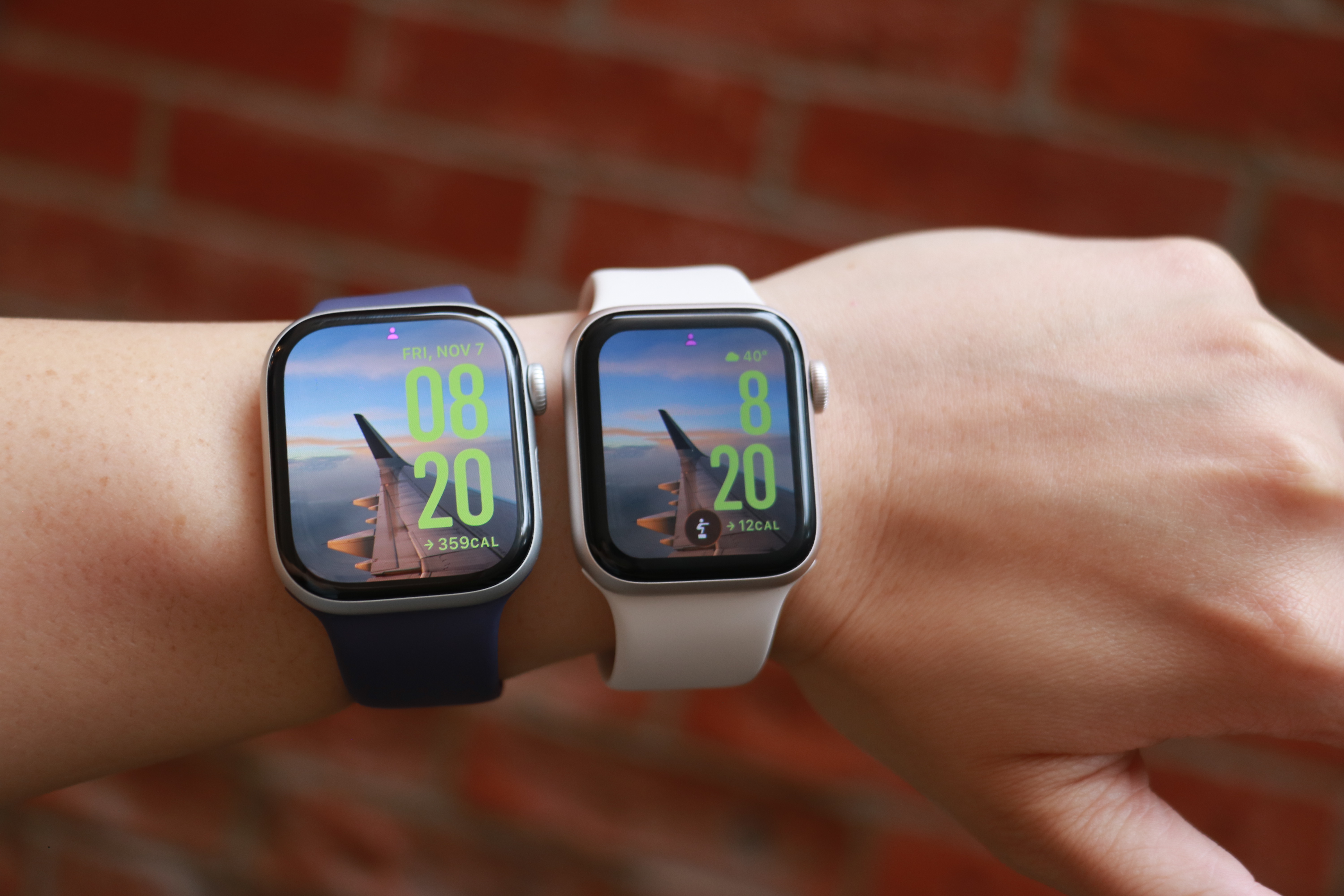
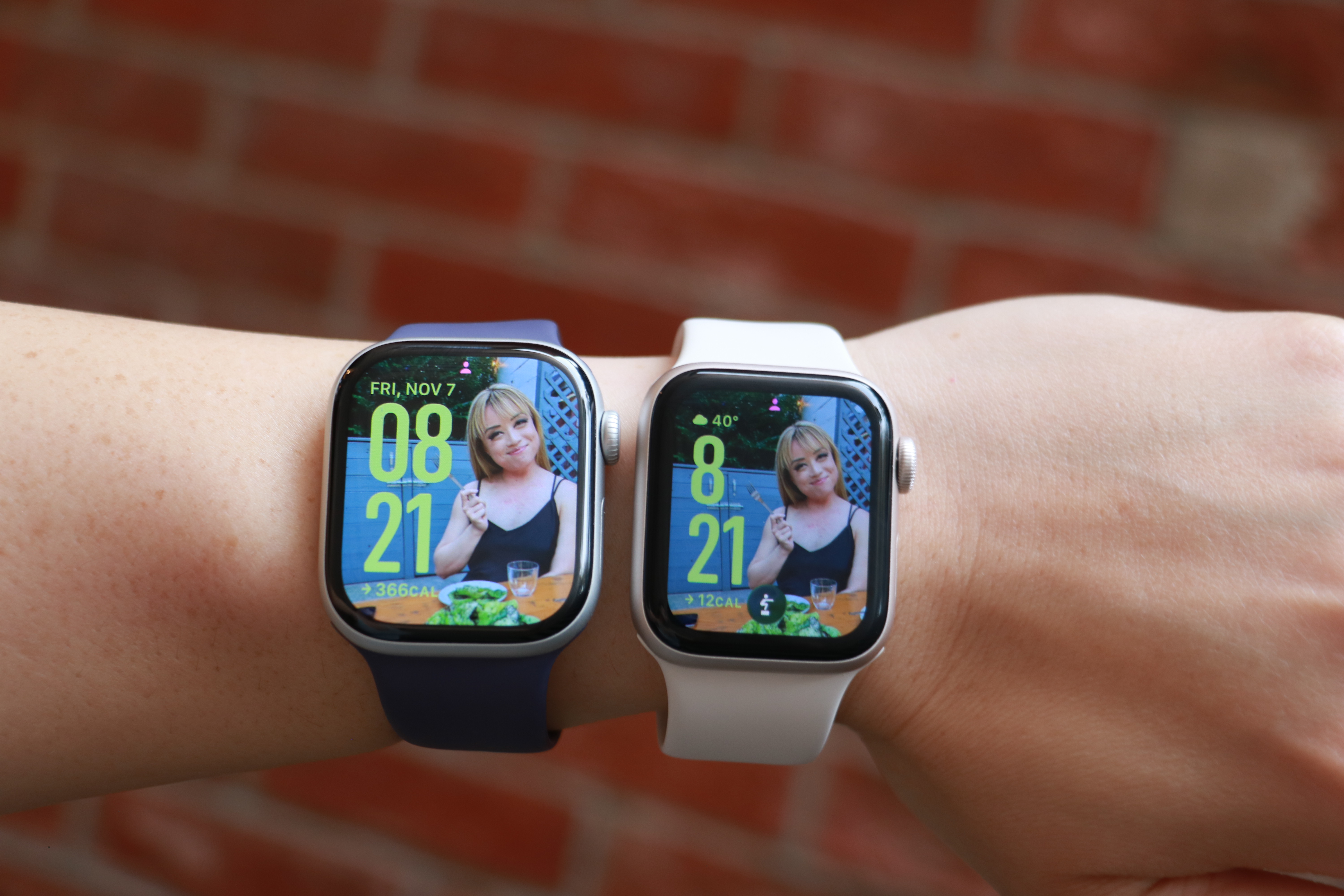
The Apple Watch Series 11 and Apple Watch SE 3 side by side on the same forearm, with the same photo watch face on their screens.
Cherlynn Low for Engadget

The Series 11’s larger screen and smaller bezels makes it a lot nicer to look at, though since the SE 3 also runs watchOS 26, I was able to use the same watch faces for both. Aesthetically, I didn’t find the two to be very far apart in terms of appearances, and if you’re not familiar with the latest Apple Watches like I am, you might not find the bezels as unsightly as I did. And though the SE 3 uses a flat OLED compared to the Series 11’s wide-angle OLED, I never really had an issue reading it, regardless of the position. 

Thanks to their electrical heart rate sensors, the Series 11 and Series 10 support Apple’s newer health-centric features like hypertension alerts, as well as apps for ECG and blood oxygen readings. The SE 3’s optical sensor is older and doesn’t have those capabilities, but you’ll still get notifications for irregular rhythms, low cardio fitness, as well as high and low heart rate notifications. Those were more than enough for me, and though I occasionally run an ECG reading on my Series 11, it’s not something I’d miss (especially if a $150 difference in price were in the balance). 

I’m also not a big swimmer or underwater enthusiast, so the SE 3’s lack of a depth gauge and water temperature sensor don’t bother me. All three watches I’ve mentioned in this section are water resistant to 50 meters, and that’s more than enough for my needs. If you want your watch to help with your underwater activities, it’s probably worth splurging on the Series 10 or 11.

The pricier watches are also certified IP6x for dust resistance, meaning they should offer a bit more peace of mind for those who work on beaches or on job sites, for example. I’ve not yet encountered a smartwatch that stopped working due to dust ingress, regardless of whether it was rated, so the SE 3 not having this certification doesn’t bother me either. 

One thing that the most discerning tech fans might call out is the fact that the SE 3 doesn’t have the same ultra wideband (UWB) chip that the Series 10 and 11 do. This enables the greater precision in Find My that allows you to locate your iPhone or wearable down to the number of feet. But you’ll still get basic Find My support on the Watch SE 3, and honestly all I really did with this was to use my watch to ring my phone so I could confirm it was with me without having to dig through all the pockets in my gigantic purse. Still, if you use this Find My interface a lot, it’s worth considering when getting your next Apple Watch.

Finally, if you’re a fan of the titanium finish or multiple color options in Apple’s more-premium lineup, only the Series 10 and 11 come in the silver and rose gold colors for the aluminum case. The Series 11 is also available in Space Gray in aluminum, as well as Slate, Gold and Natural hues for the titanium finish. Again, the SE 3 is only available in two colors.

Using the Apple Watch SE 3 as a Series 11 wearer

I’m the sort of person who straps on my smartwatch when I head out and removes it when I get home. When I’m outside, I expect my Apple Watch to track my steps and activity, automatically detect and log extended walks, tell me when someone’s calling or texting and keep tabs on my workouts. For all those situations, the SE 3 was more than adequate. Occasionally I noticed it was a bit slower than the Series 11 at recognizing when I was done working out and suggesting I end the session, but not at a frequency that was concerning. 

The SE 3 was also as capable as the Series 11 when it came to acting as a remote viewfinder for my iPhone’s camera, and Siri was satisfyingly responsive at launching my workouts or telling me about the weather. I also enjoyed having the double tap and wrist flick gestures at my disposal, and honestly kind of liked the watch’s smaller size. 

But I did miss the Series 11’s brighter screen and smaller bezels. I also prefer the Series 11 for its ability to recharge more quickly, as well as its slightly longer-lasting battery. Both still were able to make it through an entire day before needing a charge, but the Series 11 generally did more in the background in that amount of time. 

In the end, it wasn’t the features like blood oxygen readings or hypertension notifications that I wanted back. It boiled down to physical components like a brighter display or bigger battery and more durable case that I wanted around for peace of mind. 

Wrap-up

Is peace of mind worth a $150 premium? In this economy, it’s hard to say. On one hand, it’s possible a $399 Apple Watch will outlast the $249 SE 3, mostly due to its harder materials, making it a more astute investment in the long run. But for those who currently have tight budgets and need to replace aging or broken smartwatches, the SE 3 is the way to go.


This article originally appeared on Engadget at https://www.engadget.com/wearables/apple-watch-se-3-review-good-enough-for-most-people-133000008.html?src=rss

Is OpenAI About to Drop ChatGPT 5.1? Early Tests Point to Smarter Problem Solving

Is OpenAI About to Drop ChatGPT 5.1? Early Tests Point to Smarter Problem Solving

What if the next leap in artificial intelligence wasn’t just faster or smarter, but profoundly more human? Recent leaks suggest that OpenAI’s upcoming ChatGPT 5.1 model could be exactly that. Unearthed from website code and benchmarking platforms, these revelations hint at a fantastic AI capable of advanced reasoning, strategic planning, and even emotional intelligence. Imagine an […]

The post Is OpenAI About to Drop ChatGPT 5.1? Early Tests Point to Smarter Problem Solving appeared first on Geeky Gadgets.

Posted in Uncategorized

7 iPhone 20 Leaks Confirm Biggest Redesign Since the iPhone X

7 iPhone 20 Leaks Confirm Biggest Redesign Since the iPhone X

The iPhone 20, also referred to as the iPhone XX, is already generating significant attention ahead of its anticipated 2027 release. Apple’s decision to skip the iPhone 19 and move directly to the iPhone 20 reflects a bold branding strategy and a commitment to innovation. This upcoming flagship device is rumored to introduce new advancements […]

The post 7 iPhone 20 Leaks Confirm Biggest Redesign Since the iPhone X appeared first on Geeky Gadgets.

Posted in Uncategorized

Apple told to remove LGBTQ+ dating apps by China

LGBTQ+ rights and acceptance have taken another hit in China, with Apple removing two of the countries biggest LGBTQ+ dating apps. Wired reports that Blued and Finka are no longer available on the iOS App Store or certain Android App Stores following orders from the Cyberspace Administration of China, the country's internet regulator and censor. 

Apple told Wired that it must "follow the laws in the countries where we operate." Both dating apps were available solely in China, where LGBTQ+ dating apps are minimal — Grindr, for instance, hasn't been available on Apple since 2022. Blued exists internationally under the name HeeSay. 

China has increasingly cracked down on LGBTQ+ individuals' rights and groups in recent years, allegedly shuttering large organizations like the Beijing LGBT Center in 2023. For reasons unknown, Blued previously stopped new registrations this past July, with individuals buying second-hand accounts to use the app. However, it reopened in the middle of August. 

sBlued and Finka share a parent company, BlueCity, which is, in turn, owned by Newborn Town. BlueCity also operates in the healthcare space, with a non-profit dedicated specifically to prevention and treatment for diseases such as HIV/AIDS. 

This article originally appeared on Engadget at https://www.engadget.com/apps/apple-told-to-remove-lgbtq-dating-apps-by-china-130022336.html?src=rss