Windscribe isn't a VPN for everybody, and it's not trying to be. Despite its high-achieving free plan, it didn't quite make my list of the best VPNs, largely due to alienating interface choices and swingy download speeds. Its iconoclastic approach to everything from design to pricing to its online knowledge base will likely win some customers for life and turn others off.
For those in the latter camp, I've written up this guide for cancelling Windscribe. Follow the instructions below to stop Windscribe from auto-renewing, cancel third-party subscriptions, delete your account altogether and get a refund.
The most important thing to know before we start is that Windscribe's money-back guarantee only lasts seven days — if you paid for a subscription, you have to cancel before then to get a refund. It's a tighter period than most VPNs, so be ready to decide fast.
How to stop your Windscribe Pro subscription renewing
To cancel Windscribe Pro, simply stop your payment method from automatically renewing for the next subscription period. Once you've done this, you can continue using Windscribe Pro until the end of the current period, then you'll be downgraded to the free version. Here are the steps to follow.
In your browser, navigate to windscribe.com. Click the words My Account at the top of the home page.
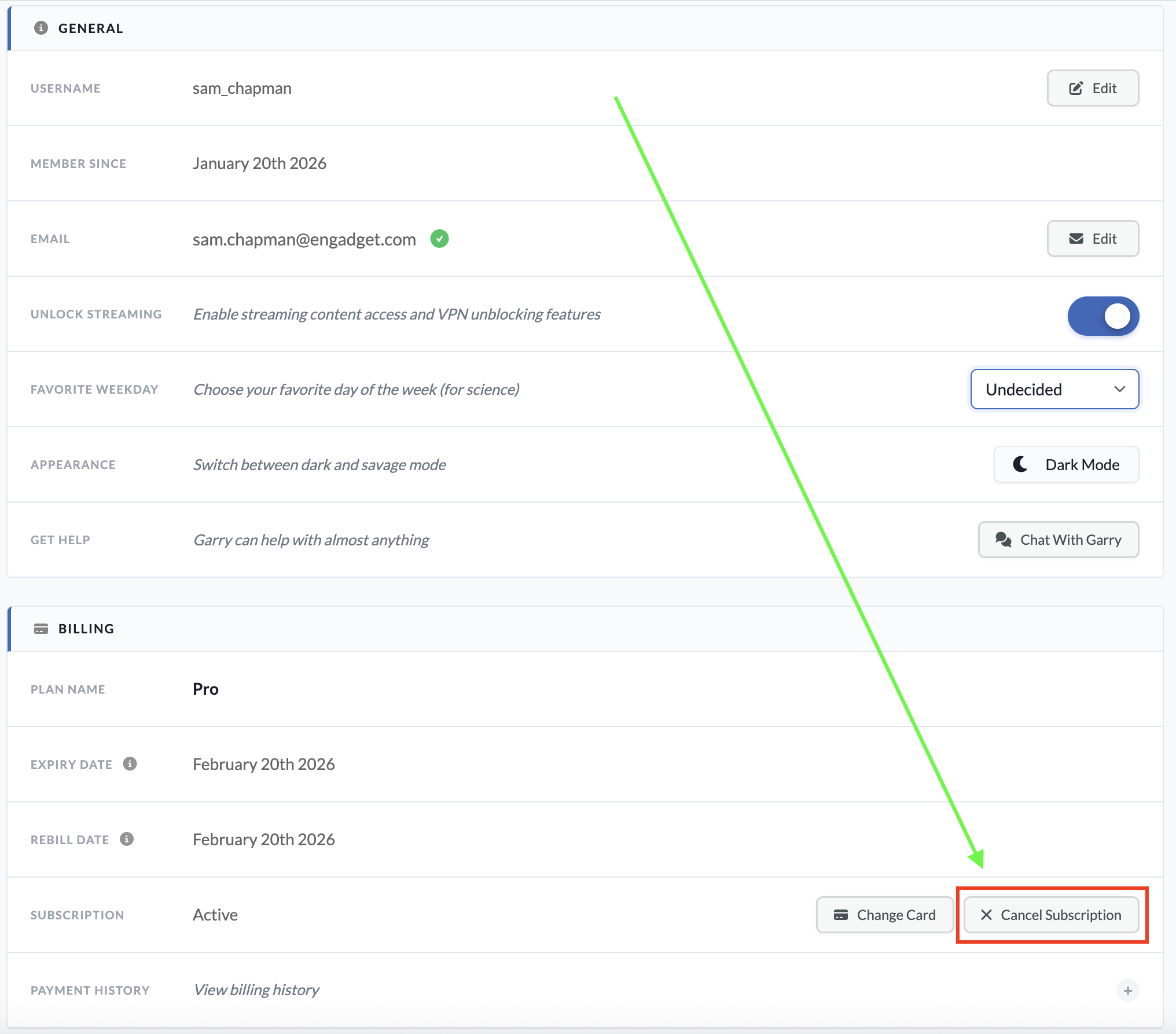
Scroll down to the billing section. On the subscriptionline, click the button marked Cancel Subscription.
You'll be taken to a new page. Enter your password in the Your Password field. Below, enter a reason for cancellation (this can be "none" or possibly "suck it," which Windscribe should approve of).
Click the Cancel Subscriptions button at the bottom of the page to end automatic renewal on your account.
You can reach this page by logging into your account on Windscribe.com.
Sam Chapman for Engadget
If your account also included a static IP subscription, there's no way to cancel that through the usual dashboard. You'll have to submit a support request by asking the Garry chatbot, which can be accessed by clicking the icon at the bottom-right corner of any page on windscribe.com.
When you subscribe to an app through a third party like the Apple App Store or Google Play Store, that same third party also handles cancellations and refunds. Windscribe itself won't be able to do anything for you here.
If you subscribed through Google Play on an Android phone, you can cancel by opening the Google Play Store app and tapping your profile icon at the top-right (a circle with the first letter of your username inside). Tap Payments & Subscriptions in the menu that appears, then subscriptions on the next page. Find your Windscribe subscription, tap it and click Cancel Subscription to end payments.
If you went through the App Store on an Apple device, open the Settings app, then tap on your name at the top of the screen. Tap Subscriptions and scroll down to your Windscribe subscription. Tap it, then tap Cancel Subscription.
How to delete your Windscribe account
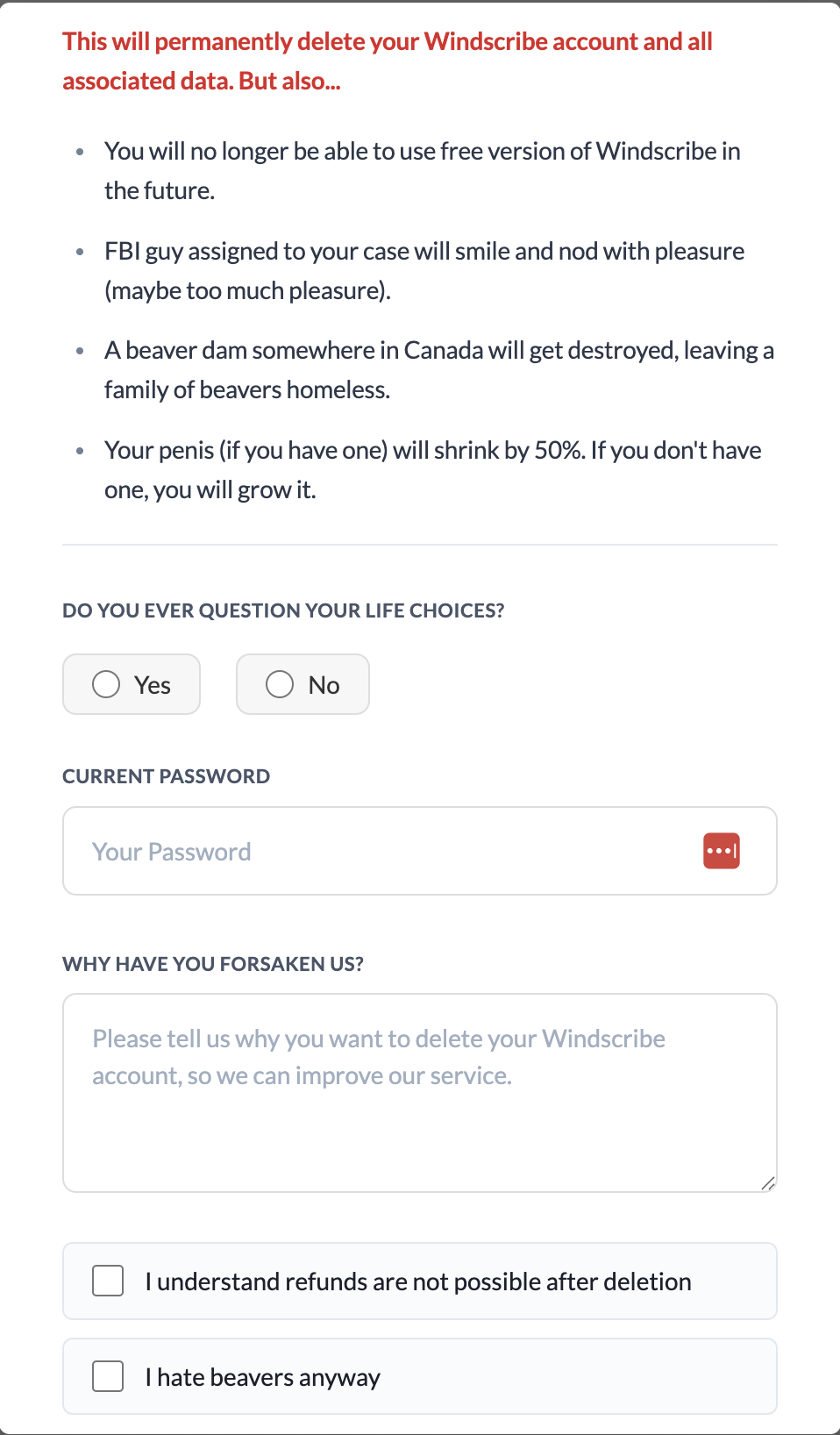
If you're certain you want to stop using Windscribe and never start up again, you can scrub your presence from its servers by deleting your account. To do this, go to windscribe.com and click the My Account button in the header bar. Scroll all the way to the bottom and click on the obnoxiously titled Give Up On Privacy button. This will show you the following image.
I realize I'm harping on this, but Windscribe gets exceptionally punchable when you try to delete your account.
Sam Chapman for Engadget
You'll have to fight through several attempts at comedy to finish deleting your account. Click Yes or No when asked if you ever question your life choices. Enter your password, write whatever you want as a cancellation reason and check both of the boxes below the text field. The Delete Account button should finally be clickable; do it. Once you've pulled the trigger, you won't be able to use the same email address to sign up for another account.
How to get a refund from Windscribe
As I warned above, you can only get a refund from Windscribe for seven days after paying for a subscription. You also cannot get your money back if you've used more than 10GB of data since the start of the payment period. Finally, you can only get refunded on the first payment of each subscription — renewals are not eligible.
If you're within those limits, you can request your money back by starting a conversation with the Garry chatbot. Click the chatbot icon at the bottom-right of the Windscribe website to start a chat. Be warned that you might have to stand firm through several attempts to fix your complaints before you can actually initiate the refund process.
Best Windscribe alternatives
Windscribe is a VPN with a lot of good points. That said, by the time you've waded through a swamp of dick jokes to complete the process, I wouldn't blame you for feeling validated in your decision to get rid of it.
There are plenty of good VPNs that can replace Windscribe. My favorite is Proton VPN, which also has a free plan, though without the ability to select your own server. ExpressVPN is simple and powerful, if a little overpriced, while Surfshark is the fastest VPN overall. If you liked Windscribe for its non-VPN features, NordVPN has the best range of extra perks.
This article originally appeared on Engadget at https://www.engadget.com/cybersecurity/vpn/how-to-cancel-windscribe-and-get-your-money-back-173000785.html?src=rss
Windscribe is a virtual private network (VPN) with intense "How do you do, fellow kids?" energy. It has servers in 69 countries and an annual plan that costs $69, an obsession with the sex number that rivals Elon Musk's. I'm shocked that it doesn't have a subscription costing $4.20 per month.
But there's another side to Windscribe's cringe: an obsession with independence and a Bernie Sanders-like anger on behalf of an exploited public. In a market where the best VPNs aim for professionalism, Windscribe aspires to be punk. Its iconoclasm may have led it to develop an app that looks like ExpressVPN in a trash compactor, but it also spurred Windscribe to offer a strong free plan and forgo financial relationships with VPN reviewers. That attitude earned it a spot on my list of the best free VPNs.
Although Windscribe's heart is in the right place, my job is to figure out whether that translates into a good product. I used our rigorous VPN testing procedure to rate Windscribe in 11 categories. You can find my results in the table below and a final verdict at the end of the review.
Editor's note (1/27/26): We've overhauled our VPN coverage to provide more detailed, actionable buying advice. Going forward, we'll continue to update both our best VPN list and individual reviews (like this one) as circumstances change. Most recently, we added official scores to all of our VPN reviews.Check out how we test VPNs to learn more about the new standards we're using.
Findings at a glance
Category
Notes
Installation and UI
Installation and setup are always straightforward
Apps look very similar on Windows, macOS, iOS and Android
App design is overly compact and often impenetrable, but hides a solid program
Browser extensions allow one-click bypassing of security features on the current page, much like common ad blockers
Speed
Average latency below 300 worldwide
Some slowdown in download and upload speeds, but not severe
Speeds were highly consistent everywhere except some African servers
Security
Six solid protocols — WireGuard, IKEv2, and four based on OpenVPN
Most protocols available on all platforms, except IKEv2 on Android
No leaks detected, even while switching servers
Packets are encrypted as expected
Pricing
$9 per month, $69 for one year ($5.75 per month)
Custom plans cost $1 per country plus $1 for unlimited data; must spend at least $3
Static IPs available for $2 per month or $8 per month for a residential address
Free plan gives you 10 locations and 10GB per month with a confirmed email
Bundles
Shares coupon codes for various discounts on five "partners in privacy"
Privacy policy
Retains very little information, none of it personally identifiable
Can make an account without an email address
All apps have been audited by independent overseers
Fought Greek court case in 2025 because it had no logs to turn over
Virtual location change
15 different servers in five locations unblocked Netflix
Content changed each time, suggesting the destination site was completely fooled
Server network
193 server locations in 122 cities across 71 countries
Only two virtual server locations in the entire network
Real servers in Russia and India risk abrupt shutdowns
Features
Standout extras include the customizable R.O.B.E.R.T blocker and split tunneling on Windows, Mac and Android
Network Options offers lots of automation choices, but terminology makes it needlessly confusing
Includes obfuscation to get online in restrictive regions
Firewall is a stronger version of a kill switch, preventing any access unless the VPN is connected
Customer support
Knowledgebase search bar is good at finding articles, and articles themselves are useful
Garry AI chatbot is helpful, but pushed way too hard at the expense of access to human agents
Active Reddit and Discord communities for peer-to-peer help
Background check
Founded in Canada in 2016
No significant controversies in 10 years
Canada is a Five Eyes nation, but this shouldn't matter if Windscribe is keeping to its no logs policy
Installing, configuring and using Windscribe
The first step is always to figure out how easy or hard the VPN is to use. Windscribe and other VPNs are important tools, but you'll never use them if the UI gets in the way. I tested Windscribe's desktop apps on Windows and Mac, its mobile apps on iOS and Android and its Chrome and Firefox browser extensions.
To start with, let me say that installing Windscribe is a breeze no matter where you do it. The downloaders and installers handle their own business, only requiring you to grant a few permissions. The apps arrive on your system ready to use out of the box.
Windows
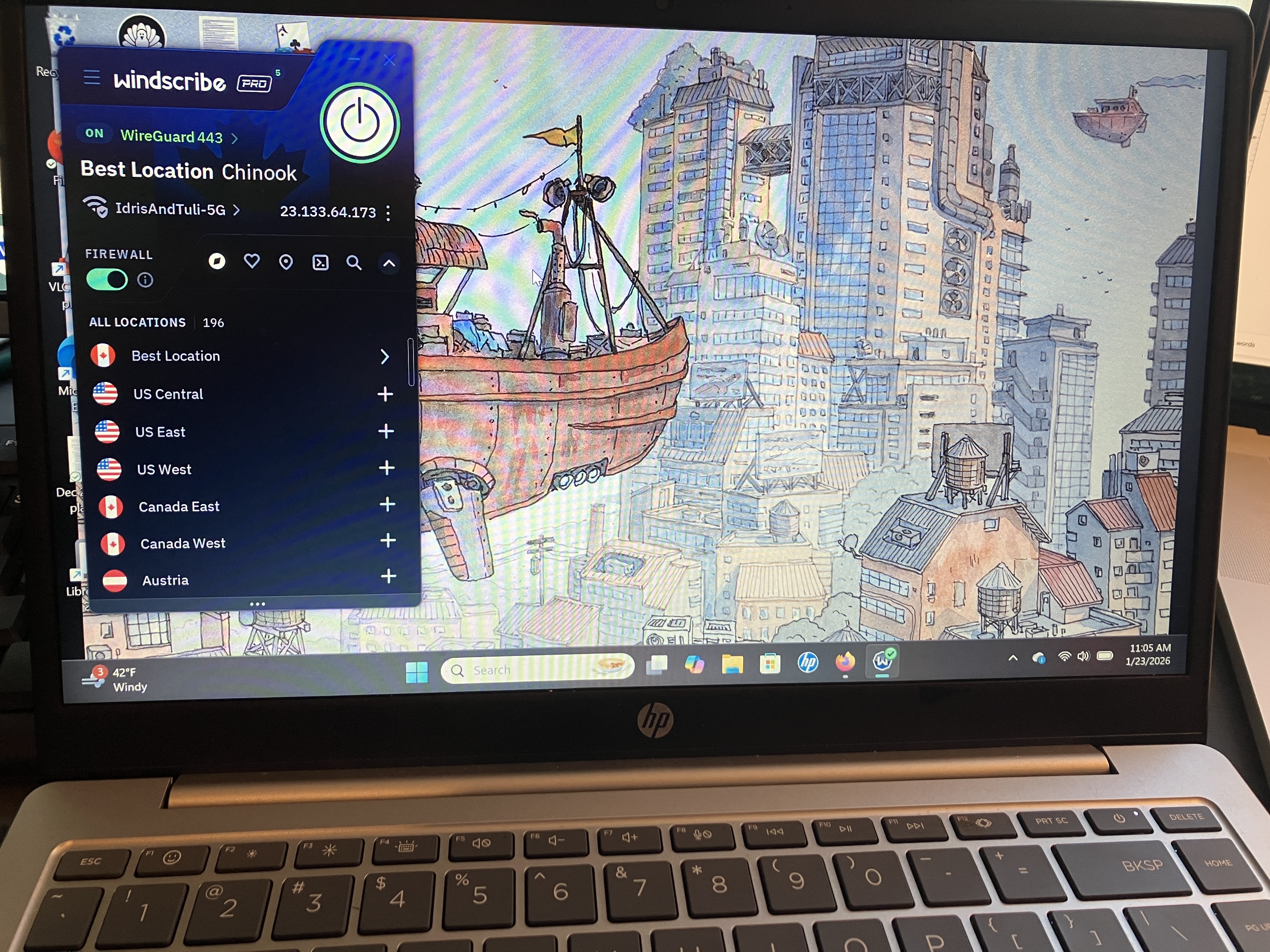
The first thing you'll notice about Windscribe is that it's not even slightly interested in looking like any other VPN. It crams everything into an extremely compact window, which has some advantages — mainly that it's easy to operate it while looking at another app. On the downside, well, it looks like this.
Windscribe's UI on a Windows laptop.
Sam Chapman for Engadget
The Windscribe team will probably just say that I'm brainwashed by the establishment, but there's a good reason that most VPNs choose designs with a little more space. This fiddly console, most of which is taken up by information you can't interact with, is likely to confirm all a newcomer's worst fears about using a VPN. Private Internet Access had a similar problem of tightening its app design to the point of being incomprehensible.
The problems persist when you get to the settings page. It's easy to make sense of a VPN without technical knowledge, but Windscribe's preferences menu does everything it can to obscure that truth. Highly technical features are mixed in with options for casual users, and the explanatory blurbs usually cloud the issue even further.
Even the "Look & Feel" settings somehow manage to be confusing. What is the difference between the Stretch, Fill and Tile modes for aspect ratio? What the heck is a Bundled background, and what does it matter whether it's Square, Palm, Ripple, Drip or Snow? The answers to all these can be found by playing around or looking in the knowledgebase, but a VPN really shouldn't require that for its most basic toggles.
Once you get used to Windscribe and learn where to find the features that actually matter, it runs quite smoothly. Connections are never delayed and there are none of the random error messages that have dogged me on other VPNs. In a world of VPNs that look great but run clunkily, Windscribe has built one that looks terrible but runs great. I can't complain about how well it works, but is it too much to ask for a provider that does both? (Oh, wait, that's Proton VPN.)
Mac
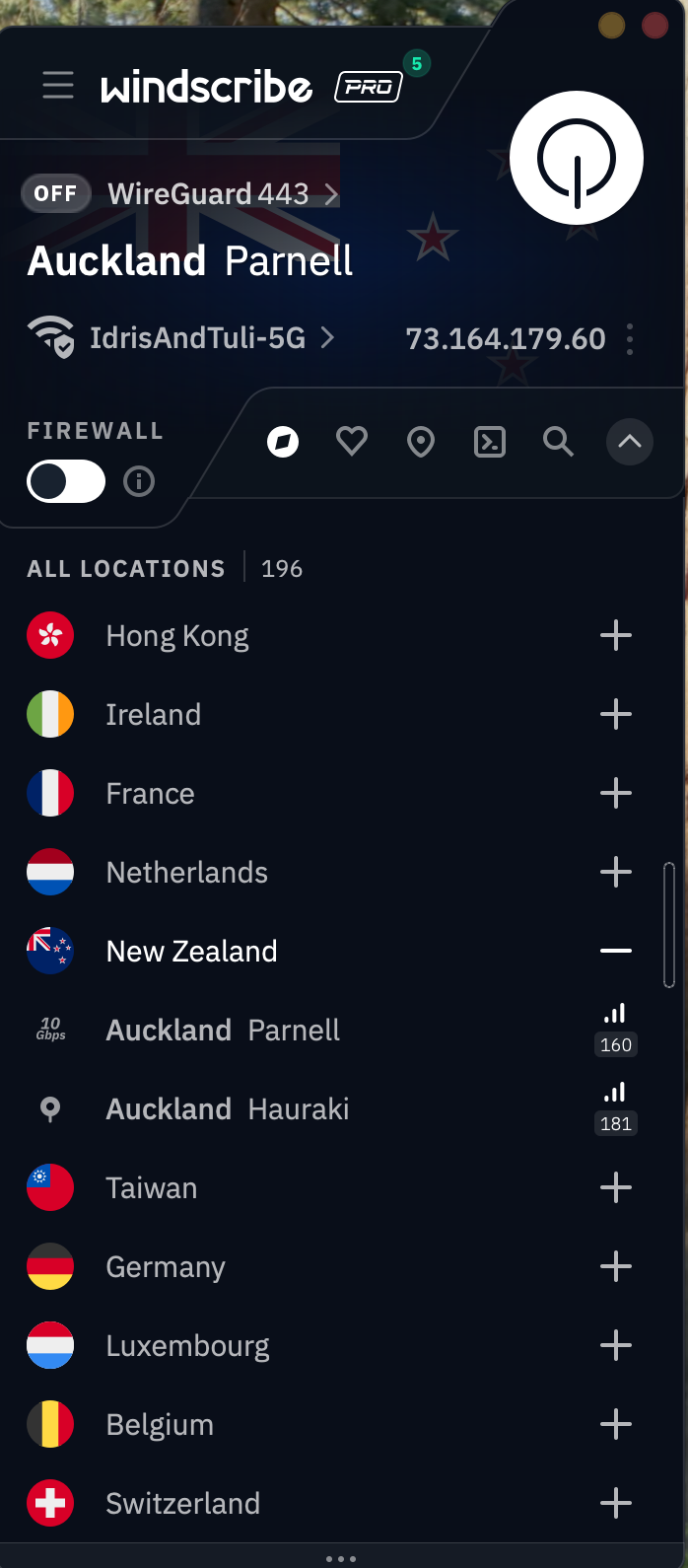
Windscribe's macOS app is almost identical to its Windows app. That deserves praise in itself — you'll get much the same experience no matter which type of computer you use. But it also means the Mac app shares the same problems.
Windscribe's app for Mac desktops and laptops.
Sam Chapman for Engadget
There's the same overly compact design cluttered with too much information. The same technobabble-filled options menu. And the same fundamental solidity underlying it all: a VPN that does the job beautifully but has no interest in being accessible. It would be a mistake to write Windscribe off because of its app design, but it's important to know what you'll have to work through.
Android
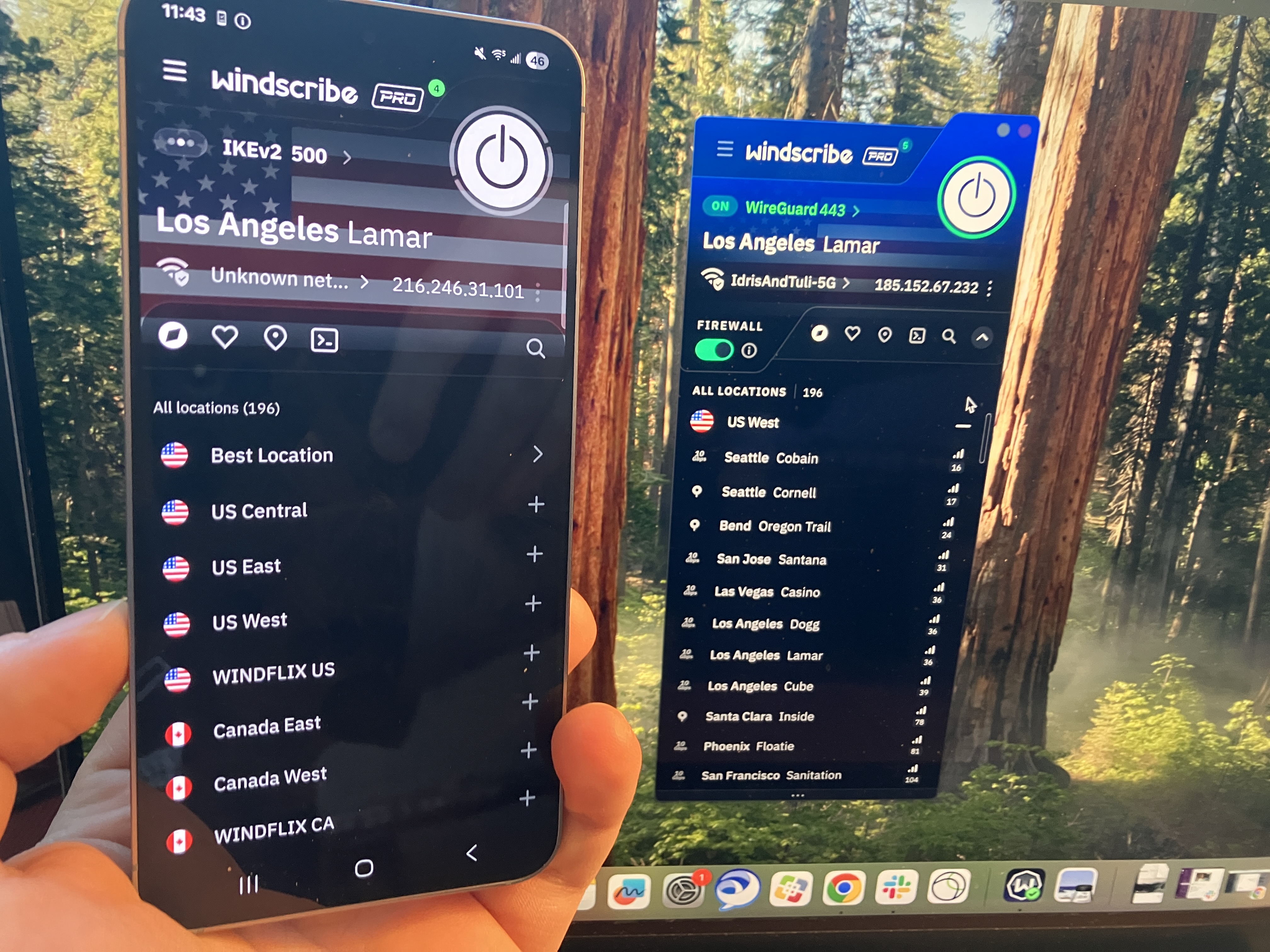
One thing I can't fault Windscribe for is a lack of consistency. The Android app looks a lot like the Windows and Mac apps, only lightly adapted for the mobile format. On these devices, the design decisions make more sense — the UI writing is still impenetrable for casual users, but the compact pages look a lot more normal on a phone screen.
A comparison of Windscribe's extremely similar apps on Android and Mac.
Sam Chapman for Engadget
iOS
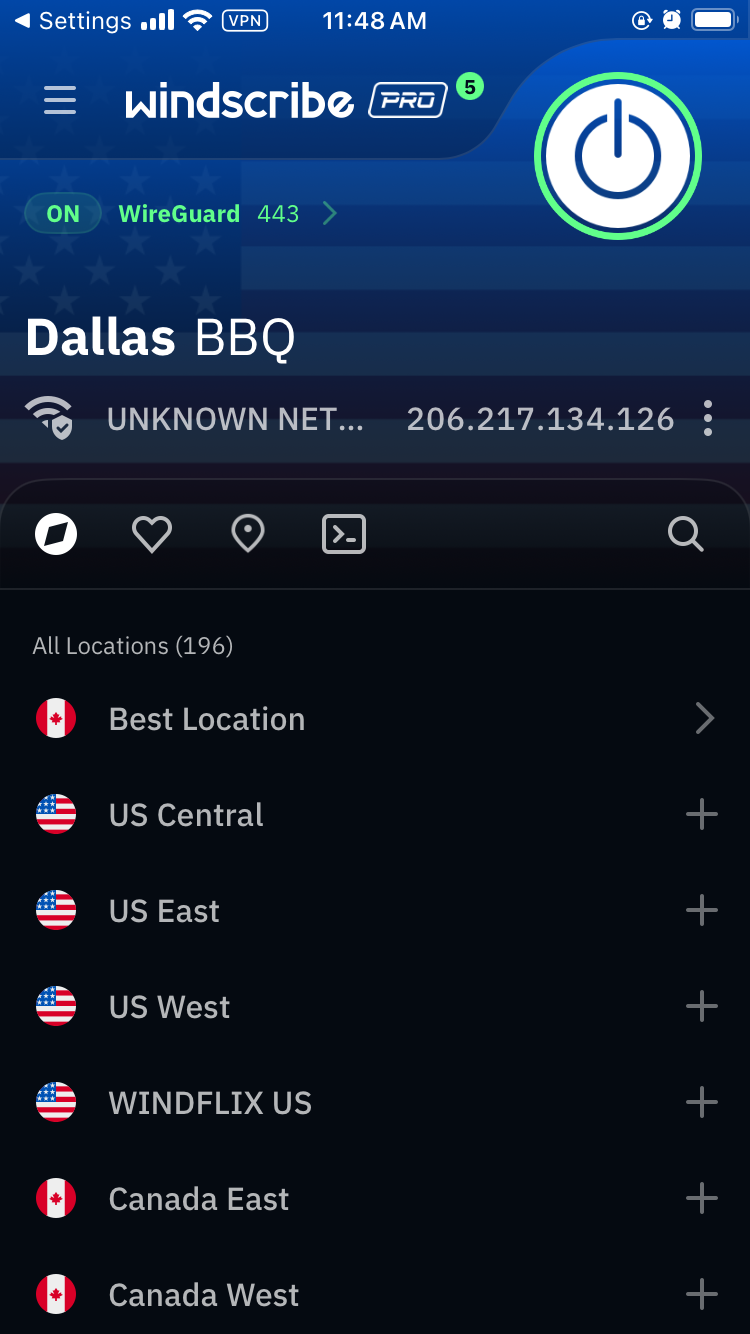
There's not a lot to say about Windscribe on iOS that I haven't already said about the other three main platforms. Looking over all my screenshots, it seems fairly clear that Windscribe's problems — much like PIA's — come from starting on mobile and trying to make that same design work on desktop. It's still not great to look at, but I can at least see where they're coming from.
Windscribe's iOS app.
Sam Chapman for Engadget
Browser extensions
Windscribe's extensions for Chrome and Firefox look a little like its desktop and mobile VPN apps, but they act a little differently. They serve the same basic purpose as the standalone apps — changing your IP address and location — but they're also customizable ad blockers for the web page you're currently on.
Windscribe's Google Chrome extension.
Sam Chapman for Engadget
For example, in the image above, I can control what location Google perceives me to be in. But I can also control what gets blocked by choosing to let Google bypass certain features. Clicking the leftmost button makes the current website skip the VPN tunnel. The central button shuts off the ad blocker and the right-hand button shuts off the features on the Privacy section of the preferences menu. Like everything else about Windscribe, it's unintuitive but works great once you figure it out.
Windscribe speed test
I used speedtest.net to test Windscribe's speeds. In case you aren't familiar with the jargon, Ping measures a server's latency, which is how long it takes a single packet of data to reach it from your device. Download speed measures how much data can be downloaded at a time, while upload speed shows how quickly you can send data to the network. Think of ping as your car's speed in miles per hour and download and upload speed as the amount of traffic on the road.
As usual, I used the WireGuard protocol to run these tests, since it's almost always the fastest. Starting with my unprotected speeds at home in Portland, I moved gradually farther away until I was connecting to the other side of the world. Ideally, ping should increase linearly (not exponentially), while download and upload speeds don't dip much at all. I've recorded Windscribe's performance in the table below.
Server location
Ping (ms)
Increase factor
Download speed (Mbps)
Percentage drop
Upload speed (Mbps)
Percentage drop
Portland, USA (unprotected)
22
—
59.35
—
5.92
—
Vancouver, Canada (fastest location)
27
1.2x
55.89
5.83
5.56
6.08
Boston, USA
161
7.3x
48.49
18.30
5.66
4.39
Quito, Ecuador
283
12.9x
46.46
21.72
4.68
20.95
London, UK
287
13.0x
43.70
26.37
4.51
23.82
Nairobi, Kenya
595
27.0x
32.63
45.02
3.57
39.70
Seoul, South Korea
258
11.7x
43.27
27.09
4.48
24.32
Average
269
12.2x
45.07
24.06
4.74
19.93
Windscribe gave me some of the shortest latencies I've ever seen — comparable to CyberGhost, whose ping lengths I was also very impressed by. Its download and upload speeds also look a lot like CyberGhost's, with both firmly in good-but-not-amazing territory.
However, Windscribe's speeds were a lot more consistent. Throughout the tests, I hardly ever saw major fluctuations in the same location, on any metric. The Nairobi server seemed to be under some strain, but that's not unusual for a VPN in Africa. Every location except for that one followed a smooth downward curve. I'm happy with that; speed is one of the areas where you want your VPN to be reliably boring, not flashy.
Practically, a speed test like this suggests that Windscribe is best for gaming, livestreaming and video chatting, and that it's perfectly serviceable for any other task you could do online. You may not get the best speeds you've ever seen, but unless your internet is bad to begin with, Windscribe should not slow it down enough to be noticeable.
Windscribe security test
I can say up top that Windscribe doesn't seem to have any dangerous security flaws, but I'll take this section to explain why I think that. To start with, it uses only the three VPN protocols currently known to be secure: WireGuard, OpenVPN and IKEv2, plus a few other options all based on OpenVPN. With those options, you can be sure you're getting encryption that's currently uncrackable.
It also passed two batteries of tests I ran on its security. The first set of tests looks for DNS leaks, WebRTC leaks and other slip-ups that might reveal your real IP address. The second checks whether data packets sent through the VPN tunnel are actually getting encrypted. Check each section below for details on how Windscribe did.
VPN protocols
A VPN protocol determines how exactly a VPN makes contact between its own servers, your device and your ISP. Certain protocols can make your VPN run faster, stabilize a shaky connection or get into websites other protocols fail to unlock. If you're having a problem with your VPN, changing the protocol is one of the first troubleshooting steps.
Windscribe makes a total of six protocols available, though it's really just three, since four of the six are variations on OpenVPN. WireGuard works on every platform, and is currently the fastest and most stable — its drawback used to be that it was new, but with the passage of time, it's no longer new enough to make it suspect.
IKEv2 is a connection protocol that uses the separate IPSec protocol for its security. This double team's main strength is reconnecting to the VPN when a device switches networks; it's also good at not draining phone batteries. Windscribe supports IKEv2 on Mac, iOS and Windows.
OpenVPN is the oldest open-source VPN protocol, refined by over a decade of repeated probing by volunteers. It's not only relatively fast and highly secure, but comes in two flavors: TCP, which makes connections more stable, and UDP, which is usually faster and should be your first resort with OpenVPN. Windscribe supports OpenVPN on all platforms.
Windscribe rounds out the selection with two unique protocols, both focused on hiding your VPN traffic from firewalls and censors. Stealth uses the same connection ports as HTTPS, so it can't be blocked by shutting certain ports down entirely. WStunnel obfuscates connections even further by using the extremely common WebSocket technology to establish VPN connections. Both these proprietary protocols are much slower than the other options, but can save you if you find yourself repeatedly blocked while using Windscribe.
Leak test
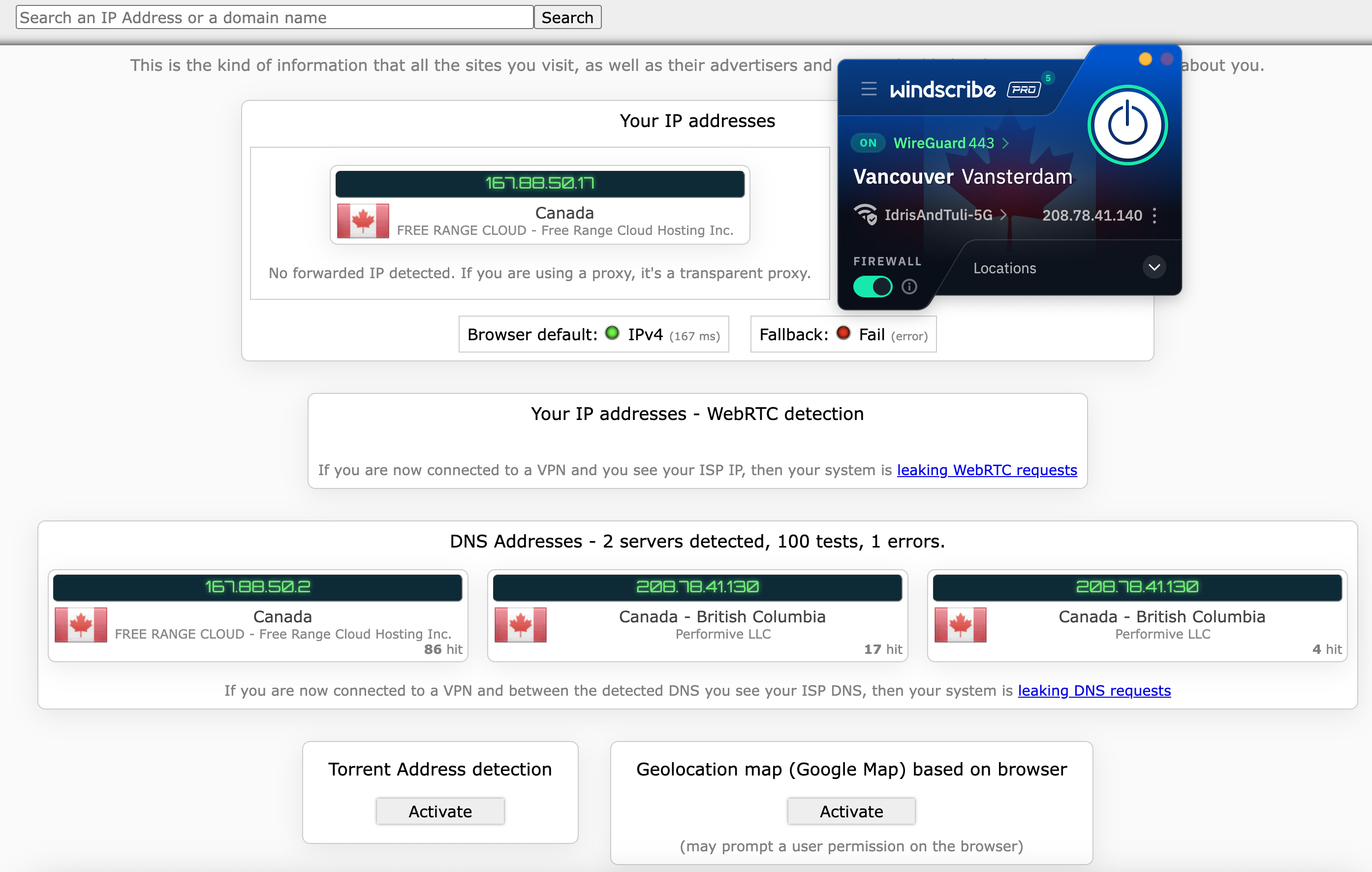
I started my leak tests by using ipleak.net to check several Windscribe servers for IP leaks of all sorts. Each time I connected and checked my location, I only saw the VPN server's IP address, never my real one. I tried to trip Windscribe up by switching servers while remaining connected, even changing continents, but my true location never once slipped out. This puts its security solidly above CyberGhost, Norton VPN and many others.
I couldn't find any holes in Windscribe's armor.
Sam Chapman for Engadget
Windscribe automatically blocks IPv6 traffic while connected, so IPv6 leaks weren't going to be a thing. I finished the test by checking five servers using browserleaks.com/webrtc, finding no issues each time.
Encryption test
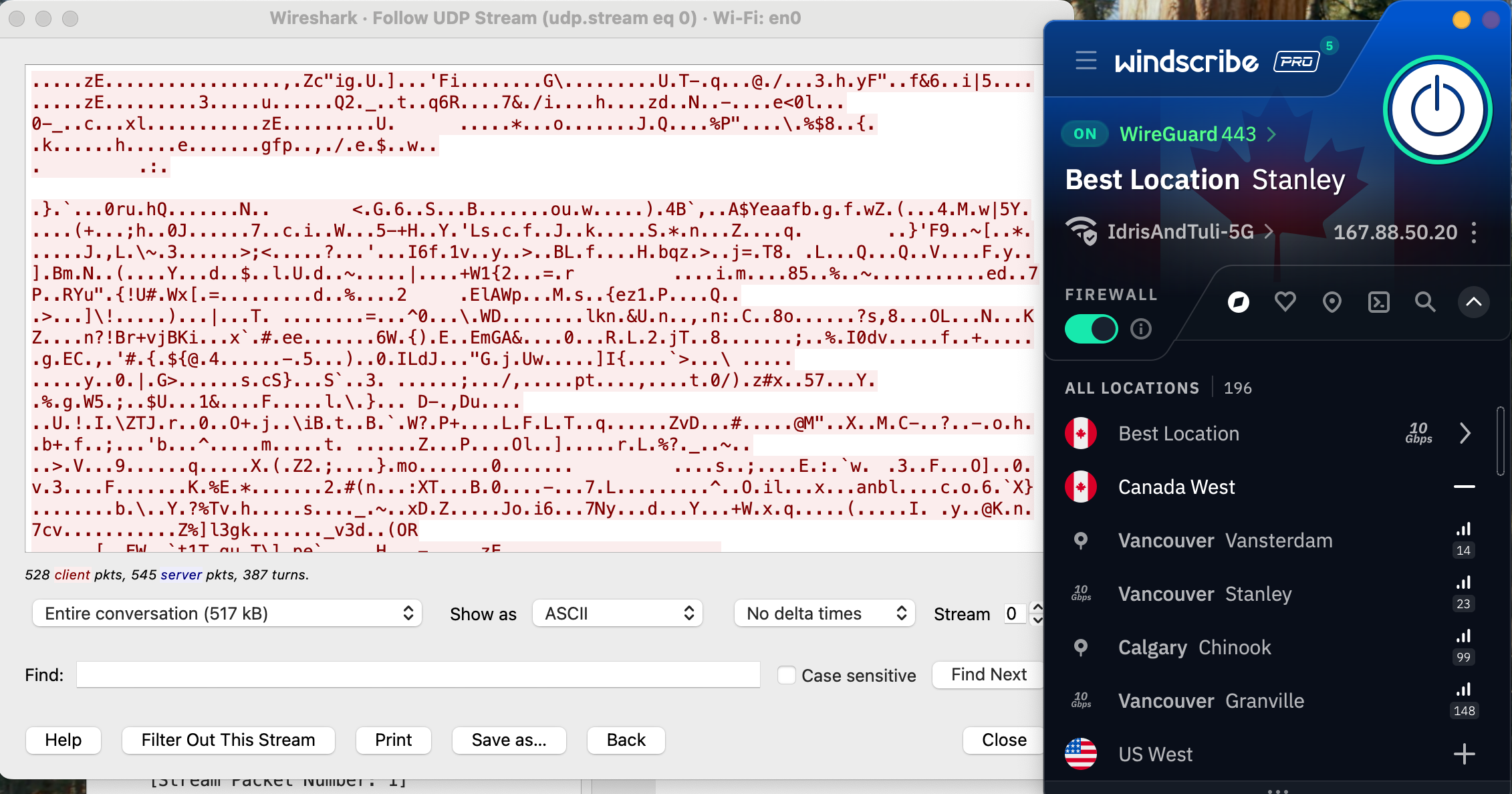
The final step is to make sure Windscribe is applying encryption properly through its VPN protocols. For this test, I used a free packet sniffer app called Wireshark to look directly at what my computer was sending out.
Windscribe's encryption looks solid.
Sam Chapman for Engadget
It's a bit hard to tell what's going on, but to summarize, I've loaded a website without HTTPS protection and checked whether Windscribe managed to apply that protection. The lack of readable information in the data stream proves that its encryption is indeed working as expected.
How much does Windscribe cost?
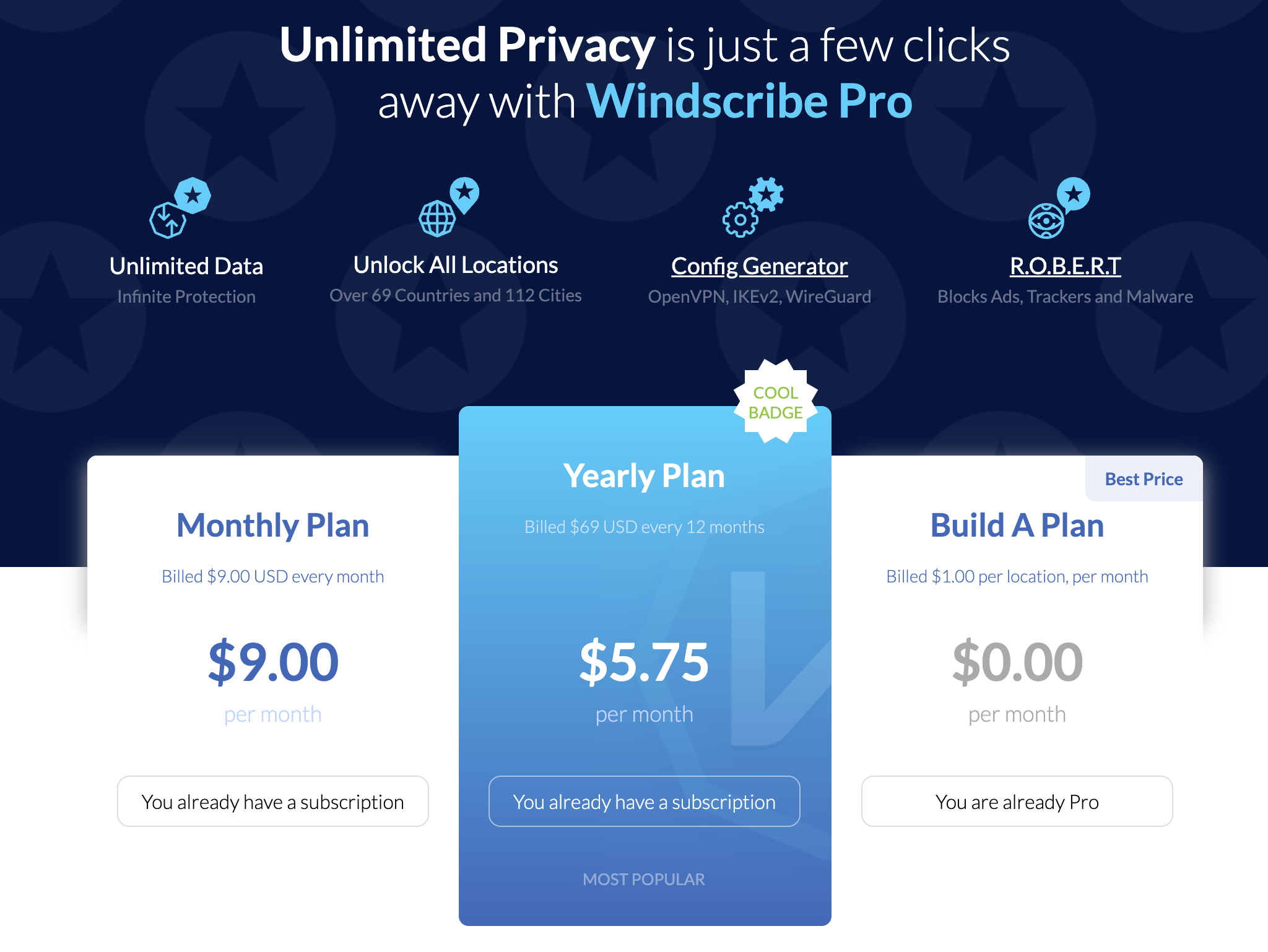
Windscribe has three subscription options (not counting its free plan, which I'll discuss in a moment). One month of Pro service costs $9.00 — after Mullvad, the second-cheapest monthly subscription to a top-tier VPN. You can also pay $69 for a 12-month Pro subscription, working out to $5.75 per month. Both of these tiers give you the exact same set of Pro features and can be used on unlimited simultaneous devices.
The cost of Windscribe Pro at publication time.
Sam Chapman for Engadget
The third option is to build your own plan. Build-A-Plan is an interesting beast that's unique to Windscribe. When you choose a custom plan, you must spend at least $3 per month. Gaining access to all the Pro servers in a country costs $1. For each country you add, you get an additional 10GB of data per month on top of the 10GB already included for free.
If you'd rather not budget your data at all, you can pay another $1 for unlimited data, plus 10 custom rules for the R.O.B.E.R.T. content blocker (I'll untangle the tortured acronym soon). It's a little convoluted, but wonderfully flexible. You can even change your Build-A-Plan in the middle of the subscription period.
Windscribe also offers shared static IPs for an extra fee. You can add a datacenter IP to any plan for $2 per month or a residential IP (usually better at getting around restrictions) for $8 per month. Team billing is also available through ScribeForce at $3 per seat per month, including a centralized management panel.
The Windscribe free plan
Windscribe isn't the overall best free VPN — hide.me wins that honor with its more flexible data limit — but it's close. Free users get access to servers in 10 countries: the US, Canada, the UK, the Netherlands, Norway, France, Germany, Switzerland, Romania and Hong Kong. If you plot that on a map, you'll see that the Windscribe free plan is most useful in North America and Europe.
Free users start with a data allotment of 2GB per month. The monthly limit rises to 10GB if you sign up with a confirmed email address and 15GB if you post about Windscribe on Twitter/X. That's enough for casual browsing, but streaming in standard definition takes about 1GB per hour, so you won't be doing much binge-watching.
On the upside, a free plan gives you access to all Windscribe's features except for dynamic port forwarding. You can set three R.O.B.E.R.T. rules and use your free account on an infinite number of devices (subject to the usual restrictions about exploiting that for commercial purposes — as Windscribe itself states, no one person has 30 devices that need a VPN).
Windscribe side apps and bundles
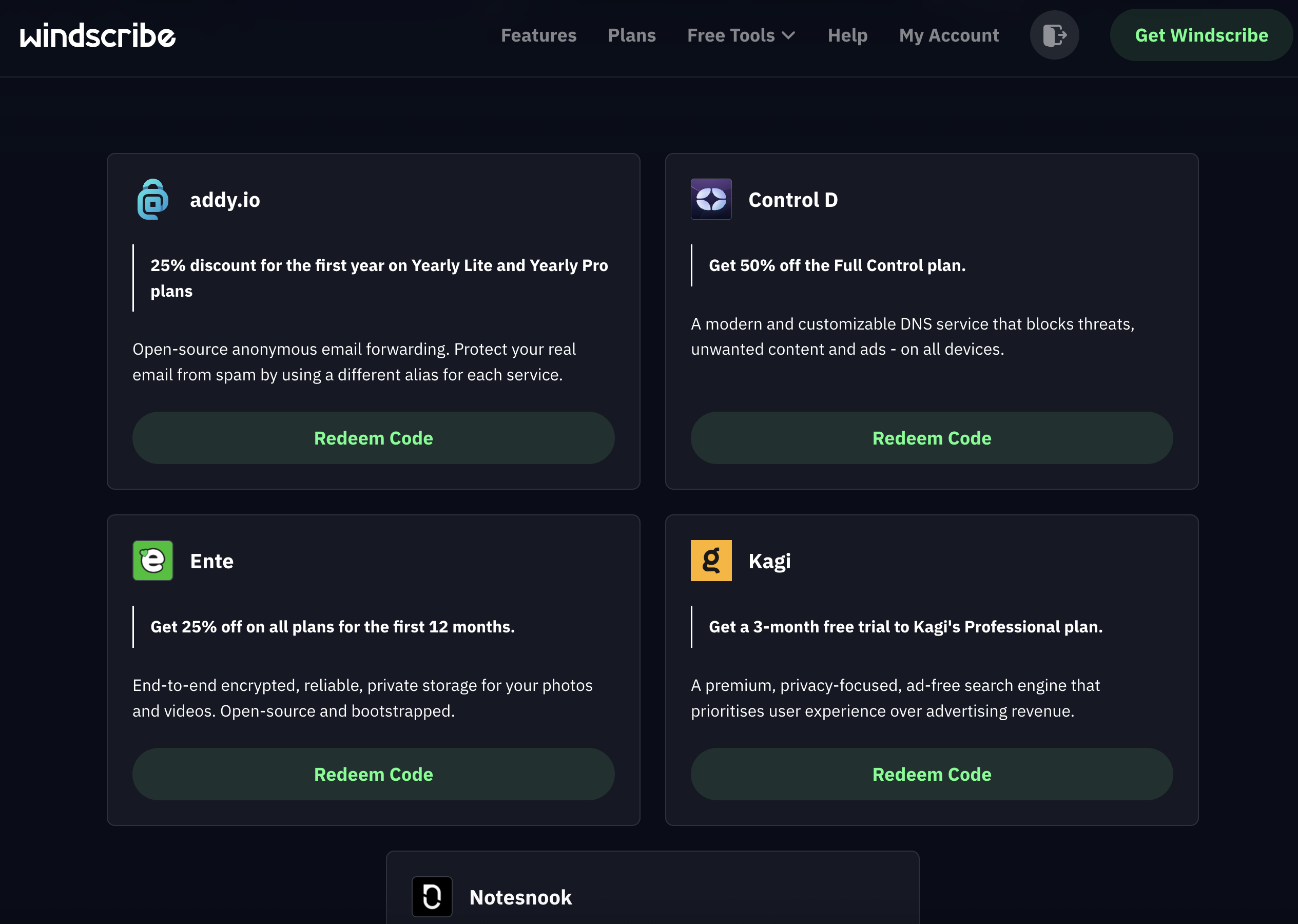
Windscribe doesn't have any add-ons of its own except for static IP addresses. However, it does offer discount codes for a group of "partners in privacy" that share its business ethics. The coupon codes are available here and don't require a Windscribe subscription to use.
The five members of Windscribe's gang.
Sam Chapman for Engadget
There are currently five allies in the gang. Control D offers DNS filtering for organizations to block unwanted websites; the Windscribe coupon gives you 50 percent off. You can get 25 percent off a one-year subscription to addy.io, an open-source email anonymizer, and Ente, an encrypted storage space for photos and videos.
Rounding out the team are Kagi,a private search engine which you can use for three months free with the Windscribe coupon, and Notesnook, an encrypted notes app. Windscribe's coupon gives you a 10% discount on Notesnook's yearly plans in perpetuity.
Close-reading Windscribe's privacy policy
Windscribe's marketing positions it as serious about user independence, so I came into this section hoping for a privacy policy that backs those words up. An early green flag is that the policy is short, succinct and obviously written to be read by the users themselves. It's also fantastic that you can sign up without an email address (though you will need one to get the full data allotment on the free plan).
Windscribe gathers information on its website using Piwik, an open-source analytics tool that it manages itself; no third parties are involved. The Windscribe app itself collects no information except for the amount of data used in a month, the time of your last connection and the number of devices you have online at once. When actively connected, it also gives you an anonymized username necessary for the OpenVPN and IKEv2 protocols.
My only quibble is that Windscribe is oddly reluctant to identify which third-party payment processors it uses. The information does exist elsewhere — an article in the knowledgebase states that payments are handled by "trusted third party processors such as PayPal and Stripe," and another page says that CoinPayments handles cryptocurrency transactions. It's a small thing, but the rest of the policy is so airtight that it stands out.
Independent privacy audits
Windscribe's apps are fully open-source (you can find them on Github here). In addition to this general exposure, it's also undergone three intensive audits from security firms. Leviathan Security looked into its desktop apps in 2021 and its mobile apps in 2022. The auditors made a total of five high-severity recommendations, all of which Windscribe claims to have addressed.
More recently, Windscribe had its entire codebase audited by PacketLabs. The auditors' June 2024 report found that some of Windscribe's code was storing more user information than it strictly needed to. Windscribe also claims to have handled this risk. More importantly, PacketLabs found no intentional subversions of Windscribe's no-logs policy, so its privacy statements can likely be trusted.
Further corroboration of the latter came from a 2025 court case in which Windscribe founder and CEO Yegor Sak was indicted in Greece and charged with a crime committed by a Windscribe user through an IP address in Finland. This case is obviously absurd — like charging the head of GM with a single instance of vehicular manslaughter committed by someone driving a Buick — but Sak was obliged to appear in court anyway.
As Sak writes in the linked post, he could have turned over the logs and shown who actually committed the crime, but he couldn't since Windscribe doesn't keep that information. Had there been an alternative to waging an expensive and inconvenient legal campaign in another country, Sak would surely have taken it. The fact that he didn't is strong proof of Windscribe's no-logging policy.
Can Windscribe change your virtual location?
Changing your IP address with a VPN can do more than just anonymize your internet activity. A service like Windscribe can give you an IP address associated with a certain country or region, letting you use the internet like you were there. This has applications ranging from the serious (break out of a nationwide firewall to document human rights issues) to the fun (get new titles on streaming platforms without paying for a new subscription).
Netflix is a great tool for testing whether a VPN can change your virtual location. Like most streamers, it tries to block all VPN access to protect the copyrights it holds. Consequently, if a VPN can crack Netflix, it must be serious about keeping its server network fresh to foil any potential blockers.
A successful location change on Netflix using Windscribe.
Sam Chapman for Engadget
For this test, I tried to access Netflix three times each through five different Windscribe server locations, refreshing the connection to use different servers each time. I looked for successful Netflix access, plus different content to prove my location had actually changed.
Server location
Unblocked Netflix?
Changed content?
Vancouver, Canada
3/3
3/3
Queretaro, Mexico
3/3
3/3
Tokyo, Japan
3/3
3/3
London, UK
3/3
3/3
Auckland, NZ
3/3
3/3
Windscribe got a perfect score. Netflix loaded easily every time, and the content was always localized to the country I chose. With this performance combined with its fairly consistent speeds over long distances, Windscribe makes a nearly perfect streaming VPN. The only downside is that the data limits on the free plan mean you'll probably have to pay for serious streaming time.
Investigating Windscribe's server network
Windscribe has 193 server locations in 71 countries, which it insists on listing as "69+" (again, hilarious). Although 193 sounds like a lot, many of them are duplicate locations in the same city. This isn't necessarily a problem, but for accuracy's sake, the total number of cities with Windscribe servers is 122.
Region
Countries with servers
Cities with servers
Total server locations
Virtual server locations
North America
6
40
61
0
South America
7
7
9
0
Europe
38
47
75
0
Africa
3
3
5
0
Middle East
2
2
2
0
Asia
12
16
28
1
Oceania
2
6
12
0
Antarctica
1
1
1
1
Total
71
122
193
2 (1 percent)
The bigger story here is Windscribe's spurning of virtual servers. A virtual server location is physically located in a different region than the one it outwardly displays. For example, a server with an Indian IP address might really be in Singapore. Throughout the entire Windscribe network, only two servers are virtual: one in India and one in Antarctica.
This is both good and bad. On the positive side, the near-total lack of virtual servers means you can be sure of how any server will perform. If it says it's in Buenos Aires, it'll run like it's in Buenos Aires — you won't be surprised with lagging speeds because it's really in Miami. This also makes it clear that Windscribe isn't interested in pumping up its network size for marketing purposes.
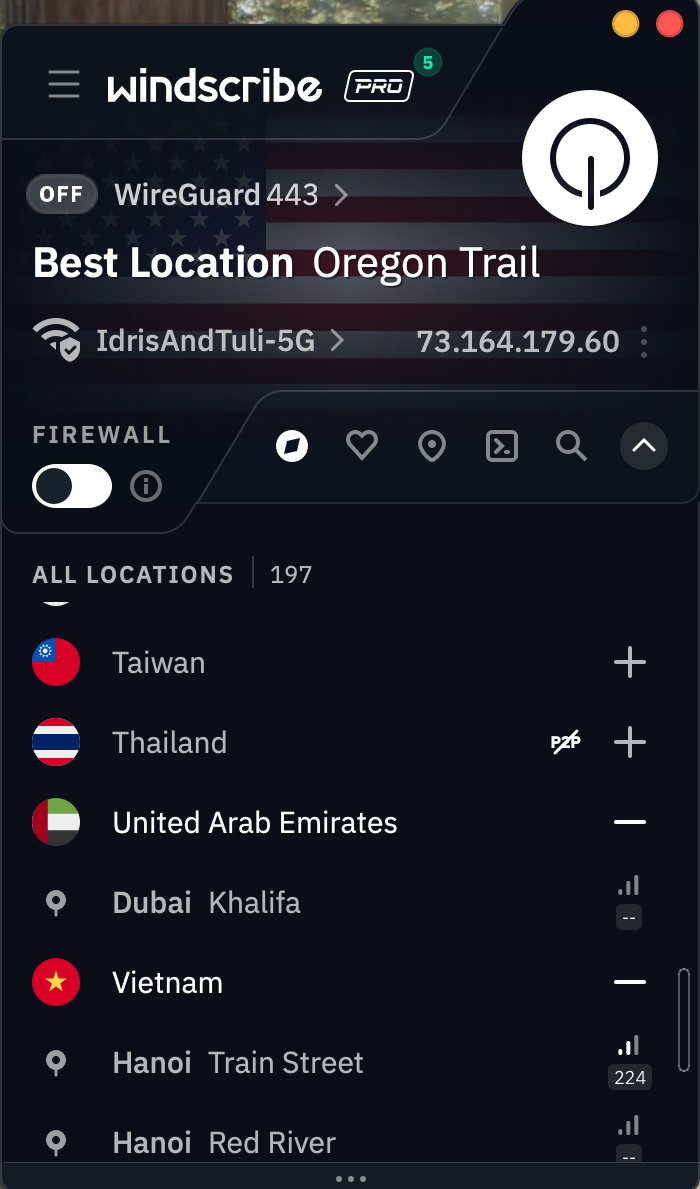
Windscribe's server selection list on the Mac app.
Sam Chapman for Engadget
On the other hand, virtual locations aren't an inherently bad thing. Windscribe acts as though advertising hype is the only reason any VPN would employ them, but there are real use cases. Virtual servers can be used to place locations inside countries where real servers would risk confiscation by the government, like Russia, India and China. Windscribe chooses instead to place real servers in Russia and India, both of which have data retention laws that directly conflict with its own privacy policy.
Does this mean that using Windscribe's Russian servers will earn you a midnight visit from the FSB? Probably not. Assuming Windscribe is following its no-logs policy (which appears to be the case), there won't be any user data on those servers if the government seizes them. But it does mean they're effectively running illegal data centers which could be raided and shut down at any time. Be aware of this if you depend on Windscribe's locations in Russia or India.
Extra features of Windscribe
As covered in the UI section, Windscribe has a lot going on in its apps. The Connection tab alone has 13 different features, including two submenus with several options of their own. With this many options, and so many of them highly situational, I won't be able to cover every nook and cranny without this review getting seriously bloated. I've instead chosen some of the most important and illustrative features to give you a clear sense of the whole picture.
Network Options
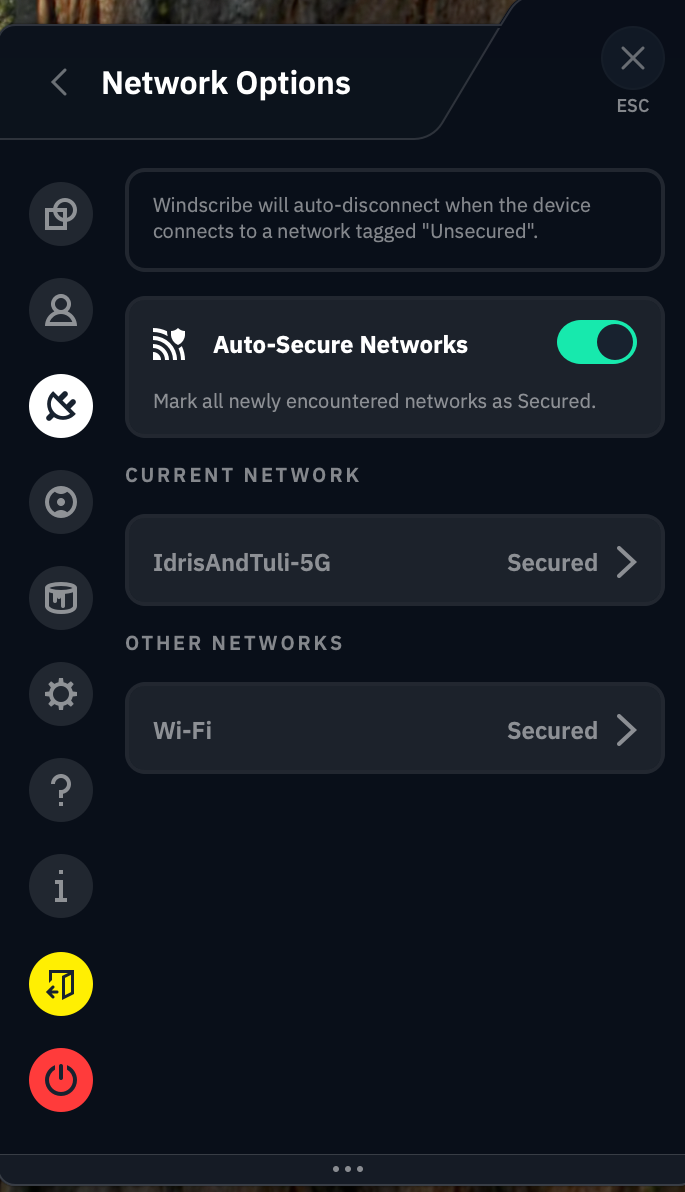
You'll find this feature at the top of the Connection tab. When you click Network Options, you should see the name of your current Wi-Fi network and all the others your Windscribe account has discovered. This feature lets you control how the VPN reacts to each network it encounters, not unlike CyberGhost's Smart Rules.
Just switching around a few terms would make this a lot less confusing.
Sam Chapman for Engadget
The app does a remarkably poor job of explaining how this works, so I'll break it down for you here. When the Auto-Secure Networks switch is turned on, Windscribe will automatically mark each new network as Secured — a word which here means "Windscribe turns on when it encounters the network."
So far, so good. But if you turn Auto-Secure Networks off, things get weird. Without it, Windscribe tags every network you encounter as Unsecured. Whenever you connect to an Unsecured network, Windscribe immediately disconnects itself. This means it secures all Secured networks and does not secure any Unsecured networks.
It feels backwards until you realize that Windscribe is referring entirely to itself here. "Secured" doesn't mean that the Wi-Fi network is password-protected or otherwise considered safe, and "Unsecured" doesn't mean that it's open to the public without a password. All that matters is whether or not you want Windscribe to activate or deactivate on that network. It's a useful feature that even lets you choose a VPN protocol for each network, but it would help to bring it more in line with mainstream terminology.
R.O.B.E.R.T.
This mouthful of a feature name allegedly stands for Remote Omnidirectional Badware Eliminating Robotic Tool. This is perhaps the apex of the VPN industry's unfortunate habit of saddling perfectly good features with word-salad names (yes, I'm aware it's supposed to be funny).
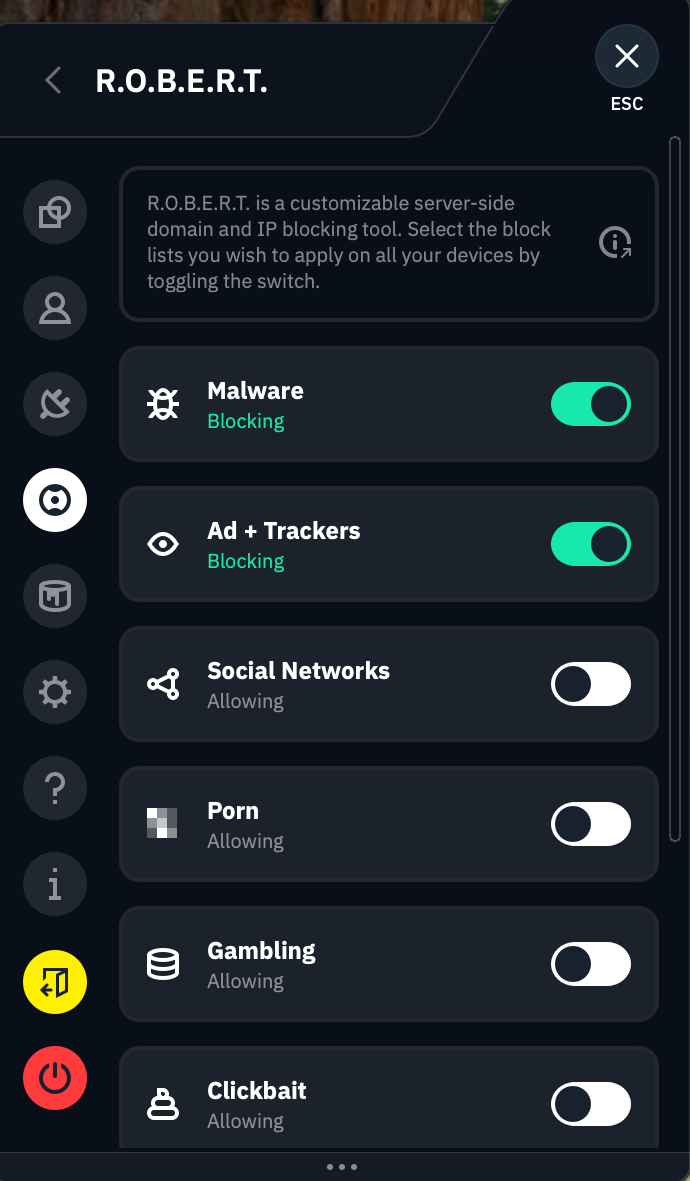
R.O.B.E.R.T. is perhaps the most customizable content blocker on any VPN right now. To start with, it includes eight lists of sites it blocks at the DNS level: Malware, Ad + Trackers, Social Networks, Porn, Gambling, Clickbait, Other VPNs and Crypto. These vary in usefulness, and you can't determine the contents of each list, but it's nice to have such a range of choices.
It eliminates all the badware, remotely AND omnidirectionally!
Sam Chapman for Engadget
Where R.O.B.E.R.T really shines, though, is in its browser-based customization dashboard. Each Free user can make three custom rules, and Pro upgrades that to 10. Each custom rule can be used to block a specific website or network or allowlist it from one of the other general blocklists. You can also set it to spoof a domain, though there's no practical reason to do this (Windscribe's idea of a "useful" application is making your friends think your post made the front page of Reddit).
Split tunneling
Split tunneling sends some of your internet requests through the VPN tunnel while others go unencrypted as normal. This can be useful if you get worse-than-usual speeds and want to minimize the amount of traffic going through the VPN, or for certain websites that refuse to work with any VPN server.
You can split tunnel on Windscribe's apps for Windows, Mac and Android. Windows and Android users can split by app or website, while Mac users can only split by website. Windscribe lets you choose whether your split tunnel will be inclusive (only apps and IPs on the list will go through the VPN) or exclusive (the apps and IPs on the list will not go through the VPN). Note that R.O.B.E.R.T. rules apply to the entire system, even excluded apps and domains.
Firewall and Always On VPN
Instead of a kill switch, which it derides as an incomplete solution, Windscribe includes a Firewall feature on desktop and an Always On VPN feature on mobile. The Firewall can be considered a strong kill switch that prevents any internet traffic from going outside the VPN tunnel — something doesn't have to go wrong for the blocks to activate. Always On VPN on iOS and Android is functionally the same.
A more proactive defense has its advantages, but it would be nice if Windscribe included the weak kill switch option. Kill switches and firewalls can be overactive, and sometimes, you don't want the strongest level of security.
Circumvent Censorship
This feature is designed to let you access Windscribe on networks that don't want you to use a VPN, from school and work systems to entire censorious countries like China. Windscribe isn't forthcoming about how it works, but it's probably a deep-packet obfuscation that makes VPN traffic look like regular traffic. I didn't have time to pop over to China and test Circumvent Censorship, but I'm glad it exists.
Windscribe customer support options
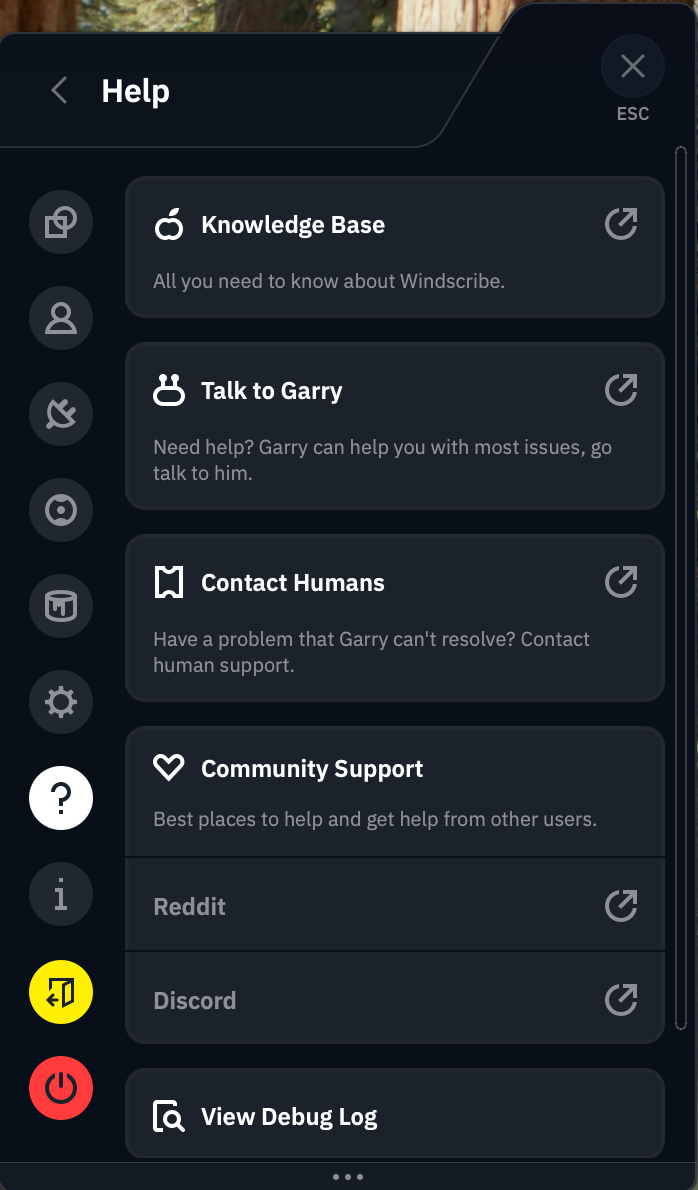
Clicking the question mark tab on the Windscribe app shows you the full list of support options. You can peruse the knowledgebase, ask their chatbot Garry, talk directly to a human or check out their user communities on Reddit and Discord.
Most of these lead back to Garry.
Sam Chapman for Engadget
I started with the written FAQs. At the top of the knowledgebase, there's a row of buttons you can click to see only articles relating to a particular operating system. This is a good idea in theory, but it's not implemented very well — there's no visible tagging system, so we can't see how it's deciding which articles to filter.
The search bar is much more likely to get you where you need to go. It works instantaneously and always turns up relevant articles, though it's weirdly insistent on showing exactly 10 results. I have few complaints about articles themselves, which are written in a way any user should find useful (give or take yet more attempted humor).
I tested the chatbot, Garry, by asking it about the mysterious Advanced Parameters tab of the Windscribe app. It explained each feature on that tab (none of which should be touched except by users with technical knowledge) in a spiel that was clearly pre-written but nonetheless useful. Garry was launched in 2018, when IBM Watson was the biggest thing in AI, and recently revamped into "Garry 2.0" — whether this is based on OpenAI or another platform is anyone's guess at the moment.
Live support
Windscribe appears to handle all of its own support, without outsourcing to Zendesk or a similar third party. If you decide not to go through Garry, Windscribe does have the option of connecting directly to a human. However, the Contact Humans option on the app sends you directly back to Garry. It's eventually possible to get Garry to connect you to a real person, but that doesn't excuse Windscribe building an outright lie into its app.
The Contact Support button on the knowledgebase, which I expected to lead to a ticket submission, also sends you straight to Garry. Windscribe really, really wants you to use Garry, in case that wasn't clear. You might have a better time going straight to the Windscribe Discord server or the r/Windscribe subreddit, both of which are linked to in the app.
Windscribe background check
Windscribe eschews a lot of the things we've come to expect from a VPN provider. It doesn't pay for ads anywhere. It has no affiliate relationships with news sites. The only thing resembling a Windscribe ad campaign is the free-plan data reward for Xeeting about it. It doesn't even have any venture capital investors — it's completely self-funded and self-hosted.
As a jaded and cynical reviewer who was already annoyed by Windscribe's memelord attitude, I was prepared to sniff out any hypocrisy in its background, which makes it all the more impressive that I didn't find any. Since its founding in Canada in 2016, Windscribe has never once been involved in any public doings that contradict its statements of ethics. It's even given free unlimited VPN access to every journalist working in Ukraine.
The only thing I could find resembling a controversy was an incident in July 2021 when Ukrainian police confiscated two servers that weren't fully encrypted. Although this would only have posed a risk to users running a customized connection profile under very specific conditions, it was still a lapse. Windscribe responded appropriately in my view, ending the legacy OpenVPN implementation that caused the problem.
Canadian headquarters
Windscribe is based in Canada, which is one of the Five Eyes nations (along with the U.S., the U.K., Australia and New Zealand). This sounds scary, but it's not actually an issue, as Yegor Sak himself points out in a blog post I reference frequently.
Five Eyes is not an organization, but an agreement between five allied countries to share necessary intelligence with each other. This can absolutely be misused. If the U.S. government wants to spy on someone without running into the 4th Amendment, it can ask the Brits to spy on that person instead and tell them what they find, knowing the Constitution can't determine what other countries do to our citizens.
As bad as that is for our civil liberties, it doesn't actually change anything where VPNs are concerned. If a VPN isn't logging user data, there shouldn't be anything for any of the Five Eyes (or Nine Eyes or Fourteen Eyes) nations to find. And if it is keeping logs, you shouldn't be using it no matter where its headquarters are.
Final verdict
You might wonder, at this point, why my distaste for Windscribe's tryhard sense of humor has featured so prominently in this review. One reason is that I had to read a lot of it this week, and you must suffer as I have suffered. But it also makes Windscribe look very good by implication. Having no patience for the discount-4chan act that pervades Windscribe's brand, I was primed to dislike the VPN itself — and I simply couldn't.
This is not to say I had no problems at all with Windscribe. Its physical servers in Russia are difficult to trust. Its help options lean way too heavily on Garry the chatbot. Its app design and UI writing are significant faults. The free plan doesn't give you enough data for streaming.
Having said all that, though, Windscribe does everything else right. It changes virtual locations and unblocks Netflix without breaking a sweat. Its servers keep latencies low, and download speeds remain solid across the world. The apps may look bad, but they never break down. Some features, like R.O.B.E.R.T. and Auto-Secure, are both useful to everybody and deeply customizable for power users.
Windscribe may be best for privacy nerds who know how all its doohickeys work, but it's a VPN I recommend for everybody. In a world of predatory software, it's a relief to use an app that's unabashedly on the customer's side.
This article originally appeared on Engadget at https://www.engadget.com/cybersecurity/vpn/windscribe-review-despite-the-annoyances-it-has-the-right-idea-120000837.html?src=rss
One of the disconcerting things about using a virtual private network (VPN) is that it can be hard to tell when it's doing its job. The best VPNs all work in the background to keep your IP address hidden and your communications with their servers encrypted. The better the VPN, the less you notice it, which can make a top-performing VPN feel (uncomfortably) like one that isn't working at all.
Luckily, you've got options for checking whether your VPN is working — other than just taking the app at its word. In this article, I'll cover the basics, then go through five different tests you can run to make sure you're actually using an encrypted VPN server. For each test, I'll explain what kind of problem it's looking for, how to run it and what to do in case it fails.
Make sure your VPN is turned on
Before you do anything else, though, it's not a bad idea to check your VPN app and make sure you remembered to connect. It's all too easy to open up the client app, choose a server, tweak some preferences and feel like your work is done. On top of that, we don't always remember to tell VPN beginners that simply opening the client isn't enough.
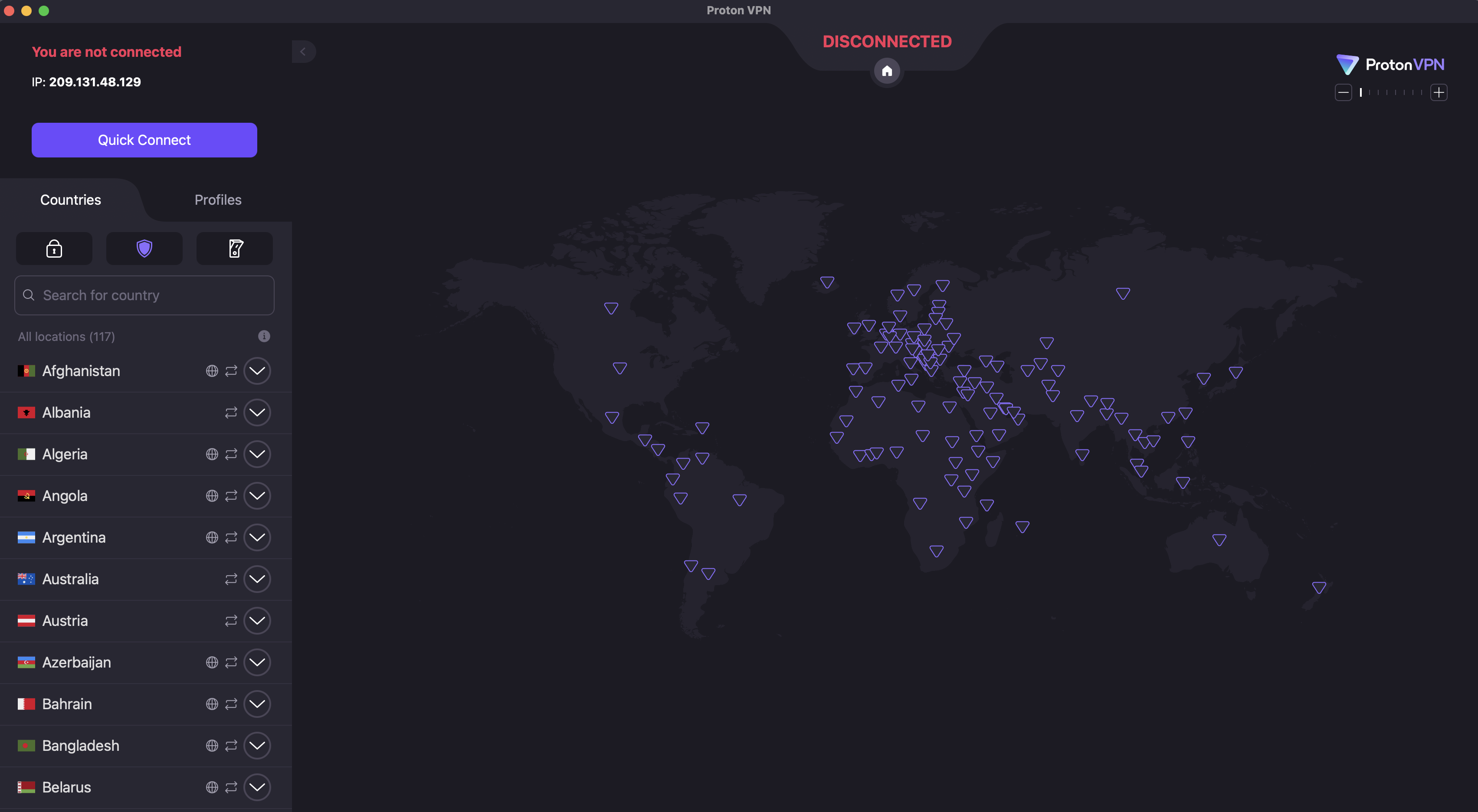
To check that your VPN is turned on, open the app on your desktop or mobile home screen. Each VPN designs its apps differently, but common signs include the color green, the word Connected and information on what server location you're connected to.
The main UI for Proton VPN, with the connection button visible at top-left and the server location menu below it.
Sam Chapman for Engadget
If you don't see anything like that, click the On button, which should be on the first page that appears when you log into the app. Most VPNs also connect whenever you click the name of a server location.
For those of you on iPhone or iPad, I've just written an explainer on how to turn a VPN off and on. For all the tests I'll discuss across the rest of this article, make sure you're connected to a VPN server before you run them. Also, make sure your internet connection is active — a VPN can only work when there's internet.
5 tests to check if your VPN works
Each of these tests investigates a different reason your VPN might not be working. We'll start by looking for connection problems that might not be obvious, check for DNS leaks, WebRTC leaks and IPv6 leaks, then finally make sure an apparently active VPN is managing to change your virtual location.
1. Has your IP address changed?
Websites and internet service providers (ISPs) use IP addresses to identify devices and their owners online. A VPN's most important job is to change your IP address to one matching its own server, which disassociates your identity from your online activities. Not doing this indicates a failure on a fundamental level: either the VPN says it's connected when it isn't, or its technology is active but somehow not sending you through the proper encrypted tunnel.
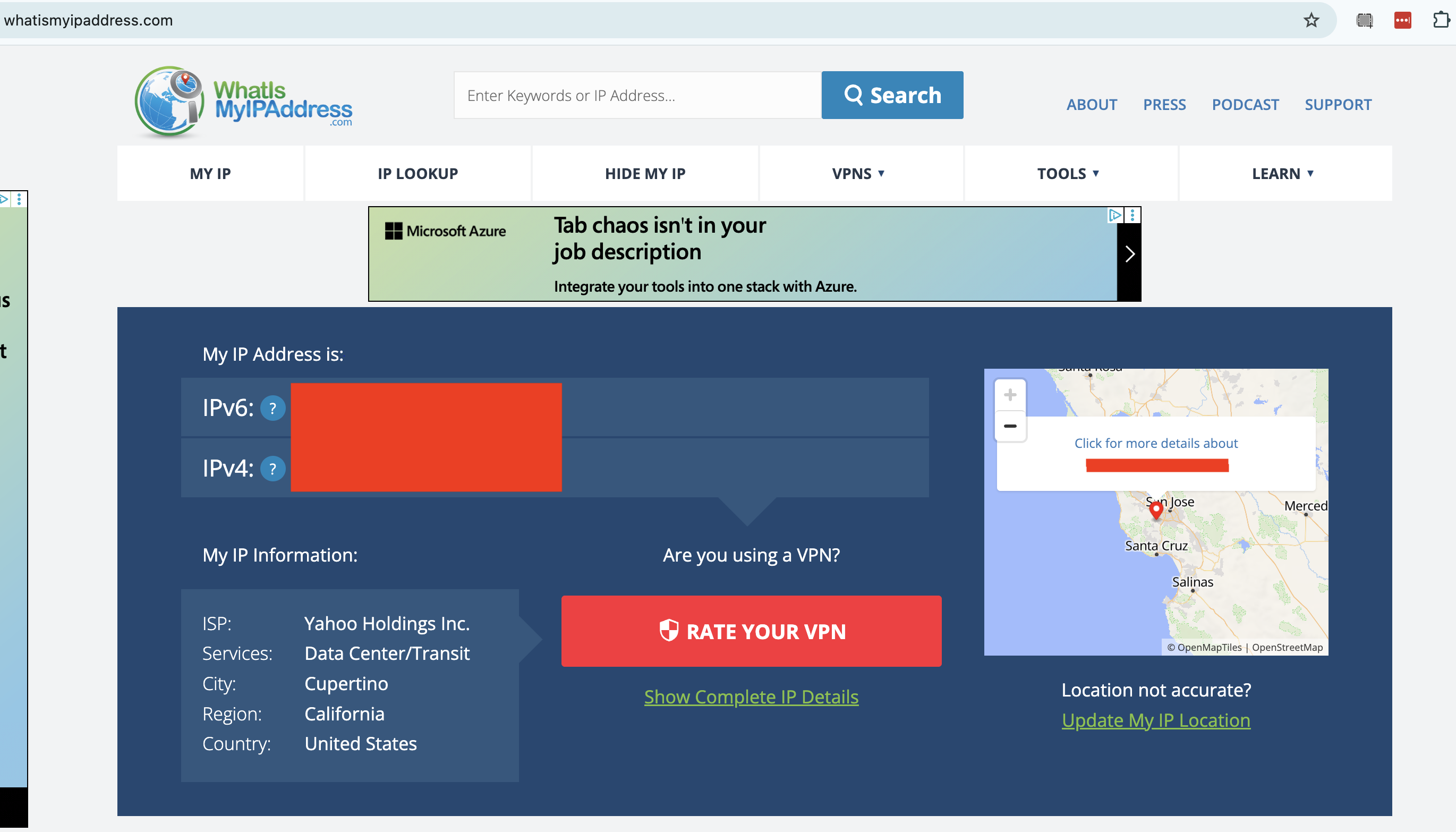
To check whether your VPN has changed your IP address, start by going to an IP address checker like whatismyipaddress.com or ipleak.net. This will show you the public IP address that everyone sees when you get online without a VPN, including the ISP that holds it and the geographic location it's associated with. Write that down or take a screenshot.
A censored report from WhatIsMyIPAddress.com.
Sam Chapman for Engadget
Next, connect to your VPN. Remember the location you connect to, and note down the new server IP address if the VPN tells you what it is. Go back to your IP tester tool and refresh the page. You should now see an IP address and location that match the one you connected to through the VPN, including a different ISP.
If your IP address is the same as before, your VPN isn't working. To fix this, try disconnecting from the server, waiting about 10 seconds, then connecting to the same location and trying the test again. This will show you whether the problem was with one individual server or an entire location.
If the problem persists, try a different server location, then a different VPN protocol. If it's still leaking, try restarting your VPN client, your device and your modem (in that order). This should fix the problem, but if it doesn't, move on to the remaining tests or get in touch with the VPN's tech support.
2. Are you leaking DNS requests?
A domain name system (DNS) server is an important step in getting a website to appear on your browser. DNS holds the information that connects URLs to the IP addresses of destination servers. If a VPN client lets your device contact a DNS server owned by your internet service provider without routing it through an encrypted tunnel first, the DNS request might reveal your real IP address to the ISP.
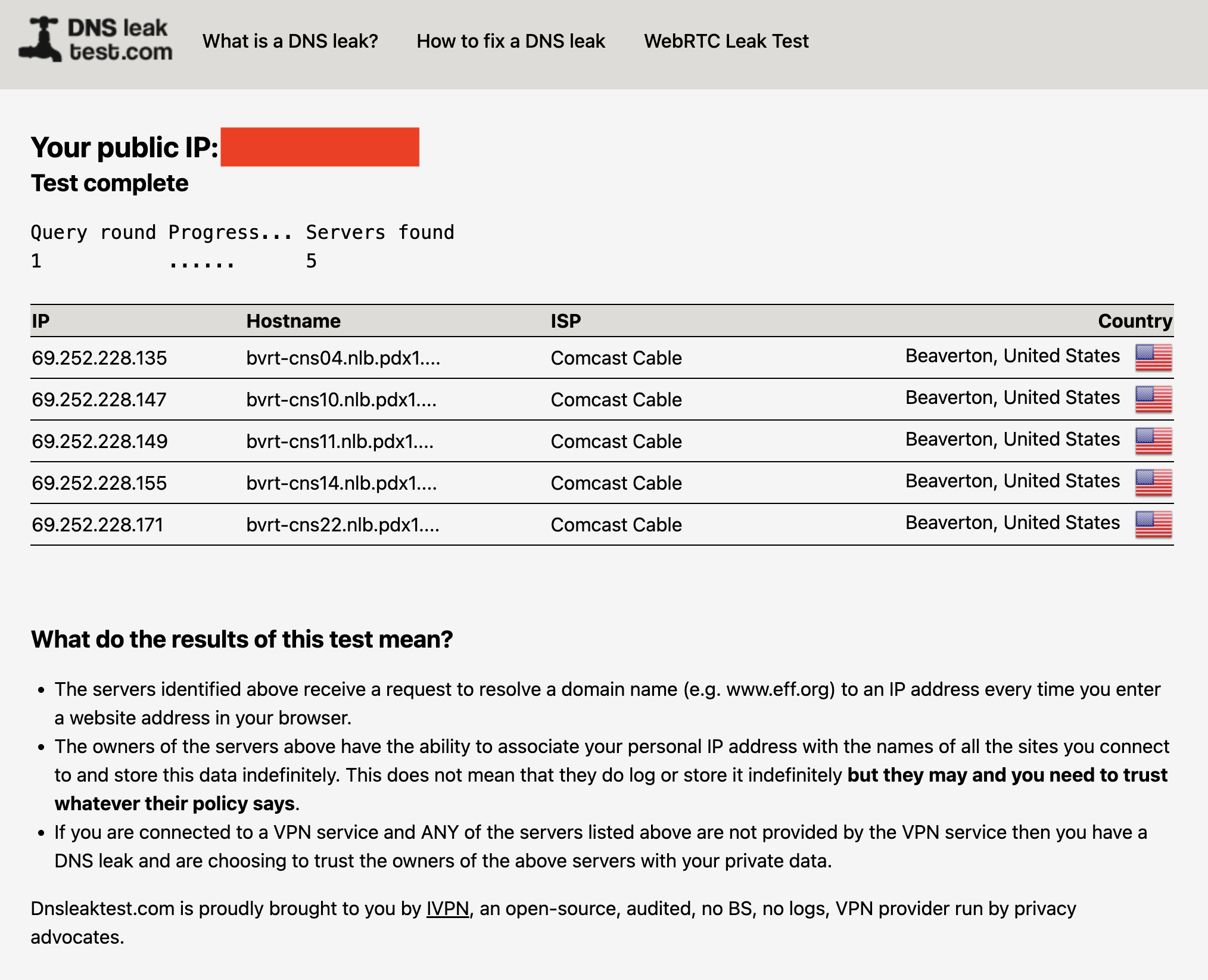
You can check for DNS leaks by connecting to your VPN, then going to dnsleaktest.com or another tool of your choice. The tester sends several innocuous DNS requests, then scans to see which servers resolve them. If you see your real ISP at all, you've got DNS leaks.
A DNS leak test run without a VPN. With one active, my real ISP (Comcast) should not appear on the list.
Sam Chapman for Engadget
The fix for DNS leaks is more intensive than the fixes in step #1. Check your VPN's control panel to activate any DNS leak protections and try again. IPv6 leaks can also appear as DNS leaks, so try disabling IPv6 in your browser (see #4 below for instructions). If you keep seeing leaks, you can also try clearing your computer's DNS cache.
Here's how to do that. On Windows, go to the Command Prompt (on Windows 10) or the WindowsTerminal (on Windows 11). Enter the phrase ipconfig/flushdns. On Mac, open Terminal from the Utilities folder, then paste in the phrase sudo dscacheutil -flushcache; sudo killall -HUP mDNSResponder and hit Enter. Test the VPN once more to see if it's still leaking.
3. Are you leaking information through WebRTC?
WebRTC, which stands for Web Real-Time Communication, is a technology that lets browsers exchange information directly with each other. This is useful for text and video chats, streaming and more, but it's also a potential security risk. WebRTC can serve as a backchannel that inadvertently sends your real IP address outside the VPN tunnel.
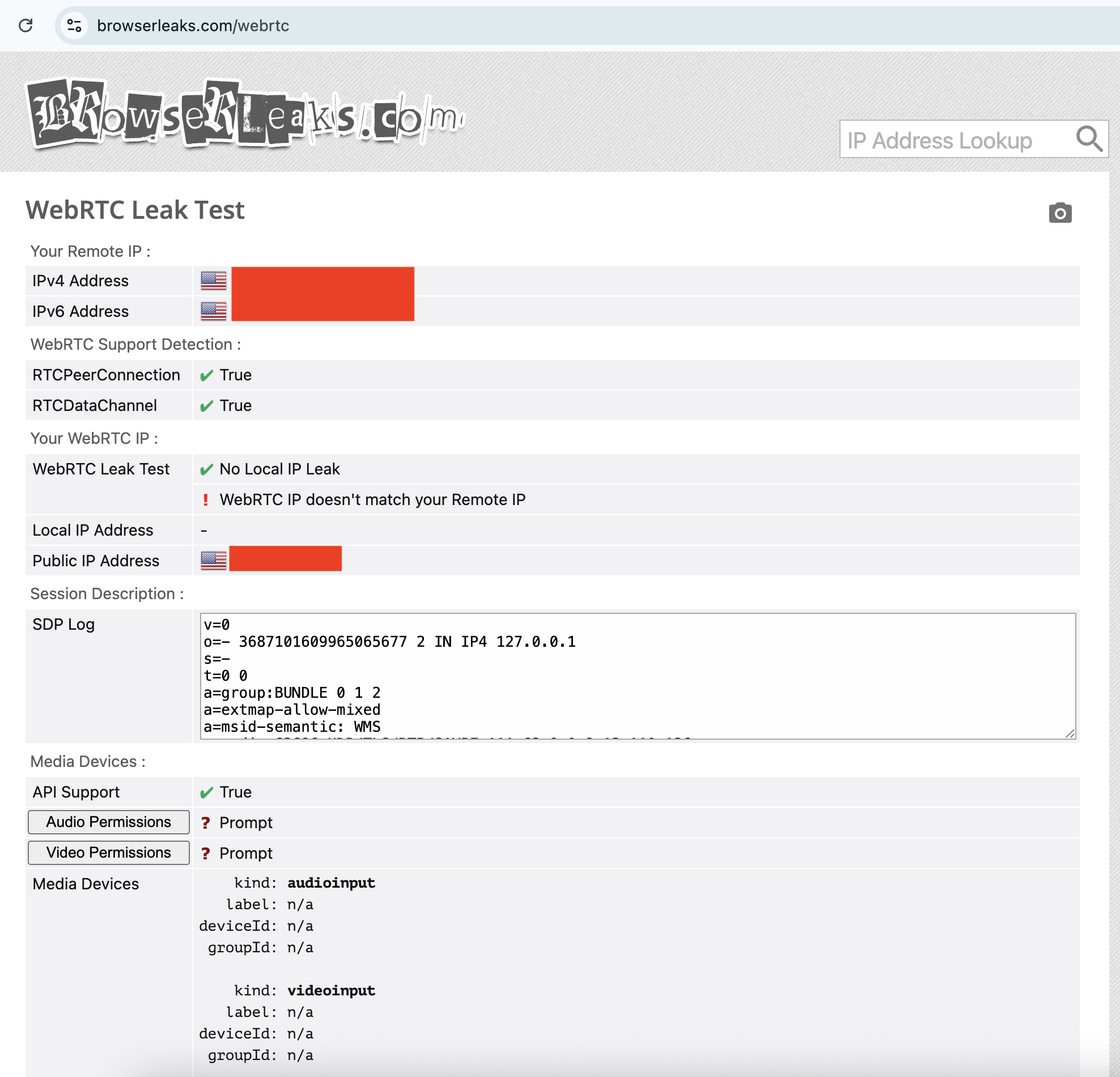
It's pretty easy to test for WebRTC leaks. I recommend the tool ipleak.net, which checks for them as a matter of course. You can also use browserleaks.com/webrtc to run a test that's particular to this kind of leak. These tools establish dummy connections through WebRTC, then test to see if the VPN still works when they're active. As usual, if you see your real IP address, there's a problem.
Your WebRTC IP not matching your Remote IP is a potential red flag.
Sam Chapman for Engadget
The fixes for a WebRTC leak are the usual ones: try different servers, locations and protocols, reset your VPN, device and modem, then try another VPN provider. However, if nothing is working, you can also disable WebRTC on your browser altogether. This means you won't be able to do any real-time chatting (that's Zoom, Google Meet, Teams and so on), so it's a last-resort solution.
To disable WebRTC on Firefox, type about:config in the URL bar, click the message to accept the risk, type media.peerconnection.enabled in the search bar, then double-click the word True to change it to False. To turn WebRTC back on, just double-click False again.
On Edge, you can disable WebRTC by entering edge://flags in the URL bar, scrolling down to the option "Anonymize local IPs exposed by WebRTC" and making sure the dropdown next to it is set to Enable. There's no built-in way to turn off WebRTC on Chrome, but you can install the WebRTC Control extension to switch it off and on yourself.
4. Is your IPv6 address leaking?
Next up, it's possible that your real location is leaking through your IPv6 address, not IPv4. To make a long explanation short, IPv6 is a new way of formatting IP addresses that leaves more options available for the future. Since we haven't yet hit the crisis point of IPv4 shortage, very few websites are restricted to IPv6 alone.
The problem is that most VPN apps were designed in the IPv4 era and aren't built to protect IPv6 traffic. There are some exceptions, including NordVPN, but most VPNs block IPv6 traffic completely rather than retrofit themselves to work with it. However, if a VPN of that sort isn't blocking IPv6 entirely, your IPv6 address and associated location can leak.
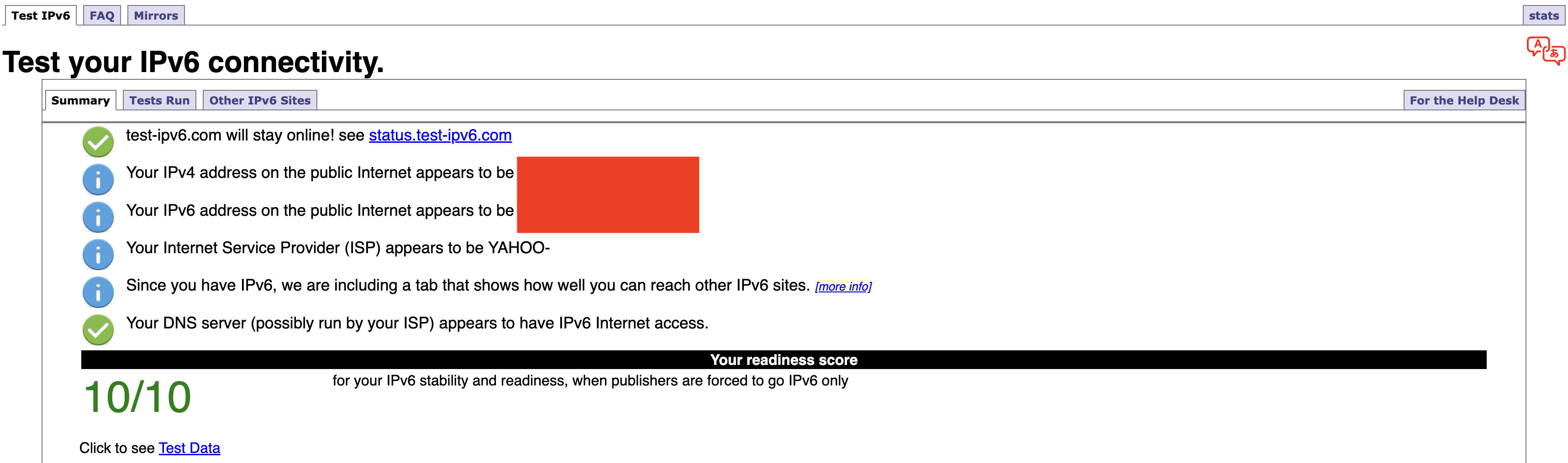
Any IP address checker can reveal an IPv6 leak, but you can find a specific test at test-ipv6.com. This site runs several exams that look for IPv6 readiness, but the most important line is the one that shows your current IPv6 address. This will probably say you don't have one, since most ISPs don't work through IPv6 yet — but if you do have one, it should match your active VPN's location, not your real one.
If your IPv4 address matches the VPN server but your IPv6 address does not, IPv6 is the likely cause of your leak.
Sam Chapman for Engadget
Should it turn out that you're leaking IPv6 requests, the easiest solution is to disable IPv6 on your computer. On Windows, you can do this through the network adapter options page of your control panel. Here's how to get there:
Windows 10: Start -> Settings -> Network & internet -> Status -> Change -> Advanced network settings -> Change adapter options.
Windows 11: Settings app -> Network & internet -> Advanced network settings -> Related settings -> More network adapter options.
On both OSes, finish the job by right-clicking the name of your internet connection, selecting Properties from the dropdown and unchecking the box next to Internet Protocol Version 6. Of course, you can always switch to another VPN that blocks IPv6 altogether, but you might find that to be a bigger hassle.
If you're on Mac, open System Settings, click the Network tab and then click the Details... button next to your network name. In the new window, click the TCP/IP tab on the left, find the entry labeled Configure IPv6 and set the dropdown to Link-Local Only.
5. Do streaming sites show different content?
A VPN can be working perfectly and still fail to unblock streaming sites. Netflix, HBO Max and the others block VPN traffic because VPNs can make them show material in regions where they don't hold the copyright. To avoid legal trouble, they set up their firewalls to block IP addresses known to belong to VPN servers.
If your VPN can't get into a streaming platform, it'll usually be obvious; the site will either display a proxy error message or simply refuse to load. However, in rare cases, the streaming site will load fine but show you the same shows you normally see. This indicates that you might be dealing with a VPN leak.
If that happens, follow the usual steps. Disconnect and reconnect to the same location to get a different server, then try different server locations. It's also possible that the streaming site is getting your real location from your browser cache, so if the problem persists, clear your cache and cookies and try again.
How to test a VPN kill switch
There's one more important step to make sure your VPN is working: test the kill switch. This common feature cuts off your internet connection if you lose touch with your VPN server. With your kill switch active, you shouldn't be at any risk of accidentally broadcasting your real IP address, location or online activity.
To test your kill switch, you'll need to simulate an abrupt loss of VPN connectivity. Open your VPN, make sure the kill switch is turned on, then connect to a server. Next, quit the VPN app without disconnecting. At this point, the kill switch should make it impossible for you to get online — if you can still browse the internet as normal, the switch might be faulty.
This article originally appeared on Engadget at https://www.engadget.com/cybersecurity/vpn/how-to-check-if-your-vpn-is-working-130000817.html?src=rss
I came out of my CyberGhost review with a positive opinion, feeling it had earned its spot in my best VPN roundup. However, even an expert review is subjective, and there's a chance CyberGhost will not work for you. If that’s the case, here's how to cancel your subscription.
How to stop your CyberGhost subscription renewing
Cancelling your CyberGhost subscription won't end it right away, unless you delete your account or get the refund (I'll explain how to do both of those later). Instead, the way to cancel CyberGhost is to stop your subscription from renewing at the end of each billing period. Once you've done that, you can keep using CyberGhost until your current period ends.
The following steps will cancel auto-renewal if you got CyberGhost through its website. If you bought it through an app store instead, see the next section.
At the top-right of the screen, click the box labeled My Account. Enter your username and password if you aren't logged in already.
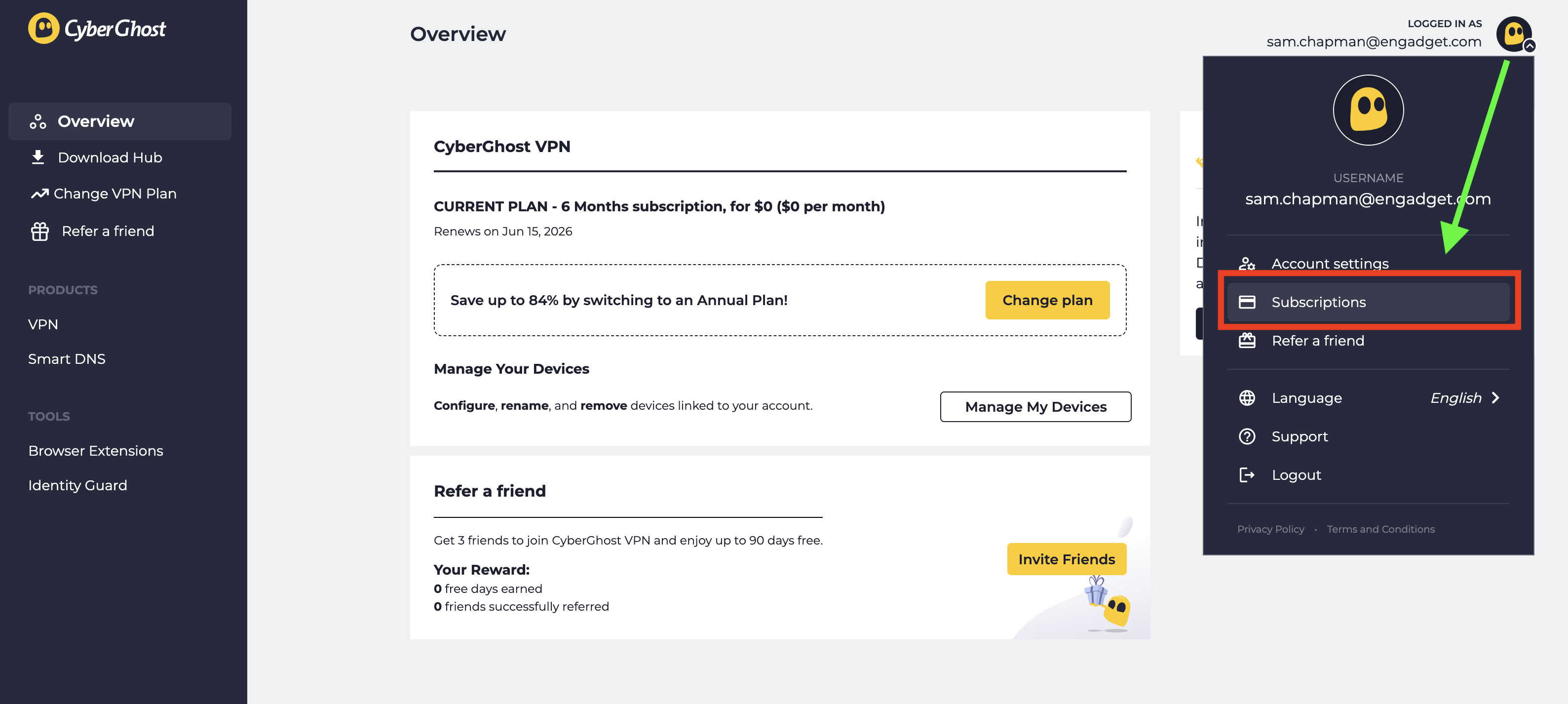
Look at the top-right corner of the new screen and click the CyberGhost logo next to your email address. From the drop-down menu, select Subscriptions.
Find the subscription you want to cancel and select Cancel Subscription.
When prompted, click Continue to Cancel.
Click the logo at top-right, then click Subscriptions to manage auto-renewal.
Sam Chapman for Engadget
This will turn off automatic billing for your account. The next time you would have been billed, your subscription will expire. You can resubscribe by purchasing another term. If you're within the refund period — 14 days for a monthly subscription and 45 days for all others — you can now request your money back.
How to cancel CyberGhost if you subscribed through an app store
When you subscribe to an app through the Apple App Store or Google Play Store, the store handles the billing; the app provider doesn't process the money itself. If you bought CyberGhost through an app store and want to cancel, you'll have to ask the app store in question, not CyberGhost. Here's how to do it.
If you subscribed through the Apple App Store, you'll need to cancel through your Apple ID. Here are the steps.
Open the Settings app on your home screen.
At the top of the Settings menu, you'll see your name. Tap it.
In your Apple Account menu, tap Subscriptions.
Scroll until you find your CyberGhost subscription, then tap on it.
Tap the words Cancel Subscription, then follow the prompts.
Here's what to do if you subscribed through the Google Play store. Similar to the Apple process, you'll go through the list of subscriptions on your profile.
Open the Google Play Store app.
Tap the circle in the top-right corner with the first letter of your name.
Find the Payments & Subscriptions menu and tap on it. On the next menu that appears, tap Subscriptions.
Scroll down until you find your CyberGhost subscription. Tap on it, then click Cancel Subscription.
Follow the prompts to complete cancellation.
How to delete your CyberGhost account
Before you set out to delete your CyberGhost account altogether, make sure you've cancelled auto-renew first by following the steps in the previous section. If you don't, you might still be charged for the subscription you're not using, and it's a huge hassle to end that without an account.
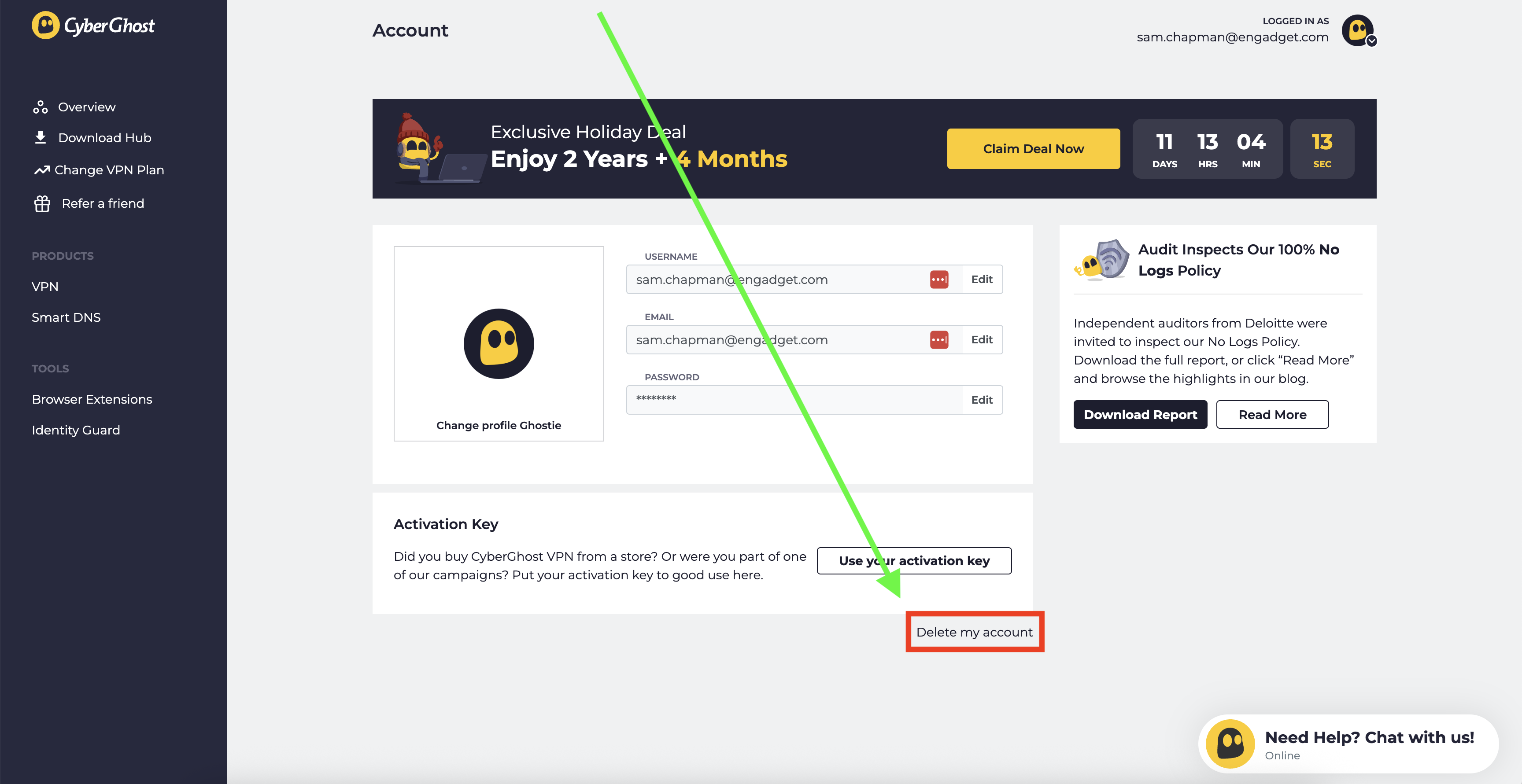
Once you've done that, log into your account on cyberghostvpn.com and click on your account profile at the top-right, just like when you canceled auto-renewal. Below the username/password window and the message about an activation key, you'll see the words Delete My Account in tiny letters.
How to find the button that deletes your CyberGhost account.
Sam Chapman for Engadget
Click on them. On the page that appears, select Delete My Account again. Follow any more prompts you're given to annihilate your username for good (note that you can't use it again afterwards).
How to get a refund from CyberGhost
To get a refund on your CyberGhost subscription, you have to be inside the window for the plan you chose. With a monthly plan, the refund period is 14 days. For all other plans, it's 45 days. If this time has elapsed, there's unfortunately no way to get your money back.
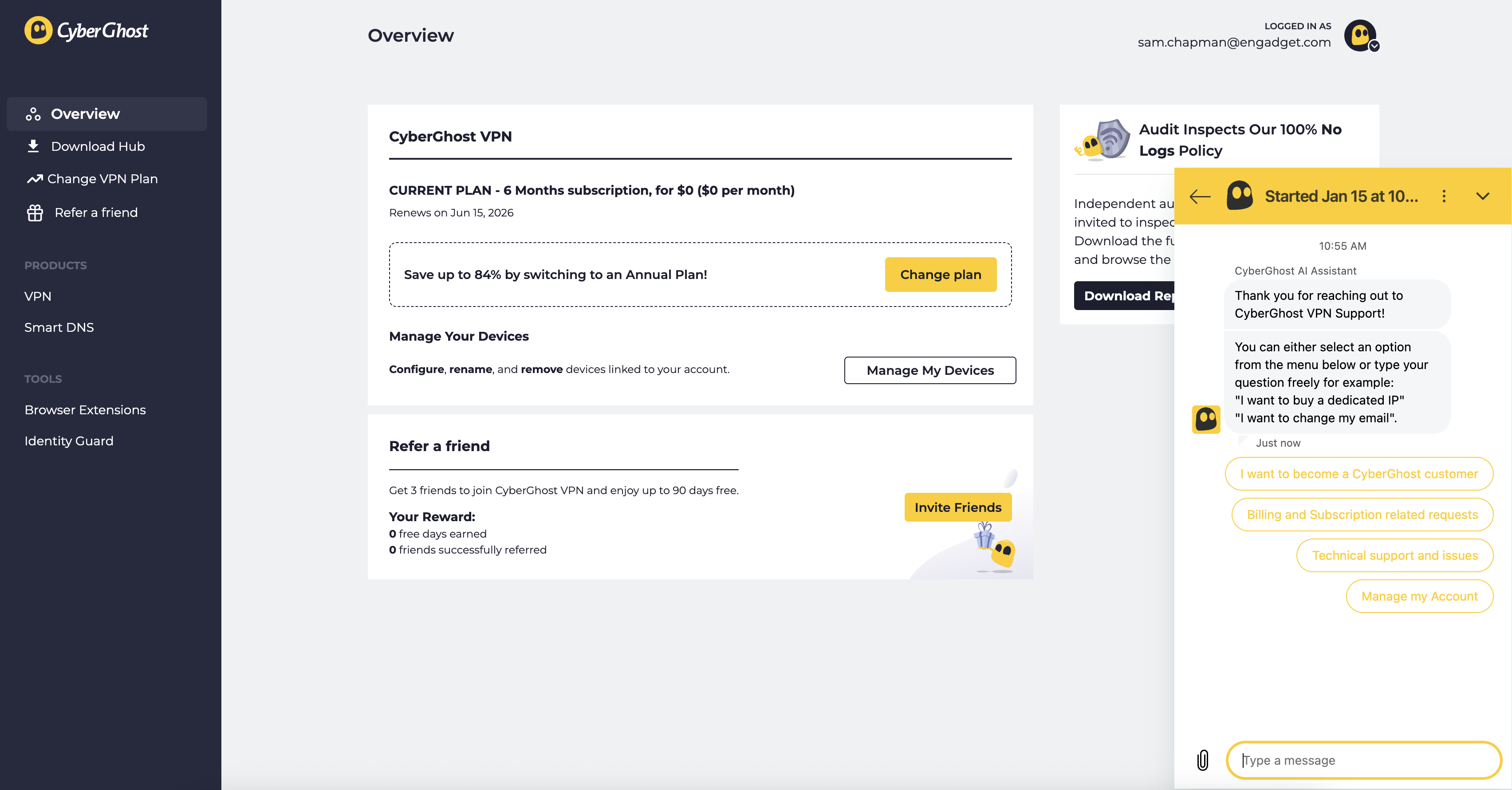
If you are within the refund period, you can get your money by sending a request through customer support. You can email support@cyberghost.ro, submit a ticket through this link or open a live chat conversation by clicking the Live Chat button at the bottom-right of any page on cyberghostvpn.com. No matter what method you choose, the conversation will go faster if you have your order number on-hand — check your inbox if you don't know it.
Start a live chat conversation by clicking the live chat button at the bottom-right of any screen on CyberGhost's website.
Sam Chapman for Engadget
If you went through an app store, you'll need to request your money back from that platform instead. Apple and Google Play handle their own monetary transactions, which means they also process refunds.
Best CyberGhost alternatives
After you've cancelled and/or deleted CyberGhost out of your life, you still need a VPN; the benefits of masking your IP address and changing your virtual location don't go anywhere. You can check out my best list (linked at the top) or best free VPN roundup for ideas, or check out the review for my favorite service, Proton VPN.
Proton VPN is my top choice because of its focus on user freedoms and attention to quality in everything it does. If you're willing to pay a bit more for extreme simplicity and total reliability, ExpressVPN is ideal for beginners. If you're a speed demon and just want to keep your downloads fast, go with Surfshark.
This article originally appeared on Engadget at https://www.engadget.com/cybersecurity/vpn/how-to-cancel-cyberghost-and-get-a-refund-130000311.html?src=rss
As frustrating as it is that governments and businesses are running roughshod over our online freedoms, at least we have plenty of good VPNs to keep us protected online. There are so many fast, intelligently designed, full-featured and affordable services on the market that the biggest problem is picking one. For any use case, you can bet at least two providers will be neck-and-neck for first place.
On the other hand, the VPN world is still the Wild West in some ways. It's easy enough to slap a cheap VPN together that the market is flooded with low-quality apps that put more money into advertising than infrastructure. They may look good, but it's all styrofoam under the hood.
I built this list of the best VPNs after intensive testing to help you reorient your focus on the providers that actually deserve your time and money. Which one truly fits your needs is dependent on who you are and what you do online, but if you pick any of my seven recommendations, you can't go too far wrong. If you're interested in a service you can use without paying, head over to my list of the best free VPNs — and if you're willing to pay but want to save money, I keep a list of the best VPN deals updated weekly.
For each VPN on this list, I've shared which platforms it works on, how much it cuts into your download speed, where it offers servers, what other features are included and how much the best available deal costs. At the end, I'll list some honorable and dishonorable mentions, then answer some of the most common questions I hear about VPNs.
Editor's note: This list is up-to-date as of February 2026. We intend to revisit this list every three months at a minimum, at which time our picks may be adjusted based on changes in pricing, features, testing results and other factors.
The VPNs in this section didn't crack our top list above, but we're summarizing them here so you can see their positives and negatives as of the time of our evaluation.
Windscribe is another well-known free VPN supported by paid subscriptions. In many ways, it takes the best from both Mullvad and Proton VPN, with the former's no-nonsense privacy and the latter's healthy free plan. Without paying, you can connect to 10 of Windscribe's server locations on an unlimited number of devices at once. We've just published a full Windscribe review that can tell you more.
Unfortunately, Windscribe didn't copy the most important part of Proton VPN's free plan — the unlimited data. You're only allowed to use 10GB per month, which isn't enough for regular streaming. It's also committed to a cramped and headache-inducing user interface that stands out from the crowd in all the worst ways.
Private Internet Access (PIA VPN) has a deeply annoying name — I assume whoever invented it also likes to hop in their Toyota Forward Motion to grab a gallon of Sustaining Cow Extract from the grocery store — but it's a worthwhile VPN whose pricing provides incredible value. Its monthly and yearly plans are good enough, but its three-year plan is the clincher. Not only is it longer than average, but you can continue to renew at the three-year level, so you won't see an unpleasant price jump the first time you re-up.
PIA's apps have a dark UI reminiscent of Proton VPN, which is always a good thing. It also supports port forwarding, custom DNS and the use of a SOCKS5 or Shadowsocks proxy as a second step in the VPN connection. You can even set the maximum data packet size to help out a struggling connection, as I cover in my full PIA VPN review.
The downside is that your connection will struggle a lot. While well-designed, PIA's apps have a tendency to lag. In my most recent battery of tests, it dragged oddly on my internet in ways that weren't directly reflected in the speed tests. It's also not always capable of unblocking streaming services in other countries, and while its server network offers 152 IP address options in 84 countries, it's heavily bulked out by virtual locations.
TunnelBear has a decent interface, which its target audience of VPN beginners will find very easy to use. Its speeds are perfectly good too, and I appreciate the depth and breadth of its transparency reports. But it's far too limited overall, with few extra features, less than 50 server locations and a free plan that caps data at 2GB per month.
VyprVPN often flies under the radar, but it has some of the best apps in the business and a very good security record (there was a breach in 2023, but it didn't crack the VPN encryption itself). It's also got a verified privacy policy, a solid jurisdiction and runs every connection through an in-house DNS to prevent leaks.
Despite all that, it didn't make the top seven because its connection speeds aren't up to scratch — you'll likely notice a bigger slowdown than average. It also has a troubling history of wild, seemingly experimental swings in its pricing and simultaneous connection limits.
Norton VPN is part of the Norton 360 package that includes the well-known antivirus software and other security apps. It's a nice bonus if you use Norton already, but as a standalone VPN, it falls short. My tests repeatedly showed it dropping encryption and revealing my IP address whenever I switched servers, and not all of its locations managed to unblock Netflix.
This isn't to say Norton VPN is terrible. It has a fairly large server network, user-friendly apps and some cool features like an IP rotator. It also recently revamped its OpenVPN infrastructure to improve speeds on Windows. But you probably won't find those things sufficient to balance out significant speed drops on other platforms or poorly written FAQs. I especially advise against Norton VPN for Apple users, as its Mac and iPhone apps are much more limited than their Windows and Android counterparts.
What to look for in a VPN
Choosing a VPN can quickly get you mired in analysis paralysis. We're here to help, but since only you know your particular needs, you should know the major red and green flags so you can make the final call yourself. Every reputable VPN provider offers a free trial or refund guarantee you can use to run the tests below. For more advice and dangers to look for, check out my article on how to tell if your VPN is working.
Compatibility: First, make sure your VPN works on all the platforms you plan to use it on. Most VPNs have apps for Windows, Mac, Android and iOS, but those apps aren't always created equal — check that the app for your chosen OS is user-friendly and has all the features you need.
Speed: Use a speed testing app to see how fast your internet is before and after connecting to the VPN (I use Ookla's speedtest.net). To check security, look up your IP address while connected to a VPN server and see if it's actually changed your virtual location. Be sure it's using expert-vetted protocols like OpenVPN, WireGuard and IKEv2. Try connecting to streaming services and seeing whether the VPN changes the available content.
Background: Do some outside research into the VPN's origins, especially its parent company, privacy policy and any past incidents. It's a dealbreaker if you can't figure out where the VPN is headquartered (which indicates a lax approach to transparency) or if it seems to have never passed a real third-party audit.
Server network: Look at the server network to make sure the VPN has locations near you and in any countries where you'll want an IP address — e.g. if you need a VPN to unblock Canadian Netflix, look for multiple server locations in Canada.
Customer Service: I also advise testing the customer support options by looking for the answer to a straightforward question. If phone support (versus email and chat) is important to you, make sure to prioritize that — and make sure it's available at convenient times in your timezone.
Pricing: Finally, check prices. See if the VPN is affordable and decide whether you're comfortable taking a long-term subscription for better savings. If you do get a multi-year plan, check what price it will renew at, since many of the cheapest subscriptions are only introductory deals.
VPN FAQs
To wrap up, let's answer some of the most common questions we get about VPNs. Feel free to get in touch if you have a query I don't cover here.
What is a VPN?
VPN stands for virtual private network. There are a few different types of VPNs, including corporate VPNs like Cisco AnyConnect, Perimeter81 and NordLayer, which are used to access a single network securely. For this list, though, we're talking about commercial services that let individual users access the internet with an assumed identity.
Whenever you get online, you're assigned an IP address — a digital nametag that tells websites where to send the information you request. For an IP address to work, it needs to be unique, which means it's possible to create a record of what an individual does online.
When you use a VPN, all the data you send to the internet goes through one of the VPN's servers before heading to its final destination. The VPN encrypts the connection between your computer and its server so the data won't trace back to you. Any website, ISP or third party that cares to look will only see the VPN's IP address, not yours. If you're interested in more detail, I've written a whole article on how a VPN works.
What are some things VPNs are used for?
The three main use cases for a commercial VPN are security, privacy and entertainment. Using a VPN conceals your real IP address from anyone who might want to use it for nefarious purposes like cyberstalking, DDoS attacks or deducing your real location. It also keeps your ISP from profiling you for ads based on where you live or what you do online.
One side effect of borrowing a VPN's IP address is that you can make it appear as though your connection is coming from another country. You can use this to access streaming content and platforms that are only available in certain regions due to copyright. Changing your location can even get you better prices when shopping online.
Location spoofing can also be used to get online in countries that censor internet access, like China and Russia, as well as certain US states or countries — like the UK — that are adding barriers like age-gating to previously unfettered online access. All you have to do is connect to a neighboring country (or locality) where the internet isn't blocked. If you plan to do this while traveling, make sure you have the VPN downloaded before you go, as some nations prevent you from even loading a VPN's homepage. Make sure you check with local laws regarding the legality of VPN use as well — just because your VPN traffic is encrypted doesn't mean that authorities can't detect that it's being used in a given location.
Are VPNs worth it?
Whether a VPN is worth the price depends on how much you value those three use cases above. It's no secret that your personal information is profitable for a lot of people, from illicit hackers to corporations to law enforcement. A VPN will not make you completely anonymous, nor is it a license to commit crimes (see the next question) but it will give you a lot more control over what you transmit to the world.
With entertainment, the value is even clearer. You can use a VPN to fight back against streaming balkanization by getting more shows and movies out of a single platform — for example, a lot of shows that have been kicked off American Netflix are still on Netflix in other countries.
What information does a VPN hide?
A VPN does not make it impossible for you to be unmasked or taken advantage of online. It prevents you from passively leaking information, keeps your IP address undiscoverable on public wi-fi networks and gets you around online censorship.
However, if you share personal information of your own volition, there's nothing the VPN can do. If you reveal your password in a social media post or click a link in a phishing email, that information bypasses the VPN. Likewise, if you do anything sensitive while logged into an account, the account holder will have that information even if you're using a VPN.
A VPN is a critical part of your online security, but it can't do the whole job by itself. Healthy passwords, malware scanners, private search engines and common sense all have roles to play. Never forget, too, that using a VPN means trusting the VPN provider with access to information that's concealed from everyone else — make sure you trust the privacy policy before signing up.
Are VPNs safe?
As far as we can determine, all the VPNs recommended in this story are safe to use. As with anything you subscribe to online, due diligence is important, but there's very little inherent risk; generally, the worst thing a bad VPN will do is fail to work, leaving you no worse off than before.
All that said, there are some VPNs (usually offered for free) that transmit malware, and others that pretend to be independent services while all secretly working off the same backend. Always make sure to look up any complaints or warnings about a service before you download it.
Can you get a VPN on your phone?
Absolutely — almost every VPN has apps for both desktop and mobile devices. A good VPN will redesign its app to be mobile-friendly without dropping too many features. Both iOS and Android natively support VPN connections, so you're free to choose whichever provider you like.
What about Google's One VPN?
Google One VPN was, as you might expect, a VPN provided by Google. It was launched in 2020 for Google One subscribers and discontinued in 2024 due to lack of use. If you really want a Google VPN, you can still get one if you have certain Pixel models or if you're a Google Fi subscriber.
That said, I don't recommend using a VPN from Google even if you do still have access to one. Google is one of the worst big tech companies at protecting user privacy. While its VPN might not leak, I wouldn't trust it to guard your sensitive information.
This article originally appeared on Engadget at https://www.engadget.com/cybersecurity/vpn/best-vpn-130004396.html?src=rss
CyberGhost is the middle child of the Kape Technologies VPN portfolio, but in quality, it's much closer to ExpressVPN than Private Internet Access. I mainly put it on my best VPN list because it's so cheap, but I wouldn't have done that if it didn't earn its place in other ways — affordable crap is still crap, after all.
My universal impression of CyberGhost is a VPN that's not perfect but is always genuinely working to make itself better. It makes decisions based on what will help its users, not to set itself apart in a crowded market. This makes it similar to a lot of other VPNs, but that's not a bad thing — especially at such a low price.
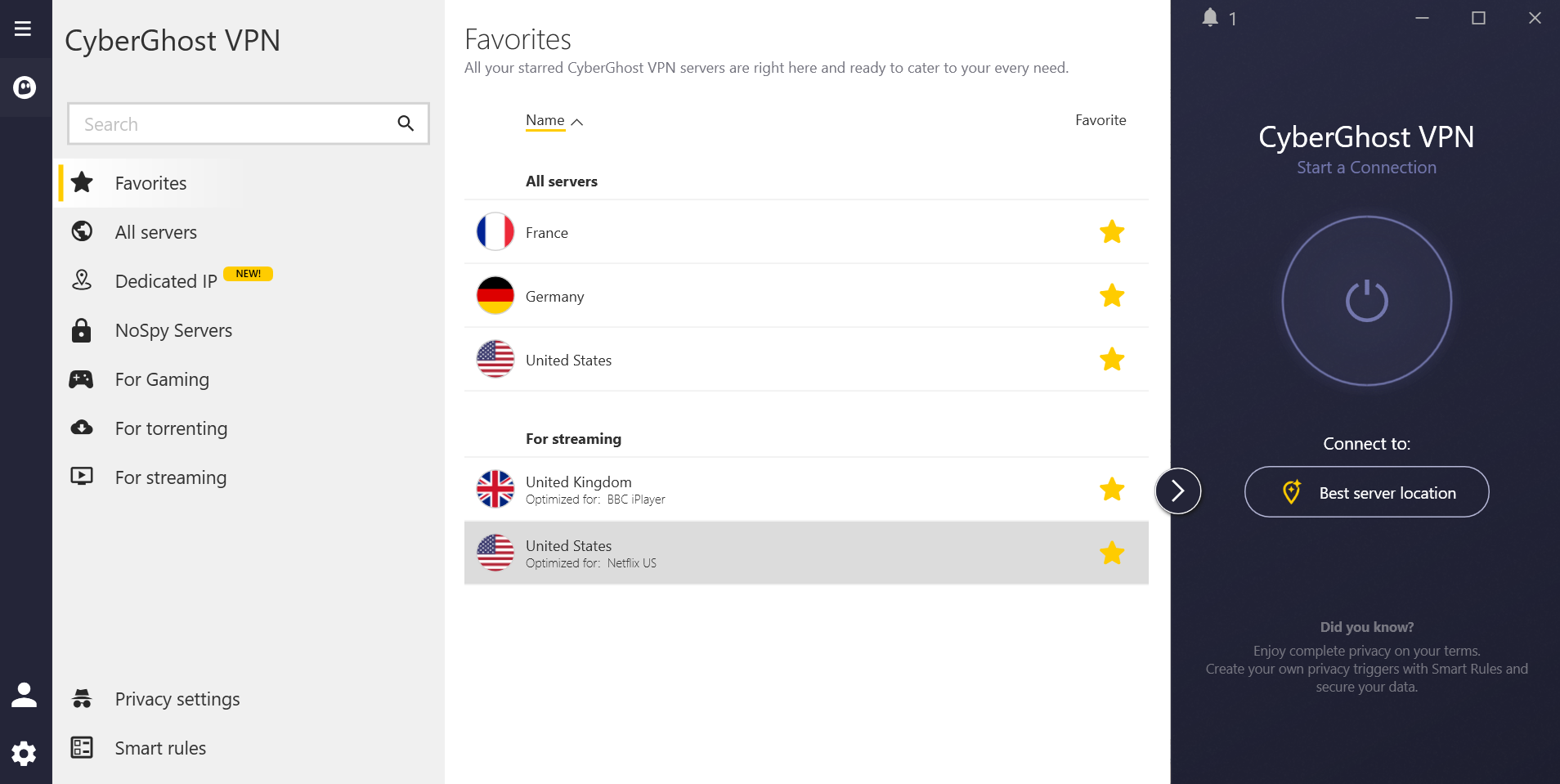
Other than its price, the best things about CyberGhost are its intuitive app design, its frictionless user experience and the super-low latencies that make it an ideal pick for gamers. Download speeds are great up close but middling far away. While I love how many servers it's got in Africa and South America, a few too many of them are virtual locations. I'll get into all this and more in the review; feel free to read straight through or use the contents table to find the area that interests you most.
Editor's note (1/16/26): We've overhauled our VPN coverage to provide more detailed, actionable buying advice. Going forward, we'll continue to update both our best VPN list and individual reviews (like this one) as circumstances change. Most recently, we added official scores to all of our VPN reviews.Check out how we test VPNs to learn more about the new standards we're using.
Findings at a glance
Category
Notes
Installation and UI
Windows app has more options and the most sensible organization
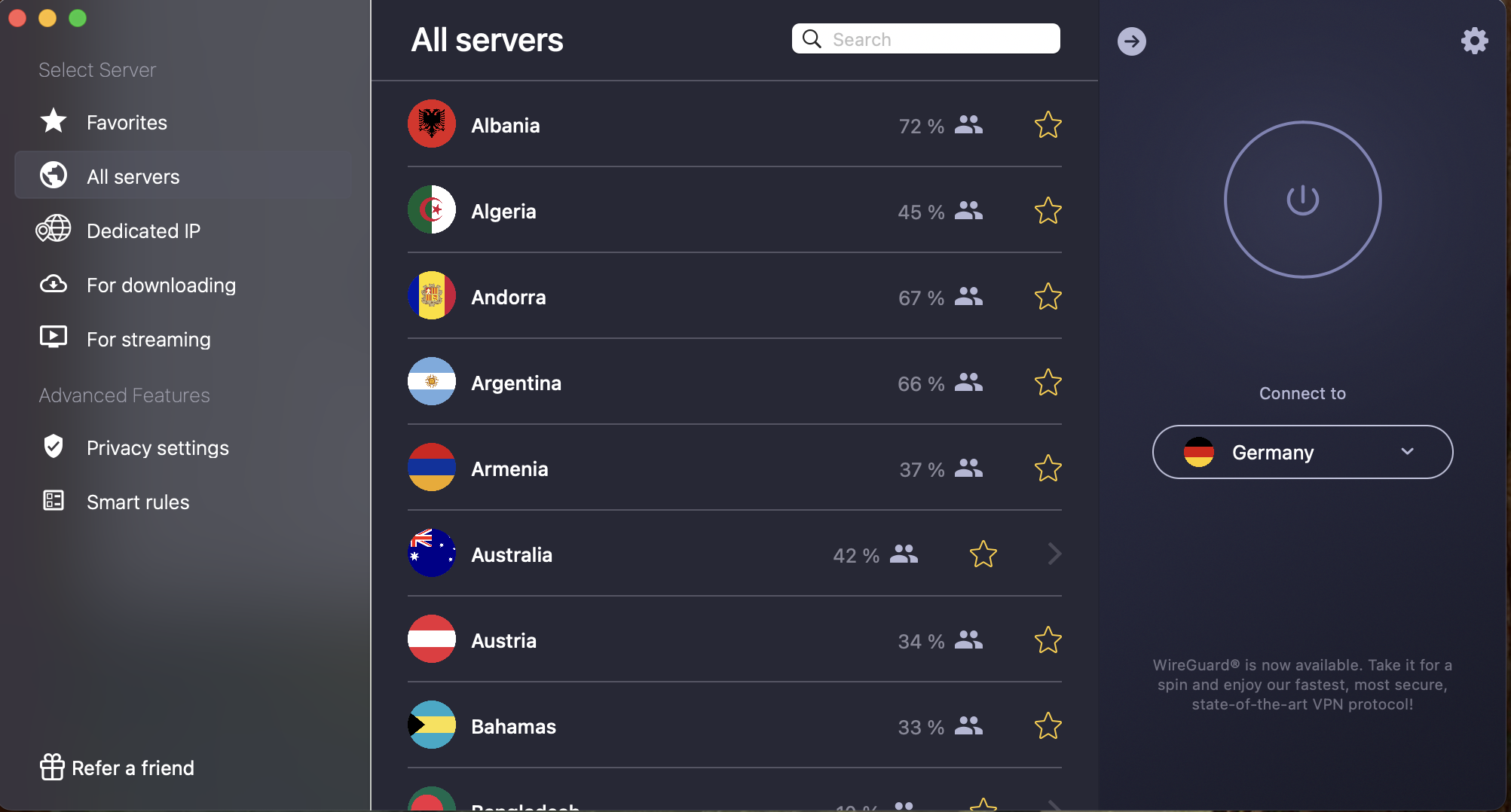
macOS app is very easy to use, but a bit lacking compared to Windows
Android and iOS both have simple main pages and slightly confusing preferences
No browser extensions (free proxy doesn't count)
Speed
Excellent latency tests, with ping times short enough to lead the VPN field
Great download and upload speeds on close-in servers
Distant servers lag somewhat on both upload and download, bringing down the worldwide average
Security
Uses WireGuard, IKEv2 and OpenVPN protocols, but they aren't all supported on all platforms
Blocks IPv6 and prevents WebRTC and DNS leaks
Disconnects when switching servers
Pricing
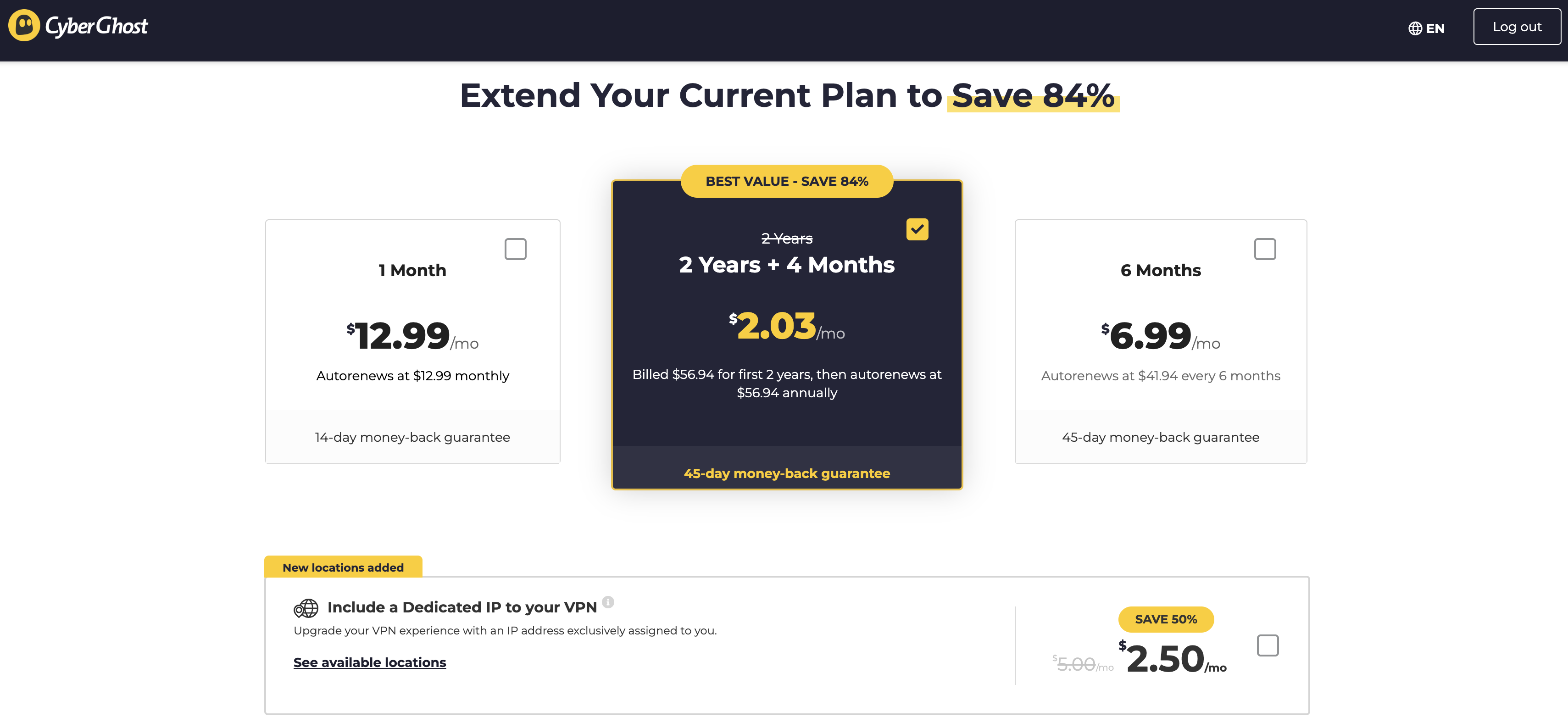
$12.99 per month
$41.94 for 6 months ($6.99 per month)
$56.94 for 28 months ($2.03 per month), renewing at the same price for 12 months ($4.79 per month)
Seven simultaneous connections
Bundles
Dedicated IP address for $2.50 per month
Privacy policy
Anonymizes all personal data
Can share data with other Kape subsidiaries, but only if they're based in areas with good privacy laws
RAM-only servers and full-disk encryption confirmed by audit
Has never given information to police
Virtual location change
Unblocked Netflix perfectly in five different regions using streaming-optimized servers and WireGuard
Server network
125 server locations in 100 countries
Good global distribution, with nine locations in South America and six in Africa
However, most servers in the southern hemisphere are virtual locations that may not give the best speeds
Features
Kill switch cannot be turned off except on Windows
Split tunneling by app on Android and by URL on Windows
Content blocker can only be turned on or off, no customization
Large network of torrent-optimized servers and streaming servers
Smart Rules automation is both user-friendly and deep
Customer support
Online help pages are well-written but poorly organized
Live chat responds quickly; there is a bot but it's easy to get past
Can also submit email tickets through an online portal
Background check
Founded in 2011 and based in Romania
Acquired by Kape Technologies in 2017
Installing, configuring and using CyberGhost
CyberGhost gets installation and UI largely right. There are no needless hurdles in the setup process. All its app designs put the important controls front and center and don't overload you with needless information. I've broken up my thoughts by platform, as CyberGhost is pretty different depending on where you use it.
Windows
CyberGhost downloads and installs amazingly fast on Windows 11. I didn't even have to grant any permissions. I just opened the .exe, clicked through a licensing agreement and logged into the desktop client. It took about two minutes end-to-end, including time I spent digging around in my password vault.
The CyberGhost VPN client for Windows 11.
Sam Chapman for Engadget
Once inside, you're greeted with a UI that looks an awful lot like Surfshark — and if it's not broken, don't fix it. Options for special servers are on the left, the server list is in the middle and the connection interface is on the right. The arrangement prioritizes the most important controls and keeps clutter to a minimum. The only thing I can find to complain about is that clicking on a country with multiple locations doesn't open the menu to choose between them; instead, you have to click on a hard-to-see arrow to the right of the name.
To access any of the special servers, click the appropriate tab in the left window, then choose from the list. Everything connects quickly. A gear icon at the bottom-left leads to all the special features and options, organized into three tabs: General (to do with the VPN app itself), CyberGhost VPN (to do with the VPN connection) and Account (to do with your subscription). The names could be better, but I can't argue with the clear and useful descriptions on each feature.
Mac
The download process on macOS Sequoia is as easy as it is on Windows 11. CyberGhost walks you through every step, installs its helper tools with minimal fuss and is ready to go out of the box. It's best to download directly from cyberghostvpn.com, since the App Store version is designed for iPads, not desktop computers.
Right after launching, the Mac app is pinned to the taskbar. To open it as a separate window, click the arrow button at the top-left. While it's in the taskbar, the only things you can do are connect, disconnect and switch to one of your favorite locations. You can do all that from the standalone window, too, so there's not much reason to ever leave it pinned.
CyberGhost's VPN client for macOS Sequoia.
Sam Chapman for Engadget
The interface on Mac differs from the Windows client in other noticeable ways. For one thing, it's permanently in dark mode, whereas Windows users get to choose between light and dark. There are fewer categories of servers in the left-hand column, with only torrenting (called For Downloading) and streaming options available — you can still connect to NoSpy, but only by going to the Romania location on the main list.
Also, the control panel gear is in the exact opposite location, sitting at the top-right of the connection window. The organization of options is also completely different and generally not as useful, with all the actual controls crammed into a single General tab.
This happened to me once or twice when my internet connection had no problems.
Sam Chapman for Engadget
Compounding the sense that CyberGhost didn't give its Mac app as much attention as its Windows app, I kept getting the odd error pictured in the screenshot above. The client would tell me I had no internet connection (my internet was fine) and direct me to run a connection test. This would always turn up all green lights and let me connect without any incident. It rarely tripped me up for more than a moment, but it was still bizarre.
Android
CyberGhost on Android is streamlined to the extreme, focusing on ease of use above all else. Connections happen quickly, and the server selection is narrowed down, with only the streaming locations getting their own tab. It's nice, but it does sometimes remind me of when I'd clean my room by shoving all the clutter under the bed.
CyberGhost connected on an Android phone.
Sam Chapman for Engadget
That's mainly because tapping the gear at the top-right opens up a preferences menu with a lot more going on than the main screen. Most of the options here aren't too complicated, but the shift is still jarring, especially since Android doesn't do as well as Windows at explaining what everything does. "Anonymous statistics" and "Share network data for troubleshooting" sound like the same thing to me, and we get nothing on the esoteric concept of Domain Fronting.
Still, I'm nitpicking a bit. CyberGhost's Android client does 95 percent of its job very well. Most of the settings aren't necessary anyway, so you can pick your favorite server and be on your way.
iOS
Much like its Android app, CyberGhost's iOS offering is sleek on the front end, a little cluttered in the back, but overall quite easy to use. Connections happen within seconds. The main page includes a useful option to tap on your current Wi-Fi network and immediately set Smart Rules for it. As with Android, only streaming-optimized servers and favorites are separated from the rest.
The main page of CyberGhost's iPhone app.
Sam Chapman for Engadget
The control panel also looks very similar to what you get on mobile. The apparent clutter comes from simple on-off toggles and more complex submenus being all jumbled up together, but you can use the VPN just fine without engaging with any of it. For the most part, CyberGhost on iOS does a lot to help you and nothing to get in your way.
Browser extensions
CyberGhost doesn't have a full-service browser extension. If you look for an extension link on the download hub, you won't find anything. What it does have is free proxy add-ons for Chrome and Firefox, which can be used to change your IP address to a new location.
However, proxies do not encrypt your traffic, leaving out one of the critical aspects of how a VPN works. The extension library pages for the CyberGhost proxies are vague about this, but they're no substitute for a full VPN. They're free and may be convenient for occasional streaming if they don't get caught, but they aren't secure.
CyberGhost speed test
I conducted all these tests on a wireless connection using the WireGuard protocol. For each, I selected either a physical server or a virtual location close to its physical source. Here's what each metric means in the table below:
Ping, measured in milliseconds (ms), is a measure of latency — how long it takes to send a signal from your device to its destination via the VPN server. Lower pings are better. Since signals can only move so quickly, latency tends to increase with distance.
Download speed, measured in megabits per second (Mbps), is what you probably think of as "internet speed" — how fast websites load and how much video you can stream without any pause to load.
Upload speed, also measured in Mbps, determines the rate at which data travels from your device to its destination. It's useful for posting content, saving files to the cloud, torrenting and two-way video calls.
Server location
Ping (ms)
Increase factor
Download speed (Mbps)
Percentage drop
Upload speed (Mbps)
Percentage drop
Portland, USA (unprotected)
16
—
58.70
—
5.80
—
Seattle, USA (fastest location)
22
1.4x
55.88
4.8
5.60
3.4
New York, USA
155
9.7x
45.43
22.6
5.43
6.4
Montevideo, Uruguay
111
6.9x
46.25
21.2
5.55
4.3
Lisbon, Portugal
328
20.5x
45.60
22.3
4.36
24.8
Johannesburg, South Africa
632
39.5x
34.12
41.9
3.68
36.6
Vientiane, Laos
350
21.9x
38.04
35.2
4.78
17.6
Average
266
16.6x
44.22
24.7
4.90
15.5
CyberGhost's speed test gave me mixed results — mostly good, but with some reasons for caution. To start on the positive side, latency results were excellent. No matter where I went in the world, the numbers only jumped above 400 milliseconds in one place, and that was the Johannesburg server that had problems across the board. CyberGhost's 266 average is significantly better than I got when testing Surfshark, currently the fastest VPN overall.
A speed test using the fastest location chosen by the CyberGhost app.
Sam Chapman for Engadget
Download and upload speeds looked good in my fastest location, Seattle. Using CyberGhost only slowed my browsing by 4.8 percent and dropped my upload rates by 3.4 percent, comparable to most of its leading competitors. At a distance, though, speeds started to falter. Things in New York remained reasonably fast, but with a lot of fluctuation between tests; unlike Seattle, numbers swung between the 30s and 50s.
As I virtually traveled the world, I saw more and more swings, plus sharp declines in South Africa (which is always the problem child of VPN servers, for some reason). To put this in perspective, CyberGhost never dragged that much on my browsing speed, and the internet remained usable no matter where I went. It's just slightly more sluggish than my favorite VPNs in every area — except latency, where it soars ahead.
CyberGhost security test
VPNs need to secure your internet activity against two things: intentional attacks and leaks due to negligence. A VPN should be watertight enough that it never lets your information slip by accident, while also defending your data against outside interference.
It's not hard to test whether a provider is meeting these two criteria. First, make sure it's using safe VPN protocols with modern encryption. Second, use an IP address checker to test for DNS, WebRTC and IPv6 leaks. Third, test encryption itself to ensure it's being applied equally to all data packets. Let's get started.
VPN protocols
CyberGhost supports three different VPN protocols, all of them up-to-date and secure. OpenVPN, available on Windows, Android, Linux and Fire TV, is my typical recommendation, balanced and secured through a multi-decade history of refinement. WireGuard, supported on every platform, is the new hotshot on the block, fast and stable but not quite as rigorously tested as OpenVPN. IKEv2, which works on macOS, iOS and Windows, connects more quickly than the others but isn't open-source.
I have some quibbles about how available these protocols are. OpenVPN should always be an option for everybody; leaving it off Apple devices doesn't make sense. I’ve asked CyberGhost about this and will update here when I get a reply. In the meantime, I can't complain about the protocols themselves, which use uncracked encryption ciphers and present no obvious weak points.
Leak test
I used ipleak.net to check CyberGhost for leaks. There are three likely causes for a VPN to accidentally reveal your real IP address: it failed to account for different IP types (IPv6 leak), a real-time connection went outside the encrypted tunnel (WebRTC leak) or it used a domain name server that an ISP could read (DNS leak).
CyberGhost never leaked my real IP address.
Sam Chapman for Engadget
CyberGhost blocks all IPv6 traffic, so there's no chance of an IPv6 leak. I checked for WebRTC leaks and didn't find any. Likewise, every time I connected to a VPN server and refreshed the page, I saw that server's IP address, proving that CyberGhost isn't leaking.
There is one important exception here: whenever you select a different server on your CyberGhost client, it disconnects from that server before connecting to the next one. This means that your data is exposed during the transition. It's annoying, but as long as you remember not to do anything risky while changing locations, you'll be fine.
Encryption test
For my final test, I used WireShark to capture images of the data packets CyberGhost was routing from my device to its servers. Sure enough, the outer layer of each data stream was encrypted no matter which VPN protocol I used. Ultimately, all my probing showed that CyberGhost is secure against both negligence and interference.
How much does CyberGhost cost?
CyberGhost sells three different subscriptions, all of them with the same features. The only difference is how long the plan lasts. You can save money overall by signing up for six months or two years at a time, but it costs more upfront. Each plan can be used on seven devices simultaneously.
These prices are subject to change.
Sam Chapman for Engadget
One month of CyberGhost costs $12.99, and it renews automatically at the same price at the end of each billing month. Each monthly renewal comes with a 14-day, money-back guarantee. You can get six months for $41.94 total, which works out to $6.99 per month. At the end of six months, it auto-renews at the same price. The six-month plan comes with a 45-day refund guarantee.
Finally, there's the two-year plan, which comes with a lot of fine print. The first time you sign up, it costs $56.94, which gets you a total of 28 months (working out to $2.03 per month). However, after your 28 months are up, all subsequent renewals instead get you a 12-month plan — still for $56.94, but now working out to $4.79 per month. That's still relatively cheap, but not nearly as affordable as some VPNs with perpetual two-year plans.
CyberGhost side apps and bundles
CyberGhost doesn't have much in the way of additional subscription offers, but that's honestly refreshing. In an age when even the best providers also need to be antiviruses, insurance agents and probably vacuum cleaners, it's nice to see a VPN that's content with just being a VPN.
CyberGhost does have a broader "security suite," but it comes at no extra cost and is currently available on Windows only. More info on that in the "Extra features" section below.
Dedicated IP
You can pay an extra $2.50 per month to add a dedicated IP address to your CyberGhost plan. With a dedicated IP, you'll have a stable address whenever you get online through the VPN, which makes it a lot easier to connect to firewall-protected web services. It's also exclusive, so nobody else can get you in trouble by misusing the IP address.
Close-reading CyberGhost's privacy policy
CyberGhost is located in Romania, which makes it subject to the strict privacy laws of the European Union. It's not legally required to keep tabs on its users or install government backdoors. That's a great start, but to be certain about a company's approach to privacy, it's best to look at its own words.
A VPN makes your online activity anonymous to anyone else who tries to look at it, but the VPN itself still has the power to violate your privacy if it chooses. This leads some people to advise against using commercial VPN services at all, though I don't go that far. The best VPNs build in features that make it impossible for them to abuse their access to your web traffic, such as RAM-only servers and full-disk encryption.
When trying to determine if you can trust a VPN with your privacy, the first place to look is its official privacy policy. This document lays out everything the VPN does to handle your personally identifiable information (PII). If the provider violates its policy, they can be sued, so it's not in their interest to lie outright in the document.
I went over CyberGhost's privacy policy with a fine-toothed comb — it can be found here if you'd like to follow along. It starts with the usual promise of "uncompromising protection": CyberGhost swears that "we are NOT storing connection logs, meaning that we DON'T have any logs tied to your IP address, connection timestamp or session duration" (all emphasis theirs).
That's the standard I'll be checking against: a total lack of any way for CyberGhost to read or share information on its own users. Let's see how it holds up.
These may just be words, but they have legal force, at least in civil court.
Sam Chapman for Engadget
The privacy policy wins early points by clarifying all the data it collects. You can see the whole quote in the screenshot above, but to summarize, any PII (like your email or IP address) will never be connected with anything you do online. Since absolute anonymity is impossible, this is the best we can hope for from a VPN.
Later on, the policy clarifies everything CyberGhost might do with personal data, none of which involves turning it over to authorities or selling it to advertisers. The most suspicious reasons given are "fraud detection/prevention" and "To enforce the terms of service," but these both relate to kicking users off CyberGhost itself, not tattling on them to the government.
The only potential problem comes in the section titled "Sharing Your Personal Data." Here, CyberGhost states that "we may communicate your personal data to a member of our group of companies," meaning all subsidiaries of Kape Technologies. I won't rehash the case against Kape in full — my ExpressVPN review covers it in detail.
Suffice to say the only real risk here is that CyberGhost might share PII with another Kape company located in a region with worse privacy laws than Romania or the EU. To me, this isn't a serious concern. First of all, Kape doesn't own any companies based in truly anti-privacy nations like China, India or Russia.
Moreover, the privacy policy states that CyberGhost won't share information with any entity not "located in the EU or another jurisdiction offering equivalent data protection standards." Every bit of data gets the same protections. This may mean PII enters a country in the Five/Nine/14 Eyes alliance, but the Eyes only matter if a VPN is already logging data it shouldn't have. It's not that abuse of intelligence-sharing agreements isn't a problem; it's just that the risk it poses starts with the VPN itself, not where it's located.
To sum up, I didn't see any red flags or loopholes in the CyberGhost privacy policy. Some clauses could be tightened up, and it always pays to be suspicious, but I'm confident that using this VPN doesn't risk your personal privacy.
Independent corroboration
CyberGhost has been audited twice by Deloitte Romania, once in 2022 and again in 2024. Following that pattern, I'll be looking out for another one this year. You need an account to read the full audit report, but it's only 10 pages and easy to summarize: the auditors found nothing in CyberGhost's systems that conflicted with its privacy policy.
The audit notes CyberGhost's server infrastructure as evidence. All servers are run on RAM with full-disk encryption, making any information they store completely ephemeral. Even if CyberGhost staff wanted to spy on you, they wouldn't see anything. The same goes for third-party hackers.
CyberGhost also posts a regular transparency report that lists how often law enforcement has asked it for information. As far as I could find, after hundreds of requests, there's never been a case where CyberGhost provided any information to cops.
Can CyberGhost change your virtual location?
For this section, I used Netflix to test whether CyberGhost's virtual location changes are detectable by other websites. Ideally, every time I change location with CyberGhost, Netflix would accept it as real and show me the content library from that country. If either of those things doesn't happen within three tests, the VPN has a problem.
Since CyberGhost has servers built for streaming, I used those for each of the five locations. You can see my results below.
Server location
Unblocked Netflix?
Changed content?
United Kingdom
3/3
3/3
Japan
3/3
3/3
Germany
3/3
3/3
Australia
3/3
3/3
Brazil
3/3
3/3
This test was a smashing success for CyberGhost. Every time, it showed me the proper video library for the location I chose and never once got caught by Netflix's firewalls. It's the best result I've seen in this section since I tested Proton VPN, and that's high praise if you know me.
CyberGhost has 125 server locations in 100 countries. Of those locations, 75 are real and 50 are virtual, which makes the math easy: CyberGhost's VPN server network is 60 percent bare-metal and 40 percent virtual. That's good, since physical servers let you calculate how much performance will deteriorate over distance — virtual servers are just as safe, but speeds might fluctuate depending on where they really are.
Region
Countries with servers
Total server locations
Virtual server locations
North America
9
21
5
South America
9
9
9
Europe
45
56
13
Africa
6
6
3
Middle East
6
6
4
Asia
23
23
16
Oceania
2
4
0
Total
100
125
50
Looking at the distribution of servers, we get good news and bad news. The good news is that there really are 100 different countries and territories to choose from, encompassing nearly all the virtual globetrotting you're likely to need. There are also lots of servers in the southern hemisphere, which is often the last place VPNs grow into. There's a wealth of choices in South America, plus several options in Africa and Central Asia.
CyberGhost's selection of VPN servers.
Sam Chapman for Engadget
The bad news is that the distribution of real servers is skewed toward Europe and the United States. None of the nine South American servers are actually located in South America; worse, a large number of them are physically located in Miami. If you're using CyberGhost in Argentina, don't expect top speeds from the Buenos Aires server, since it's actually over 4,000 miles away. CyberGhost's support center does include a list of where the virtual servers are relayed through, but it's not up to date.
Extra features of CyberGhost
CyberGhost has a few features beyond the VPN itself, though not as many as you might think. Compared to a provider like NordVPN, which goes all in on extra features, CyberGhost's offerings look pretty lean. But that doesn't matter as much if the features work well. Let's see how they do.
Kill switch
CyberGhost takes an unusual approach to its kill switch. In case you aren't familiar with the term, a kill switch cuts off your internet connection if your link to the VPN ever drops, protecting your anonymity in case of unexpected incidents. Most VPNs let you toggle the kill switch on and off, but on CyberGhost, it's fully engaged 100 percent of the time — except on Windows, where you can turn it on and off as desired.
Turning on the kill switch is almost always a good idea, but it's still annoying that Cyberghost gives many of its users no way to turn it off. In rare cases, kill switches can get overzealous, preventing you from getting online even when conditions are safe. It's an odd choice to remove a potential troubleshooting step from the user's control.
Split tunneling
Split tunneling lets you name some apps or websites that will run unprotected even while the VPN is active. This can help with certain services that refuse to work if they detect a VPN, or alternatively, can protect only one sensitive app or site while the others enjoy faster unprotected speeds.
CyberGhost only has full split tunneling on Android. It also offers a slightly different feature called Exceptions on Windows. Android split tunneling works by app, while Exceptions works by URL. In both cases, you choose individual apps or websites to leave out of the VPN. It's limited, but works as advertised.
Optimized servers
As I mentioned in the Netflix testing section, CyberGhost includes specialized servers designed for specific tasks. Other than the add-on dedicated IP servers, these come in four forms: "For gaming," "For torrenting," "For streaming" and "NoSpy." Gaming servers are apparently built to keep latency low, but I couldn't see much difference between them and the normal servers.
"For torrenting" is called "For downloading" on Mac, but it's all the same torrent-optimized servers. These are built to meet the download and upload speed requirements for effectively using P2P filesharing clients. CyberGhost has P2P servers in 86 countries, which makes it a good VPN for torrenting; only the lack of port forwarding keeps it from being truly great.
A few of CyberGhost's specialty servers on a MacBook.
Sam Chapman for Engadget
Each streaming server is built to unblock a specific streaming site in a particular country, occasionally for a single type of device. For example, United States streaming servers are aimed at Netflix, Hulu, Peacock, Disney Plus, Amazon Prime Video and more, many in their Android or Smart TV forms. UK servers work for Netflix UK, BBC iPlayer, ITV and more. In total, there are 106 streaming servers in 22 countries — not quite as extensive as the overall list, but it's important to remember that non-optimized servers still work fine for streaming.
Finally, the NoSpy options connect to a set of servers in Romania that CyberGhost claims to manage entirely in-house, with nobody able to access them except CyberGhost's own team. This is good, but it leaves me suspicious about who's running the rest of the servers. Are they all run by third parties except the NoSpy locations? That's relatively common, but it creates vulnerabilities if the VPN provider doesn't insist on high standards from collaborators.
Content blocker
CyberGhost's content blocker is underwhelming. All you can do is turn it on and off. There's no customization like you get with Windscribe's R.O.B.E.R.T. and no clear statement of where it's getting its list of domains to block. In practice, it does block in-page ads, but without specifics I couldn't test it in more detail.
There's no customization on CyberGhost's blocker -- just turn it on or off.
Sam Chapman for Engadget
Smart Rules
The Smart Rules automation suite is the crown jewel of CyberGhost's features and the most common reason I recommend it. Using Smart Rules, you can automate CyberGhost's behavior to a degree inconceivable on most other VPNs.
You can program CyberGhost to take different actions on each of your usual networks.
Sam Chapman for Engadget
Smart Rules come in two forms: actions performed automatically when CyberGhost launches or connects and actions that respond to new Wi-Fi networks. In the former category, you can set CyberGhost to connect when you open the app, determine which location it connects to and even set an app to automatically open after it connects.
Wi-Fi rules depend on whether the network CyberGhost detects is secured or not. For each type of network, you can set the VPN to connect, disconnect, ask you what to do or ignore it entirely. Once it recognizes a Wi-Fi network, you can set specific rules for that network. It's at once very easy to use and capable of surprising depth.
CyberGhost customer support options
CyberGhost primarily offers customer assistance through its online portal, which can be reached at support.cyberghostvpn.com or by going through the app. If you choose the options "CyberGhost VPN help" or "FAQ" in the app settings, you'll be taken to the support pages in a browser. I recommend going through the URL, since that takes you to the highest-level page.
The support center feels distressingly like an afterthought. Written guides are divided into four sections: Guides, Troubleshooting, FAQs and Announcements. The latter has only one article and the former three are roughly interchangeable — if I'm having trouble connecting to a server, is that an FAQ, a Guide or Troubleshooting? Looking for any particular subject here is a needle-in-a-haystack search.
Fortunately, there is a search bar, but this presents its own problems. A simple search for "connection issues macos" turned up 72 results, including one called "Troubleshooting connectivity on macOS" and another titled "Troubleshooting VPN connection on mac." These two articles are in different sections, but mostly contain the same information, except that the former has an extra walkthrough on renewing your DHCP lease.
It's a shame, because the articles themselves are mostly clear and helpful, with lots of well-chosen screenshots. Someone clearly worked hard on the content, but the overall organization left me thinking the knowledgebase was thrown together years ago and hasn't been checked since.
Live support experience
If you have trouble finding what you need in the written guides, you can get personal support in two ways. One option is to submit an email request through a Zendesk portal. This gives you all the time you need to frame your question and add supporting materials, at the cost of waiting longer for a reply.
Your other option is to access live chat, which you can do from anywhere on cyberghost.com by clicking the chat button in the bottom-left corner of the screen. Live chat starts with a "CyberGhost AI Assistant" (what we used to call a chatbot in the good old days) which runs you through several diagnostic questions. To its great credit, the bot does not try to link you to articles in the knowledgebase, understanding — as too many providers don't — that nobody tries live chat unless the FAQ isn't working for them.
It didn't take me too long to get in touch with what was apparently a live expert.
Sam Chapman for Engadget
I decided to bother CyberGhost about the connection issue I wrote about in the Mac UI section. Within seconds, the chatbot offered me a button that would transfer me directly to a live agent. I only had to wait about 4 minutes before the agent got in touch. After that, each response took about a minute and explained everything carefully and efficiently. It was as helpful as the written knowledgebase wasn't.
CyberGhost background check
CyberGhost was founded in 2011 in Bucharest, Romania, where it's still headquartered today. It claims to have around 38 million subscribers and a staff of 70. It appears to be most popular in France and Germany.
The only thing that makes me at all uncertain about CyberGhost is that I can't find much information about its history — it doesn't even have a Wikipedia page in English. By far the most likely explanation is that CyberGhost is exactly what it seems to be: a reliable, drama-free VPN provider that doesn't court controversy. Still, I'm naturally paranoid, so I'd understand if this lacuna sends you running back to a better-documented VPN.
There is precisely one date in CyberGhost's history that everyone lists: 2017, when it was purchased by Kape Technologies. As a VPN reviewer, I have to think about Kape a lot. My opinion is that the fear around it doesn't measure up to reality. For example, back when it was known as Crossrider, Kape was not a "malware distributor"; it sold an ad-injection plugin that turned out to be a useful malware vector.
Perhaps Crossrider could have worked harder to stop its platform from being misused, but that doesn't make it a security threat today. Similarly, being owned by a businessman from Israel does not mean that Kape or CyberGhost are secretly controlled by Mossad.
I'm not here to defend Kape — I'm just pointing out that a lot of the fear isn't backed up by evidence. To my mind, Kape's consolidation of the VPN industry (it also owns ExpressVPN and Private Internet Access, plus two websites that review VPNs) is bad enough without having to look for additional conspiracies. It's up to you to decide whether or not CyberGhost's parent company presents a hard line you won't cross.
Final verdict
At the end of my journey with CyberGhost, I may not be blown away, but I'm definitely pleased. After my poor experience with PIA, I was afraid the only budget VPN I could wholeheartedly recommend was a two-year subscription to Surfshark. CyberGhost is a meat-and-potatoes VPN — it's not pushing any envelopes, but it's cheap and it does the job.
All that said, I recommend it more to casual users than to people who really need secrecy. There are just enough reddish flags that I wouldn't necessarily trust it with life-and-death information: the (possible) use of third-party managers for all servers outside Romania, the freedom to share information with any Kape subsidiary, the loss of encryption when switching servers. It'll keep you anonymous and let you stream foreign TV for cheap, but you should still choose Proton VPN if you need serious privacy.
This article originally appeared on Engadget at https://www.engadget.com/cybersecurity/vpn/cyberghost-vpn-review-despite-its-flaws-the-value-is-hard-to-beat-200000250.html?src=rss
Look, virtual private networks are great — I wouldn't have made a list of the best VPNs if I didn't recommend using them. But being able to control your own technology is also important. A VPN can provide protection and peace of mind when used properly, but you may not want it active on your phone all the time.
For example: Are your Google search results suddenly in German? That’s one example of what can happen if you leave your virtual location set to Berlin or Vienna. Or maybe a VPN you installed for work or to watch a single tennis match is persistently trying to keep itself active.
The point is, deactivating a VPN on an iPhone can sometimes be unusually tricky, because there’s more than one off switch. Fortunately, it's not hard. There are several easy ways to disconnect from an iOS VPN or delete it entirely. If you catch it turning itself back on, I'll show you how to stop that too.
Three ways to turn off your iPhone VPN
I'm using a fluid definition of "turn off" here. Some of the steps below simply disconnect the VPN, while others remove it from your phone altogether. I'll make it clear in each section what the outcome will be.
How to disconnect in the VPN app
This is the easiest way to turn off a VPN on your iPhone. First, find the VPN app that’s active, which should be on your home screen somewhere. Each app has a different interface for connecting and disconnecting, but the disconnect button should be fairly obvious — it may say the word "disconnect" or show a green power icon. In any case, it should be right on the home screen, without requiring any digging through menus.
Example of where to find the disconnect option on a VPN's home screen.
Sam Chapman for Engadget
Tap the disconnect button and wait for the VPN to clearly state that it's disconnected. Check to make sure the rectangle with "VPN" inside has disappeared from the top of your iPhone screen. The VPN is now disconnected.
How to turn off the VPN in Settings
If you aren't sure which VPN app is active, or if its interface doesn't make it clear how to turn it off, you can shut it down from the Settings menu instead. Find the app on your home screen that looks like several interlocking gray gears and tap it.
Next, scroll down and tap the VPN option. If it's not present (which it won’t be on older iOS versions), tap the General option next to another picture of a gray gear. Scroll down again and tap VPN & Device Management by yet another gray gear. Finally, tap the VPN option at the top of the screen to reach the VPN management page.
Location of the VPN settings on iOS.
Sam Chapman for Engadget
If you have a VPN active, you should see an option at the top of the page labeled VPN Status. Toggle it from Connected to Not Connected. The VPN icon should disappear from the top of your screen, indicating that it's turned off.
How to delete the VPN app altogether
If you don't want the VPN on your phone at all, you can turn it off permanently by deleting both the app and the configuration. This is a lot harder to undo, so only do it if you're certain.
Start by deleting the app the same way you'd get rid of any other app. Tap the icon and hold until a pop-up menu appears. Select the Remove App option in red text, then click Remove App again when prompted.
Deleting a VPN on the iOS home screen.
Sam Chapman for Engadget
Deleting the app should also delete the configuration, but you can verify this for yourself. Follow the process from the previous section to find the VPN settings page. If there's still a VPN profile in those settings, tap the circled letter "i" next to its name, then tap Delete VPN at the bottom of the screen. The VPN is now gone from your iPhone unless you re-download it from the App Store.
Troubleshooting: When an iPhone VPN turns itself back on
Sometimes, even though you've followed all the steps, that pesky VPN rectangle is back on your screen the next time you unlock your phone. If your iOS VPN keeps turning itself back on, a few things might be happening, most of them thankfully fixable.
If you did not delete the VPN, it may be turning itself back on because its settings are telling it to. Go into its preferences menu and check for a setting called "auto-connect" or something similar. Settings like these have the VPN connect by itself to protect users who forget to activate it manually. Toggle all auto-connect options off and the problem should stop.
It's also possible that settings on the iOS side are making the VPN reconnect. Go to the VPN settings page (you'll find instructions for getting there in the previous section) and find the name of the active VPN profile. Tap the "i" next to it. On the next page, turn off "connect on demand" to stop the automatic reconnections.
If you did delete the VPN, but it's still reinstalling itself and turning back on, make sure that you deleted both the app and the connection profile. Reboot your iPhone to make sure all the settings stick. If the problem persists after all this, you've either got malware disguised as a VPN or you're using a school or work phone where the VPN can't be uninstalled.
If you aren't on a phone provided by a school or office, meaning you probably have malware, download an antivirus app and run a complete scan of your iPhone. This should remove any persistent files that keep reinstalling the virus. If, after all this, the VPN is still turning itself back on, I recommend burning your phone in a salt circle with a bundle of sage.
When should you turn off your iPhone VPN?
I encourage everyone to use a VPN every time they connect to the internet, but there are some situations where going through a VPN server is less convenient (this is the whole reason split tunneling exists). Here are a few cases in which temporarily turning off your VPN might be a good idea.
The VPN isn't working. If your browsing speed is sluggish or the VPN keeps dropping the connection, your VPN server might be having problems. Disconnecting and reconnecting, even in the same location, should switch you to a different server that may work better.
The VPN is causing unintended browsing errors. If you’re using mapping software or just trying to do a location-based search, having your VPN active can cause more problems than it solves.
Your internet connection is unstable.A VPN adds an extra step to the process of getting online. If your phone is already struggling, the VPN might be an unnecessary complication.
You're on a site that blocks all VPNs. Sites that work based on your location, including all streaming sites, may blanket-block VPNs so nothing messes with their location services. Good VPNs can get around these blocks, but even the best sometimes fail. In these cases, briefly turning off the VPN may be a good idea.
Your battery is low. VPNs can put a strain on your phone's battery life. This varies with the quality of your VPN, but you may sometimes need to shut it off if your battery is in the red.
How to turn off iCloud Private Relay
iCloud Private Relay is not a VPN, but it's often confused for one. If you found this page because you want to turn it off, you're in luck — the steps are just as simple as turning off a VPN. Start by opening Settings, then tap your name. Scroll down and tap iCloud.
Private Relay will only be active if you're an iCloud+ subscriber. If you are, tap Private Relay, then choose whether to turn it off temporarily or indefinitely.
This article originally appeared on Engadget at https://www.engadget.com/cybersecurity/vpn/how-to-turn-off-a-vpn-on-iphone-180000533.html?src=rss
Chances are that you're here because you've heard a virtual private network (VPN) can change your virtual location, and want to know what that means. If you know already, head over to my best VPN list to learn which services I recommend for changing your location. But if you're clueless, read on.
Whenever any device connects to the internet — whether it's a laptop, a phone or a smart Lego brick — it's assigned a unique IP address that other devices can use to identify it. Think of the name you give the barista at a coffee shop, except instead of a hot beverage, you’re being served websites and digital audio and video.
That's the upside. The downside is that a device's IP address can be used to find its location in the real world. That means service providers can show you local weather reports — as well as targeted local ads. More ominously, however, it means service providers can restrict what you see online based on where you are physically. That impacts everything from the fun (what Netflix has available to stream) to the serious (what information gets censored on the government's behalf).
A VPN gets around that downside by running all your online activity through a middleman server before sending it to its destination. Instead of your real IP address, everyone sees the address of the VPN server, along with its geolocation. That means you can subvert any local restrictions getting in your way: You’re actually in Houston, but so far as the website you’re viewing is concerned, you seem to be coming from Amsterdam. Here's how to do it.
How to change your virtual location with a VPN
With so many excellent commercial VPNs on the market, changing your virtual location is a lot easier than it sounds. You don't need to be a hacker — just find a good VPN app and connect to a server in your desired location. On almost any VPN, this is a simple matter of opening the app or desktop client and choosing the server location from a list.
On Proton VPN, for example, you can switch locations by clicking the name of any country in the list on the left.
Sam Chapman for Engadget
However, as with any technology, there are some potential pitfalls. For reference, I've laid out the steps below for both desktop and mobile devices.
How to change location on Windows or Mac
Use these steps to change the virtual location of any desktop or laptop device running macOS or Windows. There may be slight variations, but in general, this process works for any top VPN.
Select a VPN provider. You can rely on Engadget's best VPN list or, if you're unable to pay for a new subscription right now, our list of the best free VPNs. My personal choice is Proton VPN, but there are other good options. Look for a service with fast speeds, modern encryption and a long, non-controversial record in the industry.
Create an account with the VPN and save your username and password. Unless it's a forever-free service, this is when you'll be asked to pay for a subscription. If you're sure about your provider, you can save a lot by going with a long-term deal. See our list of the best VPN deals for ideas.
Download the VPN app. It's best to go through the VPN's website, even if you're on Mac — in rare cases, the App Store versions can be outdated or short on features. Look for a download center on the site, and make sure you enter it while logged in.
Install the VPN app. Most VPNs have an installation flow built in, so all you have to do is follow the steps. If the VPN asks you to change your settings or grant it permissions, do it; this installs the tools it needs to do its job.
Open the VPN app and find your way around the user interface. At a minimum, make sure you know how to connect, disconnect and open the location selection menu.
Connect to a server in the location where you want your internet connection to appear to originate. If you're trying to get around local restrictions, you can just pick any nearby country without that censorship — for example, if you're in China, then Japan, South Korea or Singapore will work. If you're after content from a specific country, choose a server in that country.
Get online through a browser or connected app as you normally would. To make sure your location has actually changed, use a site like WhatIsMyIPAddress to check where you're coming from.
When you want to use your real location again, disconnect from the VPN or choose a server in the county you're in.
It's not necessary, but I also recommend activating your VPN's kill switch if there is one. VPN servers aren't perfect, and they do drop connections from time to time. If this happens, an active kill switch also cuts off your internet connection so your real location isn't visible for a millisecond.
How to change location on iPhone or Android
The process for using a VPN to change your virtual location on mobile is pretty similar to how it's done on desktop. Again, while individual installation flows have their own quirks, the following steps are broadly applicable to any iOS or Android VPN.
Pick a VPN provider you like. The best VPNs also tend to be the best for mobile, including Proton VPN, ExpressVPN and Surfshark. On mobile, you can use app store reviews and comments to research. Make sure you're getting the real version of your chosen VPN and not a similarly named one trying to piggyback.
Download the VPN from the Apple App Store or Google Play Store. At this point, if you haven't paid yet, you may be able to take advantage of a free trial by opening the app and proceeding through the setup flow. This is a good time to test if the VPN is changing your location in ways that can't be seen through.
Follow the VPN's instructions to create an account, including paying for a subscription if necessary.
Take some time to learn to use the VPN app. Mobile interfaces have to pack more features into a smaller space, usually relying on tabs. Try and find the tabs for picking server locations and toggling VPN settings.
Connect to a server in your desired location. Make sure the VPN is actually active before you proceed (most of them make it pretty clear, but it's still easy to forget).
Get online through a browser or another internet-capable app.
When you're finished, disconnect from the VPN to return to using your real location.
One more note: on both mobile and desktop, I recommend using either a paid VPN or a free VPN supported by a paid subscription. Entirely free VPNs come with risks, and some popular apps secretly share problematic connections.
Why change your virtual location?
Changing your virtual location isn't hard, but it's still an extra step between you and the internet. However, the benefits of location masking far outweigh the small amount of extra work. Hiding your IP address — and your location along with it — is one of the most impactful steps you can take to stay safe online.
Concealing your IP address has massive benefits on its own, even if you use one close to your real location (which gets you shorter loading times). Lots of web services track you without your consent, frequently for advertising purposes. Some of this is done through third-party cookies, but a lot of it starts with building profiles about your IP address.
Illicit actors can also take advantage of your IP address and its geolocation. A hacker can track you down to within your ZIP code — though an IP address can't pinpoint your location to the square foot, it makes it much easier to narrow down where you live. Even with just your IP address, hackers can launch DDoS attacks against you, use the IP to make fake social media accounts in your name or even call in SWAT teams to your location.
By changing my location to the UK using ExpressVPN, I can see shows on Netflix that aren't listed in the US.
Sam Chapman for Engadget
Although masking your virtual location can be vital to staying safe online, there are other practical and even fun reasons to do it. For one thing, when traveling abroad, you might want to use a site only available in your home country. Simply connect to a server located near home and you can use your bank account and local streaming libraries as normal.
If you're home, there are lots of benefits to being virtually in another region. You can see a foreign country's streaming libraries and shop for deals that may only be available in its currency. You can also get around any nationwide online censorship and potentially download banned apps. Just be sure to be aware of your local laws to know if doing so is merely frowned upon, or if it’s truly against the law.
Can a VPN change your GPS location?
There's one more critical point to remember when changing location with a VPN. The VPN server only changes your IP address and the physical location associated with it. It does not change the GPS location your device might be broadcasting.
GPS data can leak out in a few ways. Tablets and phones have location services turned on by default, and as anyone who's heard a true crime podcast knows, they can also give away your location by contacting cell towers. Web browsers often have similar features. Websites can also use HTML5 geolocation to access your GPS — provided you give permission, but that's easy to do without thinking.
Some VPNs, including Surfshark and Windscribe, do have features designed to fool GPS, but they're not standard. When you're changing your location with a VPN, make sure to turn off location services and avoid granting any permissions that might reveal where you really are. You can also run a separate GPS spoofing app alongside your VPN.
How to troubleshoot a VPN that's not changing your location
If you've found that browsers are still seeing your old IP address while you have a VPN active, or that websites show you the same content when you're supposed to be virtually abroad, there's a chance your VPN isn't actually changing your location. To test if your real position is leaking, start by checking your IP address (with a search engine or WhatIsMyIPAddress). If it matches your home location, something has gone wrong.
Note that it's not necessarily a problem if it doesn't match your home location or the stated location of your VPN server. VPNs use virtual server locations to reach a lot of locations where brick-and-mortar servers aren't practical — Windscribe, for example, does not have a physical data center in Antarctica.
If you find that your VPN is leaking your real IP address, try these troubleshooting steps in order. I've arranged them roughly from least to most time-intensive.
Disconnect from your VPN and reconnect to the same location. This should hook you up with a different server in that same place. Test your IP again — there's a good chance the problem was isolated to the first server you tried.
Try a new location (skip this step if you need a server in a particular country).
Try a different VPN protocol. If you're using WireGuard, switch to OpenVPN or IKEv2.
Make sure location services are turned off.
Clear your browser cache and cookies to get rid of any saved information.
Test for DNS leaks. Your VPN might accidentally be sending your IP address to a public server to resolve DNS requests. IPleak.org is a good tool for catching this.
Try a different VPN. Use a free service like Proton or Windscribe and test for leaks. If the problem reoccurs, it might be coming from inside your network.
Contact the helpdesk for your original VPN and inform them about the problem. Get screenshots of the VPN connected to the leaky location next to IP address data confirming the leak.
I've already mentioned several VPNs that do a good job of changing your location, but in case you're here for product advice, here are all my recommendations in one place. My favorite VPN is Proton VPN, which is so far the only service to receive full marks on my location-change test. I used 15 of its servers in five different countries to access Netflix. Each time, I saw the destination country's full content library like I was really there.
Surfshark is a close runner-up in this category. It passed 14 out of 15 tests, only slipping up once in Japan — and a quick disconnect and reconnect was enough to fix that. I got equally great results from ExpressVPN, only having to retry one server in the UK. NordVPN performed perfectly in every location except Nigeria, and that still didn't leak my real IP address. The problem only seemed to exist on Netflix.
This article originally appeared on Engadget at https://www.engadget.com/cybersecurity/vpn/how-to-change-location-with-a-vpn-140000339.html?src=rss
Installing a virtual private network (VPN) on an iPhone or iPad is easy. The days are gone when Apple users had to be content with the leavings from the Windows ecosystem — in 2026, all the best VPN services have secure, user-friendly iOS apps on par with every other platform. If you've decided to add a VPN to your iPhone to stay anonymous online and change your virtual location, you've got plenty of great choices.
Since you're here, chances are you're familiar with the benefits of using a VPN, including security on public Wi-Fi and the ability to explore streaming libraries in other countries. But you may still be daunted by the process of actually choosing, installing and configuring a VPN on your iPhone.
In this article, I'll walk you through the steps, including how to configure a VPN manually without going through a service. Check out my how to use a VPN piece for more general information.
How to choose an iPhone VPN
One of the trickiest parts of installing an iPhone VPN is picking the right service. That brings us to our first pro tip: Don’t just go to the App Store and search on “VPN.” That will simply front-load whichever vendor(s) are paying for top placement (note the little “Ad” icon) as well as a laundry list of free services that come with big caveats. There are dozens of mobile VPNs out there, and many of them don't put the user first (for example, I reported last year on popular VPNs that failed to disclose shared security flaws). Choosing hastily can leave you stuck with an iOS VPN that's either mediocre or actively harmful.
Before downloading an iPhone VPN, do some research into the provider's background. A dependable VPN should have a well-written customer support page, a clear timeline of its history and a way to tell at a glance who actually owns and operates it. Check the reviews on the app store — it should have at least several hundred, almost all 4s and 5s.
iPhone users have a particular advantage here: several VPNs let you download their iOS app and start using it without paying. You can use this free trial period to put the VPN through its paces. Start by testing its speed using Ookla speedtest or a similar app. You should also use an IP address checker to make sure it isn't leaking; to confirm this, just check your phone's IP address before and after connecting to the VPN and make sure it's different the second time.
To keep things simple, my top recommendation for all platforms is Proton VPN. Out of all VPNs, it strikes the best balance of solid security, fast performance, useful features and a commitment to user privacy. Other iPhone VPNs I love include ExpressVPN, Surfshark and NordVPN.
How to install a VPN on your iPhone
Installing an iPhone VPN is like installing any other app. Just go to the App Store, find the VPN you've chosen and download it onto your phone. When it finishes downloading, open the app to grant permissions and finish setup. However, since there are a couple of potential sticking points, I'll run through the steps in more detail.
Proton VPN on the iOS app store.
Sam Chapman for Engadget
Open the App Store.
Tap the search bar and type in the name of your chosen VPN. Hit Search and look through the list of results. Be careful to pick the right one — there are some "mockbuster" VPNs that try to snare people looking for well-known names. As a rule, the one with the most reviews is the service worth using.
On the page for the VPN app, tap Get. Enter your Apple ID and password to begin the installation.
Once installation is complete, either tap Open in the App Store or find the new VPN icon on your home screen.
Create a VPN account with a username and password. Most services let you do this within the app, but you may have to shift temporarily to a browser, so make sure you've got internet access.
Choose a subscription. If there's a free trial, grab it and use it to test the VPN. If not, or if it's already expired, choose a plan that fits your budget and needs. Longer-term plans tend to save you money on average, but cost more at the start.
On the VPN app, log in with your new credentials. You're now ready to get started.
If you aren't interested in paying for software right now, you can still get an iOS VPN. Check out my list of the best free VPNs, which all have iPhone apps. We also constantly update a curated list of the best VPN deals for bargain hunters.
How to configure and use a VPN on your iPhone
An iOS VPN is generally usable with the default settings. Even so, it's a good idea to look through the options — you may not end up using all of them, but many of them are vital security checks or important quality-of-life boosters.
Proton VPN's NetShield content blocker on iOS.
Sam Chapman for Engadget
Here are some quick steps to make sure you're getting the best performance. These settings are in different places on each VPN, but most can be found by clicking a button with a gear icon, or any page labeled "settings" or "preferences."
Turn on the kill switch. This will protect you from broadcasting any data the VPN hasn't encrypted. In the event the VPN suddenly disconnects, the kill switch also cuts off your internet connection.
Set the VPN to always reconnect automatically if it disconnects. The method for doing this varies between services, so check the VPN's help page. Some (like Proton VPN) have an always-on VPN setting in the app itself, while others (like ExpressVPN) handle it through iOS settings.
Configure split tunneling. Not many iPhone VPNs have this option, but if yours does, you can use it to let certain apps or websites skip the VPN tunnel. Make sure to only bypass the VPN on sites and apps that share no sensitive information, or that refuse to work with a VPN active (some banks are like this).
If your VPN has a feature for blocking ads and malware domains, I recommend using it — the worst it can do is not work. Some also include parental controls, in case you're setting up the VPN on your child's phone.
Create shortcuts. Sometimes called Profiles, this relatively common feature lets you connect to the VPN and open a certain website with one tap.
Decide when and how you want the VPN to send you notifications.
Check available protocols. It's almost always best to let the VPN pick for you, but if you want to choose for yourself, IKEv2 is generally the fastest.
Look over the server list to see what choices are available.
When choosing a VPN server, think about what you need the VPN for. If you're just using it for privacy, pick the fastest server (or let the VPN app choose it for you). On the other hand, if you want to watch a movie or TV show that's only on streaming in another country, choose the fastest server in that country. If you're on a good VPN, it still shouldn't slow you down too much.
If you have the address of a VPN server and the necessary credentials, iOS lets you set up your own VPN and connect directly. This is less convenient than using a provider app, since you need to know the details about every server you connect to, but it's nice if you're worried about trusting your privacy to a third party. It can also be convenient for quickly accessing a work or school VPN from your phone. Here's how to do it.
Manually setting up a VPN connection on iOS.
Sam Chapman for Engadget
Open the Settings app. Scroll down and tap General.
Scroll down again and tap VPN & Device Management. Tap the word VPN on the new page, then tap Add VPN Configuration. You should reach the screen shown above.
Make sure Type is set to IKEv2, then enter the Description, Server and Remote ID for the server you're connecting to (plus the Local ID if there is one).
Your source for the server information should also have told you if it authenticates access with a username/password or certificate. Pick the correct option, then enter the credentials required.
Tap the Done button or the blue checkmark at the top-right of the screen.
You'll arrive back on the previous menu with your new VPN option available. Toggle it on to connect. To turn it off, return to the same menu and deactivate the switch.
Do you need an iPhone VPN?
Whenever you get online, your internet service provider (ISP) assigns an IP address to your device — a unique fingerprint that follows you throughout the session. Your ISP may sell this knowledge to marketers to target ads at you, or in worse cases, collaborate with governments willing to violate their citizens' rights to privacy.
When you use a VPN, though, your real IP address is hidden behind that of the VPN server, so nothing you do on the internet connects back to you. That's why I always advise using a VPN on any device, including iPhones, that connects to the internet. It's even more important on the unprotected public networks you sometimes find in cafes and hotels. On the fun side, you can also use a VPN to change your virtual location to show you different content libraries on Netflix and other streaming platforms.
One more thing: I often hear iPhone users ask whether they need a VPN, since iCloud Private Relay comes standard on iOS devices. Just to clear this up, iCloud Private Relay is not a VPN. As you can see from this support page, your ISP can still see your real IP address when it’s active.
This article originally appeared on Engadget at https://www.engadget.com/cybersecurity/vpn/how-to-use-a-vpn-on-iphone-201743118.html?src=rss
Chances are that if a VPN is marketed to everyday users, it more or less runs itself. As long as you go with one of the best VPNs instead of setting up your own manual connection, the interface is likely built so you have to engage with it as little as possible. Generally, if you find yourself constantly thinking about your VPN while using it — as happened to me with Norton VPN — that's a bad thing and you should change providers.
That said, it's still useful to get a high-level view of how to use a VPN, especially if you've never used one before. In this article, I'll walk you through how to download, install and configure a VPN on any platform and how to choose servers for specific situations. I'll also discuss specific steps for desktop and laptop computers, phones, tablets, smart TVs, game consoles and routers.
How to download and install a VPN
There are over 100 VPNs available on the internet and the two big mobile app stores, but most of them follow a similar approach to download and installation. Except for certain free VPNs, you'll need to create an account on the VPN provider's website, install the VPN client, then use your account to log in. Here are the steps.
In a web browser, navigate to a VPN provider's website. For suggestions on where to start, check out our list of the best VPN deals. Click any link that mentions getting the VPN or claiming the deal — as a rule, they aren't hard to find.
Select a plan based on the length of time you need the VPN for, the features you want and the number of devices you'd like to use the VPN on simultaneously. Add a payment method. You'll be prompted to create the username and password for a new account.
On desktop, you can start with the Mac or Windows app store, though some VPNs require a download directly from their respective website. That’s generally the way to get the most feature-rich version of the VPN, but just make sure you’re downloading from the provider’s website to ensure you don’t get a malicious copycat. On mobile, the app store is your only choice, but don't forget to check the reviews and make sure you're getting the service you paid for — unfortunately, rival (and sometimes less scrupulous) VPN brands can use paid placements to appear higher on search results, even for a rival product.
Follow the pre-programmed installation flow. Again, don't let a VPN make any changes to your system if you haven't thoroughly vetted the provider (or gone with one of our recommendations). If it's safe, allow the VPN all the setup permissions it needs.
Finally, open the VPN client and sign in with the credentials you created in step two. You're now ready to start using your new VPN.
Surfshark in Mac downloads folder
Sam Chapman for Engadget
With so many VPNs on the market, this process won't always be the same. Sometimes you'll have to make the account before paying, and some mobile VPNs let you handle the whole process in-app. What's always true, though, is that a good VPN will make the signup flow as easy as possible. If you have trouble before you even log in, that's a red flag.
How to configure a VPN app
Most VPNs are ready to go out of the box. However, even if you don't think you're a power user, it's a good idea to go through the settings and make sure they match what you need. Here are a few steps I recommend taking.
Activate the kill switch. This feature monitors your connection to the VPN server. If it ever drops — either from problems in the server, your client or somewhere in between — the kill switch instantly cuts off your internet until your VPN connection is restored. This saves you from accidentally broadcasting anything sensitive while also ensuring you only connect to legitimate VPN servers (avoiding the Tunnelvision bug).
Set up favorites and profiles. VPNs usually let you select servers you'll use regularly, websites you'll often connect to through the VPN and other preferences that will appear immediately when you open the app. Some go further, like Proton VPN, which lets you create user profiles that bundle several preferences together.
Decide if you want the VPN to automatically launch and connect when you start up your computer.
Check on split tunneling. There may be cases where you want a certain app or site to work outside the VPN, or where you want everything to go unencrypted except one site or app. You can set up a split tunnel when you need it, but if there's one you know you'll use regularly, it helps to build it early.
Activate or deactivate any content blockers the VPN comes with, including ad blockers, malware detectors and parental controls, as you see fit.
Decide whether you want the VPN to send you notifications, and how.
Select a VPN protocol. It's almost always best to let the VPN choose for itself, but it's helpful to at least know where the protocol-switching option is. Occasionally, if one protocol isn't working, you can troubleshoot by selecting another.
You can do all this by digging into your VPN's preferences control panel. A gear seems to be the universal icon for that, but Mac users may also find it by picking "preferences" or "settings" from the menu bar. When you find the preferences menu, go through each tab in turn and make sure everything is the way you like it.
How to choose a VPN server
Picking a server location is the final box to check before connecting. You nearly always have the option of letting the VPN pick the best server. Most apps tend to determine the best server with a latency test, so it will almost always be a node very close to your physical location.
If you just want anonymity online, that's fine — it doesn't matter which IP address you use as long as it's not your real one. But several VPN use cases do require a specific server location. For those, follow one simple rule: Pick a server in the place you want your signal to come from.
Choosing locations on Surfshark
Sam Chapman for Engadget
For example, let's say you want to watch The Office, but you're only subscribed to Netflix and not Peacock. Luckily, Netflix is licensed to show The Office in the U.K. If you connect to a British server location before opening Netflix, you'll be able to access the show without paying for an extra subscription. (Of course, make sure VPNs aren’t expressly banned by the streaming service’s terms of service before accessing it while using one.)
Other than streaming, the most common reason you'll need a specific VPN server is to get around firewalls that block websites. Whether it's your school doing the censorship, your workplace or your entire state, the solution is the same: Pick a VPN server outside the restricted region. Censorship systems filter by location — they can't block where they don't have jurisdiction. Get a new virtual location and you should be free and clear. (Always be cognizant of the laws on VPN usage in your location before activating them.)
When to use a VPN (and when not to)
It's good to get into the habit of connecting to your VPN whenever you get online. You can never be sure what information your ISP is gathering on you. If you're using unprotected Wi-Fi, or a public network with a clearly visible password, anybody might be listening in. Even if you don't need a particular location, always be using your VPN.
The only reason you might want to be online without a VPN is that certain websites, especially online banks, get suspicious if they note repeated logins to the same account from too many different IP addresses. For those cases, you can either set up a split tunnel to exclude the website from encryption, or temporarily turn your VPN off altogether.
Instructions for specific devices
Although most VPNs try to keep their apps similar on every platform, the strictures of differing hardware and software lead them to install and operate differently. In case you still have questions after reading the general guide above, this section goes into detail on every platform where you might use a VPN.
How to use a VPN on desktop
After subscribing to a VPN on Windows, you should be directed to download an EXE file — if this doesn't happen, log into your account on the website and find the downloads center. Find the folder where the EXE is saved, double-click it and follow the onscreen instructions.
On Mac, the process is more or less the same, except you'll usually get a PKG file instead of an EXE. Go to your downloads folder (either in Finder or through your web browser) and double-click the PKG file. Grant the VPN whatever permissions it needs. (Again, this is why it’s important to only use a legitimate vendor, such as the ones we recommend.)
Once installed, you can open the VPN client at any time by double-clicking the icon again. Some VPNs open as separate windows, while others will add icons to your toolbar. This often varies by platform; if you're concerned that your VPN doesn't look like a screenshot you've seen, check which operating system the image comes from.
How to use a VPN on mobile
On Android and iOS, you'll download your VPN app through the Google Play Store or Apple App Store, respectively. Even if you get started through a mobile browser, it will probably redirect you to the app store for the actual download and installation.
Follow the usual step for downloading an app: search for its name in the app store, click "Get" or "Install," then let your phone cook. As always, so long as it's a vetted VPN, grant it the permissions it needs. You may be able to download and install the VPN first, then create your account and submit payment through the app afterward.
One final note: several leading VPNs offer free trials for mobile users. If you see a button that says something like "get free trial," you may be able to use the VPN for several days without paying. Just be warned that if the trial lapses, you might get automatically signed up for a plan that's longer than you'd like.
How to use a VPN browser extension
VPNs offer browser extensions as lightweight versions of their main clients. While a desktop or mobile VPN reroutes everything that device sends to the internet, a browser extension only protects traffic through your web browser. You can use one as a primitive form of split tunneling, but they're mainly for basic convenience — most of what you do online goes through a browser, so it's nice to be able to protect your connection without opening a separate app.
NordVPN browser extension on Chrome
Sam Chapman for Engadget
To use a VPN browser extension, just create your account as normal, then download the extension from your VPN's website. You can manage it from your browser's extensions center. That's a jigsaw piece at the top-right corner on most browsers, including Chrome, Edge and Firefox.
How to use a VPN on a smart TV
You can use a VPN to change your location and stream international content directly to a smart TV. The catch is that not all smart TV brands support VPN apps. For those that don't, you'll have to find a workaround.
The good news is that a ton of the best smart TVs can natively host VPNs, including Google TV, Android TV, Amazon Fire TV and Apple TV (though only tvOS 17 and above). To use a VPN on Android TV or Apple TV, go through the device's app store. On Fire TV, simply type the name of your chosen VPN provider into the search bar.
On smart TVs that don't have native VPN, like LG, Roku and Samsung, you have a few options. You can use a smart DNS feature like ExpressVPN's MediaStreamer to reroute smart TV traffic without full VPN encryption; the steps for this are different for every VPN, so check the provider's website. You can also install a VPN on your router (see below) so your smart TV automatically uses the router's location.
Finally, you can get a temporary fix by using your computer as a Wi-Fi hotspot while it has a VPN active. Follow the steps for your operating system.
On Windows:
In your system settings, go to "Network & Internet" and turn on the mobile hotspot.
Go to "Network & Sharing Center" and click "Change adapter settings."
Right-click the name of your VPN provider and go to "Properties," then "Sharing."
Check the boxes next to "Allow other network users to connect through this computer's internet connection" and "Allow other network users to control or disable the shared internet connection."
Click the "Home networking connection" dropdown and select "Microsoft Wi-Fi Direct Virtual Adapter."
Open your VPN client and connect to a server in your desired location.
On your smart TV, open the internet connections menu and select the name of your PC. Your TV is now online through the VPN server.
On Mac:
Open system settings and go to the "General" tab. Scroll down and click "Sharing."
Toggle "Internet Sharing" on, then click on "Configure."
Click the "Share your connection from" dropdown, then choose the VPN installed on the Mac. Under "To computers using," select "Wi-Fi."
Click on "Wi-Fi options" and enter a name and password for your hotspot network.
On your smart TV, connect to the network you just created.
How to use a VPN on a game console
Right now, there's no such thing as a game console with native VPN support. If you want to use a VPN while gaming — and I recommend that for safety if you're planning to play online — you can use two of the same methods that work for a smart TV: install a VPN on your router, or get your console online through a Mac or PC hotspot.
How to install a VPN on a router
When you install a router VPN, anything that gets online through your home network will be protected, including game consoles, TVs and smart devices that don't support VPNs natively. It's not a process for the faint of heart, though. You'll need to get a new router and potentially install VPN firmware on it yourself. If you want to go this route, the easiest option is to get an ExpressVPN Aircove router — not only does it come with all the settings done for you, but it can be managed through the same clean interface as ExpressVPN's other apps.
We don't have space here to go through the entire process, but here's a general overview. First, get a router with firmware that supports VPN configurations — most ISP default routers don't, so you'll have to go third-party.
Next, go to the downloads center of your VPN's website and look for the section with VPN configurations. A "configuration" is a complete set of the information needed to access a certain VPN server through a certain protocol — say, a Proton VPN server in Arizona through OpenVPN. Download a configuration file for the protocol and location you want all your home devices to connect through.
Finally, open your router control panel by entering your router's IP address into a web browser address bar, then log in with your router credentials (these should be marked on the router itself unless you've changed them). Go to the VPN tab — which should be there if it's a router with VPN firmware — and upload the profile you downloaded from the VPN website. Use the same router control panel to activate and deactivate the router VPN connection.
This article originally appeared on Engadget at https://www.engadget.com/cybersecurity/vpn/how-to-use-a-vpn-140000564.html?src=rss