Lenovo’s Yoga Book Concept Makes 3D Models Float Above the Screen

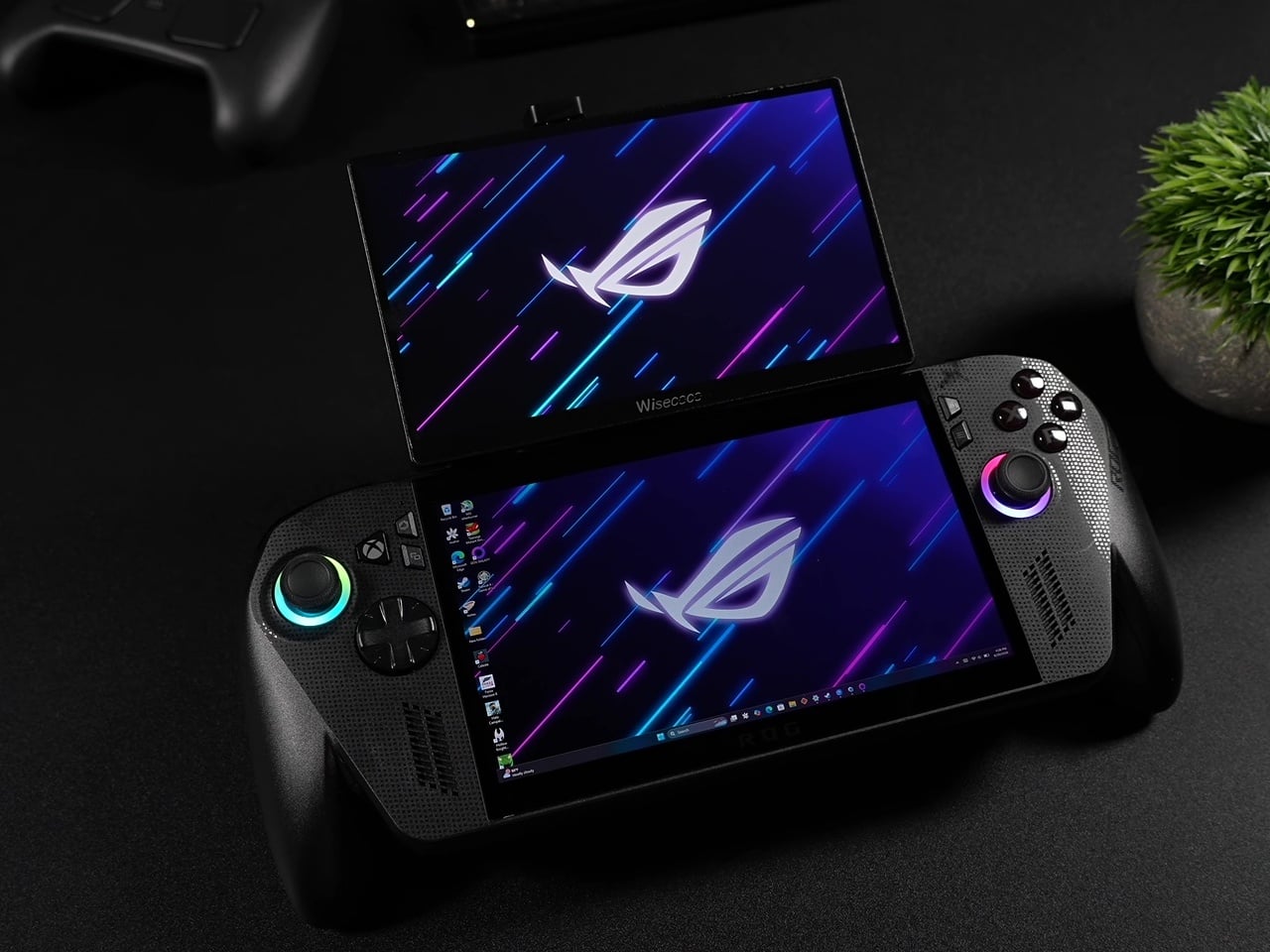
Working in 3D on a flat screen requires a specific kind of mental gymnastics. The model on the monitor is technically three-dimensional, but the screen keeps insisting it’s not, and somewhere between rotating the viewport and second-guessing the depth, the actual creative work slows to a halt. Lenovo’s Yoga Book Pro 3D Concept, revealed at MWC 2026, takes a direct position on that friction.

The upper display renders 3D content without glasses, using Lenovo’s PureSight Pro Tandem OLED technology to show depth and spatial volume directly on screen. A spacecraft that’s been modeled in three dimensions appears to float, with genuine perceived distance between its front and rear planes, rather than sitting flat behind glass.

Designer: Lenovo

The lower half of the device is a full touch display running the editing environment, with the traditional keyboard removed entirely. Snap-on physical accessories sit on that lower surface: a circular dial and a slider for adjusting lighting, tone, and viewing angle without diving into menus. The idea is that the physical controls stay contextual, appearing wherever they’re placed on the touch surface rather than in a fixed location.

An RGB camera above the upper display handles gesture recognition. Pinching, rotating, and zooming a 3D object happens in the air in front of the screen, which removes at least some of the back-and-forth between input device and viewport that slows down spatial editing. An Intel Core Ultra 7 paired with an NVIDIA GeForce RTX 5070 handles the rendering load underneath all of this.

The AI layer converts 2D reference images into editable 3D assets and can generate a surrounding environment for the converted object on prompt. For a creator pulling reference photography into a modeling workflow, that shortens a step that currently involves a separate pipeline or a lot of manual reconstruction.

What the Yoga Book Pro 3D does differently from other glasses-free 3D solutions is how it treats the display as the primary tool rather than the output. Most 3D workstation design stops at raw performance and screen size. This one asks whether the screen itself can close the gap between what the creator imagines and what the software shows them.

The post Lenovo’s Yoga Book Concept Makes 3D Models Float Above the Screen first appeared on Yanko Design.

Lenovo and AngryMiao Built a Keyboard With a Studio-Grade Knob

Most keyboards disappear into the desk. That’s by design, usually, since the keyboard’s job is to get out of the way and let the work happen. The trouble is that creative workflows don’t always work that way. Editing a podcast or cutting a video involves a lot of scrubbing, a lot of precise back-and-forth through a timeline that a mouse handles clumsily and a keyboard typically doesn’t handle at all.

The Lenovo Yoga Creative Keyboard AngryMiao Edition, announced at MWC 2026, takes a position on that gap. Developed with peripheral maker AngryMiao, it’s a full 98-key mechanical keyboard with a numpad, built around a 2.6kg aluminum base under a frosted polycarbonate top plate. The weight isn’t incidental. It keeps the board planted during longer sessions and damps the vibration that makes cheaper keyboards sound hollow, which matters more than it sounds when you’re spending hours at a stretch on a project.

Designer: Lenovo x AngryMiao

The knob is the detail that does the most explaining. Sitting at the top right of the chassis, it’s an oversized machined cylinder with concentric ridging and a recessed lens cap on top, sized and weighted to feel like something from a piece of studio equipment rather than a computer peripheral. For video editors, it controls the playhead directly, letting a thumb roll through footage frame by frame with tactile feedback that a mouse scroll wheel doesn’t come close to matching. It’s a simple addition that addresses a specific friction point, which is usually the best kind.

For users running the full Yoga setup with a Yoga Pro 9i Aura Edition laptop and a Yoga Pro 27UD-10 Monitor, there’s a dedicated YOGA key that cycles audio between the laptop’s speakers, the monitor’s speakers, or all twelve across both devices combined. That last option, spreading audio across the full speaker array, is a genuinely useful thing for anyone mixing or reviewing audio without headphones and wanting to hear how it sounds in a room rather than a pair of earbuds.

Per-key RGB lights diffuse through the translucent top plate rather than projecting harshly upward, giving the board a softer ambient glow that doesn’t compete with the screen. Two USB-C ports on the rear spine expand connectivity without requiring a separate hub on the desk. The pricing sits at $299 when it goes on sale in May 2026.

The AngryMiao collaboration brings credibility that the keyboard market takes seriously. AngryMiao’s builds are known in enthusiast circles for their material quality and acoustic tuning, and the ATM 98 platform this borrows from has a track record that Lenovo’s branding alone wouldn’t have provided. With the right setup, it ties everything together, pairing a well-built mechanical keyboard with a very good knob.

The post Lenovo and AngryMiao Built a Keyboard With a Studio-Grade Knob first appeared on Yanko Design.

7 Best Tiny Home Accessories That Make Small-Space Living Feel Like a Design Choice, Not a Compromise

Living small has a perception problem. Most people associate compact spaces with sacrifice, with the slow creep of clutter and the resignation that comes from owning less. But the best tiny home accessories flip that narrative entirely, turning constraints into opportunities for deliberate, considered living. The products on this list do not just fit into small spaces; they make small spaces feel intentional.

What separates a well-designed tiny home from a cramped apartment is not square footage. It is the objects inside it. Every item earns its place, or it does not belong. That principle drove our selection here: seven accessories that pull double duty, look better than they have any right to, and solve problems that only people who live in tight quarters truly understand.

1. Miniature Bonfire Wood Diffuser- A tiny bonfire that never burns out.

The miniature bonfire wood diffuser set does something rare for a home fragrance product: it gives you a reason to stare at it. Built from rust-resistant stainless steel, the set recreates a campfire scene at desktop scale, complete with miniature firewood bundled with a tying knot. The essential oil captures the scent of Mt. Hakusan, a Japanese mountain known for its dense cedar forests, and the firewood pieces distribute that fragrance with a slow, even release that synthetic plug-in diffusers cannot match.

In a tiny home, scent fills a room faster and lingers longer than it would in a larger space. That concentration works in this diffuser’s favor, but the real reason it belongs on this list is the trivets. Remove them from the base, and the diffuser transforms into a pocket stove capable of warming small portions of food. For anyone living in a space where every object needs to justify its existence, a centerpiece that doubles as a cooking surface is the kind of thinking that makes compact living feel clever rather than constrained.

Click Here to Buy Now: $99.00 Hurry! Only a few left.

What we like

  • Rust-resistant stainless steel construction means it ages well in humid or kitchen-adjacent environments
  • Trivets convert the decorative diffuser into a functional pocket stove, adding genuine utility to an ornamental object

What we dislike

  • The essential oil scent is specific to Mt. Hakusan, which limits fragrance variety without purchasing additional oils separately
  • The miniature scale, while charming, means the heat output of the stove is minimal to reheating rather than actual cooking

2. Lotus Clock – A wall clock that catches your keys.

The Lotus clock takes its cues from nature in a way that feels functional rather than decorative. Inspired by the way lotus leaves gather water in their gentle curves, the clock integrates a curved metal tray directly beneath its face, sized to hold keys, loose change, or other daily carry items. The wooden frame has soft, rounded corners, and the clean white face keeps time-reading effortless. Broad, flat hands coordinate with the tray’s finish, tying the clock’s two functions into a single visual statement.

Tiny homes struggle with the small-object problem: keys, coins, earbuds, and pens that scatter across every available surface and create visual noise. The Lotus clock solves this by assigning those objects a permanent home on the wall, freeing up counter and table space that compact kitchens and entryways cannot afford to lose. Available in soft gold or gentle green colorways, the piece complements different interior styles without competing for attention. The concept is a wall clock, but the execution is a storage solution disguised as one.

What we like

  • The biomimetic tray design turns a single-purpose wall object into a genuine organizational tool for daily carry items
  • Soft colorway options (gold, green) let it blend into varied interior palettes without adding visual clutter

What we dislike

  • As a concept design, availability and final production specs remain unconfirmed
  • The tray’s capacity is limited to lightweight, small items, so it will not replace a proper entryway organizer for larger households

3. Eames Hang-It-All – Fourteen hooks wrapped in wooden spheres and wire.

The Eames Hang-It-All, designed by Charles and Ray Eames, is one of those rare objects that has remained in continuous production since 1953 for a reason no one can argue with: it works. The design uses a welded steel wire frame with fourteen lacquered wooden balls in various colors, each one with a hook. The structure mounts flat against the wall and occupies almost no depth, which makes it ideal for narrow hallways and entryways where a traditional coat rack would block the path.

In a tiny home, vertical storage is everything, and the Hang-It-All exploits wall space that would otherwise sit empty. The colored spheres turn utilitarian storage into something worth looking at, which matters in a space where every object is visible at all times. Originally designed to encourage children to hang up their belongings, the playful form has aged into an adult staple that brings warmth to minimalist interiors without the heaviness of a wooden coat rack or the coldness of bare metal hooks.

What we like

  • The welded wire frame sits almost flush against the wall, consuming minimal hallway depth in tight entryways
  • Multiple color combinations available, allowing the piece to function as both storage and wall art simultaneously

What we dislike

  • The price point through Design Within Reach positions it as a premium purchase for what is, functionally, a coat hook
  • Fourteen hooks sounds generous, but the spacing means heavy coats can crowd each other and obscure the design

4. CD Jacket Player – Physical media turned into wall-mounted decor.

The CD jacket player does not pretend that CDs are making a comeback in any mainstream sense. Instead, it treats them as objects worth displaying, building a player around the album jacket rather than hiding it inside a drawer. The minimalist frame holds the CD’s cover art front and center, and a wall mount bracket lets the entire unit hang like a small piece of art. A built-in battery means it works on the go, and Bluetooth 5.0 connectivity lets it pair with wireless speakers and earphones.

Tiny homes demand that objects do more than one thing, and a music player that doubles as wall art earns its square footage in a way a Bluetooth speaker sitting on a shelf never could. The design acknowledges that people who still own CDs are emotionally attached to the physical format, to the artwork, and the ritual of selecting a disc. Mounting the player on the wall removes it from the counter, the nightstand, or whatever other surface it would otherwise claim. In a 400-square-foot space, that kind of reclaimed real estate adds up.

Click Here to Buy Now: $169.00 Hurry! Only a few left.

What we like

  • Wall-mount capability turns the player into displayable art, removing it from limited counter and shelf space
  • Bluetooth 5.0 means wireless pairing with existing speakers, so it does not demand its own audio setup

What we dislike

  • The audience for a physical CD player in 2026 is narrow, making this a niche purchase even among design-conscious buyers
  • Built-in battery life for portable use remains unspecified, and running both a motor and Bluetooth drains cells quickly

5. Ferm Living Plant Box – A planter that reorganizes your entire floor plan.

The Ferm Living plant box is, at its simplest, a rectangular metal box on thin legs with a powder-coated finish. But its real value in a tiny home has nothing to do with plants. The box’s proportions and height make it a room divider, a bookshelf, a toy bin, or a display surface that creates the illusion of separate zones within an open floor plan. The slim legs keep sightlines open at floor level, which is a small detail that makes a big difference in preventing a small room from feeling boxed in.

Studio apartments and single-room tiny homes rarely have the luxury of walls. The plant box fills that gap by creating what designers call “islands,” small zones of activity defined by furniture rather than architecture. Place it between a sleeping area and a desk, fill it with trailing plants or stacked books, and the eye reads two separate spaces where only one exists. The powder-coated metal is easy to wipe down, resistant to moisture, and available in black, a color that recedes visually and lets the objects inside take focus.

What we like

  • Thin legs preserve floor-level sightlines, preventing the visual weight that closed-base furniture adds to compact rooms
  • Multipurpose use as a planter, divider, bookshelf, or toy storage gives it a role in every room without redundancy

What we dislike

  • The open-top design means dust collects on whatever is stored inside, requiring regular maintenance in exposed layouts
  • Weight capacity is limited by the thin leg construction, so heavier items like large potted plants or dense book collections need caution

6. Key Holder Wakka – Neodymium magnet meets Japanese woodcraft.

The Key Holder Wakka turns the act of putting down your keys into something you look forward to. The system pairs a stainless steel, iron, and brass keyring with an elegant wooden base (available in maple or walnut). A neodymium magnet holds the ring securely in place, and separating the two produces a distinct, brisk tapping sound. That sound is the entire point. In a tiny home, where every habit compounds in visibility, a designated key spot eliminates the daily search-and-panic cycle.

The design logic here is behavioral rather than decorative. By making the act of placing keys enjoyable, the Wakka trains a habit through positive reinforcement rather than guilt. The wooden base is small enough to sit on a windowsill, a narrow shelf, or beside a door frame without claiming space that other items need. The material combination of warm wood and cool metal reads as considered rather than cluttered, which matters when every object on a surface contributes to the visual temperature of the entire room. Losing your keys in 300 square feet should be impossible, but anyone who has lived small knows it happens constantly.

Click Here to Buy Now: $45.00

What we like

  • The neodymium magnet holds the keyring firmly in place, preventing the drift that happens with open trays and bowls
  • Audible feedback when placing or removing keys creates a sensory ritual that reinforces the habit of using the holder

What we dislike

  • The system requires using the specific Wakka keyring, so existing keychains or fobs need to be transferred or replaced
  • At its core, this is a single-purpose object: it holds one set of keys, which limits utility for multi-person households

7. TUMBA Modular Shelf System – Lego logic applied to storage furniture.

The TUMBA modular shelf system addresses the single biggest frustration with flat-pack furniture: fixed dimensions. Where conventional shelving forces rooms to conform to predetermined sizes, TUMBA offers stackable modules made from recycled polymer that lock together without tools. High-strength plexiglass provides structural transparency, stainless steel connections snap securely into place, and the swirled textures in each panel carry visible traces of the material’s previous life. The bold colors and playful forms make the storage itself worth looking at.

Tiny homes change. A shelf configuration that works in January stops making sense after a furniture rearrangement in March, and traditional shelving punishes that flexibility with disassembly headaches and leftover hardware. TUMBA’s tool-free construction means reconfiguring takes minutes, and the modular format lets it grow vertically in tight corners or stretch horizontally along narrow walls. For renters in compact spaces who move frequently, a shelf system that breaks down and rebuilds without damage is less of a convenience and more of a necessity. The recycled material story is a bonus, but the real selling point is permission to change your mind.

What we like

  • Tool-free assembly and reconfiguration mean the shelf adapts to layout changes without the frustration of traditional flat-pack rebuilds
  • Recycled polymer construction gives each panel a unique swirled texture that standard particle board or MDF cannot replicate

What we dislike

  • Bold colors and playful forms may clash with more subdued or neutral interior palettes common in compact living spaces
  • Plexiglass panels, while visually light, are more prone to surface scratching than solid wood or metal shelving alternatives

Where Small Living Gets Interesting

The common thread across these seven products is not size. It is intent. Each one was designed with the understanding that small spaces do not need small thinking. They need objects that work harder, look better, and respect the reality that in a tiny home, there is no junk drawer to hide mistakes in. Every surface is a display, every object is a statement, and every purchase is a commitment.

What makes compact living feel like a design choice rather than a compromise has less to do with architecture and more to do with curation. The right diffuser, the right clock, the right shelf system: these are the decisions that turn 300 square feet into a space that feels chosen rather than settled for. And in a world that keeps building bigger, there is something satisfying about proving that less, when it is the right less, is more than enough.

The post 7 Best Tiny Home Accessories That Make Small-Space Living Feel Like a Design Choice, Not a Compromise first appeared on Yanko Design.

Honor MagicPad4 Review: The World’s Thinnest Tablet Nails Portability and Performance

PROS:


  • Excellent portability

  • Immersive content-consuming experience

  • Great battery life

  • Powerful performance

CONS:


  • No microSD card slot

  • No IP rating

  • Underwhelming software support period

RATINGS:

AESTHETICS
ERGONOMICS
PERFORMANCE
SUSTAINABILITY / REPAIRABILITY
VALUE FOR MONEY

EDITOR'S QUOTE:

The Honor MagicPad4 nails extreme portability with a gorgeous OLED screen, strong performance, and a surprisingly complete productivity toolkit that makes it feel like a real work-capable tablet.

Honor is pitching the MagicPad4 as a tablet that can travel like a notebook and work like a small laptop, without dragging you into the usual compromises. The headline numbers are bold. 4.8mm thin and about 450g, paired with a 12.3-inch OLED panel that runs up to 165Hz and hits a claimed 2400 nits peak brightness in HDR. 

Under that sleek shell, HONOR is also treating this as a proper flagship. You get Snapdragon 8 Gen 5, Wi-Fi 7, a 10,100mAh typical battery with 66W wired charging, and a cooling system designed to keep performance consistent under load. With the headline specs out of the way, let’s get into what the MagicPad4 is actually like to live with.

Designer: Honor

Aesthetics

The MagicPad 4 looks like it was designed with a single obsession. Make the body feel impossibly slim, then let the display do the talking. Its design language is clean, modern, and very display-forward, and it feels intentionally restrained in the best way. Instead of chasing flashy accents, the tablet leans into a minimalist, yet elegant look that quietly simmers.

Flip it over, and the styling stays just as composed. On the back, the MagicPad 4 features a square camera bump in the upper left corner, while the HONOR logo sits centered for a balanced, gallery-like finish. Color options are simple and confident, with Gray and White both pairing naturally with the tablet’s understated aesthetic.

Ergonomics

In hand, the MagicPad4’s defining ergonomic feature is slimness and weight, or the lack of it. The MagicPad 3 was already ahead of the pack on portability, listed at 5.79mm and about 595g, but the MagicPad4 still makes a meaningful leap at just 4.8mm thin and about 450g. The screen is slightly smaller this time around, dropping from 13.3 inches on the MagicPad 3 to 12.3 inches here, yet the reduction in thickness and weight is still impressive, even with that display size change in mind.

On paper, those numbers can sound like a modest revision. In use, they show up as less hand fatigue and less hesitation to pick it up for quick reading, quick edits, or a short sketching session. To underline how light it is for its size, HONOR even notes that the 12.3-inch MagicPad4 is lighter than an 11-inch iPad Air at around 462g, which is a helpful reality check for just how portable it feels.

Attach the optional keyboard, and that light, sheet-like feeling largely stays intact. That is when it becomes obvious the MagicPad4 is meant to be used as a full kit. HONOR’s three-piece mobile office set, meaning tablet plus keyboard plus stylus, comes in at about 852g, which is still easy to treat as a grab-and-go setup.

Typing feels surprisingly firm, but the slim keyboard has shallower key travel, so long sessions are a bit less comfortable than on a thicker, more laptop-like keyboard. Still, it is a tradeoff I am willing to take for how portable the whole setup is. Typing on your lap is doable, but the keyboard does not feel as planted as a laptop or a more rigid keyboard setup, so it can wobble a bit when you shift around.

Where the keyboard design really helps is flexibility. You fold the top half of the back cover to prop the tablet up, and it gives you a wide range of display tilt angles. It is the kind of flexibility you end up using constantly, especially on the go, when you are stuck working with whatever table and chair height you find.

Performance

Performance starts with the panel, because it sets the tone for everything you do on the tablet. There was a lot of backlash when HONOR switched from OLED to IPS LCD on the MagicPad 3, so bringing OLED back on the MagicPad4 feels like a direct response to what people actually wanted. Here, you get a 12.3-inch OLED with a 3000 x 1920 resolution and up to a 165Hz refresh rate, framed by a 4mm ultra-narrow bezel and a 93% screen-to-body ratio that makes the front feel almost all screen.

In use, the MagicPad4 feels smooth when you scroll, sharp when you read, and fluid when you bounce between apps. The high refresh rate is not something you consciously track all the time, but it helps everything look a bit more stable and refined, especially when you are moving quickly through feeds, documents, and multi-app workflows. It also supports 1.07 billion colors and a claimed 2400 nits peak brightness for HDR and strong light scenarios, which is a strong fit for both entertainment and everyday browsing.

Just like its flagship smartphones, HONOR treats eye comfort as part of the performance story, not a footnote. The MagicPad4 is TÜV Rheinland flicker-free and low blue light certified, and it stacks 5280Hz PWM dimming with Chip-Level AI Defocus Display and DOT Eye Comfort Technology. None of this is medical, but it is the kind of feature set that matters if you read, write, and edit for hours, because it gives you a concrete way to talk about comfort over long sessions.

The display performance also matters for pen input, and the MagicPad4 is compatible with the HONOR Magic-Pencil 3. For note-taking and sketching, it makes the tablet feel more like a digital notebook than just a consumption screen, and it is the accessory that turns that big OLED into something you can actually work on, not just look at.

HONOR pairs the display with an eight-speaker setup featuring HONOR Spatial Audio. It sounds excellent overall, with a wide soundstage and solid clarity. Dialogue comes through cleanly, and music has enough separation that it does not blur into a flat wall of sound, though bass is a bit limited, as you would expect from a tablet this slim.

Combined with the 93% screen-to-body ratio and those slim bezels, the MagicPad4 can feel genuinely immersive for movies and video. It is the kind of tablet that makes you want to watch one more episode, because the screen and speakers work together in a way that feels closer to a tiny home theater than a typical mobile device.

Under the hood, it runs on Snapdragon 8 Gen 5, which gives it the headroom to stay responsive when you start stacking tasks, juggling multiple apps, or pushing more demanding games and creative workloads. Configurations include 12GB RAM with 256GB storage, or 16GB RAM with 512GB storage.

The MagicPad4 runs MagicOS 10 based on Android 16, and a lot of its performance feel comes from the PC-style features and multitasking tools built into the software. For instance, the moment you attach the keyboard, the system prompts you to switch into PC Mode, which immediately reframes the tablet as more of a small desktop than a giant phone.

With PC Mode on, you can open up to four floating windows at once. You can resize them, move them around freely, and set up your own layout depending on what you are doing, like notes on one side, a browser on the other, and a couple of smaller apps layered in. It is a simple feature, but it makes multitasking feel natural on a 12.3-inch screen. On top of that, HONOR bundles a full suite of AI features, so the tablet is not just fast, it is clearly designed to help you get through work faster too.

The cameras are not the reason you buy the MagicPad 4, but they are perfectly fine for what a tablet usually gets used for. You get a 13MP autofocus rear camera for quick document scans and occasional shots, plus a 9MP fixed-focus front camera that is mainly for video calls, and both are serviceable without being a main selling point.

Sustainability

HONOR does not lean heavily on sustainability messaging for the MagicPad4. What it emphasizes instead is structural durability. The MagicPad4 uses aerospace-grade special fiber as part of its body, which HONOR says reduces weight while increasing stiffness by 30%.

There is also a practical durability caveat. There is no IP rating mentioned, so I would be careful around water and treat it like a device that is not meant to handle spills. Software support matters for longevity, too, and HONOR’s promise of three years of major OS updates and three years of security updates is far from class-leading, so it is worth factoring in if you plan to keep the tablet for the long haul.

Value

Value is where the MagicPad4 starts to make a lot of sense, because HONOR is not pricing it like a niche luxury tablet. In the U.K., the 12GB plus 256GB model is £599.99 (about $760 USD), and the 16GB plus 512GB version is £699.99 (about $890 USD). Accessories are priced separately, with the HONOR MagicPad4 Smart Keyboard listed at £140.98 and the Magic-Pencil 3 at £30, which is worth factoring in if you plan to use it as more than a media tablet.

What makes this feel like great value is the overall hardware and feature mix. You are getting a flagship Snapdragon chip, a 12.3-inch 165Hz OLED, a sleek form factor, and a software experience that leans into PC-style multitasking. At these prices, the MagicPad4 makes the most sense for people who will actually use that work-capable tablet angle, not just the big-screen entertainment side.

Verdict

The HONOR MagicPad4 nails the parts of tablet life that actually matter day to day. It is exceptionally portable, the 12.3-inch 165Hz OLED is excellent for reading and media, and the eight-speaker setup helps it feel more immersive than most thin tablets. With the keyboard attached, PC Mode and floating windows make it feel closer to a small laptop than a typical Android tablet.

The compromises are more about the physical keyboard experience and long-term ownership than the software itself. The keyboard is convenient and flexible, but the shallow key travel and slightly wobbly lap use remind you that it is still a tablet-first setup. Honor also does not say much about sustainability, and the promised two major OS updates and four years of security patches are not class-leading, so it is worth weighing if you plan to keep the tablet for many years.

The post Honor MagicPad4 Review: The World’s Thinnest Tablet Nails Portability and Performance first appeared on Yanko Design.

5 Reasons Modern Treehouses Just Became the Ultimate Luxury Escape

Treehouses have re-emerged not as nostalgic artifacts, but as serious architectural propositions. Within contemporary practice, they are understood as a distilled form of biophilic thinking – where structure, ecology, and human occupation are inseparable. Rather than imposing form on landscape, treetop architecture allows the built environment to coexist, adapt, and respond to living systems.

Occupying a treehouse establishes a rare spatial contract with nature. The tree is not a backdrop but a collaborator, shaping load, movement, and experience. This vertical inhabitation reframes ideas of shelter and elevation, offering a quiet yet powerful redefinition of how architecture can belong within the canopy.

1. Safe and Elevated Spaces

The charm of a treehouse comes from the idea of prospect and refuge – our natural need to see without being seen. Being up high gives a clear view of the surroundings, while the leaves and branches around provide shelter and privacy. This combination makes us feel safe and calm instinctively.

Raising the floor above the ground keeps us away from noise and distractions below. The treehouse becomes a peaceful, natural cocoon. Height isn’t just about the view as it gives a sense of security and comfort, letting us enjoy both openness and protection in one space.

Called the Forest Lab for Observational Research and Analysis (FLORA), this treetop observatory sits within Barcelona’s Collserola Natural Park at the Institute for Advanced Architecture of Catalonia (IAAC). Suspended within the forest canopy, the compact structure serves as a living and working space for researchers studying local biodiversity. Rising about 28 feet high, FLORA is designed as an immersive platform that allows direct access to the upper layers of the forest, making scientific observation possible without disturbing the ground below.

What makes FLORA especially notable is its material strategy. The entire mass-timber structure was built using invasive pine trees sourced from within the park through carefully managed forestry practices. These trees were processed into cross-laminated timber panels, laminated beams, and solid wood components, following a zero-kilometer approach to construction. Inside, the observatory includes work areas, projection space, and bird-monitoring features, turning the building into a functional research prototype that demonstrates how sustainable materials and sensitive design can support long-term ecological study.

2. Use of Honest Natural Materials

A treehouse’s beauty comes from using materials that feel natural and honest. High-quality timber, like cedar or reclaimed teak, allows the house to grow and age alongside the tree. This isn’t just for looks, as it supports the strength and health of both the tree and the structure.

Special hardware, such as Treehouse Attachment Bolts (TABs), lets the tree move and grow naturally without damage. By avoiding heavy concrete foundations, this method protects the tree and reduces environmental impact. The result is a sustainable, long-lasting design where architecture and nature coexist in balance.

Set within the wooded hills of Dunabogdány, Hungary, Console House by Hello Wood is a quiet retreat overlooking the Danube Bend. Designed to sit lightly within the landscape, the minimalist home follows a calm, nature-first approach, allowing the forest to remain the main visual focus. Raised on slender stilts, the structure appears to float above the ground, preserving natural water flow and wildlife movement beneath. Large glass openings frame peaceful valley views while filling the interiors with soft daylight.

A defining feature of the home is its long cantilevered roof, which creates a generous terrace that extends the living space outdoors. Built using cross-laminated timber and laminated beams, the structure balances strength with environmental sensitivity, while screw pile foundations minimize site disruption. The exterior is finished in charred wood using the shou sugi ban technique, giving the house a dark, textured surface that blends into the trees. Together, these choices create a refined, modern hideaway rooted in its surroundings.

3. The Climbing Experience

The magic of a treehouse starts long before you step inside, as it begins with the climb. Whether it’s a spiral staircase or a suspension bridge, moving upward slowly lifts you away from the ground. This gradual ascent helps the mind shift into a calm, reflective state.

Rising from solid earth into the airy canopy feels like a sensory reset. In many cultures, this vertical journey reflects a spiritual path, taking you from the everyday world below to the quiet, elevated sanctuary among the branches. The climb itself becomes an essential part of the treehouse experience.

Treehouses may feel like childhood nostalgia, but the O2 Treehouse by Treewalkers brings that sense of wonder firmly into adult living. You step into a lightweight, elevated home that blends playful design with thoughtful sustainability, creating a retreat that feels both imaginative and grounded in nature. Inspired by geodesic structures and forest ecosystems, these tree-supported homes appear to float among the canopy, offering a quiet escape that reconnects you with your surroundings while keeping the natural landscape largely undisturbed.

What makes these homes especially compelling is their modular, lattice-based construction, which allows multiple units to connect and evolve into small, customisable clusters. You can adapt layouts, shapes, and interior details to suit how you live, work, or unwind, while enjoying warm, wood-toned interiors, generous natural light, and breathable canvas roofing. From iconic A-frame forms to dome-like shelters, each structure balances architectural innovation with the simple comfort of being tucked into the trees.

4. Natural Climate Control

A treehouse isn’t just beautiful, but it naturally stays comfortable throughout the seasons. Leaves provide shade and cooling in summer, while letting sunlight through in winter. This passive system keeps the space pleasant without relying on air conditioning.

The tree itself helps regulate the microclimate through its natural transpiration. Thoughtful placement of windows and openings captures changing light and shadow, softening the interior and creating a calm, diffused atmosphere. By working with the tree and its environment, the treehouse achieves energy efficiency and comfort, showing how design can harmonize with nature rather than fight it.

You might remember turning a treehouse into a make-believe classroom, complete with a tiny chalkboard and a big imagination. Designer Valentino Gareri brings that playful idea into real-world architecture with the Tree-House School, a modular learning building set directly within nature. Raised among the trees, the structure eases pressure on dense cities while creating outdoor-focused spaces where education blends with exploration. It becomes a shared hub that reconnects learning with landscape, movement, and everyday discovery, all while using design strategies that support comfortable indoor conditions.

At the core of the design are two large, interconnected rings that organize classrooms from kindergarten through secondary levels, each accommodating up to 25 students and opening toward the surrounding greenery. The circular layout forms sheltered courtyards and a usable rooftop for group activities, while faceted façades alternate timber panels and glass to manage sun exposure, encourage cross-ventilation, and maintain stable interior temperatures. These passive climate-control features reduce reliance on mechanical systems, keeping classrooms bright, airy, and naturally regulated throughout the day.

5. Suspended Sanctuary

Luxury today is found in the ability to disconnect, and a treehouse offers just that. As a “hovering hearth,” it lifts you above the noise and weight of daily life. Being suspended creates a quiet, focused space where creativity, reflection, and rest come naturally.

For those who appreciate design, the treehouse is more than shelter—it’s a statement. It balances perfectly with the forces of nature, respecting both gravity and the life of the tree. This equilibrium transforms the simple act of being into a luxurious experience of calm, presence, and connection with the natural world.

Designed by architectural designer Antony Gibbon, the Burl Treehouse is a concept series of rounded pods that reinterpret forest living through a sculptural, nature-inspired lens. Shaped after tree burls—the textured growths found on trunks, the pods blend organic form with a restrained, minimalist aesthetic. Suspended above the forest floor, each structure appears to float among the trees, creating an immersive experience that feels both futuristic and deeply connected to its surroundings.

The pods are supported by slim vertical struts and suspension cables anchored directly to the trees, minimizing ground disturbance and preserving the forest below. Accessed by timber suspension bridges, the interiors are lined with light-toned cedar and ash, creating a warm, cocoon-like atmosphere. Each unit includes a bedroom with built-in storage, a compact bathroom, and custom furnishings that maximize space. A central circular window brings in natural light and frames wide forest views, while charred wood shingles on the exterior add texture and durability through traditional shou sugi ban treatment.

Treehouses captivate because they embody our longing to connect with nature. Merging honest materials, smart engineering, and poetic spatial design, they offer more than a room—they create an experience. Building among the trees honors humanity’s timeless bond with the forest, uplifting both spirit and structure in perfect harmony.

The post 5 Reasons Modern Treehouses Just Became the Ultimate Luxury Escape first appeared on Yanko Design.

A 113-Year-Old Patent Just Became the Most Creative EDC Pocket Multi-Tool of 2026

MetMo has a very particular way of working. The Leeds-based engineering team finds a mechanical concept from history that was ahead of its time, studies it carefully, then rebuilds it with the materials and precision manufacturing the original inventor could never have accessed. The MetMo Pen went back to an 1892 dual-thread screw. The Fractal Vise revived a gripping technology too complex for most workshops. Both became substantial hits, and if you follow our work, you know we covered them. Their next one follows the same formula, and it might be the most satisfying yet.

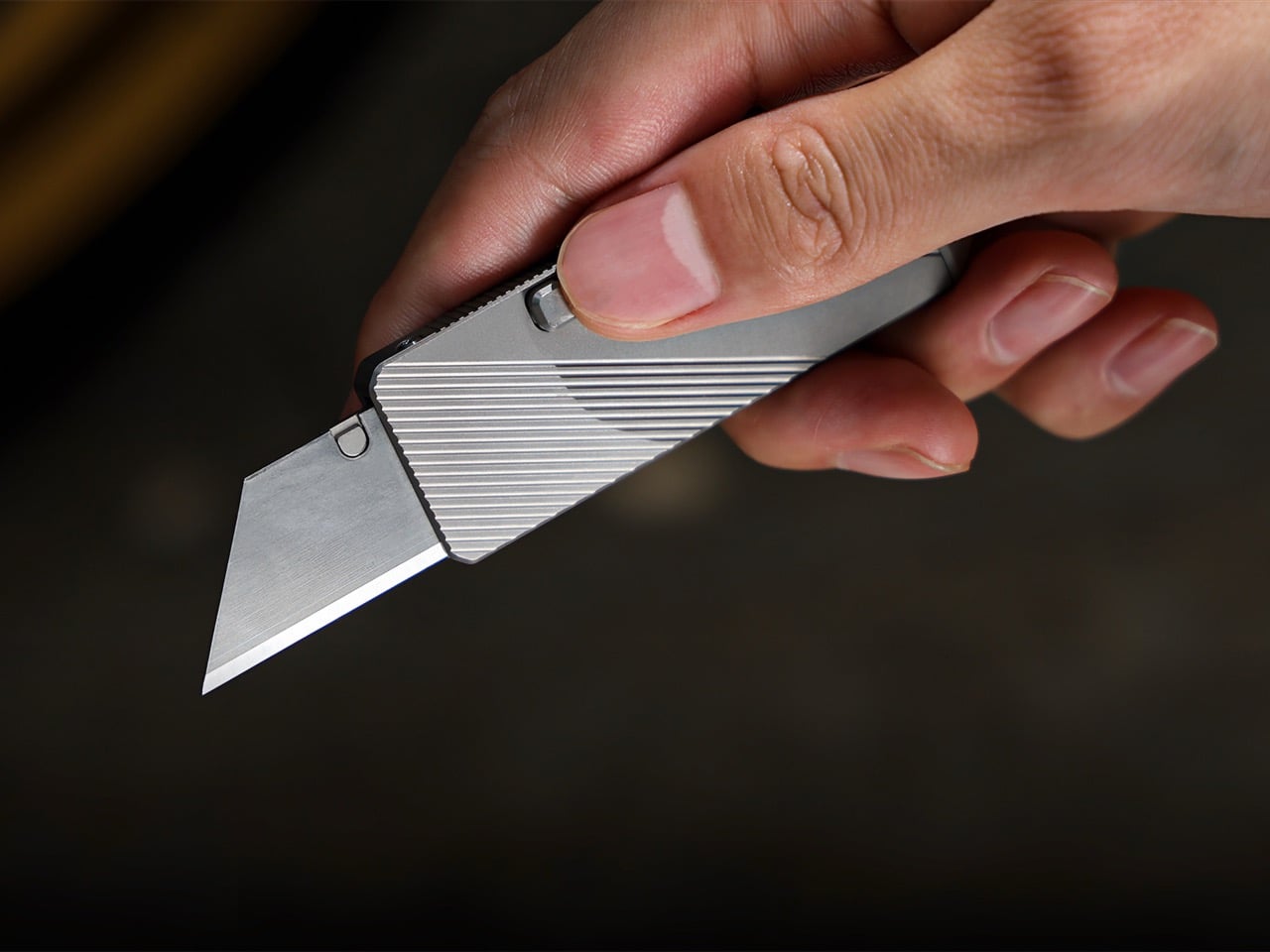
Patent no. 1,070,656, filed by J. Anderson in 1912 and granted in 1913, described a double-ended parallel wrench that never quite found its moment. MetMo took that silhouette and used it as a chassis, assigning a specific function to every surface: a hex drive zone at the centre, adaptive parallel jaws drawing directly from their Fractal Vise technology, plier teeth, a V-groove for square drive tools, and an edge nipping point. It’s five tools in one slim body, after a 113-year wait for the right team to come along and finally build it properly.

Designers: Sean Sykes & James Whitfield

Click Here to Buy Now: $134 $167 (20% off). Hurry, only 4/600 left! Raised over $438,000.

The original Anderson patent was a ghost, a clever idea that lacked the context to thrive. You can picture it being made from rough-cast metal with loose tolerances, a tool that worked in theory but was probably clunky in practice. What MetMo does is take that core mechanical logic and run it through a modern filter of CNC machining and advanced metallurgy. The result is a tool that fulfills the original’s promise in a way Anderson himself likely couldn’t have imagined. It’s the same double-ended, central-pivot concept, but executed with a precision that makes it feel entirely new. Coupled with tiny tools and details stuffed into every empty spot MetMo could find.

What’s really clever is how they packed in so much function without making it a brick. A typical multi-tool suffers from compromise, with each function feeling a bit clumsy to accommodate the others. The Pocket Grip avoids this by making existing geometry do double duty. The central pivot, a structural necessity in the 1913 design, is now a perfectly machined 1/4-inch hex drive for standard bits. The jaws aren’t just serrated; they’re divided into a ‘chomping zone’ for aggressive grip, dedicated points for round or flat objects, and even an edge nipping point. Every surface has a purpose, a level of design efficiency that makes the final object feel intentional and integrated.

That’s especially true of the adaptive parallel jaw, which is a direct technological inheritance from their own Fractal Vise. We wrote about that vise when it came out, admiring how its interlocking jaws could conform to almost any irregular shape. MetMo has miniaturized that same logic and engineered it into the Pocket Grip. One jaw remains fixed while the other adjusts, staying perfectly parallel up to a 20mm opening distance. This gives you a clamping stability that a simple pair of pliers could never match. It’s proof that MetMo isn’t just reviving old ideas; they’re building a cohesive design language and iterating on their own innovations.

All of this engineering is packed into a form that is genuinely pocket-friendly. The tool measures just 95.5mm long by 45.5mm wide, and a remarkably slim 10mm thick. The aerospace-grade aluminum version weighs a scant 83.6 grams. These numbers are key to its success as an everyday carry item. But the specs only tell half the story. The other half is the tactile experience, the so-called ‘desk toy’ factor. The smooth action of the TR6x2 drive screw, the satisfying resistance of the knurled brass adjuster, and the balanced weight in your hand make it something you instinctively want to pick up and fiddle with.

The jaws on all versions are machined from 17-4 PH hardened stainless steel, heat-treated to a Rockwell C hardness of 45, with an ultimate tensile strength of 1448 MPa. In simple terms, they are incredibly tough and designed to retain their edge. The body itself comes in three flavors: hard-anodized 7075-T651 aluminum for lightweight durability, Grade 5 titanium for the ultimate strength-to-weight ratio, or a solid stainless steel build for those who prefer a bit of heft. This isn’t a disposable product; the jaws are removable and serviceable, a direct counter-statement to the throwaway culture common in tool manufacturing.

In practice, the Pocket Grip finds its place everywhere. For a model maker or miniatures painter, it’s a precise third hand, clamping onto a base to hold a project steady. For a cyclist, it’s a compact wrench and driver for quick adjustments on the go. Around the house, it’s the tool you grab for that one awkward fitting that nothing else can quite get a handle on. The V-groove is a subtle but brilliant touch, perfect for holding 3-6mm square drive tools like taps and drill bits, adding another layer of utility for detailed work. With the ability to apply over 21kg of clamping force with just finger pressure, it has more than enough power for most daily tasks.

The Pocket Grip is available in three primary configurations based on the body material. The lightweight choice is the hard-anodized aluminum at 83.6g. For those wanting a balance of weight and extreme durability, the titanium version comes in at 103.6g. Finally, the stainless steel model offers the most substantial feel at 141g and includes an upgraded ‘Snip Grip’ with hardened cutting jaws. Pricing starts at £99, positioning it as a premium, investment-grade tool. And MetMo backs that up with what they call a 200-year guarantee, a confident statement that this is a tool built not just for you, but for the person who finds it in your workshop generations from now.

Click Here to Buy Now: $134 $167 (20% off). Hurry, only 4/600 left! Raised over $438,000.

The post A 113-Year-Old Patent Just Became the Most Creative EDC Pocket Multi-Tool of 2026 first appeared on Yanko Design.
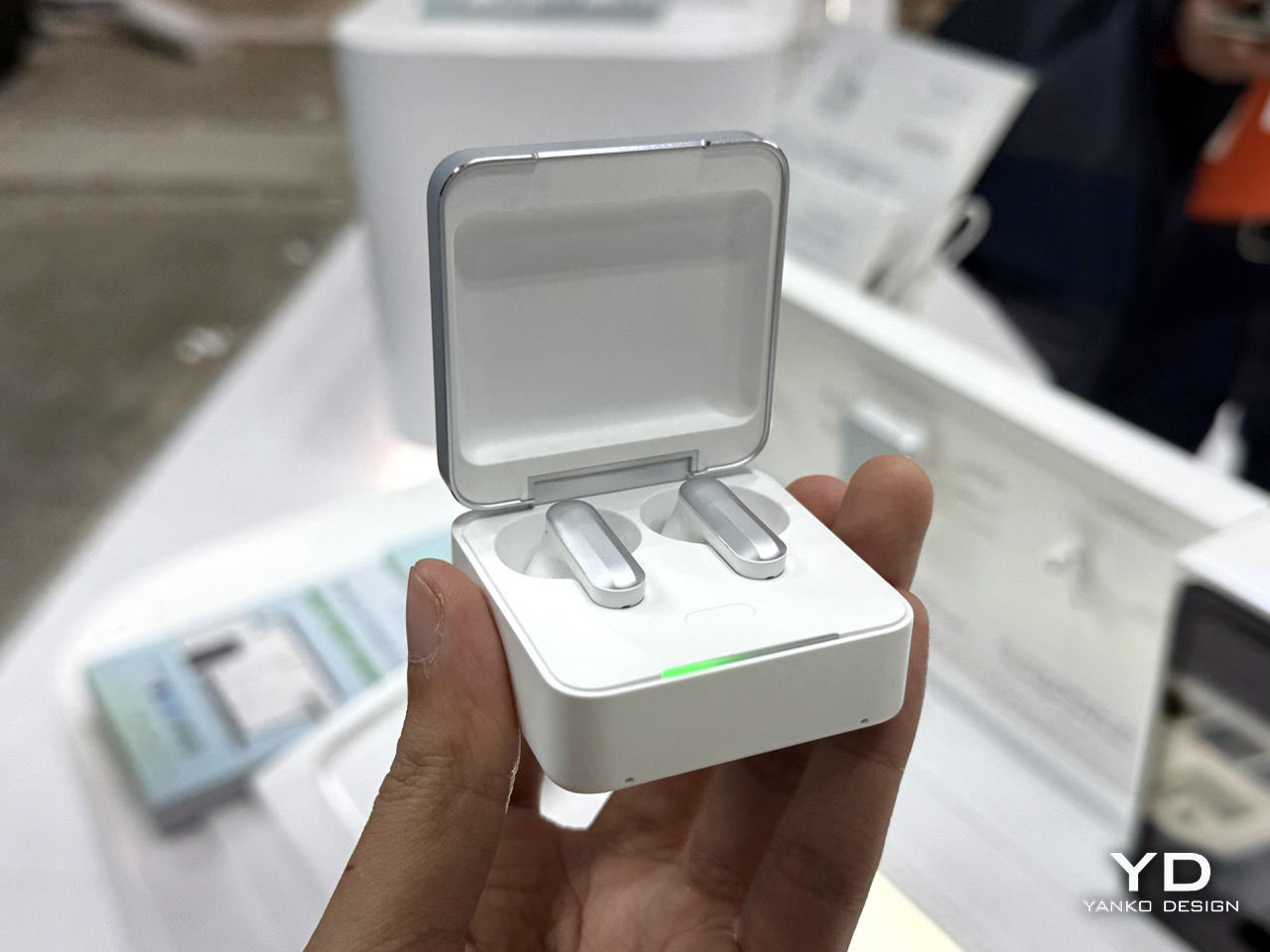
5 Best Retro Handhelds That Play PS1 Classics for Under $130

Sony’s next console is on the horizon, but a growing number of gamers are looking backward instead. The PS6 will almost certainly launch north of $500, and for that price, entire libraries of PlayStation classics remain locked behind aging hardware, digital storefronts, or subscription tiers that rotate titles in and out on a whim. Meanwhile, a parallel market of pocket-sized emulation handhelds has quietly exploded over the past two years, putting decades of retro gaming into devices that cost less than a single DualSense controller.

These handhelds won’t run God of War Ragnarök, and nobody is pretending they will. What they can do is play through Final Fantasy VII, Castlevania: Symphony of the Night, Crash Bandicoot, and thousands of other PS1 titles at full speed, often with save states, fast-forward, and display filters that the original hardware never offered. Search interest in retro gaming handhelds has grown 173% year over year, and the devices fueling that demand sit at a price under $130. Five of them stand out from the flood.

Miyoo Mini Plus

The device that started the modern budget handheld craze still holds its own, even two years after launch. The Miyoo Mini Plus runs on a Sigmastar SSD202D processor with just 128MB of RAM, specs that sound laughable on paper but prove more than sufficient for everything up to and including PS1. Its 3.5-inch IPS display at 640×480 fills a vertical body small enough to disappear into a jacket pocket, and the 3000mAh battery stretches to seven hours with the right custom firmware installed.

Designer: Miyoo

That firmware, OnionOS, is the real reason this device remains so widely recommended. Built and maintained by a dedicated community of developers, OnionOS transforms the Miyoo Mini Plus from a competent emulator into one of the most polished retro gaming experiences available at any price. Features like automatic save-on-shutdown, RetroAchievements integration, and a game switcher that lets you hop between titles without returning to the menu give it a level of software refinement that devices costing three times as much still struggle to match.

What we like

  • OnionOS custom firmware with a polished, intuitive interface
  • Genuinely pocketable
  • Strong PS1 performance despite modest hardware

What we dislike

  • Extended sessions can cause hand cramps
  • No Bluetooth audio, no HDMI output

Anbernic RG35XX Plus

Anbernic’s answer to the Miyoo Mini Plus arrived with a meaningful hardware advantage and a familiar form factor. The RG35XX Plus swaps in an Allwinner H700 quad-core Cortex-A53 processor with 1GB of LPDDR4 RAM, a substantial leap over the Miyoo. That additional horsepower translates directly into smoother PS1 emulation and opens the door to Dreamcast and Nintendo DS titles that the Miyoo simply cannot handle, all wrapped in a horizontal Game Boy-inspired shell.

Designer: ANBERNIC

Connectivity is where the RG35XX Plus pulls further ahead. Wi-Fi 5, Bluetooth 4.2, and a mini HDMI port come standard, which means this handheld can double as a TV-connected retro console when paired with a wireless controller. Dual microSD card slots support up to 512GB each, and the 3300mAh battery delivers around eight hours of play. The trade-off is software: the stock firmware is rough enough that most owners immediately replace it with GarlicOS, a community-built alternative that requires sideloading via SD card.

What we like

  • Best price-to-performance, handling PS1, Dreamcast, and DS titles
  • Mini HDMI output and Bluetooth

What we dislike

  • Stock firmware can be a bit clunky

Powkiddy RGB30

Most handhelds in this price bracket borrow their proportions from the Game Boy or the PS Vita, but the Powkiddy RGB30 charts its own course with a 4.0-inch square IPS display running at 720×720. That 1:1 aspect ratio is a deliberate choice, not a gimmick. Retro games from the NES through the PS1 era were designed for 4:3 screens, and a square panel accommodates that ratio with minimal letterboxing while giving Game Boy titles a perfect native fit. The taller body this requires also gives the D-pad and dual analog sticks room to breathe.

Designer: POWKIDDY

Under the hood, a Rockchip RK3566 quad-core processor clocked at 1.8GHz, and 1GB of LPDDR4 RAM keep things moving. PS1 games run without issue, and the device extends into Dreamcast, some N64, and limited PSP territory. The 4100mAh battery is the largest on this list, rated for eight hours. Stereo speakers and Wi-Fi round out a feature set that punches above its $70 price point. Build quality, though, remains a step behind Anbernic’s hardware, with a plastic shell that feels lighter and less refined than the competition.

What we like

  • The 1:1 square screen is a thoughtful design decision for retro titles
  • Large battery at 4100mAh

What we dislike

  • Unremarkable build quality

Trimui Smart Pro S

The Trimui Smart Pro S occupies the top of the sub-$100 bracket and makes a strong case for spending the extra money. It packs an Allwinner A133P processor and a Mali-G57 GPU that Trimui claims delivers 2.5 times the graphics performance of the original Smart Pro. In practice, this means PS1 runs flawlessly, Dreamcast and N64 titles play at full speed, and most PSP games are smooth enough to enjoy without constant tweaking. A 4.96-inch IPS display at 1280×720 presents all of it on the largest screen in this roundup.

Designer: Trimui

The hardware refinements extend beyond the processor. TMR hall-effect analog sticks eliminate drift concerns and support L3/R3 clicks, larger trigger buttons improve ergonomics over the predecessor, and an active cooling fan prevents thermal throttling during extended sessions. A 5000mAh battery provides around five hours of play, and stereo speakers with a vibration motor round out a surprisingly complete package. The PS Vita-inspired form factor is comfortable for long stretches but makes the device less pocketable than smaller alternatives, and the 16:9 widescreen wastes real estate when displaying 4:3 retro content.

What we like

  • Powerful hardware
  • Hall-effect analog sticks and active cooling
  • Large 4.96-inch screen

What we dislike

  • The 16:9 widescreen aspect ratio isn’t good for retro gaming
  • Bulky and heavy

Retroid Pocket Classic

The Retroid Pocket Classic pushes past the $100 mark at $129 for the current available model, but it earns its place on this list by being the only device here running Android and the only one with an AMOLED screen. That 3.92-inch panel at 1240×1080 delivers deeper blacks and more saturated colors than any IPS display in this bracket, and the Snapdragon G1 Gen 2 processor paired with up to 6GB of RAM puts it in a different performance class entirely. PS1 is effortless here. GameCube, PS2, and Saturn emulation become viable options.

Designer: Retroid

Running Android 14 with Google Play Store access means the Retroid Pocket Classic can function as more than a dedicated emulator. Streaming apps, cloud gaming services, and native Android titles all run alongside the retro emulation suite. A 5000mAh battery with 27W fast charging, active cooling, and Bluetooth 5.1 complete the picture. The vertical Game Boy-inspired body lacks analog sticks, which limits comfort with 3D-heavy titles from later console generations. Unlike the Linux devices on this list, the Retroid Pocket Classic ships without any pre-loaded games, requiring users to supply their own ROMs from the start.

What we like

  • 3.92-inch AMOLED display
  • Android 14 with Google Play Store access
  • Powerful Snapdragon G1 Gen 2 processor

What we dislike

  • A bit costly for a retro gaming handheld
  • No analog sticks

The post 5 Best Retro Handhelds That Play PS1 Classics for Under $130 first appeared on Yanko Design.
The First Screwdriver With an Open-Source Handle You Redesign Yourself

There’s a quiet arrogance built into most tools. Someone in a design studio somewhere decided how your hand should hold a screwdriver, how long the shaft should be, how thick the grip ought to feel. They tested it on a handful of people, ran the ergonomic studies, picked a shape, and shipped it to millions. The assumption is always the same: one form, optimized for an average that doesn’t actually exist, should work for everyone.

Siddhant Rai Garg’s final-year project at Central Saint Martins, titled Not Just Another Screwdriver, starts from a different place entirely. It asks a question that most product designers avoid because the answer is inconvenient: what if the person holding the tool is actually the best person to decide what it should feel like?

Designer: Siddhant Rai Garg

The system is deceptively simple in concept. A permanent titanium spine handles all the structural work, the torque, the load, the mechanical reality of driving a screw. Everything else around it, the grip, the length, the feel, is modular and replaceable. Segments can be added or removed to change the tool’s reach. Grip files are open-source, meaning anyone with access to a 3D printer or a block of wood and some patience can shape their own handle. The titanium core stays. Everything around it is yours to define.

What makes this interesting isn’t really the engineering, though the material separation between structural and non-structural components is genuinely clever. It’s the philosophical shift. Most product design operates on a model of authority: the designer knows best, the user receives the finished object, and any modification is either warranty-voiding or just plain weird. Garg’s project flips that relationship. The designer provides a skeleton and a set of rules. The user provides the identity.

I find this compelling because it confronts something the design world talks about constantly but rarely acts on: sustainability through longevity. We’ve all heard the pitch about buying fewer, better things. But “better” almost always means “more expensive and more permanent,” which assumes the first version of a product will remain the right version forever. That’s not how people work. Our hands change, our tasks change, our preferences change. A tool that can’t change with us eventually becomes waste, no matter how well it was made.

Not Just Another Screwdriver sidesteps this by making the most resource-intensive part, the titanium spine, the permanent element, while letting the lightweight, low-cost components around it evolve freely. It’s not asking you to commit to one perfect screwdriver for life. It’s asking you to keep the bones and swap the skin whenever you need to.

There’s also something worth noting about the open-source dimension. Releasing grip designs as downloadable, modifiable files is a deliberate act of giving up control. In an industry that guards intellectual property fiercely, choosing to let users become co-designers is a statement about where value actually lives. It suggests that a tool’s worth isn’t locked into its factory finish but grows through use and adaptation.

Of course, a final-year project isn’t a product on shelves. There are real questions about whether most people want this level of involvement with their screwdriver, whether the modularity holds up under years of heavy use, and whether open-source grip files would actually build a community or just sit on a server somewhere. These are fair challenges.

But the idea itself feels like it belongs to a larger shift happening across design, one that treats users less like consumers of finished objects and more like participants in an ongoing process. We’re seeing it in modular electronics, in open-source furniture, in customizable prosthetics. Garg’s contribution is taking that thinking and applying it to something so ordinary, so taken-for-granted, that most of us never think to question it.

A screwdriver is a solved problem. Except it isn’t, not if you believe that the person using it deserves a say in how it feels in their hand. That’s what makes this project worth paying attention to. Not because it reinvents the screwdriver, but because it reconsiders who gets to decide what a screwdriver is.

The post The First Screwdriver With an Open-Source Handle You Redesign Yourself first appeared on Yanko Design.
Redmi Buds 8 Pro Review: This €69.90 Earbud Punches Way Above Its Weight

PROS:


  • Clear and balanced sound with rich bass

  • Strong ANC performance for the price

  • Comfortable, stable fit in the ears

  • Responsive touch controls with the slide for volume

CONS:


  • Not integrated with Google Find My Device

RATINGS:

AESTHETICS
ERGONOMICS
PERFORMANCE
SUSTAINABILITY / REPAIRABILITY
VALUE FOR MONEY

EDITOR'S QUOTE:

At this price, the combination of triple drivers, solid ANC, and excellent fit makes the Redmi Buds 8 Pro hard to beat.

Redmi Buds 8 Pro arrives as Redmi’s more ambitious take on everyday wireless earbuds. They aim to combine punchy sound, serious noise cancellation, and gaming-friendly latency in a package that still feels relatively affordable. This is not a basic budget pair built only for casual background listening, and it clearly wants to feel like a step up the moment you start using it.

What makes them interesting is how they chase premium style features without making the experience feel intimidating. The triple driver setup is the headline, but the real promise is a well-rounded daily companion that can handle commuting, workouts, and long listening sessions with minimal fuss. At 399 CNY in China, the value story is hard to ignore, and the key question is whether the real-world experience matches that strong first impression.

Designer: Xiaomi

Aesthetics

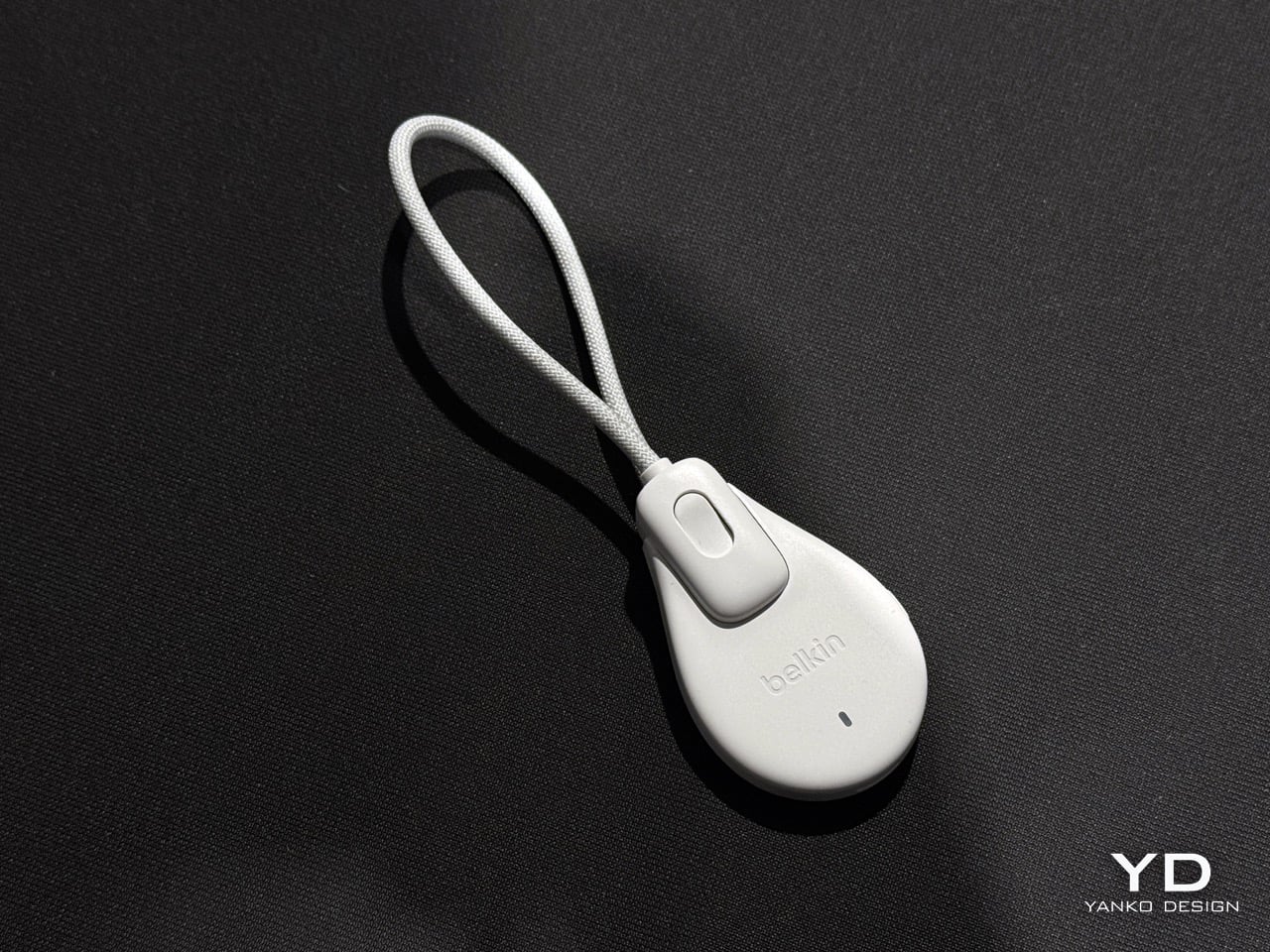
Redmi Buds 8 Pro follows a familiar stem style layout, but the visual language leans clean and modern rather than flashy. The earbuds have smooth, flowing lines, with a compact in-ear body that blends into a slim, rounded stem. Most of the earbud surface is finished in a soft matte texture that hides fingerprints and keeps the look understated. On the outside-facing side of each stem, Redmi adds a shiny strip that catches the light, with a small Redmi logo at the bottom as a neat visual anchor. This contrast between matte and gloss gives the buds a touch of sophistication while still keeping them low-key.

The charging case continues that restrained approach with a compact, pebble-like shape that slips easily into a pocket or bag. Its semi-matte shell feels smooth and resists smudges, while a subtle Redmi logo and “triple driver sound” text on the back quietly nod to the hardware inside. On the front, a slim bar of LEDs offers at a glance battery and pairing information but remains discreet when off, so the case still looks clean.

Color options and small accents may vary by region, yet the overall design clearly targets a wide audience. These are earbuds you can wear at the office, on public transport, or at the gym without drawing much attention. If you like bold, statement-making designs, they may feel a bit too reserved, but if you prefer tech that looks tidy and well finished, Redmi Buds 8 Pro sit in a very comfortable sweet spot.

Ergonomics

While the design focuses on clean lines and visual calm, the build of Redmi Buds 8 Pro focuses on comfort and practicality. Each earbud weighs about five point three grams, which helps them feel light enough for long listening sessions without that dragging sensation some heavier buds can cause. Of course, fit and comfort are different from person to person, but Redmi Buds 8 Pro fit my ears very well and never felt like they were about to fall out.

The medium-sized silicone tips come preinstalled, and Redmi also includes small and large tips in the box so you can fine-tune the seal. I usually go with medium-sized tips and sometimes switch to small tips on certain earbuds, but with Redmi Buds 8 Pro, the medium size worked best for me. Some earbuds struggle to stay put even when I am not moving or talking, yet here I had no problem with fit or comfort, even when I talked, ate, did yoga, or went for a jog with the earbuds in.

The charging case weighs about 47 grams, which keeps the full kit small and light enough to disappear into a jeans pocket or a slim sling bag. The rounded shape and smooth finish make it easy to grip and open, and the lid snaps shut with a reassuring click. Magnets inside guide the earbuds into place so they line up with the charging contacts without much effort. In everyday use, that means you can carry the case all day and quickly pop the buds in or out whenever you need them, without really noticing the extra bulk.

Performance

Redmi Buds 8 Pro pack impressive specifications for their price range, and the audio hardware is the main reason why. They use a coaxial triple driver configuration that combines an 11 mm driver with a titanium diaphragm and twin 6.7 mm PZT ceramic tweeters. In listening, the sound comes across as clear and nicely balanced, with bass that feels full and satisfying without overpowering vocals or detail.

Redmi Buds 8 Pro carry Hi-Res Audio Wireless certification and support codecs such as LDAC, but in day-to-day use, the bigger story is simply that the tuning feels well judged. Dolby Audio and Xiaomi Dimensional Audio are also supported, giving you extra options to change the sense of space and presentation, especially for movies and shows.

Active Noise Cancellation works great overall, especially considering the price. It does not completely block out train noise or airplane engine rumble, but it comes close, which makes music and podcasts easier to enjoy at lower volumes. With higher-pitched sounds like a baby crying, it still does not fully cancel everything out, yet it reduces the sharpness enough that you are less likely to get distracted from what you are doing.

One comfort note is heat. I felt the earbuds get slightly warm at first when ANC was on, but it did not seem to build up over time. It is also possible I simply got used to the sensation after wearing them for a while, so I would not call it a major issue, but it is worth mentioning if you are sensitive to heat on hot days.

Battery life is solid on paper and practical in daily use. Each earbud houses a 54 mAh battery, with rated playback of up to about eight hours on a single charge when ANC is off. Turn ANC on and use higher volumes, and actual listening time will drop somewhat, which is typical for this type of product, while the 480 mAh charging case extends total listening time up to roughly 33 hours across multiple top-ups.  

Touch controls on the stems worked great in my use, and the biggest usability upgrade is that volume control is supported via sliding on the stem. The controls support single tap, double tap, triple tap, press and hold, and swipe, which gives you a lot of flexibility without needing to reach for your phone. You can customize these gestures in the Xiaomi Earbuds app, so the controls can match your habits instead of forcing you into a fixed layout.

The app also gives you practical sound tuning options without making things feel overly technical. You can pick from preset audio profiles like Balanced sound, Enhanced bass, Enhanced treble, and Enhanced voice, depending on what you are listening to. If you want more control, there is also a custom EQ option that lets you adjust eight separate bands, with each slider running from plus six to minus six, so you can fine-tune the sound without guessing too much.

Sustainability

For a product category like true wireless earbuds, sustainability is rarely a strong point, and Redmi Buds 8 Pro are no exception. The compact, sealed design means the internal batteries are not user-replaceable, so once overall battery health drops, most people will end up replacing the whole set rather than repairing it. That pattern is common across almost all TWS earbuds today, but it still makes this a product that is easier to discard than to keep alive for many years.

The IP54 rating does offer a small positive by protecting against dust and splashes, which can reduce early failures from sweat, light rain, or accidental spills. One small feature that nudges in a better direction is the “find your earphones” function, which lets you play a tone from the left, right, or both earbuds via the app to help you track them down when they go missing. It is not a full integration with Google Find My Device, yet anything that helps you avoid losing a bud and replacing the whole set still counts as a quiet step toward better longevity.

Value

Redmi Buds 8 Pro is priced at 69.90 Euros, which works out to roughly $83. That puts them in the affordable end of the true wireless market. They still cost more than the absolute cheapest buds, but remain very accessible for anyone looking to step up from basic or bundled earphones.

From a value perspective, they make the most sense if you care about sound quality and noise cancellation more than simply paying the lowest possible price. Cheaper options can handle calls and casual listening, but usually lack the triple driver setup, stronger ANC, and more polished overall experience you get here. For many buyers, Redmi Buds 8 Pro will feel like a worthwhile upgrade that adds clear benefits without demanding a luxury-level budget.

Verdict

Redmi Buds 8 Pro is an easy recommendation if you want strong everyday performance without paying flagship prices. The triple driver setup delivers clear, balanced sound with bass that feels full but controlled, and the ANC is effective enough to make commutes and busy spaces noticeably calmer. Touch controls are reliable, and the volume slide gesture is a genuinely useful upgrade that makes daily listening feel smoother.

They are not perfect, with ANC that cannot fully erase the loudest train or plane noise and weaker results on some high-pitched sounds, plus the usual sealed battery limitations for sustainability. Still, the fit was excellent in my ears, the case is easy to carry, and the “find your earphones” tone feature helps prevent frustrating losses. If you care most about sound quality, noise cancelling, and a polished experience at a very competitive price, Redmi Buds 8 Pro hit a sweet spot.

The post Redmi Buds 8 Pro Review: This €69.90 Earbud Punches Way Above Its Weight first appeared on Yanko Design.
Xiaomi 17 Ultra Review: Lighter, Flatter, and Sharper Than Ever

PROS:


  • Excellent main and telephoto photo quality

  • Big and bright 6.9-inch LTPO AMOLED display

  • Strong performance

  • Improved ergonomic and stylish design

CONS:


  • Limiting macro use with a minimum focus distance of 30 cm

  • Noticeable warmth during camera use

RATINGS:

AESTHETICS
ERGONOMICS
PERFORMANCE
SUSTAINABILITY / REPAIRABILITY
VALUE FOR MONEY

EDITOR'S QUOTE:

The Xiaomi 17 Ultra is a camera-first flagship that finally feels balanced in the hand, and even more balanced in its image processing.

Within the renamed family, the Xiaomi 17 Ultra is the boldest expression of what Xiaomi thinks a 2026 flagship should be. It arrives globally as a big, confident phone that refuses to blend into the background. It is unapologetically camera-centric, and it is packed with specs that read like a wish list.  

On paper, Xiaomi has the ingredients to back that up. You get a 6.9-inch LTPO AMOLED display, a Leica-tuned triple camera system with a 200 MP periscope telephoto, and Qualcomm’s Snapdragon 8 Elite Gen 5. The global model carries a 6,000 mAh battery with 90W wired and 50W wireless charging, which is still a serious setup even before real-world testing.

Designer: Xiaomi

The camera hardware also shifts in meaningful ways, with the main sensor switching from Sony to OmniVision, and the zoom strategy changing from two telephoto cameras to one lens with continuous 75 mm to 100 mm optical zoom. So does the Xiaomi 17 Ultra deliver ultra-level performance where it counts. After two weeks with it, here is what I found.

Aesthetics

The Xiaomi 17 Ultra is not a phone that tries to disappear in your hand or your pocket. The gigantic circular Leica camera island still dominates the rear panel, just like on the previous model, but there is a subtle shift in design language. With a flatter back panel and flat side frame, the 17 Ultra leans into a cleaner, more minimal look than the Xiaomi 15 Ultra. The small Ultra logo with its red underline sitting above the camera bump adds a bit of character without turning the phone into a billboard.

The color palette for the global model leans into classic tones. Xiaomi focuses on black, white, and green for most markets, skipping the violet shade that appears in China. The Starlit Green unit I received is the standout, with a deep moss green base and speckling that catches the light like a dusting of stars, which makes the name feel earned. The black option looks stealthy, but the red accent on the camera ring keeps it from feeling flat, while the white version goes for a high contrast look with the black camera bump and a silver ring and side frame to tie it all together. If you are coming from the Xiaomi 15 Ultra, the evolution feels more like refinement than reinvention, yet the 17 Ultra looks more cohesive and more modern from the rear.

Ergonomics

The first thing I expected to notice when I pick up the Xiaomi 17 Ultra is the weight and thickness. The phone uses a large battery, a complex camera stack, and a sturdy frame, and all of that adds up in the hand. That said, I was pleasantly surprised. At 8.29mm thickness and about 219g, Xiaomi managed to make the 17 Ultra the slimmest and lightest among its Ultra series. The device is still big and not exactly a lightweight phone, but it feels a lot more comfortable to hold than your eyes perceive.

Ergonomically, the device feels well-balanced in the hand, which is a welcoming improvement from the top-heavy feel you get from holding the Xiaomi 15 Ultra. Xiaomi 17 Ultra adapts a flat display, for the first time for its Ultra line, and helps with the grip. Because it’s well-balanced, the camera bump becomes a natural resting point on the back, which can actually improve grip. At the same time, this is not a one-handed phone in any universe, and if you are coming from something smaller, you will need to adjust how you hold it, how you pocket it, and even how you reach for the top corners of the screen.

The global Xiaomi 17 Ultra uses a 6,000 mAh silicon-carbon battery instead of the 6,800 mAh cell in the China model. Even with the smaller capacity, it should still be enough for a full heavy day for most people. Charging is excellent with 90 W wired and 50 W wireless, and the 90 W wired mode supports PPS or Programmable Power Supply, so you can get true fast charging with any PPS-compatible USB-C charger, not only Xiaomi’s own adapter.

Performance

The display on the Xiaomi 17 Ultra is built to impress at first sight. It is a 6.9-inch LTPO AMOLED panel with 120 Hz refresh, a 1.5K class resolution at around 1200 x 2608 pixels, and a claimed 3500 nits peak brightness. It looks sharp and vibrant, and the huge screen makes movies, games, and photo editing feel more immersive. Xiaomi also adds TUV Rheinland certifications for low blue light, flicker-free performance, and circadian-friendly tuning, which are designed to reduce eye fatigue during long viewing sessions.

The Xiaomi 17 Ultra is powered by Qualcomm’s Snapdragon 8 Elite Gen 5 chipset, and the global configurations come with 16GB of RAM paired with either 512GB or 1TB of storage. It is genuinely nice to see a 1TB option offered globally, since that is still not something every flagship brings outside China. The phone flies through heavy multitasking, high refresh rate gaming, and demanding camera workloads without stutter. On the software side, it runs Android 16 with Xiaomi’s HyperOS 3, which is Xiaomi’s unified platform designed to feel lighter and more connected across phones, tablets, and other devices.

The camera system is where the Xiaomi 17 Ultra really tries to separate itself. Xiaomi drops the older quad camera approach and commits to a triple setup. The main camera is a 23-mm equivalent 50 MP unit with an f/1.67 aperture, OIS, and OmniVision’s Light Fusion 1050L sensor. The 75-100mm equivalent telephoto is a 200 MP periscope with OIS using Samsung’s HPE sensor, with a f/2.39-2.96 aperture. Rounding it out is a 50 MP 14-mm equivalent ultra-wide with an f/2.2 aperture using Samsung’s JN5 sensor.

23mm, Leica Authentic

75mm, Leica Vibrant

100mm, Leica Vibrant

On the main camera, Xiaomi pairs the Light Fusion 1050L sensor with LOFIC technology. LOFIC stands for Lateral Overflow Integration Capacitor, and it is designed to reduce highlight clipping by giving each pixel extra headroom before bright areas turn into flat white. In practice, it helps keep texture in skies and reflections while still holding onto shadow detail in high contrast scenes.

23mm, Leica Vibrant

200mm, Leica Authentic

Zoom is the other headline change. Instead of dual telephoto cameras, Xiaomi uses a floating lens structure to deliver continuous optical zoom from 75 mm to 100 mm, which makes it easy to pick between framing without obvious digital cropping. The limitation is that the range is fairly tight, so it is more about fine-tuning perspective than dramatically pulling faraway subjects closer. There is also a close-up trade-off, since the telephoto now focuses down to about 30 cm rather than the 10 cm I could get on the Xiaomi 15 Ultra, so it is less useful as a pseudo macro lens.

45mm, Leica Vibrant

100mm, Leica Vibrant

In real use, both the main camera and the telephoto produce excellent images with wide dynamic range, natural color, and strong detail in various lighting conditions. The images look clean rather than overprocessed or oversharpened. Portrait mode is especially flexible, offering eight focal lengths from 23 mm through 100 mm equivalents, with pleasant bokeh and strong separation, even if it can occasionally miss a fine strand of hair when I pixel peep. I also noticed the phone can get warm even after relatively short camera use, and hopefully Xiaomi can improve this with future updates.

75mm, Leica Vibrant

75mm, Leica Vibrant

100mm, Leica Vibrant

The ultrawide is solid but a step behind the main and telephoto in refinement. The upgraded 50 megapixel front camera with autofocus is a nice quality of life improvement, and it looks great in good light. In backlight or low light, selfies can come out a bit soft as the processing works harder to control noise.

The Xiaomi 17 Ultra’s triple camera system can shoot video up to 8K at 30 fps, and it also offers 4K at up to 120 fps, although the ultrawide tops out at 4K at 60 fps. The front camera can record up to 4K at 60 fps, which is plenty for vlogs and high-quality selfies. Dolby Vision is supported across the cameras, and Xiaomi also includes creator-friendly tools like LOG recording up to 4K at 120 fps with stabilization on, plus LUT import for quicker grading and a more consistent look.

100m, Leica Portrait

100mm, Leica Portrait,

100mm, Leica Portrait, B&W Hig Contrast Filter

In performance, the 17 Ultra generally produces sharp, well-exposed footage with a fairly wide dynamic range, and stabilization stays strong when I am walking or panning. Low-light video also holds up well, with impressive detail for a phone, thanks in part to the large main sensor. Autofocus is usually smooth, but it can struggle in tricky conditions like backlit scenes or low light, where it may hesitate or hunt before it locks.

The Xiaomi 17 Ultra China version gets a 6,800mAh battery, but globally, it comes with a 6,000mAh battery. It should last you a full day, even with heavy use. It supports 90W wired charge and 50W wireless charge. 90W wired charge is PPS, so you can take full advantage of fast charging with a PPS compatible charger, not just with Xiaomi’s proprietary brick.

Sustainability

Xiaomi’s sustainability story for the 17 Ultra is mostly about longevity rather than eco materials. The phone uses Xiaomi Shield Glass 3.0 on the front, and it carries an IP68 rating, which should help it survive years of drops, rain, and daily wear without needing an early replacement. That kind of durability matters because the most sustainable phone is often the one you do not have to replace early.

Software support strengthens that long-life angle. Xiaomi promises five major OS updates and six years of security updates, which is not class-leading, but it is enough to make long-term ownership feel realistic at this price. It also makes the phone a safer buy if you plan to keep it for several years or pass it on later. What Xiaomi does not really emphasize, at least from what I can find, is the use of recycled or more sustainable materials in the phone itself.

Value

For global buyers, the Xiaomi 17 Ultra starts at EUR 1,499, which is roughly $1,620 USD, for 16GB/512GB, with the 16GB plus 1TB configuration expected around EUR 1,699, roughly $1,840 USD. That puts it directly in the same bracket as the most expensive Samsung Galaxy and iPhone models. If you look at what the Xiaomi 17 Ultra offers, it is easy to see the value in hardware alone, especially in cameras, battery, and storage.

The challenge is that Xiaomi is not only competing with Samsung and Apple, but also with other camera-focused Android flagships that are expected to land this year. That means the 17 Ultra has to win on the full experience, not just its spec sheet, especially when buyers are cross-shopping within the same premium price tier. Even so, the 17 Ultra can justify its price if you care most about its Leica-tuned imaging, huge display, and fast charging rather than ecosystem lock-in.

Verdict

The Xiaomi 17 Ultra is one of the most complete camera-first flagships Xiaomi has shipped for the global market. It nails the fundamentals with a huge, bright display, top-tier performance, and charging that makes most rivals feel slow and old-fashioned. The bigger story is how coherent the imaging experience feels, since the main and telephoto cameras deliver natural color, wide dynamic range, and consistent results across lenses.

Of course, there are real trade-offs, too. The new 75 mm to 100 mm continuous zoom is great for framing, but it is not a massive jump in reach, and the longer minimum focus distance makes the telephoto less useful for pseudo macro shots than the Xiaomi 15 Ultra. The global price also puts it in direct competition with the biggest names, so this is no longer a value flagship by default.  Still, there is no doubt the 17 Ultra earns its Ultra name. It delivers a huge, gorgeous screen, genuinely fast charging, and one of the most enjoyable still photo experiences you can get on a phone, with Leica-tuned color that looks natural rather than overcooked. If those are your priorities, the Xiaomi 17 Ultra is an easy flagship to love.

The post Xiaomi 17 Ultra Review: Lighter, Flatter, and Sharper Than Ever first appeared on Yanko Design.