Anthropic brings memory to Claude’s free plan

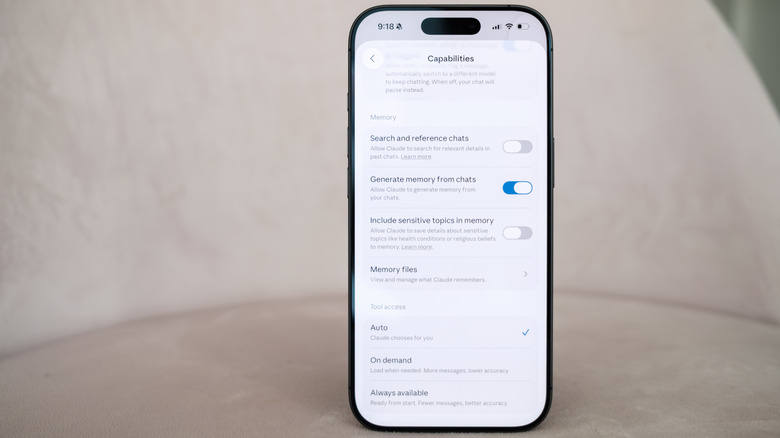
Anthropic is bringing another paid feature to Claude's free tier. The next time you chat with Claude, you'll have the option to have it reference your previous conversation to inform its outputs. Anthropic first made its chatbot capable of remembering past interactions last August, before giving it the ability to compartmentalize memories in the fall. Making memory a free feature is well-timed; earlier today Anthropic made it easier for users to import their past conversations with a competing chatbot to Claude. If after enabling memory you decide to turn it off, you can either pause the feature, preserving Claude’s memories for use down the road, or completely delete them so they’re not saved on Anthropic’s servers.

Claude is enjoying new-found popularity, having recently jumped to the number one spot in the App Store's free app charts. This comes while Anthropic is engaged in a high-stakes contract dispute with the US government over AI safeguards. On Friday, US Defense Secretary Pete Hegseth labeled the company a "supply chain risk" after it refused to sign a contract that would allow the Pentagon to use Anthropic models for mass surveillance against Americans and in fully autonomous weapons. Following Hegseth's announcement, Anthropic vowed to challenge the designation. As of right now, we’re waiting to see how things play out, and what it might mean for Anthropic.

This article originally appeared on Engadget at https://www.engadget.com/ai/anthropic-brings-memory-to-claudes-free-plan-220729070.html?src=rss

Trump orders federal agencies to drop Anthropic services amid Pentagon feud

President Donald Trump has ordered all US government agencies to stop using Claude and other Anthropic services, escalating an already volatile feud between the Department of Defense and company over AI safeguards. Taking to Truth Social on Friday afternoon, the president said there would be a six-month phase out period for federal agencies, including the Defense Department, to migrate off of Anthropic's products. 

“The Leftwing nut jobs at Anthropic have made a DISASTROUS MISTAKE trying to STRONG-ARM the Department of War, and force them to obey their Terms of Service instead of our Constitution,” the president wrote. “Anthropic better get their act together, and be helpful during this phase out period, or I will use the Full Power of the Presidency to make them comply, with major civil and criminal consequences to follow.”  

Before today, US Defense Secretary Pete Hegseth had threatened to label Anthropic a “supply chain risk” if it did not agree to withdraw safeguards that insist Claude not be used for mass surveillance against Americans or in fully autonomous weapons. In a post on X published after President Trump’s statement, Hegseth said he was “directing the Department of War to designate Anthropic a Supply-Chain Risk to National Security. Effective immediately, no contractor, supplier, or partner that does business with the United States military may conduct any commercial activity with Anthropic.”

Anthropic did not immediately respond to Engadget's comment request. Earlier in the day, a spokesperson for the company said the contract Anthropic received after CEO Dario Amodei outlined Anthropic's position made “virtually no progress” on preventing the outlined misuses.

"New language framed as a compromise was paired with legalese that would allow those safeguards to be disregarded at will. Despite DOW's recent public statements, these narrow safeguards have been the crux of our negotiations for months," the spokesperson said. "We remain ready to continue talks and committed to operational continuity for the Department and America's warfighters." 

Advocacy groups like the Center for Democracy and Technology (CDT) quickly came out against the president’s threats. “This action sets a dangerous precedent. It chills private companies’ ability to engage frankly with the government about appropriate uses of their technology, which is especially important in national security settings that so often have reduced public visibility,” said CDT President and CEO Alexandra Givens, in a statement shared with Engadget. “These threats undermine the integrity of the innovation ecosystem, distort market incentives and normalize an expansive view of executive power that should worry Americans all across the political spectrum.”

For now, it appears the AI industry is united behind Anthropic. On Friday, hundreds of Google and OpenAI employees signed an open letter urging their companies to stand in "solidarity" with the lab. According to an internal memo seen by Axios, OpenAI CEO Sam Altman said the ChatGPT maker would draw the same red line as Anthropic.  

In a blog post published late on Friday, Anthropic vowed to “challenge any supply chain risk designation in court,” and assured its customers that only work related to the Defense Department would be affected. The company's full statement is available here, an excerpt is below:

Designating Anthropic as a supply chain risk would be an unprecedented action—one historically reserved for US adversaries, never before publicly applied to an American company. We are deeply saddened by these developments. As the first frontier AI company to deploy models in the US government’s classified networks, Anthropic has supported American warfighters since June 2024 and has every intention of continuing to do so.

We believe this designation would both be legally unsound and set a dangerous precedent for any American company that negotiates with the government.

No amount of intimidation or punishment from the Department of War will change our position on mass domestic surveillance or fully autonomous weapons. We will challenge any supply chain risk designation in court.

Update, February 27, 9PM ET: This story was updated twice after publish. First at 6PM ET to include a link to and quotes from Hegseth about the designation of Anthropic as a supply chain risk. Later, a quote from Anthropic was added, along with a link to the company’s blog post on the subject.

This article originally appeared on Engadget at https://www.engadget.com/ai/trump-orders-federal-agencies-to-drop-anthropic-services-amid-pentagon-feud-222029306.html?src=rss

NASA overhauls Artemis program, delaying Moon landing to 2028

NASA is making major changes to its Artemis Moon program. On Friday, Administrator Jared Isaacman announced the space agency would carry out an additional flight in 2027 to test commercial lunar landers from SpaceX and/or Blue Origin. The new mission will take the place of Artemis 3, which previously would have seen NASA attempt to land on the Moon for the first time since 1972. The flight will also see the agency test a new spacesuit made by Axiom Space.    

As part of the new plan, the redesigned Artemis 3 mission will give NASA the chance to test at least one lander in the relative safety of low Earth orbit. NASA will attempt to return humans to the Moon during Artemis 4 sometime in 2028, with the potential for another mission as early as later that same year. Per CBS News, the decision comes after NASA's Aerospace Safety Advisory Plan said the agency's existing mission plan was too risky.     

"NASA must standardize its approach, increase flight rate safely, and execute on the President’s national space policy. With credible competition from our greatest geopolitical adversary increasing by the day, we need to move faster, eliminate delays, and achieve our objectives," said Isaacman. "Standardizing vehicle configuration, increasing flight rate and progressing through objectives in a logical, phased approach, is how we achieved the near-impossible in 1969 and it is how we will do it again."

The change of plan also comes as Artemis 2 has faced multiple delays in recent months. The Space Launch System (SLS) heavy-lift rocket has, once again, proven to be temperamental. NASA had planned to launch Artemis 2 in early February, but pushed the flight back after it caught a hydrogen leak during a fueling test. More recently, NASA delayed the mission to give its engineers time to fix a helium pressurization issue in the upper stage of the SLS.  At the earliest, the mission can now get underway on April 1.

This article originally appeared on Engadget at https://www.engadget.com/science/nasa-overhauls-artemis-program-delaying-moon-landing-to-2028-164255318.html?src=rss

Google’s Circle to Search can now identify multiple objects in an image

To coincide with the release of Samsung's new Galaxy S26 family of phones, Google is pushing out a small but meaningful update to Circle to Search. As a reminder, Circle to Search allows you to carry out a Google Search from almost anywhere on your phone. Just tap and hold your device's home button, and then circle the passage or image you want to know more about. 

With previous iterations of Circle to Search, the tool's underlying AI system was limited to searching against a single object in an image. Now, thanks to Gemini 3, it can scan and identify multiple objects at the same time. Naturally, Google is quick to point out the boon this represents for shopaholics. If you see a fit you like on Instagram, you can circle an entire person and the tool will attempt to find a match for each item they're wearing, including any shoes and accessories. At the same time, Google has made it easier to see how those clothes might look on you by bringing its virtual try on feature directly inside of Circle to Search.    

The benefits of the new model aren't only limited to shopping queries. Building on a search technique Google debuted with AI Mode, Circle to Search can now also reason through the relationship between different objects in an image. So say you see a photo of a coral reef and want to know how all the different pictured fish live together, Circle to Search will not only be able to identify the different species shown but also explain how they coexist with one another.   

Google is bringing the new and improved Circle to Search to Galaxy S26 and Pixel 10 phones first before rolling it out to more Android devices soon. 


This article originally appeared on Engadget at https://www.engadget.com/mobile/smartphones/googles-circle-to-search-can-now-identify-multiple-objects-in-an-image-180000385.html?src=rss

Samsung’s S26 and S26+ offer familiar designs, Snapdragon 8 Gen 5 chips and new software features

The wait is over. At its Unpacked event today, Samsung took the wraps off its new S26 family of phones. Unlike the S26 Ultra, the S26 and S26+ represent mostly iterative updates. Samsung has tweaked the design of the two devices, making it so they share the same rounded corners of their more expensive sibling. Additionally, the S26 has a slightly larger 6.3-inch AMOLED display and a higher capacity 4,300mAh battery inside. As for the S26+, it still has a 6.7-inch screen and 4,900mAh battery. 

Like in years past, Samsung is depending on new and expanded software capabilities rather than updated hardware to give the S26 and S26+'s cameras an edge over the competition. As before, both phones feature a 50-megapixel main camera, a 12MP ultra-wide and a 10MP telephoto with 3x optical zoom.  For selfies, they’re equipped a 12MP front-facing camera.

The company says its new Object Aware Engine will allow the front-facing cameras to deliver more pleasing portrait mode shots, with better rendering of skin tones and hair textures. For videos, Samsung has updated its Super Steady tech, making it capable of maintaining a 360-degree horizontal lock. The upgraded feature should make it easier to maintain a consistent level horizon while trying to record a video of a moving child or pet. A new feature named Auto Framing uses a machine learning algorithm to automatically tighten the frame while filming 4K and 8K clips.      

The S26 will be available in six different colorways, with the four pictured here available in store.
Sam Rutherford for Engadget

And if you're a Snapdragon fan, you can rest easy. While some pre-release reports suggested Samsung was planning to use its new flagship Exynos chipset across the entire S26 line, North American and Japanese variants of the S26 and S26+ will once again ship with Qualcomm silicon instead. Specifically, the two phones come specced with the speedy Snapdragon 8 Elite Gen 5, which debuted alongside the OnePlus 15 in November 2025. It will be interesting to see how the new Exynos 2600 compares with its Snapdragon counterpart; the former is the world's first 2nm chipset. 

Over on the software front, Samsung has upgraded its suite of AI features. For instance, the company has made Now Brief capable of pulling from a wider variety of apps to generate more comprehensive daily summaries. Similarly, the company's handy Auto Eraser feature now works across streaming services like Netflix, allowing you to make it easier to hear dialogue in a greater variety of videos. 

The two phones will retail for $899 and $1,099, making them both $100 more expensive than their predecessors. They come standard with 12GB of RAM and 256GB of storage. Samsung will also offer 512GB variants, alongside six different colorways of each phone. In-store, you'll find the S26 and S26+ in purple, blue, black and white, with silver and rose gold being online exclusives.  Pre-orders open today, with general availability to follow on March 11.    

This article originally appeared on Engadget at https://www.engadget.com/mobile/smartphones/samsungs-s26-and-s26-offer-familiar-designs-snapdragon-8-gen-5-chips-and-new-software-features-180000224.html?src=rss

The best cheap kitchen gadgets in 2026

Outfitting a kitchen can get expensive fast, but you don’t need high-end appliances or flashy tools to cook more efficiently. Some of the best kitchen gadgets are simple, affordable gadgets that quietly make everyday tasks easier — whether that’s prepping ingredients, measuring accurately or keeping your workspace organized. These are the kinds of tools you reach for again and again, not one-off purchases that end up buried in a drawer.

This guide focuses on inexpensive kitchen gadgets that punch above their price, including practical prep tools, durable measuring essentials and compact helpers that save time without taking up much space. None of them are strictly necessary, but all can streamline your routine and make cooking at home feel a little less like work.

This article originally appeared on Engadget at https://www.engadget.com/home/kitchen-tech/best-cheap-kitchen-gadgets-130049897.html?src=rss

Orbital AI data centers could work, but they might ruin Earth in the process

At the start of the month, Elon Musk announced that two of his companies — SpaceX and xAI  — were merging, and would jointly launch a constellation of 1 million satellites to operate as orbital data centers. Musk's reputation might suggest otherwise, but according to experts, such a plan isn't a complete fantasy. However, if executed at the scale suggested, some of them believe it would have devastating effects on the environment and the sustainability of low Earth Earth orbit.     

Musk and others argue that putting data centers in space is practical given how much more efficient solar panels are away from Earth's atmosphere. In space, there are no clouds or weather events to obscure the sun, and in the correct orbit, solar panels can collect sunlight through much of the day. In combination with declining rocket launch costs and the price of powering AI data centers on Earth, Musk has said that within three years space will be the cheapest way to generate AI compute power. 

Ahead of the billionaire's announcement, SpaceX filed an eight-page application with the Federal Communications Commission detailing his plan. The company hopes to deposit the satellites in this massive cluster in altitudes ranging between 500km and 2000km. They would communicate with one another and SpaceX's Starlink constellation using laser "optical links." Those Starlink satellites would then transmit inference requests to and from Earth. To power the entire effort, SpaceX has proposed putting the new constellation in sun-synchronous orbit, meaning the spacecraft would fly along the dividing line that separates the day and night sides of the planet. 

Almost immediately the plan was greeted with skepticism. How would SpaceX, for instance, cool millions of GPUs in space? At first glance, that might seem like a weird point to get hung up on — much of space being around -450 Fahrenheit — but the reality is more complicated. In the near vacuum of space, the only way to dissipate heat is to slowly radiate it out, and in direct sunlight, objects can easily overheat. As one commenter on Hacker News succinctly put it, "a satellite is, if nothing else, a fantastic thermos."

Scott Manley, who, before he created one of the most popular space-focused channels on YouTube, was a software engineer and studied computational physics and astronomy, argues SpaceX has already solved that problem at a smaller scale with Starlink. He points to the company's latest V3 model, which has about 30 square meters of solar panels. "They have a bunch of electronics in the middle, which are taking that power and doing stuff with it. Now, some of that power is being beamed away as radio waves, but there's a lot of thermal power that's being generated and then having to be dissipated. So they already have a platform that's running electronics off of power, and so it's not a massive leap to turn into something doing compute."

Kevin Hicks, a former NASA systems engineer who worked on the Curiosity rover mission, is more skeptical. "Satellites with the primary goal of processing large amounts of compute requests would generate more heat than pretty much any other type of satellite," he said. "Cooling them is another aspect of the design which is theoretically possible but would require a ton of extra work and complexity, and I have doubts about the durability of such a cooling system."  

What about radiation then? There's a reason NASA relies on ancient hardware like the PowerPC 750 CPU found inside the Perseverance rover: Older chips feature larger transistors, making them more resilient to bit flips — errors in processing caused most often by cosmic radiation — that might scramble a computation. "Binary ones and zeroes are about the presence or absence of electrons, and the amount of charge required to represent a 'one' goes down as the transistors get smaller and smaller," explains Benjamin Lee, professor of computer and information science at the University of Pennsylvania. Space is full of energized particles traveling at incredible velocities, and the latest GPUs are built on the smallest, most advanced processing nodes to create transistor-dense silicon. Not a great combination.

"My concern about radiation is that we don't know how many bit flips will occur when you deploy the most advanced chips and hundreds of gigabytes of memory up there," said Professor Lee, pointing to preliminary research by Google on the subject. As part of Project Suncatcher, its own effort to explore the viability of space-based data centers, the company put one of its Trillium TPUs in front of a proton beam to bombard it with radiation. It found the silicon was "surprisingly radiation-hard for space applications." 

While those results were promising, Professor Lee points out we just don't know how resilient GPUs are to radiation at this scale. "Even though modern computer architectures can detect and sometimes correct for those errors, having to do that again and again will slow down or add overhead to space-based computation," he said.   

Space engineer Andrew McCalip, who's done a deep dive on the economics of orbital data centers, is more optimistic, pointing to the natural resilience of AI models. "They don't require 100 percent perfect error-free runs. They're inherently very noisy, very stochastic," he explains, adding that part of the training for modern AI systems involves "injecting random noise into different layers."   

Even if SpaceX could harden its GPUs against radiation, the company would still lose satellites to GPUs that break down. If you know anything about data centers here on Earth, it's that they require constant maintenance. Components like SSDs and GPUs die all the time. Musk has claimed SpaceX's AI satellites would require "little" in the way of operating or maintenance costs. That's only true if you accept the narrowest possible interpretation of what maintaining a fleet of AI satellites would entail.

"I think that there's no case in which repair makes sense. It's a fly till you die scenario," says McCalip. From an economic perspective, McCalip argues the projected death rate of GPUs in space represents "one of the biggest uncertainties" of the orbital data center model. McCalip's put that number at nine percent on the basis of a study Meta published following the release of its Llama 3 model (which, incidentally, measured hardware failures on Earth.) But the reality is no one knows what the attrition rate of those chips will be until they're in space. 

Orbital data centers also likely wouldn't be a direct replacement for their terrestrial counterparts. SpaceX's application specifically mentions inference as the primary use case for its new constellation. Inference is the practical side of running an AI system. It sees a model apply its learning to data it hasn't seen before, like a prompt you write in ChatGPT, to make predictions and generate content. In other words, AI models would still need to be trained on Earth, and it's not clear that the process could be offloaded to a constellation of satellites. "My initial thinking is that computations that require a lot of coordination, like AI training, may end up being tricky to get right at scale up there," says Professor Lee.     

In 1978, a pair of NASA scientists proposed a scenario where low Earth orbit could become so dense with space junk that collisions between those objects would begin to cascade. That scenario is known as Kessler syndrome

One estimate from satellite tracking website Orbiting Now puts the number of objects in orbit around the planet at approximately 15,600. Another estimate from NASA suggests there are 45,000 human-made objects orbiting Earth. No matter the number, what's currently in orbit represents a fraction of the 1 million additional satellites Musk wants to launch.  

According to Aaron Boley, professor of physics and astronomy at the University of British Columbia and co-director of the Outer Space Institute, forward-looking modeling of Earth's orbit above 700 kilometers — where part of SpaceX's proposed cluster would live — suggests that area of space is already showing signs of Kessler syndrome. 

While it takes less time for debris to clear in low Earth orbit, Professor Boley says there's already enough material in that region of space where there could be a cascading effect from a major collision. Debris could, in a worst case scenario, take a decade to clear up. In turn, that could lead to disruptions in global communications, climate monitoring missions and more.     

"You could get to the point where you're just launching material in, and you could ask yourself how many satellites can I afford to lose? Can you reconstitute your constellation faster than you're losing parts of it because of debris?" says Boley. "That's a horrible future in terms of the environmental perspective" In particular, it would limit opportunities for humans to fly into low Earth orbit. "Could you operate in it? Yeah, but it would come with higher and higher costs," adds Boley. 

"The entire world is struggling with the problem of how we safely fly multiple mega constellations," says Richard DalBello, who previously ran the Traffic Coordination System for Space (TraCSS) at the US Department of Commerce. Right now, there is no common global space situational awareness (SSA) system, and government and satellite operators are using uncoordinated national and commercial systems that are likely producing different results. At the start of the year, SpaceX lowered the orbit of thousands of Starlink satellites after one of them nearly collided with a Chinese satellite. 

SpaceX has its own in-house SSA system called Stargaze, which it uses to fly its more than 7,000 Starlink satellites. According to DalBello, competing operators can receive SSA data from SpaceX, but to do so they must share their satellite position information. “Assuming data sharing, it is likely Stargaze can make an important contribution to spaceflight safety" says DalBello. “SpaceX is likely to have success with US and other commercial operators, but without the assistance of the federal government, other governments — particularly China — will likely be unwilling to share their satellite and SSA data." 

According to DalBello, the Biden administration was unable to make meaningful progress on the next-generation TraCSS system, in part because Congress was initially reluctant to fund the program. Meanwhile, the current Trump administration hasn't shown interest in advancing the work that began during the president's first term.  

Even if the regulatory situation suddenly changes and the world's governments agree on an international SSA system, SpaceX launching 1 million satellites along the day-night terminator would see the company effectively monopolize one of the Earth's most valuable and important orbits. Professor Boley argues we should view our planet's orbits as a resource that belongs to everyone. "Every time you put a satellite up, you use part of that resource. Now someone else can't use it." 

And as Hicks points out, even a single cascade of colliding satellites would prevent that space from being used for scientific endeavors. "You would have to wait years for that debris to slowly come back into the atmosphere and burn up. In the meantime, that debris is taking up space that could be used for climate monitoring missions or any other types of missions that governments want to launch."   

Separately, the constant churn of Starship launches and re-entry of dead satellites would have a potentially dire impact on our planet's atmosphere. "We're not prepared for it," Boley flatly says of the latter. "We're not prepared for what's happening now, and what's happening now is already potentially bad." 

According to Musk's "basic math," SpaceX could add 100 gigawatts of AI compute capacity annually by launching a million tons of satellite per year. McCalip estimates a 100-gigawatt buildout alone would necessitate about 25,000 Starship flights.  

Many of the metals found in satellites, including aluminum, magnesium and lithium, in combination with the exhaust rockets release into the atmosphere, can have complicated effects on the health of the planet. For instance, they can affect polar cloud formations, which in turn can facilitate ozone layer destruction through the chemical reactions that occur on their surfaces. According to Boley, the problem is we just don't know how severe those environmental factors could become at the scale Musk has proposed, and SpaceX has provided us with precious few details on its mitigation plans. All it has said is that its plan would "achieve transformative cost and energy efficiency while significantly reducing the environmental impact associated with terrestrial data centers."   

Even if SpaceX could and does go out its way to mitigate the atmospheric effects of constant rocket flights, those spacecraft still need to be manufactured here on Earth. At one of his previous roles, Hicks studied rocket emissions and found the supply chains needed to build them produce an "order of magnitude" more carbon emissions than the rockets themselves.   

SpaceX plans to fly its new satellites in a sun-synchronous orbit, meaning for much of the year, they'll be sunlit. Each new Starlink generation has been larger and heavier than the one before it, with SpaceX stating in a recent filing that its upcoming V3 model could weigh up to 2,000 kilograms, up from the 575 kilograms of the V2 Mini Optimized. While we don't know the exact dimensions of the company's still-hypothetical AI satellites, they will almost certainly be bigger than their Starlink counterparts. 

SpaceX has done more than most space operators to reduce the brightness of its satellites, but Professor Boley says he expects that this new constellation will be "strikingly bright" when moving through the night sky. In aggregate, he estimates they will almost certainly be harmful to scientific research here on Earth, limiting what terrestrial observatories can see.  

"You're going to see them with the naked eye. You're going to see them with cameras. It's going to be like living near an airport where you see all these things flying over just after sunset and the next couple of hours after sunset," says Manley. "I don't know if I want to have my entire sunset be just a band of satellites constantly shooting overhead."

There are good reasons to make some spacecraft capable of doing AI inference. For instance, Professor Lee suggests it would make orbital imaging satellites more useful, as those spacecraft could do on-site analysis, instead of sending high-resolution files over long distances, saving time in the process. But the dose, as they say, makes the poison.

"There's a lot of excitement about the many possibilities that can be brought to society and humanity through continued access to space, but the promise of prosperity is not permission to be reckless," he says. "At this moment, we're allowing that excitement to overtake that more measured progression [...] those impacts don't just impact outer space but Earth as well." 

This article originally appeared on Engadget at https://www.engadget.com/ai/orbital-ai-data-centers-could-work-but-they-might-ruin-earth-in-the-process-170000099.html?src=rss

Apple just made Xcode better for vibe coding

Apple has just released Xcode 26.3, and it's a big step forward in terms of the company's support of coding agents. The new release expands on the AI features the company introduced with Xcode 26 at WWDC 2025 to give systems like Claude and ChatGPT more robust access to its in-house IDE. 

With the update, Apple says Claude and OpenAI's Codex "can search documentation, explore file structures, update project settings, and verify their work visually by capturing Xcode Previews and iterating through builds and fixes." This is in contrast to earlier releases of Xcode 26 where those same agents were limited in what they could see of a developer's Xcode environment, restricting their utility. According to Apple, the change will give users tools they can use to streamline their processes and work more efficiently than before.

Developers can add Claude and Codex to their Xcode terminal from the Intelligence section of the app's setting menu. Once a provider is selected, the interface allows users to also pick their preferred model. So if you like the outputs of say GPT 5.1 over GPT 5.2, you can use the older system. 

The tighter integration with Claude and Codex was made possible by Model Context Protocol (MCP) servers Apple has deployed. MCP is a technology Anthropic debuted in fall 2024 to make it easier for large language models like Claude to share data with third-party tools and systems. Since its introduction, MCP has become an industry standard — with OpenAI, for instance, adopting the protocol last year to facilitate its own set of connections. 

Apple says it worked directly with Anthropic and OpenAI to optimize token usage through Xcode, but the company’s adoption of MCP means developers will be able to add any coding agent that supports the protocol to their terminal in the future. Xcode 26.3 is available to download for all members of the Apple Developer Program starting today, with the Mac Store availability “coming soon.”

This article originally appeared on Engadget at https://www.engadget.com/ai/apple-just-made-xcode-better-for-vibe-coding-195653049.html?src=rss

OpenAI brings its Codex coding app to Mac, with new multi-agent abilities included

Since last spring, OpenAI has offered Codex. What started life as the company's response to Claude Code is becoming something more sophisticated with the release of a new dedicated macOS app. At its most basic form, Codex is a programming agent capable of writing code for users, but now it can also manage multiple AI assistants that can work together to complete more complex tasks.

OpenAI gives an example of how this could work in practice. The company used Codex to create a Mario Kart-like racing game, complete with a selection of different playable cars, eight tracks and a collection of powerups players can use against the competition. For a single AI agent, generating a game from scratch, with all the needed visual assets, would be a tough ask, but Codex was able to complete the task because it could delegate the work of making the game to different models with complementary capabilities. 

For example, it turned to GPT Image for the visual assets, while a separate model simultaneously coded the web game. "It took on the roles of designer, game developer and QA tester to validate its work by actually playing the game," OpenAI says of the process. 

If that sounds complicated, OpenAI has tried to make it more approachable with a section of the app titled Skills. The feature bundles “instructions, resources, and scripts so Codex can reliably connect to tools, run workflows, and complete tasks according to your team’s preferences," the company explains. "The Codex app includes a dedicated interface to create and manage skills. You can explicitly ask Codex to use specific skills, or let it automatically use them based on the task at hand."

As you might imagine, Codex can also automate repetitive tasks. A dedicated Automations section of the app allows you to schedule tasks, which the software will complete in the background. "At OpenAI, we’ve been using Automations to handle the repetitive but important tasks, like daily issue triage, finding and summarizing CI failures, generating daily release briefs, checking for bugs, and more," the company said. 

The release of the Codex macOS app comes as AI startups explore what a group of AI agents working in parallel can accomplish. At the start of the year, Anysphere, the company behind Cursor, found it was possible to build a working web browser from scratch using such an approach, though it did encounter problems along the way. 

For a limited time, OpenAI is making Codex available to ChatGPT Free and Go users so they can see what's possible with this new software. At the same time, the company is doubling rates for Plus and Pro subscribers.

This article originally appeared on Engadget at https://www.engadget.com/ai/openai-brings-its-codex-coding-app-to-mac-with-new-multi-agent-abilities-included-183103262.html?src=rss

NASA used Claude to plot a route for its Perseverance rover on Mars

Since 2021, NASA's Perseverance rover has achieved a number of historic milestones, including sending back the first audio recordings from Mars. Now, nearly five years after landing on the Red Planet, it just achieved another feat. This past December, Perseverance successfully completed a route through a section of the Jezero crater plotted by Anthropic's Claude chatbot, marking the first time NASA has used a large language model to pilot the car-sized robot.    

Between December 8 and 10, Perseverance drove approximately 400 meters (about 437 yards) through a field of rocks on the Martian surface mapped out by Claude. As you might imagine, using an AI model to plot a course for Perseverance wasn't as simple as inputting a single prompt. 

As NASA explains, routing Perseverance is no easy task, even for a human. "Every rover drive needs to be carefully planned, lest the machine slide, tip, spin its wheels, or get beached," NASA said. "So ever since the rover landed, its human operators have painstakingly laid out waypoints — they call it a 'breadcrumb trail' — for it to follow, using a combination of images taken from space and the rover’s onboard cameras." 

To get Claude to complete the task, NASA had to first provide Claude Code, Anthropic's programming agent, with the "years" of contextual data from the rover before the model could begin writing a route for Perseverance. Claude then went about the mapping process methodically, stringing together waypoints from ten-meter segments it would later critique and iterate on.  

This being NASA we're talking about, engineers from the agency's Jet Propulsion Laboratory (JPL) made sure to double check the model's work before sending it to Perseverance. The JPL team ran Claude's waypoints through a simulation they use every day to confirm the accuracy of commands sent to the rover. In the end, NASA says it only had to make "minor changes" to Claude's route, with one tweak coming as a result of the fact the team had access to ground-level images Claude hadn't seen in its planning process.  

"The engineers estimate that using Claude in this way will cut the route-planning time in half, and make the journeys more consistent," NASA said. "Less time spent doing tedious manual planning — and less time spent training — allows the rover’s operators to fit in even more drives, collect even more scientific data, and do even more analysis. It means, in short, that we’ll learn much more about Mars."

While the productivity gains offered by AI are often overstated, in the case of NASA, any tool that could allow its scientists to be more efficient is sure to be welcome. Over the summer, the agency lost about 4,000 employees – accounting for about 20 percent of its workforce – due to Trump administration cuts. Going into 2026, the president had proposed gutting the agency's science budget by nearly half before Congress ultimately rejected that plan in early January. Still, even with its funding preserved just below 2025 levels, the agency has a tough road ahead. It's being asked to return to the Moon with less than half the workforce it had during the height of the Apollo program.     

For Anthropic, meanwhile, this is a major feat. You may recall last spring Claude couldn't even beat Pokémon Red. In less than a year, the company's models have gone from struggling to navigate a simple 8-bit Game Boy game to successfully plotting a course for a rover on a distant planet. NASA is excited about the possibility of future collaborations, saying "autonomous AI systems could help probes explore ever more distant parts of the solar system."

This article originally appeared on Engadget at https://www.engadget.com/ai/nasa-used-claude-to-plot-a-route-for-its-perseverance-rover-on-mars-203150701.html?src=rss