The AI boom could soon send GPU prices soaring, so now’s a good time to buy one

When someone asks me for gadget buying advice, I normally tell them to stick with their current device. In 2025, most new tech products aren't a worthwhile upgrade over even something that was released a few years ago — and with the price of everything going up, that new iPhone can wait. But things aren't normal right now. 

On December 3, The Wall Street Journal reported memory manufacturer Micron would wind down Crucial, its consumer business, to focus on components for the AI industry. The PC I'm writing this article on has an SSD and RAM from Crucial. Overnight, Micron decided to end a business it spent decades building, and from a certain perspective, I guess it makes sense. In recent months, OpenAI has signed more than $1.4 trillion worth of infrastructure deals, creating unprecedented demand for server-grade solid-state storage and RAM. 

To meet the moment, manufacturers have been allocating more of their production capacity and wafers to high-margin commercial customers. For consumers, the result has been skyrocketing RAM prices, with some DDR5 kits now costing as much as two or three times as much as they did a couple of months ago. Recent analysis from TrendForce shows the price of some consumer-grade SSDs increased between 20 and 60 percent in November for the same reason. Then there's LPDDR5X memory, which is used in both smartphones and NVIDIA's Grace Blackwell and Vera Rubin platforms. In 2026, it's expected to increase in price as well. The demand for AI infrastructure is such that all consumer electronics may cost more in the coming months.

That gets me to the purpose of this article. If you've been thinking about upgrading to a new graphics card, I would recommend you buy one sooner rather than later. The AI boom came for RAM first, and there are already signs it will come for GPU pricing next. A recent report suggests AMD is considering raising the MSRP of its 8GB models by $20 and 16GB models by $40 due to the price of GDDR6 memory. NVIDIA, meanwhile, is rumored to have recently told its board partners it would no longer supply them with VRAM for their cards.     

Neither NVIDIA nor AMD responded to comment requests from Engadget requesting they share how they plan to work with their board partners to ensure GPU prices remain stable. NVIDIA also did not comment on reports the company will stop providing VRAM to its board partners. 

Separate from the memory shortage, neither NVIDIA nor AMD are expected to release new GPUs soon. According to recent rumors, the earliest a Super refresh of the Blackwell line could arrive is sometime in the middle of 2026 — not at CES in January as the 40-series Super cards did in 2024. The memory crunch could complicate things there too, since the company has typically relied on more and faster VRAM to offer better performance on its Super cards. With 50-series Super GPUs, it might not be the case that NVIDIA announces them at the same MSRP as their non-Super predecessors, which was the case with the 40-series

As for AMD, the company debuted its RDNA 4 cards at the start of the year. We know it's already working on RDNA 5, and if a recent chat with Sony's Mark Cerny is any indication, the new architecture will be a major step change for AMD. However, right now rumors indicate the earliest RDNA 5 could arrive is sometime in 2027.

In other words, with nothing new on the horizon and pricing of existing stock likely to increase, there might be only a short window where you can get a new GPU at a reasonable price. It's impossible to predict the future, but if you're in need of an upgrade and have the means to purchase, there might not be a better opportunity before the end of 2026.  

Recommendations

The recommendations in Engadget's recent GPU guide are still as relevant today as they were a few months ago. Once again, the best advice I can give is to buy a card with at least 12GB of VRAM, and preferably 16GB if your budget allows for it. Unless you mostly plan to play older games on a 1080p monitor, it's not worth considering a model with 8GB of VRAM — it won't last you long enough to warrant the purchase price. 

Our recommendations are grouped from most affordable to most expensive. Where possible, I've tried to find options from both Newegg and Amazon. You won't find any high-end picks like the RTX 5080 since if you can afford that card, this guide isn't for you.  

Intel Arc B580
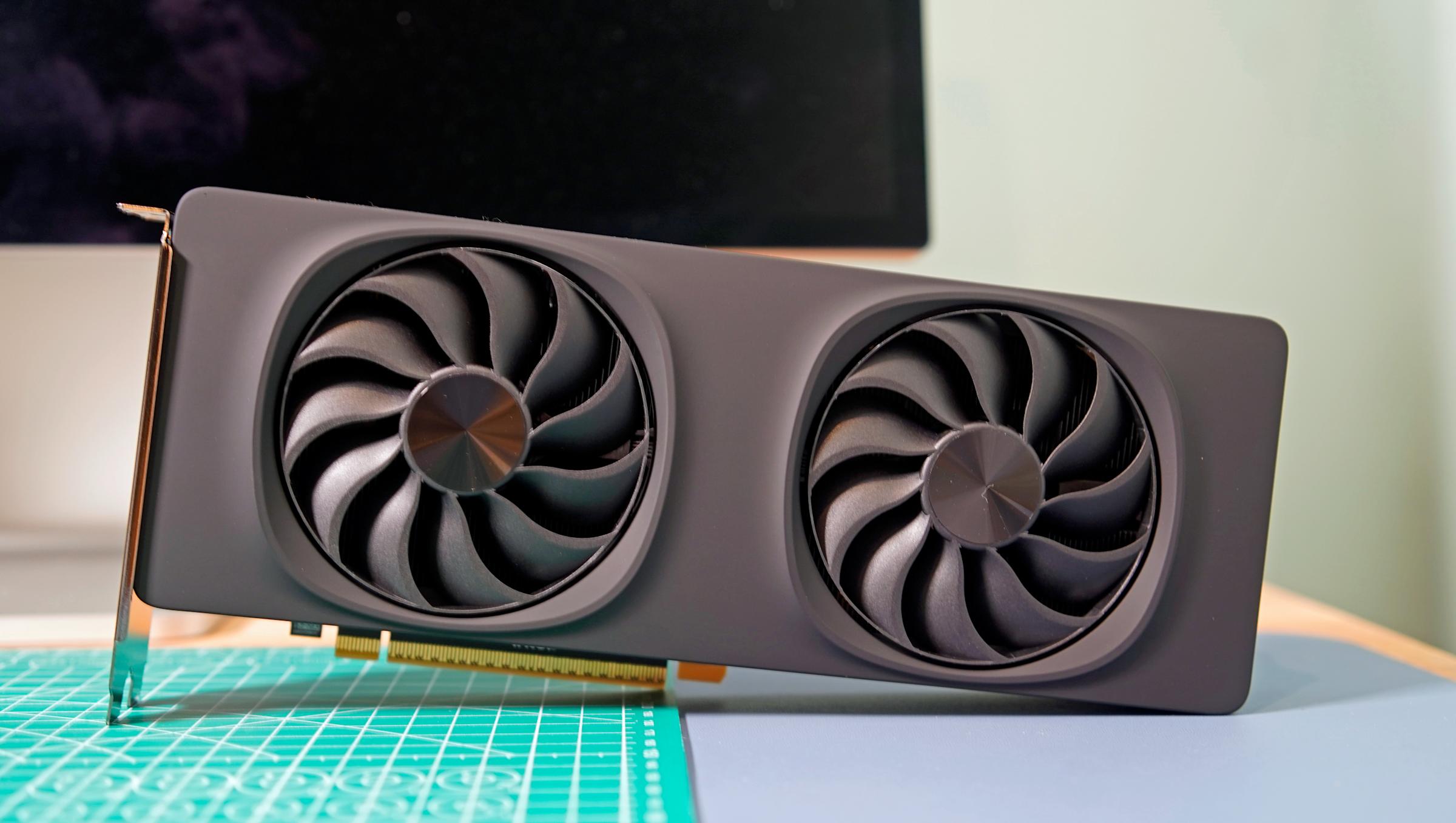
Intel's Arc B580 is a great budget option, as long as you can put up with some driver issues.
Devindra Hardawar for Engadget

For those on a tight budget, I would start and end my search with the Intel Arc B580. Newegg has models from ASRock and Onix at or under the card's $250 MSRP. I can't speak to the quality of ONIX cards, but ASRock is well-regarded. Over on Amazon, you can find the B580 for $300. With Intel cards you sometimes need to put up with odd driver issues, but as far as budget options go, the B580 offers value that's hard to beat. The one thing about budget cards like the B580 is they’re likely to face the most pricing pressure from the memory crunch due to the smaller margins manufacturers are making on them.   

NVIDIA RTX 5060 Ti 16GB
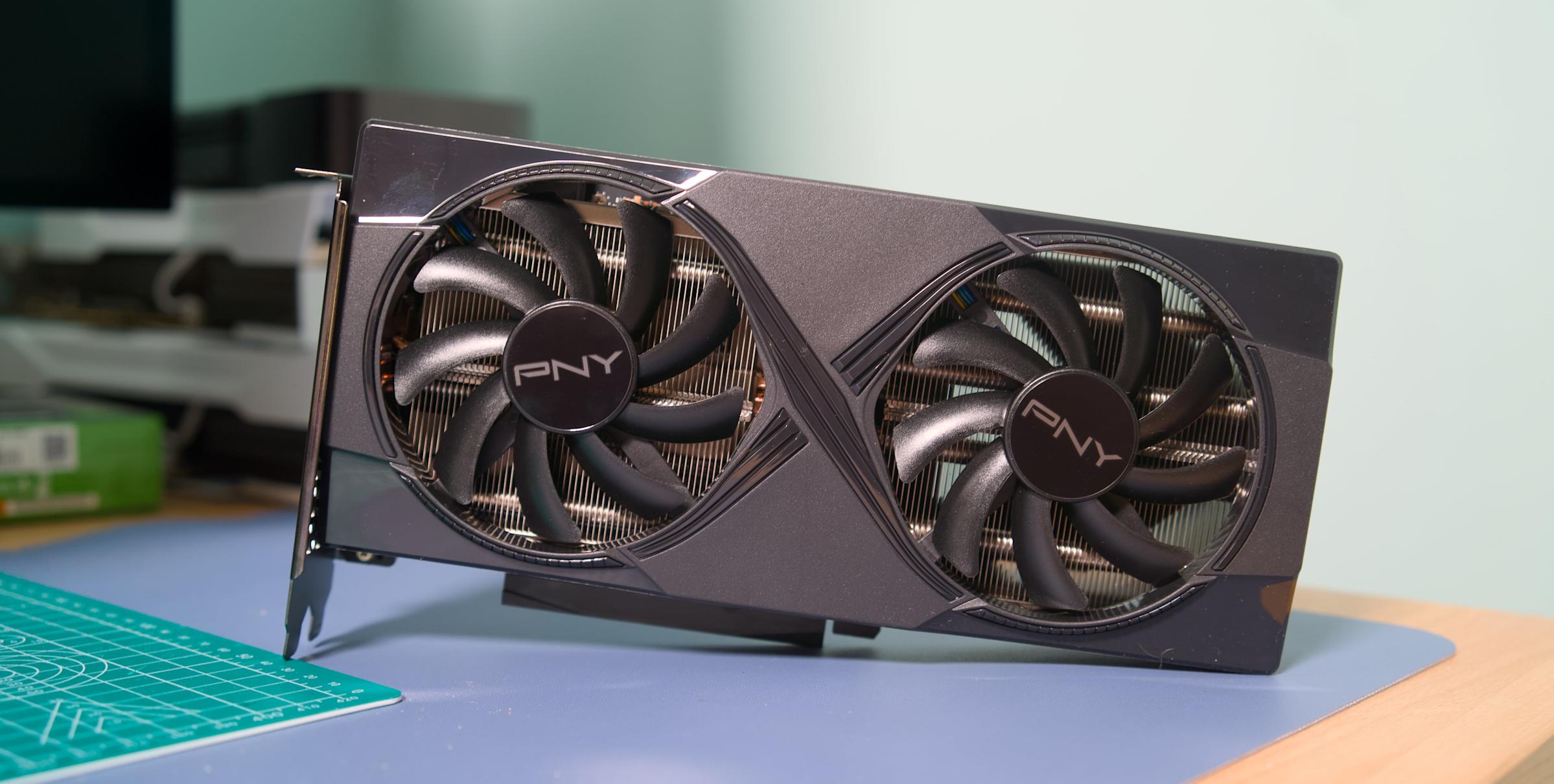
If you decide to go with the RTX 5060 Ti, be sure to buy the 16GB model.
Devindra Hardawar for Engadget

If you have more than $250 to spend on a GPU, the RTX 5060 Ti is the GPU to buy. Avoid the 8GB model and go straight for the 16GB variant. NVIDIA announced the 5060 Ti at an MSRP of $429, and luckily as of the writing of this article, you can still find one close to that price.

Newegg, for instance, is selling the MSI Ventus Black Plus version of the card for $440. Amazon has the silver colorway of that same GPU listed for $460 currently. The retailer also has models from Gigabyte and Zotac in and around that same price. 

If I had to pick between the 5060 Ti and 5070, which NVIDIA only offers with 12GB of VRAM, I would pick the former. The 5060 Ti is a safer bet, and offers nearly as much performance, particularly in games that include ray tracing as an option.    

AMD Radeon RX 9070 and RX 9070 XT  
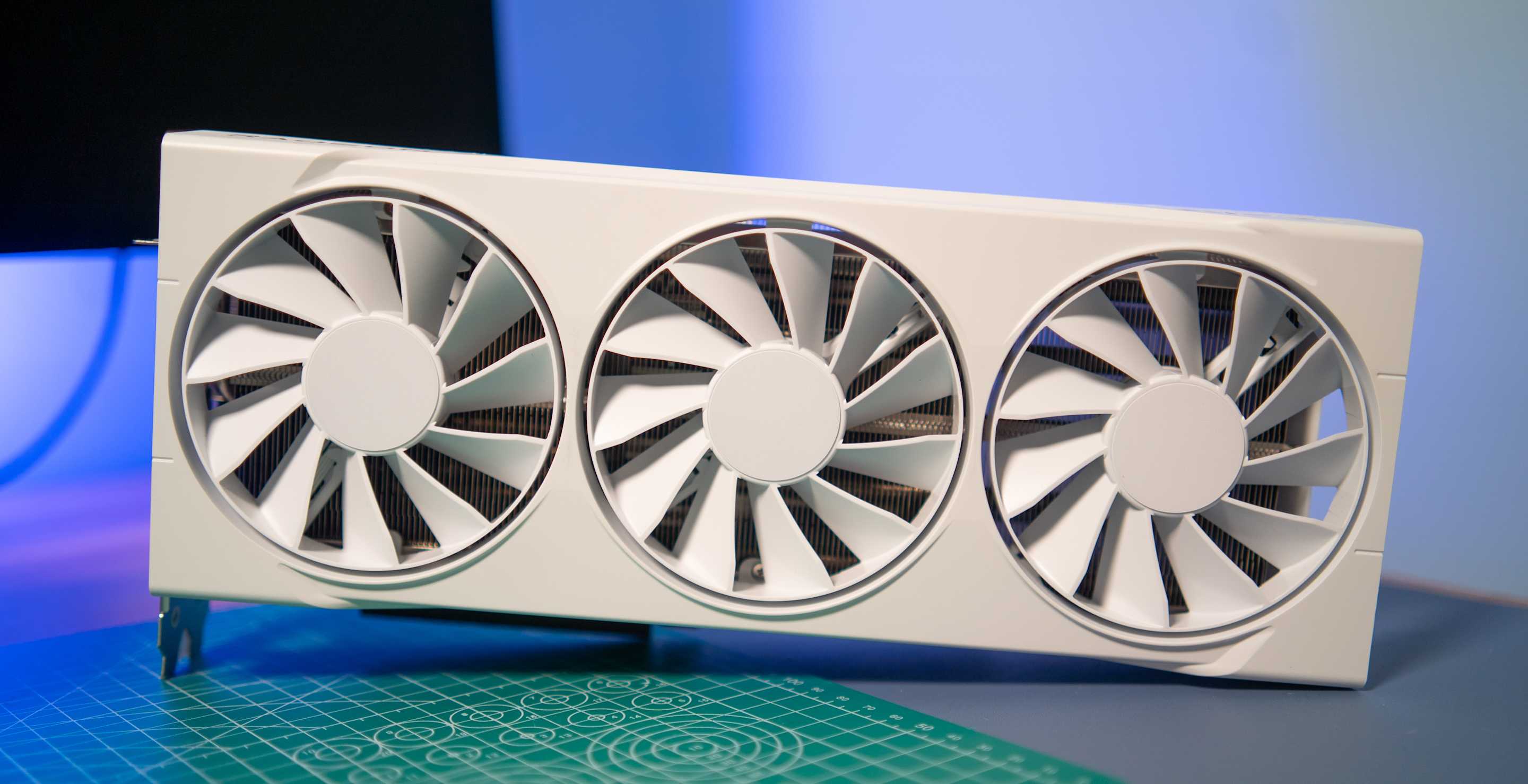
If you're a fan of Team Red, the Radeon RX 9070 and 9070 XT are among the best cards of this generation.
Devindra Hardawar for Engadget

For a mid-range option, the Radeon RX 9070 and 9070 XT offer excellent value. Of the two cards, the 9070 is the better purchase for most people due to its less demanding power requirements, but if you got a PSU that can handle the 9070 XT, go for it. 

Right now, Newegg has a few 9070 models from ASRock and Sapphire just under the card's $549 MSRP. My friend recently bought the Sapphire card linked above, and has had nothing but good things to say about it. You'll pay more going through Amazon, but the company has a couple of options around $600 from XFX and Gigabyte

When it comes to the 9070 XT, Newegg has an ASRock model priced right at the card's $599 MSRP. Many of the other options from Sapphire and XFX are unfortunately priced between $650 and $700. The same is true on Amazon, where the cheapest model I could find was $630.   

NVIDIA RTX 5070 Ti
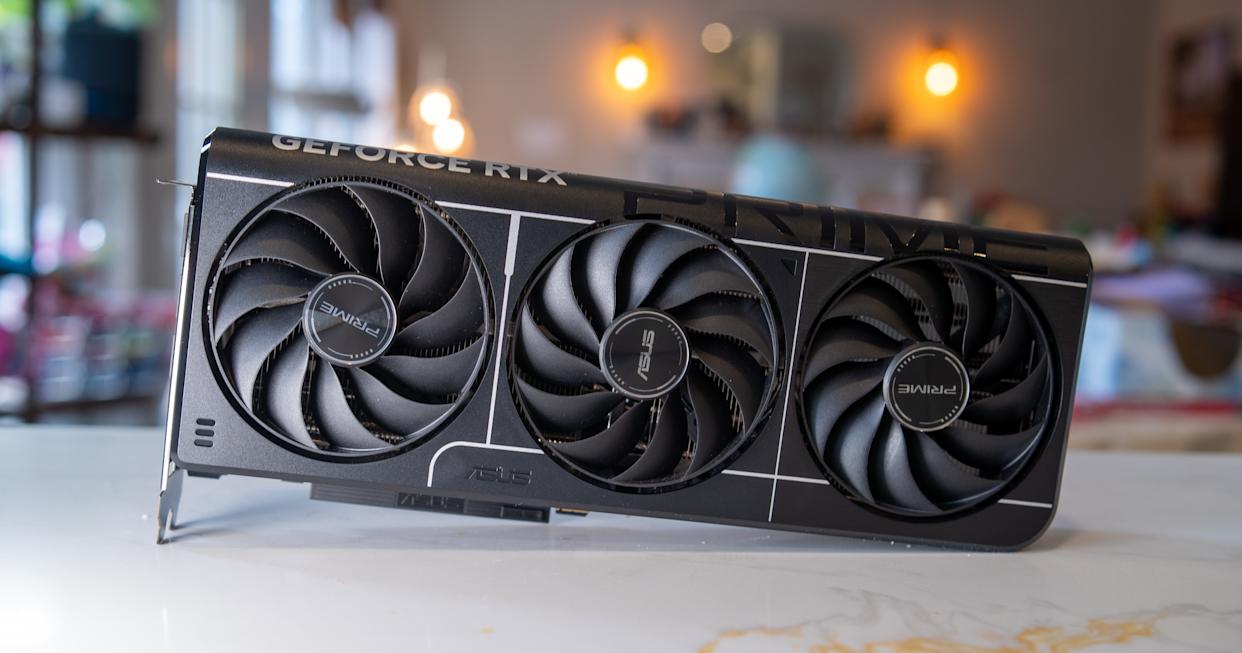
If you have more money to spend, the RTX 5070 Ti is a performance beast.
Devindra Hardawar for Engadget

For our final recommendation, consider the RTX 5070 Ti. It's a great option if you want to play games at 4K for less than what the 5080 and 5090 cost. Newegg has MSI and Zotac models on sale for $750, the card's recommended price. There are also a handful of other options from ASUS and Gigabyte that are just over $800. Amazon, meanwhile, is selling one Gigabyte variant for $749

This article originally appeared on Engadget at https://www.engadget.com/gaming/pc/the-ai-boom-could-soon-send-gpu-prices-soaring-so-nows-a-good-time-to-buy-one-153000063.html?src=rss
There aren’t any Black Friday deals on RAM this year, and you can thank AI for that

I sat down to write this story hoping to point people to deals on RAM kits for their gaming PC builds, but after an extensive search, I'm sorry to say there aren't any promotions worth even considering. Sure, if you visit Newegg or Amazon, you'll find plenty of bundles listed as Black Friday specials, but following a quick visit to PCPartPicker or CamelCamelCamel, you'll find many of those aren't deals at all. 

Take this 32GB kit of 6,000MHz DDR5 RAM from G.Skill I found on Newegg. It's one of the few "good" deals I found, but there's a catch. It's listed at $20 off its current $400 MSRP, with an additional $30 off if you use a promo code. To sweeten the deal, Newegg is even throwing in a NZXT all-in-one liquid cooler valued at $160. But here's the thing, according to PCPartPicker, that same kit cost $155 a couple of months ago. Unless you can make use of the free cooler, you don't need me to tell you $50 off a RAM kit that used to cost less than half of what it costs now is not a great buy. 

And it's not just that one set of sticks from G.Skill — nearly every kit of DDR5 RAM I could find has increased in price in recent months. For instance, Amazon has listed this 32GB bundle from Crucial at $322. A little more than a month ago, you could get that same kit for $175

If it feels like the pandemic all over again, when it was impossible to buy a GPU at MSRP, you're not far off the mark. Once again, there's a component shortage, but this time around, it's not cryptomining causing an insatiable demand for parts. Instead, it's the booming AI industry buying up every RAM stick it can for their data center builds. Unless you've been living under a rock, it's been hard to ignore the amount of money that's been thrown around by NVIDIA, Microsoft and others.  recently. Much of it has been of a seemingly circular nature, but that hasn't done anything to dent demand for both short and long-term memory. 

The problem is that many of the companies that produce consumer-grade memory, including heavyweights like SK Hynix and Samsung, also make memory for AI servers, and most of the RAM coming off those production lines is going straight to high-volume clients like OpenAI and Anthropic. In fact, demand for RAM has been so strong that even the price of some DDR4 memory kits has gone up — if you can even find the older format in stock.      

A statement CyberPowerPC posted earlier this week gives a sense of just how dire the situation is right now. "Recently, global memory (RAM) prices have surged by 500 percent and SSD prices have risen by 100 percent," the company said on X, adding it would be forced to increase the price of its pre-built PCs.

As a consumer, there's little you can do at the moment. You can either buy now and pay extra, or wait in hopes the price of RAM will stabilize sooner rather than later. Unfortunately, with no signs of the AI boom cooling down in the immediate future, it's hard to know when things might change. Save a bubble pop, the price of RAM is likely to remain high into early 2026, with the possibility of a trickle effect to SSD and GPU pricing.

This article originally appeared on Engadget at https://www.engadget.com/ai/there-arent-any-black-friday-deals-on-ram-this-year-and-you-can-thank-ai-for-that-130000335.html?src=rss

Google limits free Nano Banana Pro image generation usage due to ‘high demand’

If you were hoping to create some silly images this long holiday weekend with Google's new Nano Banana Pro model, I have some bad news: the company is restricting free usage of the AI system. In a support document spotted by 9to5Google, Google notes free users can currently generate two images daily, down from three per day previously. "Image generation and editing is in high demand," the company writes. "Limits may change frequently and will reset daily." 

It would appear Google is also limiting free Gemini 3 Pro usage, with the document stating non-paying users will get “basic access — daily limits may change frequently" as well. When the company first began rolling out Gemini 3 Pro on November 18, it guaranteed five free prompts per day. That was in line with Gemini 2.5 Pro. If you pay for either Google AI Pro or AI Ultra plan, your usage limits have not changed. They remain at 100 and 500 prompts per day, respectively. 

Google isn't the first company to enforce stricter usage following a popular release. You may recall OpenAI delayed rolling out ChatGPT's built-in image generator to free users after the feature turned out to be more popular than anticipated. However, OpenAI eventually brought image generation to free users. 

This article originally appeared on Engadget at https://www.engadget.com/ai/google-limits-free-nano-banana-pro-image-generation-usage-due-to-high-demand-223442929.html?src=rss

OpenAI can’t use the term ‘Cameo’ in Sora following temporary injunction

Cameo, the app that allows people to buy short videos from celebrities, has won an important victory in its legal battle against OpenAI. On Monday, a federal judge granted the company a temporary restraining order against OpenAI, CNBC reports. Until December 22, the startup is not allowed to use the word “cameo” in relation to any features inside of Sora, its TikTok-like app for creating AI-generated videos. The order covers similar words like “Kameo” and “CameoVideo.”

“We are gratified by the court’s decision, which recognizes the need to protect consumers from the confusion that OpenAI has created by using the Cameo trademark,” Cameo CEO Steven Galanis told CNBC. “While the court’s order is temporary, we hope that OpenAI will agree to stop using our mark permanently to avoid any further harm to the public or Cameo.”

An OpenAI spokesperson told Engadget: “We disagree with the complaint’s assertion that anyone can claim exclusive ownership over the word ‘cameo’, and we look forward to continuing to make our case to the court.”

Cameo sued OpenAI in October, claiming the company’s use of the term was likely to confuse consumers and dilute its brand. Before filing the suit, Galanis said Cameo tried to resolve the dispute “amicably,” but claims OpenAI refused to stop using the name. Sora’s cameo feature allows users to upload their likeness to the app, which other people can then use in their own videos. US District Judge Eumi K. Lee, who granted Cameo the temporary junction, has scheduled a hearing for December 19 to determine if the order should be made permanent.

Update, November 24, 7:25PM ET: This article was updated after publish to include comment from an OpenAI spokesperson.

This article originally appeared on Engadget at https://www.engadget.com/ai/openai-cant-use-the-term-cameo-in-sora-following-temporary-injunction-213431626.html?src=rss

Anthropic’s Opus 4.5 model is here to conquer Microsoft Excel

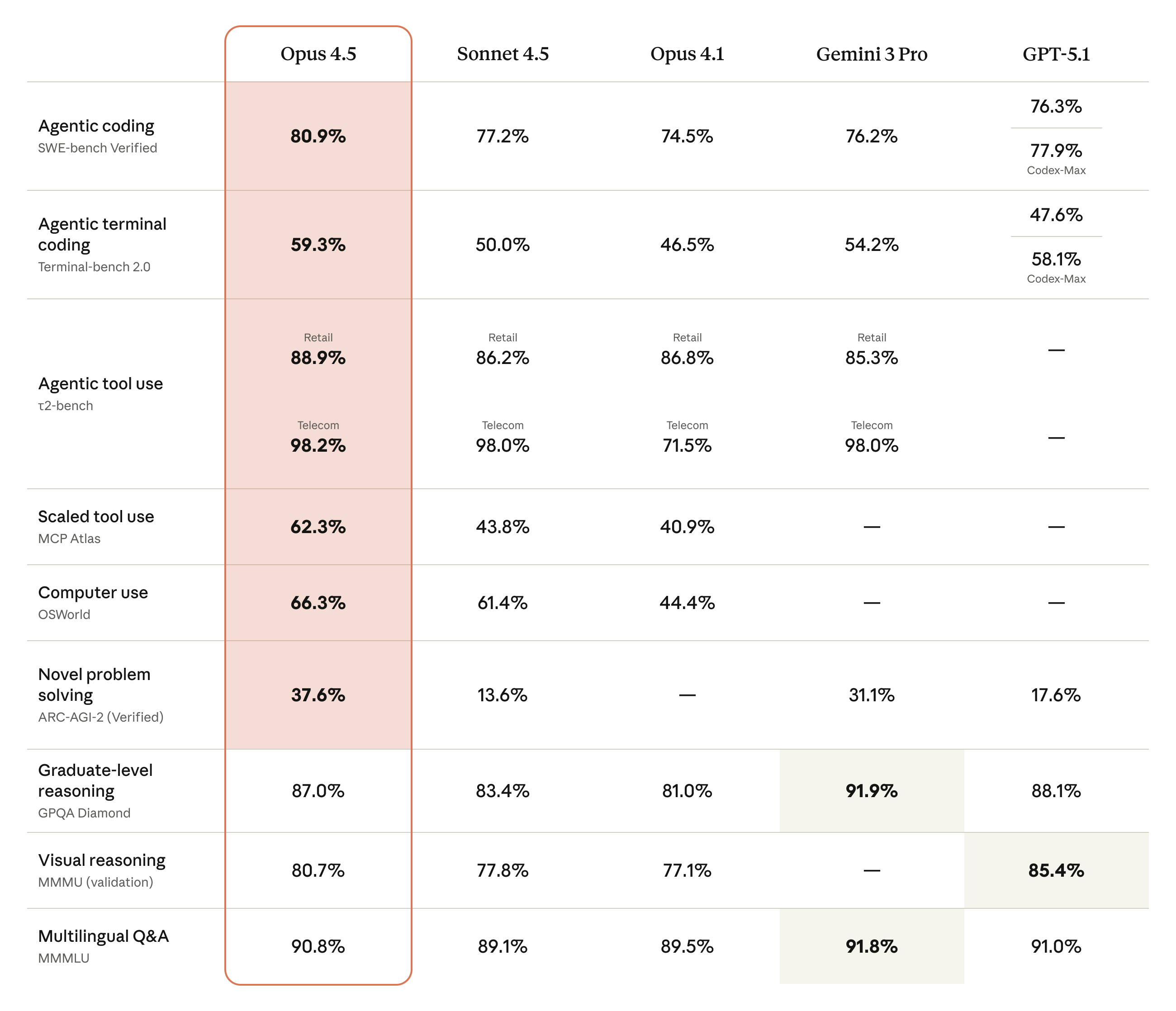
Hot on the heels of Google's Gemini 3 Pro release, Anthropic has announced an update for its flagship Opus model. Now at version 4.5, the new system offers state-of-the-art performance in coding, computer use and office tasks. No surprise there, those have been some of Claude's greatest strengths for a while. The good news is Anthropic is rolling out a handful of existing tools more broadly alongside Opus 4.5. It's also releasing one new feature.  

To start, the company's Chrome extension, Claude for Chrome, is now available to all Max users. Anthropic is also introducing a feature called infinite chat. Provided you pay to use Claude, the chatbot won't fall to context window errors, allowing it to maintain consistency across files and chats. According to Anthropic, infinite chat was one of the most requested features from its users. Then there's Claude for Excel, which brings the chatbot to a sidebar inside of Microsoft's app. The tool is now broadly available to all Max, Team and Enterprise users, with support for pivot tables, charts and file uploads built-in. 

A table comparing Opus 4.5's efforts in various benchmarks.
Anthropic

On the subject of Excel, Anthropic says early testers saw a 20 percent accuracy improvement on their internal evaluations and a 15 percent improvement in efficiency gains. As a complete Excel noob, I'm excited to for the company to trickle down that expertise to its more consumer-oriented models, Claude Sonnet and Haiku. 

Elsewhere, Opus 4.5 also delivers improvements in agentic workflows, with the new model excelling at refining its own processes. More importantly, Anthropic is calling Opus 4.5 its safest model yet. It’s better at rejecting prompt injection style attacks, outpacing even Gemini 3 Pro, according to Anthropic’s own evaluations.

If you want to try Opus 4.5 for yourself, it’s available today through all of Anthropic’s apps and the company’s API. For developers, pricing for the new model starts at $5 per million tokens.

This article originally appeared on Engadget at https://www.engadget.com/ai/anthropics-opus-45-model-is-here-to-conquer-microsoft-excel-190000905.html?src=rss

Google’s new Gemini 3 model arrives in AI Mode and the Gemini app

A few weeks short of Gemini 2's first birthday, Google has announced Gemini 3 Pro. Naturally, the company claims the new system is its most intelligent AI model yet, offering state-of-the-art reasoning, class-leading vibe coding performance and more. The good news is you can put those claims to the test today, with Google making Gemini 3 Pro available across many of its products and services.

Google is highlighting a couple of benchmarks to tout Gemini 3 Pro's performance. In Humanity's Last Exam, widely considered one of the toughest tests AI labs can put their systems through, the model delivered a new top accuracy score of 37.5 percent, beating the previous leader, Grok 4, by an impressive 12.1 percentage points. Notably, it achieved its score without turning to tools like web search. On LMArena, meanwhile, Gemini 3 Pro is now on top of the site's leaderboards with a score of 1,501 points.

Okay, but what about the practical benefits of Gemini 3 Pro? In the Gemini app, the new model will translate to answers that are more concise and better formatted. It also enables a new feature Google calls Gemini Agent. The tool builds on Project Mariner, the web-surfing Chrome AI the company debuted at the end of last year. It allows users to ask Gemini to complete tasks for them. For example, say you want help managing your email inbox. In the past, Gemini would have offered some general tips. Now, it can do that work for you.

To try Gemini 3 Pro inside of the Gemini app, select "Thinking" from the model picker. The new model is available to everyone, though AI Plus, Pro and Ultra subscribers can use it more often before hitting their rate limit. To make the most of Gemini Agent, you'll need to grant the tool access to your Google apps.

In Search, meanwhile, Gemini 3 Pro will debut inside of AI Mode, with availability of the new model first rolling out to AI Pro and Ultra subscribers. Google will also bring the model to AI Overviews, where it will be used to answer the most difficult questions people ask of its search engine. In the coming weeks, Google plans to roll out a new routing algorithm for both AI Mode and AI Overviews that will know when to put questions through Gemini 3 Pro. In the meantime, subscribers can try the new model inside of AI Mode by selecting "Thinking" from the dropdown menu.

A GIF demonstrating Gemini 3 Pro generating a mortgage calculator inside of AI Mode.
Google

In practice, Google says Gemini 3 Pro will result in AI Mode finding more credible and relevant content related to your questions. This is thanks to how the new model augments the fan-out technique that powers AI Mode. The tool will perform even more searches than before and with its new intelligence, Google suggests it may even uncover content previous models may have missed. At the same time, Gemini 3's better multi-modal understanding will translate to AI Mode generating more dynamic and interactive interfaces to answer your questions. For example, if you're researching mortgage loans, the tool can create a loan calculator directly inside of its response.

For developers and its enterprise customers, Google is bringing Gemini 3 to all the usual places one can find its models, including inside of the Gemini API, AI Studio and Vertex AI. The company is also releasing a new agentic coding app called Antigravity. It can autonomously program while creating tasks for itself and providing progress reports. Alongside Gemini 3 Pro, Google is introducing Gemini 3 Deep Think. The enhanced reasoning mode will be available to safety testers before it rolls out to AI Ultra subscribers.

This article originally appeared on Engadget at https://www.engadget.com/ai/googles-new-gemini-3-model-arrives-in-ai-mode-and-the-gemini-app-160054273.html?src=rss

How to generate AI images using ChatGPT

Since March 2025, ChatGPT has been capable of generating images. Following a period where it briefly wasn't available to free users, you now don't even pay for one of OpenAI's subscriptions to use this feature. And while making images inside of ChatGPT is easy, there are some nuances worth explaining. For example, did you know you can ask ChatGPT to edit photos you've taken? It's more powerful than you might think. Here’s everything you need to know about generating AI images with ChatGPT.  

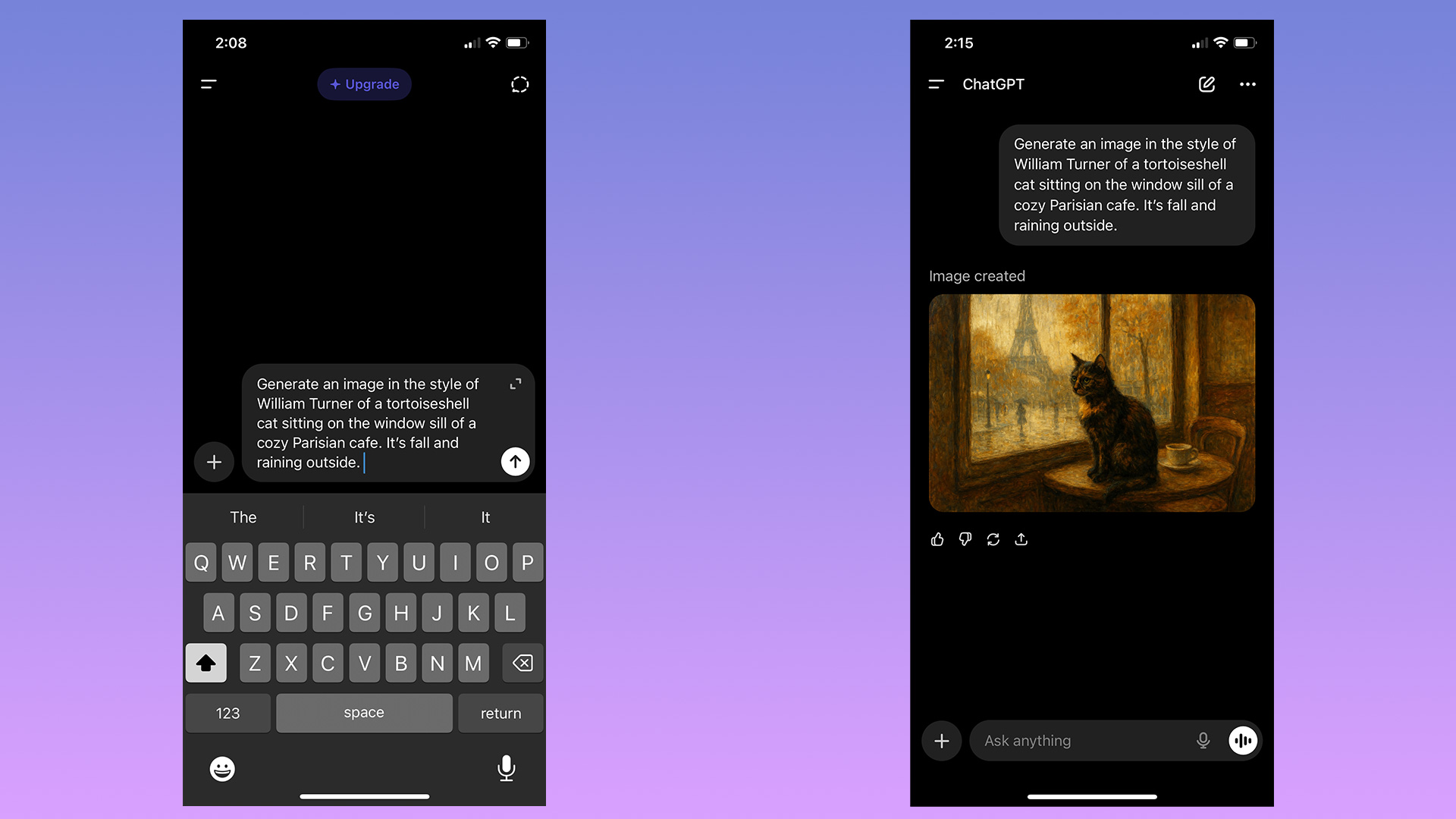
To begin making an image in ChatGPT, you can start by typing in the prompt bar.
Igor Bonifacic for Engadget

You can start generating images in ChatGPT simply by typing in the prompt bar what you want to see. There's no need to overthink things; as long as you have some version of "generate an image" followed by a description of your idea, ChatGPT will do the rest.  

Depending on the complexity of the prompt and whether you pay for ChatGPT, it may take a minute or two for the chatbot to complete your image request. Sometimes the process can take longer if OpenAI's servers are experiencing greater traffic than usual.

At the end of last year, OpenAI updated the model powering image generation to make it faster, as well as better at rendering text and following instructions. At the same time, it added a dedicated "Images" section to ChatGPT's sidebar. Here you can see all the images you've made, alongside sample prompts and suggestions for styles to try out, making it a great place to start if you've never used an image generator before.    

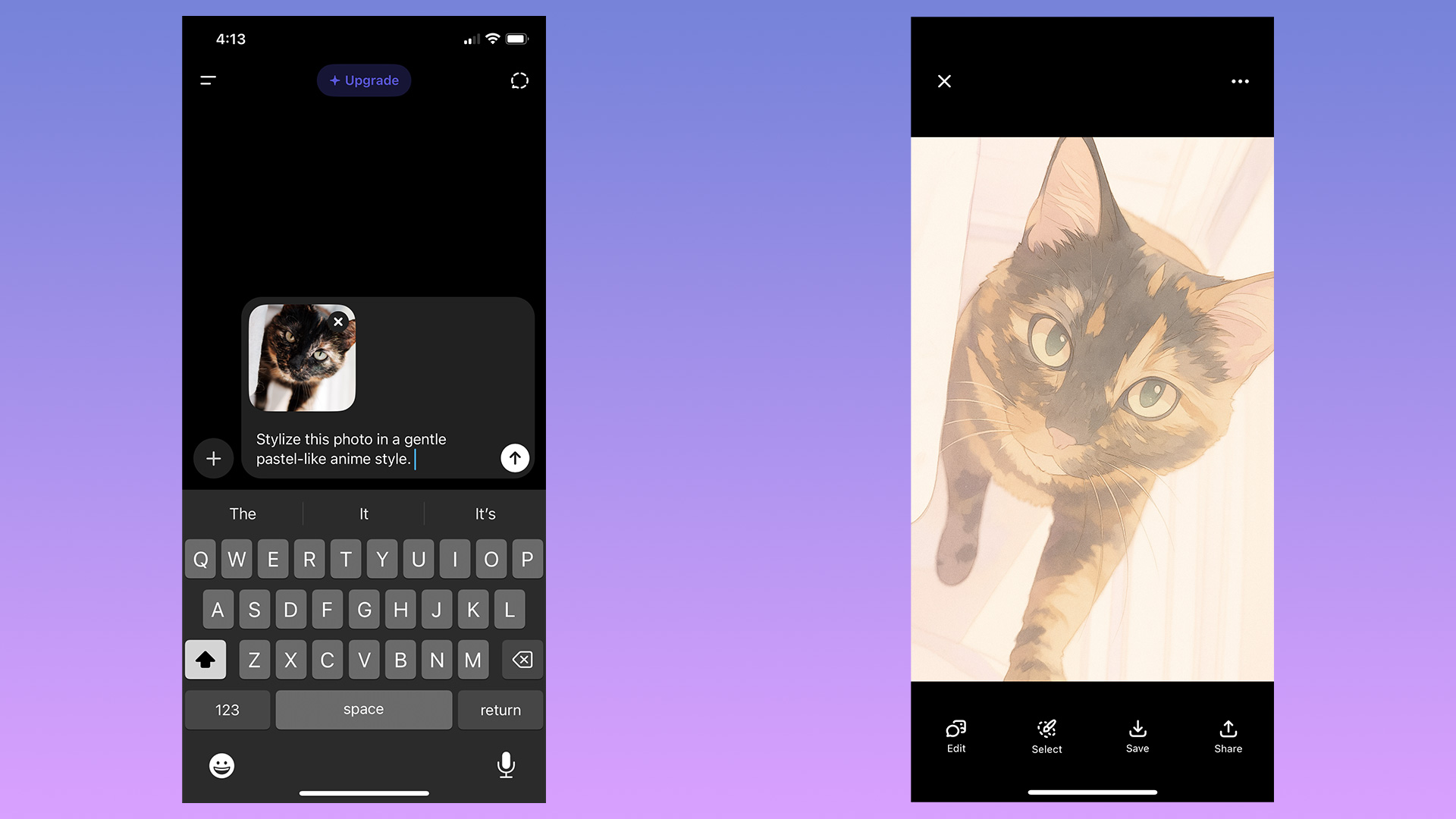
You can also upload images to ChatGPT.
Igor Bonifacic for Engadget

In addition to generating images from text prompts, ChatGPT can modify existing photos or images you upload. This is my preferred way of making images with ChatGPT; I don't need to describe the composition, I can use an existing one to guide the chatbot. To use an existing image as a starting point for a new generation, follow these steps:    

  1. Tap the "+" icon, located to the left of the prompt bar.  

  2. Select Add photos & files. 

  3. Select the image you want ChatGPT to edit. If uploading an image from your phone, you'll first need to grant ChatGPT access to your camera roll.   

  4. Write a prompt describing the changes you want.   

If generating from the Images section, tap "Add photos" instead.

Keep in mind any photos you upload to OpenAI's servers may be used by the company to train future models. You can opt out of allowing your data to be used for training by following these steps: 

  1. Open the sidebar menu. 

    1. On mobile, tap the two lines on the top left of the interface; on desktop, click instead on the OpenAI logo.

  2. Tap your name to access account settings. 

  3. Tap Data controls.

  4. Toggle off Improve the model for everyone.

ChatGPT gives you a few different ways to edit images.
Igor Bonifacic for Engadget

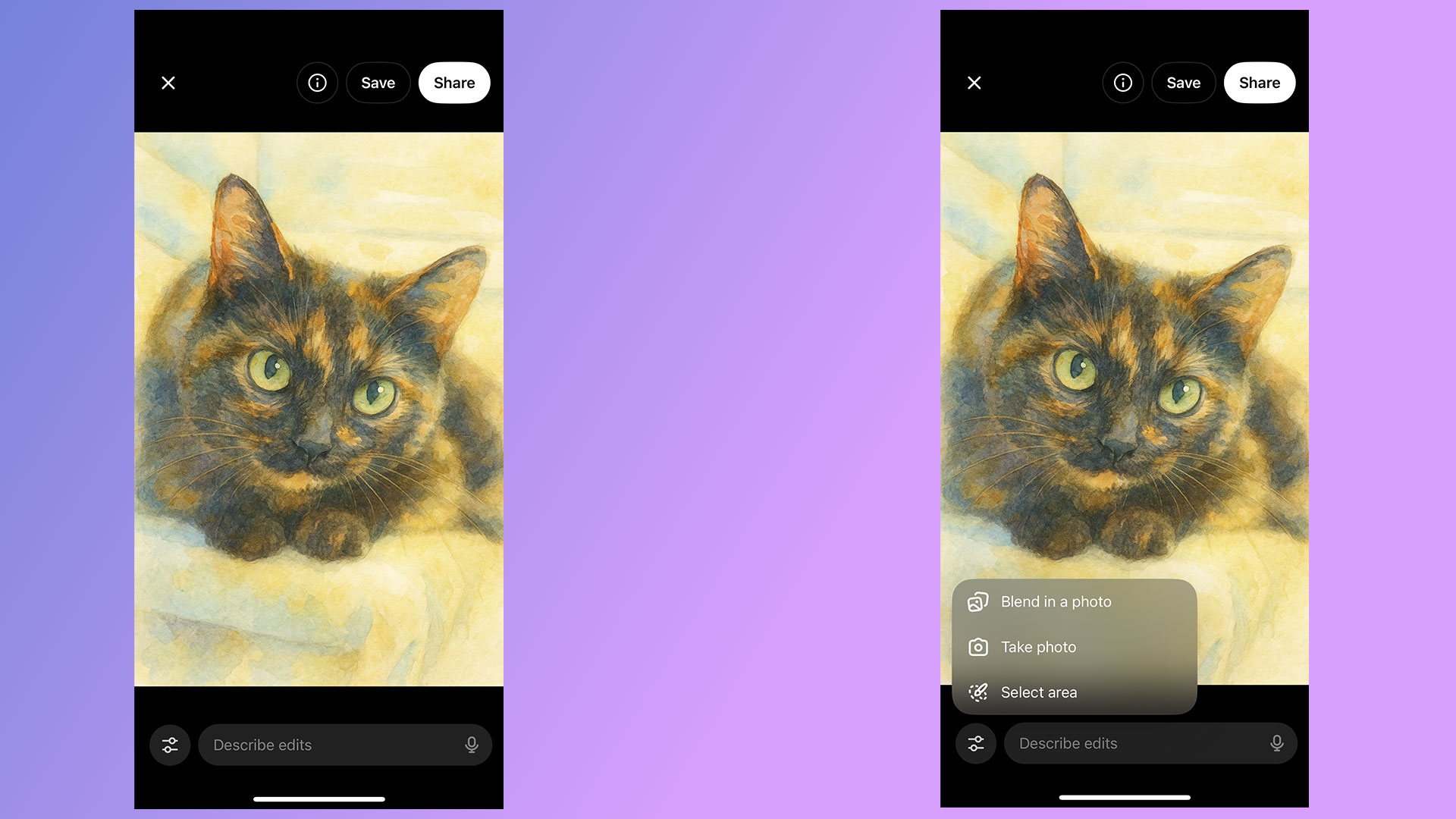
If you're unhappy with ChatGPT's output, you have two options. You can either prompt it to create an entirely new image, or edit parts of the picture it just generated. As always, the process for both involves simply typing what you want in the prompt bar. On mobile, OpenAI gives users a few different ways of accomplishing the same task.

To generate an entirely new image:  

  1. Tap the three dots icon below the image ChatGPT created. 

  2. Select Retry. 

To edit part of an existing image generation: 

  1. Tap the image ChatGPT created. 

  2. Tap Select area.

  3. Use your finger to mask the section of the image you want ChatGPT to tweak. The slider on the left allows you to adjust the size of the masking brush. On desktop, masking is also available if you click on an image and then click on the paintbrush icon on the top right. 

  4. Describe what you want ChatGPT to add, remove or replace through the prompt bar.

ChatGPT can also blend one of your photos with an image it has generated. To do this: 

  1. Tap an image ChatGPT created.

  2. Tap Blend in a photo.

  3. Upload the photo you wish 

Like all AI systems, ChatGPT is non-deterministic, meaning even if you prompt it in the same way multiple times, it won't generate the exact same response each time.  

The best advice I can offer is to be specific when prompting ChatGPT. The more detail you can provide when describing what you want from it, the better the results. And remember: ChatGPT can hallucinate — as you may have noticed from one of the example pictures I included above. In the image of the tortoiseshell cat, not only is the tortie not sitting on the window sill as instructed, it's sitting on a table that doesn't make much sense. So, most of all, be patient. Prompting an AI model is not exact science, and it can take a few tries before it creates the result you want. 

ChatGPT is available on the web, desktop and mobile. To access it on your computer, open your preferred browser and navigate to chatgpt.com. OpenAI also offers dedicated Mac and Windows apps you can download from the company's website. On iOS and Android, you'll need to download the ChatGPT app from either the App Store or Google Play before you can start using the chatbot.   

Since ChatGPT runs on OpenAI's servers, as long as you can access the chatbot, you'll be able to use it to create images no matter the age of your phone or computer. 

Yes, ChatGPT can generate images for free, as long as you create an OpenAI account. However, there is a daily rate cap and GPT-5 will take longer to make a free image. Following March 27, 2025, OpenAI briefly limited free users to three image generations per day. The company has since relaxed that restriction, though it doesn't list a specific limit on its website. In my experience, you'll be able to generate about six to seven images every 24 hours.

OpenAI offers three different subscription plans, each with their own set of image generation perks.  

  • ChatGPT Go, which costs $8 per month, offers "more image creation." 

  • ChatGPT Plus, which costs $20 per month, offers "expanded and faster image creation."

  • ChatGPT Pro, which costs $200 per month, offers "unlimited and faster image creation."       

Note: ChatGPT Go will be included in OpenAI's forthcoming ads pilot, which will see the company display sponsored content alongside organic responses from ChatGPT. The company does not plan to display ads to Plus and Pro users.   

No. For copyright reasons, ChatGPT can't replicate photos or exact real world events. For example, when I asked it to recreate the photo of Zinedine Zidane's iconic 2006 World Cup headbutt, ChatGPT refused.  

"I can make an artistic reinterpretation inspired by the emotion or energy of that moment — for example, a stylized painting showing the tension and intensity of competition, without depicting real individuals," it told me.  

This article originally appeared on Engadget at https://www.engadget.com/ai/how-to-generate-ai-images-using-chatgpt-120000560.html?src=rss

Google adds an AI Mode shortcut to Chrome on mobile

Well, I suppose it was only a matter of time, but Google is making AI Mode harder to avoid. In the US, the company has begun rolling out an update for Chrome on Android and iOS that adds an AI Mode shortcut to the browser's new tab page. It's predominantly featured, appearing right below the browser's signature search bar.

"This will let you ask more complex, multi-part questions, and then dive even deeper into a topic with follow-up questions and relevant links," the company said of the update. In the near future, Google plans to bring the shortcut to 160 additional countries, with support for other languages — including Hindi, Indonesian, Japanese, Korean, Portuguese — on the way as well. 

Google introduced AI Mode at the start of March when it previewed the feature through its Labs program. Since then, it has been aggressively rolling out AI Mode in nearly every market it operates, beginning this past May at I/O 2025 May when the company made the chatbot available to all US users.

This article originally appeared on Engadget at https://www.engadget.com/ai/google-adds-an-ai-mode-shortcut-to-chrome-on-mobile-170042622.html?src=rss

Anthropic will use AWS AI chips after $4 billion Amazon investment

Amazon is doubling its investment in Anthropic. The e-commerce giant will provide Anthropic with an additional $4 billion in funding on top of the $4 billion it committed last year. Although Amazon remains a minority investor, Anthropic has agreed to make Amazon Web Services (AWS) its “primary cloud and training partner.”

Before today’s announcement, The Information had reported that Amazon wanted to make any additional funding contingent on a commitment from Anthropic to use the company’s in-house AI chips instead of silicon from NVIDIA. It appears Amazon got its way, with both companies noting in separate press releases that Anthropic will use AWS Trainium and Inferentia chips to train future foundation models.

Additionally, Anthropic says it will collaborate with Amazon’s Annapurna Labs to develop future Trainium accelerators. “Through deep technical collaboration, we’re writing low-level kernels that allow us to directly interface with the Trainium silicon, and contributing to the AWS Neuron software stack to strengthen Trainium,” the company said. “Our engineers work closely with Annapurna’s chip design team to extract maximum computational efficiency from the hardware, which we plan to leverage to train our most advanced foundation models.”

According to another recent report, Anthropic expects to burn through more than $2.7 billion before the end. Before today, the company had raised $9.7 billion. Either way, it’s bought itself some much-needed runway as it looks to compete against OpenAI and other companies in the AI space.

This article originally appeared on Engadget at https://www.engadget.com/ai/anthropic-will-use-aws-ai-chips-after-4-billion-amazon-investment-222053145.html?src=rss

Black Friday deals include reMarkable 2 bundles for $89 off

If you’ve been eyeing the reMarkable 2 for a while, now is a great time to buy one. While the E Ink tablet itself isn’t on sale, reMarkable has discounted the two bundles it offers alongside the 2. Until the end of December 2, you can save $89 off the Type Folio and Book Folio bundles. Both include reMarkable’s Marker Plus stylus, which comes with an eraser feature not found on the regular Marker stylus. It’s also black instead of gray and four grams heavier. As for the two folios, the type one is the one to buy if you need a keyboard.

The reMarkable 2 is easily the best E Ink tablet you can buy right now. It’s the top pick in our E Ink tablet guide, and for good reason. It boasts a tremendous reading and writing experience, with a responsive, low-latency display that offers the closest pen-and-paper experience among the tablets Engadget tested. 

The reMarkable 2 makes accessing your favorite books and files easy, too. It includes support for both PDFs and ePUBs, and you can link your Google Drive, Microsoft OneDrive and Dropbox to make transferring those files a cinch. Each new reMarkable 2 tablet also comes with a complimentary one-year subscription to Remarkable Connect, which is great for transferring any notes you write to your other devices.

One of the few downsides of the ReMarkable 2 is how expensive it is to buy. Although reMarkable hasn’t directly discounted the tablet, a folio cover and Marker Plus stylus are accessories most people will probably want to buy anyway, so this Black Friday promotion still makes the device more accessible. 

Check out all of the latest Black Friday and Cyber Monday deals here.

This article originally appeared on Engadget at https://www.engadget.com/mobile/tablets/black-friday-deals-include-remarkable-2-bundles-for-89-off-210003470.html?src=rss