Anthropic’s Opus 4.5 model is here to conquer Microsoft Excel

Hot on the heels of Google's Gemini 3 Pro release, Anthropic has announced an update for its flagship Opus model. Now at version 4.5, the new system offers state-of-the-art performance in coding, computer use and office tasks. No surprise there, those have been some of Claude's greatest strengths for a while. The good news is Anthropic is rolling out a handful of existing tools more broadly alongside Opus 4.5. It's also releasing one new feature.  

To start, the company's Chrome extension, Claude for Chrome, is now available to all Max users. Anthropic is also introducing a feature called infinite chat. Provided you pay to use Claude, the chatbot won't fall to context window errors, allowing it to maintain consistency across files and chats. According to Anthropic, infinite chat was one of the most requested features from its users. Then there's Claude for Excel, which brings the chatbot to a sidebar inside of Microsoft's app. The tool is now broadly available to all Max, Team and Enterprise users, with support for pivot tables, charts and file uploads built-in. 

A table comparing Opus 4.5's efforts in various benchmarks.
Anthropic

On the subject of Excel, Anthropic says early testers saw a 20 percent accuracy improvement on their internal evaluations and a 15 percent improvement in efficiency gains. As a complete Excel noob, I'm excited to for the company to trickle down that expertise to its more consumer-oriented models, Claude Sonnet and Haiku. 

Elsewhere, Opus 4.5 also delivers improvements in agentic workflows, with the new model excelling at refining its own processes. More importantly, Anthropic is calling Opus 4.5 its safest model yet. It’s better at rejecting prompt injection style attacks, outpacing even Gemini 3 Pro, according to Anthropic’s own evaluations.

If you want to try Opus 4.5 for yourself, it’s available today through all of Anthropic’s apps and the company’s API. For developers, pricing for the new model starts at $5 per million tokens.

This article originally appeared on Engadget at https://www.engadget.com/ai/anthropics-opus-45-model-is-here-to-conquer-microsoft-excel-190000905.html?src=rss

Google’s new Gemini 3 model arrives in AI Mode and the Gemini app

A few weeks short of Gemini 2's first birthday, Google has announced Gemini 3 Pro. Naturally, the company claims the new system is its most intelligent AI model yet, offering state-of-the-art reasoning, class-leading vibe coding performance and more. The good news is you can put those claims to the test today, with Google making Gemini 3 Pro available across many of its products and services.

Google is highlighting a couple of benchmarks to tout Gemini 3 Pro's performance. In Humanity's Last Exam, widely considered one of the toughest tests AI labs can put their systems through, the model delivered a new top accuracy score of 37.5 percent, beating the previous leader, Grok 4, by an impressive 12.1 percentage points. Notably, it achieved its score without turning to tools like web search. On LMArena, meanwhile, Gemini 3 Pro is now on top of the site's leaderboards with a score of 1,501 points.

Okay, but what about the practical benefits of Gemini 3 Pro? In the Gemini app, the new model will translate to answers that are more concise and better formatted. It also enables a new feature Google calls Gemini Agent. The tool builds on Project Mariner, the web-surfing Chrome AI the company debuted at the end of last year. It allows users to ask Gemini to complete tasks for them. For example, say you want help managing your email inbox. In the past, Gemini would have offered some general tips. Now, it can do that work for you.

To try Gemini 3 Pro inside of the Gemini app, select "Thinking" from the model picker. The new model is available to everyone, though AI Plus, Pro and Ultra subscribers can use it more often before hitting their rate limit. To make the most of Gemini Agent, you'll need to grant the tool access to your Google apps.

In Search, meanwhile, Gemini 3 Pro will debut inside of AI Mode, with availability of the new model first rolling out to AI Pro and Ultra subscribers. Google will also bring the model to AI Overviews, where it will be used to answer the most difficult questions people ask of its search engine. In the coming weeks, Google plans to roll out a new routing algorithm for both AI Mode and AI Overviews that will know when to put questions through Gemini 3 Pro. In the meantime, subscribers can try the new model inside of AI Mode by selecting "Thinking" from the dropdown menu.

A GIF demonstrating Gemini 3 Pro generating a mortgage calculator inside of AI Mode.
Google

In practice, Google says Gemini 3 Pro will result in AI Mode finding more credible and relevant content related to your questions. This is thanks to how the new model augments the fan-out technique that powers AI Mode. The tool will perform even more searches than before and with its new intelligence, Google suggests it may even uncover content previous models may have missed. At the same time, Gemini 3's better multi-modal understanding will translate to AI Mode generating more dynamic and interactive interfaces to answer your questions. For example, if you're researching mortgage loans, the tool can create a loan calculator directly inside of its response.

For developers and its enterprise customers, Google is bringing Gemini 3 to all the usual places one can find its models, including inside of the Gemini API, AI Studio and Vertex AI. The company is also releasing a new agentic coding app called Antigravity. It can autonomously program while creating tasks for itself and providing progress reports. Alongside Gemini 3 Pro, Google is introducing Gemini 3 Deep Think. The enhanced reasoning mode will be available to safety testers before it rolls out to AI Ultra subscribers.

This article originally appeared on Engadget at https://www.engadget.com/ai/googles-new-gemini-3-model-arrives-in-ai-mode-and-the-gemini-app-160054273.html?src=rss

How to generate AI images using ChatGPT

Since March 2025, ChatGPT has been capable of generating images. Following a period where it briefly wasn't available to free users, you now don't even pay for one of OpenAI's subscriptions to use this feature. And while making images inside of ChatGPT is easy, there are some nuances worth explaining. For example, did you know you can ask ChatGPT to edit photos you've taken? It's more powerful than you might think. Here’s everything you need to know about generating AI images with ChatGPT.  

To begin making an image in ChatGPT, you can start by typing in the prompt bar.
Igor Bonifacic for Engadget

You can start generating images in ChatGPT simply by typing in the prompt bar what you want to see. There's no need to overthink things; as long as you have some version of "generate an image" followed by a description of your idea, ChatGPT will do the rest.  

Depending on the complexity of the prompt and whether you pay for ChatGPT, it may take a minute or two for the chatbot to complete your image request. Sometimes the process can take longer if OpenAI's servers are experiencing greater traffic than usual.

At the end of last year, OpenAI updated the model powering image generation to make it faster, as well as better at rendering text and following instructions. At the same time, it added a dedicated "Images" section to ChatGPT's sidebar. Here you can see all the images you've made, alongside sample prompts and suggestions for styles to try out, making it a great place to start if you've never used an image generator before.    

You can also upload images to ChatGPT.
Igor Bonifacic for Engadget

In addition to generating images from text prompts, ChatGPT can modify existing photos or images you upload. This is my preferred way of making images with ChatGPT; I don't need to describe the composition, I can use an existing one to guide the chatbot. To use an existing image as a starting point for a new generation, follow these steps:    

  1. Tap the "+" icon, located to the left of the prompt bar.  

  2. Select Add photos & files. 

  3. Select the image you want ChatGPT to edit. If uploading an image from your phone, you'll first need to grant ChatGPT access to your camera roll.   

  4. Write a prompt describing the changes you want.   

If generating from the Images section, tap "Add photos" instead.

Keep in mind any photos you upload to OpenAI's servers may be used by the company to train future models. You can opt out of allowing your data to be used for training by following these steps: 

  1. Open the sidebar menu. 

    1. On mobile, tap the two lines on the top left of the interface; on desktop, click instead on the OpenAI logo.

  2. Tap your name to access account settings. 

  3. Tap Data controls.

  4. Toggle off Improve the model for everyone.

ChatGPT gives you a few different ways to edit images.
Igor Bonifacic for Engadget

If you're unhappy with ChatGPT's output, you have two options. You can either prompt it to create an entirely new image, or edit parts of the picture it just generated. As always, the process for both involves simply typing what you want in the prompt bar. On mobile, OpenAI gives users a few different ways of accomplishing the same task.

To generate an entirely new image:  

  1. Tap the three dots icon below the image ChatGPT created. 

  2. Select Retry. 

To edit part of an existing image generation: 

  1. Tap the image ChatGPT created. 

  2. Tap Select area.

  3. Use your finger to mask the section of the image you want ChatGPT to tweak. The slider on the left allows you to adjust the size of the masking brush. On desktop, masking is also available if you click on an image and then click on the paintbrush icon on the top right. 

  4. Describe what you want ChatGPT to add, remove or replace through the prompt bar.

ChatGPT can also blend one of your photos with an image it has generated. To do this: 

  1. Tap an image ChatGPT created.

  2. Tap Blend in a photo.

  3. Upload the photo you wish 

Like all AI systems, ChatGPT is non-deterministic, meaning even if you prompt it in the same way multiple times, it won't generate the exact same response each time.  

The best advice I can offer is to be specific when prompting ChatGPT. The more detail you can provide when describing what you want from it, the better the results. And remember: ChatGPT can hallucinate — as you may have noticed from one of the example pictures I included above. In the image of the tortoiseshell cat, not only is the tortie not sitting on the window sill as instructed, it's sitting on a table that doesn't make much sense. So, most of all, be patient. Prompting an AI model is not exact science, and it can take a few tries before it creates the result you want. 

ChatGPT is available on the web, desktop and mobile. To access it on your computer, open your preferred browser and navigate to chatgpt.com. OpenAI also offers dedicated Mac and Windows apps you can download from the company's website. On iOS and Android, you'll need to download the ChatGPT app from either the App Store or Google Play before you can start using the chatbot.   

Since ChatGPT runs on OpenAI's servers, as long as you can access the chatbot, you'll be able to use it to create images no matter the age of your phone or computer. 

Yes, ChatGPT can generate images for free, as long as you create an OpenAI account. However, there is a daily rate cap and GPT-5 will take longer to make a free image. Following March 27, 2025, OpenAI briefly limited free users to three image generations per day. The company has since relaxed that restriction, though it doesn't list a specific limit on its website. In my experience, you'll be able to generate about six to seven images every 24 hours.

OpenAI offers three different subscription plans, each with their own set of image generation perks.  

  • ChatGPT Go, which costs $8 per month, offers "more image creation." 

  • ChatGPT Plus, which costs $20 per month, offers "expanded and faster image creation."

  • ChatGPT Pro, which costs $200 per month, offers "unlimited and faster image creation."       

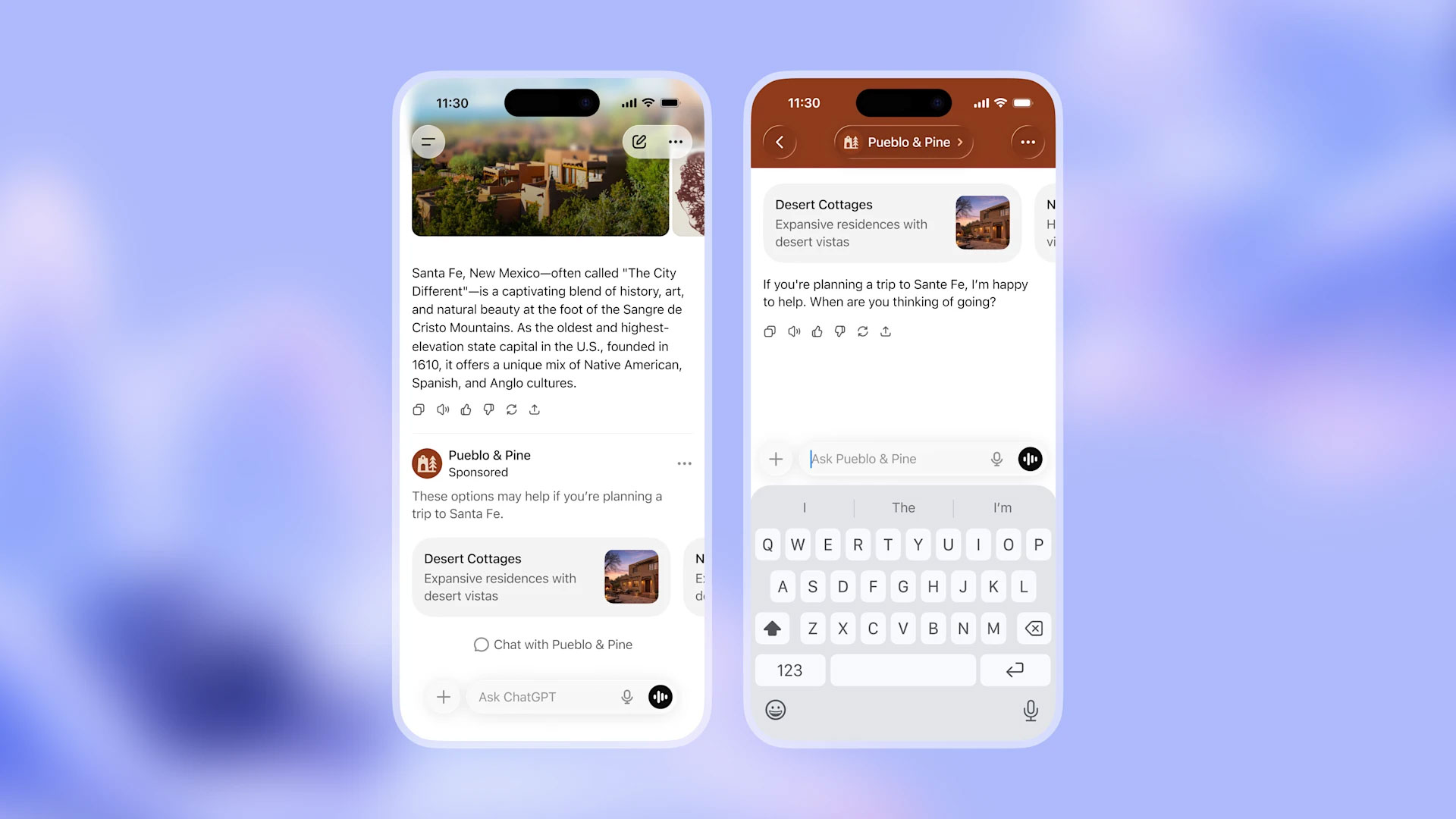
Note: ChatGPT Go will be included in OpenAI's forthcoming ads pilot, which will see the company display sponsored content alongside organic responses from ChatGPT. The company does not plan to display ads to Plus and Pro users.   

No. For copyright reasons, ChatGPT can't replicate photos or exact real world events. For example, when I asked it to recreate the photo of Zinedine Zidane's iconic 2006 World Cup headbutt, ChatGPT refused.  

"I can make an artistic reinterpretation inspired by the emotion or energy of that moment — for example, a stylized painting showing the tension and intensity of competition, without depicting real individuals," it told me.  

This article originally appeared on Engadget at https://www.engadget.com/ai/how-to-generate-ai-images-using-chatgpt-120000560.html?src=rss

Google adds an AI Mode shortcut to Chrome on mobile

Well, I suppose it was only a matter of time, but Google is making AI Mode harder to avoid. In the US, the company has begun rolling out an update for Chrome on Android and iOS that adds an AI Mode shortcut to the browser's new tab page. It's predominantly featured, appearing right below the browser's signature search bar.

"This will let you ask more complex, multi-part questions, and then dive even deeper into a topic with follow-up questions and relevant links," the company said of the update. In the near future, Google plans to bring the shortcut to 160 additional countries, with support for other languages — including Hindi, Indonesian, Japanese, Korean, Portuguese — on the way as well. 

Google introduced AI Mode at the start of March when it previewed the feature through its Labs program. Since then, it has been aggressively rolling out AI Mode in nearly every market it operates, beginning this past May at I/O 2025 May when the company made the chatbot available to all US users.

This article originally appeared on Engadget at https://www.engadget.com/ai/google-adds-an-ai-mode-shortcut-to-chrome-on-mobile-170042622.html?src=rss

Anthropic will use AWS AI chips after $4 billion Amazon investment

Amazon is doubling its investment in Anthropic. The e-commerce giant will provide Anthropic with an additional $4 billion in funding on top of the $4 billion it committed last year. Although Amazon remains a minority investor, Anthropic has agreed to make Amazon Web Services (AWS) its “primary cloud and training partner.”

Before today’s announcement, The Information had reported that Amazon wanted to make any additional funding contingent on a commitment from Anthropic to use the company’s in-house AI chips instead of silicon from NVIDIA. It appears Amazon got its way, with both companies noting in separate press releases that Anthropic will use AWS Trainium and Inferentia chips to train future foundation models.

Additionally, Anthropic says it will collaborate with Amazon’s Annapurna Labs to develop future Trainium accelerators. “Through deep technical collaboration, we’re writing low-level kernels that allow us to directly interface with the Trainium silicon, and contributing to the AWS Neuron software stack to strengthen Trainium,” the company said. “Our engineers work closely with Annapurna’s chip design team to extract maximum computational efficiency from the hardware, which we plan to leverage to train our most advanced foundation models.”

According to another recent report, Anthropic expects to burn through more than $2.7 billion before the end. Before today, the company had raised $9.7 billion. Either way, it’s bought itself some much-needed runway as it looks to compete against OpenAI and other companies in the AI space.

This article originally appeared on Engadget at https://www.engadget.com/ai/anthropic-will-use-aws-ai-chips-after-4-billion-amazon-investment-222053145.html?src=rss

Black Friday deals include reMarkable 2 bundles for $89 off

If you’ve been eyeing the reMarkable 2 for a while, now is a great time to buy one. While the E Ink tablet itself isn’t on sale, reMarkable has discounted the two bundles it offers alongside the 2. Until the end of December 2, you can save $89 off the Type Folio and Book Folio bundles. Both include reMarkable’s Marker Plus stylus, which comes with an eraser feature not found on the regular Marker stylus. It’s also black instead of gray and four grams heavier. As for the two folios, the type one is the one to buy if you need a keyboard.

The reMarkable 2 is easily the best E Ink tablet you can buy right now. It’s the top pick in our E Ink tablet guide, and for good reason. It boasts a tremendous reading and writing experience, with a responsive, low-latency display that offers the closest pen-and-paper experience among the tablets Engadget tested. 

The reMarkable 2 makes accessing your favorite books and files easy, too. It includes support for both PDFs and ePUBs, and you can link your Google Drive, Microsoft OneDrive and Dropbox to make transferring those files a cinch. Each new reMarkable 2 tablet also comes with a complimentary one-year subscription to Remarkable Connect, which is great for transferring any notes you write to your other devices.

One of the few downsides of the ReMarkable 2 is how expensive it is to buy. Although reMarkable hasn’t directly discounted the tablet, a folio cover and Marker Plus stylus are accessories most people will probably want to buy anyway, so this Black Friday promotion still makes the device more accessible. 

Check out all of the latest Black Friday and Cyber Monday deals here.

This article originally appeared on Engadget at https://www.engadget.com/mobile/tablets/black-friday-deals-include-remarkable-2-bundles-for-89-off-210003470.html?src=rss

Teach mode, Rabbit’s tool for automating R1 tasks, is now available to all users

When the Rabbit R1 arrived earlier this year, it was an unfinished product. Engadget’s own Devindra Hardawar called it “a toy that fails at almost everything.” Most of the features Rabbit promised, including its signature “large action model” (LAM), were either missing at launch or didn’t work as promised. Now, after more 20 software updates since the spring, Rabbit is releasing its most substantial update yet. Starting today, every R1 user now has beta access to teach mode, a feature that allows you to train Rabbit’s AI model to automate tasks for you on any website you can visit from your computer.

Rabbit CEO and founder Jesse Lyu gave me a demo of teach mode ahead of today’s announcement. The tool is accessible through the company’s Rabbithole hub, and features a relatively simple interface for programming automations. Once logged into your Rabbit account, you navigate to a website and input your credentials if they’re required to access the service you want to teach the R1 to use for you. Lyu was quick to note Rabbit won’t store any username and password you input; instead, the company saves the cookie from your teach mode session for the R1 to use later. In June, Rabbit had to move quickly to patch a security issue that could have led to a serious data breach. 

Once you’ve named your automation and written a description for it, all you need to do is carry out the task you want to automate as you usually would. Rabbit’s software will translate each click and interaction into instructions the R1 can later carry out on its own. When Lyu demoed teach mode for me, he taught his R1 to tweet for him.

Once the software has had a chance to analyze a lesson, you can replay the automation before trying it out on your R1 to ensure it works properly. While it’s technically true you don’t need any coding knowledge to use teach mode, approaching it from a programming perspective is likely to produce better results. That’s because you can annotate the steps the software records you doing when showing it an automation. It’s also useful from a troubleshooting perspective, as you can see from the video embedded above.

After you’ve tested your automation, it’s just a matter of asking your R1 to complete a query using teach mode. The resulting process isn’t exactly the polished experience I imagine most people have come to expect from their mobile devices. The R1 announces each step of a task, and it can take a few moments for the device to work its way through a query. According to Rabbit, part of that is by design. Early testers found it helpful for the R1 to state its progress.

I’ll be honest, it’s hard to escape the conclusion that some of the R1 automations Lyu showed me, while creative, don’t offer a more efficient way to do certain tasks than the apps people are already familiar with, a point he conceded when I said as much during our call.

“There are a lot of tasks that are not a single destination,” Lyu said. To that point, where he believes teach mode will be transformational is in interactions involving multiple platforms. Lyu gave an example of an R1 user who taught his device to order groceries. With some work, that person could use the R1’s camera to take photos of the shopping lists his wife produced, which the device would then use to order the family’s weekly groceries from their preferred stores. 

Another area where the R1 could provide a better experience than a dedicated app is in situations where there are competing standards, like the situation that exists with smart home automation currently. Say you’re trying to get some HomeKit and Google Home devices to work together. You won’t need to wait for the Matter Alliance to sort things out. With teach mode, the R1 will navigate that mess for you.

“You need to think about velocity,” Lyu tells me before laying out Rabbit’s end game with teach mode. For now, R1 users can freely add community lessons they find on Rabbithole to their devices. Lyu envisions a future where users will be able to sell their automations, with Rabbit taking a cut. Moreover, while teach mode is currently limited to navigating websites, Lyu suggests it will eventually learn to use more complex apps like Excel. At that point, Lyu contends Rabbit will be in a position to deliver an artificial general intelligence, one that will understand every piece of software ever made for humans.

Of course, questions remain. One major one is whether people will pay for community lessons if they could just as easily replicate an automation on their own. Here, Rabbit expects things to play out like they’ve done on existing app stores, with most people choosing to download apps they like instead of making their own. “For the future agent store, we anticipate a similar situation where any user could teach their own lesson if they want to, but most people will probably find lessons or agents created by other users that meet their needs very well,” the company told me in an email.

I also asked Rabbit if the company is preparing for the possibility that some platforms might block people from using teach mode to automate tasks on their R1. In the company’s view, bot detection systems like CAPTCHA will need to evolve to differentiate between “good agents” like those created by Rabbit users and malicious bots.

“When a user uses LAM to perform tasks on third-party platforms, they are logging into their own accounts with their own credentials, and paying those companies directly for those subscriptions or services,” the company added. “We are just providing a new platform for those transactions to happen, similar to you can play music on your phone and on your laptop... We do not see a conflict of interests here.”

I’m not so sure if things will play out as smoothly as Rabbit hopes, but what is clear is that the company is closer to the future Lyu promised at the start of the year — even if that future still feels years away and may be decided by another company. For now, Rabbit hopes R1 users embrace teach mode enthusiastically, as that will allow the software to improve more quickly. 

This article originally appeared on Engadget at https://www.engadget.com/ai/teach-mode-rabbits-tool-for-automating-r1-tasks-is-now-available-to-all-users-170036677.html?src=rss

Sonos Black Friday deals: Save up to $200 on speakers and soundbars

Sonos Black Friday sales have begun, kicking off one of the few times of the year you can actually save a decent amount on the company’s speakers, soundbars and other gear. This time around, you can get up to $200 off, with one of the highlights being $50 off the Sonos Era 100 — it’s down to a record low of $199.

If you’re in the market for a soundbar, consider the Sonos Arc. Now that the Arc Ultra is available, Sonos has discounted its previous flagship soundbar by $200 to $699. For something more affordable, the Beam 2 is currently $369, down from $499. Lastly, there’s the Era 300. Right now, you can buy the Dolby Atmos-compatible speaker for $359, instead of $449 as usually priced. All of these deals are being matched by Amazon, too.

More than a few of Sonos’ speakers, including the Era 100, have found a spot and stayed on Engadget’s list of best smart speakers. If you care about music but still want a speaker with modern features, a Sonos system is the way to go. Not only do the company’s speakers sound great, but you also get access to things like AirPlay 2 that make it incredibly easy to play exactly the song you want to listen to in the moment.

You may have seen that Sonos bungled the release of the latest version of its companion app. That’s true, but as things stand, the company has done a lot of work in recent months to fix its software. As a daily user, I can safely say the Sonos app is in much better shape now than it was in the spring. Other than the premium price that comes with Sonos products, there’s not much they don’t do as well or better than the competition. With the discounts the company is offering for Black Friday, its speakers come even more highly recommended.

Check out all of the latest Black Friday and Cyber Monday deals here.

This article originally appeared on Engadget at https://www.engadget.com/deals/sonos-black-friday-deals-save-up-to-200-on-speakers-and-soundbars-130038835.html?src=rss

The Echo Show 8 drops to a record low of $80 in this Amazon Black Friday deal

Black Friday has arrived, which means Amazon’s smart displays are back on sale and significantly discounted. To start, the Echo Show 8 is $70 off its regular $150 price. That’s the cheapest Amazon has sold the Show 8 for since the company’s Prime Day sales event in July when the device hit a record low price. Amazon has also discounted the more affordable Echo Show 5. Right now, it’s on sale for $50, down from $90.

Both the Echo Show 8 and Show 5 have been on Engadget’s best smart displays list for years. Of the two, the former is the best pick for most people. The 8-inch screen is just large enough to make it easy to interact with the display, but not so big so as to make a device that hogs space on your bedside table. The fact the Show 8 will adapt the size of its user interface to how far away you are from it is icing on the cake.

The Show 8 is also a great choice if you want a smart display that’s great for video calling. Not only does its 13-megapixel camera offers great image quality, but Amazon has also included a feature that automatically frames your face and follows your movements. As you can imagine, it’s a useful feature to have if you want to move around while chatting with your friends and loved ones. When you’re not using the Show 8, there’s a physical camera cover to protect your privacy. I should also mention that the Show 8 is one of the better-sounding smart displays Engadget has tested, thanks to the inclusion of spatial audio and a room calibration feature.

As for the Echo Show 5, it’s a great option if space is limited on your desk or nightstand. It’s currently one of the smallest smart displays on the market. The inclusion of an ambient light sensor and tap-to-snooze features make for a great smart alarm clock. It can also work as a sunrise clock if you don’t want to be jarred from bed.

Either way, both the Show 8 and Show 5 are great smart display, especially when you can get them on sale like they are now.

Check out all of the latest Black Friday and Cyber Monday deals here.

This article originally appeared on Engadget at https://www.engadget.com/deals/the-echo-show-8-drops-to-a-record-low-of-80-in-this-amazon-black-friday-deal-150003009.html?src=rss

Sony’s A1 II features a dedicated AI processor and refined ergonomics

When the A1 arrived in 2021, it put the camera world on notice. In more than a few categories, Sony’s full-frame mirrorless camera outperformed rivals like the Canon R5 and came with a lofty $6,500 price to match. However, after nearly four years, the A1 finds itself in an awkward position. Despite its position as Sony’s flagship, the A1 is not the most complete camera in the company’s lineup, with the more recently released A7R V and A9 III each offering features not found on their sibling. That’s changing today with the introduction of A1 II, which retains the performance capabilities of its predecessor while borrowing quality-of-life improvements from the A7R V and A9 III.

To start, the A1 II features the same fully stacked 50.1-megapixel CMOS sensor found inside the A1. As before, Sony says photographers can expect 15 stops of dynamic range for stills. The company has once again paired that sensor with its Bionz XR image processing engine but added a dedicated AI processor to handle subject recognition and autofocus. As a result, the A1 II can still shoot at up to 30 frames per second using its electronic shutter, and the autofocus system once again offers 759 points, good enough for 92 percent coverage of the sensor.

The a1 II features a new four-axis tilting LCD screen.
Sony

However, Sony is promising substantial improvements in autofocus accuracy due to that dedicated AI processing unit. Specifically, the camera is 50 percent better at locking eye focus on birds and 30 percent better at eye autofocus when it comes to other animals and humans. Additionally, you won’t need to toggle between different subject-detection modes. Instead, the camera will automatically handle that for you. Sony’s pre-capture feature also offers a one-second buffer that can capture up to 30 frames before fully depressing the shutter button.

That said, the most notable addition is the inclusion of Sony’s most powerful in-body image stabilization (IBIS) to date, with the A1 II offering an impressive 8.5 stops of stabilization. For context, that’s three additional stops of stabilization over the original A1.

When it comes to video, the A1 II is no slouch. It can capture 8K footage at up to 30 fps using the full readout of its sensor. It can also record 4K video at 120 fps and FHD footage at 240 fps for slow motion, with support for 10-bit 4:2:2 recording. If Super 35 is your thing, there you have the option for 5.8K oversampling. In addition to Sony’s color profiles, the A1 II can store up to 16 user-generated LUTs, and the camera offers the company’s breathing compensation and auto stabilization features. Of the latter, Sony says you can get “gimbal-like” footage with only a slight crop.

Sony's new 27-70mm G Master lens features a constant f/2 aperture.
Sony

On the useability front, the A1 II borrows the deeper grip and control layout of the A9 III. Also carried over from the A9 III is the camera’s 3.2-inch four-axis LCD screen and 9.44-million dot OLED viewfinder with 240Hz refresh rate. Moreover, the new camera includes Sony’s latest menu layout design. Oh, and the company plans to include two separate eyecups in the box. Nice. When it comes to connectivity, there’s a full-sized HDMI connection, USB-C and an upgraded Ethernet port that supports transfer speeds up to 2.5Gbps. For storage, the camera comes with two CFexpress Type A card slots that are also capable of reading and saving to UHS-II SD cards.

Alongside the A1 II, Sony also announced a new 28-70mm G Master Lens with a constant f/2 aperture (pictured above). While not the lightest lens in Sony’s stable, it still weighs under a kilogram. Both the A1 II and the 28-70mm F2 G Master will arrive in December. They will cost $6,500 and $2,900, respectively.

This article originally appeared on Engadget at https://www.engadget.com/cameras/sonys-a1-ii-features-a-dedicated-ai-processor-and-refined-ergonomics-164840579.html?src=rss