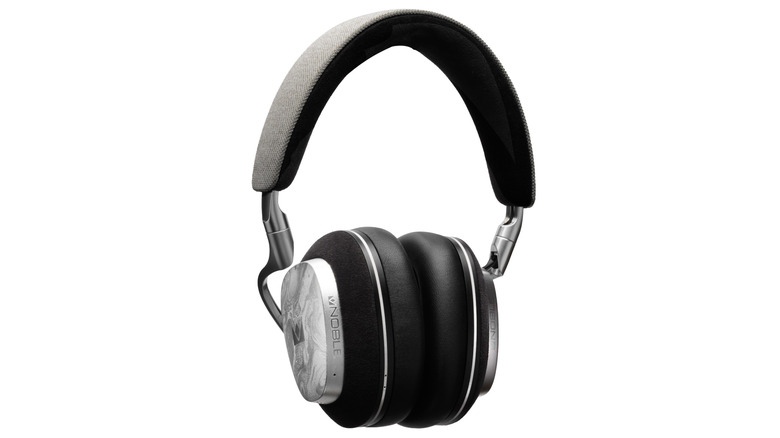
Fender Audio may have announced its new headphones and speakers right before CES, but Las Vegas afforded us the first opportunity to see the brand’s new lineup in person. Fender Audio is a Fender-owned brand from Riffsound that’s designing and making new devices after licensing the name. It’s been a while since the guitar and amplifier company made any general-use speakers of its own, and this new arrangement is similar to what Zound was doing with Marshall for a spell.
Logistics out of the way, let’s get down to what the Mix and Ellie are like in the flesh. First, the Mix headphones offer a modular construction that allows you to replace nearly every piece as needed. The ear cups detach from the headband and the ear pads are replaceable. You can also swap out the battery, thanks to an easy-to-access slot behind one ear pad. And on the other side, a USB-C dongle for wireless lossless audio is stowed for safe keeping (wired lossless audio over USB-C is also available).
Fender Audio Mix headphones
Billy Steele for Engadget
Fender Audio kept the controls simple on the Mix, opting for a single joystick for volume and playback changes. The joystick also serves as the power and pairing control as the only other button cycles through active noise cancellation (ANC) modes. In terms of sound, the Mix will satisfy listeners who crave deep bass, and vocals cut through clearly. In my brief demo, I would’ve liked more mid-range, but I’ll wait until I get a review unit for a full assessment there. I should mention the other standout feature is battery life: the Mix will offer up to 52 hours of use with ANC enabled (up to 100 hours with it off).
Then there are the Elie speakers. Both offer a similar set of features, which includes two wireless inputs for microphones (the company is working on its own model) and a combination XLR and 1/4-inch input for instruments. The Elie 06 is the smaller unit, housing a tweeter, full-range driver and subwoofer with 60 watts of output. The larger Elie 12 doubles all of that, serving as a more robust but still very portable option.
Fender Audio Ellie speakers
Billy Steele for Engadget
Both Elie units can be used in a single configuration or as a stereo pair. You can also connect up to 100 of the speakers via a Multi mode. Fender Audio has done a nice job here of checking all of the usual Bluetooth speaker boxes while offering something unique in terms all of those inputs. It’s like the company combined “regular” portable speakers with larger party boxes, offering something for customers who don’t want a massive device or any of the flashing lights.
Of course, none of these specs matter if the company didn’t ace the sound quality. While I’ll wait until I can spend several hours with some review units before I make any final judgement on these, I can tell you that both Elie speakers made a great first impression. There’s ample bass in the tuning for both, but obviously the larger Elie 12 offers more thump. Both units also provide excellent vocal clarity and nice details in the highs, as I made sure to select test tracks with lots of subtle sounds — like Bela Fleck’s banjo tunes.
The back of Fender Audio Ellie 06 speaker
Billy Steele for Engadget
Fender Audio says the arrival of the entire new lineup is imminent. Both the headphones and the Elie 6 will cost $299 and the Elie 12 is $399.
This article originally appeared on Engadget at https://www.engadget.com/audio/hands-on-with-fender-audios-headphones-and-speakers-at-ces-2026-203104561.html?src=rss
Every fall, dozens of maple and oak trees in my neighborhood shed their leaves. Thus begins the constant drone of gas-powered leaf blowers every day through early December. The noise is by far the most annoying thing about these yard tools, but I can appreciate it’s a necessary evil — unless you prefer to pick up a blister-inducing rake.
Whisper Aero argues there’s a better way. The company is using aerospace tech to quiet the noisy devices, introducing the T1 leaf blower at CES 2026 under its sub-brand Tone Outdoors. The company promises the T1 is 80 percent quieter and 60 percent more powerful than “leading” handheld gas leaf blowers. More specifically, the T1 has 880 CFM of air flow, which easily surpasses my battery-powered EGO. And at 52 decibels of average noise at peak volume, his model is drastically quieter than any leaf blower I’ve used. I was able to confirm its lower roar on the CES show floor.
Tone says the T1 also offers extended run time of up to 50 minutes on a charge in Eco mode. That too is greater than what I get on my mid-grade EGO. What’s more, the company plans to sell a battery backpack that will extend any clean-up sessions for several hours. The T1 also has a built-in LED “nightlight” so you can still use it after dark. And since it’s quieter than what you have now, you can do so without annoying your neighbors.
Tone Outdoors T1
Billy Steele for Engadget
So, how does Whisper Aero achieve this? The company originally set out to devise a quieter solution for electric aerospace motors. Its engineers discovered that they could dramatically reduce noise and increase overall efficiency by redesigning the fan and motor. They're still pursuing that, but the company discovered its technology had other uses too.
The T1 is already available for preorder for $599 and it’s scheduled to ship in September. If you don’t care for the standard green color, you can spend another $100 for limited edition “Silence Is Golden” version. The battery backpack won’t arrive until Q1 2027 though (price TBD). Tone also says it has additional models in the works and it has a partnership with Stanley Black and Decker that will likely produce additional products with this tech on board.
This article originally appeared on Engadget at https://www.engadget.com/home/ces-2026-the-tone-outdoors-t1-solved-the-biggest-problem-with-leaf-blowers-234309500.html?src=rss
Klipsch hasn’t debuted new headphones in years, but that’s going to change in 2026. At CES, Klipsch announced the upcoming Atlas hi-fi series that includes wireless and both closed and semi-open back models. All three are expected to arrive this summer, but the company hasn’t announced pricing or many details on any of them just yet. However, I was able to listen to the Atlas HP-1, the wireless model with active noise cancelation (ANC).
Without going into specifics, Klipsch says the HP-1 is designed for both daily wear and travel. This is thanks to the combination of light weight, comfort and “standout” battery life. Inside, coaxial drivers provide the company’s warm signature sound profile. Third-party support for spatial audio and hearing compensation is also in the works. This concludes the info Klipsch announced this week.
After seeing the HP-1 in person at CES, I can tell you they look quite similar to Bowers & Wilkins recent headphones designs. Klipsch has opted for wood accents on the outside of the ear cups, likely as a nod to its speaker heritage. But the combination of leather and metal, as well as the headband and ear cups, remind me a lot of B&W’s Px7.
Klipsch Atlas HP-1
Billy Steele for Engadget
During my brief time with the HP-1, the excellent sound quality was the thing that stood out most. Klipsch is demoing the headphones with lossless audio over USB-C, so it will be interesting to see what the audio is like in wireless mode. However, the company’s trademark warmth and deft tuning is immediately apparent, giving preference to highs and mids without overbearing bass. There’s ample low-end tone, but it compliments everything else and didn’t overpower in the Rage Against The Machine songs and other tracks I listened to.
It’s difficult to paint a comprehensive picture here since I wasn’t only really able to observe sound quality — and only for a short time. But the HP-1 is certainly a premium set of headphones that are comfy to wear (at least for the few minutes I wore them) and definitely sound good. The biggest downside will likely be price, which I expect to be at least $500.
This article originally appeared on Engadget at https://www.engadget.com/audio/headphones/klipsch-atlas-hp-1-hands-on-a-return-to-hi-fi-headphones-at-ces-2026-130000415.html?src=rss
Shokz may have made its name with bone-conduction headsets, but the company has also built open-style earbuds in recent years. At CES 2026, the company is debuting its most recent model, the OpenFit Pro, which combines effective noise reduction with Dolby Atmos support in a premium set of wireless buds. As the name suggests, these sit outside of your ears, secured by an over-the-ear hook, so that you can stay in tune with your surroundings at all times.
To me, the main appeal of the OpenFit Pro is the new Noise Reduction Mode that acts as a bit of active noise cancellation (ANC) for the open earbuds. The feature is adjustable, allowing you to slide between Reduced, Default and Enhanced levels of said reduction. I’m happy to report the tool does make a difference, even at its lowest setting, by assisting with background noise like raucous HVAC units. Shokz says the OpenFit Pro’s noise reduction is best suited for moderately noisy environments — like cafes, gyms and offices. And when you don’t need it, you can switch back to Open Mode for a fully unfiltered line to reality.
Shokz OpenFit Pro
Billy Steele for Engadget
The other attractive feature on the OpenFit Pro is Dolby Atmos spatial sound and Dolby Audio with Dolby head tracking. Streaming music in Atmos really shows what the OpenFit Pro is capable of, putting the “ultra large” 11mm x 20mm synchronized dual-diaphragm drivers at the forefront. Shokz promises more powerful bass and “more authentic” sound in this model, and I’d say the company delivers on that promise based on my initial testing. The only issue is that your neighbors will be able to hear your tunes at moderate volumes. My colleagues sitting across the table as I write this commented on my selection of “The Fate of Ophelia.” Call me Tay-curious.
You can expect up to six hours on a charge and up to 24 hours of use with the case with Noise Reduction Mode enabled. Turn that feature off and you’ll get up to 12 hours on the earbuds themselves. Plus, there’s IP55 protection, wireless charging and wear detection, so the OpenFit Pro will be both durable and convenient to use.
The OpenFit Pro is available for preorder starting today (January 6) for $249.95. You can make your early commitment at the Shokz website or Best Buy.
This article originally appeared on Engadget at https://www.engadget.com/audio/headphones/ces-2026-shokz-new-earbuds-effectively-reduce-noise-while-keeping-your-ears-open-080000996.html?src=rss
Dolby introduced its FlexConnect technology a few years ago, vowing that it would allow customers to position soundbars and speakers anywhere in a room. The company said the platform would then reconfigure the sound automatically, taking into account any locations that may be further away from the center sweet spot. At CES 2026, LG is the first to put Dolby Atmos FlexConnect in a soundbar, offering the so-called Sound Suite that also includes satellite speaker options and a subwoofer. You don’t need every member of the lineup to use Dolby’s tech, so you can pick and choose which items work best for your living room.
The centerpiece of the Sound Suite is the H7 soundbar. This 9.1.6-channel speaker is configured for spatial audio (Dolby Atmos) and supports lossless audio up to 24 bit/96kHz. The standout on the spec sheet for me is the six up-firing channels, which should enhance the sensation of overhead sounds. Most of the soundbars I review have only two of those.
What’s more, the H7 is equipped with a feature called Sound Follow that tracks the location of your phone to reconfigure the audio when your position changes. Maybe you move to a comfy chair instead of the sofa right in front of the TV. The idea is that you don’t have to suffer through subpar audio during a movie or show just because you aren’t in the best spot.
LG Sound Suite H7 soundbar
Billy Steele for Engadget
Then there are the M5 and M7 speakers. When used with the H7 soundbar, these are the satellite speakers, but LG cautioned me against calling them “rear” units. While it’s true a pair of them will be positioned behind most people’s sofas, the company explained that there’s more audio content coming out of them than traditional rear channels provide. As such, two of the M5s or M7s that are used to complement the speakers inside one of LG’s impressively thin TVs are doing more work than just beaming sounds that are designed to come from behind.
The M5 is a 1.1.1-channel speaker while the M7 is 2.1.1. Like the H7, both support Dolby Atmos and lossless music. What’s more, the entire Sound Suite arsenal has Wi-Fi and Bluetooth connectivity, including AirPlay 2, Google Cast and both Spotify and Tidal connect. The whole shebang also employs LG’s own AI Sound Pro and Room Calibration Pro, and all of the settings are customized in the ThinQ app for Android and iOS.
Each speaker can be used independently should the need arise, and as I already mentioned, you can pick and choose which components will work best for you — up to four total speakers. So you can opt for the H7, sub and two speakers or four of either the M5 or M7. You can also get a smaller setup with two speakers or just the soundbar and subwoofer. Dolby Atmos FlexConnect is still in play no matter what combination you decide on. I should note the optional W7 subwoofer is quite large, but you can use it standing upright or laying flat, according to LG.
LG Sound Suite M5 speaker
Billy Steele for Engadget
Of course, none of this means anything if Sound Suite doesn’t actually sound good. I’m happy to report LG’s collection of speakers are sonically impressive. I was able to get a good sense of how they’ll perform in a quite demo room at CES. Watching a variety of movie clips in Dolby Atmos, I flipped back and forth between a setup with four M7 speakers and a more robust configuration of the soundbar, subwoofer and M7 speakers. While I preferred the overall tone and tuning of the four M7s, I can concede the bigger collection offered more immersive sound and better directional audio. That said, they both provided excellent clarity and pristine detail.
With Sound Follow, you can quickly have Sound Suite reconfigure the audio based on the location of your phone with just a tap. Let’s say you move from the couch to a comfy chair and want to adjust the sound to that spot. You can do that in the app. And while I could tell a slight difference in a side-of-the-room location and the center sweet spot in front of the TV, the correction did offer an improvement over the unadjusted audio.
I was also able to test standalone mode, where you can quickly use any Sound Suite speaker individually for music. Sound quality was consistent here too, and the system allowed me to add a second M7 speaker for a stereo pair with a few taps in LG’s app. Overall, the Sound Suite lineup offers lots of flexibility in terms of features and configurations. In fact, LG says that between the H7, W7, M5 and M7, there are 50 possible combinations.
Unfortunately, LG hasn’t announced pricing or availability yet. Given the capabilities of the Sound Suite system, I don’t expect the more robust collections to come cheap. However, I do think the company will offer a few different bundles that will hopefully provide a discount over buying each component individually.
This article originally appeared on Engadget at https://www.engadget.com/home/home-theater/lg-sound-suite-hands-on-at-ces-2026-home-theater-powered-by-dolby-atmos-flexconnect-192709499.html?src=rss
Brisk It has shown off AI-enabled smart grills at CES before now, but for 2026, the company is taking its cooking tech indoors. With the Neoma multi-function countertop oven, the company offers AI features that can serve as both sous chef and nutritionist, helping you create dishes that fit your budget, diet and other lifestyle needs. The Brisk It Agentic AI can also help with meal planning and grocery orders on top of automatic cooking cycles for recipes it selects.
The Neoma has a temperature range from 90 to 450 degrees Fahrenheit and cooking times of one minute up to twelve hours. This means you can do everything from baking to roasting, air frying and more. In fact, it comes with an air fry basket, baking pan, oven rack, and crumb tray. The robust steel construction, glass door and interior space should make the Neoma well-suited for most kitchens.
Brisk It isn’t leaving the grill game though. The company also announced the AI Hybrid Gas Grill at CES. The hybrid bit describes the dual gas and wood pellet combustion, giving users the ability to infuse wood smoke in their high-heat grilling sessions. Of course, Brisk It’s AI goes to work here too, with adaptive cooking and personalized meal plans.
The AI Hybrid Gas Grill will be available at retailers later this year. The Neoma AI Countertop Oven will hit Kickstarter in February before a wider retail launch. Brisk it didn’t mention pricing for either model in its press materials.
This article originally appeared on Engadget at https://www.engadget.com/home/kitchen-tech/brisk-it-brings-its-ai-cooking-tech-to-an-indoor-oven-at-ces-2026-170000705.html?src=rss
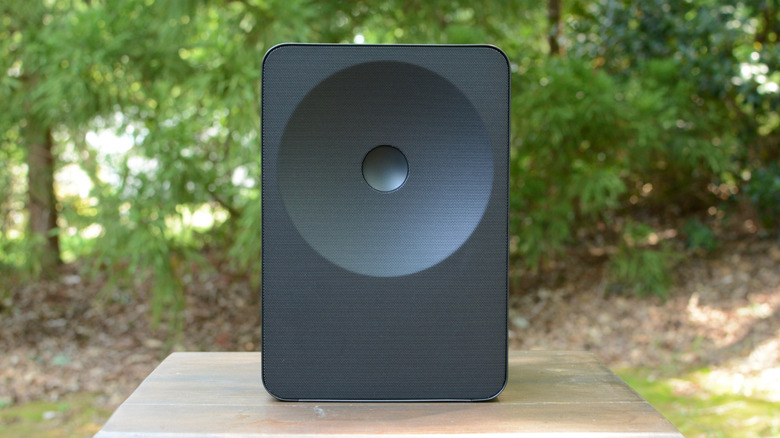
In addition to its annual soundbar updates, Samsung debuted two new home speakers at CES 2026. The Music Studio 5 and 7 are Bluetooth and Wi-Fi units designed to blend in with your home decor thanks to their minimalist look. They certainly don’t look like your typical speakers, and Samsung has packed them with features that it says will ensure optimal sound quality from each one.
The Music Studio 5 has a four-inch woofer and two tweeters, and a sound profile that’s optimized by AI Dynamic Bass Control. The design is an interesting interplay between a circle and a square, but the speaker delivers crisp, clear sound — even in the roar of a CES demo area. The Music Studio 5 will also come in a smattering of colors, which could lend a pop to a bookshelf. Controls line the top edge, including one-touch access to Spotify.
Samsung Music Studio 7
Billy Steele for Engadget
If you’re looking for something more robust, the Music Studio 7 is a 3.1.1-channel unit that’s capable of four-direction spatial audio and high-resolution listening. Samsung says you can enjoy tunes at up to up to 24-bit/96kHz and the speaker can be used as part of a turntable setup. The sound here is more robust as I heard noticeably more bass from the 7 than on the 5. The various control buttons are up top here as well, positioned near the front of the speaker for easy access.
You can also use up to four Music Studio speakers as a surround sound setup in your living room. I listened to a brief demo where Samsung was using four Music Studio 7 units in a makeshift home theater. This combo provided great immersion, with lots of detail in the directional sound in the clips being broadcast on the connected TV. Samsung also says you can use up to 10 Music Studio speakers for audio only.
The company didn’t announce any pricing details yet, but that’s likely to come just before the Music Studio speakers are available for purchase. That date is TBD as well.
This article originally appeared on Engadget at https://www.engadget.com/audio/speakers/samsung-music-studio-5-and-7-hands-on-unique-speaker-designs-debut-at-ces-2026-052009007.html?src=rss
We’re used to Samsung updating its Q990 soundbar at CES every year, and 2026 is no different. However, the company also debuted the HW-QS90H: a new all-in-one option that Samsung says won’t require a standalone subwoofer due to its Quad Bass Woofer system. The QS90H offers 7.1.2-channel audio with 13 total drivers. Before the show properly kicks off, we got to listen to the new soundbar for a quick judge of its merits.
The first thing I noticed about the QS90H is its impressive bass performance. Most of the time when a company claims its soundbar doesn’t need a subwoofer, that proves to be untrue. But even in the chaos of a noisy demo area, I could clearly hear the bassy thump coming from the QS90H’s built-in subwoofers. For once, I think would-be buyers could get by without a sub, especially in smaller living rooms.
Samsung achieved this with two of those Quad woofers. These drivers push air in two directions rather than just one, which helps with the extra low-end tone. The company didn’t sacrifice clarity either. The nine additional drivers, positioned for front, side, wide and up firing sound, provide the clear detail I’ve come to expect from Samsung.
Samsung QS90H soundbar
Billy Steele for Engadget
The QS90H also features Samsung’s Convertible Fit Design technology that debuted on the QS700F last year. This tool allows you to sit the soundbar flat on a shelf or mantle, or rotate it to mount on the wall. Built-in sensors automatically adjust the driver performance for each orientation, so that sound quality isn’t affected by the selected positioning. During my demo, I didn’t notice any difference in performance when the orientation changed. In fact, the QS90H looks a lot like the QS700F on the outside, with similar grille patters and control designs.
Samsung didn’t announce pricing or availability tonight, but that’s likely to come just prior to any on-sale date.
This article originally appeared on Engadget at https://www.engadget.com/home/home-theater/samsung-hw-qs90h-soundbar-hands-on-impressive-bass-performance-without-a-subwoofer-045727939.html?src=rss
Shure’s original MV88 microphone (no, not the + version) was a convenient snap-on option for iPhone users. Since Apple ditched the port for USB-C, the audio accessory became obsolete for newer handsets. At CES 2026, the company debuted a revised version of the mic, swapping the Lightning connection for USB-C, which also adds compatibility for Android users and a host of other devices. The best part is the updated MV88 is available now, and it’s priced at $159.
If you missed the 2015 version, the MV88 is a compact stereo condenser microphone that simply snaps onto a phone, tablet or one of your laptop’s ports. It provides a packable boost to any built-in mics on your devices, allowing you to capture better audio for voice and video clips. What’s more, it’s a simple, plug-and-play option that doesn’t require additional setup. And if you choose to employ Shure’s suite of apps, you’ll get access to things like presets, microphone gain control, a five-band EQ, limiter, compression and a high-pass filter. Plus, the company’s apps will give you a microphone level meter to keep tabs on your input.
Shure MV88 USB-C
Billy Steele for Engadget
With Auto Level Mode, the mic automatically adjusts gain in real time so that your clips aren’t too loud or too quiet. There’s also a Real-Time Denoiser that works to reduce background noise. The MV88 USB-C has four selectable polar patterns — stereo, mono cardioid, mono bi-directional and raw mid-side — and you can tilt the microphone so that it either points straight up or towards you.
I’ve been testing the new MV88 for a few days ahead of CES and I can confirm it’s a substantial boost over anything a device’s built-in microphone can offer. It’s also a nice alternative to popular lapel mics you’ve likely seen creators and influencers use. Those need to be held close to the speaker’s mouth, so they don’t pic up ambient sound or multiple speakers well without moving them. The MV88 would the better choice for capturing clips of live music, the great outdoors or other places where you want some level of background noise.
Shure MV88 USB-C
Billy Steele for Engadget
Sound quality has been impressive thus far. After barely tweaking any settings, audio capture is warm, but also crisp and clear. That Real-Time Denoiser completely eliminated a noisy hotel room A/C unit during one of my testing sessions. This means the new MV88 will improve my sound if I need to do any voice or video interviews this week from my room. I’m also looking forward to seeing how well it does at some of the evening events and on the CES show floor.
To me, the best part about the MV88 is the quick and easy setup. You literally just snap it on your phone, or another device with a USB-C port, and after a few taps you’re ready to record. Shure also included a small case for the microphone, so it’s less likely to get damaged any time you just need to chuck it in your bag.
This article originally appeared on Engadget at https://www.engadget.com/audio/shure-debuts-a-usb-c-version-of-its-mv88-microphone-at-ces-2026-010000294.html?src=rss
When Amazon’s latest Echo speakers arrived in October, a feature the company spent time hyping during its fall devices event was missing. Alexa Home Theater arrived in late November, allowing owners of a recent Fire TV device and either of the new Echo speakers the ability to use up to five units and an Echo Sub as a surround sound setup. The main selling point is that the underlying tech allows you to put the speakers wherever you want and Alexa Home Theater will handle the rest. A robust array of speakers is a considerable investment, though, and there are limitations to Amazon’s latest play for your living room.
What is Alexa Home Theater?
At the most basic level, Alexa Home Theater is an automatic room calibration tool that’s akin to Trueplay from Sonos, SpaceFit Sound from Samsung or Sound Field Optimization from Sony. The feature, no matter which company builds it, is designed to automatically tune the acoustics of a soundbar or other speakers to the acoustics of the room. These tools allow companies to account for things like high ceilings and weird angles, adjusting audio performance so things sound their best no matter how your home is designed.
Like similar technologies from other companies, Alexa Home Theater and the latest Echo speakers also support spatial awareness. This allows you to position the speakers however they best fit in your living room and the underlying tech will balance the sound based on their proximity to each other. Gone are the days when you have to put rear speakers in a specific spot in order for them to work.
For the latest Echo speakers, Amazon overhauled Alexa Home Theater to accommodate more devices in a single setup. Now you can use up to five Echo Dot Max or second-generation Echo Studio units and a subwoofer at the same time. Of course, this means you can put the compact speakers around the perimeter of your home theater space, providing more immersive surround sound than a single speaker or two can muster. Alexa Home Theater recognizes each Echo speaker and adjusts the system accordingly.
What hardware do I need to use it?
My test setup was four Echo Studio speakers and a Fire TV Stick 4K Max.
Billy Steele for Engadget
If you want to use more than two Echo speakers and a subwoofer in your Alexa Home Theater setup, you’ll need the latest Amazon devices to make that happen. That list includes the Echo Dot Max and second-gen Echo Studio, along with the Echo Sub if you crave more bass. You’ll also need a Fire TV streaming gadget for the multi-speaker option, but it has to be one of the following:
Fire TV Cube (3rd gen)
Fire TV Stick 4K Max (2nd gen)
Fire TV Stick 4K (2nd gen)
Fire TV Stick 4K Plus
You might be wondering why Alexa Home Theater isn’t supported on other (older) Amazon streaming and audio models. Well, it is… but you’ll only be allowed to pair just two Echo speakers of the same model with an optional subwoofer for a total of three devices. That list of supported models is quite long, but it accounts for the two most recent generations of both the Echo and Echo Dot in addition to the Echo Pop, Echo Plus (2nd gen) and the original Echo Studio. This two-speaker method is also supported on more Fire TV devices, including some standalone TVs with Amazon’s streaming platform built in.
In that scenario, it means you could pair two Echo speakers with a subwoofer, for example, and have them play the same audio content with Alexa Home Theater.
Currently, Amazon says these are Fire TV devices that don’t support Alexa Home Theater:
Fire TV Stick 4K Select
Amazon Fire TV 2-Series
Fire TV 4-Series (2025 Release, newest model)
Fire TV Omni QLED Series (2025 Release, newest model)
Fire TV Omni Mini-LED Series (2024 Release, newest model)
How to set up Alexa Home Theater
Like nearly all home theater speakers and soundbars these days, setting up Alexa Home Theater is easy once you have the required hardware in place. Unlike a lot of the competition, this initial configuration isn’t done in a mobile app — it’s handled by the Settings menu on a compatible Fire TV device. Before you initiate the setup process, you’ll want to make sure your Echo speakers and Fire TV device are up to date. You can ask Alexa to check for updates to the speakers, while you’ll need to check the Device & Software section of the Fire TV Settings menu for those gadgets. Once everything is current, here are the steps to follow to get started with Alexa Home Theater:
Go to Settings on your Fire TV.
Select Display & Sounds.
Select Alexa Home Theater.
Select Create Alexa Home Theater.
Select the compatible Echo speakers. You can also add an Echo Sub during this step.
Follow the on-screen instructions to configure the system. After you select either the second-gen Echo Studio or the Echo Dot Max, hit Next and the system will calibrate automatically. If you select other Echo speakers, hit Next and then confirm the placement of the speakers before calibration.
When the setup is complete, the Alexa Home Theater system is ready to use. To do so, select either Home or Watch Preview.
Using Alexa Home Theater with four Echo Studio speakers
The two Echo Studio speakers that flanked my TV primarily handled dialogue.
Billy Steele for Engadget
Like most home theater gear, the Fire TV will play short audio clips through each Echo speaker and your TV speakers to determine their location and to calibrate the group to the room. From start to finish, the setup process takes about five minutes — so long as your Fire TV and all speakers are running up-to-date firmware. It’s a quick and straightforward process, which meant I was watching Fallout soon after putting all of the speakers in place.
While streaming that video game-inspired original series, the Echo Studios provided an immersive audio experience with directional sound and crisp, clear dialogue. The front two speakers handle speech, but there’s some nuance in what direction it’s coming from on screen. Rear speakers are tasked with the bulk of the environmental noise, whether that’s nearby water, passing cars, rain or gunfire — just to name a few. I was also pleasantly surprised by how much bassy rumble these speakers produced during movies and shows. I didn’t think a single unit was particularly adept at low-end tone during my review, but I think it would be just fine to use a collection of Echo Studios without having to add the Echo Sub.
The overall audio performance here is certainly a boost over any TV’s built-in speakers, but the sense of immersion isn’t as complete as what a soundbar and a pair of rear satellite speakers can provide. Specifically, I felt like the foursome of Echo Studio speakers in my test setup stumbled with the height channels. Despite the angled design of the devices and their multi-driver configurations, the effect of overhead and aerial sounds was quite subdued.
And the worst part about this is that there’s no way to try to fix it with settings. That’s because there are minimal settings to adjust once Alexa Home Theater is set up. There are two features — dialogue boost and volume leveler — but those are both Fire TV settings rather than items meant for any connected speakers. In the Alexa Home Theater menu, there’s a lip sync tool to address any audio lag, which is a standard item for any soundbar. I would’ve loved to see some kind of channel adjustment at the very least, so that I could dial in the mix a bit rather than relying on Amazon’s preferences.
If you turn to Alexa for help, the assistant can only change bass, treble and midrange, and it can only do so when prompted by voice commands. When I asked for it to turn up the dialogue, it seemed to just increase the volume. If I asked it to adjust the height channels, Alexa responded affirmatively, but it didn’t sound like any tweaks were applied. Amazon later confirmed that those basic EQ changes are Alexa and actually do here.
Another gripe I have with Alexa Home Theater is the inability to connect my phone or another device to the entire group for music. You can still sync with individual Echo Studio speakers for music via Bluetooth, but if you want to use the whole shebang, you’ll have to play your tunes from the Fire TV or ask Alexa to help.
The Fire TV platform has plenty of audio streaming apps, but Apple Music isn’t there and that’s where my monthly subscription resides. You have to add the Apple Music skill to the Alexa app on your phone first, then you can stream content from the service by asking Amazon’s assistant. For other services with Fire TV apps, you’re using your TV to play music, and most of the time I want the TV off and to just pick up my phone to blast some Spiritbox. I also like to control the queue from my phone, but alas that’s not an option here.
Wrap-up
Amazon's new Echo Studio is a complete redesign from the 2019 model.
Billy Steele for Engadget
The main issue with using four Echo Studios and a Fire TV is the cost. For the speakers alone, you’re looking at nearly $900 for the setup I tested. When the new Echo speakers were announced in September, Amazon said it would offer Alexa Home Theater bundles with multiple speakers, but I couldn’t find those on the company’s website.
For comparison, Sonos currently offers multiple configurations of the Beam soundbar and either Era 100 speakers or a sub for less than $800. For the same price as four Echo Studio speakers, you can get Sony’s Bravia Theater System 6, which comes with a soundbar, rear speakers and a subwoofer. There are other options from other companies as well in the $800 range, and most people will likely be happier with a dedicated soundbar-based setup than four Echo units and a subwoofer. Hello, AirPlay and Google Cast.
From an aesthetic perspective, I can see why someone might opt for multiple Echo speakers instead of a mid-sized (or larger) soundbar. Two Echo Studios on either side of my TV with the two rear units tucked away on a shelf certainly creates a clean look. And in terms of sound, using two Echo Studio speakers, let alone four like I tested, will provide a noticeable boost over a TV’s built-in speakers. However, the lack of customization and the inability to control music from my phone for an Alexa Home Theater group makes it hard to recommend Amazon’s latest for shoppers looking for more immersive audio in the living room. Hopefully the company will continue to refine this feature so that it’s more capable in the future.
This article originally appeared on Engadget at https://www.engadget.com/audio/speakers/alexa-home-theater-everything-you-need-to-know-about-amazons-newest-echo-feature-130000328.html?src=rss