BYD may be known for its affordable all-electric cars, but that doesn't mean it won't dabble in the occasional hypercar under one of its subsidiary brands. At the Beijing Auto Show, BYD unveiled the Denza Z, a hypercar that can produce more than 1,000 horsepower with an all-electric motor. According to CarNewsChina, the Denza A can hit 0 to 60 mph in less than two seconds, rivaling the likes of the Rimac Nivera.
BYD first showed off the Denza Z as a concept at the Shanghai Auto Show in 2025. A year later, the Chinese EV maker confirmed its latest hypercar as a four-seater that will come in hard-top, convertible and "track" configurations. BYD hasn't revealed the Denza Z's full specs yet, so we're not sure what differentiates the track edition. So far, the company has shared that it would use its intelligent suspension system, DiSus-M, similar to Chevrolet Corvette's Magnetic Ride Control, and its Flash Charging system. BYD also told AutoExpress that the Denza Z will have some of the features seen with BYD's YangWang U9, like autonomous driving and "tank turning."
Surprisingly, BYD is planning to release the Denza Z in Europe first, with an inaugural ride at the Goodwood Festival of Speed in the UK in July. The automaker hasn't revealed pricing yet, but it should be more widely available than BYD's other hypercar under its YangWang subsidiary, which is limited to 30 units.
This article originally appeared on Engadget at https://www.engadget.com/transportation/evs/byds-next-all-electric-hypercar-is-a-convertible-thats-coming-to-europe-first-233050130.html?src=rss
If you're like me, you've absolutely had enough of winter and you're hoping warm weather is right around the corner. When it's finally more enjoyable to spend time outside, you're likely going to be cooking on the grill, so now is a great time to give everything a deep clean to prepare for your upcoming culinary adventures.
I don’t blame you if you opted to let your grill hibernate during the winter months, but if that’s the case, it’ll probably need a tune-up before spring arrives. If you did keep the grill in working order over the last few months, this is a good time for a scrub and polish before warmer temperatures inspire heavy use. Here are a few tips and tricks that will hopefully make things easier.
Disassemble, scrub, reassemble
Billy Steele for Engadget
A good rule of thumb when it comes to cleaning anything you haven’t used in a while is to take it apart as much as you feel comfortable and give it a thorough wipe down. For grills, this means removing the grates and any bars or burner covers – basically, anything you can take out that’s not the heating element. This gives you a chance to inspect the burners of your gas grill or the fire pot of a pellet model for any unsightly wear and tear. If those components are worn out or overly rusted, most companies offer replacements that you can easily swap out with a few basic tools.
Once all the pieces are out, start by scraping excess debris off all sides of the interior – with the help of some cleaner if needed. For a gas grill, this likely means pushing everything out through the grease trap. On a pellet grill, you’ll want to scrape the grease chute clear and out into the catch can, but you’ll also need to vacuum the interior with a shop vac – just like you would after every few hours of use. And while you’re at it, go ahead and empty the hopper of any old pellets that have been sitting since Labor Day. Fuel that’s been sitting in the grill for months won’t give you the best results when it comes time to cook so you might as well start fresh.
Thankfully, pellet grill companies have made easy cleaning a key part of their designs. Weber’s Searwood, for example, has minimal internal parts that need to be removed to open up the bottom of the chamber. This is also a design feature of the company’s gas grills. Simply vacuum or push the debris out the grease chute. The catch pan where all of the garbage ends up is also easy to access from the front of the grill, and you can remove the aluminum liner and replace it with a new one in seconds.
Traeger’s most recent pellet grills were also redesigned to improve cleaning. Most notably, grease and ash end up in the same “keg” that’s easy to detach from the front of the grill. The company also allows you to quickly remove all of the interior components, though they’re larger than what you find on the SmokeFire. Lastly, Traeger moved the pellet chute to the front of the Timberline and Ironwood, making it a lot more convenient to swap out wood varieties or empty an old supply.
You’ll want to get as much of the food leftovers out of your grill as possible for a few reasons. First, that stuff is old and lots of build-up over time can hinder cooking performance and might impact flavor. The last thing you want is old food or grease burning off right under an expensive ribeye. Second, in the case of pellet grills, not properly clearing out grease and dust can be dangerous. It’s easy for grease fires to start at searing temperatures and if there’s enough pellet dust in the bottom of your grill, it can actually ignite or explode. That’s why companies tell you to vacuum it out after every few hours of use.
All of that dust, grease and debris should be removed before you fire the grill back up.
Billy Steele/Engadget
To actually clean the surfaces, you’ll want to get an all-natural grill cleaner. There are tons of options here, and it may take some time to find one you like. I typically use Traeger’s formula since it’s readily available at the places I buy pellets and I’ve found it works well cutting through stuck-on muck. You want an all-natural grill cleaner over a regular household product as it’s safe to use on surfaces that will touch your food. They’re also safe to use on the exterior of your grill without doing any damage to chrome, stainless steel or any other materials.
Spray down the inside and give things a few minutes to work. Wipe it all clean and go back over any super dirty spots as needed. Ditto for the grates, bars and any other pieces you removed. I like to lay these out on a yard waste trash bag (they’re bigger than kitchen bags) so all the stuff I scrape or clean off doesn’t get all over my deck. You can use shop towels if you want to recycle or paper towels if not, but just know whatever you choose will be covered in nasty black grime so you won’t want to just toss them in the clothes washer when you’re done. A pre-wash in a bucket or sink is needed to make sure you don’t transfer gunk from your grill to your business casuals.
In terms of tools, you don’t need much. I’ve tried that grill robot that claims to do the job for you, but I’ve found sticking to the basics is more efficient. And honestly, when you get the hang of it, it doesn’t take all that long. It’s a good idea to have a wire brush specifically for the grates that you don’t use to clean anything else. After all, this will be touching the same surfaces you put food on. I recommend another, smaller wire brush – the ones that look like big toothbrushes – for cleaning the burners on a gas grill. If you notice the flame isn’t firing through one of the holes, you can use this to clean the pathway. Lastly, plastic is the way to go for a scraper, anything else and you risk scratching the surfaces of your grill. Sure, any damage done would be on the inside, but it’s still not a great feeling to knick up your previous investment.
Check for updates before your first cook
Traeger
If you have a smart grill from the likes of Traeger, Weber or another company, you’ll want to plug it in and check for software updates well in advance of your first grilling session. Chances are you haven’t cooked much since last fall, which means companies have had months to push updates to their devices. Trust me, there’s nothing worse than spending an hour trimming and seasoning a brisket only to walk outside to start the grill and it immediately launches into the update process. This could extend the whole cooking time significantly depending on the extent of the firmware additions and strength of your WiFi.
Thankfully, checking for updates is quick and easy. All you need to do is turn on your grill and open up the company’s app on your phone. If there’s a download ready for your model, the mobile software will let you know and it’s usually quite prominent. If there’s not a pop-up alert that displays immediately, you can check the settings menu just to make sure. Sometimes for smaller updates, a company might not beat you over the head to refresh. However, starting a fresh slate of firmware is always a safe bet and will ensure your grill is running at its best when it comes time to cook.
For a good time every time, clean after each use
Billy Steele for Engadget
I’ll be the first to admit I don’t adhere to my own advice here, but it’s nice to have goals. I will also be the first to tell you every single time I smoke a Boston Butt or some other super fatty cut of meat that I wish I would’ve done at least a quick cleaning right after the meal. Grease buildup is not only highly flammable but it’s much harder to clean once it cools and solidifies. Ditto for stuck-on sauce or cheese that’s left on your grates after chicken or burgers. It’s best to attack these things while the grill is still warm, but cooled down from the cook.
You don’t necessarily have to break out the shop vac each time for your pellet grill or empty the grease bin. But you’ll want to make sure that stuff is away from the main cooking area for safety and so any burn off won’t impact the flavor of your food. A few cups of hot water can cleanse the grease run-off while that wire brush I mentioned is best for the grates. It also doesn’t hurt to do a light wipe down with an all-natural cleaner so everything is ready to go when you want to cook again.
New grills for 2026
If you're looking for something brand new this spring, Weber is the only big grill company that has announced its 2026 lineup thus far. That collection of new models includes the Performer Smart Charcoal Grill, the company's first Wi-Fi-enabled charcoal grill, that offers automatic temperature control and remote monitoring via the Weber Connect app. There are twooptions which vary based on how big of a cart/storage space you need. The company will also sell non-smart versions that are more in line with previous Performer offerings.
If you already have a Weber Kettle, the upcoming Kettle Smart Ring adds a touch of Wi-Fi and automation for $280. It too works with the Weber Connect app and supports two food probes. Plus, there's the basic LCD display and knob-based navigation for ease of use. Lastly, both the Genesis and Spirit gas grill lines have been updated with the display from the Weber Slate Griddle and side shelves that accommodate handy Weber Works accessories.
Notable smart grills that debuted late last year include the X-Fire Pro and Flagship 1600 from Recteq. The former is a dual-mode pellet grill with options for smoking and searing. It functions like a traditional pellet grill for low-and-slow cooking and then the controls are more like a gas grill for high-heat grilling. The Flagship 1600 is an updated version of "the grill that built the brand" with 1,667 square inches of cooking space. Both models sync with the Recteq app for monitoring and controls. I should have a full review of the X-Fire Pro in the coming weeks.
Both Kamado Joe and Masterbuilt won't be unveiling any new models this year. Traeger hasn't announced anything new for 2026 yet either, but the company is currently facing both a financial crisis and a class-action lawsuit from former brand ambassadors over employment terms. As part of the so-called Project Gravity restructuring, Traeger no longer hosts its roadshow program at Costco and points would-be buyers to retail partners (Ace Hardware, etc.) rather than facilitating direct sales through its website.
This article originally appeared on Engadget at https://www.engadget.com/home/kitchen-tech/how-to-clean-your-grill-for-summer-outdoor-season-spring-cleaning-140040826.html?src=rss
Netflix's library of streamable party games is expanding today with a custom version of Overcooked! All You Can Eat. Netflix launched its cloud gaming program with games like Lego Party and Tetris Time Warp, but Overcooked feels a bit unique because it features a roster of Netflix-affiliated characters from KPop Demon Hunters and Stranger Things.
For the uninitiated, Overcooked plays like a more manic version of Diner Dash, where teams attempt to prepare food together in increasingly elaborate kitchens filled with obstacles. The original version of Overcooked! All You Can Eat was released in 2020, and includes DLC and stages from previous versions of the game. Netflix's version bundles in the same content, and "10 Netflix celebrity chefs" including "Dustin, Eleven, Lucas, and the Demogorgon from Stranger Things," and "half-dozen faces from KPop Demon Hunters," like "Mira, Rumi, Zoey, Jinu, Derpy and Sussie." Like Netflix's other streaming games, playing Overcooked also requires you to use a connected smartphone as a controller.
This article originally appeared on Engadget at https://www.engadget.com/gaming/netflixs-version-of-overcooked-lets-you-play-as-huntrx-212515187.html?src=rss
Samsung caught flak for the Galaxy Buds 3. The company’s mimicry of Apple’s AirPods was all too obvious last year when it opted for a stem or “blade” design after several generations of putting touch controls on the main housing of its earbuds. The Galaxy Buds 4 and Galaxy Buds 4 Pro continue that trajectory, as Samsung keeps adding new features with direct parallels to AirPods. The good news is, both models have been improved in various ways, all while their prices stay the same.
A refined design that’s still too familiar
On last year’s Galaxy Buds models, Samsung introduced its “blade” design and overall shapes that clearly took inspiration from Apple’s earbuds. While all of that remains the same on the Galaxy Buds 4 lineup, Samsung made some refinements that at least gives its earbuds a more polished look.
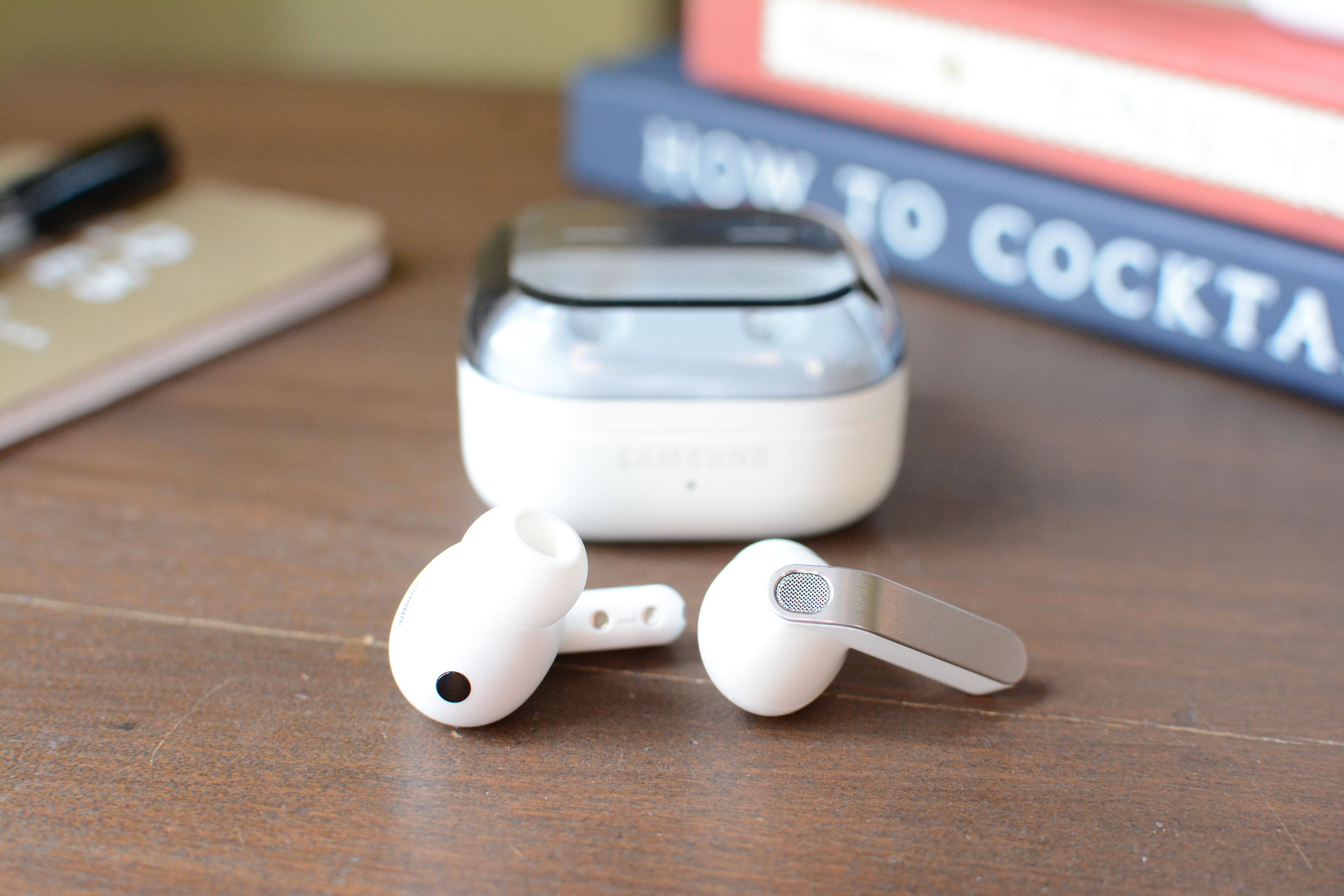
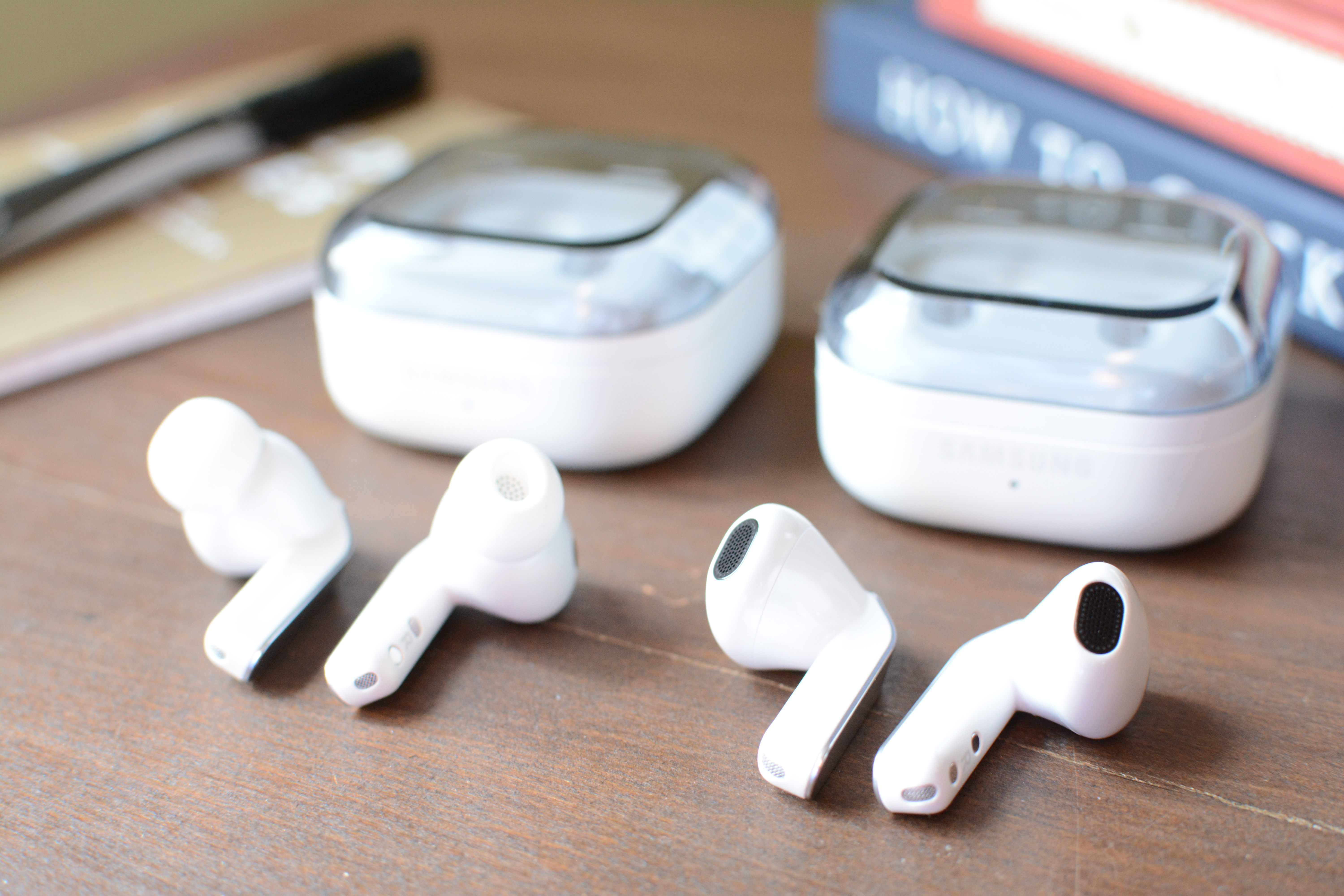
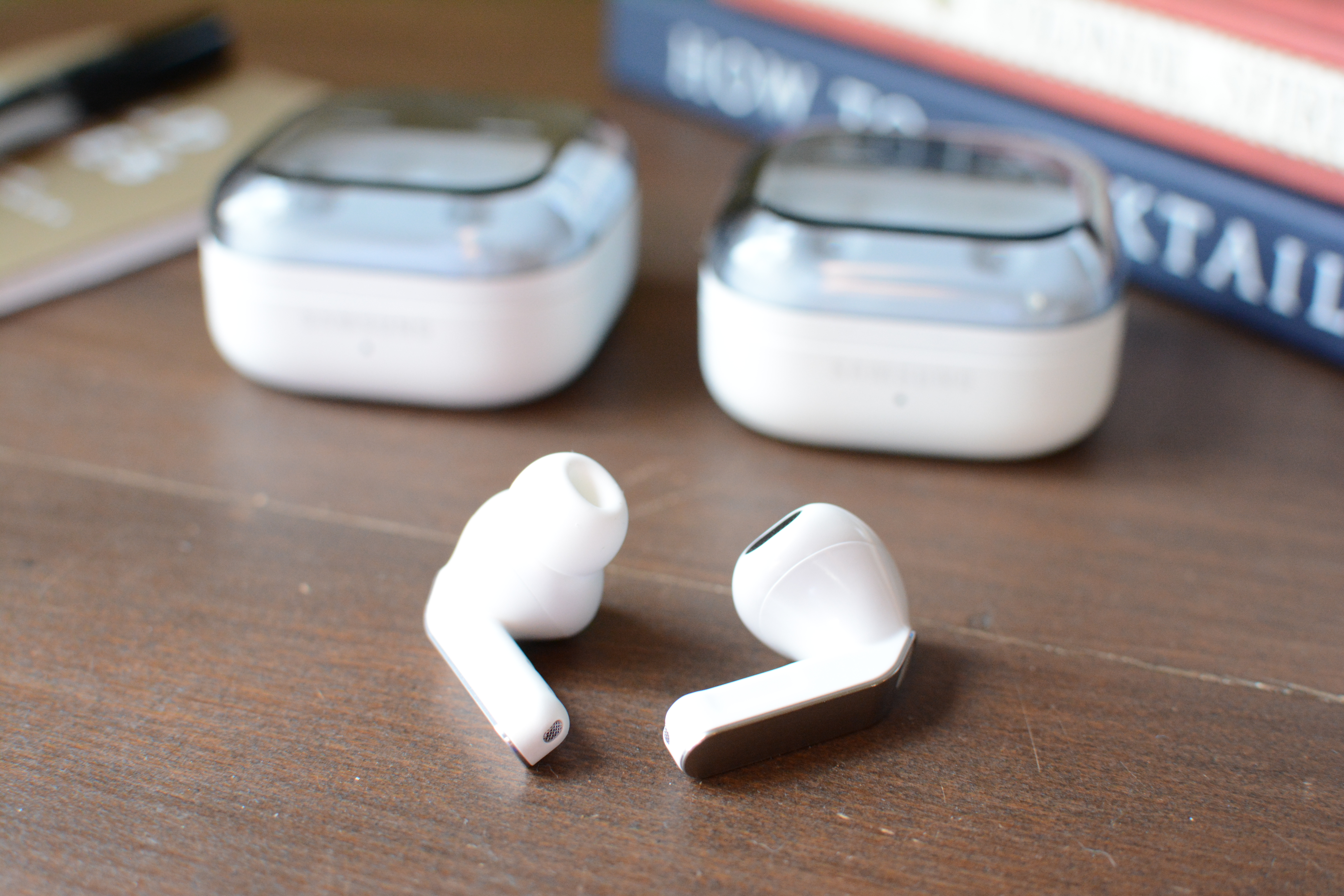
The angular “blade” is gone from both the open-fit Galaxy Buds 4 and silicone-tipped Galaxy Buds 4 Pro. That stem is now a flat panel with a thin metal cover, but it’s still called the blade (thanks, Samsung). And thank the gods, the gimmicky blade lights on the last Pro model are now gone. The Galaxy Buds 4 and 4 Pro both have an indented area that accepts both swipes and presses for the onboard controls, a design choice that makes that area easy to find by touch alone. Aside from that, the overall shape of both Galaxy Buds 4 models remains mostly the same, and they’re both pretty much the same size too.
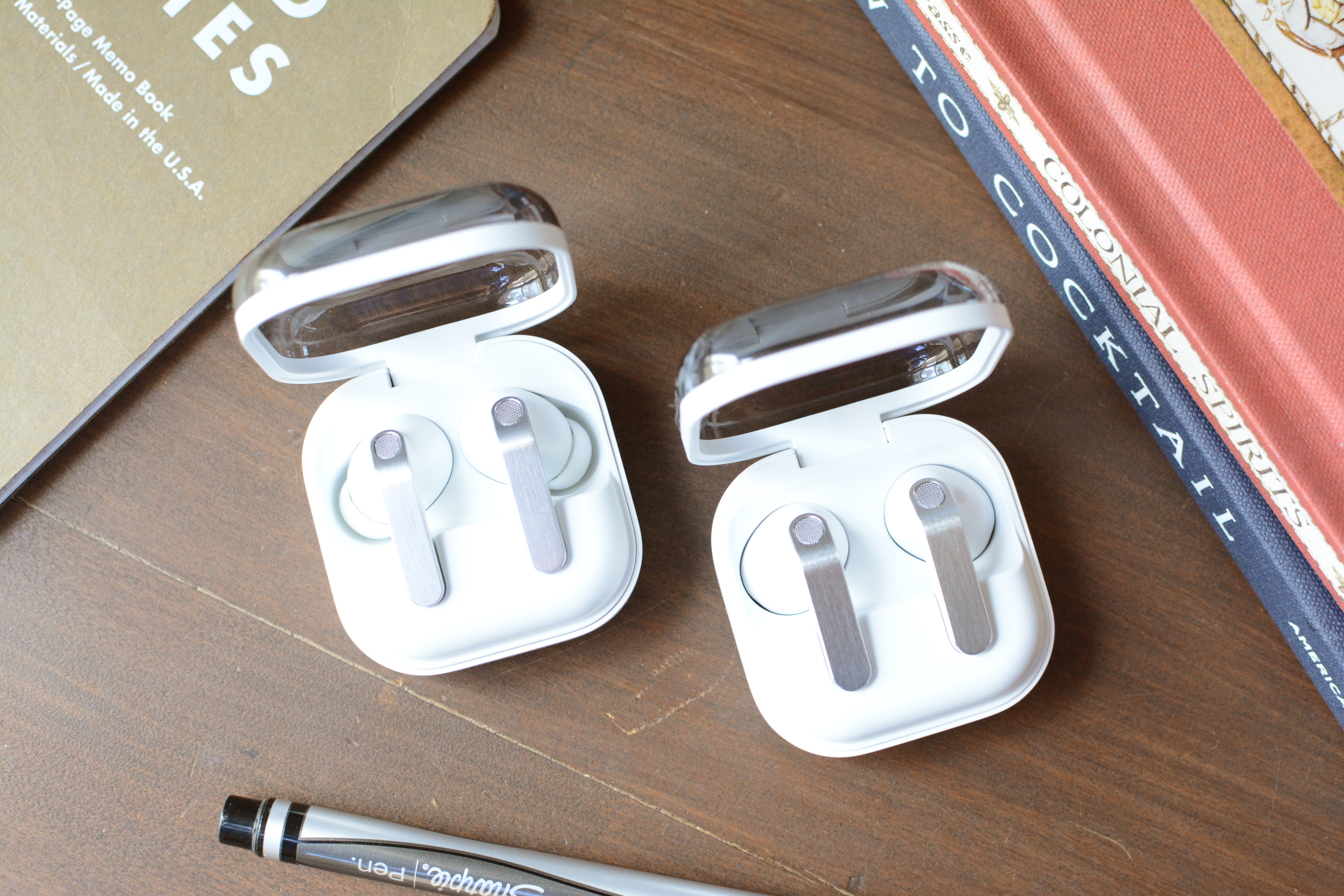
One big change for the Galaxy Buds 4 duo is the charging case. Since the buds now lay flat in there instead of sitting vertically in the case on the previous model, Samsung has gone back to its rounded square shape from older generations. The company did, however, keep the translucent lids, so you can clearly see if the earbuds are in the case without having to open it.
In addition to their styles (the Buds 4 are open fit while the Pro have ear tips), a notable distinction between the two is their ingress protection (IP) levels. The Galaxy Buds 4 Pro is rated IP57, which is good enough for dust protection and full immersion in up to three feet for 30 minutes, while the Galaxy Buds 4 is IP54. That latter number means you’re only guarded against dust intrusion and water splashes.
Useful features, if you have a Samsung phone
Samsung Buds 4 Pro
Billy Steele for Engadget
A few years ago, Samsung offered iPhone users the same suite of features as those onGalaxy phones. Those days are long gone. Like Apple does with AirPods and Google with Pixel Buds, Samsung requires you to pair a Galaxy phone to get the most out of a pair of Galaxy Buds 4 or 4 Pro. If you opt for the open-fit model though, you’ll have to sacrifice a few features.
Let’s start with the tools that are available on both versions. You can expect Adaptive EQ 2.0, 360 audio with head tracking, Auracast, automatic switching, head gestures and both touch and swipe controls across the board. Both models also offer AI assistance via either Bixby or Gemini.
Voice features are where the two models primarily differ. The Galaxy Buds 4 Pro has voice detection that automatically lowers the volume and activates ambient sound mode when you start speaking. The pricier version also offers hands-free access to an AI assistant without having to touch the earbuds or your connected device.
Pretty much all of this stuff requires a Samsung phone. Sure, you can use the basics — ANC, onboard controls and ambient sound — from the likes of iPhones and Macs. But the more advanced items like voice detection, head gestures and automatic switching won’t be available there. As before, there’s an app for Android users with non-Galaxy phones, but things like UHD audio and higher-quality calls are not available on those devices. If you do have a Galaxy phone, everything is baked into the Bluetooth menu, just like Apple does with AirPods.
Shockingly good sound quality
Samsung Galaxy Buds 4 Pro (left) and Samsung Galaxy Buds 4 (right)
Billy Steele for Engadget
I’ve come to expect good sound from the Galaxy Buds line. I usually go into any new Samsung audio review knowing I”ll be getting average audio quality at the very least. On last year’s Galaxy Buds 3, the sound performance was well above average for both sets, and that continues on the two latest models. However, if audio is your main priority, the Galaxy Buds 4 Pro is the better pick.
Like Samsung did with the Galaxy Buds 3 Pro, this year’s 4 Pro has a two-way driver setup with an 11mm “super-wide” woofer and a 5.5mm planar tweeter. While the woofer is larger than what’s inside the 3 Pro, the tweeter is smaller. Those components combine for shockingly good sound quality for a pair of Samsung earbuds. I was truly surprised when I put the Galaxy Buds 4 Pro in my ears for the first time and played aya’s electro-tinged hexed! The driving bass line on “off the ESSO” is energetic yet nuanced, vocals are cutting and clear, while the synths and other percussive elements pierce through the mix. The Galaxy Buds 4 Pro deftly handled everything I threw at it, from Spiritbox’s heavy metal to the mellow acoustic tunes on Muscadine Bloodline’s 2025 release.
The Galaxy Buds 4 aren’t a sonic slouch by any means. It’s true you’ll get deeper bass and more overall clarity and detail from the Pro model, but prospective buyers who desire an open fit don’t have to sacrifice too much in the sound department. There’s still punchy bass and crunchy highs, with enough midrange to fill in the gaps adequately. I noticed the biggest difference on that aya track, where the bass isn’t as deep or detailed and the rest of the mix isn’t quite as dynamic as it is on the Galaxy Buds 4 Pro.
Active noise cancellation that still needs work
Samsung Galaxy Buds 4 Pro (left) and Galaxy Buds 4 (right)
Billy Steele for Engadget
While both Galaxy Buds 4 models offer active noise cancellation (ANC), the Pro version has what Samsung calls Adaptive Active Noise Cancellation 2.0 versus just Adaptive Active Noise Cancellation on the other. The company didn’t go into much detail about the differences, other than to say the ANC performance on the Galaxy Buds 4 Pro is superior. Hence the 2.0, I guess.
ANC performance was a major issue on the Galaxy Buds 3 and that continues on the Galaxy Buds 4. Samsung just hasn’t managed to crack the noise cancellation code on open-fit earbuds the same way Apple has with its “regular” AirPods. In fact, the ANC on this new model makes such a modest difference, I’d wager most customers would prefer to trade it for longer battery life (or a lower price). I only kept it on in the interest of my battery rundown, otherwise I wouldn’t have used it at all. It’s definitely more like active noise reduction than outright cancellation.
Thankfully, noise cancellation is a different story on the Galaxy Buds 4 Pro. It’s still not going to silence the world like the second-gen Bose QuietComfort Ultra Earbuds can, but Samsung’s tech does just enough to make it useful in most circumstances. I found it particularly adept at blocking moderate levels of constant noise, like a clothes dryer, fan or white noise machine. It’s the sudden jolts of racket where the Pro struggles. The Buds 4 Pro also does a decent job at muffling human voices, which caused my family much frustration.
Calls and voice quality
Samsung Galaxy Buds 4 Pro (left) and Galaxy Buds 4 (right)
Every audio company claims its special sauce is the key to the clearest calls, and Samsung is no different. The company boasts that its combo of a 16kHz super wideband mode, DNN noise reduction and personalized beamforming mics offer “calls so clear, it’s stunning.” Of course, that promise requires a Galaxy S26 series phone — not just the earbuds.
I was shocked to discover how well I sounded in quiet environments as both of these earbuds offer voice quality that’s crisp and clear. If you move to a noisy spot, both models will completely block any background roar, but you will sound slightly digitized on the other end. This was more apparent on the Galaxy Buds 4, but it’s noticeable on both versions. That’s due to all the audio processing Samsung is doing to mute those distractions.
To top it all off, the ambient sound mode on the Galaxy Buds 4 Pro is very natural, which means you won’t be yelling to hear yourself during calls or meetings.
The competition
If you’re looking for the best earbuds to use with a Samsung phone, the Galaxy Buds 4 and 4 Pro are your best options. Again, like Apple does with the AirPods and Google with the Pixel Buds, Samsung continues to offer the most advanced and most useful features to the Galaxy faithful. If you don’t really care about that synergy, the second-gen Bose QuietComfort Ultra Earbuds are currently my top pick. That set won’t wow you with features, but the combination of excellent sound quality and the best ANC performance make them hard to beat. Plus, multipoint Bluetooth connectivity offers easy switching between a Galaxy S26 and a MacBook.
Wrap-up
With each passing year, Samsung draws closer to offering Galaxy phone users a true like-for-like AirPods rival. The company is really only lagging behind Apple in two areas: hearing health and heart-rate tracking. Samsung currently offers the option to amplify voices on its earbuds, but it hasn’t built a hearing test or the hearing protection tools Apple has. The biggest update on the AirPods Pro 3 was the addition of heart-rate tracking last year, which would be a great foundation for a fitness-focused version of the Galaxy Buds.
Everything else continues to improve on a familiar formula. Samsung has bolstered overall sound quality and ANC performance, even if the noise canceling abilities of the Galaxy Buds 4 remain somewhat lackluster. The design changes offer a more premium look and the gradual addition of modern features like head gestures help the company keep pace with the competition. While the Galaxy Buds 4 and 4 Pro are both good, Samsung really needs to take bigger swings with new features to make its earbuds the must-buy that AirPods are for iPhone users.
This article originally appeared on Engadget at https://www.engadget.com/audio/headphones/samsung-galaxy-buds-4-and-4-pro-review-impressive-audio-imperfect-anc-190000202.html?src=rss
One of the biggest issues with mainline Pokémon games is that you're often so focused on catching, battling and trying to be the very best that you don't have time to stop and smell the flowers. But in Pokémon Pokopia, you're rewarded for doing just that while building a loving community of friendly monsters. The game is one part Animal Crossing and one part Dragon Quest Builders sprinkled with a touch of Minecraft and Stardew Valley. he result might be one of the coziest, most wholesome life sims on the market.
Setup and gameplay
In Pokopia, you play as a Ditto, who has awakened to a world where all the other humans and Pokémon have mysteriously disappeared. Naturally, the loss of your trainer has inspired you to take the form of a person (well, as best as a Ditto can). You work together with the only other soul around, Professor Tangrowth, to figure out how to revitalize this once thriving town. As you explore, you learn to create habitats from a mix of shrubs, trees and anything else you can scavenge. You can also create new homes for the missing Pokémon and lure them back, slowly converting the wasteland into a bustling place full of life and excitement. It's a simple but extremely rewarding gameplay loop, and as you make friends with the returning monsters, they help you on your quest by teaching you skills that allow you to continue shaping and manipulating the environment. They also provide handy items and building materials.
Some Pokémon like Squirtle can even teach you new moves that you can use to manipulate your environment.
Nintendo / Engadget
This is where the other main gameplay cycle comes in, as the entire world is made up of blocks that you can excavate or rework to your heart's content. Not only does this let you customize your environment, it also serves as a way to traverse the world. See a shiny treasure on the other side of a river but you can't swim there? You can simply build a bridge instead. And just like in Minecraft, you can use raw materials to create all sorts of fancy blocks and furniture so your homes look exactly how you want. When compared to games like Animal Crossing, I found I actually prefer Pokopia's flavor of world-building a touch more, as it relies slightly more on building and exploring and less on decorating.
In order to lure Pokémon to your town, first you need to build a home they'll want to live in.
Nintendo / Engadget
My one small issue with the game is that while I like the real-time building mechanic that lets Pokémon work on stuff while you're not playing, having to wait a full day for bigger projects to be completed can bog down your progress a bit. With a game that easily provides more than 50 hours of content just for its main story (and that's not counting all the time you'll spend customizing and tweaking your town), sometimes things become a slower burn than they ought to be.
The magic of Pokopia
As befitting a Pokémon game, each monster has skills befitting their type like Charmander being able to light fires.
Sam Rutherford for Engadget
While the success of Pokopia's core mechanics can be largely attributed to co-developer Bandai Namco borrowing the game's basic template from the Dragon Quest Builders series, the real magic of the game comes from the Pokémon themselves. When I load into the world and the first thing that happens is one of my townsfolk running up to me to say thanks or give me a present, it just makes me happy. And unlike most other Pokémon games, you can actually have proper conversations with them, instead of just hearing them do their 8-bit cries. Speaking of that, I really think it's time for Game Freak to archive those Game Boy-inspired sound bites in favor of proper voice acting. We've had thirty years of crunchy, low-fi yells, and in an open-world game with adorable polygonal graphics, I think we can finally let the 'mons say their names like they do in the anime.
Pokopia's roster of characters is also bigger than expected. That's because in addition to new faces like Peakychu and Mosslax, there are well over 100 different Pokémon to befriend. And while the game leans a bit more heavily on characters from Kanto and the original 151, there's solid representation from other generations, including cameos from legendaries. Furthermore, each monster has its own unique habitat, preferences and abilities. I appreciate little details like water-type Pokémon who ask you to make their home a bit more humid or fighting-type monsters who ask for exercise equipment to spruce up theirs. Similarly, when it comes to building out your town, I like that the game makes you turn towards plant-types if you want help with your crops or a fire-type if you need help smelting some iron.
Teamwork makes the dream work.
Nintendo / Engadget
However, the most heartwarming thing about Pokopia might not even be how you interact with the other Pokémon, but how they socialize with themselves. Sometimes you'll run into two mons chasing each other around, working out together or cuddling up for a nap. And thanks to the game's photo mode, you can capture all these moments when they happen.
Exploring the world is also quite satisfying, particularly for anyone who has played any of the Pokémon games from gen one. There are a ton of references to memorable people and places from Kanto. Plus, when you're just out and about or spelunking, you'll sometimes run into other adventurous mons who need a little help before you can convince them to move into town. It feels like there are fun secrets hiding around every other corner, and even for those that are a bit less obvious, Pokopia drops just enough hints to point you in the right direction.
Wrap-up
Just look how happy everyone is when we all work together.
Nintendo / Engadget
There's so much to do in Pokopia that I wouldn't be surprised if dedicated players could tide themselves over with this game until Pokémon Winds and Wavescomes out next year. But more importantly, Bandai Namco and Game Freak have found a perfect balance between the title's open-world building mechanics and homages to the underlying franchise. Pokopia isn't just a half-hearted life-sim clone with a thin veneer of monster catching (or in this case, monster community outreach) draped on top; it's a good game in its own right that just gets better with the addition of neighborly Pokémon.
This article originally appeared on Engadget at https://www.engadget.com/gaming/nintendo/pokemon-pokopia-review-possibly-the-most-charming-pokemon-game-yet-183000812.html?src=rss
Who needs Half-Life 3 or Beyond Good & Evil 2? Roku, in an attempt to gamify content discovery on its platform, has cooked up a gaming announcement for the ages. Behold: Roklue. Yes, that's a real name that someone with a job title and (likely high) salary came up with.
Roklue (shudder) will quiz players on "the movies and TV shows that everyone is talking about," along with classic "beloved favorites." When it references a movie or show, it will provide a link for you to tune in on your device. The initial version is an Oscar season tie-in ("Roklue: Awards Season") that debuts on Saturday. This inaugural version is produced by B17 Entertainment, a Sony-owned company.
Roku says it will rotate thematic content throughout the year. Varietyreports that those will center around music festivals, the Emmys and holidays.
Apart from that name, which should come with a gag-reflex warning, Roklue sounds harmless enough. You play a trivia game to find new stuff to stream; Roku grows its engagement. Win-win. But with corporate schemes like this, it's always worth wondering where further monetization might eventually come into play. Think something like linking to series on platforms you don't yet subscribe to. (Hello, kickback.)
On March 7, you'll find the free Roklue (ick) game on your Roku home screen, no download required.
This article originally appeared on Engadget at https://www.engadget.com/entertainment/streaming/roku-is-launching-a-trivia-game-called-roklue-190000386.html?src=rss
The Xbox Series X and Series S are built for fast load times, smooth performance and expansive game libraries, but the right accessories can make a noticeable difference in how you play day to day. From storage solutions that help you manage growing installs to headsets that make it easier to catch subtle audio cues, the best Xbox accessories are about removing friction and improving comfort as much as boosting immersion.
Whether you’re setting up a new console or refining an existing setup, there’s a wide range of add-ons worth considering. Many accessories designed for previous Xbox generations still work with Microsoft’s current hardware, which makes it easier to upgrade gradually rather than all at once. We’ve tested and selected the best Xbox Series X and Series S accessories to help you get more out of your console, no matter how or where you play.
Best Xbox accessories for 2026
This article originally appeared on Engadget at https://www.engadget.com/gaming/xbox/best-xbox-series-x-series-s-accessories-140035165.html?src=rss
Outfitting a kitchen can get expensive fast, but you don’t need high-end appliances or flashy tools to cook more efficiently. Some of the best kitchen gadgets are simple, affordable gadgets that quietly make everyday tasks easier — whether that’s prepping ingredients, measuring accurately or keeping your workspace organized. These are the kinds of tools you reach for again and again, not one-off purchases that end up buried in a drawer.
This guide focuses on inexpensive kitchen gadgets that punch above their price, including practical prep tools, durable measuring essentials and compact helpers that save time without taking up much space. None of them are strictly necessary, but all can streamline your routine and make cooking at home feel a little less like work.
Best cheap kitchen gadgets for 2026
This article originally appeared on Engadget at https://www.engadget.com/home/kitchen-tech/best-cheap-kitchen-gadgets-130049897.html?src=rss
Apple’s MacBooks don’t need much help out of the box, but the right accessories can make a noticeable difference in how you use them day to day. Whether that means adding more ports, creating a cleaner desk setup or making your laptop easier to travel with, there’s a growing ecosystem of gear designed to fill in the gaps Apple leaves behind. A good accessory should feel like an extension of your MacBook, not a workaround.
The picks below are meant to work smoothly with macOS and today’s USB-C-only reality, whether you’re using a lightweight MacBook Air or a higher-end MacBook Pro. From practical essentials to quality-of-life upgrades, these accessories are meant to help you get more done without adding unnecessary bulk or friction.
Best MacBook accessories for 2026
Best MacBook webcam accessories
Best MacBook docking stations and hubs
Best MacBook charging gear
Best MacBook keyboards and mice
Best MacBook stands
This article originally appeared on Engadget at https://www.engadget.com/computing/accessories/best-macbook-accessories-150014737.html?src=rss
The right accessories can transform your Apple Watch into the best workout companion, a stylish timepiece and everything in between. Whether you’re looking to upgrade its style, recharge its battery quickly or make it even more convenient to use on the go, there’s an accessory out there that can help. From a stylish sport loop that keeps things comfortable during workouts to a sturdy charging stand for your bedside, there are plenty of ways to enhance your experience.
Apple has a few Watches at this point: the flagship model, the Ultra 2 and the Watch SE, and you can find accessories for any and all of them — many of which won’t break the bank. If you’re always on the go, a power bank with wireless charging can help keep your watch topped up without needing to hunt for an outlet. No matter which Apple Watch you own, the best accessories can make daily use more seamless and add a little extra style and functionality along the way.
Best Apple Watch accessories for 2026
This article originally appeared on Engadget at https://www.engadget.com/computing/accessories/best-apple-watch-accessories-133025270.html?src=rss