Raspberry Pi Foundation Launches $70 AI Kit for Pi 5

A rising tide lifts all boats, they say… and it seems like the AI tide is finally coming to help smaller creators harness the power of new technologies. The Raspberry Pi Foundation just unveiled their latest AI Kit that works with the Pi 5, bringing AI capabilities to hundreds of thousands of creators using the tiny computers to build their own hobby projects or even retail products. The versatile single-board computer has seen seismic growth since it was first introduced in 2012, more than a decade ago. As trends go, Raspberry Pi has also ensured its computers stay relevant, introducing features, capabilities, and modules that keep it on the cutting-edge of budget computer-building.

Developed in collaboration with Hailo, a leader in AI acceleration technology, the Raspberry Pi AI Kit is all about empowering users to build intelligent applications directly on their Raspberry Pi. Imagine creating real-time AI vision applications – object detection, facial recognition, pose estimation, and more – without relying on cloud processing.

Designer: Raspberry Pi Foundation

At the heart of the AI Kit lies the Hailo-8L AI accelerator module. This tiny powerhouse boasts a whopping 13 tera-operations per second (TOPS) of inferencing performance. That translates to real-time processing of complex AI tasks, with minimal power consumption – perfect for battery-powered projects or those seeking eco-friendly solutions.

One of the biggest challenges in AI development can be the complex software integration between cameras and AI frameworks. The Raspberry Pi team has addressed this head-on by simplifying the process. Their rpicam-apps suite now features a post-processing template specifically designed for integrating AI inferencing within the camera pipeline. With the pre-installed Hailo Tappas libraries, crafting advanced AI applications becomes achievable with just a few hundred lines of C++ code.

The Raspberry Pi AI Kit isn’t limited to rpicam-apps. The kit also includes an API that integrates with the GStreamer framework, allowing you to run inference on pre-recorded videos or build custom Python or C/C++ applications. This opens doors for a wider range of AI projects beyond camera-based solutions.

Installing the AI Kit software is a breeze. With just a few package installations through apt and a reboot, you’ll be ready to explore the exciting world of on-device AI within minutes. Their comprehensive getting started guide walks you through the entire process. The Raspberry Pi AI Kit is priced at $70, allowing all creators to tinker with artificial intelligence, building new products and helping grow the small creator community in lock-step with global innovation.

The post Raspberry Pi Foundation Launches $70 AI Kit for Pi 5 first appeared on Yanko Design.

Affordable Music Production: The $99 EASYPLAY 1s MIDI Controller with Built-In Speakers

Small enough to fit in a pocket, lighter than an iPhone, but equipped with a 25+ sound bank, MIDI capabilities, 25 keys, and its own built-in speaker system, the EASYPLAY 1s might just be the easiest way to play music anywhere you go. Music instruments, whether digital or physical, have had a problem of being too expensive, too bulky, or both. The $99 EASYPLAY 1s makes music production and even jamming as simple as pulling the MIDI synth out of your pocket and starting to play. It comes with multiple instruments built-in, a drum machine for you to drop beats, and knobs that let you change octaves and instruments in mere seconds. When you’re done playing with the built-in instrument packs, the EASYPLAY can hook to your laptop or tablet, working as an external synth to let you access millions of other instruments… or even build your own.

Designer: SummerTones

Click Here to Buy Now: $99 $198 (49% off) Hurry! Only 60 hours left!

The beauty of the EASYPLAY 1s is that it rejects the status quo with a design that feels fresh, fun, and inviting. It doesn’t look like an electronic keyboard or piano, and opts for a more retro-funk design that’s reminiscent of something Teenage Engineering would create. The EASYPLAY 1s comes with colored keys, the ability to change keycaps, and a design that encourages endless experimentation. When you start playing with the EASYPLAY 1s, you start afresh – the entire experience feels new, which means you learn new things, stumble across new patterns, and create something that feels absolutely original. With time, muscle memory kicks in, and your fingers figure out how to dance across the EASYPLAY 1s’ 25-key interface.

Think of the Casio synthesizers back in the 80s and 90s, and imagine it condensed down into the size smaller than a Nintendo Switch. The EASYPLAY 1s has a small form factor that can be either used handheld, or even kept on a tabletop surface. Switch it on and it starts working off the bat, allowing you to choose instruments, set your pitch or octave, and begin playing. A set of two 2W speakers on each side is enough to play solo, or if you want something a little more comprehensive, a 3.5mm input lets you hook the EASYPLAY 1s to a set of headphones or even a speaker system. Want to go a step further? A USB-C port lets you hook the device to a computer or tablet running any DAW (Digital Audio Workstation), effectively turning your EASYPLAY 1s into an external synth. Use it to jam, produce music, or even play samples and loops during a deejay set. Heck, you could even use the EASYPLAY 1s as a gaming controller for games like Guitar Hero, or a slew of other key-smashing games.

The small, lightweight device packs its own 25+ bank of music instruments. You can choose between traditional instruments like a guitar, piano, accordion, saxophone, or go more electronic with waveforms like sawtooth or square waves. Two knobs on either side let you choose instruments or octaves, while keys at the center become your MIDI pads, allowing you to tap for singular notes, or press multiple buttons together to create chords. There’s also a built-in metronome that makes playing in rhythm easy when you’re learning or composing, and Bluetooth capabilities that let you connect your EASYPLAY 1s to a smartphone and play along with your favorite songs on Spotify or any other streaming service.

What sets the EASYPLAY 1s apart is its incredibly low barrier for entry. At $99, it’s more affordable than most regular instruments, making it a great addition to your music arsenal, or even a perfect first gift for a youngster interested in music production. The entire device weighs around 6 ounces (170 grams) and is made of durable ABS and Silicone, making it impervious to rough usage. The $99 variant will get you one EASYPLAY 1s and a set of stickers to put on the keys, or upgrade to the full package for $129, which also includes a lanyard, a carry case, and four sets of keycaps to replace the current ones, for a more themed music experience.

Click Here to Buy Now: $99 $198 (49% off) Hurry! Only 60 hours left!

The post Affordable Music Production: The $99 EASYPLAY 1s MIDI Controller with Built-In Speakers first appeared on Yanko Design.
Is the HMD Skyline the Nokia Lumia Revival We’ve Been Waiting For?

The rumor mill is churning for HMD, the company behind the Nokia brand of smartphones. Their upcoming phone, codenamed Tomcat and now seemingly confirmed as the HMD Skyline, is generating excitement with its feature set and targeted price range. Slated for a July release, the Skyline is shaping up to be a mid-range contender with high-end features. Leaks suggest a €520 ($565 USD) price tag, positioning it above HMD’s recent offerings. It will boast 8GB of RAM and 256GB of storage, but most notably, leaks show a design language that’s highly reminiscent of Nokia’s Lumia range. The phones boast sharp corners and colorful bodies that hark back to Nokia’s Windows Phone days.

Designer: HMD Skyline

The display is rumored to be a highlight, with a FHD+ OLED touchscreen featuring a smooth 120Hz refresh rate. Powering the device will likely be the Qualcomm Snapdragon 7s Gen 2 SoC, a capable chip for everyday tasks and even some gaming. Camera enthusiasts will have a triple-lens setup on the back to play with, rumored to consist of a 108MP main sensor, an 8MP ultrawide sensor (likely), and a 2MP macro or depth sensor. Selfies will be handled by a 32MP front-facing camera.

Keeping the phone juiced is expected to be a 4,900mAh battery with support for 33W fast charging. Durability is also addressed with IP67 certification for dust and water resistance. The Skyline is also said to run the latest Android 14 operating system out of the box and will have an under-display fingerprint sensor for added security. Stereo speakers round out the package for an immersive entertainment experience.

Although HMD hasn’t officially released any images, these blurry leaks are proof that the Nokia brand language is alive and well. The company’s Lumia series captured many hearts back in Nokia’s heyday, and even though Satya Nadella (who shut Nokia’s mobile division down) said that the Windows Phone was a mistake, their catchy design language clearly wasn’t. The Skyline will allegedly be available in four gorgeous colors – pink, blue, green, and yellow. A sub-600 price tag and fairly impressive specs make it a great snag for anyone bitten by the nostalgia bug.

The post Is the HMD Skyline the Nokia Lumia Revival We’ve Been Waiting For? first appeared on Yanko Design.
The AirTag that Apple should have built: Nomad’s GPS tracking card comes with Apple ‘Find My’ support

It’s the size of a credit card, fits in your wallet, works with Apple’s Find My network, and most importantly, charges wirelessly so you don’t need to worry about batteries or ditching the entire device altogether after a year of use. Meet the Nomad Tracking Card, a slick tracking device that makes you wonder why Apple made something as bulky as the AirTag. At just 2mm thin, it’s about as thick as 2 credit cards together, making it discreet enough to slip in anywhere, whether it’s your wallet, your backpack, or even your jacket pocket, giving you the ability to track your belongings through Apple’s global device tracking network.

Designer: Nomad

Anyone who knows me knows how much I think the AirTag needs a redesign. Apple made the tracking device back in 2019 to be used with bags and keys, but didn’t think of the potential of having a card-shaped tracker for your wallet and pockets. It’s been 5 years since the AirTag made its first appearance and rumors about an AirTag 2.0 are so few and far apart, it’s almost as if Apple’s left it up to third party creators to make better trackers that work with its devices.

That’s where Nomad’s Tracking Card comes in. It’s slim, compact, and manages to fit an impressive amount of tech inside its design. The card sports a polycarbonate body, known for its toughness and impact resistance, and comes with a GPS tracker, an NFC for pairing, a battery that runs for 5 months on a full charge, and a MagSafe-compatible wireless charging coil that lets you charge your card when its battery runs out. A graphic on the card tells you where the wireless coil is located, so you can simply attach the Tracking Card onto a MagSafe charger or place it on a wireless charging mat and it begins recharging. No replaceable batteries, no single-use design, no wastage.

Nomad’s website doesn’t mention the presence of a built-in speaker like you would have with the AirTag. Useful for being able to ‘hear’ where your tracking device is, or for alerting you if stolen or left behind, the speaker can be quite a nifty feature. The Tracking Card is, however, IPX7 water and dust-proof, and starts at $40.

The post The AirTag that Apple should have built: Nomad’s GPS tracking card comes with Apple ‘Find My’ support first appeared on Yanko Design.
AI Household Waste Tracker uses GPT to tell you how to correctly dispose of trash

Of all the things I’d want an AI to help me with, this might just be the most useful. While companies like Google and OpenAI have been showing their AI’s multimodal capabilities at identifying the color of objects, or human expressions, an AI hardware company is putting the power of LLMs to good use by having them identify trash. Binit, a Finnish startup, has developed a tiny hardware device that scans your trash and then tells you how to accurately dispose of it. It doesn’t just identify objects like coffee cups and vegetable peels, it tries to analyze materials, looks at brands to identify their manufacturing techniques to determine the best ways to dispose of trash, and effectively tells you (with 98% accuracy) how to segregate your household waste so that the wrong items don’t get disposed of in the wrong channels.

Binit’s core technology is a dedicated AI-powered hardware device designed for the kitchen. Mounted conveniently near your bin, this gadget uses camera vision and sensor technology to identify items before they’re tossed. The system integrates with powerful large language models (LLMs) like OpenAI’s GPT-3, enabling highly accurate image recognition of everyday household waste objects.

Designer: Binit

Binit’s secret weapon? Rather than training their own AI model from scratch, they capitalize on the vast knowledge base of pre-trained LLMs. This approach has yielded impressive results – Binit claims near 98% accuracy in trash recognition. The system can even distinguish nuances – like whether a coffee cup has a lining based on brand recognition.

But Binit isn’t just about identifying your trash. The system analyzes the data it collects, generating insightful feedback through a companion app. This app provides users with a weekly “rubbish score” and gamified elements to motivate positive behavioral changes. Imagine a friendly nudge reminding you that you’ve been discarding a lot of plastic lately, along with suggestions for sustainable alternatives.

The free tier of the Binit app offers basic analytics, while a premium subscription unlocks additional features. The company also envisions itself as a potential data provider – offering anonymized insights on consumer waste habits to entities like packaging manufacturers. This data could be invaluable for businesses aiming to reduce their environmental footprint.

One might wonder – isn’t environmental awareness enough? Binit argues that while most people acknowledge the importance of waste reduction, ingrained habits are hard to break. They liken their approach to sleep trackers – providing data-driven insights that can empower users to make positive changes, even if they’re aware of the general principles.

Binit’s pilot programs across the US and Europe have shown promise. Users reportedly reduced mixed waste by around 40% after engaging with the system’s transparent feedback loop. The company plans to launch commercially this fall, likely in the US, offering both a dedicated AI hardware device and a free app-based scanning option.

The post AI Household Waste Tracker uses GPT to tell you how to correctly dispose of trash first appeared on Yanko Design.
Ultimate 140W GaN Travel Adapter gives you Power to Charge All Your Devices Anywhere You Go

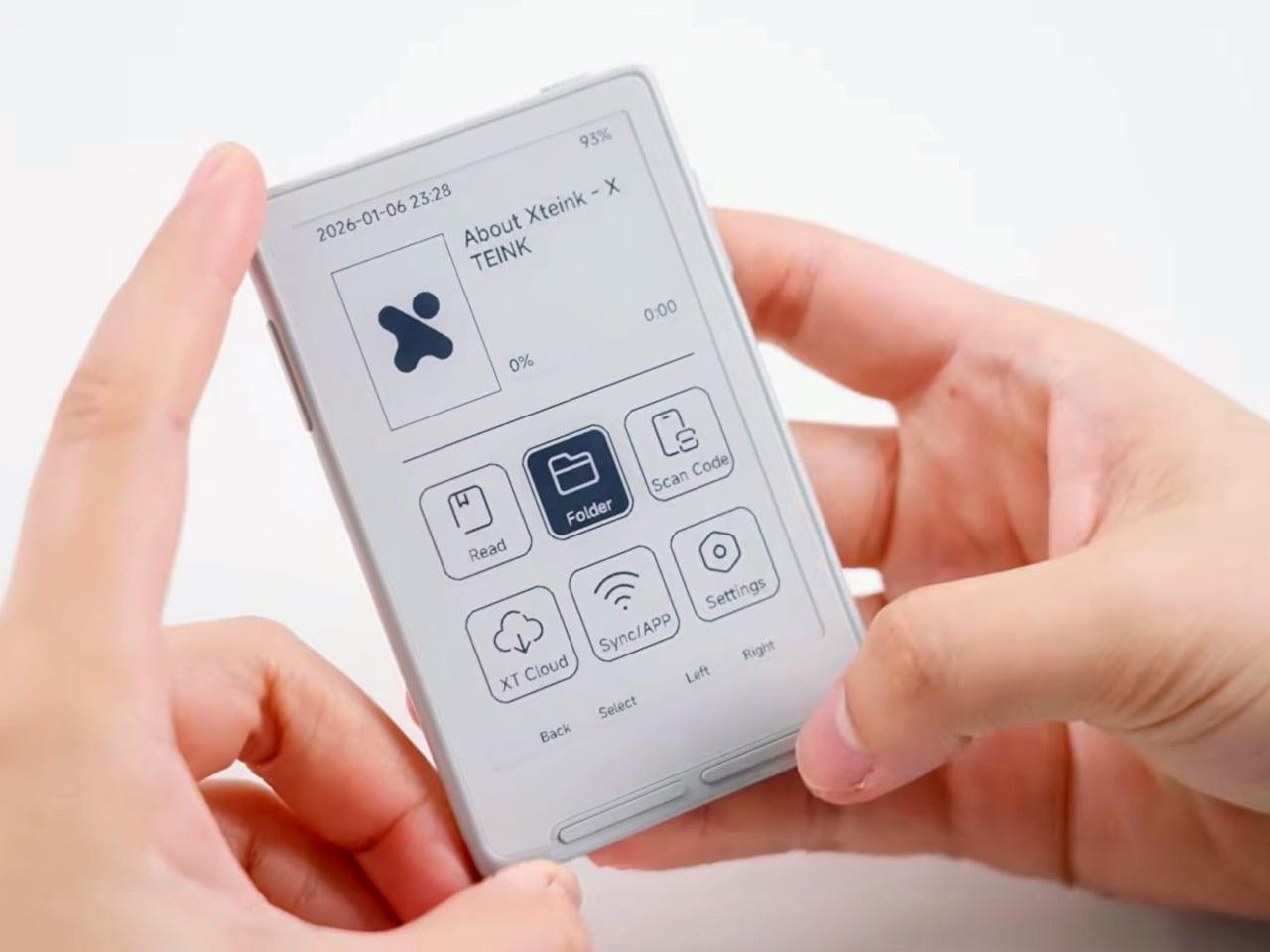
It’s 2024, and if you’re still carrying multiple plugs, charging cables, and a travel adapter every time you visit a different country, you’re living an incomplete life. Chargers have evolved over the years, charging bricks have become slimmer and more powerful, and something as simple as the SWIFT PRO can technically charge your phone, tablet, laptop, handheld gaming device, and AirPods together at the same time, anywhere in the world. The world’s only travel adapter running on 4th-gen GaN technology, the SWIFT PRO offers a staggering 140W of power that can charge multiple devices at the same time. That amount of power is enough to even fast-charge all your devices together, so you’re never waiting hours to get your iPad or smartphone fully charged. Moreover, it works internationally, and is the same size as your regular travel adapter, eliminating the need to travel with multiple charging bricks… or even work from home with a cluttered power strip and multiple plugs and wires strewn across your desk.

Designer: iBlockCube Team

Click Here to Buy Now: $68 $103 (34% off) Hurry! Only 13 of 105 left.

The iBlockCube SWIFT PRO may look like your average travel adapter, but it’s also an all-in-one charging solution. Designed with a multi-plug framework that lets it work with different socket types across multiple countries, the SWIFT PRO slides right into your backpack or travel bag, going everywhere you go. In fact, it’s good enough to use at home too, helping you charge multiple devices together. Like any traditional travel adapter, it has switches on the side that let you deploy the plug type depending on what country you are in. It has a universal AC outlet too, allowing you to plug in appliances, chargers, or other devices, but look to its bottom and you’ll see three USB-C ports for connecting devices and gadgets directly to the SWIFT PRO. A USB-A port on the side gives you the ability to hook yet another device, allowing you to plug a total of 5 gadgets at the same time.

The reason the SWIFT PRO can handle 5 concurrent gadgets is thanks to 4th gen GaN technology. A replacement for silicon carbide, GaN has much better power efficiency as a semiconductor material, helping deliver energy without heat loss. This means more powerful, and thinner charging blocks. The SWIFT PRO has an overall output of 140W, which makes it powerful enough to simultaneously fast-charge your laptop, phone, AND a tablet – something that clunky chargers couldn’t do 10 years ago.

This effectively translates to being able to travel light. All you need is the SWIFT PRO along with a few cables for your devices. The plug on the front can be used for a hairdryer or charging your electric razor while traveling, while the USB-C and USB-A ports on the bottom and sides can effectively juice your laptop, phone, tablet, and AirPods or Watch all together. Two of the USB-C ports can output up to 140W, letting you divert full power to a single laptop, while a third USB-C port caps at 20W, and the USB-A port caps at 18W. Plug multiple devices in and the SWIFT PRO automatically adjusts power delivery to each device, ensuring that all your gadgets get the right amount of fast-charging capacity. The charger will also intuitively cap the power to match your device’s highest charging requirements, protecting your gadgets from damage.

The AC outlet on the front outputs 1000W at 100V and 2500W at 250V, complying with global standards. The 140W gets distributed between the USB ports. The SWIFT PRO is perfect for charging all your gadgets, whether it’s the traditional laptop, tablet, phone, watch, and TWS earbuds, or even a drone, camera, handheld gaming device, hairdryer, or electric razor. A 10A dual-fuse keeps your devices safe from surges, and the GaN semiconductor doesn’t heat up as much as silicon carbide, ensuring efficient power delivery.

The SWIFT PRO comes in 3 color options, white, black, and tinted transparent. The travel adapter measures 3.5 inches tall, 1.9 inches wide, 2.1 inches deep, making it small enough to easily travel with. Each SWIFT PRO also ships with a small travel pouch for your adapter, and a lanyard cable that opens up to transform into a USB-C to USB-C charging cable just in case you end up running short! The SWIFT PRO is priced at a discounted $68 and ships globally starting July 2024.

Click Here to Buy Now: $68 $103 (34% off) Hurry! Only 13 of 105 left.

The post Ultimate 140W GaN Travel Adapter gives you Power to Charge All Your Devices Anywhere You Go first appeared on Yanko Design.
Keychron B1 Pro: Ultra-Thin Wireless Keyboard for Minimalists on the Go

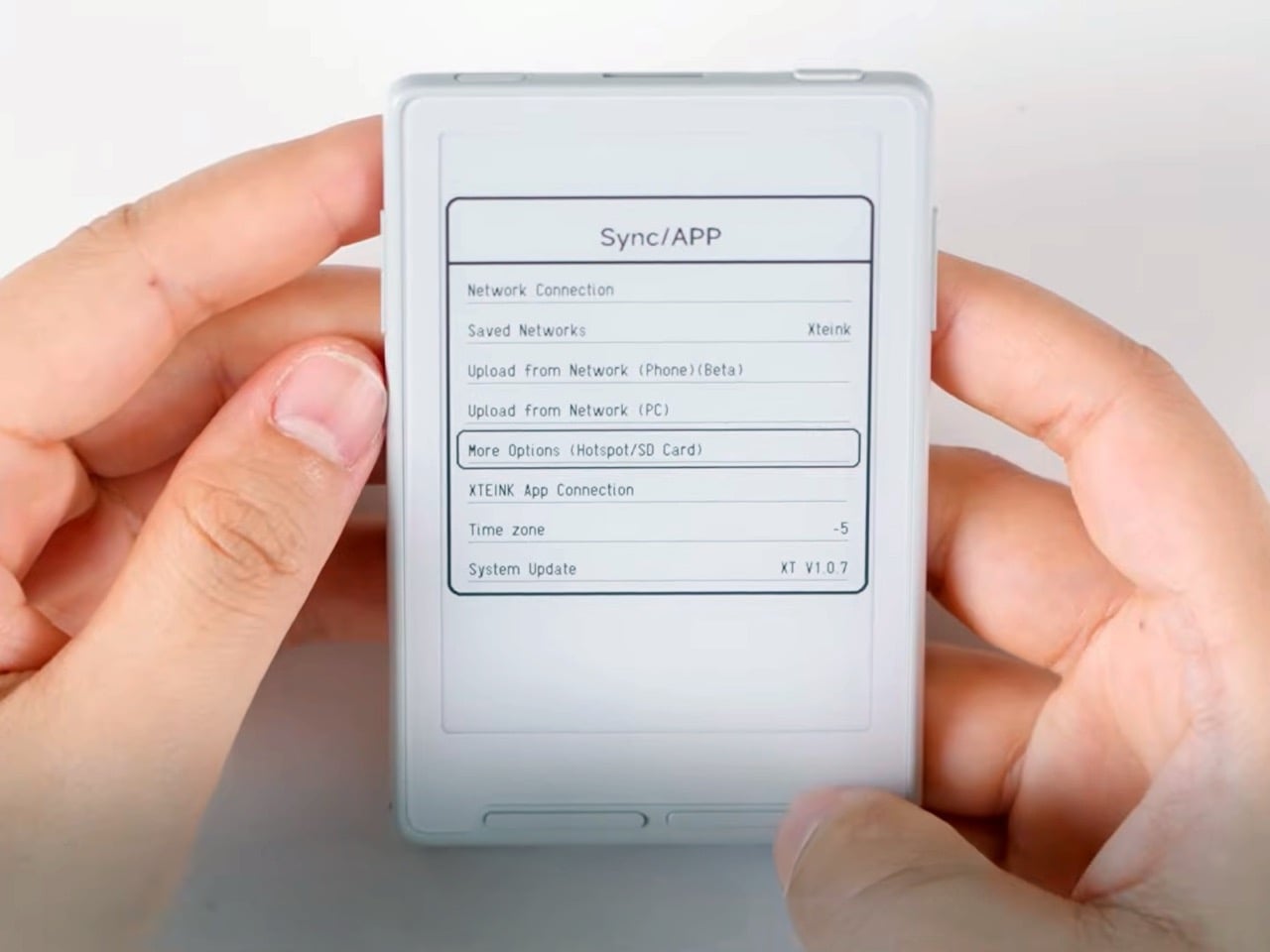
It may not have the mechanical joy that the Lofree EDGE offered as the world’s slimmest mechanical keyboard, but the Keychron B1 Pro does offer an incredibly slim design that’s portable enough to slide right into your backpack. Boasting a minimal aesthetic bundled within a portable design, the B1 Pro is an ultra-slim wireless keyboard that comes with a whopping 1200 battery life and a rather commendable $39.99 price tag.

Designer: Keychron

The B1 Pro deviates from Keychron’s usual mechanical keyboards by opting for scissor-switch keys, similar to those found on laptops. This design keeps the profile incredibly thin, measuring just 5.2mm at the front and reaching a maximum height of 14.5mm. It’s incredibly lightweight too, at only 425g, making it a perfect companion for tossing in your bag and working from anywhere.

Despite its slim profile, the B1 Pro doesn’t compromise on performance. With a 1000Hz polling rate on the 2.4GHz wireless connection, you can expect smooth and responsive typing. It also offers Bluetooth 5.2 connectivity, allowing you to seamlessly pair it with multiple devices. This is also accompanied by a battery life of a staggering 1200 hours on a single charge. Translated to real-world use, that translates to roughly 8 months of typing for 5 hours a day – a near elimination of charging woes.

The keyboard has a Mac layout while remaining functional with Windows and Linux. It even features the same multimedia and function key functions as Apple keyboards, providing a familiar experience for Mac users with the added benefit of a more comfortable typing experience thanks to the scissor-switch keys. For added comfort during extended typing sessions, the B1 Pro features a 3.2-degree tilt angle and concave keycaps designed to improve accuracy. It even comes with a dedicated emoji shortcut key and a protective silicone keycap cover for increased durability.

The B1 Pro supports ZMK firmware, allowing users to program keys, macros, and shortcuts directly through a web interface. This eliminates the need for complex software installations and provides a user-friendly way to tailor the keyboard to your specific needs.

At an affordable price point of $39.99, the Keychron B1 Pro offers a compelling combination of portability, functionality, and battery life. Whether you’re a minimalist on the go, a student juggling classes, or someone who simply prefers a low-profile keyboard, the B1 Pro is definitely worth considering.

The post Keychron B1 Pro: Ultra-Thin Wireless Keyboard for Minimalists on the Go first appeared on Yanko Design.
Meet the world’s first Augmented Reality Laptop – the Spacetop G1

The problem with the Vision Pro, aside from its shocking price tag, is it claims to replace the laptop – a device that has been perfected over decades to be the perfect productivity machine for on-the-go workers. Laptops didn’t need replacing (nobody I know has had a complaint that their laptop wasn’t spatial enough), and honestly, they’re the perfect form factor for the job they do, which is why the Vision Pro may not be the ideal device to replace them… but that doesn’t mean a spatial laptop isn’t a good idea. Meet the Spacetop, a hybrid ‘laptop’ that fills the gap between the conventional Laptop and the Vision Pro. It’s slim, light, affordable, and gives you a traditional laptop experience with an augmented reality twist.

Designer: Sightful

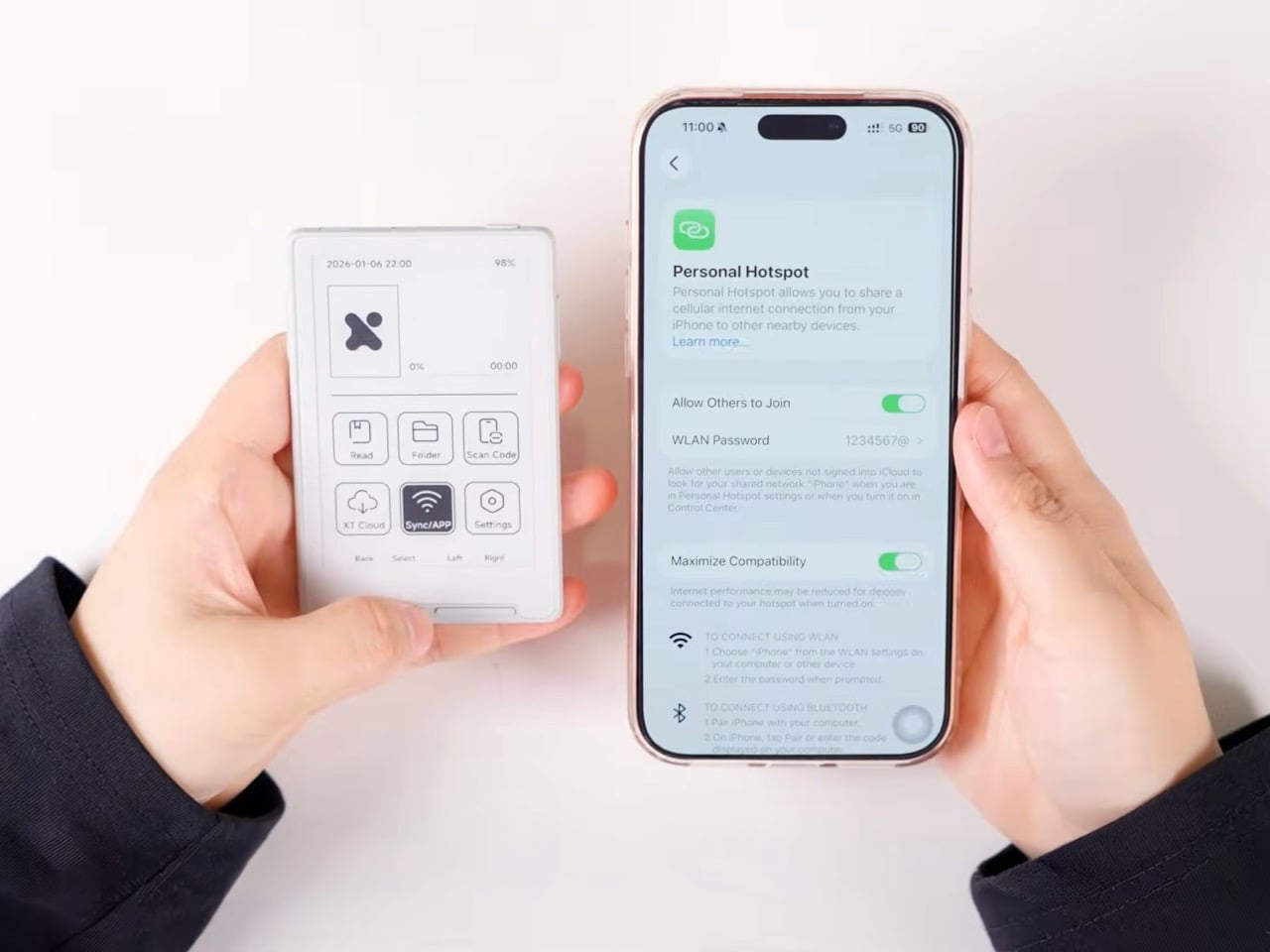
The Spacetop G1 comes from the minds of the folks at Sightful, who believe AR/VR may be the future of work, but current headsets aren’t. The Spacetop G1 is a unique AR laptop that ditches the display for a set of AR glasses. Pop them in and you’ve got yourself a screen that’s wider than your FoV, and the fact that the Spacetop G1 still packs a keyboard and a trackpad means being able to work on a laptop, but just in AR.

The format is very unique, but isn’t surprising. Most AR/VR headsets come with remotes, and are targeted towards entertainment and immersion. The fact that the Spacetop G1 opts for a close-to-laptop-style format means there’s less of a learning curve. Pop the glasses in, have multiple virtual screens unfold in front of you, and begin working. The Spacetop G1 boasts a massive 100-inch virtual workspace, shattering the limitations of traditional laptops. Imagine working on documents, browsing the web, or editing videos on a virtual canvas that feels like a home theater screen. This expansive workspace allows for effortless multitasking and a truly immersive computing experience.

Given its spiritual closeness to a laptop, the Spacetop G1 is designed to be slim enough to fit right into backpacks without any problem. The keyboard and trackpad are as thin as the kind you’d find on most conventional laptops, while the ‘lid’ houses a pair of AR glasses that fold down to a slick format. They aren’t as bulky and cumbersome as the Vision Pro, Hololens, or any of Meta’s headsets, making it less clunky to wear and making you less awkward around other people. Your eyes still perceive the environment around you too, so you’re not completely blocked out of the outer world.

Under the hood, the Spacetop G1 packs a powerful punch. A Qualcomm chipset delivers a 70% performance boost over previous models, ensuring smooth operation even with demanding tasks. With a commendable 8-hour battery life, you can work uninterrupted throughout your workday, or even work in AR while on a train or flight without missing your multi-display setup. The 90Hz refresh rate of the optics translates to crisp and responsive visuals, further enhancing the user experience.

The presence of a 100-inch workspace just means being able to do more with less. You can multitask effortlessly, having various windows within your periphery that you can move around, bring forward, or push backward. Important tasks can occupy the center of your attention. Other windows can lounge in the back or in the corners, still letting you see them if/when you need them.

That being said, the AR laptop doesn’t come cheap. It’s available for pre-order at $1900, which is significantly higher than your conventional laptop, but factoring in the AR aspect makes the price more palatable. After all, you’d spend a lot more on a laptop along with a widescreen/multiscreen layout. The fact that the Vision Pro costs a whopping $3499 is also something that makes the case for the Spacetop G1. Shipments of the Spacetop G1 start as soon as October 2024. Early adopters can secure their unit with a $100 reservation.

The post Meet the world’s first Augmented Reality Laptop – the Spacetop G1 first appeared on Yanko Design.
Snapmaker unveils a powerful all-in-one desktop device for 3D printing, laser cutting, and CNC, for its 8th anniversary

To celebrate 8 years of cutting-edge devices that have helped the creative community build like never before, Snapmaker announces a Premium version of their flagship Artisan all-in-one making device. The Artisan, which debuted in 2022, is a multipurpose desktop device that laser cuts, 3D prints, and even CNC machines all thanks to a compact form factor and a brilliant modular design that lets you swap out 3D printing, CNC, and laser modules whenever you need. A whopping 400x400x400mm work area means you can create, prototype, or set up a factory line right on your table, and the Artisan Premium now features an upgraded 40W laser module that’s 4x more powerful than the one on its 2022 model. Along with this, the company is also ushering in its 8th anniversary with a 48-hour Makerathon event that fans can watch online, coupled with offers, gifts, and a referral program that gets you rewards!

Designer: The Snapmaker Design Team

Click Here to Buy Now: $2,599 $2999 ($400 off). Hurry, deal ends in 48-hours!

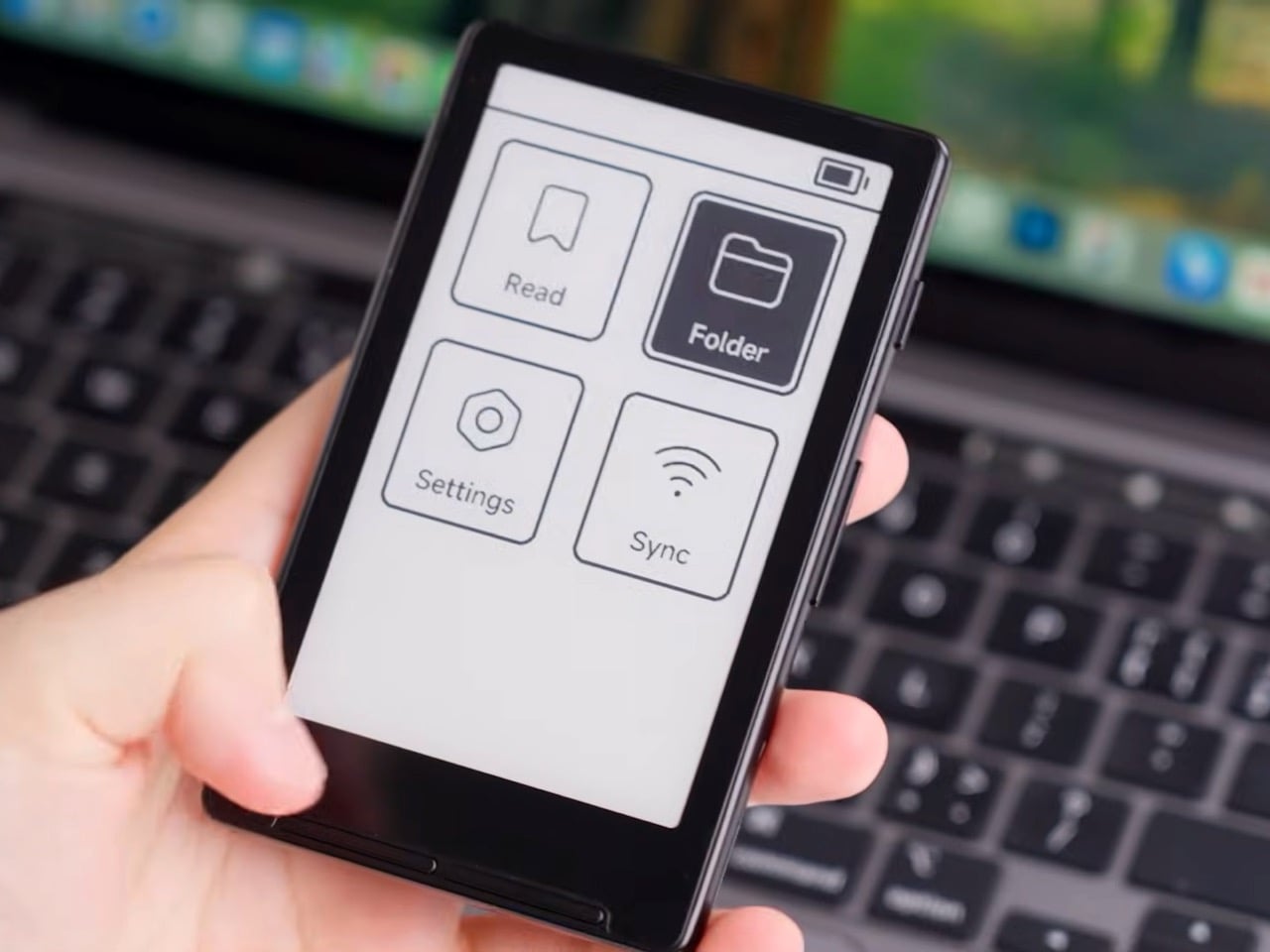
The Artisan Premium is Snapmaker’s top-of-the-line creating tool. A 3-in-1 device that prints, engraves/etches, and CNC machines, the Artisan Premium offers a large work area and still saves space by offering so many functions in one workstation. An all-metal design ensures factory-grade precision, an enclosure contains the dust and protects your eyes from laser damage, and a control unit with a 7″ touchscreen allows you to easily operate the Artisan with ease. On the inside, a modular interface lets you plug in any of Snapmaker’s variousmodules, giving the Artisan its functions.

3D Printing: Thanks to the optimized transmission system and motion control algorithm, Artisan features a high dimensional accuracy when printing at a high speed.

Laser: Coming with the 10W Laser Module, Artisan is capable of faster and deeper cutting on more materials, and delivering refined laser engraving.

CNC: The high-rigidity linear modules and high-speed spindle empower the CNC module to carve or cut smoothly on various materials with a high dimensional accuracy.

The new 40W laser module is now more powerful than ever, allowing you to cut through thicker and tougher materials faster, giving you mastery over paper, fabric, leather, wood, plastic, metal, brick, glass, and many more materials. The 3D printer features a dual-extruder design that lets you print in multiple colors or add different material supports, and the 200W CNC machine is perfect for subtractive prototyping from wood, or even soft metal and stone. The 400x400x400 working area gives you the ability to build large-scale models, and the inclusion of an air pump in the Premium variant helps clear the working area while the Artisan is doing its job.

Along with the reveal of the Artisan Premium, which goes on sale on May 28th with an MSRP of $2999 USD, or €3299 EUR (vat included) if you’re in Europe, Snapmaker is even holding a 48-hour Makerathon with the theme “Play Well” that reflects the company’s roots in fun and exploration and its ongoing commitment to innovation and creativity. Held on 31st May and 1st June, the Makerathon will see Snapmaker’s entire company divided into 10 teams that will then participate in a series of challenges where they’re required to “Make Something Wonderful”. The event will stream on Snapmaker’s Facebook page, and will also coincide with Snapmaker’s Print & Play Challenge, a video contest that all Snapmaker users can participate in.. All you need to do is print anything you can play with (toys, games, music instruments, etc.) and film a video of yourself playing with it. The first five submissions will be screened at the Makerathon, and the Print & Play Challenge will continue all the way up until the 16th of June or Father’s Day. You can participate in the Print & Play Challenge, or even visit Snapmaker’s website to explore tonnes of new content, including printable 3D models of Snapmaker’s 3-in-1 machines, massive discounts on all products, and a referral program that offers a FREE 1064nm IR Laser Module to anyone whose friend buys an Artisan Premium.

Click Here to Buy Now: $2,599 $2999 ($400 off). Hurry, deal ends in 48-hours!

The post Snapmaker unveils a powerful all-in-one desktop device for 3D printing, laser cutting, and CNC, for its 8th anniversary first appeared on Yanko Design.
Tiny Titanium Pocket Knife is smaller than a Key, and uses a Replaceable Blade Design

I swear these pocket knives keep getting smaller and smaller, but remain just as fascinating and sharp.

Meet the Tiflex, a knife so tiny you could hold it using just two fingers. Designed to be compact enough to fit on your keychain, the Tiflex is a petite little knife that shouldn’t be underestimated. It packs a titanium body and houses a scalpel blade on the front, known for its deceptive sharpness. If you’ve ever used an Xacto Knife, imagine having the same kind of blade in a form factor small enough for you to carry safely with you and use for everything from opening boxes to cutting ropes and even self-defense.

Designer: Titaner

Click Here to Buy Now: $42 $65 (35% off) Hurry! Only 33 of 100 left.

Open and close the Tiflex with a single hand

Measuring a little more than 2 inches when closed, the Tiflex might be tiny, but it’s still rather immaculately designed. It comes with a flipper that makes one-hand opening easy – the flipper even acts as a finger rest to prevent your index finger from ever accidentally touching the blade’s edge – and even has a frame lock that prevents the blade from shutting while in use. All this packs itself in a design small enough that even your house keys look larger in comparison. Now you’re probably worrying about ergonomics.

The problem with small knives is that they have small handles, which can be annoying to hold, but that’s where the Tiflex achieves a pretty good balance. The knife’s handle is 2.1 inches, and along with the blade, the knife measures 3.7 inches from tip to base. Even for that small size, the Tiflex is fairly handy to hold and use. Sure, you can’t measure it against much larger, more ergonomic knives, but the Tiflex offers convenience instead, with its compact form factor. The knife is perfect for outdoor use, craft, EDC-adjacent activities, or even for self-defense. The sharp scalpel blade plays its role wonderfully in that regard, giving you a knife that feels effortless to use.

The scalpel blade, often made with either high-carbon steel or hardened tempered stainless steel, is known for its versatility. You can use the Tiflex to cut paper, leather, plastic ties, ropes, or even seatbelts. The sharp edge can carve wood too, and that hook shape comes in handy for piercing or clawing. Hold the knife upside down like you would a karambit (with the blade emerging from the base of your grip) and it’s perfect for self-defense too, allowing you to potentially get out of a messy situation quickly.

The entire knife is made out of just 5 parts, including the blade. The handle, hinge, and blade holder are all machined from solid titanium, making the overall knife extremely light at just 6.6 grams or 0.2 ounces, but still rather durable. The knife is impervious to damage, is waterproof, corrosion-proof, and can last decades. However, the blade won’t, but that’s why the Tiflex comes with a replaceable blade design.

The clever frame lock ensures the knife’s blade stays in its open position while you use it

The replaceable blade format is great for the Tiflex for a bunch of reasons. Sharpening knives is an art that not many people have the skill or patience for, and sharpening a tiny knife like the Tiflex can be even more of a challenge. Scalpel blades come in a variety of shapes and you can buy them in bulk, replacing the Tiflex’s blade whenever it gets dull, or if you want to swap out its hook shape for something a little different. There are quite a few blade designs to choose from, and they’re all compatible with the Tiflex. All you need to do is take the old blade out and pop a new one in and it locks in place. This ensures you can use the Tiflex for years just by replacing the blade every few months, and it also means the Tiflex is inherently TSA-friendly and flight-safe, because you can simply ditch the blade and carry the rest of the knife with you on board.

The chances of you accidentally carrying your Tiflex on board a plane are pretty high because of just how ludicrously little it is. It’s designed to be attached to your keychain and forgotten about until you need a knife. That’s honestly the best kind of knife – one that’s there when you need it and gone when you don’t. Designed by the folks at Titaner, the Tiflex comes in both right-handed as well as left-handed variants, so you can choose the style of knife based on your dominant hand. The knife is originally priced at $65, but backers can grab the Tiflex at a special discounted price of $42, with 10 scalpel blades included, and global shipping starting July 2024.

Click Here to Buy Now: $42 $65 (35% off) Hurry! Only 33 of 100 left.

The post Tiny Titanium Pocket Knife is smaller than a Key, and uses a Replaceable Blade Design first appeared on Yanko Design.