The Lenovo Legion Go Fold gaming handheld concept looks awkward but its versatility is endless

Lenovo already has a large roster of gaming handhelds. However, it seems there's always room for another because at MWC the company showed off an ambitious concept device based around a flexible OLED display. And while the whole setup looks ungainly, after getting my hands on it, I'm very intrigued by its adaptability. 

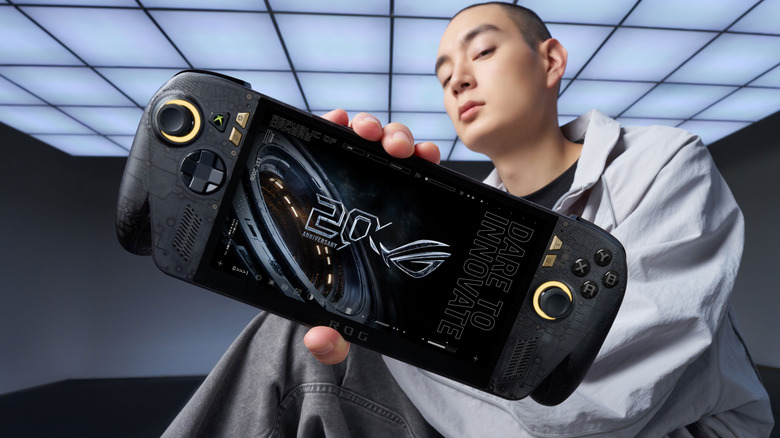
Now I'll be the first to admit that an 11.6-inch display feels oversized on a handheld that, in theory, is meant to be somewhat portable. That said, the beauty of the Legion Go Fold's screen is that it can be bent in half to create a more appropriately-sized 7.7-inch panel. In this configuration, the system feels a lot less cumbersome while also sporting a more traditional aspect ratio. Then, at a moment's notice, you can extend the display to provide extra room when you need it. 

How silly does this look when its flexible display is fully extended in portrait mode?
Sam Rutherford for Engadget

However, the thing I like most about the Legion Go Fold is that its controllers are detachable and that the tablet has several different mounting points. This means if you have the space, you can remove the controllers, rotate the display into landscape mode and then reattach them to get an immersive widescreen experience. Alternatively, you can connect the gamepads together using one of Lenovo's accessories (which is similar to Nintendo's Joy-Con Grip) and then prop the system up using the Go Fold's folio cover, which doubles as a kickstand. 

But wait, there's more: The handheld also features a strip of pogo pins for connecting a wireless keyboard, effectively transforming the whole setup into a miniature gaming laptop. Depending on how you're counting, that's at least four different modes you're getting from the Legion Fold, which is really quite impressive and speaks to the versatility of Lenovo's design.

Another feature I really like is the small 1-inch OLED display on the right gamepad. It supports a handful of widgets that can display the time, performance settings and more. It also doubles as a small touchpad, which can be really handy when playing PC titles that were originally developed for mouse and keyboard. And just like on the Legion Go and Legion Go 2, the Fold's right gamepad has a small scroll wheel and a hidden sensor, so it can also turn into a vertical mouse for playing FPS titles. 

At this point, it's important to mention that Lenovo doesn't have concrete plans to put this thing into production, so its specs don't really matter. That said, the Legion Go Fold I tried featured an Intel Core Ultra 7 258V chip with 32GB of RAM and a 48WHr battery, which is more than respectable. Though if this thing does become an actual retail device, I would like to see a power cell with a bit more capacity. 

I really love how the Legion Go Fold can turn into a miniature laptop just by moving some of its accessories around.
Sam Rutherford for Engadget

But as a concept gadget, I think the Legion Go Fold is a great showcase of how new technology (in this case, a flexible display) can bring new capabilities and greater flexibility to existing categories. And who knows, if a lot of people like the idea, it might encourage Lenovo to refine it and put it on sale for real. I would just be a bit worried about pricing, because all these components won't come cheap. 

This article originally appeared on Engadget at https://www.engadget.com/gaming/pc/the-lenovo-legion-go-fold-gaming-handheld-concept-looks-awkward-but-its-versatility-is-endless-230000816.html?src=rss

The Lenovo Modular AI PC concept is a remixed dual-screen laptop with hot swappable ports

The potential of modular laptops has never fully translated to the real world. While companies like Framework have made major strides in recent years, there's still quite a bit of room for improvement. At MWC, Lenovo is looking to address that with its Modular AI PC concept. It features not one but two displays and a detachable keyboard to create something that strains the definition of a laptop, thanks to an innovative and very adaptable design.

Compared to Framework's gadgets, which primarily use modularity to make upgrading the system and extending its lifespan easier, Lenovo's concept is based around a 14-inch chassis with hot swappable components. This allows you to move its keyboard and secondary display around at will, so the system can better adjust to its environment or workload. By default, its bonus screen is mounted on its lid, allowing you to do easy face-to-face sharing with someone sitting opposite you. However, without even needing to turn the system off, you can yank away the notebook's keyboard and put the display in its place to provide additional real estate. 

The Lenovo Modular AI PC concept's second screen can be attached to its lid or moved off to the side like a traditional dual monitor setup.
Sam Rutherford for Engadget

Or if you prefer a more traditional dual-screen setup, you can move it off to the side, prop it up via a built-in kickstand and connect to the laptop over USB-C. You even get the flexibility to arrange the display in vertical or landscape orientation, which is nice if you're doing stuff like coding or writing in a word doc (I feel targeted, but in a good way). And because the keyboard can connect to the notebook using pogo pins or Bluetooth, you have the freedom to position it practically anywhere you want. 

Meanwhile, Lenovo borrowed one aspect of Framework's modularity by including the ability to swap ports on the fly. During my demo, the company showed off modules featuring USB-C, USB-A and HDMI connectors, though I was told there are a ton of additional possibilities for those who might need things like a proper Ethernet jack or additional ports for audio. 

The Lenovo Modular AI PC concept's keyboard and be completely removed at a moment's notice and positioned anywhere you like thanks to its Bluetooth connectivity.
Sam Rutherford for Engadget

But what impressed me the most was that despite being a concept device, the whole setup felt quite polished. That almost suggests that this thing might be closer to becoming an actual retail product than some of the company's other demo gadgets. Build quality felt really sturdy and I had no issues changing out ports or moving the secondary display around without needing to troubleshoot or reboot the system. Everything just kind of worked. And while Lenovo isn't sharing details about what processor it's running or how much memory it has, its performance felt snappy too. 

My only question is that I'm not quite sure where AI fits into all of this. I was able to break down and reconfigure the system without any help from machine learning or a digital assistant. That said, I'm not complaining, because even with a lot of moving parts, its modular design is very approachable and easy to use. 

Ports on the Lenovo Modular AI PC concept can be hot swapped between to add USB-C, USB-A and HDMI connectors as needed.
Sam Rutherford for Engadget

Unfortunately, Lenovo isn't planning on turning this concept into a true retail device. But even so, I hope the company will at least consider bringing some of the modular laptop's features like its hot swappable ports to future products.


This article originally appeared on Engadget at https://www.engadget.com/computing/laptops/the-lenovo-modular-ai-pc-concept-is-a-remixed-dual-screen-laptop-with-hot-swappable-ports-230000158.html?src=rss

Samsung Galaxy S26 Ultra hands-on: Meaningful tweaks plus a slick new Privacy Display

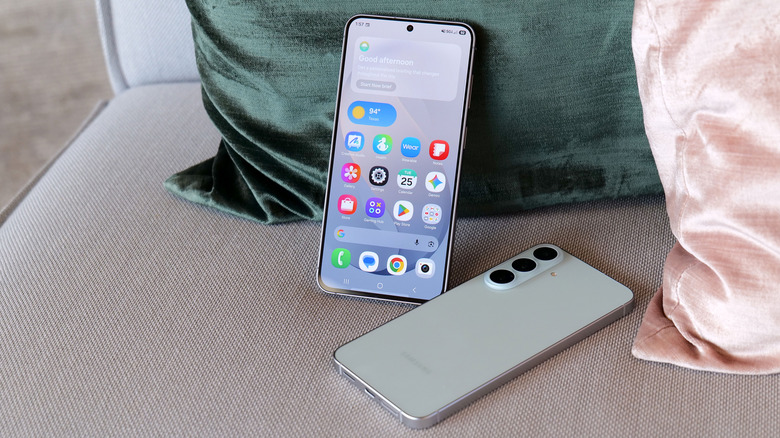
Last year, it felt like Samsung relied a bit too much on AI when trying to convince people to upgrade to its flagship phone. And while there’s no shortage of features that utilize machine learning on the new Galaxy S26 Ultra, it feels like Samsung has done a much better job of filling out the rest of the phone’s kit with fresh hardware, faster charging and a more cohesive design. It’s still rather expensive, but its price has stayed flat year-over-year at $1,300, which when combined with everything else makes it a much more attractive package than its predecessor. 

Samsung’s Ultra phones are always going to be somewhat boxy and that’s OK. However, for the Galaxy S26 Ultra, the company’s top-of-the-line handset is getting a slightly curvier appearance thanks to rounder corners. There’s also a very (and I do mean very) small reduction in size that technically makes this version the thinnest and lightest Ultra to date (214 grams and 7.9mm thick). That said, considering the previous model weighed 218 grams and measured 8.2mm, it’s incredibly hard to feel a difference even when you know what you’re looking for. 

The two biggest changes to the S26 Ultra's exterior design are more rounded corners and an aluminum chassis instead of titanium like we got on the S25U.
Sam Rutherford for Engadget

In reality, the biggest exterior change is that Samsung has ditched the titanium frame from last year’s phone in favor of an Armor Aluminum chassis with Corning Gorilla Armor 2 panels in front and back. Samsung says this new design is meant to make the Ultra fit in better with its less expensive siblings while also making it easier to do things like color match the phone’s body to the rest of the device. Also, for anyone who keeps track of Samsung’s palette, the hero color for the S26 Ultra is a rather fetching shade of purple called cobalt violet, with sky blue, white and black available as well (plus silver shadow and pink gold being Samsung’s online exclusive hues).

If you look closely at the top of the phone, you can see where a notification has been blacked out via the S26 Ultra's Privacy Display.
If you look closely at the top of the phone, you can see where a notification has been blacked out by the S26 Ultra's Privacy Display.
Sam Rutherford for Engadget

However, my favorite new thing on the S26 Ultra is its Privacy Display. When activated, it functions a lot like HP’s Sure View tech, which prevents people from peeking at your screen from acute angles. It works both when viewed from the side or up and down and has a surprising amount of customization. Not only can you set it to turn on automatically when the phone asks you for a password or PIN, it can also be triggered by specific apps or whenever you receive a notification. But perhaps the most impressive thing is that there’s almost no impact on image quality. When Privacy Display is active, there is a minor reduction in overall brightness, but aside from that, it’s really hard to tell when it’s on (at least from the front). Furthermore, the S26 Ultra’s 6.9-inch AMOLED screen has the same underlying specs as last year, including its 120Hz variable refresh rate and 2,600 nit peak brightness, so there are pretty much no trade-offs for the added functionality. 

The S26 Ultra still comes with an included S-Pen and a built-in storage slot, but it still doesn't have Bluetooth connectivity like on some of Samsung's older models.
Sam Rutherford for Engadget

Inside, the S26 Ultra features a Qualcomm Snapdragon 8 Elite Gen 5 for Galaxy chip along with either 12GB or 16GB of RAM and up to 1TB of storage. Compared to its predecessor, Samsung claims the NPU’s performance has made the biggest leap with it being 39 percent more powerful year-over-year with respectable increases for its CPU (19 percent faster) and GPU (24 percent faster) as well.

As for charging, both wired and wireless speeds have gotten a big boost with the former now rated at up to 60 watts (up from 45 watts) or 25 watts (up from 15) for the latter when using compatible Qi2 pads. Samsung says buyers will even get a three amp cable in the box, so all you need to do to get those peak wired speeds is to hook it up to the right adapter.

A small quirk with the S26 Ultra's S-Pen is that because the end of the stylus is curved to match the corner of the phone, if you put it in "wrong," it'll stick out a bit.
Sam Rutherford for Engadget

Unfortunately, we’re still not getting a magnetic ring inside the phone, which means if you want to use the S26 Ultra with magnetic accessories, you’ll need to pair the phone with a case that supports that functionality. This is super frustrating because Samsung says this decision was made in part to keep the handset as thin as possible, but when you consider the difference between the S26 Ultra and the S25 Ultra is 0.3mm, that choice feels rather misguided. 

One of my biggest complaints about last year’s S25 Ultra is that the only new hardware was an updated 50MP sensor for its ultra-wide lens, which is the camera I (and probably most people) use the least. Thankfully, it seems Samsung took note of that because while the resolution of its 200MP main cam, 10MP 3x telephoto and 50MP 5X telephoto are the same as before, the S26 Ultra’s main and 5x zoom lenses now have significantly wider apertures (from f/1.7 to f/1.4 and f/3.4 to f/2.9, respectively). This results in as much as 47 percent more light reaching the phone’s primary sensor (or 37 percent for the 5x telephoto), which should result in some major gains in photo quality and low light sensitivity. That said, I wasn’t able to properly test this during my hands-on session, so I’m going to reserve final judgement for a proper review. 

The S26 Ultra's 200MP main and 50MP 5x zoon lenses feature significantly larger apertures, which should deliver much improved image quality in low light conditions.
Sam Rutherford for Engadget

Meanwhile, for video capture, Samsung is adding support for the APV codec at up to 8K/30 fps to the S26 Ultra along with a new horizon lock feature that will keep your footage level no matter how much you rotate the phone. Now I will admit that the latter didn’t impress me much when I first heard about it, but after testing it out and spinning the phone a full 360-degrees while recording a clip, I was shocked when the resulting video showed no hint of being whirled around. Samsung also says the handset’s improved Nightography processing uses AI to recognize noise patterns in low light to improve image quality. But similar to the wider apertures bringing in more light, I’ll believe it when I see it. 

Finally, there’s a new AI-powered Photo Assist tool that lets you edit or adjust images using natural language prompts. From what I experienced, it’s effective and works as you’d expect. However, with the proliferation of services and devices offering similar functionality over the past year, this feature feels more like Samsung’s attempt to keep up with the Joneses. 

When it comes to AI, the S26 Ultra is getting the same batch of new and improved features as the rest of the S26 family. So if you’re big into machine learning, there’s no need to pay extra for this model. Furthermore, many of the updates for 2026 are tweaks or refinements of existing things like the Gallery app, which now uses AI to automatically sort screenshots into eight different categories so they’re easier to find later. There’s also what Samsung is calling Now Nudge, which functions a lot like Google’s Magic Cue. It’s built into the Samsung keyboard and it can do things like suggest relevant photos based on your conversations. 

One of the S26's most powerful new AI features is Automated  App Actions, which allows the phone to do things like book a car ride via Uber while you continue to use other apps in the foreground.
One of the S26's most powerful new AI features is Automated App Actions, which allows the phone to do things like book a car ride via Uber while you continue to use other apps in the foreground.
Sam Rutherford for Engadget

To me, the most impressive of the bunch is the S26’s Automated App Actions, which allow you to ask the phone to do slightly more complicated tasks like ordering an Uber to a specific location. After your initial prompt, Gemini can even complete the task in the background while you go back to doomscrolling or watching videos. When it’s done, you’ll get a notification so you can manually review and confirm the command. Unfortunately, Uber will be the only supported app at launch, though Samsung says it’s working on expanding the feature to others like Instacart. 

The Galaxy S26 Ultra will be available in four main colors: sky blue, black, cobalt violet and white, along with two more online exclusive hues in silver shadow and pink gold.
Sam Rutherford for Engadget

Look, there’s no getting around it: $1,300 is a lot to spend on a phone. That said, considering the RAM shortage that’s going on right now, keeping the S26 Ultra’s price the same as last year’s phone feels like a small blessing. And when you get that on a handset with a more refined design, a beefier chip, a fancy Privacy Display, faster charging and an updated generation of AI-powered tools, Samsung’s latest flagship feels like a much better deal than its predecessor. Really, the only thing that hasn’t been improved is the Ultra’s S-Pen, which as time goes on, is starting to feel more and more like a consolation prize for people who are still nostalgic about the Note line than a true tentpole feature. 

Now this doesn’t mean that people with an S25 Ultra or even an S24 Ultra should run out and upgrade. But for anyone with something older than that who’s in the market for a true do-everything phone, the S26 Ultra has quite a bit to offer. 

Pre-orders for the Galaxy S26 Ultra are live now, with official sales slated for March 11. 


This article originally appeared on Engadget at https://www.engadget.com/mobile/smartphones/samsung-galaxy-s26-ultra-hands-on-meaningful-tweaks-plus-a-slick-new-privacy-display-180000057.html?src=rss

Seattle Ultrasonics C-200 review: This is the future of kitchen knives

There’s a type of knife tech often seen in science fiction that revolves around vibrating a blade to increase its sharpness. We’ve seen examples of this in franchises like Star Wars (vibroblades), Evangelion (the prog knife), Dune (pulse-swords) and the Marvel universe (vibranium), but what might surprise you is that the underlying science is sound. By vibrating a cutting tool at high frequencies, not only do you reduce friction, you essentially turn the blade into a saw, as tiny oscillations enhance the inherent sharpness of a blade. 

However, up until recently, this tech largely only existed in fiction or for large companies that have the money to utilize the tech on an industrial scale. But that's changing in a big way for home cooks this year thanks to Seattle Ultrasonics, which is releasing the world's first ultrasonic chef's knife: the C-200. After chopping, smashing and cooking with it for about a month, I'm convinced that this is the future of kitchen knives.

From afar, the C-200 looks a lot like a regular 8-inch chef's knife, but with a slightly more contemporary design. It features a three-layer san mai blade made from Japanese AUS-10 steel with a 13-degree edge angle per side (26 degrees total). However, upon closer inspection, you'll notice there are some features that seem a bit out of place on a premium knife. 

The first is that the C-200 doesn't have a full tang, which is the back end of a blade that ideally extends into the handle to provide added strength and durability. This is usually a major no-no, particularly on a $400 knife. However, when you consider that Seattle Ultrasonics needed somewhere to put its vibration tech, there really isn't any room for it other than inside the knife's grip. 

You won't be able to feel, but pressing this button allows the C-200's blade to vibrate 30,000 times per second.
You won't be able to feel it, but pressing this button allows the C-200's blade to vibrate 30,000 times per second.
Sam Rutherford for Engadget

The knife's second quirk is that the back of the plastic handle features small indicator lights on either side, which is obviously a bit weird. Furthermore, the entire gray section can be removed to reveal a small 1,100mAh battery with an onboard USB-C port. Frankly, the presence of a battery in a knife is just kind of funky. But hey, the power to vibrate the knife has to come from somewhere because it definitely isn't being generated by your hands. And while Seattle Ultrasonics doesn't include a charging adapter or cable in the box, I don't mind because the company wisely took cues from the larger gadget industry and went with a power spec that's already widely in use. Honestly, I wish more kitchen tech makers would do the same. 

However, the knife's biggest oddity is the big orange button on the bottom of its handle. This is what you use to make the blade vibrate, which it does at 33kHz. It's positioned well so that it's easy to press regardless of whether you do a traditional pinch grip or if you're a bit more casual and prefer to hold the knife only using its handle. In the future, I can see this button becoming a touch-sensitive sensor, but for now, it's simple and effective.

Here's a small selection of knives I own sorted by weight (from top to bottom) compared to the C200: 6-inch Kyocera ceramic knife (97 grams), MAC molybdenum steel chef's knife (110g), Furtif Evercut titanium carbide chef's knife (190g), Seattle Ultrasonics C-200 (328g), Korin carbon steel cleaver (396g).
Sam Rutherford for Engadget

The main downside to the C-200's design is that at 328 grams (around 0.75 pounds) it's heavier and bulkier than a typical knife. When compared to other knives I own, which are made from a wide variety of materials including, ceramic, molybdenum steel, carbon steel and even titanium carbide, it weighs more than everything else aside from my big Chinese cleaver (396 grams). And while it fits nicely in my hand, my wife said it takes a bit more effort for her to wield. It's not too much to the point where you don't want to use it. But for quick tasks, sometimes I found myself subconsciously reaching for lighter options like my 6-inch ceramic knife, which weighs just 97 grams. 

From a user standpoint, putting the C-200 to work couldn't be simpler. Just press the button and let the knife do its thing. The big difference from how knives like this work in sci-fi is that there's no audible hum or detectable vibration when it's on. It's practically silent (well, most of the time, but more on that later), so you have to trust that it's on or check the indicator light on the handle. That said, if you still don't believe anything is happening, you can run the edge of the blade under water or scrape it over some cut citrus, at which point the blade's vibration will atomize nearby liquid into a fine mist. It's a cool party trick that also doubles as a way to amp up a cocktail by adding a faint essence of lemon, lime or anything else you can think of.

Pushing the C-200's button is super easy, regardless of what kind of knife grip you prefer.
Sam Rutherford for Engadget

Inside, the knife relies on PZT-8 piezoelectric ceramic crystals to generate up to 30,000 vibrations per second, which propagate down the blade and make the knife function as if it's sharper than it actually is. This all sounds rather fantastic, so how does it function in the real world?

To really put the C-200 through its paces, I cooked over a dozen meals that involved neatly slicing or preparing a wide variety of foods — including Hasselback potatoes, flank steak, pork belly, chives, sushi-grade tuna and all sorts of fruit. 

After prepping four pounds of pork belly with various knives, the C-200 really showed off how much of a difference its vibration tech makes.
Sam Rutherford for Engadget

In short, the C-200's effectiveness depends a lot on what you're chopping. For soft things like strawberries or a piece of cake, I didn't notice much of a difference. To make things even more difficult, the knife arrived out of the box with an incredibly fine edge — the kind that makes shearing through a sheet of paper child's play. So even though Seattle Ultrasonics says its knife can reduce cutting effort by up to 50 percent, there's not much gain to be had when slicing foods that could just as easily be cut by a butter knife. 

However, as I used it more, I found that the C-200 excels at cutting through delicate items like tomatoes, scallions and fish, where using a dull knife often results in bruising the food as you chop. This was most evident when I made poke at home, where Seattle Ultrasonic's knife delivered cleaner, more precise cuts than anything else I own. 

For me, the C-200's $399 price tag is almost worth it just so I have an an easier time making my one of my all-time favorite dishes (lu rou fan).
Sam Rutherford for Engadget

When I whipped up some pico de gallo, I distinctly noticed how neatly the C-200 sliced through the skin of a tomato, instead of initially putting a crease in it before cleanly passing through its interior — which often happens when using dull knives. An additional benefit is that because of the vibrations, I found some foods like garlic didn't stick to the side of the blade as much. This made it easier to keep track of how much I chopped while simultaneously reducing the mess from things falling willy-nilly during prep. But perhaps the most obvious demonstration of the knife's prowess was when I diced an onion. When using my other knives or the C-200 without powering it on, I could feel when I tried to cut through thicker, more sturdy layers. But then, at the touch of a button, I was able to slice down with practically no resistance. It's almost shocking because it feels like magic. 

The C-200 truly excels at cutting denser foods like flank steak. Sadly mine ended up closer to medium than medium rare, but that's not the knife's fault.
Sam Rutherford for Engadget

The C-200 even has the ability to reduce the importance of certain knife techniques. Anyone who's seen all the posts on r/kitchenconfidential about cutting chives will already know what I'm talking about. As J Kenji Lopez-Alt neatly demonstrated, the ideal way to get crisp, clean slices is to do a subtle forward or back cut instead of simply chopping straight down. But with Seattle Ultrasonics' knife, I've found that it's so sharp you can get away with almost any motion and still get good results. And if you do it the right way, things are even better. 

Other types of food that makes the C-200 really shine are denser ingredients like meat and potatoes, where you can really feel the added cutting power. Previously, when I had to break down thick cuts of protein, I sometimes wished I owned a serrated electric knife. You know, the kind you break out once a year on Thanksgiving and then it sits and gathers dust for the other 364 days. But the C-200 made that desire a thing of that past, as it quickly and easily worked through flank steak while once again producing neat, uniform slices. 

Sushi-grade tuna is another food that really shows off how the C-200's increased sharpness is better at preserving the delicate texture of the fish.
Sam Rutherford for Engadget

My favorite application of the C-200 was when I was doing prep for Taiwanese braised pork (aka 滷肉飯). Despite this being one of my most beloved dishes that I taught myself how to cook because I couldn't easily find it from local restaurants, I don't make it very often because it's a lot of work to cut multiple pounds of pork belly into small lardon-shaped pieces. Here, the knife's vibrations made it so much easier to cut through all those layers of meat, fat and skin. If there's any situation where the C-200 makes it 50 percent easier to slice through something, it's this. 

It might be hard to tell, but I was able to cut chives a little finer and more neatly with the C-200 (left) than with my other knives.
Sam Rutherford for Engadget

During my testing, two small issues cropped up. While it was quite rare, the knife would sometimes emit a faint high-pitched whine. When I asked Seattle Ultrasonic's founder Scott Heimendinger about this behavior, he was rather frank, saying that this can occur when water or moisture accumulates in just the right spots on the blade. Furthermore, he said this only happens on a small number of V1 models, which the company is working to fix in the future. Thankfully, I don't mind, but if it bothers you, making the noise go away is as easy as wiping down the knife down with a cloth or paper towel. 

The C-200s battery can be easily removed for cleaning and charging.
Sam Rutherford for Engadget

The other complication came while I was working through the multiple pounds of pork belly I mentioned earlier. After 10 to 15 minutes of continuous use, the knife beeped and its indicator light turned red. Turns out the knife had overheated, which was something I had not even considered. This led to higher-than-normal temperatures inside the knife's sealed electronics causing it to shut off. But after just 30 seconds, it returned to form. During later uses, I learned that simply taking my finger off the button between tasks, which happens naturally as you prep anyway, was more than enough to stop that situation from happening ever again.

On the flipside, I was happy to discover that despite lacking a full tang, the C-200 can handle fairly rough tasks, including laying the knife on its side to smash garlic or jamming it into an avocado to remove its pit. That said, I would really recommend against doing the latter, because between its inherent sharpness and its vibration tech, this is the first knife I've used that can slice cleanly through an entire avocado with almost no extra effort.

The Seattle Ultrasonics C-200 8-inch chef's knife features an IP65 rating for the whole device, though the front half is actually a bit more resistant thanks to an IP67 rating for its button and bolster.
Sam Rutherford for Engadget

The last big concern about a knife with built-in electronics is how it handles clean-up. Thankfully, the C-200 features an IP65 rating for dust and water resistance. That means it can withstand rinsing and splashes without issue. And it's actually even tougher than that, because the front of the knife, including its bolster and button, are rated IP67. This means it can take full submersions in water if need be. However, just because you can, doesn't mean you should. Good kitchen protocol says you don't throw knives you care about in the sink and forget them, just like how you wouldn't put one in the dishwasher either.  

But perhaps the greatest advantage of this tech is that it allows you to go longer between needing to get your knives sharpened, which if you're like most home cooks, is probably never. To be clear, I haven't tested this and in some respects I wish I had been able to test out a dull version of the C-200. That said, science dictates that slice for slice, an ultrasonic knife will simply cut better than an equivalent blade without the extra tech. So if you believe in the adage that a dull knife is more dangerous than a sharp one because you need to apply more force to get the same results, this is another bonus for both safety and convenience.

Seattle Ultrasonics' wireless charging tile makes it incredibly easy to forget that the C-200 needs to be topped up between uses.
Sam Rutherford for Engadget

I fully admit the need to keep a knife charged up is a major annoyance and something I or anyone else probably doesn't want to do. Thankfully, Seattle Ultrasonics thought of that by including support for wireless charging via the C-200's magnetic tile and it's dead simple to use. Just toss it on the charger when you're not using and it will take care of itself, so you never have to worry about how much of its normal 20-minute runtime it may or may not have left. There are also holes around back so you can easily mount the charger on a wall or shelf. In short, the added convenience the charging tile brings is so valuable that I don't really consider it an optional accessory. If you're getting the C-200, you need to buy this too, which sadly means you're looking at an all-in price of $500 for the bundle instead of just $400 for the knife by itself. 

As much as I love old-school knives, they'll simply never be as sharp an equivalent blade with this newfound tech.
Sam Rutherford for Engadget

After using the C-200, I don't think people need to rush out and throw all their old-school knives in the trash. The beauty of an ultrasonic blade like this is that it can handle everything your old cutlery is meant for, but with the touch of a button, it delivers sharpness unlike anything you've experienced before. And while it has some quirks, they're nothing like the kind you typically encounter on first-gen gadgets. Its biggest drawback is that its magnetic charging tile feels like an essential accessory, but it adds extra cost on top of a product that already has a deservedly premium price tag. 

Even though I'm sure knife makers will continue tweaking blade shapes and alloy mixes from now until the end of time, the addition of ultrasonic vibrations to a chef's knife unlocks a completely new tier of performance. That's because this technology is additive. All it does is enhance what a blade already does best. And when you look at related gadgets in the maker space, I don't think it's a coincidence that there's a similar revolution that resulted in Adam Savage of Mythbusters fame naming a sonic cutter as one of his favorite things of 2025. When viewed that way, it makes me even more confident that the C-200 is the flagbearer for a new breed of kitchen knives. 


This article originally appeared on Engadget at https://www.engadget.com/home/kitchen-tech/seattle-ultrasonics-c-200-review-this-is-the-future-of-kitchen-knives-140000051.html?src=rss

Here are my favorite things from Toy Fair 2026

Toy Fair 2026 just wrapped earlier this week and while I would have liked to spend even more time there, I have my own kids (and all their toys and trinkets) to look after. That said, there were a ton of cool new products on display at the Javits Center in New York City that set the stage for the rest of the year, so here's a quick look at some of the most interesting releases from the largest toy show in the Western Hemisphere. 

To celebrate the 40th anniversary of Transformers: The Movie, Hasbro is launching an apology tour to make up for traumatizing theatergoers with the death of the most beloved Autobot back in 1986. To kick things off, Hasbro is releasing a handful of new figures alongside re-releases for some popular bots including Astrotrain, Skywarp, Snarl and Shockwave. I want to give a special shout-out to the model for Kranix, which looks incredibly accurate, as if he just leapt off the movie screen. And even though his duck-billed spaceship alt-mode might look a bit awkward, I wouldn't have it any other way. 

The crown jewel of the line might be a near-life-size version of The Matrix of Leadership, which measures more than 15 inches wide and even plays Stan Bush's iconic song "The Touch" with the push of a button. Unfortunately, the appeal of the Matrix is so powerful that it's already sold out, including at third-party retailers like Big Bad Toy Store, which thankfully is still taking pre-orders for the rest of the lineup after the initial stock from Hasbro dried up.

A collection of some of the new F1 Hot Wheels cars for 2026.
Sam Rutherford for Engadget

Hot Wheels has big plans for 2026 including a new line of Pantone-colored cars, Brick Shop models like the Elite Series Aston Martin (which comes with its own 1:64 scale car) and a Monster Truck Mutant Chaos set with actual slime. However, I'd argue the company's new F1 offerings are the cream of the crop. Not only are there a bunch of incredibly detailed 1:64 scale racecars with metal bodies, real rubber tires and accurate livery for all the big teams, there's also a new Downhill Circuit Race course that comes with three official vehicles (Mercedes, Haas and Ferrari) featuring multiple levels and the ability to overtake or crash into other cars. If you're like a lot of Americans who have recently fallen down the F1 rabbit hole due to Netflix's Drive to Survive, these new officially licensed miniatures are sure to hit the spot. 

The first five-pack set of cars is available now, with more arriving later this spring before the Downhill Circuit Race course drives by sometime this fall. 

Darth Vader's TIE fighter is an all-in-one set, which means it comes included with one of Lego's Smart Bricks, which isn't true for every kit.
Lego

We've been eagerly awaiting the first batch of playsets featuring Lego's nifty Smart Brick after it debuted at CES. But now that the company has detailed eight new sets featuring its latest innovation, we're even more intrigued. For me, the three standout kits are the Millennium Falcon, Luke's Red Five X-Wing and Darth Vader's TIE fighter because acting out the Death Star trench run complete with reactive lights and sounds will never get old. I also have a soft spot for the Ewok minifigs that come with the AT-ST set. Alternatively, the Mos Eisley Cantina kit seems like a great way to highlight the smart brick's ability to play music or kick out some rowdy droids. The one thing to look out for, though, is the tag on the set that says whether it's Smart Play compatible or if it's an all-in-one set, because the former will need Smart Bricks from other kits to deliver Lego's newfound interactivity. 

Pre-orders for these are live now, with sets slated to ship on March 1. 

The HUNTR/X Battle Rumi Deluxe Fashion Doll (right) might be my favorite of the bunch.
Sam Rutherford for Engadget

Rumi, Mira and Zoey may have been the biggest breakout stars of 2025 and Mattel is looking to keep that momentum going with a ton of new toys and figures for everyone's favorite demon hunters. There are three new singing dolls that can belt out the trio's hit "Golden" at the touch of a button and a deluxe figure of Rumi complete with her Four Tiger Sword. There are also a ton of other dolls and miniatures showcasing HUNTR/X, the Saja Boys and more. The one downside is that these products aren't coming out until the fall, so you'll have to tide yourself over with other K-pop-themed products for now. 

If Rosalina isn't careful, Yoshi will become the biggest draw of the new Mario movie.
Spin Masters

Yoshi seems poised to steal the spotlight from Rosalina in the upcoming Super Mario Galaxy Movie and this release from Spin Masters is only reinforcing the lovable green dino's aura. From inside his shell, Yoshi can burst out with his signature yell. After that, you can pat his nose to make his eyes light up or get him to rock when he's really happy. But if you want one, you're going to have to be vigilant. Pre-orders are already sold out, so you'll need to keep a close eye on retailers like Walmart when he officially goes on sale on February 20. 

Not only do the SolarFlowers look great, they're educational too.
Thames & Kosmos

Technically, these went on sale last month, but Thames & Kosmos' SolarFlowers caught my eye again at Toy Fair due to their combination of art and science. Available in four different styles, each kit features a model that you can build yourself or with your kids (recommended age 8+) that turns into a lasting showpiece. After putting the kinetic sculpture together, you can connect the included solar panel to bring the whole kit to life (no batteries required) and make the flowers spin for perpetual entertainment. 

Honorable mentions

Some upcoming figures from Mattel's line of Masters of the Universe figures.
Sam Rutherford for Engadget

As someone who grew up during the 80s and 90s, I'm trying to be optimistic about He-Man's return to the big screen later this summer and Mattel's new line of figures is certainly helping. To help prime people for the movie, there's a big range of upcoming toys highlighting He-Man, Skeletor, Battle Cat and more, all of which I would have absolutely loved as a kid. Those will be available later this spring.

Just look how cute these are.
Sam Rutherford for Engadget

It's hard to gauge the excitement of toys aimed at one-year-olds when they can't read or get into Toy Fair. But as the parent of a toddler, I adore the partnership between Fisher-Price and Nintendo that has resulted in a line of Mario-themed Little People. All the big names are here, including Peach, Luigi and Bowser and there's even a couple of super cute playsets to go with them. But perhaps the best part is that a six-pack of figures and Bower's Airship costs under $25, which means your kid could be in for hours of fun without you spending a ton of money.

This article originally appeared on Engadget at https://www.engadget.com/entertainment/here-are-my-favorite-things-from-toy-fair-2026-183356720.html?src=rss

Pixel 10a hands-on: Google locks down the midrange phone game

Google's A-series phones have offered some of the best value among midrange handsets for years, and after checking out the new Pixel 10a, I don't see that trend stopping anytime soon.

Let's start with the specs. Starting at just $499, you get a vivid 6.3-inch OLED screen with a 120Hz refresh rate and 3,000 nits of peak brightness, 8GB of RAM and either 128GB or 256GB of onboard storage. The phone also features a durable aluminum frame along with a stronger Corning Gorilla Glass 7i panel in front and a composite plastic back with a lovely matte finish. As a nod towards sustainability, Google says the P10a's chassis is made from 100 percent recycled material, while the rear panel comes in at 81 percent. And just like its predecessor, you still get an IP68 rating for dust and water resistance and the same battery capacity (5,100mAh) — except now it charges even faster, both wired (30 watts, up from 23) and wirelessly (10 watts, up from 5).

While lavender is the new hero color for the Pixel 10a, berry is the hue I'd pick.
Sam Rutherford for Engadget

The one place where the Pixel 10a might come up a touch short is that unlike its more expensive siblings, it features an older Tensor G4 processor instead of the Tensor G5 chip used on the main Pixel 10 line. Google says the decision to go with an older SoC is due to budget constraints. While it might not be the first choice for gamers or power users, I've never really had an issue with the day-to-day performance of Google's recent homegrown silicon.

However, even with a one-year-old chip, Google found a way to port over three flagship features to the Pixel A series for the first time. Camera Coach uses AI to help you compose and come up with more interesting shots. Meanwhile, Auto Best Take is designed to ensure that everyone in a group shot ends up with their finest expression. Finally, Satellite SOS allows you to call for help during emergencies, even when you don't have proper cell service. 

Satellite SOS support is one of three new features coming to the Google's A-series phones for the first time.
Sam Rutherford for Engadget

As for its cameras, the P10a looks to be using the same sensors as before, including a 48MP main camera, a 13MP ultra-wide and a 13MP selfie shooter in front. That might be a bummer for some, but considering that the Pixel 9a offered by far the best image quality of any phone in its price bracket, I'm not that bothered. Also, it's quite likely that if Google had opted for new hardware, it may have pushed the phone above $500. 

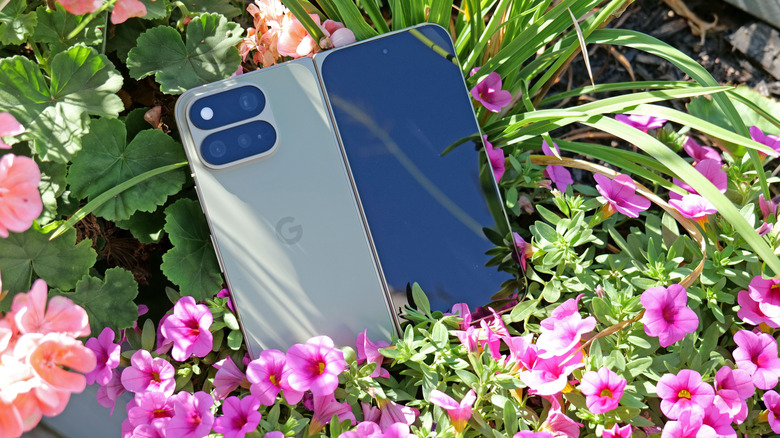
After seeing the positive response to the barely-there camera bump on its predecessor, Google leaned in and made the Pixel 10a’s rear camera module completely flat, and it’s my favorite thing about the phone. There's no hump or protrusions to speak of, and when combined with the rest of the phone's design, it results in a really sleek, minimalist look. Plus, after almost a decade of big and bulky camera warts on the back of phones, it's just nice seeing the Pixel 10a go the opposite direction. 

I really appreciate how Google double downed on feedback regarding the Pixel 9a's tiny camera bump (left) by making the Pixel 10a's camera (right) completely flat.
Sam Rutherford for Engadget

On the flipside, my biggest complaint about the P10a is that Google didn't include Pixelsnap support (aka magnetic Qi2 compatibility). It's another feature that got cut due to cost and it's a real bummer because after introducing it on last year's main Pixel 10 line, I was hoping that it would become a standard inclusion on all Google phones going forward. Thankfully, when I asked about the lack of Pixelsnap support, Google representatives were able to confirm that there will be third-party accessory makers such as Casefinite, Dbrand and Spigen that will offer cases with built-in magnetic rings, so anyone hoping to attach magnetic peripherals will still have an avenue to do so. 

The Pixel 10a's charging speeds have been improved to 30 watts for wired and 10 watts wirelessly.
Sam Rutherford for Engadget

Regardless, for Android phone owners who are in the market for a simple, no-nonsense upgrade that covers all the basics without breaking the bank, the Pixel 10a is looking like another top contender. 

The Pixel 10a is available for pre-order today in lavender, berry, fog and obsidian with official sales slated for March 5. 


This article originally appeared on Engadget at https://www.engadget.com/mobile/smartphones/pixel-10a-hands-on-google-locks-down-the-midrange-phone-game-150000513.html?src=rss

Pokemon Pokopia is so damn cozy

Pokémon Pokopia can be described as a pocket monster-themed take on Animal Crossing with a hint of Stardew Valley thrown in for good measure. And if you're like me, that alone is probably enough to sell you on the game. However, after getting a chance to play a preview of it for around half an hour, it became immediately clear that the game's coziness levels are off the charts, but it also offers some fun twists on the genre.

Co-developed by The Pokémon Company, GAME FREAK and KOEI TECMO, instead of playing as a generic trainer, you take control of a lonely Ditto who wakes up in a cave only to be greeted by Professor Tangrowth, the last surviving inhabitant of what used to be a bustling town. While the professor might look like an extra-large version of the original pokémon with glasses, its role is to guide you as you rebuild and hopefully repopulate the surrounding area.

One of the best things about Pokopia is actually being able to talk to the other 'mons.
Nintendo

As a Ditto, you naturally have the ability to transform into other Pokémon, though the process is sort of incomplete, meaning you can only learn one skill from the monsters you befriend instead of their entire moveset like in the mainline games. This is where the first twist on the traditional life sim comes in. Instead of crafting them or earning money to buy tools, you can transform into other Pokémon (like Lapras or Dragonite) to use their abilities to traverse obstacles or shape the world around you. For example, turning into a Squirtle lets you shoot a water gun that will revitalize dry patches or thirsty plants, while transforming into a Scyther lets you slice through objects similar to the HM Cut. 

From there, you can use these skills to do things like create clusters of shrubs that will serve as homes for other Pokémon, allowing you to entice fellow creatures to return to the once desolate landscape. Another twist I really appreciate is that after appearing, new monsters will give you quests or just hang out. They will even talk and respond, and I don't mean like the 8-bit cries from other Pokémon games. They speak in full sentences, which is a wonderful departure from previous titles that really gives you the feeling that you're making friends and rebuilding a community instead of just being on a crusade to catch them all. 

The Stardew Valley part of the equation comes into play after you leave the first tutorial area and you come upon an abandoned Pokémon Center that's in dire need of a renovation. You can do things like collect materials and do more quests to clean up the area to eventually turn the building in the heart of the town. Unfortunately, that's where my preview ended, aside from quickly hopping into a multiplayer session where I was able to see a much more developed village, complete with multiple buildings, roads and benches. You know, all the sorts of things you used to furnish and decorate your island with in Animal Crossing. 

This gave me a nice glimpse at just how many things you can build in Pokopia and how easy it is to visit other people's towns. However, it didn't answer some of my bigger questions about the game, like what's the deal with Peakychu and Mosslax, whom we've seen before in previous trailers. Are they just one-off versions of existing ‘mons with unusual typings (i.e. ghost and grass) only for this game, or are they going to be a bigger part of the Pokémon world going forward? Perhaps more importantly, it was hard to tell if there will be any sort of PVE content like The Mines or Skull Cavern in Stardew Valley. I'm really hoping there is because it seems like Ditto's abilities could translate quite seamlessly to spelunking or battling your way through dungeons in search of rare items or building materials. 

I love how derpy Ditto looks when it transforms into other Pokémon.
Nintendo

That said, just being able to build a community of friendly monsters while injecting life back into a forgotten town has good vibes radiating from every corner. So if you need a super cozy game to keep you busy this winter/spring, Pokémon Pokopia is shaping up to be the digital version of a fluffy blanket and a cup of hot chocolate filled to the brim with all of your favorite 'mons. 

Pokémon Pokopia is available for pre-order now, with official sales slated for March 5.

This article originally appeared on Engadget at https://www.engadget.com/gaming/nintendo/pokemon-pokopia-is-so-damn-cozy-140000954.html?src=rss

ASUS Zenbook Duo (2026) review: Two screens really are better than one

It takes time for novel designs to catch on. But even so, I am still wondering why the Zenbook Duo hasn't had a bigger impact on the market after ASUS released its first true dual-screen laptop two years ago. Notebooks like these provide the kind of screen space you'd typically only get from a dual monitor setup, but in a much more compact form factor that you can easily take on the road. It could be that people were wary of an unfamiliar design, shorter battery life or buying a first-gen product — all of which are understandable concerns. However, now that ASUS has given the ZenBook Duo a total redesign for 2026, the company has addressed practically all of those barriers to entry while making it an even more convincing machine for anyone who could use more display space. Which, in my experience, is pretty much everyone.

Editor’s note: The 2026 ASUS Zenbook Duo is expected to be available for pre-order sometime in late February, with general availability slated for March.

For the new model, ASUS didn't mess with the laptop's basic layout too much. Instead, the company polished and tightened everything up, resulting in a system that weighs about the same (3.6 pounds) while reducing its overall size (12.1 x 8.2 x 0.77 to 0.92 inches) by five percent. Critically, you still get a built-in kickstand on the bottom and a detachable keyboard that you move wherever you want. There’s also a decent number of ports, including two USB-C with Thunderbolt 4, one USB-A 3.2 jack, HDMI 2.1 and a combo audio port. That said, I do wish ASUS had found room for an SD card reader of some kind, though given the Zenbook Duo's unique design, I get why that didn't make it. 

The Zenbook Duo's detachable keyboard gives users a ton of flexibility when it comes to utilizing both of the laptop's displays.
Sam Rutherford for Engadget

One of the Zenbook Duo's most important design upgrades is a new "hideaway" hinge that reduces the gap between the laptop's two screens. Not only does this make the laptop easier and more pleasant to use in dual-screen mode, it also allows the entire system to lay flat on a table, which is nice for drawing or sharing your screen with someone sitting opposite you. Unfortunately, while my review unit didn’t come with one, ASUS says its forthcoming Pen 3.0 will come bundled with the Zenbook Duo in the US, so you won’t need to pay extra for it.

Another small but appreciated improvement is the new pogo pins below the lower display, which provides a more secure and reliable way of keeping the laptop's detachable keyboard topped up. In my experience, even after running multiple rundown tests that completely drained the Duo's battery, I never had to charge up the keyboard on its own. It was always smart enough to sip electricity from the main system in the background, though it also has a built-in USB-C port for power just in case. On the flipside, if you're not scared of typing on glass, you can still use the lower screen as a keyboard and touchpad, or as a place to display widgets for news, the weather, performance and more. 

As someone who loves a desktop with dual monitors, I can't overstate how nice it is to have similar built-in functionality on a laptop.
Sam Rutherford for Engadget

The standout feature on the Zenbook Duo continues to be its dual displays, and now for 2026, they look better than ever. Both OLED panels have a 144Hz refresh rate with a 2,880 x 1,800 resolution while also covering 100 percent of the DCI-P3 spectrum. And while its nominal brightness of 500 nits for SDR content is just OK, ASUS makes up for that with peaks of up to 1,000 nits in HDR. And to make both screens even more enjoyable, ASUS managed to shrink the size of their bezels down to just 8.28mm. That's a reduction of 70 percent compared to the previous model, so now there's even less getting in the way of you utilizing these screens to their fullest.

The Zenbook Duo can be configured with a range of new Intel Core Ultra 7 and Core Ultra 9 processors, including the X9 388H chip used on our review unit. For general use and productivity, the laptop is super smooth and responsive, though that shouldn't be a surprise coming from Intel's latest top-of-the-line mobile CPU. However, for those seeking max performance, some of the benchmark numbers aren't quite as impressive as you might expect. That’s because ASUS has limited the Duo's TDP (thermal design power) to 45 watts — which is shy of the chip's 80-watt turbo power limit.

The kickstand in back adds a bit a bulk, but it's better than not having one at all like with Lenovo's Yoga Book.
Sam Rutherford for Engadget

In PCMark 10, the Zenbook Duo only managed a score of 7,153 compared to 9,651 from a Dell XPS 14, despite the latter having a lower-tier Intel Core Ultra X7 358H processor. That said, in other tests like Geekbench 6, the Duo had no trouble staying on top with a multicore score of 17,095 versus 9,651 for the Dell. 

Another pleasant surprise is that because the Duo's chip comes with Intel's upgraded Arc B390 integrated GPU, this thing has plenty of oomph to game on, let alone edit videos or other similar tasks. In Elden Ring at 1,920 x 1,200, the Zenbook maintained a relatively stable framerate between 55 and 60 fps on high settings, which is great considering this thing doesn't have discrete graphics. This means as long as you don't mind fiddling with game options a bit, you should be able to play newer AAA games without too much trouble. 

The left side of the Zenbook Duo features a full-size HDMI connector along with a USB-C port, plus a backup USB-C jack for charging the detachable keyboard.
Sam Rutherford for Engadget

You'd think a laptop with two displays would be super power hungry. However, by increasing the capacity of its cell from 75WHrs to 99WHrs, ASUS has made the Zenbook Duo's endurance (or lack thereof) a complete non-issue. On PCMark 10's Modern Office rundown test, the laptop lasted 18 hours and 33 minutes in single-screen mode. Granted, that's nearly four hours less than what we got from MSI's Prestige 14 Flip AI+, but considering that's the longest-lasting notebook we've ever tested, I'm not bothered. When compared to ASUS' own Zenbook A14 (18:16), things are basically a wash, which I think is a win for the Duo, as the A14 is meant to be an ultralight system with an emphasis on portability and longevity. 

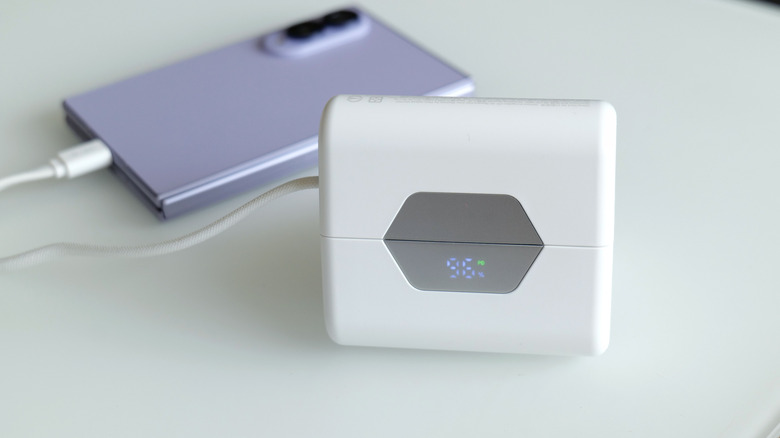
Obviously, battery life takes a hit when you're using both displays. However, when I re-ran our battery test with its two displays turned on, the Duo still impressed with a time of 14:23. This is more than enough to give you the confidence to set this thing up in dual-screen mode even when an outlet isn't close at hand. Thankfully, for times when you do need a power adapter, the charging brick on ASUS' cable is rather compact, so it's not a chore to lug it around. 

The Zenbook Duo's battery life is good enough you won't always need its power brick. Thankfully, when you do, ASUS' 100-watt adapter is relatively compact.
Sam Rutherford for Engadget

I'm a believer that one day people will eventually embrace typing on screens with laptops just like they have for smartphones. However, even if you're not willing to make that jump just yet, the Zenbook Duo still has all of its bases covered. Its detachable keyboard gives you a pleasant experience while freeing up the bottom of the notebook to be a second display. This allows you to have something similar to a traditional dual-monitor desktop but in a chassis that you can easily take on the road without any major compromises. 

The 2026 Zenbook Duo combines a compact design with strong performance, plenty of ports and surprisingly good battery life. Sure, it's a touch heavier than a typical 14-inch laptop, but its two screens more than make up for a little added weight and thickness. That leaves price as the Duo's remaining drawback, and starting at $2,100 (or $2,300 as reviewed), it certainly isn't cheap. 

However, when you consider that a similarly equipped rival like a Dell XPS 14 costs just $50 less for a single screen, that price difference is rather negligible. Alternatively, if you opt for a more affordable ultraportable and then tack on a decent third-party portable monitor, you're still likely looking at a package that costs between $1,500 and $1,800. Plus, that setup is significantly bulkier and more annoying to carry around. So while the Zenbook Duo might be an unconventional pick right now, it has all the tools to deliver unmatched portable productivity and I don’t think it will be too much longer until the masses catch on.

This article originally appeared on Engadget at https://www.engadget.com/computing/laptops/asus-zenbook-duo-2026-review-two-screens-really-are-better-than-one-140000982.html?src=rss

The Switch 2’s Virtual Boy is a tribute to Nintendo’s wackiest console

Even in 2026, VR still feels like tech that isn't quite ready for prime time. When Nintendo released the original Virtual Boy way back in 1995, it was hard for my 10-year-old brain to comprehend a 3D console with a bipod, a facemask and a monochrome red display. Then, when you factor in weak sales that led to the system being discontinued after only a year, you end up with a gadget that felt more like a mythical creature than something you could actually buy. But that's changing later this month when the Virtual Boy returns as an add-on for the Switch 2. After getting an early demo of Nintendo's new accessory, I can confirm that this thing feels just as weird and quirky as it did when it first came out more than 30 years ago. 

The biggest difference on the new model is that it uses the Switch 2's screen as its main display and processor.
Sam Rutherford for Engadget

The most impressive thing about the revamped Virtual Boy is how much it looks and feels like the original. It still features that classic red and black color scheme along with a stand for propping it up. The biggest difference is that instead of having a built-in display, there's a slot where you can slide in a Switch 2 (with its Joy-Con detached). This brings several advantages: Since the Switch 2 has its own battery, there's no need for cords anymore. It also means you don't have to worry about swapping in individual game carts, as software can be downloaded directly from Nintendo's online store. Graphics also look much sharper than I remember, though I admit that could just be me getting old. Finally, instead of reviving the Virtual Boy's archaic gamepad, Nintendo smartly opted to let us use the Switch 2's current lineup of controllers. The end result is a design that's faithful to the original but doesn't suffer from many of the pitfalls that plagued so many 90s gadgets — like tangled wires, awkward controls and fuzzy displays. 

One thing Nintendo didn't change is Virtual Boy's monochrome red visuals.
Sam Rutherford for Engadget

However, even with a fair bit of modernization, it's hard to prepare your mind for the journey back in time that happens when you actually use it. Unlike every other contemporary VR headset, you still don't strap the new Virtual Boy onto your face. Instead, you have to adjust its bipod so that its facemask is level with your face and then you kind of just lean in to immerse yourself in a world where red is the only color. It's definitely a bit awkward, but it works. Nintendo even included a way to adjust IPD, so visuals look just as crisp (if not moreso) as they did on the original.

That said, the clunkiest thing about the Virtual Boy is its games. While Nintendo updated its exterior and internals, the company didn't really mess with its software — for better and worse. This means you get a relatively unadulterated look at where people thought VR was headed 30 years ago, which becomes immediately evident as soon as you boot into one of the console's first seven games. Galactic Pinball is slow and trying to time when to hit the flippers to prevent the ball from getting past you is an exercise in frustration. Meanwhile, Red Alarm feels like a cheap port of Battlezone, just with a vaguely Arwing-shaped plane instead of a tank. And once again, the pacing on this aerial shooter is glacial. Then there's 3D Tetris, which just kind of hurts your head as you try to drop pieces from a top-down perspective while the entire stage pivots around and never stops moving. The only title that really stands out is Virtual Boy Wario Land, which was and still is the best game on the entire platform. 

There's no getting around it, the Virtual Boy's bipod is just kind of awkward.
Sam Rutherford for Engadget

After playing with the revamped Virtual Boy for just under half an hour, it's just as eccentric and ungainly as the original was three decades ago. But you know what, I wouldn't have it any other way because this thing is just as much of a time capsule as it is a nostalgic revival of a forgotten system. And if you want to experience a hazy concept of what people thought the future was going to be, there still isn't anything like the Virtual Boy. 

The Virtual Boy add-on for the Switch 2 officially goes on sale on February 17 for $100, with the caveat that buyers will need an active Nintendo Switch Online + Expansion pack membership. Also, in addition to the seven games available at launch, Nintendo is planning to add nine more throughout the year including Mario's Tennis and previously unreleased titles such as Zero Racers and D-Hopper.

This article originally appeared on Engadget at https://www.engadget.com/gaming/nintendo/the-switch-2s-virtual-boy-is-a-tribute-to-nintendos-wackiest-console-140000003.html?src=rss

Mario Tennis Fever preview: A racket-smashing blast

New Mario sports games typically only come around once in a generation. So to get a fresh installment of tennis featuring a deep roster of characters this early in the Switch 2's lifecycle is rather exciting. And after getting a chance to play Mario Tennis Fever prior to its official release on February 12, the best entry to the franchise yet might only be a couple of weeks away.

Once again, Mario Tennis Fever relies on the series' familiar mix of topspin, slice and flat (power) shots used in previous games. The big new mechanic for this title is that instead of Zone Shots from Mario Tennis Aces, you can equip each character with a different racket, similar to how you can choose between a range of vehicles in Mario Kart. Every racket features a different special ability that you can charge up by rallying back and forth. When the gauge is full, you can unleash a Fever Shot to potentially devastating results. 

The Fever Shot is just one of the special abilities from the 30 different rackets available in Mario Tennis Fever.
Nintendo

For example, the Fire Racket turns the ball into a fireball that leaves multiple embers on the court. If your opponent gets burned, they will slowly lose health, which will make them move slower or knock them out (but only temporarily) if you're playing doubles. Alternatively, the Pokey Racket can summon the giant cactus monster it's named after onto the court, which not only blocks your view but gets in the way as you chase down shots. And just like the game's large stable of characters (38 in total), there are almost just as many different Fever Rackets (30) to choose from. 

The thing I like most is that compared to special shots in previous titles, Fever Shots have built-in counterplay. Zone Shots from Mario Tennis Aces sometimes made it feel like you were playing a fighting game as people battled to conserve meter, while signature moves in Mario Tennis: Ultra Smash often turned into automatic points. If someone sends a Fever Shot at you, you can send it back simply by returning the ball before it bounces. This naturally sets up some frenetic sequences as characters try to volley back and forth without letting the ball hit the ground in order to prevent the Fever Shot from taking effect on their side of the court. This is exactly the kind of chaos that makes Mario Tennis so fun — it just feels a bit more balanced now. 

Pokey is here to be a thorn on your court.
Nintendo

That said, if you prefer a different kind of mayhem, there are also new Wonder Court Matches, which borrow the titular blue flower seeds from Mario's most recent 2D platformer. This game mode nixes Fever Rackets in favor of changing up the rules of the sport on the fly in weird and unexpected ways. Don't be surprised when you have a hard time hitting seeds with your shots to activate wondrous effects while spike balls get tossed at you or a parade of piranha decides to have a party on top of the net. 

Unfortunately, I wasn't able to play Mario Tennis Fever's Adventure mode, which is a bit of a shame as I've heard that it's deeper and more fleshed out. This is a welcome upgrade from the somewhat thin single-player campaign from Aces. Thankfully, the game still supports motion controls for younger players or anyone who'd rather swing a virtual racket instead of mashing buttons. I also appreciate that Nintendo is making it easy to get into multiplayer matches, as the game supports both online matches (ranked and unranked) and local wireless connectivity (LAN). For the latter, you can also use the Switch 2's Game Share feature to send the title to other nearby systems so people can try out Mario Tennis Fever for themselves, even if they don't own a copy. 

Wonder Court Matches are another new way to upend the rules of Mario Tennis.
Nintendo

So if you're like me and you've always preferred sports games that are more bombastic instead of realistic, Mario Tennis Fever ($70) is shaping up to be a real grand slam. Pre-orders are live now ahead of the title's official release on February 12. 


This article originally appeared on Engadget at https://www.engadget.com/gaming/nintendo/mario-tennis-fever-preview-a-racket-smashing-blast-140000408.html?src=rss