X walks back its misgendering policy after right-wing complaints

X has, once again, quietly changed its rules around deadnaming and misgendering without an explanation. With the latest change, it seems that there will be no penalties for misgendering or deadnaming people on X after al, except in cases when it may be “required by local laws.”

The update, which was first spotted by Mashable, comes after X appeared to reinstate some aspects of Twitter’s former policy, which fell under its hateful conduct rules. Prior to Elon Musk’s takeover, Twitter had barred targeted deadnaming and misgendering. That section of the company’s rules then disappeared last April. Then, last week, ArsTechnica noted that the policy was quietly updated to indicate that X would “reduce the visibility of posts that purposefully use different pronouns to address someone other than what that person uses for themselves, or that use a previous name that someone no longer goes by as part of their transition.”

While it wasn’t a full reversal of the earlier policy — under the company’s previous leadership, intentional misgendering was grounds for a suspension — it seemed that there once again would be penalties for this type of harassment. Now, that section of Twitter’s rules is prefaced with “where required by local laws.”

As with so much of what happens at X, there is significant confusion about the policy as the company’s rules seem to change based on the whims of Musk rather than a considered process. This was on display over the last fewldays as Musk fielded several complaints from right-wing personalities about last week’s change. On Thursday, Musk told one such account that the update “is just about repeated, targeted harassment of a particular person.” But by Saturday, Musk was offering a new explanation. “Turns out this was due to a court judgment in Brazil, which is being appealed, but should not apply outside of Brazil,” he said.

X didn’t respond to a request for comment about the policy or why it was changed twice in a matter of days. But Musk is known to be sympathetic to people who regularly engage in anti-trans harassment. One of his first moves after taking over the company was to reinstate a number of accounts banned for violating the company's previous hateful conduct policy. He has also repeatedly mocked people who specify their pronouns and publicly criticized X staff for attempting to apply the company’s “freedom of speech, not reach” policy to a transphobic documentary.

This article originally appeared on Engadget at https://www.engadget.com/x-walks-back-its-misgendering-policy-after-right-wing-complaints-202433498.html?src=rss
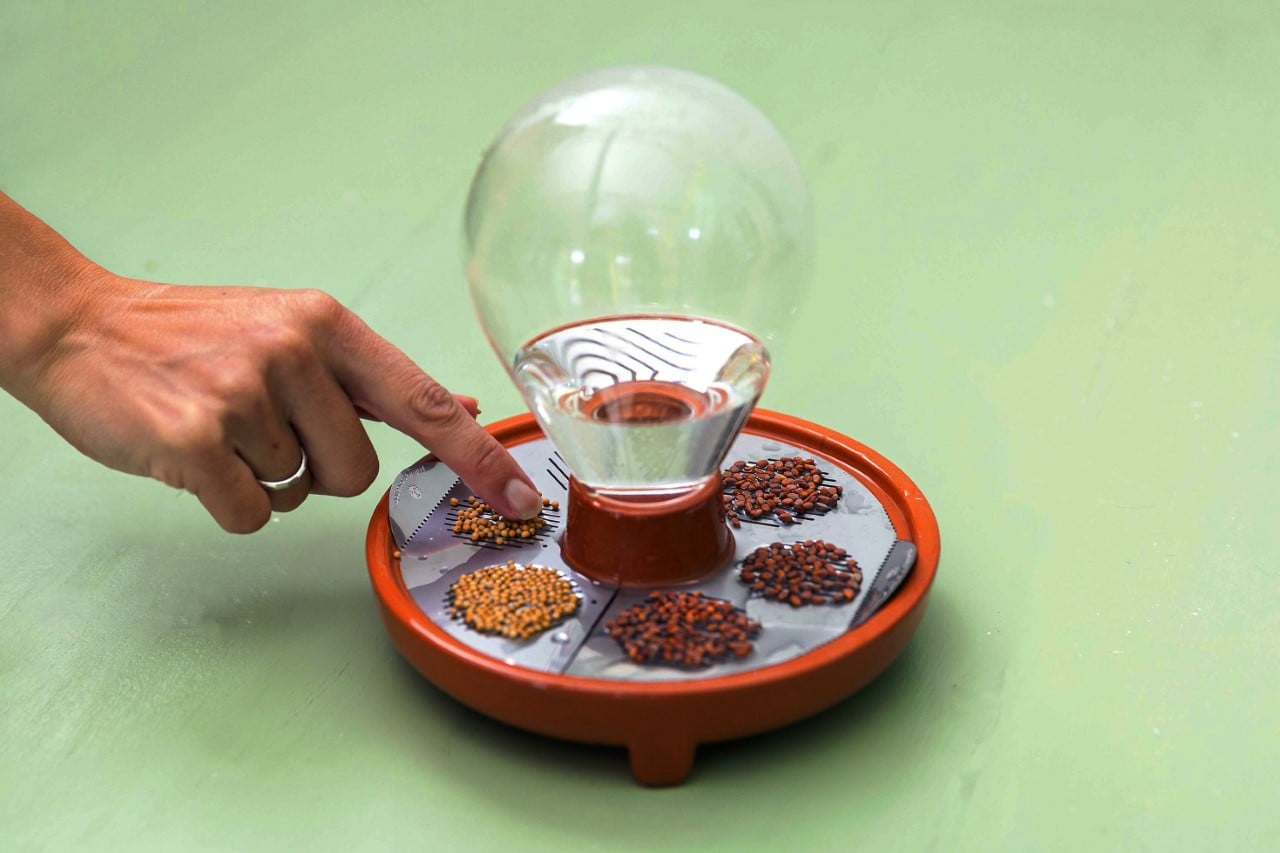

This tiny self-watering planter lets you easily grow microgreens with no soil or effort

Small enough to fit in both your palms, the Patella Crescenda makes growing greens ridiculously easy and quick. The unique shape of the planter allows it to water itself so you don’t need to, and helps you grow seeds without any soil, yielding sprouts in just about a week. The Patella Crescenda is intuitive, fun to use, and is made to be reusable so you can have a constant supply of microgreens for your salads, canapes, and smoothies.

Designer: House of Thol

The Patella Crescenda comes together with just four simple parts – a base tray, two reusable steel seed plates, and a water bulb that fits on top. Fill the bulb with water and place it upturned into the base and an air vacuum inside helps deploy the water slowly, filling up the base tray. Two steel plates sit on top of the base tray, right above the water level. Cuts on these plates let you place clusters of seeds like pulses, legumes, grains, etc. and they begin growing on their own, with the roots descending downwards into the base trey through the cuts.

In just about a week, the microgreens are ready to harvest and can simply be cut with scissors, or pinched off the steel plates. The sprouts grow directly in water without any soil, so you don’t need to clean or rinse them. Garnish them over your food or chuck them in your smoothies. Microgreens are incredibly nutrient-dense compared to their seed/grain/legume counterparts, giving your dishes a fresh burst of color as well a lot of minerals and antioxidants.

The Patella Crescenda simplifies the art of growing microgreens by literally condensing it down into three steps – Add water, add seeds, and harvest. The compact design, coupled with that glass bulb of water gives your interior space a wonderful aesthetic touch, while allowing you to intuitively see how much water your planter has. The steel plates come with six grill-cuts, allowing you to grow a variety of microgreens at the same time in the same dish, and once you’ve reaped your sprouts, cleaning and resprouting a new batch of seeds gives you a fresh harvest in just about a week!

The post This tiny self-watering planter lets you easily grow microgreens with no soil or effort first appeared on Yanko Design.

The M3 MacBook Pro is getting multi-display support, just like the Air

Apple revealed some new M3 MacBook Air laptops today and one of the marquee features is that they can drive two external displays while the lid is closed. It’s pretty weird when the Air line gets a feature missing from the beefier MacBook Pro line, but Apple’s on top of it. The company just announced that this feature is also coming to standard M3 MacBook Pro laptops via a software update, as reported by 9to5Mac.

There’s no details as to which software update would include the new tool, though macOS Sonoma 14.4 is in active development, so that’s a possibility. The feature should work exactly how it does with the forthcoming M3 MacBook Air, as the two lines share a processor and a similar architecture.

This update is going to be for 14-inch MacBook Pro laptops with the standard M3 chip. The more powerful versions with the M3 Pro and Max chips can already do this, so the 16-inch model doesn’t require a software update. Prior to this, you could only use the regular M3 MacBook Pro to drive a single external monitor with the lid closed. 

Apple Silicon MacBook Pros have been able to drive multiple external displays all the way back to the M1 Pro chip, but never with standard M-series chips. Apple hasn’t offered up a reason as to why this took so long to get going on chips without Pro or Max in the name. In any event, this is going to be huge for current M3 MacBook Pro owners looking for more screen real estate. 

This article originally appeared on Engadget at https://www.engadget.com/the-m3-macbook-pro-is-getting-multi-display-support-just-like-the-air-193844930.html?src=rss

The M3 MacBook Pro is getting multi-display support, just like the Air

Apple revealed some new M3 MacBook Air laptops today and one of the marquee features is that they can drive two external displays while the lid is closed. It’s pretty weird when the Air line gets a feature missing from the beefier MacBook Pro line, but Apple’s on top of it. The company just announced that this feature is also coming to standard M3 MacBook Pro laptops via a software update, as reported by 9to5Mac.

There’s no details as to which software update would include the new tool, though macOS Sonoma 14.4 is in active development, so that’s a possibility. The feature should work exactly how it does with the forthcoming M3 MacBook Air, as the two lines share a processor and a similar architecture.

This update is going to be for 14-inch MacBook Pro laptops with the standard M3 chip. The more powerful versions with the M3 Pro and Max chips can already do this, so the 16-inch model doesn’t require a software update. Prior to this, you could only use the regular M3 MacBook Pro to drive a single external monitor with the lid closed. 

Apple Silicon MacBook Pros have been able to drive multiple external displays all the way back to the M1 Pro chip, but never with standard M-series chips. Apple hasn’t offered up a reason as to why this took so long to get going on chips without Pro or Max in the name. In any event, this is going to be huge for current M3 MacBook Pro owners looking for more screen real estate. 

This article originally appeared on Engadget at https://www.engadget.com/the-m3-macbook-pro-is-getting-multi-display-support-just-like-the-air-193844930.html?src=rss

Pixel phones just got next-gen call screening

Google just announced that some Pixel phones are getting next-gen call screening. This improves on the pre-existing Call Screen feature by implementing a new Hello button. Once tapped, the system will deploy Google Assistant to speak on your behalf.

The digital assistant will ask the caller why they’re trying to reach you, and you’ll be able to hear the response in real-time. If it sounds important, you can interrupt and begin the call. If not, you can kick them to the curb and go back to watching TV.

Google Assistant already worked to screen calls in a similar way, but the Hello button gives the user ultimate control as to when to begin the screening process. There’s even an option to tell the caller to wait a little bit, if you can't get to the phone quite yet. In addition to the real-time element, the tool still captures transcripts of these screenings to peruse at your leisure. The new Call Screen update is only available for the Pixel Fold and Pixel 6 phones and newer.

This is part of a larger March features drop for Pixel phones. Google’s smartphones will now be able to share 10-bit HDR videos directly to Instagram, with no processing required. This is similar to the approach Samsung recently took with its Galaxy S24 native camera update.

The features drop also expands the company’s recently-launched Circle to Search tool to Pixel 7 smartphones. As the name suggests, this lets people search for stuff by simply drawing a circle around the object. The tool was previously only available for Pixel 8 and Galaxy S24 users.

This article originally appeared on Engadget at https://www.engadget.com/pixel-phones-just-got-next-gen-call-screening-190034396.html?src=rss

Pixel phones just got next-gen call screening

Google just announced that some Pixel phones are getting next-gen call screening. This improves on the pre-existing Call Screen feature by implementing a new Hello button. Once tapped, the system will deploy Google Assistant to speak on your behalf.

The digital assistant will ask the caller why they’re trying to reach you, and you’ll be able to hear the response in real-time. If it sounds important, you can interrupt and begin the call. If not, you can kick them to the curb and go back to watching TV.

Google Assistant already worked to screen calls in a similar way, but the Hello button gives the user ultimate control as to when to begin the screening process. There’s even an option to tell the caller to wait a little bit, if you can't get to the phone quite yet. In addition to the real-time element, the tool still captures transcripts of these screenings to peruse at your leisure. The new Call Screen update is only available for the Pixel Fold and Pixel 6 phones and newer.

This is part of a larger March features drop for Pixel phones. Google’s smartphones will now be able to share 10-bit HDR videos directly to Instagram, with no processing required. This is similar to the approach Samsung recently took with its Galaxy S24 native camera update.

The features drop also expands the company’s recently-launched Circle to Search tool to Pixel 7 smartphones. As the name suggests, this lets people search for stuff by simply drawing a circle around the object. The tool was previously only available for Pixel 8 and Galaxy S24 users.

This article originally appeared on Engadget at https://www.engadget.com/pixel-phones-just-got-next-gen-call-screening-190034396.html?src=rss

Google updates the first-gen Pixel Watch with health monitoring features

Google is releasing new features for the first-gen Pixel Watch, and they include the health-monitoring capabilities that launched with its successor. The older wearables will now be able to detect whether you're working out and can automatically start tracking your activity and then stop when you're done. In particular, it works for running, walking, elliptical training, spinning, outdoor biking and rowing. 

You'll also be able to track the time you spend in different heart rate zones, which could help you optimize your workouts. Plus, you'll be able to set a goal pace for your exercise sessions to get a notification for when you're not performing up to par. In case you want your first-gen Pixel Watch to help you feel more relaxed instead, simply fire up the Fitbit Relax App on the device to guide you through some breathing exercises. 

For travelers, though, Google's most exciting update for watches isn't just for its Pixel line. The company has rolled out public transit directions for devices running Wear OS 3 and above, which means you can check what kind of public transportation you can take right on your wrist — it will even display your public transit options' real-time departure schedules. You'll now also be able to navigate an unfamiliar location without taking out your phone through a compass-enabled map view on your watch. 

The company is releasing features for different devices under its Pixel line, as well. Pixel phones will now be able to share 10-bit HDR videos directly to Instagram Reels and will be able to upload Ultra HDR Photos to the app. In addition, the Pixel 8's "Circle to Search" feature is coming to Pixel 7 and Pixel Pro phones, giving you a quick way to do Search queries without having to switch apps. All you have to do is draw a circle around or highlight an image, a video or a piece of text to look up the information you need. Finally, a "Call Screen" feature will give you access to a "hello" chip you can tap while a call is being screened. Google Assistant can ask the caller to speak, so you can get an idea of why they're calling, and it can also ask them to wait a bit longer if you can't pick up their call just yet. 

This article originally appeared on Engadget at https://www.engadget.com/google-updates-the-first-gen-pixel-watch-with-health-monitoring-features-190002033.html?src=rss

Google updates the first-gen Pixel Watch with health monitoring features

Google is releasing new features for the first-gen Pixel Watch, and they include the health-monitoring capabilities that launched with its successor. The older wearables will now be able to detect whether you're working out and can automatically start tracking your activity and then stop when you're done. In particular, it works for running, walking, elliptical training, spinning, outdoor biking and rowing. 

You'll also be able to track the time you spend in different heart rate zones, which could help you optimize your workouts. Plus, you'll be able to set a goal pace for your exercise sessions to get a notification for when you're not performing up to par. In case you want your first-gen Pixel Watch to help you feel more relaxed instead, simply fire up the Fitbit Relax App on the device to guide you through some breathing exercises. 

For travelers, though, Google's most exciting update for watches isn't just for its Pixel line. The company has rolled out public transit directions for devices running Wear OS 3 and above, which means you can check what kind of public transportation you can take right on your wrist — it will even display your public transit options' real-time departure schedules. You'll now also be able to navigate an unfamiliar location without taking out your phone through a compass-enabled map view on your watch. 

The company is releasing features for different devices under its Pixel line, as well. Pixel phones will now be able to share 10-bit HDR videos directly to Instagram Reels and will be able to upload Ultra HDR Photos to the app. In addition, the Pixel 8's "Circle to Search" feature is coming to Pixel 7 and Pixel Pro phones, giving you a quick way to do Search queries without having to switch apps. All you have to do is draw a circle around or highlight an image, a video or a piece of text to look up the information you need. Finally, a "Call Screen" feature will give you access to a "hello" chip you can tap while a call is being screened. Google Assistant can ask the caller to speak, so you can get an idea of why they're calling, and it can also ask them to wait a bit longer if you can't pick up their call just yet. 

This article originally appeared on Engadget at https://www.engadget.com/google-updates-the-first-gen-pixel-watch-with-health-monitoring-features-190002033.html?src=rss

Instagram finally lets you edit DMs

Instagram launched direct messaging tools way back in 2013, but there hasn’t been a way to edit them after the fact. That changes today. Meta just rolled out a software update for the Instagram app that finally allows for DM edits, with one major caveat. You only have 15 minutes to make any changes.

Here’s how it works. Once you send a direct message and realize you made a huge blunder, like “accidentally” professing your love to an old college buddy, just press and hold on the sent message. This will create a dropdown menu. Look for “edit” and make the required changes. Nobody will ever be the wiser, as long as you got there within 15 minutes.

The Instagram pin feature.
Meta

This isn’t the only change to DMs found with today’s update. You can also pin up to three of your favorite direct messages on top of the feed, which is useful in the case of ongoing conversations. This can be done with standard one-on-one chats and group chats. Just hold on the conversation tab, look for the dropdown and tap “pin” to make the move.

The update also makes it easier to toggle read receipts on and off, depending on personal preference. The rest of today’s new features are cosmetic. There are new DM themes, and some include unique animations. Finally, the update features a way to save your favorite stickers in your DMs for easy access. Just hold on the sticker and it’ll be there next time you want it.

Meta’s constantly making changes to Instagram. Back in January, it began testing a feature that lets users access a secondary photo grid that only close friends can see. Late last year, the app got customizable story templates.

This article originally appeared on Engadget at https://www.engadget.com/instagram-finally-lets-you-edit-dms-183412692.html?src=rss

Instagram finally lets you edit DMs

Instagram launched direct messaging tools way back in 2013, but there hasn’t been a way to edit them after the fact. That changes today. Meta just rolled out a software update for the Instagram app that finally allows for DM edits, with one major caveat. You only have 15 minutes to make any changes.

Here’s how it works. Once you send a direct message and realize you made a huge blunder, like “accidentally” professing your love to an old college buddy, just press and hold on the sent message. This will create a dropdown menu. Look for “edit” and make the required changes. Nobody will ever be the wiser, as long as you got there within 15 minutes.

The Instagram pin feature.
Meta

This isn’t the only change to DMs found with today’s update. You can also pin up to three of your favorite direct messages on top of the feed, which is useful in the case of ongoing conversations. This can be done with standard one-on-one chats and group chats. Just hold on the conversation tab, look for the dropdown and tap “pin” to make the move.

The update also makes it easier to toggle read receipts on and off, depending on personal preference. The rest of today’s new features are cosmetic. There are new DM themes, and some include unique animations. Finally, the update features a way to save your favorite stickers in your DMs for easy access. Just hold on the sticker and it’ll be there next time you want it.

Meta’s constantly making changes to Instagram. Back in January, it began testing a feature that lets users access a secondary photo grid that only close friends can see. Late last year, the app got customizable story templates.

This article originally appeared on Engadget at https://www.engadget.com/instagram-finally-lets-you-edit-dms-183412692.html?src=rss