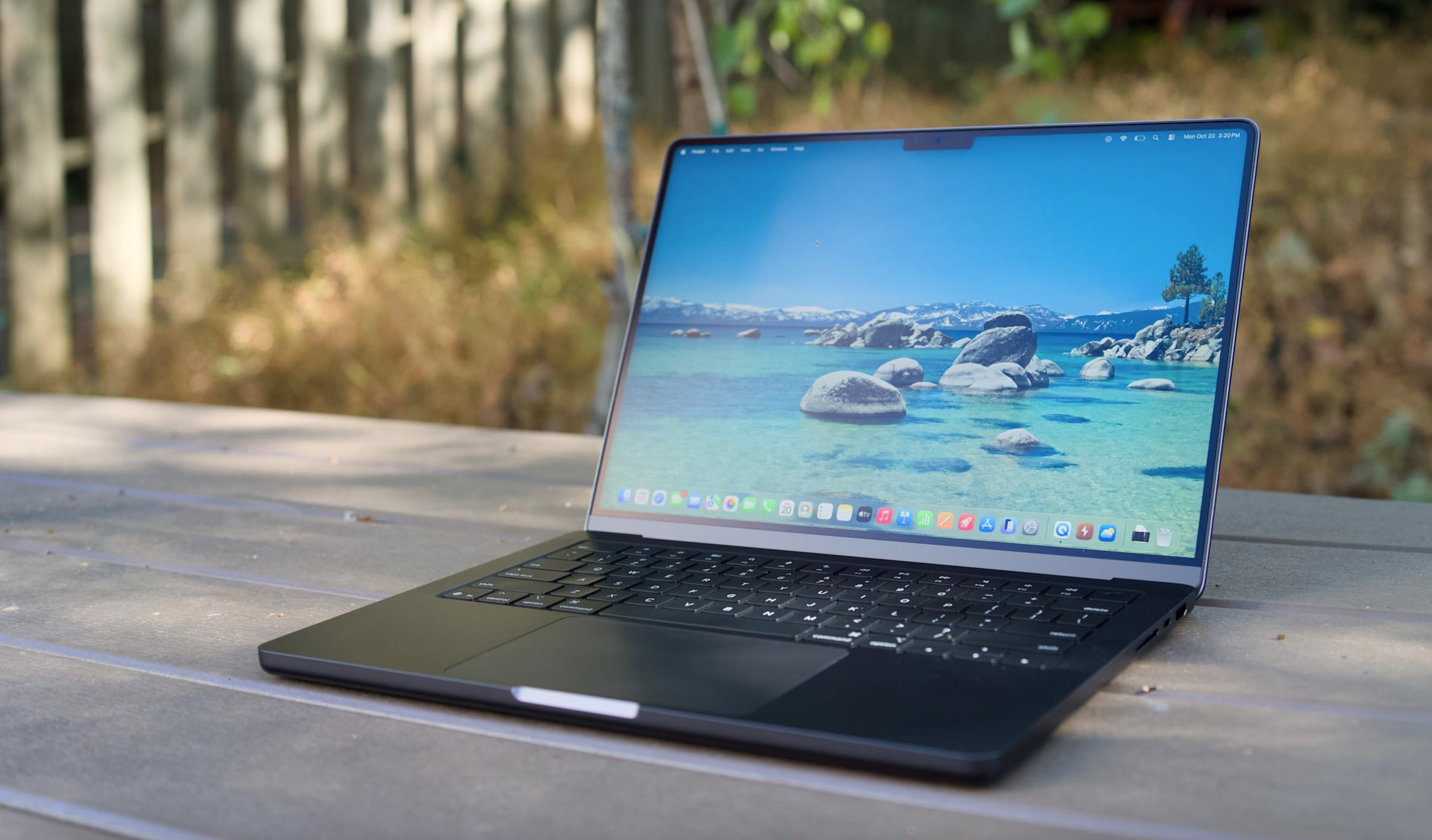
“MacBook Neo” appears to be the name of Apple’s long-rumored cheap MacBook, based on a regulatory posting on Apple’s website, MacRumors reports. The gaffe was quickly removed from Apple’s site (pour one out for the poor soul who posted it). Previous rumors didn’t attach a name to the low-cost MacBook — I figured Apple would just revive the clean and simple “MacBook” branding. The name MacBook Neo sounds like something we’d see from ASUS or Acer, it’s just trying a bit too hard to seem cool.
To recap, Apple is expected to unveil its first low-cost MacBook laptop tomorrow (and personally, I think it has a good shot at peeling away disgruntled Windows users). It’s rumored to be powered by one of the company’s A-series mobile chips, instead of the M-series hardware in its laptops and desktops so far. Apple reportedly isn’t skimping on the case — it’s expected to be all metal, except with plenty more colors than the company’s existing lineup. In many ways, the MacBook Neo sounds like a revival of Apple’s cute and colorful iBook laptops, except for far less money than those machines, with no handle for toting around.
Apple kicked off its week of spring announcements with the iPhone 17e and iPad Air M4 yesterday, both of which are relatively modest upgrades. (Still, it’s nice to have MagSafe on the iPhone 17e.) This morning, Apple unveiled the MacBook Air M5 and MacBook Pro M5 Pro/Max systems, both of which are slightly more expensive than the previous models. We also got a new addition to Apple’s monitor lineup with the 5K MiniLED Studio Display XDR. Along with the MacBook Neo, we may also see an upgraded Mac Studio desktop announced tomorrow.
This article originally appeared on Engadget at https://www.engadget.com/computing/laptops/apples-cheap-macbook-could-be-called-the-macbook-neo-153800133.html?src=rss
The Xbox Series X and Series S are built for fast load times, smooth performance and expansive game libraries, but the right accessories can make a noticeable difference in how you play day to day. From storage solutions that help you manage growing installs to headsets that make it easier to catch subtle audio cues, the best Xbox accessories are about removing friction and improving comfort as much as boosting immersion.
Whether you’re setting up a new console or refining an existing setup, there’s a wide range of add-ons worth considering. Many accessories designed for previous Xbox generations still work with Microsoft’s current hardware, which makes it easier to upgrade gradually rather than all at once. We’ve tested and selected the best Xbox Series X and Series S accessories to help you get more out of your console, no matter how or where you play.
Best Xbox accessories for 2026
This article originally appeared on Engadget at https://www.engadget.com/gaming/xbox/best-xbox-series-x-series-s-accessories-140035165.html?src=rss
This week, we're diving into the big changes at Xbox and what it all means for Microsoft's gaming future. Phil Spencer, the longtime face of Xbox, announced he's retiring last week. He'll be replaced by Microsoft's former CoreAI CEO Asha Sharma, instead of his longtime deputy Sarah Bond, who plans to leave the company. Will this change actually help the beleaguered Xbox division, or is it another example of Microsoft shoving AI into everything?
Also, Samsung held its latest Unpacked event this week to announce its new Galaxy S26 family. They look pretty much the same as last year, but the Ultra model includes a unique privacy feature that can instantly make the screen unreadable to bystanders. It's one of those features we expect to see in every phone eventually.
Xbox leadership falls apart. what happens next with Phil Spencer and Sarah Bond out? – 1:53
Samsung Unpacked: Privacy display on the S26 Ultra looks amazing – 27:27
U.S. Defense leadership gives Anthropic a Friday deadline to let it use Claude as it sees fit – 42:38
MrBeast editor accused of insider trading on Kalshi – 50:40
Discord delays age verification program after user revolt – 54:09
Around Engadget – 1:04:04
Working on – 1:05:16
Pop culture picks – 1:08:21
Credits
Hosts: Devindra Hardawar and Igor Bonifacic Producer: Ben Ellman Music: Dale North and Terrence O’Brien
This article originally appeared on Engadget at https://www.engadget.com/gaming/xbox/engadget-podcast-xboxs-leadership-shakeup-and-samsungs-galaxy-s26-150000180.html?src=rss
The MacBook is coming back — or at least, that's what the rumors claim. Next week, Apple is expected to announce a colorful, low-cost, non-Air, non-Pro MacBook powered by one of its mobile processors. By avoiding its pricier M-series chips, Apple may reportedly be able to reach a low $699 or $799 price for the MacBook. The $999 MacBook Air is the cheapest laptop on the company's website right now, but Apple also sold the older M1 MacBook Air at Walmart for $700 in 2024, which later went down to $650 last year.
That Walmart deal was a smart way for Apple to test out the viability of cheaper MacBooks without building an entirely new product. But now the M1 Air’s design looks seriously dated, and the company also needs to move beyond the six-year-old M1 chip. It's time to get serious about delivering a true low-cost Apple laptop.
There's another compelling reason to bring back a cheaper MacBook: It's the perfect way to court disgruntled Windows users, something Apple hasn't really done since its "Get A Mac" ads from the mid-2000s. I figure the unbridled success of the iPhone and iPad made Apple focus less on directly competing with Windows. The sleek designs of the 2011-2015 era MacBook Air and Pros were their main selling points, but Apple's push towards USB-C-only machines and unreliable butterfly keyboards later made it clear it wasn't totally focused on Macs.
But now Microsoft is distracted by AI — it's been pushing Copilot and AI features for years, instead of improving the Windows experience with more useful upgrades. Recent talk of agentic AI capabilities, which would let Copilot handle tasks for you automatically, also sparked plenty of criticism from Windows users. And with all of the focus on AI, Microsoft has also released some disastrous Windows updates over the last year, which have bricked OS installations. So, Apple, why not make a direct play for Windows users?
Last year, I covered why it's a great time to jump ship from Windows to Mac, and I haven't been able to let go of that idea since. Apple's M-series chips are shockingly fast and efficient, and its hardware tends to be more durable than typical PC fare. Rumors point to Apple developing a new aluminum case for the low-cost MacBook, so it will likely feel more polished than a typical sub-$1,000 Windows laptop. macOS has also avoided the bloat that's plagued Windows for years — you can turn off Apple Intelligence with two clicks if you want to, and there aren't any annoying ads to deal with.
A MacBook Air M5 on a table.
Devindra Hardawar for Engadget
And while it used to be a pain to transition from Windows to Mac, it’s far easier these days, especially if you mainly rely on web apps. It also wouldn't be tough for Apple to make short tutorials to help Windows users get their bearings with the macOS basics, like installing apps and juggling app windows. Apple could also make a play for iPhone owners using Windows, who may not be aware of the many ways iOS and macOS are integrated. iPhone mirroring may be a huge draw on its own.
Rumors also suggest the upcoming MacBook might use the A18 Pro from the iPhone 16 Pro, a chip that benchmarks faster than the M1. Even if it only has six cores, making it slower for heavy workloads than the M2, an A18 Pro-powered MacBook would still be more than enough power for basic productivity work. Not everyone needs the surprising amount of GPU power in the MacBook Air — especially if downgrading means they can save $200 to $300.
I'm not saying any of this through any sort of Apple-loving bias. I typically use a MacBook Pro for work, but I'm a Windows user at heart. Windows was my gateway to computing in the '90s, back when Macs were far more expensive than PCs. These days, I spend more time on my Windows desktop making podcasts, playing PC games and bumming around the internet than I do working on Macs.
And yet, it’s hard to deny everything Apple is doing right today — the only thing it’s missing is an inexpensive laptop entry. A $699 or $799 MacBook simply makes sense. And for many Windows users, it’ll be just the escape from Microsoft they need.
This article originally appeared on Engadget at https://www.engadget.com/computing/laptops/a-cheap-macbook-is-the-perfect-way-for-apple-to-win-over-windows-users-130000045.html?src=rss
Mafia: The Old Country demands to be played on an enormous screen. As much as I love my 32-inch Alienware OLED gaming monitor, it doesn't do justice to Mafia's cinematic vistas of Sicily. But, I also wanted to play that game in its full 4K glory, with none of the compromises of today's game consoles. So why not just shove a tiny gaming desktop under my home theater? Enter the Fragbox, Falcon Northwest's revamped small form factor gaming PC. While it's very expensive, starting at $3,997, it's incredibly powerful and gives you the freedom to easily upgrade the hardware down the line.
I know what you're thinking: "A $4,000 desktop, in this economy?" That pricing also doesn't include upgrading from the stock NVIDIA's RTX 5070 GPU, as well as adding more RAM and larger SSDs, all of which could drive the price up thousands more. I initially planned to review the FragBox back in early December 2025, before the AI-induced RAMaggedon made memory, storage and other components dramatically more expensive. Falcon Northwest is mainly known as a boutique and high-end system builder, so its wealthier clientele can likely weather the pricing storm. If you're looking for a deal, though, you won't find it here.
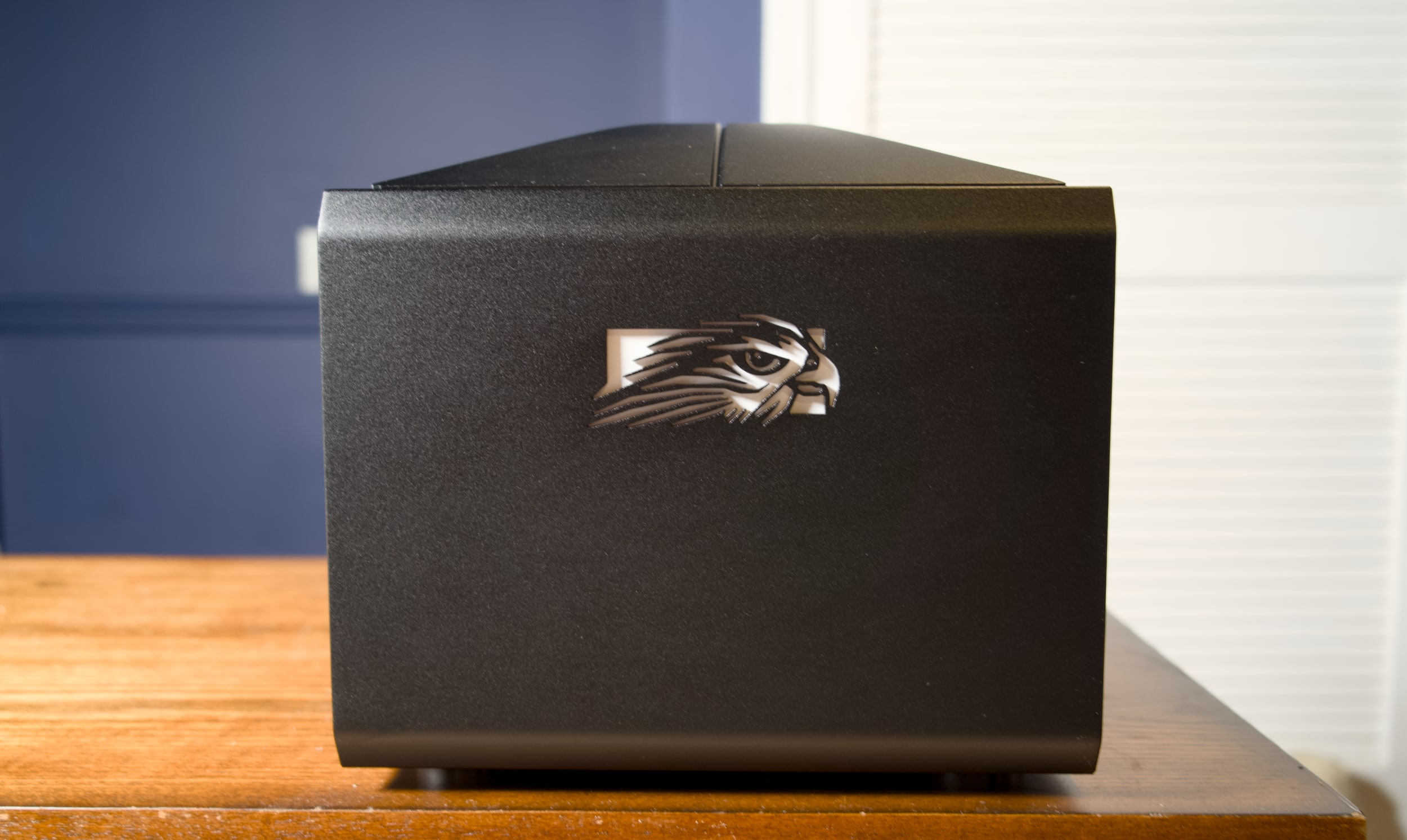
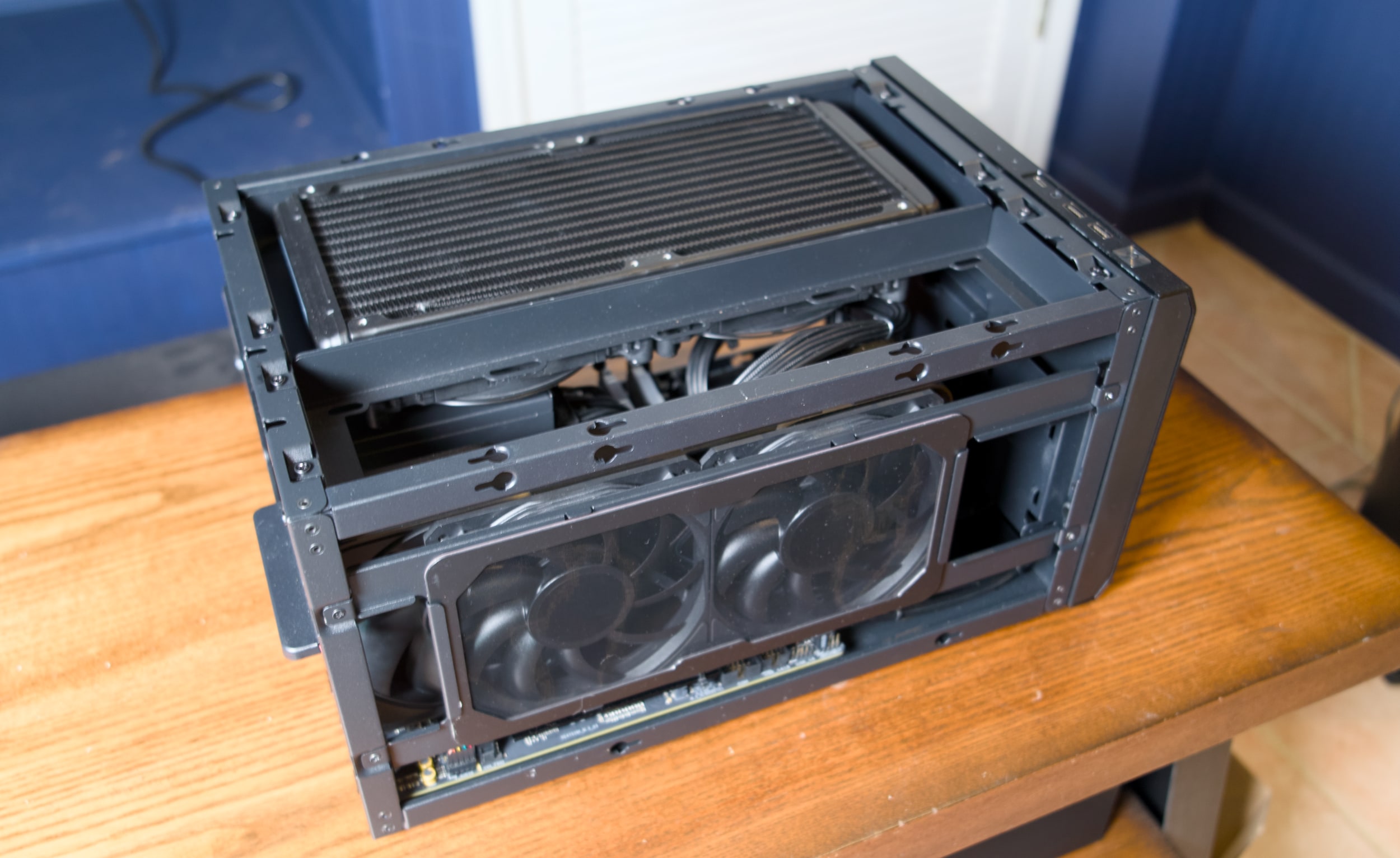
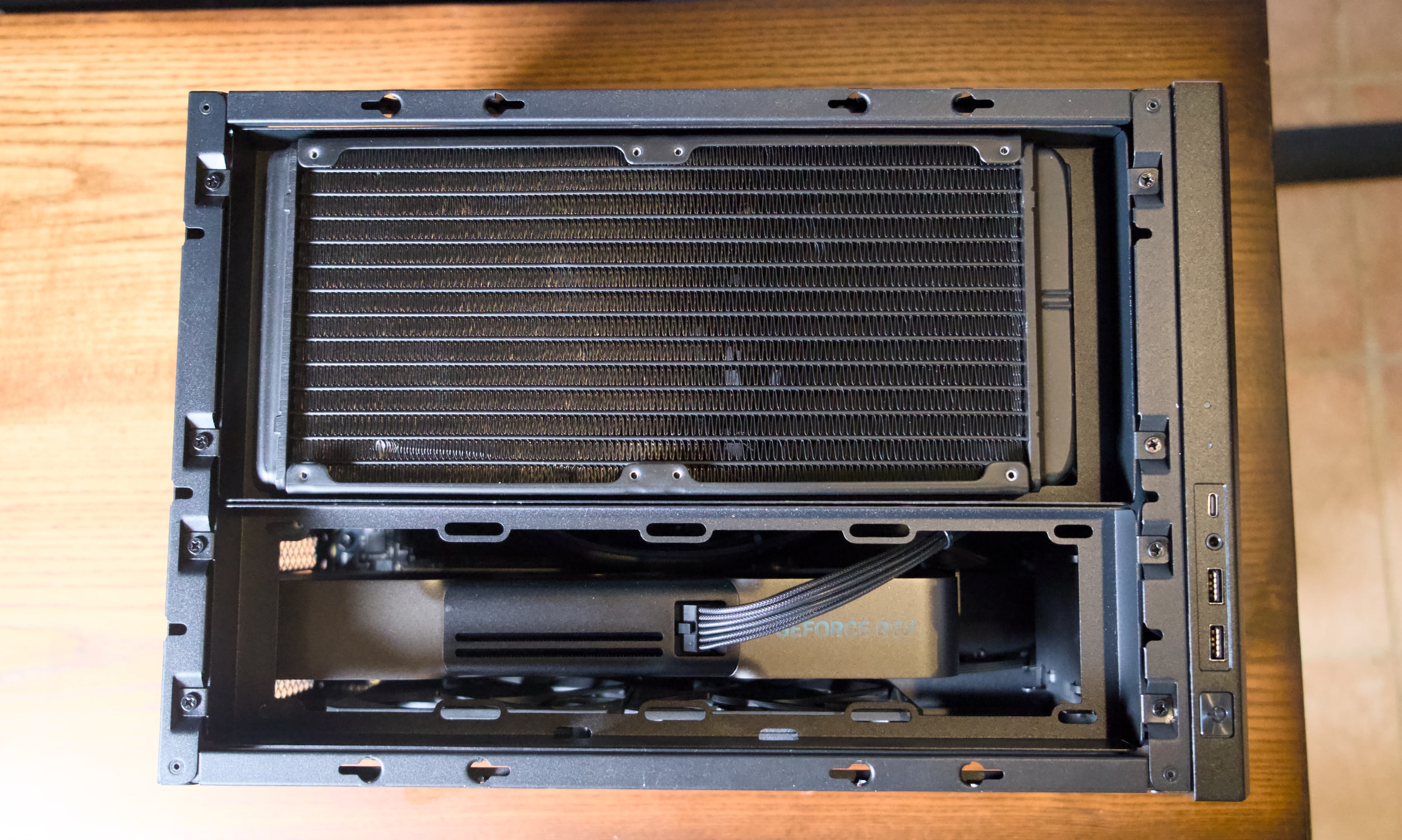
So what, exactly, is a FragBox? Imagine a typical mid-tower desktop squashed down to a system that's only 10.2-inches tall, 10.5-inches wide and 15.9-inches deep. When Falcon initially debuted the FragBox in 2003, it was notable for being a genuinely small PC that used full-sized parts. That's still a main selling point today: It can still fit in large NVIDIA GPUs, including the beefy RTX 5090, as well as either Intel's latest Core Ultra chips or AMD's Ryzen 9000 CPUs. A huge 280mm radiator sits at the top pulling out hot air, and it also serves as an All-in-One (AIO) liquid cooler for the CPU.
At 25 pounds, the FragBox isn't exactly light, but its sturdy metal handle makes it easy to move around. Most mid-tower desktops usually weigh between 20 and 35 pounds, depending on their case material. But they're also much larger and harder to squeeze into tight spaces. The FragBox's relatively squat size makes it easy to shove into a home entertainment center, or just sit on the corner of your desk. If you need a bit more height clearance, you can also remove the handle from the top panel. Just be sure there’s enough room for some airflow — all of that heat has to go somewhere, right?
Falcon Northwest FragBox
Devindra Hardawar for Engadget
Despite its density, the FragBox's elegant design makes it a cinch to access to all of the system's components. Just unscrew the side and top panels and you can easily remove the GPU, RAM, storage and other major components. There are three slots of M.2 SSDs, as well as two locations for 2.5-inch drives and a spot for a large 3.5-inch HDD. The system is bundled with a 1,200W power supply, which should be more than enough to handle future GPUs and CPUs.
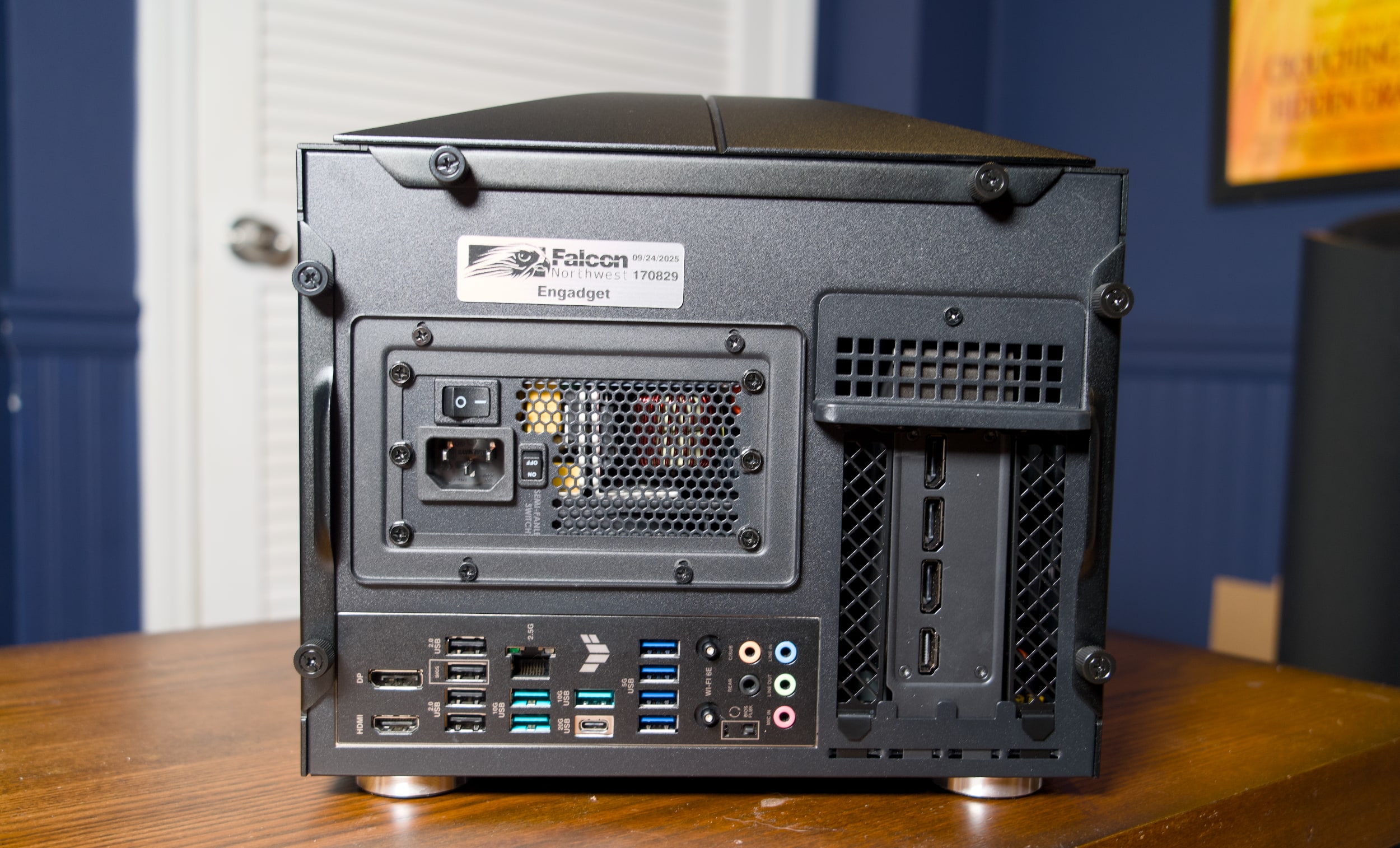
Ports are plentiful as well: There are two USB-A and one USB-C connections right up front, alongside a headphone jack. On the rear, you've got your typical assortment of mid-tower connections, including four USB-A 2.0 connections, seven USB-A 3 ports, one 20G USB-C 3.2 port, 2.5G Ethernet, HDMI and DisplayPort. Our RTX 5090 review unit also included three DisplayPort jacks and one HDMI connection (which you'll see on most GPUs). Wi-Fi 6E was also built into our unit, but Falcon says that Wi-Fi 7 is now standard with new builds.
Falcon Northwest FragBox
Devindra Hardawar for Engadget
The FragBox, thankfully, lacks the garish LEDs and cheesy thermal glass you find on more ostentatious gaming rigs. Falcon Northwest's aluminum case looks and feels stately, like an old-school luxury car. If you want something flashier, you can shell out an additional $400 for a custom UV printed case or $149 for a UV-printed front panel.
Our review unit was equipped with AMD's Ryzen 9950X3D CPU, NVIDIA's RTX 5090, 96GB of DDR5 RAM and a 2TB SSD, which adds up to a whopping $7,995. Five months ago, it would have cost $7,047 —- you can thank the RAM shortage for the price jump.
Even before benchmarking or running any games, I expected it to be a beast. In PCMark 10, the FragBox scored a whopping 13,810, which is around 500 points higher than my mid-tower system with the same CPU and GPU. It also scored the highest 3DMark Speedway and Port Royal ray tracing scores I've ever seen. Even more impressive, the FragBox's fans were barely audible under load, and the CPU and GPU sat at a chill 52C and 65C, respectively
CPU
GeekBench 6 CPU
GeekBench 6 GPU
Cinebench 2024
Falcon Northwest FragBox
3,445/22,787
390,148
N/A
Desktop with AMD Ryzen 9 9950X3D, RTX 5090
3,366/18,950
381,400
134/2,124
Desktop with AMD Ryzen 9 7900X, RTX 5090
2,822/14,216
358,253
113/1,103
Apple Mac Studio M4 Max
4,090/26,394
116,028
190/2066
To get back to my initial point, it ran Mafia: The Old Country in 4K flawlessly, with every graphics setting cranked all the way up. While playing on my 120-inch projector home theater setup, the game reached 62 fps natively, and flipping on DLSS upscaling and frame generation bumped that up to 120 fps. Not that you need a super higher framerate for a slow-paced, mostly cinematic action game. I was just happy to be playing without any compromises — even the PS5 Pro can't reach the same level of graphical fidelity as the monstrously powerful RTX 5090.
Falcon Northwest FragBox
Devindra Hardawar for Engadget
I'm no stranger to big-screen PC gaming, but previously I've had to run a laughably long HDMI cable from my desktop to make it work. I'm just too old for that mess now. And it also doesn't work consistently, especially at higher framerates, thanks to the massive bandwidth required to pump out 4K at high refresh rates. In-home game streaming is also an option, but that's not great when you're blowing games up to an enormous TV or projector screen. It's just too hard to ignore the imperfections of streaming compression. (Admittedly, I need to test newer high-bandwidth options, especially after I was impressed by NVIDIA's GeForce Now upgrade last year.)
The FragBox also made it easy to jump into all of my recent Steam titles, including Mewgeneics and Arc Raiders on a big screen. Unfortunately, Windows itself remains a key stumbling block for home theater PC gaming. You'll still need to keep a keyboard and PC around to deal with the initial OS configuration. And even once I enabled Steam's Big Picture mode, which offers excellent controller options, I still occasionally had to deal with Windows Updates and other annoyances.
Falcon Northwest FragBox
Devindra Hardawar for Engadget
Microsoft is currently trying to optimize Windows for gaming handhelds, and it's reportedly doing even more to make a future PC-powered Xbox feel more console-like. For now, though, using a Windows PC in your home theater doesn't feel much different than it did a decade ago. Steam is your savior, Windows is your enemy. Or you could just save thousands of dollars and buy a $500 PlayStation 5 or $700 PS5 Pro, instead. The latter will still get you smooth framerates and a healthy dose of ray tracing, without the annoyance of Windows, keyboards and mice.
But if you just want a compact and insanely powerful gaming desktop, and you don't mind spending a premium, it's hard to deny that the FragBox gets everything right.
Update 2/23, 1:48PM: Added updated information about Wi-Fi 7, handle removability and pricing.
This article originally appeared on Engadget at https://www.engadget.com/computing/falcon-northwest-fragbox-review-a-compact-gaming-rig-that-does-everything-right-130000837.html?src=rss
This week, Meta CEO Mark Zuckerberg testified in a landmark social media trial, claiming the company only wanted to make Instagram "useful" and not addictive. In this episode, we chat about Zuck's testimony and the potential implications of this trial for social media companies. Also, we dive into the latest effects of the RAMaggedon RAM shortage, including a potential PlayStation 6 delay and a dire future for practically every consumer electronics company.
Mark Zuckerberg testifies that Instagram was meant to be “useful,” not addictive in social media addiction trial – 1:27
Meta reportedly plans to launch a smartwatch later this year – 13:23
The RAMageddon will likely kill some small consumer electronics companies – 15:54
Apple could unveil a MacBook, new M5 Pro chip, and iPhone 17e at March 4th event – 26:26
Google’s Pixel 10a arrives on March 5 – 32:17
Email leaked to 404 media suggests Ring had plans to use its Search Party function for wider surveillance – 34:48
Listener mail – 45:14
Working on – 48:40
Pop culture picks – 49:04
Credits
Host: Devindra Hardawar Producer: Ben Ellman Music: Dale North and Terrence O’Brien
This article originally appeared on Engadget at https://www.engadget.com/ai/engadget-podcast-instagram-on-trial-and-the-ramaggedon-rages-on-131526178.html?src=rss
You've seen this movie before: A disheveled man (Sam Rockwell) busts into a restaurant, threatening to blow up the joint unless a crew of people joins him. Like Groundhog Day, he's been through this countless times before, and he immediately starts recounting otherwise unknowable details to convince the diner patrons. Like 12 Monkeys, he's from the future — the timely twist in Good Luck, Have Fun, Don't Die is that, rather than a world-ending virus, he needs help preventing a humanity-ending AI from being born.
Good Luck is more of a primal scream than a thoughtful articulation about where everything went wrong. There's a bit of "old man yells at cloud" energy here (director Gore Verbinski is 61, and screenwriter Matthew Robinson is 47), but it fits the film's satirical tone. Looking around at the world today, who doesn't wish they could warn their past selves about the tech industry and the new ruling class it helped breed.
Rockwell's character eventually wrangles a ragtag crew of future saviors: Mark and Janet (Michael Pena and Zazie Beetz), a married couple of high school teachers; Susan (Juno Temple), a distraught mother; and Ingrid (Haley Lu Richardson), a sad woman wearing a princess dress. There's also Asim Chaudhry's Scott, who mostly serves as comic relief, but doesn't get any real backstory like the others.
Good Luck wastes no time fleshing out its present near-dystopia in episodic chapters. It turns out Mark and Janet are also on the run from smartphone-obsessed high schoolers, who spend their days scrolling through endless TikTok-like feeds. Susan is forced to confront a horrific situation around her son (I won't get into specifics here, but it's a distinctly American phenomenon). And Ingrid is literally allergic to Wi-Fi and smart devices, which makes it hard to fit into the modern world.
Each of these scenarios play out like mini Black Mirror episodes. Everything is heightened to the absurd, and all the problems can be traced back to unchecked technological encroachment and capitalism. Nothing subtle there. The glimpses of an apocalyptic future are even less so — all we see are destroyed cities, people trapped in VR headsets (which place them in an AI-generated reality) and robots hunting down anti-AI humans.
Sam Rockwell in Good Luck, Have Fun, Don't Die.
Briarcliff Entertainment
Good Luck is at its best when it's simply having fun. As Rockwell and crew make their way to their final destination — a child who is about to invent true AI — they encounter pig-faced assassins, Stepford-esque parents and an adorably horrific kaiju. Even when faced with half-baked scripts, Verbinski always manages to impress visually (think back to the creepiness of TheRing, or the wildly entertaining set pieces in Pirates of the Caribbean). That's as true as ever here, where the final scene evokes the hyper-tech chaos of Akira.
As much as Good Luck, Have Fun, Don’t Die, evokes classic sci-fi, it still can’t hold a candle to the sheer terror of seeing AI unleash a nuclear bomb in Terminator 2. And despite its zanines, it doesn’t reach the madcap heights of Gilliam’s Brazil or 12 Monkeys. But if you’re sick of having AI products shoved down your throat, and you think the notion of “true AI” is a farce, it’s a fun way to channel your rage.
This article originally appeared on Engadget at https://www.engadget.com/entertainment/tv-movies/good-luck-have-fun-dont-die-rails-against-ai-in-style-154437854.html?src=rss
Apple’s Vision Pro is a curious product — it initially wowed me two years ago, but it was hard to ignore that the visionOS platform felt incomplete without dedicated apps for YouTube and Netflix. Well, it seems that Google has finally decided to take the Vision Pro seriously, as it’s launching a YouTube app on the platform today. Previously, you could only view YouTube videos via Safari, or through third-party apps like Tubular Pro.
According to an Apple representative, the YouTube Vision Pro app features every video on on the service, including shorts, 360, 3D and VR 180 content. I haven’t tried it myself yet, but it certainly couldn’t be worse than trying to navigate through YouTube’s desktop app via finger gestures. Now that Google is spinning up its Android XR ecosystem, the company probably couldn’t avoid the Vision Pro for long. And don’t forget, we may also see a cheaper Vision Air next year.
Your move, Netflix.
This article originally appeared on Engadget at https://www.engadget.com/ar-vr/apple-vision-pro-finally-gets-a-youtube-app-today-170000886.html?src=rss
Get ye to Windows Update, because there's a good chance you've got new Secure Boot certificates to install. Microsoft just announced that it will be refreshing those certificates, which were originally introduced when Secure Boot debuted in 2011, as a security precaution. Secure Boot was a way for Microsoft to protect systems from running unsigned and potentially malicious code before Windows launched. It went on to be an installation requirement for Windows 11, as well as anti-cheat software used in Valorant, Call of Duty: Black Ops 6/7 and Battlefield 6.
Without the new Secure Boot certificates, Microsoft says your system will still function normally, but it will enter "a degraded security state that limits its ability to receive future boot-level protections." Basically, you won't be protected from malware and viruses targeting vulnerabilities in older versions of Windows. As expected, Microsoft also notes that unsupported versions of Windows won't be receiving the new Secure Boot certificates. They're only coming to Windows 11 systems, as well as Windows 10 PCs subscribed to Microsoft's Extended Security Updates.
Microsoft says many users will be able to pick up the updated Secure Boot certificates by visiting Windows Update, but a few may need additional firmware updates from their system (or motherboard’s) OEM. You’ll also be able to track the status of your security certificates in the Windows Security app in the “coming months.”
"As cryptographic security evolves, certificates and keys must be periodically refreshed to maintain strong protection," Nuno Costa, Partner Director of Windows Servicing and Delivery, wrote in a blog post today. "Retiring old certificates and introducing new ones is a standard industry practice that helps prevent aging credentials from becoming a weak point and keeps platforms aligned with modern security expectations."
Costa says Microsoft has been working with OEMs like Dell and HP to ensure a smooth transition to the new Secure Boot certificates. Many new systems built in 2024 already have the updated certs, while "almost all" devices shipped last year have them as well. Microsoft has also been alerting IT customers to this transition since last year.
This article originally appeared on Engadget at https://www.engadget.com/computing/microsoft-will-start-refreshing-secure-boot-certificates-in-march-for-windows-11-and-windows-10-esu-users-170000777.html?src=rss
If you haven't heard, there's now a social network for AI: Moltbook, a site that purportedly features AI agents talking to each other. That includes OpenClaw, a personal AI agent (formerly called Clawdbot and Moltbot) that's open source and free for anyone to run on their systems. In this episode, Devindra and Senior Reporter Karissa Bell discuss the rise of these services, and the potential future that AI agents may have for all of us.
Anthropic reinforces its commitment against ads with Super Bowl ad spots – 19:32
SpaceX acquires xAI and plans for a mega IPO – 27:08
Alexa + rolls out free for all Amazon Prime subscribers – 33:36
Around Engadget: Reviews of the New AirTag and Switch Virtual Boy – 44:12
Working on – 46:34
Pop culture picks – 49:24
Credits
Hosts: Devindra Hardawar and Karissa Bell Producer: Ben Ellman Music: Dale North and Terrence O’Brien
This article originally appeared on Engadget at https://www.engadget.com/ai/engadget-podcast-so-theres-a-social-network-for-ai-agents-now-133000813.html?src=rss