With Claude enjoying a moment of newfound popularity among regular people, Anthropic is previewing an update designed to make its chatbot better at explaining some concepts. Starting today, Claude can generate charts and diagrams as part of its responses, either when asked directly or when it decides visuals might be helpful to the user.
For example, try asking Claude what's the best way to fold a paper plane. Where previously it was limited to text, now it can show you step by step how to fold a Nakamura lock plane. Anthropic is quick to point out what it's introducing today isn't image generation. When producing visual aids, Claude will use HTML code and XML vector graphics. Anthropic likens it to giving Claude access to its own whiteboard.
The new feature is available to all Claude users, regardless of whether you pay for one of Anthropic's subscriptions. However, the company does warn it's releasing beta software, so expect some quirks along the way. The feature also isn’t available on mobile just yet. This release comes just days after OpenAI made ChatGPT capable of generating interactive visuals when explaining science and math concepts.
This article originally appeared on Engadget at https://www.engadget.com/ai/claude-can-now-generate-charts-and-diagrams-160000369.html?src=rss
In recent weeks, Google has been busy adding AI features to all of its most popular apps. Following Gmail and Chrome, Maps is now the latest service to get a Gemini makeover, with a redesign of the driving experience headlining the update.
Google is billing the new "Immersive Navigation" mode as the most significant update to driving directions in Maps in about a decade. Now instead of displaying a 2D map of the area around your car, Maps will render the surroundings in 3D. Google believes this transformation will make it easier for drivers to orient themselves, with the new view giving greater depth to nearby landmarks like buildings and overpasses.
Behind the scenes, the company's Gemini models power the experience, deciding how to render elements to remove distractions. Pulling information from Google's Street View database and aerial photos, Google says its models are also smart enough to know when to highlight road elements like crosswalks, traffic lights and stop signs to ensure you don't miss an off ramp or important turn. At the same time, Google has made the voice guidance in Maps sound more natural. For instance, when you're driving along the highway, looking for where you need to get off, the voice assistant will say something along the lines of "go past this exit and take the next one." I imagine this will be especially helpful when driving in a foreign country with unfamiliar road names.
The new intelligence Google has built into the redesigned navigation experience extends to alternative routes. Now, when the app suggests taking a different way of getting somewhere, it will detail the associated tradeoffs with that route. For example, it might tell you it might take longer to travel but you'll encounter less traffic along the way. Before you start your journey, Maps will now also provide a Street View preview of your destination and recommend where to park.
This being a new release in Google's self-proclaimed Gemini era, the company has naturally found a way to add its chatbot to Maps. Inside the app, you'll find a new icon labelled Ask Maps. Tap the icon, write a natural language prompt and Gemini will use all the information contained within Maps to craft a response.
Google is pitching the feature as a way to get information no traditional map can provide. For example, you could ask Gemini to find you a place where you can charge your phone and grab a cup of coffee, all without having to wait a long time in line. Google suggests finding the answer to a specific question like that would have previously required sifting through countless reviews. Not so anymore. The results Gemini produces through Ask Maps will contain personalized results based on places you searched for and saved in the past. You can also act on any recommendations Gemini surfaces, making it easy to book restaurants, save locations and more.
Google is starting to roll out the new immersive driving experience today in the US, with availability to expand over the coming months to Android and iOS devices, as well as CarPlay, Android Auto and cars with Google built-in. Ask Maps, meanwhile, is rolling out to Android and iOS devices in the US and India, with desktop support coming soon.
This article originally appeared on Engadget at https://www.engadget.com/ai/google-maps-brings-a-3d-map-to-your-driving-directions-123000843.html?src=rss
Microsoft plans to begin shipping early units of its next generation console, codenamed Project Helix, to game studios starting sometime next year. “We're sending alpha versions of Project Helix to developers starting in 2027,“ said Jason Ronald, vice-president of next generation for Xbox, according to IGN, which was present at the company’s GDC 2026 presentation where it shared early details about the new device. Ronald did not clarify what he meant by “alpha version,” but given the keynote’s developer focus, presumably he meant devkits, which studios could use to start creating games for the new console.
Additionally, Ronald reiterated that the new system would be capable of playing both Xbox console games and PC games, and said it would incorporate a custom AMD-made system-on-a-chip capable of rendering graphics with path tracing. Judging from a slide the company shared, Microsoft and AMD are working on many of the same technologies and capabilities AMD is co-designing with Sony for next PlayStation console. For instance, Ronald said Helix would be capable of ray regeneration, a technique designed to produce better-looking ray-traced effects. The new console will also offer multi-frame frame generation and machine learning-based upscaling.
“It delivers an order of magnitude leap in ray tracing performance and capability, integrates intelligence directly into the graphics and compute pipeline, and drives meaningful gains in efficiency, scale, and visual ambition. The result is more realistic, immersive, and dynamic worlds for players,” Ronald wrote in a blog post published after his presentation.
Ronald didn’t speak to any specific compute numbers, likely due to the fact Microsoft has yet to finalize the Helix hardware. We’ll likely learn more of those details the closer we get to 2027.
This article originally appeared on Engadget at https://www.engadget.com/gaming/xbox/microsoft-will-start-providing-game-studios-with-project-helix-consoles-in-2027-180352458.html?src=rss
When you think of an AI-forward PC, you might think of something like NVIDIA's $3,999 DGX Spark — a computer with enough computing power to run complex large language models locally. That's not what Rabbit is trying to build with Project Cyberdeck. Instead, the company's goal is to produce a device tailored for vibe coding, and Engadget was given an exclusive first look at the upcoming PC.
Rabbit began working on Project Cyberdeck after the company's CEO, Jesse Lyu, saw how much his software engineers were using Claude Code. Lyu thought a small form factor PC, like the netbooks that were popular in the late aughts, with a command line interface would be ideal for on-the-go vibe coding, but when he went online to look for something that fit the bill, he was disappointed.
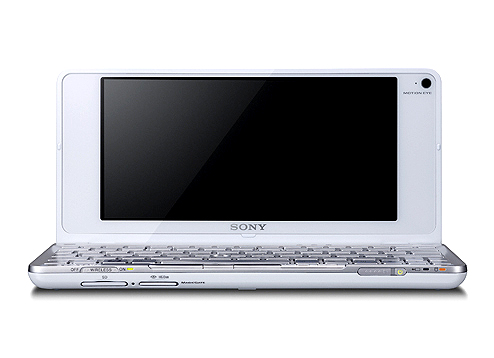
"They all come with shitty rubber dome keyboards," Lyu says of low-cost PCs like the latest Chromebooks, which use flexible silicone sheets under their keys to save on space and cost. "They're not something you would enjoy typing on for an extended period of time." So Rabbit decided to build its own device. For inspiration, Lyu and company looked to an unlikely source: the Sony Vaio P.
The Cyberdeck takes inspiration from the Sony Vaio P.
Sony
Sony's netbook was only briefly available from the start of 2009 to about the end of 2010. At the time, the 8-inch Vaio P was the world's lightest netbook, weighing just 1.4 pounds, but it had a host of issues. It was also expensive, costing considerably more than other Intel Atom notebooks of the time. In 2009, the most affordable Vaio P would set you back $900 (about $1,365 adjusted for inflation). With Project Cyberdeck, Rabbit is aiming for a device that costs about $500, and hopefully avoids a similar fate.
I saw a few early renders of Project Cyberdeck, which Rabbit isn't ready to share publicly yet. Imagine a cross between the Rabbit R1, Vaio P and the original Nintendo DS. It looks cute. All the renders had four USB-C ports to allow users to connect the device to external monitors and peripherals, though the actual IO specs are as-yet undecided.
The company is in the process of sourcing components and working towards a final design, so details can — and will — change. I saw some of the parts Lyu has been testing in his office, but no final prototype as such.
For one, Rabbit still needs to decide on a chipset. The company is aiming for a performance benchmark relative to the Raspberry Pi 5, which has a Broadcom BCM2712 quad-core Arm Cortex A76 processor clocked at 2.4GHz. With 16GB of RAM, the Raspberry Pi 5 can run two external monitors, a capability Rabbit hopes to match with the Cyberdeck. The idea here is to make a device that's powerful enough it won't feel slow when it's communicating with Anthropic and OpenAI's servers, but affordable enough to make it a no-brainer purchase for developers.
The company confirmed Project Cyberdeck will run Linux. Rabbit will allow users to modify the operating system and install any third-party tools they want. Additionally, all the software features the company has developed for RabbitOS will be available through command-line prompts.
Two parts of the device Lyu hopes are major differentiating factors are the keyboard and screen. Lyu appears set on shipping a computer with a 40 percent keyboard that has low-profile mechanical switches and a fully hot swappable PCB, so users can tweak the typing feel to their liking. Lyu also had a sample 7-inch OLED screen on his desk when I spoke to him. That specific panel offers touch input, a 165Hz refresh rate and 815 nits of brightness. While it might not be the one Rabbit settles on, OLED is the goal, because of what it would mean for battery life.
For the uninitiated, OLED panels produce black values by turning off individual diodes, and since each diode is self-emitting, there's no need for a power-hungry backlight. Like every smartphone manufacturer, Rabbit is taking advantage of this by planning to offer a dark mode interface from day one.
One aspect of the Cyberdeck's design Lyu can't definitively speak to is how much RAM it will feature. The entire industry is dealing with datacenter demand for high-bandwidth memory that has sent the price of computers, smartphones and other electronics soaring. Lyu believes Rabbit won't be forced to delay the Cyberdeck out of 2026, but he also didn't rule out the possibility either. If things change for the better, he's confident Rabbit would be able to take advantage, since it took the company about 93 days to ship the first R1 device after it began working on the design.
Separately, I wonder if people will want to carry around a second device solely for their coding needs? You don't need a dedicated machine to access Claude Code or OpenAI Cursor. Even companies like Apple have begun integrating vibe coding services into their development environments. Rabbit could be on track for a repeat of the R1, but with so many details of the Cyberdeck left undecided, for now, it's too early to know for sure. The company will get to make its case when it shares more details in the coming weeks and months.
This article originally appeared on Engadget at https://www.engadget.com/ai/rabbits-cyberdeck-is-a-modern-take-on-a-netbook-151907273.html?src=rss
At the start of the year, Google brought a host of new Gemini-powered features, including built-in Nano Banana image generation, to Chrome. After debuting in the United States, those features are now making their way to Chrome users in Canada, India and New Zealand, with support for 50 additional in tow. Among the new languages Gemini in Chrome can now converse in are French, Gujarati, Hindi and Spanish.
To try out Gemini in Chrome, tap the sparkle icon at the top right of the interface. This will open the sidebar interface Google introduced in January. From there, you can chat with the company's Gemini chatbot without the need to switch tabs. From the sidebar, you can also access Google's in-house image generator. Additionally, Gemini in Chrome offers integrations with Gmail, Maps, Calendar, YouTube and other Google apps. If you live outside Canada, India or New Zealand, Google says it will make Gemini in Chrome available in more countries and languages throughout the rest of 2026. Oh, and if don’t want to use Gemini in Chrome, you can right click on the sparkle icon and select unpin to never see it again.
This article originally appeared on Engadget at https://www.engadget.com/ai/google-starts-rolling-out-gemini-in-chrome-to-users-in-canada-india-and-new-zealand-023000528.html?src=rss
OpenAI is rolling out new interactive responses in ChatGPT it says are designed to make the chatbot more useful for learners. Starting today, ChatGPT will generate dynamic visuals when you ask it to explain select scientific and mathematical concepts, including the Pythagorean theorem, Coulomb's law and lens equations. When ChatGPT responds with an interactive visual, you'll be able to tweak any variables and the equation itself, allowing you to see how those changes affect the solution.
With today's release, OpenAI says ChatGPT will respond with interactive visuals when asked about more than 70 concepts, with support for additional topics to come down the line. The visuals are available to all ChatGPT users, regardless of subscription status. However, OpenAI notes high school- and college-aged students are likely to get the most out of the new feature.
ChatGPT explains Ohm's law.
OpenAI
The more interactive responses from ChatGPT follow the release of Study Mode last summer. Released in response to the sheer amount of students using chatbots to complete their coursework, that feature guides the user toward finding an answer themselves, rather than provide an outright solution. "This is just the beginning," OpenAI says of its latest feature. "Over time, we plan to expand interactive learning with additional subjects and continue building tools that strengthen learning with ChatGPT."
This article originally appeared on Engadget at https://www.engadget.com/ai/chatgpt-will-now-generate-interactive-visuals-to-help-you-with-math-and-science-concepts-170000520.html?src=rss
OpenAI is releasing a new model today, and like GPT-5.2 before it, GPT-5.4 is all about professional work. OpenAI is calling GPT-5.4 its most capable frontier model for tasks like coding and data analysis. OpenAI claims the new model produced presentations with stronger, more varied aesthetics and made more effective use of its image generation tools.
It's also the first model from OpenAI built with native computer-use capabilities, making it better at carrying out tasks across several apps at the same time. When it comes to computer use, one noticeable improvement OpenAI has recorded is the way GPT-5.4 issues mouse and keyboard commands. It's significantly better at navigating a desktop environment than its predecessor.
When users turn to GPT-5.4 in ChatGPT, where it will now be the default model for the chatbot's Thinking mode, the system will outline how it plans to tackle a request, giving people the opportunity to tell it to adjust course as it's generating a response. At the same time, the new model offers better web research capabilities, especially when it comes to "highly specific" queries, according to OpenAI.
"Together, these improvements mean higher-quality answers that arrive faster and stay relevant to the task at hand," the company states. Separately, OpenAI claims GPT-5.4 is its most factual model yet, noting, relative to GPT-5.2, it's 18 percent less likely to generate a response with any errors. Here's hoping it knows not to turn to Grokipedia for information, something its predecessor was known to do.
As mentioned, GPT-5.4 will be available in ChatGPT when users select the chatbot's Thinking mode, and as GPT-5.4 Pro from the model picker. As such, this isn't a release for Free and Go users — or even Plus subscribers, for that matter. It's more for enterprise customers, and developers who rely on the company's Codex app. On that note, for API customers, OpenAI claims GPT-5.4 is its most token efficient reasoning model to date, though those tokens will cost more than their GPT-5.2 counterparts. For instance, OpenAI is pricing one million input tokens at $2.50, up from $1.75 with GPT-5.2.
The fact that OpenAI has increasingly shifted its strategy to focus on professionals shouldn't be surprising. When Microsoft announced last September it would add Anthropic's models to Copilot 365 (where previously it depended exclusively on OpenAI's systems), there were reports that suggested the company made the decision because it found Claude was better at tasks like generating spreadsheets and presentations. Reporting from The Informationsuggests OpenAI is generating about $25 billion in annualized revenue. However, the company is still far from being profitable, and with more than $1.4 trillion in data center commitments on the books, it's reliant on funding from investors to keep the lights on. Seen in that context, productivity represents a place where it might have a chance to build a sustainable business.
This article originally appeared on Engadget at https://www.engadget.com/ai/i-hope-you-like-spreadsheets-because-gpt-54-loves-them-180000444.html?src=rss
At the start of February, OpenAI upgraded its Codex coding app to give it the ability to manage multiple AI agents. At the same time, it released a standalone macOS app. If you've been patiently waiting for Windows to get that same treatment, OpenAI just released a dedicated Codex app for Microsoft's operating system.
Like its macOS counterpart, the software allows you to coordinate multiple coding agents to work on the same task. There's also support for automations to streamline repetitive tasks like bug testing. To help users get started, Codex includes a dedicated "Skills" section. Skills bundle together instructions, resources and scripts the software can use to connect agents to specific tools and workflows. OpenAI has also included native sandboxing to help make Windows developers feel at home.
Codex is available to ChatGPT Free, Go, Plus and Pro users. If you decide to give the app a try, know that your session history is saved to your OpenAI account, meaning you can start coding on Mac and then move to Windows without losing your work.
This article originally appeared on Engadget at https://www.engadget.com/ai/openai-brings-its-codex-coding-app-to-windows-195345429.html?src=rss
Over the past few years, Google's A-series Pixel phones have consistently been some of the best midrange phones you can buy. But with the AI boom causing memory shortages and the price of consumer electronics to rise, including smartphones, affordable devices like the Pixel 10a are more important than ever. Thankfully, Google's new phone still represents great value, even if it doesn't come with many upgrades.
Design and display
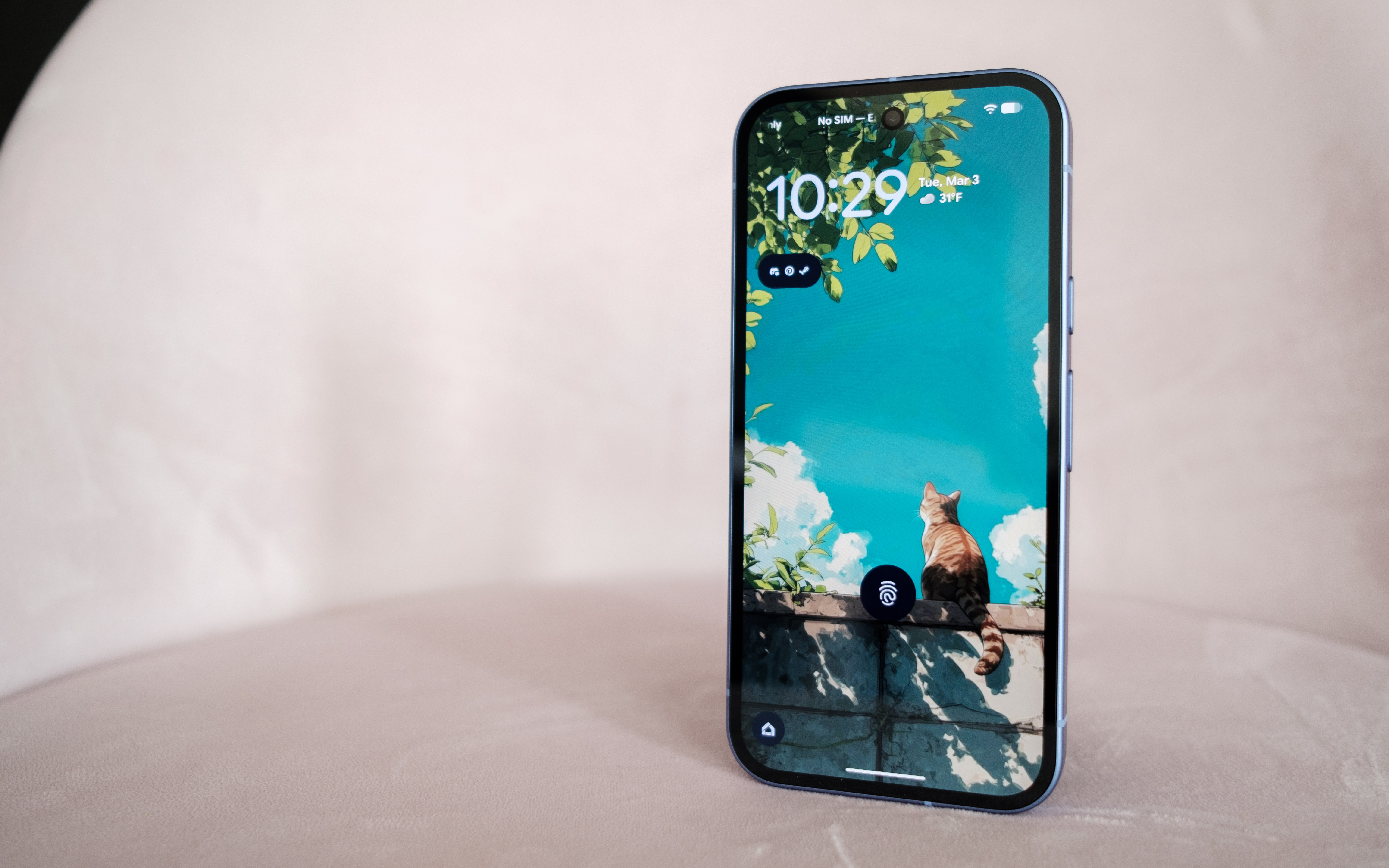
As before, the Pixel 10a has a 6.3-inch 120Hz P-OLED display.
Igor Bonifacic for Engadget
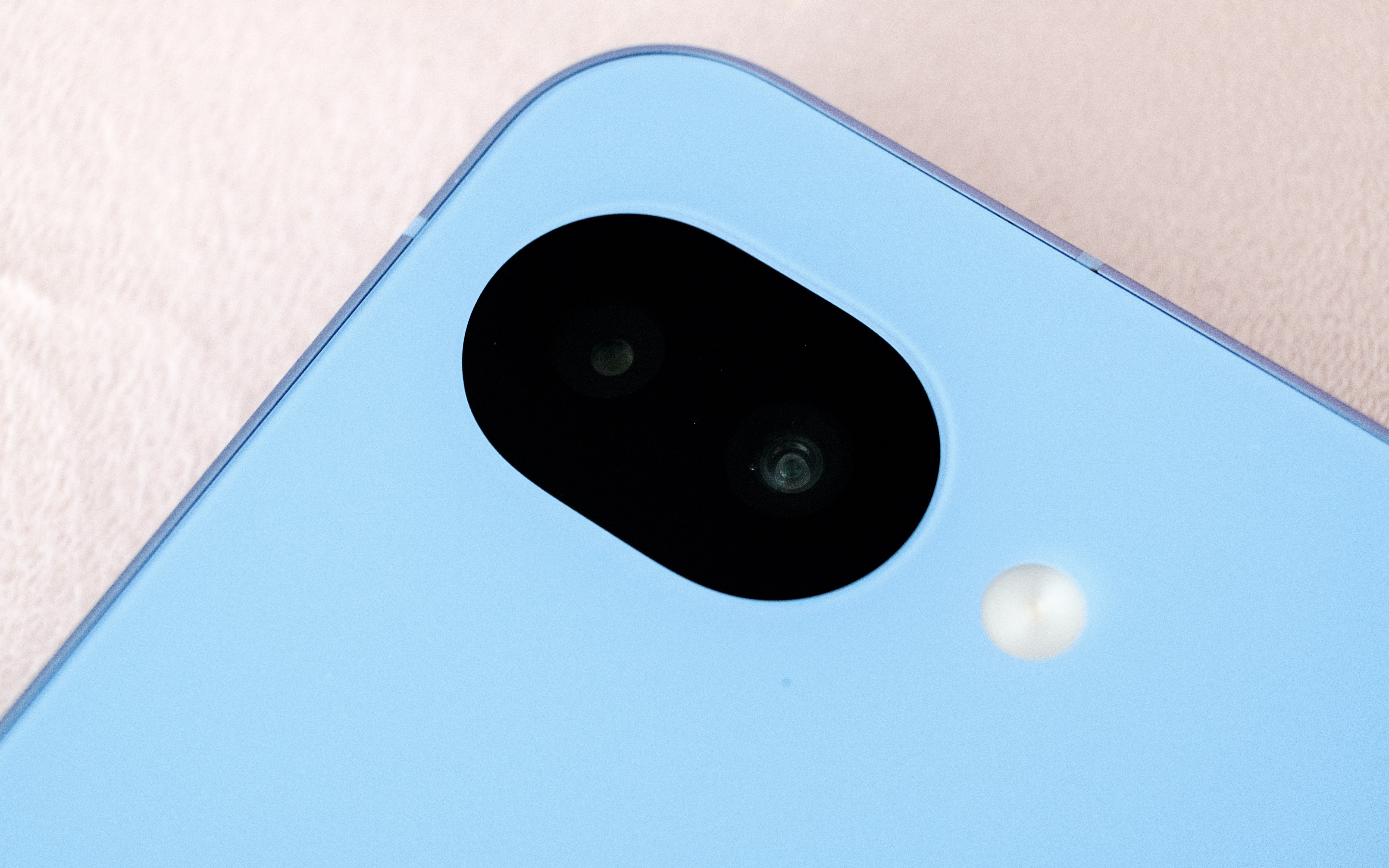
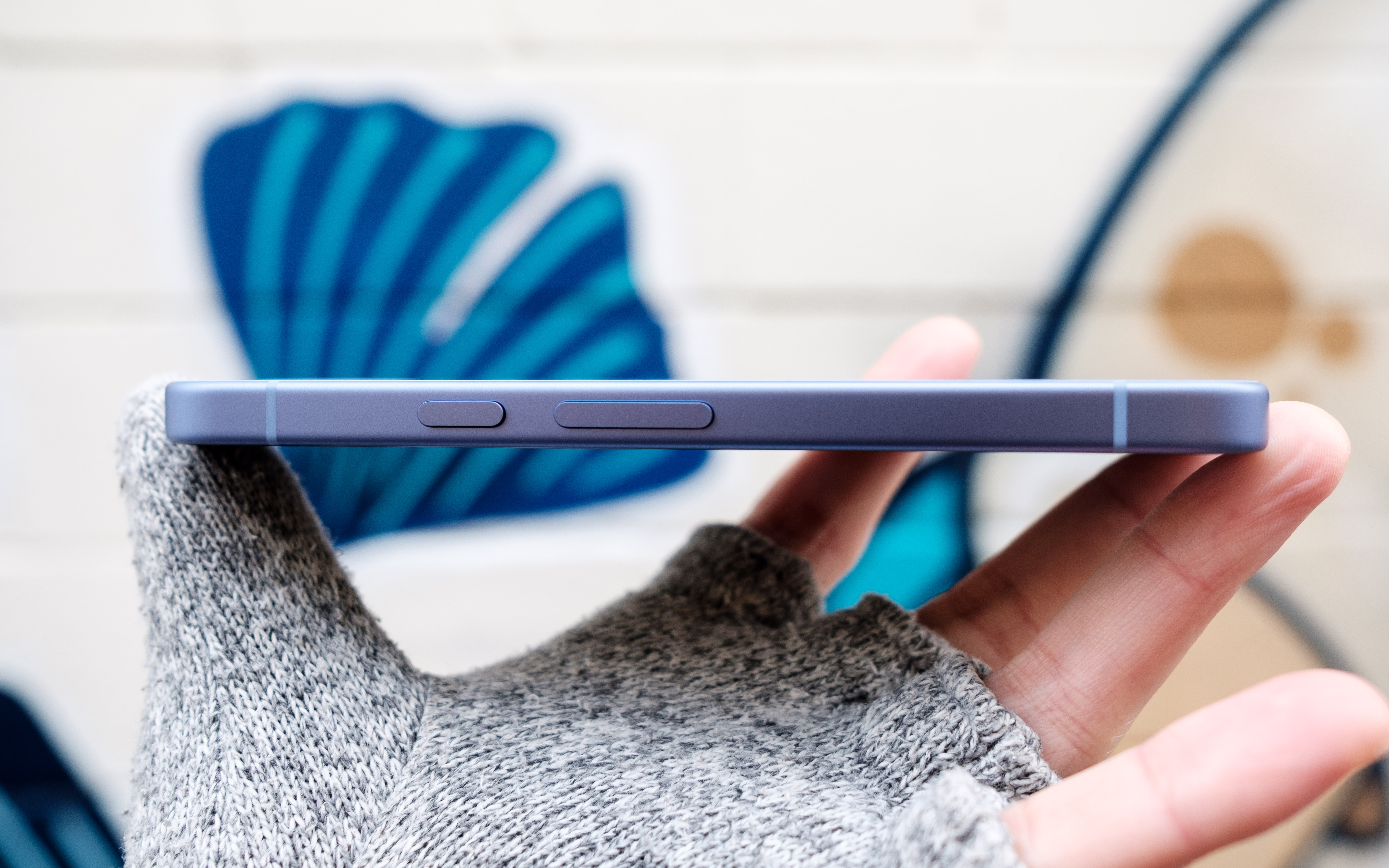
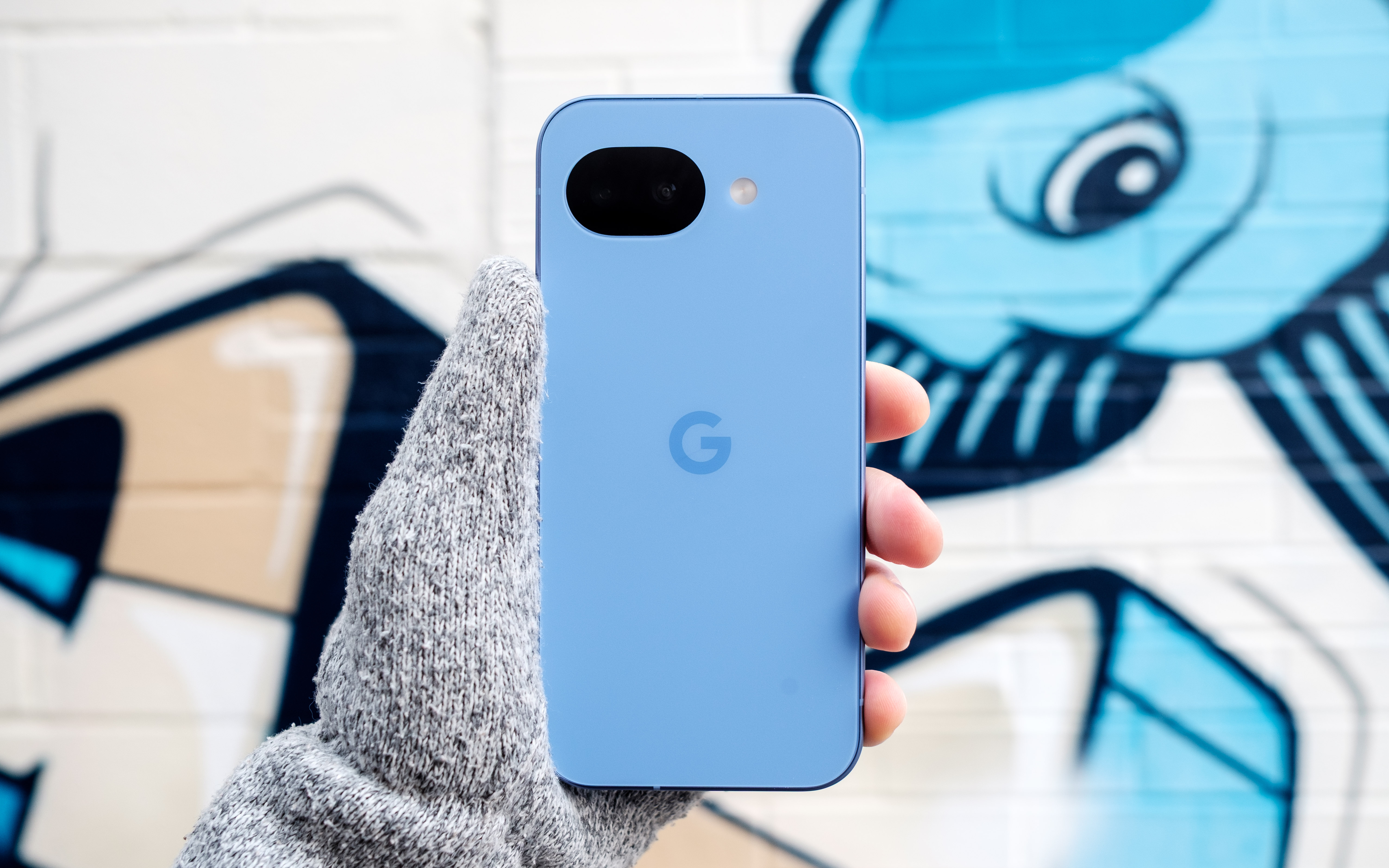
The story of the Pixel 10a is one of small changes, so let’s start with the outside. The phone is available in four colors: lavender (pictured), berry, fog and obsidian. Photos don't do the lavender color justice. In person, the light refracts beautifully off the surface of the aluminum frame and composite back. The back of the phone also has a pleasing matte finish that made the 10a feel secure in my hand. Another nice touch is that Google shaved down the camera module further, so that the 10a can now lie completely flat. As before, the entire phone is rated IP68-certified against dust and water. For DIY enthusiasts, Google has said it redesigned the 10a's internals to make it easier to repair. Hooray for that.
Beyond those changes, the 10a has a brighter 120Hz P-OLED screen that offers up to 3,000 nits of brightness, up from 2,700 on the 9a. The display also offers better protection against scratches and drops thanks to Google's decision to switch to Gorilla Glass 7i for the screen coating. Despite the minimal changes, there's not much to complain about here. The 10a's screen is fast, responsive and vibrant. The on-screen fingerprint sensor is also in an easy-to-reach spot toward the middle of the phone. After reviewing severalbigphones in recent months, it was also nice to go back to a handset with a sensible 6.3-inch footprint.
Performance and battery
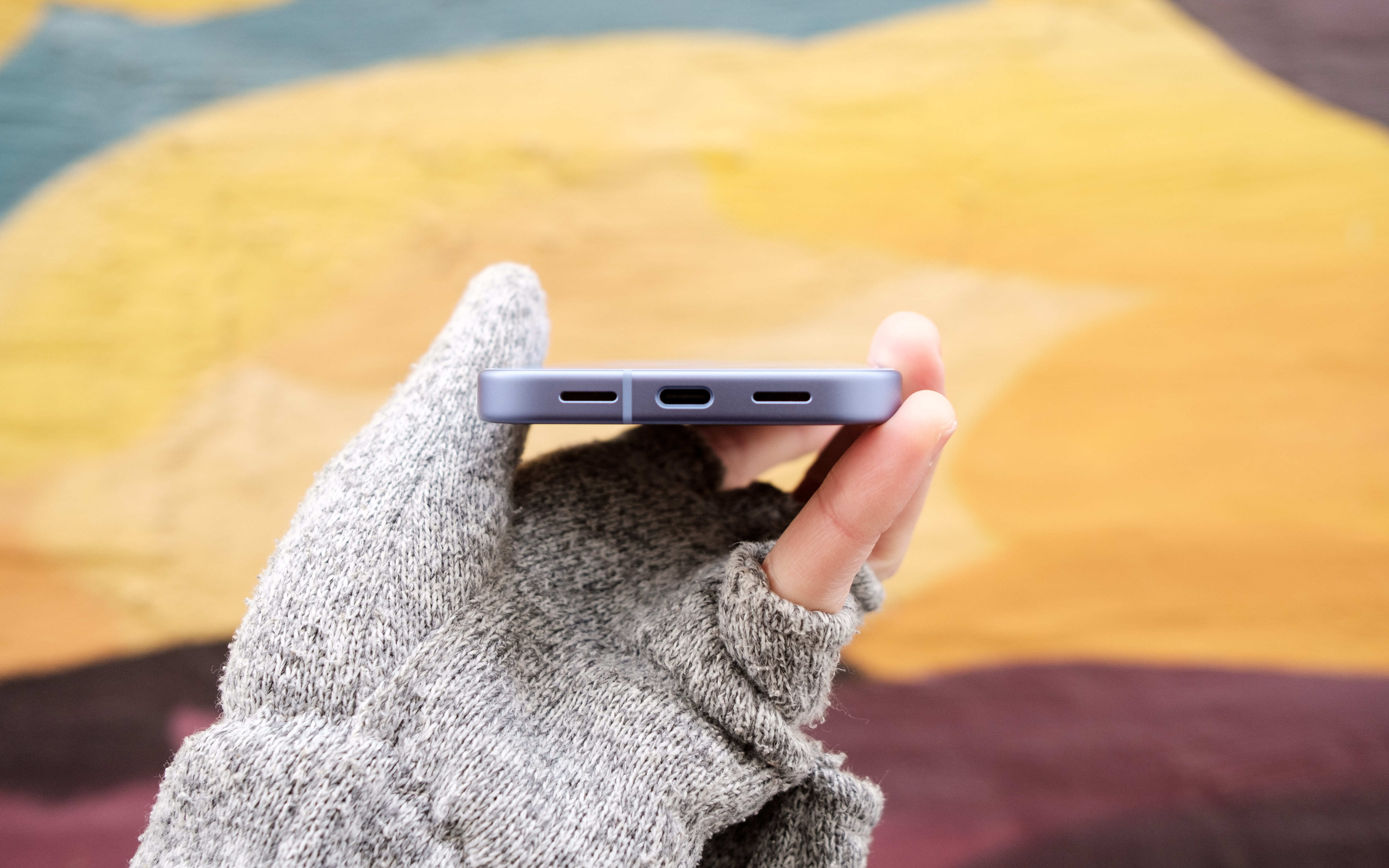
The speakers on the Pixel 10a could be stronger and more defined.
Igor Bonifacic for Engadget
I've been spoiled recently by phones like the OnePlus 15R, which offers a 7,400mAh battery and 55 watt charging out of the box. By that metric, the Pixel 10a, with its 5,100mAh battery, leaves something to be desired. Putting the phone through Engadget's video rundown test, it ran for 28 hours before the battery died, which is exactly where the Pixel 9a landed last year. However, that score means the 10a is thoroughly middle of the pack when it comes to battery life. I can also see battery life becoming a concern as the phone ages. While that's true of every phone, the 10a's smaller battery makes that more of a pressing concern since you'll be charging the phone more often and therefore degrading the battery faster.
Google has improved wired charging speeds, with the new phone capable of charging at 30 watts, up from 23-watts with the 9a. You'll need to provide a compatible power adapter though; the Pixel 10a doesn't come with one inside the box. With a 30 watt charger, the 10a's battery went from dead to about 50 percent in under 45 minutes. A full charge takes approximately an hour and 45 minutes. Again, not great, but serviceable.
Another disappointment is that the Pixel 10a doesn't support Google's new Pixelsnap standard. Wireless charging is faster on the new phone (it's now rated at 10 watts, up from five), but without a compatible third-party case, a charging puck won't magnetically align with the back of the 10a. It's not a dealbreaker, but Pixelsnap would have been a great addition.
The 10a has the same chipset Google used on the Pixel 9a, the Tensor G4, and the company has once again gone with 8GB of RAM. Other midrange phones like Samsung Galaxy S25 FE offer faster chips, but they also cost more. Moreover, I didn't feel like the 10a was worse for running on old silicon. The new 120Hz display does a lot to make the new phone feel snappy, and Google's in-house Android skin feels responsive as ever.
The 10a also does a commendable job of keeping heat in check. I sat down to play Diablo Immortaland even after an hour of playtime, the phone was still cool to the touch despite running the game at high settings and 60 frames per second.
Cameras
This time around, the Pixel 10a has a camera module that's flush with its body.
Igor Bonifacic for Engadget
The 10a comes with the same camera package as its predecessor. On the back, you get a 48-megapixel main camera with an f/1.7 lens that offers optical image stabilization and phase detection autofocus. Complementing it is a 13MP ultrawide with a 120-degree field of view. For selfies, you get a 13MP camera with an f/2.2 lens. As ever, Google's software is doing most of the heavy lifting here. That includes a pair of new features, Camera Coach and Auto Best Take, that debuted with the Pixel 10 series.
Camera Coach, like the name suggests, uses AI to analyze the scene you're about to capture, and offers tips on how to best compose and light the shot. It will also suggest the best camera mode for the job. While I can see how this tool could be useful, I found the fact it relies on a cloud model made it too slow for some situations. For example, when I used Camera Coach to help me snap a photo of my cat, a sassy tortoiseshell, she walked away by the time the 10a got a response from Google's servers. In more static scenes, Camera Coach is more useful, but much of photography is about capturing a fleeting moment in time, so its utility is limited.
Auto Best Take solves a problem I'm sure we've all experienced. You go to take a group portrait, and snap multiple frames to ensure everyone looks good, only to end up without a single usable shot. With Auto Best Take, Google promises to combine similar group photos so that everyone looks their best. This feature works as advertised.
Outside of those features, the 10a offers a predictably great camera experience. The phone consistently produces photos that are sharp with great natural colors. That said, I did miss having a telephoto camera, as you can see from the photos I shot during a recent Cat Power concert in Toronto. Given the 10a only costs $500, it's hard to fault Google for not including one.
Software
The Pixel 10a's side button can both activate Gemini and the phone's camera.
Igor Bonifacic for Engadget
Out of the box, the 10a comes with Android 16. Like all of Google's recent Pixel devices, the company has promised to support the 10a for an industry-leading seven years with software updates and security patches. The company's pledge includes Pixel Drops, which often bring new software features. One feature Google has brought over from the more expensive Pixel 10 line is Satellite SOS, which allows you to call for help during emergencies, even when your phone can't connect to a cellular network. Outside of a demo designed to make users aware of the feature, I wasn't able to test Satellite SOS (thankfully).
Notably, the 10a is still missing Google's Screenshots app. That's unfortunate since it's one of the more useful Pixel exclusives, making it easier to organize all your online clippings. Other AI features such as Gemini Live and Circle to Search are accounted for, and as useful ever.
Wrap-up
Overall, the Pixel 10a is a great phone, though I would have loved to see more year-over-year upgrades.
Igor Bonifacic for Engadget
The Pixel 10a is a tricky phone to grade. On the one hand, part of me wants to dock points because Google has added so few updates. On the other, the 10a is still a great phone for $500, and at a time when consumer electronics are becoming more expensive by the day, the fact it hasn't gone up in price is a small miracle. Even if Google is partly responsible for the current memory crunch, the company's hardware division has delivered an affordable device that’s still worth recommending. The Pixel 10a is still the phone to beat in the $500 range.
This article originally appeared on Engadget at https://www.engadget.com/mobile/smartphones/google-pixel-10a-review-small-changes-but-still-great-value-173026779.html?src=rss
Anthropic is bringing another paid feature to Claude's free tier. The next time you chat with Claude, you'll have the option to have it reference your previous conversation to inform its outputs. Anthropic first made its chatbot capable of remembering past interactions last August, before giving it the ability to compartmentalize memories in the fall. Making memory a free feature is well-timed; earlier today Anthropic made it easier for users to import their past conversations with a competing chatbot to Claude. If after enabling memory you decide to turn it off, you can either pause the feature, preserving Claude’s memories for use down the road, or completely delete them so they’re not saved on Anthropic’s servers.
Claude is enjoying new-found popularity, having recently jumped to the number one spot in the App Store's free app charts. This comes while Anthropic is engaged in a high-stakes contract dispute with the US government over AI safeguards. On Friday, US Defense Secretary Pete Hegseth labeled the company a "supply chain risk" after it refused to sign a contract that would allow the Pentagon to use Anthropic models for mass surveillance against Americans and in fully autonomous weapons. Following Hegseth's announcement, Anthropic vowed to challenge the designation. As of right now, we’re waiting to see how things play out, and what it might mean for Anthropic.
This article originally appeared on Engadget at https://www.engadget.com/ai/anthropic-brings-memory-to-claudes-free-plan-220729070.html?src=rss