What if you could take a powerful AI model and make it uniquely yours, tailored to solve your specific challenges, speak your industry’s language, or even reflect your personal style? That’s the promise of fine-tuning, a process that transforms generalized AI into a specialized tool designed to excel in precisely the areas you care about […]
If you want to expand the storage of your Nintendo Switch 2, you’ll need a microSD Express card. This is not the same as the more traditional microSD cards you may have bought for the original Switch or other gaming handhelds; Express cards are newer, faster and significantly more expensive on average. But they’re your only choice, and given how much space certain Switch 2 games chew up, you’ll probably have no choice but to get one eventually. Which to buy, though? If you’re looking for the best microSD card for the Switch 2 today, we’ve broken down what you should know before taking the plunge.
The best microSD cards for the Switch 2 (aren't all that important)
After timing these microSD Express cards across a range of Switch 2 games, our advice is simple: Get whichever one is in stock for the lowest price in the capacity you want. They aren’t identicallyfast, especially if you want to move a game to the card from the console’s internal storage (or vice versa). But the differences in load times and overall performance within actual games are tough to notice unless you have a stopwatch handy.
All five cards loaded up the digital version of Mario Kart World, for instance, between 18 and 20 seconds. Each loaded the first Grand Prix race in about 6.5 seconds. Getting to the start screen of Cyberpunk 2077took about 38 or 39 seconds in each case. Loading a save in a particularly asset-heavy area (Jig-Jig Street) then took between 26 and 29 seconds, depending on the card. (The one exception was with the Onn card, which averaged closer to 31 seconds with that particular task, though that’s also the cheapest choice.)
With Fast Fusion, a smaller native Switch 2 game, the initial load always took six to seven seconds, while each card loaded the first championship race in roughly 4 seconds. It was a similar situation with the Switch 2 upgrade for The Legend of Zelda: Breath of the Wild (using a Switch 1 cartridge): Each card took just over six seconds to get to the start screen, between 19 and 20 seconds to load a save just before the final boss, about 16 seconds to fast travel between Kakariko Village and Korok Forest, and so on. We saw no significant issues with in-game loads when playing each game, either.
The SanDisk microSD Express Card and Lexar Play Pro.
Jeff Dunn for Engadget
All of this suggests that the Switch 2 has a relatively specific target for these cards to hit, and that there may not be much room for one model to leap too far out in front of the others. We’ll also note that the console’s built-in storage was consistently faster than any external option: The gap wasn’t always big, but no card truly outpaced it in any of our tests. Loading that demanding area in Cyberpunk, for example, took about 22.5 seconds on average. So if you want the absolute fastest load times, don’t put your game on a card at all.
If you need the mental comfort of knowing you technicallyhave the best card available, get the SanDisk microSD Express Card. It had no outliers across our many game loading tests, and it was consistently right near the top when it came to moving games to and from system storage, which means it offers strong sequential read and write performance. Benchmark testing on PC with tools like CrystalDiskMark backed this up, as noted in our broader microSD card buying guide.
Putting Mario Kart (a 21.9GB file) on that card took four minutes and 39 seconds on average, which was only second to the Lexar Play Pro by six seconds. It was the fastest to write Fast Fusion (3.5GB), taking an average of 27 seconds across three runs. Only PNY’s card was faster to move games back to the console’s storage, but that one was far slower at writing games to the card — getting Mario Kart on there took seven minutes and 11 seconds on average. Just note that the 128GB version of SanDisk’s card has slower sequential writes than the larger versions, including much slower sustained write speeds (100 MB/s vs 210-220 MB/s). So transferring a game to that particular model will take much longer. The Onn card was also slower to move games back to system storage, taking about 50 seconds more than the SanDisk with Mario Kart and nearly three minutes longer with Cyberpunk.
Practically speaking, though, speed differences aren’t as important in this case as having lots of space to hold games at a price you can live with. To make things easy, we’ve listed every Express card we’ve seen at retailers at the time of writing below. Remember: You want microSD Express, not “Extreme,” like the branding SanDisk uses for some conventional microSD cards. A microSD Express card will have a big “EX” logo printed on it.
All microSD Express cards will have this "EX" logo printed on them.
Nintendo/Engadget
As you can see, while the SanDisk card is fast, it’s also the most expensive of an already-pricey bunch. Is it worth an extra $10-20 to shave a couple seconds off certain loads in certain games, or a couple minutes when moving a game to external storage? Probably not for most people.
But stock for all of these cards has been a bit patchy since the Switch 2 landed, particularly for the Walmart Onn model, which has typically been the cheapest choice. More recently, the GameStop-branded cards seem to have sold out too. If only one card is actually available by the time you read this — and you must have it today — it’s safe to just get it. You won’t lose or gain all that much when it comes to real-world performance.
We’ve recommended holding off on buying a microSD Express card for as long as possible in previous updates to this guide, and ultimately each model above should still come down in price over time. We saw multiple Express card discounts during Black Friday and Cyber Monday, for instance.
But between President Trump’s tariff hikes and the ongoing AI-driven shortages for memory and high-capacity storage, you’d be justified if you wanted to grab the largest card you can reasonably afford sooner rather than later. These things are still pricey compared to traditional microSD cards: The Samsung Pro Plus, for example, costs $17 for 128GB, $27 for 256GB, $50 for 512GB and $95 for 1TB as of this writing. And ideally, we’ll see more high-capacity options down the road: Nintendo says the Switch 2 technically supports cards up to 2TB, but so far only a couple even go up to 1TB. You should still try to use all 256GB baked into the Switch 2 first, even if it means having to delete a game or two. But if you absolutely need more space right away, the cards above should be fine today.
What are microSD Express cards?
A microSD Express card like the one on the right has a second row of pins on the back.
Jeff Dunn for Engadget
Most microSD cards are based on a standard called Ultra High Speed (UHS), of which there are three versions: UHS-I, UHS-II and UHS-III. The vast majority of cards you may have bought in the past utilize UHS-I. These have one row of pins in the back and a theoretical maximum data transfer speed of 104 megabytes per second (MB/s). (Though many cards are able to surpass that limit with proprietary tech and card readers.) The original Switch has a UHS-I microSD slot, as do most other gaming handhelds like Valve’s Steam Deck.
UHS-II cards add a second row of pins and can reach up to 312 MB/s. These are pricier and much less common than cards based on UHS-I, but they’re supported by some cameras and higher-power handhelds like the ASUS ROG Xbox Ally X. UHS-III, meanwhile, is twice as fast as UHS-II in theory (624 MB/s), but no microSD cards have actually used it.
UHS-I cards have held on over the years because they’re cheap, widely supported and fast enough for the things most people need them to do: record 4K video, stash photos and so on. But with the Switch 2, Nintendo needs more. The new console is dramatically more powerful, which allows it to run demanding games that may have originally been built for stronger hardware like the PlayStation 5, Xbox Series X or gaming PCs. The device also usesUFS 3.1 storage internally, which is much speedier than the eMMC storage used by the original Switch. (A custom file decompression engine helps improve load times as well.) So if the Switch 2 is going to accept microSD cards, it needs ones that won’t bring a serious drop-off in performance and can hold up with modern games.
The Nintendo Switch 2.
Sam Rutherford for Engadget
Hence, SD Express. This standard has technically been around since 2018 but mostly went nowhere until the Switch 2 came along. It also uses a second row of pins, but it lets microSD cards take advantage of the PCI Express (PCIe)/NVMe interface, which is the same underlying tech used by modern SSDs. As a result, it can produce considerably faster read and write speeds, with a current theoretical maximum of 985 MB/s.
As noted above, real-world performance won’t be quite that fast. Even if it was, the best microSD Express cards would still be much slower than the NVMe SSDs used by the PS5 and Xbox. (Sony recommends SSDs with sequential read speeds of at least 5,500 MB/s.) And they’ll fall well below their peak speeds under sustained loads: SanDisk, for instance, says sustained write speeds for its 128GB Express card can drop as low as 100 MB/s.
But they’re still a marked improvement over old UHS-I cards, and in theory, they should be quicker than some older SATA-based SSDs when it comes loading game levels, asset streaming, retrieving saves or copying games to external storage. Whereas SanDisk’s microSD Express card can produce sequential read speeds around 900 MB/s, Lexar’s Professional Silver Plus — the top UHS-I pick in our general microSD card guide — topped out just over 200 MB/s, and that’s with a proprietary reader. (On the first Switch, it’d be closer to 100 MB/s.) Sequential writes and random speeds were three to four times better as well, and sometimes even more depending on the benchmark we used.
It remains to be seen how well these Express cards will hold up with years of use, and there’s no way to know exactly when their sky-high prices will drop. Non-Switch 2 devices that support microSD Express are still exceedingly rare, and the standard itself isn’t backwards compatible with UHS-II, so you’ll be limited to UHS-I speeds if you want to use your card with another device (unless you buy a pricey external reader). Still, while the increased costs and limited selection are annoying, the tech itself is worthy of a next-gen Switch.
How we test microSD Express cards
Jeff Dunn for Engadget
We put our microSD Express cards through a series of tests meant to simulate how people would use each card on the Switch 2 in the real world. We mainly worked with four games: a mid-sized title in Mario Kart World, a small one in Fast Fusion, a relatively large one in Cyberpunk 2077 and a hybrid in The Legend of Zelda: Breath of the Wild, which ran off a Switch 1 cartridge but used a roughly 10GB Switch 2 upgrade pack that was downloaded and installed digitally.
We first timed how long it took to move each game from the system’s internal storage to the card in question, and vice versa. We then timed how long it took to load each game when installed to a given card. After that, we measured how quickly the cards could load certain in-game scenarios: the first Grand Prix race in Mario Kart; the first championship race in Fast Fusion; fast traveling between the Jig-Jig Street, Embers and Downtown Central areas in Cyberpunk and fast traveling between the Kakariko Village, Korok Forest and the Hyrule Castle Town Ruins areas in Zelda. (We chose those places in the latter two games because they’re more taxing than other regions.) With Cyberpunk and Zelda, we also timed how long it took to load up different save files in those locations.
With each test, we completed three to five runs to account for any irregularities and marked down the average time taken between them. We did each test in airplane mode, with Wi-Fi and Bluetooth off, to minimize any performance drain that could arise from background downloads. Between each test, we also spent at least an hour playing the games off each card to ensure there were no significant drop-offs compared to the console’s built-in storage.
Recent updates
December 2025: We’ve tested Samsung’s P9 Express card, though our general shopping advice for this market remains the same.
November 2025: We’ve tested the 256GB version of Walmart’s Onn microSD Express card and edited our guide accordingly. It’s generally slower than most of the other options we’ve tried, especially when moving games to and from system storage, and in synthetic benchmark tests on a PC. But the performance drop-off isn’t particularly noticeable in actual Switch 2 games, so if you see it in stock and just want to pay as little as possible, it’s a decent buy.
September 2025: We’ve taken another pass through this guide to confirm our advice is still accurate. We’ve also noted a new 512GB version of PNY’s microSD Express card and confirmed that a “SanDisk GamePlay” Express card sold at Walmart has the same performance as the standard SanDisk model we recommend above, just with a different name.
This article originally appeared on Engadget at https://www.engadget.com/gaming/nintendo/best-microsd-cards-for-nintendo-switch-2-160052947.html?src=rss
Apple is preparing to release iOS 26.1, the first major update to its latest operating system, iOS 26. This update brings a variety of enhancements aimed at improving performance, introducing new features, and addressing user feedback. With the release expected within the next 24 to 48 hours—likely on November 3rd or 4th—it is important to […]
Have you ever felt overwhelmed by a sea of browser tabs, each one competing for your attention and slowing down your workflow? For many, this chaotic reality is a daily struggle, leading to wasted time and mounting frustration. Enter the scrolling tabs feature in ChatGPT Atlas, a innovative approach to tab management that promises to […]
Imagine a world where 99% of your project management tasks, those endless hours spent drafting briefs, assigning tasks, and compiling updates, could be handled effortlessly by an AI assistant. Sounds too good to be true? It’s not. With the rise of tools like ChatGPT, project managers are discovering a fantastic way to streamline their workflows […]
Apple’s highly anticipated November event is generating significant excitement, with leaks pointing to major updates across its product lineup. From advanced chip technology to smarter connectivity and enhanced displays, the event promises to introduce innovations that could redefine how you interact with Apple’s ecosystem. Here’s a closer look at what these developments could mean for […]
Apple’s iOS 26.1 update introduces a range of improvements designed to enhance your device’s performance, usability, and customization options. Whether you’re using the latest iPhone or an older model, this update addresses critical concerns such as battery life, overheating, and interface fluidity. Additionally, it introduces new features that elevate both functionality and aesthetics. Below is […]
The iPhone Air, Apple’s thinnest and lightest smartphone to date, represents a daring step forward in design. With its ultra-slim profile and lightweight build, it caters to users who prioritize portability and aesthetics. However, this bold approach comes with significant compromises in areas such as performance, battery life, and functionality. The video below from ZONEofTECH […]
The vivo X300 Pro and iPhone 17 Pro Max represent two of the most advanced smartphones available in 2025, each excelling in distinct areas to cater to different user preferences. The vivo X300 Pro emphasizes photography excellence and battery performance, while the iPhone 17 Pro Max focuses on a seamless software ecosystem and superior video […]
Most of us have struggled with key rings that jam in your pocket, carabiners that tangle with everything else in your bag, or split rings that pop open at the worst possible moment when you’re rushing to unlock something important. Everyday carry should be about readiness and preparation, not frustration and fumbling with gear that fights you instead of helping you stay organized and efficient throughout your day.
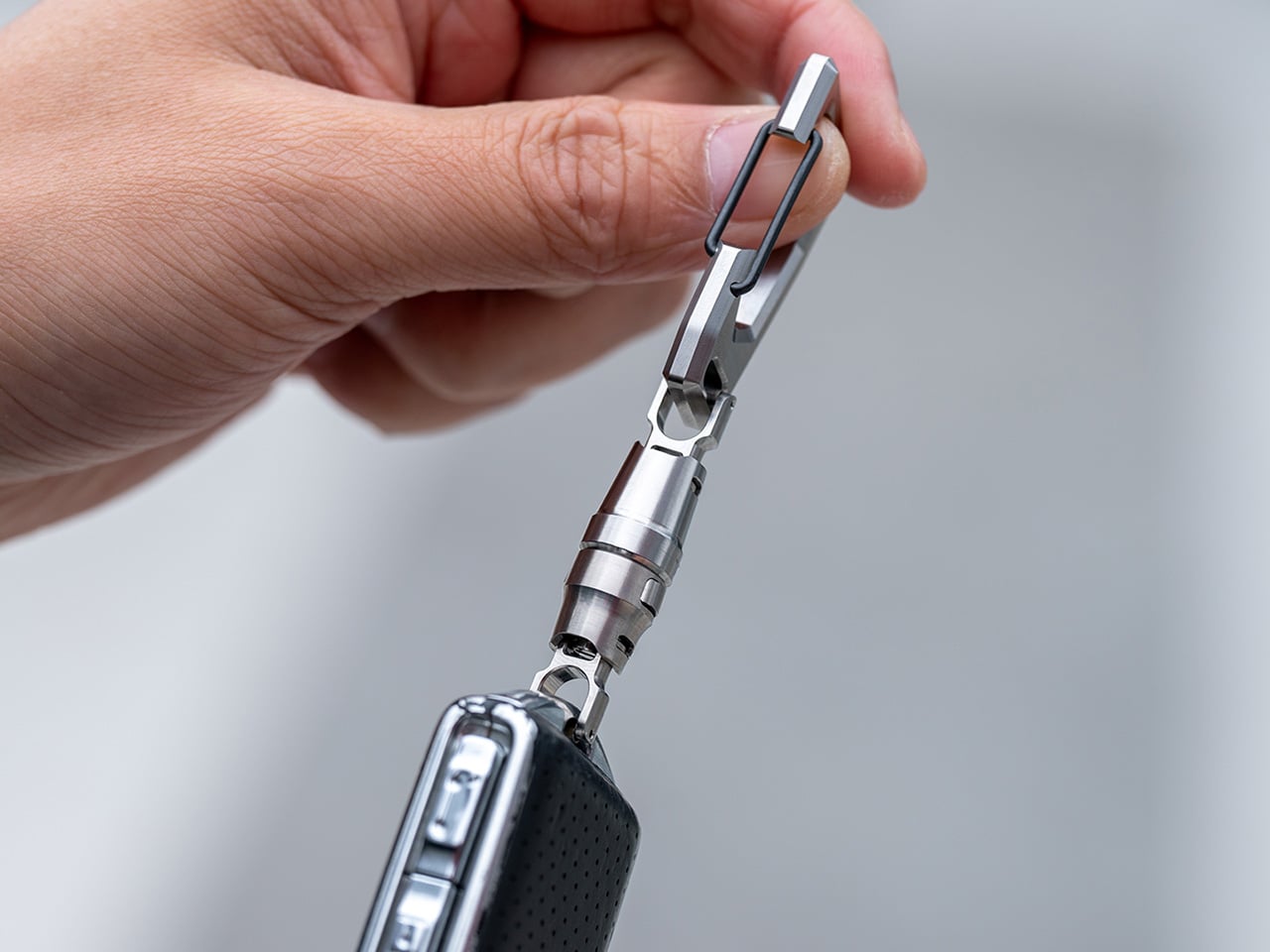
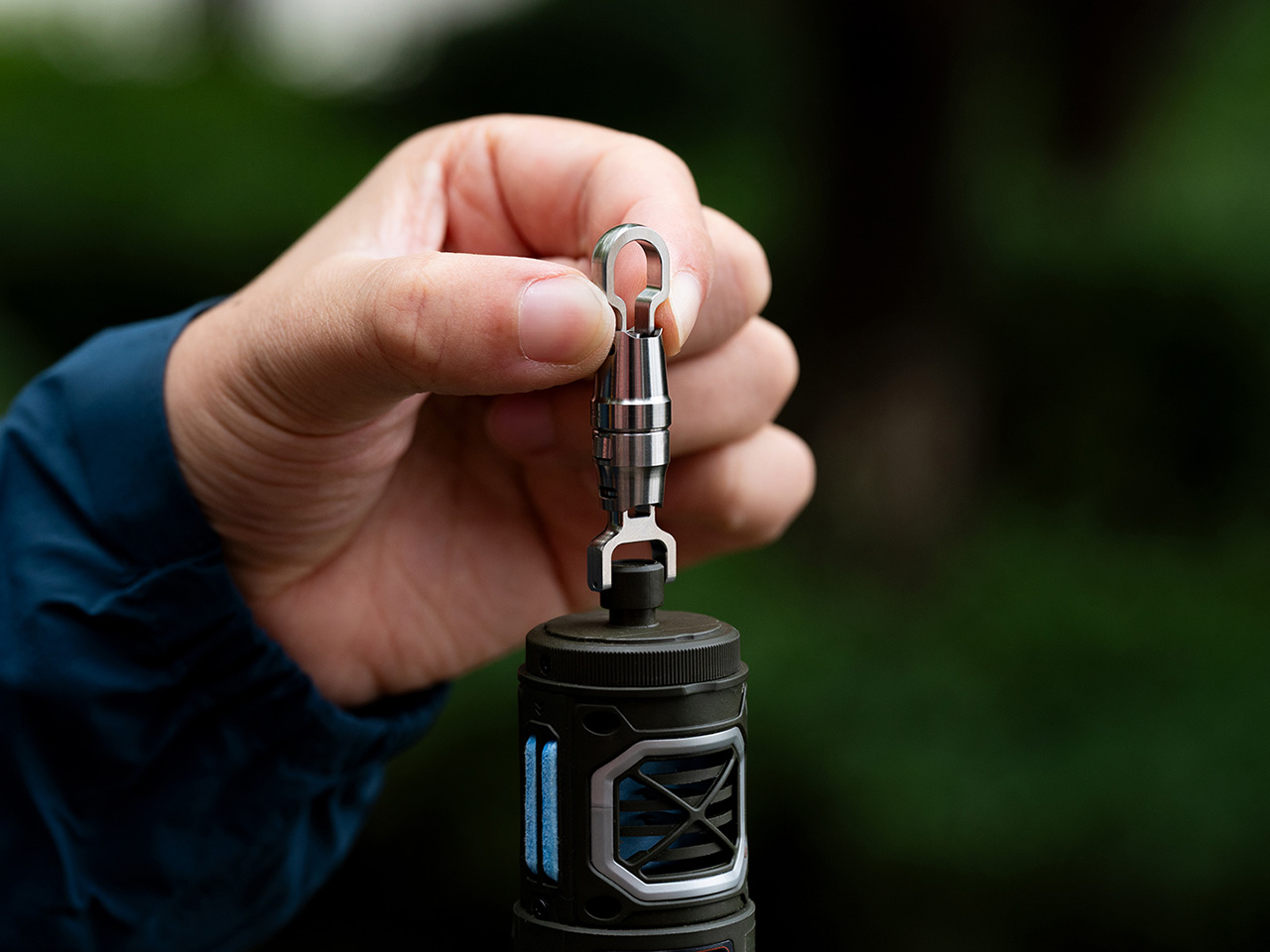
The Titaner Quick-Release EDC Carry System offers a completely different approach by blending aerospace-grade GR5 titanium, a patented magnetic-mechanical lock, and a modular design that adapts to your gear and your daily routine without adding unnecessary bulk or complexity. It features four sub-connectors that support various carrying use cases, from everyday carry to professional outdoor gear. Best of all, it feels as good as it looks, engineered to disappear into your pocket until the exact moment you need quick, one-handed access to whatever you’re carrying.
Crafted entirely from GR5 titanium, the Titaner system manages to be both ultra-light and incredibly strong for its compact size. Each connector is CNC-machined with precision tooling and finished with careful attention to edge smoothness, available in your choice of stonewashed, machine, or bold anodized finishes in yellow and blue. The result is gear that feels warm and tactile rather than cold and industrial.
The minimalist form follows function precisely without wasting a single millimeter on unnecessary features or decorative elements. Weighing just 6.5 grams, lighter than two sheets of paper, the main connector is barely noticeable in your pocket yet tough enough to survive years of daily use and harsh outdoor environments without failing. The titanium construction means it will never rust, discolor, or irritate your skin during extended contact with sweat or seawater.
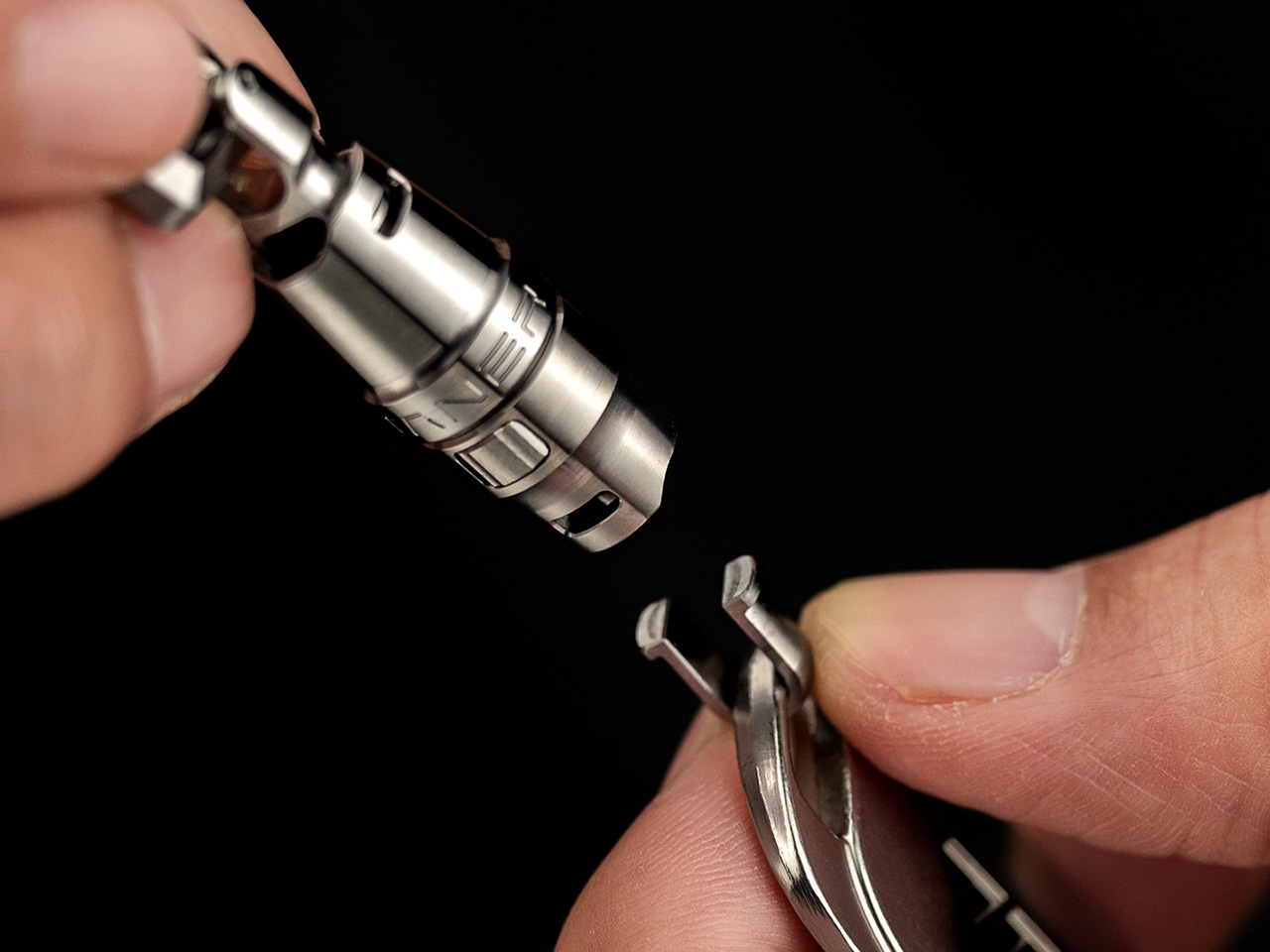
The heart of the system is a patented dual-action lock combining an N56 neodymium magnet for effortless alignment with a physical GR5 titanium lock for absolute security you can trust completely. Connecting your gear is as simple as snapping the pieces together with a satisfying, audible click that confirms proper engagement, but releasing them requires a deliberate press and 90-degree twist motion that prevents accidental detachment.
This dual-action approach ensures your keys, tools, or tech never detach by accident during daily activities, no matter how much you pull, shake, or jostle your bag during commutes, hikes, or outdoor adventures. The connector maintains its hold through vibration, snagging, and heavy use in demanding conditions, providing peace of mind for carrying expensive equipment you can’t afford to lose unexpectedly or replace on short notice.
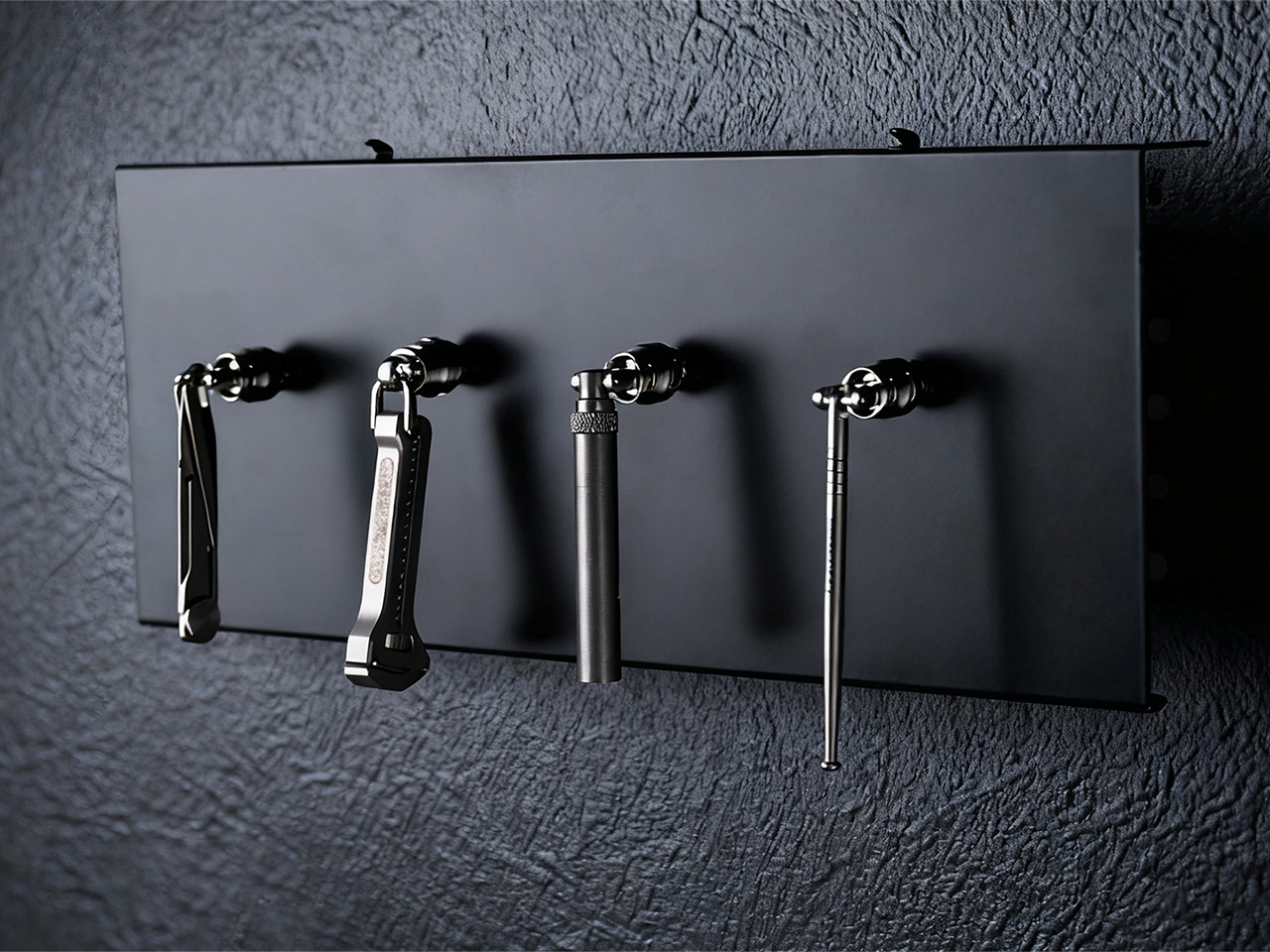
The newly launched EDC Connector modular system eliminates the need for traditional key rings entirely through four distinct sub-connector types that attach directly to the main buckle. This direct-attach approach removes bulk, weak points, and the annoying jingle that comes with metal rings clanking together in your pocket. Each sub-connector is purpose-built for specific carry needs, from single items to webbing straps, letting you build a setup that actually makes sense for your lifestyle.
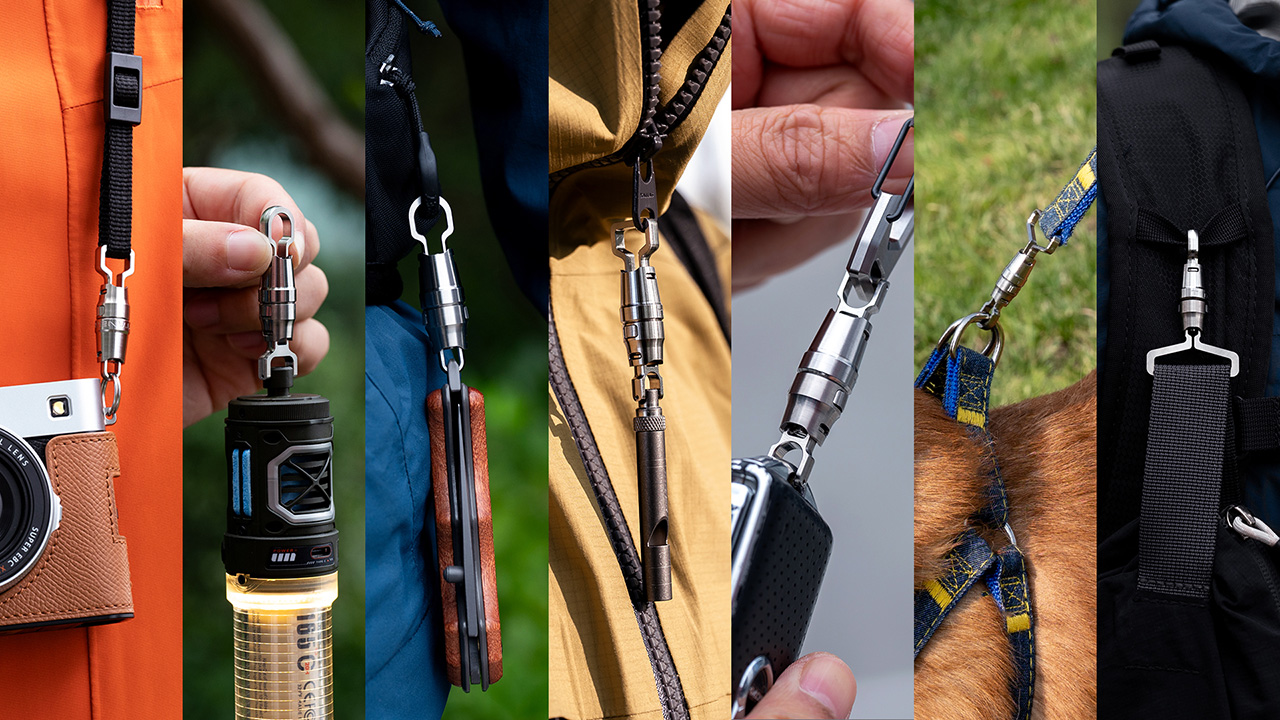
There are four types of sub-connectors that work seamlessly with the main buckle for different purposes. The U-Series provides balanced carry for single items, the X-Series features a reinforced titanium pin for tools with small attachment holes, the D-Series stacks keys quietly like pages in a book for flat carry, and the E-Series creates ultra-stable anchor points for webbing and backpack straps.
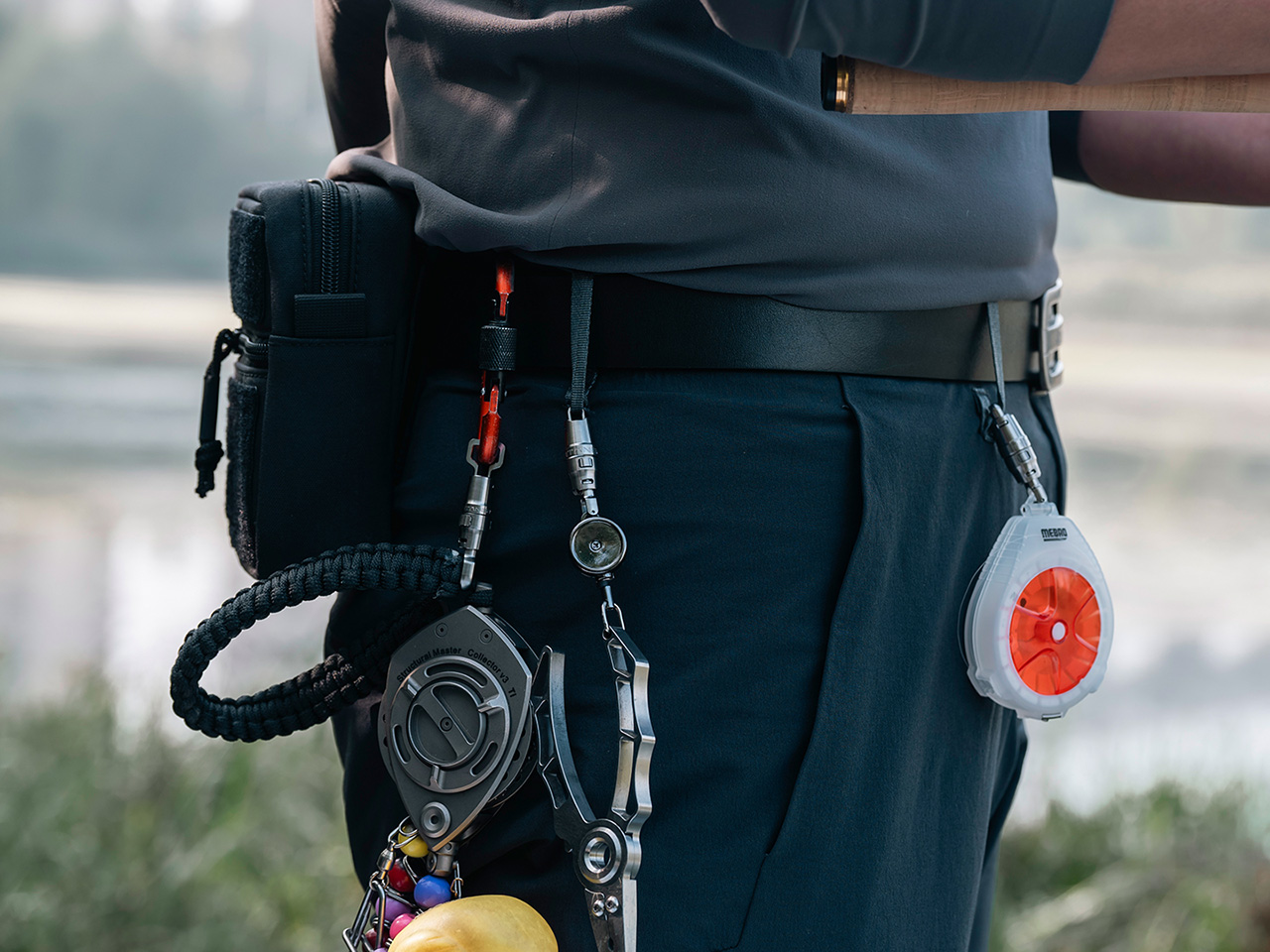
Whether you’re organizing house and car keys for daily commutes, hanging a flashlight or multitool from your belt, attaching gear to a backpack for outdoor adventures, or keeping pet tags secure during walks through the neighborhood, the system adapts seamlessly to different scenarios throughout your day. The 360-degree swivel keeps everything tangle-free and automatically positions gear in the most convenient orientation for immediate, effortless access.
Every edge is finished smooth for absolute comfort, and the connector’s action is so precise and crisp that you’ll find yourself clicking it open and closed just for the tactile satisfaction and stress relief it provides. The titanium is hypoallergenic and completely corrosion-resistant, maintaining its appearance and performance even after years of sweaty hikes, rainy commutes, or daily handling without showing degradation or requiring special maintenance.
The finishes let you match your gear to your personality and specific use case preferences. Stonewashed provides a rugged texture that hides daily wear and tells your adventure story, machine finish showcases pure titanium with clean technical elegance, and anodized versions make a bold visual statement with vibrant color that distinguishes your carry from typical EDC gear most people settle for every day.
The Titaner Quick-Release EDC Carry System delivers minimalist design, technical innovation, and everyday practicality in a package that feels both premium and approachable for serious users who demand quality. For anyone who wants their gear to be as reliable and refined as the rest of their daily routine, this titanium connector system offers a thoughtful alternative to the clunky key rings and unreliable split rings most people simply tolerate.