Valve Steam Frame Streams PC VR Free from Stutters in All-Day Test

Valve Steam Frame Streams PC VR Free from Stutters in All-Day Test Valve Steam Frame tested during seven days of intensive gaming usage

Roughly a full day of PC VR streaming without disconnects or stuttering: that’s what Valve’s Steam Frame delivered in testing. The headset also runs VR and flat-screen Steam games without a PC, so you can play games from your existing library. Steven Sullivan spent seven days with it, finding comfortable wear and strong VR performance, […]

The post Valve Steam Frame Streams PC VR Free from Stutters in All-Day Test appeared first on Geeky Gadgets.

Posted in Uncategorized

CarScreen Lands on the App Store to Bring YouTube & Video to CarPlay

CarScreen Lands on the App Store to Bring YouTube & Video to CarPlay CarScreen

After months of development and testing with thousands of TestFlight beta users, CarScreen: Video & Navigation (commonly referred to as CarScreen) has officially arrived on the iOS App Store. Built with SwiftUI by an independent developer, the app gives iPhone drivers a direct software option for streaming YouTube and loading custom media feeds on compatible […]

The post CarScreen Lands on the App Store to Bring YouTube & Video to CarPlay appeared first on Geeky Gadgets.

Posted in Uncategorized

Set Up Apple Notes in iOS 27 to Link and Organize Long Notes

Set Up Apple Notes in iOS 27 to Link and Organize Long Notes Apple Notes note-taking app upgraded with new text organization features

Apple Notes now lets you link directly to sections of a note in iOS 27, iPadOS 27 and macOS 27, so you can jump to the information you need instead of scrolling. You can also use Shortcuts to add text under a specific heading, rather than just at the start or end. Notes brings text, […]

The post Set Up Apple Notes in iOS 27 to Link and Organize Long Notes appeared first on Geeky Gadgets.

Posted in Uncategorized

Why Steam Deck Stutters in Heavy Games and How Valve Could Fix It

Why Steam Deck Stutters in Heavy Games and How Valve Could Fix It Valve Steam Deck handheld expecting a shader compilation stutter fix

A proposed Linux fix for Valve’s Steam Deck aims to reduce the stutter that interrupts games as they render frames. Deck Ready reports that the approach would stop memory housekeeping from holding up rendering. It tackles a different cause from the shader compilation stutter many players know from Unreal Engine 5 games, and it is […]

The post Why Steam Deck Stutters in Heavy Games and How Valve Could Fix It appeared first on Geeky Gadgets.

Posted in Uncategorized

The ATP Finals Skywalk Let Players Move Without the Crowds

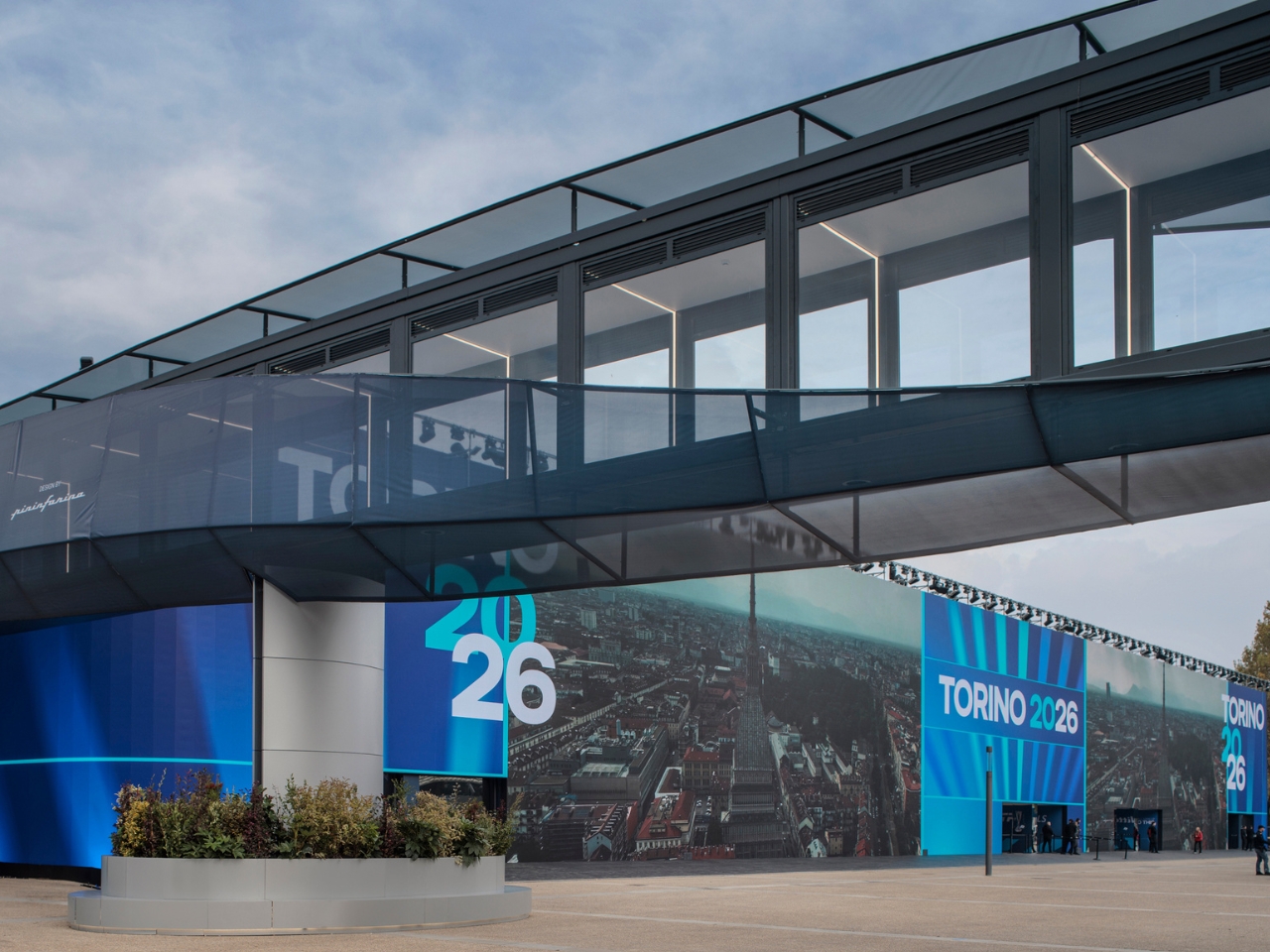
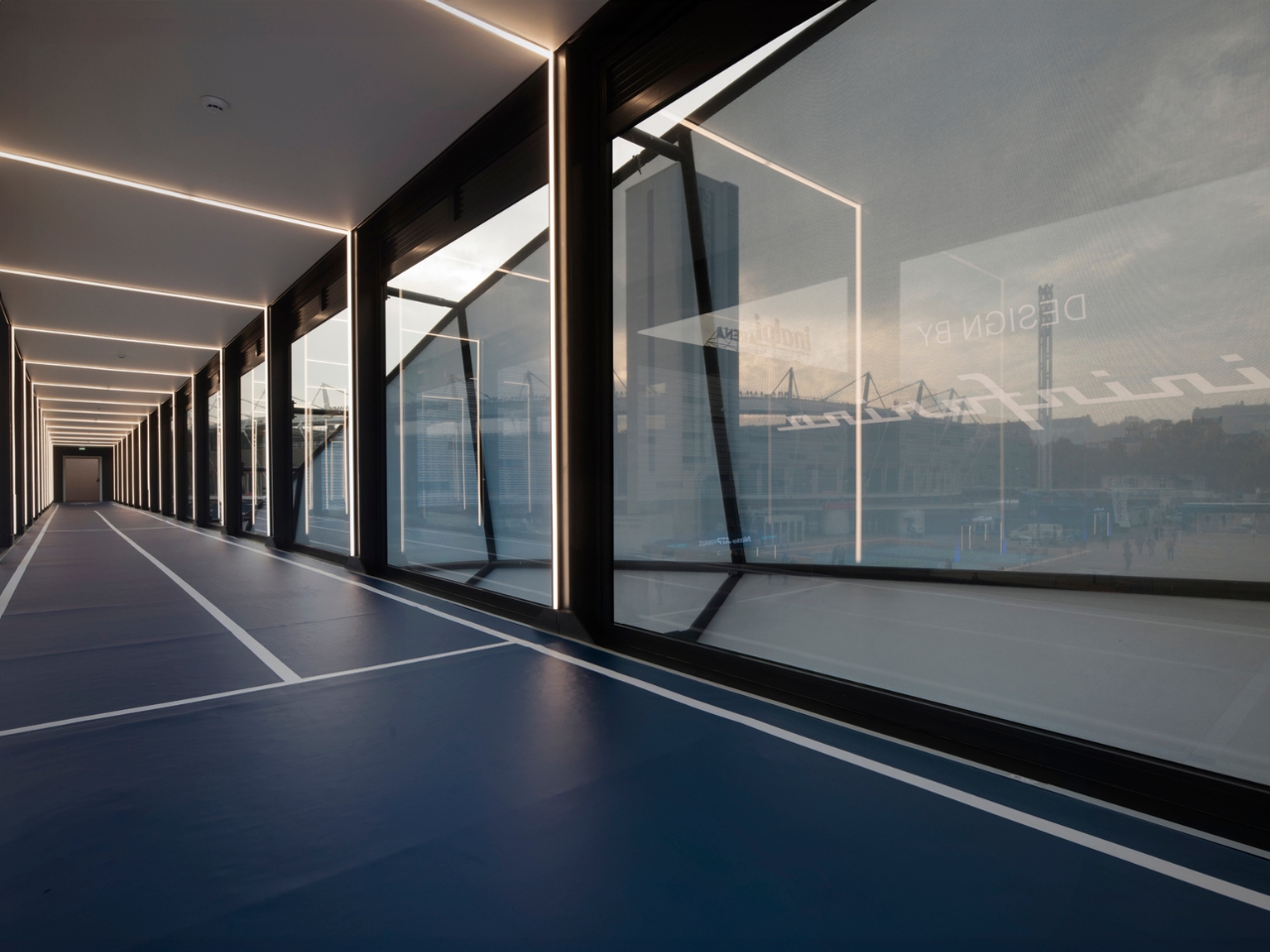
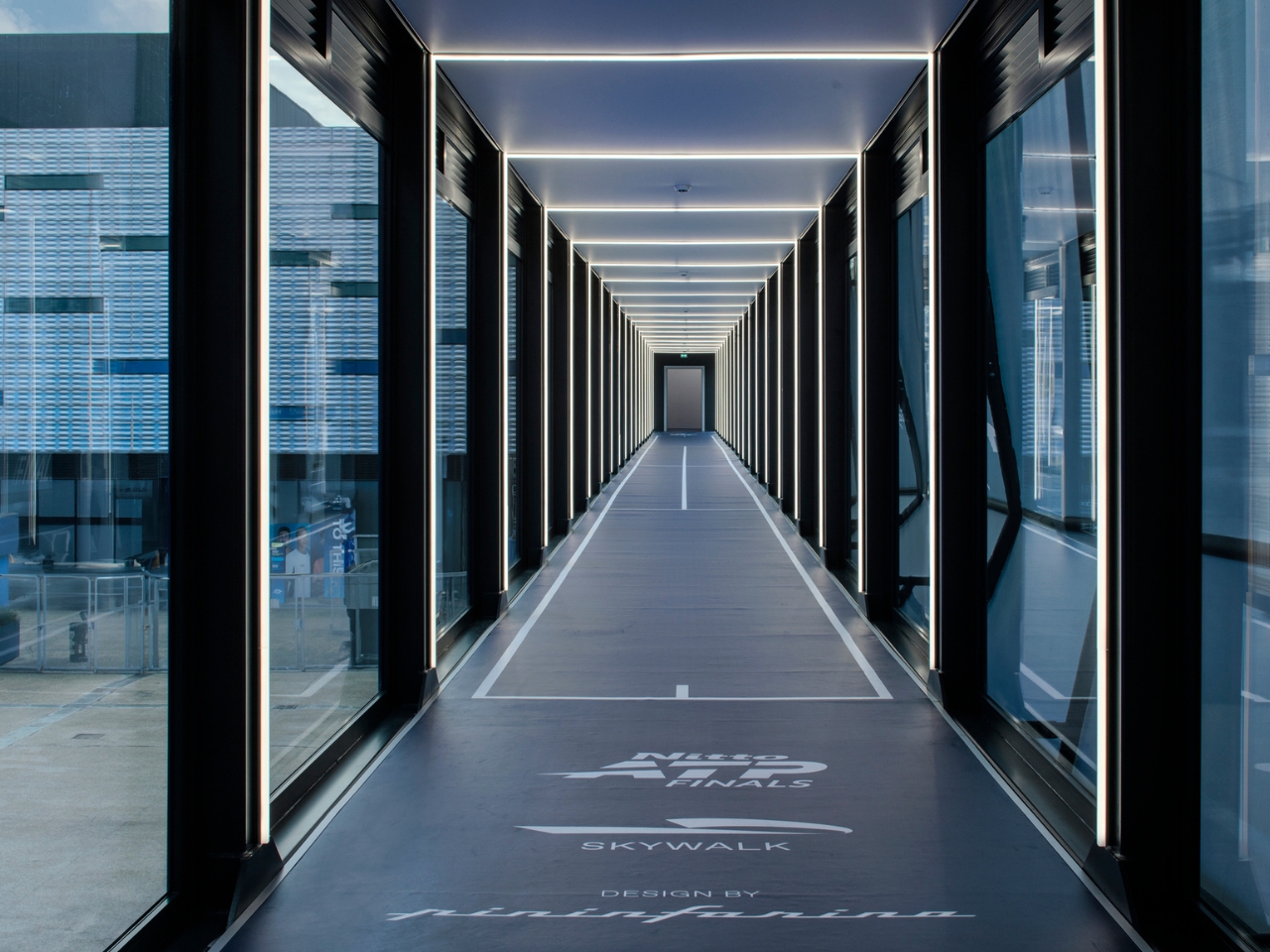
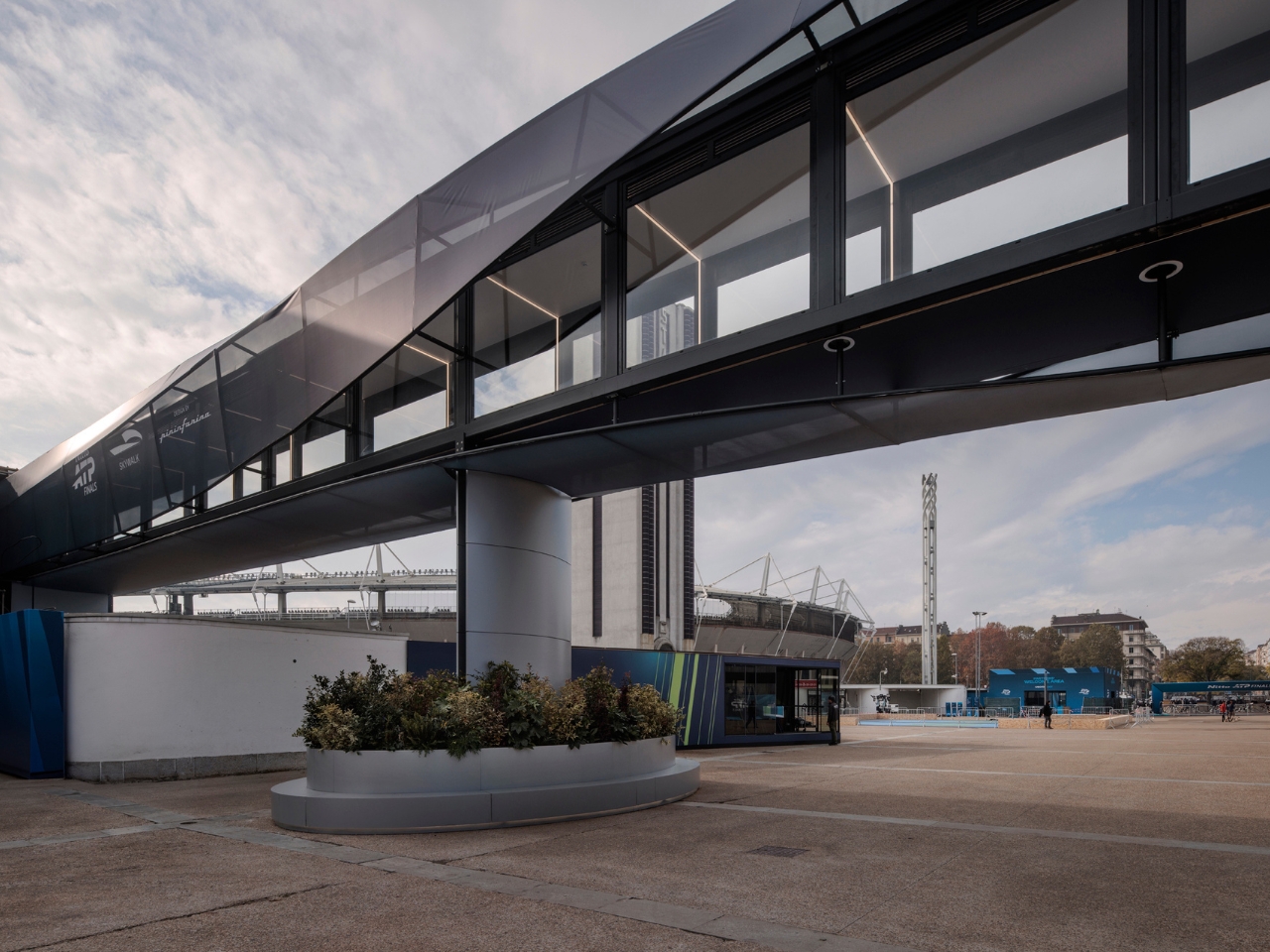
White tennis court lines run down the blue floor of Pininfarina’s Skywalk in Turin. Look through the windows and the perspective gives the game away: the plaza is about 20 feet below. The nearly 200-foot bridge was built for the 2026 Nitto ATP Finals to get players between Inalpi Arena, their lounge, and the Fan Village without sending them through the same ground-level routes as spectators. Even with the new practice court where fans could watch players warm up, the walk to get there could stay uneventful.

Pininfarina designed the Skywalk and a second installation called Stargate with the Italian Tennis and Padel Federation for the tournament, which ran from November 15 to 22. I like how plainly the bridge handles a problem that usually gets solved out of sight. In the photographs, you can see clear across the plaza beneath it. You can also see into the corridor from outside. The privacy here comes from having a route to yourself, not from disappearing behind a solid wall.

Designer: Pininfarina (Photos: Pierpaolo Ottaviano, CDP Smart Factory)

From ground level, the bridge is a straight row of windows with dark, translucent ribbons sweeping across it. One rises past the roofline while another dips below the floor. Pininfarina says the curves take their cues from the trajectory of a ball in a rally. I probably wouldn’t have guessed tennis from the exterior alone, and that’s part of why I like it. The windows give your eye a steady rhythm to follow, while the ribbons keep interrupting it. A perfectly straight crossing manages to look like it’s changing direction.

The interior is a little more literal. The court markings are the obvious tennis reference, but the lights do more for the space. Thin strips run up the sides and across the ceiling, turning each section of the corridor into a glowing rectangle. In the straight-on photographs, the rectangles get smaller and smaller until all that’s left is a door. It looks like a player tunnel dreamed up for a video game, which seems fair for a hallway that has its own court markings.
The less photogenic decision may be the more useful one. Pininfarina says the bridge was made from modules prefabricated off-site and assembled at the arena. The studio calls its approach Design for Manufacturing and Assembly, which means working out how the pieces will be made, transported, and joined while the design is still taking shape. That matters for a tournament that lasts eight days. A bridge built in sections can also be taken apart in sections, so the city doesn’t have to commit to a permanent overhead crossing just because it needed one for the event.

Over in Piazza San Carlo, Pininfarina curled the ribbon into Stargate, a ring outlined in light. Here the point was to give people a reason to stop. On November 13, all eight singles players, including Ben Shelton, Frances Tiafoe, and eventual champion Carlos Alcaraz, walked the Blue Carpet in the square. They paused to wave and pose for pictures before gathering for the official group photo. In that photo, the ring sits behind the players and the trophy, bright enough to frame the group without swallowing the stone backdrop.

Stargate is the one I’d expect to see in somebody’s camera roll. The Skywalk is the one I’d borrow for another sporting event. I like the idea that fans can get close to their favorite players at an occasion set aside for it, and that those same players can get to practice without every trip becoming an appearance. Pininfarina used much the same curve for both jobs. In the square, it gives you a place to look. At the arena, it gives the people you came to see a little room to get on with their day.

The post The ATP Finals Skywalk Let Players Move Without the Crowds first appeared on Yanko Design.


Unlock 10 Hidden Features on Your Meta AI Glasses

Unlock 10 Hidden Features on Your Meta AI Glasses Meta AI Glasses

Across Ray-Ban Meta, Oakley Meta, and Meta-branded frames, Meta AI glasses have grown well beyond simple hands-free photo snapping and music playback. Paired with the Meta AI mobile app, these frames combine open-ear audio, camera vision, and voice commands to help with everyday tasks, travel, and accessibility. Whether you are fine-tuning video capture or navigating […]

The post Unlock 10 Hidden Features on Your Meta AI Glasses appeared first on Geeky Gadgets.

Posted in Uncategorized

Libreboot Reverses AI Code Ban After Just One Month

Libreboot Reverses AI Code Ban After Just One Month

If you contribute to open source firmware, the rules on AI-generated code can determine what you can submit. Libreboot has dropped its blanket ban on AI-generated code soon after introducing it. The project provides free, open source firmware that initializes hardware before the operating system starts. Lead developer Leah Rowe still opposes AI-generated code but […]

The post Libreboot Reverses AI Code Ban After Just One Month appeared first on Geeky Gadgets.

Posted in Uncategorized

The Best New Features Added to Samsung One UI 9.5 Beta

The Best New Features Added to Samsung One UI 9.5 Beta One UI 9.5 Beta

Samsung has opened its One UI 9.5 Beta Program for the Galaxy S26 series (Galaxy S26, S26+, and S26 Ultra) across select markets including the US, UK, Germany, India, South Korea, and Poland via the Samsung Members app. While it builds on the existing One UI foundation rather than reinventing every screen from scratch, the […]

The post The Best New Features Added to Samsung One UI 9.5 Beta appeared first on Geeky Gadgets.

Posted in Uncategorized

Midori’s Tape Cutter Clips onto the Roll and Goes with It

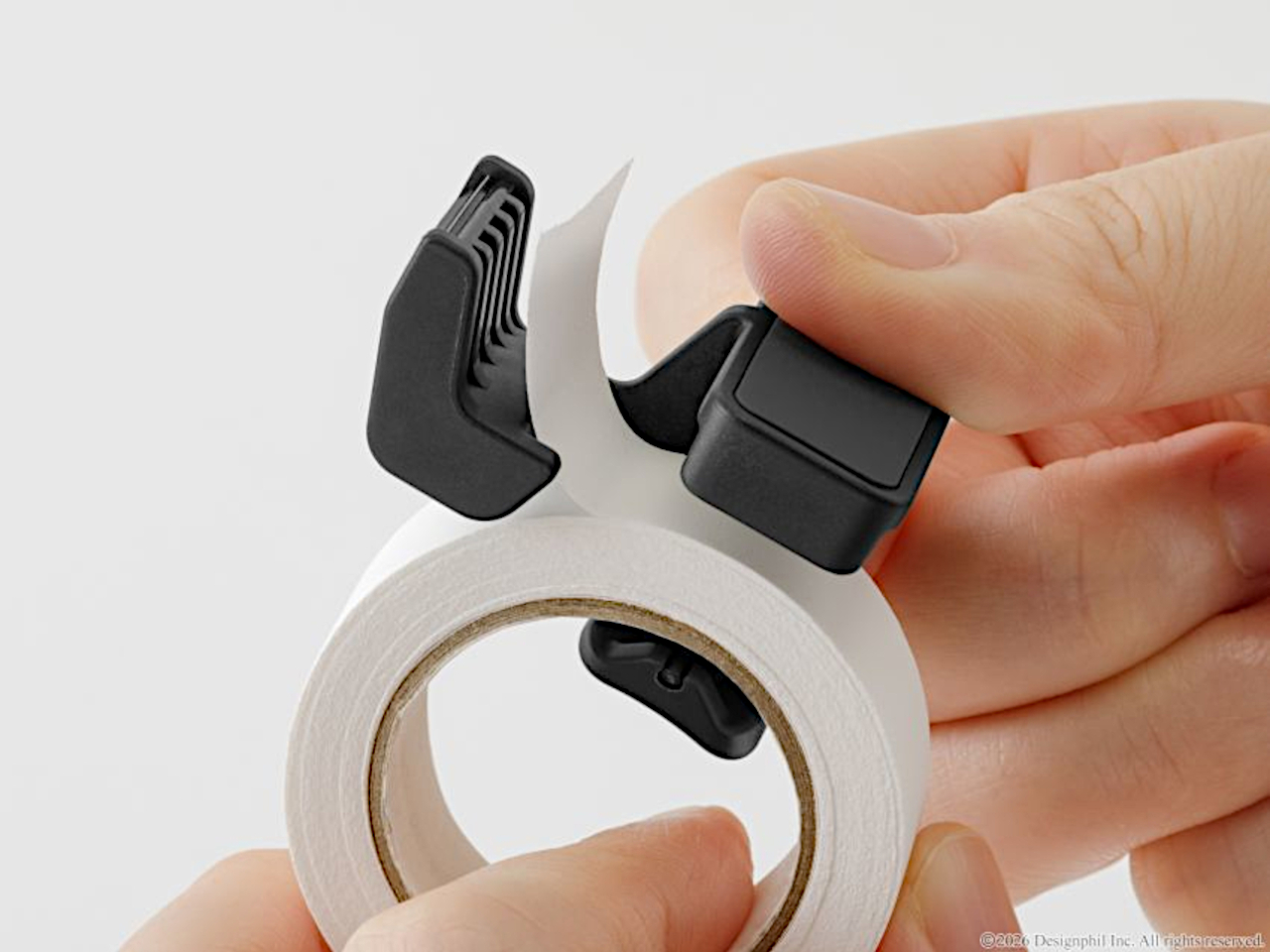
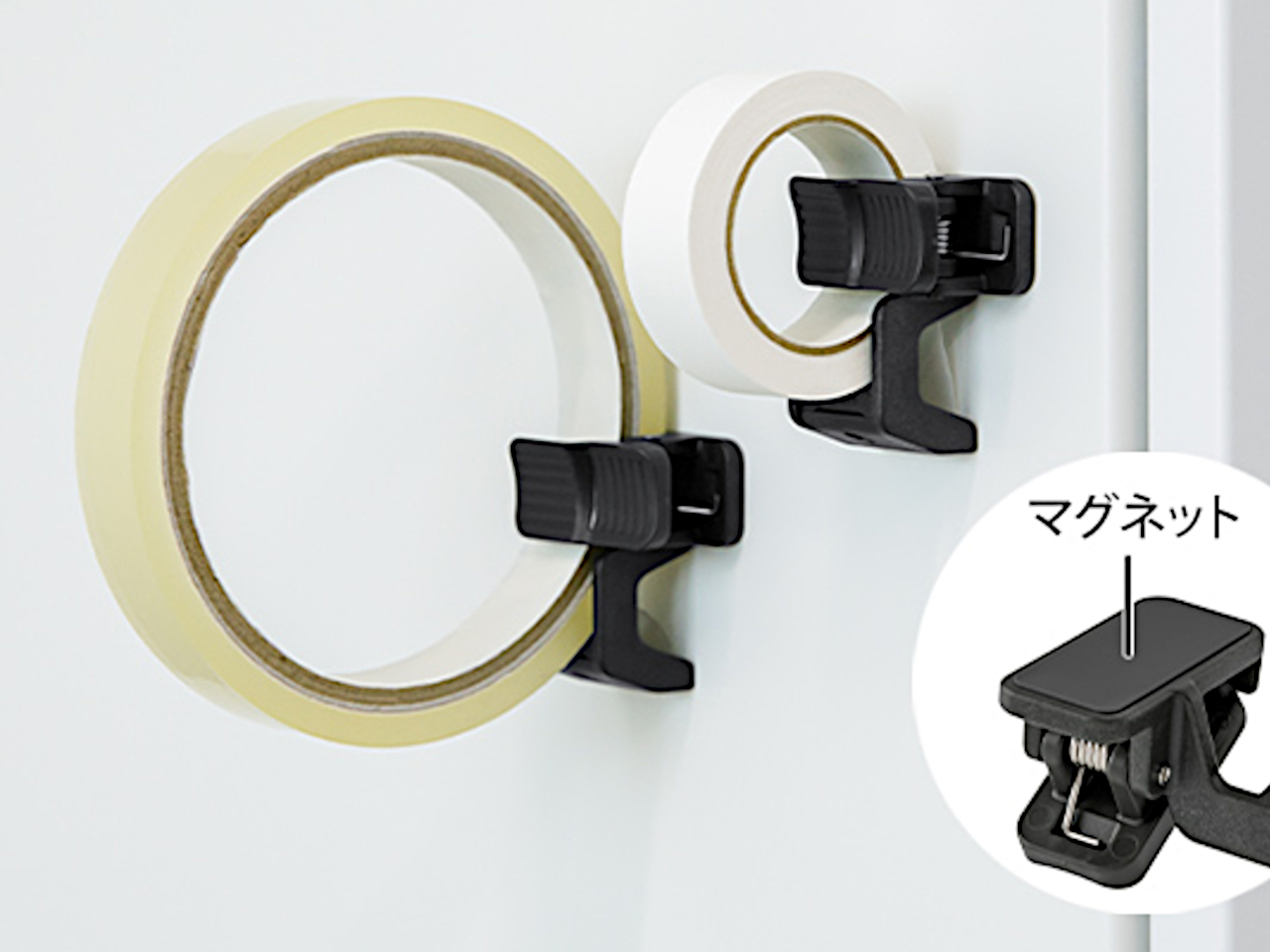
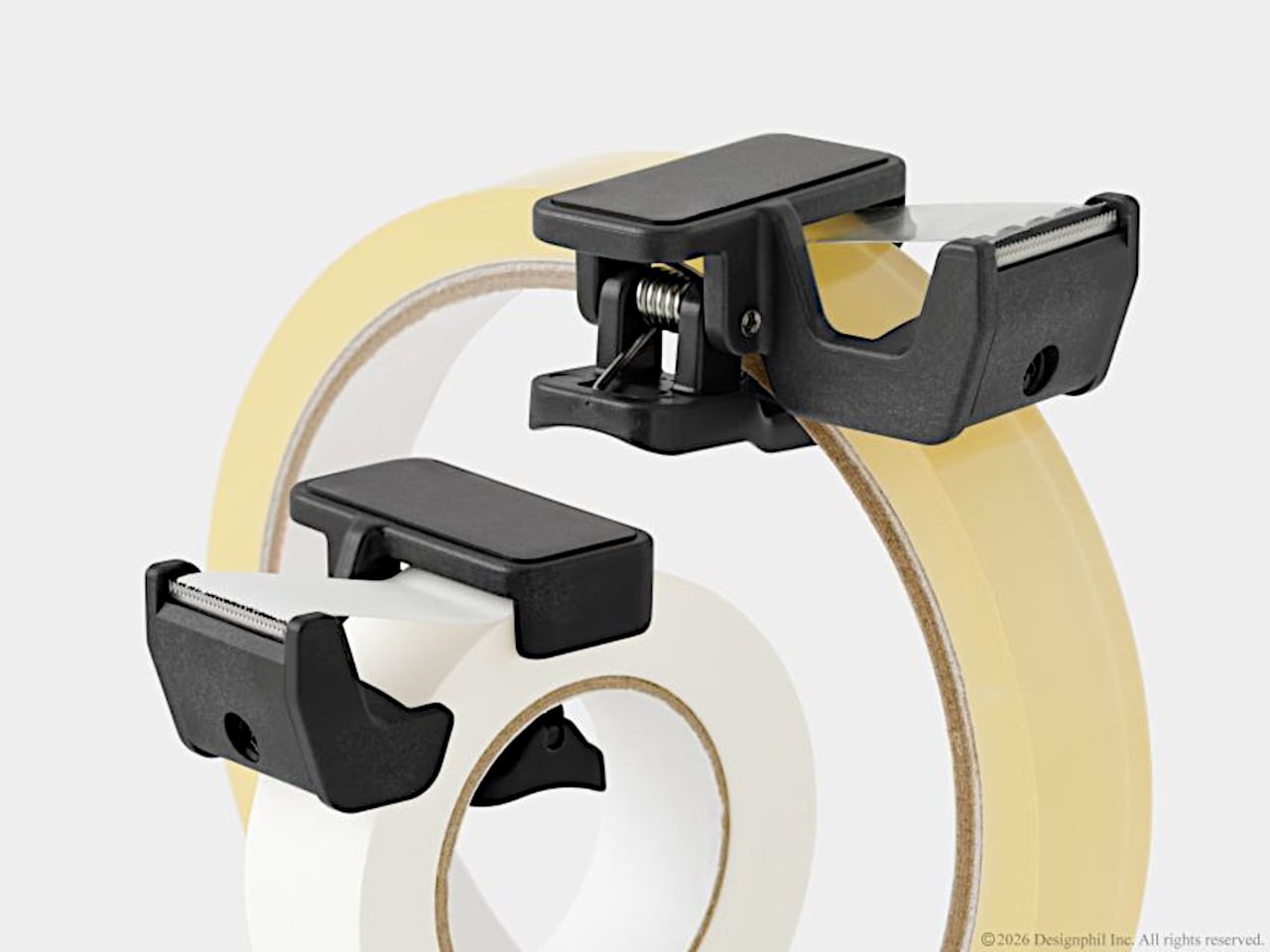
Finding the end of a roll of clear tape can take longer than sealing an envelope. A desktop dispenser solves that little problem, provided the roll you want actually fits inside it. Midori’s Multi Tape Cutter puts the dispenser on the roll instead, using a spring clip that can move from a small roll of masking tape to a larger one of cellophane.

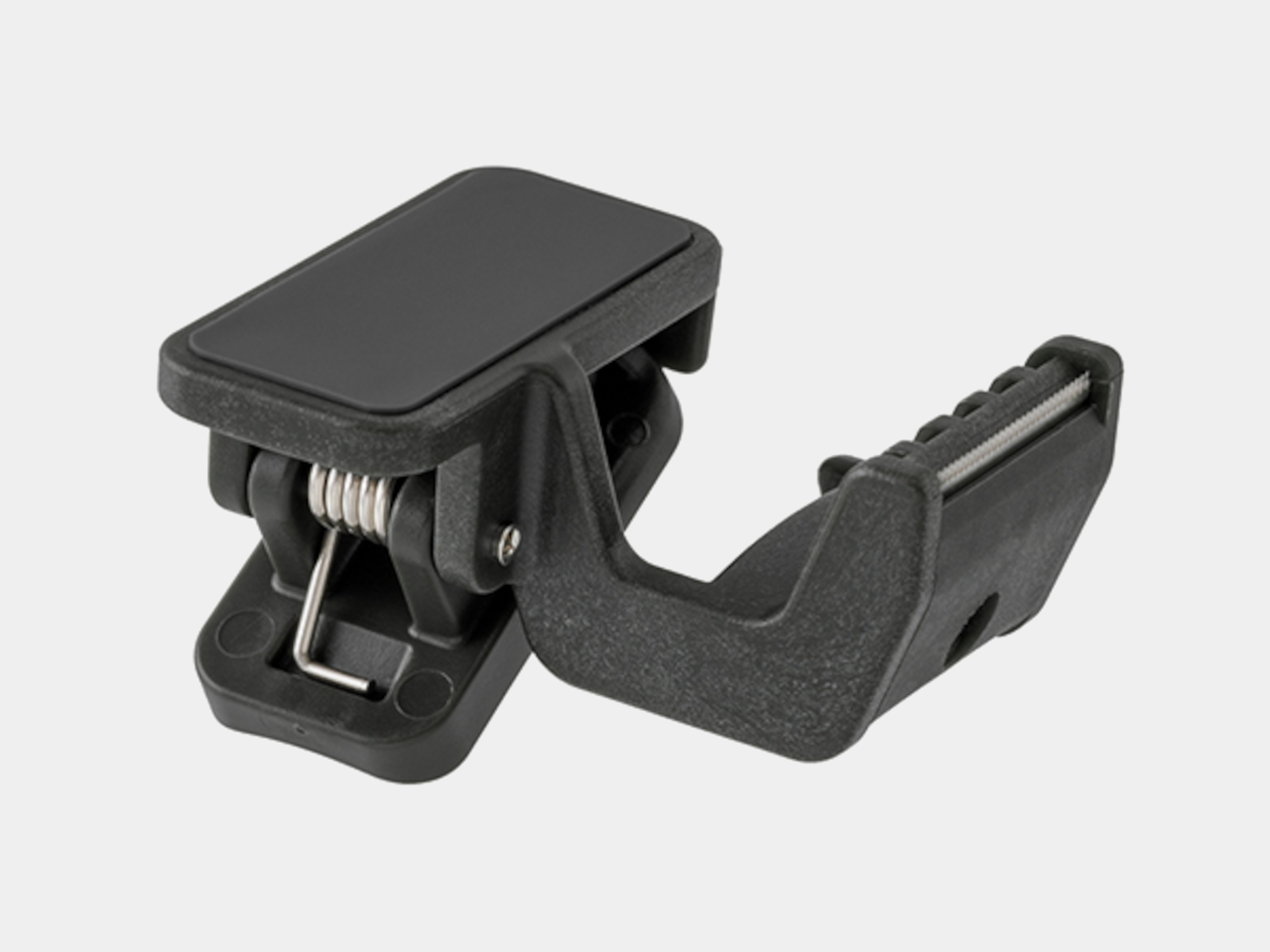
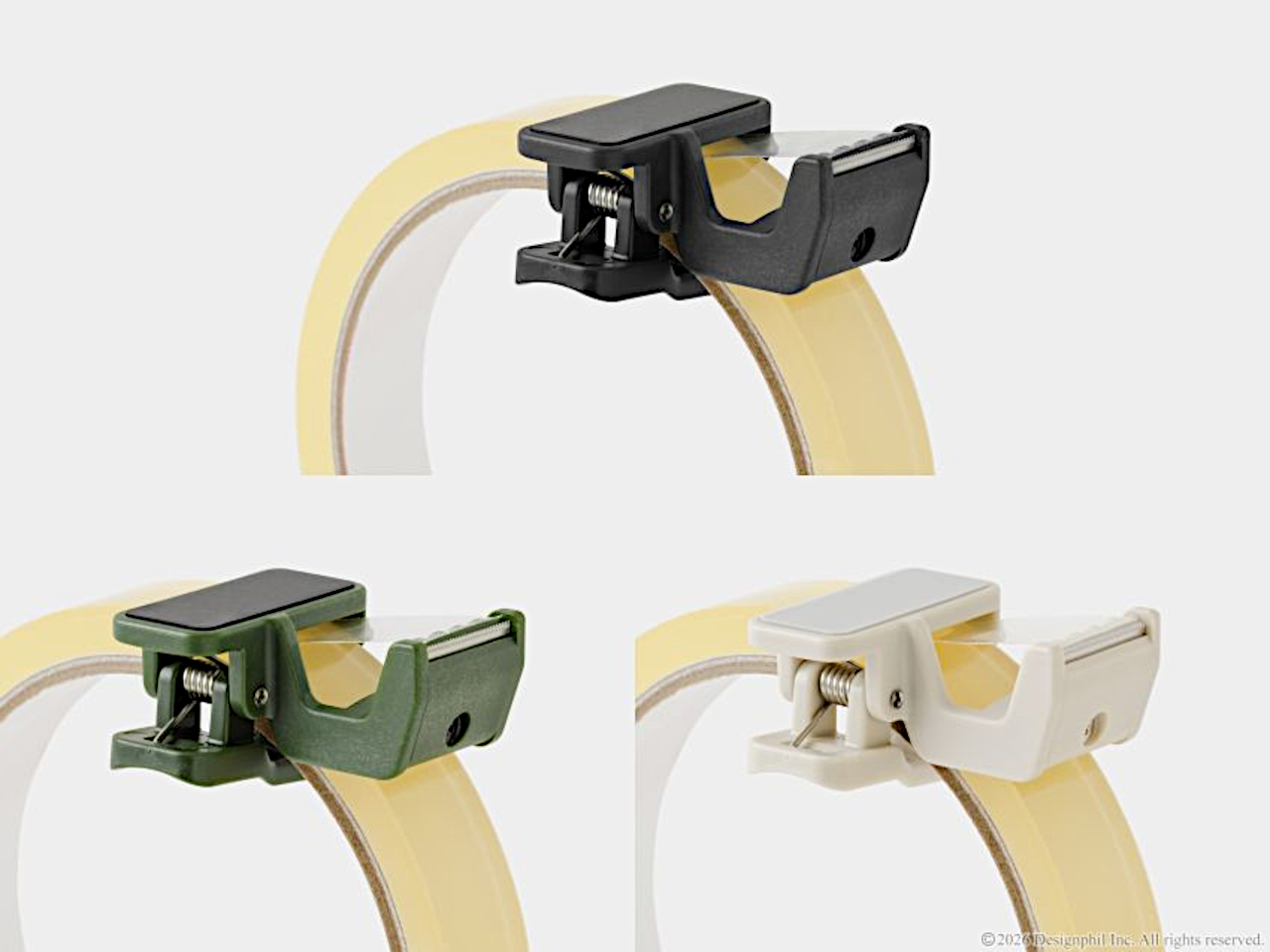
The clip looks a little like a clothespin with a blade in front. One jaw reaches inside the core, and the other sits over the tape, leaving the center open instead of filling it with a spindle. You still have to find the end the first time, of course, and feed it through a gap in the body before pulling.

Designer: Midori

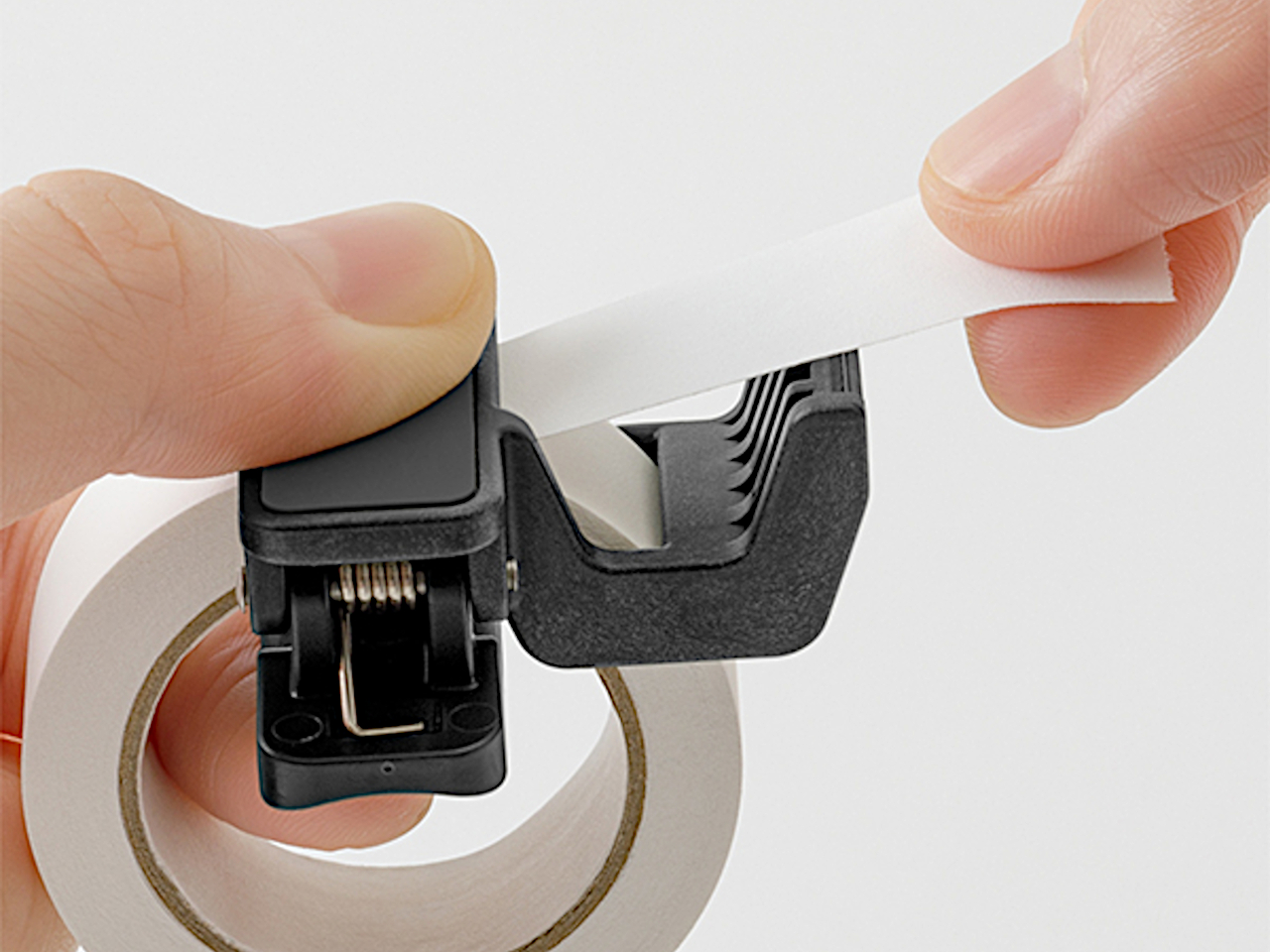
The tricky bit is keeping the clip on the roll without making the roll a pain to turn. A tiny nylon roller inside the lower jaw turns as you pull, so the core can roll past that point instead of rubbing against a fixed surface. Midori still recommends holding the cutter lightly. Squeeze too hard, and you’ll make the tape harder to pull.

Once you’ve pulled out enough tape, a twist brings it against the stainless steel blade. The end left on the roll sticks to the cutter’s body, where you can pinch it for the next piece. That’s a small detail until you’re wrapping a stack of gifts and would rather spend the evening folding paper than scraping at clear tape with a thumbnail.

In the kitchen, masking tape can live on a flat steel fridge door, ready to put a date on the leftovers. The magnet holds the cutter with the roll still attached. Designphil says it tested the pull of the magnet against the force of the spring so you wouldn’t leave the cutter on the fridge and walk away with only the tape.

There are limits to what that little jaw can swallow. Midori specifies tape about 0.47 to 0.59 inches wide, and a cardboard core that sticks out past the tape can be too wide even when the tape itself fits. The opening needs to be about an inch across at minimum, with no more than about half an inch from its edge to the roll’s outer rim.

Midori began selling the cutter in Japan on November 19, 2026, in black, khaki, and beige. It costs ¥968 (about $6.07) including tax, and a pair of replacement blades sells separately for ¥462 (about $2.89). A Phillips screwdriver is all Midori calls for to make the swap, so a dull blade doesn’t have to mean throwing away a perfectly good clip.

A weighted dispenser still earns its spot on a desk if you need to tear off a strip with one hand. Midori’s clip is better suited to jobs that take the tape away from the desk altogether. If you’re wrapping something too big to fit on the table, it’s the dispenser that comes to the gift, rather than the other way around.

The post Midori’s Tape Cutter Clips onto the Roll and Goes with It first appeared on Yanko Design.
Condense 10 PowerPoint Slides Into One Interactive Dashboard ti Improve Engagement

Condense 10 PowerPoint Slides Into One Interactive Dashboard ti Improve Engagement Interactive PowerPoint presentation slides generated by Microsoft Copilot

If you want your audience to explore a presentation rather than just watch it, Microsoft Copilot can turn your material into interactive PowerPoint slides. In a closer look from David Fortin, Copilot turned an Excel file with 373 lines into a dashboard with controls for filtering the figures. You can also create slides from a […]

The post Condense 10 PowerPoint Slides Into One Interactive Dashboard ti Improve Engagement appeared first on Geeky Gadgets.

Posted in Uncategorized