Gemini in Chrome is about to get a small but handy upgrade. Starting today, Google is rolling out a feature it calls Skills to Chrome on desktop. Skills allow you to save your favorite Gemini in Chrome prompts for quick access, thereby making it easier and faster to repeat certain tasks. For instance, Google suggests you could use one saved prompt to get Gemini to calculate how much protein there could be in a new recipe you found online. Another Skill can make it easier to do a side-by-side spec comparison of a few different products you're looking at across multiple tabs.
You can save prompts you want to use again directly from Gemini in Chrome's chat history. To use a saved prompt, type forward slash or click the plus button and select the Skill you want to use. To help people get started, Google is providing a set of ready-to-go prompts you can use to save time on common workflows or as a jumping off point for your own Skills. Skills you save are available on any version of Chrome for desktop where you're signed into your account, though for the time being, Google is only rolling out the feature to people who have their browser language set to US English.
Gemini in Chrome, like its other AI tools, has become a major area of focus for Google in recent months. At the start of the year, the company rolled out an update that saw the addition of a dedicated Gemini sidebar to Chrome and access to Nano Banana image generation directly from said sidebar. More recently, Google began rolling out Gemini in Chrome to users in Canada, India and New Zealand. As the high-stakes AI race countinues to heat up, expect more features in that vein, though we may still get more traditional enhancements — like vertical tabs — from time to time.
This article originally appeared on Engadget at https://www.engadget.com/ai/chrome-skills-let-you-save-your-favorite-gemini-prompts-for-easy-access-170000683.html?src=rss
OpenAI has acquired Hiro Finance, a startup that offers AI-powered financial planning tools. As first reported by TechCrunch, fiscal terms of the deal, which was announced on Monday, were not disclosed by OpenAI. However, all signs point this to being an acquhire, with Hiro founder Ethan Bloch writing on LinkedIn that the company's product would stop working on April 20. Users have until May 13 to migrate their data off of Hiro's servers before everything is deleted.
It's unclear if OpenAI plans to offer a dedicated financial planning tool in the mold of Hiro. At the start of the year, the company released Prism, a Claude Code-like app for scientific research that built on its acquisition of the startup behind Crixet. At the very least, it sounds like some of the expertise Hiro has built will make its way to OpenAI's chatbot. "For decades, personalized financial guidance has been too expensive, too generic, or too hard to access. ChatGPT is finally changing that," Bloch wrote on LinkedIn.
The deal is the second acquisition in only two weeks to be announced by OpenAI. At the start of the month, the company bought Technology Business Programming Network (TBPN), a media company known for its daily tech podcast. For a company that has by all indications a long and tough road ahead to profitability, it sure does seem OpenAI is spending a lot of time and money on startups that might not end being central to its core business, which in recent months has seen it target the coding market to edge out Anthropic.
This article originally appeared on Engadget at https://www.engadget.com/ai/openai-buys-its-second-startup-in-a-month-140550769.html?src=rss
OpenAI has acquired Hiro Finance, a startup that offers AI-powered financial planning tools. As first reported by TechCrunch, fiscal terms of the deal, which was announced on Monday, were not disclosed by OpenAI. However, all signs point this to being an acquhire, with Hiro founder Ethan Bloch writing on LinkedIn that the company's product would stop working on April 20. Users have until May 13 to migrate their data off of Hiro's servers before everything is deleted.
It's unclear if OpenAI plans to offer a dedicated financial planning tool in the mold of Hiro. At the start of the year, the company released Prism, a Claude Code-like app for scientific research that built on its acquisition of the startup behind Crixet. At the very least, it sounds like some of the expertise Hiro has built will make its way to OpenAI's chatbot. "For decades, personalized financial guidance has been too expensive, too generic, or too hard to access. ChatGPT is finally changing that," Bloch wrote on LinkedIn.
The deal is the second acquisition in only two weeks to be announced by OpenAI. At the start of the month, the company bought Technology Business Programming Network (TBPN), a media company known for its daily tech podcast. For a company that has by all indications a long and tough road ahead to profitability, it sure does seem OpenAI is spending a lot of time and money on startups that might not end being central to its core business, which in recent months has seen it target the coding market to edge out Anthropic.
This article originally appeared on Engadget at https://www.engadget.com/ai/openai-buys-its-second-startup-in-a-month-140550769.html?src=rss
If you're a Warhammer fan of a certain age, some of these may be formative experiences for you. I know they are for me. I can't count how many hours I spent playing Chaos Gate when I first discovered 40K at the age of 10. Yes, it was an XCOM clone, but by that point I didn't know about the MicroProse original, and Space Marines were cool.
Years later and as a Tau collector at the time, I also loved Fire Warrior, even if it wasn't the most polished or deep first-person shooter. I haven't played the other five games included in today's announcement, but I've heard Warhammer: Shadow of the Horned Rat and Warhammer 40K: Rites of War are pretty good if you're into the setting or, in the latter case, a fan of the Eldar.
To celebrate the re-release of these old gems, Games Workshop is running a Classics sale on Steam, with discounts on all 19 re-releases. Plus, you can get discounts on some more recent releases, including the excellent Dawn of War – Definitive Edition and Dawn of War 2 – Anniversary Edition. If you're new to the Warhammer 40K universe, and would rather avoid a plastic addiction, one of those would be my first port of call, along with the excellent Space Marine 2.
This article originally appeared on Engadget at https://www.engadget.com/gaming/pc/games-workshop-brings-seven-classic-warhammer-games-to-steam-for-the-first-time-185432304.html?src=rss
Over the past couple of years, Google has found ways to stuff Gemini in nearly every app and service it offers. Whether it's Gmail with its AI inbox or Chrome with its chat sidebar, Gemini is now inescapable inside of Workspace. I don't know about you, but I don't need an AI to tell me how to write a =SUM equation in Sheets or an outline for a first draft. Most of the time, I find Gemini is a distraction. If you feel the same way, this how-to is for you.
How to remove Gemini from your personal Workspace account
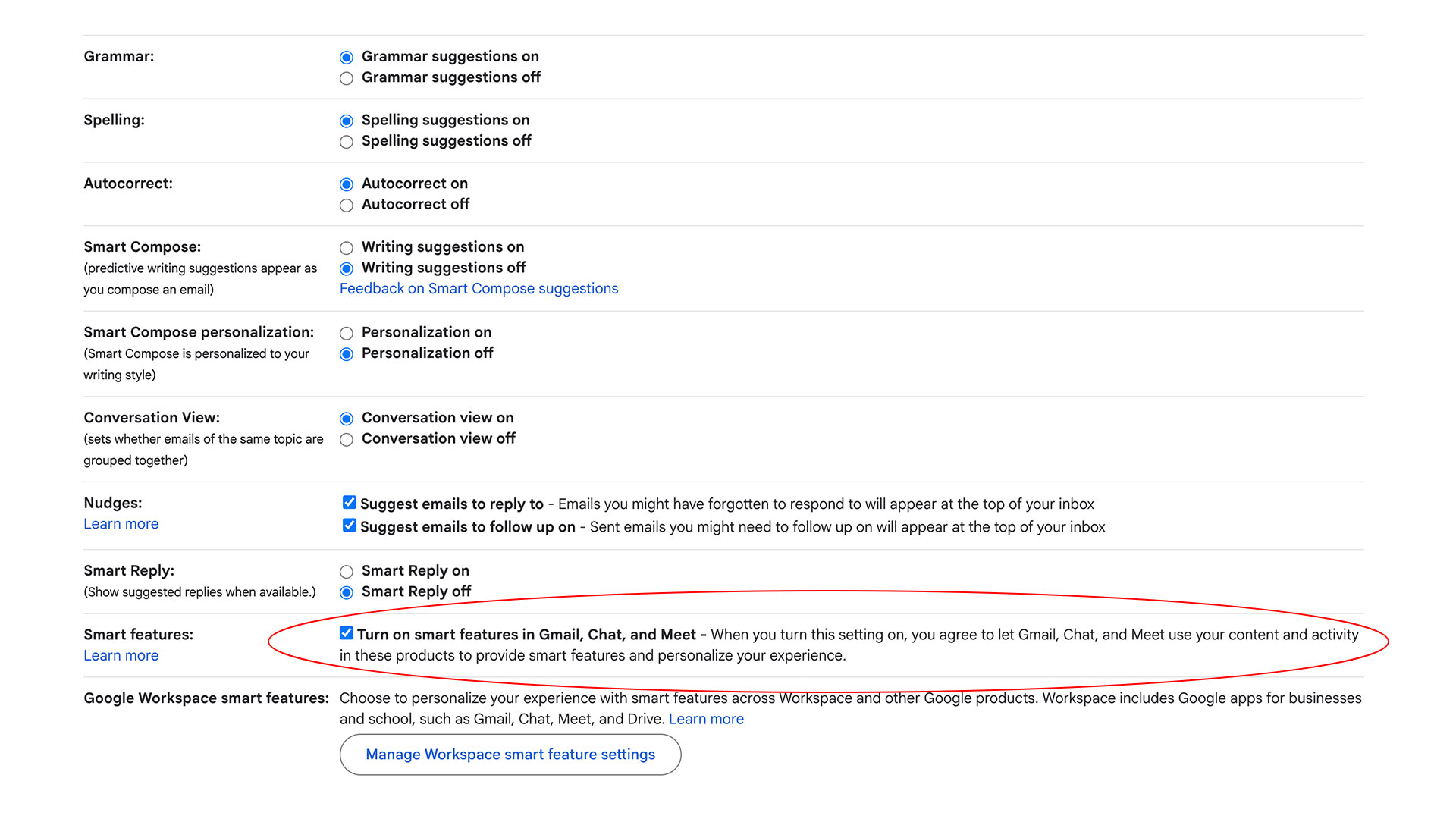
From the "General" tab of Gmail's settings menu, look for the Smart features checkbox.
Igor Bonifacic for Engadget
To turn Gemini off, you will need to disable two separate sets of options. The first set covers a set of features, including smart compose, that are shared across Gmail, Chat and Meet — so if you turn them off in one app, they won't be available in any of the three. All of this is most easily done through Gmail's web client.
In Gmail, tap the cog icon.
Select See all settings.
Under the General tab, scroll down to find Smart features.
Disable Turn on smart features in Gmail, Chat, and Meet.
In Japan, Switzerland, the United Kingdom or European Economic Area, smart features are turned off by default.
Next, turn your attention to Workspace.
In Gmail, tap the cog icon.
Select See all settings.
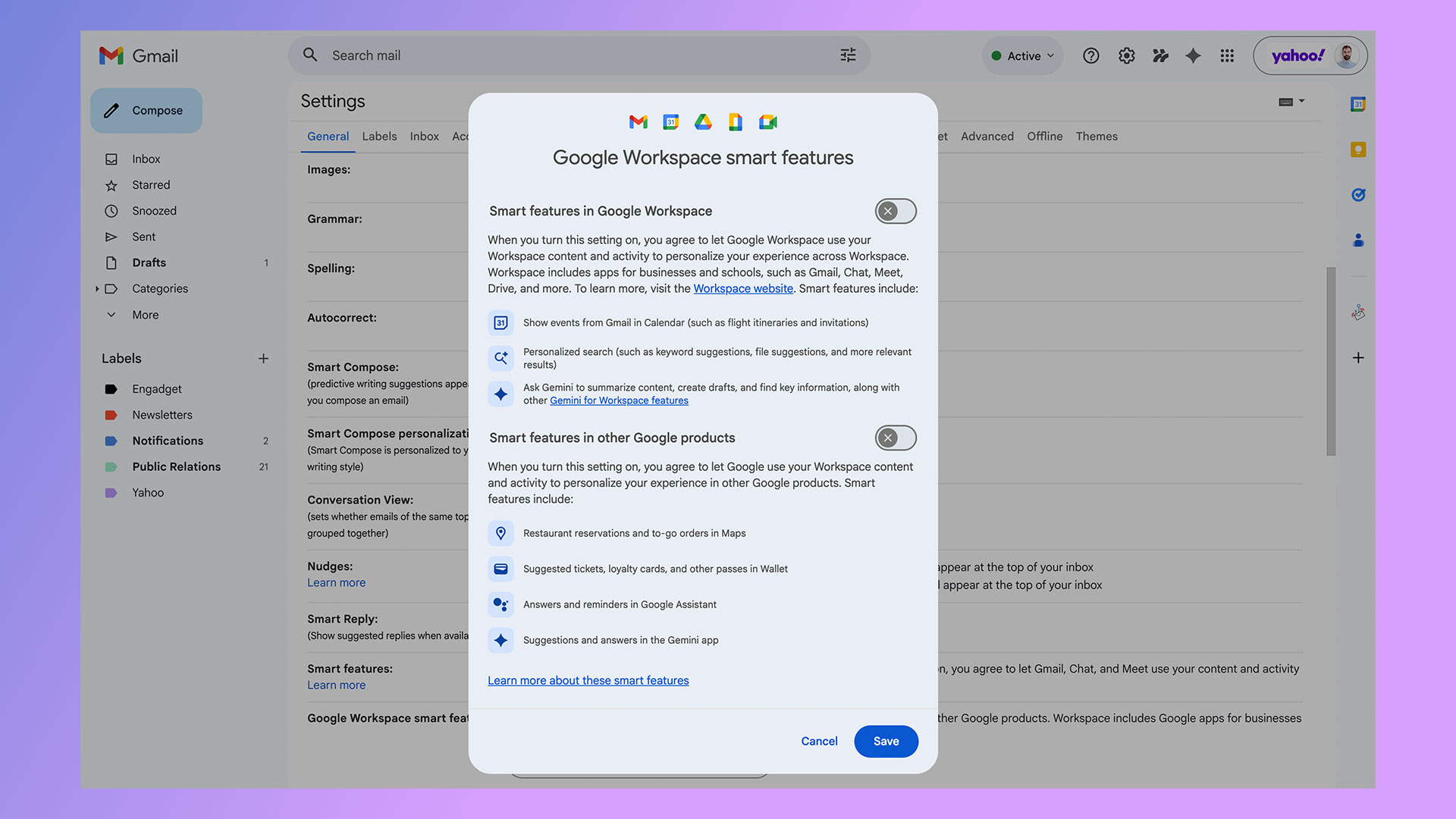
Under the General tab, scroll down and click Manage Workspace smart feature settings.
Toggle off smart features in Google Workspace and Smart features in other Google products.
A word of warning: completely disabling smart features in Google Workspace turns off not only Gemini integration but also access to basic capabilities like spelling and grammar corrections. You'll also lose features that have been Google staples for years. In Gmail, for example, the app will stop sorting incoming emails by priority, a notification at the top of the screen informing you that smart features are required for inbox categorization. Whatever Google's motivation for this state of affairs, it's a design decision that actively discourages users from disabling Gemini integration.
Disabling Gemini in Google Workspace will also turn off other features.
Igor Bonifacic for Engadget
If you want to rid yourself of Gemini but would still like to use some of the other features the company offers through Gmail and its other apps, I recommend leaving the first set of smart features on while disabling the Workspace-specific ones. You can also opt to turn off some of the features included in the first group, while leaving others on. Below is a list of those features, with a brief overview of the less self-explanatory ones.
Grammar
Spelling
Autocorrect
Smart Compose — as you write an email, Gmail will generate predictive writing suggestions
Smart Compose personalization — as you write, Gmail will tailor Smart Compose suggestions to your writing style
Nudges — Gmail will generate notifications prompting you to respond or follow up on unanswered emails
Smart Reply — Gmail will generate suggestions on how to respond to an email
Package tracking — Google will display shipping updates inside of Gmail
Desktop notifications — Yes, for some reason you need the power of AI to get notifications on your PC
Unfortunately, Google doesn't offer this same level of granular control when it comes to smart features inside of Workspace. For instance, if you turn off Gemini in Docs, Calendar won't automatically display events from Gmail. Again, Google really wants to dissuade you from disabling Gemini.
How to remove Gemini from your professional Workspace account
If your workplace uses Google Workspace, all of the above options should be present in Gmail's settings menu, and you can follow the same steps to turn off most of the smart features Google offers. Unfortunately, the second part of the process does nothing. You will still see Gemini in Docs, Sheets and elsewhere, even with smart features in Workspace turned off. Only your admin can completely turn off Gemini for you.
This article originally appeared on Engadget at https://www.engadget.com/ai/how-to-de-gemini-your-google-apps-170000462.html?src=rss
After its history-making trip around the Moon, NASA's Artemis II mission is set to return to Earth later today. The Orion spacecraft carrying astronauts Reid Wiseman, Christina Koch, Victor Glover and Jeremy Hansen is scheduled to splash down off the coast of San Diego at approximately 8:07PM ET. NASA will stream the landing on YouTube and its NASA+ website, as will Netflix and HBO Max. The official broadcast will begin at 6:30PM ET.
After leaving Earth on NASA's super heavy-lift SLS rocket and spending nine days in space, the most dangerous part of the Artemis II mission still lies ahead. It will take approximately 13 minutes for the Orion spacecraft to complete re-entry. During that time, it will be subject to temperatures of up to 5,000 degrees Fahrenheit (2,760 degrees Celsius).
Reentry is dangerous for any crewed spacecraft, but is of particular concern here because of a "skip reentry" during the Artemis 1 mission. At that time, the Orion crew vessel briefly used its own lift to "skip" back out of Earth's upper atmosphere before re-entering for the final descent, suffering excess charring in the process. NASA spent months investigating and determined the craft was safe to fly, but Artemis II will take a more gradual approach back to Earth in hopes of reducing its exposure to excess heat.
Still, this is the first time in 53 years that NASA will need to guide a human crew back from the Moon. Once all is said and done, however, the Artemis II crew will have traveled 695,081 miles (1,118,624 km), captured amazing images along the way and reminded the world what’s possible when nations work together.
This article originally appeared on Engadget at https://www.engadget.com/science/space/how-to-watch-the-artemis-ii-landing-145344873.html?src=rss
After its history-making trip around the Moon, NASA's Artemis II mission is set to return to Earth later today. The Orion spacecraft carrying astronauts Reid Wiseman, Christina Koch, Victor Glover and Jeremy Hansen is scheduled to splash down off the coast of San Diego at approximately 8:07PM ET. NASA will stream the landing on YouTube and its NASA+ website, as will Netflix and HBO Max. The official broadcast will begin at 6:30PM ET.
After leaving Earth on NASA's super heavy-lift SLS rocket and spending nine days in space, the most dangerous part of the Artemis II mission still lies ahead. It will take approximately 13 minutes for the Orion spacecraft to complete re-entry. During that time, it will be subject to temperatures of up to 5,000 degrees Fahrenheit (2,760 degrees Celsius).
Reentry is dangerous for any crewed spacecraft, but is of particular concern here because of a "skip reentry" during the Artemis 1 mission. At that time, the Orion crew vessel briefly used its own lift to "skip" back out of Earth's upper atmosphere before re-entering for the final descent, suffering excess charring in the process. NASA spent months investigating and determined the craft was safe to fly, but Artemis II will take a more gradual approach back to Earth in hopes of reducing its exposure to excess heat.
Still, this is the first time in 53 years that NASA will need to guide a human crew back from the Moon. Once all is said and done, however, the Artemis II crew will have traveled 695,081 miles (1,118,624 km), captured amazing images along the way and reminded the world what’s possible when nations work together.
This article originally appeared on Engadget at https://www.engadget.com/science/space/how-to-watch-the-artemis-ii-landing-145344873.html?src=rss
Following the icy reception to Llama 4, Meta is releasing the first in a new family of AI systems built by its recently formed Superintelligence team. The company is kicking off its new Muse era with Spark, a lightweight model geared toward consumer use. In the future, Meta plans to offer more capable versions of Muse, but for now, it's clear the company wants to nail the basics.
To that point, many of Spark's capabilities are table stakes for a new model in 2026. For instance, it offers both "Instant" and "Thinking" modes. With the latter engaged, the model will take an extra few moments to reason through a prompt. Other consumer-facing AI systems have had this kind of flexibility for a while. Anthropic, for example, was one of the first AI labs to offer a "hybrid reasoning model" when it released Claude Sonnet 3.7 at the start of last year. That said, Meta plans to add an even more powerful "Contemplating" mode down the road.
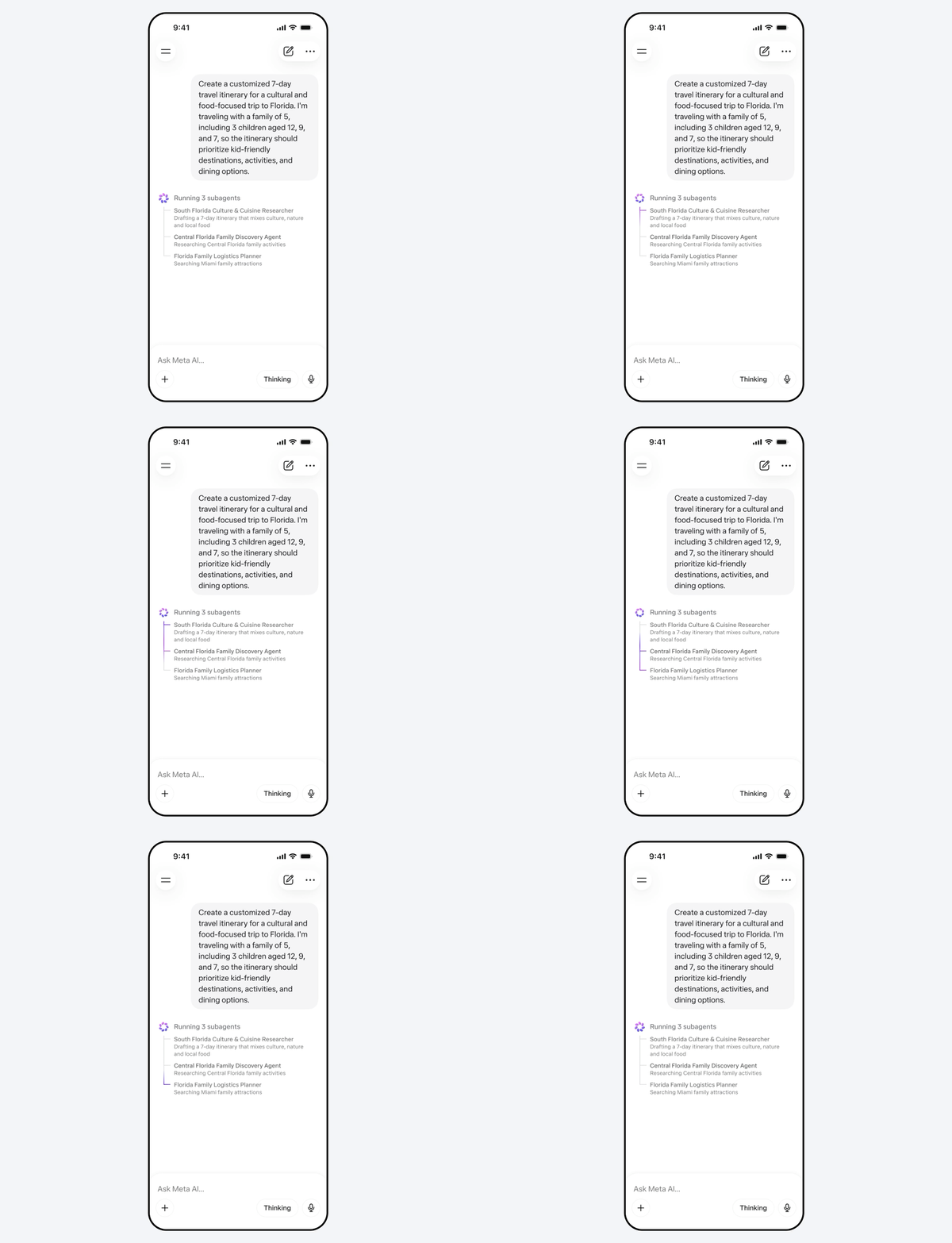
A GIF demonstrating Muse Spark's multi-agent capabilities.
Meta
Muse Spark can also coordinate multiple AI subagents to tackle a request. Meta suggests users will see this capability in action when they ask for help with tasks like family trip planning. In such a scenario, one agent might compile an itinerary, while another finds kid-friendly activities everyone can enjoy. At the same time, Meta has built Spark to be natively multimodal, meaning the model can process images, video and audio. Like Google Lens, this gives you the option to snap a photo with your phone and ask Meta AI questions about what you see.
Of course, it wouldn't be a 2026 AI release if Muse Spark didn't include a built-in shopping assistant. Like ChatGPT, Spark can compare different items for you, listing the pros and cons of each, with links to make it easy to buy the product that appeals to you.
Muse Spark is available today in the Meta AI app and meta.ai website everywhere where the company offers those services. Meta will begin rolling out the new features the model powers starting in the US. In the coming weeks, the company plans to bring Muse Spark to more countries and places where people can access Meta AI, including Facebook, Instagram and WhatsApp.
Additionally, Meta says it "hopes to open source future versions of the model." We'll see if the company ends up doing that; last year, Meta CEO Mark Zuckerberg appeared to flip flop on the company's open source stance, saying it would need to be more "rigorous" about such decisions moving forward.
This article originally appeared on Engadget at https://www.engadget.com/ai/metas-muse-spark-model-brings-reasoning-capabilities-to-the-meta-ai-app-161456684.html?src=rss
Google has started rolling out a small but significant update to Chrome on desktop. Starting today, users will begin seeing an option to organize their tabs vertically. To use the new feature, right click on any Chrome window and select "Show Tabs Vertically."
Google is late to the game here. Before today, every other major browser but Chrome offered support for vertical tabs — though the quality of implementation varies widely. Firefox, for instance, has supported vertical tabs since its 136 update in March of last year, and in my experience, has one of the best interfaces for managing dozens of tabs. Apple's own Safari is another browser with the option to stack tabs vertically, though things can quickly get confusing due to all the different ways you can group webpages.
Separately, Google is rolling out an enhanced reading mode that offers a new full-page interface. To use the feature, right click on a page and select "Open in reading mode." As you might imagine, reading mode is designed to make busy webpages easier to get through without distraction. As with most Chrome upgrades, it may take a few days before today's update rolls out to your device, so be patient if you don't see it right away.
This article originally appeared on Engadget at https://www.engadget.com/computing/chrome-finally-adds-support-for-vertical-tabs-170000081.html?src=rss
NASA's Artemis II mission is about to make history. After a successful April 1 launch, and a trip of 39,000 miles through space, astronauts Reid Wiseman, Christina Koch, Victor Glover and Jeremy Hansen are about to travel farther from Earth than any human beings have before, and you can watch the entire thing unfold online. NASA will stream the entire flyby on YouTube and its own NASA+ website, with coverage beginning at 1PM ET. You can also watch NASA+ through Netflix.
It's going to take some time for things to get underway, so if you're working or have plans this evening but don't want to miss seeing history being made, your best bet is to try and catch a handful of key moments. At approximately 1:56PM ET, Artemis II will fly farther than any crewed mission has before, breaking the previous record set by Apollo 13 in 1970. Then, the Orion spacecraft will begin its flyby of the Moon at 2:45PM ET, with the craft expected to make its closest approach to the lunar surface at approximately 7:02PM ET. A few short minutes later, the spacecraft will reach its maximum distance from Earth at about 7:07PM ET.
A little more than an hour later at 8:35PM, the Artemis II crew will get a chance to see a total solar eclipse from the far side of the Moon. This is something that won't be visible from Earth. So if you can only catch one part of the broadcast, this is the one to watch.
This article originally appeared on Engadget at https://www.engadget.com/science/space/how-to-watch-the-historic-artemis-ii-lunar-flyby-155114417.html?src=rss