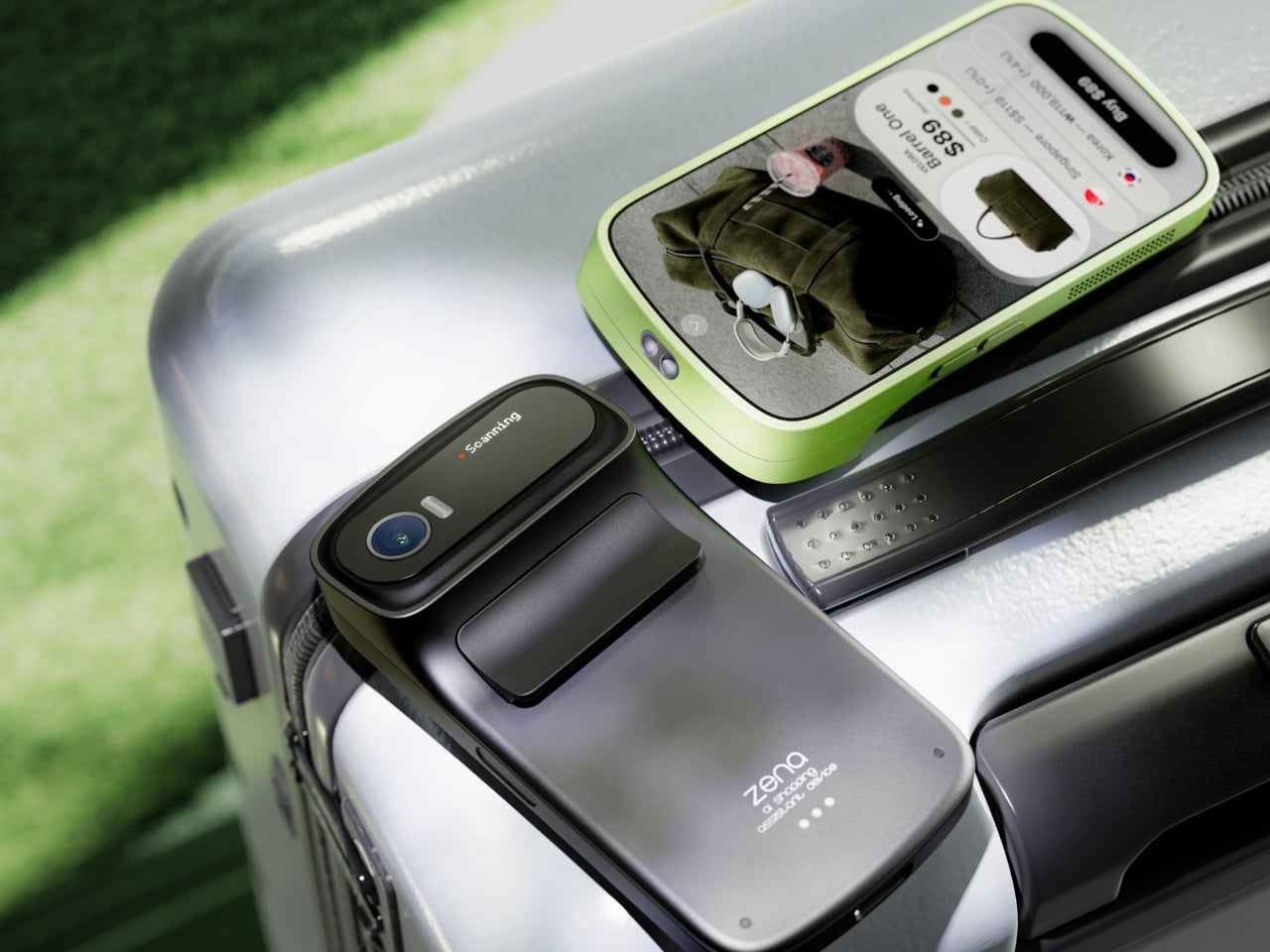
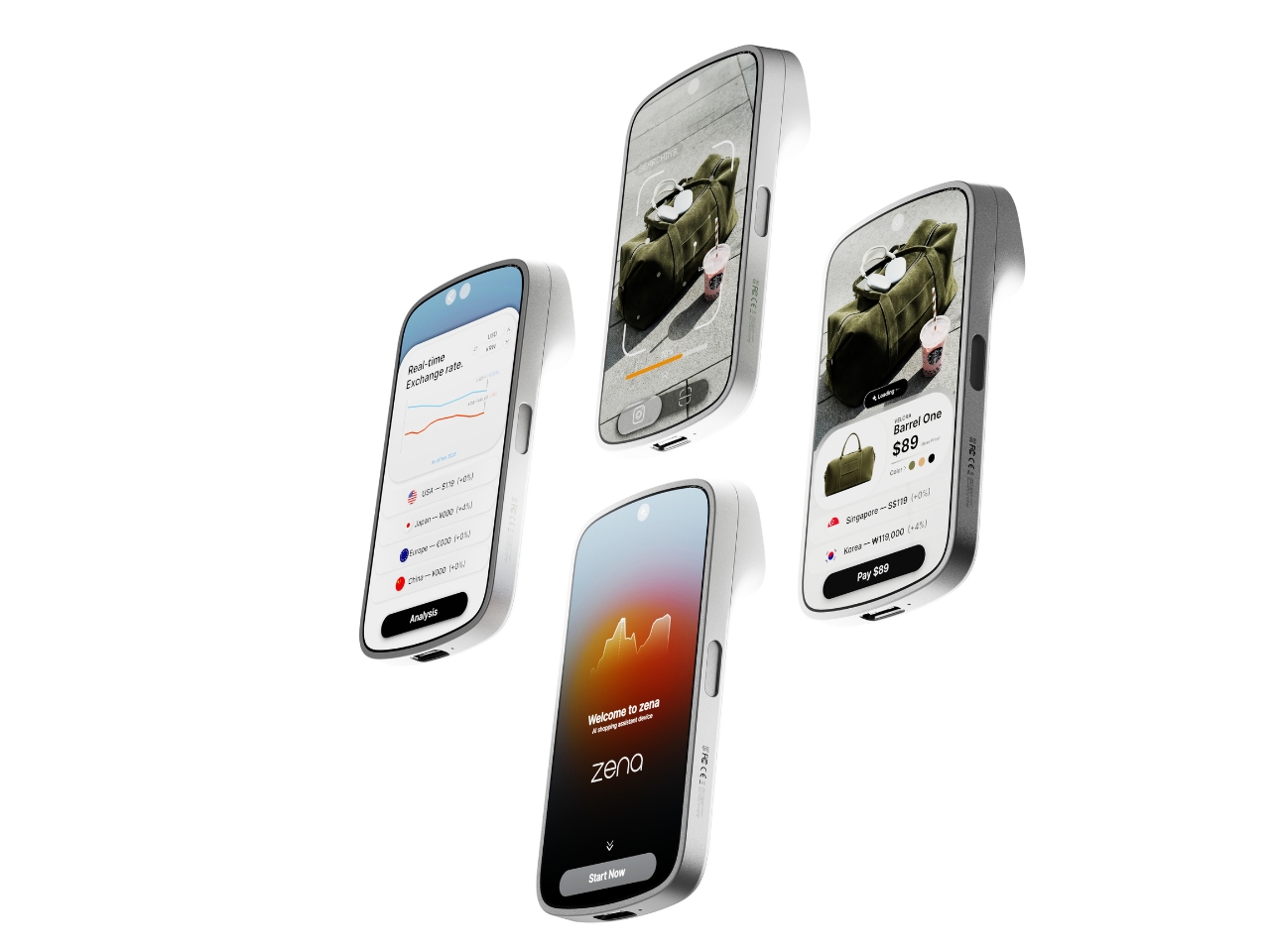
If you’ve ever ordered something from an international retailer only to be blindsided by a customs bill at your door, you already know the frustration that designers Taehyeong Kim and Yu Jeong Choi were sitting with when they created zena. It’s a concept device that reads like the future of shopping, but it addresses a problem that is very much happening right now.
The premise is deceptively simple. You point zena at a product, it scans it, and within seconds you have a full breakdown: the item’s price, real-time exchange rates across multiple currencies, applicable duties, and the best purchasing options available. Not the price the retailer wants you to see. The actual, landed cost. The number that follows you home.
The design team’s background research puts the stakes into perspective. Citing Avalara’s 2024 global consumer survey, their project notes that 68% of shoppers reported a negative experience tied to unexpected cross-border costs. 75% said they wouldn’t repurchase from a retailer after a customs surprise. And 49% refused delivery altogether. That last number is staggering when you sit with it. Nearly half of the people who encountered surprise fees just sent the package back. That’s not only a UX failure. That’s an industry-wide trust problem that e-commerce at large seems unmotivated to solve. So two industrial designers from Daegu, Korea, decided to take a direct swing at it.
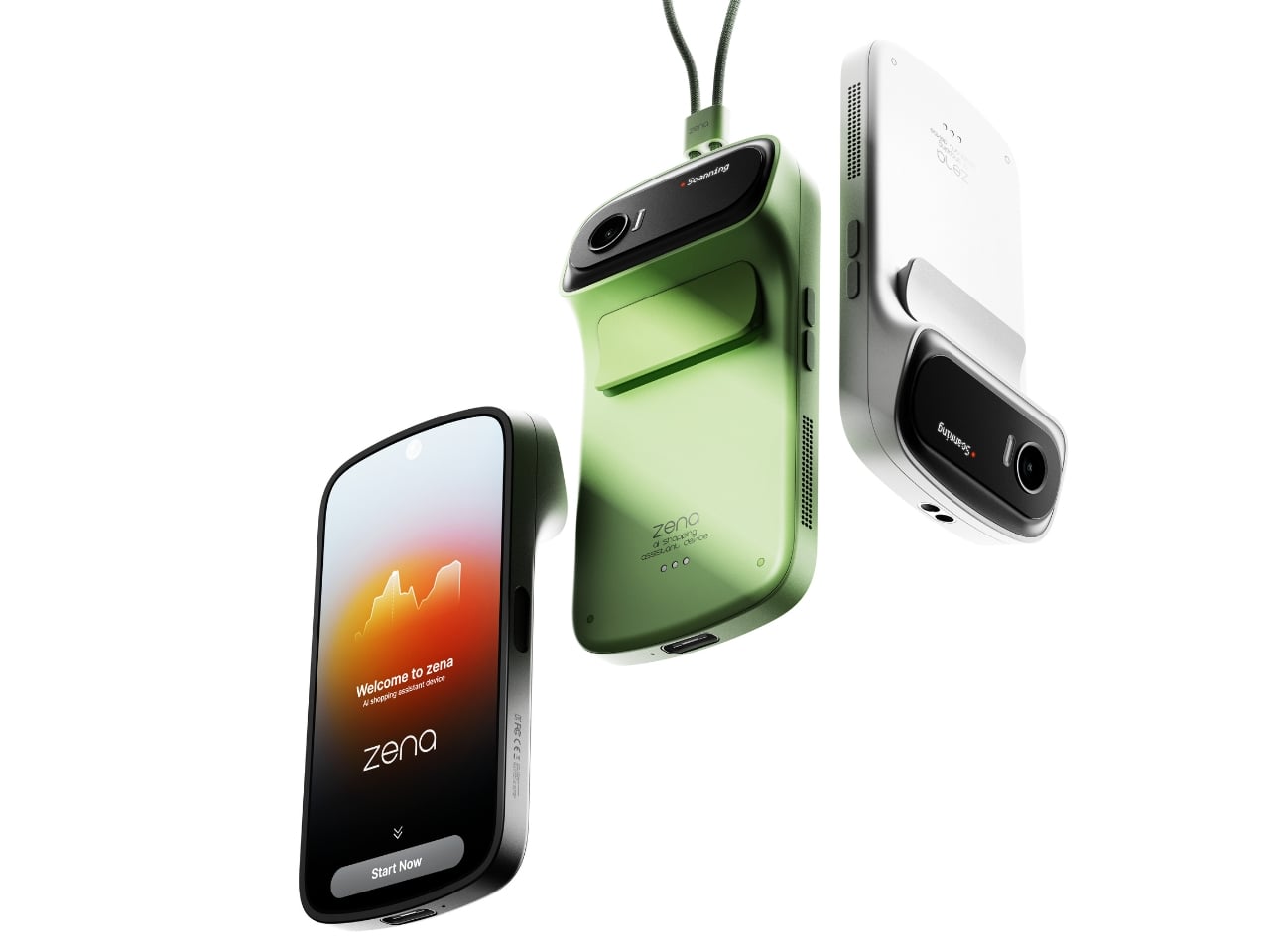
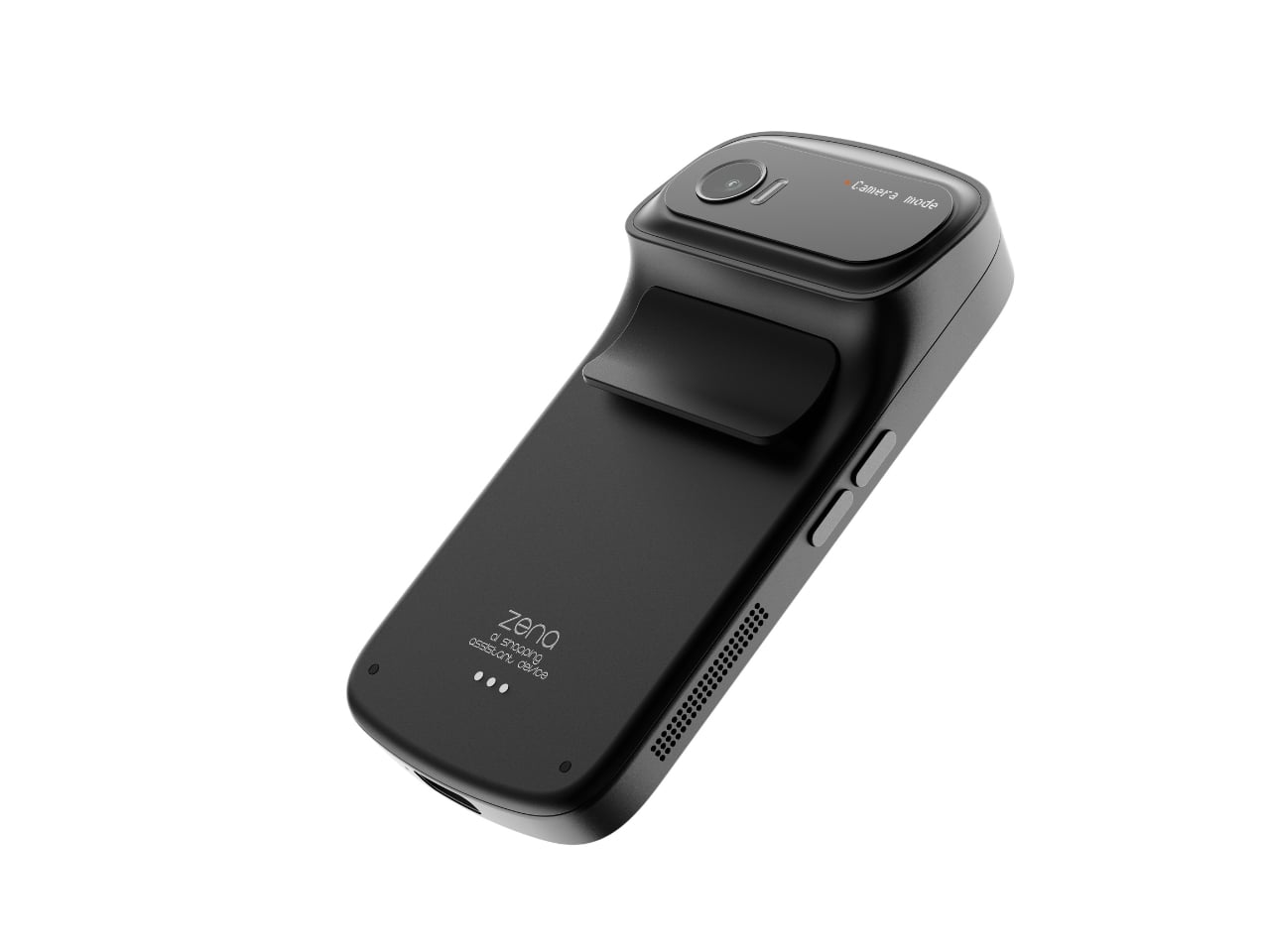
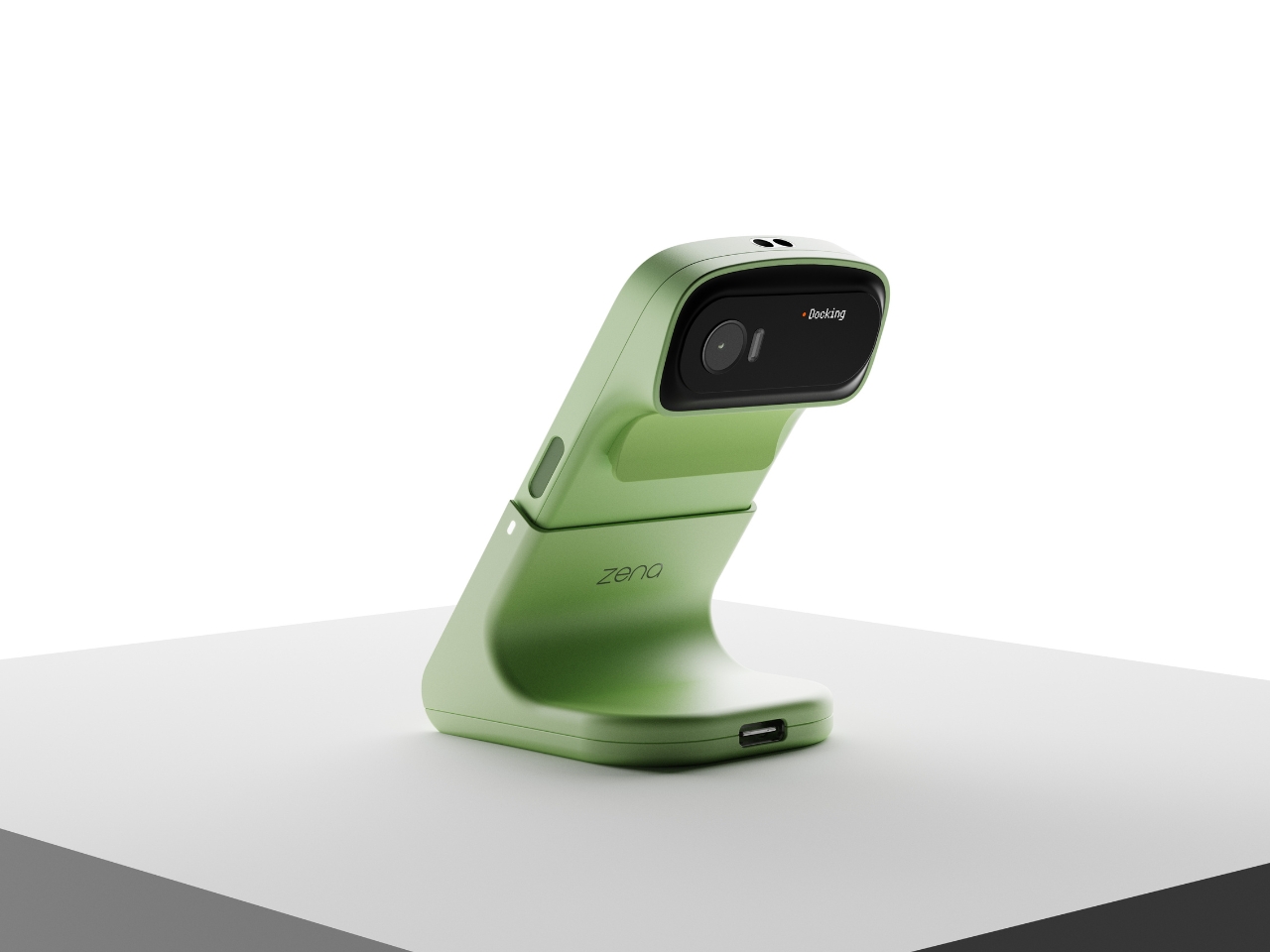
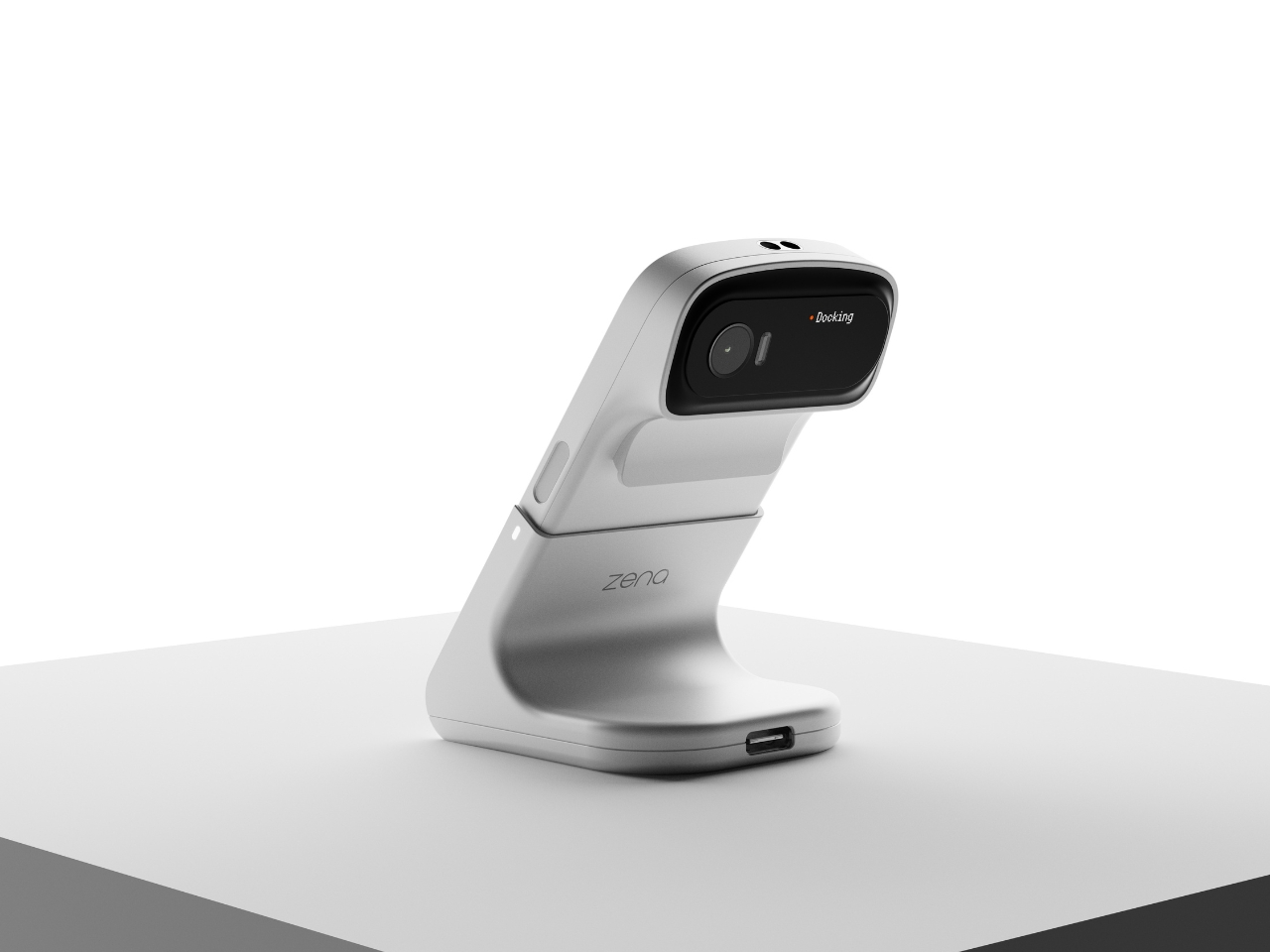
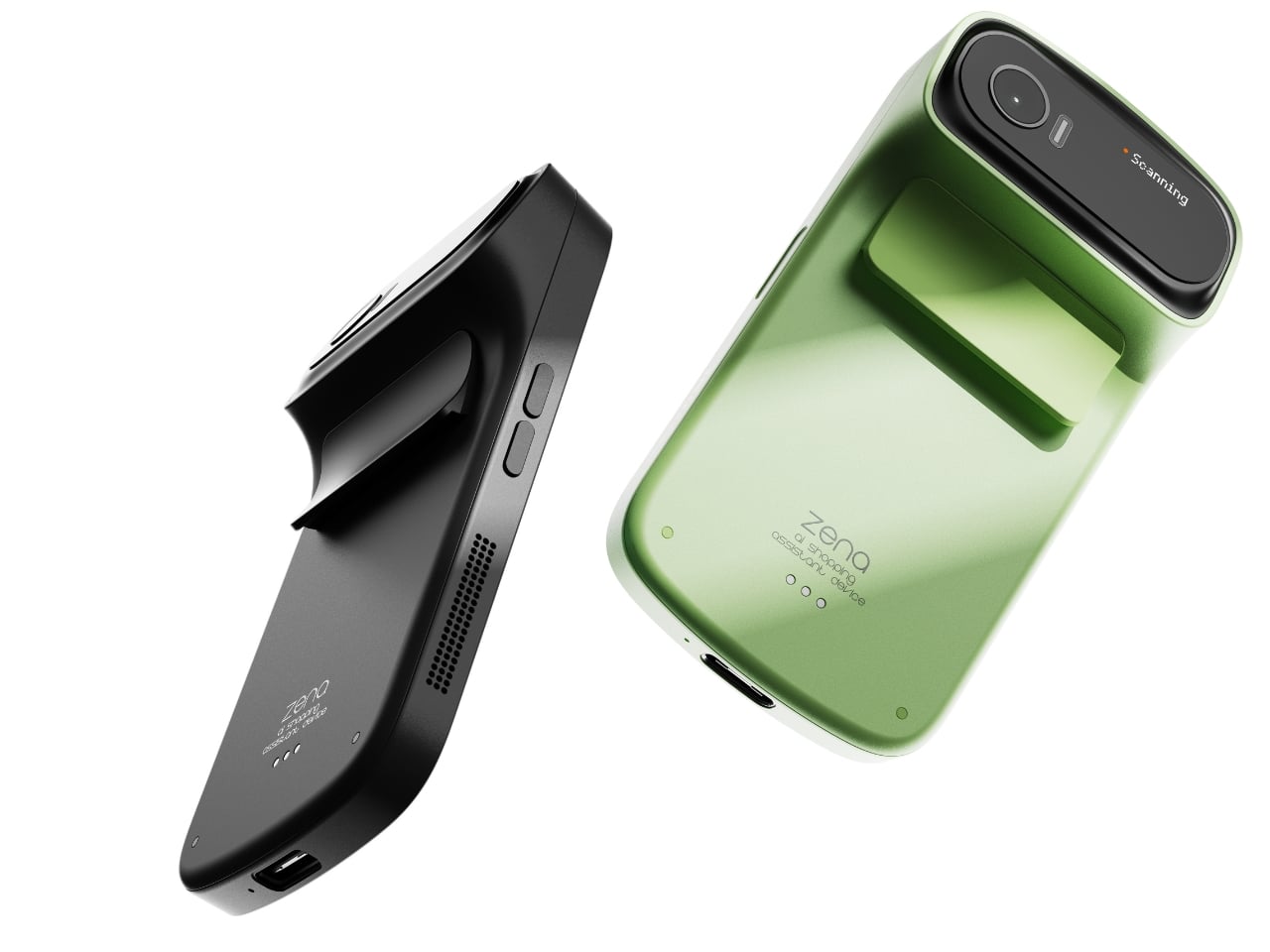
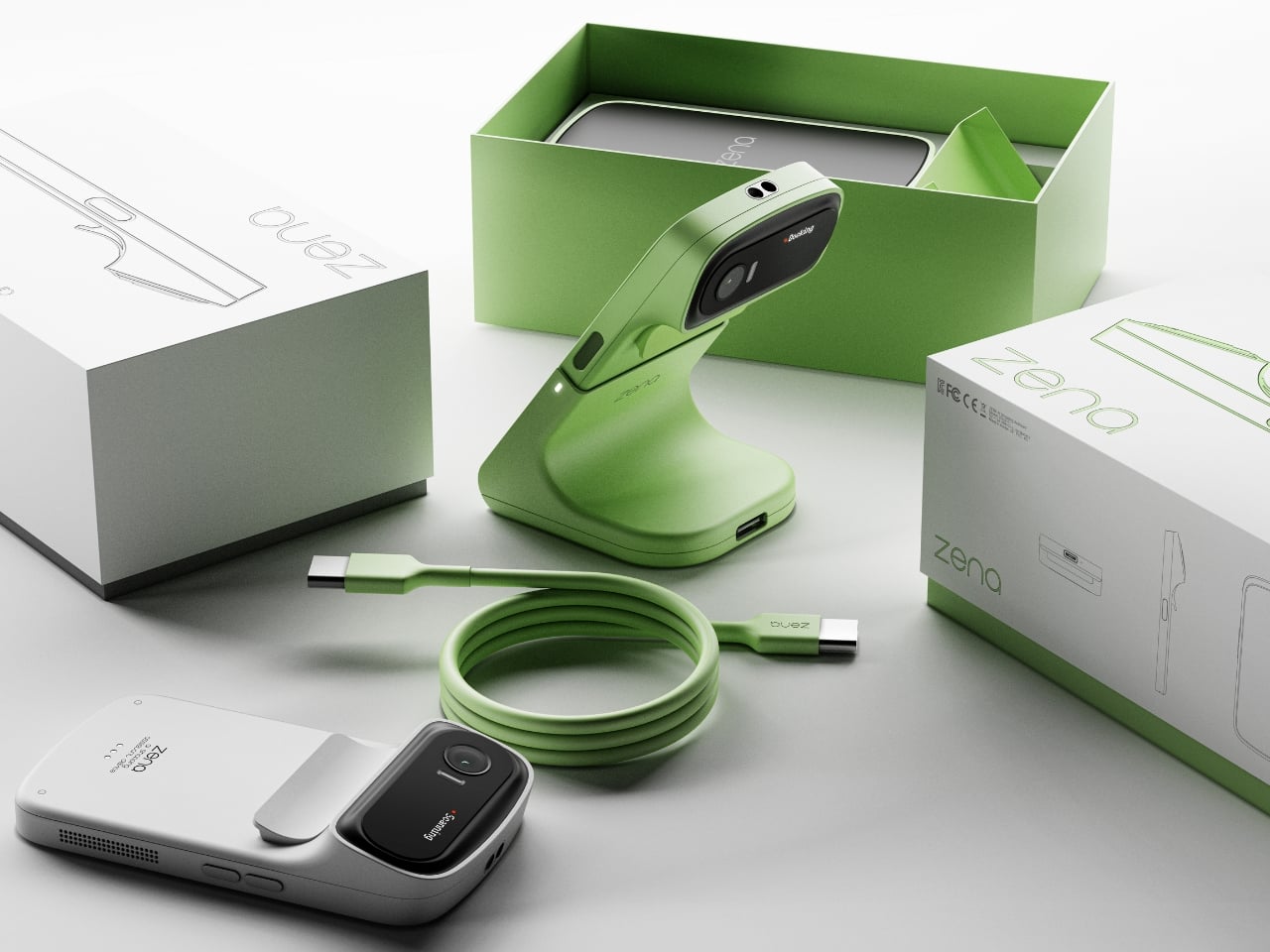
The way they’ve approached the physical design is just as compelling as the concept itself. Zena is small, handheld, and wears its function confidently. The camera module sits on a rotating head at the top, giving it a form that feels like a high-end digital camera crossed with a barcode scanner from a much more considered future. It comes in matte black, soft silver, and a sage green that is genuinely lovely, with a woven lanyard strap running through a flush metal eyelet on the side. That strap detail alone signals that these designers cared about the object beyond its utility. It’s the kind of quiet decision that separates a good concept from a great one.
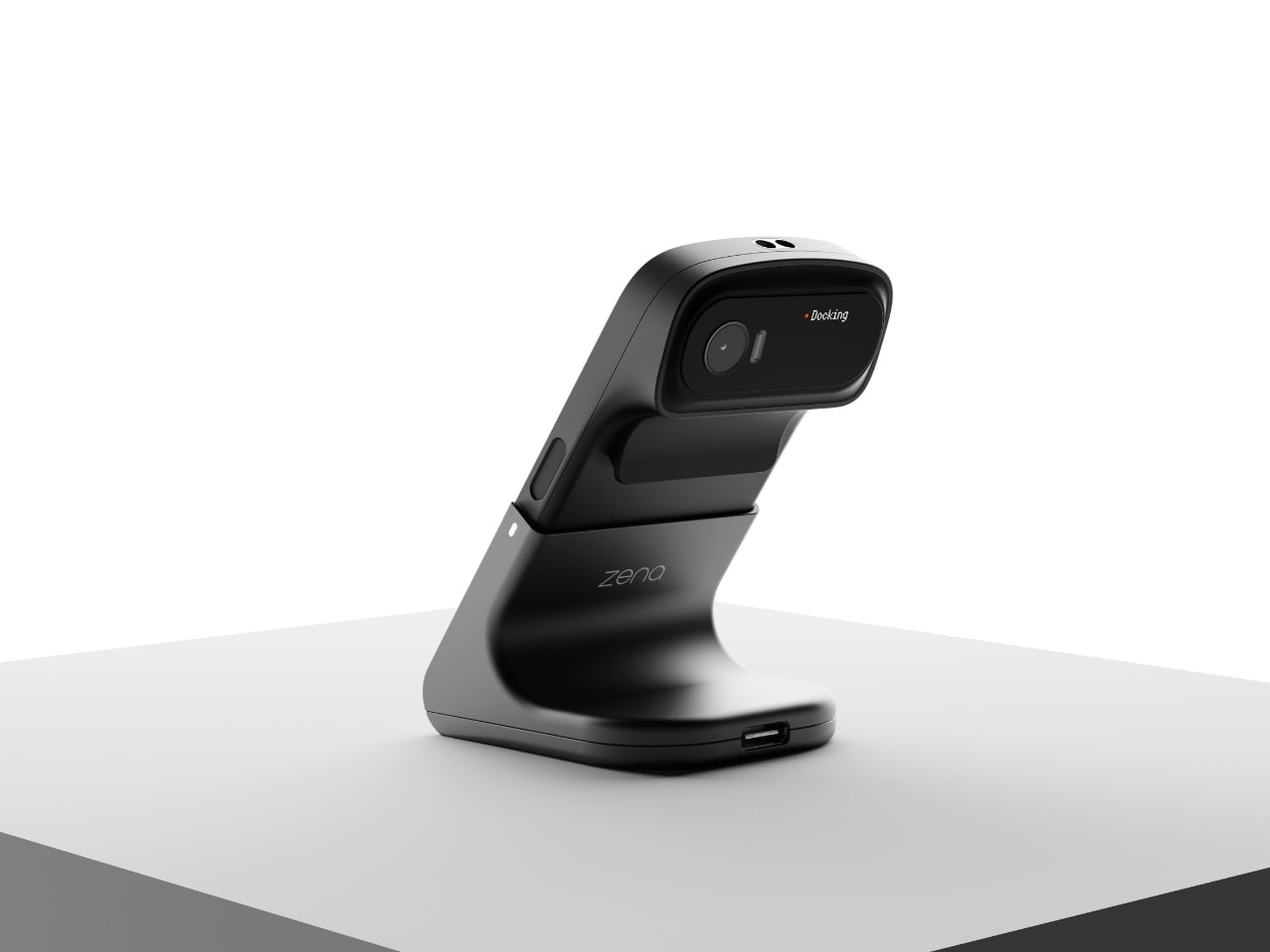
The docking station is worth mentioning too. Docked, zena tilts its camera head upward like it’s curious about something, giving it a personality that feels almost alive. It sits on a desk in a way that makes you want to look at it, which is more than you can say for most gadgets. The dock functions as a charging station as well, which means the device is always ready to go when you reach for it.
On the software side, the UI is clean and intentional. Once zena scans a product, it surfaces the item’s name, price, color options, and a list of purchase prices sorted by country and currency, with duty percentages clearly noted beside each one. A real-time exchange rate graph runs alongside. You pick your preferred price, preferred purchase location, and complete the transaction immediately. The workflow is scan, search, analyze, buy. No extra apps, no tab-switching, no mental math in a foreign currency.
The part that sticks with me is how practical this feels specifically as a travel companion. Imagine walking through a boutique in Tokyo or a market in Paris and actually knowing, before you commit, whether you’re getting a fair price or paying for the privilege of proximity. Right now that calculation happens mostly in your head, half-guessed and usually wrong.
Zena isn’t something you can buy yet. It’s a concept living on Behance for now. But it speaks to a real gap in how we shop globally, and it does so in a package that respects both form and function equally. In a design space full of concepts that look polished but feel purposeless, this one carries a clear point of view. Kim and Choi aren’t just designing a gadget. They’re designing against a system that has been profiting from consumer confusion for years. That’s the kind of ambition that deserves more than just a scroll-past.
Like other electronics products, cameras have shot up in price in the US of late due to tariffs and other reasons. Fortunately, there are still many models available for less than the price of a budget smartphone ($750 or less) that offer great features for creators and photographers alike.
If it’s speed you want for sports or action shots of your kids, models like Canon’s R50 can shoot bursts as fast as many high-end cameras. Creators, meanwhile, can choose Sony’s ZV-E10 for vlogging jobs. There are also great, and cheap, models in the action and gimbal camera categories.
Which one to pick therefore depends not only on your budget but what you want to do with your camera. So we’ll not only detail the best picks, but how to home in on the best model for your specific needs.
Best budget cameras for 2026
What to consider before choosing the best budget camera for you
Which camera to buy obviously depends on what you shoot. If it’s mostly things like extreme sports, skiing or other adventurous activities, the best choice is obviously an action camera from GoPro, DJI or Insta360. Then, you just need to decide whether you want to shoot flat or 360 video, and whether you need a tiny or regular-sized model. The same goes for gimbal-style cameras from DJI and others.
Buying a camera for travel photography, sports photos or vlogging is a bit trickier. Here, you need to choose either a compact camera with a fixed lens or a mirrorless model that supports removable lenses.
Compact cameras tend to have smaller sensors and slightly lower quality lenses, but they’re obviously easier to carry — most will fit in a large pocket. So, if budget, convenience and portability is the most important to you, then go for a model in this category.
When you’re trying to make the highest quality videos, though, you’ll want to choose a mirrorless camera with a decent lens. With the larger sensor, you’ll be able to create nice blurred bokeh backgrounds to separate your subject from the foreground. Lenses are usually sharper as well, and you’ll be able to expand your collection over time for even more versatility.
This article originally appeared on Engadget at https://www.engadget.com/cameras/best-budget-camera-130000653.html?src=rss
You don’t need to spend a fortune to get a capable Windows laptop. For everyday tasks like web browsing, writing documents, streaming video or handling schoolwork, a well-chosen budget machine can still deliver a smooth, reliable experience. The challenge is cutting through the noise to find affordable options that balance performance, build quality and battery life without serious compromises.
For many buyers, timing is no longer optional. With Windows 10 support now officially over, upgrading has become a necessity rather than a nice-to-have. The picks below focus on cheap Windows laptops that can handle day-to-day workloads comfortably while keeping you current on software and security updates. If you’re open to spending more for extra power or premium features, our broader guide to the best Windows laptops covers higher-end alternatives as well.
What to look for in a budget-friendly Windows laptop
While you can do a lot even when spending little on a Windows laptop, you must set your expectations accordingly. The biggest downside when purchasing a budget laptop (of any kind, really) is limited power. You’ll want to carefully consider a few specs, the most important among them being the processor (CPU). Many Windows laptops under $500 run on Intel Celeron or Pentium chipsets, but you can find some with Core i3/i5 and AMD Ryzen 3/5 CPUs at the higher end of the price spectrum.
We recommend getting the most powerful CPU you can afford because it will dictate how fast the computer will feel overall. Memory (RAM) is also important because, the more you have, the easier it will be for the laptop to manage things like a dozen browser tabs while you edit a Word document and stream music in the background.
When it comes to storage, consider how much you want to save locally. If you primarily work in Google Docs or save most things in the cloud, you may not need a machine with a ton of onboard storage. Just remember that your digital space will also be taken up by apps, so it may be worth getting a little extra storage than you think you need if you know you’ll be downloading big programs. A final side note: solid state drives (SSDs) are ubiquitous at this point, not to mention faster and more efficient than hard drives (HDDs), so we recommend getting a laptop with that type of storage.
As for screens, there’s a healthy mix of HD (720p resolution) and FHD (1080p) options in this price range and we recommend springing for a notebook with a 1080p display if you can. Touchscreens aren’t as common in the budget space as standard panels, but you’ll only really miss one if you get a 2-in-1 laptop.
Before we get to our recommended specs for a cheap Windows laptop, it’s worth mentioning that Microsoft clearly lays out the true minimum requirements for any Windows 11 machine. Those include a 1GHz or faster processor that includes two or more cores, at least 4GB of RAM and 64GB of available storage space. That’s the bare minimum to run Windows 11; we recommend giving yourself some wiggle room by choosing a machine that will perform well now and for years to come.
Specs to look for in an affordable Windows laptop
CPU: Intel Core i3 or AMD Ryzen 3 processors, at minimum
RAM: At least 8GB
Storage: At least 128GB SSD
Screen: At least 1080p FHD
It’s essential to prioritize what’s important to you. But at the lower end of the budget, a good laptop may not offer everything you need, whereas a great one might. Although most machines come with features like Bluetooth, built-in Wi-Fi and additional ports, you might find not all of them come with the specifics you require, like an SD card slot, webcam, charger, and so on. Be sure to check the spec list of any laptop you’re considering before you buy, especially if you need specific connectors and capabilities.
As for Copilot+, don’t expect to see much of it on truly affordable Windows laptops just yet. Microsoft’s AI features and Copilot assistant require certain specs to run, namely a powerful neural processing unit (NPU), 16GB of RAM and 256GB of storage. Currently, the cheapest Copilot+ AI PCs will run you about $700, so if you’re willing to pay more for those perks, check out our best laptops guide for more options.
If you’re looking for either a gaming laptop or a “Windows on Arm” laptop, both categories will require you to spend more money than we’re discussing here.
Best cheap Windows laptops for 2026
The cheap Windows laptop market moves fast, and — unlike nearly all of our other buying guides — we haven't necessarily tested each specific configuration listed below. However, the combination of these technical specifications and familiar brands represent exactly the sort of entry-level laptops we'd recommend to shoppers in this price range based on our thorough research and expert knowledge.
What to know about the budget Windows laptop market
The best cheap laptop models change all the time. Unlike more expensive, flagship machines, these notebooks can be updated a couple times each year. That can make it hard to track down a specific model at Amazon, Best Buy, Walmart or any other retailer. Also, we’ve seen prices vary widely depending on the configuration and retailer you’re looking at.
You can ensure you’re getting a quality laptop by doing a few things. First and foremost, make sure you get a machine that follows the recommended specs we list above. Also, make sure you’re buying from a reputable retailer, including big-box stores like Walmart, Best Buy and Costco, online shops like Amazon or direct manufacturers like Dell, HP, Lenovo and others. If you have a physical store near you (likely a Best Buy in the US), it’s never a bad idea to go play around with some laptops in person before choosing one.
If you decide to shop online from the likes of Amazon or Walmart, double check the seller of the laptop you’re considering. For example, many items on Amazon are “shipped and sold” by Amazon and those are typically the best options. You’ll see that information on Amazon on the right sidebar on a product page, under the Add to Cart and Buy Now buttons. Third-party sellers are common in the affordable laptop space. Amazon sometimes classifies laptop manufacturers as third-party sellers, so you may see a laptop shipped and sold by HP or Dell — that’s a good thing, since it’s coming directly from the manufacturer.
However, there are other third-party electronics sellers out there. We recommend clicking on the third-party seller’s name on Amazon or Walmart (yes, Walmart has them, too) to see how much positive feedback and how many five-star ratings they’ve received from buyers.
What about Chromebooks and tablets?
You may be inclined to recommend a Chromebook or a tablet to anyone considering a budget Windows laptop computer. Those instincts aren’t wrong, but Chromebooks and tablets aren’t the best buy for everyone. Tablets have the most portability, but they will only work for the most mobile-competent users like kids who have been grabbing smartphones out of their parents’ hands since they’ve been dexterous enough to do so. Tablets can also be just as expensive as some of the cheapest Windows laptops, and that’s without a mouse or keyboard.
Chromebooks are a good alternative for those that basically live in a browser, the trade-off being you must give up the “traditional desktop.” And Chrome OS is a more limited operating system than Windows when it comes to the programs you can install and run.
What Windows laptops do well
What can you realistically accomplish on a cheap Windows laptop? Quite a bit, especially if you’re doing one thing (or a limited number of things) at a time. They’re great for everyday tasks like web browsing, checking email, video streaming and more. All of those things can be done on Chromebooks as well, but Windows laptops have a big advantage in Microsoft Office. While yes, there is a browser based version, the native, desktop apps are considered a must have for many and will run smoothly on even the most bare-bones budget laptop. The only caveat is that you may run into some slowdown on low-powered devices if you’re multitasking or working with large data sets in Excel or a lot of photos and graphics in Powerpoint.
When it comes to specs, a bright spot for Windows laptops is storage. Even the most affordable devices tend to have at least a 128GB solid state drive. That will come in handy if you prefer to keep your most important files saved locally on your laptop's hard drive. In contrast, cheaper Chromebooks often have less storage because they’re built on the assumption that you’ll save all of your documents in the cloud. Not only is that less convenient when you need to work offline, but it also limits the size of programs and files that you can download. So, Chromebooks aren't the best for hoarding Netflix shows before a long trip or for use as a gaming laptop.
Windows also has thousands of apps that you can download from its app store. Chromebooks have some Chrome apps, numerous browser extensions and the ability to download Android apps, but quality control is… inconsistent. Android apps, in particular, often haven’t been optimized for Chrome OS, which makes for a wonky user experience. Windows may not have as many apps as Android, but at least the experience is fairly standard across the board.
Windows also gives you the ability to download and use programs from other sources, like direct from the developer. You can run things like Adobe Creative Suite, certain VPNs and programs like GIMP, Audacity and ClipMate on a Windows device, which just isn’t possible on Chrome OS. Chromebooks limit you to the apps and programs in The Play Store and the Chrome Extensions store, reducing any others to unusable, space-sucking icons in your Downloads folder.
This article originally appeared on Engadget at https://www.engadget.com/computing/laptops/best-affordable-windows-laptops-123000512.html?src=rss
A few years ago, it may have been fashionable to spend $1,000 on the latest flagship smartphone, but for most people, that’s neither practical nor necessary. You don't even have to spend $500 today to get a decent handset, whether it’s a refurbished iPhone or an affordable Android phone, as there are plenty of decent options as low as $160.
However, navigating the budget phone market can be tricky; options that look good on paper may not be in practice, and some devices will end up costing you more when you consider many come with restrictive storage. While we spend most of our time reviewing mid- to high-end handsets at Engadget, we've tested a number of the latest budget-friendly phones on the market to see cut it as the best cheap phones you can get right now.
Best cheap phones
What to look for in a cheap phone
For this guide, our top picks cost between $100 and $300. Anything less and you might as well go buy a dumb phone instead. Since they’re meant to be more affordable than flagship phones and even midrange handsets, budget smartphones involve compromises; the cheaper a device, the lower your expectations around specs, performance and experience should be. For that reason, the best advice I can give is to spend as much as you can afford. In this price range, even $50 or $100 more can get you a dramatically better product.
Second, you should know what you want most from a phone. When buying a budget smartphone, you may need to sacrifice a decent main camera for long battery life, or trade a high-resolution display for a faster CPU. That’s just what comes with the territory, but knowing your priorities will make it easier to find the right phone.
It’s also worth noting some features can be hard to find on cheaper handsets. For instance, you won’t need to search far for a device with all-day battery life — but if you want a phone with excellent camera quality, you’re better off shelling out for one of the recommendations in our midrange smartphone guide, which all come in at $600 or less.
Wireless charging and waterproofing also aren’t easy to find in this price range and forget about the fastest chipset. On the bright side, most of our recommendations come with headphone jacks, so you won’t need to buy wireless headphones.
iOS is also off the table, since, following the discontinuation of the iPhone SE, the $599 iPhone 16e is now the most affordable offering from Apple. That leaves Android as the only option in the under-$300 price range. Thankfully today, there’s little to complain about Google’s operating system – and you may even prefer it to iOS.
Lastly, keep in mind most Android manufacturers typically offer far less robust software features and support for their budget devices. In some cases, your new phone may only receive one major software update and a year or two of security patches beyond that. That applies to the OnePlus and Motorola recommendations on our list.
If you’d like to keep your phone for as long as possible, Samsung has the best software policy of any Android manufacturer in the budget space, offering at least four years of security updates on all of its devices. Recently, it even began offering six years of support on the $200 A16 5G, which we recommend below. That said, if software support (or device longevity overall) is your main focus, consider spending a bit more on the $500 Google Pixel 9a, or even the previous-gen Pixel 8a, which has planned software updates through mid-2031.
This article originally appeared on Engadget at https://www.engadget.com/mobile/smartphones/best-cheap-phones-130017793.html?src=rss
A few years ago, it may have been fashionable to spend $1,000 on the latest flagship smartphone, but for most people, that’s neither practical nor necessary. You don't even have to spend $500 today to get a decent handset, whether it’s a refurbished iPhone or an affordable Android phone, as there are plenty of decent options as low as $160.
However, navigating the budget phone market can be tricky; options that look good on paper may not be in practice, and some devices will end up costing you more when you consider many come with restrictive storage. While we spend most of our time reviewing mid- to high-end handsets at Engadget, we've tested a number of the latest budget-friendly phones on the market to see cut it as the best cheap phones you can get right now.
Best cheap phones
What to look for in a cheap phone
For this guide, our top picks cost between $100 and $300. Anything less and you might as well go buy a dumb phone instead. Since they’re meant to be more affordable than flagship phones and even midrange handsets, budget smartphones involve compromises; the cheaper a device, the lower your expectations around specs, performance and experience should be. For that reason, the best advice I can give is to spend as much as you can afford. In this price range, even $50 or $100 more can get you a dramatically better product.
Second, you should know what you want most from a phone. When buying a budget smartphone, you may need to sacrifice a decent main camera for long battery life, or trade a high-resolution display for a faster CPU. That’s just what comes with the territory, but knowing your priorities will make it easier to find the right phone.
It’s also worth noting some features can be hard to find on cheaper handsets. For instance, you won’t need to search far for a device with all-day battery life — but if you want a phone with excellent camera quality, you’re better off shelling out for one of the recommendations in our midrange smartphone guide, which all come in at $600 or less.
Wireless charging and waterproofing also aren’t easy to find in this price range and forget about the fastest chipset. On the bright side, most of our recommendations come with headphone jacks, so you won’t need to buy wireless headphones.
iOS is also off the table, since, following the discontinuation of the iPhone SE, the $599 iPhone 16e is now the most affordable offering from Apple. That leaves Android as the only option in the under-$300 price range. Thankfully today, there’s little to complain about Google’s operating system – and you may even prefer it to iOS.
Lastly, keep in mind most Android manufacturers typically offer far less robust software features and support for their budget devices. In some cases, your new phone may only receive one major software update and a year or two of security patches beyond that. That applies to the OnePlus and Motorola recommendations on our list.
If you’d like to keep your phone for as long as possible, Samsung has the best software policy of any Android manufacturer in the budget space, offering at least four years of security updates on all of its devices. Recently, it even began offering six years of support on the $200 A16 5G, which we recommend below. That said, if software support (or device longevity overall) is your main focus, consider spending a bit more on the $500 Google Pixel 9a, or even the previous-gen Pixel 8a, which has planned software updates through mid-2031.
This article originally appeared on Engadget at https://www.engadget.com/mobile/smartphones/best-cheap-phones-130017793.html?src=rss
A few years ago, it may have been fashionable to spend $1,000 on the latest flagship smartphone, but for most people, that’s neither practical nor necessary. You don't even have to spend $500 today to get a decent handset, whether it’s a refurbished iPhone or an affordable Android phone, as there are plenty of decent options as low as $160.
However, navigating the budget phone market can be tricky; options that look good on paper may not be in practice, and some devices will end up costing you more when you consider many come with restrictive storage. While we spend most of our time reviewing mid- to high-end handsets at Engadget, we've tested a number of the latest budget-friendly phones on the market to see cut it as the best cheap phones you can get right now.
Best cheap phones
What to look for in a cheap phone
For this guide, our top picks cost between $100 and $300. Anything less and you might as well go buy a dumb phone instead. Since they’re meant to be more affordable than flagship phones and even midrange handsets, budget smartphones involve compromises; the cheaper a device, the lower your expectations around specs, performance and experience should be. For that reason, the best advice I can give is to spend as much as you can afford. In this price range, even $50 or $100 more can get you a dramatically better product.
Second, you should know what you want most from a phone. When buying a budget smartphone, you may need to sacrifice a decent main camera for long battery life, or trade a high-resolution display for a faster CPU. That’s just what comes with the territory, but knowing your priorities will make it easier to find the right phone.
It’s also worth noting some features can be hard to find on cheaper handsets. For instance, you won’t need to search far for a device with all-day battery life — but if you want a phone with excellent camera quality, you’re better off shelling out for one of the recommendations in our midrange smartphone guide, which all come in at $600 or less.
Wireless charging and waterproofing also aren’t easy to find in this price range and forget about the fastest chipset. On the bright side, most of our recommendations come with headphone jacks, so you won’t need to buy wireless headphones.
iOS is also off the table, since, following the discontinuation of the iPhone SE, the $599 iPhone 16e is now the most affordable offering from Apple. That leaves Android as the only option in the under-$300 price range. Thankfully today, there’s little to complain about Google’s operating system – and you may even prefer it to iOS.
Lastly, keep in mind most Android manufacturers typically offer far less robust software features and support for their budget devices. In some cases, your new phone may only receive one major software update and a year or two of security patches beyond that. That applies to the OnePlus and Motorola recommendations on our list.
If you’d like to keep your phone for as long as possible, Samsung has the best software policy of any Android manufacturer in the budget space, offering at least four years of security updates on all of its devices. Recently, it even began offering six years of support on the $200 A16 5G, which we recommend below. That said, if software support (or device longevity overall) is your main focus, consider spending a bit more on the $500 Google Pixel 9a, or even the previous-gen Pixel 8a, which has planned software updates through mid-2031.
This article originally appeared on Engadget at https://www.engadget.com/mobile/smartphones/best-cheap-phones-130017793.html?src=rss
Good deals on Apple products aren’t as frequent as we’d like them to be, but if there’s one of the company’s products that does seem to enjoy pretty regular price cuts, it’s the AirTag. Right now you can pick up a four-pack of Apple’s diminutive first-generation Bluetooth trackers for $64, which translates to 35 percent off and a near record low price.
Bear in mind that this deal brings the price per AirTag down to about $16 if you were to buy them individually, and when not on sale they usually cost $29.
If you use Apple devices and consider yourself to be a serial thing-misplacer, AirTags are extremely useful. Adding one to your account takes a single tap, and with Apple’s Find My network so well established, locating missing items has never been easier.
Using your iPhone you can trigger a sound from the AirTag’s built-in speaker, or alternatively Precision Finding can be used to pinpoint its location via Find My. You just follow the instructions on your iPhone, paying attention to the vibrations that signal you’re getting closer.
A reminder again that the above deals apply to the first-generation AirTag only. Apple introduced a refreshed tracker with greater range and a louder speaker last month, which retails at the same price as its predecessor. For deals on the new AirTag, you may have to wait a bit.
Presidents’ Day is a great time to buy appliances, mattresses and furniture as they are often on sale for the holiday. Tech also gets discounted around this time, but you have to do a bit more digging to find actually good deals. And this year, Presidents’ Day comes right after Valentine’s Day and Super Bowl 2026, which means there are some overlapping sales to consider. If you don’t want to sort through the mess of bad deals out there, Engadget has you covered. We’re curating the best President Day sales on tech we can find right here. We’ll update this post through the holiday as more deals become available.
Presidents’ Day deals under $50
Disney+ and Hulu bundle (one month) for $10 ($3 off): You can get one month of Disney+ and Hulu access for only $10 right now. That represents a small savings over the standard $13-per-month price for the bundle, but a 58-percent discount when you compare it to the price of paying for both services separately. It’s a good way to test out the bundle without paying too much before you decide if you want to subscribe for the long haul.
Waterpik cordless rechargeable water flosser for $40 (20 percent off): A water flosser like this one can make it easier (and less painful in some cases) to floss your teeth on the regular. This model from Waterpik includes two interchangeable tips and has two pressure settings. Its battery life should last up to four weeks with regular use as well.
Amazon Fire TV Stick 4K Max for $40 ($20 off): Amazon’s most premium streaming dongle supports 4K HDR content, Dolby Vision and Wi-Fi 6E. You may even be able to get it for $10 less than the sale price listed, for a final price of $30, when using the code MAX4KFTV at checkout.
Blink Mini 2K+ — 2 cameras for $45 (50 percent off): Blink’s latest plug-in security cameras support 2K video and improved audio quality. Like previous versions, these cameras have two-way talk, motion alerts and support for Alexa voice commands.
Apple Magic Mouse for $68 (14 percent off): Apple’s sleek wireless mouse has a multi-touch surface that supports gesture control, and its battery should last about a month in between charges. And yes, it has a USB-C port.
Apple Watch Series 11 for $299 ($100 off): The latest flagship Apple Watch has excellent performance, a boosted battery life and a lightweight design that you can comfortably wear all day long — and even into the night to track sleep.
iPad mini (A17 Pro ) for $399 ($100 off): The updated iPad mini runs on the A17 Pro chip for improved performance, plus it has an 8.3-inch Liquid Retina display, a 12MP ultra wide camera with Center Stage, USB-C charging and compatibility with the Apple Pencil Pro.
Beats Studio Pro for $200 (43 percent off): Beats updated these cans to have improved sound quality, and you can really hear the difference from models that came before it. These headphones also have solid Transparency mode, good voice performance and USB-C audio.
Beats Solo 4 headphones for $150 (25 percent off): These on-ear headphones support spatial audio and dynamic head tracking, and they have up to 50 hours of battery life. The “fast fuel” feature allows them to get up to five hours of playback time with just a quick 10-minute power-up.
Beats Studio Buds+ for $100 (41 percent off): These tiny buds have both active noise cancellation and transparency mode, and they’ll work just as well with either Apple or Android devices.
This article originally appeared on Engadget at https://www.engadget.com/deals/presidents-day-sales-2026-are-live-the-best-tech-deals-up-to-43-percent-off-to-shop-from-apple-samsung-anker-and-others-163000321.html?src=rss
You know that feeling when you stumble upon a neighborhood that just gets it right? Where every corner feels designed for actual humans instead of maximizing square footage? That’s exactly what Architectkidd has created with My Front Yard in Phuket, and it’s making me rethink everything I thought I knew about retail spaces.
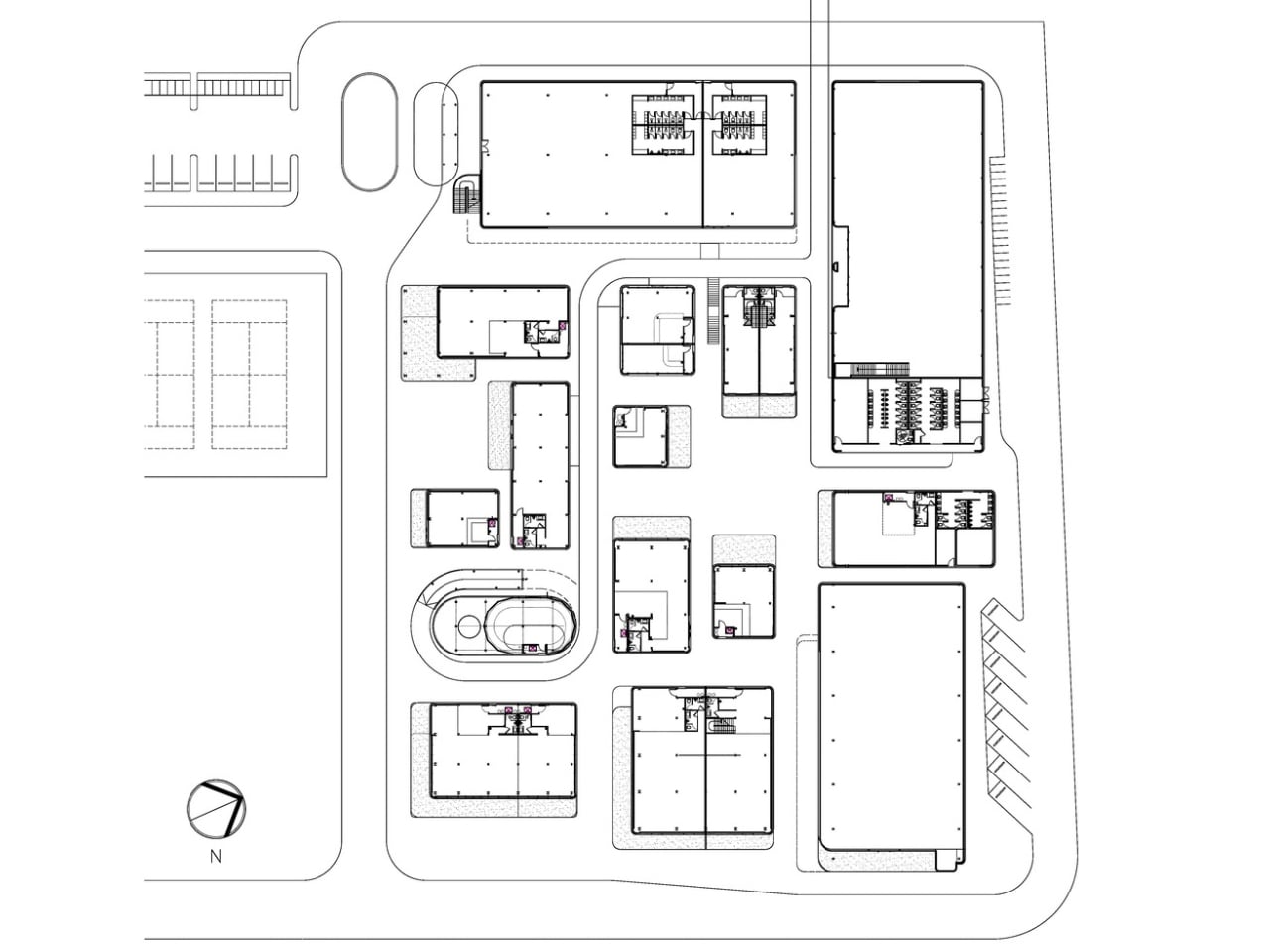
Here’s the thing: most shopping centers feel like they were designed by people who have never actually enjoyed walking through one. You get those massive, soul-sucking boxes where the only outdoor space is the parking lot. But My Front Yard flips that script entirely. Located against a hillside in Phuket, this project ditches the big box approach for something that feels more like wandering through a well-planned village than a commercial development.
The concept is refreshingly simple yet radical in today’s retail landscape. Instead of cramming everything under one massive roof, Architectkidd broke the space into a cluster of low-rise pavilions scattered across the site. These aren’t just random buildings, they’re connected by open-air walkways and communal spaces that actually make you want to slow down and explore. It’s retail therapy in the most literal sense.
What makes this design so clever is how it taps into the rhythms of everyday life. The outdoor pathways aren’t just pretty, they’re designed for morning walks, exercise stops, daily jogs, and yes, even bringing your pet along. The space becomes part of your routine rather than a destination you have to psychologically prepare for. It’s the kind of place where grabbing coffee or browsing shops becomes a pleasant addition to your day instead of a task to endure.
The architectural language ties everything together without feeling monotonous. Each pavilion maintains its own identity while contributing to a cohesive whole, creating what Architectkidd calls “micro-communities” within the larger development. It’s a subtle but important distinction. You’re not navigating a monolith, you’re discovering pockets of activity that each have their own character and purpose.
This approach represents a fundamental shift in how we think about commercial spaces. The goal wasn’t just to create another place to shop, it was to build a landscape where community happens organically. Success here isn’t measured in transactions per square foot but in how naturally people integrate the space into their lives. Can you pop by for a quick errand? Absolutely. But you can also spend an afternoon wandering, meeting friends, or just enjoying being outside in a thoughtfully designed environment.
The timing of this project feels particularly relevant. We’ve spent years watching retail struggle to compete with online shopping, and the answer often seemed to be making physical stores more experiential. But My Front Yard suggests a different solution: make the entire environment worth experiencing. When the journey between shops is as pleasant as what’s inside them, you’re creating value that Amazon can’t replicate.
Phuket’s climate makes this open-air concept especially practical, but the philosophy behind it could translate to countless other contexts. We’re seeing a broader movement in architecture and urban planning that prioritizes human-scale development, pedestrian-friendly design, and spaces that encourage spontaneous interaction. My Front Yard isn’t just riding that wave, it’s showing how those principles can work in a commercial setting without sacrificing functionality.
There’s also something refreshing about design that doesn’t shout for attention. The pavilions and walkways create an experience without overwhelming you. It’s confident enough to be understated, trusting that good bones and thoughtful planning will be their own draw. In an era of Instagram-bait architecture, that restraint feels almost rebellious.
Looking at projects like My Front Yard makes me hopeful about the future of retail and public space generally. We don’t have to choose between commercial viability and human-centered design. We can create places that serve both purposes, spaces that support businesses while genuinely improving daily life for the people who use them. Sometimes the most innovative thing you can do is remember what made neighborhoods work in the first place, then apply that wisdom with contemporary tools and fresh eyes.
It's big-game season, which means it's a good time to look for home theater gear on sale ahead of Super Bowl 2026. There are plenty of Super Bowl TV deals to consider, but if you have arguably the most important piece of the puzzle down, you may want to upgrade your sound system instead. Sonos' latest sale may have just what you need; a bunch of the company's home theater gear is up to 20 percent off right now. You can save $130 on the Beam (Gen 2) soundbar, bringing its price down to $369, and you'll also find deals on the flagship Arc Ultra soundbar, subwoofers, and more.
The Sonos Beam is the company's sub-$500 soundbar. Engadget's pick for the best midrange model, the compact speaker has impressive sound for its size. Part of that is its Dolby Atmos support. Although the soundbar lacks upward-firing speakers, it uses software tricks to compensate. Audio timing and frequency adjustments make sound seem to come from the side or slightly above.
One of the biggest drawbacks is that the Beam only has one HDMI port. Regardless, that compromise may be easier to accept at Beam's current $369 than at its usual $499.
Several more home theater speakers are included in Sonos's sale. If you have a loftier budget for a soundbar, there's the Arc Ultra. Typically $1,099, it's now $899. The company's pair of subwoofers is included as well. You can get the Sub Mini for $399 (down from $499) or the Sub 4 for $759 (from $899).
Although they aren't explicitly sold as home theater products, the Era 100 ($179) and Era 300 ($379) are also included in the sale. The portable Move 2 isn't discounted individually, but you will find it in a couple of bundles. You can check out the sale page for the complete list.
This article originally appeared on Engadget at https://www.engadget.com/deals/sonos-soundbars-and-home-theater-gear-is-up-to-20-percent-off-right-now-174053415.html?src=rss