The Wireless Display Kit That Needs No App, No Network, No Pairing

There’s no shortage of ways to get your screen onto a larger display these days, but the experience rarely matches the simplicity it should have. Adapters pile up in bags, cables stretch across desks, and software-based casting tools have a talent for dropping at the worst possible moment. For a market that’s moved so decisively toward wireless, display connectivity has been surprisingly slow to catch up.

The MouseArc G1 is a wireless HD transmitter and receiver set that takes that problem head-on, without leaning on apps, network menus, or the complicated routines that have made similar devices tedious. It also doesn’t look the part of a utilitarian tool. The G1 sports a puzzle-tile design in white and orange that gives it a visual identity far removed from a typical AV dongle.

Designer: MouseArc

Click Here to Buy Bow: $69 $120 (43% off). Hurry, only 89/400 left! Raised over $49,000.
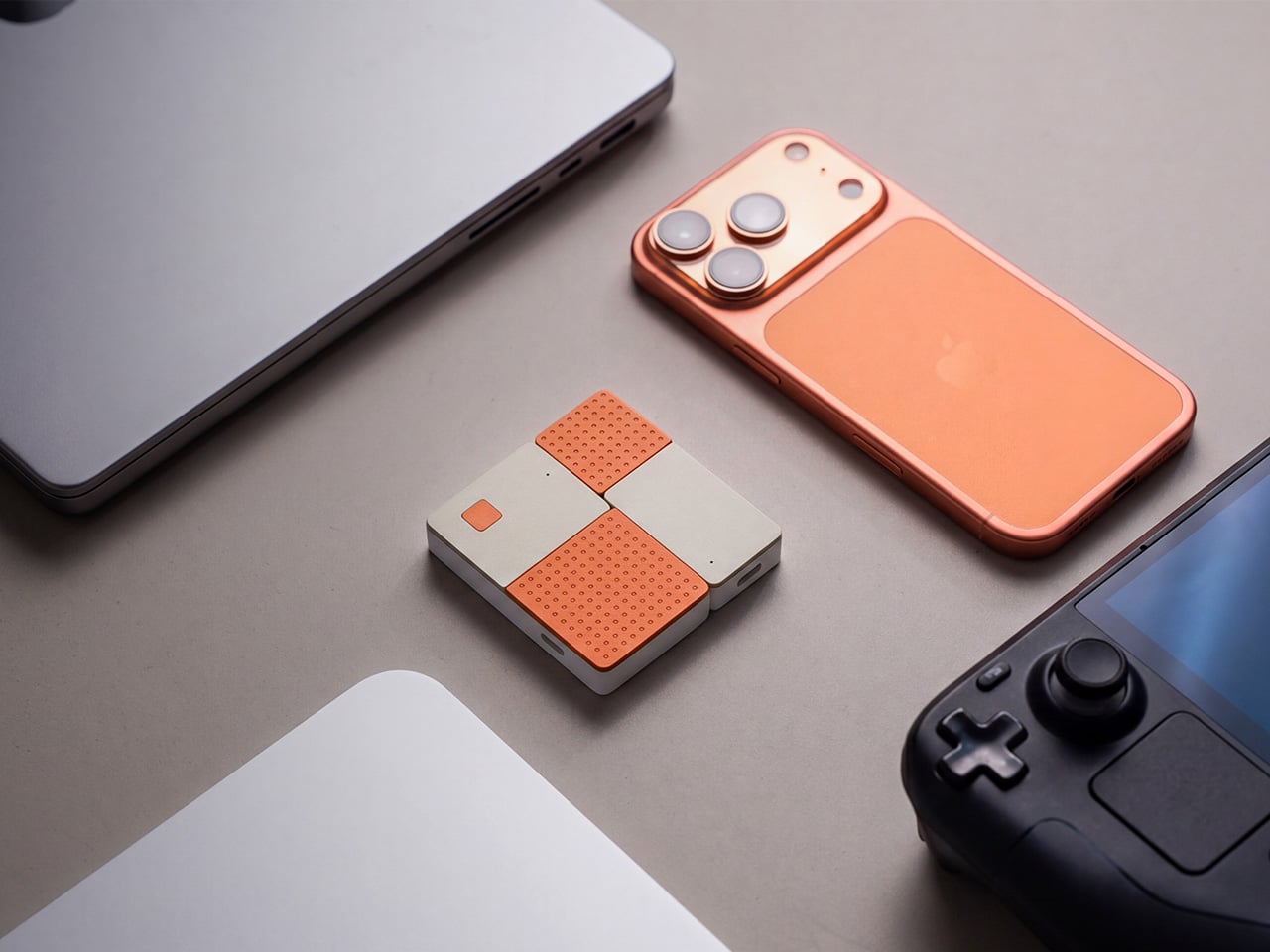
The kit includes a USB-C transmitter for source devices and an HDMI receiver for the display. Both come factory pre-paired, so there’s nothing to configure right out of the box. No app installs, no Bluetooth pairing, no hopping onto a Wi-Fi network. You plug the transmitter into your laptop or phone, connect the receiver to a TV or projector, and you’re ready almost immediately.

The G1 runs on 802.11ac 5G peer-to-peer Wi-Fi, operating on a dedicated channel rather than borrowing bandwidth from your home network. That separation keeps the signal clean and resistant to interference, which pays off noticeably during longer sessions. It’s also rated for up to 50m in open areas, making it a practical option for conference rooms, lecture halls, and larger commercial spaces.

Think about walking into a conference room with your laptop, needing to get a presentation up before the meeting starts. With the G1 already connected to the room’s display, the only step is plugging in the transmitter. There’s no wrestling with the AV system, no scrambling for a compatible cable, and no awkward silence while everyone politely watches you troubleshoot.

That same ease carries into more personal moments. Connecting a phone or tablet to a TV for a movie night is about as involved as plugging in a USB drive. The G1 works with a wide range of USB-C devices that support DisplayPort Alt Mode, from iPhones and iPads to MacBooks and Samsung Galaxy phones, so there’s a good chance what you already own qualifies.
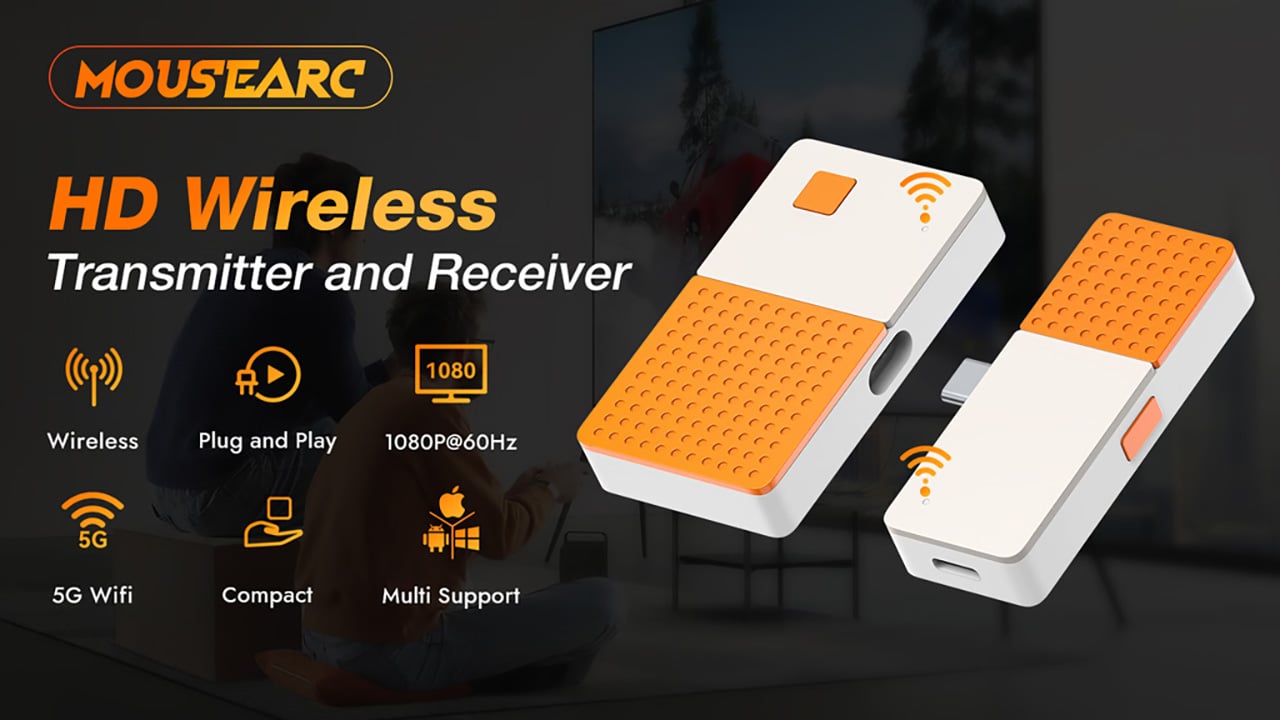
For anything where motion matters, the G1 supports 1080p at 120Hz, with a dedicated processing unit keeping visuals sharp and movement fluid. Fast-moving scenes stay clear without the blur or judder that can make wireless display setups feel like a step backward. Audio stays synced throughout as well, which rounds out an experience that holds up well for gaming, sports, and high-motion content.

Something that often goes unaddressed with wireless display kits is what happens to your device’s power while you’re casting. The G1 includes a 100W PD 3.0 pass-through charging port, so your laptop or phone stays charged while the transmitter is in use. For anything running longer than a quick demo, that detail makes a real difference to how the session actually plays out.

Then there’s the form factor. At 6.5cm x 6cm x 1.3cm and around 32g, the G1 is compact enough to pocket or slip into a bag without thought. The puzzle-tile silhouette and white and orange finish give it a visual personality that stands apart from the usual AV dongle, which feels like a deliberate design choice for something meant to travel daily.

What the G1 delivers is a cleaner way to use the displays you already own. Whether it’s a presentation, a movie, a classroom session, or a gaming moment on a bigger screen, it handles the connection without demanding anything back. That quiet, friction-free reliability is genuinely hard to find in a category that tends to make everything feel more complicated than it needs to be.

Click Here to Buy Bow: $69 $120 (43% off). Hurry, only 89/400 left! Raised over $49,000.

The post The Wireless Display Kit That Needs No App, No Network, No Pairing first appeared on Yanko Design.
The Wireless Display Kit That Needs No App, No Network, No Pairing

There’s no shortage of ways to get your screen onto a larger display these days, but the experience rarely matches the simplicity it should have. Adapters pile up in bags, cables stretch across desks, and software-based casting tools have a talent for dropping at the worst possible moment. For a market that’s moved so decisively toward wireless, display connectivity has been surprisingly slow to catch up.

The MouseArc G1 is a wireless HD transmitter and receiver set that takes that problem head-on, without leaning on apps, network menus, or the complicated routines that have made similar devices tedious. It also doesn’t look the part of a utilitarian tool. The G1 sports a puzzle-tile design in white and orange that gives it a visual identity far removed from a typical AV dongle.

Designer: MouseArc

Click Here to Buy Bow: $69 $120 (43% off). Hurry, only 89/400 left! Raised over $49,000.

The kit includes a USB-C transmitter for source devices and an HDMI receiver for the display. Both come factory pre-paired, so there’s nothing to configure right out of the box. No app installs, no Bluetooth pairing, no hopping onto a Wi-Fi network. You plug the transmitter into your laptop or phone, connect the receiver to a TV or projector, and you’re ready almost immediately.

The G1 runs on 802.11ac 5G peer-to-peer Wi-Fi, operating on a dedicated channel rather than borrowing bandwidth from your home network. That separation keeps the signal clean and resistant to interference, which pays off noticeably during longer sessions. It’s also rated for up to 50m in open areas, making it a practical option for conference rooms, lecture halls, and larger commercial spaces.

Think about walking into a conference room with your laptop, needing to get a presentation up before the meeting starts. With the G1 already connected to the room’s display, the only step is plugging in the transmitter. There’s no wrestling with the AV system, no scrambling for a compatible cable, and no awkward silence while everyone politely watches you troubleshoot.

That same ease carries into more personal moments. Connecting a phone or tablet to a TV for a movie night is about as involved as plugging in a USB drive. The G1 works with a wide range of USB-C devices that support DisplayPort Alt Mode, from iPhones and iPads to MacBooks and Samsung Galaxy phones, so there’s a good chance what you already own qualifies.

For anything where motion matters, the G1 supports 1080p at 120Hz, with a dedicated processing unit keeping visuals sharp and movement fluid. Fast-moving scenes stay clear without the blur or judder that can make wireless display setups feel like a step backward. Audio stays synced throughout as well, which rounds out an experience that holds up well for gaming, sports, and high-motion content.

Something that often goes unaddressed with wireless display kits is what happens to your device’s power while you’re casting. The G1 includes a 100W PD 3.0 pass-through charging port, so your laptop or phone stays charged while the transmitter is in use. For anything running longer than a quick demo, that detail makes a real difference to how the session actually plays out.

Then there’s the form factor. At 6.5cm x 6cm x 1.3cm and around 32g, the G1 is compact enough to pocket or slip into a bag without thought. The puzzle-tile silhouette and white and orange finish give it a visual personality that stands apart from the usual AV dongle, which feels like a deliberate design choice for something meant to travel daily.

What the G1 delivers is a cleaner way to use the displays you already own. Whether it’s a presentation, a movie, a classroom session, or a gaming moment on a bigger screen, it handles the connection without demanding anything back. That quiet, friction-free reliability is genuinely hard to find in a category that tends to make everything feel more complicated than it needs to be.

Click Here to Buy Bow: $69 $120 (43% off). Hurry, only 89/400 left! Raised over $49,000.

The post The Wireless Display Kit That Needs No App, No Network, No Pairing first appeared on Yanko Design.

The Wireless Display Kit That Needs No App, No Network, No Pairing

There’s no shortage of ways to get your screen onto a larger display these days, but the experience rarely matches the simplicity it should have. Adapters pile up in bags, cables stretch across desks, and software-based casting tools have a talent for dropping at the worst possible moment. For a market that’s moved so decisively toward wireless, display connectivity has been surprisingly slow to catch up.

The MouseArc G1 is a wireless HD transmitter and receiver set that takes that problem head-on, without leaning on apps, network menus, or the complicated routines that have made similar devices tedious. It also doesn’t look the part of a utilitarian tool. The G1 sports a puzzle-tile design in white and orange that gives it a visual identity far removed from a typical AV dongle.

Designer: MouseArc

Click Here to Buy Bow: $69 $120 (43% off). Hurry, only 89/400 left! Raised over $49,000.

The kit includes a USB-C transmitter for source devices and an HDMI receiver for the display. Both come factory pre-paired, so there’s nothing to configure right out of the box. No app installs, no Bluetooth pairing, no hopping onto a Wi-Fi network. You plug the transmitter into your laptop or phone, connect the receiver to a TV or projector, and you’re ready almost immediately.

The G1 runs on 802.11ac 5G peer-to-peer Wi-Fi, operating on a dedicated channel rather than borrowing bandwidth from your home network. That separation keeps the signal clean and resistant to interference, which pays off noticeably during longer sessions. It’s also rated for up to 50m in open areas, making it a practical option for conference rooms, lecture halls, and larger commercial spaces.

Think about walking into a conference room with your laptop, needing to get a presentation up before the meeting starts. With the G1 already connected to the room’s display, the only step is plugging in the transmitter. There’s no wrestling with the AV system, no scrambling for a compatible cable, and no awkward silence while everyone politely watches you troubleshoot.

That same ease carries into more personal moments. Connecting a phone or tablet to a TV for a movie night is about as involved as plugging in a USB drive. The G1 works with a wide range of USB-C devices that support DisplayPort Alt Mode, from iPhones and iPads to MacBooks and Samsung Galaxy phones, so there’s a good chance what you already own qualifies.

For anything where motion matters, the G1 supports 1080p at 120Hz, with a dedicated processing unit keeping visuals sharp and movement fluid. Fast-moving scenes stay clear without the blur or judder that can make wireless display setups feel like a step backward. Audio stays synced throughout as well, which rounds out an experience that holds up well for gaming, sports, and high-motion content.

Something that often goes unaddressed with wireless display kits is what happens to your device’s power while you’re casting. The G1 includes a 100W PD 3.0 pass-through charging port, so your laptop or phone stays charged while the transmitter is in use. For anything running longer than a quick demo, that detail makes a real difference to how the session actually plays out.

Then there’s the form factor. At 6.5cm x 6cm x 1.3cm and around 32g, the G1 is compact enough to pocket or slip into a bag without thought. The puzzle-tile silhouette and white and orange finish give it a visual personality that stands apart from the usual AV dongle, which feels like a deliberate design choice for something meant to travel daily.

What the G1 delivers is a cleaner way to use the displays you already own. Whether it’s a presentation, a movie, a classroom session, or a gaming moment on a bigger screen, it handles the connection without demanding anything back. That quiet, friction-free reliability is genuinely hard to find in a category that tends to make everything feel more complicated than it needs to be.

Click Here to Buy Bow: $69 $120 (43% off). Hurry, only 89/400 left! Raised over $49,000.

The post The Wireless Display Kit That Needs No App, No Network, No Pairing first appeared on Yanko Design.

The Wireless Display Kit That Needs No App, No Network, No Pairing

There’s no shortage of ways to get your screen onto a larger display these days, but the experience rarely matches the simplicity it should have. Adapters pile up in bags, cables stretch across desks, and software-based casting tools have a talent for dropping at the worst possible moment. For a market that’s moved so decisively toward wireless, display connectivity has been surprisingly slow to catch up.

The MouseArc G1 is a wireless HD transmitter and receiver set that takes that problem head-on, without leaning on apps, network menus, or the complicated routines that have made similar devices tedious. It also doesn’t look the part of a utilitarian tool. The G1 sports a puzzle-tile design in white and orange that gives it a visual identity far removed from a typical AV dongle.

Designer: MouseArc

Click Here to Buy Bow: $69 $120 (43% off). Hurry, only 89/400 left! Raised over $49,000.

The kit includes a USB-C transmitter for source devices and an HDMI receiver for the display. Both come factory pre-paired, so there’s nothing to configure right out of the box. No app installs, no Bluetooth pairing, no hopping onto a Wi-Fi network. You plug the transmitter into your laptop or phone, connect the receiver to a TV or projector, and you’re ready almost immediately.

The G1 runs on 802.11ac 5G peer-to-peer Wi-Fi, operating on a dedicated channel rather than borrowing bandwidth from your home network. That separation keeps the signal clean and resistant to interference, which pays off noticeably during longer sessions. It’s also rated for up to 50m in open areas, making it a practical option for conference rooms, lecture halls, and larger commercial spaces.

Think about walking into a conference room with your laptop, needing to get a presentation up before the meeting starts. With the G1 already connected to the room’s display, the only step is plugging in the transmitter. There’s no wrestling with the AV system, no scrambling for a compatible cable, and no awkward silence while everyone politely watches you troubleshoot.

That same ease carries into more personal moments. Connecting a phone or tablet to a TV for a movie night is about as involved as plugging in a USB drive. The G1 works with a wide range of USB-C devices that support DisplayPort Alt Mode, from iPhones and iPads to MacBooks and Samsung Galaxy phones, so there’s a good chance what you already own qualifies.

For anything where motion matters, the G1 supports 1080p at 120Hz, with a dedicated processing unit keeping visuals sharp and movement fluid. Fast-moving scenes stay clear without the blur or judder that can make wireless display setups feel like a step backward. Audio stays synced throughout as well, which rounds out an experience that holds up well for gaming, sports, and high-motion content.

Something that often goes unaddressed with wireless display kits is what happens to your device’s power while you’re casting. The G1 includes a 100W PD 3.0 pass-through charging port, so your laptop or phone stays charged while the transmitter is in use. For anything running longer than a quick demo, that detail makes a real difference to how the session actually plays out.

Then there’s the form factor. At 6.5cm x 6cm x 1.3cm and around 32g, the G1 is compact enough to pocket or slip into a bag without thought. The puzzle-tile silhouette and white and orange finish give it a visual personality that stands apart from the usual AV dongle, which feels like a deliberate design choice for something meant to travel daily.

What the G1 delivers is a cleaner way to use the displays you already own. Whether it’s a presentation, a movie, a classroom session, or a gaming moment on a bigger screen, it handles the connection without demanding anything back. That quiet, friction-free reliability is genuinely hard to find in a category that tends to make everything feel more complicated than it needs to be.

Click Here to Buy Bow: $69 $120 (43% off). Hurry, only 89/400 left! Raised over $49,000.

The post The Wireless Display Kit That Needs No App, No Network, No Pairing first appeared on Yanko Design.
The Wireless Display Kit That Needs No App, No Network, No Pairing

There’s no shortage of ways to get your screen onto a larger display these days, but the experience rarely matches the simplicity it should have. Adapters pile up in bags, cables stretch across desks, and software-based casting tools have a talent for dropping at the worst possible moment. For a market that’s moved so decisively toward wireless, display connectivity has been surprisingly slow to catch up.

The MouseArc G1 is a wireless HD transmitter and receiver set that takes that problem head-on, without leaning on apps, network menus, or the complicated routines that have made similar devices tedious. It also doesn’t look the part of a utilitarian tool. The G1 sports a puzzle-tile design in white and orange that gives it a visual identity far removed from a typical AV dongle.

Designer: MouseArc

Click Here to Buy Bow: $69 $120 (43% off). Hurry, only 89/400 left! Raised over $49,000.

The kit includes a USB-C transmitter for source devices and an HDMI receiver for the display. Both come factory pre-paired, so there’s nothing to configure right out of the box. No app installs, no Bluetooth pairing, no hopping onto a Wi-Fi network. You plug the transmitter into your laptop or phone, connect the receiver to a TV or projector, and you’re ready almost immediately.

The G1 runs on 802.11ac 5G peer-to-peer Wi-Fi, operating on a dedicated channel rather than borrowing bandwidth from your home network. That separation keeps the signal clean and resistant to interference, which pays off noticeably during longer sessions. It’s also rated for up to 50m in open areas, making it a practical option for conference rooms, lecture halls, and larger commercial spaces.

Think about walking into a conference room with your laptop, needing to get a presentation up before the meeting starts. With the G1 already connected to the room’s display, the only step is plugging in the transmitter. There’s no wrestling with the AV system, no scrambling for a compatible cable, and no awkward silence while everyone politely watches you troubleshoot.

That same ease carries into more personal moments. Connecting a phone or tablet to a TV for a movie night is about as involved as plugging in a USB drive. The G1 works with a wide range of USB-C devices that support DisplayPort Alt Mode, from iPhones and iPads to MacBooks and Samsung Galaxy phones, so there’s a good chance what you already own qualifies.

For anything where motion matters, the G1 supports 1080p at 120Hz, with a dedicated processing unit keeping visuals sharp and movement fluid. Fast-moving scenes stay clear without the blur or judder that can make wireless display setups feel like a step backward. Audio stays synced throughout as well, which rounds out an experience that holds up well for gaming, sports, and high-motion content.

Something that often goes unaddressed with wireless display kits is what happens to your device’s power while you’re casting. The G1 includes a 100W PD 3.0 pass-through charging port, so your laptop or phone stays charged while the transmitter is in use. For anything running longer than a quick demo, that detail makes a real difference to how the session actually plays out.

Then there’s the form factor. At 6.5cm x 6cm x 1.3cm and around 32g, the G1 is compact enough to pocket or slip into a bag without thought. The puzzle-tile silhouette and white and orange finish give it a visual personality that stands apart from the usual AV dongle, which feels like a deliberate design choice for something meant to travel daily.

What the G1 delivers is a cleaner way to use the displays you already own. Whether it’s a presentation, a movie, a classroom session, or a gaming moment on a bigger screen, it handles the connection without demanding anything back. That quiet, friction-free reliability is genuinely hard to find in a category that tends to make everything feel more complicated than it needs to be.

Click Here to Buy Bow: $69 $120 (43% off). Hurry, only 89/400 left! Raised over $49,000.

The post The Wireless Display Kit That Needs No App, No Network, No Pairing first appeared on Yanko Design.

The Wireless Display Kit That Needs No App, No Network, No Pairing

There’s no shortage of ways to get your screen onto a larger display these days, but the experience rarely matches the simplicity it should have. Adapters pile up in bags, cables stretch across desks, and software-based casting tools have a talent for dropping at the worst possible moment. For a market that’s moved so decisively toward wireless, display connectivity has been surprisingly slow to catch up.

The MouseArc G1 is a wireless HD transmitter and receiver set that takes that problem head-on, without leaning on apps, network menus, or the complicated routines that have made similar devices tedious. It also doesn’t look the part of a utilitarian tool. The G1 sports a puzzle-tile design in white and orange that gives it a visual identity far removed from a typical AV dongle.

Designer: MouseArc

Click Here to Buy Bow: $69 $120 (43% off). Hurry, only 89/400 left! Raised over $49,000.

The kit includes a USB-C transmitter for source devices and an HDMI receiver for the display. Both come factory pre-paired, so there’s nothing to configure right out of the box. No app installs, no Bluetooth pairing, no hopping onto a Wi-Fi network. You plug the transmitter into your laptop or phone, connect the receiver to a TV or projector, and you’re ready almost immediately.

The G1 runs on 802.11ac 5G peer-to-peer Wi-Fi, operating on a dedicated channel rather than borrowing bandwidth from your home network. That separation keeps the signal clean and resistant to interference, which pays off noticeably during longer sessions. It’s also rated for up to 50m in open areas, making it a practical option for conference rooms, lecture halls, and larger commercial spaces.

Think about walking into a conference room with your laptop, needing to get a presentation up before the meeting starts. With the G1 already connected to the room’s display, the only step is plugging in the transmitter. There’s no wrestling with the AV system, no scrambling for a compatible cable, and no awkward silence while everyone politely watches you troubleshoot.

That same ease carries into more personal moments. Connecting a phone or tablet to a TV for a movie night is about as involved as plugging in a USB drive. The G1 works with a wide range of USB-C devices that support DisplayPort Alt Mode, from iPhones and iPads to MacBooks and Samsung Galaxy phones, so there’s a good chance what you already own qualifies.

For anything where motion matters, the G1 supports 1080p at 120Hz, with a dedicated processing unit keeping visuals sharp and movement fluid. Fast-moving scenes stay clear without the blur or judder that can make wireless display setups feel like a step backward. Audio stays synced throughout as well, which rounds out an experience that holds up well for gaming, sports, and high-motion content.

Something that often goes unaddressed with wireless display kits is what happens to your device’s power while you’re casting. The G1 includes a 100W PD 3.0 pass-through charging port, so your laptop or phone stays charged while the transmitter is in use. For anything running longer than a quick demo, that detail makes a real difference to how the session actually plays out.

Then there’s the form factor. At 6.5cm x 6cm x 1.3cm and around 32g, the G1 is compact enough to pocket or slip into a bag without thought. The puzzle-tile silhouette and white and orange finish give it a visual personality that stands apart from the usual AV dongle, which feels like a deliberate design choice for something meant to travel daily.

What the G1 delivers is a cleaner way to use the displays you already own. Whether it’s a presentation, a movie, a classroom session, or a gaming moment on a bigger screen, it handles the connection without demanding anything back. That quiet, friction-free reliability is genuinely hard to find in a category that tends to make everything feel more complicated than it needs to be.

Click Here to Buy Bow: $69 $120 (43% off). Hurry, only 89/400 left! Raised over $49,000.

The post The Wireless Display Kit That Needs No App, No Network, No Pairing first appeared on Yanko Design.

YURON 4K Transmitter Connects Instantly, No Network or App Required

Getting a laptop or tablet onto a TV or projector usually involves digging for the right cable, switching inputs, or wrestling with built-in casting that drops connections at the worst moment. This happens in meeting rooms, classrooms, and living rooms, turning simple screen sharing into a minor technical puzzle. A small, dedicated wireless bridge feels like a relief when it just works without software or setup rituals that waste five minutes before anything appears.

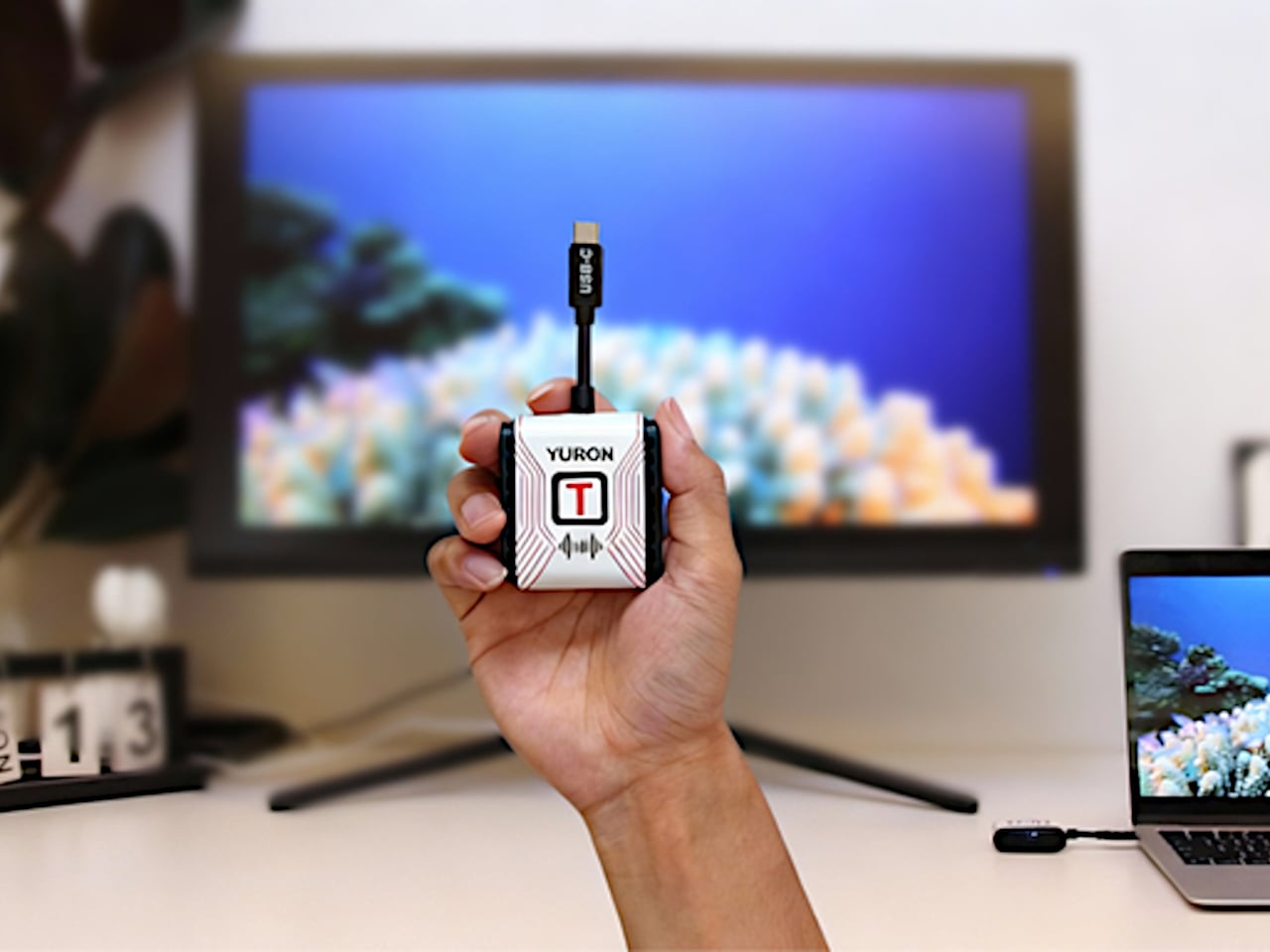
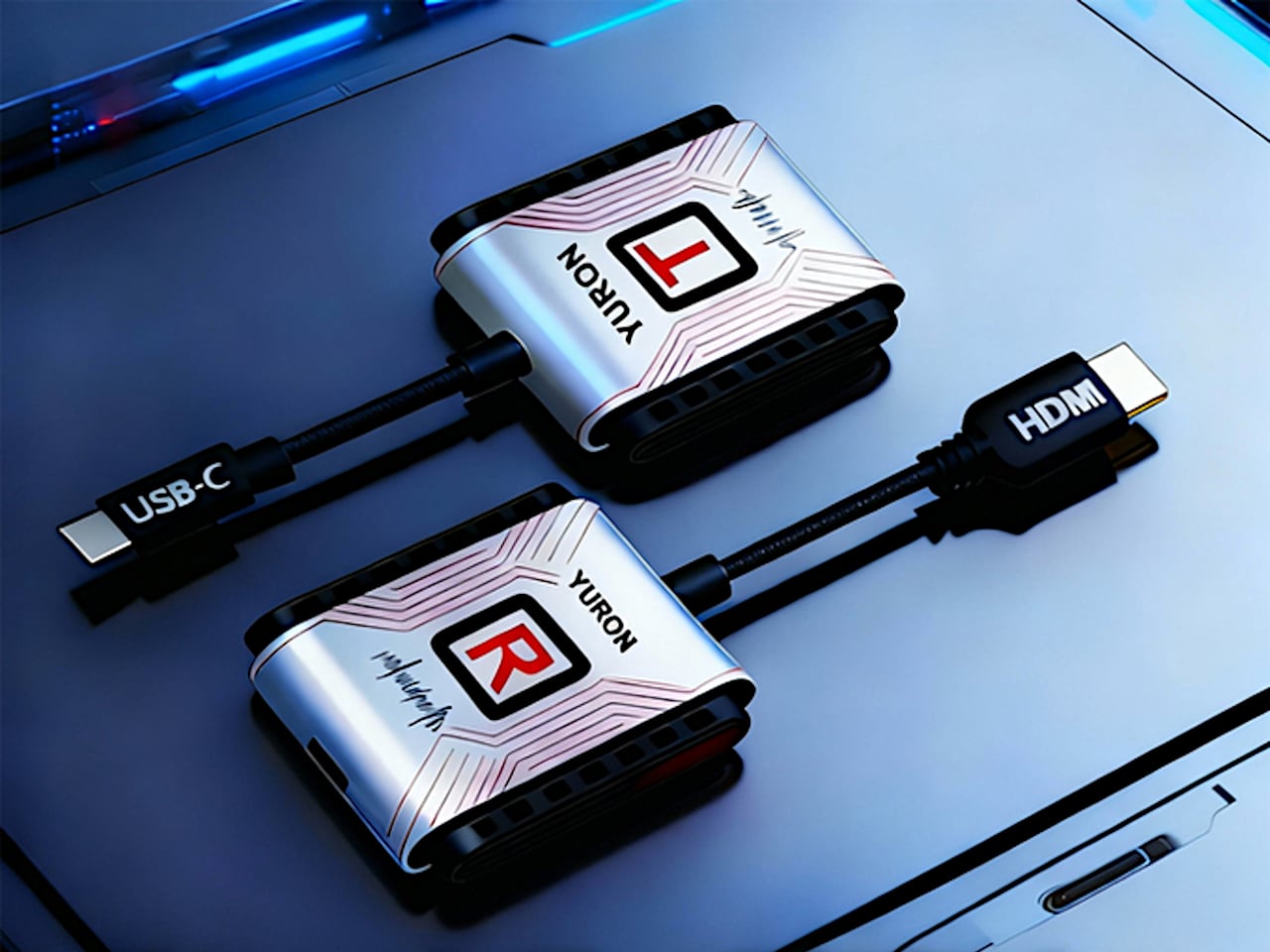
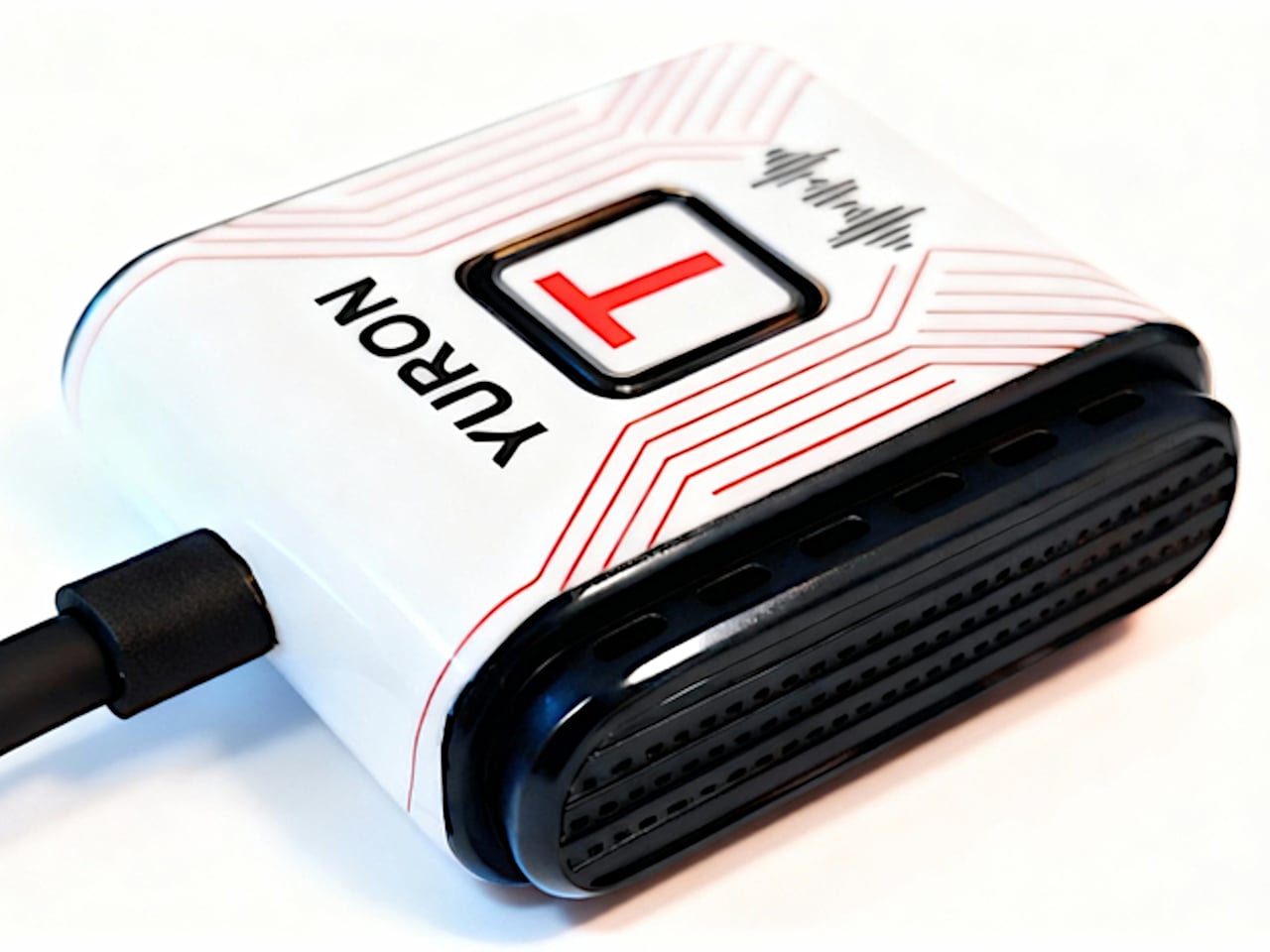
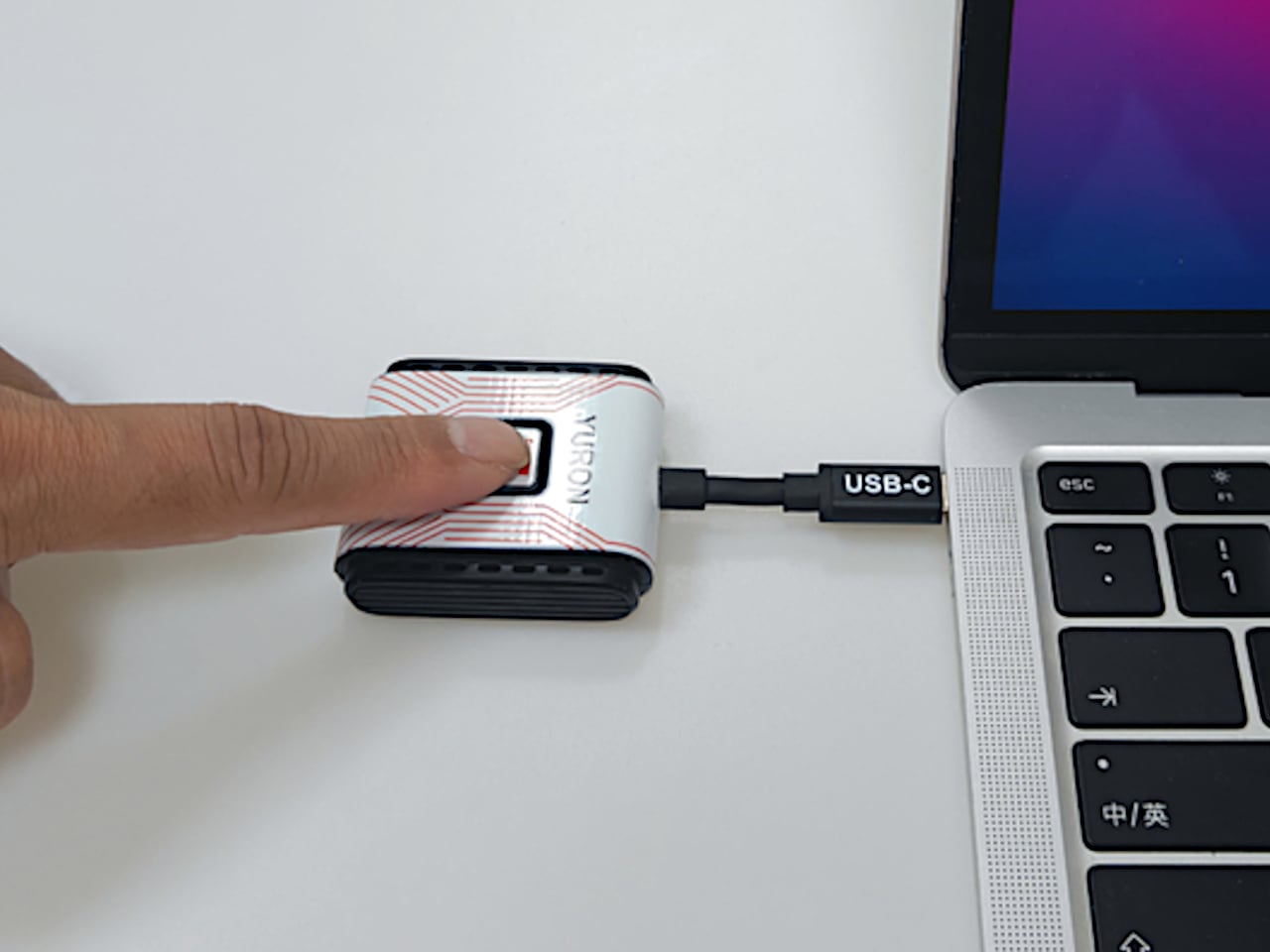
YURON is a plug-and-play 4K transmitter and receiver pair that lives in a bag or drawer until needed. One end plugs into a device over USB-C or HDMI, the other into a display’s HDMI port, and the link comes up automatically over its own 5G Wi-Fi connection. No apps, no pairing, no joining a network, just a direct path for video and audio that starts working the moment both sides power on.

Designer: YURON

Click Here to Buy Now: $59 $129 (54% off). Hurry, only 67/1000 left! Raised over $158,000.

YURON handles 4K 60 Hz HDR10 video up to 45 m, using H.265 compression, adaptive 5G Wi-Fi, and error correction to keep the picture smooth. It is fast enough for presentations, movies, and casual gaming, with audio and video traveling together, so there is no awkward lag. The point is to make the wireless link feel as transparent as a cable, without the cable running across the floor or desk.

1

Walking into a meeting room or classroom, you plug the receiver into the display once, then let different laptops or tablets take turns with the transmitter. YURON supports both mirror and extended modes, so someone can present slides on the big screen while keeping notes or chat on their own display. The 45 m range means it works in larger rooms without needing to huddle near the projector.

1

In a living room or dorm setup, a laptop, handheld console, or streaming box can send 4K content to a TV without an HDMI run. The low latency and 60 Hz refresh make it comfortable for games and sports, and the lack of app dependencies means guests can plug in and share videos or photos without installing anything. It becomes a quiet upgrade to movie nights and couch sessions.

1

The one-click control lets you cut the link instantly from the transmitter, useful when switching between apps with sensitive content or when you want to check something privately before sharing it again. A single receiver can pair with up to eight transmitters, with a button press cycling through them. In a studio, office, or classroom, multiple people can share the same screen without swapping cables or logging into accounts.

1

The hardware is compact and light enough to live on a key shelf or in a laptop sleeve, with a USB-C port that supports up to 100W Power Delivery, so a laptop can stay charged through the same connection. The internal cooling design, with multiple thermal zones and ventilation holes, keeps performance stable during long 4K sessions. It is the kind of detail that makes a small device feel engineered rather than improvised.

YURON turns screen sharing from a minor technical hurdle into something almost invisible. Instead of planning around cables or hoping a TV’s casting feature cooperates, you plug in a small pair of devices and treat any display as if it were directly connected. For people who move between work, study, and play, that kind of quiet reliability is often what makes a tool worth keeping in the bag, especially when the alternative is fumbling with adapters or explaining why the screen is still blank three minutes after the meeting was supposed to start.

Click Here to Buy Now: $59 $129 (54% off). Hurry, only 67/1000 left! Raised over $158,000.

The post YURON 4K Transmitter Connects Instantly, No Network or App Required first appeared on Yanko Design.