The Wireless Display Kit That Needs No App, No Network, No Pairing

There’s no shortage of ways to get your screen onto a larger display these days, but the experience rarely matches the simplicity it should have. Adapters pile up in bags, cables stretch across desks, and software-based casting tools have a talent for dropping at the worst possible moment. For a market that’s moved so decisively toward wireless, display connectivity has been surprisingly slow to catch up.

The MouseArc G1 is a wireless HD transmitter and receiver set that takes that problem head-on, without leaning on apps, network menus, or the complicated routines that have made similar devices tedious. It also doesn’t look the part of a utilitarian tool. The G1 sports a puzzle-tile design in white and orange that gives it a visual identity far removed from a typical AV dongle.

Designer: MouseArc

Click Here to Buy Bow: $69 $120 (43% off). Hurry, only 89/400 left! Raised over $49,000.
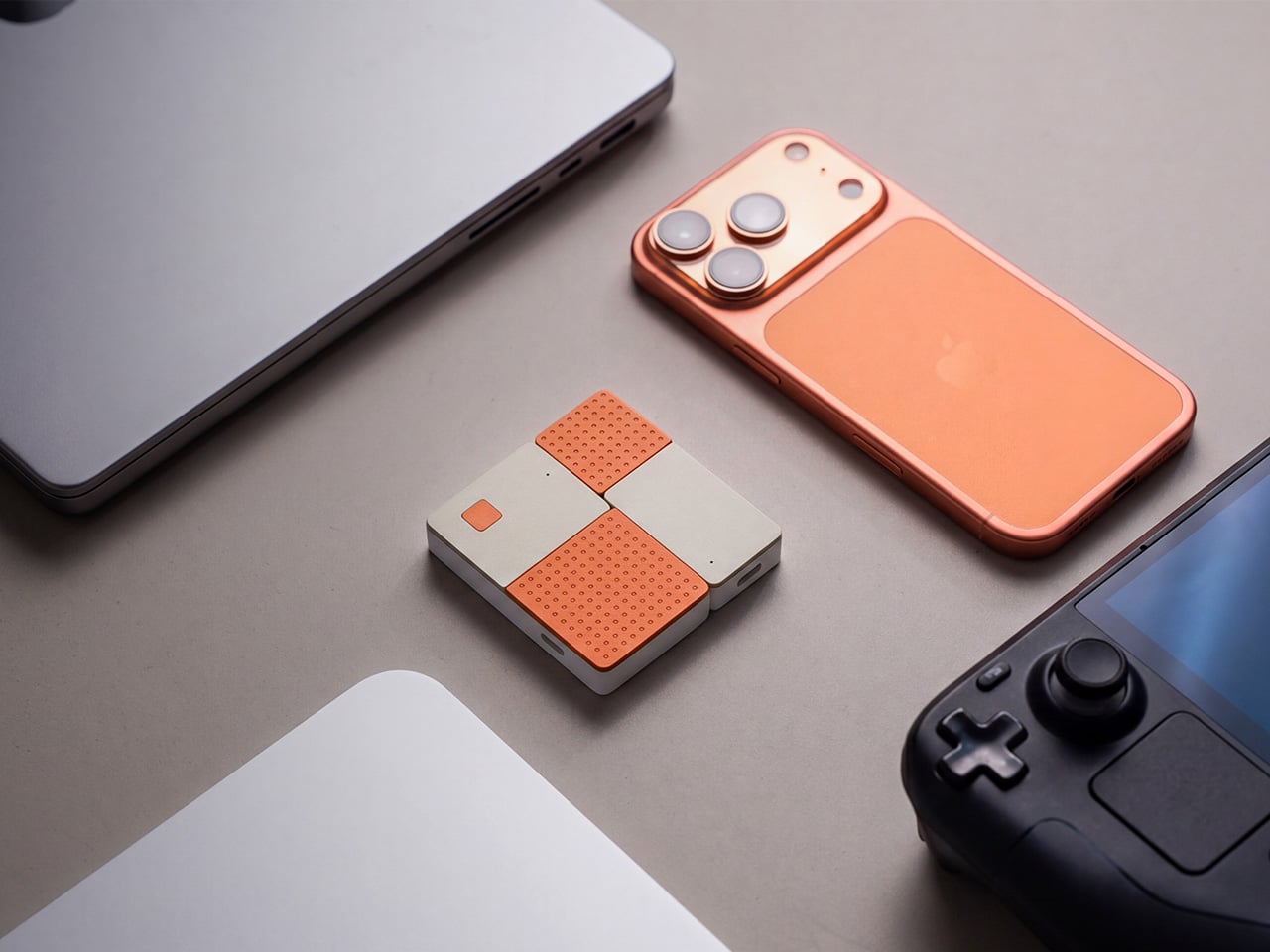
The kit includes a USB-C transmitter for source devices and an HDMI receiver for the display. Both come factory pre-paired, so there’s nothing to configure right out of the box. No app installs, no Bluetooth pairing, no hopping onto a Wi-Fi network. You plug the transmitter into your laptop or phone, connect the receiver to a TV or projector, and you’re ready almost immediately.

The G1 runs on 802.11ac 5G peer-to-peer Wi-Fi, operating on a dedicated channel rather than borrowing bandwidth from your home network. That separation keeps the signal clean and resistant to interference, which pays off noticeably during longer sessions. It’s also rated for up to 50m in open areas, making it a practical option for conference rooms, lecture halls, and larger commercial spaces.

Think about walking into a conference room with your laptop, needing to get a presentation up before the meeting starts. With the G1 already connected to the room’s display, the only step is plugging in the transmitter. There’s no wrestling with the AV system, no scrambling for a compatible cable, and no awkward silence while everyone politely watches you troubleshoot.

That same ease carries into more personal moments. Connecting a phone or tablet to a TV for a movie night is about as involved as plugging in a USB drive. The G1 works with a wide range of USB-C devices that support DisplayPort Alt Mode, from iPhones and iPads to MacBooks and Samsung Galaxy phones, so there’s a good chance what you already own qualifies.
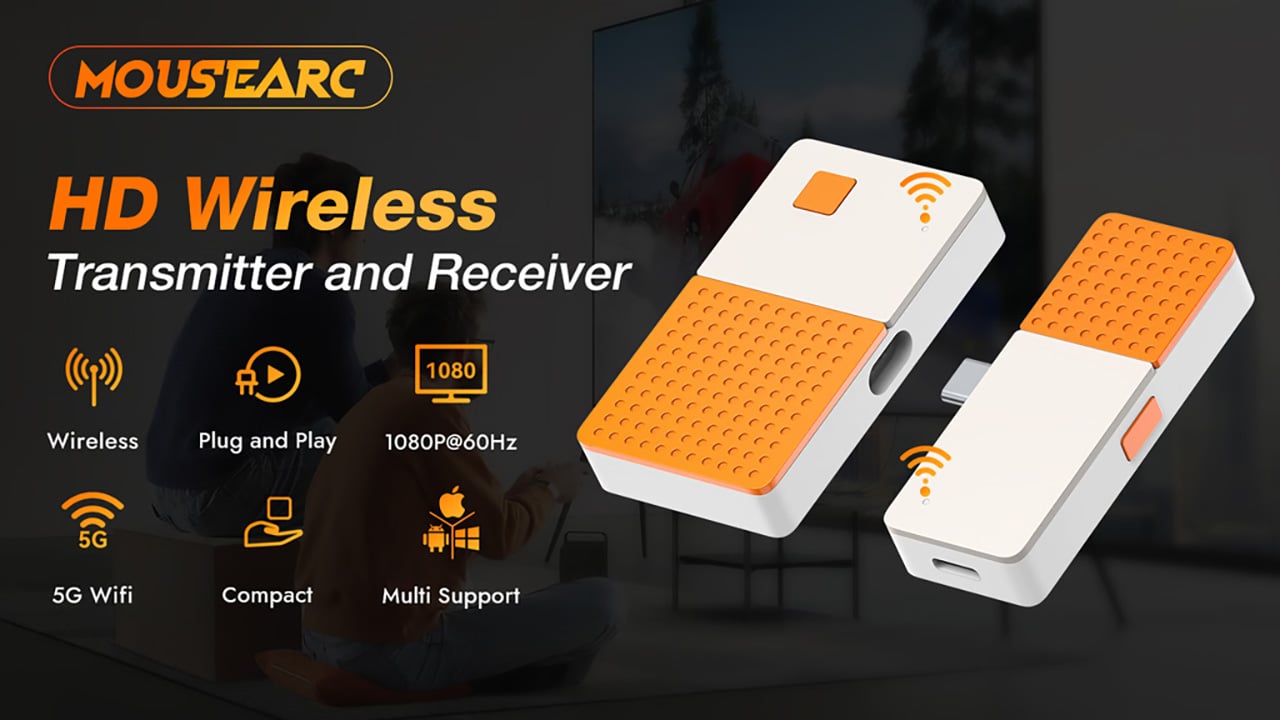
For anything where motion matters, the G1 supports 1080p at 120Hz, with a dedicated processing unit keeping visuals sharp and movement fluid. Fast-moving scenes stay clear without the blur or judder that can make wireless display setups feel like a step backward. Audio stays synced throughout as well, which rounds out an experience that holds up well for gaming, sports, and high-motion content.

Something that often goes unaddressed with wireless display kits is what happens to your device’s power while you’re casting. The G1 includes a 100W PD 3.0 pass-through charging port, so your laptop or phone stays charged while the transmitter is in use. For anything running longer than a quick demo, that detail makes a real difference to how the session actually plays out.

Then there’s the form factor. At 6.5cm x 6cm x 1.3cm and around 32g, the G1 is compact enough to pocket or slip into a bag without thought. The puzzle-tile silhouette and white and orange finish give it a visual personality that stands apart from the usual AV dongle, which feels like a deliberate design choice for something meant to travel daily.

What the G1 delivers is a cleaner way to use the displays you already own. Whether it’s a presentation, a movie, a classroom session, or a gaming moment on a bigger screen, it handles the connection without demanding anything back. That quiet, friction-free reliability is genuinely hard to find in a category that tends to make everything feel more complicated than it needs to be.

Click Here to Buy Bow: $69 $120 (43% off). Hurry, only 89/400 left! Raised over $49,000.

The post The Wireless Display Kit That Needs No App, No Network, No Pairing first appeared on Yanko Design.
The Wireless Display Kit That Needs No App, No Network, No Pairing

There’s no shortage of ways to get your screen onto a larger display these days, but the experience rarely matches the simplicity it should have. Adapters pile up in bags, cables stretch across desks, and software-based casting tools have a talent for dropping at the worst possible moment. For a market that’s moved so decisively toward wireless, display connectivity has been surprisingly slow to catch up.

The MouseArc G1 is a wireless HD transmitter and receiver set that takes that problem head-on, without leaning on apps, network menus, or the complicated routines that have made similar devices tedious. It also doesn’t look the part of a utilitarian tool. The G1 sports a puzzle-tile design in white and orange that gives it a visual identity far removed from a typical AV dongle.

Designer: MouseArc

Click Here to Buy Bow: $69 $120 (43% off). Hurry, only 89/400 left! Raised over $49,000.

The kit includes a USB-C transmitter for source devices and an HDMI receiver for the display. Both come factory pre-paired, so there’s nothing to configure right out of the box. No app installs, no Bluetooth pairing, no hopping onto a Wi-Fi network. You plug the transmitter into your laptop or phone, connect the receiver to a TV or projector, and you’re ready almost immediately.

The G1 runs on 802.11ac 5G peer-to-peer Wi-Fi, operating on a dedicated channel rather than borrowing bandwidth from your home network. That separation keeps the signal clean and resistant to interference, which pays off noticeably during longer sessions. It’s also rated for up to 50m in open areas, making it a practical option for conference rooms, lecture halls, and larger commercial spaces.

Think about walking into a conference room with your laptop, needing to get a presentation up before the meeting starts. With the G1 already connected to the room’s display, the only step is plugging in the transmitter. There’s no wrestling with the AV system, no scrambling for a compatible cable, and no awkward silence while everyone politely watches you troubleshoot.

That same ease carries into more personal moments. Connecting a phone or tablet to a TV for a movie night is about as involved as plugging in a USB drive. The G1 works with a wide range of USB-C devices that support DisplayPort Alt Mode, from iPhones and iPads to MacBooks and Samsung Galaxy phones, so there’s a good chance what you already own qualifies.

For anything where motion matters, the G1 supports 1080p at 120Hz, with a dedicated processing unit keeping visuals sharp and movement fluid. Fast-moving scenes stay clear without the blur or judder that can make wireless display setups feel like a step backward. Audio stays synced throughout as well, which rounds out an experience that holds up well for gaming, sports, and high-motion content.

Something that often goes unaddressed with wireless display kits is what happens to your device’s power while you’re casting. The G1 includes a 100W PD 3.0 pass-through charging port, so your laptop or phone stays charged while the transmitter is in use. For anything running longer than a quick demo, that detail makes a real difference to how the session actually plays out.

Then there’s the form factor. At 6.5cm x 6cm x 1.3cm and around 32g, the G1 is compact enough to pocket or slip into a bag without thought. The puzzle-tile silhouette and white and orange finish give it a visual personality that stands apart from the usual AV dongle, which feels like a deliberate design choice for something meant to travel daily.

What the G1 delivers is a cleaner way to use the displays you already own. Whether it’s a presentation, a movie, a classroom session, or a gaming moment on a bigger screen, it handles the connection without demanding anything back. That quiet, friction-free reliability is genuinely hard to find in a category that tends to make everything feel more complicated than it needs to be.

Click Here to Buy Bow: $69 $120 (43% off). Hurry, only 89/400 left! Raised over $49,000.

The post The Wireless Display Kit That Needs No App, No Network, No Pairing first appeared on Yanko Design.

The Wireless Display Kit That Needs No App, No Network, No Pairing

There’s no shortage of ways to get your screen onto a larger display these days, but the experience rarely matches the simplicity it should have. Adapters pile up in bags, cables stretch across desks, and software-based casting tools have a talent for dropping at the worst possible moment. For a market that’s moved so decisively toward wireless, display connectivity has been surprisingly slow to catch up.

The MouseArc G1 is a wireless HD transmitter and receiver set that takes that problem head-on, without leaning on apps, network menus, or the complicated routines that have made similar devices tedious. It also doesn’t look the part of a utilitarian tool. The G1 sports a puzzle-tile design in white and orange that gives it a visual identity far removed from a typical AV dongle.

Designer: MouseArc

Click Here to Buy Bow: $69 $120 (43% off). Hurry, only 89/400 left! Raised over $49,000.

The kit includes a USB-C transmitter for source devices and an HDMI receiver for the display. Both come factory pre-paired, so there’s nothing to configure right out of the box. No app installs, no Bluetooth pairing, no hopping onto a Wi-Fi network. You plug the transmitter into your laptop or phone, connect the receiver to a TV or projector, and you’re ready almost immediately.

The G1 runs on 802.11ac 5G peer-to-peer Wi-Fi, operating on a dedicated channel rather than borrowing bandwidth from your home network. That separation keeps the signal clean and resistant to interference, which pays off noticeably during longer sessions. It’s also rated for up to 50m in open areas, making it a practical option for conference rooms, lecture halls, and larger commercial spaces.

Think about walking into a conference room with your laptop, needing to get a presentation up before the meeting starts. With the G1 already connected to the room’s display, the only step is plugging in the transmitter. There’s no wrestling with the AV system, no scrambling for a compatible cable, and no awkward silence while everyone politely watches you troubleshoot.

That same ease carries into more personal moments. Connecting a phone or tablet to a TV for a movie night is about as involved as plugging in a USB drive. The G1 works with a wide range of USB-C devices that support DisplayPort Alt Mode, from iPhones and iPads to MacBooks and Samsung Galaxy phones, so there’s a good chance what you already own qualifies.

For anything where motion matters, the G1 supports 1080p at 120Hz, with a dedicated processing unit keeping visuals sharp and movement fluid. Fast-moving scenes stay clear without the blur or judder that can make wireless display setups feel like a step backward. Audio stays synced throughout as well, which rounds out an experience that holds up well for gaming, sports, and high-motion content.

Something that often goes unaddressed with wireless display kits is what happens to your device’s power while you’re casting. The G1 includes a 100W PD 3.0 pass-through charging port, so your laptop or phone stays charged while the transmitter is in use. For anything running longer than a quick demo, that detail makes a real difference to how the session actually plays out.

Then there’s the form factor. At 6.5cm x 6cm x 1.3cm and around 32g, the G1 is compact enough to pocket or slip into a bag without thought. The puzzle-tile silhouette and white and orange finish give it a visual personality that stands apart from the usual AV dongle, which feels like a deliberate design choice for something meant to travel daily.

What the G1 delivers is a cleaner way to use the displays you already own. Whether it’s a presentation, a movie, a classroom session, or a gaming moment on a bigger screen, it handles the connection without demanding anything back. That quiet, friction-free reliability is genuinely hard to find in a category that tends to make everything feel more complicated than it needs to be.

Click Here to Buy Bow: $69 $120 (43% off). Hurry, only 89/400 left! Raised over $49,000.

The post The Wireless Display Kit That Needs No App, No Network, No Pairing first appeared on Yanko Design.
The Wireless Display Kit That Needs No App, No Network, No Pairing

There’s no shortage of ways to get your screen onto a larger display these days, but the experience rarely matches the simplicity it should have. Adapters pile up in bags, cables stretch across desks, and software-based casting tools have a talent for dropping at the worst possible moment. For a market that’s moved so decisively toward wireless, display connectivity has been surprisingly slow to catch up.

The MouseArc G1 is a wireless HD transmitter and receiver set that takes that problem head-on, without leaning on apps, network menus, or the complicated routines that have made similar devices tedious. It also doesn’t look the part of a utilitarian tool. The G1 sports a puzzle-tile design in white and orange that gives it a visual identity far removed from a typical AV dongle.

Designer: MouseArc

Click Here to Buy Bow: $69 $120 (43% off). Hurry, only 89/400 left! Raised over $49,000.

The kit includes a USB-C transmitter for source devices and an HDMI receiver for the display. Both come factory pre-paired, so there’s nothing to configure right out of the box. No app installs, no Bluetooth pairing, no hopping onto a Wi-Fi network. You plug the transmitter into your laptop or phone, connect the receiver to a TV or projector, and you’re ready almost immediately.

The G1 runs on 802.11ac 5G peer-to-peer Wi-Fi, operating on a dedicated channel rather than borrowing bandwidth from your home network. That separation keeps the signal clean and resistant to interference, which pays off noticeably during longer sessions. It’s also rated for up to 50m in open areas, making it a practical option for conference rooms, lecture halls, and larger commercial spaces.

Think about walking into a conference room with your laptop, needing to get a presentation up before the meeting starts. With the G1 already connected to the room’s display, the only step is plugging in the transmitter. There’s no wrestling with the AV system, no scrambling for a compatible cable, and no awkward silence while everyone politely watches you troubleshoot.

That same ease carries into more personal moments. Connecting a phone or tablet to a TV for a movie night is about as involved as plugging in a USB drive. The G1 works with a wide range of USB-C devices that support DisplayPort Alt Mode, from iPhones and iPads to MacBooks and Samsung Galaxy phones, so there’s a good chance what you already own qualifies.

For anything where motion matters, the G1 supports 1080p at 120Hz, with a dedicated processing unit keeping visuals sharp and movement fluid. Fast-moving scenes stay clear without the blur or judder that can make wireless display setups feel like a step backward. Audio stays synced throughout as well, which rounds out an experience that holds up well for gaming, sports, and high-motion content.

Something that often goes unaddressed with wireless display kits is what happens to your device’s power while you’re casting. The G1 includes a 100W PD 3.0 pass-through charging port, so your laptop or phone stays charged while the transmitter is in use. For anything running longer than a quick demo, that detail makes a real difference to how the session actually plays out.

Then there’s the form factor. At 6.5cm x 6cm x 1.3cm and around 32g, the G1 is compact enough to pocket or slip into a bag without thought. The puzzle-tile silhouette and white and orange finish give it a visual personality that stands apart from the usual AV dongle, which feels like a deliberate design choice for something meant to travel daily.

What the G1 delivers is a cleaner way to use the displays you already own. Whether it’s a presentation, a movie, a classroom session, or a gaming moment on a bigger screen, it handles the connection without demanding anything back. That quiet, friction-free reliability is genuinely hard to find in a category that tends to make everything feel more complicated than it needs to be.

Click Here to Buy Bow: $69 $120 (43% off). Hurry, only 89/400 left! Raised over $49,000.

The post The Wireless Display Kit That Needs No App, No Network, No Pairing first appeared on Yanko Design.

The Wireless Display Kit That Needs No App, No Network, No Pairing

There’s no shortage of ways to get your screen onto a larger display these days, but the experience rarely matches the simplicity it should have. Adapters pile up in bags, cables stretch across desks, and software-based casting tools have a talent for dropping at the worst possible moment. For a market that’s moved so decisively toward wireless, display connectivity has been surprisingly slow to catch up.

The MouseArc G1 is a wireless HD transmitter and receiver set that takes that problem head-on, without leaning on apps, network menus, or the complicated routines that have made similar devices tedious. It also doesn’t look the part of a utilitarian tool. The G1 sports a puzzle-tile design in white and orange that gives it a visual identity far removed from a typical AV dongle.

Designer: MouseArc

Click Here to Buy Bow: $69 $120 (43% off). Hurry, only 89/400 left! Raised over $49,000.

The kit includes a USB-C transmitter for source devices and an HDMI receiver for the display. Both come factory pre-paired, so there’s nothing to configure right out of the box. No app installs, no Bluetooth pairing, no hopping onto a Wi-Fi network. You plug the transmitter into your laptop or phone, connect the receiver to a TV or projector, and you’re ready almost immediately.

The G1 runs on 802.11ac 5G peer-to-peer Wi-Fi, operating on a dedicated channel rather than borrowing bandwidth from your home network. That separation keeps the signal clean and resistant to interference, which pays off noticeably during longer sessions. It’s also rated for up to 50m in open areas, making it a practical option for conference rooms, lecture halls, and larger commercial spaces.

Think about walking into a conference room with your laptop, needing to get a presentation up before the meeting starts. With the G1 already connected to the room’s display, the only step is plugging in the transmitter. There’s no wrestling with the AV system, no scrambling for a compatible cable, and no awkward silence while everyone politely watches you troubleshoot.

That same ease carries into more personal moments. Connecting a phone or tablet to a TV for a movie night is about as involved as plugging in a USB drive. The G1 works with a wide range of USB-C devices that support DisplayPort Alt Mode, from iPhones and iPads to MacBooks and Samsung Galaxy phones, so there’s a good chance what you already own qualifies.

For anything where motion matters, the G1 supports 1080p at 120Hz, with a dedicated processing unit keeping visuals sharp and movement fluid. Fast-moving scenes stay clear without the blur or judder that can make wireless display setups feel like a step backward. Audio stays synced throughout as well, which rounds out an experience that holds up well for gaming, sports, and high-motion content.

Something that often goes unaddressed with wireless display kits is what happens to your device’s power while you’re casting. The G1 includes a 100W PD 3.0 pass-through charging port, so your laptop or phone stays charged while the transmitter is in use. For anything running longer than a quick demo, that detail makes a real difference to how the session actually plays out.

Then there’s the form factor. At 6.5cm x 6cm x 1.3cm and around 32g, the G1 is compact enough to pocket or slip into a bag without thought. The puzzle-tile silhouette and white and orange finish give it a visual personality that stands apart from the usual AV dongle, which feels like a deliberate design choice for something meant to travel daily.

What the G1 delivers is a cleaner way to use the displays you already own. Whether it’s a presentation, a movie, a classroom session, or a gaming moment on a bigger screen, it handles the connection without demanding anything back. That quiet, friction-free reliability is genuinely hard to find in a category that tends to make everything feel more complicated than it needs to be.

Click Here to Buy Bow: $69 $120 (43% off). Hurry, only 89/400 left! Raised over $49,000.

The post The Wireless Display Kit That Needs No App, No Network, No Pairing first appeared on Yanko Design.

The Wireless Display Kit That Needs No App, No Network, No Pairing

There’s no shortage of ways to get your screen onto a larger display these days, but the experience rarely matches the simplicity it should have. Adapters pile up in bags, cables stretch across desks, and software-based casting tools have a talent for dropping at the worst possible moment. For a market that’s moved so decisively toward wireless, display connectivity has been surprisingly slow to catch up.

The MouseArc G1 is a wireless HD transmitter and receiver set that takes that problem head-on, without leaning on apps, network menus, or the complicated routines that have made similar devices tedious. It also doesn’t look the part of a utilitarian tool. The G1 sports a puzzle-tile design in white and orange that gives it a visual identity far removed from a typical AV dongle.

Designer: MouseArc

Click Here to Buy Bow: $69 $120 (43% off). Hurry, only 89/400 left! Raised over $49,000.

The kit includes a USB-C transmitter for source devices and an HDMI receiver for the display. Both come factory pre-paired, so there’s nothing to configure right out of the box. No app installs, no Bluetooth pairing, no hopping onto a Wi-Fi network. You plug the transmitter into your laptop or phone, connect the receiver to a TV or projector, and you’re ready almost immediately.

The G1 runs on 802.11ac 5G peer-to-peer Wi-Fi, operating on a dedicated channel rather than borrowing bandwidth from your home network. That separation keeps the signal clean and resistant to interference, which pays off noticeably during longer sessions. It’s also rated for up to 50m in open areas, making it a practical option for conference rooms, lecture halls, and larger commercial spaces.

Think about walking into a conference room with your laptop, needing to get a presentation up before the meeting starts. With the G1 already connected to the room’s display, the only step is plugging in the transmitter. There’s no wrestling with the AV system, no scrambling for a compatible cable, and no awkward silence while everyone politely watches you troubleshoot.

That same ease carries into more personal moments. Connecting a phone or tablet to a TV for a movie night is about as involved as plugging in a USB drive. The G1 works with a wide range of USB-C devices that support DisplayPort Alt Mode, from iPhones and iPads to MacBooks and Samsung Galaxy phones, so there’s a good chance what you already own qualifies.

For anything where motion matters, the G1 supports 1080p at 120Hz, with a dedicated processing unit keeping visuals sharp and movement fluid. Fast-moving scenes stay clear without the blur or judder that can make wireless display setups feel like a step backward. Audio stays synced throughout as well, which rounds out an experience that holds up well for gaming, sports, and high-motion content.

Something that often goes unaddressed with wireless display kits is what happens to your device’s power while you’re casting. The G1 includes a 100W PD 3.0 pass-through charging port, so your laptop or phone stays charged while the transmitter is in use. For anything running longer than a quick demo, that detail makes a real difference to how the session actually plays out.

Then there’s the form factor. At 6.5cm x 6cm x 1.3cm and around 32g, the G1 is compact enough to pocket or slip into a bag without thought. The puzzle-tile silhouette and white and orange finish give it a visual personality that stands apart from the usual AV dongle, which feels like a deliberate design choice for something meant to travel daily.

What the G1 delivers is a cleaner way to use the displays you already own. Whether it’s a presentation, a movie, a classroom session, or a gaming moment on a bigger screen, it handles the connection without demanding anything back. That quiet, friction-free reliability is genuinely hard to find in a category that tends to make everything feel more complicated than it needs to be.

Click Here to Buy Bow: $69 $120 (43% off). Hurry, only 89/400 left! Raised over $49,000.

The post The Wireless Display Kit That Needs No App, No Network, No Pairing first appeared on Yanko Design.

EZCast Just Turned Every Phone Into a Professional Camera Monitor

Monitoring a camera feed used to require either hovering behind the viewfinder or investing in a dedicated wireless video system with separate transmitters, receivers, and field monitors. For solo content creators, small production teams, and anyone shooting interviews or tutorials with limited gear, that kind of setup has always felt disproportionate to the task. The gap between “professional monitoring” and “just squinting at the back of the camera” remained stubbornly wide.

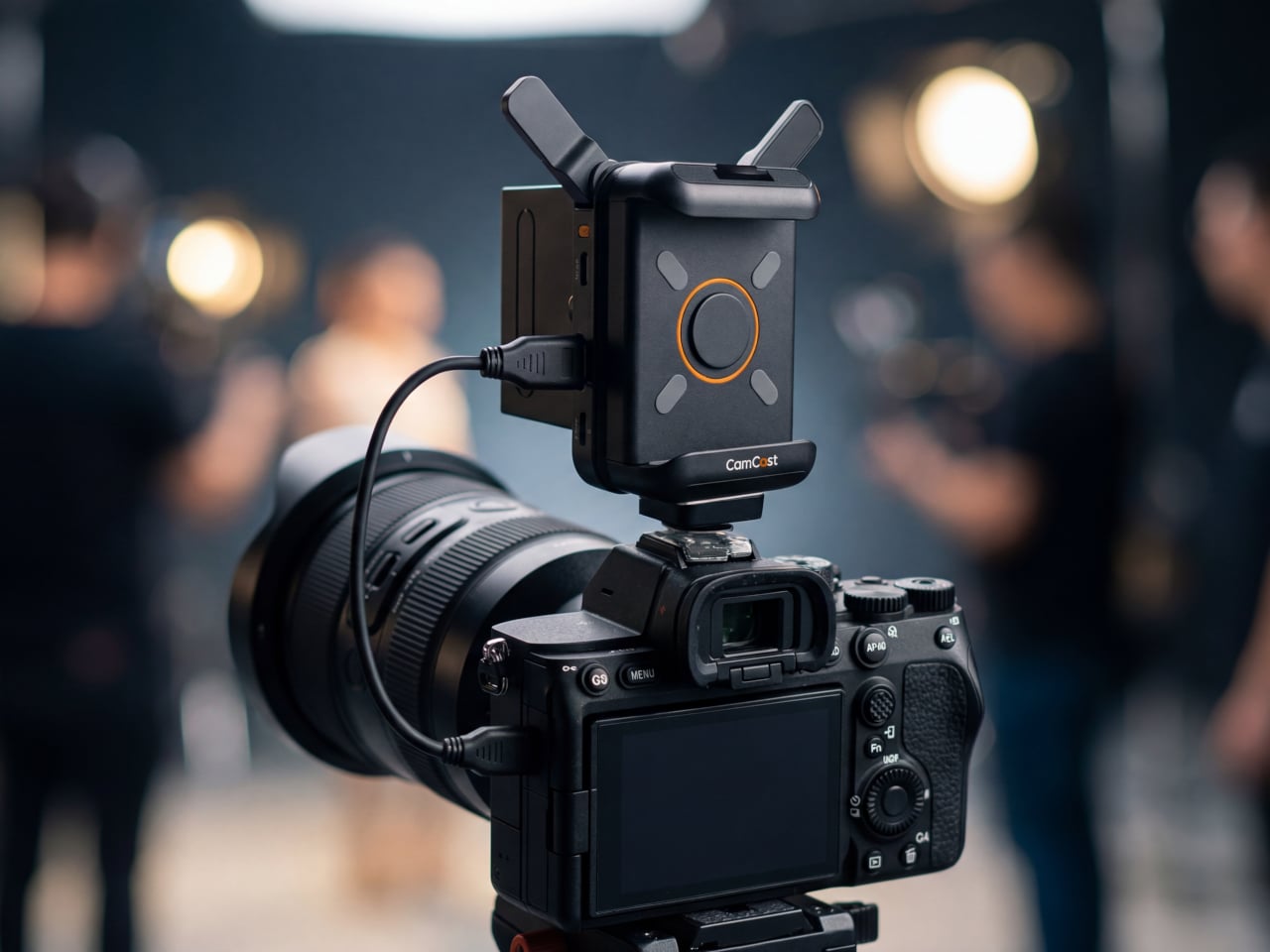
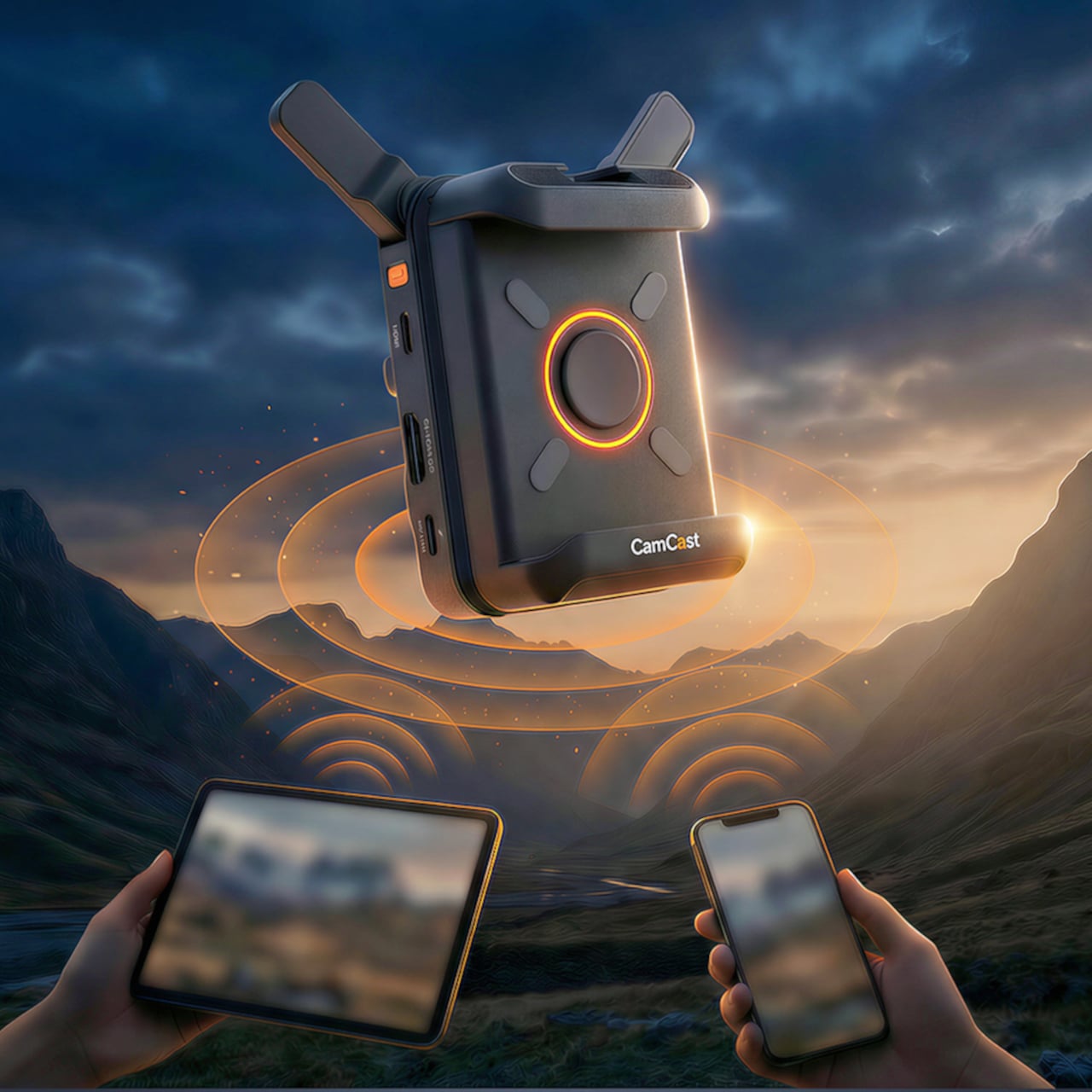
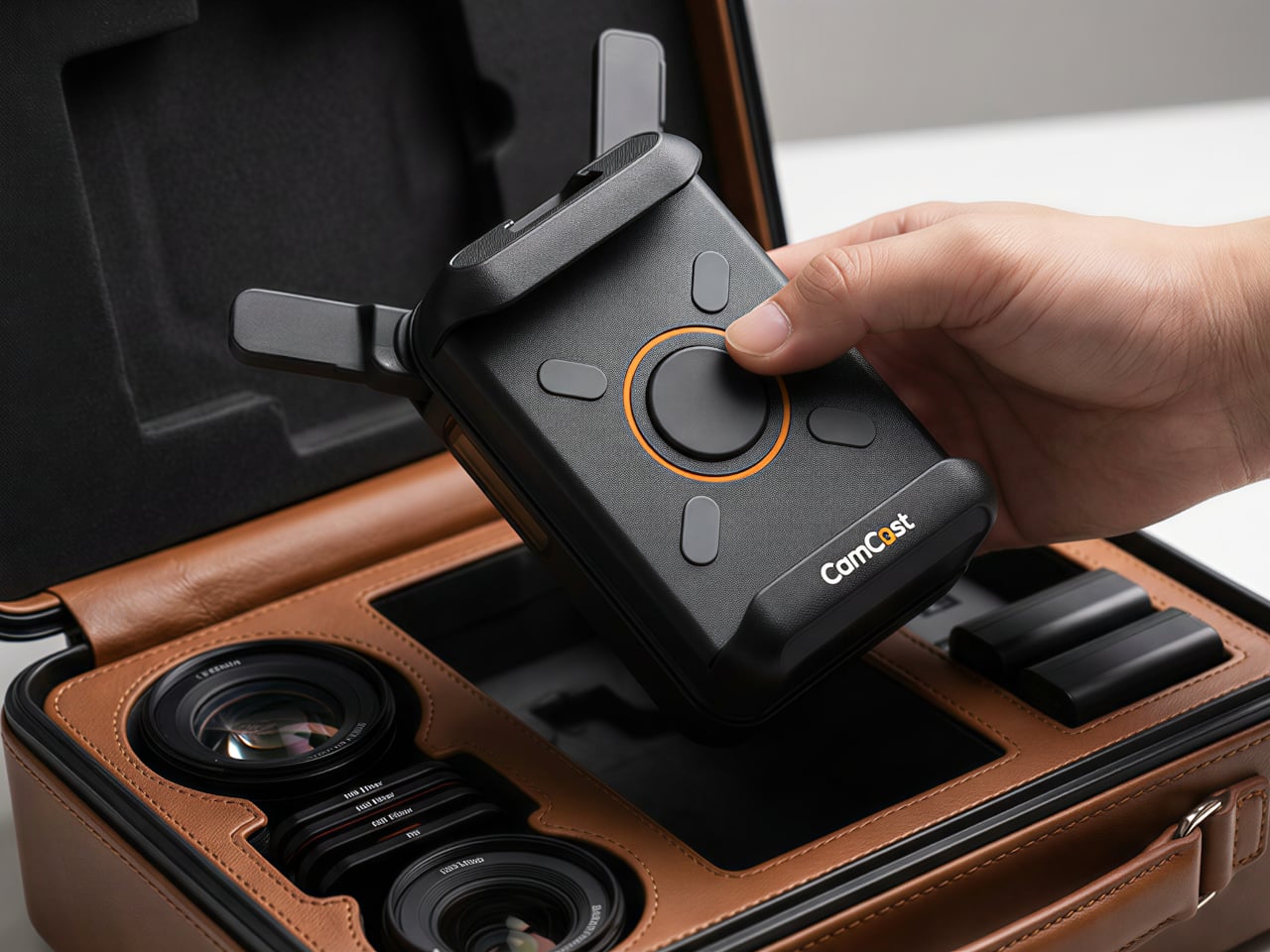
EZCast’s CamCast CT-1 is a compact wireless transmitter designed to sit on top of any HDMI-equipped camera, from mirrorless bodies and DSLRs to action cams and camcorders. Once connected, it broadcasts a live 1080p 60fps feed over 5GHz Wi-Fi to up to four iOS or Android devices simultaneously. EZCast has spent over a decade building wireless display and screen-mirroring technology for offices and classrooms, and the CamCast is their first product built specifically for cameras, applying that signal distribution expertise to a production context.

Designer: EZCast

Click Here to Buy Now: $129 $239 ($110 off). Hurry, only a few units left!

The device itself is small enough to mount on a camera hot shoe or gimbal arm, with included adapters for both horizontal and vertical orientation. A built-in OLED screen displays connection details, and pairing happens through a QR code scan that takes roughly three seconds. Power comes from either a standard NP-F battery, the same type used across countless cinema accessories, or a USB-C connection at 5V/3A. That dual-power flexibility means a battery for mobility on location or a simple cable for longer, stationary shoots where runtime matters more.

1

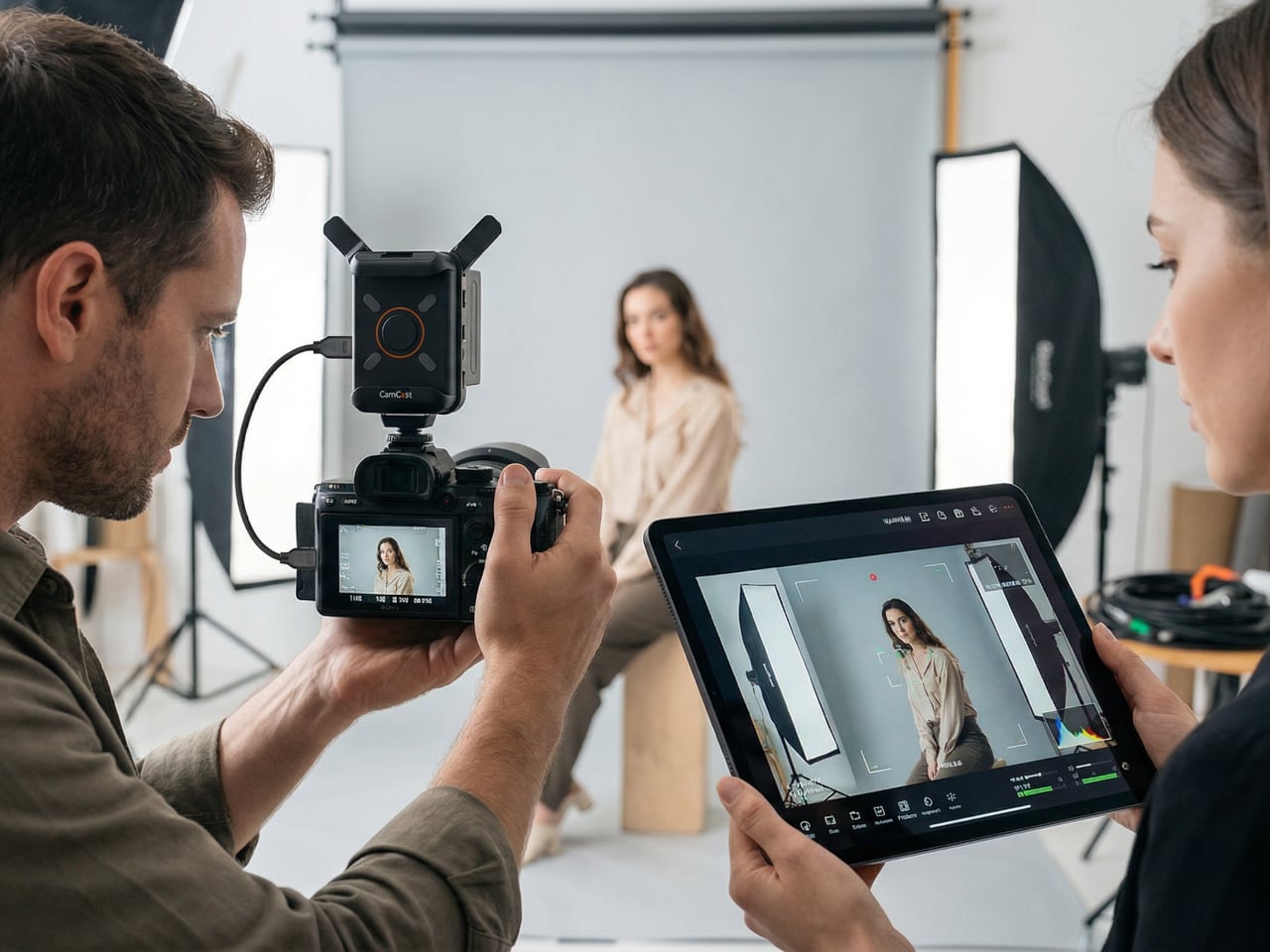
Beyond passive monitoring, the companion CamCast app lets users save takes directly to their phone, review footage instantly, and share clips without ever pulling a memory card from the camera. For a two-person crew shooting a wedding, for instance, the second operator can watch the main camera’s composition from across the venue on a phone while managing their own setup. A makeup artist can confirm framing before the talent walks on set. Four people watching the same live feed, all from devices they already carry, collapses a communication problem that traditionally required dedicated hardware to solve.

What separates the CamCast CT-1 from a basic wireless HDMI sender, though, is the built-in PTP camera control. From the app on a phone or tablet, users can adjust shutter speed, ISO, color temperature, and aperture, and even navigate through camera menus remotely. Consider a camera mounted on an overhead rig for a cooking tutorial, or locked onto a gimbal for a tracking shot. Physically reaching the camera to change a setting interrupts the flow of a shoot. Being able to tweak exposure or white balance from a phone across the room changes how a solo creator or small team interacts with their gear.

1

The CamCast CT-1 also has a UVC output, which means it can connect directly to a laptop or desktop and function as a capture card. For livestreamers, educators, or anyone running a webinar, this removes an entire piece of hardware from the signal chain. One device handles wireless monitoring to phones and wired streaming output to a computer at the same time, which is a lot of functions packed into something that weighs less than most on-camera microphones.

1

Picture a YouTuber who films with a mirrorless camera on a tripod across the room. Right now, checking framing or adjusting settings means walking over, making a change, walking back, and repeating until it looks right. With the CamCast mounted on that camera, the phone becomes both the monitor and the remote control. An instructor recording a craft tutorial gets the same benefit, turning their tablet into a live preview without needing cables snaking across the workspace or an expensive field monitor clamped to a light stand.

Rather than building another monitor or another receiver, EZCast built a bridge between cameras and the screens people already own. That redistribution of function, turning four phones into four production monitors through a single transmitter, might be the more interesting design move in a category still dominated by expensive, single-purpose hardware.

Click Here to Buy Now: $129 $239 ($110 off). Hurry, only a few units left!

The post EZCast Just Turned Every Phone Into a Professional Camera Monitor first appeared on Yanko Design.

EZCast Just Turned Every Phone Into a Professional Camera Monitor

Monitoring a camera feed used to require either hovering behind the viewfinder or investing in a dedicated wireless video system with separate transmitters, receivers, and field monitors. For solo content creators, small production teams, and anyone shooting interviews or tutorials with limited gear, that kind of setup has always felt disproportionate to the task. The gap between “professional monitoring” and “just squinting at the back of the camera” remained stubbornly wide.

EZCast’s CamCast CT-1 is a compact wireless transmitter designed to sit on top of any HDMI-equipped camera, from mirrorless bodies and DSLRs to action cams and camcorders. Once connected, it broadcasts a live 1080p 60fps feed over 5GHz Wi-Fi to up to four iOS or Android devices simultaneously. EZCast has spent over a decade building wireless display and screen-mirroring technology for offices and classrooms, and the CamCast is their first product built specifically for cameras, applying that signal distribution expertise to a production context.

Designer: EZCast

Click Here to Buy Now: $129 $239 ($110 off). Hurry, only a few units left!

The device itself is small enough to mount on a camera hot shoe or gimbal arm, with included adapters for both horizontal and vertical orientation. A built-in OLED screen displays connection details, and pairing happens through a QR code scan that takes roughly three seconds. Power comes from either a standard NP-F battery, the same type used across countless cinema accessories, or a USB-C connection at 5V/3A. That dual-power flexibility means a battery for mobility on location or a simple cable for longer, stationary shoots where runtime matters more.

1

Beyond passive monitoring, the companion CamCast app lets users save takes directly to their phone, review footage instantly, and share clips without ever pulling a memory card from the camera. For a two-person crew shooting a wedding, for instance, the second operator can watch the main camera’s composition from across the venue on a phone while managing their own setup. A makeup artist can confirm framing before the talent walks on set. Four people watching the same live feed, all from devices they already carry, collapses a communication problem that traditionally required dedicated hardware to solve.

What separates the CamCast CT-1 from a basic wireless HDMI sender, though, is the built-in PTP camera control. From the app on a phone or tablet, users can adjust shutter speed, ISO, color temperature, and aperture, and even navigate through camera menus remotely. Consider a camera mounted on an overhead rig for a cooking tutorial, or locked onto a gimbal for a tracking shot. Physically reaching the camera to change a setting interrupts the flow of a shoot. Being able to tweak exposure or white balance from a phone across the room changes how a solo creator or small team interacts with their gear.

1

The CamCast CT-1 also has a UVC output, which means it can connect directly to a laptop or desktop and function as a capture card. For livestreamers, educators, or anyone running a webinar, this removes an entire piece of hardware from the signal chain. One device handles wireless monitoring to phones and wired streaming output to a computer at the same time, which is a lot of functions packed into something that weighs less than most on-camera microphones.

1

Picture a YouTuber who films with a mirrorless camera on a tripod across the room. Right now, checking framing or adjusting settings means walking over, making a change, walking back, and repeating until it looks right. With the CamCast mounted on that camera, the phone becomes both the monitor and the remote control. An instructor recording a craft tutorial gets the same benefit, turning their tablet into a live preview without needing cables snaking across the workspace or an expensive field monitor clamped to a light stand.

Rather than building another monitor or another receiver, EZCast built a bridge between cameras and the screens people already own. That redistribution of function, turning four phones into four production monitors through a single transmitter, might be the more interesting design move in a category still dominated by expensive, single-purpose hardware.

Click Here to Buy Now: $129 $239 ($110 off). Hurry, only a few units left!

The post EZCast Just Turned Every Phone Into a Professional Camera Monitor first appeared on Yanko Design.
EZCast Just Turned Every Phone Into a Professional Camera Monitor

Monitoring a camera feed used to require either hovering behind the viewfinder or investing in a dedicated wireless video system with separate transmitters, receivers, and field monitors. For solo content creators, small production teams, and anyone shooting interviews or tutorials with limited gear, that kind of setup has always felt disproportionate to the task. The gap between “professional monitoring” and “just squinting at the back of the camera” remained stubbornly wide.

EZCast’s CamCast CT-1 is a compact wireless transmitter designed to sit on top of any HDMI-equipped camera, from mirrorless bodies and DSLRs to action cams and camcorders. Once connected, it broadcasts a live 1080p 60fps feed over 5GHz Wi-Fi to up to four iOS or Android devices simultaneously. EZCast has spent over a decade building wireless display and screen-mirroring technology for offices and classrooms, and the CamCast is their first product built specifically for cameras, applying that signal distribution expertise to a production context.

Designer: EZCast

Click Here to Buy Now: $129 $239 ($110 off). Hurry, only a few units left!

The device itself is small enough to mount on a camera hot shoe or gimbal arm, with included adapters for both horizontal and vertical orientation. A built-in OLED screen displays connection details, and pairing happens through a QR code scan that takes roughly three seconds. Power comes from either a standard NP-F battery, the same type used across countless cinema accessories, or a USB-C connection at 5V/3A. That dual-power flexibility means a battery for mobility on location or a simple cable for longer, stationary shoots where runtime matters more.

1

Beyond passive monitoring, the companion CamCast app lets users save takes directly to their phone, review footage instantly, and share clips without ever pulling a memory card from the camera. For a two-person crew shooting a wedding, for instance, the second operator can watch the main camera’s composition from across the venue on a phone while managing their own setup. A makeup artist can confirm framing before the talent walks on set. Four people watching the same live feed, all from devices they already carry, collapses a communication problem that traditionally required dedicated hardware to solve.

What separates the CamCast CT-1 from a basic wireless HDMI sender, though, is the built-in PTP camera control. From the app on a phone or tablet, users can adjust shutter speed, ISO, color temperature, and aperture, and even navigate through camera menus remotely. Consider a camera mounted on an overhead rig for a cooking tutorial, or locked onto a gimbal for a tracking shot. Physically reaching the camera to change a setting interrupts the flow of a shoot. Being able to tweak exposure or white balance from a phone across the room changes how a solo creator or small team interacts with their gear.

1

The CamCast CT-1 also has a UVC output, which means it can connect directly to a laptop or desktop and function as a capture card. For livestreamers, educators, or anyone running a webinar, this removes an entire piece of hardware from the signal chain. One device handles wireless monitoring to phones and wired streaming output to a computer at the same time, which is a lot of functions packed into something that weighs less than most on-camera microphones.

1

Picture a YouTuber who films with a mirrorless camera on a tripod across the room. Right now, checking framing or adjusting settings means walking over, making a change, walking back, and repeating until it looks right. With the CamCast mounted on that camera, the phone becomes both the monitor and the remote control. An instructor recording a craft tutorial gets the same benefit, turning their tablet into a live preview without needing cables snaking across the workspace or an expensive field monitor clamped to a light stand.

Rather than building another monitor or another receiver, EZCast built a bridge between cameras and the screens people already own. That redistribution of function, turning four phones into four production monitors through a single transmitter, might be the more interesting design move in a category still dominated by expensive, single-purpose hardware.

Click Here to Buy Now: $129 $239 ($110 off). Hurry, only a few units left!

The post EZCast Just Turned Every Phone Into a Professional Camera Monitor first appeared on Yanko Design.

EZCast Just Turned Every Phone Into a Professional Camera Monitor

Monitoring a camera feed used to require either hovering behind the viewfinder or investing in a dedicated wireless video system with separate transmitters, receivers, and field monitors. For solo content creators, small production teams, and anyone shooting interviews or tutorials with limited gear, that kind of setup has always felt disproportionate to the task. The gap between “professional monitoring” and “just squinting at the back of the camera” remained stubbornly wide.

EZCast’s CamCast CT-1 is a compact wireless transmitter designed to sit on top of any HDMI-equipped camera, from mirrorless bodies and DSLRs to action cams and camcorders. Once connected, it broadcasts a live 1080p 60fps feed over 5GHz Wi-Fi to up to four iOS or Android devices simultaneously. EZCast has spent over a decade building wireless display and screen-mirroring technology for offices and classrooms, and the CamCast is their first product built specifically for cameras, applying that signal distribution expertise to a production context.

Designer: EZCast

Click Here to Buy Now: $129 $239 ($110 off). Hurry, only a few units left!

The device itself is small enough to mount on a camera hot shoe or gimbal arm, with included adapters for both horizontal and vertical orientation. A built-in OLED screen displays connection details, and pairing happens through a QR code scan that takes roughly three seconds. Power comes from either a standard NP-F battery, the same type used across countless cinema accessories, or a USB-C connection at 5V/3A. That dual-power flexibility means a battery for mobility on location or a simple cable for longer, stationary shoots where runtime matters more.

1

Beyond passive monitoring, the companion CamCast app lets users save takes directly to their phone, review footage instantly, and share clips without ever pulling a memory card from the camera. For a two-person crew shooting a wedding, for instance, the second operator can watch the main camera’s composition from across the venue on a phone while managing their own setup. A makeup artist can confirm framing before the talent walks on set. Four people watching the same live feed, all from devices they already carry, collapses a communication problem that traditionally required dedicated hardware to solve.

What separates the CamCast CT-1 from a basic wireless HDMI sender, though, is the built-in PTP camera control. From the app on a phone or tablet, users can adjust shutter speed, ISO, color temperature, and aperture, and even navigate through camera menus remotely. Consider a camera mounted on an overhead rig for a cooking tutorial, or locked onto a gimbal for a tracking shot. Physically reaching the camera to change a setting interrupts the flow of a shoot. Being able to tweak exposure or white balance from a phone across the room changes how a solo creator or small team interacts with their gear.

1

The CamCast CT-1 also has a UVC output, which means it can connect directly to a laptop or desktop and function as a capture card. For livestreamers, educators, or anyone running a webinar, this removes an entire piece of hardware from the signal chain. One device handles wireless monitoring to phones and wired streaming output to a computer at the same time, which is a lot of functions packed into something that weighs less than most on-camera microphones.

1

Picture a YouTuber who films with a mirrorless camera on a tripod across the room. Right now, checking framing or adjusting settings means walking over, making a change, walking back, and repeating until it looks right. With the CamCast mounted on that camera, the phone becomes both the monitor and the remote control. An instructor recording a craft tutorial gets the same benefit, turning their tablet into a live preview without needing cables snaking across the workspace or an expensive field monitor clamped to a light stand.

Rather than building another monitor or another receiver, EZCast built a bridge between cameras and the screens people already own. That redistribution of function, turning four phones into four production monitors through a single transmitter, might be the more interesting design move in a category still dominated by expensive, single-purpose hardware.

Click Here to Buy Now: $129 $239 ($110 off). Hurry, only a few units left!

The post EZCast Just Turned Every Phone Into a Professional Camera Monitor first appeared on Yanko Design.