Following a false start last week, Google has begun rolling out Search Live globally. The tool allows you to point your phone's camera at an object or scene and ask questions about what you see in front of you. With today's expansion, Google is making Search Live available in every location and language where it offers its AI Mode chatbot. With that, people in more than 200 countries and territories can use Search Live to get answers to their questions.
Behind the expansion is Google's Gemini 3.1 Flash Live model. According to the company, the new AI system was designed to be natively multilingual, and capable of more natural conversations. It should also be more reliable and faster.
Separately from Search Live, Google is bringing Live Translate to iOS. Live Translate, if you need a reminder, allows you to put on a pair of headphones and get a real-time translation of what another person is saying. With today's announcement, Google is also bringing the feature to more countries, including Germany, Italy, Spain, Japan and the UK, across both Android and iOS. All told, Live Translate can now understand more than 70 languages and work with any set of headphones. Neat.
This article originally appeared on Engadget at https://www.engadget.com/ai/google-begins-rolling-out-search-live-globally-180938407.html?src=rss
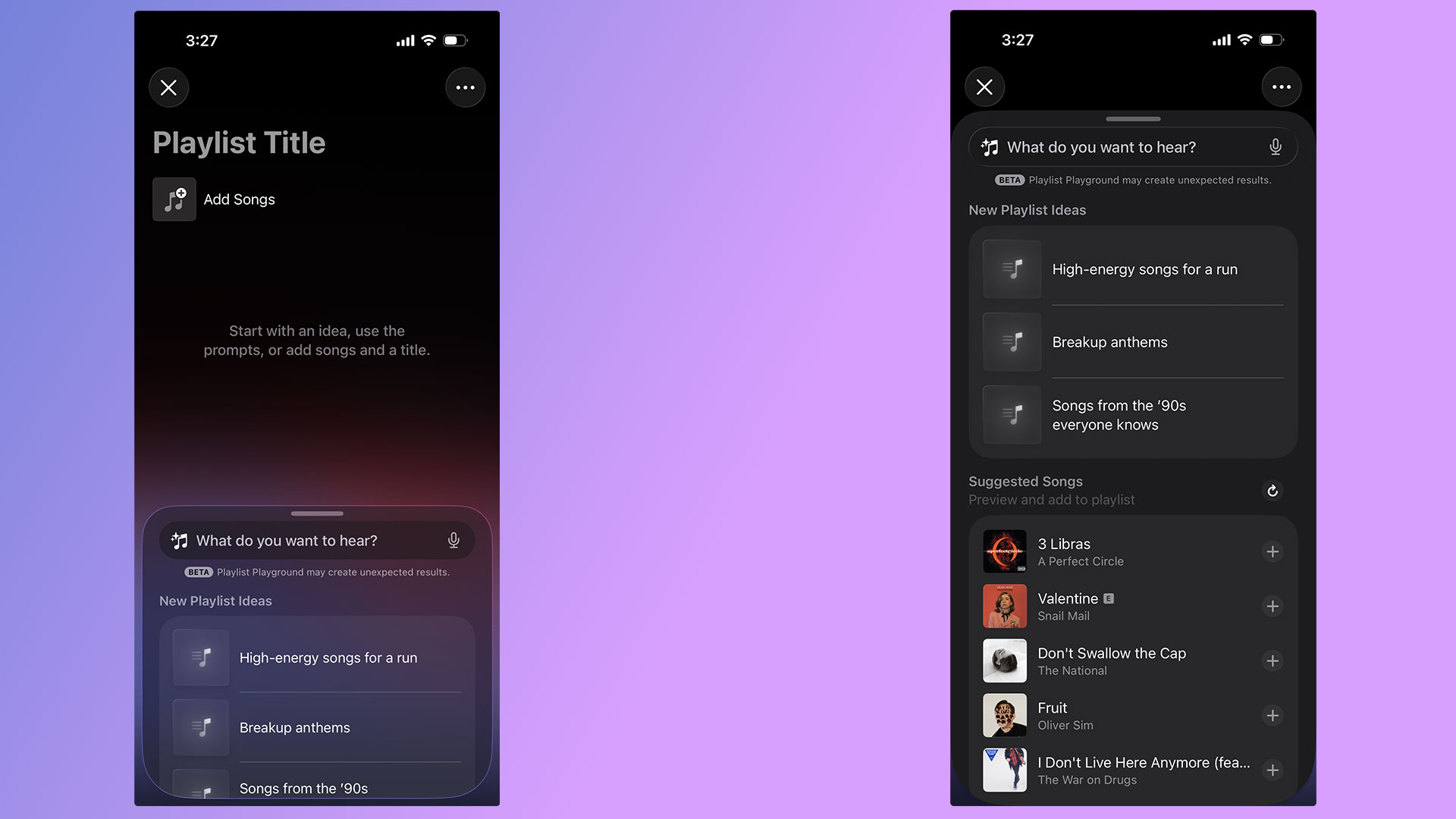
With the release of iOS 26.4, Apple Music's Playlist Playground can now generate playlists with the help of AI. Best of all, you don't need an Apple Intelligence-capable iPhone to take advantage of the new feature. As long as you're a US Apple Music subscriber with your language set to English, you can start using Playlist Playground right now. Here's how to get started.
How to create playlists using Playlist Playground
A pair of screenshots showing off Apple Music's new Playlist Playground feature.
Igor Bonifacic for Engadget
For the time being, there are two ways to access Playlist Playground. For the time being, the company is highlighting the feature within the "Top Picks for You" section of Apple Music's Home tab. If you don't see a shortcut there, Apple integrated the feature into the app's existing playlist creation tool. Just tap the new icon found in the Library tab. If you're new to Apple Music, the flow looks like this:
Open Apple Music.
Navigate to the "Library" tab.
Tap the playlist creation button.
Write a prompt describing the mood or style of music you want to hear.
To help people get started, Apple provides a selection of sample prompts. One pro tip: it's possible to use metadata in conjunction with Playlist Playground. For example, after Apple Music generates a playlist, you can tell Apple's model to edit it by removing any songs released before 2016. Of course, you're also free to add and remove songs manually as you please.
Once you're happy with your new playlist, Apple Music treats all Playlist Playground mixes like it does any other playlist, meaning you can save it to your Library, download for offline playback, play it from your Apple Watch and share it with friends and invite them to add songs.
FAQ
What Apple devices is Playlist Playground available on?
As of the writing of this article, Playlist Playground is a beta release only available to Apple Music subscribers in the US with their preferred language set to English. An iPhone or iPad running iOS 26.4, or an Apple Vision headset running visionOS 26.4 is also required.
As Apple releases the feature in more countries and languages, we'll update this article.
Is Playlist Playground available on Android?
Yes, if you use Apple Music on Android, Playlist Playground is available there too.
How does Playlist Playground work?
When generating mixes, Playlist Playground pulls from both trending data and your personal listening history. Along with other AI-powered Apple Music features like AutoMix and Lyrics Translation, Playlist Playground runs as part of the Apple Music service. That’s one of the reasons Apple can offer it outside of Apple Intelligence-capable devices.
This article originally appeared on Engadget at https://www.engadget.com/entertainment/music/how-to-use-apples-playlist-playground-to-make-ai-generated-mixes-134500610.html?src=rss
Anthropic has begun previewing "auto mode" inside of Claude Code. The company describes the new feature as a middle path between the app's default behavior, which sees Claude request approval for every file write and bash command, and the "dangerously-skip-premissions" command some coders use to make the chatbot function more autonomously.
With auto mode enabled, a classifier system guides Claude, giving it permission to carry out actions it deems safe, while redirecting the chatbot to take a different approach when it determines Claude might do something risky. In designing the system, Anthropic's goal was to reduce the likelihood of Claude carrying out mass file deletions, extracting sensitive data or executing malicious code.
Of course, no system is perfect, and Anthropic warns as such. "The classifier may still allow some risky actions: for example, if user intent is ambiguous, or if Claude doesn't have enough context about your environment to know an action might create additional risk," the company writes.
Anthropic doesn't mention a specific incident as inspiration for auto mode, but the recent 13-hour AWS outage Amazon suffered after one of the company's AI tools reportedly deleted a hosting environment, was probably front of mind for the company. Amazon blamed that specific incident on human error, saying the staffer involved in the incident had "broader permissions than expected."
Team plan users can preview auto mode starting today, with the feature set to roll out to Enterprise and API users in the coming days.
This article originally appeared on Engadget at https://www.engadget.com/ai/anthropic-releases-safer-claude-code-auto-mode-to-avoid-mass-file-deletions-and-other-ai-snafus-142500615.html?src=rss
OpenAI is shutting down its Sora video generation app. "We're saying goodbye to Sora," the company wrote in a X post published Tuesday afternoon. For now, OpenAI has yet to say when the app and its related API service would become unavailable. Instead, promising to share those details at a later date.
"We've decided to discontinue Sora in the consumer app and API. As we focus and compute demand grows, the Sora research team continues to focus on world simulation research to advance robotics that will help people solve real-world, physical tasks," an OpenAI spokesperson told Engadget.
We’re saying goodbye to Sora. To everyone who created with Sora, shared it, and built community around it: thank you. What you made with Sora mattered, and we know this news is disappointing.
We’ll share more soon, including timelines for the app and API and details on…
While today's news might come as a surprise for some, there were warning signs Sora was heading in this direction since the start of the year. While Sora hit the top of the US App Store charts shortly after its debut, interest in the platform appears to have quickly fizzled out thereafter. At the start of 2026, data from analytics firm Appfigures suggested the app was seeing successive month-over-month declines in both new installs and user spending. In December alone, a time of year when most apps typically flourish, Sora reportedly saw a 32 percent decline in new downloads from November.
The shutdown also aligns with OpenAI's recent shift in strategy. Since the release of GPT-5.2, the company's "code red" response to Google's Gemini 3 Pro model, OpenAI has tried to court professionals like coders and data analysts with systems that excel in those domains, seeing enterprise customers as a route toward profitability. However, today’s shutdown does appear to come with an additional cost for OpenAI. According to The Hollywood Reporter, Disney is exiting the deal it signed with the AI lab at the end of last year, and won’t, as a result, invest $1 billion into it.
This article originally appeared on Engadget at https://www.engadget.com/ai/openai-is-shutting-down-its-sora-video-generation-app-211023358.html?src=rss
After one too many of you threatened to switch to Linux, Microsoft has published a long list of changes it plans to make to Windows 11. In a lengthy blog titled "Our commitment to Windows quality," Pavan Davuluri, the executive vice president of Windows and Devices, said the company has spent a "great deal" of time in recent months reading feedback from users. "What came through was the voice of people who care deeply about Windows and want it to be better," he said. To that end, Windows Insiders can expect to see some of the changes Microsoft plans in response to all criticism begin rolling out starting this month.
Most notably, Microsoft ease up on the AI pedal. "You will see us be more intentional about how and where Copilot integrates across Windows, focusing on experiences that are genuinely useful and well-crafted," writes Davuluri. As a first step, Microsoft says it will remove "unnecessary Copilot entry points," starting with apps like the Snipping Tool, Photos, Widgets and Notepad.
Elsewhere, users can look forward to additional taskbar customization, allowing them to position the interface element at the top or sides of the screen; less disruptive updates, with the option to shut down or restart your device without being forced to install a new patch; and a faster, less janky File Explorer. "Our first round of improvements will focus on a quicker launch experience, reduced flicker, smoother navigation and more reliable performance for everyday file tasks," said Davuluri.
Looking beyond the next two months, Microsoft notes it will work to improve performance across Windows, with “lowering the baseline memory footprint” of the operating system a key area of focus. Presumably, this plan of action is as much a response to the global memory shortage as it is user feedback. PC manufacturers are struggling right now, with a recent estimate warning the market could shrink as much as 8.9 percent year-over-year in 2026 due to the high cost of RAM and SSDs. On the subject of reliability, the company says reducing OS-level crashes and releasing higher quality drivers is a priority, as is making Bluetooth and USB connections less prone to errors and disconnects.
Microsoft's promise to fix Windows 11 is long overdue. In January, the company released a couple of emergencyupdates after what should have been a routine security patch caused bugs that left some PCs unable to shut down and broke Outlook. The general state of the operating system has led many to explore Linux alternatives like Bazzite. With Apple also recently releasing the $600 MacBook Neo, a laptop that few Windows manufacturers can match right now, Microsoft’s dominance in the PC market is looking vulnerable for the first time in more than a decade.
This article originally appeared on Engadget at https://www.engadget.com/computing/microsoft-will-yank-copilot-from-some-windows-apps-and-let-you-move-the-taskbar-again-202857203.html?src=rss
Update, 4:05PM ET: A few hours after this story was published, Google reached out to retract the news. The company provided Engadget with the following statement:
"Search Live has not rolled out globally to all users. It remains available in the US and India, with testing currently underway in additional markets. We apologize for the earlier miscommunication."
Given that the company says it is testing in more markets, it seems entirely possible that the global Search Live release will happen sooner than later. But, for now, it’s on hold.
The original, unedited article follows below:
After rolling out Search Live to all US Google app users last September, Google is now bringing the feature to every place where it offers its AI Mode chatbot. Search Live, if you need a reminder, allows you to point your phone's camera at an object or scene and ask questions about what you see in front of you. Google debuted the tool at I/O 2025 before it began rolling it out to users. With today's expansion, Search Live is available in more than 200 countries and territories.
What's more, Google has updated the feature to run off its Gemini 3.1 Flash model, an upgrade the company says should translate to more natural conversations, in addition to a faster and more reliable experience. The new model is also natively multilingual. You can access Search Live from the Google app on Android and iOS. Tap the "Live" button below the search bar to get started. You can also access Search Live through Google Lens. As in the Google app, look for the "Live" icon, here located near the bottom of the screen, to start chatting.
This article originally appeared on Engadget at https://www.engadget.com/ai/google-is-testing-search-live-in-more-markets-150000316.html?src=rss
When OpenAI released GPT-5.4 at the start of March, the company said the new model was designed primarily for professional work like programming and data analysis. Now OpenAI is launching GPT-5.4 mini and nano, and while it is once again highlighting the usefulness of these new systems for tasks like coding, one of the new models is available to Free and Go users. What's more, that model, GPT-5.4 mini, even offers performance that approaches GPT-5.4 in a handful of areas.
As a Free or Go user, you can access 5.4 mini by selecting "Thinking" from ChatGPT's plus menu. For paid users, the model is the new fallback for when you've hit your rate limit with 5.4 proper. OpenAI says 5.4 mini offers better performance than GPT-5.0 mini in a few different key areas, including reasoning, multimodal understanding and tool use. That means 5.4 mini is better at parsing non-text inputs such as images and audio, and has a more nuanced understanding of how to do things like search the web. It does all of this while running more than twice as fast as its predecessor.
As for GPT-5.4 nano, OpenAI says it's ideal for tasks such as data classification and extraction where speed and cost-efficiency are top of mind. If you're a ChatGPT user, you won't find the new model in the chatbot. Instead, OpenAI is making it only available through its API service. The company envisions developers using more advanced models to delegate tasks to AI agents running GPT-5.4 nano, and that's reflected in the cost of the new model, which OpenAI has priced starting at $0.20 per million input tokens.
This article originally appeared on Engadget at https://www.engadget.com/ai/gpt-54-mini-brings-some-of-the-smarts-of-openais-latest-model-to-chatgpt-free-and-go-users-170000585.html?src=rss
At the start of the year, Google introduced Personal Intelligence, a Gemini feature that allows the chatbot to pull information from the user's other Google apps and services to generate personalized responses. After making the feature first available to Google AI Pro and Ultra subscribers, the company is expanding availability to more users in the US.
Google is kicking off the expansion with AI Mode. Starting today, anyone in the US can enable Personal Intelligence inside of the company's dedicated search chatbot. To enable the feature, tap on your profile, select Search personalization, followed by Connected Content Apps. From there, select Connect Workspace and Google Photos.
In the coming weeks, Google will start rolling out Personal Intelligence to free users of the Gemini app in the US, with international availability to follow thereafter. The company plans to do the same with Gemini in Chrome, where personalization will first roll out to users in the US before becoming available in other countries.
Google suggests a few different use cases for Gemini personalization inside of AI Mode, the Gemini app and Chrome. For instance, say you turn to AI mode for help with planning an upcoming trip. Instead of generating a generic itinerary, the chatbot will pull information from your apps to suggest something more tailored to your interests. It can also help you with troubleshooting in cases where you can’t remember the exact make or model of a device you’re trying to fix, as long as there are some hints to its origin contained inside of your Gmail account.
In each case, Personal Intelligence is disabled by default. Gemini will not personalize its responses unless you enable the new feature. Additionally, personalization is only available to personal accounts and not for Workspace business, enterprise and education users.
This article originally appeared on Engadget at https://www.engadget.com/ai/google-makes-gemini-personalization-available-to-free-users-160000581.html?src=rss
OpenAI's forthcoming "adult mode" will allow users to engage in lewd conversations with ChatGPT, but not use the chatbot to generate explicit images, audio or video. In response to reporting from The Wall Street Journal, an OpenAI spokesperson characterized the upcoming release as capable of producing smut rather than pornography.
OpenAI CEO Sam Altman first floated the idea of allowing people to use ChatGPT for erotica last October, saying the company wanted to "treat adult users like adults." OpenAI originally planned to release adult mode at the start of 2026. Since then, the company has pushed back the feature a handful of times, with the most recent delay coming at the start of March so that OpenAI could "focus on work that is a higher priority for more users."
Through The Journal's reporting, we're learning OpenAI forged ahead with work on adult mode despite reservations from its council on wellbeing and AI. The group of eight researchers and experts were reportedly unanimous in warning the company AI-generated erotica could lead to people developing an unhealthy emotional dependence on ChatGPT, and that underage users would almost certainly find ways to access the feature. According to The Journal, one council member, citing cases where people have taken their own lives after becoming attached to ChatGPT, said the company was at risk of creating a "sexy suicide coach."
Those concerns appear to have been well-founded. At one point, the company's age verification technology was misidentifying underage users as adults about 12 percent of the time, according to The Journal. At OpenAI's scale, with around 100 million teens using ChatGPT every week, that error rate would have translated to millions of minors accessing erotic chats. OpenAI told The Journal its prediction algorithm performs to industry standards, adding no such system will ever be completely foolproof.
This article originally appeared on Engadget at https://www.engadget.com/ai/openais-adult-mode-reportedly-wont-generate-pornographic-audio-images-or-video-150744035.html?src=rss
Inevitably, the more you use something — your Mac included — the more dirty and cluttered it’s likely to become. At that point, you can buy a new machine, but the more economical move is to make what you have already work better. To help your computer feel new, or at least a little cleaner and less chaotic, we put together this guide with techniques and useful apps that have helped us maintain a more organized computer. I’ve been using these tips since before I first published this guide in 2021, and they’ve helped keep my 2018 MacBook Air looking and running (almost) like brand new.
How to clean your Mac’s screen and body
While there are many products out there from manufacturers claiming their one does it best, my advice is to keep things simple. It’s also the one Apple recommends. To start, you will need some water in a spray bottle and a clean microfiber cloth. You can use regular water from the tap but I've found distilled water works best; it’s far less likely to leave residue behind on your Mac, particularly on the display. You can buy distilled water at a grocery store or make it yourself with some simple cookware. Either way, it’s more affordable than dedicated cleaning solutions. If you don’t already own any microfiber towels, Amazon sells affordable 24-packs you can get for about $10.
One other product I would recommend is a Giottos Rocket Blower. I can’t say enough good things about this little tool. It will save you from buying expensive and wasteful cans of compressed air.
As for the actual process of cleaning your Mac, remember to start with a clean cloth (that’s part of the reason we recommend buying them in bulk). You’ll save yourself time and frustration this way. Begin by turning off your computer and unplugging it. If you bought a Rocket Blower, use it now to remove any dust. If not, take a dry microfiber cloth and go over your computer. Take special care around the keys, particularly if you own an older Mac with a butterfly keyboard.
Next, dampen one side of your cleaning cloth with water. Never spray any liquid directly on your computer. You’ll have more control this way and you’ll avoid getting any moisture into your Mac’s internals. I always clean the display first since the last thing I want to do is create more work for myself by transferring dirt from some other part of my computer to the screen.
The last step is to buff and polish your computer with the dry side of the cloth. Be gentle here as you don’t want to scratch the screen or any other part of. That’s it. Your Mac should be looking clean again.
How to organize your hard drive
Igor Bonifacic / Engadget
One of the trickiest parts of cleaning your Mac’s hard drive is knowing where to start; most of us have apps on our computers we don’t even remember installing in the first place. Thankfully, macOS comes with a tool to help you with that exact issue.
Navigate to System Settings > General > Storage. Here you’ll find a tool that separates your storage into broad categories like "Applications," "Documents," "Music," "Photos" and so on. Either double-click on an item in the list or click the circled i icon to see the last time you used an app and how much space it’s taking up. You can delete the apps from the same window.
The applications section is particularly helpful since you can see the last time you used a program, as well as if it’s no longer supported by the operating system or if it’s outdated thanks to a more recent release.
You don’t need me to tell you to uninstall programs you don’t use, but what you might not know is that there’s a better way to erase them than simply dragging them to the trash can. A free program called AppCleaner will help you track down any files and folders that would get left behind if you were just to delete an application.
Igor Bonifacic / Engadget
After deleting any apps you don’t need, move to the Documents section. The name is somewhat misleading here since you’ll find more than just text files and Keynote spreadsheets. In this case, documents turns out to be the tool’s catch-all term for a variety of files, including ones that take up a large amount of space. You can also safely delete any DMGs (disc image files with the extension .dmg) for which you’ve installed the related app.
The other sections in the storage space are self-explanatory. The only other thing I’ll mention is if you’ve been using an iPhone for a while, there’s a good chance you’ll have old iOS backups stored on your computer. You can safely delete those, too.
Tips and tricks for keeping a neat Desktop and Finder
Igor Bonifacic
Let’s start with the menu bar. It may not technically be part of the desktop, but a tidy one can go a long way toward making everything else look less cluttered. My recommendation here is to download an app called Bartender. At first glance, it’s a simple program allowing you to hide unwanted menu bar items behind a three-dots icon, but the strength of Bartender is that you get a lot of customization options. For example, you can set a trigger that will automatically move the battery status icon out from hiding when your computer isn’t connected to a power outlet.
While we’re on the subject of the menu bar, take a second to navigate to System Settings > General > Login Items & Extensions and look at all the apps that launch when you boot up your system. You can speed up your system by paring down this list to only the programs you use frequently.
When it comes to the desktop itself, less is more. Nothing will make your computer look like a cluttered mess more than a busy desktop. Folders and stacks can help, but for most people, I suspect part of the problem is they use their desktop as a way to quickly and easily find files that are important to them.
If you’ve ever struggled to find a specific file or folder on your computer, try using your Mac’s tagging capabilities instead. Start by opening the Finder Settings menu (Command + ,) and click the Tags tab. You can use the default ones provided by macOS or make your own. Drag the ones you think you’ll use most often to the favorites areas at the bottom of the preferences window. This will make it so that they’re easily accessible when you want to use them. To append a tag to a file or folder, click on it while holding the ctrl key and select the one you want from the dropdown menu. You can also tag a file while working on it within an app. Keep in mind you can apply multiple tags to a single file or folder, and you can even apply them to applications.
Igor Bonifacic / Engadget
What makes tags so useful in macOS is that they can appear in the sidebar of the Finder window, and are easily searchable either directly with Finder or using Siri. As long as you have a system for organizing your files, even a simple one, you’ll find it easier to keep track of them. As one example, I like to apply an Engadget tag to any files related to my work. I’ll add an “Important” tag if it’s something that’s critical and I want to find quickly.
One tool that can help supercharge your Finder experience is Alfred. It’s effectively a more powerful version of Apple’s Spotlight feature. Among other things, you can use Alfred to find and launch apps quickly. There’s a bit of a learning curve, but once you get a hang of it, Alfred will change how you use your Mac for the better.
How to organize your windows and tabs
Igor Bonifacic / Engadget
If you’ve used both macOS and Windows 10, you’ll know that Apple’s operating system doesn’t come with the best window management tools. You can click and hold on the green full-screen button to tile a window to either the left or right side of your screen, but that’s about it and the feature has always felt less precise than its Windows counterpart.
My suggestion is to download an app that replicates Windows 10’s snapping feature. You have several competing options that more or less offer the same functionality. My go-to is a $5 program called Magnet. If you want a free alternative, check out Rectangle. Another option is BetterSnapTool, which offers more functionality than Magnet but doesn’t have as clean of an interface. All three apps give you far more ways to configure your windows than what you get through the built-in tool in macOS. They also come with shortcut support, which means you can quickly set up your windows and get to work.
This article originally appeared on Engadget at https://www.engadget.com/computing/how-to-clean-your-mac-macbook-cleaning-supplies-digital-organization-153007592.html?src=rss