EZCast Just Turned Every Phone Into a Professional Camera Monitor

Monitoring a camera feed used to require either hovering behind the viewfinder or investing in a dedicated wireless video system with separate transmitters, receivers, and field monitors. For solo content creators, small production teams, and anyone shooting interviews or tutorials with limited gear, that kind of setup has always felt disproportionate to the task. The gap between “professional monitoring” and “just squinting at the back of the camera” remained stubbornly wide.

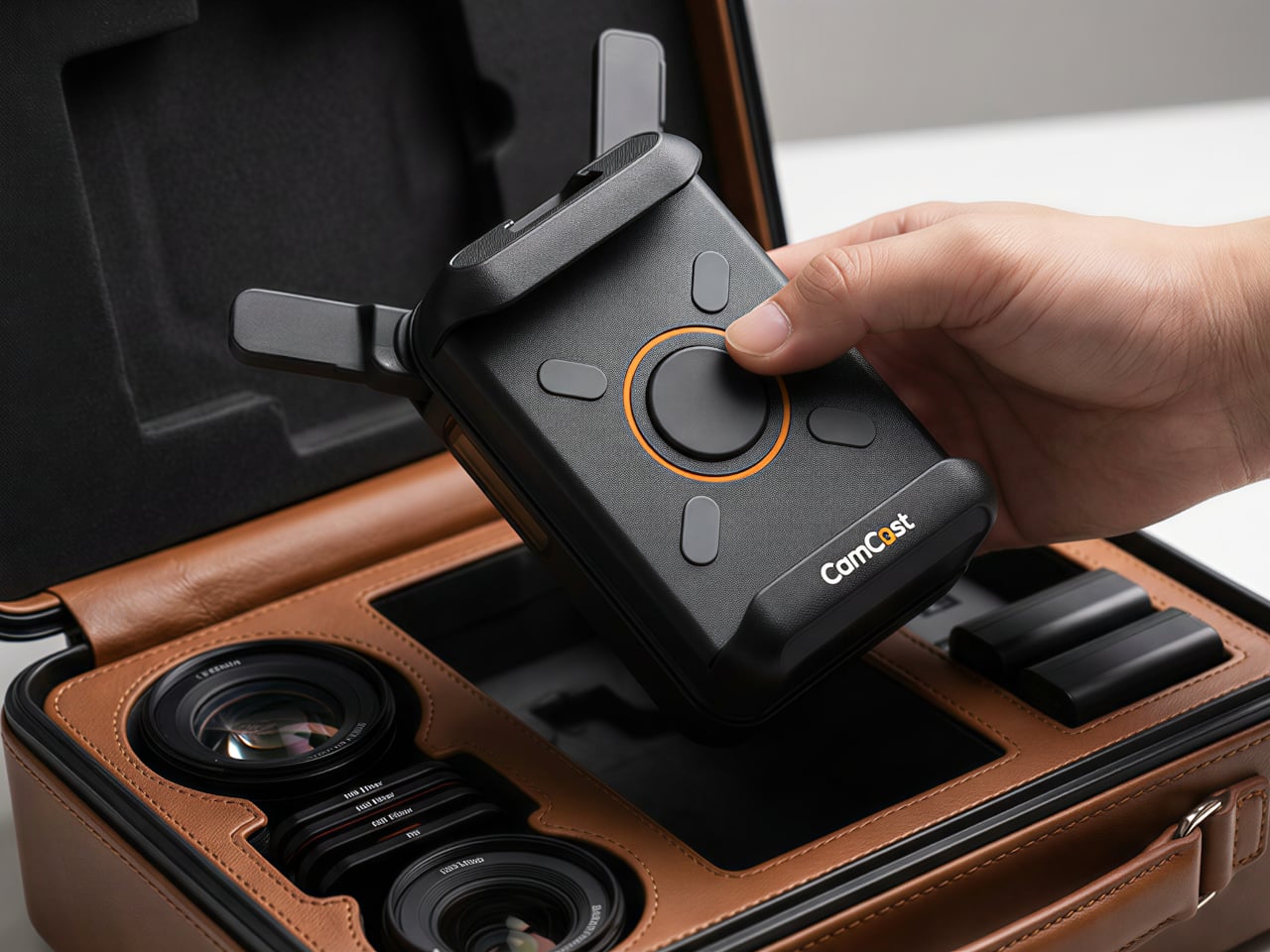
EZCast’s CamCast CT-1 is a compact wireless transmitter designed to sit on top of any HDMI-equipped camera, from mirrorless bodies and DSLRs to action cams and camcorders. Once connected, it broadcasts a live 1080p 60fps feed over 5GHz Wi-Fi to up to four iOS or Android devices simultaneously. EZCast has spent over a decade building wireless display and screen-mirroring technology for offices and classrooms, and the CamCast is their first product built specifically for cameras, applying that signal distribution expertise to a production context.

Designer: EZCast

Click Here to Buy Now: $129 $239 ($110 off). Hurry, only a few units left!
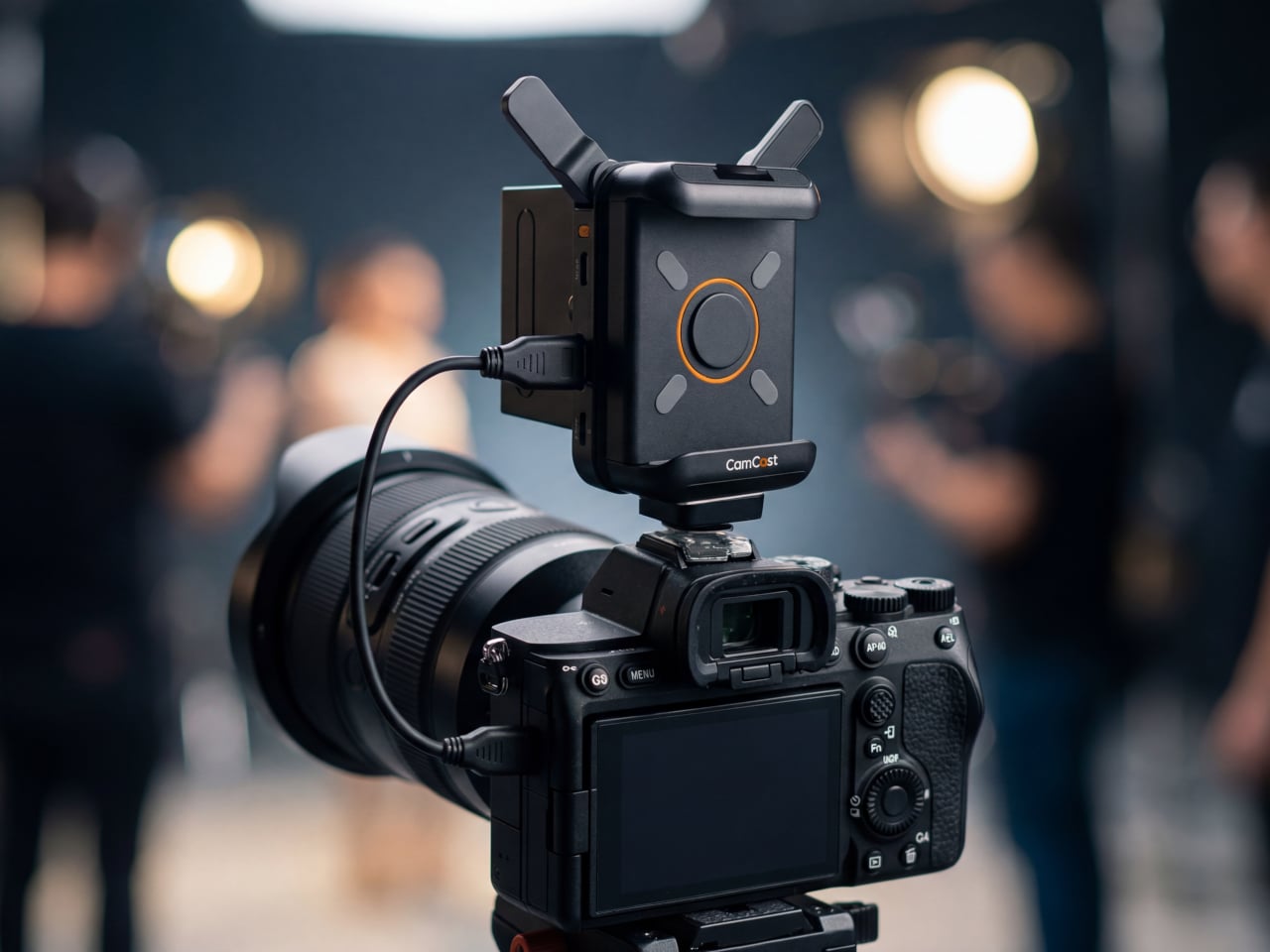
The device itself is small enough to mount on a camera hot shoe or gimbal arm, with included adapters for both horizontal and vertical orientation. A built-in OLED screen displays connection details, and pairing happens through a QR code scan that takes roughly three seconds. Power comes from either a standard NP-F battery, the same type used across countless cinema accessories, or a USB-C connection at 5V/3A. That dual-power flexibility means a battery for mobility on location or a simple cable for longer, stationary shoots where runtime matters more.

1

Beyond passive monitoring, the companion CamCast app lets users save takes directly to their phone, review footage instantly, and share clips without ever pulling a memory card from the camera. For a two-person crew shooting a wedding, for instance, the second operator can watch the main camera’s composition from across the venue on a phone while managing their own setup. A makeup artist can confirm framing before the talent walks on set. Four people watching the same live feed, all from devices they already carry, collapses a communication problem that traditionally required dedicated hardware to solve.

What separates the CamCast CT-1 from a basic wireless HDMI sender, though, is the built-in PTP camera control. From the app on a phone or tablet, users can adjust shutter speed, ISO, color temperature, and aperture, and even navigate through camera menus remotely. Consider a camera mounted on an overhead rig for a cooking tutorial, or locked onto a gimbal for a tracking shot. Physically reaching the camera to change a setting interrupts the flow of a shoot. Being able to tweak exposure or white balance from a phone across the room changes how a solo creator or small team interacts with their gear.

1

The CamCast CT-1 also has a UVC output, which means it can connect directly to a laptop or desktop and function as a capture card. For livestreamers, educators, or anyone running a webinar, this removes an entire piece of hardware from the signal chain. One device handles wireless monitoring to phones and wired streaming output to a computer at the same time, which is a lot of functions packed into something that weighs less than most on-camera microphones.

1

Picture a YouTuber who films with a mirrorless camera on a tripod across the room. Right now, checking framing or adjusting settings means walking over, making a change, walking back, and repeating until it looks right. With the CamCast mounted on that camera, the phone becomes both the monitor and the remote control. An instructor recording a craft tutorial gets the same benefit, turning their tablet into a live preview without needing cables snaking across the workspace or an expensive field monitor clamped to a light stand.

Rather than building another monitor or another receiver, EZCast built a bridge between cameras and the screens people already own. That redistribution of function, turning four phones into four production monitors through a single transmitter, might be the more interesting design move in a category still dominated by expensive, single-purpose hardware.

Click Here to Buy Now: $129 $239 ($110 off). Hurry, only a few units left!

The post EZCast Just Turned Every Phone Into a Professional Camera Monitor first appeared on Yanko Design.

EZCast Just Turned Every Phone Into a Professional Camera Monitor

Monitoring a camera feed used to require either hovering behind the viewfinder or investing in a dedicated wireless video system with separate transmitters, receivers, and field monitors. For solo content creators, small production teams, and anyone shooting interviews or tutorials with limited gear, that kind of setup has always felt disproportionate to the task. The gap between “professional monitoring” and “just squinting at the back of the camera” remained stubbornly wide.

EZCast’s CamCast CT-1 is a compact wireless transmitter designed to sit on top of any HDMI-equipped camera, from mirrorless bodies and DSLRs to action cams and camcorders. Once connected, it broadcasts a live 1080p 60fps feed over 5GHz Wi-Fi to up to four iOS or Android devices simultaneously. EZCast has spent over a decade building wireless display and screen-mirroring technology for offices and classrooms, and the CamCast is their first product built specifically for cameras, applying that signal distribution expertise to a production context.

Designer: EZCast

Click Here to Buy Now: $129 $239 ($110 off). Hurry, only a few units left!
The device itself is small enough to mount on a camera hot shoe or gimbal arm, with included adapters for both horizontal and vertical orientation. A built-in OLED screen displays connection details, and pairing happens through a QR code scan that takes roughly three seconds. Power comes from either a standard NP-F battery, the same type used across countless cinema accessories, or a USB-C connection at 5V/3A. That dual-power flexibility means a battery for mobility on location or a simple cable for longer, stationary shoots where runtime matters more.

1

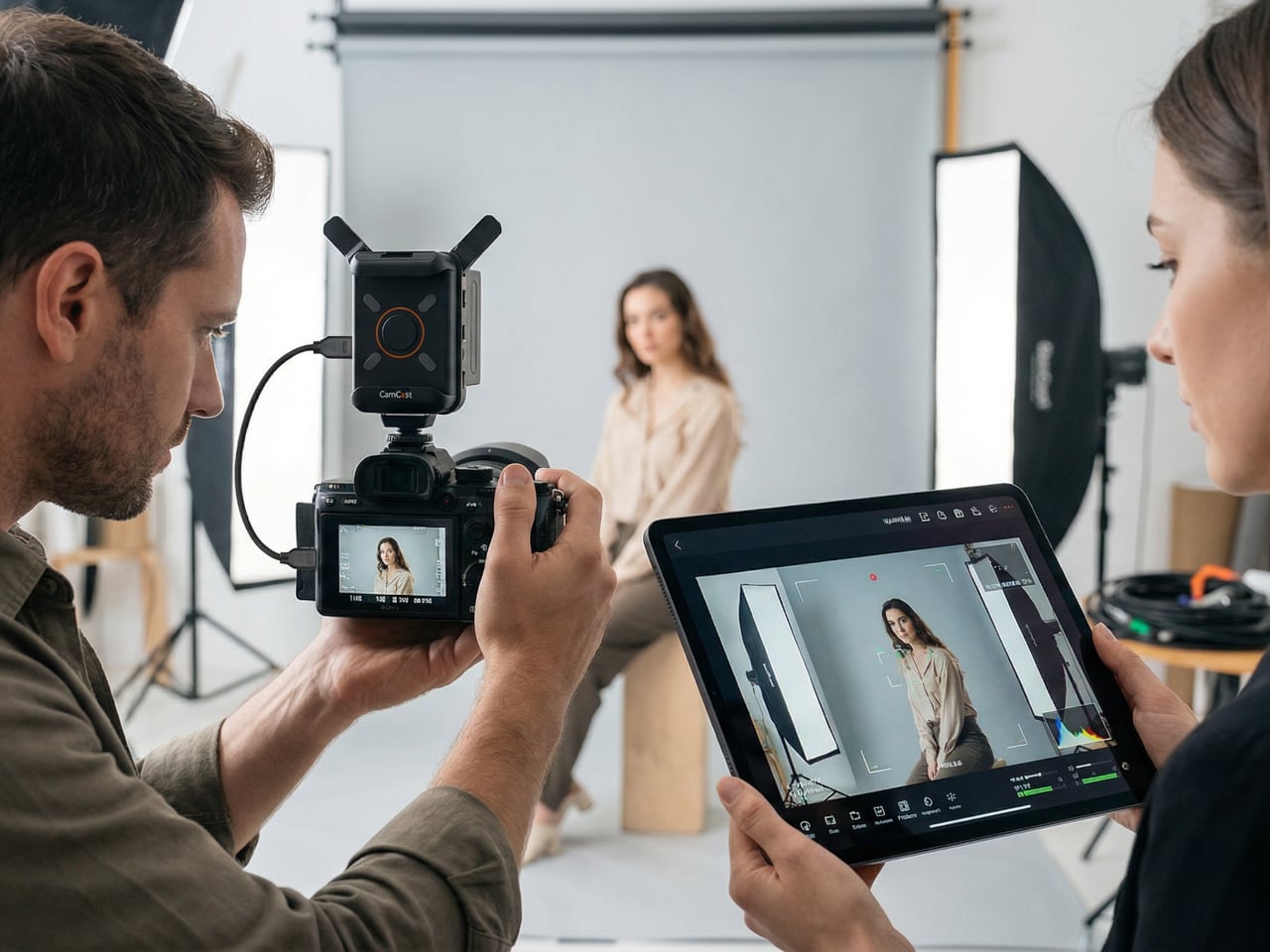
Beyond passive monitoring, the companion CamCast app lets users save takes directly to their phone, review footage instantly, and share clips without ever pulling a memory card from the camera. For a two-person crew shooting a wedding, for instance, the second operator can watch the main camera’s composition from across the venue on a phone while managing their own setup. A makeup artist can confirm framing before the talent walks on set. Four people watching the same live feed, all from devices they already carry, collapses a communication problem that traditionally required dedicated hardware to solve.
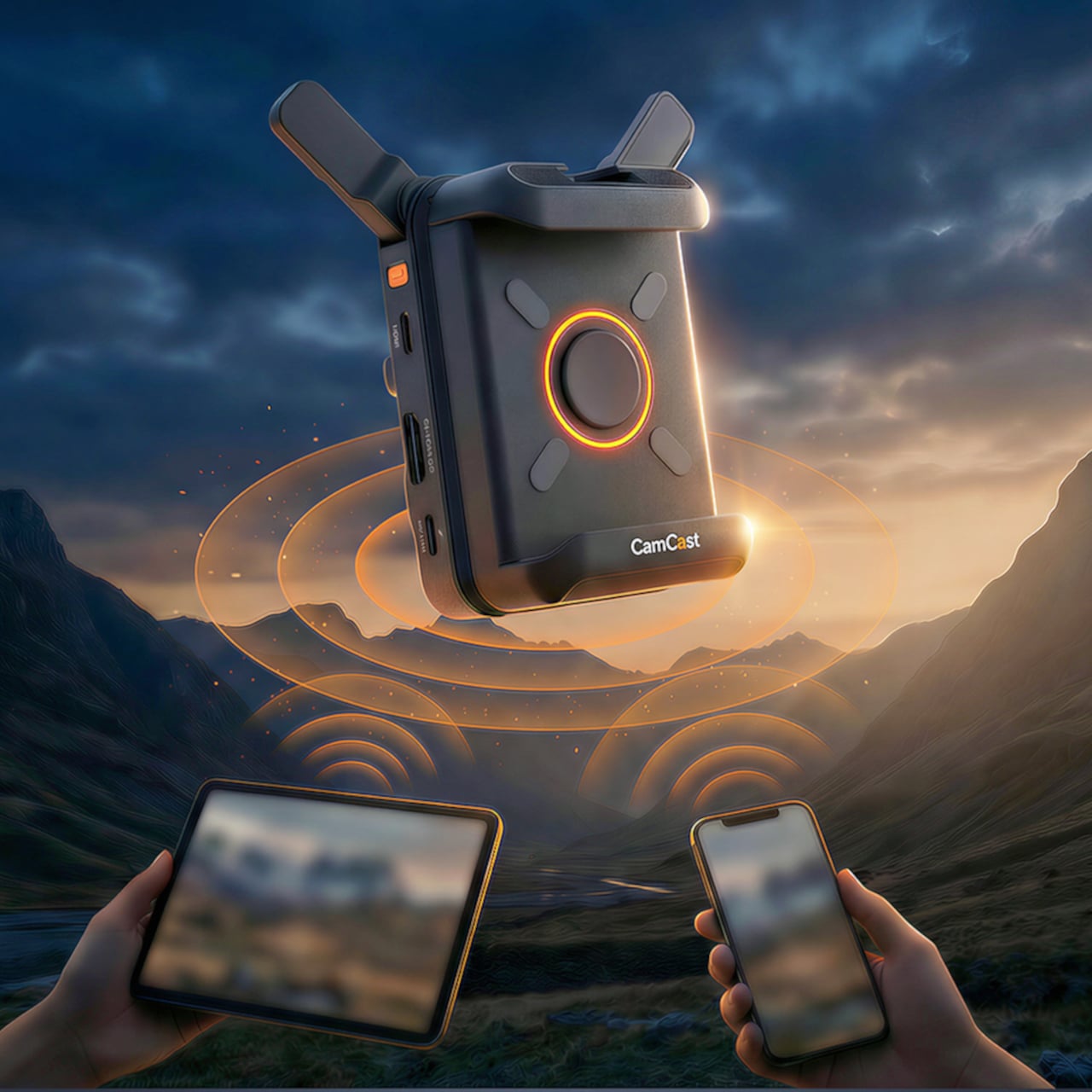
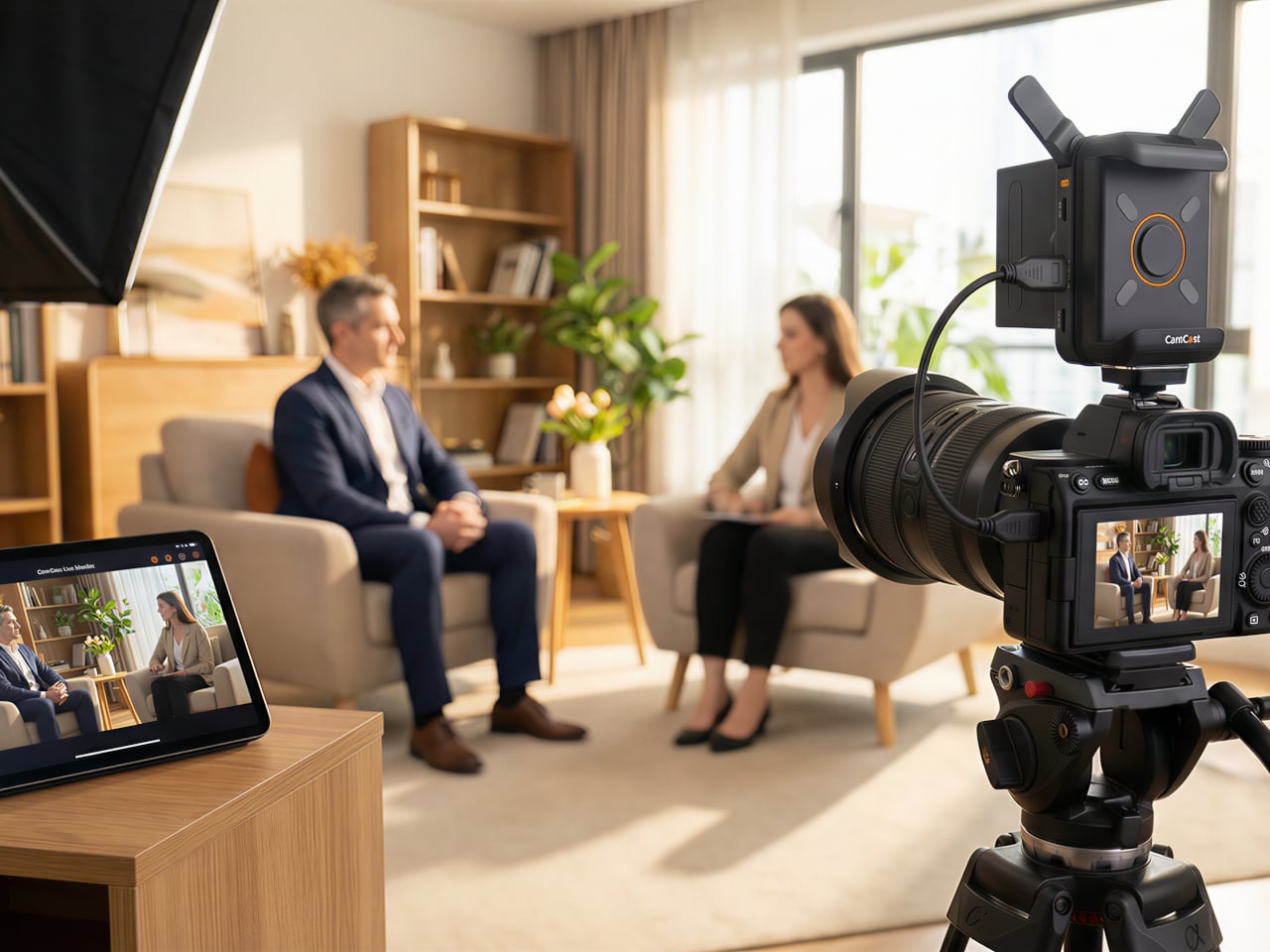
What separates the CamCast CT-1 from a basic wireless HDMI sender, though, is the built-in PTP camera control. From the app on a phone or tablet, users can adjust shutter speed, ISO, color temperature, and aperture, and even navigate through camera menus remotely. Consider a camera mounted on an overhead rig for a cooking tutorial, or locked onto a gimbal for a tracking shot. Physically reaching the camera to change a setting interrupts the flow of a shoot. Being able to tweak exposure or white balance from a phone across the room changes how a solo creator or small team interacts with their gear.

1

The CamCast CT-1 also has a UVC output, which means it can connect directly to a laptop or desktop and function as a capture card. For livestreamers, educators, or anyone running a webinar, this removes an entire piece of hardware from the signal chain. One device handles wireless monitoring to phones and wired streaming output to a computer at the same time, which is a lot of functions packed into something that weighs less than most on-camera microphones.

1

Picture a YouTuber who films with a mirrorless camera on a tripod across the room. Right now, checking framing or adjusting settings means walking over, making a change, walking back, and repeating until it looks right. With the CamCast mounted on that camera, the phone becomes both the monitor and the remote control. An instructor recording a craft tutorial gets the same benefit, turning their tablet into a live preview without needing cables snaking across the workspace or an expensive field monitor clamped to a light stand.

Rather than building another monitor or another receiver, EZCast built a bridge between cameras and the screens people already own. That redistribution of function, turning four phones into four production monitors through a single transmitter, might be the more interesting design move in a category still dominated by expensive, single-purpose hardware.

Click Here to Buy Now: $129 $239 ($110 off). Hurry, only a few units left!

The post EZCast Just Turned Every Phone Into a Professional Camera Monitor first appeared on Yanko Design.

EZCast Just Turned Every Phone Into a Professional Camera Monitor

Monitoring a camera feed used to require either hovering behind the viewfinder or investing in a dedicated wireless video system with separate transmitters, receivers, and field monitors. For solo content creators, small production teams, and anyone shooting interviews or tutorials with limited gear, that kind of setup has always felt disproportionate to the task. The gap between “professional monitoring” and “just squinting at the back of the camera” remained stubbornly wide.

EZCast’s CamCast CT-1 is a compact wireless transmitter designed to sit on top of any HDMI-equipped camera, from mirrorless bodies and DSLRs to action cams and camcorders. Once connected, it broadcasts a live 1080p 60fps feed over 5GHz Wi-Fi to up to four iOS or Android devices simultaneously. EZCast has spent over a decade building wireless display and screen-mirroring technology for offices and classrooms, and the CamCast is their first product built specifically for cameras, applying that signal distribution expertise to a production context.

Designer: EZCast

Click Here to Buy Now: $129 $239 ($110 off). Hurry, only a few units left!

The device itself is small enough to mount on a camera hot shoe or gimbal arm, with included adapters for both horizontal and vertical orientation. A built-in OLED screen displays connection details, and pairing happens through a QR code scan that takes roughly three seconds. Power comes from either a standard NP-F battery, the same type used across countless cinema accessories, or a USB-C connection at 5V/3A. That dual-power flexibility means a battery for mobility on location or a simple cable for longer, stationary shoots where runtime matters more.

1

Beyond passive monitoring, the companion CamCast app lets users save takes directly to their phone, review footage instantly, and share clips without ever pulling a memory card from the camera. For a two-person crew shooting a wedding, for instance, the second operator can watch the main camera’s composition from across the venue on a phone while managing their own setup. A makeup artist can confirm framing before the talent walks on set. Four people watching the same live feed, all from devices they already carry, collapses a communication problem that traditionally required dedicated hardware to solve.

What separates the CamCast CT-1 from a basic wireless HDMI sender, though, is the built-in PTP camera control. From the app on a phone or tablet, users can adjust shutter speed, ISO, color temperature, and aperture, and even navigate through camera menus remotely. Consider a camera mounted on an overhead rig for a cooking tutorial, or locked onto a gimbal for a tracking shot. Physically reaching the camera to change a setting interrupts the flow of a shoot. Being able to tweak exposure or white balance from a phone across the room changes how a solo creator or small team interacts with their gear.

1

The CamCast CT-1 also has a UVC output, which means it can connect directly to a laptop or desktop and function as a capture card. For livestreamers, educators, or anyone running a webinar, this removes an entire piece of hardware from the signal chain. One device handles wireless monitoring to phones and wired streaming output to a computer at the same time, which is a lot of functions packed into something that weighs less than most on-camera microphones.

1

Picture a YouTuber who films with a mirrorless camera on a tripod across the room. Right now, checking framing or adjusting settings means walking over, making a change, walking back, and repeating until it looks right. With the CamCast mounted on that camera, the phone becomes both the monitor and the remote control. An instructor recording a craft tutorial gets the same benefit, turning their tablet into a live preview without needing cables snaking across the workspace or an expensive field monitor clamped to a light stand.

Rather than building another monitor or another receiver, EZCast built a bridge between cameras and the screens people already own. That redistribution of function, turning four phones into four production monitors through a single transmitter, might be the more interesting design move in a category still dominated by expensive, single-purpose hardware.

Click Here to Buy Now: $129 $239 ($110 off). Hurry, only a few units left!

The post EZCast Just Turned Every Phone Into a Professional Camera Monitor first appeared on Yanko Design.

EZCast Just Turned Every Phone Into a Professional Camera Monitor

Monitoring a camera feed used to require either hovering behind the viewfinder or investing in a dedicated wireless video system with separate transmitters, receivers, and field monitors. For solo content creators, small production teams, and anyone shooting interviews or tutorials with limited gear, that kind of setup has always felt disproportionate to the task. The gap between “professional monitoring” and “just squinting at the back of the camera” remained stubbornly wide.

EZCast’s CamCast CT-1 is a compact wireless transmitter designed to sit on top of any HDMI-equipped camera, from mirrorless bodies and DSLRs to action cams and camcorders. Once connected, it broadcasts a live 1080p 60fps feed over 5GHz Wi-Fi to up to four iOS or Android devices simultaneously. EZCast has spent over a decade building wireless display and screen-mirroring technology for offices and classrooms, and the CamCast is their first product built specifically for cameras, applying that signal distribution expertise to a production context.

Designer: EZCast

Click Here to Buy Now: $129 $239 ($110 off). Hurry, only a few units left!

The device itself is small enough to mount on a camera hot shoe or gimbal arm, with included adapters for both horizontal and vertical orientation. A built-in OLED screen displays connection details, and pairing happens through a QR code scan that takes roughly three seconds. Power comes from either a standard NP-F battery, the same type used across countless cinema accessories, or a USB-C connection at 5V/3A. That dual-power flexibility means a battery for mobility on location or a simple cable for longer, stationary shoots where runtime matters more.

1

Beyond passive monitoring, the companion CamCast app lets users save takes directly to their phone, review footage instantly, and share clips without ever pulling a memory card from the camera. For a two-person crew shooting a wedding, for instance, the second operator can watch the main camera’s composition from across the venue on a phone while managing their own setup. A makeup artist can confirm framing before the talent walks on set. Four people watching the same live feed, all from devices they already carry, collapses a communication problem that traditionally required dedicated hardware to solve.

What separates the CamCast CT-1 from a basic wireless HDMI sender, though, is the built-in PTP camera control. From the app on a phone or tablet, users can adjust shutter speed, ISO, color temperature, and aperture, and even navigate through camera menus remotely. Consider a camera mounted on an overhead rig for a cooking tutorial, or locked onto a gimbal for a tracking shot. Physically reaching the camera to change a setting interrupts the flow of a shoot. Being able to tweak exposure or white balance from a phone across the room changes how a solo creator or small team interacts with their gear.

1

The CamCast CT-1 also has a UVC output, which means it can connect directly to a laptop or desktop and function as a capture card. For livestreamers, educators, or anyone running a webinar, this removes an entire piece of hardware from the signal chain. One device handles wireless monitoring to phones and wired streaming output to a computer at the same time, which is a lot of functions packed into something that weighs less than most on-camera microphones.

1

Picture a YouTuber who films with a mirrorless camera on a tripod across the room. Right now, checking framing or adjusting settings means walking over, making a change, walking back, and repeating until it looks right. With the CamCast mounted on that camera, the phone becomes both the monitor and the remote control. An instructor recording a craft tutorial gets the same benefit, turning their tablet into a live preview without needing cables snaking across the workspace or an expensive field monitor clamped to a light stand.

Rather than building another monitor or another receiver, EZCast built a bridge between cameras and the screens people already own. That redistribution of function, turning four phones into four production monitors through a single transmitter, might be the more interesting design move in a category still dominated by expensive, single-purpose hardware.

Click Here to Buy Now: $129 $239 ($110 off). Hurry, only a few units left!

The post EZCast Just Turned Every Phone Into a Professional Camera Monitor first appeared on Yanko Design.

EZCast Just Turned Every Phone Into a Professional Camera Monitor

Monitoring a camera feed used to require either hovering behind the viewfinder or investing in a dedicated wireless video system with separate transmitters, receivers, and field monitors. For solo content creators, small production teams, and anyone shooting interviews or tutorials with limited gear, that kind of setup has always felt disproportionate to the task. The gap between “professional monitoring” and “just squinting at the back of the camera” remained stubbornly wide.

EZCast’s CamCast CT-1 is a compact wireless transmitter designed to sit on top of any HDMI-equipped camera, from mirrorless bodies and DSLRs to action cams and camcorders. Once connected, it broadcasts a live 1080p 60fps feed over 5GHz Wi-Fi to up to four iOS or Android devices simultaneously. EZCast has spent over a decade building wireless display and screen-mirroring technology for offices and classrooms, and the CamCast is their first product built specifically for cameras, applying that signal distribution expertise to a production context.

Designer: EZCast

Click Here to Buy Now: $129 $239 ($110 off). Hurry, only a few units left!

The device itself is small enough to mount on a camera hot shoe or gimbal arm, with included adapters for both horizontal and vertical orientation. A built-in OLED screen displays connection details, and pairing happens through a QR code scan that takes roughly three seconds. Power comes from either a standard NP-F battery, the same type used across countless cinema accessories, or a USB-C connection at 5V/3A. That dual-power flexibility means a battery for mobility on location or a simple cable for longer, stationary shoots where runtime matters more.

1

Beyond passive monitoring, the companion CamCast app lets users save takes directly to their phone, review footage instantly, and share clips without ever pulling a memory card from the camera. For a two-person crew shooting a wedding, for instance, the second operator can watch the main camera’s composition from across the venue on a phone while managing their own setup. A makeup artist can confirm framing before the talent walks on set. Four people watching the same live feed, all from devices they already carry, collapses a communication problem that traditionally required dedicated hardware to solve.

What separates the CamCast CT-1 from a basic wireless HDMI sender, though, is the built-in PTP camera control. From the app on a phone or tablet, users can adjust shutter speed, ISO, color temperature, and aperture, and even navigate through camera menus remotely. Consider a camera mounted on an overhead rig for a cooking tutorial, or locked onto a gimbal for a tracking shot. Physically reaching the camera to change a setting interrupts the flow of a shoot. Being able to tweak exposure or white balance from a phone across the room changes how a solo creator or small team interacts with their gear.

1

The CamCast CT-1 also has a UVC output, which means it can connect directly to a laptop or desktop and function as a capture card. For livestreamers, educators, or anyone running a webinar, this removes an entire piece of hardware from the signal chain. One device handles wireless monitoring to phones and wired streaming output to a computer at the same time, which is a lot of functions packed into something that weighs less than most on-camera microphones.

1

Picture a YouTuber who films with a mirrorless camera on a tripod across the room. Right now, checking framing or adjusting settings means walking over, making a change, walking back, and repeating until it looks right. With the CamCast mounted on that camera, the phone becomes both the monitor and the remote control. An instructor recording a craft tutorial gets the same benefit, turning their tablet into a live preview without needing cables snaking across the workspace or an expensive field monitor clamped to a light stand.

Rather than building another monitor or another receiver, EZCast built a bridge between cameras and the screens people already own. That redistribution of function, turning four phones into four production monitors through a single transmitter, might be the more interesting design move in a category still dominated by expensive, single-purpose hardware.

Click Here to Buy Now: $129 $239 ($110 off). Hurry, only a few units left!

The post EZCast Just Turned Every Phone Into a Professional Camera Monitor first appeared on Yanko Design.

EZCast Just Turned Every Phone Into a Professional Camera Monitor

Monitoring a camera feed used to require either hovering behind the viewfinder or investing in a dedicated wireless video system with separate transmitters, receivers, and field monitors. For solo content creators, small production teams, and anyone shooting interviews or tutorials with limited gear, that kind of setup has always felt disproportionate to the task. The gap between “professional monitoring” and “just squinting at the back of the camera” remained stubbornly wide.

EZCast’s CamCast CT-1 is a compact wireless transmitter designed to sit on top of any HDMI-equipped camera, from mirrorless bodies and DSLRs to action cams and camcorders. Once connected, it broadcasts a live 1080p 60fps feed over 5GHz Wi-Fi to up to four iOS or Android devices simultaneously. EZCast has spent over a decade building wireless display and screen-mirroring technology for offices and classrooms, and the CamCast is their first product built specifically for cameras, applying that signal distribution expertise to a production context.

Designer: EZCast

Click Here to Buy Now: $129 $239 ($110 off). Hurry, only a few units left!

The device itself is small enough to mount on a camera hot shoe or gimbal arm, with included adapters for both horizontal and vertical orientation. A built-in OLED screen displays connection details, and pairing happens through a QR code scan that takes roughly three seconds. Power comes from either a standard NP-F battery, the same type used across countless cinema accessories, or a USB-C connection at 5V/3A. That dual-power flexibility means a battery for mobility on location or a simple cable for longer, stationary shoots where runtime matters more.

1

Beyond passive monitoring, the companion CamCast app lets users save takes directly to their phone, review footage instantly, and share clips without ever pulling a memory card from the camera. For a two-person crew shooting a wedding, for instance, the second operator can watch the main camera’s composition from across the venue on a phone while managing their own setup. A makeup artist can confirm framing before the talent walks on set. Four people watching the same live feed, all from devices they already carry, collapses a communication problem that traditionally required dedicated hardware to solve.

What separates the CamCast CT-1 from a basic wireless HDMI sender, though, is the built-in PTP camera control. From the app on a phone or tablet, users can adjust shutter speed, ISO, color temperature, and aperture, and even navigate through camera menus remotely. Consider a camera mounted on an overhead rig for a cooking tutorial, or locked onto a gimbal for a tracking shot. Physically reaching the camera to change a setting interrupts the flow of a shoot. Being able to tweak exposure or white balance from a phone across the room changes how a solo creator or small team interacts with their gear.

1

The CamCast CT-1 also has a UVC output, which means it can connect directly to a laptop or desktop and function as a capture card. For livestreamers, educators, or anyone running a webinar, this removes an entire piece of hardware from the signal chain. One device handles wireless monitoring to phones and wired streaming output to a computer at the same time, which is a lot of functions packed into something that weighs less than most on-camera microphones.

1

Picture a YouTuber who films with a mirrorless camera on a tripod across the room. Right now, checking framing or adjusting settings means walking over, making a change, walking back, and repeating until it looks right. With the CamCast mounted on that camera, the phone becomes both the monitor and the remote control. An instructor recording a craft tutorial gets the same benefit, turning their tablet into a live preview without needing cables snaking across the workspace or an expensive field monitor clamped to a light stand.

Rather than building another monitor or another receiver, EZCast built a bridge between cameras and the screens people already own. That redistribution of function, turning four phones into four production monitors through a single transmitter, might be the more interesting design move in a category still dominated by expensive, single-purpose hardware.

Click Here to Buy Now: $129 $239 ($110 off). Hurry, only a few units left!

The post EZCast Just Turned Every Phone Into a Professional Camera Monitor first appeared on Yanko Design.

EZCast Just Turned Every Phone Into a Professional Camera Monitor

Monitoring a camera feed used to require either hovering behind the viewfinder or investing in a dedicated wireless video system with separate transmitters, receivers, and field monitors. For solo content creators, small production teams, and anyone shooting interviews or tutorials with limited gear, that kind of setup has always felt disproportionate to the task. The gap between “professional monitoring” and “just squinting at the back of the camera” remained stubbornly wide.

EZCast’s CamCast CT-1 is a compact wireless transmitter designed to sit on top of any HDMI-equipped camera, from mirrorless bodies and DSLRs to action cams and camcorders. Once connected, it broadcasts a live 1080p 60fps feed over 5GHz Wi-Fi to up to four iOS or Android devices simultaneously. EZCast has spent over a decade building wireless display and screen-mirroring technology for offices and classrooms, and the CamCast is their first product built specifically for cameras, applying that signal distribution expertise to a production context.

Designer: EZCast

Click Here to Buy Now: $129 $239 ($110 off). Hurry, only a few units left!

The device itself is small enough to mount on a camera hot shoe or gimbal arm, with included adapters for both horizontal and vertical orientation. A built-in OLED screen displays connection details, and pairing happens through a QR code scan that takes roughly three seconds. Power comes from either a standard NP-F battery, the same type used across countless cinema accessories, or a USB-C connection at 5V/3A. That dual-power flexibility means a battery for mobility on location or a simple cable for longer, stationary shoots where runtime matters more.

1

Beyond passive monitoring, the companion CamCast app lets users save takes directly to their phone, review footage instantly, and share clips without ever pulling a memory card from the camera. For a two-person crew shooting a wedding, for instance, the second operator can watch the main camera’s composition from across the venue on a phone while managing their own setup. A makeup artist can confirm framing before the talent walks on set. Four people watching the same live feed, all from devices they already carry, collapses a communication problem that traditionally required dedicated hardware to solve.

What separates the CamCast CT-1 from a basic wireless HDMI sender, though, is the built-in PTP camera control. From the app on a phone or tablet, users can adjust shutter speed, ISO, color temperature, and aperture, and even navigate through camera menus remotely. Consider a camera mounted on an overhead rig for a cooking tutorial, or locked onto a gimbal for a tracking shot. Physically reaching the camera to change a setting interrupts the flow of a shoot. Being able to tweak exposure or white balance from a phone across the room changes how a solo creator or small team interacts with their gear.

1

The CamCast CT-1 also has a UVC output, which means it can connect directly to a laptop or desktop and function as a capture card. For livestreamers, educators, or anyone running a webinar, this removes an entire piece of hardware from the signal chain. One device handles wireless monitoring to phones and wired streaming output to a computer at the same time, which is a lot of functions packed into something that weighs less than most on-camera microphones.

1

Picture a YouTuber who films with a mirrorless camera on a tripod across the room. Right now, checking framing or adjusting settings means walking over, making a change, walking back, and repeating until it looks right. With the CamCast mounted on that camera, the phone becomes both the monitor and the remote control. An instructor recording a craft tutorial gets the same benefit, turning their tablet into a live preview without needing cables snaking across the workspace or an expensive field monitor clamped to a light stand.

Rather than building another monitor or another receiver, EZCast built a bridge between cameras and the screens people already own. That redistribution of function, turning four phones into four production monitors through a single transmitter, might be the more interesting design move in a category still dominated by expensive, single-purpose hardware.

Click Here to Buy Now: $129 $239 ($110 off). Hurry, only a few units left!

The post EZCast Just Turned Every Phone Into a Professional Camera Monitor first appeared on Yanko Design.

YURON 4K Transmitter Connects Instantly, No Network or App Required

Getting a laptop or tablet onto a TV or projector usually involves digging for the right cable, switching inputs, or wrestling with built-in casting that drops connections at the worst moment. This happens in meeting rooms, classrooms, and living rooms, turning simple screen sharing into a minor technical puzzle. A small, dedicated wireless bridge feels like a relief when it just works without software or setup rituals that waste five minutes before anything appears.

YURON is a plug-and-play 4K transmitter and receiver pair that lives in a bag or drawer until needed. One end plugs into a device over USB-C or HDMI, the other into a display’s HDMI port, and the link comes up automatically over its own 5G Wi-Fi connection. No apps, no pairing, no joining a network, just a direct path for video and audio that starts working the moment both sides power on.

Designer: YURON

Click Here to Buy Now: $59 $129 (54% off). Hurry, only 67/1000 left! Raised over $158,000.

YURON handles 4K 60 Hz HDR10 video up to 45 m, using H.265 compression, adaptive 5G Wi-Fi, and error correction to keep the picture smooth. It is fast enough for presentations, movies, and casual gaming, with audio and video traveling together, so there is no awkward lag. The point is to make the wireless link feel as transparent as a cable, without the cable running across the floor or desk.

1

Walking into a meeting room or classroom, you plug the receiver into the display once, then let different laptops or tablets take turns with the transmitter. YURON supports both mirror and extended modes, so someone can present slides on the big screen while keeping notes or chat on their own display. The 45 m range means it works in larger rooms without needing to huddle near the projector.

1

In a living room or dorm setup, a laptop, handheld console, or streaming box can send 4K content to a TV without an HDMI run. The low latency and 60 Hz refresh make it comfortable for games and sports, and the lack of app dependencies means guests can plug in and share videos or photos without installing anything. It becomes a quiet upgrade to movie nights and couch sessions.

1

The one-click control lets you cut the link instantly from the transmitter, useful when switching between apps with sensitive content or when you want to check something privately before sharing it again. A single receiver can pair with up to eight transmitters, with a button press cycling through them. In a studio, office, or classroom, multiple people can share the same screen without swapping cables or logging into accounts.

1

The hardware is compact and light enough to live on a key shelf or in a laptop sleeve, with a USB-C port that supports up to 100W Power Delivery, so a laptop can stay charged through the same connection. The internal cooling design, with multiple thermal zones and ventilation holes, keeps performance stable during long 4K sessions. It is the kind of detail that makes a small device feel engineered rather than improvised.

YURON turns screen sharing from a minor technical hurdle into something almost invisible. Instead of planning around cables or hoping a TV’s casting feature cooperates, you plug in a small pair of devices and treat any display as if it were directly connected. For people who move between work, study, and play, that kind of quiet reliability is often what makes a tool worth keeping in the bag, especially when the alternative is fumbling with adapters or explaining why the screen is still blank three minutes after the meeting was supposed to start.

Click Here to Buy Now: $59 $129 (54% off). Hurry, only 67/1000 left! Raised over $158,000.

The post YURON 4K Transmitter Connects Instantly, No Network or App Required first appeared on Yanko Design.