As TikTok faces the possibility of a ban in the United States, a new study sheds light on the type of accounts US adults follow on the platform. According to the report, published by Pew Research, political content and news are only a small fraction of the accounts US adults follow in the app.
The report is based on an analysis of 227,946 accounts followed by 664 TikTok users who participated in the study. Of those accounts, less than one percent were “politicians, civic actors or traditional media outlets and journalists,” Pew found, noting that “the typical U.S. adult on TikTok follows no accounts in each of these categories.”
Instead, people were more likely to follow accounts that posted about entertainment and pop culture, humor and viral dance clips. “To the extent Americans’ followed accounts discuss politics, it tends to be mixed with other topics,” Pew writes. “Some 43% of all followed accounts that discussed politics or current events during the study period also discussed entertainment and pop culture.”
Pew Research Center
The content of users' following feeds doesn't offer a complete picture of what people see on TikTok. The app defaults to the algorithmic “for you” feed, which is made up mainly of recommendations. And even though most users may not choose to follow explicitly political accounts, previous research from Pew found that 45 percent of US TikTok users report seeing “at least some” content about politics or political issues in the app.
The question of what US users see on TikTok has been more closely scrutinized over the last year. Some lawmakers stepped up calls for a ban of the app last fall after TikTok critics used hashtag data to suggest that the app was disproportionately recommending pro-Palestinian content. The company said such takes were the result of “unsound analysis.” TikTok stopped showing view counts for specific hashtags earlier this year.
While Pew’s report doesn’t touch on TikTok’s algorithmic recommendations, the authors note that follows are an important signal for the app. “User interactions with posts from the accounts they follow play a nontrivial role in shaping their For You page,’” the report says. “And studying these followed accounts can give us a better understanding on the content that users actively choose to look for on the platform.”
This article originally appeared on Engadget at https://www.engadget.com/social-media/most-us-tiktok-users-arent-following-political-accounts-study-says-140053492.html?src=rss
Google has released a new feature for Docs that will make it easier to break down — and, later, to find and access — information into separate sections. It's adding tabs to Docs, so that you can "build content in a way that makes it possible for you to find what you’re looking for quickly." Instead of creating multiple Doc files or merely using headings to organize information, you can write down whatever you want into distinct tabs, which will be much quicker to parse than a lengthy document. Tabs could also make collaborating with classmates or co-workers less chaotic.
In its announcement, Google enumerated several examples of how tabs could help people. "A project manager," the company wrote, "can create a tab for budget, roles and responsibilities, goals, and key dates so that their working team can stay on track." In addition to Google's examples, we could also see the feature being useful to authors, who can use separate tabs for their outline, character profiles, plot plans, scenario details and other important notes.
Document tabs will take up the left-hand section of the Google Docs interface. You can create several subtabs under each tab if you want to break down the information that's supposed to go into that section each further. If you edit a tab's name, you'll also be able to set an emoji to best represent what it's about, which will then replace the default article icon. The new feature has already started rolling out and will be making its way to all Google Workspace users, as well as everyone with personal Gmail accounts, over the next 15 days.
Google
This article originally appeared on Engadget at https://www.engadget.com/general/google-docs-adds-tabs-to-help-you-stay-organized-130016429.html?src=rss
Google has to open up the Play Store. On Monday, US District Judge James Donato issued a permanent injunction forcing the company to open its storefront to competitors for three years and make Android apps available in alternate stores. The ruling stems from Google’s four-year antitrust battle with Epic Games. Google said on Monday it will appeal the injunction, highlighting its competition with Apple and potential security concerns.
As part of the ruling, Google must allow third-party app stores access to the Google Play library. In addition, CNBC reports that the company has to make those alternate app stores available for download in the Play Store. Google also can’t make deals (using fees or revenue sharing) to launch apps exclusively on Google Play or preinstall its store on new hardware.
Billing changes will also emerge from the injunction. Google can’t require developers to use its own billing system. Nor can it stop devs from notifying users about less expensive payment options.
CNBC reports that a three-person committee will monitor Google’s compliance and technical issues stemming from the ruling. Google and Epic will form the committee.
When reached for comment by Engadget, a Google spokesperson pointed to a blog post explaining why it will appeal. Google VP of Regulatory Affairs Lee-Anne Mulholland wrote that the company’s competition with Apple helps to negate antitrust concerns. “The decision fails to take into account that Android is an open platform and developers have always had many options in how to distribute their apps,” Mulholland wrote. “In fact, most Android devices come preloaded with two or more app stores right out of the box.”
“For example, Epic Games has made its popular Fortnite app available to Android users through the Samsung Galaxy Store, sideloading, and the Epic Games Store — all while Fortnite was not distributed through Google Play,” Google’s Regulatory Affairs VP wrote. “These are options that developers have never been able to offer to their American users on iPhones.”
In December, a jury found Google’s Play Store to violate US antitrust laws. The unanimous verdict stated that the company held an illegal monopoly on app distribution and in-app billing for Android devices. It also ruled that its deals with other gaming companies and device manufacturers were anti-competitive.
The ruling went in a very different direction from a similar one Epic filed against Apple, which the Fortnite maker mostly lost. CNBC notes that a jury decided Google’s trial, while the fate of Apple’s suit fell into the hands of a judge.
This article originally appeared on Engadget at https://www.engadget.com/big-tech/google-has-to-open-up-the-play-store-in-epic-games-antitrust-ruling-195239228.html?src=rss
If you’re active on Meta’s Threads app, then you’ve probably encountered some amount of engagement bait in your “for you”” feed. Now, Instagram chief Adam Mosseri has acknowledged the issue, saying that the company is “working to get it under control" after a spike in such posts.
“We’ve seen an increase in engagement-bait on Threads and we’re working to get it under control,” Mosseri said in a post on Threads. He didn’t say what steps the company is taking but said there would be “more to come” on the issue.
Mosseri’s comments are the first time the Meta executive has acknowledged the problem that’s become an increasingly prominent topic of discussion on Threads. Because the app defaults to the algorithmic “for you” feed, engagement bait style posts that attract a lot of replies often go viral on the app even if it’s the type of content many users say they don’t want to see.
But addressing the issue could be tricky because what people often refer to as “engagement bait” takes many forms in the app. There are downright spammy posts that lift the kind of copypasta content that’s shared widely on Facebook (here’s a particularly egregious recent example). There are accounts that post open-ended AskReddit-style questions. And then there’s the rage-bait posts, as recently documented by Business Insider’s Katie Notopoulos.
Those posts, which often touch on polarizing topics, seem like they’re only meant to elicit angry responses from other users who have a controversial opinion from someone they don’t know thrust into their timeline. For example, I’ve seen dozens of posts with hundreds of replies about whether young children should be allowed on airplanes. In her experiment, Notopoulos got more than 1 million views and 5,000 replies on a post — heavily inspired from a two-year-old viral tweet and Reddit post — about not feeding children who come over for playdates.
And while Mosseri and Meta haven’t explained why it’s proved so easy to game Threads’ algorithm to go viral with this kind of content, it seems to be related to how the app has prioritized replies in deciding what to surface to users. “Not all comments or replies are good,” Mosseri said.
This article originally appeared on Engadget at https://www.engadget.com/social-media/meta-is-working-to-fix-threads-engagement-bait-problem-173135011.html?src=rss
A few months ago, Google introduced a new way to search Gmail with the help of its Gemini AI. The feature, called Gmail Q&A, lets you find specific emails and information by asking the Gemini chatbot questions. You can ask things like "What time is our dinner reservation on Saturday?" to quickly find the information you need. It was only initially available on Android devices, but now Google has started rolling it out to iPhones.
In addition to being able to ask questions, you can also use the feature to find unread emails from a specific sender simply by telling Gemini to "Find unread emails by [the person's name]." You can ask the chatbot to summarize a topic you know you can find in your inbox, such as work projects that you've been on for months consisting of multiple conversations across several threads. And you can even use Gemini in Gmail to do general search queries without having to leave your inbox. To access Gemini, simply tap on the star icon at the top right corner of your Gmail app.
Google says the feature could take up to 15 days to reach your devices. Take note, however, that you do need to have access to Gemini Business, Enterprise, Education, Education Premium or Google One AI Premium to be able to use it.
This article originally appeared on Engadget at https://www.engadget.com/ai/gmails-gemini-powered-qa-feature-comes-to-ios-120015661.html?src=rss
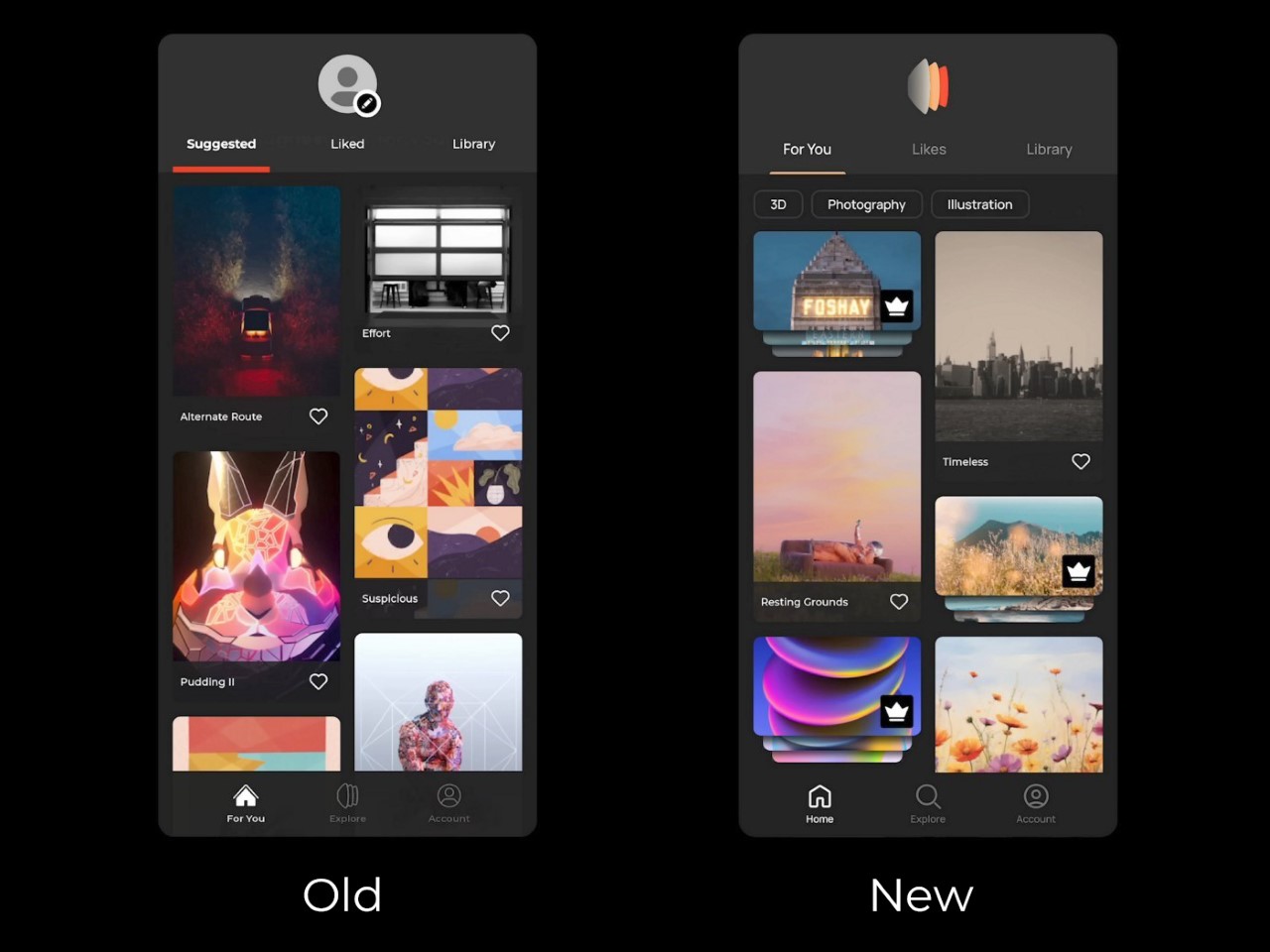
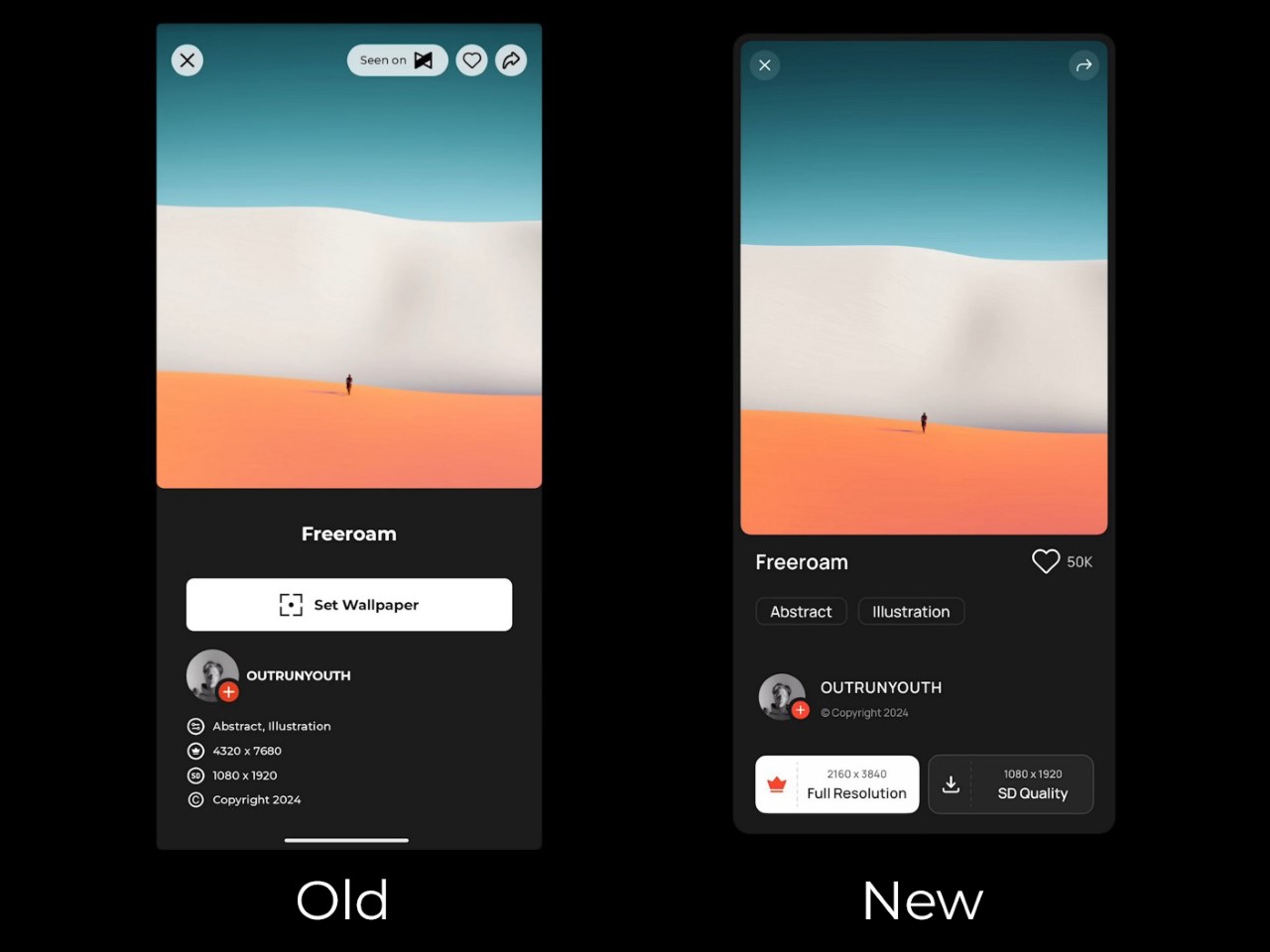
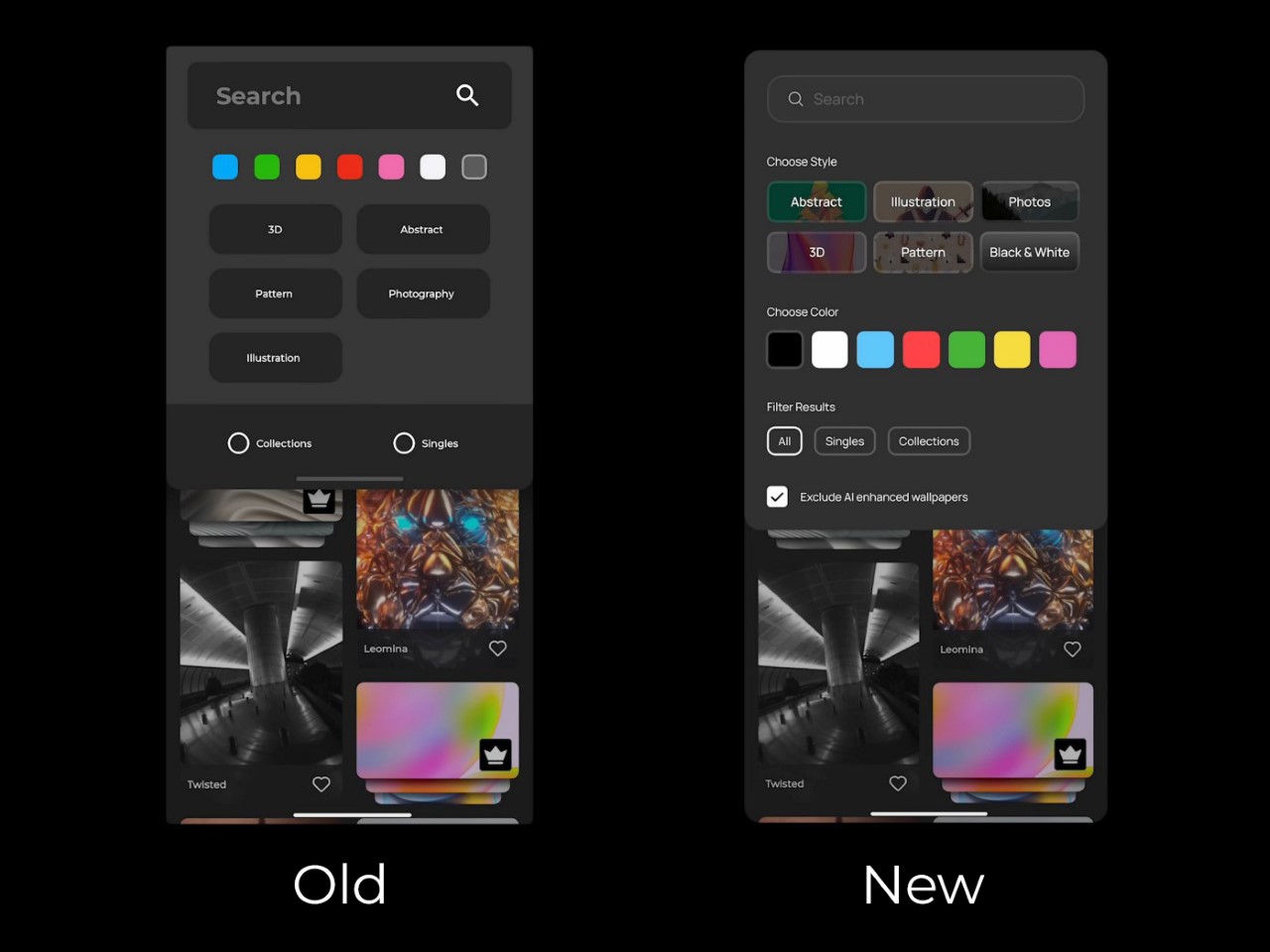
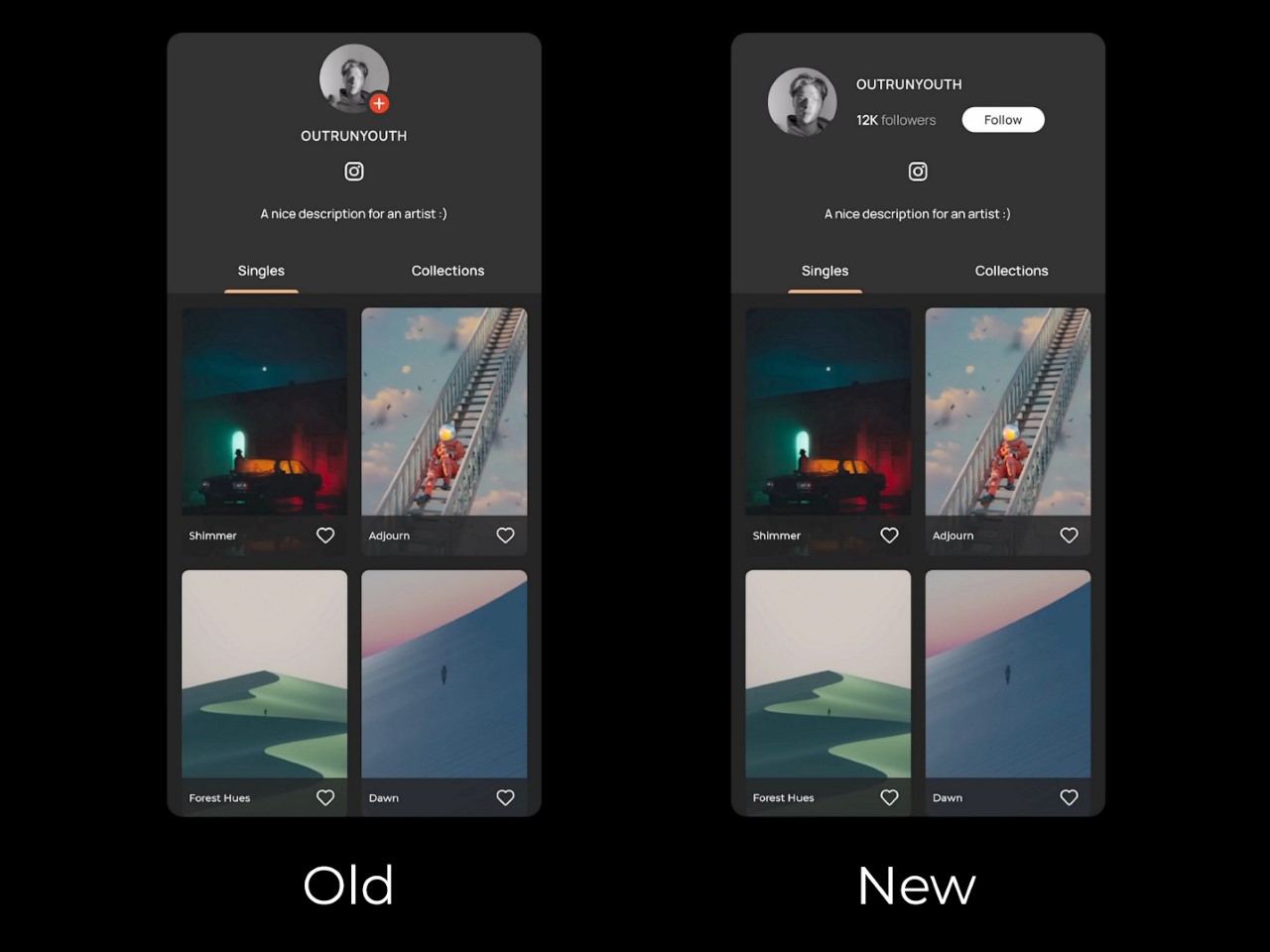
Juxtopposed’s redesign of the Panels app is a literal chef’s kiss if you love a good review. Just like MKBHD politely dismantles bad design, Juxtopposed brings the same calm demeanor to her review of the Panels app, while simultaneously redesigning literally every page to make the app MUCH better. Not only does the new app have a better UI, it’s more feature-packed, less buggy, more visually efficient, and even proposes a new way to monetize the app that makes it, well… less offensive.
MKBHD announced his first ever product last week – an app that gives you access to a wallpaper marketplace featuring wonderfully curated artist-made wallpapers that come personally approved by YouTuber and tech-culture icon Marques Brownlee. The problem, however, was that the app was a fraction of what we expected from tech’s greatest reviewer. It was buggy, had ad-ware, tracked personal data (which a wallpaper app definitely shouldn’t do), and tried to monetize jpegs by asking for $12 a month or $50 a year… something that was simply outrageous for essentially a bunch of wallpapers. The internet revolted in massive swathes, raking MKBHD’s credibility over fire for what seemed like a very obvious cash-grab. Moreover, people somehow managed to reverse-engineer the app and extract the wallpapers for free as a form of protest. Paying $12 a month for wallpapers isn’t something that makes a lot of sense to most people, considering Netflix, Spotify, hell even MKBHD’s own YouTube Premium cost the same amount. However, this isn’t about the app’s launch or its pricing model – it’s the fact that the app itself could be better designed. Taking things to task, YouTuber and UI designer Juxtopposed decided to quickly critique and redesign the Panels app. For UI/UX designers, this video is an absolute masterclass in great design, as she breaks down her entire process, providing constructive criticism of the existing app and fixing every flaw with simple design tweaks. If you’re a UI/UX designer or just an enthusiast, grab a coffee, sit down, and enjoy the next 5 and a half minutes of the video above… or scroll through to quickly read how Juxtopposed took the most polarizing phone app of last week and turned it into a well-designed experience that any tech YouTuber would recommend.
First off, the website—a brand’s first handshake with its audience—felt like a bit of a fumble. Given MKBHD’s production quality for his videos, you’d imagine expecting precision, but instead you’ve got a layout that feels like a rushed draft. There’s an odd flatness to the design, where headings blend into paragraphs and links lead you down rabbit holes of nowhere (it’s also incredibly heavy and doesn’t scroll smoothly on weak internet connections). It’s strange, considering MKBHD’s professional video production setup. But to be fair, this is just the website, not the app itself. And if there’s anything we know about the tech world, first impressions on paper (or screen) don’t always define the real experience.
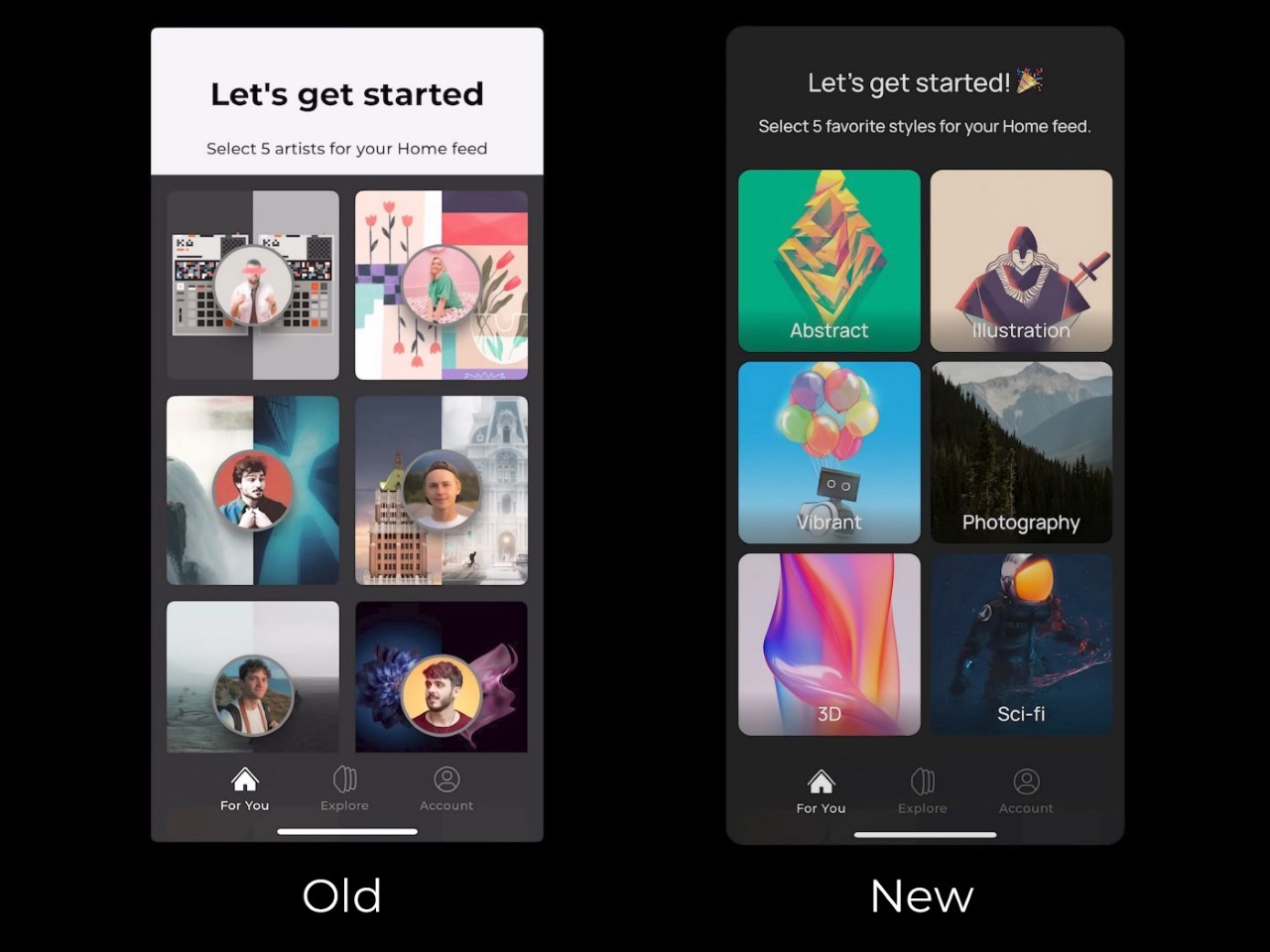
Once you install the app, you’re greeted with a setup process – and here’s where things feel, well, clunky. To create a personalized home feed, users are asked to select five artists from a list of fourteen. Sounds simple enough—except there’s a catch. You can’t actually explore these artists’ work before choosing. No profiles, no descriptions, just a gallery of unfamiliar names, leaving you to essentially take a shot in the dark. Wouldn’t it be easier to offer some style or mood-based suggestions? Especially for an app built around personalization, this initial friction feels like a missed opportunity to connect with users from the get-go.
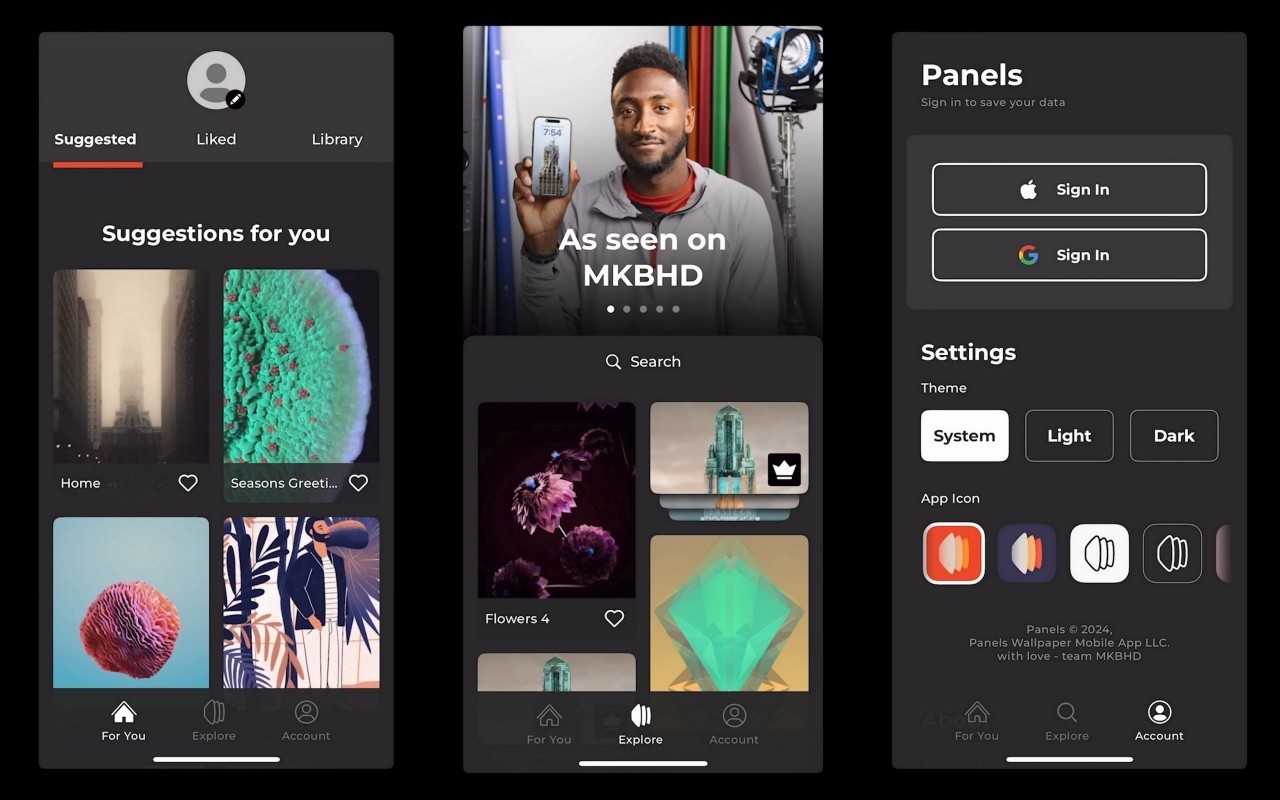
The three core sections of the Panels app
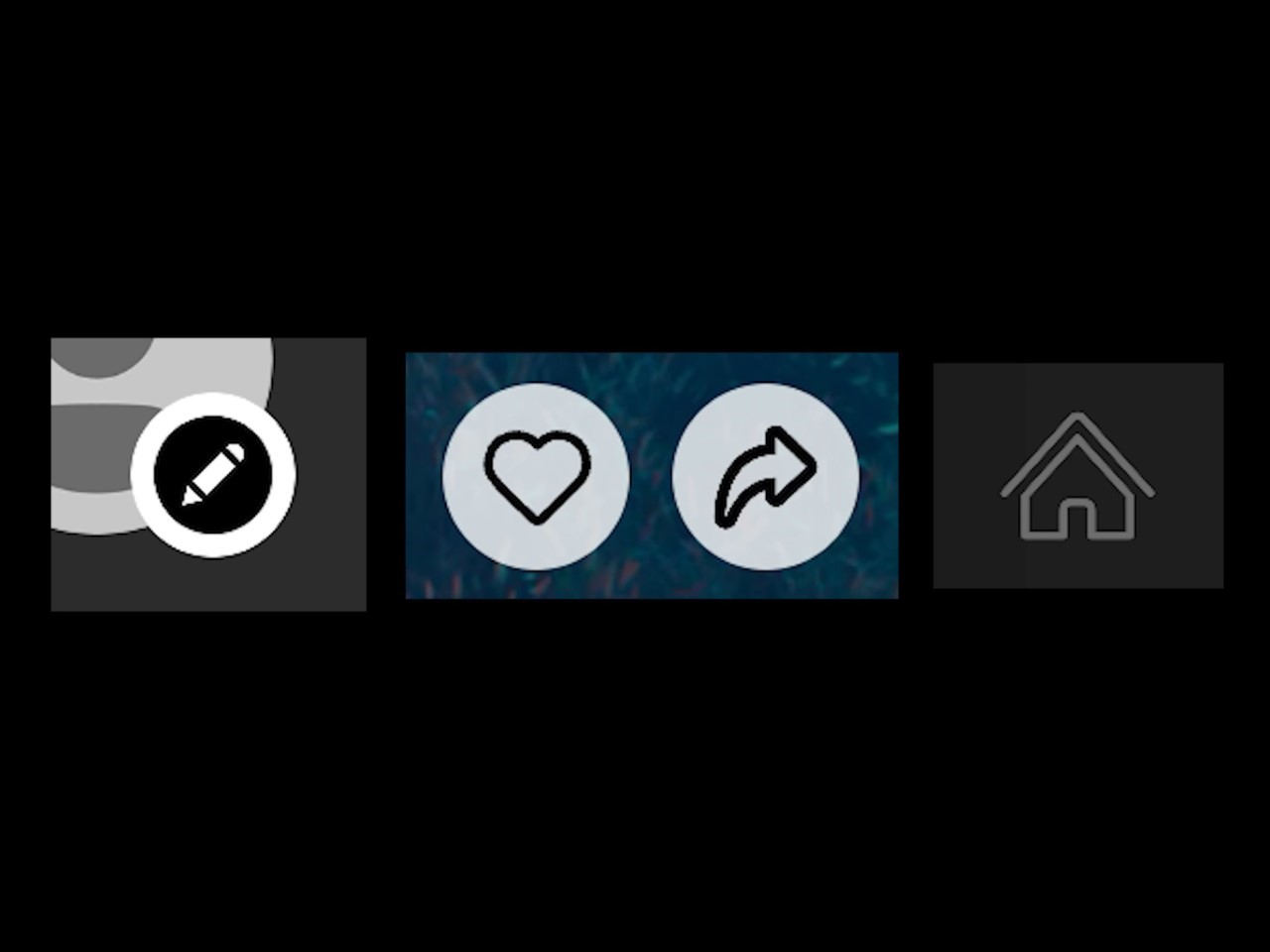
Navigating through Panels, you’re introduced to its three core sections: Home, Explore, and Account. It’s a simple enough structure, but it doesn’t quite land. The Home page, intended to show personalized suggestions, feels more like a placeholder, with user favorites and purchases awkwardly scattered. Meanwhile, the Explore section, where discovery should thrive, suffers from design missteps. A small, nearly invisible search button? In 2024? Come on. Even the icons seem to have skipped the quality check, with mismatched styles and inconsistent border thicknesses. It’s hard not to feel like this is still a work in progress—one that launched too soon.
Inconsistent icon styles
But here’s where the real frustration sets in – pricing. For an app that delivers digital art, the monetization strategy feels surprisingly tone-deaf. Want standard wallpapers? Watch an ad. Want premium ones? That’ll be $50 a year or $12 a month (this is AFTER Marques reduced the prices following a blowback). Compared to other apps in this space, many of which offer free ad-supported options with lower subscription rates, Panels’ pricing feels excessive. It’s not that the app shouldn’t charge, but the balance between free and paid features needs rethinking. Locking everything behind a hefty subscription might scare off users before they even have the chance to engage with what could be a fantastic product. Remember, nobody buys NFTs anymore because of how inherently people feel JPEGs shouldn’t cost so much money. For $12 a month, you can either have a premium wallpaper app subscription or pay $2 extra for YouTube Premium. The math isn’t mathing, as people on the internet say nowadays.
Technically, Panels offers some good ideas, but they’re overshadowed by awkward execution. There’s no flexibility in how wallpapers are applied—no option to choose between home screen or lock screen. The search functionality is limited, forcing you to abandon filters if you want to type a new term. And for a wallpaper app, isn’t search everything? Refining the search experience and adding sorting options like relevance or popularity could make a huge difference in how users interact with the app.
In fact, Juxtopposed even proposed turning the Panels app into a de-facto social network where people can build out a proper profile and create and share their own wallpaper designs (sort of like how OnePlus did with their community). It’s a clever idea that offers the ability to strengthen MKBHD’s own 19.5 million-strong follower base, effectively also becoming a place where Marques can share exclusive content with Panels+ members. But alas, the app currently is a victim of Marques’ success as a YouTuber who puts quality above all. It’s a shame the app didn’t reflect that.
Ultimately, Panels is a solid idea that just needs time to mature. It’s not there yet—the design is inconsistent, the pricing feels off, and the user experience needs a serious overhaul. But as with most things Marques touches, there’s potential. Feedback from the community could steer the app in the right direction. For now, though, Panels feels like a promising beta rather than a polished product… but hey, the redesign feels like a major improvement, doesn’t it?
There’s a new fix available for certain iPhones and iPads that addresses issues with recording and password security. Apple released two new patches including iOS 18.0.1 for iPhones and iPadOS 18.0.1, according to the support website. The update also finally allows users with an M4-powered iPad to upgrade to iOS 18, after the initial version was pulled for bricking users’ devices.
The patch fixes recording issues with all of the iPhone 16 models in the Messages app. The iPhone’s microphone would accidentally start recording a few seconds before becoming activated with the orange microphone icon.
The password patch fixes an issue in which the VoiceOver function may read a saved password aloud. The patch works for iPhone XS and later as well as iPad Pro 13-inch, iPad Pro 12.9-inch (third generation and later), iPad Pro 11-inch (first generation and later), iPad Air (third generation and later), iPad (seventh generation and later) and iPad mini (fifth generation and later).
If you own one of these devices, you can download the new patches by going to the Software Updates tab in the General section of your Settings app.
This article originally appeared on Engadget at https://www.engadget.com/mobile/new-ios-update-fixes-microphone-and-password-problems-173339119.html?src=rss
Meta has spent the last few years saying that “young adults” are crucial to the future of Facebook. Now, the company is introducing a number of changes to its 20-year-old social network in an effort to get younger users to spend more time in the app.
The updates include a new “local” section in the Facebook app that aims to surface information relevant to your local community, a renewed focus on events planned on the service and a new “Communities” feature for Messenger. The changes, Meta claims, will help young adults “explore their interests and connect with the world beyond their close friends.”
Emphasizing events isn’t an entirely new strategy for the company. It launched a standalone events app in 2016 and then rebranded it a year later to focus on “local” businesses and happenings. It quietly killed the app in 2021.
Meta is taking a slightly different approach this time. The new “local” section will surface Marketplace listings, Reels and posts from Facebook groups alongside event listings from your community. Local news, which Meta has also previously boosted, is notably absent Meta’s announcement.
In addition to the local tab, the company is also trying to make events more prominent in Facebook. Facebook will now provide personalized event recommendations in the form of a weekly and weekend digest that will be pushed to users via in-app notifications. The company is also changing how invitations to Facebook events work so users can send invites to their connections on Instagram and via SMS and email.
Groups on Facebook, which Meta has said is among the most-used features by young adults, is also getting attention in this update. Meta is experimenting with a “a customizable Group AI” that allows admins to create a bot that can chat with members to answer questions based on posts that have been shared in the group. Elsewhere in the app, Meta is starting to test an Instagram-like Explore section and a dedicated space for Reels inside of Facebook.
On Messenger, Meta is adding a new “Communities” feature, a concept it previously introduced on WhatsApp. Communities allows “small to medium-sized” groups to organize their conversations and interact in a way that’s more like a Facebook group. Members can create topic-based chats and there are built in moderation and admin tools for controlling who can join.
The changes are part of a broader effort by Meta to bring younger people back to its app with features tailored around how they use social media. “Facebook is still for everyone, but in order to build for the next generation of social media consumers, we’ve made significant changes with young adults in mind,” the Facebook app’s head, Tom Alison, wrote in May.
Whether Meta’s latest efforts will be successful, though, is unclear. The company says there are more than 40 million young adults on Facebook in the US and Canada, a number that’s “the highest it’s been in more than 3 years.” But that’s still a relatively small percentage of its total users in the region and an even tinier slice of its users overall.
This article originally appeared on Engadget at https://www.engadget.com/social-media/facebook-is-pushing-local-content-and-events-to-try-to-win-back-young-adults-161742961.html?src=rss
OpenAI has debuted a new workspace interface for ChatGPT called Canvas. The AI giant unveiled its new ChatGPT workspace on its official blog and immediately made it available for ChatGPT Plus and Team users. Enterprise and Edu users will be able to access Canvas sometime next week.
Canvas is a virtual interface space for writing and coding projects that allows users to consult with ChatGPT on certain portions of a project. A separate window opens besides the main chat space and users can put writing or code on this new “canvas” and highlight sections to have the model focus on and edit “like a copy editor or code reviewer,” according to the blog.
Canvas can either be opened manually by typing “use canvas” in your prompt. Canvas can also automatically open when it “detects a scenario in which it could be helpful,” according to the blog post. There are also several shortcuts that can be used for writing and coding projects. For writing projects, users can ask ChatGPT for suggested edits or length adjustments, or ask it to change the reading level of a block of text, from graduate school level down to kindergarten. It can also add "relevant emojis for emphasis and color."
Coders can have ChatGPT review their code and add inline suggestions for improvements. It can also mark up your work with logs and comments to aid in debugging and make understanding your code easier. It's also capable of fixing bugs and port coding to a different language such as JavaScript, TypeScript, Python, Java, C++ or PHP in Canvas mode.
OpenAI’s Canvas feature brings ChatGPT in line with other AI assistants that have separate workspaces to focus on certain areas of a project like Anthropic's Artifacts and the coding focused AI model Cursor.
Update, October 4, 12:55PM ET: This story was edited after publishing to include more context on the code and text functionality of the Canvas feature.
This article originally appeared on Engadget at https://www.engadget.com/ai/openai-rolls-out-canvas-its-newest-chatgpt-interface-230335185.html?src=rss
Gemini Live, Google’s AI chatbot you can talk to like a person, is about to support more languages. The company is rolling out support for the generative AI virtual assistant in over 40 languages in the coming weeks.
Gemini Live is Google’s take on “free-flowing, natural conversations” in this new generative AI era. You can use it for things like brainstorming for events, diving down learning rabbit holes or practicing for job interview questions (and receiving real-time feedback). Although Google describes it as like talking with a friend, I’m unsure how many would do all of that.
Additionally, the tool will let you chat in two languages on the same device, and further expansion of supported languages is in the works. Multi-language support will also work with Gemini integrations for other Google apps and services, like Google Calendar, Tasks, Keep and Utilities.
You can set your preferred language(s) in the Android app. In the Google app, go to Settings > Google Assistant > Languages, and choose your first preference. If you want a second one, there’s an option below that to “Add a language.”
You’ll need an Android phone to use it. Google hasn’t yet announced any plans to bring Gemini Live to iPhone. At least for now, the company seemingly prefers to use it to attract folks to its own mobile platform.
This article originally appeared on Engadget at https://www.engadget.com/ai/google-will-expand-gemini-live-to-over-40-languages-in-the-coming-weeks-194521661.html?src=rss