TikTok’s signature features that hooked users around the world are its algorithm and endless scroll. Now, though, the European Union has called those aspects of the app illegal and may order the company to alter them.
“Today, the European Commission preliminarily found TikTok in breach of the Digital Services Act for its addictive design,” the EU’s regulator said in a press release. “This includes features such as infinite scroll, autoplay, push notifications, and its highly personalized recommender system.” It said that TikTok failed to put up safeguards to ensure that those “addictive” features don’t “harm the physical and mental wellbeing of users,” including minors.
“For example, by constantly ‘rewarding' users with new content, certain design features of TikTok fuel the urge to keep scrolling and shift the brain of users into ‘autopilot mode'. Scientific research shows that this may lead to compulsive behaviour and reduce users' self-control,” the regulators stated.
TikTok’s current parental controls and features to limit screen time are insufficient, the Commission added, and TikTok may need to modify them. The platform may also be required to limit its infinite scroll and adjust its recommendation algorithms.
The EU Commission will give TikTok an opportunity to rebut the findings and the company said would use “any means available” to challenge them. “The commission’s preliminary findings present a categorically false and entirely meritless depiction of our platform,” the company told The New York Times in a statement.
Europe opened its wide-ranging investigation against TikTok in February 2024 and has already found the company at fault for its data sharing practices and advertising transparency. If found guilty of violating the DSA, TikTok faces a fine up to six percent of its annual worldwide turnover.
This article originally appeared on Engadget at https://www.engadget.com/social-media/eu-says-tiktok-uses-addictive-design-and-must-change-131738425.html?src=rss
A free trial to a virtual private network (VPN) can mean a few different things. Several of the best VPNs let you try them out without paying. A rare few, and only one on this list, let you try them without submitting payment information at all. Some VPNs have forever free plans that let you use them indefinitely without paying, as long as you're OK with some limits.
For the most part, though, your best chance to test a VPN for free is to pay for a subscription. Then, if you don't like the service, you can get your money back before the refund guarantee expires. This takes a bit more work, and some services have very tight turnarounds. However, it'll get you the most time with the most complete version of the VPN.
With that out of the way, let's talk about the best VPN free trials for each definition of "free trial." I'll start with VPNs that actually have free trials, most of which require a payment method and only work on mobile devices. The next section lists the best forever free plans. Finally, I'll share instructions for how to use a VPN money-back guarantee as a free trial.
Best VPNs with free trials
Best VPN forever free plans
Using VPN money-back guarantees as free trials
Although VPN free trials are great when you can get them, you'll enjoy a lot more flexibility by taking advantage of refund guarantees. Almost every provider has a money-back guarantee that doesn't require you to prove a specific problem. You'll probably have to deflect some upselling attempts before you actually get the refund, but most policies do promise you all your money back, with no pro-rating.
I like to download VPNs on their one-month plans so I can put the full service through my usual battery of tests. A 30-day money-back guarantee grants you enough time to learn whether you can use the VPN long-term. If you don't like the service, the standard method for getting a refund is to get in touch with customer support on the VPN provider's help page.
This article originally appeared on Engadget at https://www.engadget.com/cybersecurity/vpn/best-vpns-with-free-trials-130000435.html?src=rss
When we say that NordVPN is a good VPN that's not quite great, it's important to put that in perspective. Building a good VPN is hard, as evidenced by all the shovelware VPNs flooding the market. NordVPN may not be perfect, but it's easily top-five caliber and excels in certain use cases.
First, the bad: NordVPN's apps could all stand to undergo a little more quality control, with elements distracting from other elements and inconsistent designs from platform to platform. At least one of its FAQ pages directly contradicts itself. And while all the server locations could unblock Netflix, the one in Nigeria still showed U.S. content, indicating that our real location might have leaked.
However, there's a lot of good to balance that out. Speeds are fantastic and we saw no other hint of any kind of leak. Its server network is expansive and not overly reliant on virtual locations. The vast majority of servers are ideal for unblocking foreign websites. The real draw, though, is the extra features, including the innovative and flexible Meshnet, plus a malware blocker that acts more like a full antivirus and forward-looking quantum resistant encryption.
Editor's note (9/24/25): We've overhauled our VPN coverage to provide more detailed, actionable buying advice. Going forward, we'll continue to update both our best VPN list and individual reviews (like this one) as circumstances change. Most recently, we added official scores to all of our VPN reviews.Check out how we test VPNs to learn more about the new standards we're using.
Check out a summary of our NordVPN review in the table below.
Category
Notes
Installation and UI
Connections happen quickly and features are easy to use on all platforms
UI sometimes gets in the way; map screens can be clunky and apps come with unnecessary notifications
Surprisingly, the best UI may be in the browser extension
Speed
Extremely fast download speeds with only a 6.4-percent average drop
Good latencies on nearby servers, but farther ones have some lag
Fast upload speeds, but losses spiked in a few locations
Security
Uses acceptable protocols with uncracked encryption
NordWhisper obfuscated protocol recently implemented on Windows, Android and Linux
No DNS, WebRTC or IPv6 leaks on five test servers
Pricing
Best plan is the 2-year Basic for $81.36, or $3.39 per month
Basic gives you the complete VPN
If you get a multi-year plan, be sure to manually renew in order to keep the promotional rates
Bundles
Plus tier adds advanced malware protection and NordPass password manager
Complete plan adds NordLocker cloud storage
Prime tier adds ID theft protection and insurance features
Privacy policy
NordVPN does not log user activity on the VPN, a policy backed up by several third-party audits
However, it does log potentially identifiable device information unless you opt out in settings
Some concerning liberties taken in the overall Nord policy, but no documented malfeasance
Virtual location change
Four out of five test servers unblocked Netflix three times running, including virtual India location
Location in Nigeria got into Netflix, but didn't change available titles
Server network
153 server locations in 117 countries and territories
Server network is about 40 percent virtual, including all locations in Africa
Features
Extra servers grant additional privacy (double VPN, Onion over VPN, obfuscation) or specific optimizations (P2P, dedicated IP)
Threat Protection blocks dangerous domains and the Pro upgrade has some antivirus capability
Dark Web Monitor reports to you when any sensitive information has appeared on clandestine leak sites
Presets let you activate several settings with one click
Post-quantum encryption is nice, but not necessary yet
Kill switch is a useful safety feature on all apps
Split tunneling by app on Windows and Android, and by URL on browser extensions
Customer support
Written FAQs, live chat and email support
Live chat connected to an expert human within a minute
FAQs are poorly organized and contain some conflicts, but well-written on average
Background check
NordVPN is headquartered in Panama, while its parent company Nord Security is based in the Netherlands
2018 theft of public keys was a mistake, but NordVPN did almost everything right in response
Claims of law enforcement collaboration are overblown — NordVPN will comply with requests, but that doesn't mean they'll have information to provide
Installing, configuring and using NordVPN
NordVPN's biggest strengths are its speeds and the range of options it puts at your fingertips. User experience is important, but it's not quite as front-and-center as it is with ExpressVPN and Proton VPN. Here's how the apps run on all the major platforms.
Windows
The Windows app is the first instance of NordVPN's UI being not bad enough to complain about, but not good enough to be considered excellent. The initial connection process is a little slow, and it's far easier to connect than it is to disconnect (click the power button while connected to shut the VPN off). The map takes up space that would have been better allocated to the server list.
Sam Chapman for Engadget
The minor problems continue in the settings list, which makes the mistake of not keeping all its tabs visible in the window — if you open one, you have to click back to the main menu to reach another page. The pages themselves are easy to use; it's just a bit clunkier than it could have been.
Mac
Setup is swift and easy on Mac, but the full NordVPN interface is a little awkward. The vast majority of the main window is taken up by a large map, which is mostly useless. There's no way to zoom out to see the whole world, and you can't choose between servers in each country unless you zoom way in. The server list on the left-hand side is almost always more useful.
Sam Chapman for Engadget
The preferences panel is better. All the tabs come with clear explanations of their function, and are laid out so the menu is always visible, unlike the Windows app. The gear icon at the bottom includes its own set of tabs that encompass most of the common functions, including changing your VPN protocol, activating the kill switch and setting the VPN to automatically connect on untrusted networks.
Android
NordVPN on mobile can be described in much the same way as its desktop apps: generally great, occasionally getting in its own way. On Android, the map screen is much more helpful. It's expandable to the entire world and allows you to choose between servers within a country. On the other hand, the important settings are buried in the Profile tab, and the app notifies you about your "security score" to pressure you into activating certain settings.
Sam Chapman for Engadget
To find the general settings page on Android, tap the bottom-right Profile tab and scroll down. Except for Threat Protection, which has its own tab on the main window, every feature is located here. It's probably necessary to keep the main app from getting cluttered, but still mildly frustrating.
iOS
The NordVPN iOS app resembles a compressed version of the macOS client, for better or worse. As with Android, most of its features are in the bottom-right Profile tab. It works well most of the time, but often feels slightly cumbersome. There's a bit too much on the screen, and a bit too much of the stuff has nothing to do with the VPN's core function.
Sam Chapman for Engadget
As an example, you can't log into your account within the app — you have to load your Nord account page in a web browser. Forced app switching is a design choice that truly needs to die. That said, VPN connections happen quickly. If you tend to simply leave your VPN active, you probably won't notice any of this stuff.
Browser extensions
Most VPN browser extensions consist of the same features on a smaller scale, and NordVPN's — on Chrome, Firefox and Edge — are no exception. They are important for one reason, though: they're the only way to split tunnels by URL and the only split tunneling at all on macOS and iOS. Despite being more compact, they're also easy to use, making for an excellent quick-start VPN solution.
Sam Chapman for Engadget
NordVPN speed test
All VPNs slow down your average browsing speeds by adding extra steps into the connection process. When we test speed, we're looking for the VPN to drag as little as possible on your unprotected speeds. Download speed will be the most important stat for most users, since that determines how fast web pages load and how quickly videos can buffer.
Latency is important for live connections like video chats, games and live streaming. Latency increases with distance — in the test below, data packets were sent to the remote server, then back to our home network. Upload speeds likewise influence your live two-way communications and are also vital for torrenting. Let's see how NordVPN performs on all three metrics.
Server location
Latency (ms)
Increase factor
Download speed (Mbps)
Percentage drop
Upload speed (Mbps)
Percentage drop
Unprotected (Portland, OR, USA)
22
--
59.20
--
5.86
--
Seattle, WA, USA (Fastest)
44
2x
57.21
3.4
5.62
4.1
New York, NY, USA
177
8x
56.90
3.9
5.60
4.4
Stockholm, Sweden
371
16.9x
55.94
5.5
5.63
3.9
Istanbul, Turkey
411
18.7x
53.02
10.4
5.78
5.9
Hong Kong
350
15.9x
56.18
5.1
5.72
2.4
Johannesburg, South Africa
602
27.4x
53.26
10.0
5.67
3.3
Average
326
14.8x
55.42
6.4
5.54
4.0
To summarize: NordVPN's download speeds are the fastest we've seen and its upload speeds and latency tie with the best. Downloads only dropped by an average of 6.4 percent across the globe and readings were mostly consistent — the servers in question performed much the same in each test. We even threw in Turkey and South Africa, two locations that commonly cause problems, but NordVPN still kept the drop to 10 percent.
Sam Chapman for Engadget
Latency is more a product of physical distance than VPN infrastructure, but you can still see differences between services. When tested on a similar range of locations, ExpressVPN and Proton VPN both kept average latencies under 300 ms. NordVPN's average came out to 326 milliseconds, though we should note that its latency increased less than Proton's on the closest server.
Upload speeds declined an average of four percent, but there were a few anomalously high readings in Istanbul that skewed those numbers up. Without that location, NordVPN's upload rates would also have been the industry's current best.
NordVPN security test
No matter how well-built a VPN looks from the outside, there are several ways its security can fail. The most common problems are outdated protocols with weak encryption, failing to block IPv6 traffic or inadvertent leaks from sending DNS requests outside the encrypted tunnel. We'll start by looking for those common leak sources, then check whether NordVPN's encryption might be failing in less traceable ways.
VPN protocols
A VPN protocol is a set of rules used to get data quickly and safely from your device to a VPN server and back, even while that data is encrypted. Different protocols are connected with different encryption algorithms and can impact the speed, security and stability of your connection.
When testing VPN security, the first step is to see if it's using any protocols like PPTP that are outdated and crackable, or homebrewed protocols with unclear security. NordVPN users have four options for protocols: OpenVPN, IKEv2 (not available on Mac or iOS), NordLynx and NordWhisper (available on Windows, Android and Linux only).
Sam Chapman for Engadget
OpenVPN and IKEv2 are both standard protocols you'll find on most VPN providers. Both use various strengths of the Advanced Encryption Standard (AES), with OpenVPN defaulting to AES-256 and IKEv2 to AES-128. OpenVPN can be set to UDP (faster but less stable) or TCP (more reliable but slower). So far, so secure.
NordLynx is unique to NordVPN, but it's not that far off the beaten track — it's just WireGuard with extra security. WireGuard normally works by saving a stable IP address for each connection, which raises the very slight risk of exposing a user. NordLynx adds a second layer of abstraction that means those stable addresses are never revealed. Since NordVPN strongly recommends it for most situations, we used it for all our tests in this review.
Finally, there's NordWhisper, a new protocol introduced in early 2025 that disguises your VPN traffic as normal web traffic to evade blanket web blocks. It's likely to be slower than the other protocols, so don't use it unless everything else has been blocked. We also don't recommend counting on it too much in general — large-scale censorship technology, like the Great Firewall of China, tends to rely on blocklists of known VPN servers, whose identity NordWhisper can't disguise.
Leak test
Our first order of business was to check five test servers to see if they leaked our real IP address — staying away from the ones in the speed test in order to get as comprehensive a picture of NordVPN's security as possible. With help from ipleak.net, we found all five to be free of the three major types of leaks.
DNS leaks occur when a VPN sends DNS requests (in short, how your browser knows which websites to show you) outside its encrypted tunnel. By default, NordVPN uses its own private DNS servers, which our tests showed to effectively prevent leaks.
WebRTC leaks are caused by real-time communication protocols sending information outside the VPN, which may reveal your real IP address. NordVPN is consistently successful at keeping WebRTC inside the tunnel, but you can have your browser block it if you're still worried.
IPv6 leaks happen when a VPN only blocks IPv4 traffic and lets v6 through. NordVPN automatically blocks IPv6 traffic while it's active, so an IPv6 leak is all but impossible.
Sam Chapman for Engadget
Although that's all great news, it is still possible for leaks to occur without a clear explanation, so we ran one final test on NordVPN.
Encryption test
Wireshark is a program that captures detailed images of information sent over a device's internet connection. Even though our tests showed NordVPN to be free of leaks, we wanted to inspect it at the most granular level. Using WireShark, we recorded the traffic sent to an unencrypted HTTP site, before and after connecting to each NordVPN test server.
Every server showed the same pattern: readable plaintext before, encrypted ciphertext after. If there is a security flaw remaining in NordVPN, it's unlikely to be relevant to the overwhelming majority of users.
How much does NordVPN cost?
NordVPN's pricing structure looks convoluted at first, but it's much simpler than it appears. A Basic subscription gets you full VPN functionality, and all the other tiers just add more features. If all you need is a VPN, you only need to concern yourself with the left side of the table below.
The best deal for a Basic NordVPN subscription, which lets you connect to NordVPN with up to 10 devices at once, costs $81.36 for two years when you pay upfront ($3.39 per month). One year of the same plan costs $59.88 in advance ($4.99 per month) or $12.99 for one month at a time. The table below shows the complete cost; for more information on plans above Basic, see "side apps and bundles" in the next section.
Plan
1-month cost
1-year cost
2-year cost
Basic
$12.99
$59.88 ($4.99/month)
$81.36 ($3.39/month)
Plus
$13.99
$71.88 ($5.99/month)
$105.36 ($4.39/month)
Complete
$14.99
$83.88 ($6.99/month)
$129.36 ($5.39/month)
Prime
$17.99
$107.88 ($8.99/month)
$177.36 ($7.39/month)
The longer plans save money, but be careful: if you let them expire, you'll automatically renew at the more expensive one-year plan. Enough customers claim to have been auto-renewed at the higher rate that they've launched a class-action lawsuit against NordVPN, accusing the company of deceptive pricing practices and making renewals too difficult to cancel. A NordVPN PR rep said they could not comment on ongoing legal action, "other than to state that we are and always have been very clear about the recurring nature of our services." No court date has been set so far.
That said, there's a fairly straightforward workaround in the meantime: To prevent the auto renewal, log out of your NordVPN account, then sign up for a discounted plan again using the same email. As long as you do this before your subscription expires, your new account should link to your old one, keeping you subscribed at the introductory rate.
Free trials and refunds
Every NordVPN plan comes with a 30-day money-back guarantee. If you cancel and request a refund before 30 days are up, you'll get the full cost back. The only way to try it for free without paying is to get the app on Android, where there's a seven-day trial through the Google Play Store.
NordVPN side apps and bundles
NordVPN is part of a larger family of Nord Security products, which you can save money on if you need more than one. We won't review all of them here, but for reference, here's everything you'll get from the higher subscription tiers.
Basic: VPN on 10 devices, specialty servers, DNS ad-blocking, Meshnet
Plus: All Basic features, plus malware scanning, extra scam blocking, tracker blocking, NordPass password manager, data breach scanner
Complete: All Plus features, along with 1TB of NordLocker encrypted cloud storage
Prime: All Complete features, plus NordProtect features like dark web monitoring, credit monitoring, ID theft insurance and extortion insurance
Another tier called Ultra includes a subscription to Incogni, a data removal service run by Nord's partner Surfshark. The Ultra bundle is only available in certain countries, since NordVPN is still testing it; users outside the test countries can still add Incogni service at checkout. There also used to be a NordVPN family plan, but it seems to have been eliminated after Nord expanded the devices per subscription to 10.
You can get a dedicated IP address on NordVPN to ensure you have the same IP every time you connect. This lets you configure remote firewalls to let you through while you're connected to the VPN. A dedicated IP costs $8.99 per month, $70.68 for a year ($5.89 per month) or $100.56 for two years ($4.19 per month).
The NordVPN pricing page lists access to a Saily eSIM plan as a perk, though mysteriously, none of the existing plans seem to include it yet. A lot of VPNs are expanding into the eSIM space, so this may change soon.
Close-reading NordVPN's privacy policy
A VPN privacy policy isn't just empty words — it's a contract between the provider and its users. If a service openly defied its own policy, it could be sued for false advertising. VPNs tend to sneak loopholes into their privacy policies instead of flouting them outright; these loopholes can shed light on how the provider actually views your privacy.
This policy applies to all Nord Security apps. It's impossible to create an account without a valid email address, but you can use a separate email masking service to make that anonymous. The policy also explicitly says that your email address will be added to a marketing mailing list, though you can opt out. Irritating, but not a privacy risk in itself.
We're more concerned about the later statement that it may process data without the user's consent "under the legal basis of our or third parties' legitimate interest." This clause covers some cases we'd agree are legitimate, such as identifying people who launch cyberattacks from NordVPN servers. But Nord also considers it "legitimate interest" to process your personal data "to improve or maintain our services and provide new products and features."
Reached for comment, a NordVPN representative said that using personal data in this way "generally involves aggregated, depersonalized or technical information." That's somewhat reassuring, but the "generally" leaves a bit too much wiggle room. Ideally, we'd prefer that personal data exist wholly in the "consent only" section.
The section on sharing your data with third parties only lists "some of" the service providers who may receive your information. Among these are Google Analytics, which is known to store personal data on U.S. servers — all of which are potential security risks in the age of DOGE. Other unnamed "third parties" are involved in targeting ads at users of Nord websites.
The NordVPN representative said that "since some partners, such as payment processors, can vary by region or specific service and may change over time depending on our operational needs, we do not publish a fixed list." They added that all third parties are "contractually required to handle personal data in accordance with applicable laws and industry standards."
We aren't using this to condemn Nord; many of these practices are fairly standard in the VPN industry. But it's important to know about all the potential leakage points before trusting your deepest secrets to any company.
NordVPN specific policies
The NordVPN privacy policy doesn't add much atop the general Nord notice. It does track session activity connected to your username to make sure you're staying within the 10-device limit, but it automatically deletes these logs 15 minutes after you disconnect. The logs also don't include your IP address or the addresses of VPN servers you used.
Sam Chapman for Engadget
The only real problem we found is that NordVPN apps collect information about your activity on the app by default. This doesn't include information about your browsing habits, but it does include unique traits that could conceivably be used for "device fingerprinting" — in which a third party can deduce a user's identity through clues about their device. You can turn this off in the General settings.
A NordVPN spokesperson told us that the data collected is "not personally identifiable," and that the company takes "deliberate steps to strip out anything that could be linked back to a specific person." This presumably means the data is aggregated so it only shows general trends, not any one device's activity. That's a lot less risky, but we still recommend switching the setting off.
Third-party privacy audits
NordVPN has passed five independent audits of its privacy policy so far, most recently from Deloitte in late 2024. Annoyingly, you can only read the entire report by logging into a Nord account, but it at least doesn't have to be a paid account.
The audit found that NordVPN was following its own no-logs policy. Specifically, the Deloitte Lithuania investigators concluded that "the configuration of IT systems and management of the supporting IT operations is properly prepared, in all material respects in accordance with the NordVPN's description set out in the Appendix I." (Appendix I of the report is identical to NordVPN's privacy policy.)
Can NordVPN change your virtual location?
You'll be most interested in this section if you mainly use a VPN to change their location for streaming. To see if NordVPN could unlock new streaming libraries, we picked a new batch of five test servers, then logged onto Netflix. Since Netflix tries to block all VPN servers to prevent copyright issues, our first question was whether we'd get through at all.
Our second question: would connecting to a NordVPN server actually change what Netflix library we saw? It should, given that NordVPN seems leak-proof, but thoroughness demands we check anyway. Here's what we found.
Server location
Netflix unblocked?
Content changed?
Canada
Yes
Yes
Argentina
Yes
Yes
Germany
Yes
Yes
India
Yes
Yes
Nigeria
Yes
No
Four out of five locations worked perfectly. On a Canadian server, we were able to stream Star Trek: The Next Generation, which left American Netflix years ago. The Argentine server gave us access to something called Pasion de Gavilanes, which we'd never heard of but sounds great.
Sam Chapman for Engadget
The only problem was Nigeria. We tested it several times, connected to multiple different Nigerian locations, but saw our American Netflix library every time. We then ran a leak test on Nigeria, which wasn't one of our security test locations, and found it to be working normally. It's hard to say what happened, especially since the Nigeria server doesn't appear to be virtual, but we can confirm that it wasn't working.
Investigating NordVPN's server network
NordVPN has servers in 153 cities in 117 countries. Out of all total options, 62 are virtual locations (about 40 percent), where the server is really located somewhere else. This makes it possible to get servers into more places, but depending on your actual location relative to the server, it may perform differently than you expect.
Sam Chapman for Engadget
Virtual locations have allowed NordVPN's server network to grow quite extensive, with lots more locations in South America, Africa and Asia than the industry standard. Check out the distribution in the table.
Region
Countries and territories with servers
Total server locations
Total virtual server locations
North America
15
36
12
South America
10
10
6
Europe
48
57
11
Africa
10
10
10
Middle East
7
7
4
Asia
24
26
18
Oceania
3
7
1
Total
117
153
62 (40.5 percent)
The relatively low proportion of virtual locations (nearly identical to that of ExpressVPN) is a good sign, as it means NordVPN has been growing its server network thoughtfully. Some VPNs — looking at you, HMA — inflate their server lists as a marketing point without seriously considering what it takes to maintain such a large network. That thankfully doesn't seem to be the case here.
Extra features of NordVPN
Here's everything you get with a NordVPN app other than the VPN itself. There's a lot going on here, so we'll limit ourselves to a sketch of each feature.
Specialty servers
As soon as you load NordVPN, you'll see a list of special servers near the top of the right-hand column. We'll go over each of them in order.
Dedicated IP: As discussed in the bundles section, a dedicated IP address costs extra. With this, you'll always connect with the same IP, which is private to you alone. It may be worth the price if you find yourself getting asked for CAPTCHAs a lot more while connected to NordVPN — though for what it's worth, that didn't happen to us.
Double VPN: This sends your connection through a second VPN server before it reaches your ISP. The second server is your apparent location. There are 10 endpoints to choose from. As you might imagine, your internet will run slower with two VPN servers in the mix, so only use this if you seriously need security.
Obfuscated servers: These are only available on OpenVPN. Obfuscation can help you get around firewalls that seek out and block VPN traffic. If you can't get online with NordVPN when you're on a certain network, obfuscated servers might work.
Onion Over VPN: After encrypting your data as normal, these servers send it through several nodes of the Tor network, granting you the total anonymity of onion routing while keeping you safe from malicious relays. It's available in two locations, Netherlands and Switzerland, and — like double VPN — is best used only when you need the utmost privacy.
P2P: NordVPN only allows torrenting on its peer-to-peer servers, but fortunately, it's got P2P servers in 114 countries — only three fewer than it has in total. NordVPN keeps your download and upload speeds very fast on average, so you shouldn't have trouble torrenting from any location.
Meshnet
Meshnet is NordVPN's most unique and exciting feature by a long shot. By logging into the same NordVPN account on multiple devices, you can connect those devices directly through a NordLynx tunnel without needing a NordVPN server in between.
Sam Chapman for Engadget
Essentially, you're using your own devices as VPN servers — obviously not great for privacy, but amazing for accessing web services in other countries. While two devices are connected, you can transfer files between them through the NordLynx tunnel. You can even invite friends and use their devices.
Threat Protection
NordVPN has two levels of antivirus: Threat Protection and Threat Protection Pro. The former is a simple DNS filter that stops your browsing from loading unsafe web pages while NordVPN is active. It's the highest level available on Android, iOS and Linux, or on any Basic subscription.
Sam Chapman for Engadget
Threat Protection Pro, which Plus subscribers or higher can set up on Windows and Mac, can work even when you aren't connected to a NordVPN server. It acts more like a standalone antivirus by scanning downloaded files for malware, and can even block trackers. Basic Threat Protection (without Pro) can block some trackers by filtering out domains known to use them, but doesn't block the trackers directly.
Dark Web Monitor
While active, Dark Web Monitor continually searches known data breach dump sites on the dark web and notifies you if it ever finds your account email address. If you get that notification, change any passwords associated with the address. With a Prime subscription, you can also have it search for your phone number, social security number or other financial information.
Presets
Presets let you set up one-click VPN connections with a desired group of settings, a lot like Proton VPN's Profiles. NordVPN comes pre-loaded with presets that optimize for "Downloads," "Speed" and "Browsing," which sounds to us like the same thing three times.
More usefully, you can create presets for particular countries, then add website shortcuts that will appear once you've connected. You could, for example, set one that connects to a specific location, then add a shortcut to a streaming site available in that location.
Post-Quantum encryption
Experts widely believe that quantum computers will eventually make our current encryption algorithms obsolete, but there's almost no consensus on when that will actually happen — except that it hasn't happened yet. Knowing that, NordVPN's "post-quantum encryption" feature comes across as a bit premature, but it's reassuring that someone is thinking about it.
Having said that, we don't recommend using post-quantum encryption yet. It works by layering one of the known quantum-proof encryption standards on top of a standard NordLynx session, which makes your VPN connection slower and more erratic. Until we can verify a real quantum cyberattack, post-quantum encryption is a needless precaution.
Kill switch
A kill switch cuts off your internet the instant you lose your connection to a NordVPN server. This protects you in case a server unexpectedly fails, and as a side benefit, prevents you from connecting to any fake VPN servers. You should keep the kill switch on at all times.
Split tunneling
Split tunneling is available on NordVPN's Windows and Android apps (and Android TV by extension), along with its browser extensions. On Windows and Android, it splits by app: you can determine which apps get online through the VPN and which go unprotected. The browser extensions let you split by URL, so the VPN only protects certain sites.
NordVPN customer support options
NordVPN's apps link directly to its online help center. As always, we went in with a specific question in mind: whether the basic level of Threat Protection could block trackers, and if so, what kind. We found the categories on the written support page difficult to parse, especially the troubleshooting section — would the average user appreciate the difference between "app issues," "connection issues" and "errors"?
We correctly guessed that our question would be under "Using NordVPN -> Features," but the introductory article on Threat Protection and Threat Protection Pro was buried at the bottom of the list. Unfortunately, that made things more confusing, as this article says that Threat Protection (not Pro) both does and doesn't block trackers. In NordVPN's favor, however, using the search bar brought us instantly back to that article without any confusion.
The live support experience
Using NordVPN's live chat was a smooth and reassuring experience. From the time we decided to ask directly, it took us less than a minute to connect with a real person, who quickly cleared up the confusion and promised to update the confusing support page (we'll check back to see if they actually do).
Sam Chapman for Engadget
One other option is an email support form, which can be found both on the website and in the help sections of NordVPN apps. This is best for complex problems that require screenshots to explain, and promises a response within 24 hours.
NordVPN background check
NordVPN was founded in 2012. Launching with its desktop apps, it moved to iOS and Android in 2016, then added apps for browser extensions and smart TVs. Its developer, Nord Security, has no parent company, and its history is relatively uncontroversial. We've documented two notable incidents below, plus more about Nord Security's operations.
Headquarters and ownership
Nord Security was founded in Lithuania, and maintains offices there. Although Nord Security is registered in Amsterdam, NordVPN operates under a separate license in Panama, which makes any data requests subject to Panama's courts.
Finland server breach
The first serious incident in NordVPN's history began in March 2018, when unidentified hackers managed to steal three private keys from one of Nord's data centers in Finland. Researchers didn't notice the leak until October 2019, well after the stolen keys had expired, but NordVPN's encryption was still technically vulnerable for several months.
We say "technically," because it was really only the outer layer of encryption — and even if they'd broken through it all, the hackers would only have seen browsing activity, not usernames, passwords or anything else sensitive. If anything, NordVPN's response actually makes us trust it more. It ended its relationship with the contractor who ran the Finnish data center and revamped its policies to eliminate the kind of negligence that led to the breach.
Arguably, its only real error was not immediately disclosing the breach. NordVPN learned about the leak and started addressing it in May 2018, but the news didn't break until more than a year later. That timing probably made it look more suspicious than any actual mishandling did.
Law enforcement compliance
Another minor controversy erupted in 2022, when PCMag and other outlets reported that NordVPN had edited its website to say that it would comply with data requests from law enforcement. NordVPN responded with a new post that said nothing had changed: their policy was always to comply with lawful requests, which — provided the requests were lawfully submitted through a Panamanian court — is literally their only option.
We're inclined to agree. VPNs are legal companies. They wouldn't last long if they openly declared their intent to break the law. The key is that when law enforcement comes calling, there shouldn't be anything to show them, as with the Turkish seizure of ExpressVPN. That's why verifiable no-logging policies are so important.
Final verdict
NordVPN is a great service on its own merits. It only suffers from having to be compared with the likes of ExpressVPN and Proton VPN. For example, its P2P servers are good for torrenting, but not as useful without Proton's port forwarding. It's fast, but speed tests fluctuated just a little more than Express.
NordVPN's extra features are the best reason to pick it over its rivals. With Meshnet, you can theoretically set up a VPN connection anywhere in the world, and no other VPN has anything close to Meshnet's file transfer powers. Threat Protection Pro is also great if you can get it, adding file scanning to bolster the typical approach of just blocking suspicious DNS addresses. Specialty servers round out the offering, with double VPN maintaining good speeds with extra safety and Onion over VPN being among the safest ways to use Tor.
This article originally appeared on Engadget at https://www.engadget.com/cybersecurity/vpn/nordvpn-review-2025-innovative-features-a-few-missteps-163000578.html?src=rss
The US Central Intelligence Agency is ending one of its popular services, The World Factbook. Over the decades, this reference has provided readers with information about different countries and communities around the world. The post from the CIA announcing the news didn't provide any information about why it will stop offering The World Factbook. The agency was subject to the same buyouts and job cuts that decimated much of the federal workforce in 2025, so maybe this type of public-facing tool is no longer a priority.
This reference guide was first published in 1962 as The National Basic Intelligence Factbook. That original tome was classified, but as other government departments began using it, an unclassified version for the public was released in 1971. It became a digital resource on the CIA website in 1997.
This article originally appeared on Engadget at https://www.engadget.com/big-tech/the-cia-stops-publishing-the-world-factbook-184419024.html?src=rss
Surfshark’s One plan is heavily discounted right now, with an 87-percent discount on the two-year package, plus three extra months. The promo price comes out to $2.29 per month, or $62 for the first 27 months.
We’ve generally liked Surfshark as a straightforward, speedy service for everyday use, and it’s one of the picks in our guide to the best VPNs. In our Surfshark review, we found it delivered excellent speeds overall and reliably unblocked Netflix across most of our test servers, which makes this long-term deal worth a look if you want a VPN deal that also includes extras like antivirus, breach alerts and private search.
In our Surfshark review, the VPN stood out for its excellent performance and approachable design, especially for people who want strong protection without constantly tweaking settings. During testing, it delivered some of the fastest speeds we’ve seen from a major VPN, with average download speeds dropping by just over five percent worldwide. Upload speeds also held up well, making it a solid option for streaming, browsing and everyday use. We gave Surfshark an overall score of 87 out of 100 and called it one of the best VPNs for casual users.
This deal focuses on the Surfshark One plan, which bundles the VPN with a suite of extra security tools. In addition to the VPN itself, you get Alternative ID for masking your email and personal details, antivirus protection, breach monitoring through Surfshark Alert and a private search engine. It also supports unlimited simultaneous device connections, so you can protect all of your devices with a single subscription.
Right now, the Surfshark One plan is discounted by 86 percent, bringing the price down to $67 total for two years plus three extra months. That works out to $2.49 per month for the first 27 months, billed upfront, with a 30-day money-back guarantee if you change your mind.
If you want to compare it against other top services before committing, you can also check out our full Surfshark VPN review and our best VPN guide to see how it stacks up. We’ll be keeping our best VPN deals roundup updated regularly, too.
This article originally appeared on Engadget at https://www.engadget.com/deals/surfshark-vpn-is-offering-up-to-87-percent-off-two-year-plans-123000279.html?src=rss
So you've decided you need a virtual private network to hide your browsing activity from your ISP, change your virtual location, stay safe on public Wi-Fi and enjoy all the other benefits. The inevitable next question is: "Should I pay for one? If so, how much?"
All the best VPNs cost money, but it can be hard to tell an overpriced service apart from one that's priced according to its value. On this page, I'll share the costs for top VPN services, calculate the industry average and explain what makes VPNs cost as much as they do. At the end, I'll share a few tips for making a VPN fit your budget.
How much is a VPN?
I'd like to start by introducing the complexity of the problem. If you just want the numbers, you’ll find those in the sections below.
The main thing that makes VPNs so hard to budget for is that providers aren't always honest about how much they're charging. They rarely lie outright, but they often overcomplicate their pricing structures and hide increases in the fine print.
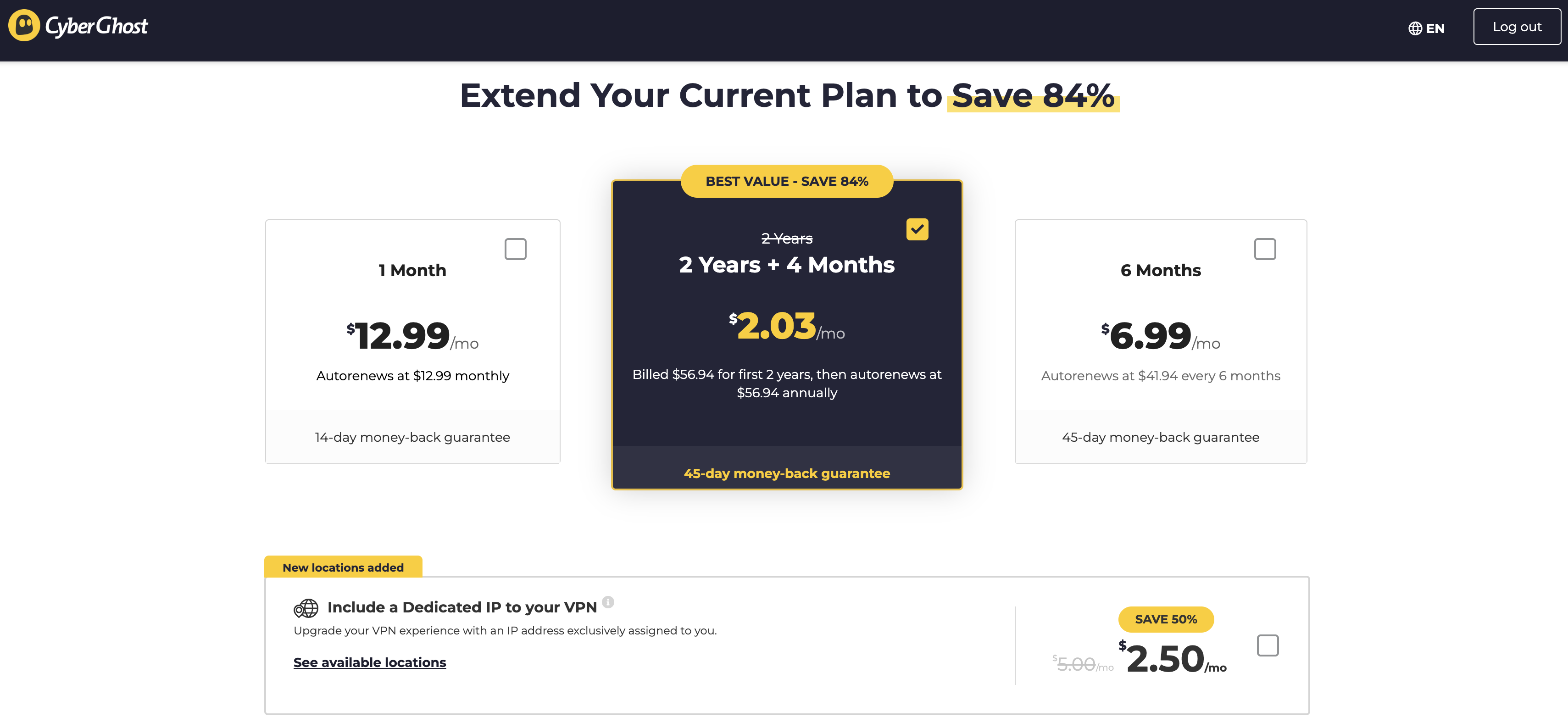
Let's take CyberGhost as an example, since I just reviewed it. A one-month subscription to CyberGhost costs $12.99 — simple enough. However, you can also get a six-month subscription by paying $41.94 upfront, though the website more prominently calls this "$6.99 per month." Finally, you can pay $56.94 for a 28-month subscription, but only once; after that, it'll be $56.94 for a year.
These prices are subject to change.
Sam Chapman for Engadget
As you can see in the image, the website heavily emphasizes the average monthly price, in text that dwarfs the actual price you'll pay at checkout. This gets even worse with services like NordVPN that have multiple tiers of subscription as well as multiple durations. It's not uncommon to see 10 or more prices quoted for the exact same VPN.
The best way to cut through the confusion and shop on your own terms is to compare different VPNs at the same duration and subscription tier. For example, you could find the cost of one year of the most basic available plan, since most basic subscriptions still include full VPN service. In the next two sections, I'll compare and average the basic tiers of my top seven VPNs at the monthly and yearly levels.
Average monthly cost of a VPN
Here's what the best VPNs cost per month. The numbers below are for subscribing to one month at a time, excluding any discounts and special deals.
Proton VPN: $9.99
ExpressVPN: $12.99
Surfshark: $15.45
NordVPN: $12.99
CyberGhost: $12.99
Mullvad: $5.98 (depends on dollar/euro exchange rate)
As you can see, $12.99 is a normal price for one month of a VPN — but the average price is somewhat lower, as several providers sell monthly plans for less. In general, expect to pay in the range between $10 and $13. Companies like Surfshark sometimes inflate their monthly prices in a bid to drive more traffic toward the longer plans.
Mullvad is also an outlier, since you can only ever subscribe to it month-by-month. There are other outliers, such as Astrill, which costs a whopping $30 per month. But the above holds true for all the best-regarded providers.
Average yearly cost of a VPN
If you choose to sign up for a year at a time, you'll probably save money but you'll have to pay more upfront. VPNs offer long-term deals to pump their cash flow and active user numbers. One-year costs for the top seven VPNs are written below as a lump sum, since several of them add extra months to the first subscription period so they can quote a lower monthly price. Since CyberGhost doesn't have a one-year plan, I've replaced it with Windscribe.
Proton VPN: $47.88
ExpressVPN: $52.39 for the first subscription, $99.95 afterwards
Surfshark: $47.85
NordVPN: $59.88 for the first subscription, $139.08 afterwards
Windscribe: $69.00
Mullvad: $71.82 (depends on dollar/euro exchange rate)
hide.me: $54.99
Average: $57.69
For one year of a VPN service, you can expect to pay somewhere between $45 and $70. Note that at least two services, ExpressVPN and NordVPN, raise prices after the first year, so account for that in your budget if you really like them.
Why do VPNs cost so much?
The length of the subscription is the biggest factor in determining how much you'll pay. Beyond that, it's all a bit fuzzy. Commercial VPNs are still a relatively new industry, so there's not a lot of standardization in the pricing.
Most of the variation in cost comes from competition: VPNs value themselves lower to offer a better deal than their rivals, or higher if they think they've got a unique differentiator. Astrill gets away with charging $30 a month because of a widespread belief that it's the best VPN for China (in truth, no VPN can be sure of working in China 100 percent of the time).
Another factor that might influence a VPN's price is the cost of maintaining its infrastructure. For each new server location, the provider has to either rent space in an existing data center, build its own physical server farm or set up a virtual server with an IP address from a particular location.
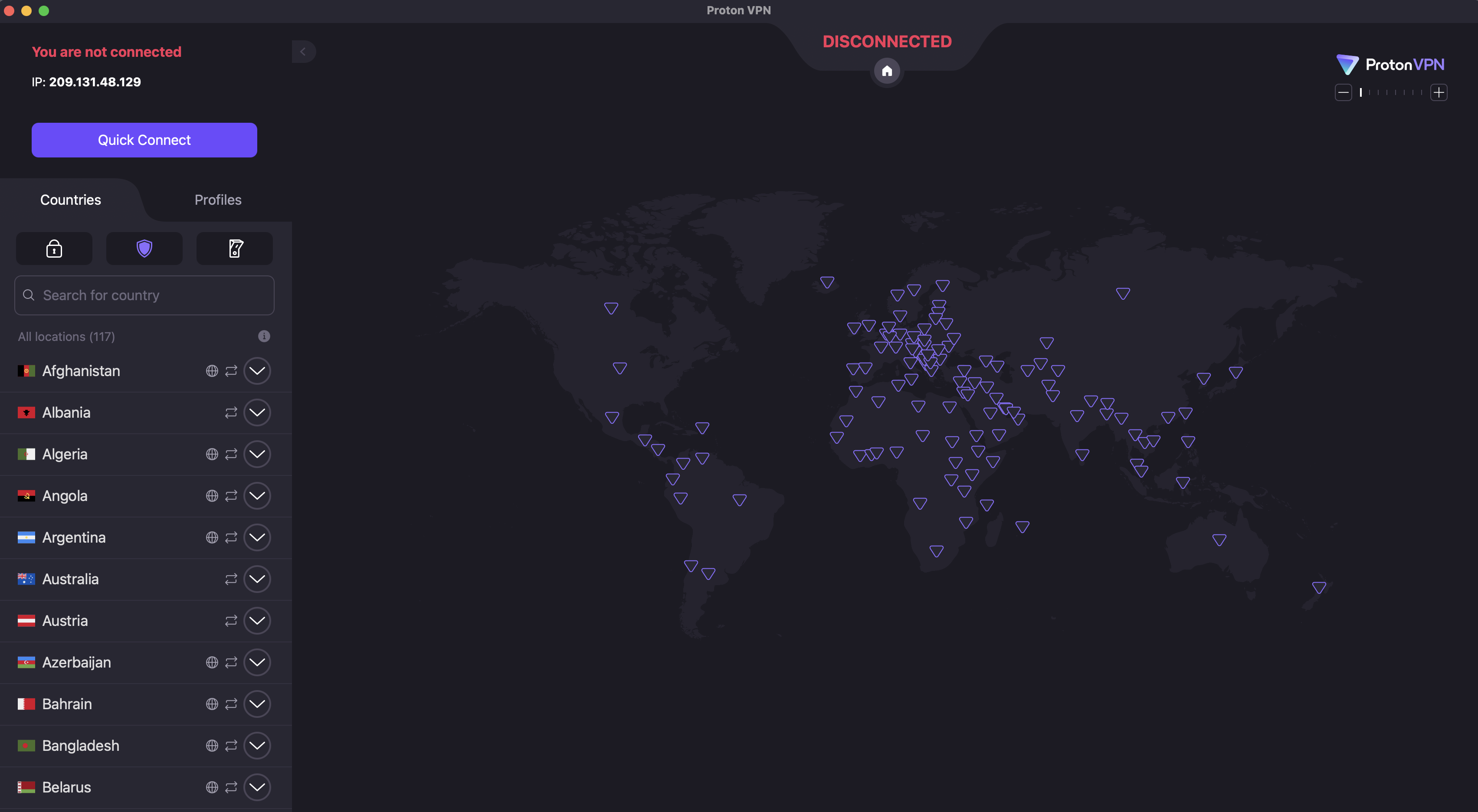
On Proton VPN, for example, you can switch locations by clicking the name of any country in the list on the left.
Sam Chapman for Engadget
Once the locations exist, they have to be maintained, including regular changes to their IP address so firewalls don't identify and block them. Loads at locations need to be balanced between servers and technology has to be upgraded as faster solutions become available.
Since VPNs can have hundreds of server locations, all that upkeep doesn't come cheap, and customers often eat the cost. Factor in the price of extra features outside core VPN functionality and you'll understand why these companies are so desperate for liquidity that they'll offer discounts over 80 percent — as long as you hand over a lump sum right now.
What about free VPNs?
VPNs can get pricey, especially if you want high quality. But some VPNs charge nothing at all. Is there any reason not to go with free VPNs every time?
The answer is a pretty clear yes; paying for a VPN is almost always a better idea. When we rounded up the best free VPNs, only three got our unqualified recommendation. All three were paid services with free plans, and all come with strict limitations on server locations, data usage and other privileges.
The unfortunate reality is that free VPNs come with downsides no matter which one you use. Plenty of them are hacked-together apps with little value, thrown together to make a quick buck. Others turn you into the product by selling your data to advertisers or renting out your home IP address. Some drop any pretense and plant malware directly on your device.
These risks, which are often invisible to the end user, are the reason I almost always advise going with a free VPN funded by a paid plan, like Proton VPN, hide.me or Windscribe. Those plans may be restricted, but at least the provider's motives are out in the open: they make money off the paid plan and they want you to switch to it.
How to save money on a VPN
If you've decided to pay for a VPN but want to stretch your budget as much as possible, the tips below can push your cybersecurity dollar a bit farther. To begin with, the general advice on choosing a VPN always applies: read expert opinions, check the reviews and use the free trial to test its speed and security.
Get a long-term plan. If you're confident that you'll actually use the VPN for the whole duration, there's no reason not to go with a 12-month or 24-month subscription. These are win-win deals that genuinely do save you a lot of money overall.
Cancel auto-renewal. VPN accounts are set to automatically renew by default. In some cases, this can inadvertently lock you into a higher-priced long-term plan. I recommend cancelling auto-renew right after subscribing even if you're sure you want to continue. From there, you can create a new account to get the introductory rate again — or go with a different VPN to get a better deal.
Look for resubscription deals. Another perk of cancelling immediately is that the VPN will often try to woo you back with exclusive discounts. Stay strong until your subscription is a month or two from expiring, then look for emails offering better rates.
Wait for seasonal discounts. If you can hold off until November, most VPNs offer steep discounts from Black Friday season all the way through New Year's. Check around other holidays too, as VPNs will take any excuse for marketing; CyberGhost is offering a Valentine's Day deal as I type this. We also keep track of the best VPN deals you can get at any time of the year.
Use the VPN to save money on streaming. Most streaming services are more expensive than VPNs. If you use a VPN to access more content without adding a new streaming subscription, you'll come out ahead. For example, if you only have Netflix but want to watch Schitt’s Creek, you can pay $16.99 per month for Peacock without ads — or $9.99 per month for Proton VPN to unblock Netflix Canada, which features that show.
Shop for regional discounts. Like the previous point, this won't save you money on the VPN itself, but might save you enough money on other expenses that you turn a profit. Changing your virtual location can get you discounts on purchases where prices vary by region, especially travel costs.
This article originally appeared on Engadget at https://www.engadget.com/cybersecurity/vpn/how-much-do-vpns-cost-170000567.html?src=rss
Moltbook bills itself as a social network for AI agents. That's a wacky enough concept in the first place, but the site apparently exposed the credentials for thousands of its human users. The flaw was discovered by cybersecurity firm Wiz, and its team assisted Moltbook with addressing the vulnerability.
The issue appears to be the result of the entire Reddit-style forum being vibe-coded; Moltbook's human founder posted a few days ago on X that he "didn't write one line of code" for the platform and instead directed an AI assistant to create the whole setup.
According to the blog post from Wiz analyzing the issue, Moltbook had a vulnerability that allowed for "1.5 million API authentication tokens, 35,000 email addresses and private messages between agents" to be fully read and accessed. Wiz also found that the vulnerability could let unauthenticated human users edit live Moltbook posts. In other words, there is no way to verify whether a Moltbook post was authored by an AI agent or a human user posing as one. "The revolutionary AI social network was largely humans operating fleets of bots," the company's analysis concluded.
So ends another cautionary tale reminding us that just because AI can do a task doesn’t mean it'll do it correctly.
This article originally appeared on Engadget at https://www.engadget.com/ai/moltbook-the-ai-social-network-exposed-human-credentials-due-to-vibe-coded-security-flaw-230324567.html?src=rss
TikTok is finally "back to normal" in the US after days of technical issues and outages tied to winter storms. Less than a week after companies like Oracle took ownership of TikTok's domestic operations, the platform faced a major power outage when one of its primary US data center sites — run by Oracle — got taken down by the storm.
The problems started last Monday, January 26, when TikTok announced it was working on a "major infrastructure issue" and warned of bugs, time-out requests, missing earnings, and more. The next day TikTok shared that progress has been made but there were still some issues. It added, "Creators may temporarily see '0' views or likes on videos, and your earnings may look like they're missing. This is a display error caused by server timeouts; your actual data and engagement are safe."
Then, yesterday, February 1, TikTok claimed the problem was straightened out and that users shouldn't experience any more related issues. "We're sorry about the issues experienced by our U.S. community. We appreciate how much you count on TikTok to create, discover, and connect with what matters to you," the platform stated in its update. "Thank you for your patience and understanding."
A number of US users have uninstalled TikTok in response to its new ownership and technical issues. Some users also claimed that TikTok was censoring what they could post or what others saw. For instance, The Guardian reports that many people faced issues sharing videos about ICE agents killing Alex Pretti and general anti-ICE content.
On January 26, analytics firm Sensor Tower told CNBC that uninstalls of the app had increased by over 150 percent during the five days since its change in ownership, when compared to the three months before. At the same time, independent app and competitor UpScrolled saw a surge in downloads.
This article originally appeared on Engadget at https://www.engadget.com/apps/tiktok-says-its-back-to-normal-after-winter-storm-related-outages-114848212.html?src=rss
When talking about the best VPNs, I frequently warn about the dangers of trusting free VPNs without verifying them. Although there are a few free VPNs worth recommending, many other free providers are ineffective, malicious or looking to profit off their users (or sometimes all three). Even the best free VPNs work a lot better once you subscribe and access their full service.
This can be frustrating if you want to enjoy the benefits of a VPN but don't have the budget for yet another subscription. To help you out, I put together a list of the best paid VPN services you can get cheaply. Every name on the list comes with my full recommendation — I'll never recommend a VPN that doesn't protect you, no matter how affordable.
Before I get started, I want to define "cheap," since VPNs often bamboozle the customer with muddled pricing schemes. Most providers have long-term subscription plans with big discounts, and many of them compensate by making their monthly plans more expensive. On this list, I'll recommend services with cheap subscriptions for both the short and long term, plus one favorite that balances both.
Best cheap VPNs for 2026
Other VPNs we tested with good deals
A couple of VPNs have decent pricing options attached to worthy services but weren't quite strong enough to make the list. Both these services get my hearty recommendation; they're just hard to justify as "cheap."
ExpressVPN
ExpressVPN recently switched to a multi-tier pricing model. The Basic pricing tier gets you complete VPN service but doesn't include the full set of features. The best price on that is $78.18 for 28 months, which works out to $2.79 per month. Although that sounds great, it's more expensive than both Surfshark and CyberGhost at the same duration and renews at the even higher price of $99.95 per year ($8.33 per month).
Still, as I wrote in my full ExpressVPN review, it's an outstanding service overall. Thanks to its sensible app layouts and focus on doing simple tasks well, I find it especially good for introducing beginners to what a VPN can do.
NordVPN
NordVPN is another provider that I gave a relatively positive review. I really like its boundary-pushing features, especially the various types of highly specialized servers. Its pricing isn't bad, exactly, but even the Basic level is more expensive than just about everyone else at every duration. NordVPN's fast download speeds and wide server network make it worthwhile for lots of users, but it's hard to recommend to people on a budget.
What to look for in a good cheap VPN
Looking for an affordable VPN is the same as looking for any kind of VPN; it just requires more care. The worst VPNs usually present themselves as free, but there's also a fair number of mediocre options that think low prices have to mean a mediocre service. If you want to use a VPN but don't have much extra cash, take some additional care in a few areas of your search.
First, don't subscribe to a VPN — or even download any of its apps — if you haven't verified its security. To do that, start by checking what experts have to say about it. If a VPN is truly unsafe, chances are high that somebody has already sounded the alarm. You can also check the list of protocols the VPN offers. If it's anything other than OpenVPN, WireGuard or IKEv2, do a deep dive to make sure it's using worthwhile encryption.
If you've verified that the VPN isn't a virus, check to see if it has a free trial or a guaranteed money-back period. This will give you some risk-free time to do hands-on tests. Our article on how we test VPNs includes several tests you can run on your own computer, phone or tablet. Check the VPN's speed, make sure it has the server locations you need and look for anything that might be leaking your real IP address.
Read the VPN's privacy policy and make sure you're comfortable with how much information it saves. Some VPNs emphasize privacy more than others. Finally, before your free trial or refund period expires, make sure to double-check on the pricing structure of the VPN you're choosing — it's possible that it will only be cheap for the first subscription period.
This article originally appeared on Engadget at https://www.engadget.com/cybersecurity/vpn/best-cheap-vpn-170000957.html?src=rss
The National Center for Missing and Exploited Children said it received more than 1 million reports of AI-related child sexual abuse material (CSAM) in 2025. The "vast majority" of that content was reported by Amazon, which found the material in its training data, according to an investigation by Bloomberg. In addition, Amazon said only that it obtained the inappropriate content from external sources used to train its AI services and claimed it could not provide any further details about where the CSAM came from.
Amazon provided Engadget with the following statement to explain why it doesn’t have data that can provide any further action on what it found.
“When we set up this reporting channel in 2024, we informed NCMEC that we would not have sufficient information to create actionable reports, because of the third-party nature of the scanned data. The separate channel ensures that these reports would not dilute the efficacy of our other reporting channels. Because of how this data is sourced, we don't have the data that comprises an actionable report.”
"This is really an outlier," Fallon McNulty, executive director of NCMEC’s CyberTipline, told Bloomberg. The CyberTipline is where many types of US-based companies are legally required to report suspected CSAM. “Having such a high volume come in throughout the year begs a lot of questions about where the data is coming from, and what safeguards have been put in place.” She added that aside from Amazon, the AI-related reports the organization received from other companies last year included actionable data that it could pass along to law enforcement for next steps. Since Amazon isn’t disclosing sources, McNulty said its reports have proved “inactionable.”
Amazon provided Engadget with these additional details, which were first reported in Bloomberg:
“Amazon is committed to preventing CSAM across all of its businesses, and we are not aware of any instances of our models generating CSAM. In accordance with our commitments to responsible AI and the Generative AI Principles to Prevent Child Abuse, we take a deliberately cautious approach to scanning foundation model training data, including data from the public web, to identify and remove known CSAM and protect our customers. While our proactive safeguards cannot provide the same detail in NCMEC reports as consumer-facing tools, we stand by our commitment to responsible AI and will continue our work to prevent CSAM.”
The company also reiterated that “we intentionally use an over-inclusive threshold for scanning, which yields a high percentage of false positives” to explain the high volume of content the company reported.
Safety questions for minors have emerged as a critical concern for the artificial intelligence industry in recent months. CSAM has skyrocketed in NCMEC's records; compared with the more than 1 million AI-related reports the organization received last year, the 2024 total was 67,000 reports while 2023 only saw 4,700 reports.
In addition to issues such as abusive content being used to train models, AI chatbots have also been implicated in several dangerous or tragic cases involving young users. OpenAI and Character.AI have both been sued after teenagers planned their suicides with those companies' platforms. Meta is also being sued for alleged failures to protect teen users from sexually explicit conversations with chatbots.
Update, January 30, 2026, 11:05AM ET: This story has been updated with several statements from Amazon.
This article originally appeared on Engadget at https://www.engadget.com/ai/amazon-discovered-a-high-volume-of-csam-in-its-ai-training-data-but-isnt-saying-where-it-came-from-224749228.html?src=rss