The best kitchen gadgets for 2026

Whether you love cooking already or you want to try to cook more at home to spend less money on takeout, there are tons of gadgets that can make your time in the kitchen even more enjoyable. As food lovers and tech reviewers, the Engadget team has tried out pizza ovens, sous vide machines, air fryers, ice cream makers and more. Here, we gathered all of the best gear we’ve tested, reviewed and used in our own kitchens for when you’re looking to spice things up in yours. We’ve also linked to our reviews and buying guides so you can dive deeper into our recommendations for the best kitchen gadgets around.

Nicole Lee contributed to this report.

This article originally appeared on Engadget at https://www.engadget.com/home/kitchen-tech/best-kitchen-tech-gadgets-small-appliances-124515179.html?src=rss

The best streaming devices for 2026

With the dominance of smart TVs, streaming sticks and boxes may seem redundant — but if your smart set is slow or has a frustrating user interface, a streaming device will let you bypass your TV’s built-in OS and use Google TV, Fire TV, Apple TV or something else instead. There are a lot of streaming gadgets out there, all with different operating systems, memory capacities, video resolutions and bonus features, such as headphone connections and ambient modes that fill your screen with stills when you’re not watching. We tested options from the major brands and broke down exactly what each device gives you so you can pick the best streaming device for your TV.

Google’s TV Streamer, the Apple TV 4K, Amazon’s Fire TV Sticks and Roku devices are the most popular players in the space. Three of those brands also come built into TVs, such as Fire, Google and Roku TVs, but the Apple TV 4K doesn't come pre-loaded on any set. Each one has a unique operating system and interface. This may be the biggest deciding factor for many people, as it determines how the home entertainment you want to watch is arranged and presented. We go into detail for each platform below, but all of them come with home screens that, to varying degrees, gather your apps in one place, present the movies and TV shows you’re currently watching and give you suggestions of other media streaming options.

Nearly all streaming devices come with a remote that lets you search and do other operations using your voice, eliminating the need to hunt and peck at on-screen keyboards. They all offer “universal search,” in which searching for a title takes you to whichever app has it available. If you want to watch Wicked but don’t know where it’s playing, just push the voice button on the remote and say "Wicked.” (We found simply saying the title or the genre you want sometimes works better than saying “Show me…” or “Search for…”) From the search results, hit the play button and the correct app will open and start playing — assuming you’ve previously logged into that app and, in most cases, have an active subscription.

Most streaming sticks connect to the internet via Wi-Fi, with the majority of them supporting Wi-Fi 5 or 6 protocols. Set-top boxes can also have Ethernet ports, so you can hardwire your internet connection to the device, which is typically faster than wireless. Streaming media players connect to your TV through an HDMI port, and most sticks hide behind the screen, while set-top boxes sit on a surface nearby. Nearly all units also plug into an AC outlet for power. Some sticks used to work by pulling power from a USB port on the TV, but increasingly, these devices are designed to plug into the wall.

If your home theater setup has a screen that can display 4K content with Dolby Vision and HDR10, you’ll want a streaming device that supports those high-end formats. Of course, even the most top-shelf streamer can’t make a 1080p TV stream 4K. The series or movie also has to be transmitted in 4K and, increasingly, companies restrict higher-quality streaming to more expensive subscription plans. In short, every element needs to support the video or audio feature, otherwise the highest quality you’ll get will be the lowest of any component in the chain.

Most remotes that come with streaming devices will allow you to control the power and volume of your TV. Some of the less expensive devices, however, don't have that feature, so you'll need to use your TV's remote control to turn it on, then use the streaming remote to navigate the streamer's interface. If your streamer's remote does offer power and volume controls, the setup process will usually calibrate your remote to your TV. If you want to use a soundbar, such as from Sonos or other brands, for audio you may also have to take the additional step of pairing your remote to the speaker.

In addition to helping you find stuff to watch, streaming devices from Apple, Google and Amazon can answer questions about the weather, sports scores and general facts using built-in voice assistants. They can also act as smart home controllers to turn off connected smart bulbs or plugs and show feeds from smart cameras. Just remember, as with all smart home devices, compatibility is key. Fire TV devices work with Alexa-enabled smart home equipment; the Google TV Streamer lets you control Google Home devices; and Apple TV 4Ks play nice with HomeKit and other Apple devices. Rokus grant power over Roku’s smart home products, but also work with the other ecosystems.

Like every gadget we test, we start by researching what’s worthy of reviewing. Then we get a hold of the devices ourselves and see how well they work. We don’t have a central Engadget lab; we test things in our own living rooms, on our own TV sets. We also figure that’s a better approximation of your own TV experience anyway.

We began testing streaming devices as far back as 2007 with the first Apple TV device. Since then, we’ve tried out most of the major new releases to come along — from the Roku Stick back in 2014 to the 2024 Google TV Streamer 4K. A few years ago, we decided to compile the streaming devices we reviewed into this guide. Since then, we’ve updated our top picks using verdicts from our reviews, as well the testing we perform just for this guide. As new devices come out, we try them and, if something is worthy, we add it to our top picks on this list.

This article originally appeared on Engadget at https://www.engadget.com/entertainment/streaming/best-streaming-devices-media-players-123021395.html?src=rss

CES: So very big, so little sustainability tech

Every third booth at CES showed off some new AI product or other. If you wanted to find a robotic lawn mower, throw a rock. Humanoid robots, smart locks and super thin TVs were everywhere. But if you went looking for sustainability products, you’re going to have to hunt a bit.

Last year, the Sustainability section at the Las Vegas Convention Center had 20 booths. This year, there were 38, but that’s in part due to the combination of the energy and sustainability categories. So exhibitors like South Korea’s largest electric utility company, a nuclear power company from the same country and lots of battery manufacturers. There was also an AI data platform booth in the section that had nothing to do with sustainability as far as I can tell. Guess the organizers just ran out of room for all the AI.

Within the sustainability section, and at other CES venues, I found a few encouraging displays of sustainable products — organizations and devices that were trying to address the multitude of problems the world is facing when it comes to energy production, climate and pollution.

But none of it quite achieved Engadget’s best of CES status this year. Some of what we saw was utility-scale, some wasn’t quite ready for consumer consumption and other stuff was too niche or had too many caveats to make the list. I won’t go so far as to say sustainability is dead at CES, because that sends me into dark downward spirals, but it’s getting sparse out there, friends.

Here are the companies I saw that had promise and innovative ideas. And gosh darn it, at least these guys are trying.

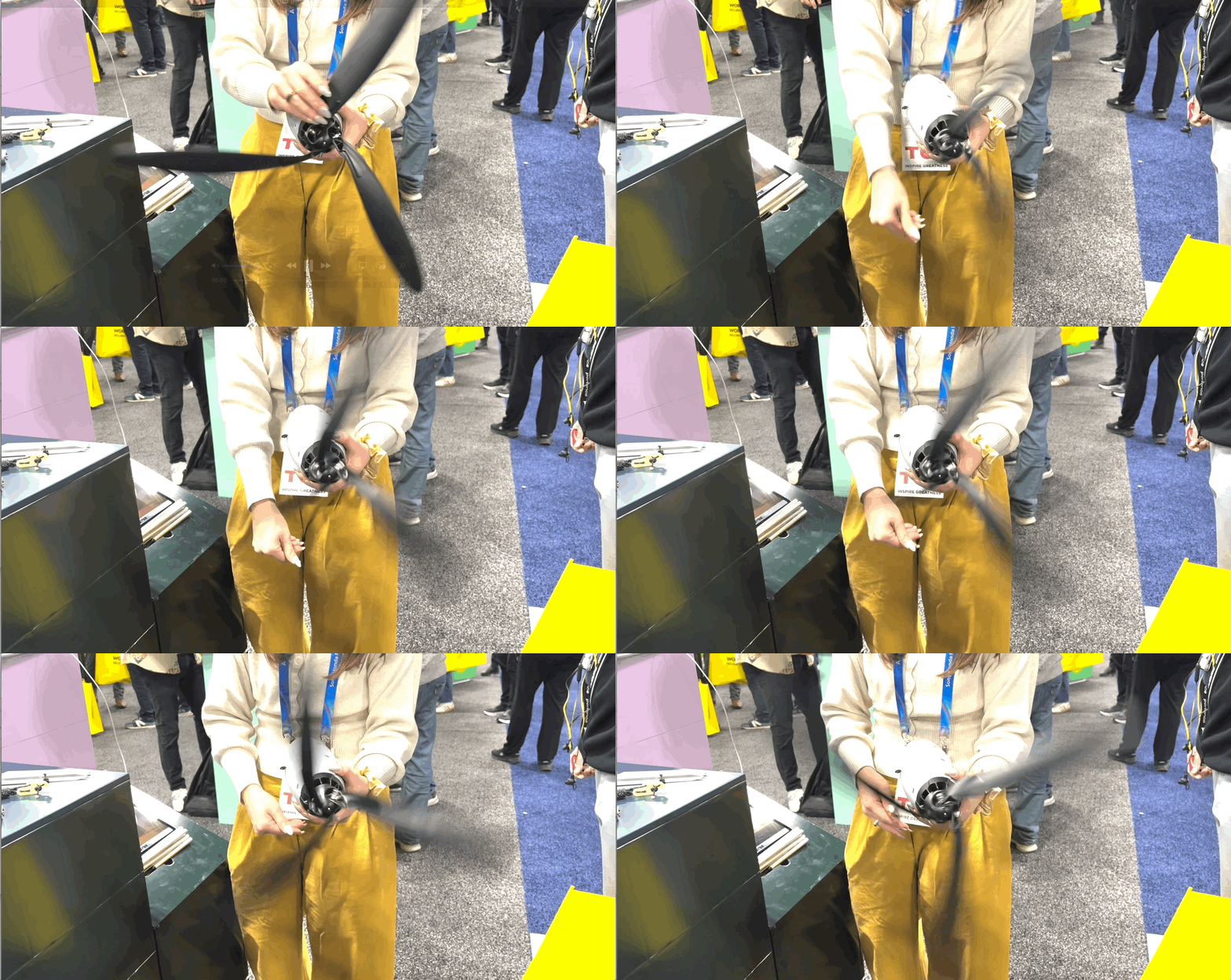
Spinning the Shine Turbine 2.0
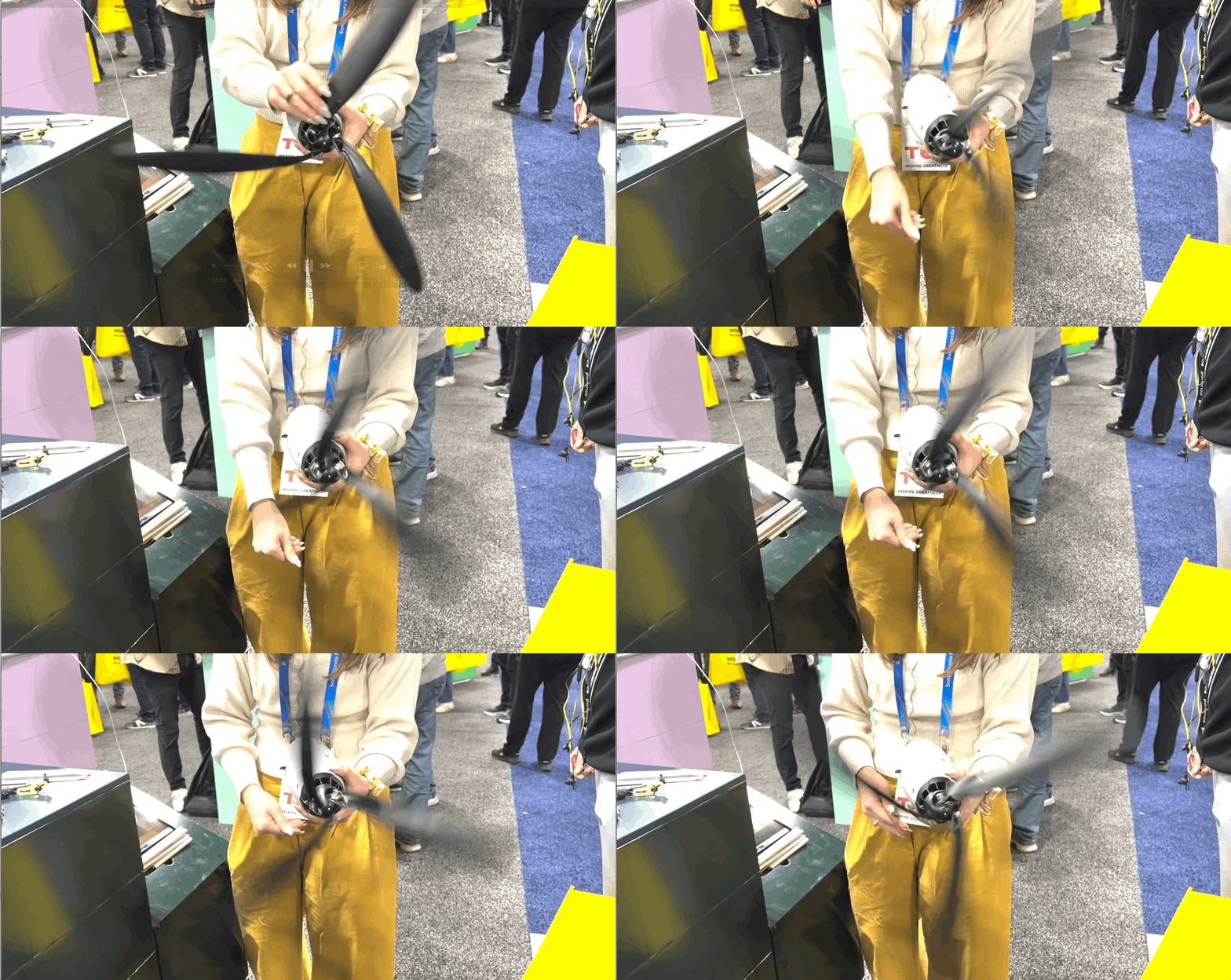
Spinning the Shine 2.0 wind turbine
Amy Skorheim for Engadget

This little guy could be a precursor to some serious personal wind power generation. That’s where the company is heading. For now, the Shine 2.0 can use as little as a light breeze to start generating power to charge your smartphones, laptops or even a power station. The whole unit weighs three pounds and sets up in around two minutes. The second generation model can output up to 75 watts and the company is working on a third version that goes up to 100 watts for even more substantial energy production.

Learn more at Shine.

Flint batteries break down by 70 percent in four weeks in a compost pile.
Amy Skorheim for Engadget

When I approached Flint’s booth, the rep told me the company made cellulose batteries. And I thought, like paper-wrapped batteries? Nope. The chemicals inside the batteries are made from cellulose. They have a solvent-free, lithium-free, PFAS-free chemistry and break down by 70 percent in four weeks in a composting environment. They use the same basic architecture as a lithium-ion cell, with an anode, cathode and separator with ion transfers between the two. As of now, Flint is focused on partnering with manufacturers, and consumer products are on the horizon.

Learn more at Flint.

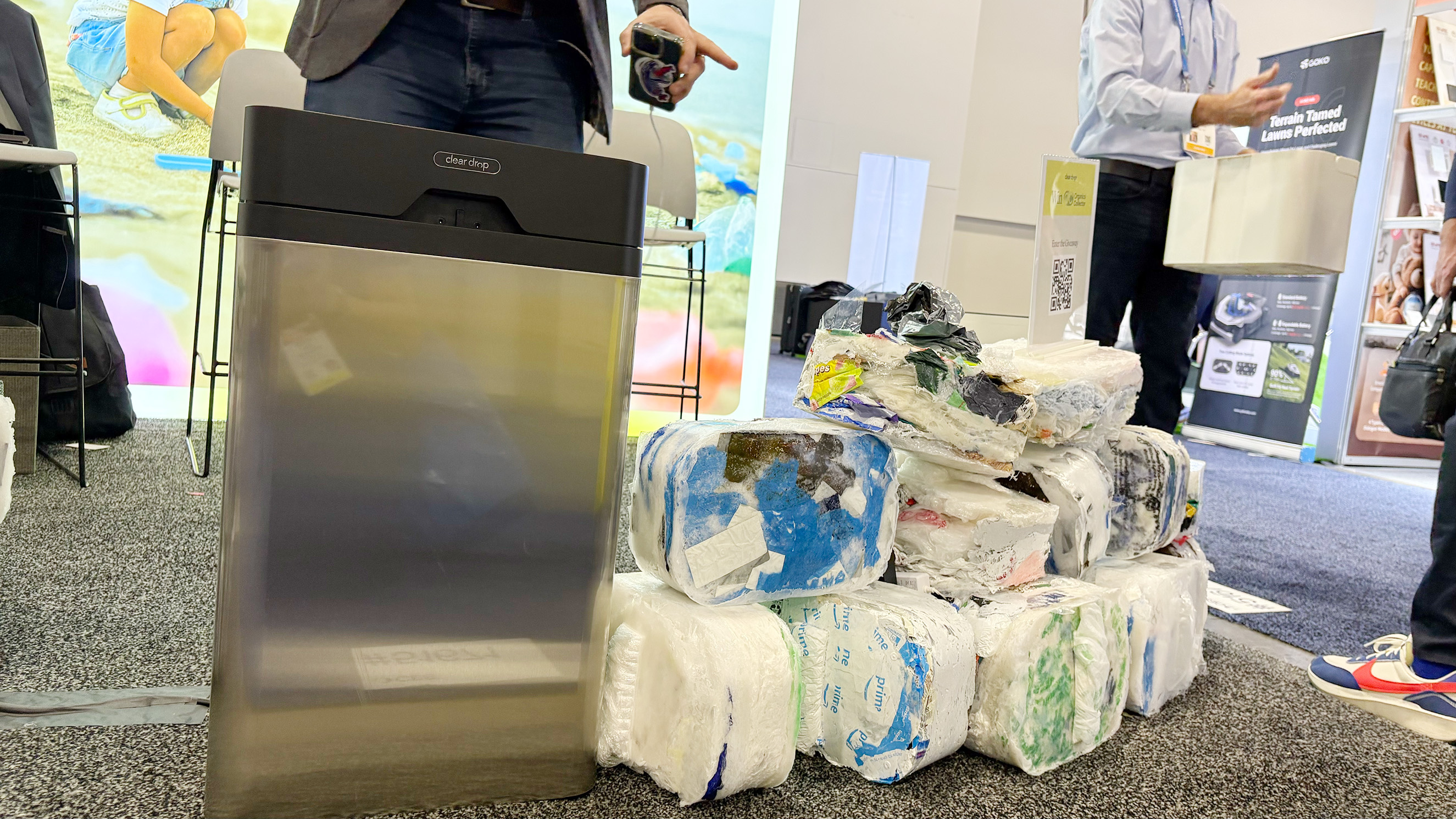
The Clear Drop soft plastics compactor next to a pile of the bricks it produces.
Amy Skorheim for Engadget

The Clear Drop is a soft plastics compactor that creates eight by twelve by four-inch bricks out of hundreds of grocery bags, bubble wrap, ziplocks and plastic packaging. One brick is equivalent to a 30-pound trash bag-worth of bags. Once the brick is created, it can be shipped to one of Clear Drop’s partner facilities in a pre-paid USPS shipping envelope. They currently work with a few US-based recycling facilities and hope to one day create an infrastructure to include municipal recycling.

Learn more at Clear Drop.

Alpha power by CPTI
Alpha power by CPTI
Amy Skorheim for Engadget

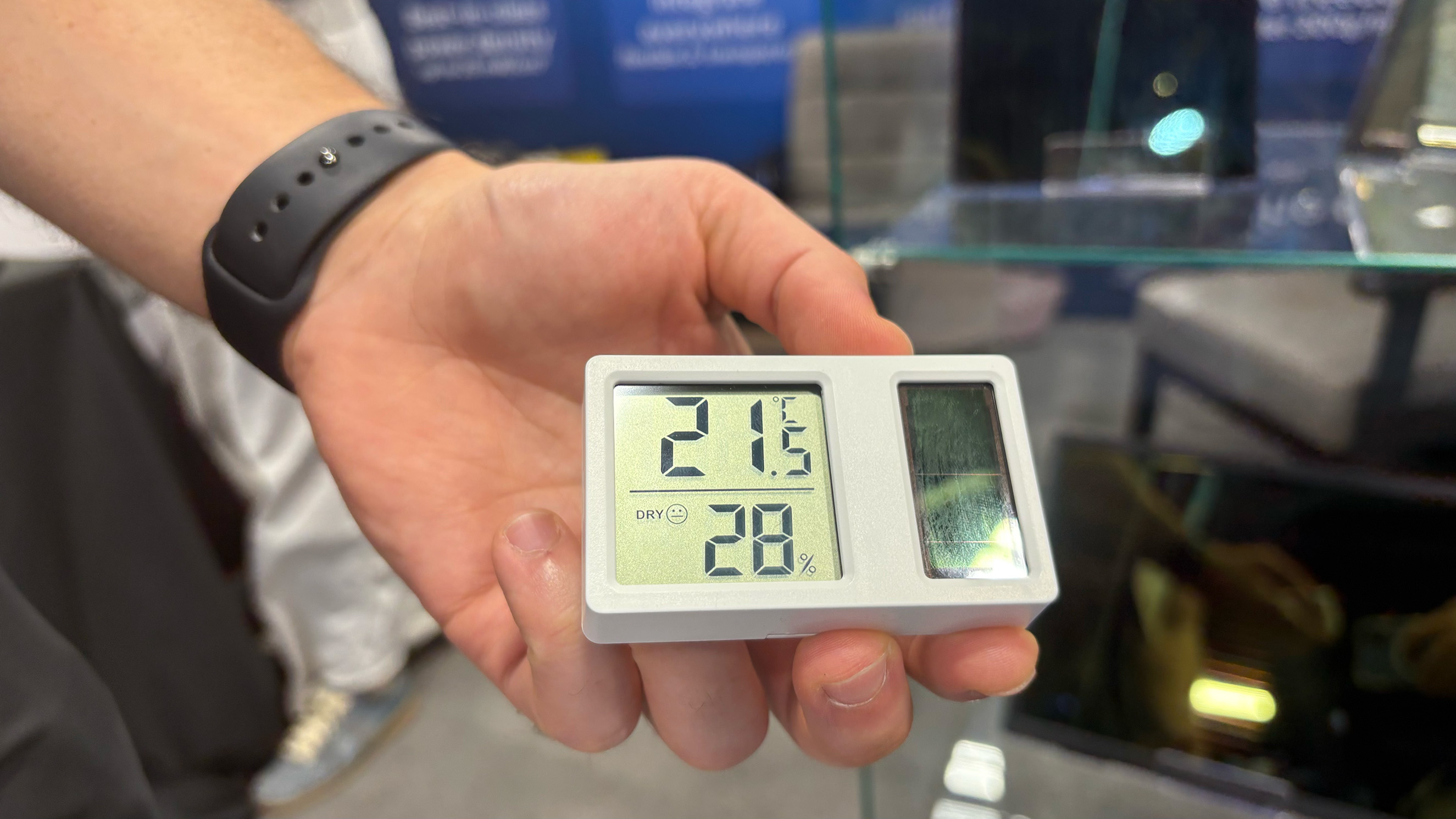
From what I’ve learned at the show, perovskite is the hottest thing in solar right now. It’s a mineral compound that’s been used to create more efficient solar panels. Some so sensitive to light that just indoor illumination is enough to create usable energy. Alpha Power by CPTI creates lightweight, flexible perovskite solar panels that can conform to multiple surfaces. Again, this is a company that’s partnering with manufacturers, so look for panels built into your laptop to charge it under the glare of your too-harsh office lights.

Learn more at CPTI.

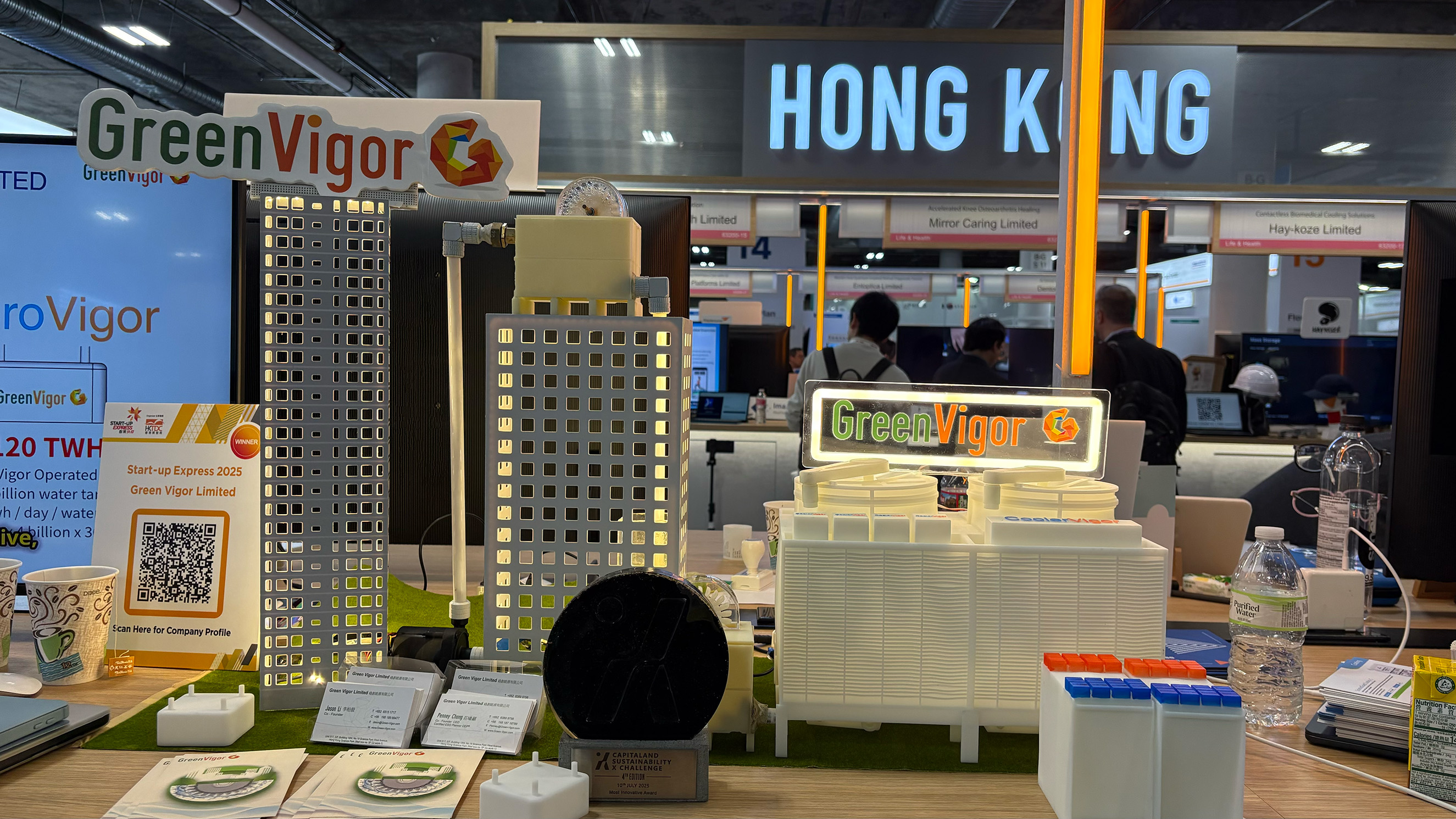
3D models of buildings using Green Vigor technology.
Amy Skorheim for Engadget

Down in the lower levels of the Venetian Expo at CES I found Green Vigor in the Hong Kong pavilion. This small company has two solutions to create energy for buildings by harnessing the potential energy from existing systems. HydroVigor generates power from water systems. So every time someone washes their hands or flushes a toilet in a building, the roof-top system generates a bit of power. CoolVigor uses the same principles to harness energy from HVAC systems. HydroVigor is currently in use in many buildings in Singapore and Hong Kong and they’re working to expand to more buildings globally.

Learn more at GreenVigor.

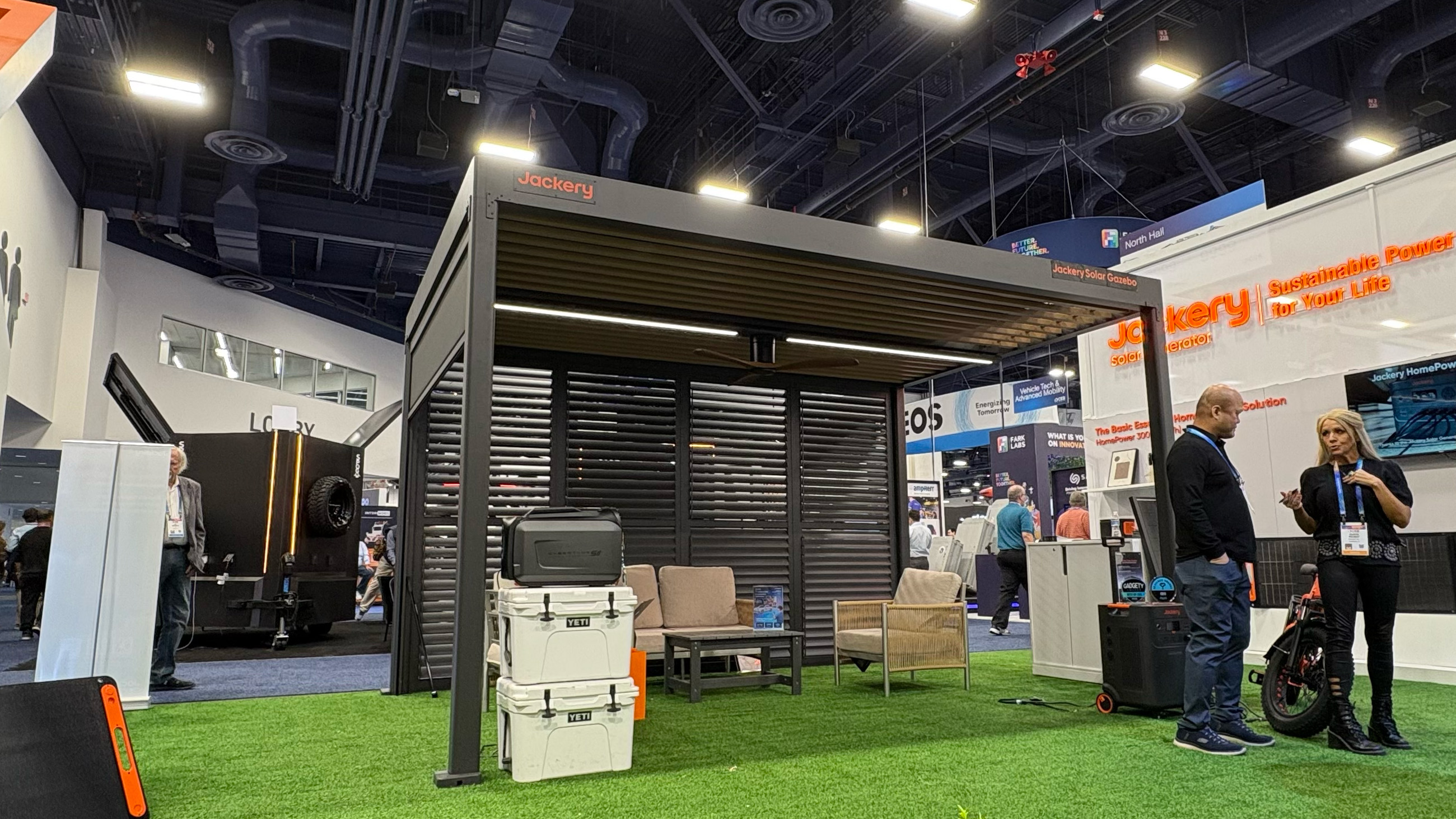
Jackery's Solar Gazebo.
Amy Skorheim for Engadget

This outdoor hangout spot can produce up to 10kWh of power on a given day. It’s a modular design that lets you choose louvered walls, sunshades, lights and fans when you order it and the solar panels are so strong that a full-sized human Jackery rep was able to stand on a sample panel in front of me and nothing cracked (though the company officially rates it at 20 pounds of snow per square foot). You can use the power directly, tie it into your home system, feed it into the grid or hook it up to one of Jackery’s many power stations to save the power for later. The gazebo costs $12,000 and will ship in mid-2026.

Learn more at Jackery.

Bluetti's DIY RV Solar power system
Amy Skorheim for Engadget

Bluetti, like Jackery, is known for its vast lineup of portable and fixed power stations and batteries. This year, it brought a new power station made with bio-based plastic as well as a DIY system for adding solar power to your existing RV.

Learn more at Bluetti.

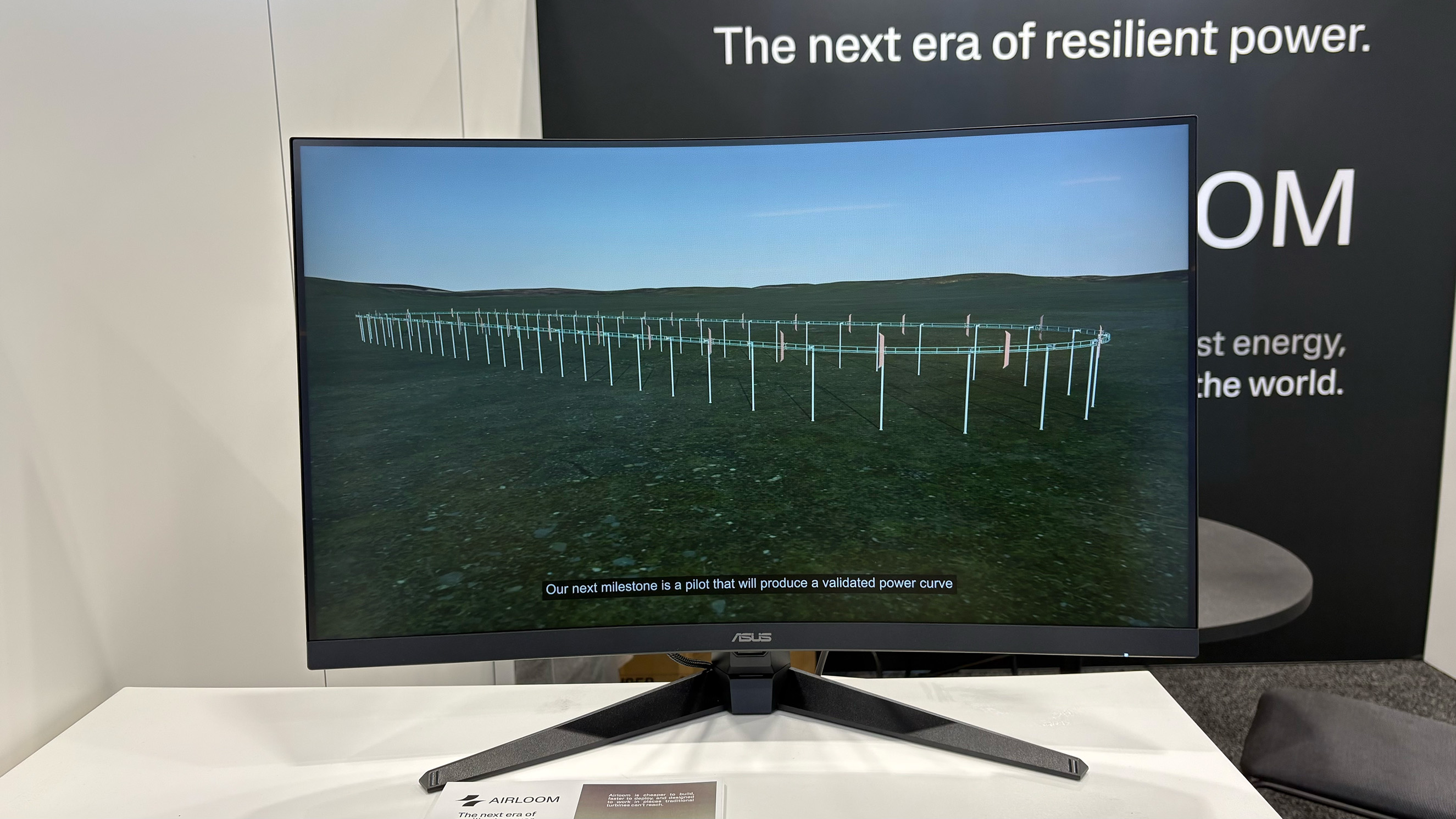
Airloom's roller coaster-like wind power generator for data centers.
Amy Skorheim for Engadget

Engadget’s Anna Washenko does a great job of explaining the tech behind Airloom. In short it’s a roller coaster for wind that’s comprised of 40 percent less mass than a standard wind turbine and uses 42 percent fewer parts and 96 percent fewer unique parts. That makes it faster to deploy and cheaper to instal. I can also be sited in more places. Again, this is a utility-scale solution, geared towards data centers and their insatiable need for energy to power Very Important AI Things.

Learn more at Airloom.

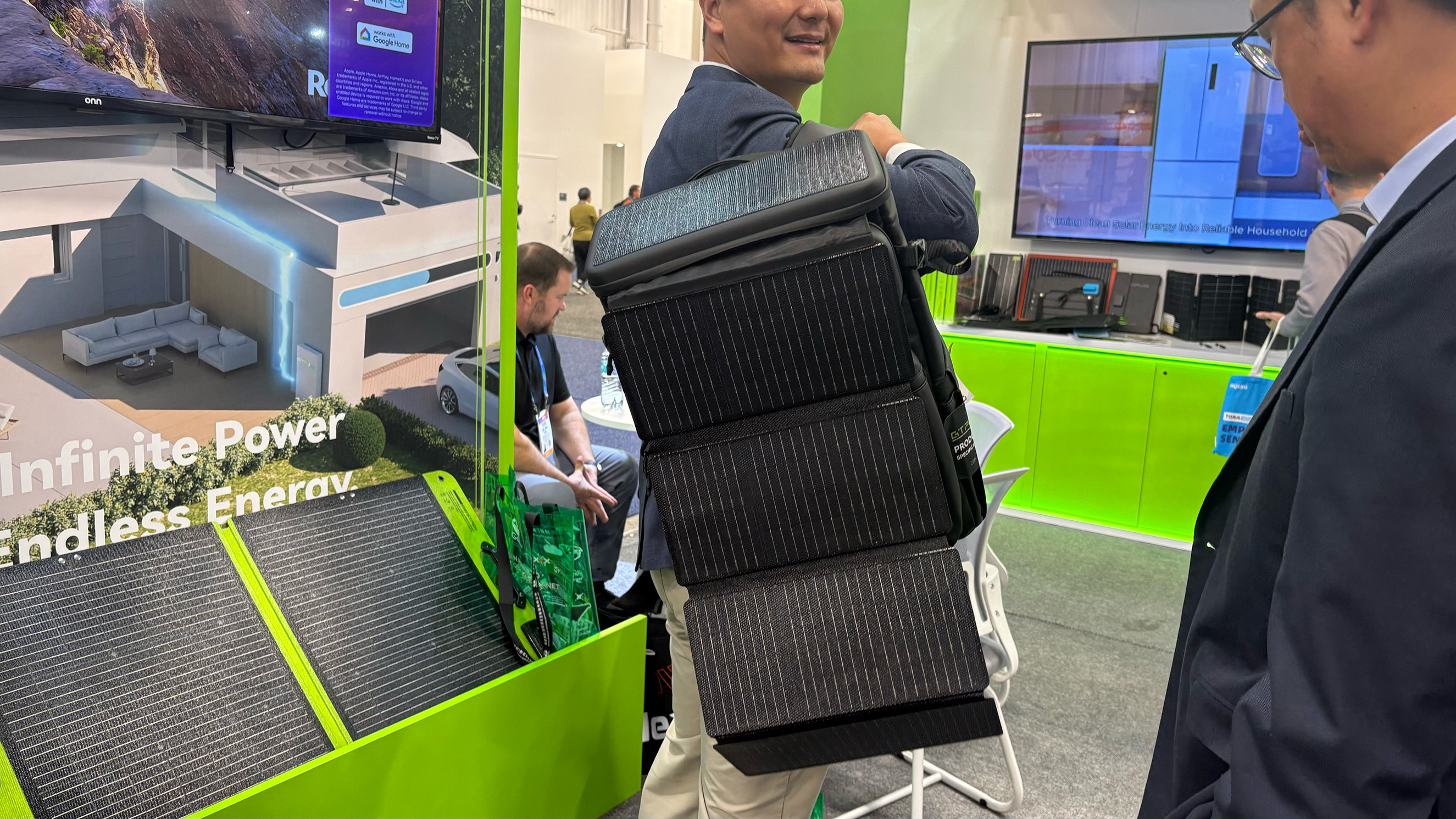
Gaotu had a range of solar products in various formats.
Amy Skorheim for Engadget

If you are looking for a solar-powered anything, hit up Gaotu. At the company’s booth, I saw hats, a fishing chair, a backpack, a sunbrella and a car roof-top enclosure that unfurls to charge up your Tesla. The Shenzhen-based company has been in business for 18 years and plans to just keep sticking solar panels on anything it can.

Learn more at Gaotu.

Segway's latest cargo e-bike
Amy Skorheim for Engadget

The single largest booth in the CES sustainability section was Segway. This year, the company showed off two new e-bikes, which our own Dan Cooper covered. This one here is the Muxi, a cargo bike with an easily swappable battery, an optional passenger seat with foot pegs and an optional middle basket. Plus a beverage cup holder.

Learn more at Segway.

If we don’t all fall into the ocean before then, perhaps CES 2027 will have a stronger showing of sustainability tech. In the meantime, I’ll take a modicum of comfort in these few brave organizations still dedicated to keeping us afloat.

This article originally appeared on Engadget at https://www.engadget.com/science/ces-so-very-big-so-little-sustainability-tech-180000648.html?src=rss

Emerson Smart brings offline voice control to lamps and fans

Perhaps you like the idea of controlling your home appliances with your voice, but aren’t super keen on a data center processing recordings of you. Fair enough. The trade-off for most smart home conveniences is relinquishing at least some of your privacy. Today at CES, I saw a line of voice-controlled home appliances from Emerson Smart that adjust power and setting via voice commands. But commands are recognized on the devices themselves, not carried through Wi-Fi and processed elsewhere.

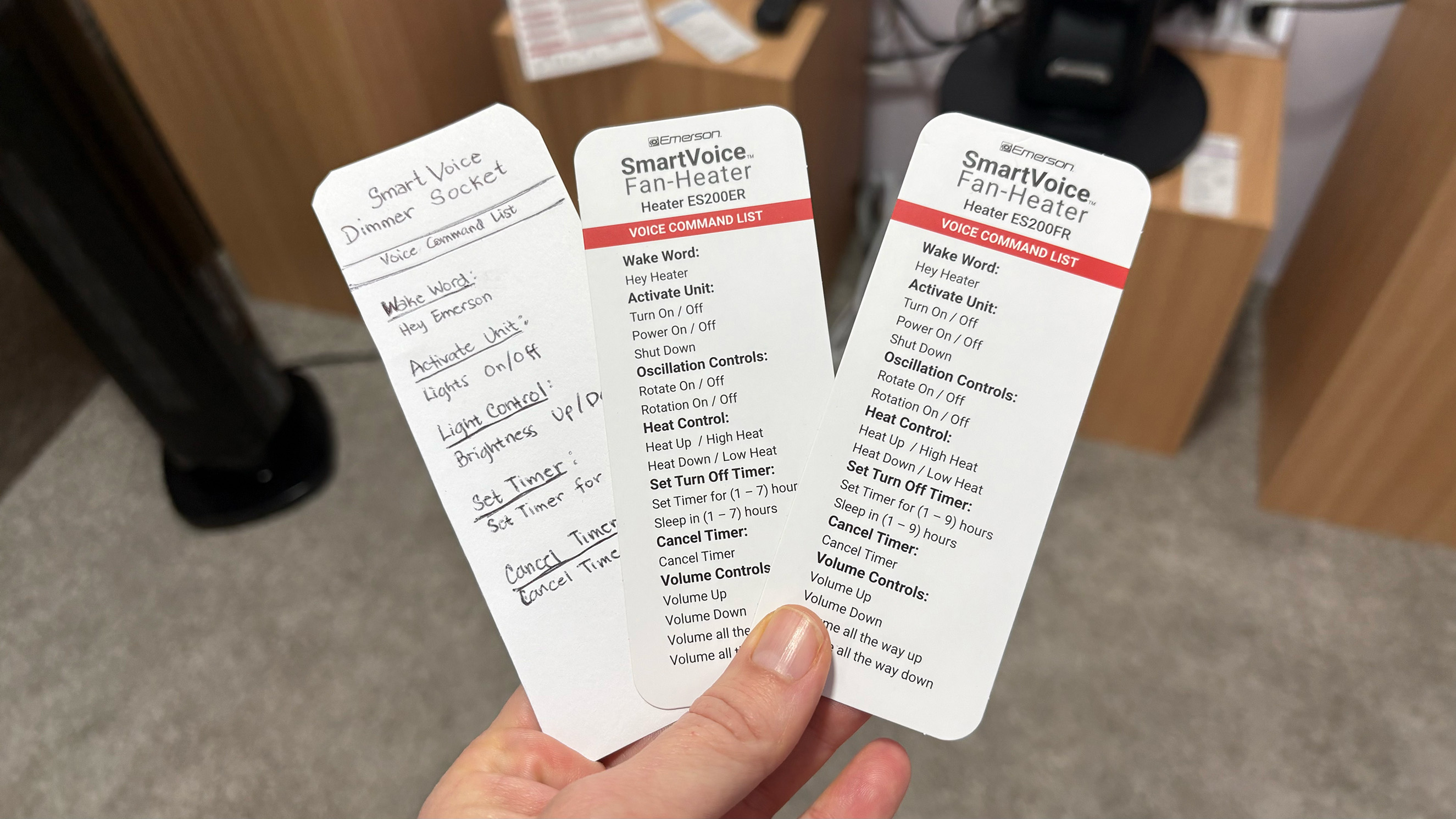
The huge array of smart plugs, fans, heaters and even air fryers require no app for setup and don’t need access to Wi-Fi. Instead, I said, “hey Emerson, lights on” or “hey fan, turn on low” and the devices in the demo space acted accordingly. A few of the devices combine the mic with a speaker and can respond when a command is received.

A bit of built-in programing on the air fryers allow them to understand commands for 100 cooking presets, so saying things like, “reheat this pizza” or “cook these frozen french fries” will set the correct mode, time and temp. Of course you can also just say, “cook at 350 degrees for 10 minutes” and it’ll comply. Most of the commands for the other items are pretty simple but allow you to do things like set a timer, turn on oscillation and set intensity speeds.

Selection of available commands for Emerson Smart devices.
Amy Skorheim for Engadget

Some of the devices allow for a small amount of programmability. Pressing and holding the button on the smart plug, for example, changes the wake word to “plug two,” doing it again swaps it to “plug three,” and so on. That way, if you have more than one plug in a room, you can operate them individually.

The small demo space in which I talked to the devices (that did its best to shut out the thrumming noise of the CES show floor) had at least six models active and listening for my words. When I said “Hey Emerson,” both an air fryer and one of the heaters responded. That was one of the limitations that I could see with the devices: If you outfit your entire home in Emerson Smart gear, it might take some time to name and position everything so it works in a coherent way. The lack of an app means that programmability is limited, too. That’s the trade-off the privacy-conscious or app-averse user will have to make if they want to turn their lamp on and fan up when they walk into a room just by talking.

As the only offline, non-DIY voice-controlled lineup of appliances out there, you’re stuck with whatever design Emerson Smart thinks look good. Thankfully, the overall design is clean and modern, if a little basic. The upcoming models of air purifiers and fans were decidedly more attractive.

A new Emerson Smart air purifier and fan combo.
Amy Skorheim for Engadget

A handful of devices are available for sale now, but new Emerson Smart products will go into production later this year.

This article originally appeared on Engadget at https://www.engadget.com/home/smart-home/emerson-smart-brings-offline-voice-control-to-lamps-and-fans-201500078.html?src=rss

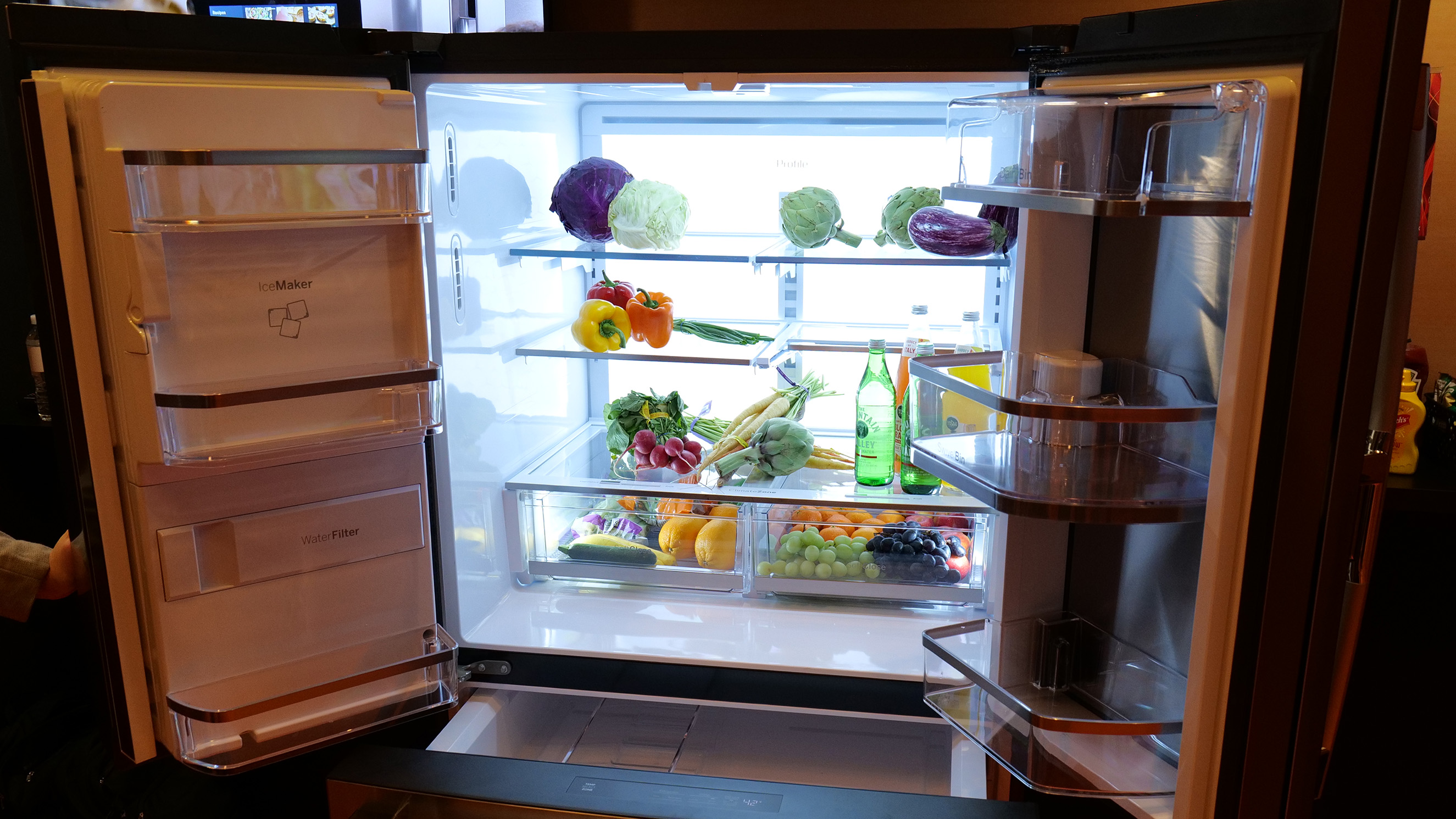
The GE Profile Smart Fridge stops you from buying too much kale

If you’ve ever bought a bag of spinach only to come home and realize you already had a bag of spinach, you may appreciate this fridge. I had a chance to check out the GE Profile Smart Fridge with Kitchen Assistant at CES and was surprised to find I kinda wanted one. To be perfectly honest, most attempts I’ve seen at the show to “stick some AI in it” are at best amusing but usually completely unnecessary.

Here, though, the AI has a purpose. After seeing how the autofill water dispenser worked, I asked the GE Appliance reps how easy it was to change the fridge’s water filter. Jason May, a GE Appliances product management executive, walked up to the fridge’s (appropriately sized) touchscreen and said “Hey HQ, where’s my water filter?” (HQ is short for SmartHQ, GE Profile’s assistant). Then, relying on information it had gathered from this model’s user manual, the AI assistant explained exactly where to find it (in the left hand door below the ice maker). It took another rep about two seconds to pop out the filter and, justlikethat, the task was on its way to done.

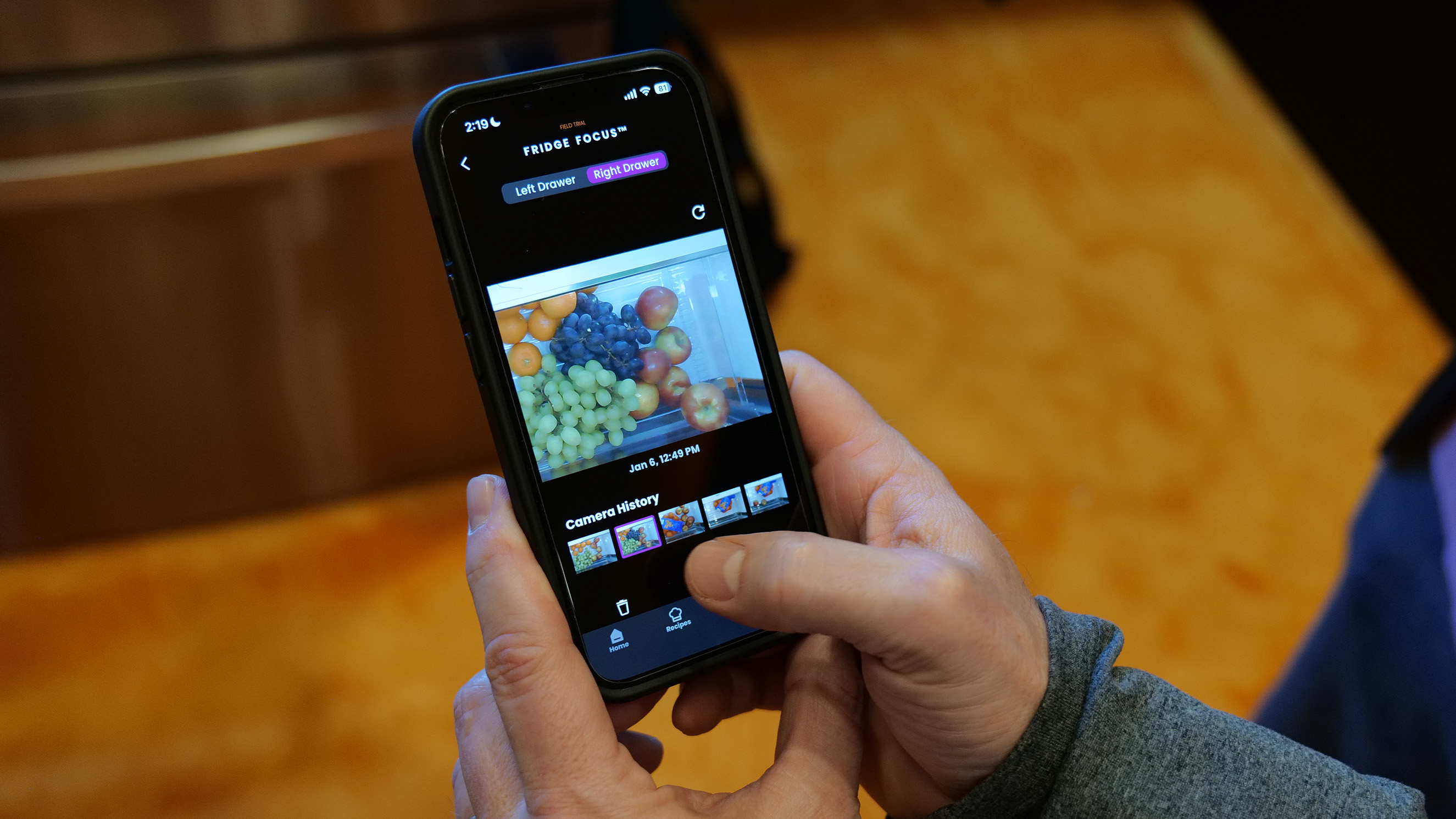
As for the spinach conundrum, that’s handled by a crisper drawer camera, called Fridge Focus. Each time you open the drawers, a built-in camera (that you can physically shutter or turn off in the app) takes a video snapshot of what’s left when you’re done. So if you’re at the store and wondering how much kale you already have, you can take a peek and see.

Checking out what's in the crisper drawer using the Fridge Focus feature.
Sam Rutherford for Engadget

Wendy Treinen, GE Appliances’ senior director of product communications, told me the camera can see what’s in the crisper drawer, but can’t see who accessed it. So if you’re hoping your fridge will rat out whoever at the last of the grapes, you’re out of luck. It can however, help that grape-eater easily add more fruit to the family shopping list.

That’s the most unique feature the fridge offers: a patented, built-in barcode scanner. It lives in the water dispenser and when you walk up, a little green light activates and scans the barcode of whatever you hold up to it. So if you’re drinking the last of the almond milk, you scan the container and it’ll automatically add it to your list.

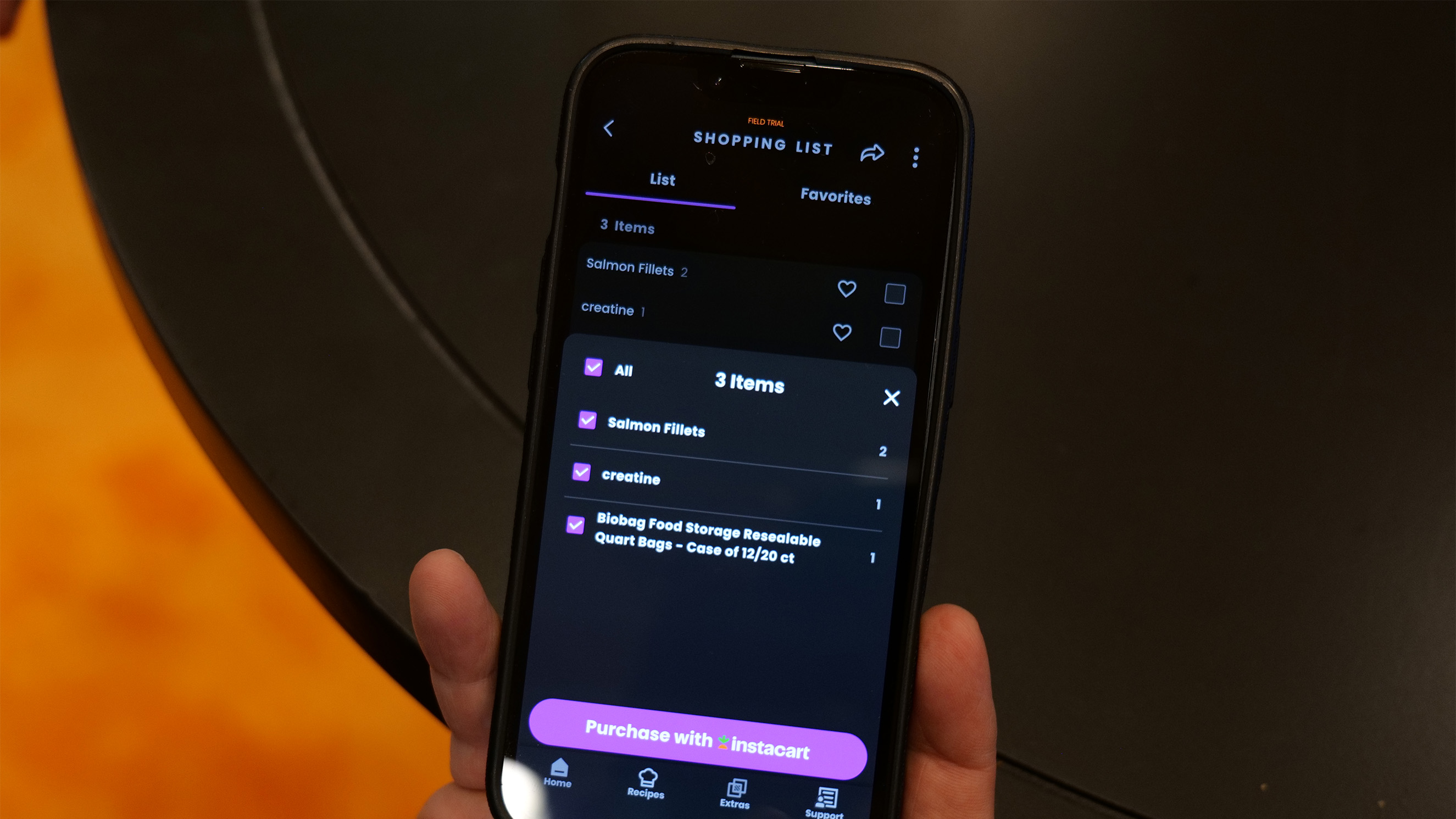
That list can be accessed through the SmartHQ app which you can either check off at the grocery store or, if you really want to get deluxe about it, use the Instacart integration and have it delivered to your door. I scanned a few products — a box of vitamin C mix and a package of cinnamon raisin bagels — both of which quickly popped up on the screen and joined the running list.

Adding grocery items to Instacart with one button.
Sam Rutherford for Engadget

The scanner can recognize four million products, including household items like paper towels and trash bags, but you can add things a other ways too. The easiest is probably just asking your fridge to do so, saying “Hey HQ, add paper towels to my shopping list.” The app allows manual additions and you can add items using the recipe function as well.

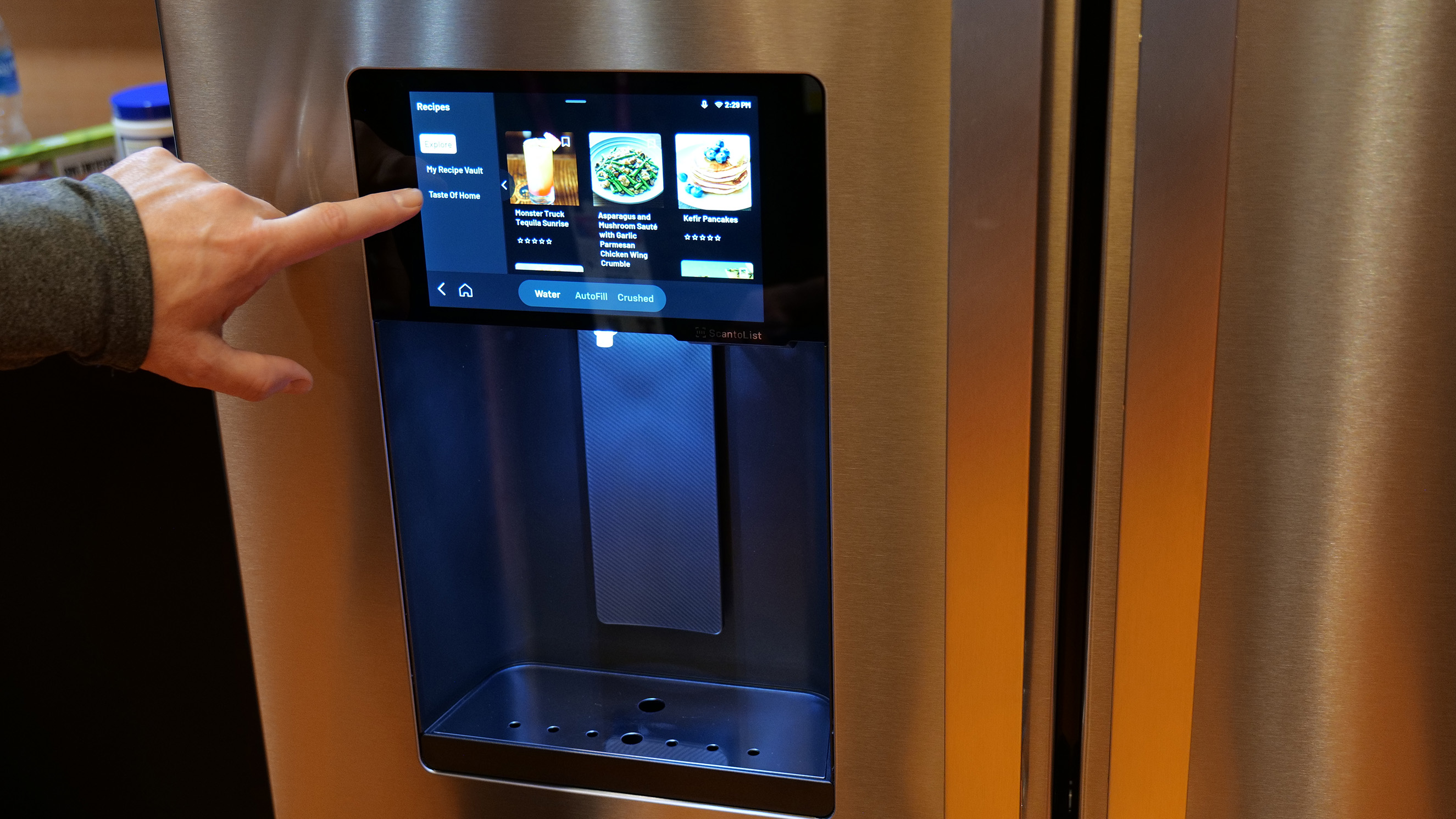
For the launch of the fridge, GE Profile has partnered with Taste of Home and will send 50 recipes each month to the fridge for users to try. Once you see the ingredients list, you can add anything you’re missing to your shopping. Those 50 recipes will cycle out at the end of the month to make way for a new 50, so if you cook something and like it, you’ll need to to add it to your personal recipe vault.

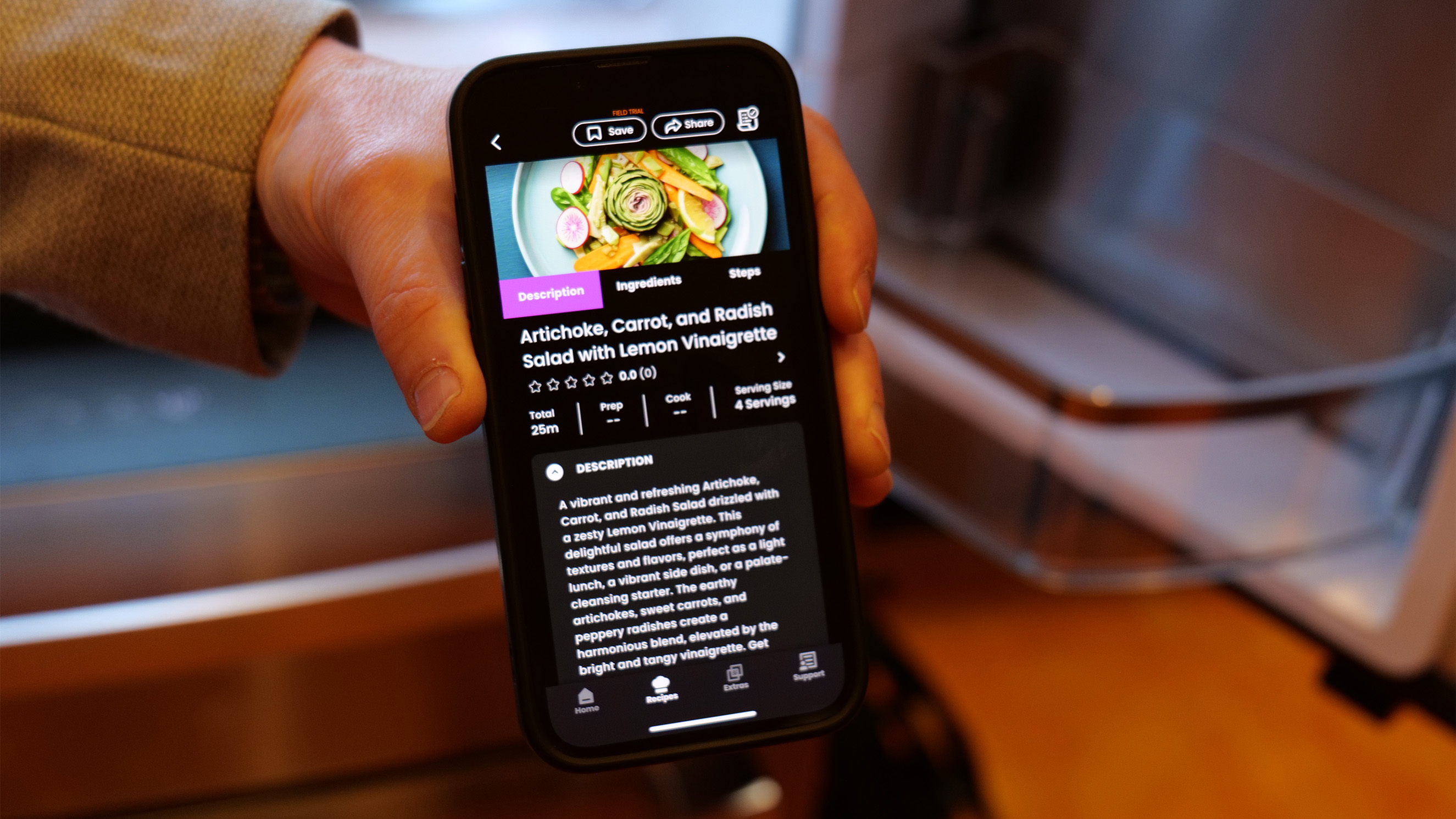
The AI assistant can also create recipes for you. The GE rep snapped a picture of an array of produce and asked SmartHQ what he could make with it. A list of recipe suggestions popped up and they all looked quite tasty (to be fair, I hadn’t eaten yet and it was already 2PM).

The recipe created from a picture of produce. Sam Rutherford for Engadget

I mentioned the water dispenser’s hands-free auto-fill feature earlier. That’s been available on GE Profile fridges for a while and lets you select your glass capacity and walk away while it fills. You can also ask for, say, a half cup of water for a recipe. A new “precise fill” feature will dispense larger amounts in sequence. Say you need ten cups of water for soup. Since you can’t fit a huge vat in the water dispenser tray, you can instead use a smaller jug and the auto-filler will fill it the correct amount of times.

Another of my favorite bits is the screen. Fridges with giant, interactive screens make my eyes roll. Yes, it’s novel and eye-catching and perhaps amusing, but what possible problem is it trying to solve? The screen here is eight inches, which is enough to display scanned items, show recipes, and display the weather atop a pretty image when you’re not actively using the interface.

Finally! A reasonably sized fridge screen.
Sam Rutherford for Engadget

The GE Appliances reps were eager to point out that this is just the beginning of what they want to do with the fridge. My college Sam Rutherford asked whether the fridge would be able to alert you before your lettuce went bad, and we were told something that addresses that problem is on the horizon. It would likely work by recognizing when you purchased a perishable, and how long that perishable typically lasts. The company is also working with a chef on a feature that can reimagine your leftovers to create something new.

During the demo, May told me that the whole idea around the fridge’s design was to do something other than just “put a big screen on it with a bunch of apps that don’t have ay relevance to anything.” Instead the engineers started with problems people actually have — knowing what to buy at the store, knowing what’s already in the fridge, answering the eternal, unrelenting “What’s for dinner?” question — and designed the fridge around that.

I’d have to live with it a while to know whether those problems were solved, but so far, I can say this is the most intrigued I’ve felt about a smart fridge yet. The GE Profile Smart Fridge with Kitchen Assistant will be available in March from geappliances.com for $4,899.

A good amount of organization.
Sam Rutherford for Engadget

This article originally appeared on Engadget at https://www.engadget.com/home/kitchen-tech/the-ge-profile-smart-fridge-stops-you-from-buying-too-much-kale-172433059.html?src=rss

The Shine 2.0 is a compact wind turbine for your next camping trip

As power gets more dicey, personal energy generation only gets more appealing. Shine’s compact turbine isn’t going to power your house any time soon (though Rachel Carr, the company’s co-founder told me they have plans in that direction) but it can suck up the energy required to refill a smartphone in as little as 17 minutes. Of course, what it can generate depends on wind speed. That same charge could take as long as 11 hours if there’s only a slight breeze.

That power curve, and its ability to operate at night, sets the turbine apart from solar panels. Of course, on a completely still day, the Shine as inert as a becalmed sailing ship but if the wind picks up even as little as a breeze, it gets to work making power. The turbine even automatically pivots on the included stand to face into the wind.

Shine turbine 2.0
Shine turbine 2.0
Shine

The Shine 2.0 looks like a thin space football and has a screw-off cap that reveals a hollow compartment for the stand and tie downs. The cap then doubles as a key to unlock the blades. It all weighs just three pounds, which is impressively light considering it also houses a 12,000mAh battery that can output up to 75 watts. This is the second version of the turbine and updates include a USB-C port instead of USB-A, as well as app connectivity.

The company claims you can set the entire thing up in around two minutes. I watched the Carr take the turbine from fully closed to unfurled and ready for the stand in about that long. Unfortunately, there was no wind rushing through the CES show floor so I couldn’t see it spin, but Carr was kind enough to spin it for me.

Spinning the Shine Turbine 2.0
Amy Skorheim for Engadget

Possibly the most exciting part is Shine’s plan for more expansive power generation. Shine 3.0, which the company is working on now, will be a 100 to 300 watt system and grid-tied turbines are on the wish list.

Pre orders are now open for the Shine 2.0 through Indiegogo for $399 and units should begin shipping this spring.

Update, January 7 2026, 4:00PM ET: This story has been updated to correct the wattage output and include the co-founder’s name.

This article originally appeared on Engadget at https://www.engadget.com/home/smart-home/the-shine-20-is-a-compact-wind-turbine-for-your-next-camping-trip-191000940.html?src=rss

IKEA’s first CES appearance included a $6 Matter smart bulb

I know IKEA is all about small, efficient spaces, but their meeting room inside the Venetian during the company’s first-ever CES was the same size as my (not large) living room. Plenty of people were as excited as I was to see what the Swedish designers brought with them to the show and the room was thick with humans. A bowl full of BELÖNING bars helped ease my mounting claustrophobia and I was able to check out the new smart home lineup.

Like most things IKEA, the 21 Matter-compatible smart home devices are simple, sleek and silly affordable. They include a $6 smart bulb, an $8 smart plug, a $6 smart remote and a slew of home sensors. A slightly pricier ($15) globe bulb is a direct answer to my longstanding wish for more attractive (but affordable) smart bulbs.

One of my favorite of the new devices was the BILREA remote control. It’s a smooth, riverstone-like object that either comes with two simple buttons or a button and a scroll wheel. It pairs up with and controls IKEA’s smart devices and lamps but what I really love is the magnetic mount integrated into its body. You can either attach the remote to any ferrous surface or use the small metal chip and included adhesive to give the remote a home on a wall or elsewhere. Why have so few other companies come up with a way to neatly and simply organize these tiny yet crucial controllers?

The whole suite is Matter-compatible and, as such, it needs a hub to function. IKEA has its own, DIRIGERA, but, true to the Matter principles of interoperability, you can also use a Matter hub you already own. The new line of smart home devices should start showing up in IKEA stores and on its website sometime in January.

Lamps and speakers from the TEKLAN smart home collection.
Amy Skorheim for Engadget

Apart from the egalitarian and utilitarian items, the Swedish brand also brought a new collection of products, TEKLAN, designed in collaboration with designer and photographer Tekla Evelina Severin. These include circular Bluetooth speakers in color-saturated patterns and solids ranging from eight to 18 inches. There are also two new speaker lamps, called KULGLASS, that have glass lampshades inspired by soft serve ice cream. Those devices went on sale on January 1 this year.

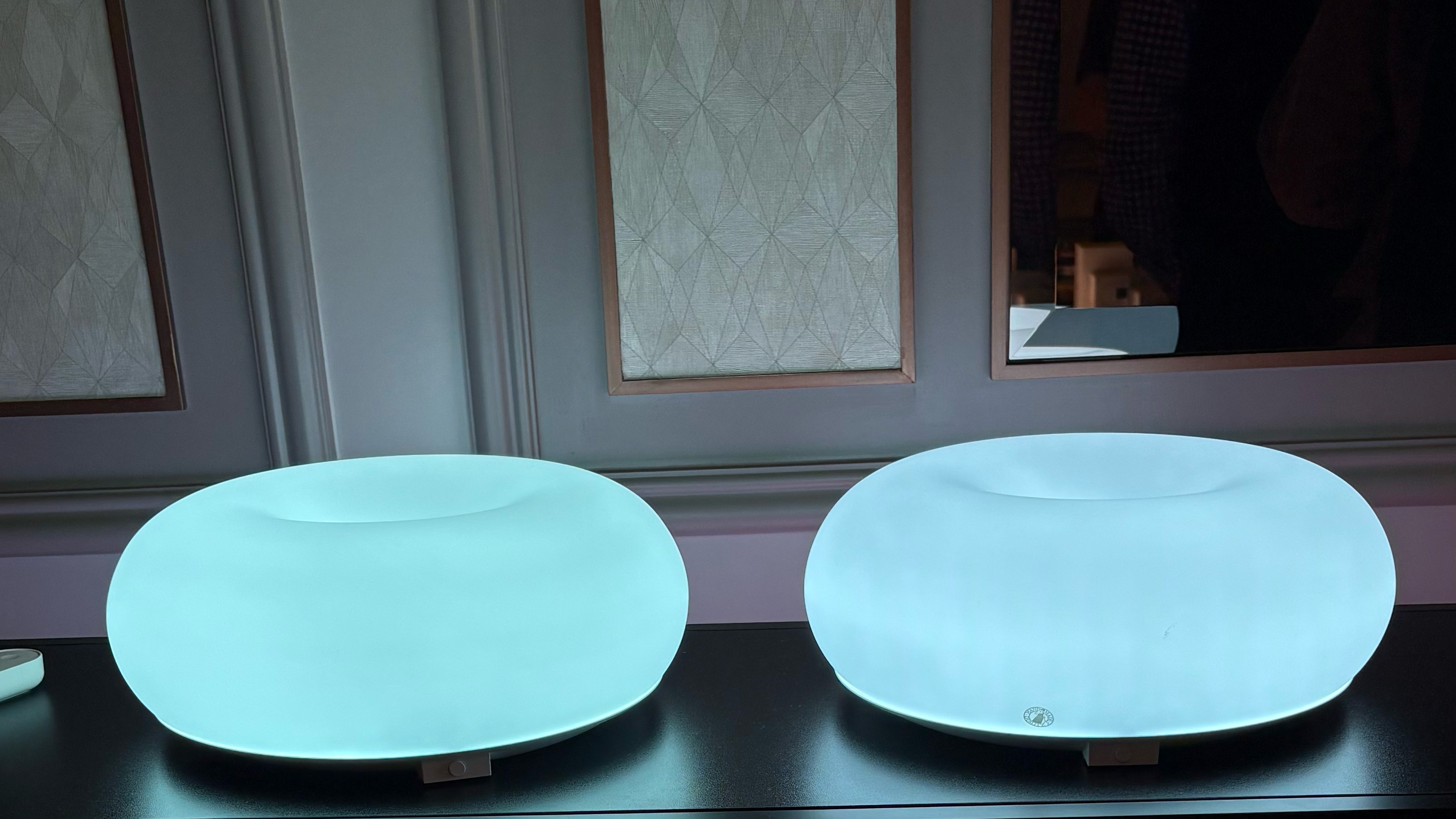
Finally, I made my way (three feet) over to the curious, donut-shaped lamps. This is the smart version of the store’s popular VARMBLIXT lamp that debuted three years ago. It’s controllable through the app or the remote I mentioned above and gently cycles through a rainbow of color patterns, shifting slowly from shade to shade. I got lost for a while watching it morph from white to pink to red and back again. For a moment I forgot I was wedged into a room too full of people. I figured those around me probably wanted a look at the lamp for themselves, so I took a longing glance back at the BELÖNING bowl and squeezed out of the room.

The popular VARMBLIXT donut lamp is now smart.
Amy Skorheim for Engadget

This article originally appeared on Engadget at https://www.engadget.com/home/smart-home/ikeas-first-ces-appearance-included-a-6-matter-smart-bulb-172623474.html?src=rss

Clear Drop is trying to do something about all those plastic bags under your sink

Even if you bring home as few bags as possible — using reusable bags, carrying purchases home with your own two hands — soft plastics sill accumulate. I certainly have a collection with one flimsy plastic sack filled with dozens or hundreds of others. I plan to do something with it… eventually.

Unfortunately, there aren’t a ton of options for what to do with those soft plastics, as most recycling facilities can’t accept them. But no one likes seeing them end up in oceans and rivers and stuck up in trees. So I was excited to see the Clear Drop Soft Plastic Compactor (CPC) at CES. It’s a pre-recycler for your home that turns hundreds of bags into a solid brick that’s easier to transport. Certain facilities can accept the bricks for recycling.

Clear Drop works with 95 percent of soft plastics, sucking up bags, bubble wrap, ziplocks, package wrap and cling film into its maw. It then compresses and heats the plastic to form a compact eight by twelve by four inch brick. I asked Matt Daly, Clear Drop’s head of product, what the compactor can’t take and I was told you can’t add ping pong balls, IV bags and camera film. Easy enough.

A compacted brick the Clear Drop CPC produced.
Amy Skorheim for Engadget

It was satisfying to see the little slot on the top gobble up the plastic bags Daly fed it. The Clear Drop wasn’t set to smash and heat at the show, but I was assured by another Clear Drop rep that any plastic smell produced during operation was minimal and the company performed safety tests to ensure the machine didn’t create any harmful emissions.

Daly said it would take about a month for most households to create a brick, which translates to around a 30 gallon trash bag full of other bags. Once that brick is created, it can be shipped to one of Clear Drop’s partner facilities and pre-paid USPS shipping envelops are included. They work with multiple US-based recycling facilities and do audits to ensure the bricks are actually being recycled.

Of course, I was a little disappointed the bricks couldn’t be tossed in my blue curbside bin, but Daly said they’re working to bring more recycling partners on board and the ultimate goal is to create an infrastructure that would eventually include municipal recycling. Shipping the bricks somewhere feels a little counterproductive, eco-wise. And the machine itself is not cheap. The price is split up over the course of two years, but it adds up to $1,400.

I’m happy to see someone somewhere is doing something to address a pretty clear problem. While it’s not perfect, this is probably the best household-level solution I’ve seen to that can ensure your bags don’t go down some sea turtle’s throat.

This article originally appeared on Engadget at https://www.engadget.com/home/smart-home/clear-drop-is-trying-to-do-something-about-all-those-plastic-bags-under-your-sink-140000254.html?src=rss

Birdbuddy’s new smart bird feeder can ID birds by their songs

I’m seeing a ton of smart bird feeders again this year at CES — and I’m inexplicably drawn to them. Perhaps because the idea of birds nibbling on seeds and flying away represents a natural purity and freedom that doesn’t exist within the halls of CES. Birdbuddy was one of the first smart bird feeder brands, with a wildly successful Kickstarter back in 2020. And this year, they’ve added birdsong to their species identification capabilities.

Two new feeders, the Birdbuddy 2 and the Birdbuddy 2 Mini both have the new feature, but the latter is a more affordable, starter version. The Bird Buddy 2 is solar-powered with built-in panels. It’s slightly larger and has a bigger seed capacity, too. Both have HD cameras you can manually position either vertically or horizontally and both have a mic to help with birdsong IDs.

Upgrades to the cameras include a faster wake-up time when a bird lands and the housing for the seed and camera has a more modular design that makes the feeder easier to clean. The lens is now protected by Gorilla Glass, which may seem excessive, but Rhian Humphries, Birdbuddy’s senior PR manager, said curious birds often peck at the camera looking for more food.

The AI Birdbuddy uses was trained on real bird visits and at the end of each day, you’ll get a “postcard,” a curated look at the birds that visited your feeder that day. Of course, the app can also alert you each time you have a feathered customer in your yard so you can tune into nature’s live feed and soothe your soul for a few.

The Birdbuddy 2 goes for $199. It sold out during the pre-order phase, and those units will ship in February, but more will be available in mid 2026. The Birdbuddy 2 Mini costs $129 with pre-orders opening in summer.

This article originally appeared on Engadget at https://www.engadget.com/home/smart-home/birdbuddys-new-smart-bird-feeder-can-id-birds-by-their-songs-122000692.html?src=rss

Cozyla showed off a 4K, 55-inch digital family calendar at CES

New tech at CES often makes categorization hard. Is Cozyla’s latest device a digital family calendar, a TV or a smart home hub? After seeing it, I’d say the answer is, yes? Cozyla calls the Calendar + Max the “largest interactive hub in it’s category.” And indeed, it’s the size of a big flatscreen, but the main interface is just like any other Cozyla device, an Android-based family calendar and planner with shared schedules, notes, meal plans, and chores. It syncs with Google, Yahoo and Apple calendars as well as Outlook, and it will run apps from the Google Play store. (Yahoo owns Engadget, but has no say in our editorial coverage.)

But this super-sized version can also stream shows and movies with whichever apps you subscribe to. The photo integration, via the app, will take pics from your phone and stick them on the bigs screen. You can also create a slideshow and photo walls to look at when the calendar is off.

The smart home integration lets you view your security camera and video doorbell feeds on a much larger scale than your phone’s display can offer. The display has a camera of its own so you can make FaceTime and Zoom calls.

The Max comes on a built-in stand that you can roll around the house, along with a battery that should power the whole thing for around six hours. When I first heard about it, I found myself wondering where I would put Calendar+ Max in my house. The kitchen is an ideal centralized calendar location, but I don’t want to watch Miss Scarlet in there. Luckily, the wheels make that conundrum moot. This can go anywhere you want it to, and swings into portrailt orientation that looks great for chore mode, and landscape orientation for watching shows.

Possibly the best part is the lack of subscription required. Like with all Cozyla screens, there’s no ongoing cost to use all the features. The Calendar + Max has no release date or price available just yet, but if I ever decided to organize my family’s life beyond barely contained chaos, I can see myself considering it.

This article originally appeared on Engadget at https://www.engadget.com/home/smart-home/cozyla-showed-off-a-4k-55-inch-digital-family-calendar-at-ces-040352802.html?src=rss