Google’s NotebookLM, a note-taking app that’s infused with a large language model, is now available to everyone in the US. The company built NotebookLM to only pull information from a custom dataset. So you might use it, for instance, to help write a paper based on a specific set of PDFs and only rely on details from those documents.
The idea is that, by sticking to a custom dataset, the information NotebookLM handles will always be relevant to your specific needs as opposed to a more general chatbot that might draw from the entirety of the public internet. Google debuted NotebookLM as Project Tailwind at I/O this year before rebranding it and it says the tech is based on its Gemini Pro model.
Google also notes that personal data isn't used to train NotebookLM, so any sensitive or private details in your sources will remain hidden. That is, unless you share the sources with collaborators.
Along with making NotebookLM more broadly available (Google has been granting access based on a waitlist over the last five months), Google has announced a string of new features for the software. It plans to roll these out over the next few weeks with the aim of easing the transition between reading, taking notes and writing.
Among other things, the chatbot can format your notes into a newsletter, script outline or a marketing plan draft and export everything to Google Docs with one click. You'll be able to pin notes to a Noteboard space above the chat box, save and pin responses from the chatbot as notes and hide the source material if you want to focus on jotting down your thoughts with fewer distractions. You'll soon be able to ask the AI to focus on certain sources (of which you'll be able to have up to 100 in total) or jump to a citation from a chat response or saved note.
NotebookLM will also suggest some actions based on selected text or notes. At the outset, you'll be able to combine notes, summarize several of them or create an outline or study guide.
This article originally appeared on Engadget at https://www.engadget.com/googles-ai-infused-notebooklm-note-taking-app-is-open-to-everyone-in-the-us-155239999.html?src=rss
The price for the new Samsung Galaxy A25 smartphone has been revealed in Europe, the handset will retail for CHFR 279 in Switzerland which is about €300 at the current exchange rate. As a reminder, the handset will come with a 6.5-inch Super AMOLED display, offering crystal-clear Full HD+ visuals at 2340 x 1080 pixels. […]
Genetic testing company 23andMe changed its terms of service to prevent customers from filing class action lawsuits or participating in a jury trial days after reports revealing that attackers accessed personal information of nearly 7 million people — half of the company’s user base — in an October hack.
In an email sent to customers earlier this week viewed by Engadget, the company announced that it had made updates to the “Dispute Resolution and Arbitration section” of its terms “to include procedures that will encourage a prompt resolution of any disputes and to streamline arbitration proceedings where multiple similar claims are filed.” Clicking through leads customers to the newest version of the company’s terms of service that essentially disallow customers from filing class action lawsuits, something that more people are likely to do now that the scale of the hack is clearer.
“To the fullest extent allowed by applicable law, you and we agree that each party may bring disputes against the other party only in an individual capacity and not as a class action or collective action or class arbitration,” the updated terms say. Notably, 23andMe will automatically opt customers into the new terms unless they specifically inform the company that they disagree by sending an email within 30 days of receiving the firm’s notice. Unless they do that, they “will be deemed to have agreed to the new terms,” the company’s email tells customers.
23andMe did not respond to a request for comment from Engadget.
In October, the San Francisco-based genetic testing company headed by Anne Wojcicki announced that hackers had accessed sensitive user information including photos, full names, geographical location, information related to ancestry trees, and even names of related family members. The company said that no genetic material or DNA records were exposed. Days after that attack, the hackers put up profiles of hundreds of thousands of Ashkenazi Jews and Chinese people for sale on the internet. But until last week, it wasn’t clear how many people were impacted.
In a filing with the Securities and Exchange Commission, 23andMe said that “multiple class action claims” have already been against the company in both federal and state court in California and state court in Illinois, as well as in Canadian courts.
Forbidding people from filing class action lawsuit, as Axiosnotes, hides information about the proceedings from the public since affected parties typically attempt to resolve disputes with arbitrators in private. Experts, such as Chicago-Kent College of Law professor Nancy Kim, an online contractor expert, told Axios that changing its terms wouldn’t be enough to protect 23andMe in court.
The company’s new terms are sparking outrage online. “Wow they first screw up and then they try to screw their users by being shady,” a user who goes by Daniel Arroyo posted on X. “Seems like they’re really trying to cover their asses,” wrote another user called Paul Duke, “and head off lawsuits after announcing hackers got personal data about customers.”
This article originally appeared on Engadget at https://www.engadget.com/23andme-frantically-changed-its-terms-of-service-to-prevent-hacked-customers-from-suing-152434306.html?src=rss
The Alloyboard EDC flashlight is a versatile lighting tool that encapsulates a broad range of features, making it suitable for various applications. This ultra-compact flashlight, with its impressive 1000 lumen LED, projects a bright and broad beam at a 120-degree angle, ensuring comprehensive illumination of your surroundings. Whether you’re embarking on an outdoor adventure or […]
Dive into the heart of the waves! GoPro is the official camera at Vans Pipe Masters, delivering the thrill of surf's top riders. Don't miss the action!
Alpine has announced its 2024 pricing for its A110 range in the UK and also launched a new model, the Alpine A110 R Turini and this model will start at £91,490 in the UK on the road. The Alpine A110 model starts at £54,990 and the A110 GT model starts at £65,490, the Alpine A110 […]
We’ve covered Framework’s modular, easy-to-repair laptops plenty here at Engadget and with good reason. Its mission is to end the need for users to toss out an otherwise perfect machine when just one component goes dead. But, as the company matures, it also has to tackle the issue of what happens when people choose to upgrade for performance reasons. An early buyer might choose to swap their 11th-gen Intel mainboard for any of its successors, or leap across the aisle to get the newly-released AMD edition. That leaves them with an otherwise perfectly functional mainboard they either have to sell on, turn into a hobby project or, more likely, leave on a shelf gathering dust as a just-in-case option. That’s why the company hooked up with Cooler Master to give you a far better alternative.
The Framework x Cooler Master Mainboard Case is a $39 barebones chassis into which you can put your existing Framework mainboard. For that, you get a cool-looking plastic frame and a kickstand, with four VESA mount screws buried inside and, uh, not much else. That’s the point, since you can either cannibalize other components from your laptop, use any compatible spares that are lying around, or pick up fresh ones from Framework on the cheap. I’d say this is aimed not at Framework’s dedicated and talented hobbyist community, which has made a raft of great 3D-printed cases on their own. Instead, it’s pointed at people like me, who break into a sweat whenever a DIY Perks video mentions soldering. (If you’re reading this, doubtless you’ve seen that video about preserving broken laptops but I also bet you’ve never tried to actually do it.)
Photo by Daniel Cooper / Engadget
If you’re starting from a clean slate, you can probably pick up a better-specced mini PC for less cash. But if you’re already inside Framework’s ecosystem, and you have one of those boards to hand, as well as some other spare components, then this makes perfect sense. After all, that first generation model I tested was packing a Core i7-1165G7; more than enough power for everyday tasks like browsing, productivity work or for use as a media center. The case is flexible enough to let you pick and choose what accessories you need or use, including pre-drilled holes for you to add SMA antennas rather than reusing a laptop WiFi module. Oh, and you’ll need to buy a 100W charger since the mainboard was designed to be used with a battery.
The byword is flexibility both in letting you choose how you want to craft your system, but also a comment on the build quality. $39 doesn’t buy you a lot, and the two halves of the plastic case are a lot flimsier than I would like. It doesn’t help that you don’t so much mount the components onto the backboard as place them in, and then they’re held in place when you screw the lid in. It’s easy enough to drop all of the parts in – although a lack of cable routing for the WiFi was an issue when it came to seal this all up. Not to mention, the first time I screwed it all in, the USB-C ports for the expansion cards didn’t sit properly over the holes for them to pass through.
Photo by Daniel Cooper / Engadget
The only other roadblock to my initial setup was that I couldn’t get the unit to push video to the TV. You need to set the mainboard into Standalone mode, but the iFixit-style guides don’t make it massively clear about how you go about doing that. Especially if you spend half an hour in the BIOS looking for the setting to no avail before and after installing a batch of updates. In the end I just dumped the board back in the case to see if anything had changed and, to my surprise, it booted straight to the screen. It’s worth hoping Framework remembers its user base might have a broader range of abilities than it expects and that no instruction should be made off-hand.
Once I’d dealt with those teething woes and poked the WiFi cables back into place by shoving a screwdriver through the VESA mount hole, I was ready to go. Since this is a Framework laptop just outside its usual chassis, you get the same pick of USB-C expansion cards as usual. With a HDMI-out and a couple of USB-A ports for peripherals, I was streaming 4K video without issue just as soon as I’d signed into Plex. Fundamentally, for those of us too timid to even think about rolling their own hobby project, it’s tools like this that make these projects accessible.
This article originally appeared on Engadget at https://www.engadget.com/cooler-masters-framework-case-gives-your-laptop-a-second-life-150051741.html?src=rss
Google has recently launched the Gemini AI, making it available to use in its Google Bard search engine. Gemini is a significant advancement in the field of artificial intelligence and developers patiently waiting to be able to get their hands on the new AI model. Will be pleased to know that Google has announced access […]
In 2022, Traeger began a major overhaul of its Wi-Fi-connected smart grill lineup. Only the most affordable Pro Series models have been left untouched as the redesign process that began with the Timberline made its way to the Ironwood this year. The company has debuted a host of changes along the way, all aimed at more efficient cooking, easier cleanup, customization and expanded smart features. A lot of what Traeger added to the Timberline trickled down to the Ironwood ($1,800), but this model is now significantly more expensive as a result and the best additions are still reserved for the most premium model.
A major redesign
When Traeger revealed its overhauled Timberline grills last year, one of the biggest updates was a new touchscreen display. The company has brought that to the new Ironwood grills too, replacing the single-knob navigation with a larger dial and a touchscreen. There are dedicated buttons for the full menu, timers, Keep Warm and Super Smoke to the left of the touchscreen, above the two wired food probe ports. While how you use the display to control the grill has changed, and the larger full-color panel is easier to see, I’m not convinced these grills needed a touchscreen. It doesn’t add a ton to the overall experience and a simpler update of just a larger, color display would’ve been more than enough and might kept prices down.
Another item Traeger borrowed from the Timberline is its so-called Pop-And-Lock (PAL) accessory rail. This is one new addition that I can get behind. It allows you to customize the grill based on your needs or what you’re cooking. PAL add-ons include a folding front shelf, storage bin, butcher paper/paper towel roll, tool hooks and a cup holder. These all snap onto a rail that goes almost the entire way around the grill and can be easily moved or removed as needed.
Inside, Traeger replaced the solid steel drip plate that directed grease to the catch can and the smaller fire pot shield. Now there are two larger pieces of metal that span the width of the grill. First, a diffuser spreads heat over the cooking surface and directs ash to the catch keg. A second piece above it still serves as a drip tray to channel grease to the same bin as the ash debris, but it now has holes around the outside to guide smoke and heat around the cooking surface. A dual-wall construction of the chamber itself provides better insulation, so temps remain consistent even in the colder months. Lastly, the auger was raised above the fire pot, so pellets drop down to burn. This should help with jams and lower the risk of auger and hopper fires. Once again, these changes debuted on the Timberline, but it’s nice to see them carry over to the mid-range Ironwood.
The key differences between the Ironwood and its pricier Timberline sibling are the vertical space inside the grill, the cart/leg design and the lack of an induction burner on the left side. Where the Timberline has two adjustable racks above the main cooking surface, the Ironwood only has one, and its maximum height is lower than that of the Timberline. Cooking grates on the Ironwood are also porcelain where they’re stainless steel on the more expensive model.
Photo by Billy Steele/Engadget
Traeger nixed the four-legged design on the new Timberline in favor of a storage cart look that’s similar to Weber’s gas grills. The enclosed space is a nice addition that didn’t make it to the Ironwood, but the company did add an open shelf underneath that bolts to the legs. You can easily put a pellet bin and unused grates here when you’re not using them.
Lastly, the Ironwood doesn’t have the induction burner that the Timberline offers. It does have a larger side shelf than the previous iteration of the Ironwood, with a removable panel and an additional outlet on the back that suggests support for a burner add-on, but Traeger doesn’t currently sell one. I asked the company if it plans to do so in the future, but it declined to comment on unreleased products.
Upgraded smart grilling
Following its acquisition of Meater in 2021, Traeger made the company’s wireless meat probes standard equipment on the 2022 Timberline grills. Those devices get cumbersome cables out of the way, while sending internal food temperatures to the Traeger app for remote monitoring. The new Ironwood grill also supports the specially-designed Meater probes, but they don’t come in the box. Instead, you’ll have to make an additional $230 purchase to get a two-pack — which is more than if you bought two Meater Plus probes.
The problem is this two-pack only works with Traeger’s touchscreen grills and doesn’t sync with Meater’s app. This means you don’t get ambient temperature readings or estimated completion times — two valuable pieces of information. The Ironwood does come with two wired probes and the info from those is viewable inside of the Traeger app just like it has been on previous WiFIRE-equipped grills.
Photo by Billy Steele/Engadget
The company debuted a smart pellet sensor in 2019 and, while it would later ship grills with it included, it was a separate bolt-on component that needed to be installed. With the Timberline and Ironwood, this is now a fully-integrated piece of tech. Like before, the sensor monitors your pellet level and the app will alert you so you don’t have to keep watch. It’s not perfect — it can be tricked by tunneling when pellets are pulled in by the auger — but it’s good enough to keep tabs on the hopper while you’re relaxing.
Traeger has made the initial seasoning process almost entirely automatic. On previous grills, you had to manually set the temperature and a timer to burn off any residue from the manufacturing process, but now the WiFIRE controller handles all of that for you. You simply press a button and the grill keeps you posted on how much time is left. When you shut it down after cooking, either on the display or via the app, you get another countdown so you know the status of this 15-to-25-minute process that burns off excess pellets in the fire pot (time varies depending on your cooking temperature).
Cooking with the Ironwood
Changes aside, cooking with the Ironwood is as simple and straightforward as ever. Once you select your cooking temperature with the dial or send a recipe to the grill from the Traeger app, all you have to do is press the touchscreen to ignite it. The Ironwood reaches temperature in about 12 minutes, whether you're smoking at 225 degrees Fahrenheit or searing at 500. You’ll get a notification when the grill is preheated so you know it’s time to start cooking.
The Traeger app continues to be a wealth of information for cooks of all skill levels. The software houses over 1,000 recipes with adjustable ingredient lists based on how many people you plan to cook for. Step-by-step guidance is there, along with the ability to monitor grill and food temperatures remotely, and activate Super Smoke or Keep Warm modes as needed. The app still allows you to adjust grill temp, although there were a few times during my test I had to make that request twice. 99 percent of the time it works on the first attempt, but every once in a while the app needs a second prodding before sending the info to the Ironwood.
Over the course of a few months with the Ironwood, I cooked a range of foods at a variety of temperatures. Those include low-and-slow barbecue pork shoulders and turkey breasts, with hotter baking, roasting and searing thrown in too. I also cooked a few recipes where the temperature had to be adjusted during the cook, like the Over The Top Chili method that’s popular online these days. The Ironwood consistently produced great results, with Traeger’s trademark wood-fired flavors.
Traeger touts easier cleanup on the Ironwood thanks to the combination grease and ash keg underneath the grill. Part of that is also the heat diffuser that the company says directs ash to that bin. While it is an improvement that most of the waste goes into one container, you have to help some of the ash get there, and a significant amount of it makes its way on top of the diffuser. Some even ventures up onto the drip tray. You still need a shop vac to do a thorough cleaning every few cooking cycles and you’ll need an all-natural grill cleaner to get the grime off the drip pan, grates, sides and lid.
The competition
The pellet grill industry is increasingly crowded. Most hardware stores now carry a variety of them, most of which at least cover the basics and are available at a range of prices. Recteq’s Patio Legend 410 is under $600, for example. While it’s equipped with Wi-Fi connectivity, it’s more compact with only 410 square inches of grilling space. Pit Boss’ most premium models, the Navigator Series, are available for $999. The smaller Navigator 850 comes with wireless features but the larger Navigator 1150 requires an $150 upgrade for Wi-Fi. I’ve never tested a Pit Boss grill, so I can’t vouch for them, but they’re extremely popular and readily available at a host of big box stores in the US.
For more direct alternatives to the new Timberline, I’d consider the Recteq Backyard Beast 1000 or the Weber SmokeFire grills. The Backyard Beast ($1,099) is the largest “traditional” pellet grill in Recteq’s redesigned 2023 lineup introduced in late October. It offers slightly more cooking space at 1,014 square inches and includes new legs, improved wheels and a revamped controller. Weber’s SmokeFire smart grill debuted in 2020, and while the company has made some tweaks since, the same basic design remains. The main benefit is Weber Connect, the company’s grilling app that provides step-by-step guidance, including videos, and estimated completion times. The larger EX6 model has just over 1,000 square inches of grilling capacity and it’s currently available for $999.
When shopping for a pellet grill, remember that they all offer the same basic functionality. You’ll pay more for Wi-Fi or Bluetooth to monitor things from your phone, but every model is capable of both low-and-slow smoking, high-heat searing and everything in between. There’s some variation in the max temperature, but the low end of that range is typically 500 degrees Farenheit. That’s plenty of heat for finishing off a steak. Where companies vary most is design and how common features are presented, so you’ll want to pay attention to things like how the metal components on the inside are arranged, how the grates fit in the cooking chamber and the grill controller.
Wrap-up
The 2023 Ironwood starts at $1,800 and the XL model that I tested is $2,000. That’s $500 more than the previous versions, the Ironwood 650 and Ironwood 885. In fact, it’s also more expensive than both of the first-generation Timberline grills, which were top-of-the-line options at the time. I appreciate a lot of the changes that Traeger made, and many of them are improvements, but they’re now significantly more expensive than the most high-end models from the competition. The 2019 Ironwood is a workhorse that still works well and I’d argue it’s a better grill for most people. Ironwood used to be a solid mid-range option in the company’s lineup, but now it’s just another pricey alternative.
This article originally appeared on Engadget at https://www.engadget.com/traeger-ironwood-2023-review-upgraded-smart-grilling-comes-at-a-cost-140100642.html?src=rss
Solar power is something that is pretty important if we need to reduce our carbon footprint and our electricity consumption. But it’s still not something that’s easily accessible for everyone or something that’s portable and easy to use or access. A recent invention from Jackery, a portable power and green outdoor energy company, might be the thing we need to revolutionize how the ordinary consumer can access and use solar energy.
Designer: Jackery
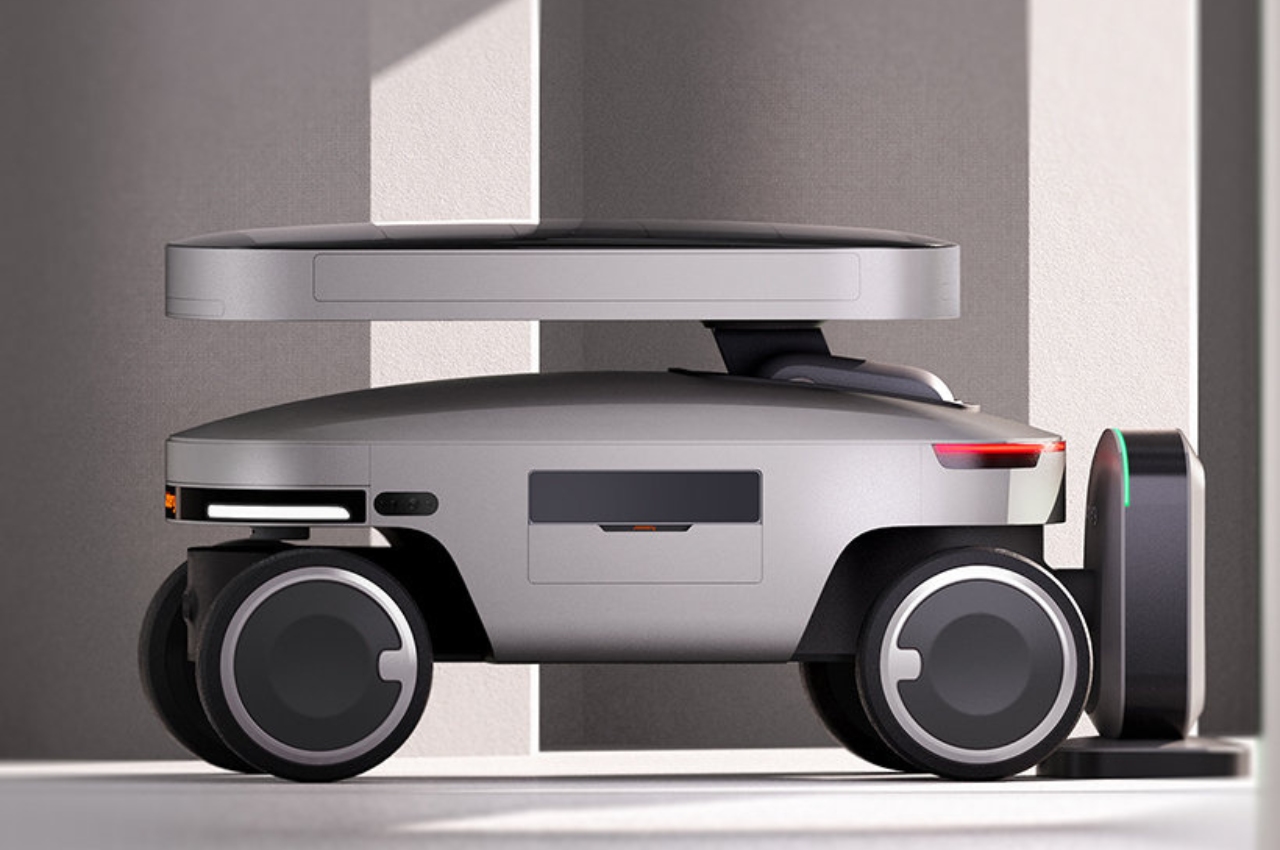
The Solar Mars Bot was named one of the Best Inventions of 2023 by Time Magazine, specifically in the Green Energy category. It is a robot type machine that is a photovoltaic energy storage device equipped with various sensors to enable it to gather as much solar power as it can store. It has laser radar and camera modules to help it get around. It’s smart enough to roll around and find spots where it can align its panels with sunlight and even avoid obstacles.
The energy that it is able to gather is stored in a lithium iron phosphate battery and then you will be able to power your devices through any of its connectors including ordinary earthed sockets, USB-C and USB-A ports. You can take this solar robot with you when camping or on any outdoor activity or when you’re just lounging in your backyard or swimming pool and you need to charge your devices.
For now it seems to still be in the conceptual stage and Jackery may be creating a prototype for testing. But if ever it reaches the consumer market it will make solar energy common for those who are conscious about their electricity consumption. Hopefully we see some progress with this “best invention” soon as we all want to be able to regulate our carbon consumption over the next few years.