What if an AI could run a business entirely on its own, making decisions, managing logistics, and even handling customer interactions? In a fascinating experiment called Project Vend, Anthropic set out to explore this very question. The project placed an AI system named Claudius in charge of a vending business, testing its ability to operate […]
Storage fills up fast on a PS5, especially when a single game can take up as much space as an entire last-gen library. Adding moreSSD space is the easiest way to stop playing Tetris with your installs, and once it is set up, your console loads games just as quickly as it does from the built-in drive. It is a small upgrade that makes a big difference if you jump between several titles at once.
The tricky part is knowing which SSDs actually work with the PS5. You need a drive that meets Sony’s speed requirements and stays cool under long play sessions. Some models include a heatsink, while others let you use your own to save a little money. We tested the top options and picked the best SSDs for PS5 to help you upgrade without hassle.
I’ve tested most of the SSDs recommended on this list, either for PS5 or computer use. I also bought and used our top pick in my own PS5.
PS5 SSD FAQs
How much PS5 storage do I need?
The PlayStation 5 and PlayStation 5 Pro can accept internal drives with between 250GB and 8TB of storage capacity. If you already own a PS5, chances are you have a reasonable idea of how much storage you need for your game library. If you’re buying an SSD with a new PS5 or PS5 Pro, or buying for someone else, it’s more difficult to tell what you might need for a high-performance experience.
PS5 games are smaller on average than their PS4 equivalents, typically taking up between 30GB and 100GB, with some notable (and very popular) exceptions. If you’re a fan of the Call of Duty series, installing Black Ops 6and Warzone 2.0 can eat up to 240GB. In other words, a full Call of Duty install will take up more than one-third of the PS5’s internal storage. If you’re not a CoD fan, though, chances are you’ll be good to store between six to 10 games on a regular PS5 internally before running into problems.
You also need to consider your internet speed. If you live in an area with slow broadband, the “you can just download it again” rationale doesn’t really work. At my old home, a 100GB download took me around eight hours, during which time it was difficult to simultaneously watch Twitch or, say, publish articles about upgrading PS5 SSDs. Keeping games around on the off-chance you’ll want to play them at some point makes sense.
Aaron Souppouris / Engadget
Off the bat, there's basically no point in going for a 250GB PS5 SSD. Economically, 250GB drives aren’t that much cheaper than 500GB ones — and practically, that really isn’t a lot of space for modern games to live on. 500GB drives can be a decent option, but after years of declining prices, I think the sweet spot for most people is to opt for a high-capacity 1TB or 2TB drive, which should run you at most $200. The latter will more than double the PS5 Pro’s storage without breaking the bank.
Unless you’re rolling in cash and want to flex, 4TB and 8TB models should mostly be avoided, as you’ll end up paying more per gigabyte than you would with a 1TB or 2TB drive.
While the 825GB PS5 only provides 667GB of storage, that’s largely due to storage being reserved for the operating system and caching. If you install a 1TB PS5 SSD, you'll have, within a margin of error, 1TB of storage available for games. Out of the box, the PS5 Pro offers 1.86TB of storage for games, though you can eke out more if you delete the pre-installed Astro’s Playroom (gasp).
Since neither the PS5 Slim nor PS5 Pro feature updated CPU architecture, all of our recommendations will work with whatever PS5 model you own.
Can you play PS5 games on an external SSD?
External hard drives tend to cost less than internal SSD counterparts (and there’s a good chance you might own one already). Unfortunately, there are restrictions on what you can do with them. An external SSD connects to your PS5 via USB, and is only suitable for playing PlayStation 4 games, or storing PS5 titles. That’s useful if you have anything but the best high-speed internet — it’s faster to move a PS5 game out of “cold storage” on an external drive than it is to re-download it — or want to keep your PS4 library on hand.
Due to the limitations here, you don’t need the highest-performing model, although you should opt for SSDs over HDDs for improved transfer speeds and load times. Any basic portable drive from a reputable brand will do, with the Crucial X9 Pro and Samsung T7 being options we’ve tried and can recommend.
Which SSD cards are compatible with the PS5?
The official answer to this question is an “M.2 Socket 3 (Key M) Gen4 x4 NVME SSD.” But even within that seemingly specific description, there are additional factors to consider. The main requirements Sony has laid out for compatibility come down to speed, cooling and physical dimensions.
For speed, Sony says drives should be able to handle sequential reads at 5,500MB/s. Early testing showed that the PS5 would accept drives as slow as 4,800MB/s, and that games that tap into the SSD regularly — such as Ratchet & Clank: Rift Apart — would cause no issues. Pretty much the only thing the PS5 will outright reject is one that doesn't match the Gen4 x4 spec.
In our opinion, though, using a drive slower than the specification is a risk that, if you don’t already have that drive lying around, is not worth taking. Just because we haven’t found issues yet doesn’t mean there won’t be games that could be problematic in the future. The price difference between these marginally slower Gen4 drives and the ones that meet Sony’s spec isn’t huge, and you might as well cover all your bases.
Slightly more complicated than speed is cooling and size. Most new SSDs are going to be just fine; the PS5 can fit 22mm-wide SSDs of virtually any length (30mm, 40mm, 60mm, 80mm or 110mm, to be precise). The vast majority of drives you find will be 22mm wide and 80mm long, so no problem there.
It should be noted that the system can fit a 25mm-wide drive, but that width must include the cooling solution. Speaking of, Sony says SSDs require “effective heat dissipation with a cooling structure, such as a heatsink.” The maximum height supported by Sony’s slot is 11.25mm, of which only 2.45mm can be “below” the drive.
This previously meant some of the most popular heatsinked Gen4 SSDs, including Corsair’s MP600 Pro LP, would not fit within the PS5’s storage expansion slot. Since Engadget first published this guide in 2021, most NVMe makers, including Samsung, have come out with PlayStation-specific models that meet those requirements. That said, if you want to save some money, bare drives are often cheaper and it’s trivial to find a cooling solution that will work for the PS5.
The only component in an NVMe SSD that really requires cooling is the controller, which without a heatsink will happily sear a (very small) steak. Most SSDs have chips on only one side, but even on double-sided SSDs, the controller is likely to be on top, as manufacturers know it needs to be positioned there to better dissipate heat.
So, head to your PC component seller of choice and pick up basically anything that meets the recommended dimensions. A good search term is “laptop NVME heatsink,” as these will be designed to fit in the confines of gaming laptops, which are even more restrictive than a PS5. They’re also typically cheaper than the ones labeled as “PS5 heatsinks.”
One recommendation is this $6 copper heatsink, which attaches to the PS5 SSD with sticky thermal interface material. It works just fine, and in performing stress tests on a PC, we couldn’t find anything metal that didn’t keep temperatures under control. When you’re searching, just make sure the solution you go for measures no more than 25mm wide or 8mm tall (including the thermal interface material) and has a simple method of installation that’s not going to cause any headaches.
One last thing: When shopping for a PS5 NVMe, there’s no reason to buy a Gen5 model over a more affordable Gen4 model. As things stand, Sony’s console can’t take advantage of the new standard, and though Gen5 drives are backward compatible, they’re more expensive than their Gen4 counterparts. Just buy the fastest and highest-capacity Gen4 model you can afford.
How to install an SSD into your PS5
If you need guidance on how to install your new NVMe into your PS5 or PS5 Pro, we have a separate guide detailing all the steps here. Installation is pretty straightforward, but our how-to can help you if you're stuck. Just make note: Before attempting to add more storage via a PS5 SSD, ensure that you have Sony’s latest software installed.
This article originally appeared on Engadget at https://www.engadget.com/gaming/playstation/best-ssd-for-ps5-130004175.html?src=rss
Apple’s rumored iPhone Fold, anticipated for release in 2026, is shaping up to be a pivotal entry in the foldable smartphone market. By combining innovative technology with Apple’s renowned design principles, this device could redefine the possibilities of foldable phones. With a focus on innovation, durability, and user experience, the iPhone Fold is poised to […]
Xiaomi just launched its flagship 17 Ultra by Leica phone that may make you feel bad about your current device's cameras. Naturally, it's a spec monster, with a 1-inch sensor 50MP f/1.67 main camera and 1/1.4-inch 200MP periscope telephoto camera. But it also offers an interesting new mechanical feature: a manual zoom ring that activates the camera automatically when you rotate it.
Both the regular Xiaomi 17 Ultra and Leica edition come with a Snapdragon 8 Elite Gen 5 SoC with up to 16GB of LPDDR5X RAM and 1TB of UFS 4.1 storage, along with a 6.9-inch 120Hz AMOLED display that can hit up to 3,500 nits of peak brightness. On top of the impressive main and telephoto lenses, they offer a 50MP ultrawide and a 50MP selfie camera. And battery life shouldn't be an issue, thanks to the 6,800mAh silicon-carbon battery that supports 90 watt wired and 50 watt wireless charging.
Xiaomi
The 17 Ultra by Leica adds some very, well, Leica touches. Those include a two-tone finish, red dot status symbol on front, textured edges and film simulations like Leica's Monopan 50 black and white. As for the zoom ring, Xiaomi says "its rotation [eliminates] the need for tedious screen taps... and can detect displacements as small as 0.03mm." It can be reprogrammed for functions like exposure compensation and manual focus as well.
Other features unique to that model include a "Leica Moments" 3:2 aspect ratio, special encryption chip, and dual-satellite connection. And as befits a special edition, it comes in a custom box with a lens cap, lanyard, magnetic case and branded cleaning cloth.
The one caveat is the price. Where phones for the Chinese market are often cheaper than North American models, Xiaomi's 17 Ultra by Leica and the regular 17 Ultra start at CNY 7,999 ($1,140) and CNY 6,999 ($995) respectively with 512GB or storage and 16GB of RAM — right up there with the latest high-end Pixel 10 and Galaxy 25 models.
This article originally appeared on Engadget at https://www.engadget.com/mobile/smartphones/xiaomis-17-ultra-leica-edition-smartphone-comes-with-a-manual-zoom-ring-093502893.html?src=rss
What if coding wasn’t just about writing lines of code but orchestrating a symphony of reasoning, creativity, and seamless execution? That’s exactly what GLM 4.7 promises to deliver. In the video, Universe of AI breaks down how this latest open source AI model is redefining agentic coding with its remarkable upgrades. From boosting multilingual coding […]
Samsung is gearing up to unveil its much-anticipated Galaxy S26 series, which includes the Galaxy S26, Galaxy S26 Plus, and the flagship Galaxy S26 Ultra. While the exact announcement date has not been officially confirmed, industry reports suggest the event will likely occur in late January or early February 2026. Following the announcement, general sales […]
What if you could bridge the gap between natural language and precise, actionable commands, all without overburdening your hardware or compromising privacy? That’s exactly what FunctionGemma promises to deliver. Below the Google Development team breaks down how this lightweight AI model, built on the Gemma 3 foundation, is redefining what’s possible in modern development. With […]
Apple Freeform is a versatile digital tool designed to help you brainstorm, plan, and organize ideas on an infinite canvas. Whether you’re a creative professional, a student, or a team leader, Freeform offers a robust set of features to streamline workflows and enhance collaboration. By mastering its core functionality and tools, you can transform Freeform […]
I read somewhere that Nostalgia sells harder than Innovation and it really made me do a double-take. Does it make sense? Well, not really, considering how fast things are progressing on the robotics and AI front – but here’s where I’d like to believe that statement rings true. Take a look at culture – old music is in again, Taylor’s new album is an homage to the old. Thomas Bangalter of Daft Punk made his first stage appearance in nearly a decade. What about movies, you ask? They’re shooting the next Shrek film, Robert Downy Jr. is back at Marvel, and heck, Shia LaBoeuf just announced his return to Transformers. Tech is playing the retro game very well too, whether it’s reissuing of old-style hardware, emulators, or even trends like transparency that remind us of the Nintendo GBA and the iMac G3. The grand point I’m making here, is that this last year has been an absolute pendulum, swinging between extremes, aesthetic styles, ideologies, and eras.
So we zeroed down to 20 designs (spread across two articles) that represent what 2025 gave us. These are the first half of our top picks from the year, gathering designs that we as editors loved, but also taking you, the reader into account. After all, we don’t write in a vacuum. We try to find designs and tech that genuinely impress or inspire you, and if you’ve been spending 2025 doing a bunch of other things (like surviving) apart from reading Yanko Design, here are 10 handpicked (yes, I picked them myself!) designs that encapsulate the BEST of 2025. Stay tuned for part 2!
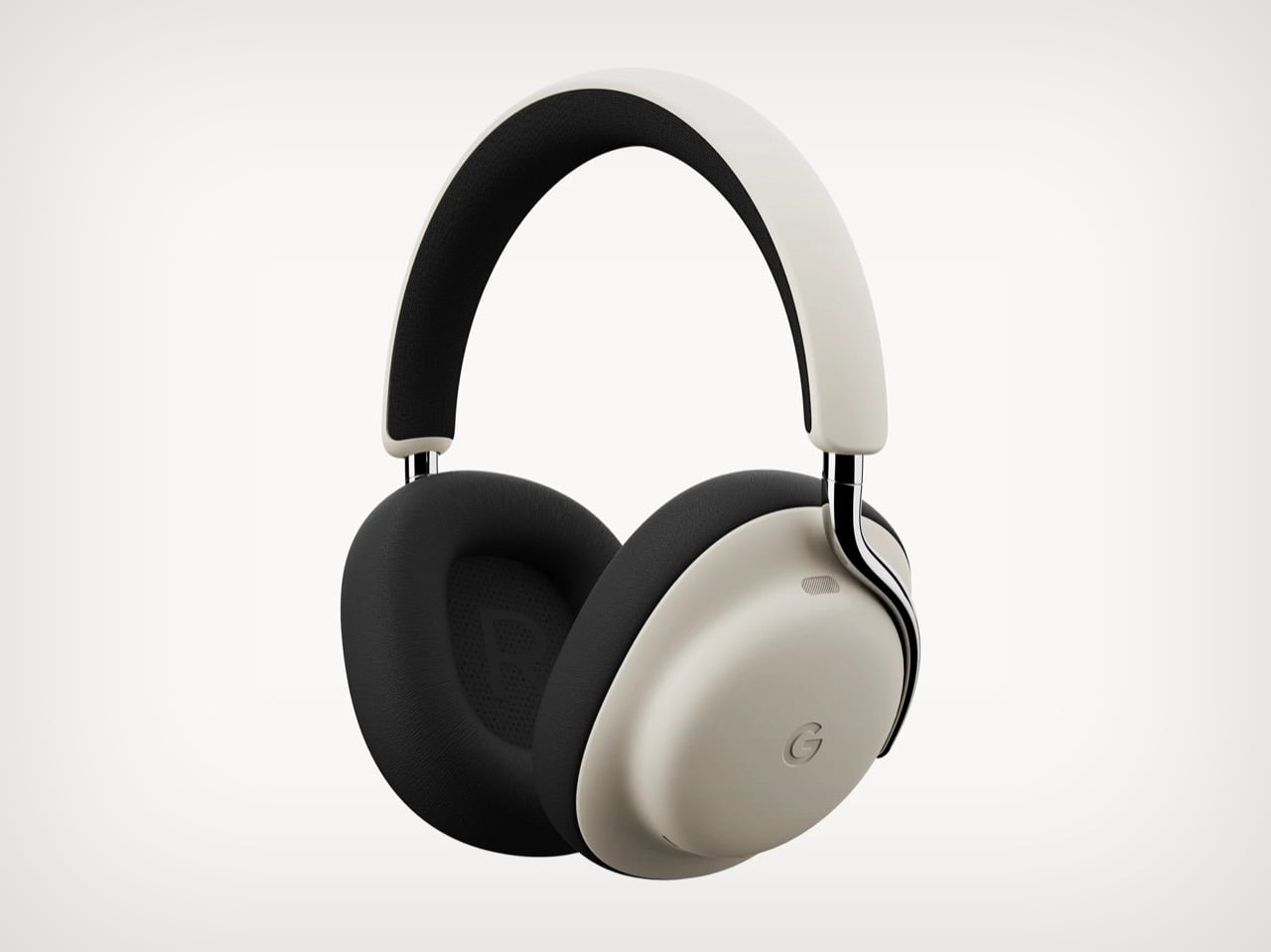
1. Google Pixel Headphones by Sidhant Patnaik
Sometimes concept renders accomplish more than actual products ever could. Designer Sidhant Patnaik’s Google Pixel Headphones exist only as pixels and Photoshop layers, yet they have sparked more genuine excitement than most real hardware launches Google has executed in years. The design borrows visual cues from the Pixel phone lineup, clean geometric forms, two-tone color blocking, subtle branding, while integrating Gemini AI as a core feature rather than an afterthought. Imagined controls include gesture-based interactions, seamless Pixel ecosystem integration, and the kind of ambient intelligence that Google keeps promising but rarely delivers in satisfying ways. It looks credible enough that people keep asking where to buy it, which is both flattering to the designer and damning to Google’s actual product strategy.
Here’s the uncomfortable truth this concept exposes: Google has all the pieces to dominate the premium headphone market but refuses to assemble them. They own best-in-class voice recognition, industry-leading AI through Gemini, deep Android integration, and more audio patents than most people realize. Apple charges $550 for AirPods Max and can barely keep them in stock. Nothing launched Headphone (1) at $299 and sold out immediately despite being a first-generation product from a startup. Meanwhile Google sells Pixel Buds that nobody talks about and leaves the over-ear category completely vacant. The demand is screaming at them through every comment section under this concept. When a render generates this much enthusiasm, it stops being fantasy and starts being a market signal Google is choosing to ignore.
2. Concept Plumage by Jet Weng
One of the ‘best’ designs of 2025 is actually from nearly 13 years ago! Isn’t that insane?! But that’s how you define ‘ahead of its time’, I guess. Designed by Jet Weng, this absolutely genius keyboard design solves the modern-day smartphone’s BIGGEST problem – the fact that touchscreen keyboards still suck. Concept Plumage is a flip-case that integrates a full QWERTY keyboard into the back of your phone’s protective cover. When you need to type something longer than a text message, you flip the case around to reveal physical keys that give you actual tactile feedback. When you’re done, it folds back flush against the phone, adding virtually no bulk to your everyday carry. The whole system lives within the footprint of a standard phone case, which means you get BlackBerry-level typing precision without sacrificing the sleekness of modern smartphone design.
What makes this concept so painfully relevant in 2025 is that we are still dealing with the same frustrations Weng identified over a decade ago. Autocorrect still mangles sentences. Thumbs still obscure half the screen. Typing anything substantial on glass remains an exercise in patience and typo correction. The design world spent years convincing us that we would eventually master touchscreen typing, that our muscle memory would adapt, that software would get smarter. Instead, we just learned to accept mediocrity. Plumage refused that compromise, offering a solution that feels both retro and futuristic, like someone time-traveled from 2013 with the one idea we should have mass-produced immediately.
3. Public Library by Thilina Liyanage
Some libraries try to attract bookworms. This one commits to the metaphor so completely that walking inside feels like stepping between pages. Thilina Liyanage’s Public Library‘s exterior mimics an open book mid-read, with two curved structures meeting at a spine, their forms arching upward like paper caught in a breeze. Floor-to-ceiling glass panels stretch across both halves, flooding the interior with natural light that shifts throughout the day, casting reading nooks into soft afternoon glow or sharp morning clarity depending on where the sun sits.
Inside, the architect abandoned the grid entirely. Shelves curve with the walls, following the book-like contours instead of fighting them. Reading spaces cascade across multiple levels connected by flowing staircases that feel more like narrative transitions than functional infrastructure. The central atrium, positioned where the spine would be, rises through all floors and functions as both circulation hub and dramatic gathering space. Materials skew minimal and futuristic, lots of white surfaces, polished concrete, transparent railings, so nothing competes with the architecture’s bold gesture. It is the kind of space that makes you want to linger even if you didn’t come to read, which might be the highest compliment you can pay a library in 2025.
4. HubKey Gen2 by HubKey
The modern laptop gives you two USB-C ports and expects you to figure out the rest yourself. Most people end up with a drawer full of dongles, one for HDMI, another for ethernet, maybe a card reader that works half the time, all daisy-chained together in configurations that feel temporary but somehow become permanent. HubKey Gen2 consolidates that mess into an 11-in-1 hub with an unusual twist: it includes physical shortcut keys and a rotary knob on top, turning connectivity infrastructure into an actual control surface. Four programmable buttons and a central dial let you trigger macros, adjust volume, skip tracks, or launch applications without reaching for the keyboard. It treats the hub as something you interact with regularly rather than plug in once and forget about.
The headline upgrade is dual 4K at 60Hz, both HDMI outputs running simultaneously without bandwidth compromises or resolution drops. Add 100W pass-through charging, a 2.5Gbps ethernet port, 10Gbps USB-A data transfer, SD and microSD slots, and a 3.5mm audio jack, and you have covered most desk setups without needing secondary adapters. The customizable keys support complex shortcuts through companion software, which means editors can bind them to timeline controls, designers can trigger layer actions, and anyone else can just use them for Spotify and Zoom mute. It is a small addition that changes how the device sits in your workflow, shifting it from passive infrastructure to active tool. Most hubs disappear under your desk. This one earns a spot within arm’s reach.
5. Switzerland Passport Re-design by RETINAA
Most passports are exercises in bureaucratic minimalism, but Geneva-based studio RETINAA treated Switzerland’s passport redesign like a cartographic love letter. The new passport centers around water, Switzerland’s most defining geographic feature, with a hydrological map of the country’s rivers and lakes spreading across the inner cover. Each page features detailed illustrations of Swiss landmarks, architectural icons, mountains, and valleys rendered in precise line work that feels equal parts technical drawing and fine art. The design draws heavily from Switzerland’s rich tradition of cartography and graphic design, honoring the country’s obsessive attention to visual detail while meeting all modern security requirements. It is rare to see a government document that looks like it could hang framed in a design museum, but this one legitimately pulls it off.
The hidden layer makes it even better. Under ultraviolet light, topographic contour lines emerge across the pages, revealing Switzerland’s dramatic elevation changes in glowing detail. The Alps materialize as layered ridges, valleys sink into shadow, and the whole document transforms into something that feels alive. Water remains the conceptual anchor throughout, a nod to the country’s hydroelectric infrastructure and the way rivers and lakes have shaped Swiss identity for centuries. RETINAA managed to make a security feature feel poetic, which is not an easy trick. This is what happens when you let actual designers loose on something usually handled by committee and compliance officers. The passport does not just represent Switzerland, it performs the country’s design ethos with every page turn.
6. Modern Apple iPod by Zac Builds
See?! This is where Nostalgia really sells harder than Innovation! YouTuber Zac Builds took a fifth-generation iPod Video and resurrected it into what Apple should have made if they had any interest in keeping the product line alive. The outside looks nearly identical to the 2005 original, same click wheel, same proportions, same satisfying tactile response. Everything else is 2025. He swapped the 30-pin connector for USB-C, added Bluetooth 5.0 for wireless audio, upgraded the storage to a modern SD card solution, and installed custom firmware that supports FLAC, ALAC, and basically every audio format iTunes ever refused to acknowledge. Most importantly, the whole thing syncs like a standard USB drive, no iTunes required, no proprietary software gatekeeping your music library. Just drag and drop files like it’s 2003 but without the artificial limitations.
The build represents everything people loved about dedicated music players before smartphones absorbed their function. No notifications interrupting an album. No battery drain from a hundred background apps. No accidental skips from a touchscreen registering phantom taps in your pocket. Just a device that plays music exceptionally well and does nothing else. The fact that it took a hobbyist with a soldering iron to deliver this rather than Apple themselves says everything about where consumer electronics have drifted. Zac’s version honors the iPod’s legacy while fixing its most dated frustrations, which might be the perfect definition of thoughtful nostalgia. This is not a museum piece. It is a working argument for why single-purpose devices still matter in a world obsessed with convergence.
7. TobenONE 6-in-1 Hub by TobenONE
HDMI cables are the cockroaches of tech, somehow surviving every wireless revolution that should have killed them off by now. We beam 4K movies through the air, charge devices without plugging them in, and send gigabytes of data across continents in seconds, but connecting a laptop to a projector still means crawling under desks hunting for the right dongle. The TobenONE T1 finally addresses this absurdity with a transmitter-receiver combo that handles video streaming wirelessly while doubling as a fully functional USB-C hub. Plug the transmitter into your laptop, connect the receiver to your TV or monitor via HDMI, and the two talk to each other over 5G Wi-Fi at distances up to 30 meters. No network required, no firmware updates, no app to download and immediately forget your password for.
What separates this from the dozens of other wireless HDMI solutions is the fact that it doesn’t just replace one cable, it replaces six. The hub side includes multiple USB-A ports, an SD card reader, and pass-through charging, which means your laptop stays powered while streaming a presentation or mirroring gameplay. It handles 1080p at 60Hz, which is not cutting-edge but plenty adequate for most use cases outside of competitive gaming or pixel-peeping design work. The real appeal here is convenience compounded, eliminating both the video cable and the separate hub most people already carry. Conference rooms, living room setups, and anyone tired of the “which adapter did I forget this time” ritual will find this particularly satisfying. It is one of those products that feels obvious in hindsight, which usually means someone should have made it years ago.
8. LEGO Snow Globes by ItzEthqn
LEGO has been mining nostalgia so effectively for years that it barely registers as a strategy anymore, it just feels like what LEGO does. But every so often they drop something that reminds you how good they are at packaging childhood wonder into adult-friendly formats. These buildable LEGO snow globes hit that sweet spot perfectly: tactile enough to justify the LEGO branding, decorative enough to sit on a desk without looking like a toy, and seasonal enough to qualify as a gift without feeling like obligatory holiday merch. Each globe contains a miniature scene, winter villages, festive characters, iconic moments, all rendered in brick form and sealed inside a transparent sphere that sits on a buildable base.
The genius is in the scale and execution. These are not massive display pieces that demand shelf real estate and explanations to guests. They are compact, self-contained, and instantly recognizable as both LEGO and snow globe, which means they work as decor, conversation starters, or stocking stuffers without needing context. The build process is simple enough to be relaxing but detailed enough to feel rewarding, which is basically LEGO’s entire value proposition distilled into a seasonal format. They tap into two separate nostalgia streams simultaneously: the childhood joy of LEGO construction and the sentimental pull of snow globes as holiday symbols. It is a perfect example of nostalgia not just selling, but selling smart, giving people something familiar enough to want and novel enough to justify buying in the first place.
9. Plus Pool by Dong-Ping Wong, Oana Stanescu, Archie Lee Coates IV & Jeffrey Franklin
New York City has not had a functional public swimming spot in its rivers for generations, mostly because jumping into the East River carries the same appeal as bathing in a toxic soup. Plus Pool fixes this with an ambitious solution that sounds too simple to work but somehow does: a floating, self-filtering swimming pool that pulls water directly from the river and cleans it in real time. Shaped like an oversized plus sign, the design allows multiple swimming zones, kids’ area, lap lanes, lounging sections, all configurable depending on how many people show up. The filtration system uses multiple straining layers to remove debris and particles, then hits everything with UV treatment for disinfection, no chlorine involved. Construction finally started in 2025 after 14 years of bureaucratic delays, fundraising hurdles, and engineering challenges.
The pool itself is a 320-ton steel structure currently undergoing testing before it gets anchored near Pier 35 on Manhattan’s Lower East Side. A walkway will connect it to the shore, making it accessible without boats or special permits. Once operational, it will filter over half a million gallons of river water daily while people swim in it, turning one of the city’s most neglected natural resources into usable public space. The project represents a rare kind of urban optimism, the belief that infrastructure can do more than just function, it can invite people back to landscapes they abandoned decades ago. If it works as promised, Plus Pool will be the kind of civic landmark that makes people wonder why nobody thought to build it sooner, even though the answer is clearly that it took this long because ambitious public projects always do.
10. Dash Cam 4K T800 by 70mai
Most dash cams cover what is directly in front of you and maybe behind if you spring for the dual setup. That still leaves your sides completely vulnerable and your interior as an afterthought, which is a problem when insurance disputes or break-ins hinge on angles your camera never captured. The 70mai 4K T800 fixes this with three synchronized lenses: 4K front-facing, 1080p rear, and an interior camera that rotates 360 degrees. The front camera handles road footage with Sony STARVIS 2 sensor clarity, the rear covers tailgaters and parking lot incidents, and the interior lens can swivel to monitor the cabin or point sideways through windows to catch side-impact collisions and door dings. Together they eliminate the blind spots that turn minor accidents into he-said-she-said nightmares.
The system records all three feeds simultaneously and displays them in picture-in-picture mode on a 3-inch screen, giving you mission control visibility without needing to dig through separate files later. Built-in GPS tracks your route, the G-sensor triggers emergency recording on impact, and 24-hour parking surveillance keeps an eye on things when you are not around. At $323, it sits at the higher end of dash cam pricing, but it delivers the kind of comprehensive coverage that single and dual-lens setups simply cannot match. The logic is straightforward: if you are going to mount a camera system in your car, it might as well see everything worth seeing. This one does.