Apple was right about the iPad Calculator App… After 14 years, the iPad Calculator is Game-Changing

After over a decade, the iPad finally got a calculator app. Let’s just get one thing straight – Apple just made the calculator glamorous.

Steve Jobs debuted the iPad back in January 2010, that’s a whopping 14 and a half years ago… and mysteriously enough, the iPad never shipped with an Apple-branded calculator app. Whenever pressed on the issue, Apple spokespeople always had the same answer – they didn’t want to release a calculator app just for the sake of it. They wanted to get it right by designing the best-ever calculator app for the iPad. Up until yesterday, all that felt like deflection, that Apple didn’t quite care about calculators on the iPad (after all, it was an entertainment and visual productivity device). Today, however, Apple is vindicating itself after over a decade of judgment. The new iPad Calculator app debuted at WWDC and it’s INCREDIBLE.

The new Calculator app for the iPad comes with a familiar interface, but uses the iPad’s larger screen to its advantage, delivering more oomph thanks to larger real estate. It has a history feature and built-in unit conversions, but if you have an Apple Pencil lying around, the Calculator experience gets MUCH more interesting.

Pair the Calculator with the Pencil and you get what Apple calls Math Notes, a more interactive, personal experience that takes your hand-written notes and graphs and turns them into computable datasets. Write an equation and the calculator understands your handwriting and solves the equation for you. Draw geometry, label the parts, and add a ‘=’ sign and the app intuitively understands what you want to calculate, giving you the answer. It’s like the self-answering Horcrux book from Harry Potter and the Chamber Of Secrets but on steroids. The app understands what you’re drawing/writing and how you’re doing so too. It mimics your handwriting to deliver answers (so when you write 2+2=, it adds ‘4’ to the end in a similar writing style). You can change parts of your calculations and the answers update in real-time. You can turn equations into graphs, change variables, and watch the graph change in real-time too.

This brilliant reinterpretation of the calculator comes thanks to Apple’s integration of the calculator’s features in its Notes app. It’s nothing like anything we’ve seen before. In fact, we’ve seen ChatGPT and Google Bard (or Gemini) fail in this exact area, with their inability to understand graphs or photos of equations, resulting in hilariously wrong answers. The iPad calculator app sidesteps all that by giving you the ability to intuitively take notes and compute calculations using the Pencil. You don’t need to upload an image from a text book, just draw stuff out instead. Now whether the Math Notes will be able to do all this correctly is something entirely different. It could end up making the same mistakes as GPT and Google, or create unique errors that will only be made evident once the Calculator and Math Notes features roll out with iOS 18 this fall. For one, I can definitely say that math teachers are NOT going to be happy about all of this!

The post Apple was right about the iPad Calculator App… After 14 years, the iPad Calculator is Game-Changing first appeared on Yanko Design.
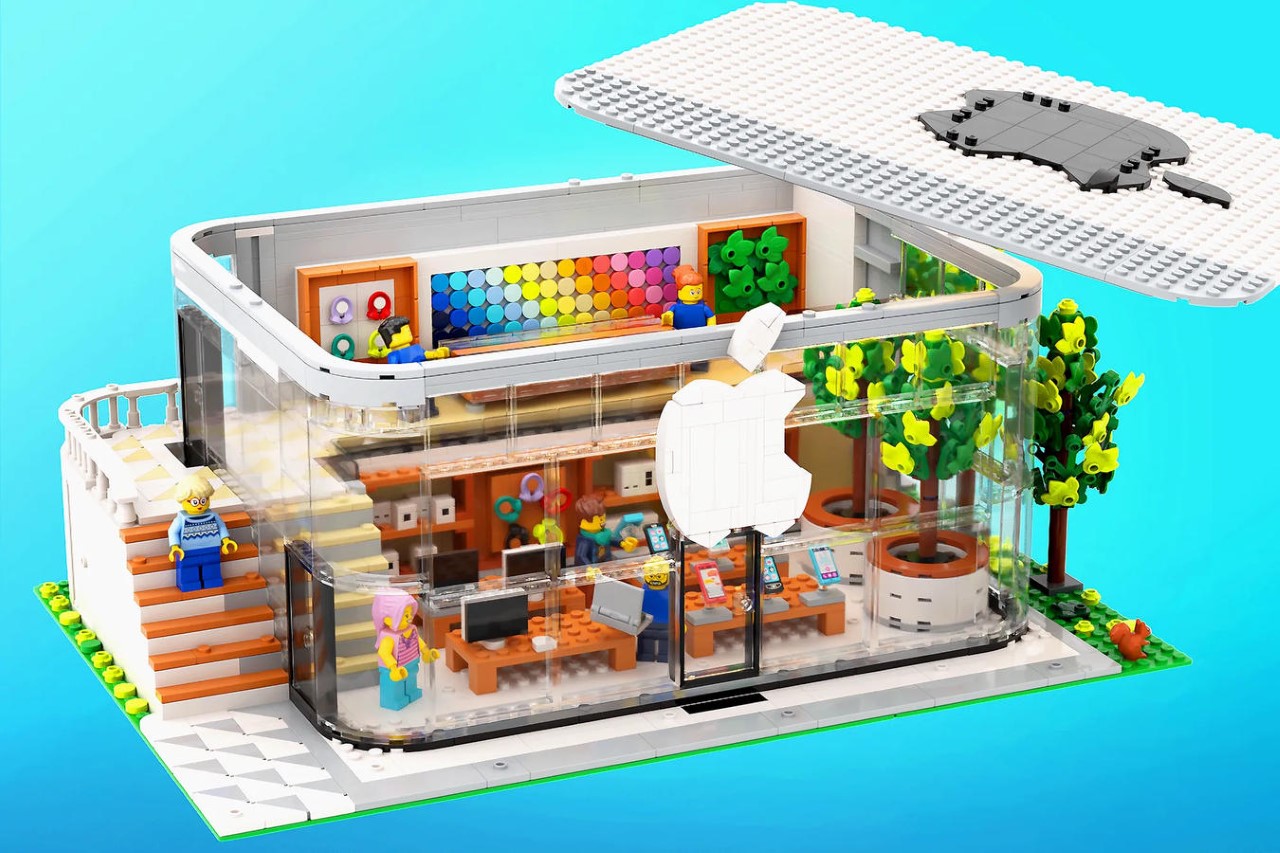
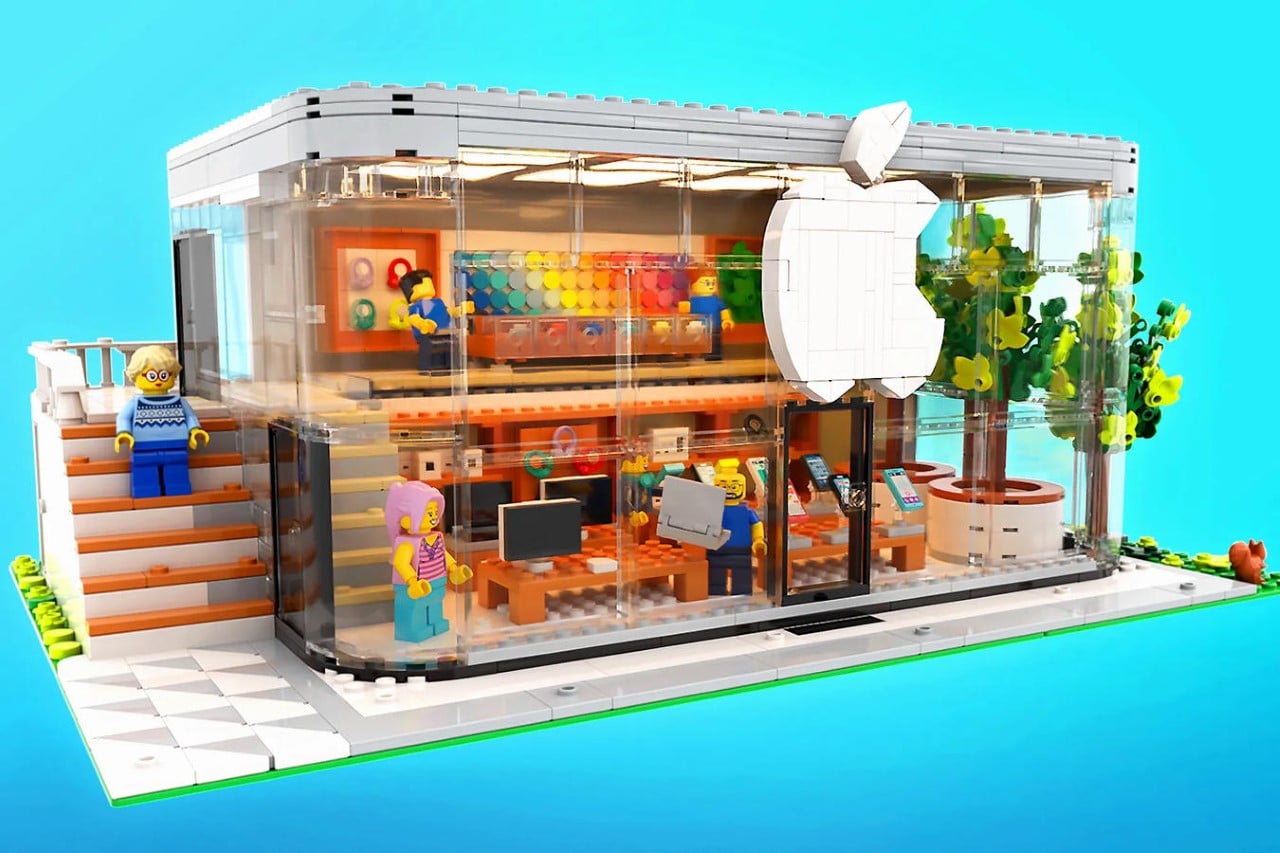
This LEGO Apple Store turns the company’s retail space into an adorably detailed brick diorama

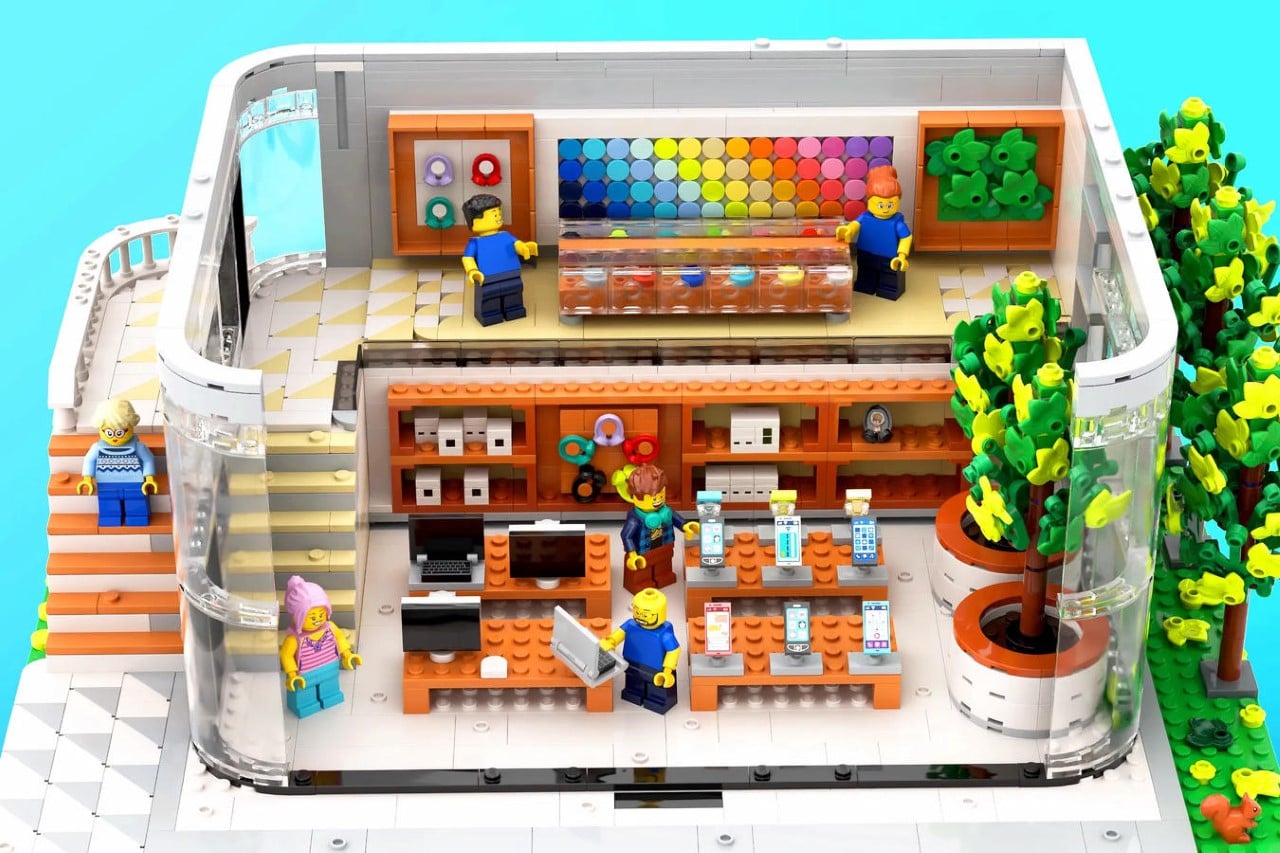
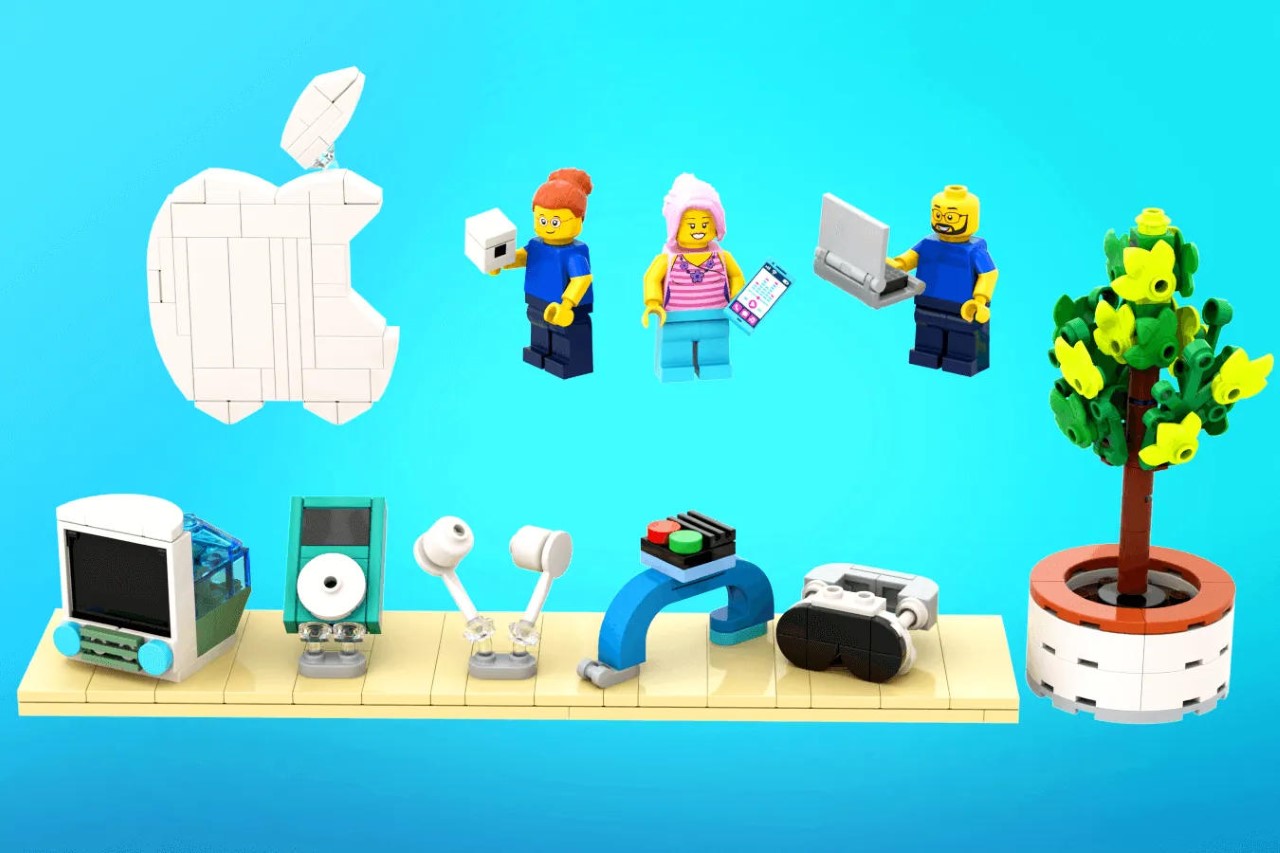
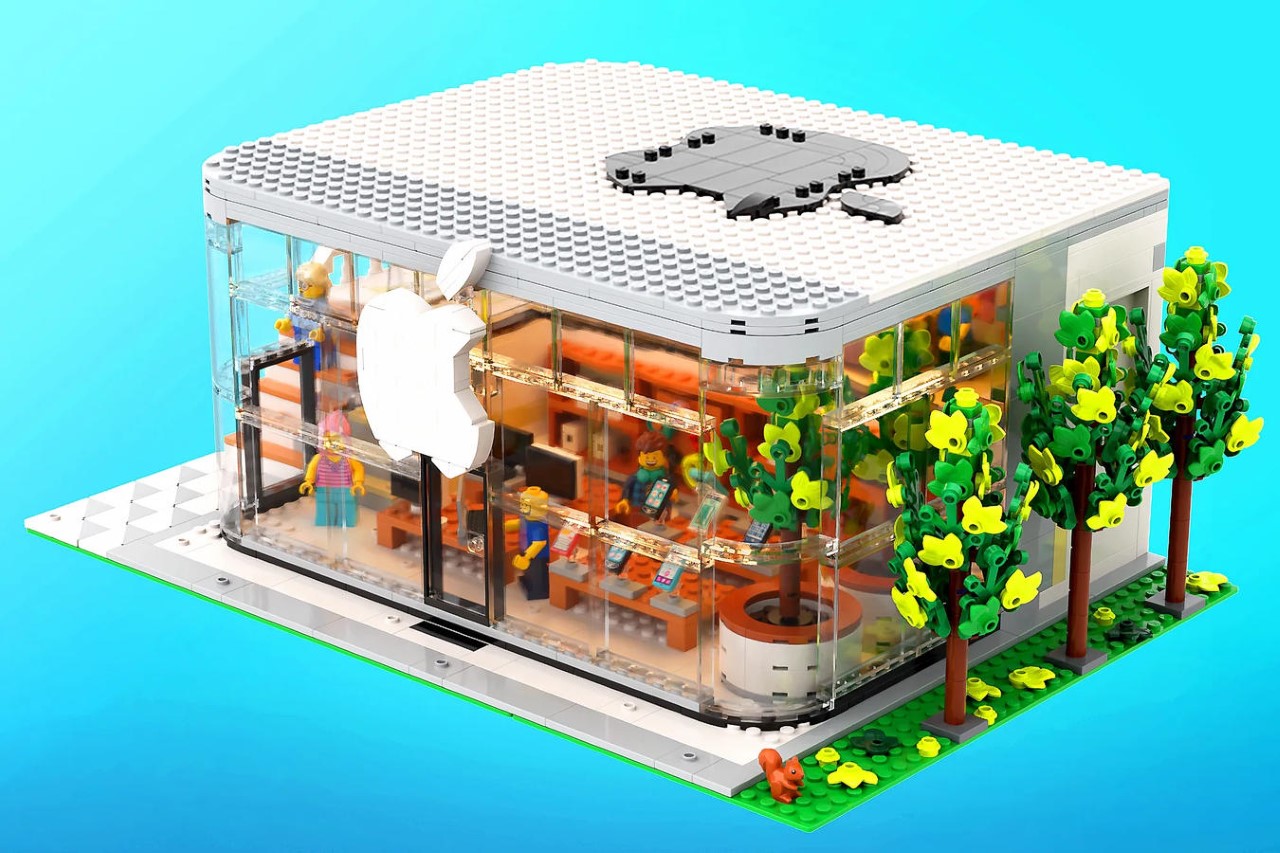
Complete with a massive white Apple logo on the front, glass facades, minimal interiors, a Genius Bar, and even tiny Apple products arranged across the display counters, this LEGO version of the Apple Store captures the minimal grandeur of the Cupertino tech company’s retail spaces. The brand may be well known for their cutting-edge products, but are masters of crafting awe-striking experience centers too. Built by seasoned brick expert ‘legotruman’ in collaboration with 2A2A, the LEGO Apple Store is a 1539-brick marvel that does true justice to its original. It comes with white interiors, glass facades, landscaping, eye-catching details, and enough easter eggs and products to keep a fan-boy entertained (from the iconic iMac G3 of the Steve Jobs era, to even the Vision Pro, which completes its 1st anniversary today!)

Designers: legotruman & 2A2A

The LEGO Apple Store is a two-storey marvel featuring all of the company’s greatest product launches under one single roof. “Both the Apple brand and LEGO celebrates beauty and creativity, the principles and image of the two brands are a great match,” designer legotruman rightfully says. The final model isn’t based on any specific retail outlet, but rather is an amalgamation of multiple outlets’ core design philosophies. The result is something that seems familiar, with floor-to-ceiling glass panels that let you see inside the store, a white Apple logo on the front that lets people know it’s an Apple Store, and minimal interiors that let the products, posters, and display units stand out and grab eyeballs.

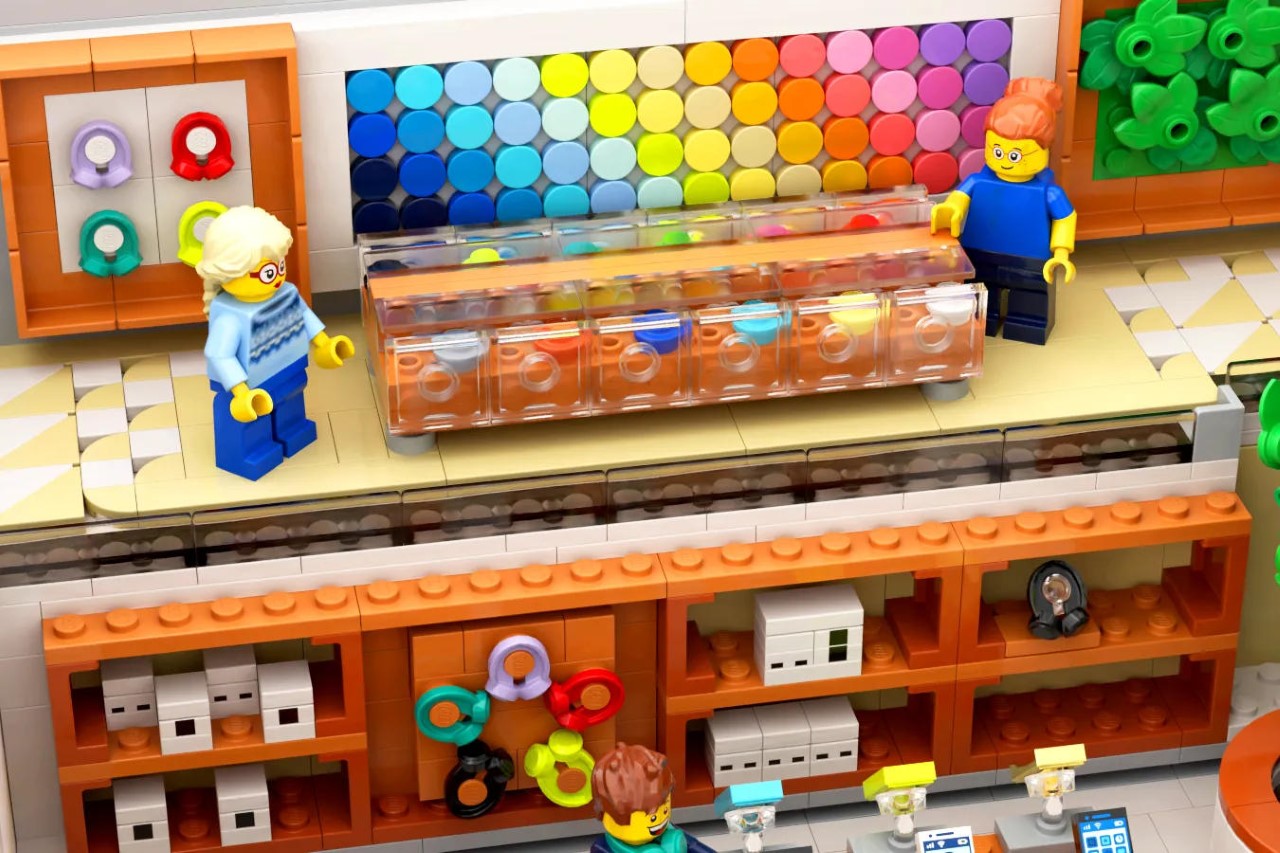
The design features a removable top as well as a removable front facade, letting you access the minifigures and pieces inside to arrange them how you see fit. The LEGO Apple Store comes with Geniuses in blue shirts as well as customers, creating a vibrant atmosphere inside the outlet. Multiple counters have all of Apple’s products from iMacs and MacBooks to iPhones. Look to the wall and you’ll see boxes of Apple products waiting to be sold, and AirPods Max headphones arranged decoratively to attract people.

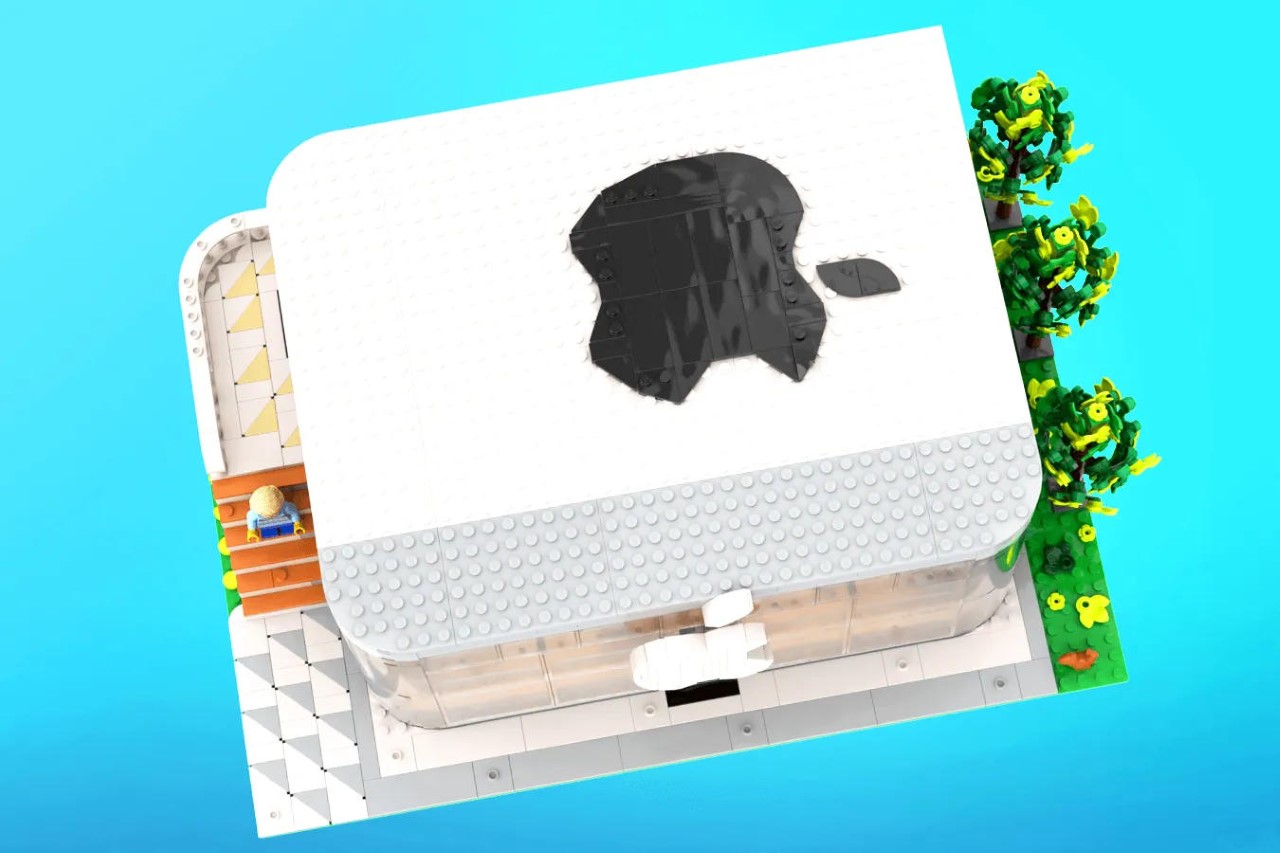
Every part of the store’s design has something to show. The front offers a glimpse into the store, while the top features a massive black Apple Logo. On the left, a staircase guides minifigures to the upper level (where the Genius Bar is usually located), while the right has ficus trees as seen in many Apple stores. Flip over to the back and you’ve got a hidden hatch where legotruman put a few other Apple products on display, capturing the company’s history over the past twenty-five years. You’ve got an iMac G3, and iPod Classic, AirPods, an Apple Watch, and a Vision Pro, all designed out of LEGO bricks and arranged on a horizontal platform at the back of the LEGO build.

The inside of the store feels unmistakably Apple-like. Every detail brings back memories of actual stores, from the long tables with products on them, to the colorful posters and wall-art that are a signature element of Apple’s retail spaces. You’ll see all sorts of easter eggs around the build, keeping you entertained and constantly engrossed. Like every LEGO build, you do have the ability to customize the space too, moving stuff around and even adding new elements to the store.

legotruman and 2A2A’s MOC (My Own Creation) maxes out at an impressive 1539 bricks, making it a relatively complex build. The entire kit, when complete, measures 16.1-inches wide, 10.1 inches deep, and 6 inches tall. legotruman mentions that you can add this build to your LEGO city, bringing an iconic landmark to your brick-based neighborhood.

The LEGO Apple Store is currently a submission on the LEGO Ideas forum, an open space for creators to submit their own brick-builds. The community then votes for their favorite creations, following which the LEGO internal team reviews the submission before turning it into a buyable box-set. This particular fan-made creation currently stands at an impressive 4,730 votes, and if you want to vote for it too, just head down to the LEGO Ideas website and cast your vote!

The post This LEGO Apple Store turns the company’s retail space into an adorably detailed brick diorama first appeared on Yanko Design.
iPhone 16 Pro Max AI features Leaked

iPhone 16 Pro Max

The upcoming iPhone 16 Pro Max is set to revolutionize the smartphone industry with its groundbreaking AI features and camera enhancements. Powered by the cutting-edge A18 and A18 Pro chipsets, this highly anticipated model is expected to be unveiled in September. However, potential buyers should be prepared for a possible price increase due to global […]

The post iPhone 16 Pro Max AI features Leaked appeared first on Geeky Gadgets.

How to Free Up iCloud Storage Without Deleting Photos

iCloud Storage

Apple’s iCloud is a convenient way to store and sync your data across all your Apple devices, but it’s easy to run out of storage space, especially if you have a lot of photos. If you’re running low on iCloud storage, you don’t have to resort to deleting your precious memories. Here are some effective […]

The post How to Free Up iCloud Storage Without Deleting Photos appeared first on Geeky Gadgets.

More Last Minute iOS 18 Detailed Revealed

iOS 18

Apple’s iOS 18 is set to bring a plethora of new features and improvements to the iPhone, aiming to revolutionize the user experience through a combination of aesthetic upgrades, functional enhancements, and robust security measures. This update promises to deliver a more intuitive, personalized, and secure operating system for iPhone users worldwide. Visual Overhaul and […]

The post More Last Minute iOS 18 Detailed Revealed appeared first on Geeky Gadgets.

Last Minute iOS 18 Details Leaked Ahead of WWDC Keynote

iOS 18

As the highly anticipated Worldwide Developers Conference (WWDC) 2024 draws near, a flurry of last-minute leaks has shed light on the significant updates expected in the upcoming iOS 18. The keynote, set to be live-streamed on Apple’s website, Apple TV, and YouTube, promises to unveil a host of exciting features, including major redesigns, enhanced AI […]

The post Last Minute iOS 18 Details Leaked Ahead of WWDC Keynote appeared first on Geeky Gadgets.

Apple AirPods Troubleshooting: Sound Only in One Ear? Here’s How to Fix It

Apple AirPods

Picture this: you’re gearing up for your morning jog, playlist at the ready when you notice something amiss. Your AirPods, usually the reliable soundtrack to your run, are only playing sound in one ear. Annoying, right? But before you panic and rush to the nearest Apple store, know that this is a common issue with […]

The post Apple AirPods Troubleshooting: Sound Only in One Ear? Here’s How to Fix It appeared first on Geeky Gadgets.

Apple’s iOS 18 AI is Called Apple Intelligence

Apple Intelligence

Apple is set to unveil a groundbreaking suite of artificial intelligence features called “Apple Intelligence” at the upcoming Worldwide Developers Conference (WWDC) in 2024. These cutting-edge enhancements will be available for users to explore in beta starting from June 10th, promising to revolutionize the way you interact with your Apple devices. The key improvements span […]

The post Apple’s iOS 18 AI is Called Apple Intelligence appeared first on Geeky Gadgets.

10 Expert Level iPhone Shortcuts You Need to Try

iPhone shortcuts

The video below from Stephen Robles gives us ten advanced iPhone shortcuts that will take your efficiency to the next level. Your iPhone is more than just a communication device; it’s a powerful tool that can streamline your daily tasks and boost your productivity. By leveraging the iPhone’s automation features, you can create shortcuts that […]

The post 10 Expert Level iPhone Shortcuts You Need to Try appeared first on Geeky Gadgets.

Things You Need to Know Before Installing iOS 18 Beta

iOS 18 Beta

Are you eager to try out the latest features and improvements in iOS 18? Before diving into the beta installation, it’s crucial to understand what to expect and how to prepare your device. This video below from iReviews offers valuable insights and tips to ensure a smooth transition to the iOS 18 beta. Apple will […]

The post Things You Need to Know Before Installing iOS 18 Beta appeared first on Geeky Gadgets.