Instagram lets you add texts on photos and layer images for grid posts

Instagram has introduced new text tools meant to help you design a grid that's more reflective of your personality. To start with, you can now layer your photos and add text to them, as stickers, to achieve the look you want. You can start the whole process by selecting an image and then tapping the text button to write a text overlay for it in the font that you prefer. If you'd rather layer several images for one post, tap on the gallery button in the top right corner of the screen instead. You can then change the shape of the sticker, which again can contain either a text or another image, into a square, a circle, a heart or a star by tapping on it. 

Speaking of text you can add to your photos, Instagram is adding new fonts you can use in the app. You can combine those fonts with the new animations and effects the app is adding, as well, to jazz up your Reels and Stories. Earlier this month, Instagram doubled the number of photos and videos you can share in a carousel post. From 10 files, the app now allows you to upload up to 20, giving you an easy way to add photo dumps to your account. These new features will let you personalize your photo dumps and to potentially use them as an outlet for your creativity... sort of like how Myspace users could customize their profiles back in the day. In fact, Instagram also recently announced a feature that lets you attach a song to your profile, which Myspace was known for in the early days of social media. 

This article originally appeared on Engadget at https://www.engadget.com/social-media/instagram-lets-you-add-texts-on-photos-and-layer-images-for-grid-posts-160030041.html?src=rss

You can now customize PlayStation DualSense Edge controllers on PC

PC gamers who use Sony’s PlayStation DualSense Edge controllers can now customize them using an updated PlayStation Accessories app. This app used to be called “Firmware updater for DualSense wireless controller” (a really long name).

Users can still use the app to update the controller’s firmware, which is necessary to ensure flawless operation. But the app also now lets DualSense Edge users adjust trigger deadzones, change layouts, modify stick sensitivity and alter controller vibration intensity. Naturally, you can swap between custom profiles for specific games on your PC for convenience.

While you can customize Sony’s more flexible and expensive DualSense Edge wireless controller, it’s currently not possible to do so for the standard DualSense controller. However, you can still use the app to update the firmware of both models. You can update both controllers using a USB or Bluetooth connection.

On a related note, Sony has been increasingly focused on the PC market, as it has brought major titles to PC (including God of War, The Last of Us Part I, Marvel’s Spider-Man and Horizon Zero Dawn) in recent years. PS VR2 support has also been live since early August, provided you shell out for an adapter.

This article originally appeared on Engadget at https://www.engadget.com/gaming/playstation/you-can-now-customize-playstation-dualsense-edge-controllers-on-pc-151715163.html?src=rss

BMW is bringing a dedicated UNO Gaming App to over 500,000 existing car infotainment systems

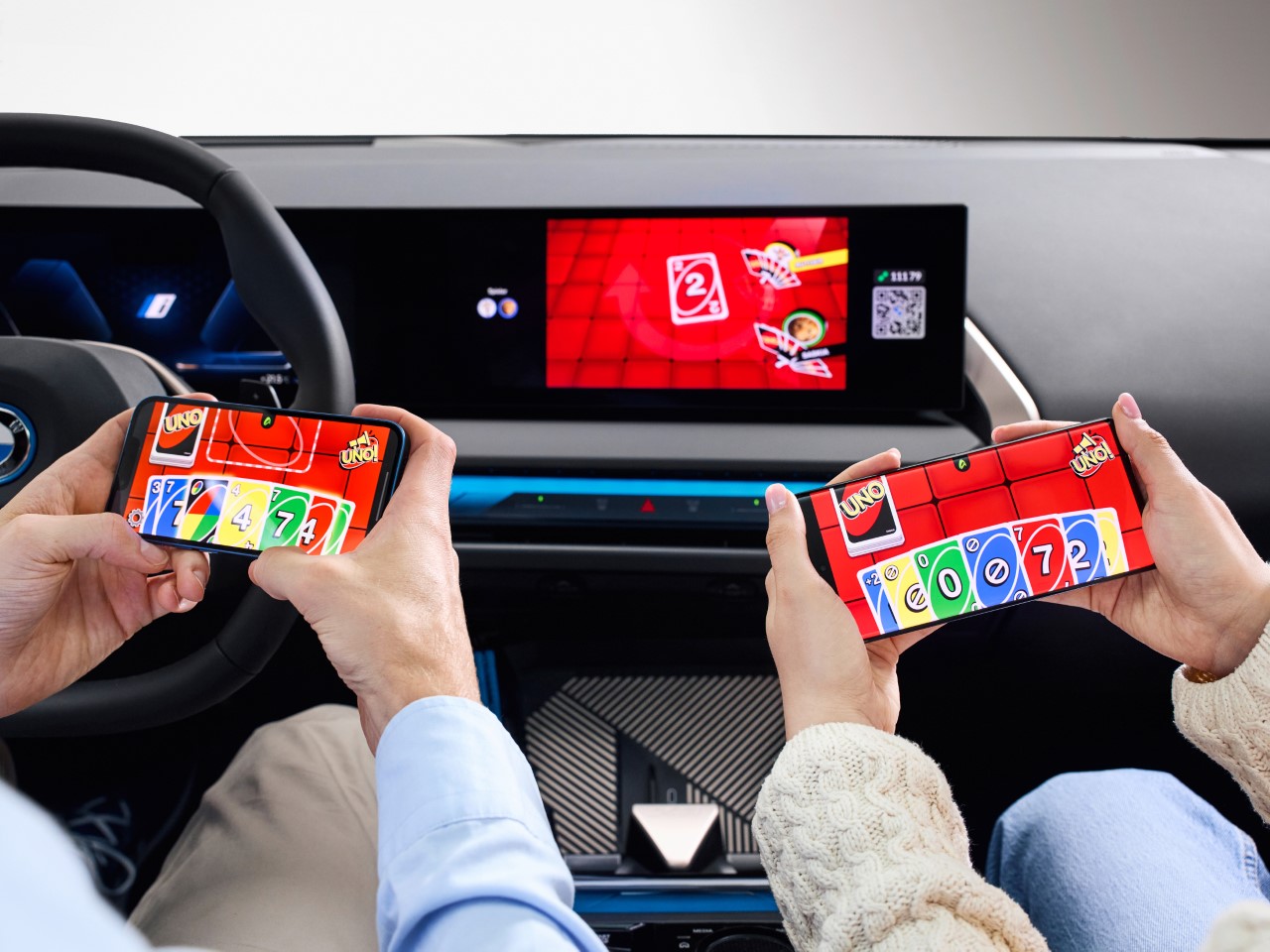
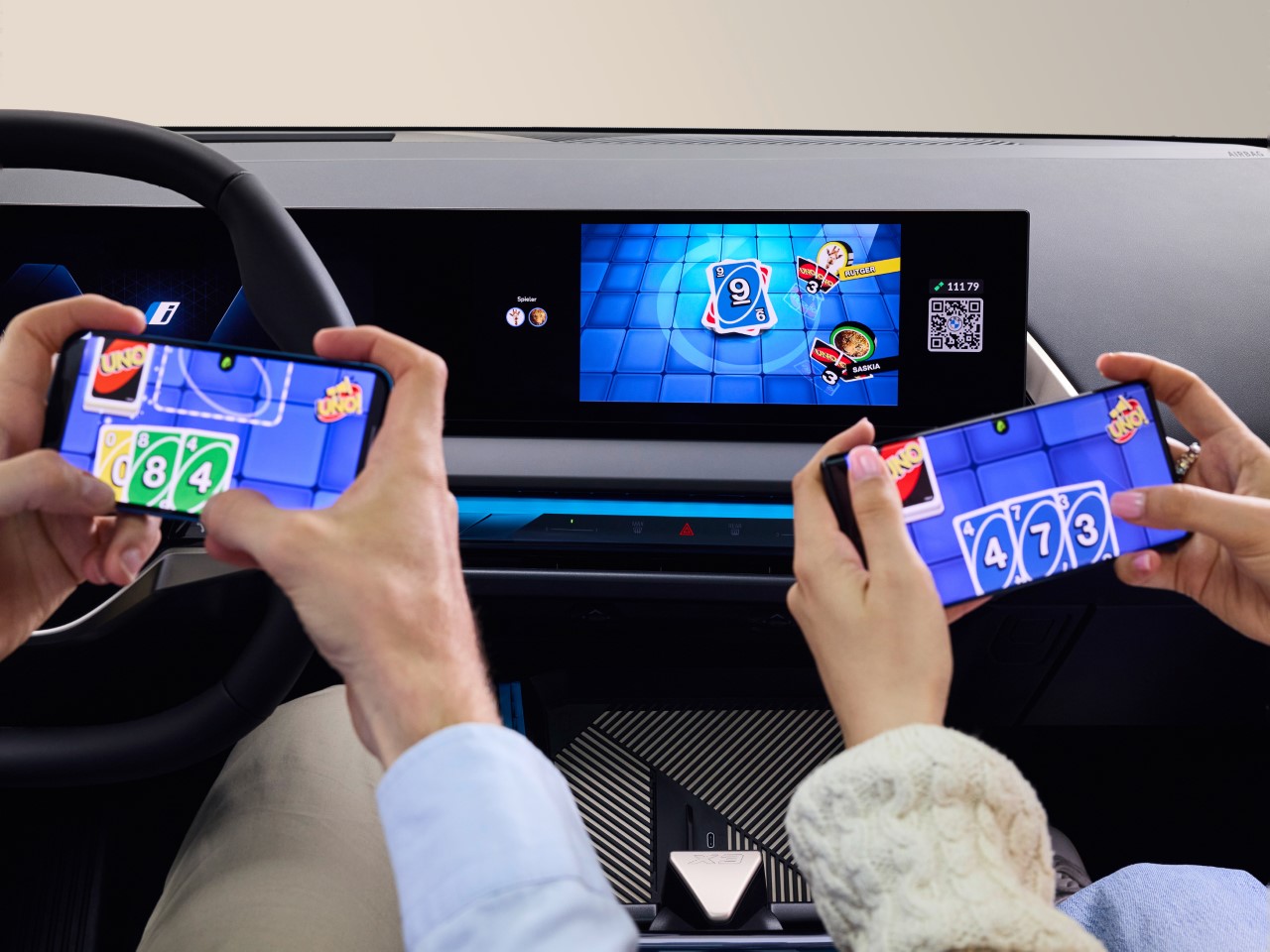
With an announcement from BMW dropping shortly after the Concours d’Elegance event at Pebble Beach, you’d probably think we’ve got some interesting car news or some automotive updates, but you’d be wrong. Instead, BMW threw quite the curveball by announcing a dedicated version of the hit card game UNO, designed specifically for in-car gaming. Dubbed the “UNO Car Party!”, this collaboration between BMW, Mattel, and AirConsole rolled out at Gamescom 2024, where it was introduced as the next evolution of in-car entertainment. With over 500,000 BMW and MINI vehicles set to feature this, you can now settle all your family’s backseat rivalries with a virtual card match that no one saw coming.

Designers: BMW & Mattel

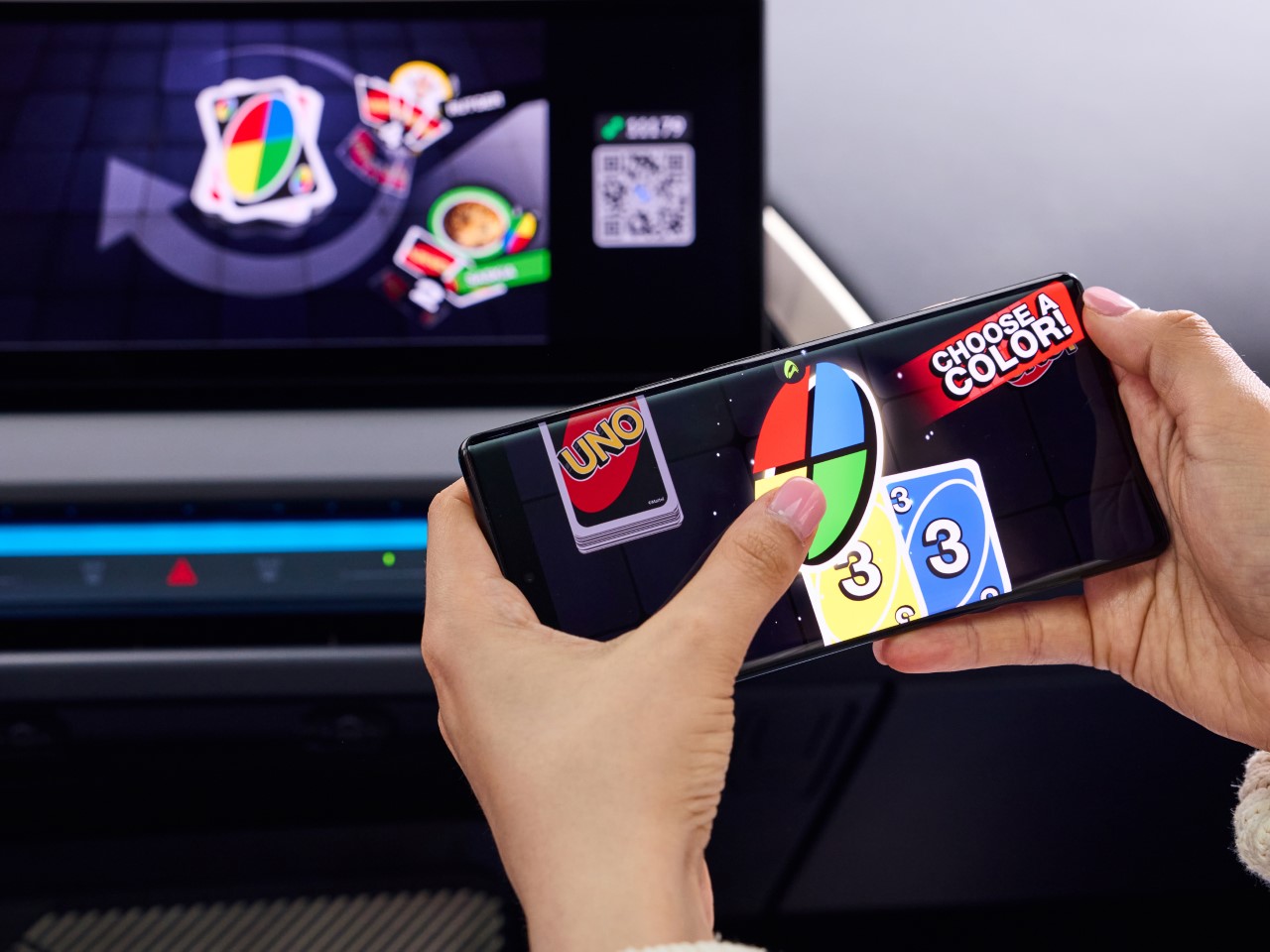
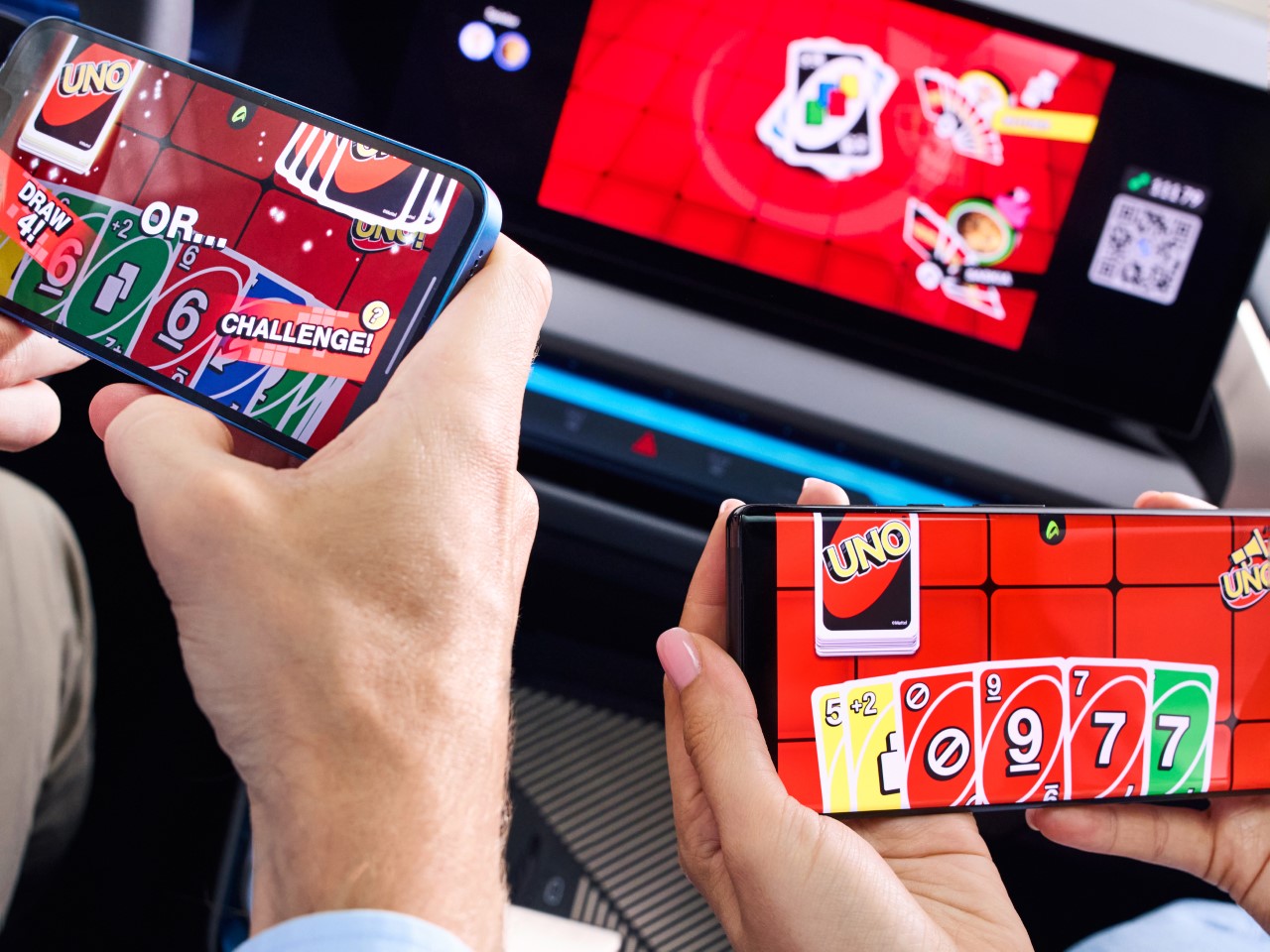
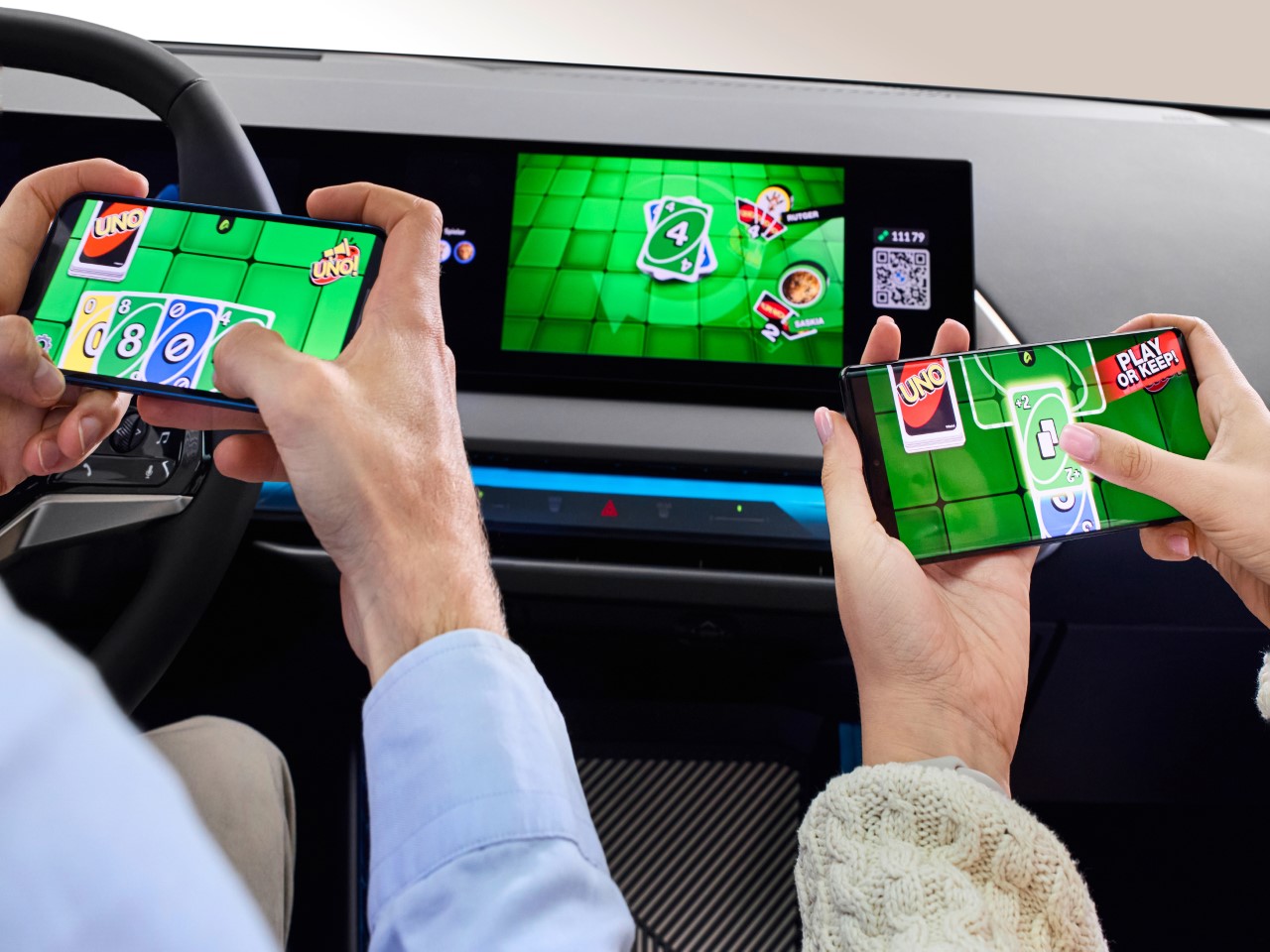
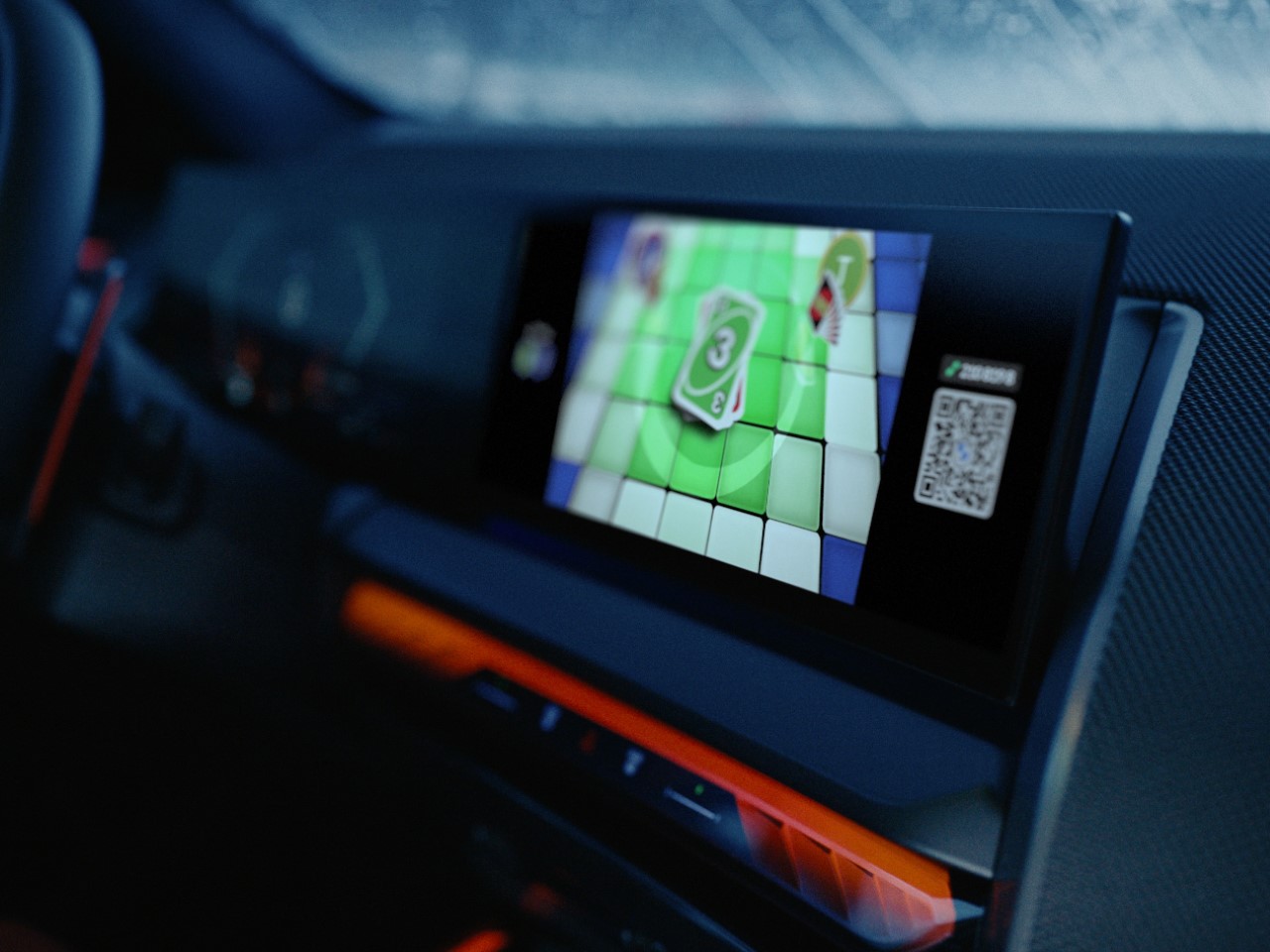
The setup is surprisingly slick for a car game. AirConsole’s tech lets up to four players use their phones as controllers—no shuffling required, just a quick QR code scan on the car’s display. Each player’s hand remains secret on their phone while the main screen shows the game’s progress, meaning you can still side-eye your opponents and snoop on their hand. Given how hands-on and intense UNO can be, the game is only playable when the vehicle is in park mode. That’s BMW’s subtle way of saying, “Hey, safety first.” But once the car’s stationary, it’s game on, transforming your car into a temporary game room that’s perfect for killing time while charging your EV or waiting for that friend who’s always late.

In terms of gameplay, it’s pretty much the UNO you know and love (or dread). Same rules, same chance to ruin friendships, but now with digital flair—automated scoring, snazzy graphics, and a setup that doesn’t involve losing cards under the seat. It’s straightforward, easy to get into, and definitely beats staring out the window. The concept is clever in its simplicity, merging retro card game vibes with modern tech. Plus, it’s a nice break from doomscrolling or listening to the same playlist on repeat.

This move from BMW is part of a bigger trend where cars are becoming more than just vehicles—they’re turning into mobile entertainment hubs. And while “UNO Car Party!” might not be a game-changer (pun intended), it’s a fun little feature that adds personality to your car. Sure, it’s no substitute for a full-fledged console, but it’s a step toward making your vehicle a bit more interesting when you’re not actually driving it. Whether it’s a quick match during a pit stop or a way to pass the time while you’re stuck waiting for someone, it’s clear that BMW is leaning into the idea that cars can be places for more than just commuting.

So, if you’ve ever found yourself thinking, “I wish I could play UNO in my car,” your oddly specific wish has just come true. Whether you’re ready to embrace it or just find it amusing, BMW’s latest innovation proves that even the most unexpected ideas can have a place in the future of driving—or at least parking.

The post BMW is bringing a dedicated UNO Gaming App to over 500,000 existing car infotainment systems first appeared on Yanko Design.

How Cryptocurrency Wallet Apps Are Developed

In the rapidly evolving world of digital finance, cryptocurrency wallet apps play a crucial role in managing and securing digital assets. These apps are essential for anyone involved in cryptocurrency transactions, whether seasoned traders or newcomers. This article delves into cryptocurrency wallet development, providing insights into the key components, development process, and emerging trends. Crypto […]

The post How Cryptocurrency Wallet Apps Are Developed first appeared on Trendy Gadget.

Posted in Uncategorized | Tagged

Microsoft will host a security conference after the CrowdStrike shutdown

Microsoft announced it will host a special conference in September to discuss the lessons and security measures the industry can take away from the CrowdStrike computer shutdown in July. The Windows Endpoint Security Ecosystem Summit is scheduled for September 10 at Microsoft’s Redmond, WA headquarters.

The event will feature representatives from Microsoft, CrowdStrike and other cyber and computer security companies. The participants will explore changes in industry practices and the use of applications that can prevent future computer shutdowns.

An executive who spoke to CNBC anonymously says one of the talking points of the conference will address the use of applications that rely more on Windows’ user mode instead of kernel mode. The July outage occurred because Crowdstrike’s agent operated in kernel mode in which the central processing unit gives software total access to a system’s resources and hardware. Applications in user mode are more isolated so they can’t bring down other systems.

The attendees will also discuss implementing eBPF technology into systems to check programs without triggering system wide crashes. The conference will also feature discussions on the use of safer programming languages such as Rust, an alternative to programming languages such as C or C++.

CrowdStrike blamed faulty testing software included in an update as the cause of the crash that shut down 8.5 million Windows machines starting on July 19. The shutdown causes blue screens of death for systems for banks, airlines and businesses around the world.

This article originally appeared on Engadget at https://www.engadget.com/cybersecurity/microsoft-will-host-a-security-conference-after-the-crowdstrike-shutdown-172119101.html?src=rss

Google Essentials will house all Google services in a single Windows app

If you buy a new Hewlett-Packard laptop in the next few weeks, then you’ll notice a new app on the “Start” menu called Google Essentials. On Thursday, Google announced that the new app will bundle some of its core services like Google Photos, Google Drive and Google Messages.

The Google Essentials app will not only house shortcuts to its most used services but it will also centralize your Google account information and saved materials such as documents, photos and saved games for titles from Google Play Games. Eligible subscribers will also receive a two month trial of Google One cloud storage with 100GB.

The blog posts says that Google Essentials will only be available on Windows PCs starting with new Hewlett-Packard (HP) laptops including models like the Spectre, Envy, Pavilion, OMEN and Victus. Google says it plans to make the Essentials app available on more Windows PC brands in the future.

The concept of a bundled Google services app sounds very similar to the old Windows Live Essentials. The collection of Microsoft applications allowed Windows users a quicker way to access apps like Mail, Movie Maker, Messenger and Writer. An archived version of the Windows Live Essentials installer is available on the Internet Archive.

This article originally appeared on Engadget at https://www.engadget.com/apps/google-essentials-will-house-all-google-services-in-a-single-windows-app-223824942.html?src=rss

Twitch subscription prices are increasing by $2 on iOS and Android

Twitch is updating subscription costs for mobile purchases. Beginning October 1, Tier 1 sub and gift sub prices made in the company's mobile app will be $8, up from the current rate of $6 a month. Tier 2 and Tier 3 prices will not be impacted.

The company announced this summer that the Tier 1 price for subscribing to a channel on desktop would be increasing by a dollar in the US, rising from $5 to $6. That change initially took effect in July, the first time Twitch sub costs had risen for US viewers. The move followed similar hikes for Tier 1 subs in the UK, Canada, Australia and Turkey earlier this year.

The bigger increase to sub costs on mobile is likely a response to the fees both major tech companies charge for in-app purchases. This subject has gotten the companies snared in some antitrust suits, and they have reduced their commission percentage for several use cases. Both Apple and Google have also adopted new fee structures in Europe in response to the Digital Markets Act.

This article originally appeared on Engadget at https://www.engadget.com/apps/twitch-subscription-prices-are-increasing-by-2-on-ios-and-android-213528826.html?src=rss

Pixel 9 Pro and Pixel 9 Pro XL review: Superb cameras, with a side of Gemini AI

This year, Google decided not only to update the design of its Pixel phones but also put its AI features front and center. The Pixel 9 Pro and 9 Pro XL are the first Pixels that have swapped the Assistant for Gemini. With its latest flagships, Google continues to improve its cameras, by upgrading its primary sensor and expanding its suite of editing tools. And to power all those new AI tricks, the company has equipped the devices with its newest Tensor processor, designed to handle on-device Gemini tasks. For the first time, too, the Pro-branded Pixel is available in two sizes, with a smaller version joining the family. Better yet, if you go for the Pixel 9 Pro, you’ll be getting a largely identical phone to the pricier 6.8-inch Pixel 9 Pro XL. Please note: no camera compromise here, Apple.

But this isn’t just another flagship Android: it’s a concerted effort to get you hooked on Google’s AI-powered image editing, email assistance and more. The Pixel 9 Pro delivers on all these aspects, with varying degrees of success.

Pixel 9 Pro review
Photo by Mat Smith/Engadget

As I opened the box, I knew this was the most premium Pixel yet. The Pixel 9 Pro has softer curved corners than its predecessor, while the edges have been flattened. It also felt somehow familiar — like my iPhone. I had to double-check, and they weighed the same, down to the gram (all 221 of them). That’s not bad: the iPhone Pro is the de facto phone to beat. The Pixel 9 Pro has a similar matte satin finish.

I don't know if the flattened sides make it easier to grip than the Pixel 8 Pro, but I found the substantial camera module did help with stability, occasionally resting on my finger or thumb during shots. The ‘cyclops bar’ is gone, replaced with a more conventional — but just as substantial — camera array. The temperature sensor is, for some reason, still here, although a Thermometer app update coming this week will let it save the things you’re most regularly measuring and even offer some AR guidance to ensure you’re the right distance away from the object you’re scanning.

Without the camera bar, which felt a bit much, the Pixel 9 Pro doesn’t feel like Google trying to make an aggressive design statement. The camera module is huge, however.

Pixel 9 Pro review
Photo by Mat Smith/Engadget

Like last year, Google has kept the display almost entirely flat. The Pixel 9 Pro XL’s 6.8-inch screen is 0.1 inches bigger than last year’s Pixel 8 Pro and brighter, too, peaking at 3,000 nits. It makes sense for Google to make its bigger pro Pixel even larger to match the XL in its name, but like the iPhone 15 Pro Max, the Pro XL is a little too big for me. My not-exactly-small hands struggled to reach the search bar or dropdown menus in the top corners. (Sidenote: I can move the Chrome address bar to the bottom of the screen on my iPhone, but not on Android? What gives?)

Meanwhile, the Pixel 9 Pro's 6.3-inch panel is roomy enough to see plenty of lines of text at once, without me having to almost sprain a finger to reach its edges. Both Pixel 9 Pros have Gorilla Glass Victus 2 on their displays as well as across the satin-finish backs, like last year’s flagship phone, meaning they’re about as durable as before.

With the XL, you’re consciously deciding you want a Big Phone – this is S24 Ultra territory. Fortunately, it’s another bright, vivid screen from Google, with variable refresh rates from 1-120Hz for smooth scrolling when needed. 

The XL Pixel Pro’s resolution of 1,344 x 1,992 translates to a pixel density of 486 ppi, which is lower than the Pixel 9 Pro (495 ppi). But good luck discerning that in real life. Google continues to lean towards more understated color tones on its screens, compared to rival phones from Samsung and Apple. Still, I think it suits the shades of Android’s Material Design palette, as well as this year’s hardware color options. Both Pixel 9 Pro sizes arrive in black, white, hazel and rose quartz. I was sent the hazel version, which is subtle to the point of looking almost gray. My colleague Cherlynn Low is infatuated with the rose quartz Pixel 9 Pro she’s tested.

Pixel 9 Pro review
Photo by Mat Smith/Engadget

The Pixel camera is still the best smartphone camera. Last year, we called Pixel 8 Pro “the most powerful smartphone camera on the market,” and Google has tried to hold on to that position. Hardware-wise, the sensors are the exact resolution as the Pixel 8 Pro, aside from the leap to a 42-megapixel front-facing camera, up from 10.5 megapixels last year. Google has also improved the autofocus, and it takes surprisingly decent crisp shots and video.

But we’re all here to discuss the triple camera array on the back. There’s a new 50MP primary camera, a 48MP ultra-wide, and a 48MP telephoto camera with a 5x optical zoom. The upgraded hardware doesn’t result in noticeable improvements over the Pixel 8 Pro in most of the photos I compared… until I started using the telephoto sensor. There, I saw huge improvements to detail and color. Google has addressed some of the Pixel 9 Pro’s video-recording weaknesses too — I didn’t notice any overheating issues with the new Tensor chip, even when recording multiple video clips at maximum resolution.

Google has once again augmented its cameras with software features that walk the line between gimmick and game-changer.

Add Me could be the latter for me. As the guy with the newest smartphone in my friendship group and family, I’m usually the one taking candid and group shots for everyone. But that means there often aren’t many photos of me. Add Me is a new camera mode which combines Google’s computational photography expertise with augmented reality to scan and frame an area and group of people. Once you’ve taken the first photo, you trade places with someone else, the Pixel 9 Pro will ask that person to align the frame, and take a second shot. 

It’s a little like the Best Take feature from last year, which could swap out faces to ensure everyone’s giving their best smile, the Pixel then processes and combines those two images together. It’s a simplified Photoshop clone tool, sure, but it looks good. I will be using this at the next birthday/wedding/christening/future 40th birthday party. (Ed. note: We get it, Mat, you’re popular.)

Pixel 9 Pro review camera samples
Ugh, not two of me.
Photo by Mat Smith/Engadget

The Pixel 9 Pro arrives with several features initially teased a year ago, including Zoom Enhance and Video Boost. Zoom Enhance is pretty self-explanatory, using AI to increase both detail and sharpness on your most aggressively zoomed photos. The results can be mixed. It’s not as egregious as Samsung’s super-imposed moon photography, but Zoom Enhance does its best work on shapes, structures and patterns, sharpening up brickwork, foliage and more. It still usually makes a mess with humans.

There are use cases for Zoom Enhance (it does a great job sharpening up London’s Tower Bridge) but I’m not sure it’ll rescue your concert pics from the back of the venue. Not unless you want a nightmarish vision of Taylor Swift’s face massaged by AI. Notably, Zoom Enhance is one of the camera AI features that’s processed on-device.

Pixel 9 Pro XL review camera samples
Photo by Mat Smith/Engadget

With Video Boost, the Pixel 9 Pro records video in a special mode (that you will have to toggle in settings before recording) and those clips are automatically uploaded to the cloud for server-side processing. What’s new for the Pixel 9 Pro is that you can shoot videos with up to 20x zoom or create boosted videos with 8K resolution. You’ll need to record at 1080p to create 4K videos, and capture in 4K to make 8K clips. This is upscaled 8K, so while clips seem crisper in places, don’t expect 8K footage that’s comparable to what you’ll get with dedicated cameras. Video Boosted 8K seems more like a spec boast for Google rather than a feature you’ll use with any regularity.

Having said that, Google has improved Video Boost substantially since it first launched, adding smoother transitions between focal lengths and different camera sensors. With Video Boost, leaping from a standard wide view to 5x zoom is far less jarring, and Google has fixed the color imbalances between its trio of sensors — it looks much like it was filmed on a single-lens camera. It also offers a boost to any video captured in low light. It won’t make pitch-black footage visible — I did try — but does improve the color and detail of dim video clips. You can also punch in to 20x digital zoom if you’re using Video Boost for surprisingly functional footage.

Pixel 9 Pro camera samples
Photo by Mat Smith/Engadget

Once you’ve taken your photos, an upgraded Magic Editor brings the same content-aware fill features as last year, capable of deleting unwanted objects and people from your photos. This year, Google adds more generative AI power. First up, Autoframe will let the Pixel try its hand at improving your photo’s composition, cropping and even extending your photos, generating backgrounds and adding elements, sometimes successfully.

Reimagine puts Google’s generative AI skills to use with more creative tasks, allowing you to select backgrounds, items or other areas of your photo, and create dreamy composite images. I was able to swap out my living room for a Hawaiian sunset, make the floor lava in a nearby park and more. Get too specific with your wording, though, and the results aren’t quite as impressive. But that’s the state of smartphone generative AI, for now.

The pro camera controls, introduced with the Pixel 8 Pro, are still here. They let you manually tweak exposure, shutter speed, and ISO, and are still super useful for those who know what they’re doing.

On the Pixel 9, you may notice a few surprise apps that you never installed. But this isn’t quite bloatware: they’re Google’s new Pixel Screenshots and Pixel Studio. Instead of adding more complication to the Photos app, these have been made into standalone apps, which I’m very glad to see.

For now, you’re unable to edit photos with people in Pixel Studio, which dampens a lot of the fun. If you want standard generative-AI cartoon images and renders, Pixel Studio can oblige, although my creations aren’t quite as cohesive as the examples shown. While Pixel Studio offers the ability to title your designs, most times that text will get turned into the usual AI-generated squiggles, defeating the purpose of making most things with this app.

It’s a little too early to draw conclusions on Pixel Screenshots, too. It uses AI to parse through all your screenshots, making information like prices, reservations and dates searchable. However, the Pixel 9 doesn’t populate your screenshots automatically, nor could I find a way to pull my existing screenshots (years of them!) from my Google Photos backup, which seems like a miss. The Photos app already silos them as screenshots, so there must be a way to transfer them across. Is this a privacy issue? We’ve asked Google.

This means the tool offered limited utility during my first week of testing. What could be incredibly useful is how Gemini AI can gradually learn to identify what’s captured in the screenshots beyond simply reading the text. Screenshots in general are just smarter on the Pixel 9 Pro. I captured some travel itinerary emails, and before I even had to open an app, the Pixel suggested adding my hotel stay to Google calendar. These are the touches I love. (Of course, I could hold the power button to summon Gemini and ask it to do so similarly.)

Both Pixel 9 Pros get a year’s subscription to Google One AI Premium, a bundle of 2TB storage as well as the use of Gemini Advanced. The latter lets the AI directly dabble in apps like Gmail and Google Docs, to summarize text, PDFs and email conversations, although I didn’t spot it in my own Gmail app. I was still able to test this in a Chrome tab elsewhere, as the subscription extends to every device you use with Google products. There’s also access to Gemini Live, a conversational mode that’s almost entirely voice-based. I’m not sure how much I’d use this mode, however. I prefer to type my specific requests. 

Gemini Live will tick along in the background as you use other apps, which adds to the utility, and stores all your requests and results on the main Gemini screen. I was able to barrel through about 15 different voice requests for shows I wanted to see at this year’s Edinburgh Fringe, and it could already parse showtimes and venues, faster than I could manually find them. It struggled with some names and couldn’t identify some notable comedians at all. Google has made AI-assisted search a functional part of how I use my phone.

It’s been fun seeing what Gemini Advanced is capable of. After taking an obtuse photo of several skyscraper buildings in central London, I asked Gemini Advanced to identify where the photo was taken. The AI initially said it could be New York, suggesting one of the buildings was One Vanderbilt. 

Pixel 9 Pro review
Photo by Mat Smith/Engadget

Then I said that was incorrect and that it was taken in London. Gemini Advanced circled back, identifying not only one of the buildings but also the address, which was roughly 100 feet away from where I took the photo. The sheer seamlessness of the experience on Android was what impressed me most, but this is part of Gemini Advanced and after the one-year trial ends, Google expects you to pay $20 a month to keep your access. At a time when all my payments for Netflix, Spotify and more are climbing, Google isn’t offering enough to make me add another subscription to the pile.

Along with 16GB of RAM, the Pixel 9 series features the Tensor G4, Google’s latest slice of silicon, designed to breeze through AI tasks and generative AI requests. But If you’re a mobile gamer this isn’t going to blow you away. The G4 is more powerful than the Tensor G3, sure, but it doesn’t quite match the smoothness of the latest Snapdragon chips from Qualcomm. Tensor G4’s improved abilities are put to use most with new AI tasks: for example, Google says its Add Me feature taps into augmented reality software along with 15 different on-device AI models.

We haven’t quite got to the point where we can compare the speeds and efficiencies of generative AI tasks. For the most part, the Pixel 9 Pro behaves like a typical flagship phone. Chrome is unlikely to stutter, and the Pixel 9 Pro seems capable of handling heavy video editing and processing with ease, as well as new Magic Editor features for your photos. These features still take a moment, but the fact that so many AI tools work on-device, with no connection needed, impresses me.

The Pixel 9 Pro XL’s 5,060mAh battery is almost identical to the Pixel 8 Pro (5,050mAh), and it delivered over 22 hours in our looped video rundown test. The Pixel 9 Pro, meanwhile, managed to run for almost 25 hours. However, maximum charge wattage differs between the two Pros too. The Pixel 9 Pro charges at 27W, less than the Pixel 8 Pro's 30W, while the new Pixel 9 Pro XL charges at 37W. This means the XL should charge faster than the base Pro. Google says the Pixel 9 Pro can get up to 55 percent in 30 minutes, while the XL will reach a heady 77 percent in the same time, using the company’s own 45W charger. My Pixel 9 Pro showed similar figures, speedily recharging to over 50 percent in under 25 minutes.

Pixel 9 Pro review
Photo by Mat Smith/Engadget

The Pixel Pro has never looked better and feels like the premium devices Google’s always wanted to make. Naturally, there’s a premium cost associated. Given that last year’s 6.7-inch Pixel 8 Pro was $999, the $1,099 Pixel 9 Pro XL is $100 more expensive, while the Pixel 9 Pro, with the same cameras, storage, processor and AI hooks, but a smaller screen, costs the same $999. However, compared to rivals like Samsung’s Galaxy S24 Ultra ($1,300), the Pixel 9 Pro devices remain competitively priced.

The Pixel 9 Pro is a showcase for Gemini, Google’s AI assistant, and it’s been given a huge opportunity to shine as Pixel 9 Pro owners enjoy a year of free access to the more advanced model. It’s early days for some of the new software features, like Pixel Studio and Screenshots, however.

Competition from Apple and Samsung over the last few years may have chipped away at the competitiveness of Pixel features like Night Sight, but Google continues to improve the Pixel’s imaging prowess further. The Pixel 9 Pro cements the Pixel series’ status as the best smartphone camera. It’s so good that I don’t mind that chonky camera cutout — it changed my mind.

Some of these new features are crucially ones I will regularly use, like Add Me. Elsewhere, Google taps into cloud processing to beef up your video with the might of its server network. At the same time, the Pixel keeps many of its computational photography tricks on-device, with the temperamental Zoom Enhance available without the need for an internet connection.

It all culminates in a phone with unique tricks and incredible battery life, regardless of which size you go for. It's so good that my iPhone will have to go without its SIM for a little longer: the Pixel 9 Pro will be my main phone for just a bit more.

This article originally appeared on Engadget at https://www.engadget.com/mobile/smartphones/pixel-9-pro-and-pixel-9-pro-xl-review-superb-cameras-with-a-side-of-gemini-ai-170055834.html?src=rss

Anova will charge customers to use its sous vide app, because everything must be a subscription

Anova will soon start charging customers a monthly or yearly fee to use the “smart” features of its well-regarded sous vide cooking appliances. The subscription costs kick in on August 21 and apply to the proprietary app, which controls wireless functionality. In other words, you won’t be able to remotely control the device without paying the piper.

The subscription price isn’t exactly exorbitant, at $2 per month or $10 per year, but it’s the principle of the thing. In the old days, we’d buy an object and then use that object. End of story. Now everything’s a dang subscription. Yes. I wrote those previous sentences in a cartoonish old man's voice, but the point stands.

Anova says that the subscription fee will only apply to new users. If you already own an Anova cooker and use the app, the company will grandfather you in for free. However, it’s now mandatory to create an account. Before this change, it was optional. If you use an Anova cooker in guest mode, get that account made pronto. 

These cookers can be used without the app, but that turns them into bare-bones sous vide machines (not that there’s anything wrong with that.) The app allows for remote adjustments, access to status updates, the perusal of recipes and more.

“Our community has literally cooked 100s of millions of times with our app. Unfortunately, each connected cook costs us money,” company CEO Stephen Svajian wrote in a blog post. Svajian didn't go into detail as to how using simple Bluetooth features costs the company money, but whatever. 

The bad news doesn’t stop there. Anova is stripping its first-gen products of all smart features. This applies to the Bluetooth and Bluetooth + Wi-Fi models of the original Anova Precision Cooker. Not even a subscription will save these devices, though the change doesn’t go into effect until 2025.

This article originally appeared on Engadget at https://www.engadget.com/home/kitchen-tech/anova-will-charge-customers-to-use-its-sous-vide-app-because-everything-must-be-a-subscription-151906912.html?src=rss

Instagram’s experimental profile grid has rectangular images instead of squares

Instagram is testing a new profile grid layout that features rectangular images instead of the squares you're used to. In an Instagram story, Adam Mosseri has revealed that the app is testing a vertical grid for users' profiles. He explained that the original square grid was designed back in the day when the app only allowed users to upload square photos. Those days are long gone, and the vast majority of Instagram uploads are apparently vertical, specifically 4 x 3 images and 9 x 16 videos. He called cropping those uploads down to square as "pretty brutal." 

When you click on Instagram's video tab, you'll already see a rectangular grid, so the experimental layout won't look terribly unfamiliar. In fact, the test profile looks exactly the same, based on a screenshot that a user posted on Threads, except the grid includes photo posts and not just videos. A spokesperson told The Verge that the test has only rolled out to a small number of users and that the Instagram team will listen to feedback before expanding the redesigned grid's availability. 

Based on an old post by reverse engineer Alessandro Paluzzi, the app has been working on the new rectangular grid layout since at least 2022. It looks like the test is making its way to more users — and it seems like not everyone's happy about it. Mosseri posted his Story in response to a comment submitted to his "Ask Me Anything" session, pleading for the app not to kill the old layout.

This article originally appeared on Engadget at https://www.engadget.com/social-media/instagrams-experimental-profile-grid-has-rectangular-images-instead-of-squares-160007086.html?src=rss