Lenovo’s robot concept can help you digitally sign documents (and maybe annoy coworkers)

Lenovo can make a robot, too. Alongside proof-of-concept foldable gaming PCs and modular laptops, it introduced the AI Workmate Concept at MWC 2026. With its own Intel Core Ultra processor, 64GB of memory and its own Pico projector, it’s an AI-laced “workmate” meant to streamline office tasks and collaboration. And it has an LCD face.

For now, it’s a proof of concept, musing on how to integrate voice commands and LLMs (large language models) into workplace settings. It's meant to sit on your desk, but preferably also near a wall – more on that later.

Voice commands aside, the concept bot supports writing, voice and gestures with on-device AI processing. While it can answer the usual voice assistant questions, it can also scan and summarize documents (both digitally and physically) and even assist with creating a PowerPoint presentation – though you might want to check its work.

Lenovo AI Workmate Concept at MWC 2026
Mat Smith for Engadget

The 3.4-inch 480 x 480 screen doesn’t seem to offer any data visualization or numbers. During my demo, it only seemed to show the bot's eyes and facial expressions: it’ll sip coffee as it listens (with a moustache), cup a floating hand to the side of its face when it needs you to repeat a command, or twinkle when it’s processing more complicated tasks, like that fictional PowerPoint presentation.

With its articulated head, which houses the projector, cameras and LCD face, you can ask it to project images or documents on either the desk in front of it or a wall nearby. No need to flip around your monitor or laptop to share with colleagues. In one example, a spokesperson asked for a postcard. The Workmate then projected a (Lenovo-branded) image of Barcelona onto the desk. The rep laid paper down, then signed the ‘postcard’ and got the robot to scan it (with two downward-facing 5-megapixel cameras), and then send the file to a nearby printer.

Lenovo AI Workmate Concept at MWC 2026
Image by Mat Smith for Engadget

In theory, this sort of flow could transition to document signing or adding notation to images and files. However, one caveat here is whether those of us who work in offices want the extra workplace noise of a chatty robo and the person barking orders at it.

Lenovo says this concept (and it has a few at MWC) is meant to demonstrate the company’s “exploration of spatial and physical AI experiences” that integrate “seamlessly into professional environments.” Hopefully, further evolutions offer a text-based way to make using it a little less noisy.

Lenovo was also showing a simpler AI work device, the AI Work Companion Concept. It’s a completely different premise, despite the name being a little too close to the AI Workmate Concept.

Lenovo AI Workmate Concept at MWC 2026
Image by Mat Smith for Engadget

The AI Work Companion is not a robot, but a handsome chunky desk clock, with a solid, satisfying dial on the top and programmable buttons. The front is almost entirely display, able to show calendars, task lists and other work-centric dashes. It runs independently, plugging into a USB-C port for power and pulling data down wirelessly, while also acting as a port hub for charging other accessories and devices.

It’s certainly not as high-concept as the robot, but there are some AI smarts inside.

The Work Companion’s “Thought Bubble” uses AI to sync a user’s tasks and daily schedule across devices, synthesizing a daily action plan. It will even suggest times to break up bursts of work and attempt to monitor screen time to better manage burnout.

According to the press release, Lenovo says it also has “playful interactions with the user” and will, kind of bleakly, offer an end-of-week celebration report of tasks completed. It’s lucky it’s a good-looking desk clock.

This article originally appeared on Engadget at https://www.engadget.com/ai/lenovo-concept-robot-ai-workmate-mwc-2026-230159746.html?src=rss

Lenovo unveils the 2026 refresh of its Yoga 9i 2-in-1 convertible laptop at MWC

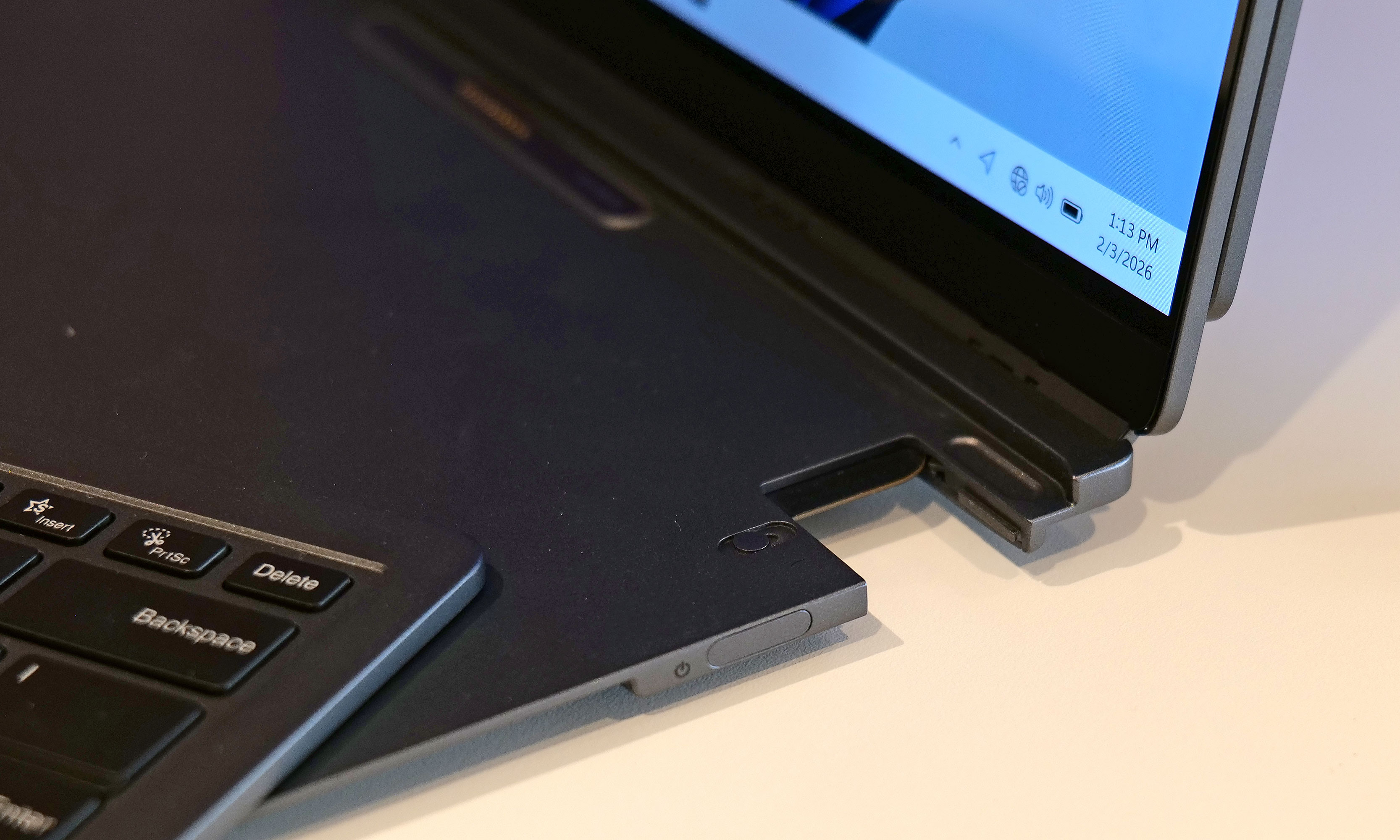
Lenovo has given the Yoga 9i 2-in-1 Aura Edition a refresh for 2026 and launched the new device at this year’s Mobile World Congress. The convertible laptop comes with a new Canvas Mode when the Yoga Pen Gen 2 case it’s bundled with is attached to the A-cover. When you lay the device down on a flat surface with the case attached, you’ll get a slight elevation on the display, which may make it easier to sketch or draw.

The Copilot+ laptop is powered by Intel Core Ultra Series 3 processors with integrated graphics, has up to 32GB in memory and runs Windows 11. Its 14-inch screen has a resolution of 2,880 x 1,800 pixels, has a variable refresh rate of 120 Hz and supports multi-touch. In addition to the new Canvas Mode, the device also supports Tablet, Tent, Stand and traditional Laptop Modes like its predecessors do. The Yoga 9i 2-in-1 Aura Edition Gen 11 will be available in May, with prices starting at $1,949.

Lenovo has also launched the new Yoga Pro 7a at MWC 2026. This Copilot+ laptop is powered by AMD Ryzen AI Max+ Series processors and comes with up to 128GB of RAM, so it can be used for heavy AI tasks. It has a 15.3-inch 2.5K PureSight Pro OLED display and is equipped with a big Force Pad trackpad that doubles as a drawing tablet. You can get the device starting in August this year for at least $2,099.

For a more affordable option, there’s the new IdeaPad Slim 5i Ultra laptop, which also has Copilot+ features. It’s powered by Intel Core Ultra processors and comes with either a WUXGA OLED or a WQXGA IPS LCD 14-inch display that has a VRR of 120 Hz. The device was designed for portability, with its thinnest part measuring just 11.9 mm in depth, and weighs 2.5 lbs. It will be available starting in October for at least $799.

Another affordable option is the new Idea Tab Pro Gen 2, which is specifically targeted towards students. It’s powered by theSnapdragon 8s Gen 4 Mobile Platform and has a 13-inch 3.5K display. The Tab Pro Gen 2 is Lenovo’s first tablet to ship with its Qira AI assistant and the company’s AI tools. It will be sold with a Lenovo Tab Pen Plus included for $419 starting in July.

This article originally appeared on Engadget at https://www.engadget.com/computing/laptops/lenovo-unveils-the-2026-refresh-of-its-yoga-9i-2-in-1-convertible-laptop-at-mwc-230100644.html?src=rss

Lenovo’s ThinkPads get a spec bump at MWC 2026

Lenovo is updating its business-focused laptop lineup at MWC 2026. The best-selling ThinkPad T-series is getting a full refresh, and there's an updated ThinkBook 2-in-1 and an all-new Android tablet.

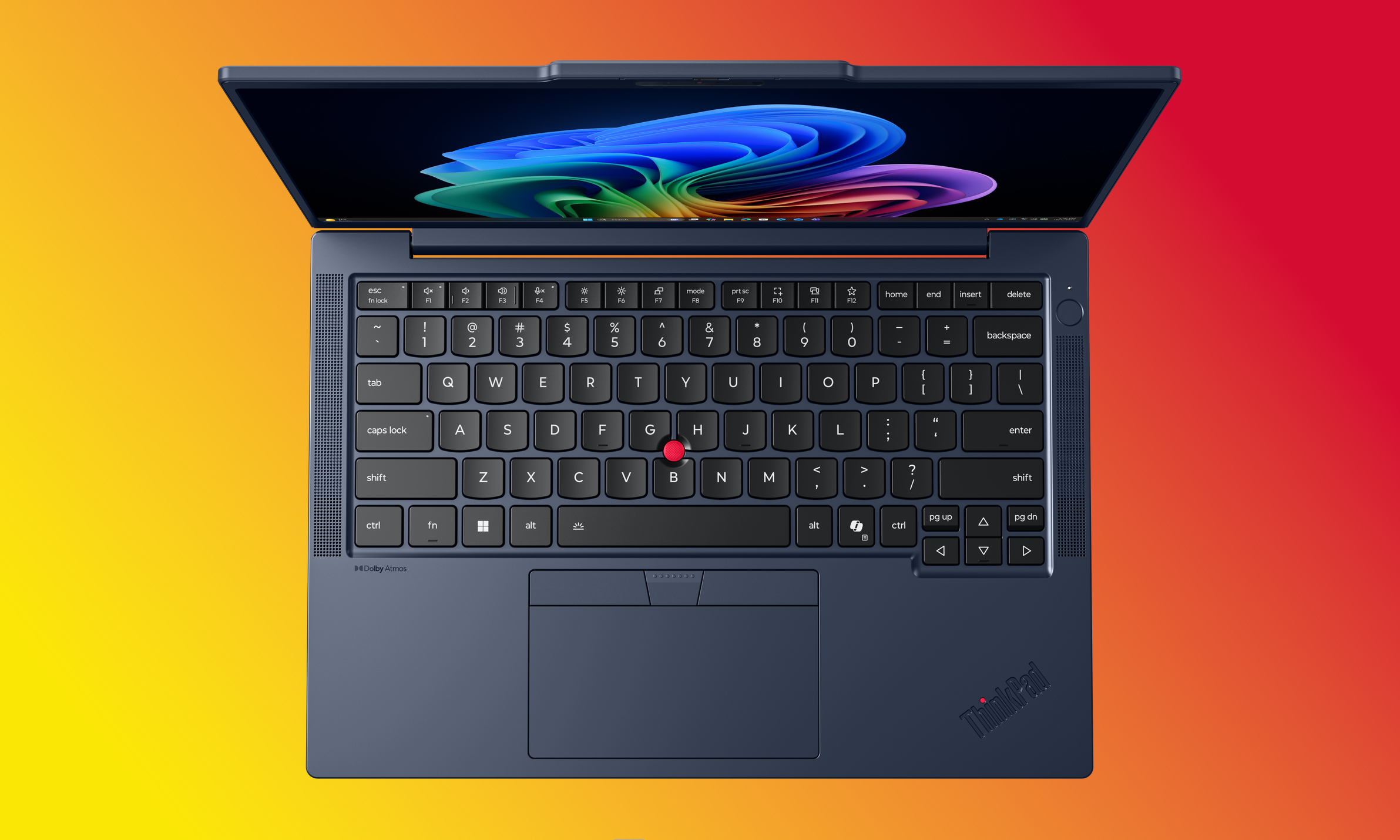
The ThinkPad T-Series, the backbone of Lenovo's business PC lineup, now (optionally) ships with a 5MP camera that supports computer vision and vHDR. The 2026 versions of the laptops have larger speakers and a new color (“cosmic blue”) on some models.

The ThinkPad T14 Gen 7 and ThinkPad T16 Gen 5 (each starting at $1,799) are the all-around workhorses of the ThinkPad lineup. Lenovo touts the 2026 models' 10/10 iFixit repairability score. They ship with either an Intel Core Ultra Series 3 (with Intel vPro) or an AMD Ryzen AI Pro 400 Series processor.

The ThinkPad T14s Gen 7 laptop against a colorful gradient
ThinkPad T14s Gen 7
Lenovo

Meanwhile, the T14s Gen 7 ($1,899+) is an even lighter version of Lenovo's slim ThinkPad variant. The 2026 model weighs 2.45 lbs (1.1kg), making it the lightest T-series model to date. The T14s Gen 7 is powered by Intel Core Ultra Series 3 (with Intel vPro) or AMD Ryzen AI Pro 400 Series processors.

Rounding out the T-Series is the second-generation of the 360-degree-folding ThinkPad T14s 2-in-1. The 2026 model ($1,849+) is ever-so-slightly lighter than its predecessor, now weighing in at 3.06lbs (1.39kg). The new version includes a garaged pen, with its storage slot living above the screen.

The ThinkPad X13 Detachable against a colorful gradient
ThinkPad X13 Detachable
Lenovo

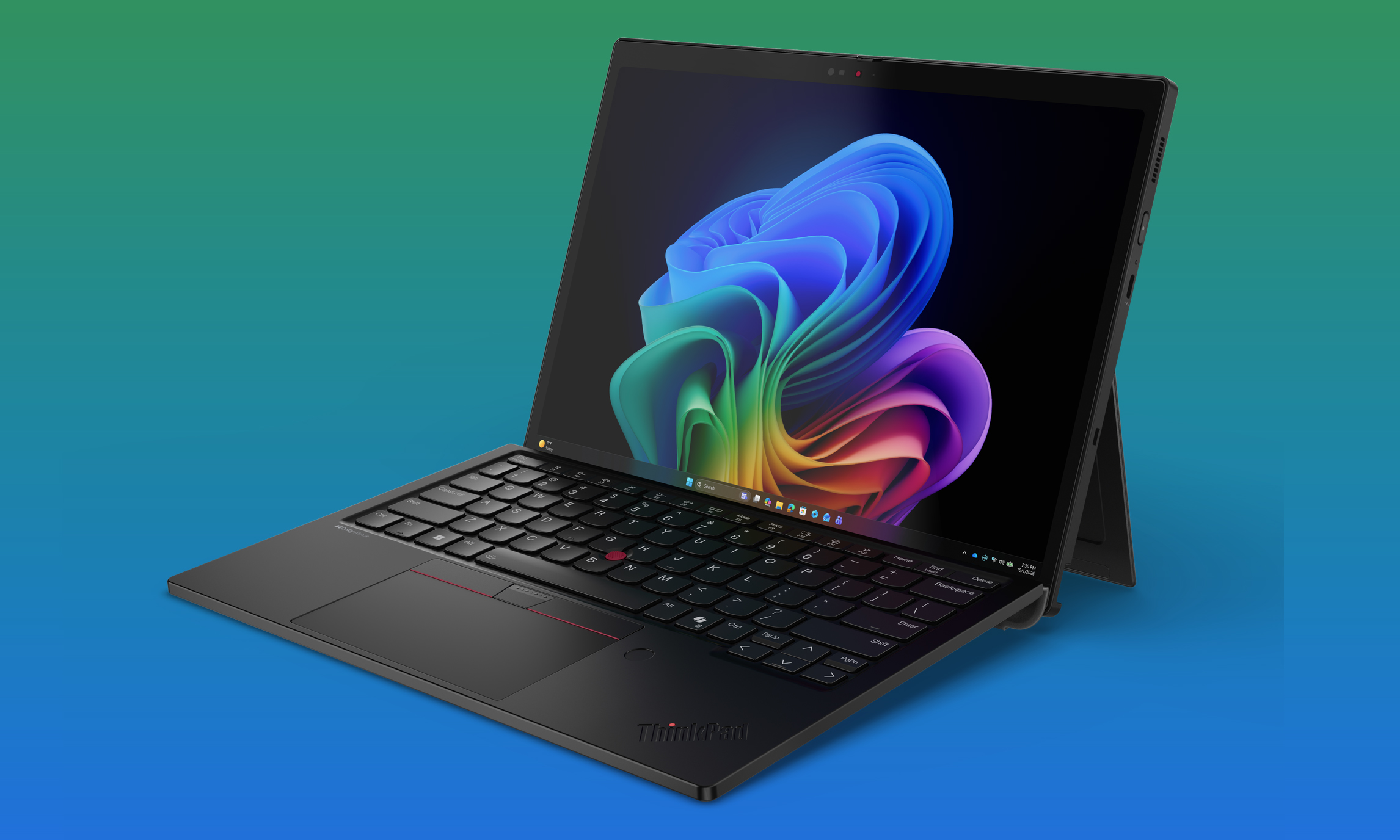
The ThinkPad X13 Detachable is the lineup's take on the Surface Pro. The tablet has Intel Core Ultra Series 3 processors and up to 64GB of RAM. Its 13-inch display supports up to 500 nits of brightness. It has a pair of Thunderbolt 4 ports, and its keyboard has full-sized keys with 1.5mm of travel. It ships with a "full-size ergonomic pen" that you can stash (and charge!) in a dedicated slot on the keyboard. The X13 Detachable starts at $1,999.

The $499 ThinkPad X11 is a rugged Android tablet for industrial environments. Powered by the Snapdragon 7s Gen 3 Mobile Platform, it has a 10.95-inch display with 2,560 x 1,600 resolution and 600 nits of brightness. It's MIL-STD-810H certified, meaning it passes stringent military testing for durability.

A person in an automotive factory, using the ThinkTab X11 tablet to look at graphs
ThinkTab X11
Lenovo

Finally, there's the ThinkBook 14 2-in-1 Gen 6 ($1,754+). This Yoga-like folding device has a 14-inch WUXGA touch display. It runs on an Intel Core Ultra 7 (Series 3) processor and supports up to 32GB of RAM.

Most of the devices start shipping in Q2 2026. (That includes the ThinkPad T14, T16, T14s, T14s 2-in-1, ThinkTab X11 and ThinkBook 14 2-in-1.) The lone exception is the ThinkPad X13 Detachable, which is slated for Q3 2026. You can learn more about the new business-focused devices on Lenovo's website.

This article originally appeared on Engadget at https://www.engadget.com/computing/laptops/lenovos-thinkpads-get-a-spec-bump-at-mwc-2026-230100419.html?src=rss

Lenovo’s latest gaming tablet goes big on battery

Lenovo’s buzziest gaming-related MWC announcement is undoubtedly its foldable Legion Go handheld-cum-laptop hybrid, which you can read all about here. But that wasn’t all the company showed off. We’re also getting an updated Legion Tab, Lenovo’s powerful gaming tablet.

Like the Gen 4 and 3 models before it, the latest Legion Tab features an 8.8-inch LCD display with an 165Hz refresh rate. The 3K panel can get up to 600 nits of brightness. The notable spec boosts come in the form of a jump up to a Snapdragon 8 Gen 5 chipset and a larger 9,000mAh battery, which should help you power through those long-haul flight gaming sessions.

The 360g Gen 5 Legion Tab is equipped with 16GB of RAM and up to 512GB of storage. It also features what looks like an RGB light ring next to the rear camera cutout (just in case anyone needs reminding that you’re a capital G on-the-go gamer), and two USB-C ports.

The latest Legion Tab also supports Lenovo AI Engine+, which uses AI for audio enhancement and noise cancellation. Available in Eclipse Black, Glacier White and Surge, it will be available to buy in May, with prices starting at $849.

Lenovo also unveiled a new 15-inch variant of its Gen 11 Legion 7a gaming laptop, after announcing an updated 16-inch model at CES in January. It features a slightly smaller version of the same PureSight OLED display and is powered by a Ryzen AI Max+ 392 processor with integrated Radeon 8060S graphics. Weighing in 1.65kg, the Legion 7a is a slimline laptop designed to be easily portable without compromising too much on power, and its 84Whr battery is good for the size. It will be available with up to 2TB of storage in July, starting at $2,299.

This article originally appeared on Engadget at https://www.engadget.com/gaming/pc/lenovos-latest-gaming-tablet-goes-big-on-battery-230017436.html?src=rss

The Lenovo Legion Go Fold gaming handheld concept looks awkward but its versatility is endless

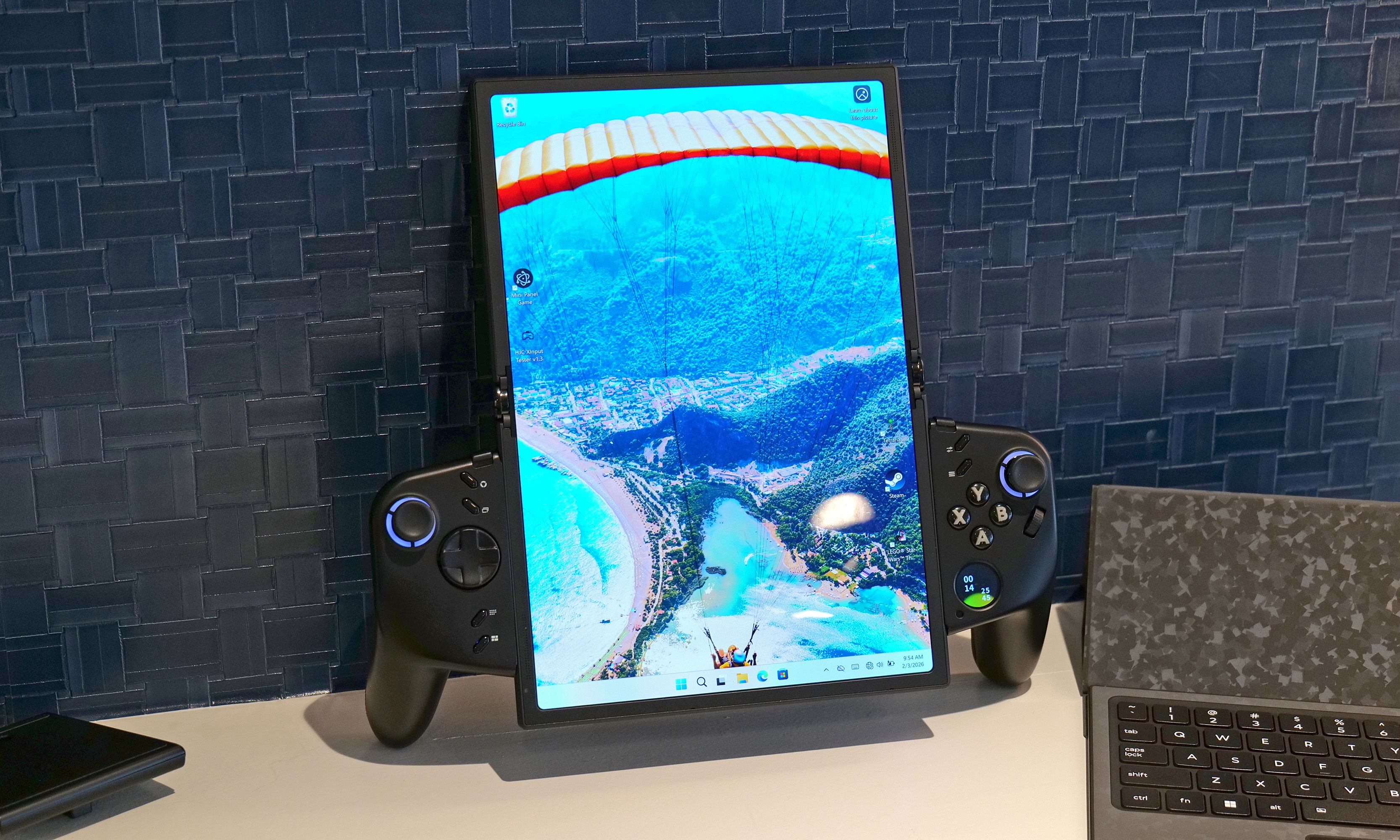
Lenovo already has a large roster of gaming handhelds. However, it seems there's always room for another because at MWC the company showed off an ambitious concept device based around a flexible OLED display. And while the whole setup looks ungainly, after getting my hands on it, I'm very intrigued by its adaptability. 

Now I'll be the first to admit that an 11.6-inch display feels oversized on a handheld that, in theory, is meant to be somewhat portable. That said, the beauty of the Legion Go Fold's screen is that it can be bent in half to create a more appropriately-sized 7.7-inch panel. In this configuration, the system feels a lot less cumbersome while also sporting a more traditional aspect ratio. Then, at a moment's notice, you can extend the display to provide extra room when you need it. 

How silly does this look when its flexible display is fully extended in portrait mode?
Sam Rutherford for Engadget

However, the thing I like most about the Legion Go Fold is that its controllers are detachable and that the tablet has several different mounting points. This means if you have the space, you can remove the controllers, rotate the display into landscape mode and then reattach them to get an immersive widescreen experience. Alternatively, you can connect the gamepads together using one of Lenovo's accessories (which is similar to Nintendo's Joy-Con Grip) and then prop the system up using the Go Fold's folio cover, which doubles as a kickstand. 

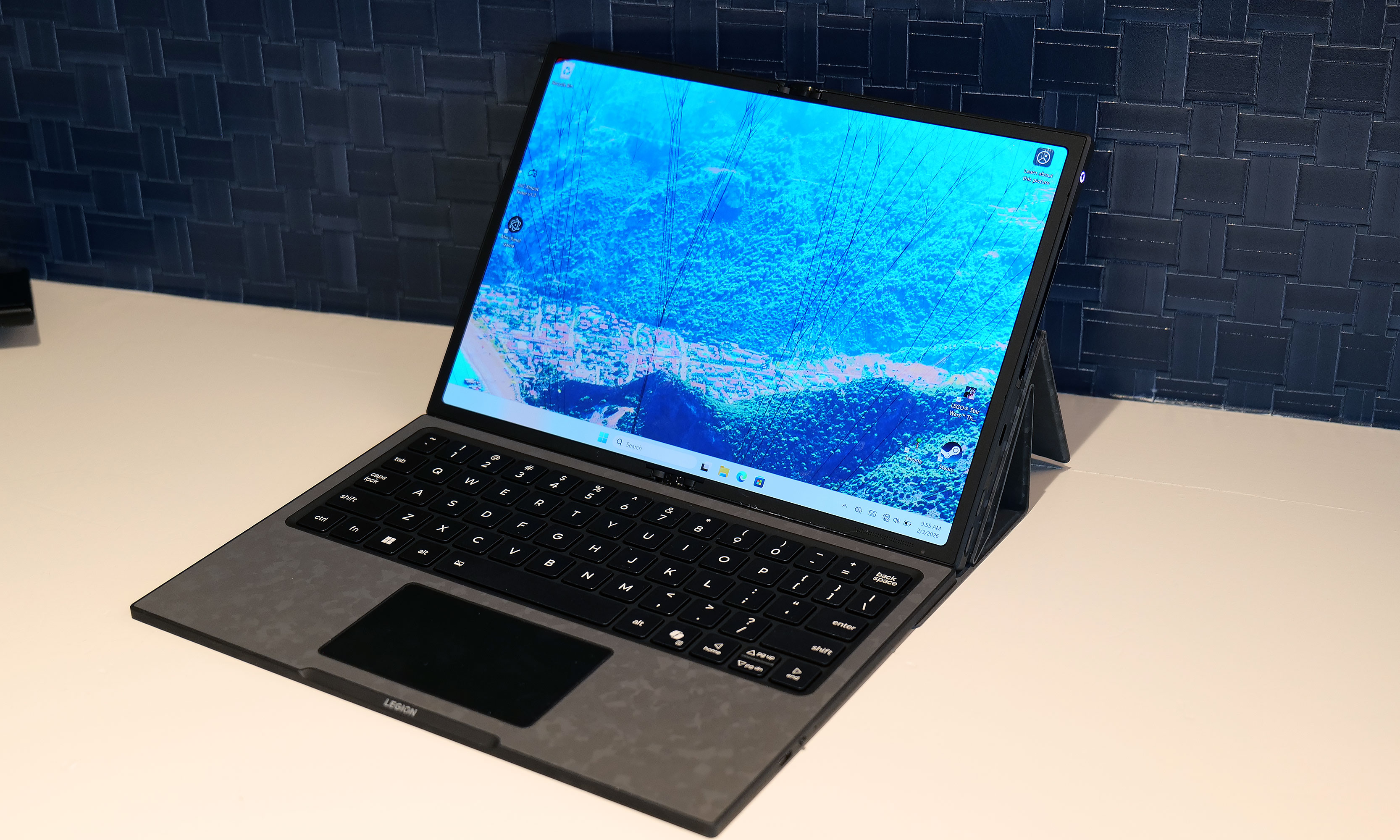
But wait, there's more: The handheld also features a strip of pogo pins for connecting a wireless keyboard, effectively transforming the whole setup into a miniature gaming laptop. Depending on how you're counting, that's at least four different modes you're getting from the Legion Fold, which is really quite impressive and speaks to the versatility of Lenovo's design.

Another feature I really like is the small 1-inch OLED display on the right gamepad. It supports a handful of widgets that can display the time, performance settings and more. It also doubles as a small touchpad, which can be really handy when playing PC titles that were originally developed for mouse and keyboard. And just like on the Legion Go and Legion Go 2, the Fold's right gamepad has a small scroll wheel and a hidden sensor, so it can also turn into a vertical mouse for playing FPS titles. 

At this point, it's important to mention that Lenovo doesn't have concrete plans to put this thing into production, so its specs don't really matter. That said, the Legion Go Fold I tried featured an Intel Core Ultra 7 258V chip with 32GB of RAM and a 48WHr battery, which is more than respectable. Though if this thing does become an actual retail device, I would like to see a power cell with a bit more capacity. 

I really love how the Legion Go Fold can turn into a miniature laptop just by moving some of its accessories around.
Sam Rutherford for Engadget

But as a concept gadget, I think the Legion Go Fold is a great showcase of how new technology (in this case, a flexible display) can bring new capabilities and greater flexibility to existing categories. And who knows, if a lot of people like the idea, it might encourage Lenovo to refine it and put it on sale for real. I would just be a bit worried about pricing, because all these components won't come cheap. 

This article originally appeared on Engadget at https://www.engadget.com/gaming/pc/the-lenovo-legion-go-fold-gaming-handheld-concept-looks-awkward-but-its-versatility-is-endless-230000816.html?src=rss

The Lenovo Modular AI PC concept is a remixed dual-screen laptop with hot swappable ports

The potential of modular laptops has never fully translated to the real world. While companies like Framework have made major strides in recent years, there's still quite a bit of room for improvement. At MWC, Lenovo is looking to address that with its Modular AI PC concept. It features not one but two displays and a detachable keyboard to create something that strains the definition of a laptop, thanks to an innovative and very adaptable design.

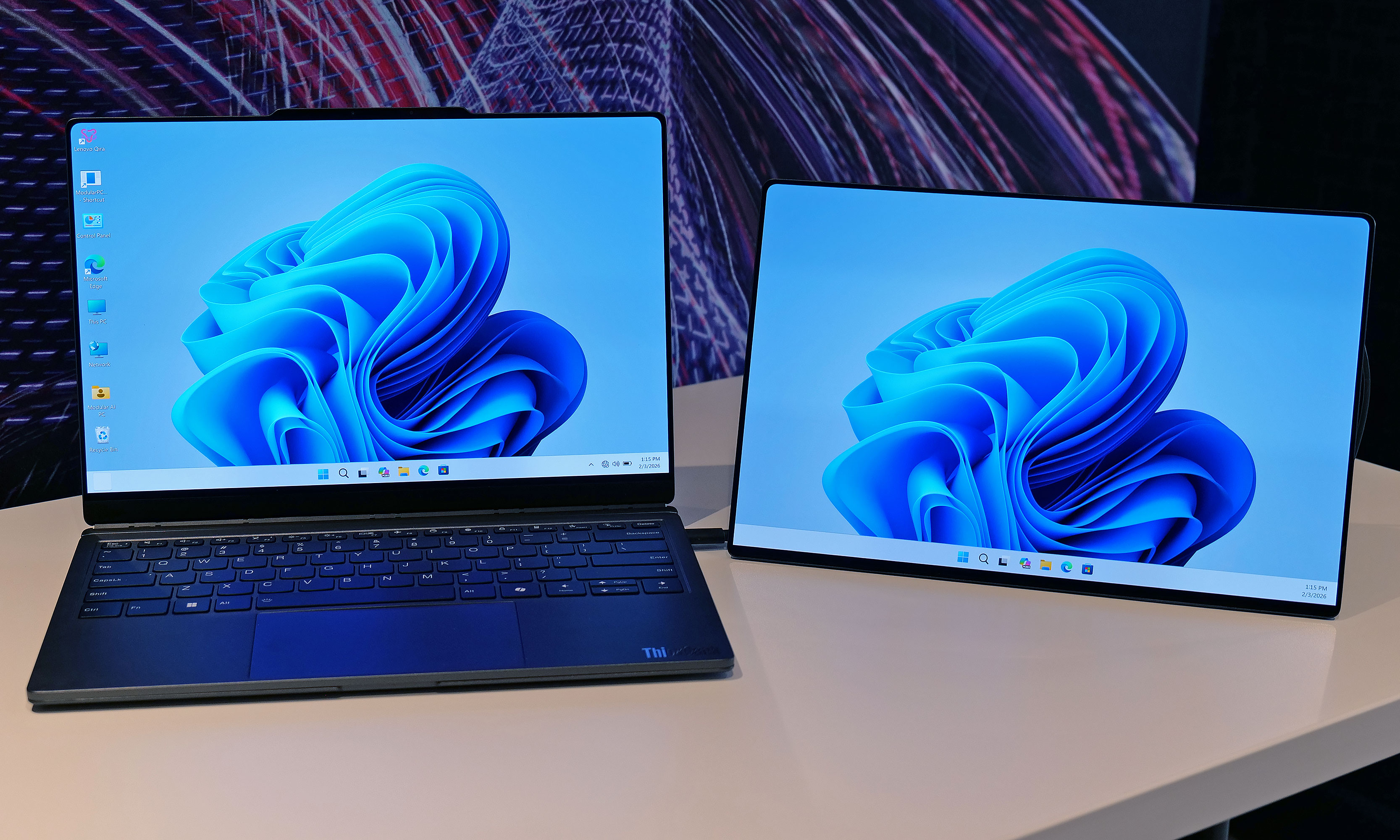
Compared to Framework's gadgets, which primarily use modularity to make upgrading the system and extending its lifespan easier, Lenovo's concept is based around a 14-inch chassis with hot swappable components. This allows you to move its keyboard and secondary display around at will, so the system can better adjust to its environment or workload. By default, its bonus screen is mounted on its lid, allowing you to do easy face-to-face sharing with someone sitting opposite you. However, without even needing to turn the system off, you can yank away the notebook's keyboard and put the display in its place to provide additional real estate. 

The Lenovo Modular AI PC concept's second screen can be attached to its lid or moved off to the side like a traditional dual monitor setup.
Sam Rutherford for Engadget

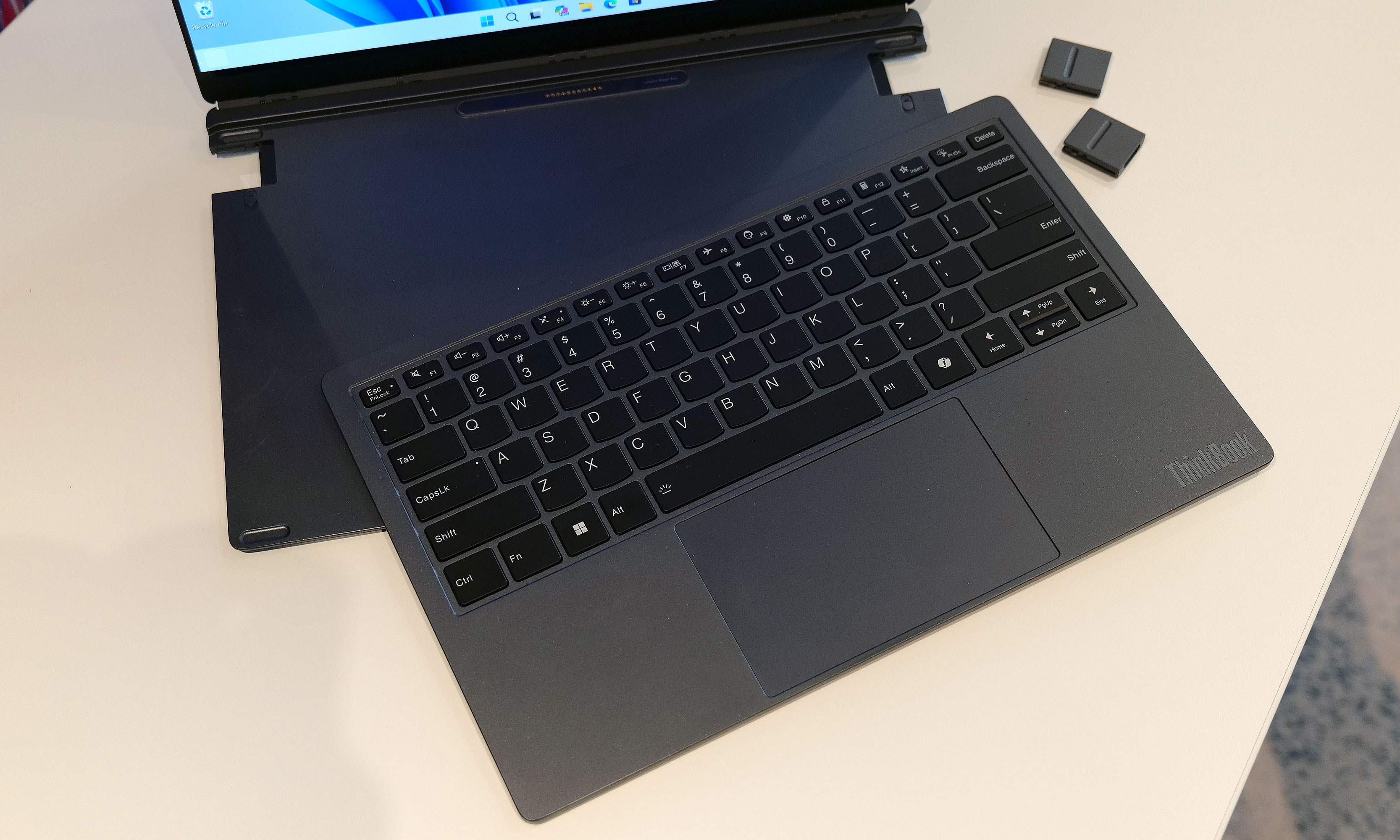
Or if you prefer a more traditional dual-screen setup, you can move it off to the side, prop it up via a built-in kickstand and connect to the laptop over USB-C. You even get the flexibility to arrange the display in vertical or landscape orientation, which is nice if you're doing stuff like coding or writing in a word doc (I feel targeted, but in a good way). And because the keyboard can connect to the notebook using pogo pins or Bluetooth, you have the freedom to position it practically anywhere you want. 

Meanwhile, Lenovo borrowed one aspect of Framework's modularity by including the ability to swap ports on the fly. During my demo, the company showed off modules featuring USB-C, USB-A and HDMI connectors, though I was told there are a ton of additional possibilities for those who might need things like a proper Ethernet jack or additional ports for audio. 

The Lenovo Modular AI PC concept's keyboard and be completely removed at a moment's notice and positioned anywhere you like thanks to its Bluetooth connectivity.
Sam Rutherford for Engadget

But what impressed me the most was that despite being a concept device, the whole setup felt quite polished. That almost suggests that this thing might be closer to becoming an actual retail product than some of the company's other demo gadgets. Build quality felt really sturdy and I had no issues changing out ports or moving the secondary display around without needing to troubleshoot or reboot the system. Everything just kind of worked. And while Lenovo isn't sharing details about what processor it's running or how much memory it has, its performance felt snappy too. 

My only question is that I'm not quite sure where AI fits into all of this. I was able to break down and reconfigure the system without any help from machine learning or a digital assistant. That said, I'm not complaining, because even with a lot of moving parts, its modular design is very approachable and easy to use. 

Ports on the Lenovo Modular AI PC concept can be hot swapped between to add USB-C, USB-A and HDMI connectors as needed.
Sam Rutherford for Engadget

Unfortunately, Lenovo isn't planning on turning this concept into a true retail device. But even so, I hope the company will at least consider bringing some of the modular laptop's features like its hot swappable ports to future products.


This article originally appeared on Engadget at https://www.engadget.com/computing/laptops/the-lenovo-modular-ai-pc-concept-is-a-remixed-dual-screen-laptop-with-hot-swappable-ports-230000158.html?src=rss

Best Buy Canada seemingly just leaked Sonos’ next portable speaker

A product briefly posted on the Canadian Best Buy website this weekend suggests Sonos may soon announce a new portable speaker called the Sonos Play. The speaker offers Wi-Fi and Bluetooth connectivity, AirPlay 2 support, Trueplay to tune the sound based on wherever you've placed it and voice controls, according to a page that's since been removed. Best Buy Canada had it listed for $399.99 CAD (or a little under 300 US dollars), and put the release date at March 31.

The listing may have been taken down, but not before it was spotted and reposted on Reddit. The product page for the Sonos Play also showed that it comes in two colors, White and Black, and it has a little carrying strap for added convenience. It's IP67 rated dust- and waterproof. Sonos hasn't officially made any announcements about it yet, but we wouldn't be surprised to see one soon.

This article originally appeared on Engadget at https://www.engadget.com/audio/speakers/best-buy-canada-seemingly-just-leaked-sonos-next-portable-speaker-215601978.html?src=rss

Anthropic’s Claude grabs top spot in App Store after Trump’s ban

Anthropic may have lost out on doing business with the US government, but it's gained enough popularity to earn the number one spot on the App Store's Top Free Apps leaderboard. At the top, Claude beat out both ChatGPT and Google Gemini, which respectively sit at the second and third spots on Apple's free apps charts.

The sudden surge in user downloads isn't random. It follows news that President Trump has barred any federal agency from using Anthropic's Claude or other AI tools after the AI company refused to concede on certain guardrails. After declining to have its AI models be used for mass domestic surveillance and fully autonomous weapons, Anthropic was also threatened with a "supply-chain risk" label by the Department of Defense Secretary Pete Hegseth. The very public spat led to a wave of user support that finally allowed Claude to dethrone OpenAI's ChatGPT on the App Store as the most downloaded free app.

While OpenAI has stepped into Anthropic's shoes after agreeing to a deal with the Department of Defense, the CEO still offered up some thoughts about the debacle during an AMA on X. Even though Claude is a competing model, Sam Altman said that Anthropic's supply-chain risk designation was "a very bad decision" that he's hoping gets reversed. On top of that, OpenAI's CEO called Anthropic's blacklisting "an extremely scary precedent," but he's "still hopeful for a much better resolution."

This article originally appeared on Engadget at https://www.engadget.com/big-tech/anthropics-claude-grabs-top-spot-in-app-store-after-trumps-ban-193610130.html?src=rss

The US reportedly used Anthropic’s AI for its attack on Iran, just after banning it

In a lengthy post on Truth Social on February 27, President Trump ordered all federal agencies to "immediately cease all use of Anthropic's technology" following strong disagreements between the Department of Defense and the AI company. A few hours later, the US conducted a major air attack on Iran with the help of Anthropic's AI tools, according to a report from The Wall Street Journal.

The president noted in his post that there would be a "six-month phase-out period for agencies like the Department of War who are using Anthropic’s products," so federal agencies are still expected to eventually move away from using Claude or other Anthropic tech. It's also not the first time that the US used Anthropic's AI for a major military operation, as the WSJ previously reported that Claude was used in the capture of the now-removed Venezuelan president Nicolás Maduro.

Moving forward, the Department of Defense may begin transitioning towards other AI options, especially after reaching deals with both xAI and OpenAI to use their models within the federal agency's network. However, the WSJ reported that it would take months to replace Anthropic's Claude with other AI models.

This article originally appeared on Engadget at https://www.engadget.com/ai/the-us-reportedly-used-anthropics-ai-for-its-attack-on-iran-just-after-banning-it-172908929.html?src=rss

A closer look at Honor’s Robot Phone

While Honor has already made plenty of product announcements, with tablets, foldables and more, its most interesting device at MWC 2026 is the Robot Phone — and maybe the humanoid robot that came alongside it.  

After briefly showing off a model at CES, Honor isn't quite ready to launch its Robot Phone. However, we got more specs, tech demos and a closer look following the company's MWC press event in Barcelona. The Robot Phone is currently set to launch later this year.

Honor Robot Phone at MWC 2026
Image by Mat Smith for Engadget

Honor has put a lot of effort into ensuring its camera gimbal is highly mobile, to the point of creating a tiny personal robot that is, dare I say, adorable? The Robot Phone's pop-up camera can cock its head, shake to say no, nod to agree, and even "flip" – or at least rotate 360 degrees. According to Honor's presentation, it can even bop along to songs. A spokesperson told me that it's got five songs in its repertoire, so it's not clear whether they're programmed for these kind of demos, or will be a feature of the final retail device.

Another demo here at MWC showed how you could make the Robot Phone "sleep" by covering its gimbal eye, though it's odd that the camera is still exposed rather than folded away. My main concern with the Robot Phone is the robustness and durability of its robotic mechanisms. We've lived through several waves of smartphones that attempted much simpler mechanical camera functions and the threat of dust or heavy-handed users can't be ignored.

Honor Robot Phone at MWC 2026
Image by Mat Smith for Engadget

The company says it's taken what it learned from foldables, regarding high-performance materials and simulation accuracy, and applied it to shrinking the camera module. On stage, Honor CEO James Li revealed what he calls the industry's smallest micro motor, much smaller than a 1-euro coin and, he added, 70 percent smaller than existing micro motors. 

As this component has been reduced substantially, the Robot Phone's gimbal will be the industry's smallest 4-degrees-of-freedom gimbal system. That's a spec – we finally got a spec! It'll also offer three-axis stabilization in this tiny camera package, with the primary camera using a 200-megapixel sensor. 

The fold-away panel that the primary camera tucks into also reveals more typical cameras, so you're not forced to use the gimbal if you don't need it. Still, that's one very thick camera unit:

Honor Robot Phone at MWC 2026
Image by Mat Smith for Engadget

Honor has already started building out camera modes and features, with a Super Steady Video mode that enhances stability while swinging the Robot Phone around to capture video. AI Object Tracking will apparently intelligently follow subjects, while AI SpinShot supports intelligent 90-degree and 180-degree rotational movement for more cinematic transitions. We've seen these sorts of pre-programmed movements and functions in full-size phone gimbals and action cams. If Honor can nail it in such a tiny form, it'll be impressive. 

Other specifications during Honor's press event were sparse, although the company announced a collaboration with ARRI Image Science to bring its cinematic smarts to the Robot Phone's gimbal camera. 

In a press release, Honor's Li said the collaboration would bring ARRI's "cinematic standards and professional workflows" into mobile imaging. It's apparently the first time elements of ARRI Image Science are being integrated into a consumer device. Dr. Benedikt von Lindeiner, VP at ARRI, said the goal is to bring a true cinematic aesthetic, such as "natural color, gentle highlight roll-off, and a sense of depth," to shooting with an Honor smartphone.

Honor Robot Phone at MWC 2026
Image by Mat Smith

Honor also made a humanoid robot companion for its Robot Phone. The bot took to the stage alongside the Robot Phone, danced alongside human dancers, did a backflip and shook hands with CEO James Li. It didn't say a thing, but fortunately, during some on-the-rails banter between the robot, Robot Phone and Honor's CEO, the Robot Phone was particularly chatty.

Like the many humanoid robots we've reported on and seen in person, Honor hopes to put it to work in both industrial and domestic settings, pitching it as a central part of the company's multi-million-dollar push into AI. For now, it's being called Honor Robot.  

This article originally appeared on Engadget at https://www.engadget.com/mobile/smartphones/a-closer-look-at-honors-robot-phone-145935198.html?src=rss