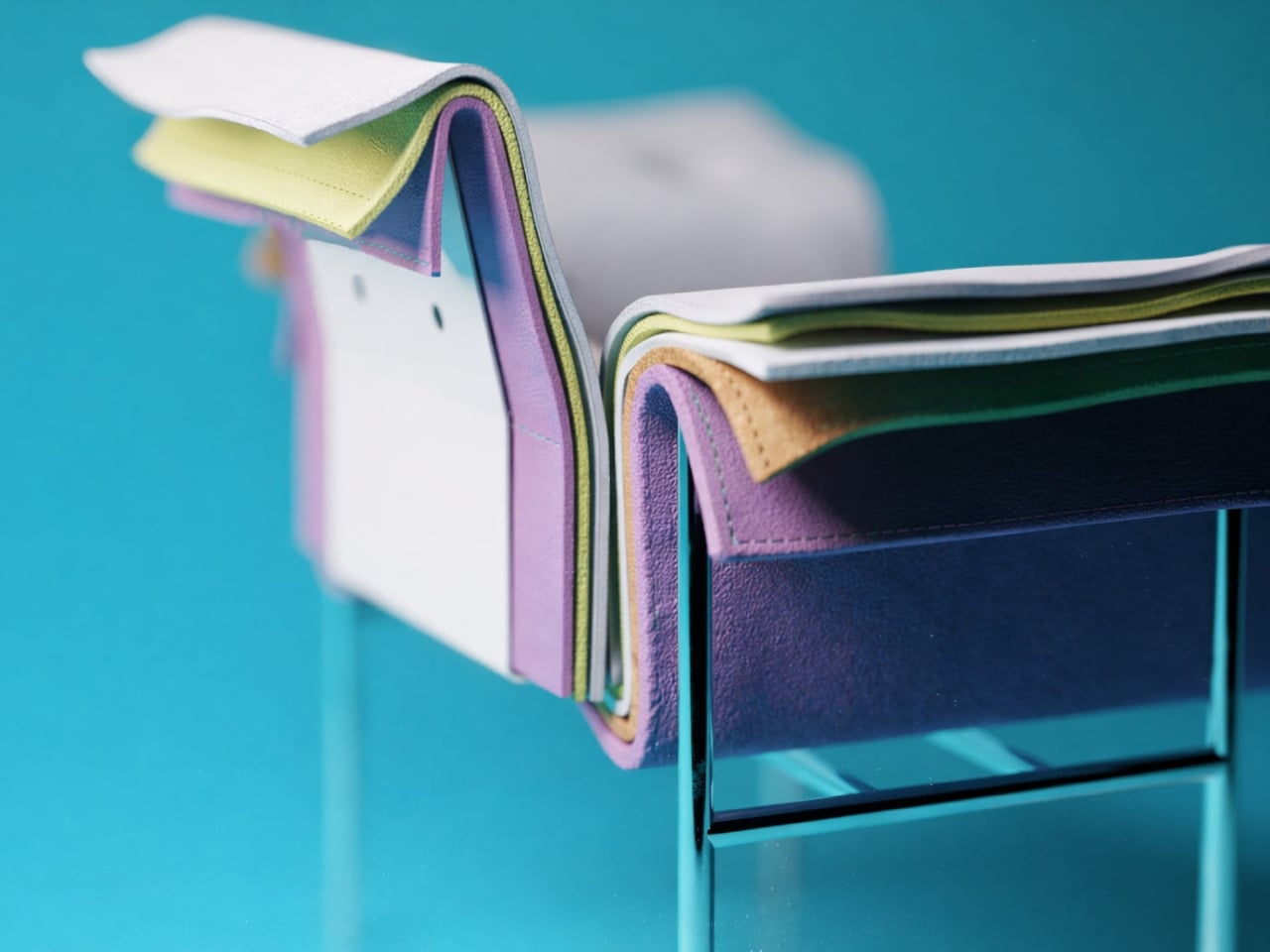
This Chair Looks Like a Material Swatch Book

You know those material swatch books at fabric stores where every color fan out in perfect rainbow order? Designer Fatih Demirci apparently looked at one and thought, “What if that was a chair?” The result is the Kartela Chair, a concept design that turns the humble material sample into something you’d actually want to sit on.

Let’s be real. Most furniture design either plays it safe with neutrals or goes so wild that you’d only see it in a modern art museum. The Kartela Chair manages to walk this delightful line between practical and playful. Looking at it feels like stumbling upon a design secret, where function meets whimsy in the most unexpected way.

Designer: Fatih Demirci

The concept is brilliantly simple yet visually striking. The chair features layers upon layers of cushioned upholstery stacked together, creating this incredible rainbow effect along the edges. Each layer represents a different color or texture, much like flipping through pages in a designer’s sample book. It’s the kind of thing that makes you do a double take. From one angle, you see a sophisticated seating piece with a clean, minimalist frame. From another, you catch those vibrant cascading layers that give it personality and depth.
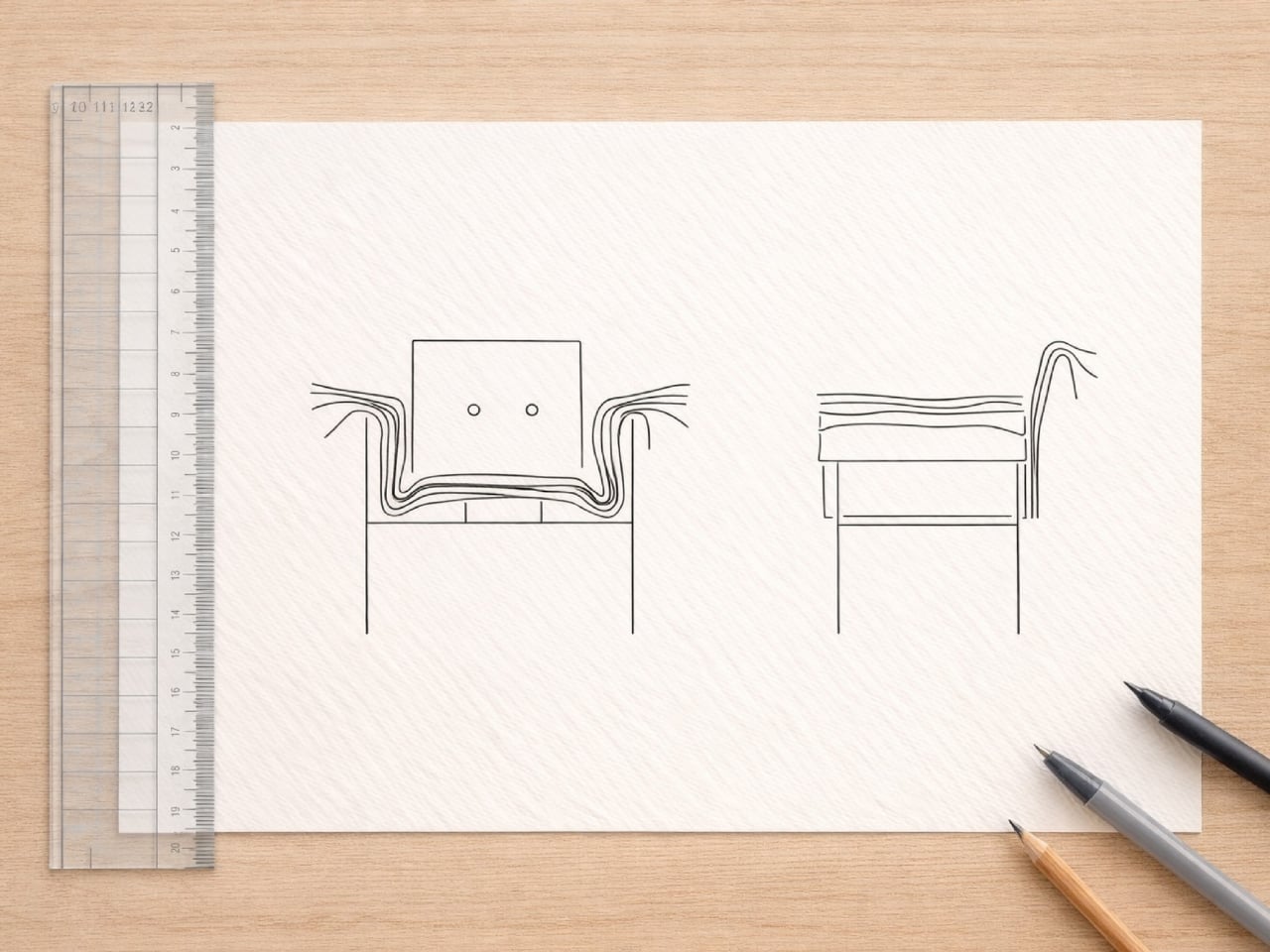
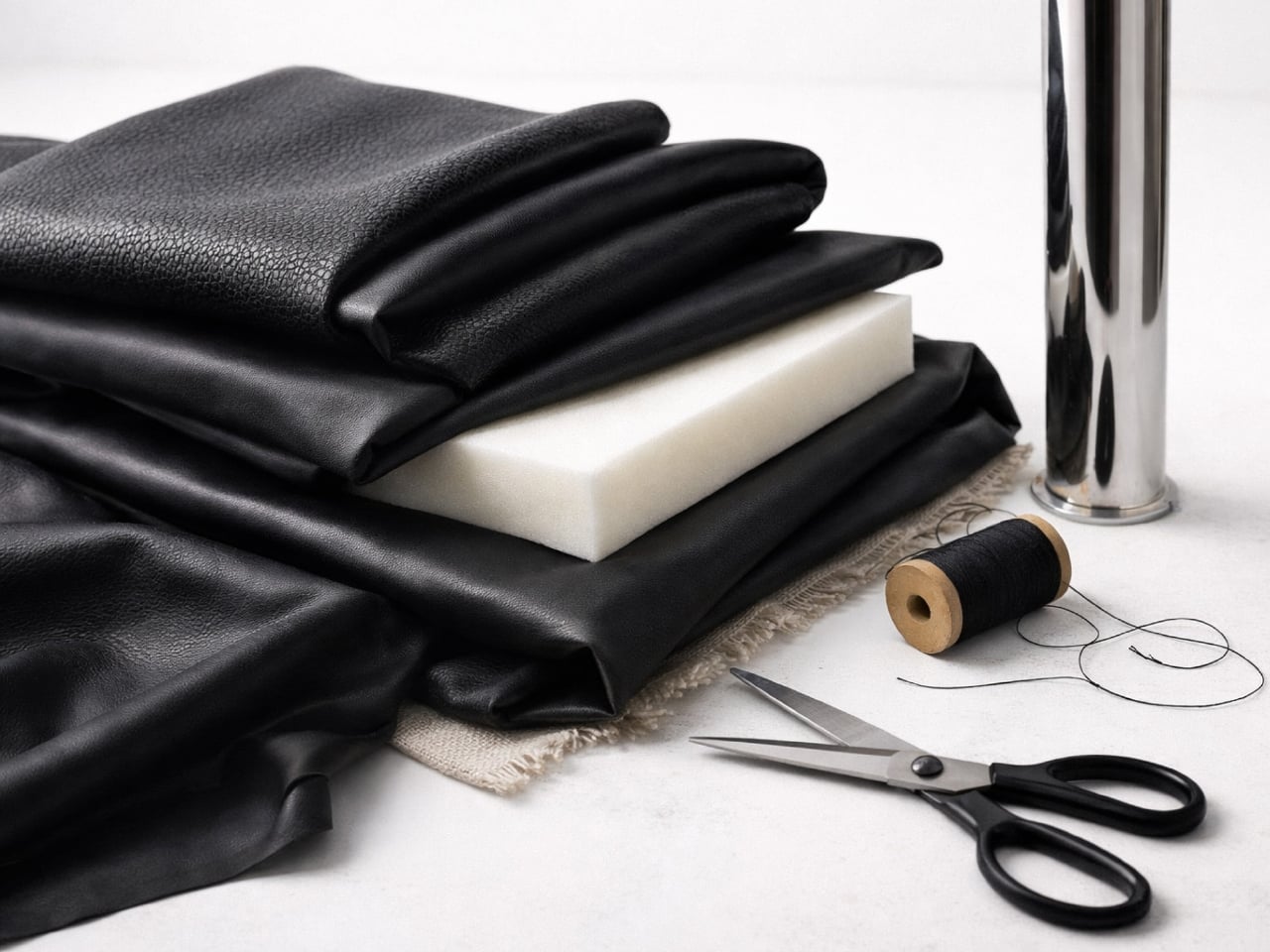
What really gets me about this design is how it celebrates the materials themselves. Usually, upholstery is hidden away, tucked and stapled underneath where no one sees the construction. Demirci flips that script entirely. Here, the layers become the main event. Every fold, every color transition, every texture is on full display. It’s like the chair is saying, “Hey, look how I’m made, and isn’t it beautiful?”


The Kartela Chair comes in different colorways, which honestly makes it even more fun. There’s a lime green version that practically vibrates with energy, perfect for someone who wants their furniture to make a statement. Then there are softer pastel combinations in lilacs, blues, and creams that feel more serene but still maintain that playful edge. And for those leaning toward earthy vibes, there are warm tones in mustards, tans, and terracottas that bring all that visual interest without overwhelming a space.


The frame itself keeps things grounded. Slim metal legs in either white or black powder coat give the chair an airy, almost floating quality. It’s a smart move. With all that cushioned drama happening above, a heavy base would make the whole thing feel clunky. Instead, the minimal structure lets those colorful layers take center stage while still providing solid support.


From a practical standpoint, this concept is interesting because it challenges how we think about customization. Imagine being able to choose your layer combinations like picking nail polish colors. Want more blues? Go for it. Prefer a monochromatic fade? That works too. The design naturally lends itself to personalization in a way that most furniture doesn’t.


There’s also something nostalgic about the aesthetic. Those tufted buttons on the seat and back cushions give off vintage vibes, like something your cool aunt might have had in her 70s living room, but updated for today. It’s retro without being costume-y, which is a hard balance to strike.


Of course, this is still a concept design, which means we’re looking at rendered images rather than something you can order online tomorrow. But that’s part of what makes furniture concepts so exciting. They push boundaries and make us reconsider what’s possible. Even if the Kartela Chair never makes it to mass production, it’s already done its job by sparking conversation and inspiring other designers to think outside the traditional furniture box. Whether this chair ever graces showroom floors or remains a digital darling, Fatih Demirci has created something that makes people smile. And in the end, isn’t that what good design should do?


The post This Chair Looks Like a Material Swatch Book first appeared on Yanko Design.

iOS 26.3 Beta 2: Siri 2.0 is FINALLY Coming!

iOS 26.3 Beta 2: Siri 2.0 is FINALLY Coming!

Apple has officially released iOS 26.3 developer beta 2, marking another significant step in the evolution of its software ecosystem. This update is part of a broader rollout that includes iPadOS, macOS, tvOS, visionOS, and watchOS, showcasing Apple’s commitment to refining its platforms. While the changes in this beta may appear subtle, they lay the […]

The post iOS 26.3 Beta 2: Siri 2.0 is FINALLY Coming! appeared first on Geeky Gadgets.

Posted in Uncategorized

Proton’s Lumo AI chatbot now has an encrypted space for your projects

Proton’s latest update for Lumo, its privacy-focused chatbot, introduces a feature called Projects. It’s a dedicated and encrypted space for tasks that you know you’ll access again and again over an extended period of time, such as papers you’ll have to work on the whole semester or plans for a big trip you’re taking later this year.

Lumo will remember and keep all the information and all the files you upload for every project you create. Any document you upload or resources you add to the chat will sync across devices, so you don’t have to repeat yourself every time you access a task. Projects are also integrated with Proton Drive, allowing you to easily link documents and other files in your chats.

Proton says you can use the feature for just about any topic you want and give the chatbot tailored instructions for every project you create. It also said that each project is its own encrypted environment and that it will not use your chat histories to train AI models. To be clear, Lumo uses open source AI models, including Nemo, OpenHands 32B, OLMO 2 32B and Mistral Small 3.

The latest version of Lumo is now available to all users, but you’re only limited to one project if you’re on a free account. To be able to created an unlimited number of projects, you’ll have to subscribe to Lumo Plus, which costs $10 a month.

This article originally appeared on Engadget at https://www.engadget.com/ai/protons-lumo-ai-chatbot-now-has-an-encrypted-space-for-your-projects-110000298.html?src=rss

Proton’s Lumo AI chatbot now has an encrypted space for your projects

Proton’s latest update for Lumo, its privacy-focused chatbot, introduces a feature called Projects. It’s a dedicated and encrypted space for tasks that you know you’ll access again and again over an extended period of time, such as papers you’ll have to work on the whole semester or plans for a big trip you’re taking later this year.

Lumo will remember and keep all the information and all the files you upload for every project you create. Any document you upload or resources you add to the chat will sync across devices, so you don’t have to repeat yourself every time you access a task. Projects are also integrated with Proton Drive, allowing you to easily link documents and other files in your chats.

Proton says you can use the feature for just about any topic you want and give the chatbot tailored instructions for every project you create. It also said that each project is its own encrypted environment and that it will not use your chat histories to train AI models. To be clear, Lumo uses open source AI models, including Nemo, OpenHands 32B, OLMO 2 32B and Mistral Small 3.

The latest version of Lumo is now available to all users, but you’re only limited to one project if you’re on a free account. To be able to created an unlimited number of projects, you’ll have to subscribe to Lumo Plus, which costs $10 a month.

This article originally appeared on Engadget at https://www.engadget.com/ai/protons-lumo-ai-chatbot-now-has-an-encrypted-space-for-your-projects-110000298.html?src=rss

Inside 2026’s AI Race, from NVIDIA Vera Rubin to Grid Deals & Safer Agents

Inside 2026’s AI Race, from NVIDIA Vera Rubin to Grid Deals & Safer Agents

What happens when fierce competitors in the AI world finally find common ground? Below, AI News & Strategy Daily | Nate B Jones takes you through how OpenAI, Google, and Anthropic, three of the biggest names in artificial intelligence, are aligning on a shared vision for the future. In a space often defined by rivalry […]

The post Inside 2026’s AI Race, from NVIDIA Vera Rubin to Grid Deals & Safer Agents appeared first on Geeky Gadgets.

Posted in Uncategorized

The Fastest Way to Transfer WhatsApp (iPhone to Android) in 2026

The Fastest Way to Transfer WhatsApp (iPhone to Android) in 2026

Switching from Android to iPhone or vice versa can seem daunting, especially when it comes to transferring your WhatsApp data. However, WhatsApp provides an official and free method to simplify this process. By using the “Move to iOS” app, you can seamlessly transfer your chats, media, and account information without relying on third-party tools. The […]

The post The Fastest Way to Transfer WhatsApp (iPhone to Android) in 2026 appeared first on Geeky Gadgets.

Posted in Uncategorized

How to Build a Cheap Gaming Rig That Plays at 80 FPS 1440p in 2026

How to Build a Cheap Gaming Rig That Plays at 80 FPS 1440p in 2026

Is building a gaming PC on a budget still possible in today’s market? With hardware prices climbing, many gamers are questioning whether affordable builds are a thing of the past. In the video, ETA Prime breaks down how to assemble a surprisingly powerful gaming rig for just $330–$340. By starting with a refurbished Dell Optiplex […]

The post How to Build a Cheap Gaming Rig That Plays at 80 FPS 1440p in 2026 appeared first on Geeky Gadgets.

Posted in Uncategorized

The best streaming devices for 2026

With the dominance of smart TVs, streaming sticks and boxes may seem redundant — but if your smart set is slow or has a frustrating user interface, a streaming device will let you bypass your TV’s built-in OS and use Google TV, Fire TV, Apple TV or something else instead. There are a lot of streaming gadgets out there, all with different operating systems, memory capacities, video resolutions and bonus features, such as headphone connections and ambient modes that fill your screen with stills when you’re not watching. We tested options from the major brands and broke down exactly what each device gives you so you can pick the best streaming device for your TV.

Google’s TV Streamer, the Apple TV 4K, Amazon’s Fire TV Sticks and Roku devices are the most popular players in the space. Three of those brands also come built into TVs, such as Fire, Google and Roku TVs, but the Apple TV 4K doesn't come pre-loaded on any set. Each one has a unique operating system and interface. This may be the biggest deciding factor for many people, as it determines how the home entertainment you want to watch is arranged and presented. We go into detail for each platform below, but all of them come with home screens that, to varying degrees, gather your apps in one place, present the movies and TV shows you’re currently watching and give you suggestions of other media streaming options.

Nearly all streaming devices come with a remote that lets you search and do other operations using your voice, eliminating the need to hunt and peck at on-screen keyboards. They all offer “universal search,” in which searching for a title takes you to whichever app has it available. If you want to watch Wicked but don’t know where it’s playing, just push the voice button on the remote and say "Wicked.” (We found simply saying the title or the genre you want sometimes works better than saying “Show me…” or “Search for…”) From the search results, hit the play button and the correct app will open and start playing — assuming you’ve previously logged into that app and, in most cases, have an active subscription.

Most streaming sticks connect to the internet via Wi-Fi, with the majority of them supporting Wi-Fi 5 or 6 protocols. Set-top boxes can also have Ethernet ports, so you can hardwire your internet connection to the device, which is typically faster than wireless. Streaming media players connect to your TV through an HDMI port, and most sticks hide behind the screen, while set-top boxes sit on a surface nearby. Nearly all units also plug into an AC outlet for power. Some sticks used to work by pulling power from a USB port on the TV, but increasingly, these devices are designed to plug into the wall.

If your home theater setup has a screen that can display 4K content with Dolby Vision and HDR10, you’ll want a streaming device that supports those high-end formats. Of course, even the most top-shelf streamer can’t make a 1080p TV stream 4K. The series or movie also has to be transmitted in 4K and, increasingly, companies restrict higher-quality streaming to more expensive subscription plans. In short, every element needs to support the video or audio feature, otherwise the highest quality you’ll get will be the lowest of any component in the chain.

Most remotes that come with streaming devices will allow you to control the power and volume of your TV. Some of the less expensive devices, however, don't have that feature, so you'll need to use your TV's remote control to turn it on, then use the streaming remote to navigate the streamer's interface. If your streamer's remote does offer power and volume controls, the setup process will usually calibrate your remote to your TV. If you want to use a soundbar, such as from Sonos or other brands, for audio you may also have to take the additional step of pairing your remote to the speaker.

In addition to helping you find stuff to watch, streaming devices from Apple, Google and Amazon can answer questions about the weather, sports scores and general facts using built-in voice assistants. They can also act as smart home controllers to turn off connected smart bulbs or plugs and show feeds from smart cameras. Just remember, as with all smart home devices, compatibility is key. Fire TV devices work with Alexa-enabled smart home equipment; the Google TV Streamer lets you control Google Home devices; and Apple TV 4Ks play nice with HomeKit and other Apple devices. Rokus grant power over Roku’s smart home products, but also work with the other ecosystems.

Like every gadget we test, we start by researching what’s worthy of reviewing. Then we get a hold of the devices ourselves and see how well they work. We don’t have a central Engadget lab; we test things in our own living rooms, on our own TV sets. We also figure that’s a better approximation of your own TV experience anyway.

We began testing streaming devices as far back as 2007 with the first Apple TV device. Since then, we’ve tried out most of the major new releases to come along — from the Roku Stick back in 2014 to the 2024 Google TV Streamer 4K. A few years ago, we decided to compile the streaming devices we reviewed into this guide. Since then, we’ve updated our top picks using verdicts from our reviews, as well the testing we perform just for this guide. As new devices come out, we try them and, if something is worthy, we add it to our top picks on this list.

This article originally appeared on Engadget at https://www.engadget.com/entertainment/streaming/best-streaming-devices-media-players-123021395.html?src=rss

Samsung Galaxy S26 Ultra: The 60W Upgrade Users Have Been Waiting For

Samsung Galaxy S26 Ultra: The 60W Upgrade Users Have Been Waiting For

The Samsung Galaxy S26 Ultra is positioned to redefine expectations in the premium smartphone market. With its innovative display technology, enhanced camera capabilities, and faster charging speeds, it offers a suite of features designed to appeal to tech enthusiasts and everyday users alike. However, some aspects of the device raise questions about its practical benefits […]

The post Samsung Galaxy S26 Ultra: The 60W Upgrade Users Have Been Waiting For appeared first on Geeky Gadgets.

Posted in Uncategorized