While we got a peek at a few Xbox Game Studios projects during last week’s Developer Direct event, neither Bethesda nor Activision Blizzard made appearances. Fans of several Blizzard franchises won’t need to wait too long to find out what’s next for their favorite games, though, as the publisher has lined up several showcases to help mark its 35th anniversary.
The developer-led streams will include “major game announcements,” according to Blizzard. They’ll all air over the next few weeks. Here’s where and when you can watch each stream:
January 29. 12PM ET — World of Warcraft State of Azeroth(YouTube and Twitch)
February 4, 1PM ET — Overwatch Spotlight (YouTube and Twitch)
February 9, 12:30PM ET — HearthstoneSpotlight on the (YouTube and Twitch)
February 11, 5PM ET — Diablo 30th Anniversary Spotlight (YouTube and Twitch)
With Blizzard not holding a BlizzCon in either 2024 or 2025, the announcements at these showcases should help fill the gap until the event returns in September. “This is only the start of what we’ll share around our games this year,” Blizzard president Johanna Faries said.
The WoW showcase will take place just over a month before the Midnight expansion arrives on March 2. Among other things, the developers will share their roadmaps for both modern and classic WoW.
Overwatch 2 has been teasing a takeover of the game by the villainous Talon faction, and with the next season only a couple of weeks away, we’ll surely hear more about that. Maybe Blizzard will reveal the long-rumored Overwatch mobile spinoff here too (and hopefully an animated series).
The second Diablo IV expansion, Lord of Hatred, is set to arrive on April 28 with a new campaign and fresh classes in tow, so expect to learn more during that franchise’s showcase. Hearthstone fans will also soon get a better sense of what to expect for that game this year.
This article originally appeared on Engadget at https://www.engadget.com/gaming/blizzard-lines-up-wow-overwatch-hearthstone-and-diablo-showcases-154912932.html?src=rss
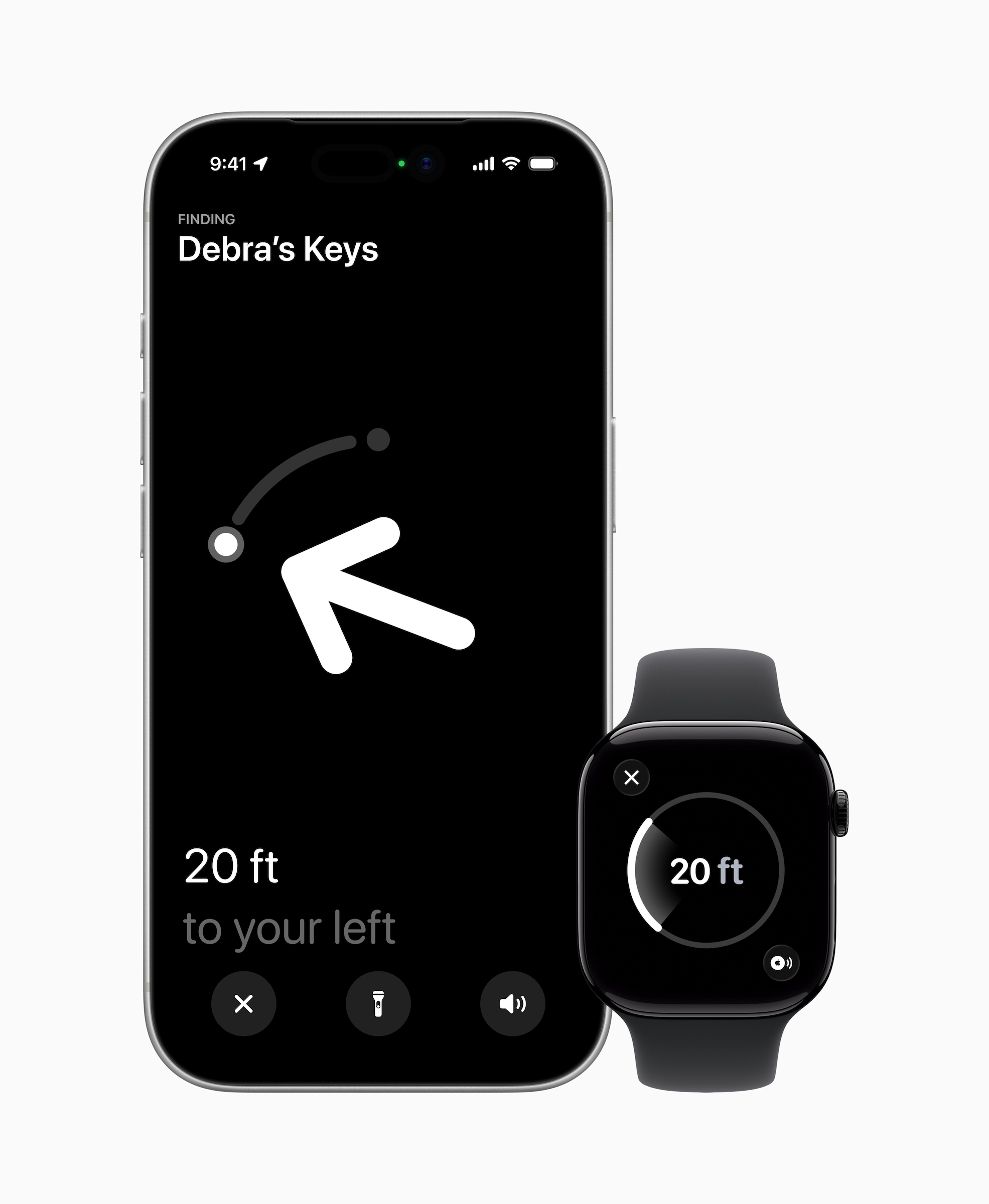
Once you get over that, the new Apple AirTag does offer some nice improvements. For starters, it's now powered by Apple's second-generation Ultra Wideband chip — the same one used in the iPhone 17 lineup and for the Apple Watch Ultra 3. It also uses Precision Finding to reach items up to 50 percent further away than the previous AirTag model. This feature will now work with any Apple Watch Series 9, Ultra 2 or a later iteration of either. That means the directional guidance that shows you down to a few feet where your AirTags are will be available on those compatible watches in addition to your iPhone.
New AirTag.
Apple
The new AirTag is also 50 percent louder than before and has what Apple calls a "distinctive new chime." It still uses the Find My network to bounce off other Bluetooth users and locate the AirTag.
Launched in 2021, Apple's AirTag has long stood as our favorite Bluetooth tracker for iPhones. It's convenience within the Find My app is a big help and almost makes up for the fact that it doesn't have a key ring — almost.
Update, January 28 2026, 11:58AM ET: This story has been updated to add a clarification on the Precision Find update for Apple Watches, as well as a link in the intro.
This article originally appeared on Engadget at https://www.engadget.com/wearables/apples-second-generation-airtag-offers-greater-range-but-still-doesnt-have-a-keyring-hole-150540407.html?src=rss
The ninth mainline Resident Evil is trying to split the difference between the series’ action-heavy entries and the stress-inducing hide-and-seek episodes. During a four-hour playthrough of some early parts of Resident Evil Requiem, I spent time with both of the two main characters, Grace and series mainstay Leon. They offer distinctly different playstyles, talents, strengths, and weaknesses. While it isn't an entirely new premise for the survival horror series (in the original, playing as Chris Redfield offered more challenge than playing as Jill Valentine) it’s never been this pronounced.
I started playing as Leon, entering a medical facility he seemed to have been invited to. With a cavernous main hall, it feels like yet another iconic Resident Evil hub, immediately reminding me of Raccoon City's Police Precinct and even the original's cavernous manor. Wings to explore? Check. Suspiciously quiet and empty central area that will almost definitely get overrun by zombies at some point? Probably.
Both Grace and Leon’s parts can be played in either third- or first-person perspective, though Leon’s segments seem better suited to the third-person view, since there's just a lot more shooting. Grace's segments were tense and demanded my full attention, more akin to Resident Evil 7. During this early part of the game, there is a lot of hiding, plenty of ammo conservation and a lot more learning from dumb mistakes. The parts of the game I played with Leon reminded me more of Resident Evil 4 (or 5 or 6 – but let’s gloss over those).
Once you take control of him, Leon is immediately attacked and has to fend off roughly 15 infected doctors, nurses and patients. It’s a significant tone shift from Grace skulking around the facility, hiding behind plants and sometimes just hoping for the best.
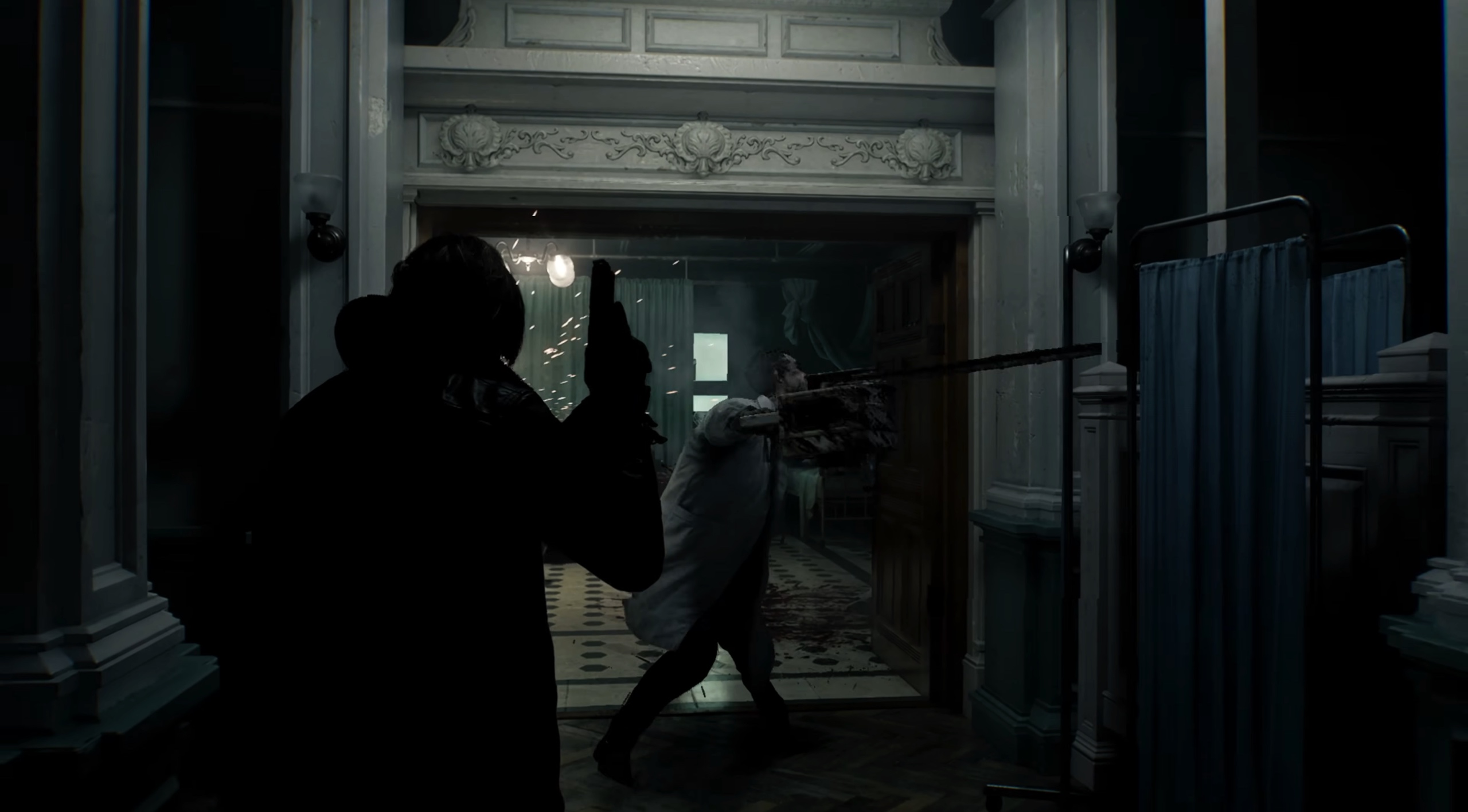
Leon faces off against a chainsaw-wielding doctor zombie. Best cut that arm off.
Capcom
Leon, fortunately, arrives with several weapons, including a new melee option, a hatchet. Using this, he can make targeted attacks to lop off limbs and aim at the head to deliver more damage. At least on these basic zombies, I found relentless slashing more effective than more targeted efforts – I’m sure future enemies will demand more… nuanced approaches. A later enemy must be decapitated to kill it.
After a set number of swings, you will need to retreat and sharpen the blade, which adds to the jeopardy while not disrupting the chaos. The hatchet can even be used to parry attacks – if you get the timing down.
Leon even gets to wield a chainsaw during this initial encounter, but only after claiming it from one particularly industrious zombie that seemed to find it inside a hospital. It was crucial to both disarm this zombie and grab the chainsaw before another corpse could take a turn on it. However, just because the chainsaw gets dropped doesn’t mean it’s turned off. I suffered significant damage when I repeatedly rushed into the spinning power tool.
The zombies in Requiem are also a little more nuanced compared to previous games – if a zombie can have nuance. While nearly all of the zombies will attack you on sight, they can be distracted or delayed based on the person they were before they turned. For example, the chef zombie (a hardy, bigger zombie than the ones you’ve come across until that point) will only chase you around his kitchen. Step out into the corridor and he’ll leave you alone. Elsewhere, a zombie (attached to an IV, cute) has his eyes bandaged and will react aggressively to any noise. I used this to my advantage, hurling an empty bottle at another zombie who stood nearby. The IV zombie killed him immediately. Another time, a senior exec who’s been turned is firing an employee of his… by killing them, moaning “You’re fired” as he does so. This little vignette gave me enough time to dim the lights and hide when he left his office.
In Requiem, players are expected to exploit individual zombie behaviors to outmaneuver them. It’s also a welcome dose of humor to the survival horror series, reminding me a little of the camp moments in Dead Rising, another zombie-centric Capcom series.
Leon doesn’t have to strategize quite as much, arriving with a particularly powerful handgun, the Requiem, that he eventually passes over to Grace. This is capable of stopping pretty much (but not all) enemies you come across, although it initially comes with only a single bullet, so you really have to make it count.
During a set-piece battle against a towering, swollen former patient, I got to test Requiem’s action-horror controls under pressure. Leon finds a shotgun and has to flank (and outrun) his “hungry” attacker. The environment in the rafters of the building is designed so it’s easy to figure out where you need to go and how to stop the giant zombie from cornering you. Ammo, at least during this fight, was scattered around, which was a relief after struggling to find bullets during Grace’s segment.
Despite the lack of traditional weapons, Grace eventually finds a blood injector (and its companion blood analysis system). These turn into Requiem’s crafting system. Powered by literal buckets and puddles of blood (you have to draw up infected blood from certain parts of the environment and enemies), samples can be combined with scraps, herbs and more to create high-powered first-aid shots, injectable explosive blood, ammunition and a lot of other things. Analysing different blood types (and solving some light puzzles) adds further crafting options.
Oh he's not going to help you.
Capcom
During the preview, the infected blood injector was exclusively for Grace’s use. It’ll be intriguing if only one character gets to benefit from the crafting system, although Capcom teased customizable weapons for Leon, which might better suit his playstyle. Grace might also be handicapped by the typewriter save system popularized in the first few RE games. This could mean you’ll only be able to save if you have an ink ribbon on you, a very stressful part of inventory management early on in the series — she really can’t catch a break. However, it appears to be adjustable in difficulty settings.
According to Capcom’s Resident Evil showcase last week, infected blood will apparently play a strong role in Requiem, touching on both Leon’s past (he’s apparently suffering from a mystery ailment) and the circumstances surrounding the death of Grace's mother. And it wouldn’t be a Resident Evil game with mystery, buckets of blood, and a pulpy villain. Capcom has primed another fascinating villain with Requiem’s Dr. Gideon, a former Umbrella virologist who was seemingly written for an actor to go full camp baddie – if the doctor’s hooded snakeskin trenchcoat wasn’t a giveaway.
Resident Evil Requiem will be released on February 27, 2026 for PC, PS5 and Xbox Series X|S.
This article originally appeared on Engadget at https://www.engadget.com/gaming/resident-evil-requiem-preview-150000849.html?src=rss
Europe is probing Elon Musk’s X for failing to take action to prevent the spread of AI-generated sexually explicit images including child sexual abuse material (CSAM), regulators said in a press release. The European Commission’s investigation could result in “further enforcement steps” against X, not long after it levied a $140 million fine against the platform.
“Sexual deepfakes of women and children are a violent, unacceptable form of degradation. With this investigation, we will determine whether X has met its legal obligations under the DSA [Digital Services Act], or whether it treated rights of European citizens — including those of women and children — as collateral damage of its service,” said the Commission’s executive VP, Henna Virkkunen in a statement.
The EU said that it will assess whether X took measures to reduce risks around the dissemination of illegal content when it deployed Grok onto the platform. Those risks include manipulated sexually explicit images including content that may amount to CSAM. “These risks seem to have materialized, exposing citizens in the EU to serious harm,” the Commission stated.
On top of the new inquiry, the EC is also expanding its 2023 investigation of X over its recommendation algorithm and tools used to prevent the spread of illicit content.
CBS Newsfound that, as of Monday morning, Grok was still able to generate undressed images of individuals. X previously claimed this ability had been removed for both free and paid users.
The investigation is coming at a delicate time for Europe, which is already in the Trump administration’s crosshairs over its scrutiny of American tech companies. And the EU would also be going up against Musk, who is the owner and has the biggest megaphone on X. After X was hit with a 120 million euro ($140 million fine) for breaching Europe’s Digital Services Act, Musk called the EU “the fourth Reich” and said in a post on X that it should be “abolished.”
In response to the inquiry, X reiterated previous comments it has made about Grok. “We remain committed to making X a safe platform for everyone and continue to have zero tolerance for any forms of child sexual exploitation, nonconsensual nudity and unwanted sexual content,” a spokesperson told The New York Times.
Update, January 26 2026, 11:42AM ET: Added additional coverage from CBS.
This article originally appeared on Engadget at https://www.engadget.com/ai/the-eu-is-investigating-grok-and-x-over-potentially-illegal-deepfakes-134506678.html?src=rss
It's that time of year where a great pair of headphones double as earmuffs and a current sale will ensure you get a great quality — and good looking — option. One of our favorite wireless headphones for 2026 is available for 35 percent off.
Amazon is offering the first-generation Bose QuietComfort Ultra Bluetooth Headphones for $279, down from $429. Since coming out last April, they've become our choice for best noise-canceling wireless headphones. Notably, the sale is only available in the headphone's nice limited edition Deep Plum model.
We gave the Bose QuietComfort Ultra headphones an 86 in our review, thanks, in part, to their incredible active-noise cancellation (ANC) — an industry-lead Bose has held for years. They also offers improved audio, producing a warmer and clearer sound than other Bose headphones. Plus, they live up to their name, remaining comfortable even after hours and hours thanks to cushioning inside the headband and earpads.
This article originally appeared on Engadget at https://www.engadget.com/deals/the-bose-quietcomfort-ultra-headphones-are-35-percent-off-130020033.html?src=rss
A good home theater setup goes beyond just having the right TV (although that certainly does help a lot). Getting the right sound for your space, the right lighting and making sure your streaming gear is up to date are all things that can go a long way to making your setup feel premium.
And don’t think that just because you’re not hosting movie night every weekend that a good home theater setup is a waste. Whether your family is full of cinephiles, you love playing video games with your kids or you plan on hosting friends to watch Super Bowl 2026, the right home theater equipment can make your experience much better. We test a ton of that technology here at Engadget; if you’re looking to make some changes to your setup, we’ve collected some of our favorite home theater gear here to make your shopping list a bit easier to compile.
Best home theater gear
This article originally appeared on Engadget at https://www.engadget.com/home/home-theater/the-best-gear-to-upgrade-your-home-theater-setup-130000755.html?src=rss
Whether you love cooking already or you want to try to cook more at home to spend less money on takeout, there are tons of gadgets that can make your time in the kitchen even more enjoyable. As food lovers and tech reviewers, the Engadget team has tried out pizza ovens, sous vide machines, air fryers, ice cream makers and more. Here, we gathered all of the best gear we’ve tested, reviewed and used in our own kitchens for when you’re looking to spice things up in yours. We’ve also linked to our reviews and buying guides so you can dive deeper into our recommendations for the best kitchen gadgets around.
Best kitchen gadgets for 2026
Nicole Lee contributed to this report.
This article originally appeared on Engadget at https://www.engadget.com/home/kitchen-tech/best-kitchen-tech-gadgets-small-appliances-124515179.html?src=rss
Never underestimate the chilling powers of grainy grayscale imagery and ethereal whooshing sounds. Outside Parties asks, "What if I Spy, but in an alien hell dimension?", and it is impressively unnerving despite the fact that nothing's really happening at any given time. It goes all in on atmosphere, to great effect. This is the Playdate horror game that I've been waiting for.
Adams Immersive's Outside Parties is a sort of scavenger hunt across a massive image of a realm called the Outside, which can only be visited by astral travel, according to the lore. There are lots of unknowns about what or where it really is, though explorers have mapped it fairly extensively through out-of-body excursions and they've encountered thousands of different entities there, including the spirits of the dead. As the player, you have come across a Hellscryer K5 — the communication device, psychic camera and recorder used for these trips — and now you're combing through the mission logs, getting sucked into the mystery of it all. Think of the K5 as your Playdate, except powered by blood and runes.
At the center of Outside Parties is a 1.44 gigapixel, 360-degree panoramic HDR image which has dozens of eerie scenes hidden within it: skeletons of human, animal and paranormal origin; scary robed figures and occult symbols etched all around; what appear to be fountains and rivers of blood; a Stonehenge of teeth. These are the targets you're meant to track down, and as you hone in and check them off your list, voice signals attached to each one will reveal more and more of the explorer's spellbinding story.
But this isn't a straightforward "find the object" puzzle game by any means. When you first look at the zoomed-out photo, it's akin to a strip of TV static with some heavily shadowed areas throughout. You can zoom to up to 64 times magnification to get a better look at specific zones, but you also have to adjust the image brightness using the crank to improve the clarity of the objects. Making it brighter or darker will reveal more objects in certain spots while simultaneously obscuring others. There are 150 targets according to the developer, which should take players somewhere from 10-20 hours to complete. I've been at it for hours and still have plenty left to find. (If you're stuck, you can turn to the helpful target lookup page, which provides hints with varying degrees of specificity.)
All the while as you're hunched over your Playdate, laser-focused on the screen to find targets that are buried in a sea of fuzz, unsettling audio transmissions are cutting in and out, disturbing images are flashing on-screen at random and a constant atmospheric whooshing is playing in your ear. The sound design of this game is seriously brilliant — it's worth playing for that alone, not to mention all the other cool stuff. From the startup page to the menus where you'll find bits of a background story, to the creepy clips of people wailing and ominously reciting numbers, the sounds of Outside Parties make for a truly immersive, disconcerting experience that I previously wouldn't have thought possible on a Playdate. It's really something special.
Outside Parties also comes with a screensaver that once again makes me yearn for the Playdate Stereo Dock. Pop on the Void Monitor, sit back, and enjoy the horrifying sights and sounds of the Outside.
This article originally appeared on Engadget at https://www.engadget.com/gaming/outside-parties-is-the-creepiest-playdate-game-yet-and-im-kind-of-obsessed-213142541.html?src=rss
Microsoft issued another out-of-band update to fix a bug that caused Outlook to crash for Windows 11 users. This second emergency patch addresses issues seen with Outlook and files stored in the cloud following Microsoft's January 2026 Windows security update.
According to Microsoft, this update fixes a bug where some apps that "open or save files stored in cloud-backed locations" became unresponsive or displayed error messages. Some users also experienced Outlook crashing or not opening when PST files are stored in cloud-based options like OneDrive.
This is the second time this year that Microsoft had to issue a last-minute fix for bugs related to its January security update. Last week, some Windows 11 devices couldn't shut down or hibernate, while other devices running Windows 10 or 11 couldn't log in through remote connections. For more context, Microsoft only issues out-of-band updates when there's a serious issue that can't wait until its regular update cycle. Fortunately, the latest out-of-band update is cumulative, so you only need to download and install this one to fix the issues seen with the January update.
This article originally appeared on Engadget at https://www.engadget.com/computing/microsoft-releases-second-emergency-windows-11-update-to-fix-outlook-crashes-192012812.html?src=rss
A new and improved Siri may finally make an appearance, but this time, it could be with a Google Gemini glow up. According to Bloomberg's Mark Gurman, Apple wants to announce a new Siri in "the second half of February" that will show off the results of its recently announced partnership with Google and offer demonstrations of the Gemini-powered capabilities.
After this reveal, Gurman reported that the new Siri will make its way to iOS 26.4, which is also slated to enter beta testing in February before its public release in March or early April. Apple has been meaning to launch its next-gen Siri ever since its announcement at WWDC 2024, but now we know that this Gemini-powered Siri will behave more like an AI chatbot, similar to OpenAI's ChatGPT, thanks to another Bloomberg report from last week.
Following the reported demo that's scheduled for late February, Gurman said Apple will have a grand reveal of the new Siri, which is currently codenamed Campos, at its annual developer conference in the summer. After that, the latest Siri and the accompanying Gemini-powered Apple Intelligence features are expected to arrive with iOS 27, iPadOS 27 and macOS 27, which are expected to be available as beta releases in the summer.
This article originally appeared on Engadget at https://www.engadget.com/ai/apple-reportedly-plans-to-reveal-its-gemini-powered-siri-in-february-174356923.html?src=rss