While there are lots of great Black Friday sales on cheaper devices, it's the big ticket items that really make a world of difference. Take Apple's 2024 Mac mini M4, which has dropped to $479 from $599 as part of early Black Friday deals. The 20 percent discount brings Apple's mini desktop computer with 16GB of RAM and 256GB of SSD to only $10 more than its all-time low.
We gave the Mac mini M4 a 90 in our review, in part, because it packs an incredible amount of power into such a small design. It also has front facing USB-C and headphone ports, a first for the Mac mini lineup. Plus, it starts with 16GB of RAM, an upgrade from its predecessors.
However, if you want more memory or storage, the other Mac Mini M4 models are also on sale. You can get 16GB of RAM and 512GB of SSD for $719, down from $799. Then there's the option for 24GB of RAM and 512GB of SSD at $889, down from $999. Plus, if you want to bundle in three years of AppleCare+, each model ends up being about $100 cheaper than normal.
If you're looking to build a desktop setup from scratch, there's a small but notable discount on Apple's Magic Trackpad as well. It's down to $120, which is only seven percent off its usual price but it's the cheapest we've seen it.
This article originally appeared on Engadget at https://www.engadget.com/deals/apples-mac-mini-m4-drops-to-479-for-black-friday-150749921.html?src=rss
When I review products, I try to take other perspectives and use cases into account as much as possible. I'm very aware that I'm not the target audience for every device. But once in a while I run into something that seems like it was designed specifically for me and it just hits different. With the Acer Predator Triton 14 AI, that's pretty much the situation. While it isn't the flashiest or most powerful gaming laptop on the market, it has pretty much everything I look for in a portable system that lets me play games on the go — and then some.
Design and display
The term ultraportable is typically reserved for more traditional thin-and-light productivity machines, but I think it definitely applies to the Triton 14 AI. At just 3.5 pounds and 0.71 inches thick, Acer's rig is actually a touch lighter and just as thin as a Dell 14 Premium (3.7 pounds and 0.71 inches), despite featuring a much beefier GPU. And even compared to rivals like the Razer Blade 14 (3.6 pounds and 0.64 inches thick), the Triton 14 AI isn't losing much ground there either.
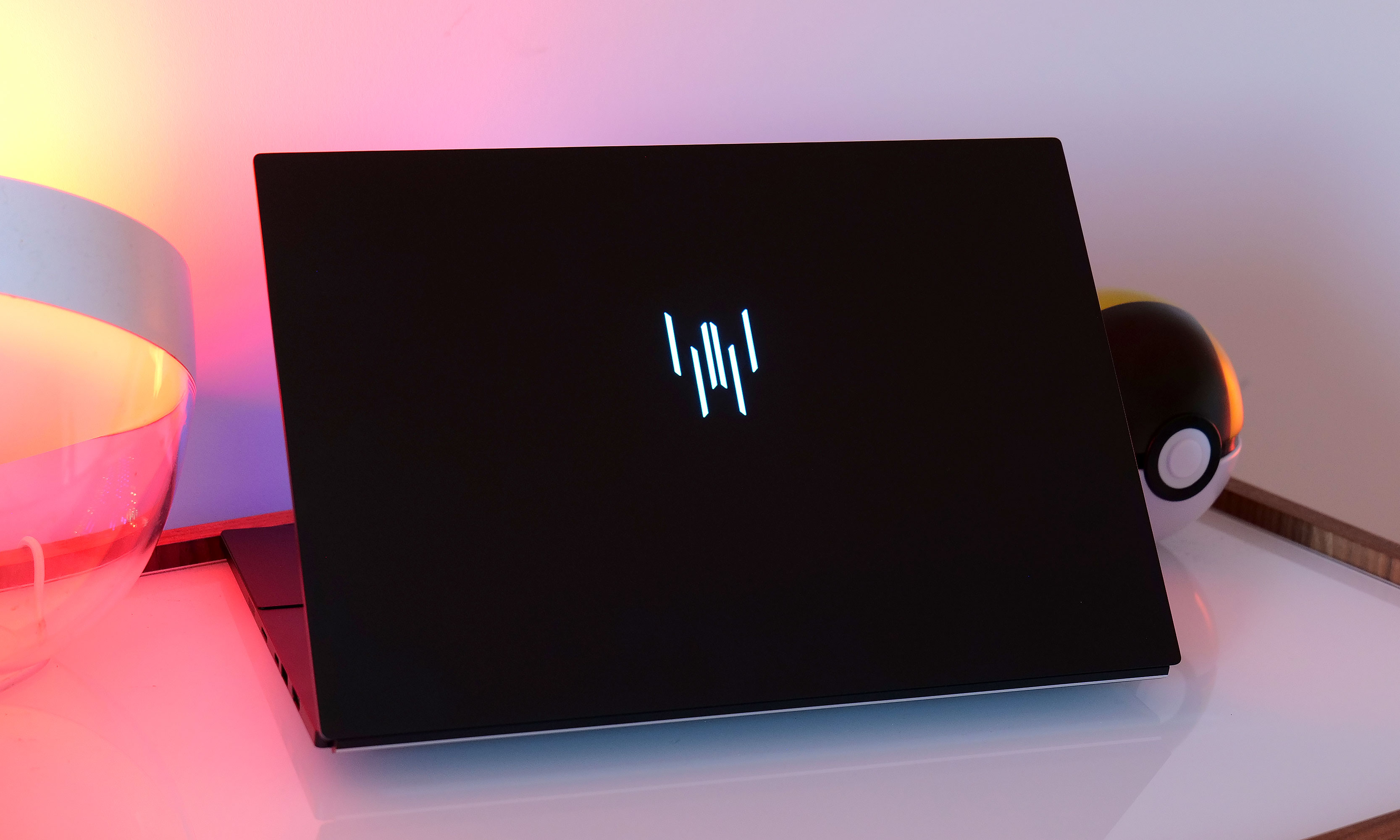
Furthermore, while some gaming notebooks go overboard with edgy aesthetics and an abundance of RGB lighting, the Triton 14 AI looks refreshingly understated. Sure, it still has customizable LEDs behind the Predator logo on its lid and per-key lighting on its keyboard. But aside from that, the laptop feels like an exercise in restraint for a category that often favors excess.The other small design flourish is a pixelated Predator logo (that looks like it was made from a tiny dot matrix display) to the right of the touchpad.. I think it's a clever touch that hints at the notebook's gaming focus without hitting you over the head with it.
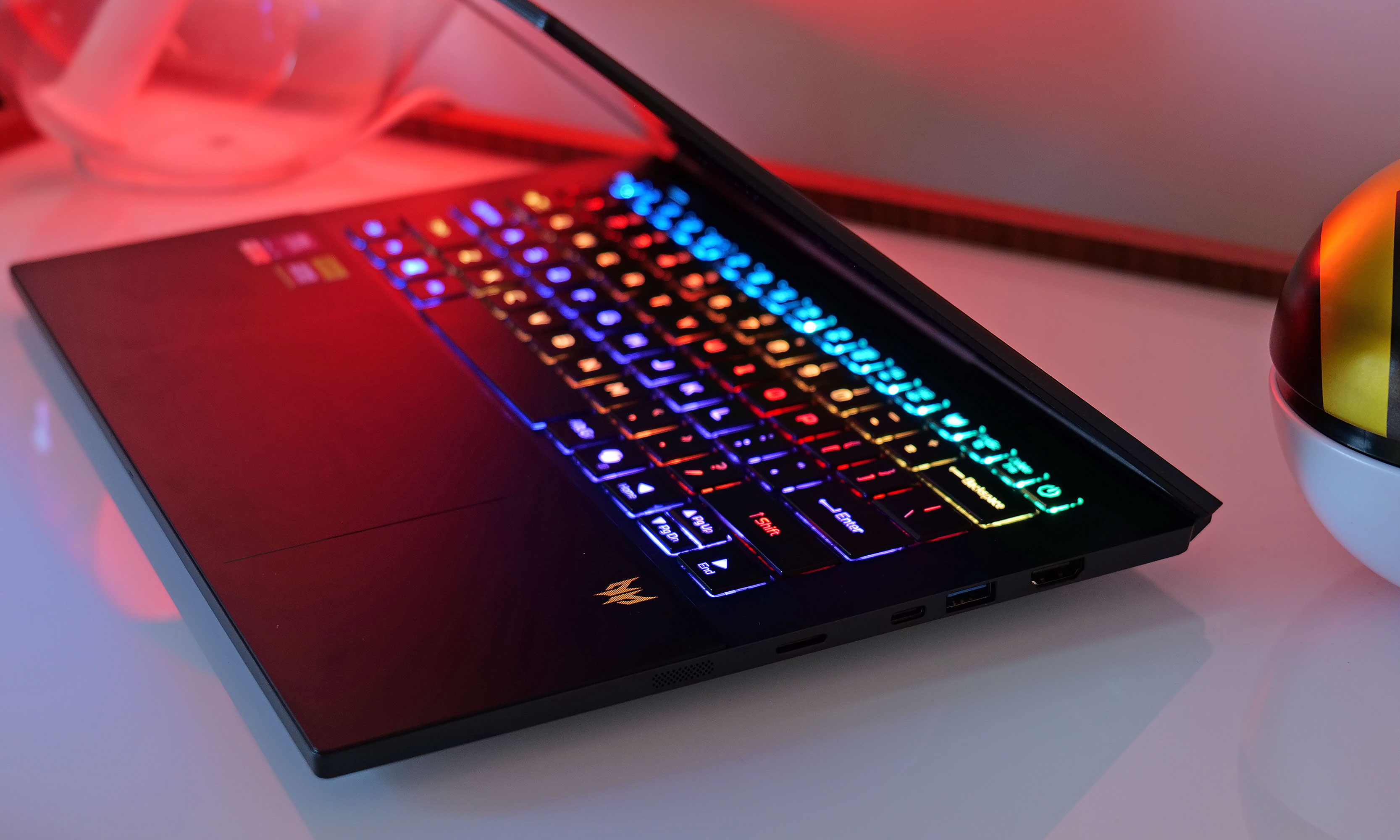
Despite its size, the Triton 14 AI also has excellent connectivity. You get two USB-C ports (one on either side), with Thunderbolt 4 support on the right while the other is used for power and USB 4 data speeds (both can be used for charging). There are also two USB-A 3.2 jacks, 3.5mm audio, a full-size HDMI 2.1 connector and even a microSD card reader. That means you can easily hook it up to an external monitor (which you really ought to have when fragging at home). Alternatively, when you're not gaming, it can be a great mobile editing station because offloading photos and videos from a camera via microSD is a cinch.
The Acer Predator Triton 14 AI's right side features a microSD card reader, two USB ports (one Type-C and one Type-A) and a full-size HDMI jack.
Sam Rutherford for Engadget
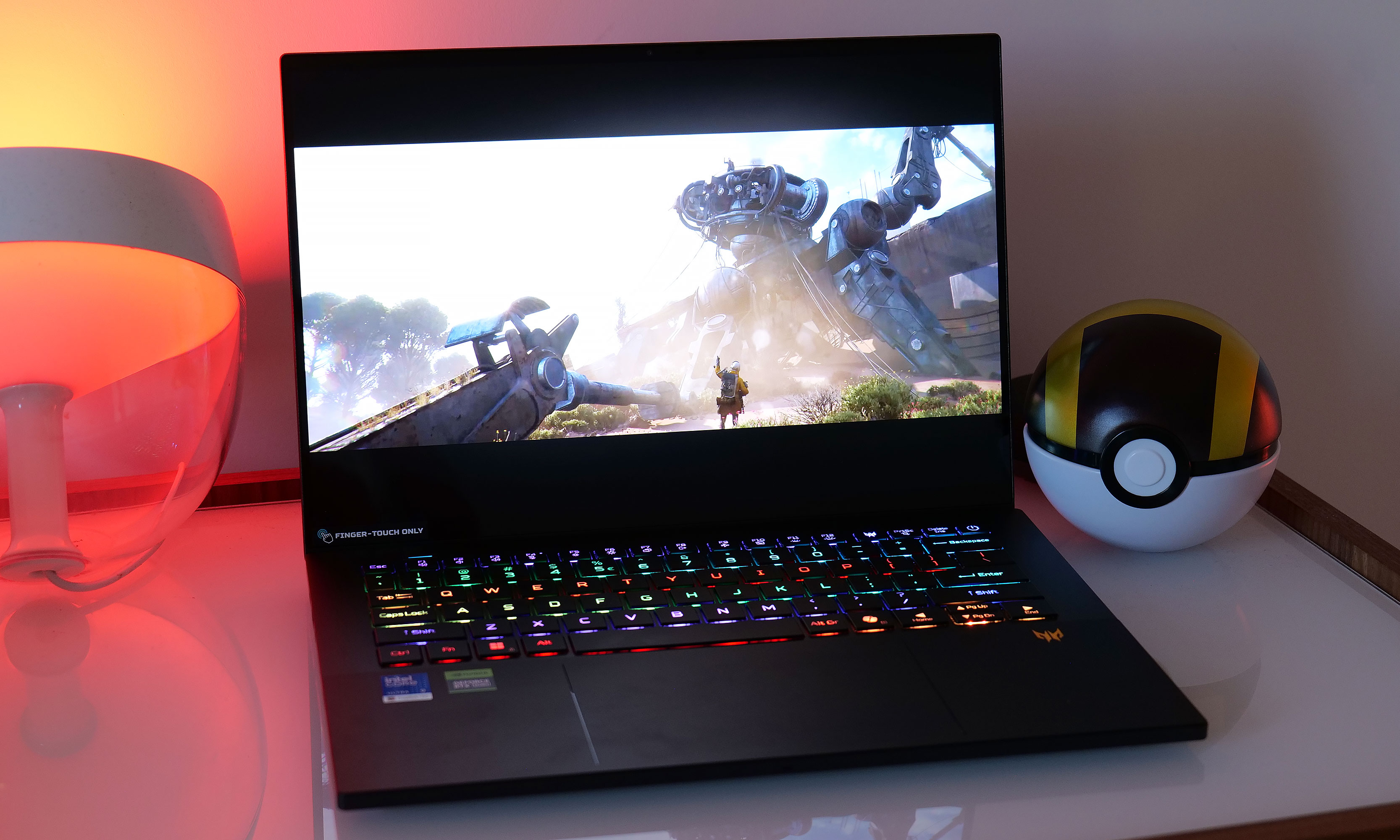
Acer didn't cut corners with the Triton 14 AI's display either. Sure, its 120Hz refresh rate could be a touch faster or it could have gone with a slightly higher 3.2K display like on the Dell 14 Premium, but those are real nitpicks. The OLED panel produces rich colors and in my testing, the display on my review unit actually exceeded Acer's stated 340-nit brightness by a few percent.
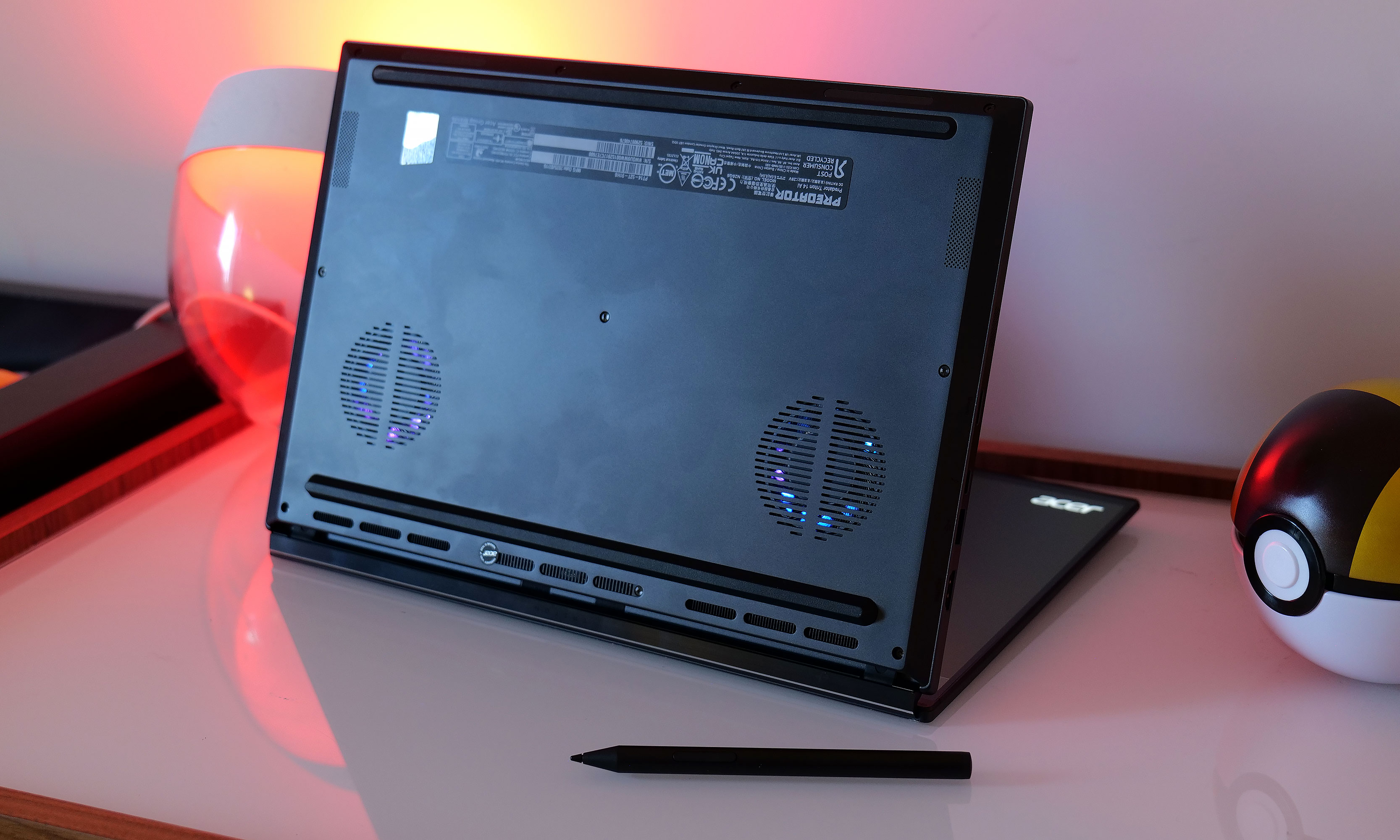
While Acer included six speakers that get plenty loud, my one small gripe is that they aren't located in the best spots to maximize audio quality. There are two drivers hidden behind tiny grilles on each edge of the laptop and four more located on the bottom. This means unless the laptop is sitting on a hard reflective surface like a desk (without something like a desk mat in between), audio often sounds muffled or dampened. It's not a dealbreaker and I understand that the Triton 14 AI's petite dimensions didn't leave much room for up-firing drivers, but I wish Acer had found an arrangement that sounds slightly better.
Keyboard, touchpad and an unusual special feature
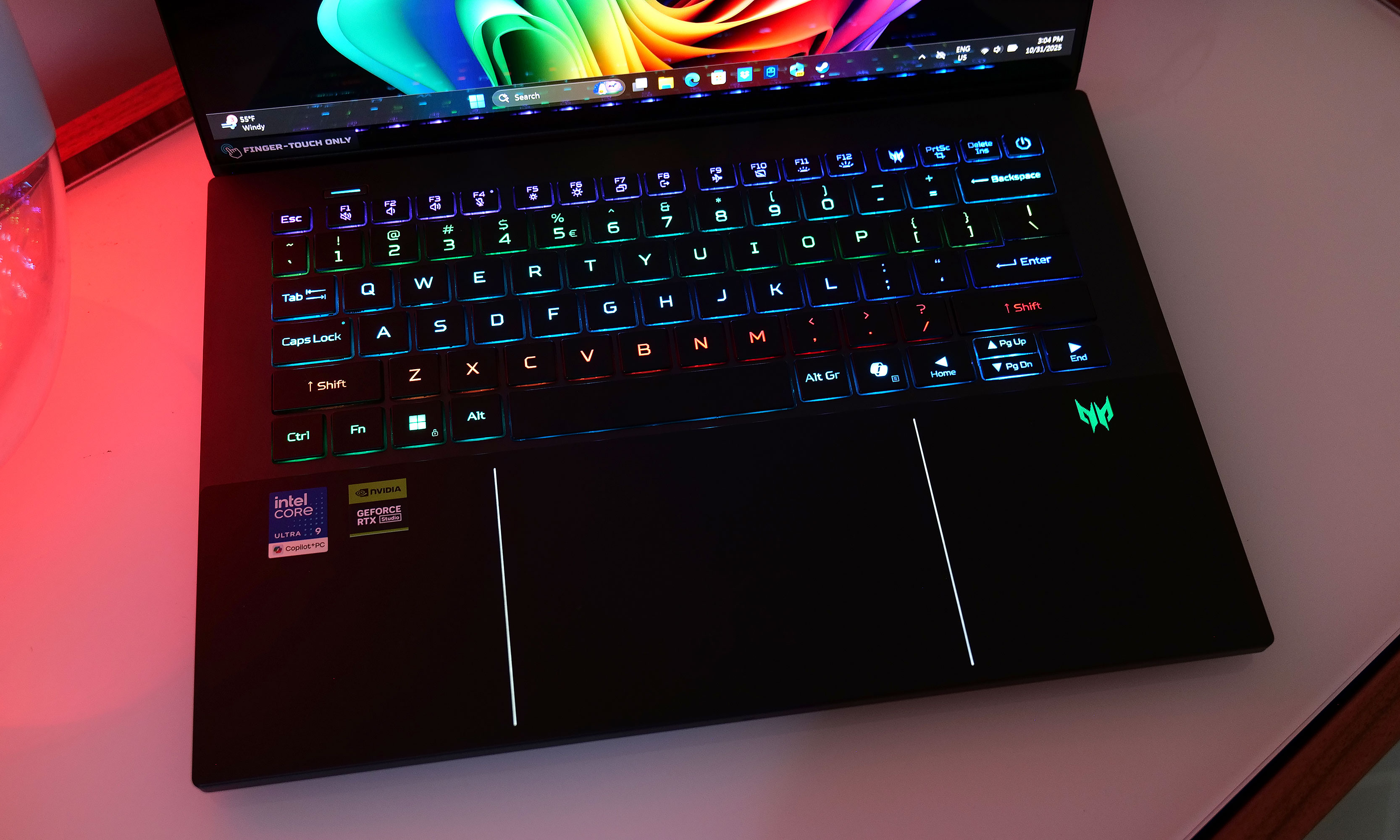
The Acer Predator Triton 14 AI features a keyboard with per-key mini LED lighting and a touchpad with built-in stylus support.
Sam Rutherford for Engadget
In addition to per-key lighting and a pleasantly bouncy typing experience, Acer added a few extra features to the Triton 14 AI's mouse and keyboard that you don't normally see on gaming laptops. On the left above the function row, there's a physical button that makes it fast and easy to switch between various performance modes with a single press. There's also a dedicated Predator key that acts as a shortcut to Acer's app, where you can do things like tweak settings or adjust the laptop's lighting.
Down below, the Triton 14 AI features a large seamless touchpad made from Gorilla Glass, similar to what you get on a Dell 14 Premium. However, to address the issue of you not knowing where the trackpad ends and the rest of the notebook's deck begins, Acer added two light strips on either side. It’s a simple and elegant solution that looks nice too.
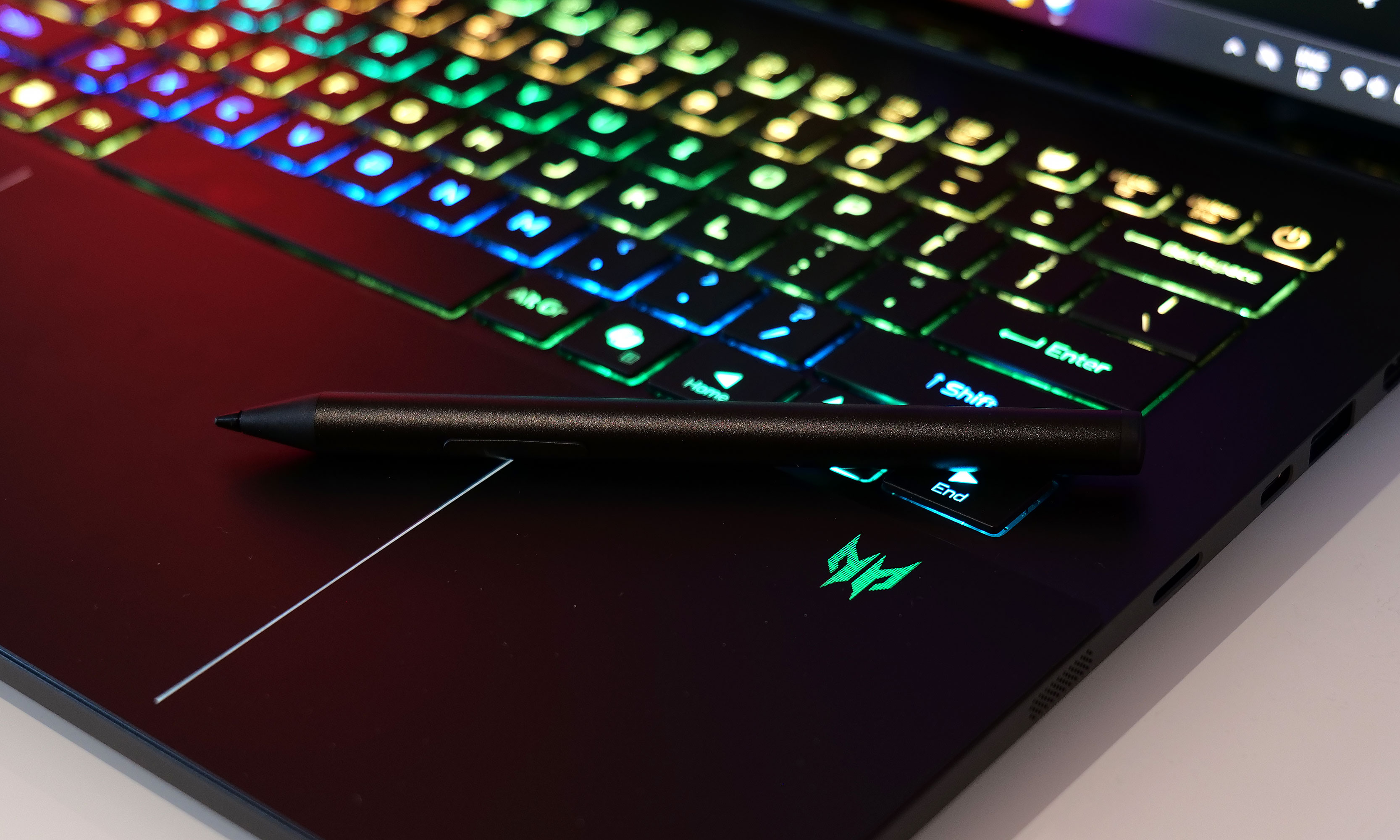
Not only does the Predator Triton 14 AI's touchpad feature stylus support, Acer included an active pen in the box, so you won't need to buy one separately.
Sam Rutherford for Engadget
However, the Triton's real party trick is that it also supports stylus input (via MPP 2.0) with 4,096 levels of pressure sensitivity. This means you can use it like a small built-in Wacom tablet. On top of that, the laptop ships with an active pen, so you don't need to shell out extra money for one. And because Windows recognizes the stylus out of the box, there's no extra setup required. So while this isn't something I will use all the time, it's nice to have for times when I feel like taking notes, sketching or just need to sign a document electronically.
Performance
Our $2,500 review unit features an Intel Core Ultra 9 CPU with 32GB of RAM and a 1TB PCIe Gen 4 SSD along with an NVIDIA RTX 5070 GPU. Notably, this is as big a graphics card as the Triton 14 AI can handle, but considering similarly-sized rivals like the Razer Blade 14 have the same limitation, it's hard to be upset. More importantly, even without the option for an RTX 5080 or 5090, Acer's tiny gaming laptop still boasts respectable performance.
The Acer Predator Triton 14 AI features a vivid 14.5-inch OLED panel with a WQXGA+ (2880 x 1800) resolution.
Sam Rutherford for Engadget
In Cyberpunk 2077 at 1080p and Ultra RT settings, the Triton 14 AI hit 55 fps, which is a notch above the 45 fps I got from the Radeon 8060S in the ROG Z Flow 13. It also means that with just a tiny bit of tweaking, it's easy to push framerates above 60 while keeping almost all of the graphics settings maxed out. Meanwhile, in Returnal at 1080p on Epic, the Triton 14 AI fared even better, hitting 115 fps. That falls short of what I saw on the Alienware 16 Area-51 (154 fps), but considering that's a larger system with an RTX 5080, the difference between the two machines is understandable.
As for cooling, Acer went beyond simply using a built-in vapor chamber. Instead of the paste or liquid metal used by the competition, the company says this is the first time a graphene-based thermal interface material has been used inside a gaming laptop. This makes a difference, especially on a notebook this thin, because it means for less demanding games like Teamfight Tactics, if you adjust its performance mode you can actually play them on your lap without worrying about scorching your legs. That said, you still have to watch out because there are two largish fans on the bottom as well, so for more serious titles you'll still want to switch to a table or desk.
Battery life
The Acer Predator Triton 14 AI's stay relatively cool in normal use thanks to a vapor chamber and a graphene-based thermal interface material. However, under heavy loads, it will still get a bit toasty.
Sam Rutherford for Engadget
Longevity is often a concern for small, power-hungry gaming laptops like this. But somehow, Acer managed to fit a more than adequate 76Whr battery inside. On PCMark 10's Modern Office rundown test, the Triton 14 AI lasted seven hours and 26 minutes. That's three hours better than larger systems like the Alienware 16 Area-51 (4:13) and half an hour better than smaller rivals like the ASUS ROG Z Flow 13 (6:54). And even though it fell short by an hour when compared to a traditional ultraportable like the Dell 14 Premium (8:30), that's still very solid when you consider the Triton’s more powerful graphics.
Wrap-up
If you're in the market for a more powerful and sedentary type of gaming laptop that might only get moved around a couple of times a month (if that), the Triton 14 AI might not be for you. But as someone who prefers gaming laptops that are, you know, actually portable, this thing is pretty much my ideal notebook.
Even though it's a gaming laptop, the Acer Predator Triton 14 AI's design is refreshingly understated.
Sam Rutherford for Engadget
For $2,500 as tested, the Predator Triton 14 AI has a vivid OLED display, solid performance, surprisingly good battery life and an incredibly sleek chassis that begs you to take this thing everywhere. It's a bit pricey, but considering a similarly-specced Blade 14 costs $2,700 (before sales or discounts), you might even say it's a bit of a bargain. What puts this thing over the top though, is that Acer could have stopped there and no one would have complained. But then it added extra features like ample ports, powerful cooling and built-in stylus support (not to mention the included pen). In a lot of ways, this isn't just a travel-friendly gaming machine, it's a true do-everything ultraportable.
This article originally appeared on Engadget at https://www.engadget.com/computing/laptops/acer-predator-triton-14-ai-review-a-true-ultraportable-gaming-laptop-145300067.html?src=rss
Apple’s latest MacBook Air M4 is now discounted to $750 for Black Friday. The deal applies to the entry-level 13-inch model, giving you the same sharp Liquid Retina display and impressive M4 performance that we praised in our review, now for less.
The MacBook Air M4 continues Apple’s streak of refining what’s already its most popular laptop. It runs on the new M4 chip with a 10-core GPU, offering fast performance for everyday work, creative apps and light gaming. The upgrade from the M3 model is noticeable in both speed and efficiency, making it ideal for multitasking or editing photos and videos on the go.
Despite the power boost, it keeps the same slim profile that helped define the MacBook Air line. The unibody design is still one of the thinnest and lightest in its class, weighing just under three pounds, with a durable aluminum chassis available in four colors — midnight, starlight, silver and space gray. The fanless build keeps it completely silent during use, even when running intensive tasks.
The 13.6-inch Liquid Retina display supports the P3 wide color gamut and reaches up to 500 nits of brightness, making text and images look crisp and vibrant whether you’re working indoors or near a window. You also get a 1080p FaceTime HD camera, a three-mic array for clear video calls and a four-speaker setup with Spatial Audio support.
Connectivity includes two Thunderbolt/USB 4 ports, a MagSafe 3 charging port and a headphone jack. Battery life remains one of its standout features, with Apple rating it at up to 18 hours on a single charge. That easily covers a full day of work or travel without reaching for the charger.
There are a few small limitations, like the lack of a high refresh rate display and the fact that both USB-C ports sit on the same side. Still, for most users, the MacBook Air M4 strikes the best balance between power, portability and price.
If you want a larger screen, Apple’s 15-inch MacBook Air M4 offers the same specs with more workspace, but the 13-inch remains the best pick for portability. You can read more about how it compares to other Apple laptops in our guide to the best MacBooks. This MacBook Air M4 deal makes one of Apple’s best laptops an even smarter buy.
This article originally appeared on Engadget at https://www.engadget.com/deals/apples-macbook-air-m4-is-250-off-in-this-black-friday-deal-183808705.html?src=rss
The 2024 iMac looks the same as ever, but there’s an update that promises to dramatically transform the lineup. It’s not the M4 processor, though that’s nice. No, I’m talking about the boost in base memory that finally lifts the entry-level models from a deplorable 8GB to 16GB. That, along with the new chips, promises to finally make the $1,299 iMac cost effective for most buyers.
There are a few other tweaks, like an optional nano-coated display, an updated 12-megapixel webcam and an assortment of new colors. Otherwise, things are much the same as last year, which may make you wonder if it’s worth the upgrade. After testing one for content creation, gaming and productivity, I can tell you that the answer is definitely yes.
What’s new with the latest iMac?
Side-by-side, the 2023 and 2024 iMacs look about the same. The 24-inch 4.5K 500-nit display and the computer itself are housed in the same slim 0.43-inch (11.5mm) thick frame. It still sits on an elegant stand that tilts but lacks an adjustable height setting. While tilt-only is a common setup on all-in-one PCs, at this point it would be nice to see Apple do even a simplified height adjustment like it did on the Studio Display. Elsewhere, there are two Thunderbolt 4 ports on the base model and four on the more expensive versions, along with a magnetic power connector and 3.5mm headphone jack on the left side — all the same as before.
What is new is the higher-quality 12MP webcam that’s a massive leap up from past models. It finally delivers sharp and color-accurate video worthy of the rest of the computer, to help you look your best when on FaceTime or Zoom. It supports Apple’s Center Stage feature that auto-centers the subject during video calls, even if you’re moving around. The new webcam also works with the new Desk View feature that lets you show off objects below your screen.
Steve Dent for Engadget
You can now get the iMac with optional nano-textured display glass that blocks glare, even with a light pointing right at it. Though it does slightly reduce sharpness, I’d recommend it if you can afford the extra $200. Otherwise, it’s the same clear and colorful display with 500 nits of brightness, a wide P3 gamut and a resolution of 4,480 x 2,250, which are all the same as before. The 24-inch size may be too small for some, but I found it ample for most work, and I’m used to dual 32-inch screens. Still, given that the iMac is Apple’s only desktop model with an integrated display, it would be nice to see a 27- or even 32-inch option on future models, even if that makes it less compact and portable.
The iMac M4’s color palette also got a tiny refresh. Though it still comes in the same seven hues as before, they’re now in slightly paler shades that Apple calls “fresh.” Indeed, the model I tested is a very light green that is so subtle it’s hard to even see in dim light. I’m a fan of subdued hues, but anyone hoping for a shot of bright color may be disappointed.
The accessories have also been updated. Both the new Magic Mouse and Magic Keyboard (with optional Touch ID) now charge via USB-C rather than Lightning like the iMac M3, negating a major complaint in our previous review. As usual, all the accessories, including the cables, match the color of your iMac — a cute touch.
Steve Dent for Engadget
I love the feel of Apple’s keyboard for speed typing, as I’m not a mechanical keyboard guy. The Magic Mouse is an acquired taste, but the slightly firm click pressure and accuracy suit my taste and I love the ability to scroll side-to-side as well as up and down. Yes, the charging port is on the bottom, which is a bit of a design fail, but it can go a month between charges — and you only need to plug it in for a few minutes to get enough power to last a workday.
The key updates are inside with the M4 processor, which is available in two variants. The base $1,299 model comes with an 8-core CPU, 8-core GPU, 16GB of RAM, 256GB of storage and two Thunderbolt 4 ports. All other versions have 10-core CPUs, 10-core GPUs and four Thunderbolt ports, starting at $1,499 with 16GB of RAM and 256GB of storage. There’s no M4 Pro option, and therefore no Thunderbolt 5 ports on any 2024 iMac. Every version but the base model also has gigabit ethernet (on the power brick) and Touch ID on the Magic Keyboard.
The model I’m testing shows that Apple’s upgrades are still too expensive. It has a 10-core M4, 24GB of RAM, 1TB of storage and four Thunderbolt 4 ports, along with the nano-textured screen. Those three options (the extra 8GB of RAM, 1TB of storage and the updated screen) shoot the $1,299 price up to $2,299. The good news, though, is that not buying them won’t leave you with an unacceptable amount of memory as before.
In use: Outstanding performance and friendly features
Steve Dent for Engadget
Desktop PCs don’t get much more practical than the iMac M4. Installing it is as easy as placing it on a surface and plugging it in, then running through a relatively quick setup. With everything integrated in the display, you can install it on your desk, in a kid’s bedroom or anywhere else with a small amount of space. It’s easy to move, too, as there are no cables other than power and weighs just 9.74 pounds.
Performance was a pleasant surprise, better than I expected on tasks ranging from video editing to gaming. The key benchmarks show substantial gains over the iMac M3 in processing, graphics performance and AI, ranging from 20 percent on single CPU tests to over 30 percent on the GPU side.
The iMac M4 is actually a touch faster than the 14-inch MacBook Pro M4, but pokier than the 16-inch model with an M4 Pro chip, particularly when it comes to graphics. In fact, GPU performance is considerably lower than the Mac Mini and even the MacBook Pro M3 Pro models. Still, integrated graphics are far more powerful than they used to be, and the iMac M4 beats most rival Windows PCs in that regard, including the Surface with a Snapdragon X Elite chip. However, it sits well below PCs with discrete graphics from NVIDIA and AMD.
Computer
Geekbench 6
Geekbench 6 GPU
Cinebench 2024
Apple iMac (M4, 2024)
3,751/15,093
35,520
171/881 GPU 4,425
Apple iMac (M3, 2023)
3,125/11,818
25,922
137/659 GPU 3,340
Apple MacBook Pro 16-inch (M4 Pro, 2024)
3,925/22,456
70,197
178/1,689 GPU 9,295
Surface Laptop 7 (Snapdragon X Elite)
2,797/14,400
19,963
123/969 GPU N/A
Apple MacBook Pro 16-inch (M3 Max, 2024)
3,202/21,312
92,344
143/1,686 GPU 13,182
Gaming shows the iMac’s GPU deficiencies, with resolution limited to a maximum of 1080p for titles like Resident Evil 7 Biohazard and Baldur’s Gate 3 to have playable frame rates above 30 fps. Still, it’s not a bad gaming machine for an AIO that’s mostly designed to run Excel spreadsheets or make Zoom calls.
It’s surprisingly solid for content creation, too. That’s aided by the rapid storage speeds (2.94/5.14 GB/s read/write), integrated video decoding and faster processor. For instance, I don’t expect a lot of iMac users to edit 8K 24p clips on Blackmagic’s DaVinci Resolve, but you can totally do that. It also handled Premiere Pro, Photoshop and Lightroom Classic projects well. The only place it stuttered was on RAW 8K video playback, which is a very big ask for an all-in-one. My 16-inch MacBook Pro with an M3 Pro can handle that thanks to the extra cores, but it’s nearly $1,000 more.
Steve Dent for Engadget
With that bright, sharp display, the iMac M4 is also great for entertainment. It can play 4K HDR content and supports Dolby Atmos and Spatial Audio thanks to the six speaker setup with two force-canceling woofers. Of course it’s better to use high-quality headphones, but the sound straight out of speakers is better than any AIO I’ve used before. When watching movies and series on Netflix and Prime Video (The Diplomat and Don’t Look Up), the iMac M4 provided a colorful, immersive viewing experience.
Finally, AI was a big selling point of the M4 Macs at its unofficial Mac Week event. The iMac M4 fared well in that regard with a 51,421 Geekbench 6 quantized AI score, closely matching results from the M4 Pro and M4 Max (all M4 CPUs have 16 “Neural Engine” AI cores). As a more practical test, I transcribed a 69-minute Engadget podcast episode using the Whisper Transcription app, which took three minutes and four seconds. That was the same as the MacBook Pro M4, but a minute slower than the M4 Pro model.
Should you buy the iMac M4?
Steve Dent for Engadget
With an unchanged design, there might seem to be no justification to buy or upgrade to the iMac M4. I disagree for one reason: Apple’s change to 16GB of base memory allows you to do more than ever on an entry-level iMac, including taxing activities like 4K video editing and AAA gaming. In fact, I would only consider getting an M3 or older model if getting one with 16GB of RAM is cheaper than the iMac M4.
I would still avoid the base model if at all possible, though. For me, the sweet spot is now the $1,499 option that comes with 256GB of storage, four Thunderbolt 4 ports (to easily add extra storage) and the Magic Keyboard with Touch ID. That’s still not cheap, but gives you a very capable and expandable machine for $400 less than the minimum price we recommended last year.
This article originally appeared on Engadget at https://www.engadget.com/computing/apple-m4-imac-review-the-best-all-in-one-gets-a-lot-faster-173055294.html?src=rss
Black Friday deals are already coming in hot with some excellent discounts on MacBooks. Key among them is a sale on the M3 MacBook Air, the machine we consider to be the best laptop for most people and the best laptop for college students. Amazon has the notebook with 16GB of RAM and 256GB of storage for $849 (some models are even down to $844), which is $250 off the list price.
Apple just released its first M4-powered Macs, but it has yet to slot the latest chip into the MacBook Air. The 13-inch MBA's blend of power and portability makes it a potent choice and we gave it a score of 90 in our review. It delivers fast performance and has a killer display. The design is sleek and sturdy and it sounds great thanks to a quad-speaker array. We like the trackpad and keyboard as well, while the upgrade to Wi-Fi 6E connectivity is a definite plus.
Our main quibble is that the USB-C ports are on the same side of the unit as the one for the charger — having even one USB-C on the right side would be handy. But that's a minor complaint about an otherwise terrific laptop.
If you're willing to go with a slightly older (but no less capable) processor, the M2 MacBook Air with 16GB of RAM and 256GB of storage has dropped to $749 — another record-low price.
This article originally appeared on Engadget at https://www.engadget.com/deals/black-friday-deals-include-the-apple-m3-mackbook-air-with-16gb-of-ram-for-an-all-time-low-price-180617908.html?src=rss
If you weren't able to buy Apple's latest iMac in time to get it on its release day on November 8, here's your chance to get a discount on the all-in-one computer. The company is already selling it for $85 off at Amazon before the Black Friday frenzy even begins. Apple's refreshed computer has a list price of $1,299, but you can now get its silver version for just $1,214. Meanwhile, the blue and the green versions will set you back $1,249. Nothing huge, but it's always nice to get a brand new device for almost $100 off its original price.
The 2024 iMac model is powered by the company's M4 chip, its latest silicon that enables the computer to run up to 1.7 times faster for daily tasks and up to 2.1 faster for more demanding activities, such as gaming, than the M1-powered model. It has 16GB of RAM, compared to its predecessor's 8GB, and you can choose to upgrade it to 24GB or 32GB. When it comes to storage, you have quite a few options. You can get the base model with a 256GB SSD or any of the upgraded ones with 512GB, 1TB and 2TB storage. It's the base unit that's currently on sale, with 16GB of RAM, a 256GB SSD, 8-core CPU and 8-core GPU.
The computer has an aluminum unibody design with a 24-inch 4.5K Retina display and a 12MP Center Stage camera. You'll also have access to two Thunderbolt USB-C ports on the base model, and you'll get a Magic Keyboard with Lock Key, as well as a Magic Mouse, with the iMac itself.
This article originally appeared on Engadget at https://www.engadget.com/deals/apples-m4-imac-is-already-on-sale-in-an-early-black-friday-deal-110029171.html?src=rss
If you weren't able to buy Apple's latest iMac in time to get it on its release day on November 8, here's your chance to get a discount on the all-in-one computer. The company is already selling it for $85 off at Amazon before the Black Friday frenzy even begins. Apple's refreshed computer has a list price of $1,299, but you can now get its silver version for just $1,214. Meanwhile, the blue and the green versions will set you back $1,249. Nothing huge, but it's always nice to get a brand new device for almost $100 off its original price.
The 2024 iMac model is powered by the company's M4 chip, its latest silicon that enables the computer to run up to 1.7 times faster for daily tasks and up to 2.1 faster for more demanding activities, such as gaming, than the M1-powered model. It has 16GB of RAM, compared to its predecessor's 8GB, and you can choose to upgrade it to 24GB or 32GB. When it comes to storage, you have quite a few options. You can get the base model with a 256GB SSD or any of the upgraded ones with 512GB, 1TB and 2TB storage. It's the base unit that's currently on sale, with 16GB of RAM, a 256GB SSD, 8-core CPU and 8-core GPU.
The computer has an aluminum unibody design with a 24-inch 4.5K Retina display and a 12MP Center Stage camera. You'll also have access to two Thunderbolt USB-C ports on the base model, and you'll get a Magic Keyboard with Lock Key, as well as a Magic Mouse, with the iMac itself.
This article originally appeared on Engadget at https://www.engadget.com/deals/apples-m4-imac-is-already-on-sale-in-an-early-black-friday-deal-110029171.html?src=rss
Apple's excellent MacBook Pros are faster than ever with its new M4 chips. That's it, that's the review. Their screens are slightly brighter, and the 14-inch model now starts with 16GB of RAM, but otherwise these are the same laptops that have been around since the M1 Pro redesign in 2021. Really, though, it's not as if Apple had much to improve on. The MacBook Pros have been among our favorite premium laptops for years — now they're just better.
When I last reviewed Apple's MacBook Pros, I concluded by saying, "Just try to save up for 16GB of RAM." Now, thanks to the increasing memory demands of Apple Intelligence, that's not something anyone will have to worry about again. That makes the $1,599 14-inch MacBook Pro a far better deal than before (you previously had to add on another $200 to get to 16GB). The 16-inch model, which starts at $2,499 with 24GB of RAM, is also a better choice for big-screen fans since its M4 Pro chip is a tremendous upgrade over last year's hardware.
What's new in the M4 MacBook Pros?
The star of the show this year are Apple's new M4, M4 Pro chips and M4 Max chips. The M4 features a 10-core CPU and 10-core GPU, while the Pro bumps up to a 14-core CPU and 20-core GPU. The Max model, as usual, goes even harder: It features a 16-core CPU and a whopping 40-core GPU.
As you'd expected, the prices for those more powerful chips escalate dramatically: The M4 Pro 14-inch MacBook Pro starts at $1,999 ($400 more than the base model), while the M4 Max model starts at $3,199. At least you get slight RAM and storage bumps with those pricier chips, the M4 Pro starts with 24GB of RAM, while the Max model includes 36GB RAM and a 1TB SSD.
Aside from dramatically better chips, all of the new MacBook Pros feature MiniLED Liquid Retina XDR screens that can reach up to 1,000 nits for SDR (standard dynamic range) content. That's a 400-nit increase from before, and it should help make content far more visible in daylight or in very bright rooms. (HDR content, as usual, can push the display even further to a peak of 1,600 nits.) There's also a nano-texture glass option (for a $150 surcharge) that can make the screens more glare resistant, which is useful for working in bright environments. Note, however, that it can also make the screen appear less sharp.
Devindra Hardawar for Engadget
Apple also upgraded the MacBook Pros' webcams to 12-megapixels, a major leap over the previous 1080p camera. (Apple hasn't confirmed the megapixel figure for that camera, but it's likely around 2MP, the bare minimum to reach 1080p). Having a higher resolution camera also opens the door for Center Stage, which can keep you in focus as you move around your room.
Devindra Hardawar for Engadget
I didn't hate Apple's previous webcams, but mostly that's because I remember how mediocre its older 720p webcams used to be. The new models look far sharper with more accurate colors, and the overall image doesn't look as heavily filtered as the previous cameras. They also support Desk View (above), Apple's helpful feature for showing off objects below your screen.
If you're often dealing with large file transfers, you might also appreciate support for Thunderbolt 5 on the M4 Pro and M4 Max chips. It can support up to 120 Gb/s speeds, up from 40 Gb/s in Thunderbolt 4, which the standard M4 chip includes. That could make a huge difference if you're moving terabytes worth of 4K and 8K videos onto external drives – just note you’ll need to invest in similarly equipped Thunderbolt 5 storage. Thunderbolt 5 could potentially allow for external AI accelerators (unfortunately, Apple Silicon doesn't support external GPUs).
Devindra Hardawar for Engadget
In use: The best MacBook Pros yet
I didn't really expect much from the new MacBook Pros, especially since the previous M3 models were already very impressive. But, once again, Apple managed to surprise me with its mobile hardware. The M4 chip, which was in our 14-inch review unit, was a solid performer. But the M4 Pro in our 16-inch MacBook Pro was an astonishing leap ahead of its predecessor, and it's also faster than every other computer we've tested this year (aside from the new Mac mini, which also had a M4 Pro chip).
Unfortunately, we didn't have an M4 Max-equipped MacBook Pro to test, but given that it's filled with more M4 CPU and GPU cores, I'd expect another major performance jump.
Computer
Geekbench 6
Geekbench 6 GPU
Cinebench 2024
Apple MacBook Pro 14-inch (M4, 2024)
3,797/14,571
37,869
172/979 GPU: 3770
Apple MacBook Pro 16-inch (M4 Pro, 2024)
3,925/22,456
70,197
178/1,689 GPU 9,295
Surface Laptop 7 (Snapdragon X Elite)
2,797/14,400
19,963
123/969 GPU N/A
Apple MacBook Pro 16-inch (M3 Max, 2024)
3,202/21,312
92,344
143/1,686 GPU 13,182
In Geekbench 6's CPU benchmark, the 14-inch M4 MacBook Pro scored 1,000 to 1,500 points higher than other recent laptops when it came to single-threaded work. Its multi-threaded performance lead was more slim, but it still beat out Intel's new Lunar Lake chips and Qualcomm's Snapdragon X Elite. The M4 Pro 16-inch MacBook Pro scored similarly for single-threaded work, but it blew the competition by 9,000 to 12,500 points. That performance gap alone is equivalent to the multi-threaded Geekbench 6 scores from other laptops this year! (It’s also slightly faster than last year’s M3 Max chip in the 16-inch MacBook Pro, another major achievement.)
Cinebench 2024 scores tell a similar story. Both the 14-inch and 16-inch MacBook Pro scored well above the competition in the single-threaded test. The M4 system was on-par with the best multi-threaded scores we saw from the Surface Laptop 7 (powered by a Snapdragon X Elite chip) and HP Omnibook Ultra 14 (AMD Ryzen AI 9 HX 375). But the M4 Pro 16-inch MacBook Pro, once again, handily outclassed other systems with its multithreaded score, which was nearly double what we've been seeing throughout the year.
Cinebench's GPU benchmark puts the M4 Pro's graphics performance in line with NVIDIA's RTX 4070 in Dell's XPS 16, while the M4 chip is in line with the Framework Laptop 16's Radeon 7700S. That's all about what I expected after testing the Mac mini with an M4 Pro chip, and it's simply astonishing to see that level of performance from a mobile-focused GPU.
Devindra Hardawar for Engadget
When it comes to games, the M4 Pro 16-inch MacBook Pro was able to maintain 60fps in Lies of P, Resident Evil 4 and Myst while playing in 1,440p with the graphics settings cranked to the max. 4K was possible, but typically slowed things down to around 30fps, which isn't very playable on a computer. The M4 14-inch MacBook Pro, meanwhile, handled those same games in 1080p at 60fps. We typically wouldn't recommend gaming much on Macs, but Apple's graphics hardware is hard to ignore at this point, and the company is also working to get more high profile titles in the App Store, like Remedy's Control.
To put Apple's Neural Engine to the test, I also used the Whisper Transcription app (AKA MacWhisper) to turn an hour and nine-minute long podcast episode into a transcript. The M4 14-inch MacBook Pro took three minutes and two seconds, while the M4 Pro 16-inch model took two minutes and 11 seconds (similar to what I saw on the M4 Mac mini). In comparison, an M3 14-inch MacBook Pro took three minutes and thirty-seven seconds.
Devindra Hardawar for Engadget
While the speed upgrades are more than welcome, in my testing I noticed that both of the MacBook Pros' screens were easier to see in bright sunlight. That alone isn't enough to upgrade for if you've already got an M2 or M3 MacBook Pro, but it's definitely something to look forward to. And even though Apple's keyboard and enormous trackpad haven't changed, they're still among the best in the industry. I also still appreciate having a wide variety of ports on these systems: three USB-C connections (Thunderbolt 4 with the M4, Thunderbolt 5 with the M4 Pro), an HDMI port, a headphone jack, a MagSafe power connector and an SD card reader.
Both MacBook Pros also continue to deliver excellent battery life. The 14-inch lasted for 34 hours and 15 minutes while looping an HD video, whereas the 16-inch went for 30 hours and 16 minutes. That's the first time we've seen our video rundown test go beyond 30 hours. In real-world usage, I could typically use both machines for general productivity work for two days without needing a recharge. That's the benefit of relying on power-sipping mobile hardware.
Devindra Hardawar for Engadget
Should you buy the new M4 MacBook Pros?
There's no doubt these new MacBook Pros are compelling, especially if you need the raw power of the M4 Pro (or conceivably, the M4 Max). If you're running an M1 MacBook Pro, or still trucking along with an Intel model, you'll definitely see some notable performance gains from these machines. But if you've got an M2 or M3 MacBook Pro, the M4 hardware is less of a qualitative leap. You're probably better off waiting for the eventual OLED refresh, which is rumored to happen in 2026.
This article originally appeared on Engadget at https://www.engadget.com/computing/laptops/apple-macbook-pro-14-inch-and-16-inch-review-2024-brace-yourself-for-m4-speed-140057584.html?src=rss
Apple's excellent MacBook Pros are faster than ever with its new M4 chips. That's it, that's the review. Their screens are slightly brighter, and the 14-inch model now starts with 16GB of RAM, but otherwise these are the same laptops that have been around since the M1 Pro redesign in 2021. Really, though, it's not as if Apple had much to improve on. The MacBook Pros have been among our favorite premium laptops for years — now they're just better.
When I last reviewed Apple's MacBook Pros, I concluded by saying, "Just try to save up for 16GB of RAM." Now, thanks to the increasing memory demands of Apple Intelligence, that's not something anyone will have to worry about again. That makes the $1,599 14-inch MacBook Pro a far better deal than before (you previously had to add on another $200 to get to 16GB). The 16-inch model, which starts at $2,499 with 24GB of RAM, is also a better choice for big-screen fans since its M4 Pro chip is a tremendous upgrade over last year's hardware.
What's new in the M4 MacBook Pros?
The star of the show this year are Apple's new M4, M4 Pro chips and M4 Max chips. The M4 features a 10-core CPU and 10-core GPU, while the Pro bumps up to a 14-core CPU and 20-core GPU. The Max model, as usual, goes even harder: It features a 16-core CPU and a whopping 40-core GPU.
As you'd expected, the prices for those more powerful chips escalate dramatically: The M4 Pro 14-inch MacBook Pro starts at $1,999 ($400 more than the base model), while the M4 Max model starts at $3,199. At least you get slight RAM and storage bumps with those pricier chips, the M4 Pro starts with 24GB of RAM, while the Max model includes 36GB RAM and a 1TB SSD.
Aside from dramatically better chips, all of the new MacBook Pros feature MiniLED Liquid Retina XDR screens that can reach up to 1,000 nits for SDR (standard dynamic range) content. That's a 400-nit increase from before, and it should help make content far more visible in daylight or in very bright rooms. (HDR content, as usual, can push the display even further to a peak of 1,600 nits.) There's also a nano-texture glass option (for a $150 surcharge) that can make the screens more glare resistant, which is useful for working in bright environments. Note, however, that it can also make the screen appear less sharp.
Devindra Hardawar for Engadget
Apple also upgraded the MacBook Pros' webcams to 12-megapixels, a major leap over the previous 1080p camera. (Apple hasn't confirmed the megapixel figure for that camera, but it's likely around 2MP, the bare minimum to reach 1080p). Having a higher resolution camera also opens the door for Center Stage, which can keep you in focus as you move around your room.
Devindra Hardawar for Engadget
I didn't hate Apple's previous webcams, but mostly that's because I remember how mediocre its older 720p webcams used to be. The new models look far sharper with more accurate colors, and the overall image doesn't look as heavily filtered as the previous cameras. They also support Desk View (above), Apple's helpful feature for showing off objects below your screen.
If you're often dealing with large file transfers, you might also appreciate support for Thunderbolt 5 on the M4 Pro and M4 Max chips. It can support up to 120 Gb/s speeds, up from 40 Gb/s in Thunderbolt 4, which the standard M4 chip includes. That could make a huge difference if you're moving terabytes worth of 4K and 8K videos onto external drives – just note you’ll need to invest in similarly equipped Thunderbolt 5 storage. Thunderbolt 5 could potentially allow for external AI accelerators (unfortunately, Apple Silicon doesn't support external GPUs).
Devindra Hardawar for Engadget
In use: The best MacBook Pros yet
I didn't really expect much from the new MacBook Pros, especially since the previous M3 models were already very impressive. But, once again, Apple managed to surprise me with its mobile hardware. The M4 chip, which was in our 14-inch review unit, was a solid performer. But the M4 Pro in our 16-inch MacBook Pro was an astonishing leap ahead of its predecessor, and it's also faster than every other computer we've tested this year (aside from the new Mac mini, which also had a M4 Pro chip).
Unfortunately, we didn't have an M4 Max-equipped MacBook Pro to test, but given that it's filled with more M4 CPU and GPU cores, I'd expect another major performance jump.
Computer
Geekbench 6
Geekbench 6 GPU
Cinebench 2024
Apple MacBook Pro 14-inch (M4, 2024)
3,797/14,571
37,869
172/979 GPU: 3770
Apple MacBook Pro 16-inch (M4 Pro, 2024)
3,925/22,456
70,197
178/1,689 GPU 9,295
Surface Laptop 7 (Snapdragon X Elite)
2,797/14,400
19,963
123/969 GPU N/A
Apple MacBook Pro 16-inch (M3 Max, 2024)
3,202/21,312
92,344
143/1,686 GPU 13,182
In Geekbench 6's CPU benchmark, the 14-inch M4 MacBook Pro scored 1,000 to 1,500 points higher than other recent laptops when it came to single-threaded work. Its multi-threaded performance lead was more slim, but it still beat out Intel's new Lunar Lake chips and Qualcomm's Snapdragon X Elite. The M4 Pro 16-inch MacBook Pro scored similarly for single-threaded work, but it blew the competition by 9,000 to 12,500 points. That performance gap alone is equivalent to the multi-threaded Geekbench 6 scores from other laptops this year! (It’s also slightly faster than last year’s M3 Max chip in the 16-inch MacBook Pro, another major achievement.)
Cinebench 2024 scores tell a similar story. Both the 14-inch and 16-inch MacBook Pro scored well above the competition in the single-threaded test. The M4 system was on-par with the best multi-threaded scores we saw from the Surface Laptop 7 (powered by a Snapdragon X Elite chip) and HP Omnibook Ultra 14 (AMD Ryzen AI 9 HX 375). But the M4 Pro 16-inch MacBook Pro, once again, handily outclassed other systems with its multithreaded score, which was nearly double what we've been seeing throughout the year.
Cinebench's GPU benchmark puts the M4 Pro's graphics performance in line with NVIDIA's RTX 4070 in Dell's XPS 16, while the M4 chip is in line with the Framework Laptop 16's Radeon 7700S. That's all about what I expected after testing the Mac mini with an M4 Pro chip, and it's simply astonishing to see that level of performance from a mobile-focused GPU.
Devindra Hardawar for Engadget
When it comes to games, the M4 Pro 16-inch MacBook Pro was able to maintain 60fps in Lies of P, Resident Evil 4 and Myst while playing in 1,440p with the graphics settings cranked to the max. 4K was possible, but typically slowed things down to around 30fps, which isn't very playable on a computer. The M4 14-inch MacBook Pro, meanwhile, handled those same games in 1080p at 60fps. We typically wouldn't recommend gaming much on Macs, but Apple's graphics hardware is hard to ignore at this point, and the company is also working to get more high profile titles in the App Store, like Remedy's Control.
To put Apple's Neural Engine to the test, I also used the Whisper Transcription app (AKA MacWhisper) to turn an hour and nine-minute long podcast episode into a transcript. The M4 14-inch MacBook Pro took three minutes and two seconds, while the M4 Pro 16-inch model took two minutes and 11 seconds (similar to what I saw on the M4 Mac mini). In comparison, an M3 14-inch MacBook Pro took three minutes and thirty-seven seconds.
Devindra Hardawar for Engadget
While the speed upgrades are more than welcome, in my testing I noticed that both of the MacBook Pros' screens were easier to see in bright sunlight. That alone isn't enough to upgrade for if you've already got an M2 or M3 MacBook Pro, but it's definitely something to look forward to. And even though Apple's keyboard and enormous trackpad haven't changed, they're still among the best in the industry. I also still appreciate having a wide variety of ports on these systems: three USB-C connections (Thunderbolt 4 with the M4, Thunderbolt 5 with the M4 Pro), an HDMI port, a headphone jack, a MagSafe power connector and an SD card reader.
Both MacBook Pros also continue to deliver excellent battery life. The 14-inch lasted for 34 hours and 15 minutes while looping an HD video, whereas the 16-inch went for 30 hours and 16 minutes. That's the first time we've seen our video rundown test go beyond 30 hours. In real-world usage, I could typically use both machines for general productivity work for two days without needing a recharge. That's the benefit of relying on power-sipping mobile hardware.
Devindra Hardawar for Engadget
Should you buy the new M4 MacBook Pros?
There's no doubt these new MacBook Pros are compelling, especially if you need the raw power of the M4 Pro (or conceivably, the M4 Max). If you're running an M1 MacBook Pro, or still trucking along with an Intel model, you'll definitely see some notable performance gains from these machines. But if you've got an M2 or M3 MacBook Pro, the M4 hardware is less of a qualitative leap. You're probably better off waiting for the eventual OLED refresh, which is rumored to happen in 2026.
This article originally appeared on Engadget at https://www.engadget.com/computing/laptops/apple-macbook-pro-14-inch-and-16-inch-review-2024-brace-yourself-for-m4-speed-140057584.html?src=rss
"That's a computer?!" My daughter just couldn't believe her eyes when I pulled the new Mac mini out of its box. It measures just five-inches by five-inches across, and it sits a mere two inches tall. The Mac mini is an adorable box that resembles an oversized Apple TV. But what's more impressive is that it's significantly faster than before, thanks to Apple's M4 and M4 Pro chips, and it still starts at $599. Once again, the Mac mini redefines what a desktop can be.
While Apple may have started the tiny PC trend with the original Mac mini in 2005, it's certainly not alone today. Intel's NUC line survived execution and is now being spearheaded by ASUS, but those boxes are still expensive and relatively niche. HP sells "Elite MIni" desktops for businesses, but they mainly exist to make IT workers' lives easier.
The Mac mini, meanwhile, has for years been an affordable gateway into the world of Apple desktops. Now, it's the cheapest way to get a taste of Apple Silicon, especially if you already have a monitor, keyboard and mouse. (And if you don't, you can still configure a whole desktop setup for under $1,000.) As I said when it was announced, even if you don't need one, the Mac mini's pint-sized frame and powerful hardware makes it incredibly compelling.
What's new with the Mac mini?
Just look at it! The Mac mini's redesigned case is less than half the size of the previous version, so you won't have to devote as much desk space to it. It also features front connectivity for the first time — two USB-C ports and a headphone jack — something that previously required upgrading to the $1,999 Mac Studio. Most people will likely be better off with the 3.5mm jack up front, but if you’re the rare user who needs to connect speakers, you’re better off relying on a USB-C dongle in the rear, or a high-quality audio interface.
More so than aesthetics, the Mac mini's biggest upgrade this time around is Apple's new M4 hardware, as well as the fact that it – like all new Macs going forward – now comes with 16GB of RAM standard. The M4 sports a 10-core CPU (four high-performance cores and six high-efficiency), a 10-core GPU and a 16-core Neural Engine. For $1,399, you can bump up to the dramatically more powerful M4 Pro chip (which is what's in our review unit), featuring a 14-core CPU (10 high-performance and four high-efficiency) and 20-core GPU.
Devindra Hardawar for Engadget
The M4 chip includes support for Thunderbolt 4 on its three rear USB-C ports, while the M4 Pro brings Thunderbolt 5 to Macs for the first time, with triple the data transfer speeds (120 Gb/s compared to 40 Gb/s). Every Mac mini also includes a full-sized HDMI connection (supporting up to 8K 60Hz or 4K 240Hz), as well as an Ethernet port (gigabit standard, or upgradable to 10GbE). While it lacks the integrated SD card reader of the Mac Studio, the Mac mini is otherwise well-equipped to meet the demands of many creative professionals.
There are some curious design choices, though. For one, the Mac mini's power button is along the bottom of its rear end, which leads to some awkward finger gymnastics whenever you want to turn it on. (Read into that what you will.) That means you probably wouldn't want to hide it in an unreachable corner of your desk. The previous Mac mini also hid the power button along its rear, but at least that was right beside its ports, and it didn't require tipping over the device.
Apple likely doesn't expect its users to be completely turning off their devices very often, but that's also clearly at odds with its sustainability efforts. (The company loudly claims the Mac mini is carbon neutral, for example, as it's mostly built with recycled metals and other materials.)
Devindra Hardawar for Engadget
How fast is the Mac mini?
The Mac mini was the fastest computer I've reviewed this year, at least when it comes to CPU benchmarks. I've grown used to being impressed by Apple Silicon, but the M4 Pro in our review unit (which was also equipped with 48GB of RAM) was still a bigger leap ahead than I expected. While running in high power mode, which cranks up performance, the Mac mini’s Geekbench 6 single-threaded score of 3,943 was well above the typical 2,500 to 2,800 point range we've seen in PCs this year. Its multithreaded Geekbench 6 score reached a whopping 22,850 points — the only other systems that cracked 14,00 points this year were the Snapdragon X Elite-powered Surface Laptop 7 and XPS 13.
Computer
Geekbench 6
Geekbench 6 GPU
Cinebench 2024
Apple Mac mini (M4 Pro, 2024)
3,934/22,850
69,753
172/1660 GPU:8953
Apple MacBook Pro 14-inch (M4, 2024)
3,797/14,571
37,869
172/979 GPU: 3770
Surface Laptop 7 (Snapdragon X Elite)
2,797/14,400
19,963
123/969
Apple iMac (M3, 2023)
3,152/11,892
30n388
138/629 GPU:3711
Naturally, other laptops with dedicated, power-hungry video cards outclassed the Mac mini in the Geekbench 6 GPU test, but Apple's tiny desktop still beat out the RTX 4050 in Dell's XPS 14, as well as the Radeon 7700S in the 16-inch Framework Laptop. That's still a very impressive result for graphics built into a single system-on-a-chip.
Outside of benchmarks, the Mac mini impressed me by running Lies of P in 1,440p with maxed out graphics settings at 60fps. It even managed to run the game in 4K with medium graphics settings, but the frame rate hovered around 30fps, which wasn't very playable. That's not a huge surprise though — what's more important is that I know the GPU is powerful enough to run modern games at more reasonable resolutions. Resident Evil 4 and No Man's Sky also held a steady 60 fps in 1,440p.
To test out the Mac mini's AI capabilities, I used the Whisper Transcription app to transcribe an hour and nine-minute long episode of the Engadget Podcast. That took two minutes and nine seconds, using the small language model. In comparison, the M4-powered 14-inch MacBook Pro took three minutes and three seconds, while an M3 14-inch MacBook Pro took three minutes and thirty-seven seconds. These figures tell us Apple's M4 hardware can help students quickly get notes from lecture recordings, or even transcribe classes in real-time without much effort.
Devindra Hardawar for Engadget
As I threw benchmarks, games and encoding jobs at the Mac mini, I was constantly impressed by how much it could tackle without making any discernible fan noise. But Apple can’t escape heat. The Mac mini has a large intake fan along its bottom that sucks in cool air and spreads it out throughout the entire system. However, when I started running Cinebench's multithreaded benchmark, the fan kicked into high gear and the Mac mini sounded like it was getting ready to take off.
It's not an unpleasant sound — it's more like a calming white noise machine than the obnoxiously loud Mac fans of yore — but it's certainly noticeable. If you're typically wearing headphones or blasting music, it may not be an issue, but it could make the Mac mini very annoying in a shared office setting. If you're planning to constantly throw heavy workloads at it in high power mode, you might be better off with the larger Mac Studio, which can better handle heat. Apple still hasn't updated the Studio with M4 chips, though — you'll have to wait until next year for that.
Devindra Hardawar for Engadget
Should you buy the Mac mini?
There's no doubt the M4 Pro Mac mini is an absolute beast, but at $1,399 (with 24GB of RAM and a 512GB SSD to start), it's mainly targeted at creative professionals. I didn't have the $599 M4 model to test (which starts with 16GB of RAM and a 256GB SSD), but I benchmarked that exact same chip on the 14-inch MacBook Pro and still found it impressive. Its Geekbench 6 and Cinebench scores still beat out most of the computers we've tested this year, and its GPU is fast enough for solid 1080p 60 fps gameplay.
If you're just looking for a basic and adorably small Mac desktop, the $599 Mac mini will likely be all you need. And if you're looking to do a bit more serious work, and can't justify the $1,999 Mac Studio, the $1,399 model is a decent value compared to PC workstations. Just be prepared to stomach Apple's upgrade prices: You'll have to spend an additional $400 just to get 32GB of RAM on the base Mini, and another $400 to get a 1TB SSD. That's wildly out of step with prices outside of the Apple ecosystem, where you can easily find a decent 1TB NVMe SSD under $100. (That said, unlike a laptop, connecting a cheap but capacious external drive to the mini is a more viable option.)
Apple’s gonna Apple when it comes to upgrade pricing, but at least you can finally buy a $599 Mac mini with 16GB of RAM. That alone is reason to celebrate. The fact that it’s cute enough to impress my kid is a nice bonus.
This article originally appeared on Engadget at https://www.engadget.com/computing/apple-mac-mini-review-m4-pro-2024-shockingly-small-incredibly-powerful-140042432.html?src=rss