The best gaming headsets for 2025

Sometimes, the best gaming headset doesn’t have to be a “gaming headset” at all. While many people view these devices as their own category, they’re ultimately still headphones, just with a boom mic and some fancy branding attached. While the overall quality of dedicated headsets has improved over time, they still tend to cost extra compared to a good pair of wired headphones (which, yes, still exist). If you need to chat with friends, you can always buy a microphone separately and get superior sound quality there as well.

That said, we completely understand that many people just want the simplicity of a headset with a built-in mic. So after testing dozens of contenders over the past couple of years, we’ve rounded up a few commendable gaming headsets and headphones that work well for gaming — which aren’t quite the same thing. Whichever way you go, all of our picks should make your game time more enjoyable, whether you play competitively or just for fun.

The PlayStation Pulse Elite wireless gaming headset.
The PlayStation Pulse Elite.
Jeff Dunn for Engadget

Note: This is a selection of noteworthy gaming headsets and headphones we’ve put through their paces, not a comprehensive list of everything we’ve ever tried.

The PlayStation Pulse Elite is a reasonable alternative to the Turtle Beach Atlas Air for PS5 owners, as it allows you to change volume, swap between different EQ presets, adjust the game-to-chat mix and mute the mic right from the console’s native UI. It’s similar to the way AirPods integrate with iPhones. This pair also lets you connect to a second device over Bluetooth at the same time, and the planar magnetic drivers — a rarity for $150 headphones — do a decent job of reproducing smaller details. The sound profile as a whole is narrower and more uneven in the bass and treble than the Atlas Air, however, while the all-plastic design is comfortable but flimsy-feeling. It also doesn’t do much to block outside noise, despite being closed-back, and the control buttons are awkward to reach.

We also tested the in-ear equivalent to the Pulse Elite, the PlayStation Pulse Explore, but found it too uncomfortable to wear over extended sessions. This one is limited to roughly five hours of battery life, too.

The Astro A50 (Gen 5) is effectively the same headset as the A50X, just without any HDMI ports on its base station. It costs $100 less, so it’s a worthy alternative to the Audeze Maxwell if you mainly play on one platform and want a superior microphone. But the ability to automatically switch between consoles is the thing that makes the A50X worth buying in the first place, so that convenience is still worth paying for if you game on multiple devices.

A black gaming headset, the Corsair Virtuoso Pro, rests flat down on a brown wooden table.
The Corsair Virtuoso Pro.
Photo by Jeff Dunn / Engadget

The Corsair Virtuoso Pro is another one of the few dedicated gaming headsets with an open-back design. It has a relatively dark sound with mostly underemphasized treble and elevated upper-bass, though the highs are clearer here than they are on the Astro A40 — a former top pick that's now discontinued — and it still delivers a wider soundstage than most gaming headsets. We preferred this signature over Astro’s pair with some games, though in others it felt less balanced. The Virtuoso Pro’s mic still sounds fairly thin as well, so it’s merely decent compared to the wider headset market. Its headband adjustment mechanism feels cheap, too, and you can’t detach the mic without swapping cables out entirely. Its round, breathable ear cups and manageable weight do make it easy to wear, though, and it comes with a sturdy travel case for protection. Ultimately, it’s a decent buy, but it’s hard to justify over the more featured and easier-sounding Atlas Air.

The HyperX Cloud Alpha Wireless can last well over 300 hours at moderate volumes, which is remarkable and by far the best of any wireless model we’ve tested. It’s light and not too snug on the head, and its powerful bass lends a real sense of excitement to in-game action. But it blunts more detail than the Atlas Air, Maxwell and A50 X, and its mic isn’t as good. Several users have also reported latency issues when using the headset with HyperX’s Ngenuity software, and there’s no Xbox, Bluetooth or wired audio support. Still, if battery life is paramount, you may be able to look past all of that.

A black and red gaming headset, the HyperX Cloud Alpha Wireless, rests on a white headphone stand on a table outdoors.
The HyperX Cloud Alpha Wireless.
Photo by Jeff Dunn / Engadget

If the Audeze Maxwell is out of stock, the Logitech G Pro X 2 Lightspeed is another quality wireless headset worth considering. It sounds better than something like the HyperX Cloud Alpha Wireless, with satisfying but more controlled bass and more accurate mids. It’s also lighter on the head than the Maxwell. Logitech rates its battery life at 50 hours, but we found it to last much longer at moderate volumes. 

However, similar to the Astro A50 X, a dip in the treble makes it sound darker and more veiled than the Maxwell, and it doesn’t have any HDMI-switching tricks to fall back on. Its mic also sounds less natural than those of the Maxwell and A50 X. Plus, while it can connect over a USB dongle, Bluetooth or a 3.5mm cable, it can’t pair to two devices at once like Audeze’s and Astro’s pairs. Our biggest issue is the price: Value-wise, it’s in something of a no man’s land at its MSRP of $280. It’s a fine choice if it ever dips around $200, though.

The wireless Razer BlackShark V2 Pro is tremendously comfortable and has a good mic, but its boomy sound is less refined and detailed than the Audeze Maxwell. As a closed-back headset, it also lacks the width of the Atlas Air. There’s no support for wired audio either. 

It's worth noting that Razer has released a new BlackShark V3 Pro model that adds active noise cancellation, wired audio support and the ability to listen to multiple audio sources simultaneously, among other tweaks. We haven't tested it yet, but it also costs $50 more at $250. 

The Logitech G535 is an impressively light (0.52 pounds) and comfy wireless headset that’s often available for $100 or less. It has a relatively neutral sound signature: not flat, but not beholden to big, thumping bass. It can make details in the mids sound thin, and if anything it could use a little more sub-bass, but it’s an agreeable listen overall. However, its mic isn't especially full, and its 35-or-so-hour battery life is a significant drop from our top recommendations. It doesn’t work with Xbox’s wireless protocol or Bluetooth either, and it forces you to crank the volume to reach a listenable level. But if you don’t want to spend a ton on a wireless headset, it’s a fine value.

Logitech's G535 wireless gaming headset rests on top of a wicker chair on a patio outdoors.
The Logitech G535 Lightspeed.
Photo by Jeff Dunn / Engadget

Xbox owners who want a more affordable wireless headset than the Audeze Maxwell could do worse than the SteelSeries Arctis Nova 7X. It’s another bass-forward pair, and its mic is comparable to that of the Cloud Alpha Wireless. It offers multiple connectivity options, including Bluetooth and a 3.5mm cable. While it's marketed for Xbox, it can also connect to PCs and PS5s. Its 30-ish-hour battery life is well short of the Maxwell and Cloud Alpha Wireless, however, and its uneven treble can cause things like in-game dialogue to sound masked in certain titles.

SteelSeries sells a cheaper Arctis Nova 5X model with longer battery life, though we haven't been able to test that one yet, and it doesn't support wired connections.

The wired HyperX Cloud Alpha often goes for $80 or less, and at that price it’s fine as a mild step-up from the Cloud Stinger 2 if you really want a closed-back gaming headset. It’s old, but its plush earpads and headband are comfy, and its detachable mic, while not superb, is still serviceable. Its treble is underemphasized, however, and again it sounds more “in your head” than our open-back picks.

The SteelSeries Arctis Nova Pro is a comfortable wired-only headset with a good mic and a useful DAC that makes it easy to adjust the headset’s EQ and game-to-chat mix on the fly. However, its closed-back design can’t provide the same enveloping sense of width, and its default sound can sound piercing in the treble. It’s also pricier, typically fluctuating between $200 to $280 these days.

The SteelSeries Arctis Nova Pro Wireless is largely similar to its wired counterpart but adds a passable level of active noise cancellation. Being able to hot-swap battery packs and connect to multiple devices at once is also nice. It’s not as convenient for multi-console play as the Astro A50 X, though, and it's usually not much cheaper than the Audeze Maxwell, which sounds better, has a superior mic and lasts longer on a charge.

The Beyerdynamic MMX 200 and HyperX Cloud III Wireless gaming headsets lay on their sides on top of a brown wooden table.
The Beyerdynamic MMX 200 (left) and HyperX Cloud III Wireless (right).
Photo by Jeff Dunn / Engadget

There’s nothing particularly bad about the Beyerdynamic MMX 300 Pro: It uses the same drivers as the DT 900 Pro X, its velour earpads are comfy and its mic works well. It’s just hard to recommend spending $380 on a wired-only headset when the Audeze Maxwell offers wireless functionality and similarly excellent sound — with slightly less spiky treble and more even bass — for $80 less. The MMX 300 Pro’s mic isn’t detachable either, and the closed-back design keeps it from sounding as wide as the DT 900 Pro X.

The HyperX Cloud III Wireless is comfy and can last up to 120 hours per charge, but it sounds less dynamic than the older Cloud Alpha Wireless, with weaker bass response. Like that pair, it also lacks a 3.5mm jack, Bluetooth audio support and Xbox compatibility. The Cloud Alpha Wireless still gets nearly three times the battery life, too, so it remains a better buy if you want a wireless headset for PS5 or PC gaming in the $150 range. The Cloud III Wireless has also become harder to find in stock in recent months.

The Sennheiser HD 490 Pro are studio-focused open-back headphones that also work well for gaming. They come with two sets of ear pads, one that slightly elevates the bass and another that bumps the midrange, though they deliver impressive width and detail either way without pushing too hard in one direction. They’re also a pleasure to wear over long periods, both lighter than the DT 900 Pro X and less stiff than the HD 560S. That said, they're often priced around $400, and their sound profile is more of a nice alternative to our top picks than something clearly more natural or resolving. Most people don’t need to pay the premium.

A black gaming headset with a built-in boom microphone, the HyperX Cloud Stinger 2, rests on a white table in an outdoors setting.
The HyperX Cloud Stinger 2.
Photo by Jeff Dunn / Engadget

Evaluating headphones is a particularly subjective exercise, so calling one pair the absolute “best” is something of a fool’s errand. At a certain point, whether you're an audiophile or not, everything becomes a matter of taste. For most, a headphone with a wide soundscape and strong imaging performance — i.e., the ability to position sounds correctly, so you can more precisely tell where footsteps and other gameplay effects are coming from — will provide the most immersive gaming experience, the kind that makes you feel like your head is within a given scene.

For that, you want a high-quality pair of open-back headphones. That is to say, an over-ear pair whose ear cups do not completely seal off the ear from air and outside noise. These are inherently terrible at isolating you from external sound and preventing others from hearing what you’re playing, so if you often play games in a noisy environment, their benefits will be blunted. But in a quiet room, the best open-back pairs sound significantly wider and more precise than more common closed-back models.

More up for debate is how a good gaming headphone should sound. If you want something that’ll help you in competitive multiplayer games, you may prefer a headphone with a flatter sound signature, which'll keep a game’s mix from being overly boosted in one direction and is less likely to mask the smaller details of what’s happening around you. A slightly brighter sound, one that pushes the upper frequencies a tad, may also work. Open-back headphones almost never have huge sub-bass, so you rarely have to worry about low-end sounds muddying up the rest of the signature. In this light, the fact that an overwhelming amount of gaming headsets are closed-back and bass-heavy seems counterintuitive.

Lots of people love bass, though. And if you don't really care about competitive play, some extra low-end can add a touch of excitement to action scenes or rousing soundtracks. You still don’t want a pair that boosts the low-end too hard — as many gaming headsets do — but the point is that what makes a pair “immersive” to one person may sound dull to another.

November 2025: We’ve updated this guide for clarity and made sure all pricing and availability details are accurate. We’ve also removed the Astro A40 TR, our longtime favorite wired headset, as it appears to have been discontinued (and since our top wireless pick comes with a cable in the box anyway).

April 2025: We’ve updated this guide to ensure our recommendations are still accurate and removed our testing notes for the Beyerdynamic MMX 200, which is no longer available. 

January 2025: We’ve looked over this guide to ensure our picks are still accurate and added notes on a few more headsets we’ve recently tested, including the PlayStation Pulse Elite, Astro A50 (Gen 5) and Beyerdynamic MMX 300 Pro.

November 2024: We've updated this guide with a new recommendation for the best dedicated gaming headset, the Turtle Beach Atlas Air, and reorganized our picks accordingly. We've also added notes on other gaming-friendly headphones we've tested, including the Sennheiser HD 490 Pro and Razer BlackShark V2 Pro, and removed a couple of write-ups on headsets that are no longer available.

This article originally appeared on Engadget at https://www.engadget.com/audio/headphones/best-gaming-headset-130006477.html?src=rss
Underrated Apple Watch Apps You Need to Install

Underrated Apple Watch Apps You Need to Install

The Apple Watch has become a cornerstone of wearable technology, celebrated for its versatility and seamless integration into daily life. While its native features are robust, many users overlook the wealth of third-party apps that can significantly enhance its functionality. These apps, often developed to address specific needs, can improve health tracking, boost productivity, and […]

The post Underrated Apple Watch Apps You Need to Install appeared first on Geeky Gadgets.

Posted in Uncategorized

Waiting For Steam Machine? Build Your Own 4K Games Machine Now!

Waiting For Steam Machine? Build Your Own 4K Games Machine Now!

What if you didn’t have to wait for Valve’s much-anticipated Steam Machine to hit the shelves in 2026? Imagine having a gaming system right now that not only rivals the Steam Machine but also reflects your personal preferences and performance goals. Bold claim? Not quite. By using the power of the Minis Forum HX100G, a […]

The post Waiting For Steam Machine? Build Your Own 4K Games Machine Now! appeared first on Geeky Gadgets.

Posted in Uncategorized

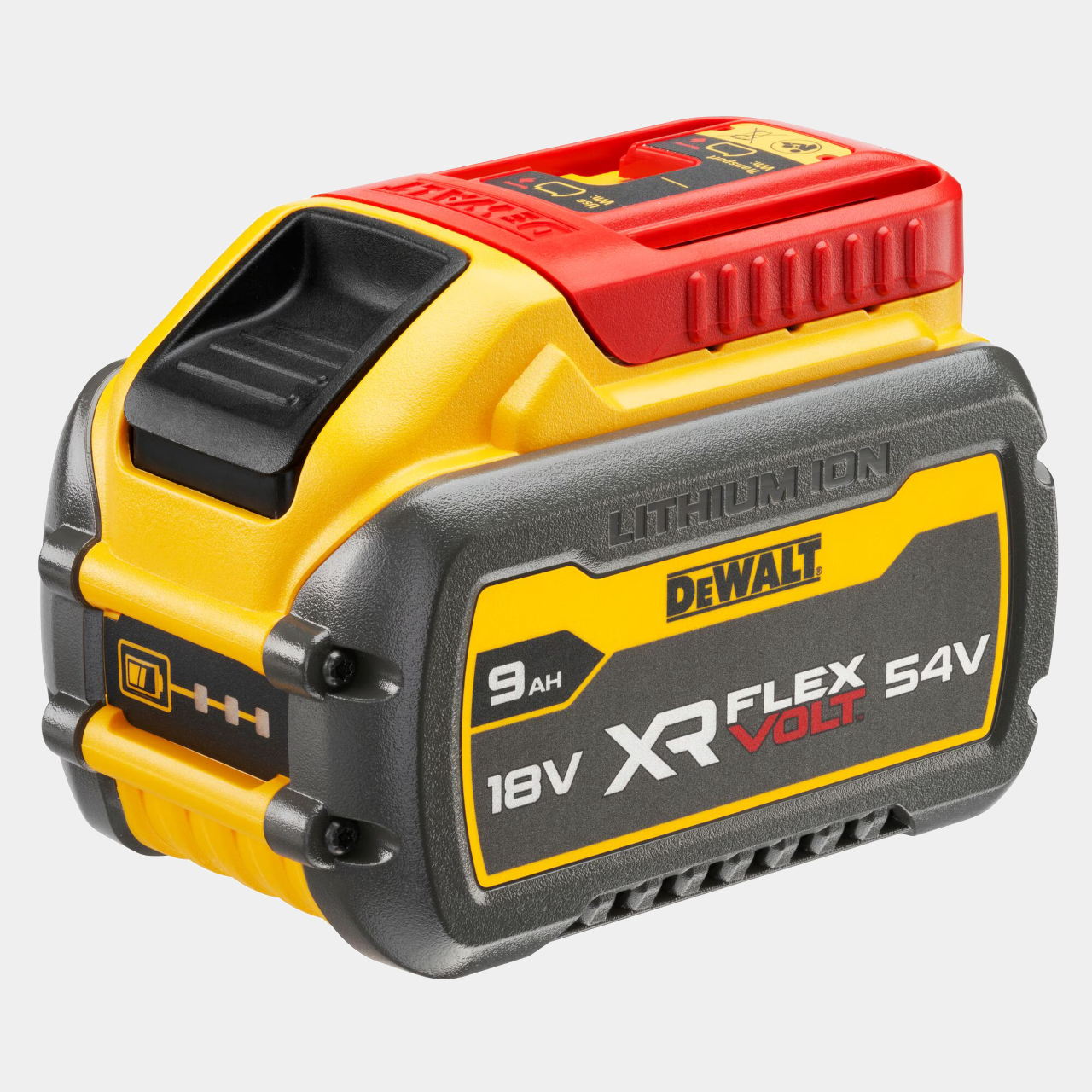
GBA SP With DeWALT Battery Will Outlast the Apocalypse

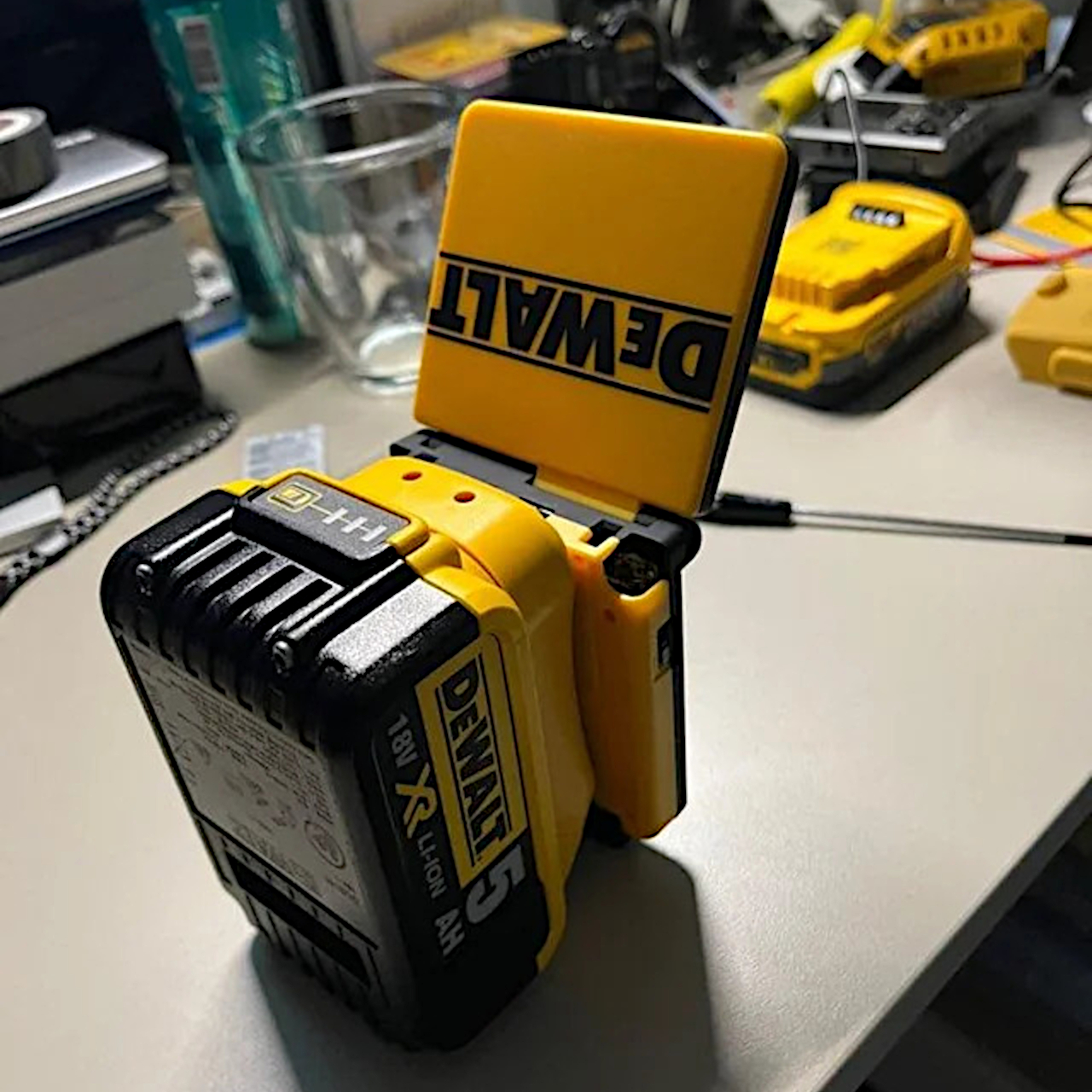
Handheld gamers obsess over battery life like it’s a matter of survival. We swap cells, carry backup chargers, and baby old consoles through one more dungeon before the screen flickers off. Battery anxiety is real, especially for something like the Game Boy Advance SP, where the original cell barely lasted through a single flight. This mod responds to that anxiety by going completely overboard, bolting a GBA SP onto a DeWALT power-tool battery big enough to run drills and apparently several full-length RPGs.

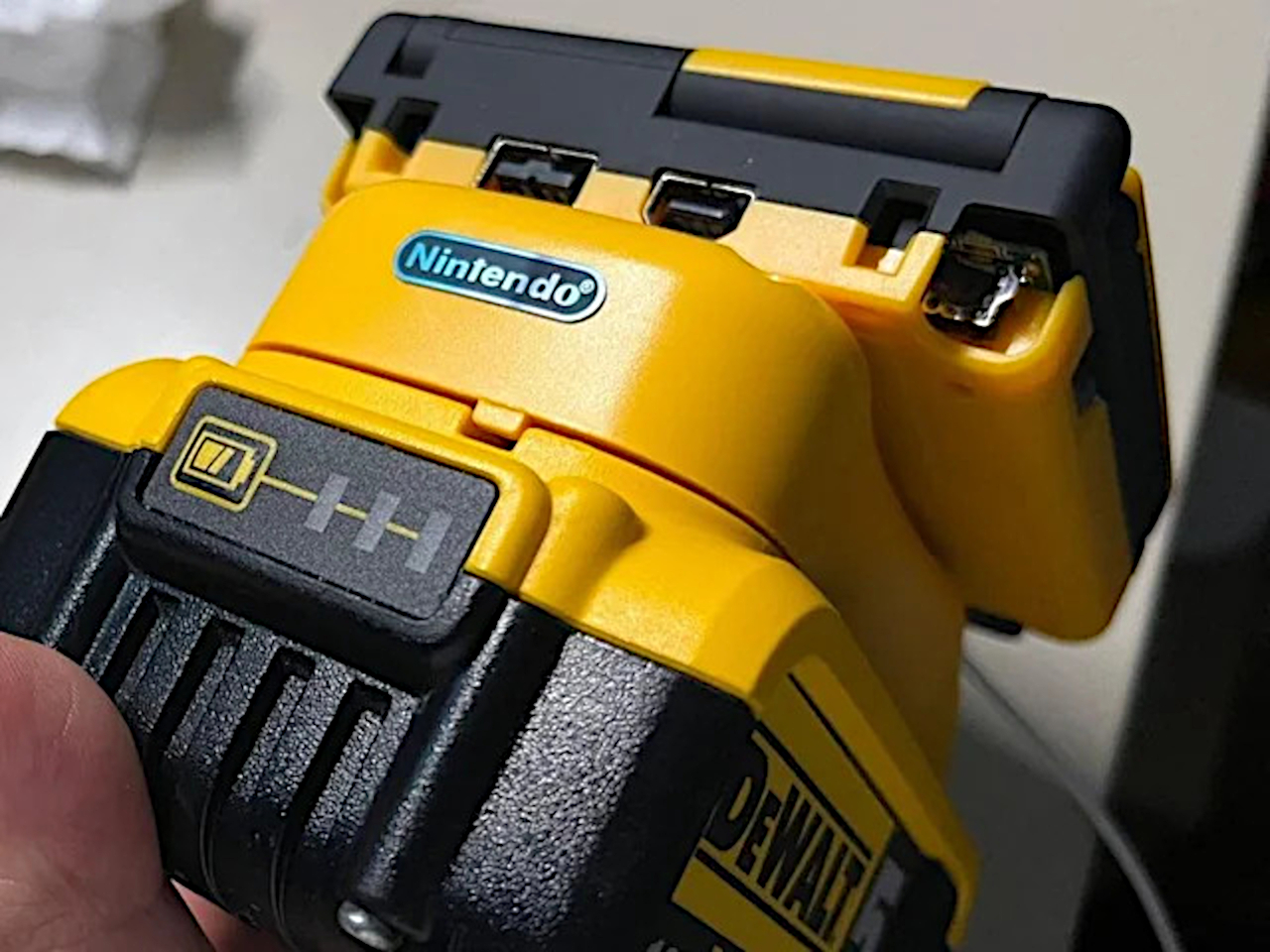
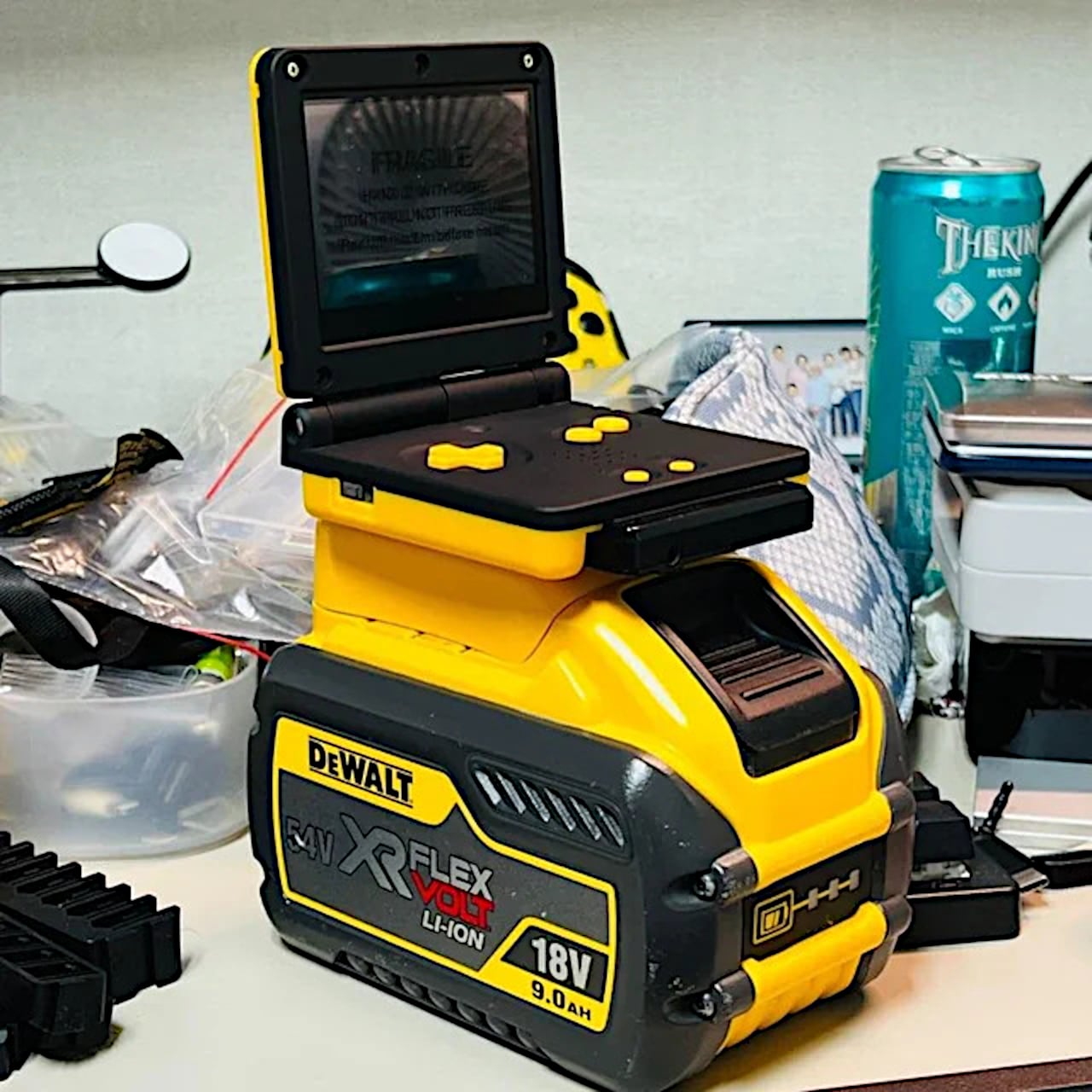
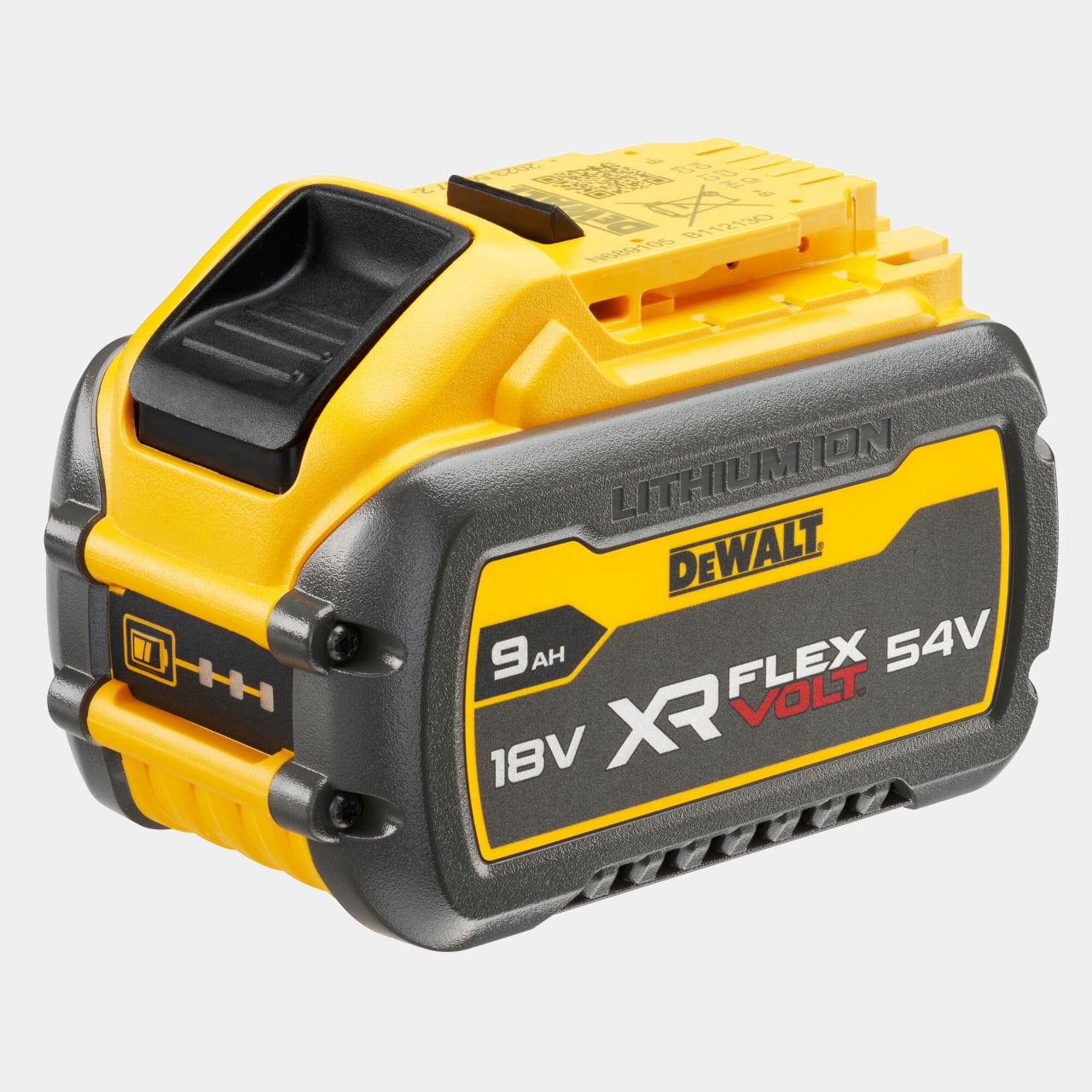
The project comes from a Reddit build where a modder mounts a GBA SP onto a DeWALT XR FLEXVOLT lithium-ion pack, creating what commenters immediately dubbed the “jobsite Game Boy.” The console’s original tiny battery is gone, replaced by a buck converter that steps down the tool battery’s eighteen volts to the four-ish volts the SP expects. The result looks like Nintendo and DeWALT secretly collaborated on a rugged portable for construction workers.

Designer: Bangoo H

The battery is rated at nine amp-hours at 18 volts, which works out to around 162 watt-hours compared to the few watt-hours of the original cell. Reddit did the math and estimated hundreds of hours of runtime, with one commenter joking that the battery might finally die fifteen minutes after the nukes start flying and another suggesting you could finish your entire childhood backlog before needing a recharge.

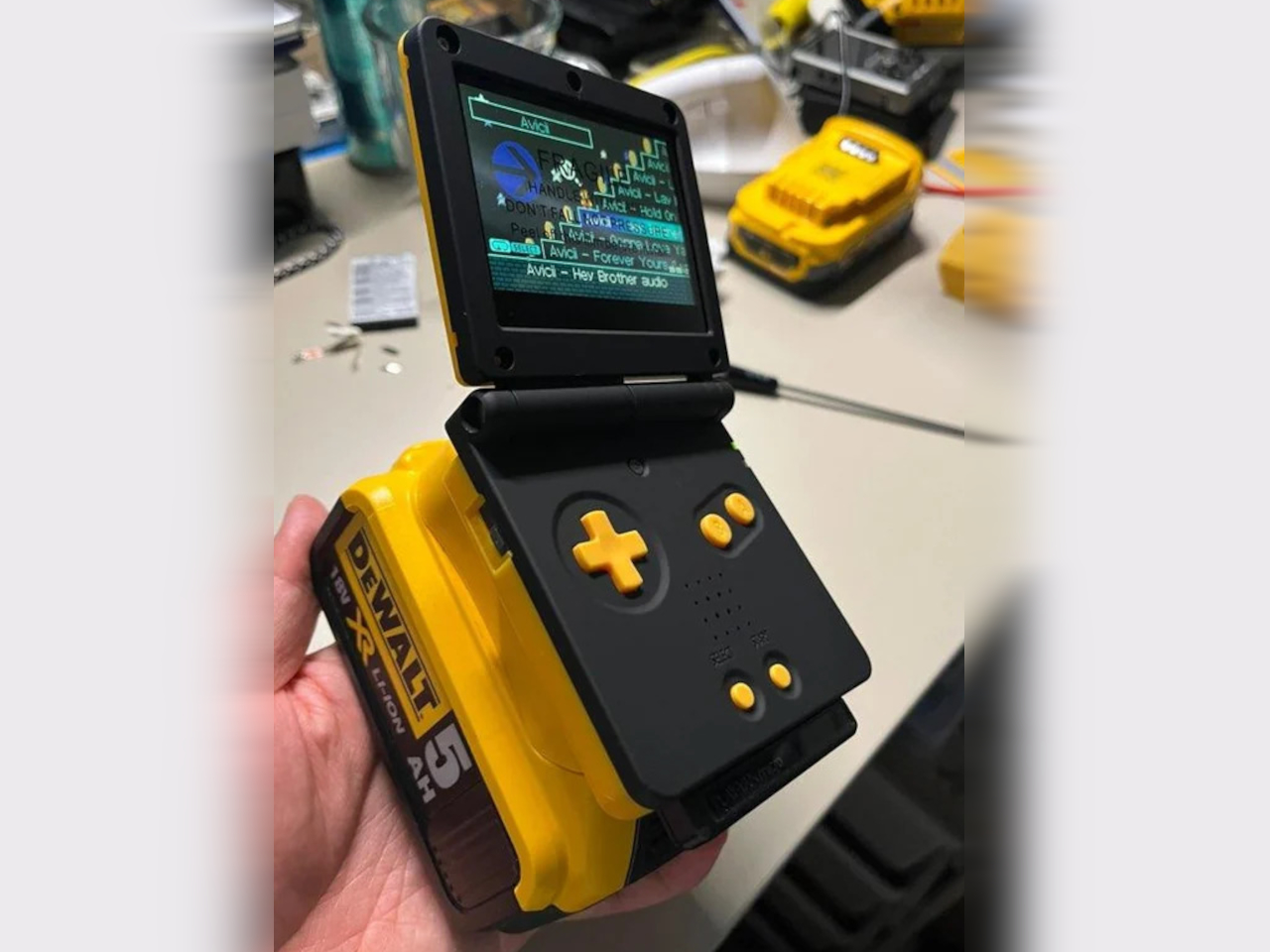
The wiring is straightforward if you squint. The modder dropped a buck converter into the SP where the original battery lived, wired it to the battery contacts via a dummy cell, then connected that to a custom holder that slides onto the DeWALT pack’s rail. Charging still happens through the regular DeWALT charger, so the Game Boy just thinks it has an absurdly large external battery that never quits.

The aesthetics are what really sell it. The SP shell has been resprayed in black with yellow buttons, and the lid wears a big DeWALT logo, so when it’s closed, the whole thing reads like a tiny power-tool accessory. Open it up, and the screen pops out of the battery like a work light. It even has a little Nintendo badge on the back, making the mashup feel weirdly official.

Of course, the DeWALT pack turns the SP from a pocketable handheld into a luggable brick. Commenters joked about dropping it on your face in bed or finally silencing anyone who says the SP is too small for their hands. It’s not exactly travel-friendly unless your idea of travel involves rolling a toolbox around, but it does give the console a much larger grip.

The DeWALT GBA SP mod turns battery anxiety into a punchline and shows how far you can push an idea just because it makes you laugh. By strapping a beloved handheld to a power-tool battery, it mixes serious electrical work with a sense of humor, reminding us that modding can be joyful and completely unnecessary in the best possible way.

The post GBA SP With DeWALT Battery Will Outlast the Apocalypse first appeared on Yanko Design.

iFLYTEK AINOTE 2: Is AI the Future of Digital Notebooks?

iFLYTEK AINOTE 2: Is AI the Future of Digital Notebooks?

The iFLYTEK AI Note 2 is setting a new benchmark in digital productivity tools with its innovative features and sleek, minimalist design. As the world’s thinnest e-ink tablet, it combines innovative technology with a user-friendly interface to deliver a unique and efficient note-taking experience. Whether you’re a professional managing complex projects, a student navigating academic […]

The post iFLYTEK AINOTE 2: Is AI the Future of Digital Notebooks? appeared first on Geeky Gadgets.

Posted in Uncategorized

Gemini 3 Enterprise : Bridges Gap Between Complex Data & Actionable Insights

Gemini 3 Enterprise : Bridges Gap Between Complex Data & Actionable Insights

What if the future of enterprise operations wasn’t just faster, but smarter, capable of transforming how businesses think, plan, and execute? Enter Gemini 3 Enterprise, an advanced AI model that’s redefining the boundaries of productivity and innovation. With its ability to process multimodal data, craft intelligent strategies, and empower developers with agentic coding, Gemini 3 […]

The post Gemini 3 Enterprise : Bridges Gap Between Complex Data & Actionable Insights appeared first on Geeky Gadgets.

Posted in Uncategorized

The best Bluetooth trackers for 2026

Most people think of AirTags when they picture a Bluetooth tracker. And indeed, Apple’s little white discs were once the only capable option, relying on a vast finding network of nearby iPhones to pinpoint lost tags. But now Google has a finding network of its own, and third party brands like Chipolo, Hyper and Pebblebee have trackers that pair with your choice of Google or Apple’s network. That means you’ve got a lot of options for tagging and tracking your keys, backpacks, luggage and more. We tested the major brands out there to see how well they work, how loud they are and how they look to put together a guide to help you get the most out of your chosen tracker. Here are the best Bluetooth trackers you can buy.

Editor's note: Apple just released a new version of its AirTag trackers. We are in the process of testing the new model and will update this guide once we're done. 

Bluetooth trackers are small discs or cards that rely on short-range, low-energy wireless signals to communicate with your smartphone. Attach one of these gadgets your stuff and, if it’s in range, your phone can “ring” the chip so you can find it. These tracking devices offer other features like separation alerts to tell you when you’ve left a tagged item behind, or where a lost item was last detected. Some can even tap into a larger network of smartphones to track down your device when you’re out of range. Depending on what you want the tracker to do, there are a few specs to look for when deciding which to get.

Like most things from the folks in Cupertino, AirTags only work with products in the Apple ecosystem. Both Apple and Google have opened up access to the Find My and Find Hub networks to third-party manufacturers, including Chipolo and Pebblebee. Those two companies make device-agnostic models that will work with the larger tracking network from either brand, so iPhone and Android users can buy the same tag. Tile trackers work with either Android or Apple devices, but use Tile’s own Life 360 finding network. Samsung’s latest fob, the Galaxy SmartTag2, only works with Samsung phones and taps into a finding system that relies on other Samsung devices to locate lost tags.

Crowd-sourced finding capabilities are what make headlines, with stories about recovering stolen equipment or tracking lost luggage across the globe. Using anonymous signals that ping other people’s devices, these Bluetooth tracking devices can potentially tell you where a tagged item is, even if your smartphone is out of Bluetooth range.

Apple’s Find My network is the largest, with over a billion iPhones and iPads in service all running Apple’s Find My app by default. So unless an iPhone user opts out, their phone silently acts as a location detector for any nearby AirTags. Apple recently increased the AirTag’s finding power by enabling you to share the tracker's location with a third party, party, like an airline. Chipolo fobs that work on Apple’s network have the same ability. Google launched its Find My Device network in 2024 and has since renamed it Find Hub, which, like Apple's fining app, combines devices and people finding in one place. That network is now a close second for the largest in the US

Now that Google’s Find Hub network is up and running, it’s a close second for the largest in the US. Like Apple, Android users are automatically part of the network, but can opt-out by selecting the Google services option in their phone’s Settings app and toggling the option in the Find Hub menu. Samsung’s SmartTag 2 and related network also defaults to an opt-in status for finding tags and other devices.

Tile offers a large finding grid that includes Tile users, Amazon Sidewalk customers and people running the Life360 network. Life360 acquired Tile in 2021, and, according to the company, the Life360 network has more than 70 million monthly active users.

In our tests, AirTags and third-party tags using its network, like the Chipolo Loop and Pop and the Pebblebee Clip 5, were the fastest to track down lost items. They offered nearly real-time location data in moderately to heavily trafficked spots around Albuquerque, including a bar, bookstore and coffee shops in Nob Hill, along with various outdoor hangouts on UNM’s campus.

Samsung's SmartTags were able to locate our lost items most of the time, though not with the same precision finding accuracy as AirTags. When we tested Google’s Find Hub (then called Find My Device) network right after launch, it was noticeably slower than Apple’s network when using the community finding feature. Testing it again in mid 2025, the time it took to locate a lost item was considerably improved, taking less than 20 minutes on average for the community to track a fob. In our tests, Tile’s finding network wasn’t able to consistently locate its lost fobs.

An assortment of bluetooth trackers arranged in a grid on a wooden background. Trackers include black Tile trackers in various shapes, two silver and white AirTag trackers and a round blue Chipolo tracker attached to a set of keys with a multitool key chain.
Amy Skorheim / Engadget

A tracker’s day-to-day utility becomes really apparent when it prevents you from losing something in the first place. Separation alerts tell you when you’ve traveled too far from your tagged items. Useful if you want to make sure your laptop bag, jacket or umbrella always comes with you when you leave the house.

Apple’s Find My app delivers these notifications, but Google’s Find Hub does not. However, if you have a Chipolo device and allow its companion app to run in the background on your Android phone, left-behind alerts are enabled. Tile trackers require a yearly subscription to enable the alerts (currently $7 to $25 monthly). Both AirTags and Tiles allow you to turn off separation alerts at certain locations, meaning you can set your home as a “safe” place where items can be left behind, but alerts will still trigger elsewhere.

In our tests, AirTags and others using the Find My network alerted us between the 600- and 1,400-foot mark. Tiles sent a notification after about an average of 1,500 feet and were more consistent when using an Android phone than an iPhone. Chipolo Pop tags paired with an Android phone and using its own app sent an alert when we got around 450 feet away from our tagged item.

The feature you may use most often is the key finder function, which makes the tracker ring when you hit a button in the app. With Apple's AirTags, you can say "Hey Siri, where are my keys?" and the assistant will ring the tag (assuming it doesn't mistakenly think you're asking for directions to the Floridian archipelago). You can also use the Find Item app in your Apple Watch to ring your fob. Asking smart home/personal assistants like Alexa or the Google Assistant to find your keys will work with Chipolo, Tile and Pebblebee trackers linked to your Android device.

If you have your tag but can’t find your phone, some trackers will let you ring them to find your handset. SmartTag2 fobs reliably rang our Galaxy phone when we double-pressed it. Tile trackers have the same feature. Chipolo Pop and Loop trackers can ring your phone, but uses the Chipolo app to do so, which can run concurrently with the Find My or Find Hub connection. AirTags and third-party tags using Google’s network don’t offer this feature.

The volume of the Bluetooth tracking device may determine whether you can find an item buried in your couch cushions or in a noisy room. AirTags have a reputation for being on the quiet side, and that aligned with what we saw (measuring roughly 65 decibels). Chipolo’s Pop tags and Tile’s Pro model measure between 83 and 86 decibels on average. Pebblebee’s new Clip 5 was the loudest of any tag we’ve tested, clocking in at 97 ear-splitting decibels.

Design will determine what you can attach the tracker to. AirTags are small, smooth discs that can’t be secured to anything without accessories, which are numerous, but that is an additional cost to consider. Chipolo, Pebblebee and Tile offer trackers with holes that easily attach to your key ring, and all three companies also offer card-shaped versions designed to fit in your wallet. Pebblebee Clip 5 tags come with a handy carabiner-style key ring.

You can even get trackers embedded into useful items like luggage locks. The SmartLock from KeySmart is a TSA-approved luggage lock, but in addition to the three digit code, it’s also a Bluetooth tracker that’s compatible with Apple Find My. It wasn’t quite as loud as other trackers in my tests, and the range wasn’t as long, but it paired easily and worked with Apple’s finding network just like an AirTag.

AirTag, Tile Pro, SmartTag2, HyperShield and Chipolo Pop fobs use replaceable batteries and each should go for at least a year before needing to be swapped. Pebblebee Clip 5 and Chipolo Loop trackers are rechargeable via a standard USB-C port. The Clip 5 has a long battery life claim at 12 months. The Loop should go for six months on a charge. 

Trackers shaped like credit cards, aka wallet trackers, don't have replaceable batteries, but some, like the Chipolo Card and the Pebblebee Card 5 are USB-C rechargeable. 

AirTags have gotten a lot of attention and even prompted some lawsuits for Apple due to bad actors planting them on people in order to stalk them. While this fact may not influence your buying decision, any discussion of Bluetooth trackers should note what steps Apple, Google and Tile have taken to address the issue. Last year, all the major players in the Bluetooth tracker business teamed up to combat misuse and standardize how unauthorized tracking detection and alerts work for iOS and Android.

Last year, Tile launched a feature called Anti-Theft Mode, which enables you to render one of its trackers undetectable by others. That means if someone steals your tagged item, they won’t be able to use the anti-stalking features to find and disable the tracker. That sort of negates one of the major ways potential stalking victims can stay safe, so Tile hopes ID verification and a $1 million penalty will deter misuse. 

As a theft deterrent, a Bluetooth tracker may or may not be the best option. Anecdotal stories abound in which people have recovered stolen goods using a tracker — but other tales are more cautionary. Neither Apple nor Google promotes its trackers or finding networks as a way to deal with theft. GPS trackers, on the other hand, are typically marketed for just that purpose.

Before deciding on which trackers to test, we researched the field, looking at user reviews on Amazon, Best Buy and other retailers, along with discussions on sites like Reddit. We also checked out what other publications had to say on the matter before narrowing down our options.

Here’s the full list of every tracker we tested:

After acquiring the trackers, I tested each one over the course of a few weeks using both an iPhone 11 followed by an iPhone 16 and a Samsung Galaxy S22 then an S23 Ultra. I recreated likely user experiences, such as losing and leaving items behind at home and out in the city. I planted trackers at different spots near downtown Albuquerque, mostly concentrated in and around the University of New Mexico and the surrounding neighborhood of Nob Hill. Later, I conducted tests in the Queen Anne neighborhood of Seattle.

Each test was performed multiple times, both while walking and driving and I used the measure distance feature on Google Maps to track footage for alerts. I paid attention to how easy the app was to use, how reliable the phone-to-tracker connection was and any other perks and drawbacks that came up during regular use.

As new trackers come to market, or as we learn of worthy models to try, I'll test them and add the results to this guide. 

The Moto Tag haunts me. At this very moment, my Galaxy phone says the fob is “Near you right now.” But I don’t know where. I tap to play a sound and the Find Hub tries, but ultimately says it can’t. I tap the Find Nearby function that’s supposed to visually guide you to the tag. I parade my phone around the house like a divining rod, take it down into the basement, walk it all over the garage. Nothing. But the Hub app unendingly says the Moto Tag is “Near you right now” and I get flashes of every old-school horror movie where the telephone operator tells the soon-to-be victim that the call is coming from inside the house.

It’s partly my fault. I tend to keep good tabs on the gadgets I test for work. But during my most recent move, the tiny green disc didn’t make it into the safety of my review unit cabinet after relocation. Perhaps in retribution for my neglect, the Moto Tag keeps itself just out of reach. Taunting me. I’ll let you know if I ever find it, but in the meantime, it’s clear this finding device doesn’t want to be found. The recommended tags in this guide will serve you better.

Tile recently came out with a new suite of trackers, replacing the Tile Mate, Tile Pro, Tile Sticker and Tile Slim with updated models. In addition to fun new colors for the Mate and Slim, Tile added an SOS feature that can send a notification to your Life360 Circle when you triple press the button on the tracker. It’s a clever addition that turns your keys into a panic button, something offered by personal safety companies as standalone devices.

There are a few caveats: You and the people you want to notify in an emergency will need the Life360 app installed on your phones. If you want your Tile to also trigger a call to emergency services, you’ll need a $15-per-month Life360 subscription (that’s in addition to a Tile membership, which starts at $3/month or $30 annually). And enabling the SOS triple-press disables the ability to ring your phone with the fob.

I tested the SOS feature and it did indeed send a text message to my Circle, with the message that I had triggered an SOS and a link to a website that showed my current location. I thought it odd that the link didn’t open the Life360 app (which shows the location of users' phones), but I wasn’t as much concerned with Tile’s personal safety features as I was with the tracking capabilities, which turned out to be less than ideal.

For my tests, I planted Tile trackers in a densely populated area of Seattle (about 15,000 people per square mile). After setting the trackers to “lost” in the Tile app, I waited. After four hours, one of the trackers was not discovered by the finding community, so I went and retrieved it. Another fob I planted alerted me that the tracker had been found by the Tile community after three hours — but the location it gave me was off by a third of a mile. I then decided to plant a tracker in the busiest place I could think of — the dried fruit and nuts aisle of a Trader Joes on a Friday evening before a major holiday. It still took over a half an hour before another Tile user anonymously pinged my lost tracker.

In my tests with Samsung’s trackers and the fobs on Google’s Find Hub network, it took around ten minutes for them to be discovered. AirTags took half that time and all were tested in a far less populated city. Tile's four hours with no ping and over a half hour before getting a hit in a crowded TJs were pretty long stretches.

Tile devices work with both mobile operating systems and its latest models are indeed louder than they were before. But they aren’t as quick to connect and you need to pay for a membership to activate left-behind alerts. And when you do, those notifications don’t kick in as quickly as they do with competing trackers.

Both the Tile Pro and the Samsung Galaxy SmartTag2 claim a maximum range of around 400 feet, which is longer than the 300-foot claim for Chipolo’s Pop tags. The Pebblebee Clip 5 claims a 500-foot range, though other trackers with a shorter claimed range often performed better in our tests. Apple doesn’t make range claims for AirTags, but 30 meters (100 feet) seems to be the general consensus for those fobs. 

Any Bluetooth signal, of course, is dependent on a few factors. Obstacles like walls and people can block the signal, so a clear line of sight is the only way to achieve the maximum range. Other signals, like Wi-Fi, can also interfere with Bluetooth connections. Even high humidity can have an effect and lessen the distance at which your phone will connect to your tracker.

Remember, when considering the range of Bluetooth trackers, the size of the “finding network” also comes into play. This is the number of nearby phones that can be used to anonymously ping your tracker when your own phone is out of Bluetooth range. As of now, Apple AirTags have the largest network, followed by Google’s Find Hub, Samsung’s finding community and finally, Tile’s Life360 members.

Bluetooth trackers are designed to track small, personal items like keys, jackets, backpacks and the like. All trackers have safeguards to prohibit the tag from being used to stalk people, so most will alert someone if a tracker that does not belong to them is detected following them. That means a car thief may get tipped off that there’s a tracker in the car they’re trying to steal. 

That said, you’ll see plenty of stories about people finding their car thanks to a Bluetooth tracker. Some police departments have even handed out trackers to combat high rates of carjacking. In most instances, the tracker of choice has been AirTags thanks to their wide finding network. If you’re looking for a tracker for your car, you may want to look into GPS trackers, some of which are designed for just that purpose.

Accuracy for Bluetooth trackers can be looked at in two ways: Finding items nearby and finding items misplaced outside your home. For nearby items, you’ll most often use the ring function on the device to hunt it down. Apple’s AirTags also use ultra-wideband technology, which creates directional navigation on your phone to get you within a foot of the tracker.

Accurately finding lost items outside your home depends on the size of the finding network. Since this relies on the serendipity of a random phone passing within Bluetooth range of your tracker, the more phones on a given network, the better. And since Bluetooth ranges and distance estimates are only precise within about a meter or so, getting pings from more than one phone will help locating items. Here again, it’s worth noting that Apple’s Find My network is the largest, followed by Google, Samsung and Tile (both Chipolo and Pebblebee have fobs that work with the Apple and Google networks).

February 2026: Added Pebblebee Clip 5 as the best rechargeable device. Added HyperShield tag as a budget pick. Updated FAQs for accuracy. 

October 2025: Added Chipolo Loop as a new pick for best rechargeable Bluetooth tracker. Detailed our experience with the Moto Tag and KeySmart SmartLock. Updated details about separation alerts and Ultra Wideband tech.

August 2025: Updated the name of Google's finding network to Find Hub, instead of Find My Device. Added details about Pebblebee's new Alert feature. Added a table of contents. 

This article originally appeared on Engadget at https://www.engadget.com/computing/accessories/best-bluetooth-tracker-140028377.html?src=rss

Stop Guessing ROI : Calculate Payback in Excel Like a Pro

Stop Guessing ROI : Calculate Payback in Excel Like a Pro

Imagine investing in a promising project, only to realize years later that it’s taking far longer than expected to recoup your initial outlay. Wouldn’t it have been invaluable to know upfront how long it would take to break even? The payback period is a critical financial metric that answers this exact question, offering a clear […]

The post Stop Guessing ROI : Calculate Payback in Excel Like a Pro appeared first on Geeky Gadgets.

Posted in Uncategorized

From Trash to Treasure, How Enzymes and Plasma Aim to Clean up Plastics

From Trash to Treasure, How Enzymes and Plasma Aim to Clean up Plastics

What if the solution to one of humanity’s most pressing environmental crises has been hiding in plain sight all along? With over 400 million tons of plastic produced annually and only a fraction of it recycled, the world is drowning in waste. Beaches are littered with discarded bottles, marine life is choking on microplastics, and […]

The post From Trash to Treasure, How Enzymes and Plasma Aim to Clean up Plastics appeared first on Geeky Gadgets.

Posted in Uncategorized