The Surface Laptop Ultra Just Got NVIDIA’s Answer to Apple Silicon

The laptop has always been a machine of compromises. Workstation-class performance typically arrived in thick chassis with short battery life and fan noise audible from across a room. Getting genuine power in a form factor thin and light enough to carry without a second thought has been largely Apple’s territory, a problem it’s been solving with its own ARM-based chips while Windows machines played catch-up.

NVIDIA is changing that calculus for Windows with RTX Spark, an ARM-based superchip that fuses a 20-core Grace CPU with a Blackwell RTX GPU carrying 6,144 CUDA cores, connected by NVIDIA’s NVLink-C2C chip-to-chip interconnect. Microsoft built the Surface Laptop Ultra around it from the silicon up, designing the machine and the chip in concert, producing what it describes as the most powerful Surface Laptop ever built.

Designer: Microsoft, NVIDIA

The reason ARM architecture matters for laptop design is power efficiency. Compared to x86 chips, ARM-based designs deliver significantly more performance per watt, and that ratio determines what’s physically possible in a chassis. RTX Spark laptops are engineered to be as slim as 14mm and as light as 3 pounds, proportions that previously excluded any serious dedicated GPU from the equation entirely.

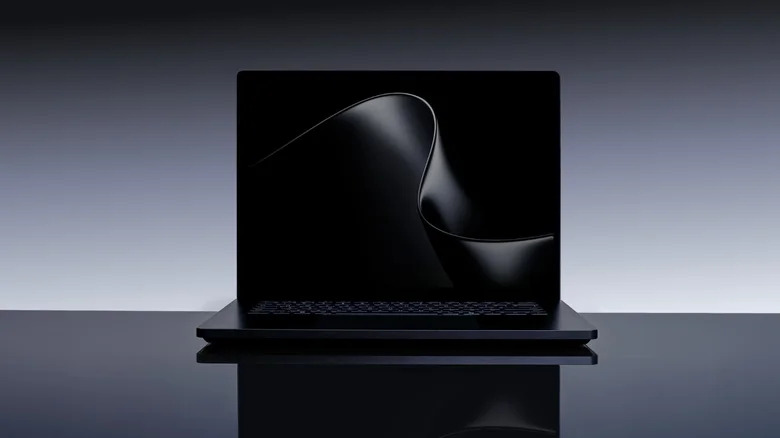
The Surface Laptop Ultra lands at under 18mm thick and under 4.5 pounds, housed in CNC-machined aluminum in Platinum and Nightfall finishes. The 15-inch mini-LED PixelSense Ultra touchscreen reaches up to 2,000 nits of peak HDR brightness with a 3:2 aspect ratio and 262 pixels per inch, making it the brightest display Microsoft has ever shipped on a Surface. A full port set, including HDMI, USB-C, USB-A, SD card, and headphone jack, rounds out a machine designed for professional use.

RTX Spark’s most defining architectural choice is unified memory, where up to 128GB of RAM is shared dynamically between the CPU and GPU. A 3D rendering job, a video edit, and a locally running AI model can all draw from that same pool simultaneously, without the bottlenecks discrete memory architectures create. That arrangement enables 1 petaflop of AI compute, enough to run 120-billion-parameter models entirely on the device.

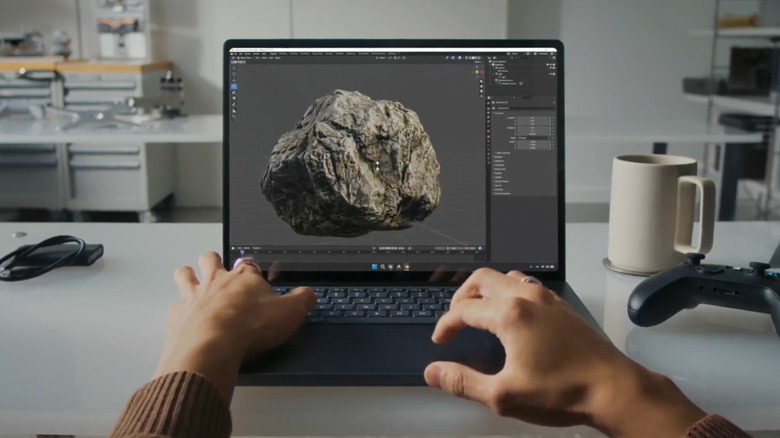
The full CUDA software stack runs natively on RTX Spark, which matters directly for creative professionals. Adobe is rebuilding Photoshop and Premiere from the ground up for the chip, targeting 2x faster AI and graphics performance. On the creative side, RTX Spark handles 12K video editing, renders 90GB-plus 3D scenes using NVIDIA OptiX, and generates 4K AI video, tasks that previously required a dedicated workstation to complete without serious compromise.

NVIDIA describes RTX Spark as the most efficient PC chip ever built, a statement aimed squarely at Apple Silicon’s grip on the high-end creative laptop market. That efficiency is also what allows the Surface Laptop Ultra’s all-new thermal system to sustain heavy workloads without the throttling and fan noise that defined previous Windows machines in this tier. Microsoft’s own engineers worked across mechanical, thermal, materials, and industrial design disciplines simultaneously, treating the chassis and the chip as a single system.

All-day battery life holds even while running on battery power, and the compact charger is small enough to fit in a jacket pocket. The Surface Laptop Ultra and additional RTX Spark-powered devices from ASUS, Dell, HP, Lenovo, and MSI are expected in fall 2026. For a platform that has long asked users to choose between portability and capability, the arrival of an ARM PC chip in NVIDIA’s hands changes the terms of that conversation considerably.

The post The Surface Laptop Ultra Just Got NVIDIA’s Answer to Apple Silicon first appeared on Yanko Design.

Microsoft’s $1,950 Surface Pro 13 Gen 12 Got Smarter: Its Design Didn’t

The 2-in-1 laptop has had an interesting run. What started as a novelty device that couldn’t decide what it wanted to be has gradually become a workplace staple. IT departments are increasingly looking for machines that can handle everything from a boardroom presentation to a cross-country flight without missing a beat, and the pressure to pack more intelligence into smaller form factors keeps growing.

The Surface Pro has been Microsoft’s answer to this for well over a decade, and the new Surface Pro for Business, 13-inch (12th Edition), largely keeps the formula intact. If you’re expecting a dramatic redesign, it isn’t coming. The magnesium chassis, adjustable kickstand, and detachable keyboard are all still here, which is either a testament to the original design or a sign of a very cautious product team.

Designer: Microsoft

That said, what’s happening inside tells a different story. Powered by Intel Core Ultra Series 3, either the Core Ultra 5 335 or the Core Ultra 7 366H, this Surface Pro hits 50 TOPS through Intel AI Boost, qualifying it as a Copilot+ PC. That means on-device AI is fast enough for a consultant to summarize a contract or an analyst to run through data without needing a cloud connection.

And that AI work happens on a 13-inch PixelSense Flow display running at 2880 x 1920 pixels with a dynamic refresh rate of up to 120Hz, available in an optional OLED for deeper contrast and richer color. The anti-reflective coating is genuinely useful for anyone working in brightly lit offices or outdoor settings, giving this screen a practical advantage over glossier alternatives.

For workers who annotate more than they type, the 2-in-1 flexibility is still the Surface Pro’s most practical feature. Fold the keyboard flat, grab a Surface Slim Pen for Business, and the device shifts from laptop to inking tablet. It’s a workflow that makes sense during a client walkthrough or a field assessment, and one that doesn’t require any extra hardware to pull off.

Under the hood, memory goes up to 64GB of LPDDR5x RAM for anyone running virtual machines or demanding workloads. The removable Gen 4 SSD also matters to enterprise IT teams, who can swap drives without replacing the entire unit. Battery life is promised to reach up to 17 hours on the LCD model, enough for a full day of travel without hunting for a power outlet.

Starting at $1,949.99, this is firmly enterprise territory, especially since that doesn’t include the keyboard or pen, which still don’t come in the box. But for IT teams investing in devices that double as laptops, tablets, and mobile workstations, the math starts to make sense. The 12th Edition has a lot riding on what’s happening under its unchanged exterior, and perhaps hopes that its enterprise customers haven’t yet gotten bored with its looks.

The post Microsoft’s $1,950 Surface Pro 13 Gen 12 Got Smarter: Its Design Didn’t first appeared on Yanko Design.

Microsoft’s $1,950 Surface Pro 13 Gen 12 Got Smarter: Its Design Didn’t

The 2-in-1 laptop has had an interesting run. What started as a novelty device that couldn’t decide what it wanted to be has gradually become a workplace staple. IT departments are increasingly looking for machines that can handle everything from a boardroom presentation to a cross-country flight without missing a beat, and the pressure to pack more intelligence into smaller form factors keeps growing.

The Surface Pro has been Microsoft’s answer to this for well over a decade, and the new Surface Pro for Business, 13-inch (12th Edition), largely keeps the formula intact. If you’re expecting a dramatic redesign, it isn’t coming. The magnesium chassis, adjustable kickstand, and detachable keyboard are all still here, which is either a testament to the original design or a sign of a very cautious product team.

Designer: Microsoft

That said, what’s happening inside tells a different story. Powered by Intel Core Ultra Series 3, either the Core Ultra 5 335 or the Core Ultra 7 366H, this Surface Pro hits 50 TOPS through Intel AI Boost, qualifying it as a Copilot+ PC. That means on-device AI is fast enough for a consultant to summarize a contract or an analyst to run through data without needing a cloud connection.

And that AI work happens on a 13-inch PixelSense Flow display running at 2880 x 1920 pixels with a dynamic refresh rate of up to 120Hz, available in an optional OLED for deeper contrast and richer color. The anti-reflective coating is genuinely useful for anyone working in brightly lit offices or outdoor settings, giving this screen a practical advantage over glossier alternatives.

For workers who annotate more than they type, the 2-in-1 flexibility is still the Surface Pro’s most practical feature. Fold the keyboard flat, grab a Surface Slim Pen for Business, and the device shifts from laptop to inking tablet. It’s a workflow that makes sense during a client walkthrough or a field assessment, and one that doesn’t require any extra hardware to pull off.

Under the hood, memory goes up to 64GB of LPDDR5x RAM for anyone running virtual machines or demanding workloads. The removable Gen 4 SSD also matters to enterprise IT teams, who can swap drives without replacing the entire unit. Battery life is promised to reach up to 17 hours on the LCD model, enough for a full day of travel without hunting for a power outlet.

Starting at $1,949.99, this is firmly enterprise territory, especially since that doesn’t include the keyboard or pen, which still don’t come in the box. But for IT teams investing in devices that double as laptops, tablets, and mobile workstations, the math starts to make sense. The 12th Edition has a lot riding on what’s happening under its unchanged exterior, and perhaps hopes that its enterprise customers haven’t yet gotten bored with its looks.

The post Microsoft’s $1,950 Surface Pro 13 Gen 12 Got Smarter: Its Design Didn’t first appeared on Yanko Design.

Microsoft’s $1,950 Surface Pro 13 Gen 12 Got Smarter: Its Design Didn’t

The 2-in-1 laptop has had an interesting run. What started as a novelty device that couldn’t decide what it wanted to be has gradually become a workplace staple. IT departments are increasingly looking for machines that can handle everything from a boardroom presentation to a cross-country flight without missing a beat, and the pressure to pack more intelligence into smaller form factors keeps growing.

The Surface Pro has been Microsoft’s answer to this for well over a decade, and the new Surface Pro for Business, 13-inch (12th Edition), largely keeps the formula intact. If you’re expecting a dramatic redesign, it isn’t coming. The magnesium chassis, adjustable kickstand, and detachable keyboard are all still here, which is either a testament to the original design or a sign of a very cautious product team.

Designer: Microsoft

That said, what’s happening inside tells a different story. Powered by Intel Core Ultra Series 3, either the Core Ultra 5 335 or the Core Ultra 7 366H, this Surface Pro hits 50 TOPS through Intel AI Boost, qualifying it as a Copilot+ PC. That means on-device AI is fast enough for a consultant to summarize a contract or an analyst to run through data without needing a cloud connection.

And that AI work happens on a 13-inch PixelSense Flow display running at 2880 x 1920 pixels with a dynamic refresh rate of up to 120Hz, available in an optional OLED for deeper contrast and richer color. The anti-reflective coating is genuinely useful for anyone working in brightly lit offices or outdoor settings, giving this screen a practical advantage over glossier alternatives.

For workers who annotate more than they type, the 2-in-1 flexibility is still the Surface Pro’s most practical feature. Fold the keyboard flat, grab a Surface Slim Pen for Business, and the device shifts from laptop to inking tablet. It’s a workflow that makes sense during a client walkthrough or a field assessment, and one that doesn’t require any extra hardware to pull off.

Under the hood, memory goes up to 64GB of LPDDR5x RAM for anyone running virtual machines or demanding workloads. The removable Gen 4 SSD also matters to enterprise IT teams, who can swap drives without replacing the entire unit. Battery life is promised to reach up to 17 hours on the LCD model, enough for a full day of travel without hunting for a power outlet.

Starting at $1,949.99, this is firmly enterprise territory, especially since that doesn’t include the keyboard or pen, which still don’t come in the box. But for IT teams investing in devices that double as laptops, tablets, and mobile workstations, the math starts to make sense. The 12th Edition has a lot riding on what’s happening under its unchanged exterior, and perhaps hopes that its enterprise customers haven’t yet gotten bored with its looks.

The post Microsoft’s $1,950 Surface Pro 13 Gen 12 Got Smarter: Its Design Didn’t first appeared on Yanko Design.