CES 2026 proved the PC industry is hosed this year

Dell's XPS 14 currently costs over $2,000. An AMD executive predicts that PC builders will likely make piecemeal upgrades this year, instead of building entirely new systems. And new AI supercomputers from NVIDIA and AMD are gobbling up the RAM market. At CES 2026, it was hard not to notice the dire year ahead for the computing industry, one that will likely lead to higher prices and more limited availability for consumer goods across the board.

Really, though, the show just confirmed what was apparent since RAM prices skyrocketed over the last few months, driven by demand from AI datacenters. As Samsung's marketing leader, Wonjin Lee, told Bloomberg at CES: "There's going to be issues around semiconductor supplies, and it's going to affect everyone. Prices are going up even as we speak."

At first, it appeared that Dell's new XPS 14 and XPS 16 were among the earliest systems hit by these demands. Last year's models started at $1,699 and $1,899, respectively, and we were initially told the new models would actually come in cheaper at $1,650 and $1,850. At the moment, the XPS 14 starts at $2,050, while the XPS 16 is $2,200. A Dell representative tells us these aren’t entry-level configurations, instead we can expect to see cheaper systems below $2,000 in February. While those prices haven’t been finalized, the reps say it should be similar to the earlier figures we were given.

It’s also worth noting that it didn't take much to configure the earlier models upwards of $2,000. It’s just unfortunate that Dell doesn’t have cheaper configurations available for the launch if its new systems, especially since they look so compelling. Meanwhile, Apple still hasn't budged its $1,599 MacBook Pro 14-inch pricing. At least Dell still comes in cheaper than the $2,499 MacBook Pro 16-inch.

On the desktop front, AMD's David McAfee, Corporate Vice President and GM of Client Channel Business, noted that the longevity of the company's AM4 and AM5 platforms might be a boon for gamers, since they can upgrade their CPUs without buying new RAM kits and motherboards. That allows for a pathway to better performance without paying out the nose for over-priced RAM.

"I think that will be potentially a trend that we see in 2026 with more component upgrades, as opposed to full system swap outs and, and altogether rebuilds," he said in a group interview with Engadget and other outlets. "Some of the most popular CPUs that are still running in gamers’ platforms are parts like the 2600 back to the Pinnacle Ridge days, or 3000 series... Stepping even from there into a little bit more modern 5,000 series processors in an AM4 socket and motherboard, there's a pretty big boost there."

McAfee added that around 30 to 40 percent of AMD's business still revolves around the AM4 platform, even without the specter of a wild memory market.

"There's no product that has memory in it that's immune to some of these forces around DRAM pricing and, and what it's doing to the market," he said, when asked about potential GPU price increases. "I think the, the truth is the volatility that we've seen over the past two months or so has really been unprecedented."

Looking ahead, he said he expects prices to settle within the first three to six months of the year, but he didn't discuss his reasoning further. As an aside, he also noted that AMD's X3D chips, which feature 3D V-cache, actually don't see much of a hit from slower RAM. Their high amounts of onboard L2 and L3 cache make up for less ideal memory transfer speeds, McAfee said.

That McAfee commented at all about the state of RAM is noteworthy. Every PC maker I’ve asked, including Dell and Acer, refused to comment on the volatile state of the memory industry ahead of CES. Perhaps they were hoping things would calm down before they had to price their new systems. Ultimately, they’re beholden to an increasingly limited supply of RAM.

And where is all that memory going? At CES, NVIDIA announced its new Vera Rubin AI supercomputer, which supports up to 54TB of RAM across 36 Vera CPUs and 20.7TB of memory across 72 GPUs. AMD, as well, announced its new Helios AI rack, which supports up to 31TB of memory across 72 AMD Instinct MI455X GPUs. Given the endless appetite for computing to power AI model building and inferencing, there’s likely going to be a significant demand for these beastly systems.

Put simply: Our global supply of memory is being sacrificed to appease the AI industry. That’s good news for the likes of OpenAI, Microsoft and NVIDIA, but bad news for anyone who cares about PCs and the consumer products we use every day. Get ready for a year of price hikes.

Update 1/12, 3:00p: Added a mention of lower entry-level configurations coming eventually.

This article originally appeared on Engadget at https://www.engadget.com/computing/ces-2026-proved-the-pc-industry-is-hosed-this-year-174500314.html?src=rss
The Clicks co-founder explains who its tiny Communicator phone is for

Clicks is an apologetically gadgety company, making gear that feels charmingly out-of-place in a world where almost every smartphone out there is an all-screen slab. That was obviously two years ago when the company first revealed its keyboard case that brought tactile typing to the iPhone and eventually other Android devices. Rather than that being a one-off curiosity, the company had two new announcements at CES 2026: a magnetic keyboard accessory that also doubles as a battery bank and small, squat mobile phone with a keyboard. And while there isn’t a working prototype of the Clicks Communicator available for the press to see, I got to check out the new Power Keyboard talk with Clicks co-founder and former BlackBerry marketing director Jeff Gadway about where he thinks his products fit into the smartphone world.

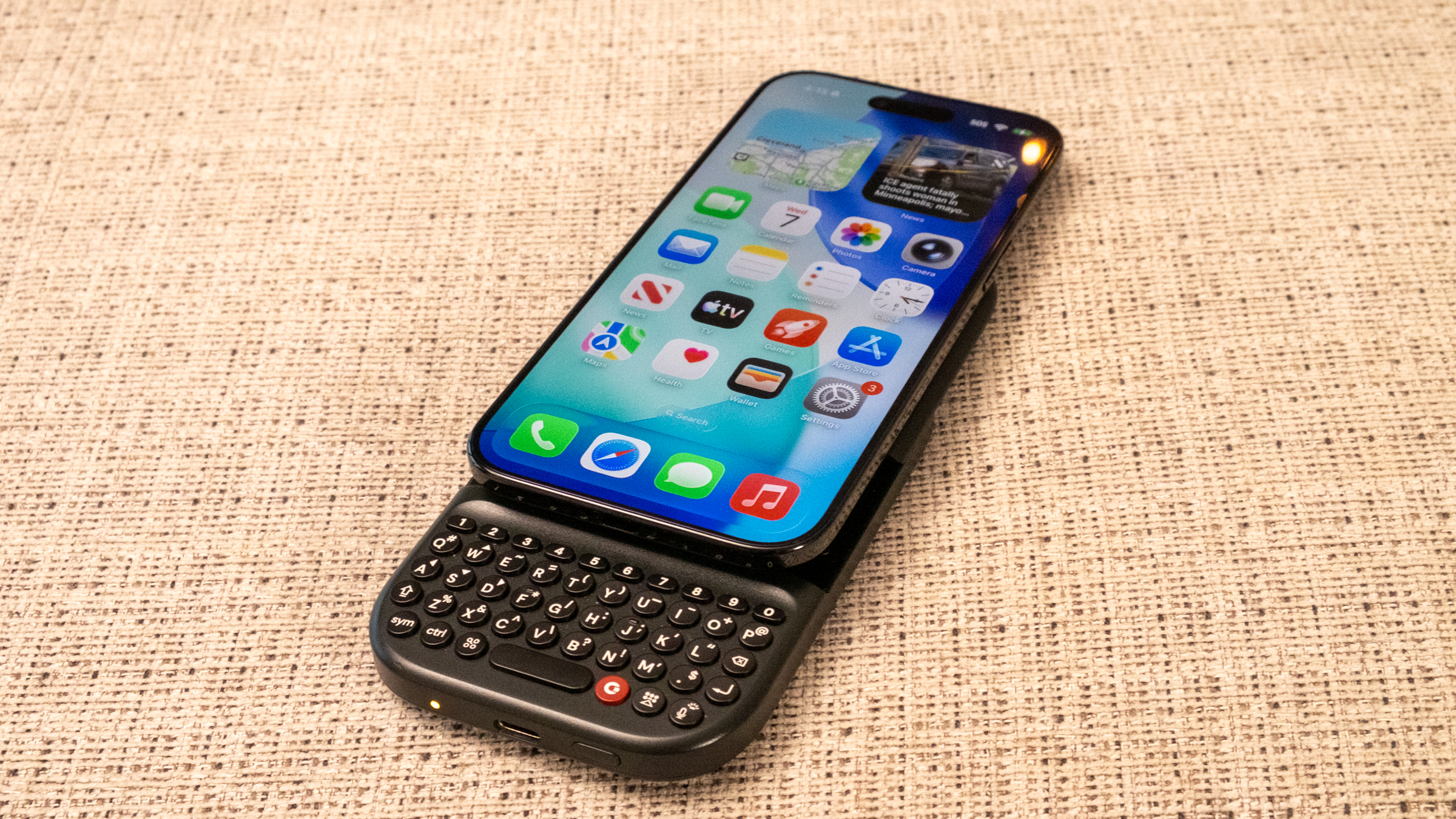
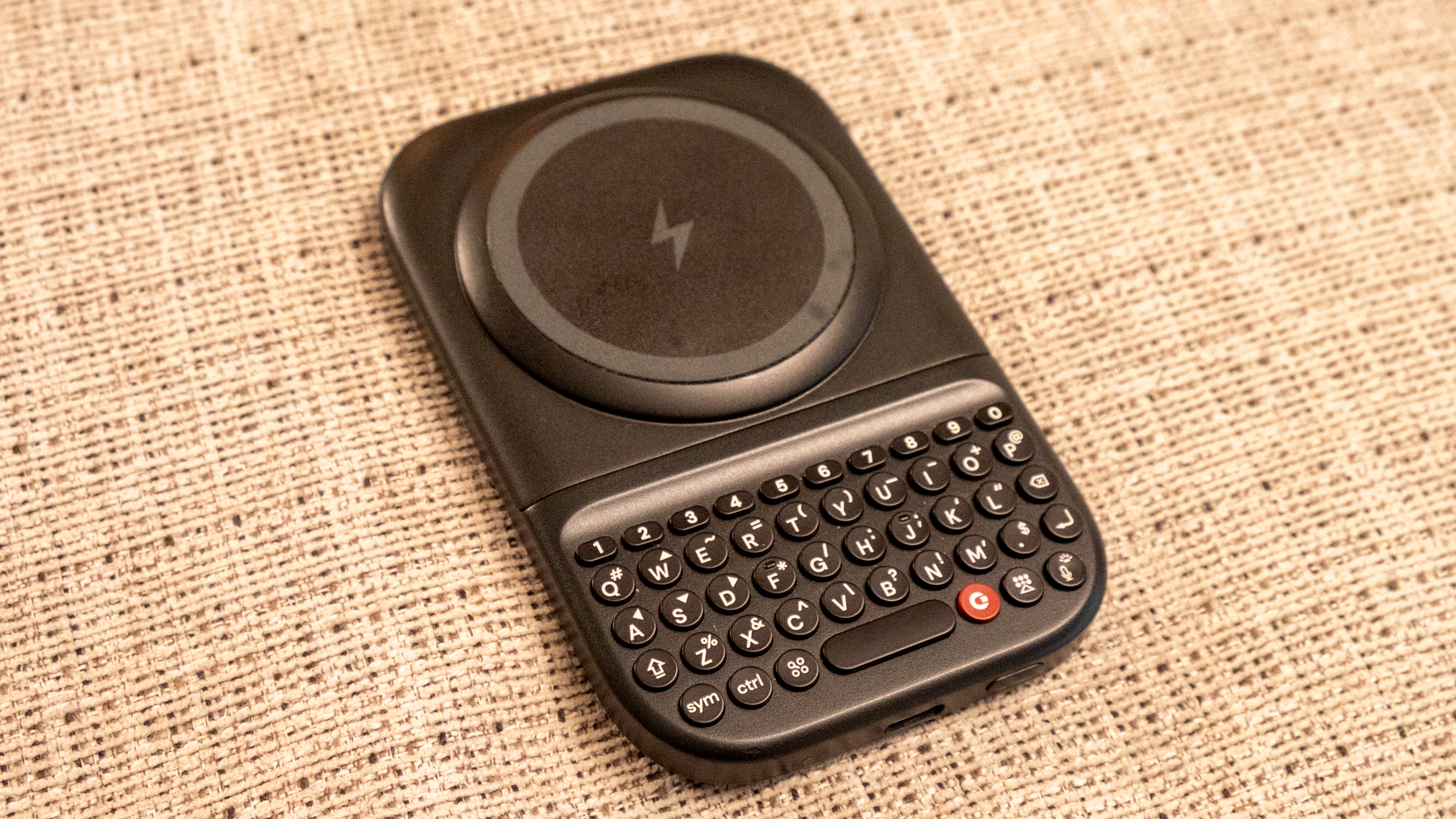
At first glance, the $79 Power Keyboard feels like a big improvement over the original Clicks Keyboard case. It magnetically attaches to any phone with Qi2 and connects over Bluetooth. The keyboard itself is similar to the original Clicks keyboard, but there’s a dedicated number row which is a nice improvement. But the thing that really caught my eye was its old-school slider form factor. When closed, the Power Keyboard sits on the back of your phone like a thick wireless battery pack — but it satisfyingly slides up to reveal the keyboard like the Palm Pre or BlackBerry Torch smartphones of old.

The magnetic, sliding Clicks Power Keyboard.
Nathan Ingraham for Engadget

The Power Keyboard’s last trick is that it can charge your phone up when attached. The battery itself isn’t huge, so you’re not going to fully recharge a modern smartphone. But it’s still a nice addition for if you need some power in a pinch. You can also set it up so it doesn’t charge your phone and instead uses all the battery to power the keyboard; in that situation, the keyboard will last weeks without a charge. Or you can designate a percentage that can only be used by the keyboard — for example, if the battery pack’s charge drops below 20 percent, it’ll stop charging your phone and instead save that power for the keyboard.

The Clicks Power Keyboard, without a phone attached.
Nathan Ingraham for Engadget

As someone who has never owned a smartphone with a keyboard, I can’t say how good the Clicks keyboard actually is — there would be a definite learning curve before I got comfortable with it. It certainly feels tiny to me, but if you just type on and trust autocorrect you should get the hang of it before too long. Whether the benefits of using a physical keyboard matter are up to you to decide. It’s nice seeing a bigger screen unobstructed by the virtual keyboard, but I feel far too set in my touchscreen ways to consider switching it up. But some people just loved their keyboards, and for them this gadget might hit the spot.

The Clicks Communicator is the more unexpected of the two new devices the comapny is working on, but without a working demo model I can’t render any judgement about how it will actually work. When it was announced, Clicks specifically said they were targeting people who used multiple devices, a demographic that I wasn’t fully convinced was large enough to justify the Communicator’s existence. But Gadway assured me the company had done plenty of research before moving into the hardware production phase.

“You've got people who are mandated to carry a second device for corporate deploy. Then you've got people who are small business owners and want to have a separate phone for their small business,” he said. “In markets like Europe, there's a requirement for employers to give people the option to have a separate device and create more separation. You've got travelers who want a second SIM, and then you've got this growing cohort of digital detox, digital minimalism, digital well-being people.” None of those segments might be huge on its own, but add it all up and the Clicks team felt like they had a decent opportunity.

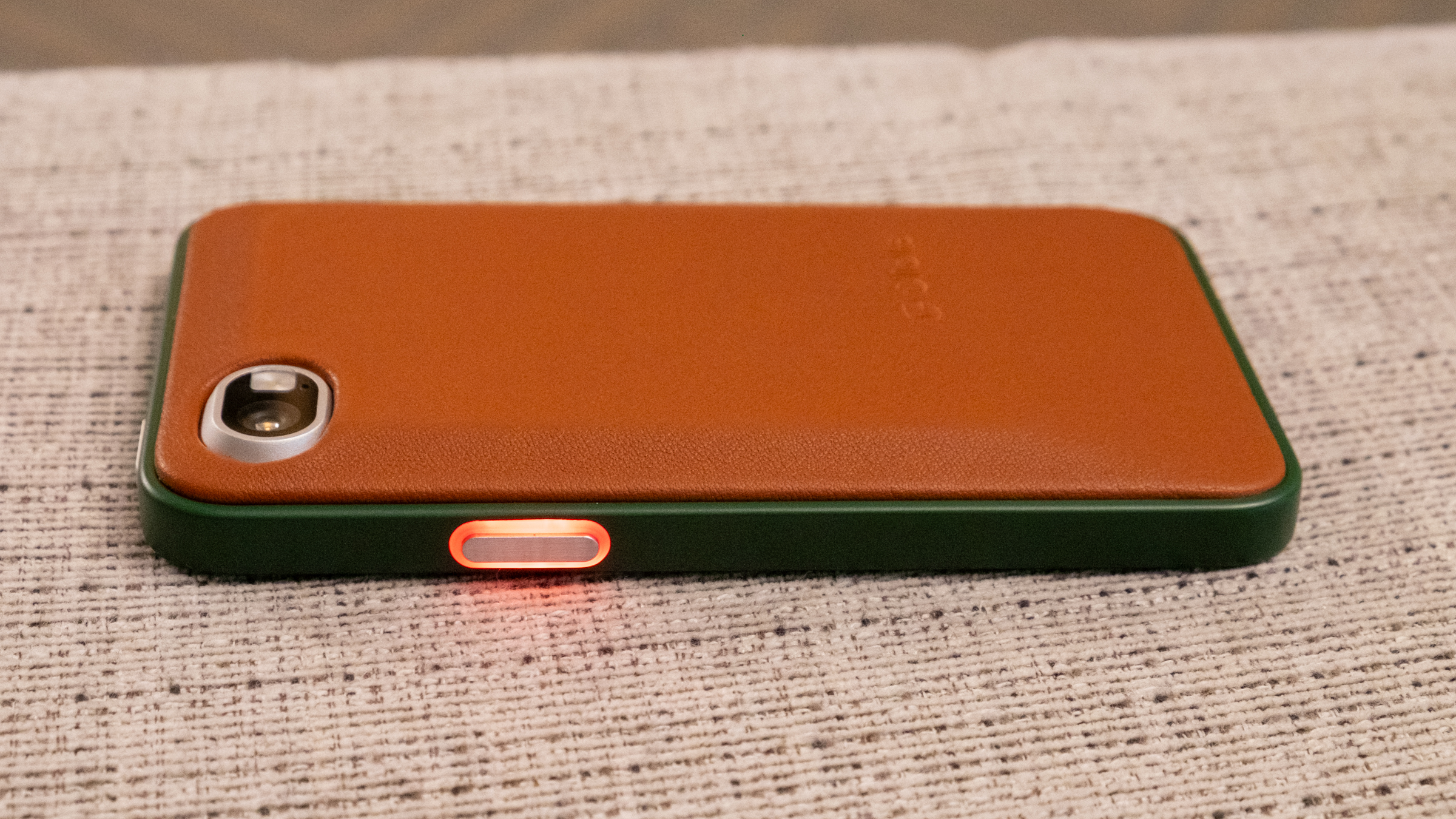
The Clicks Communicator has an LED Light on its side button that you can customize for different notifications.
Nathan Ingraham for Engadget

The other half of the thought process was making the Communicator different from an iPhone or Pixel — instead of having two essentially identical devices, Clicks wanted to make the Communicator with a distinct focus. “Our thought process was that complementary devices in tech are on the rise,’ Gadway said. “You wear an Oura Ring and you wear a smart watch; you carry an e-reader for reading and a tablet for content consumption. So why shouldn't your second phone be better at certain things than your first phone instead of just being a straight duplicate?”

That’s where the squarish, 4-inch touchscreen, keyboard and custom implementation of the Niagara Android launcher, which is a list-based UI rather than a grid of apps. The custom Clicks implementation of it focuses on your messaging apps and quickly triaging through new items (hence the Communicator name). The keyboard itself is touch sensitive and can be swiped across to navigate and take actions on what you see. But the Communicator is just an Android phone at heart which means you can install any apps that you find essential — though its form factor changes what it is best used for. “You can download whatever apps you want, but we've optimized it to be better at specific things,” Gadway said. “So, you know, do you want to watch letterboxed TikTok videos on this? Probably not. You could, but it's not the thing you're going to reach for to do that. But we're not going to give you a product that restricts what you can do.”

The good thing about being a smaller hardware maker is that Clicks doesn’t need to sell millions of these — they’re just interested in offering an alternative for people who might enjoy it, just as they’ve done with their keyboard accessories. Of course, the Communicator is a bigger investment; it’s up for pre-order now for $399 (that’s Pixel 9a territory, for comparison). Once it launches in the second half of the year, we’ll find out if it can find its audience.

This article originally appeared on Engadget at https://www.engadget.com/mobile/the-clicks-co-founder-explains-who-its-tiny-communicator-phone-is-for-170000501.html?src=rss

Sharpa’s ping-pong playing, blackjack dealing humanoid is working overtime at CES 2026

There were no idle hands at Sharpa's CES booth. The company's humanoid may have been the busiest bot at show, autonomously playing ping-pong, dealing blackjack games and taking selfies with passersby. On display wasn't just the robot and its smarts, but also SharpaWave, a highly dexterous 1:1 scale human hand. 

The hand has 22 active degrees of freedom, according to the company, allowing for precise and intricate finger movements. It mirrored my gestures as I wiggled my hand in front of its camera, getting everything mostly right, which was honestly pretty cool. Each fingertip contains a minicamera and over 1,000 tactile pixels so it can pick up objects with the appropriate amount of delicateness for the task at hand, like plucking a playing card from a deck and placing it gently on the table. 

Sharpa's robot was a pretty good ping-pong player, too. We've seen ping-pong robots plenty of times before, but these typically come in the form of a disembodied robotic arm, not one that's humanoid from the waist up. The company's products are meant to be general-purpose, with the ability to handle a wide range of jobs, and its humanoid wore a lot of hats at CES to drive the point home.  

This article originally appeared on Engadget at https://www.engadget.com/ai/sharpas-ping-pong-playing-blackjack-dealing-humanoid-is-working-overtime-at-ces-2026-150000488.html?src=rss

Dolby Vision 2 is coming this year, here’s what you need to know

Dolby may have announced Dolby Vision 2 a few months ago, but the company gave the new platform its first big reveal at CES 2026. I got the chance to see the improvements in person for the first time, thanks to a variety of demos and Q&A sessions. Dolby Vision 2 will be available this year, but initially, it will be limited. As such, I’ve compiled the info on where the image engine will be available first, and what’s likely to come next in terms of where and how you can use it. But first, let’s quickly summarize what Dolby Vision 2 will even do for your TV. 

Dolby Vision 2 is Dolby’s next-generation image engine that the company announced in September. The new standard will do several things to improve picture quality on your TV, including content recognition that optimizes your TV based on what and where you’re watching. This first element will improve scenes that many viewers complain are too dark, compensate for ambient lighting and apply motion adjustments for live sports and gaming. 

Dolby Vision 2 will also deliver new tone mapping for improved color reproduction. I witnessed this first hand in various demos at CES, and this is the biggest difference between the current Dolby Vision and DV2 for me. 

There’s also a new Authentic Motion feature that will provide the optimal amount of smoothing so that content appears more “authentically cinematic,” according to Dolby. This means getting rid of unwanted judder, but stopping short of the so-called soap opera effect. 

Essentially, Dolby is taking advantage of all of the capabilities of today’s TVs, harnessing the improvements to display quality and processing power that companies have developed in the decade since Dolby Vision first arrived.

Lifestyle photo of the TCL X11L SQD-Mini LED Series
TCL

The biggest Dolby Vision 2 news at CES was the first three TV makers that have pledged support for the new standard. Hisense is bringing it to its 2026 RGB MiniLED TVs — including UX, UR9 and UR8. The company also plans to add it to more MiniLED TVs with an OTA update. TCL's 2026 X QD-Mini LED TV Series and C Series will support Dolby Vision 2 via a future update. It will be available on TP Vision’s Philips’ 2026 OLED TVs, including the 2026 Philips OLED811, and OLED911 series as well as the flagship OLED951.

There are sure to be other companies that announce Dolby Vision 2 support in 2026. Sony doesn’t announce its new TVs at CES anymore, so that’s just one of the bigger names that’s yet to reveal its hand. Any upcoming TVs that seek to leverage the full suite of tools that Dolby Vision 2 offers will need to have an ambient light sensor as that’s one of the key facets of Dolby’s upgrade.

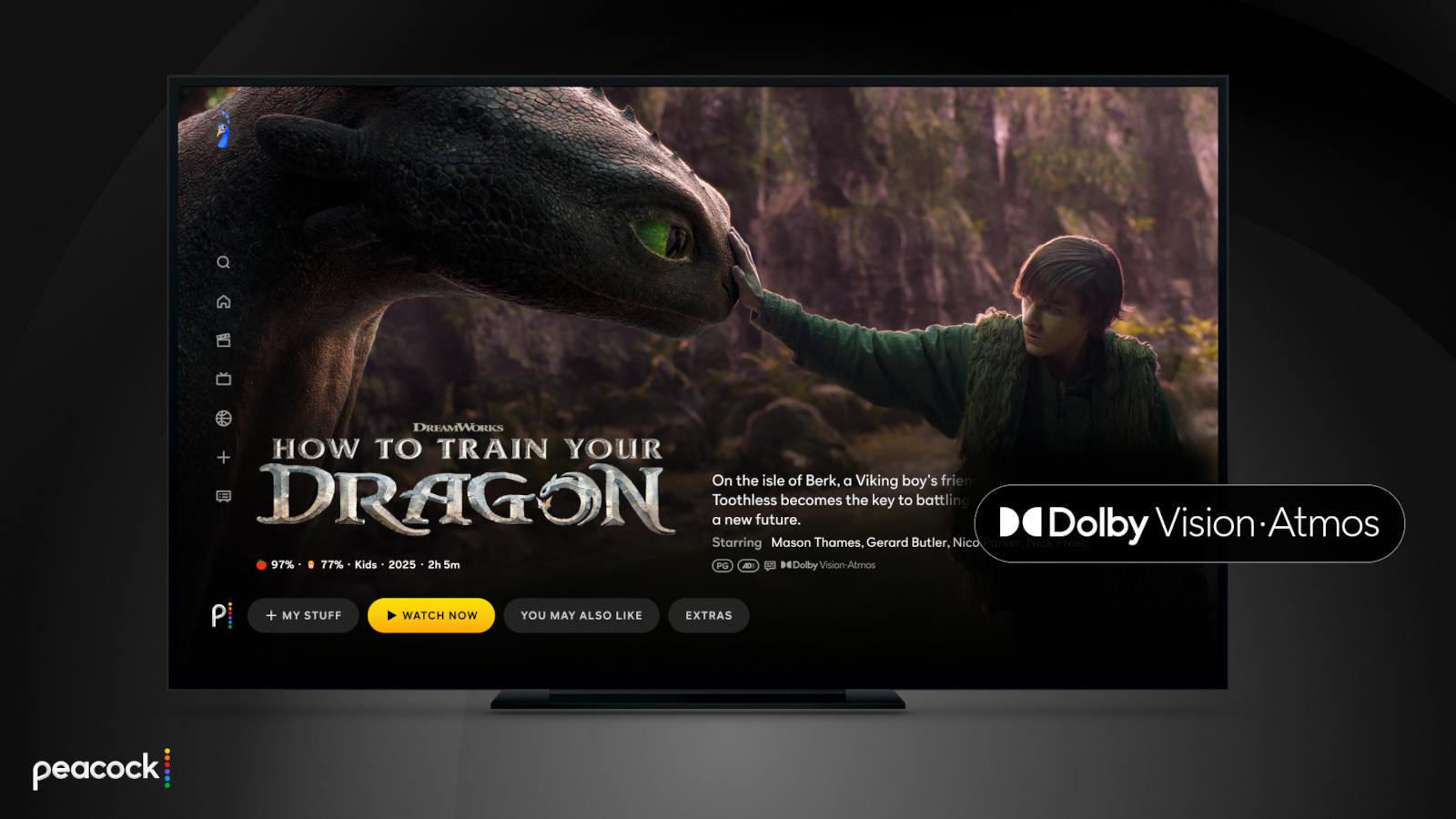
Peacock is bringing Dolby Vision and Atmos support to more live sports offerings.
Peacock

The other big piece of Dolby Vision 2 news at CES 2026 was the first streaming service that will support the platform. Peacock grabbed that honor, and so far it’s the only streamer to pledge support. However, several services support the current version of Dolby Vision, including Netflix, Disney+, Apple TV+, Amazon Prime Video, HBO Max and Paramount+. Like the additional TV support that’s sure to be announced throughout the year, I expect more streaming services will jump on board soon as well.

This article originally appeared on Engadget at https://www.engadget.com/home/home-theater/dolby-vision-2-is-coming-this-year-heres-what-you-need-to-know-140000034.html?src=rss

CES 2026 Day 3: The most interesting tech that’s still on the show floor

Even as CES 2026 wraps up soon, there’s no shortage of standout hardware hiding in plain sight. From genuinely quieter yard tools to ultra-light EVs and companion robots that want to remember your family, Day 3 was all about tech that felt a little more considered — and in some cases, refreshingly practical.

If you can’t get enough of CES, be sure to check out our picks for best of CES 2026, which highlights the most impressive new tech we’ve seen in Las Vegas. We’ve also rounded up the CES gadgets you can buy right now if you’re itching to place an order, along with a look at the weirdest tech at CES 2026, because it wouldn’t be CES without a few delightfully unhinged ideas.

Tone Outdoors T1
Tone Outdoors T1
Billy Steele for Engadget

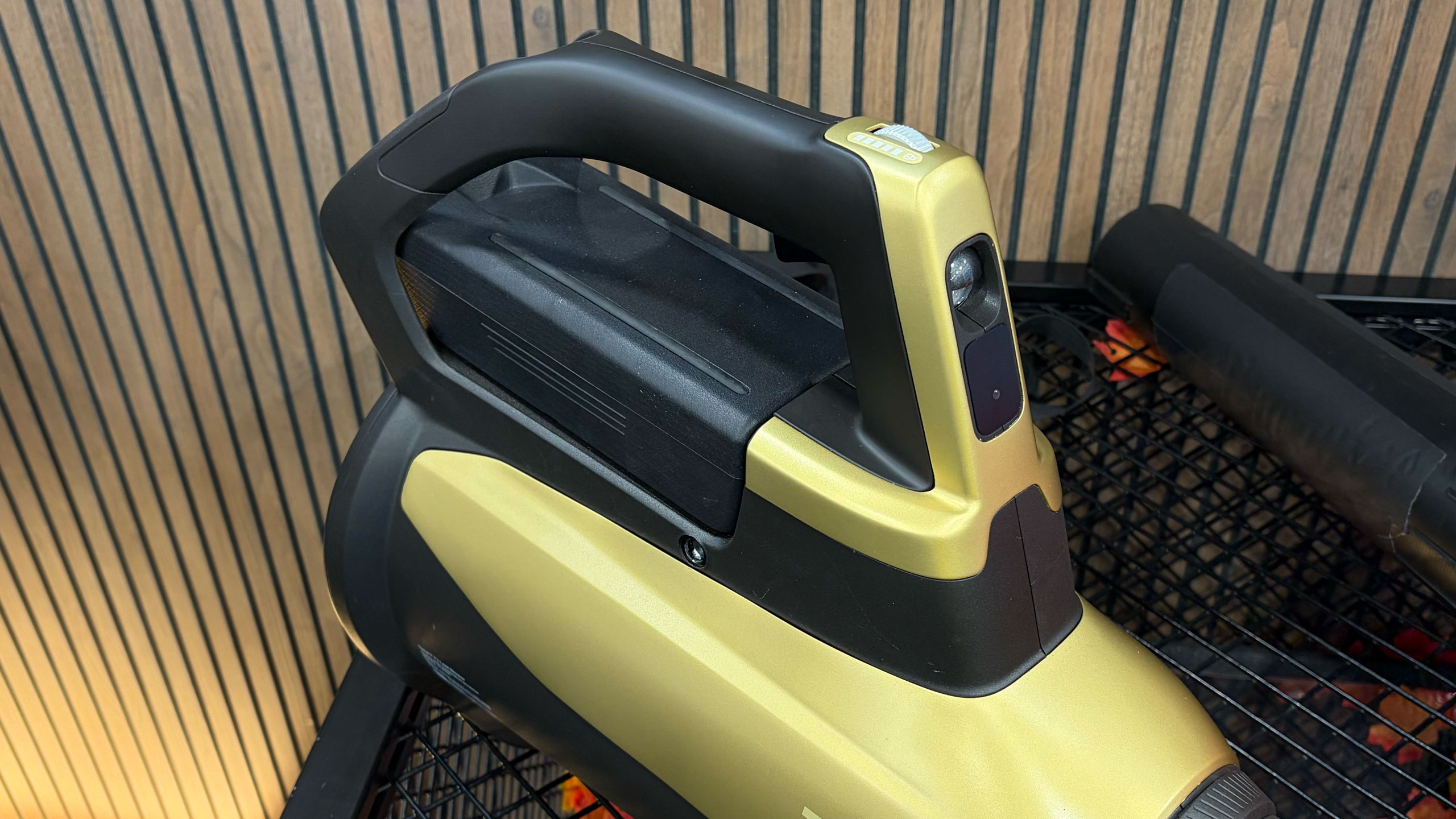
The Tone Outdoors T1 leaf blower is one of the rare CES gadgets that makes an immediate, obvious impression — mostly because it’s shockingly quiet. Whisper Aero’s aerospace-derived motor redesign delivers 880 CFM of airflow at around 52 decibels, which we could confirm even amid the noise of the show floor. It also runs up to 50 minutes in Eco mode, supports a forthcoming battery backpack and even includes an LED for nighttime cleanup. Pre-orders are open now for $599, with shipping expected in September.

Finally! A reasonably sized fridge screen.
Sam Rutherford for Engadget

The GE Profile Smart Fridge is the first smart fridge we’ve seen that feels like it was designed around real problems instead of just slapping a massive screen on the door. GE’s AI assistant can answer practical questions like where your water filter is, scan groceries via a built-in barcode reader and keep tabs on produce with a crisper drawer camera. The eight-inch display feels refreshingly restrained, while integrations with Instacart and recipe suggestions add utility. It launches in March for $4,899, and for once, we’re genuinely curious what it would be like to live with it.

Longbow Motors Speedster
Billy Steele for Engadget

Longbow Motors brought one of the most emotionally compelling EVs we’ve seen to CES, and it’s unapologetically minimalist. The Speedster uses in-wheel motors from Donut Labs to hit a jaw-dropping curb weight of just 2,200 pounds, lighter than a Miata. Its stripped-back interior, mystery shift lever and exposed motors feel like a direct rejection of touchscreen-heavy modern cars. It’s wildly expensive at just under $100,000, but also one of the few EVs here that got us excited to drive.

A robot with eyes on top of a screen showing a smile.
Cheyenne MacDonald for Engadget

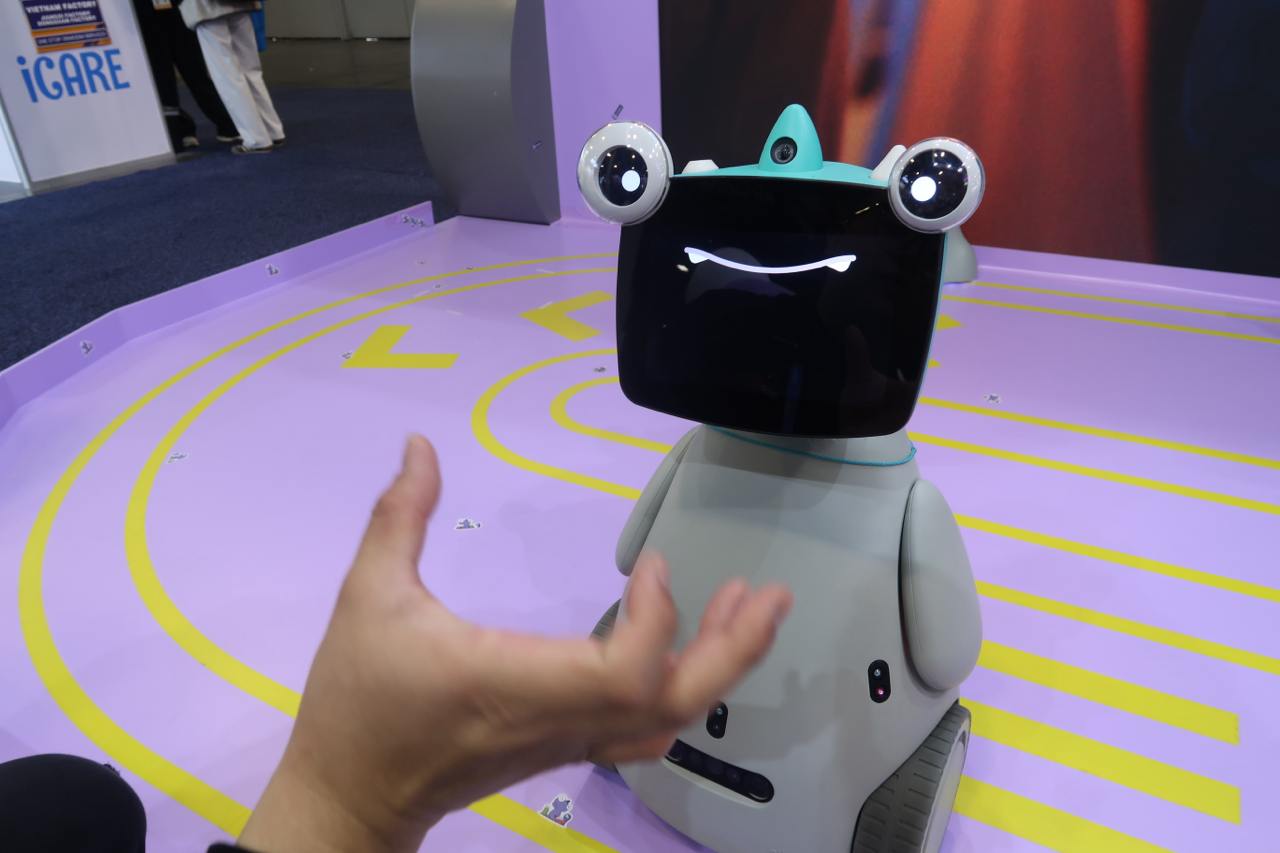
OlloBot might win the award for most charmingly strange robot on the show floor. Designed as a family “cyber pet,” it responds to voice and touch, develops a personality over time and stores all its memories locally in a removable heart-shaped module. The robot can help find lost items, make calls and eventually control Matter smart home devices. A Kickstarter is planned for summer, with pricing starting around $1,000.

Image demonstrating the setup for Bluetti's Charger 2
Here's how the Bluetti Charger 2 would work with dual charging sources.
Bluetti

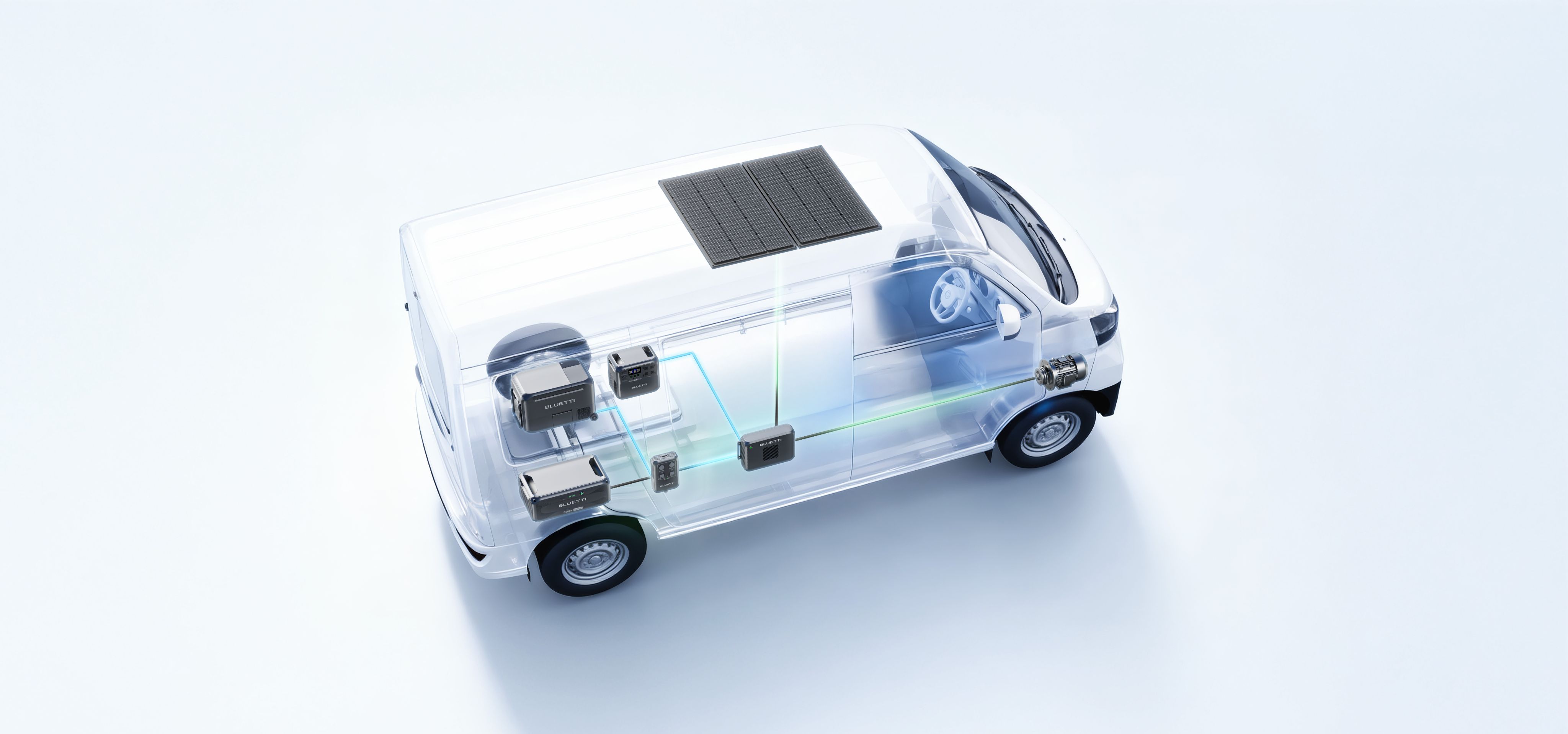
Bluetti’s Charger 2 fixes a very specific but real problem for off-grid users: charging from your engine and solar panels at the same time. The dual-input system supports up to 600W from solar and 800W from an alternator, dramatically speeding up battery top-ups. It also works with multiple Bluetti power stations and can even jump-start your vehicle in a pinch. Early pricing is $349 through February 7, after which it jumps to $499.

The CES show floor will soon be closing down, but Engadget still has a lot of stories in our pipeline. As the crowds thin out, we’re continuing to surface the tech that actually stands out — whether it’s solving everyday annoyances or simply doing something bold and different. Stay tuned to our CES 2026 hub for more hands-ons, deep dives and final takeaways even after CES 2026 comes to a close at the end of this week.

This article originally appeared on Engadget at https://www.engadget.com/big-tech/ces-2026-day-3-the-most-interesting-tech-thats-still-on-the-show-floor-134724231.html?src=rss

Lumus brought a massively wider FOV to smartglasses at CES 2026

Lumus got a major boost in brand recognition when one of its waveguides was selected for use in the Meta Ray-Ban Display glasses. But that already feels like old tech now because at CES 2026, the company brought some of its latest components to the show and based on what I saw, they seem poised to seriously elevate the optical quality of the next wave of high-end smartglasses. 

When the Meta Ray-Ban Displays glasses came out, they wowed users as they were (and still are) one of a handful of smartglassess to feature a full-color in-lens display with at least a 20-degree field of view. But going by the specs on Lumus’ newest waveguides, we’re set for a major upgrade in terms of future capabilities. 

If you look closely, you can see where light from the waveguide propagates into the one of the smartglasses' lenses.
Sam Rutherford for Engadget

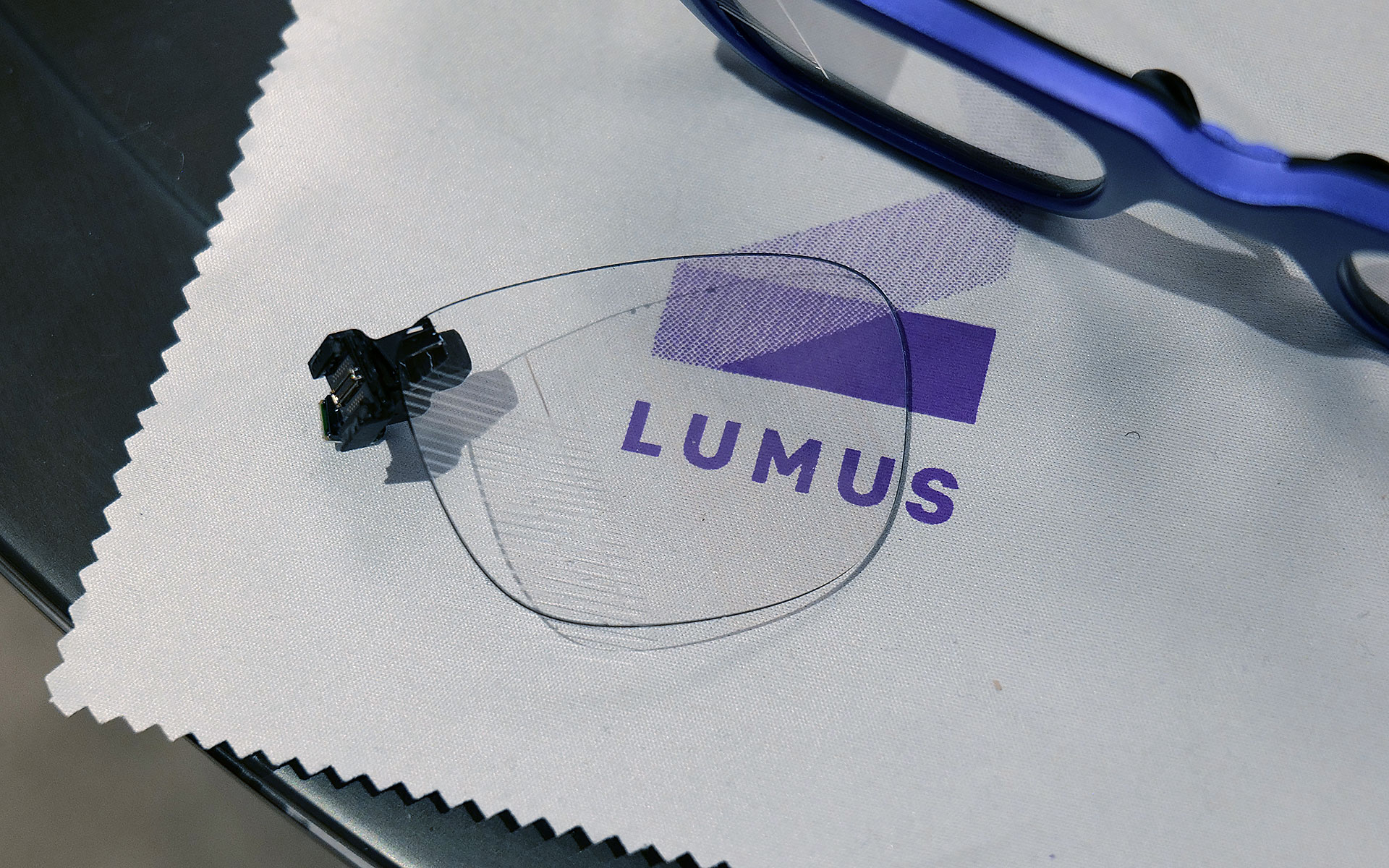
The first model I tried featured Lumus’ optimized Z-30 waveguides, which not only offer a much wider 30-degree FOV, they are also 30 percent lighter and 40 percent thinner than previous generations. On top of that, Lumus says they are also more power efficient with the waveguides capable of hitting more than 8,000 nits per watt. This is a big deal because smartglasses are currently quite limited by the size of batteries they can use, especially if you want to make them small and light enough to wear all day. When I tried them on, I was dazzled by both the brightness and sharpness I saw from the Z-30s despite them being limited to 720 x 720 resolution. Not only did the increase in FOV feel much larger than 10 degrees, colors were very rich, including white, which is often one of the most difficult shades to properly reproduce.

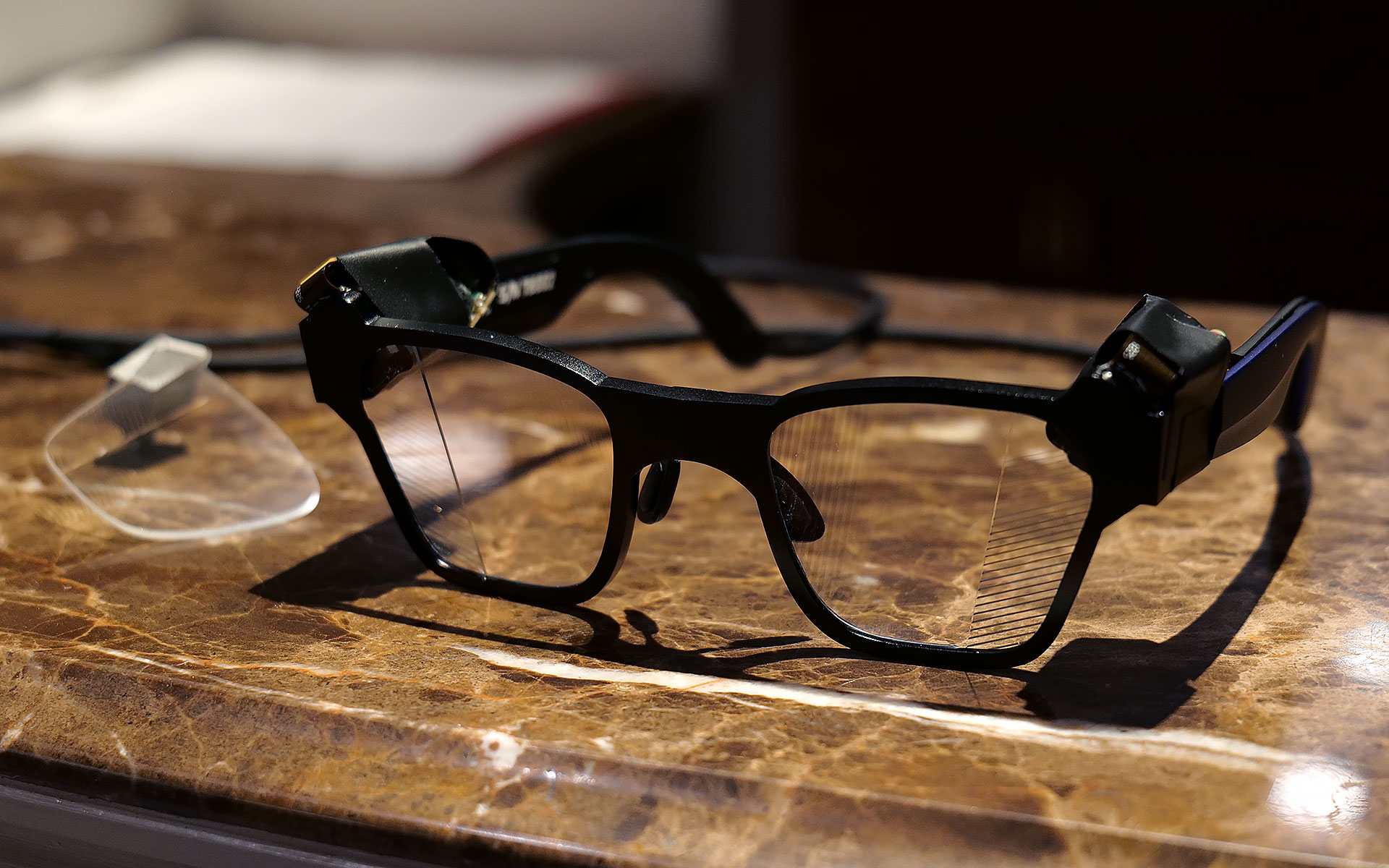
I had to take a photo of one of Lumus' non-functioning smartglasses with the company's 70-degree FOV waveguide, because two out of three of the working ones had already broke and the last one that I used was being held together by tape.
Sam Rutherford for Engadget

However, even after seeing how good that first model was, I was totally not prepared for Lumus’ 70-degree FOV waveguides. I was able to view some videos and a handful of test images and I was completely blown away with how much area they covered. It was basically the entire center portion of the lens, with only small unused areas around the corners. And while I did notice some pincushion distortion along the sides of the waveguide’s display, a Lumus representative told me that it will be possible to correct for that in final retail units. But make no mistake, these waveguides undoubtedly produced some of the sharpest, brightest and best-looking optics I’ve seen from any smartglasses, from either retail models or prototypes or. It almost made me question how much wider FOV these types of gadgets really need, though to be clear, I don’t think we’ve hit the point of diminishing returns yet. 

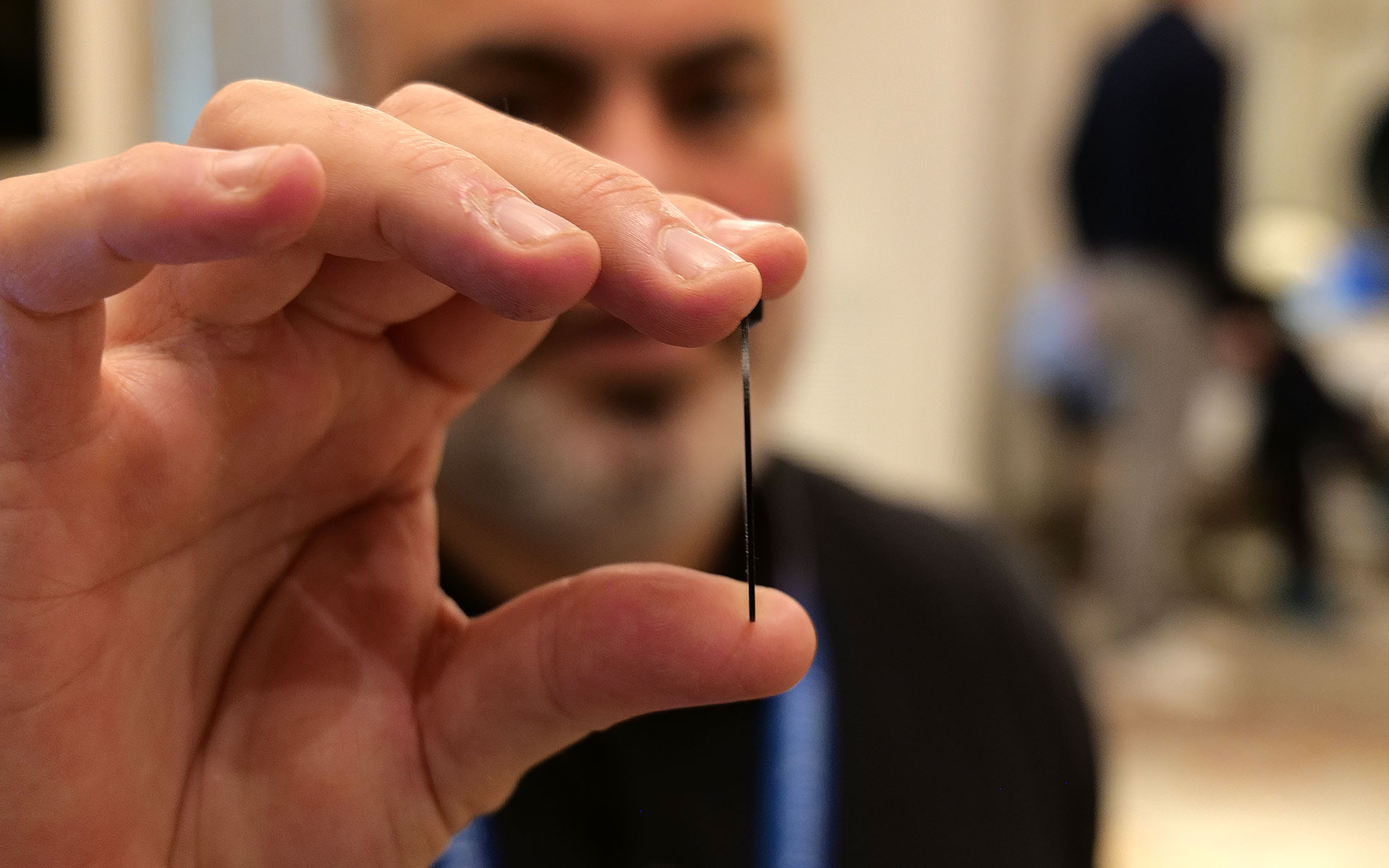
This is one of Lumus' thinnest waveguides measuring in at just 0.8mm.
Sam Rutherford for Engadget

Other advantages of Lumus’ geometric reflective waveguides include better overall efficiency than their refractive counterparts along with the ability to optically bond the displays to smartglasses lenses. That means unlike a lot of rivals, Lumus’ waveguides can be paired with transitions lenses instead of needing to resort to clip-on sunglass attachments when you go outside. Lumus also claims its designs also simplifies the manufacturing process, resulting in thinner waveguides (as small as 0.8mm) and generally higher yields. 

Unfortunately, taking high-quality photos of content from smartglasses displays is incredibly challenging, especially when you’re using extremely delicate prototypes, so you’ll just have to take my word for now. But with Lumus in the process of ramping up production of its new waveguides with help from partners including Quanta and SCHOTT, it feels like there will be a ton of smartglasses makers clamoring for these components as momentum continues to build around the industry’s pick for the next “big” thing. 


This article originally appeared on Engadget at https://www.engadget.com/wearables/lumus-brought-a-massively-wider-fov-to-smartglasses-at-ces-2026-233245949.html?src=rss

Handwriting is my new favorite way to text with the Meta Ray-Ban Display glasses

When Meta first announced its display-enabled smart glasses last year, it teased a handwriting feature that allows users to send messages by tracing letters with their hands. Now, the company is starting to roll it out, with people enrolled in its early access program getting it first,

I got a chance to try the feature at CES and it made me want to start wearing my Meta Ray-Ban Display glasses more often. When I reviewed the glasses last year, I wrote about how one of  my favorite tings about the neural band is that it reduced my reliance on voice commands. I've always felt a bit self conscious at speaking to my glasses in public. 

Up to now, replying to messages on the display glasses has still generally required voice dictation or generic preset replies. But handwriting means that you can finally send custom messages and replies somewhat discreetly. 

Sitting at a table wearing the Meta Ray-Ban Display glasses and neural band, I was able to quickly write a message just by drawing the letters on the table in front of me. It wasn't perfect — it misread a capital "I" as an "H" — but it was surprsingly intuitive. I was able to quickly trace out a short sentence and even correct a typo (a swipe from left to right will let you add a space, while a swipe from right to left deletes the last character). 

Alongside handwriting, Meta also announced a new teleprompter feature. Copy and paste a bunch of text — it supports up to 16,000 characters (roughly a half-hour's worth of speech) — and you can beam your text into the glasses' display. 

If you've ever used a teleprompter, Meta's version works a bit differently in that the text doesn't automatically scroll while you speak. Instead, the text is displayed on individual cards you manually swipe through. The company told me it originally tested a scrolling version, but that in early tests, people said they preferred to be in control of when the words appeared in front of them. 

Teleprompter is starting to roll out now, though Meta says it could take some time before everyone is able to access. 

The updates are the among the first major additions Meta has made to its display glasses since launching them late last year and a sign that, like its other smart glasses, the company plans to keep them fresh with new features. Elsewhere at CES, the company announced some interesting new plans for the device's neural band and that it was delaying a planned international rollout of the device.

This article originally appeared on Engadget at https://www.engadget.com/wearables/handwriting-is-my-new-favorite-way-to-text-with-the-meta-ray-ban-display-glasses-213744708.html?src=rss

Razer put a waifu in a bottle at CES 2026

Last year Razer showed off Project Ava as a digital assistant that lived inside your computer to help adjust settings or provide gaming tips. But now at CES 2026, the company’s AI companion platform has gotten a major glow-up while moving into some new digs. 

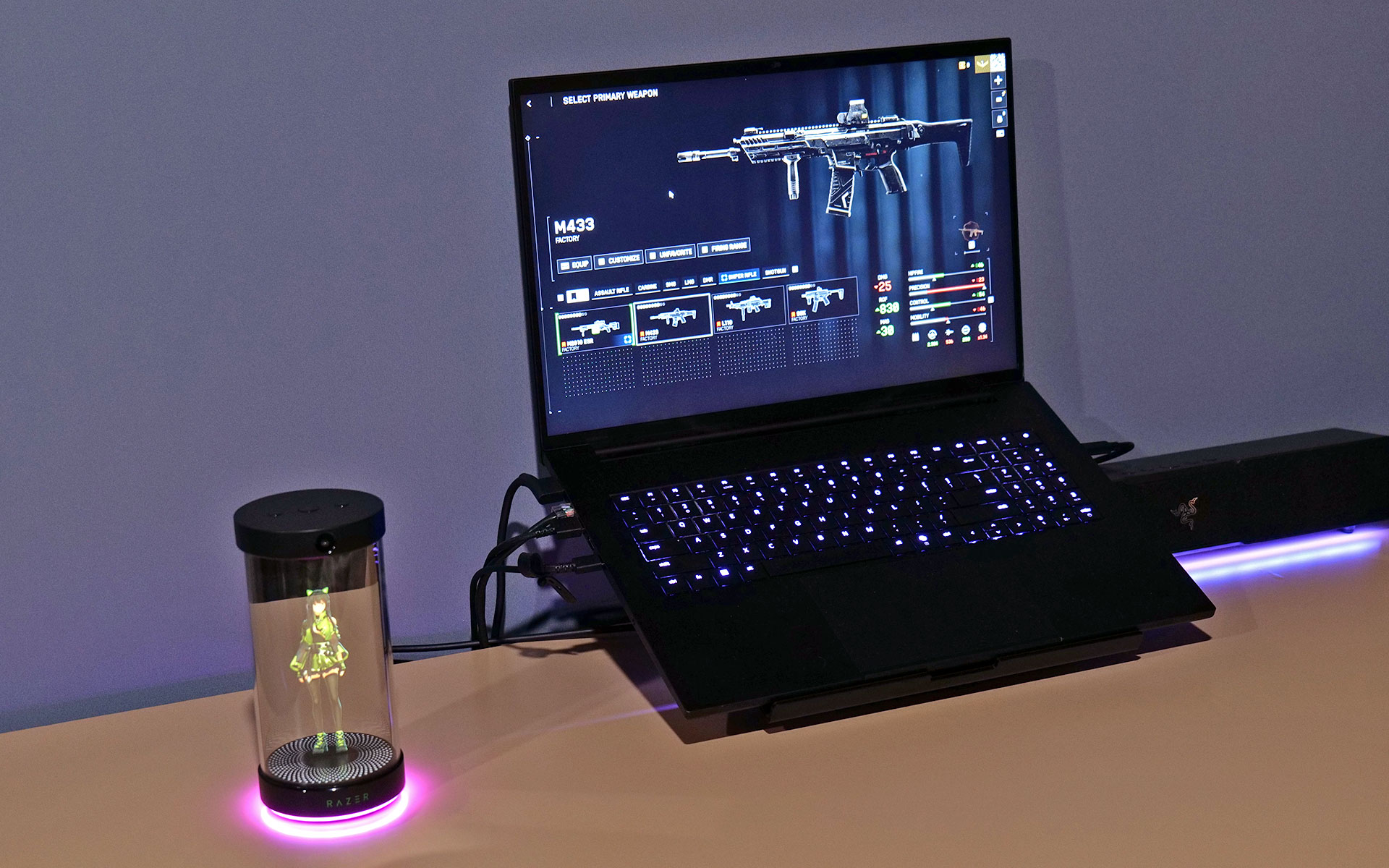
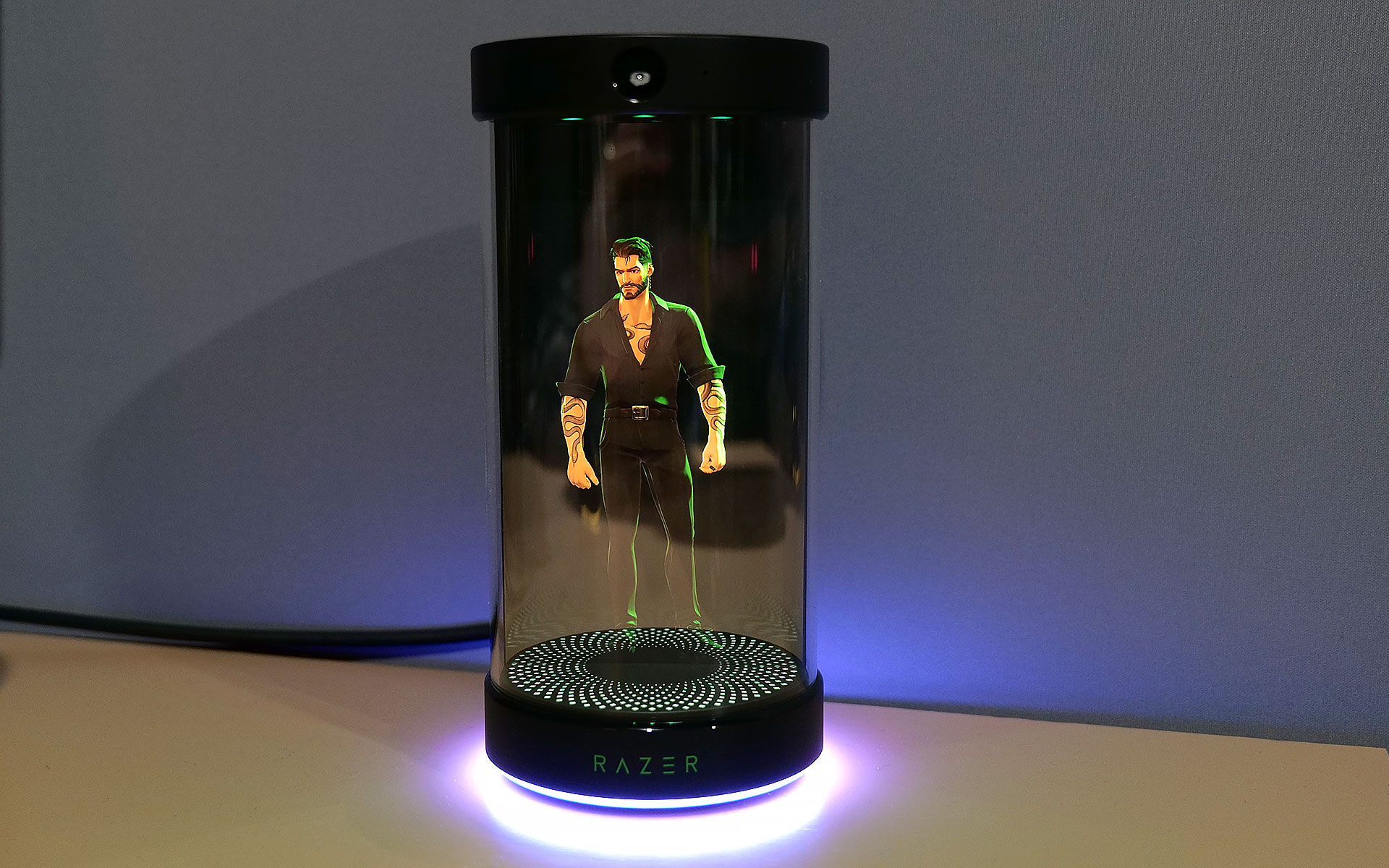
Now, in lieu of being constrained entirely to your PC’s screen, Razer has given Project Ava a real home in the form of a small tube that can display a 5.5-inch animated hologram of the AI’s avatar. You’ll still need to connect it to your computer via USB-C to provide Ava with the power and data it needs. However, all of your companion’s other components are built into its abode, including dual far-field mics so you can talk to it, a down-firing full-range speaker so it can talk and an HD camera with an ambient light sensor so the AI can see and react to its surroundings.   

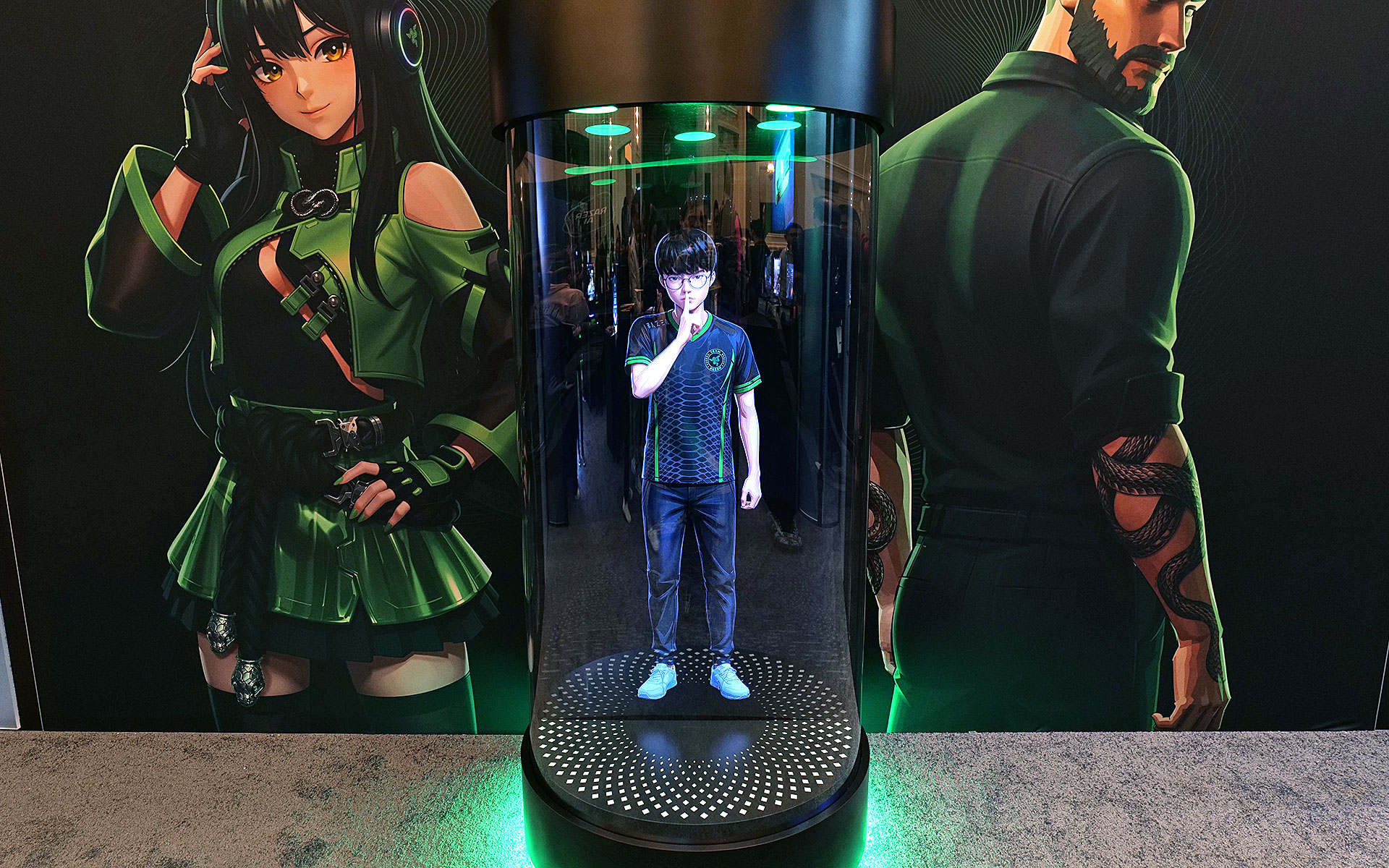
But perhaps the biggest upgrade to the project is that instead of just Ava, who Razer describes as “a calm, reliable source of energy to help you keep things clear, efficient, and always on point,” there are three or four new personas (depending on how we’re counting) joining the roster. Kira looks like a TikTok e-girl decked out in a frilly outfit complete with Razer neon green accents, while Zane is her edgy masculine alternative who kind of reminds me of the Giga Chad meme, but with extra snake tattoos. Then there’s Sao, who appears to be directly inspired by iconic Japanese salary woman Saori Araki. Finally, there’s an avatar made in the likeness of Faker (Lee Sang-hyeok), the most successful and well-known League of Legends player of all time and one of Razer's sponsored esports athletes.

The new peripheral for Project Ava is a cylinder that can display a 5.5-inch hologram of an AI companion.
Sam Rutherford for Engadget

The idea now is that instead of being trapped inside your computer, Ava or one of Razer’s other personas can sit on your desk and be your companion for everything. They can remind you of upcoming events, respond to questions or even comment on your outfit using Razer’s built-in camera. That said, if you need some privacy, the device’s mics can be muted and the company says its planning on putting a physical camera shutter on final retail models. Of course, Ava or any of the other avatars can still hang out while you game and give you advice. During my demo, Kira helped pick out a loadout in Battlefield 6 based on user criteria and even provided pros and cons for some of the game’s other equipment options. 

Project Ava's expanded roster of AI companions
Razer

Unfortunately, while I did get to see Kira and Zane talk, dance and sway in their little bottles, Sao and Faker weren’t quite ready to make their holographic debuts. But according to Razer, that’s sort of by design as Project Ava is very much a work in progress. Currently, the avatars’ responses are generated by X AI’s Grok (yikes!), but the platform was created as a sort of open-source project that will support other models like Gemini or ChatGPT.

Down the line, Razer is hoping to add the ability for users to create their own unique avatars and companions based on their input or inspiration from real-world objects. Meanwhile, for avatars like Faker's because he’s also an actual person, Razer wants additional time to make the AI companion helpful with topics like real-time League of Legends coaching.

Say hello to Giga Chad, I mean Zane.
Sam Rutherford for Engadget

That said, while some folks might find Project Ava a bit weird or unnerving, it actually feels pretty tame (almost cute even) in an era where people are already marrying their AI partners. And if you’re the kind of person who prefers digital companions over flesh-and-blood alternatives (you know, people), I guess it’s kind of nice to have a more tangible representation of your electronic waifus and husbandos.

Faker's avatar was only viewable in this nearly life-size mock up.
Sam Rutherford for Engadget

Sadly, Razer has not provided full pricing for Project Ava’s holographic peripheral, though a representative said that it will be in the same ballpark as the company’s other peripherals. I’m estimating a final cost of around $200. Reservations for Project Ava are currently live with a $20 deposit before official shipments begin sometime in the second half of 2026.

This article originally appeared on Engadget at https://www.engadget.com/gaming/pc/razer-put-a-waifu-in-a-bottle-at-ces-2026-205315908.html?src=rss

Hands-on with Fender Audio’s headphones and speakers at CES 2026

Fender Audio may have announced its new headphones and speakers right before CES, but Las Vegas afforded us the first opportunity to see the brand’s new lineup in person. Fender Audio is a Fender-owned brand from Riffsound that’s designing and making new devices after licensing the name. It’s been a while since the guitar and amplifier company made any general-use speakers of its own, and this new arrangement is similar to what Zound was doing with Marshall for a spell.

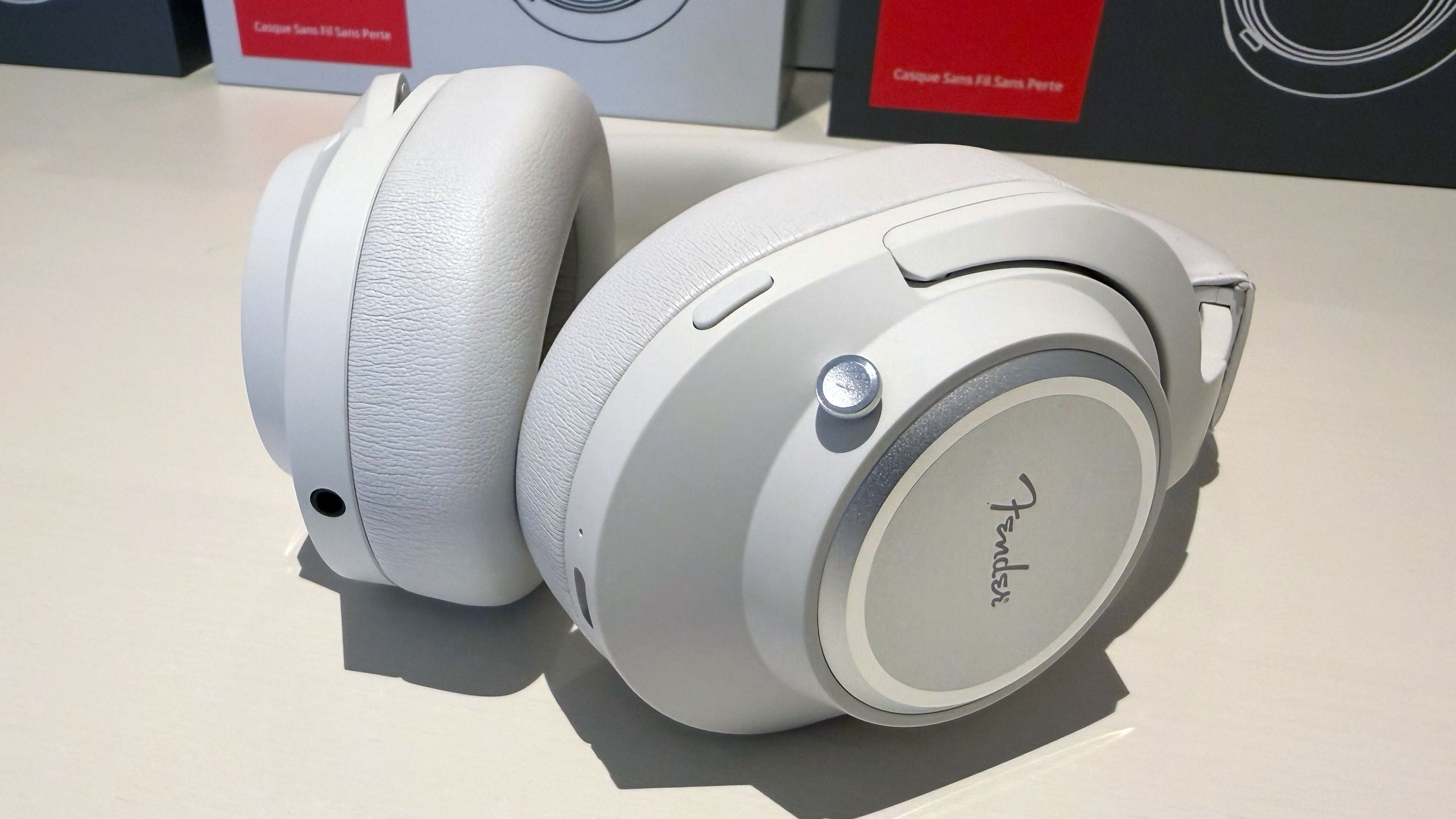
Logistics out of the way, let’s get down to what the Mix and Ellie are like in the flesh. First, the Mix headphones offer a modular construction that allows you to replace nearly every piece as needed. The ear cups detach from the headband and the ear pads are replaceable. You can also swap out the battery, thanks to an easy-to-access slot behind one ear pad. And on the other side, a USB-C dongle for wireless lossless audio is stowed for safe keeping (wired lossless audio over USB-C is also available).

Fender Audio Mix headphones
Billy Steele for Engadget

Fender Audio kept the controls simple on the Mix, opting for a single joystick for volume and playback changes. The joystick also serves as the power and pairing control as the only other button cycles through active noise cancellation (ANC) modes. In terms of sound, the Mix will satisfy listeners who crave deep bass, and vocals cut through clearly. In my brief demo, I would’ve liked more mid-range, but I’ll wait until I get a review unit for a full assessment there. I should mention the other standout feature is battery life: the Mix will offer up to 52 hours of use with ANC enabled (up to 100 hours with it off).

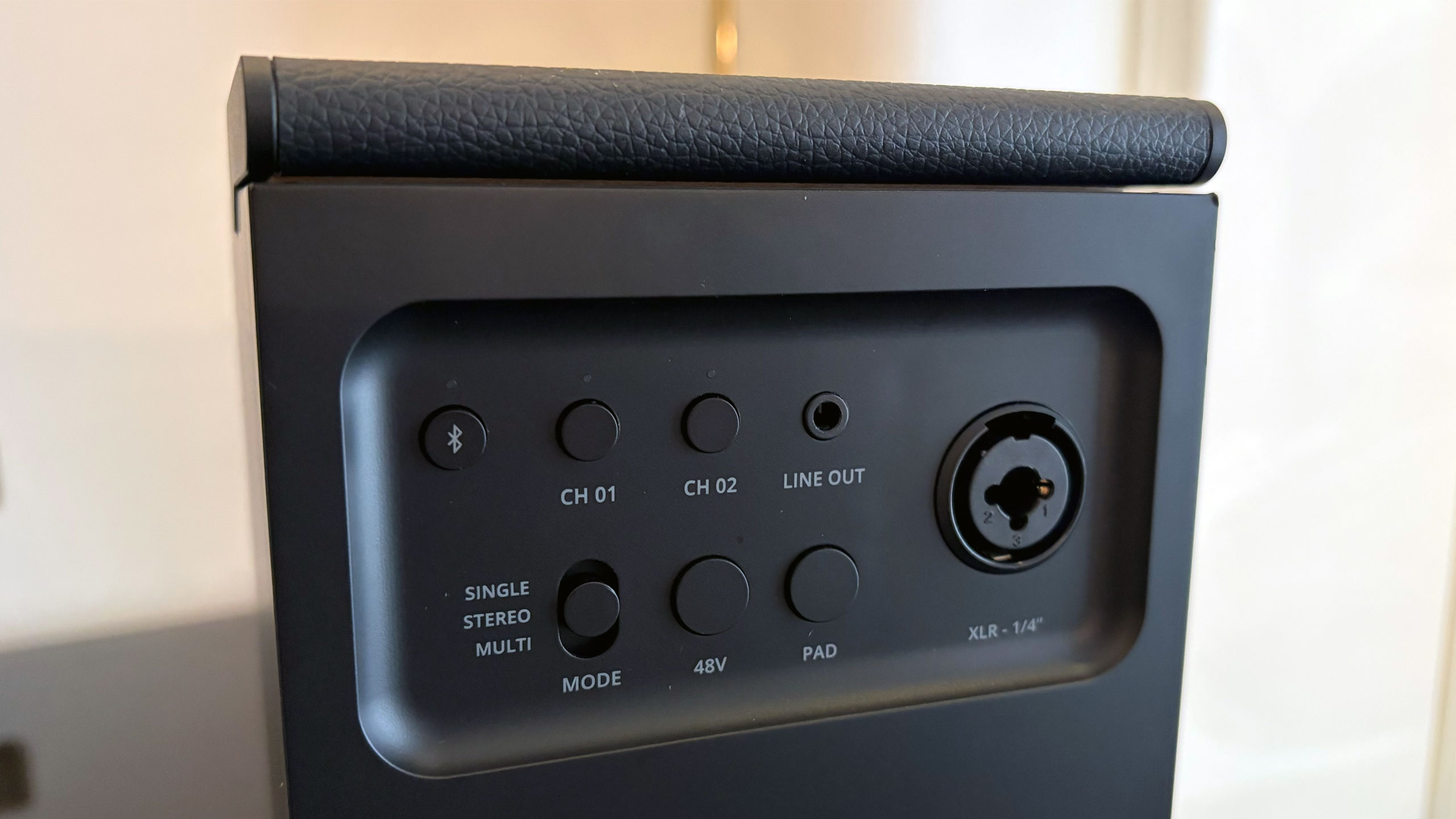
Then there are the Elie speakers. Both offer a similar set of features, which includes two wireless inputs for microphones (the company is working on its own model) and a combination XLR and 1/4-inch input for instruments. The Elie 06 is the smaller unit, housing a tweeter, full-range driver and subwoofer with 60 watts of output. The larger Elie 12 doubles all of that, serving as a more robust but still very portable option.

Fender Audio Ellie speakers
Billy Steele for Engadget

Both Elie units can be used in a single configuration or as a stereo pair. You can also connect up to 100 of the speakers via a Multi mode. Fender Audio has done a nice job here of checking all of the usual Bluetooth speaker boxes while offering something unique in terms all of those inputs. It’s like the company combined “regular” portable speakers with larger party boxes, offering something for customers who don’t want a massive device or any of the flashing lights.

Of course, none of these specs matter if the company didn’t ace the sound quality. While I’ll wait until I can spend several hours with some review units before I make any final judgement on these, I can tell you that both Elie speakers made a great first impression. There’s ample bass in the tuning for both, but obviously the larger Elie 12 offers more thump. Both units also provide excellent vocal clarity and nice details in the highs, as I made sure to select test tracks with lots of subtle sounds — like Bela Fleck’s banjo tunes.

The back of Fender Audio Ellie 06 speaker
Billy Steele for Engadget

Fender Audio says the arrival of the entire new lineup is imminent. Both the headphones and the Elie 6 will cost $299 and the Elie 12 is $399.

This article originally appeared on Engadget at https://www.engadget.com/audio/hands-on-with-fender-audios-headphones-and-speakers-at-ces-2026-203104561.html?src=rss

Emerson Smart brings offline voice control to lamps and fans

Perhaps you like the idea of controlling your home appliances with your voice, but aren’t super keen on a data center processing recordings of you. Fair enough. The trade-off for most smart home conveniences is relinquishing at least some of your privacy. Today at CES, I saw a line of voice-controlled home appliances from Emerson Smart that adjust power and setting via voice commands. But commands are recognized on the devices themselves, not carried through Wi-Fi and processed elsewhere.

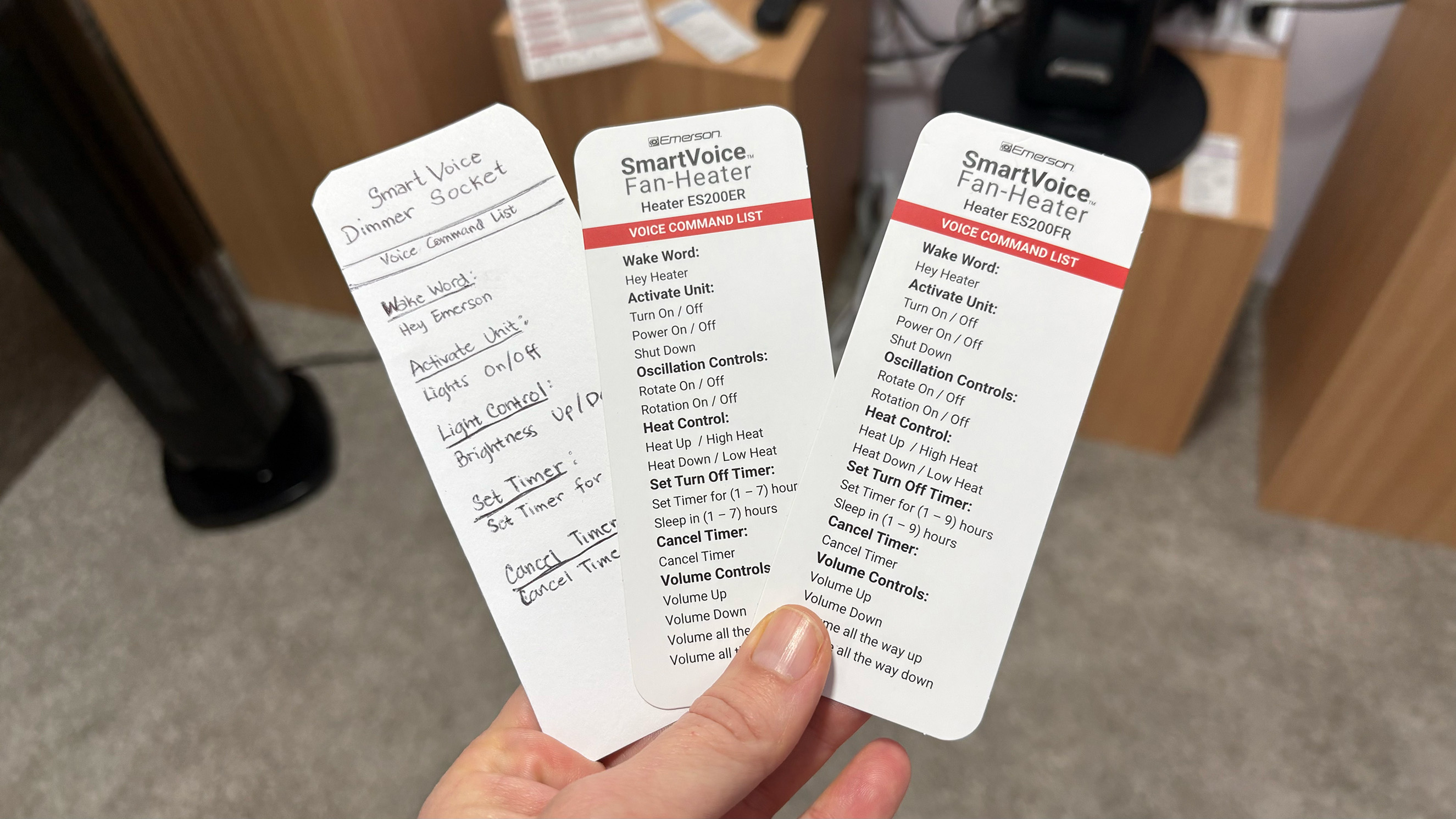
The huge array of smart plugs, fans, heaters and even air fryers require no app for setup and don’t need access to Wi-Fi. Instead, I said, “hey Emerson, lights on” or “hey fan, turn on low” and the devices in the demo space acted accordingly. A few of the devices combine the mic with a speaker and can respond when a command is received.

A bit of built-in programing on the air fryers allow them to understand commands for 100 cooking presets, so saying things like, “reheat this pizza” or “cook these frozen french fries” will set the correct mode, time and temp. Of course you can also just say, “cook at 350 degrees for 10 minutes” and it’ll comply. Most of the commands for the other items are pretty simple but allow you to do things like set a timer, turn on oscillation and set intensity speeds.

Selection of available commands for Emerson Smart devices.
Amy Skorheim for Engadget

Some of the devices allow for a small amount of programmability. Pressing and holding the button on the smart plug, for example, changes the wake word to “plug two,” doing it again swaps it to “plug three,” and so on. That way, if you have more than one plug in a room, you can operate them individually.

The small demo space in which I talked to the devices (that did its best to shut out the thrumming noise of the CES show floor) had at least six models active and listening for my words. When I said “Hey Emerson,” both an air fryer and one of the heaters responded. That was one of the limitations that I could see with the devices: If you outfit your entire home in Emerson Smart gear, it might take some time to name and position everything so it works in a coherent way. The lack of an app means that programmability is limited, too. That’s the trade-off the privacy-conscious or app-averse user will have to make if they want to turn their lamp on and fan up when they walk into a room just by talking.

As the only offline, non-DIY voice-controlled lineup of appliances out there, you’re stuck with whatever design Emerson Smart thinks look good. Thankfully, the overall design is clean and modern, if a little basic. The upcoming models of air purifiers and fans were decidedly more attractive.

A new Emerson Smart air purifier and fan combo.
Amy Skorheim for Engadget

A handful of devices are available for sale now, but new Emerson Smart products will go into production later this year.

This article originally appeared on Engadget at https://www.engadget.com/home/smart-home/emerson-smart-brings-offline-voice-control-to-lamps-and-fans-201500078.html?src=rss