OpenAI is shutting down its Sora video generation app. "We're saying goodbye to Sora," the company wrote in a X post published Tuesday afternoon. For now, OpenAI has yet to say when the app and its related API service would become unavailable. Instead, promising to share those details at a later date.
"We've decided to discontinue Sora in the consumer app and API. As we focus and compute demand grows, the Sora research team continues to focus on world simulation research to advance robotics that will help people solve real-world, physical tasks," an OpenAI spokesperson told Engadget.
We’re saying goodbye to Sora. To everyone who created with Sora, shared it, and built community around it: thank you. What you made with Sora mattered, and we know this news is disappointing.
We’ll share more soon, including timelines for the app and API and details on…
While today's news might come as a surprise for some, there were warning signs Sora was heading in this direction since the start of the year. While Sora hit the top of the US App Store charts shortly after its debut, interest in the platform appears to have quickly fizzled out thereafter. At the start of 2026, data from analytics firm Appfigures suggested the app was seeing successive month-over-month declines in both new installs and user spending. In December alone, a time of year when most apps typically flourish, Sora reportedly saw a 32 percent decline in new downloads from November.
The shutdown also aligns with OpenAI's recent shift in strategy. Since the release of GPT-5.2, the company's "code red" response to Google's Gemini 3 Pro model, OpenAI has tried to court professionals like coders and data analysts with systems that excel in those domains, seeing enterprise customers as a route toward profitability. However, today’s shutdown does appear to come with an additional cost for OpenAI. According to The Hollywood Reporter, Disney is exiting the deal it signed with the AI lab at the end of last year, and won’t, as a result, invest $1 billion into it.
This article originally appeared on Engadget at https://www.engadget.com/ai/openai-is-shutting-down-its-sora-video-generation-app-211023358.html?src=rss
Who among us hasn't tormented over the burden of having to exit an AI app to check the weather? Well, I haven't, and I'm guessing you haven't either. But AccuWeather has a solution regardless. On Tuesday, the company rolled out a ChatGPT app to spare… someone that pain.
Snark aside, there may be a few niche situations where this provides a slight advantage. AccuWeather suggests asking ChatGPT, "When is the best time this afternoon to go for a run with the most comfortable weather conditions?" or "Will it rain on my planned vacation this weekend?" Of course, you could just read the dang forecast to get those same answers. But hey, to each their own.
After you've connected the AccuWeather app to your ChatGPT account, your weather-related queries will be answered in an interactive weather module. Available info includes MinuteCast, RealFeel and RealFeel Shade.
This isn't the first time AccuWeather has adapted its service — perhaps questionably — to emerging technologies. In 2017, it pushed out a virtual reality app for Samsung's Gear VR headset. Engadget noted at the time that it "sounds like one of the least exciting VR experiences imaginable."
This article originally appeared on Engadget at https://www.engadget.com/ai/accuweather-is-now-available-inside-chatgpt-192637363.html?src=rss
Snapchat users are sending a staggering number of snaps to each other, according to newly released data from Snap. In 2025, Snapchat users created close to 2 trillion snaps, the company said in an update.
That works out to about 5.5 billion distinct snaps per day and about 63,000 each second, according to the company. When you consider that Snapchat has about 474 million daily users, that averages to more than 11 snaps per user each day. In a blog post, the company called it "a reflection of how often people are capturing a moment in a bid to connect with one another."
The numbers offer a window into engagement on the nearly 15-year-old platform where much of users' activity happens out of public view. The stat is the first time the company has shared the total number of snaps sent in a year, though Snap said last year its users shared more than 1 trillion selfie snaps in 2024.
Snap, which at times has struggled with user growth, has been inching closer to 1 billion users for the last year. It reported 946 million monthly users in its most recent earnings report. CEO Evan Spiegel described reaching a billion people as a "long term goal."
Jim Lanzone, the CEO of Engadget’s parent company Yahoo, joined the board of directors at Snap on September 12, 2024. No one outside of Engadget’s editorial team has any say in our coverage of the company.
This article originally appeared on Engadget at https://www.engadget.com/social-media/snapchat-users-sent-nearly-2-trillion-snaps-in-2025-121500274.html?src=rss
Apple is reportedly planning on inserting ads into the Maps app, according to Bloomberg's Mark Gurman. An announcement could come as soon as this month, with the ads themselves appearing on iPhones this summer.
This will likely work similarly to ads in Google Maps and Yelp, which lets retailers and brands bid for coverage with particular search queries. I've personally never found the ads in Google Maps to be that annoying, so let's hope Apple's implementation is similar.
This article originally appeared on Engadget at https://www.engadget.com/apps/apple-will-reportedly-start-stuffing-ads-into-the-maps-app-182311634.html?src=rss
The premise seems simple enough. LG promises that you can set its Sound Suite speakers anywhere and Dolby’s home theater tech will make them perform well. The soundbar, subwoofer and speakers don’t have to go in prescribed locations for the best results, which means you can place them where you need to and move them as you see fit. Of course, this all hinges on the reliability of the underlying tech and LG’s ability to make individual speakers that actually sound good.
Like most premium soundbars and complete home theater setups these days, a complete Sound Suite collection is expensive. The centerpiece alone, a soundbar that most people will want in their customizable configuration, is $1,000. However, if you have a recent LG TV, or are planning to buy a 2026 model when those arrive, there’s no better option for boosting your living room entertainment experience.
The components of the LG Sound Suite
There are four different devices that make up the Sound Suite. The centerpiece is the H7 soundbar ($1,000), which is the first one that works with Dolby Atmos FlexConnect (DAFC) technology. Then there’s the 8-inch W7 subwoofer ($600) and the M5 and M7 speakers ($250 and $400). LG allows you to pick and choose between these products to build a home theater set up that suits your needs — up to four speakers and one subwoofer. The only real caveat is that you need the H7 soundbar or a recent LG TV (2025 OLED G5, C5, CS5 and QNED 9M, or an upcoming 2026 model) to serve as the primary device for Sound Suite to work. That’s because the underlying tech requires LG’s alpha 11 Gen 3 AI processor, which is inside the soundbar and the company’s newer TVs.
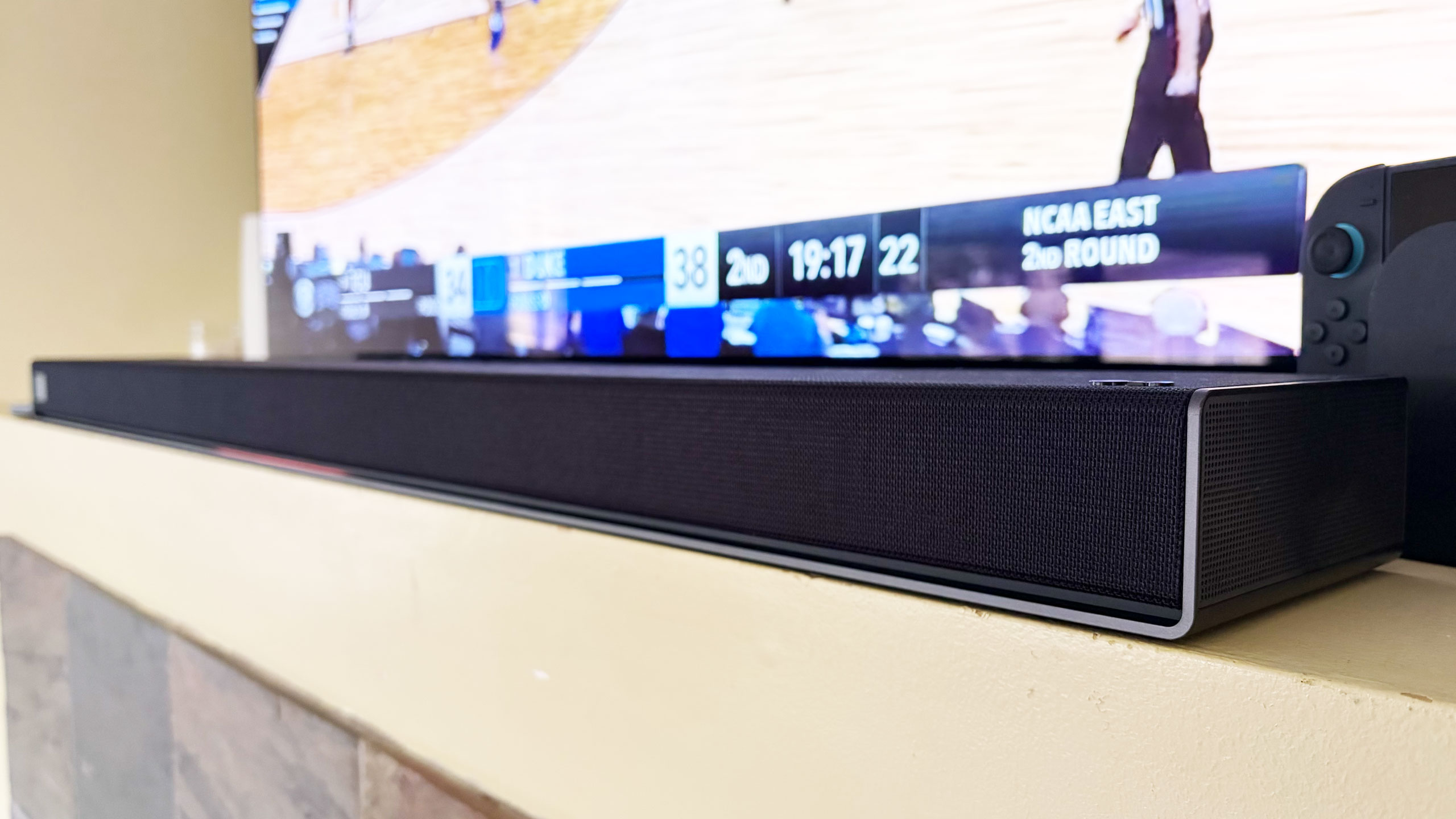
The H7 houses a dozen Peerless drivers comprising front, side and up-firing units. There’s also four woofers and eight passive radiators for bass and low-frequency audio. The soundbar has a pretty basic design, plain enough to sit in front of an LG OLED (or other premium TV) without being a distraction, and short enough not to block it. Both Bluetooth and Wi-Fi are available here, so AirPlay 2, Google Cast, Spotify Connect and Tidal Connect are all supported.
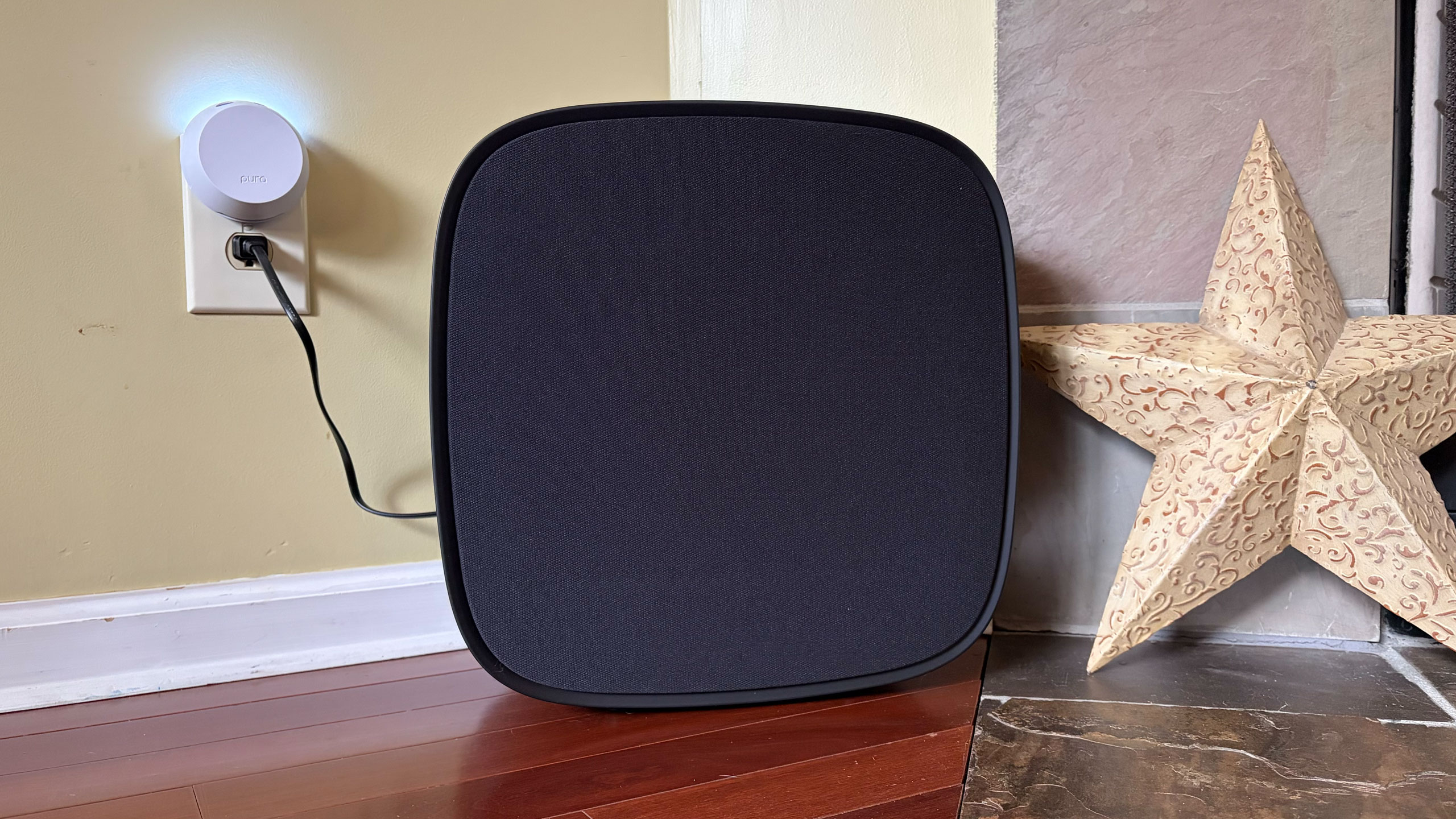
The W7 wireless sub has an 8-inch woofer that gets really boomy at times. It’s quite large at 16.1 x 16.3 x 7.6 inches, but you can use it standing up vertically or laying down horizontally — whichever orientation fits your needs or available space. The M5 and M7 speakers offer basically the same features, including AirPlay and Cast, and can be used either by themselves, as a stereo pair, as a four-speaker array or as rear satellite speakers with the H7 soundbar. The main difference is the M7 has two full-range drivers, one up-firing driver and a woofer while the M5 only has a tweeter, an up-firing driver and a woofer.
What is Dolby Atmos FlexConnect?
FlexConnect is a home theater audio technology that Dolby announced in 2023. It was available on TCL’s Z100 speakers last year, but LG’s Sound Suite marks the first time the feature has been available on a more robust living room product that includes a soundbar. FlexConnect allows you to position speakers anywhere in a room without sacrificing audio performance. The tech uses a TV or soundbar as the lead device to locate speakers so it can tune the sound to match their positioning. The system can also quickly adapt when you move a speaker — maybe for a party or other special occasion.
FlexConnect works as advertised, but there is one caveat that should’ve been obvious, although I didn’t anticipate it. Every time you add or remove speakers from a DAFC group, you’ll need to recalibrate the system, which includes the software playing sounds from the speakers so that the TV or soundbar can locate them and Dolby’s tech adjusts their output. It doesn’t take long, but there is audible noise from each unit in the group, so you’ll want to factor in that time — and potential annoyance for anyone else in the house.
Other Sound Suite features
LG Sound Suite H7 soundbar
Billy Steele for Engadget
Sound Suite offers some of the same features as LG’s other home theater products. Those include Night Mode, Room Calibration Pro, AI Sound Pro+ real-time audio upscaling and Clear Voice Pro+ for enhanced dialogue. For the Sound Suite, LG has also introduced Sound Follow, a feature that allows you to adjust the “sweet spot” for the system based on where you’re sitting.
Once you set your current position with a tap in the ThinQ app, Sound Follow is supposed to change the levels and tuning accordingly. I’m not entirely sure this was working on my system. Unlike my demo at CES, the seating position on the FlexConnect layout in the app was never updated. And while the UI seemed to indicate the change was made when I tapped the buttons, I couldn’t hear any difference in the audio. I asked LG for more information to ensure Sound Follow is functioning properly.
A word about setup
Like most soundbars and speakers these days, you have to use an app to get them all connected and properly set up. And like Samsung, LG makes you do that through the same app that handles all of its connected devices — including appliances. Once you unbox and plug in the Sound Suite speakers, you add them in the ThinQ app as a new home theater arrangement. The software shows you which speakers are available to use and allows you to select which ones you want in the initial Dolby Atmos FlexConnect grouping.
The app will ask you to set the distance between the soundbar and your primary seating area before running the sound optimization (tuning) process. ThinQ will display the speaker layout and you can edit the DAFC group at any time. If you move a speaker though, you’ll need to run the optimization again for the best audio performance. And if you’re using an LG TV as the lead device, all of this is sorted onscreen rather than in the app.
Overall, the process is pretty straightforward, although I encountered some pretty significant connectivity issues that were very frustrating. I review soundbars and speakers regularly, so I’m familiar with the process of using an app to connect devices to my home Wi-Fi in order to get them up and running. With the H7, it took a few days to get it connected, which meant I could only use the soundbar with the audio options available on LG C5’s menu and wasn’t able to set up a larger Sound Suite configuration. After several router and soundbar reboots, I was finally able to get the H7 to connect and become available to finish the install. I’ve never had this problem before, so perhaps LG did something different with the Wi-Fi components here.
LG Sound Suite M7 speakers
Billy Steele for Engadget
When I was adding the M7 speakers to my DAFC setup, I had no issues connecting them to Wi-Fi initially. However, I did have trouble adding them to the FlexConnect group, which required each piece of the Sound Suite playing an audio calibration clip. Repeatedly, the ThinQ app told me there was a connection issue with one of the M7s, although eventually they all somehow got added anyway. I also had trouble removing speakers from the arrangement. Even though the app said sound was only coming from the H7 soundbar, one of the two M7 speakers was still connected and emitting sound when I didn’t want it to. For some reason, this only happened when playing music over AirPlay — TV audio over HDMI eARC always functioned as intended.
If you’re using the TV as the lead device, you do all of the setup on the screen. I found this method to be more straightforward and reliable, although it blasted the calibration sounds at a deafening volume. There is a big issue though: Once connected to the TV as a DAFC setup, the speaker settings weren’t available in either the ThinQ app or on-screen menus. This meant I was stuck in standard mode, with things like AI Sound Pro+ inaccessible. I asked LG for more info on this because it greatly impacts the overall experience.
Which configuration sounds best?
Before I get into describing the various Sound Suite configurations, I need to make an important note about the limitations for the possible setups. LG only allows a maximum of five speakers in any Sound Suite arrangement, but you can mix and match however you want. Just remember if you don’t opt for the H7 soundbar, you’ll need a compatible LG TV as the lead device for FlexConnect to work.
You can also use the M5 and M7 as standalone speakers in another room and swap them in and out of your living room or home theater setup as needed. In the multi-room scenario, Sound Suite speakers function much like a Sonos system would, and the M7 is more than capable of being a standalone music speaker with plenty of detail and decent bass. I wasn’t able to test the M5, so I can’t vouch for that one. Keep in mind that if you opt for the M5 or the M7 for your living room, you’ll need at least two of either one to use FlexConnect with your LG TV.
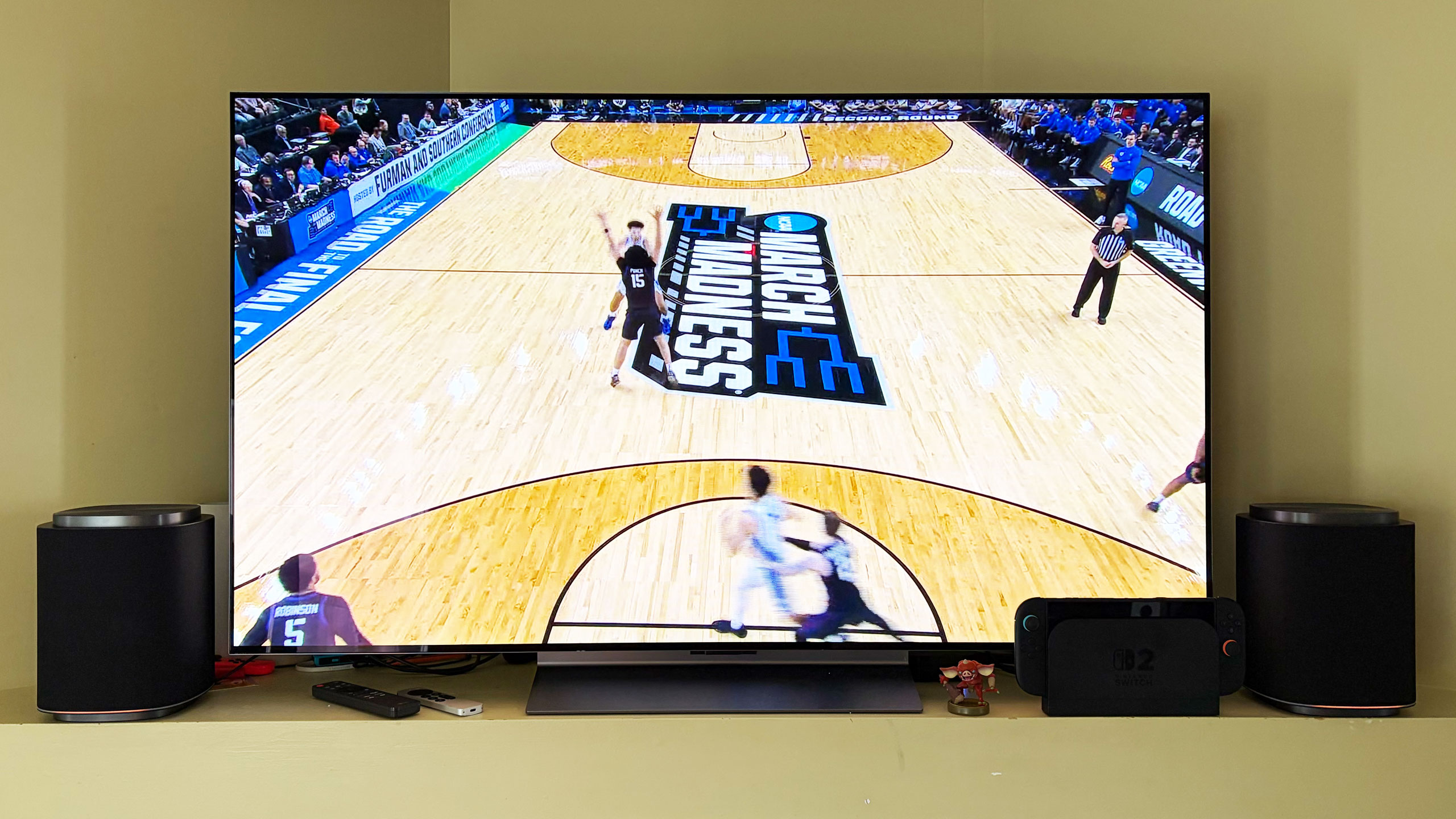
After testing multiple configurations of the Sound Suite, I think the combination of the H7 soundbar, W7 subwoofer and two M7s is the ideal arrangement. I’ll hedge that a bit as I prefer to disable the M7s in the rear of the room when watching live TV — especially sports — as the same audio coming from the soundbar and those speakers didn’t really enhance the experience. Plus, arena noise seemed overly echo-y and off-putting. This setup is well-suited for streaming TV shows and movies, things where Dolby Atmos, or at least LG’s spatial upscaling, is at the height of its powers.
The LG Sound Suite W7 subwoofer is quite large
Billy Steele for Engadget
In this setup with the H7 as the lead, you get Sound Suite in its most immersive form. I always use Netflix’s Drive to Survive as my first test of a new home theater system, and LG’s lineup handled it like a champ. You get excellent directional audio, which makes the cars sound like they’re zooming around your living room. And the in-car shots are so enveloping, it’s like you’re sitting right behind the driver. This configuration also works well for music, though I preferred to use either one of the M7 speakers or the soundbar/sub duo rather than the whole shebang.
My second favorite setup is four M7s. Once again, this configuration requires an LG TV as the lead device, but if you have that, you can definitely save some room in front of your television with separate front speakers. Unfortunately, you can’t use a subwoofer too because if you’re using a TV to power the speakers, you can only add up to four. That’s a real bummer, but the TV speakers will be used as a center channel (dialogue) boost, so it’s not a complete waste. However, this arrangement would benefit from more bass.
The four-speaker setup could be particularly beneficial for people who mount their TVs on the wall and don’t want a soundbar underneath. And, again, FlexConnect allows you to put the speakers anywhere, not necessarily flanking your TV. You also get the option of moving these smaller speakers around when you need to — something you can’t really do with a soundbar. The only sacrifice I noticed audio-wise is that two M7s in the front doesn’t offer the same overhead sensation for Atmos content as the H7’s up-firing drivers.
If you’re just using four M7 speakers for home theater duties, you’ll enjoy the immersive audio these Sound Suite speakers will provide. There’s lots of directional sounds with Atmos content, and there’s plenty of subtle detail that comes through on movies and shows. However, for live sports, this arrangement pulls commentary audio from the TV speakers and puts much of the arena/stadium noise in the rear M7s, which makes it difficult to hear the announcers at times. This is one area where the inability to adjust the audio settings really hampers the experience.
If you’re hoping to invest in something that can pull double duty for music, I prefer one or two M7s for that purpose. And while there’s decent low-end thump, streaming your favorite tunes is where you’ll notice the absence of that W7 subwoofer.
The competition
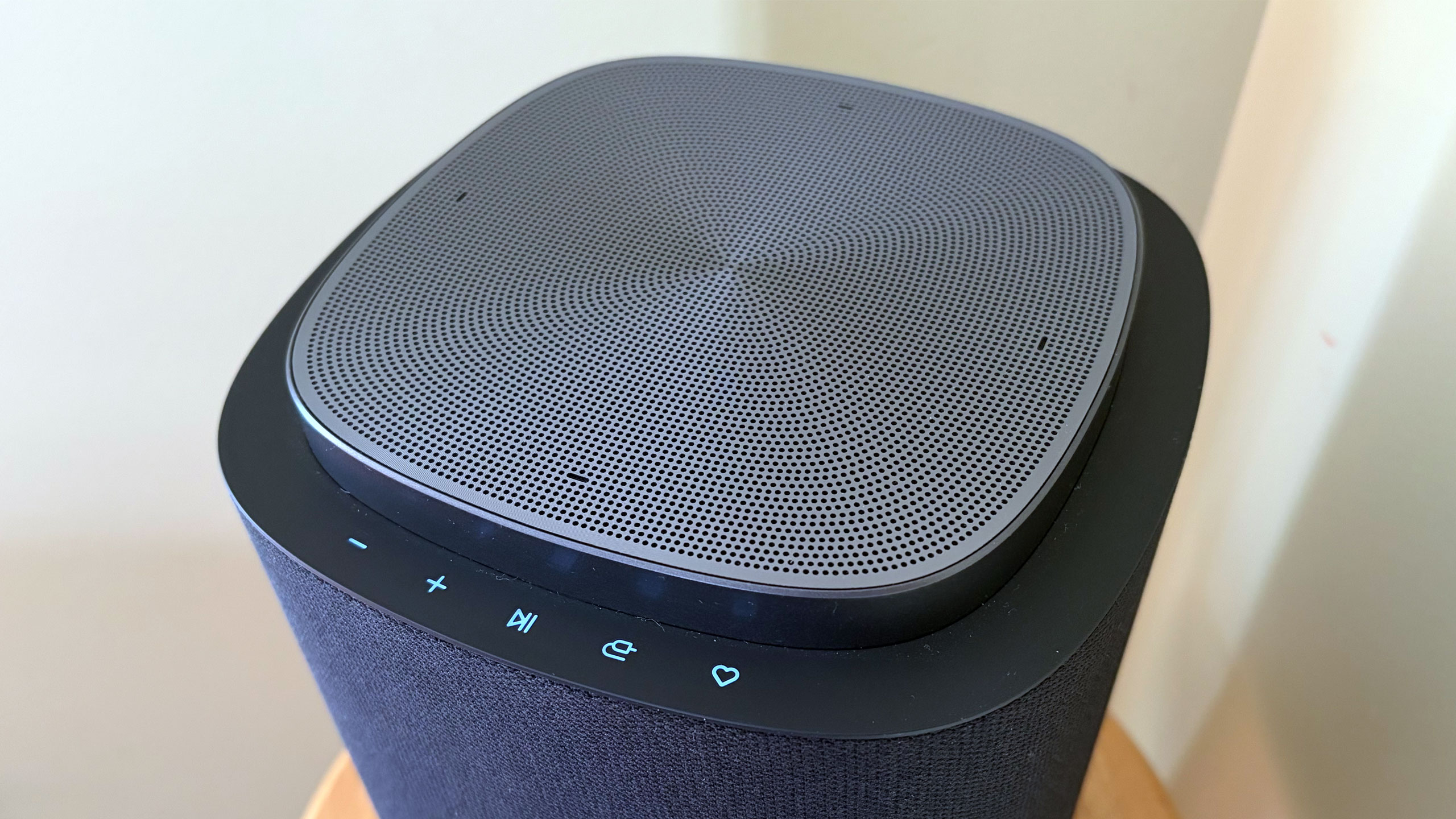
The controls on the LG Sound Suite M7 speaker
Billy Steele for Engadget
If you’re looking for alternatives to LG’s Sound Suite, you have to make some sacrifices. The only other option right now that offers Dolby Atmos FlexConnect is the TCL Z100 speaker. Obviously, you’ll need multiples of this $300 device, and you’ll probably want to add the $350 subwoofer, too. Like the LG M7, you’ll need a compatible TCL TV to serve as the lead device for FlexConnect (a QM6K, QM7K, QM8K, QM9K or X11L model). I haven’t tested these 1.1.1-channel units, so I can’t provide a direct comparison to the Sound Suite’s M5 or M7.
For those who can live without FlexConnect, Samsung’s Q990 series is consistently the best all-in-one setup you can buy. I haven’t reviewed one since 2024 because the company has been keen on shipping new models with minimal updates, which means the hardware and most of the features remain the same. The HW-Q990H will be the latest installment when it arrives later this year, with the biggest differentiator being a new dialogue boost called Sound Elevation.
While the Q990 always comes with rear speakers and a subwoofer alongside a powerful soundbar, some features will only be available if you also have a Samsung TV. One of those is Q-Symphony, which utilizes TV speakers alongside the Q990’s drivers for more detailed and immersive sound. For the entire Q990 package, you’re looking at $2,000 — $100 less than the comparable Sound Suite arrangement of the H7 soundbar, two M5 speakers and a W7 sub.
Wrap-up
There’s no denying that LG has created a powerful and immersive living room experience with its Sound Suite lineup. I also like that the company allows customers to decide what they need without sacrificing the main draw of FlexConnect. While I did experience some setup and software issues, those are things LG can iron out over time — Sound Suite is still brand new, after all. I would like to see the company offer some discounted bundles and continue to add more audio features over time to justify the hefty investment. If you’ve got a couple grand to spend, especially if you have a recent LG TV, Sound Suite will be your best option for building out a home theater setup.
This article originally appeared on Engadget at https://www.engadget.com/audio/speakers/lg-sound-suite-review-dolby-atmos-flexconnect-in-a-powerful-package-160000544.html?src=rss
A legal feud between the co-founders of Lux Optics, the developer behind the Halide camera app, revealed that Apple was close to acquiring the company. As first reported by The Information, Apple held acquisition talks for Lux Optics, which also developed the Kino, Spectre and Orion apps, in the summer of 2025.
According to The Information, the deal eventually fell through in September of that year, but the potential acquisition could've provided Apple with the third-party software to improve its own built-in camera app. Apple is already rumored to be introducing variable aperture to its upcoming iPhone 18 Pro models, so it's not surprising that the iPhone maker was looking for software with advanced features to match its possibly upgraded camera hardware.
Despite Apple's interest, Lux Optics' co-founders, Ben Sandofsky and Sebastiaan de With concluded that future updates to Halide could increase the company's valuation and ended the acquisition talks. According to the lawsuit between the co-founders, Sandofsky started investigating de With for the alleged misuse of company funds shortly after the talks with Apple ended. Afterwards, de With was fired from Lux Optics and later joined Apple's design team. While Halide may remain third-party software for iPhones and iPads, users can still look forward to some software improvements to the built-in camera app, since that's reportedly one of Apple's priorities.
This article originally appeared on Engadget at https://www.engadget.com/apps/apple-considered-buying-halide-to-upgrade-its-native-camera-app-175139818.html?src=rss
A French officer recently leaked the location of an aircraft carrier because of a run on the sports app Strava. This is not the first time this has happened, as the app tracks location data.
🚨🇫🇷 NEW: The location of the French aircraft carrier, FS Charles de Gaulle, has been given away by a sailor using Strava whilst jogging on the ship deck
In other words, the use of Strava to track runs is becoming a global security risk, but it doesn't have to be. If you happen to find yourself in an undisclosed location as part of a military entourage, here are a couple of ways to keep things private.
Change the settings
Don't want to give up those Strava runs? Just change the settings. On the web, click on "Do Not Share My Personal Information" on the feed page and then look for "Opt Out."
This is also fairly easy for smartphone users. Just head to "Privacy Controls" for the app and follow the prompts on both iOS and Android. Both versions include an option to disable the sharing of personal information, including location data.
Use another running app
Most sports apps track location data, but they don't all share Strava's spotty history. There are plenty of apps out there to choose from, and some are quite good. No matter which one you download, be sure to take steps to change the privacy settings.
Run the old-fashioned way
Believe it or not, people still jogged before smartphones. Just lace up a pair of shoes and get out there. For extra protection, leave your phone and smartwatch at home.
Get a treadmill
Are you stuck on an aircraft carrier somewhere in the middle of the ocean? It could be tough to get your steps in, so consider bothering the top brass for a treadmill.
This article originally appeared on Engadget at https://www.engadget.com/apps/heres-how-not-to-leak-military-information-with-your-strava-run-183635879.html?src=rss
OpenAI is developing a “super app” for desktop that unifies ChatGPT, its browser and its Codex app, according to the Wall Street Journaland CNBC. A company spokesperson told the publications that OpenAI Chief of Applications Fidji Simo will lead the application revamp with assistance from OpenAI President Greg Brockman. Simo will also help the marketing team advertise the app when it comes out. OpenAI’s leadership is apparently hoping that combining several products can help it streamline user experience and dedicate its resources to one project.
The company has yet to make an official announcement about the new app, but Simo replied to the Journal piece’s author on X. “Companies go through phases of exploration and phases of refocus; both are critical,” Simo said. “But when new bets start to work, like we're seeing now with Codex, it's very important to double down on them and avoid distractions. Really glad we're seizing this moment.”
The Journal saw the internal note Simo sent to employees, wherein she said that the company realized it was spreading its efforts across too many apps and that it needed to simplify its efforts. “That fragmentation has been slowing us down and making it harder to hit the quality bar we want,” she reportedly wrote. In an all-hands meeting, CNBC said she also told employees that the company was “orienting aggressively” towards high-productivity use cases.
It’s not clear yet when the unified app will be available, but OpenAI is reportedly focusing on developing agentic AI capabilities for it. The agents will be able to make decisions and use tools to do tasks on computers, such as writing software or analyzing data, with little human oversight.
This article originally appeared on Engadget at https://www.engadget.com/ai/openai-is-putting-chatgpt-its-browser-and-code-generator-into-one-desktop-app-025709839.html?src=rss
Google is testing a version of its Gemini app for macOS, Bloomberg reports. The app would bring the AI assistant to uncharted territory, and in more direct competition with OpenAI's ChatGPT and Anthropic's Claude, both of which offer standalone Mac apps.
Gemini remains accessible through the web, and it sounds like the macOS app offers the same set of features, with the ability to respond to prompts, search the web and generate text, images and code. The major differentiator of the Mac app could be a feature called "Desktop Intelligence," which gives Gemini a new source of information and context for its responses. According to a message in the app's code viewed by Bloomberg, "when you enable apps for Desktop Intelligence you are enabling Gemini to see what you see (such as screen context) and pull content directly from these apps to improve and personalize your experience only when Gemini is in use."
The ability to refer to information in apps and what's currently on your screen is offered by both the Claude and ChatGPT macOS apps, and something Gemini is capable of on mobile devices. It's not clear if Gemini for macOS will be able to actually take action in the apps it can view — like, for example, Anthropic's popular Claude Cowork feature — but Google has already started offering that experience in a limited form on smartphones, so who's to say that couldn't come to desktop operating systems, too.
Bloomberg reports that the Gemini app is being tested with non-Google employees, which could be a sign it's making its way to a public release. Thanks to Apple and Google's AI partnership, whether the app sees the light of day or not, some of the technology that makes Gemini possible will run on macOS in the future. Google and Apple announced in January that Google's Gemini models would power future versions of Apple Intelligence. Apple is also reportedly overhauling Siri into more of a chatbot, an experience likely made possible by Gemini.
This article originally appeared on Engadget at https://www.engadget.com/ai/google-is-reportedly-testing-a-gemini-app-for-mac-203703372.html?src=rss
Google has detailed how users will be able to sideload apps from unverified developers once it implements its more restrictive policy towards downloading software on Android. The company originally planned to require all developers to be "verified" to distribute on Android, but softened its stance in November 2025 to allow carveouts for Android power-users and hobbyist developers.
For the average Android users, the ability to sideload apps will now be locked behind a multi-step one-time process. Users will first have to enable developer mode in settings, confirm they're not being coached into disabling security, restart their phone (to cut off any phone calls), then wait a day and confirm their identity with biometric authentication or a pin before installing any apps. Google says you can enable the ability to install apps from unverified developers for seven days or indefinitely, but regardless of what you'll choose, you'll still have to dismiss a warning telling you the app you're installing is from an unverified developer.
For hobbyist developers or students who want people to try their app but don't want to create a verified developer account, Google also plans to offer free "limited distributions accounts" that let you share apps without being verified. These accounts will let you share apps with up to 20 devices without having "to provide a government-issued ID or pay a registration fee."
Google is implementing its new verification process in the name of security, and has likened the requirements being asked of developers to "an ID check at the airport, which confirms a traveler's identity but is separate from the security screening of their bags." Neither the verification nor this new approach to sideloading entirely closes off getting apps from unverified developers onto your Android device, they just make it harder to download something dangerous directly from the internet onto your phone.
Google appears to be trying to split the difference on Android, tightening up what apps can be distributed via verification, while cutting its own Play Store fees and changing its stance towards third-party app stores. Requiring verification to distribute software extends Google's influence outside of its own apps and app store, which is why some developers and digital rights organizations have publicly pushed back on the company's plan.
Developers can sign-up for early access to the developer verification process now. Google says its new workflow for enabling sideloading and small distributions of apps will go live in August.
Correction, March 19, 2026, 3:44PM ET: The headline has been change to clarify that the new procedure does not apply to all app sideloading.
This article originally appeared on Engadget at https://www.engadget.com/apps/android-will-hide-app-sideloading-behind-a-new-one-time-security-process-184651171.html?src=rss