The best gaming handhelds for 2026

Handheld gaming systems aren’t niche anymore. Today’s devices range from compact devices built around retro emulation to full-fledged portable PCs capable of running modern AAA games. That variety is exciting, but it also makes shopping harder. The “best” gaming handheld now depends less on a single, standout device and more on how, where and what you want to play.

Some handhelds are designed for quick sessions and classic libraries, prioritizing simplicity, long battery life and pocketable designs. Others blur the line between console and PC, offering large screens, powerful chips and access to massive game libraries, often at the cost of size, price or endurance. There are even more experimental options that focus on unusual controls or intentionally limited experiences.

We’ve spent months testing and tracking the fast-moving handheld space to figure out which devices are actually worth your money right now. Whether you’re looking for a versatile all-rounder, a premium portable gaming PC or a dedicated machine for retro games, these are the gaming handhelds that stand out in an increasingly crowded field.

Editor’s note (11/7/25): A barrage of new mobile emulation handhelds have been announced since our last update, including two follow-ups to our current “best for most” pick (the Retroid Pocket 6 and the more marginally updated Retroid Pocket G2) and a new version of our “best overall” pick (the AYN Odin 3). Other competitors like Ayaneo’s KONKR Pocket Fit are also on the way, and there’s been a wave of new dual-screen models like the AYN Thor, Ayaneo Pocket DS and Anbernic RG DS. We think our current recommendations will still satisfy most shoppers, but since we’re still working to test most of these newer devices, we wanted to give a heads-up for anyone who wants the absolute latest. In the meantime, we’ve added testing notes on a few other emulation-focused handhelds as well as a couple new portable PCs like the ASUS ROG Xbox Ally X.

The Nintendo Switch 2 comes with two Joy-Con, two Joy-Con straps, a Joy-Con grip, the dock, a HDMI cord and a 60-watt power adapter with a detachable USB-C cable.
Sam Rutherford for Engadget

Read our full Nintendo Switch 2 review

The new Nintendo Switch 2 is already more popular than any of the handhelds above, but we haven’t made it a formal pick in this guide since it exists in its own world. As one of the newest devices from the big three console manufacturers, most people aren’t choosing between it and the handheld PCs or emulation devices above. The main reason to buy a Switch 2 is to play new Nintendo games, and no other device can (legally) offer that. Likewise, the Switch 2 doesn’t even try to offer the flexibility of a Steam Deck, ROG Ally X or even the Retroid Pocket 5.

That said, the hardware itself is a significant upgrade over its predecessor, with dramatically improved performance, a sharper, faster and bigger 7.9-inch display, magnetic Joy-Con controllers and more storage. It’s a wholly more polished take on the Switch 1’s ideas.

Does that make it a must-buy right now? Unless you’re worried about a tariff-induced price hike — which may not be the most outlandish fear — not really. Donkey Kong Bananza is a joy, Mario Kart World is fun enough and playing Cyberpunk 2077 on a Nintendo console is kind of surreal, but the list of true must-plays that are exclusive to the Switch 2 is still limited. That’s OK — it’s only been a few months. But don’t feel like you must rush out and splash the cash today unless you have a serious case of Donkey Kong-induced FOMO.

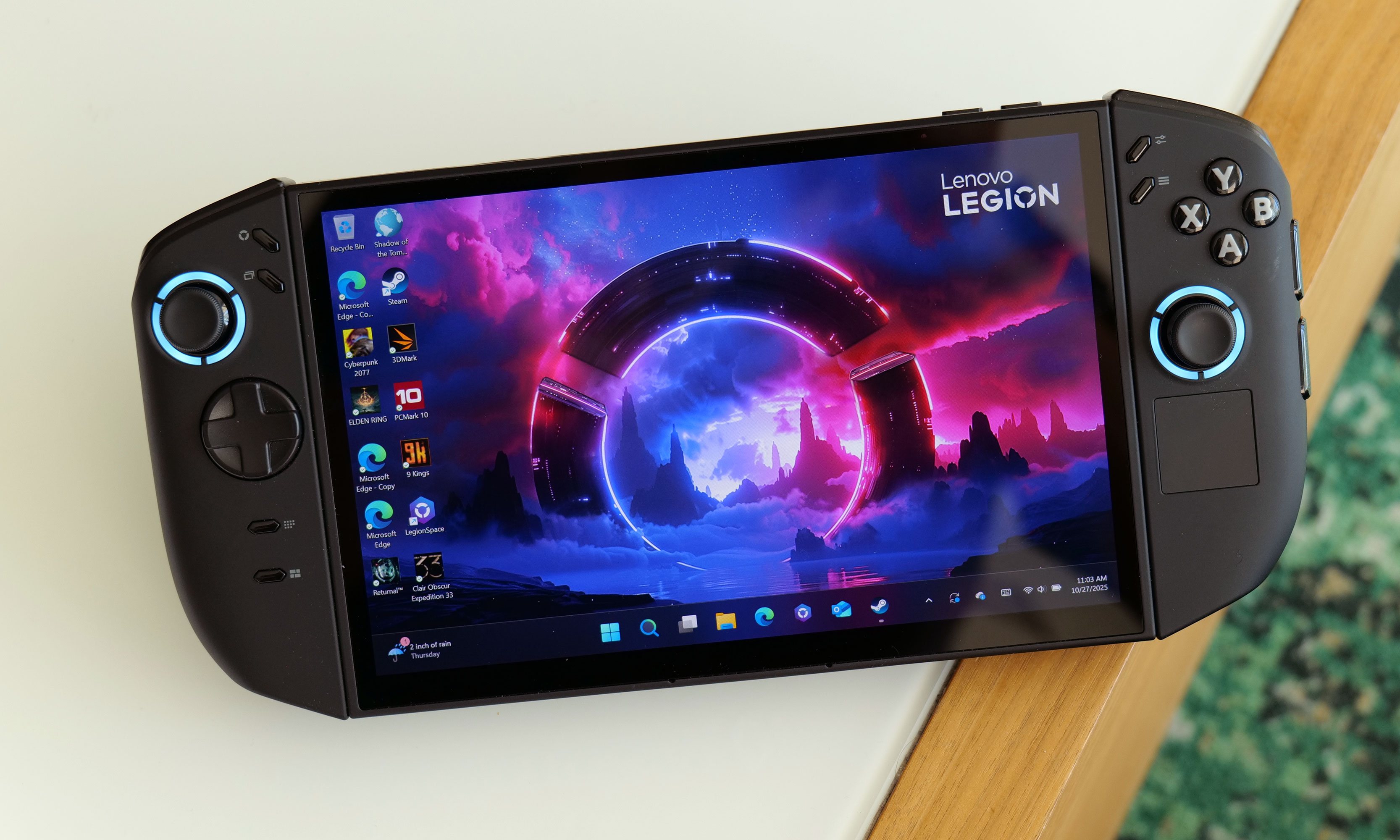
With a score of 85, the Lenovo Legion Go 2 has earned a Recommended rating from Engadget.
The Lenovo Legion Go 2.
Sam Rutherford for Engadget

Note: This is a selection of noteworthy gaming handhelds we’ve tested, not a comprehensive list of everything we've ever tried.

The Lenovo Legion Go 2 is a capable alternative to the ROG Xbox Ally X with a mondo-sized 8.8-inch display. That screen is the main reason to consider it, as it’s a vivid OLED panel that supports VRR and has a 144Hz native refresh rate. Like the Switch, it also comes with detachable controllers — one of which includes a useful touchpad for navigating Windows — plus a built-in kickstand for tabletop play.

That said, it’s an absolute tank at just over two pounds, and we found it to perform a little worse than the Xbox Ally X at equal settings. It’s also even more expensive, starting at $1,100 and rising to $1,350 for a config with the same Ryzen Z2 Extreme chip. It’s a lovely device if you’ve got cash to burn — and to be fair, none of these Windows handhelds are for anyone looking for “value” — but the Xbox Ally X is a better buy for most.

The beige-and-black MSI Claw 8 AI+ gaming handheld rests on a brown and white table with its screen active and facing the camera.
The MSI Claw 8 AI+.
Sam Rutherford for Engadget

The original MSI Claw was a flop, but the newer Claw 8 AI+ is much more appealing if you’re willing to pay for a larger and slightly more powerful alternative to the ASUS ROG Ally X. With its Intel Core Ultra 7-258V chip and 32GB of RAM, it typically pumped out 10 to 15 percent higher frame rates than last-gen models like the ROG Ally X and Lenovo Legion Go in our testing. (Another model is available with the Ryzen Z2 Extreme chip.) Battery life is relatively strong, while its 8-inch 120Hz IPS display is plenty bright and supports VRR. There are smooth Hall effect thumbsticks and triggers, two Thunderbolt 4 ports and a built-in fingerprint sensor beyond that.

The Claw’s main issue is its price: At $1,100 after recent price hikes, it’s hard to justify over the ROG Xbox Ally X, which is already too expensive for most people. ASUS' handheld is lighter and easier to grip on top of that — though the Claw is thinner — and its overhauled Xbox UI, while far from perfect, is still easier to get around than MSI’s Center M hub. There's a smaller 7-inch version of this handheld for $900 as well, but we haven’t tested that one.

The ModRetro Chromatic gaming handheld rests on a gray couch cushion, displaying the start screen to the video game Tetris.
The ModRetro Chromatic.
Jeff Dunn for Engadget

The ModRetro Chromatic is a competitor to the Analogue Pocket that can similarly play actual Game Boy cartridges via FPGA. With its premium metal frame, loud speaker, tight d-pad and beautifully bright 2.56-inch display, it’s an impressive modernization of Nintendo’s classic handheld. ModRetro also publishes a number of games specifically for the device, including a pretty great version of Tetris that comes bundled in the box.

However, for many, its faithfulness to the original Game Boy probably goes too far: It requires three AA batteries for power, and unlike the Analogue Pocket it doesn’t support custom save states. It’s also designed for Game Boy and Game Boy Color games only; it can’t play any Game Boy Advance cartridges or games from other retro handhelds like Analogue’s device, nor does doesn’t support ROMs. For only $20 less than the Pocket, that makes it a tough sell, even if the hardware is arguably higher-quality.

There’s also the lethal, autonomous elephant in the room: ModRetro is founded by Palmer Luckey, the idiosyncratic entrepreneur behind the Oculus Rift who has gone on to form Anduril Industries, a defense contractor that makes drones, surveillance systems and other AI-powered military tech. He has also espoused political views that many people — and this is the tamest way I can put this — may not be comfortable backing. We are not here to police where you can spend your money, and the Chromatic does much of what it wants to do well. Still, all of these handhelds are just so inessential, and no other option that we know of is as closely tied to an arms dealer.

The Legion Go S features an 8-inch OLED display with a 120Hz refresh rate.
The Lenovo Legion Go S.
Sam Rutherford for Engadget

The Windows 11 version of the Lenovo Legion Go S has the same relatively comfortable design and commendable 8-inch 120Hz display as the SteamOS model we highlight above. With the Z2 Go model we tested, though, its performance lags too far behind the ROG Ally X, Claw 8 AI+ and original Legion Go for something priced at $730. Windows is still clunky, too.

The Ayaneo Flip DS gaming handheld rests on a light brown wooden table, with its top screen showcasing the game Rocket League and its bottom screen playing a YouTube video.
The Ayaneo Flip DS.
Photo by Jeff Dunn / Engadget

The Ayaneo Flip DS is a cool concept: a powerful Windows machine with a clamshell design and dual displays, sort of like a supercharged Nintendo DS. It feels sturdy, it performs roughly on par with the other Ryzen 7 7840U (or 8840U) handhelds in this guide, and its 7-inch top display is sharp, fast and bright. The second screen makes it a natural fit for emulating Wii U or 3DS games, but you could also, say, look up a guide or play a YouTube video without having to close whatever you’re playing. 

Unfortunately, this is more of a neat idea than a fully thought-out product. The folding design means that the joysticks have to be short and recessed, while the face buttons and d-pad are uncomfortably flat. The whole thing is overly thick and heavy, plus it runs very hot. Battery life tops out around two hours, and actually managing two displays on a Windows handheld is about as clunky as you'd expect. With prices now starting above $1,100, the Flip DS is hard to recommend unless you’re (oddly) desperate for a handheld Wii U emulator. We're always happy to see more weird hardware, though.

The Ayaneo Kun is pictured on a coffee table with the Death Stranding launch screen showing.
The Ayaneo Kun.
Photo by James Trew / Engadget

The Ayaneo Kun is one of the more decadent Windows handhelds we’ve tested. With a sharp 8.4-inch display, a Ryzen 7 8840U chip, up to 64GB of RAM, up to 4TB of storage, a sizable 75Whr battery and a 54W max TDP, it’s both a capable gaming device and a feasible replacement for a desktop PC. But it now starts at a pricey $999, it’s huge and it suffers from the usual Windows-related issues. It also lacks VRR, and that Ryzen chip is no longer the latest and greatest. The Kun is still a fine device in a vacuum, but the ROG Xbox Ally X is a better buy. This is technically an older model for Ayaneo, too, as the company seems to launch a new handheld every other hour these days.

The Retroid Pocket Classic rests on the arm of a gray couch with its screen on displaying a Game Boy Color logo.
The Retroid Pocket Classic.
Jeff Dunn for Engadget

The Retroid Pocket Classic is another Game Boy-style vertical handheld in the vein of the Analogue Pocket, but like the other Retroid models we’ve highlighted, it’s an Android device designed to emulate games via ROM files, not genuine cartridges. (Naturally, it can also play native Android games.) It’s still far clunkier to set up and use as a result, and its overall design feels more toy-like than either the Pocket or ModRetro Chromatic.

But its Snapdragon G1 Gen 2 chip is easily powerful enough to play any classic handheld system (along with most other retro games that don’t require joystick controls), while its 3.9-inch OLED display is superbly bright, sharp and colorful. The battery can last more than 10 hours when emulating lower-power systems, and Retroid sells a version with six face buttons instead of the standard four if you want to play older Sega Genesis and Saturn games in particular. The Analogue Pocket is still more premium and rewarding to use, but if you want a similar form factor and can live with the typical quirks that come with a device like this, the Classic is a good value at $129. Of the many Game Boy-style handhelds out there that solely rely on software emulation, it’s the one we’d recommend first.

The Retroid Pocket Mini and Retroid Pocket 5 gaming handhelds rest on a brown desktop.
The Retroid Pocket Mini (bottom) and Retroid Pocket 5.
Jeff Dunn for Engadget

The Retroid Pocket Mini is essentially a smaller version of the Retroid Pocket 5. It runs on the same Snapdragon 865 chip and feels just as sturdy, but it has a smaller 3.92-inch display with a 4:3 aspect ratio. This makes it a more natural fit for older retro consoles, as you won’t get the black boxes you’d see on a 16:9 display like the one on the Pocket 5. If you mainly want to emulate systems like the SNES, Sega Genesis or Game Boy Color and don’t mind paying extra for a rich OLED display, it’s a good little device. But the tiny screen is limiting if you ever want to play newer games, and we wish there wasn't so much empty space around the display. 

This device had also generated some controversy within the retro gaming community for having persistent issues with inaccurate shaders (and for the slapdash way Retroid handled the matter). The company replaced the original model with a "V2" iteration that addresses those concerns, however.

The 4.7-inch Retroid Pocket 4 Pro is the predecessor to the Pocket 5. Its performance isn’t significantly far off the newer model, so it remains a nice value if you’re determined to spend less than $200 on an emulation device. It misses out on the larger OLED display and more ergonomically-friendly design of its follow-up, however. The base Pocket 4 may also be worth a look if you want to stay under $150, but its weaker chip makes it less adept at emulating games from the PS2, GameCube and up.

Two Game Boy-style gaming handhelds, the Miyoo Mini Plus and TrimUI Brick, sit on a gray couch cushion.
The Miyoo Mini Plus (left) and TrimUI Brick.
Jeff Dunn for Engadget

The Miyoo Mini Plus is a highly affordable handheld with a well-built, Game Boy-style form factor that fits nicely with older games. Its 3.5-inch display pops for something in the $60 to $80 range, its battery lasts as long as it needs to and it can emulate consoles up to the original PlayStation without much issue. Its Linux-based software is extensively customizable, though it requires some tinkering to get it working optimally. Like many cheapo handhelds, it also lacks fast charging. Since it’s from a smaller Chinese firm and isn’t available at major retailers, it can also be difficult to actually buy. It's a nice choice if you want something more compact than the Retroid Pocket Classic, but that model's roomier design, more vibrant OLED panel and longer battery life makes it worth the extra cash for most people.

The TrimUI Brick is another low-cost vertical handheld that’s surprisingly well-built for an $80-ish device, thanks to its brushed metal backplate and impressive 3.2-inch IPS display. It has a weaker chip than the Retroid Pocket Classic, but it can still emulate older handheld games just fine, and its tiny frame makes it much easier to actually fit in a pocket. That said, while it has a sharper and more vivid screen than the Miyoo Mini Plus (its closest rival), the face buttons, d-pad and especially back buttons are all stiffer, and its stock UI feels similarly bootleg. (Some of the icons for different systems in the game library: “GomeBuy,” “Fanicon,” and “PloyStotion.”) You can fix the latter with custom firmware, but Retroid’s interface is easier to grok by default, and its setup process is less annoying. Most people interested in this class of device will be happier paying up for the Pocket Classic instead.

A small gaming handheld that looks reminiscent to the original Nintendo Game Boy called the Anbernic RG35XX Plus rests at an angle on a light brown wooden table. The display is turned on and showcases the start screen from the Game Boy game Metal Gear Solid.
The Anbernic RG35XX Plus.
Photo by Jeff Dunn / Engadget

The Anbernic RG35XX Plus is another wallet-friendly vertical handheld. For about the same price as the Miyoo Mini Plus, it offers a faster chipset, more RAM and a bigger battery alongside a similarly impressive design. Its stock OS is overly sloppy and cheap-looking, however, and while its stronger chip is appreciated, it's still far behind the Retroid Pocket Classic.

The Anbernic RG35XXSP gaming handheld rests on a brown wooden table.
The Anbernic RG35XXSP.
Jeff Dunn for Engadget

The Anbernic RG35XXSP is a variant of the RG35XX Plus based on the same internals, only it apes the clamshell form factor of the old Game Boy Advance SP. That’s a great design to rip off if you must pick one, and the hardware doesn’t feel nearly as cheap as its (pre-tariff) price tag of $60 or so would suggest. But the software issues noted above still apply (both here and with the many other devices in the same RGXX family). We’ve also seen several user reports of quality control issues with the RG35XXSP’s battery, which is automatically disqualifying.

The Anbernic RG405M is another 4:3 handheld with a 4-inch display and a pleasing metal frame. It's an OK alternative to the Retroid Pocket Mini if you want a little more screen space for less cash, but it’s slower, and it lacks the Mini’s OLED display. We find the Retroid’s grooved back to be comfier to hold over time as well. And again, Anbernic has paused handheld shipments to America as of this writing.

PlayStation Portal
The PlayStation Portal.
Photo by Devindra Hardawar/Engadget

The PlayStation Portal is an odd accessory that’s designed to stream games from a PlayStation 5. It lacks built-in apps, so it doesn’t support traditional emulation. Because it’s entirely dependent on the quality of your home Wi-Fi, we can’t guarantee how well it’ll actually perform. It doesn’t work with Bluetooth earbuds either. 

The 8-inch display is fine and the DualSense-style controls are great, so PlayStation diehards who want a second screen for local PS5 streaming may see the appeal. Sony recently added the ability to stream a selection of games via the cloud, which is a step in the right direction, but you need an expensive PlayStation Plus Premium subscription to take advantage. In general, there’s little here that you can’t do with a smartphone and mobile game controller, so most people are better off saving their $200.

The Logitech G Cloud would’ve been a great Android pick when it launched if it cost about $150 less. Its 7-inch 1080p display is bright, vibrant and generally more pleasing to look at than the panel on the AYN Odin 2, its battery lasts a good 10 to 12 hours per charge and its design is comfy to hold for hours at a time. Alas, the G Cloud still tends to retail for $300, which is just too much when the Retroid Pocket 5 offers more power at a lower price.

A collection of gaming handhelds rest on a wooden tabletop. The handhelds include the Nintendo Switch - OLED Model, Valve Steam Deck and the Retroid Pocket 3, as well as an iPhone 12 mini hooked up to a Backbone One mobile game controller.
Jeff Dunn / Engadget

You can break down the gaming handheld market into three broad tiers. At the top, you have x86-based portable gaming PCs like the Steam Deck or ASUS ROG Xbox Ally X. These are the most powerful handhelds you can buy, as they seek to replicate the experience of a moderately specced gaming desktop. The Steam Deck runs on Linux, but most others use Windows. If you want to play modern, recently released PC games on the go (and need something stronger than a Switch), this is the type of device you’d get. They can also emulate the widest range of retro consoles. They’re typically the largest and most cumbersome devices to hold, however, and their battery life can be short. Naturally, they’re also the most expensive, costing anywhere from $400 to more than $1,000.

Further down on the price spectrum are "mobile handhelds" like the Logitech G Cloud or Retroid Pocket. These devices often run Android or Linux and can range from under $50 to $400-ish (before tariffs). They aren’t equipped to play modern console or PC titles, but they’re usually more compact than a portable PC, and you can still use them for mobile games and cloud streaming. While most are marketed toward those ends, many gamers actually buy them to emulate classic games through software like RetroArch. Getting emulators to work can be complicated, and accessing the BIOS and ROM files required to play games this way is legally murky. One lawsuit from Nintendo led to the shutdown of the most prominent Switch and 3DS emulators, for instance. (Engadget does not condone piracy.) Backing up files of games you already own for personal use only is considered more defensible, though, so for that a mobile handheld can be a more user- and wallet-friendly way to play the classics — provided you don’t want to just use your phone.

We’ll call the last tier “handhelds that do their own thing.” This is a catch-all for things like the Switch 2 or Playdate: portable devices that run heavily customized software and aim to provide a unique gaming experience. They aren’t necessarily ideal for emulation or playing the latest multiplatform titles; instead, they often have distinct game libraries. They might not have the widest appeal as a result (Switch excluded), but they’re often easier for less tech-literate folks to just pick up and use.

November 2025: The ASUS ROG Xbox Ally X replaces the older ROG Ally X as our new favorite Windows gaming handheld. We’ve also added testing notes on the Lenovo Legion Go 2, ModRetro Chromatic and a couple of emulation-based handhelds in the Retroid Pocket Classic and TrimUI Brick. We’re working to test several other recent releases for our next update, including updated versions of the Retroid Pocket 5 and AYN Odin 2.

August 2025: We’ve added the SteamOS version of the Lenovo Legion Go S as a new recommendation and updated our top Windows pick to reflect the upcoming release of ASUS’ and Microsoft’s ROG Xbox Ally devices, which will feature an overhauled Windows UI. We’ve also added a note on the recently released Nintendo Switch 2. We’ll include testing notes on the Retroid Pocket Classic, TrimUI Brick and ModRetro Chromatic in the near future. (Note: Yours truly went on paternity leave after our last update — apologies for the delay!)

May 2025: We’ve tested the Retroid Pocket Flip 2 and recommended it as an alternative to the Retroid Pocket 5. We’re also watching out for the first third-party devices that run SteamOS, starting with the new Lenovo Legion Go S, and the next ASUS ROG Ally device, which seems to be arriving soon based on recent leaks.

March 2025: We’ve edited this guide for clarity and added testing notes for the MSI Claw 8 AI+ and Lenovo Legion Go S (Windows version). Our main picks are unchanged. Looking ahead, we’re keeping an eye on upcoming Windows handhelds from Acer and Ayaneo, a pair of new emulation devices from Retroid, the first third-party devices to ship with SteamOS and more machines that run on AMD’s Ryzen Z2 chips, among others. 

January 2025: We have a new top pick among emulation-focused handhelds: the Retroid Pocket 5. Beyond that, we’ve added notes on a few other devices we’ve tested, including the Retroid Pocket Mini and Anbernic RG35XXSP; lightly edited other blurbs to reflect changes in the market; and removed a couple write-ups for products that’ve been discontinued. We're also keeping an eye on new handhelds that’ve recently been announced or are strongly rumored to arrive in the near future, including devices from MSI and Lenovo.

August 2024: We’ve replaced the ASUS ROG Ally, our prior pick for the best Windows gaming handheld, with the new and improved ROG Ally X. We’ve also checked to make sure all availability and pricing details noted throughout the guide are accurate.

June 2024: We’ve updated this guide to ensure all of our recommendations are up to date, adding a note on ASUS’ upcoming ROG Ally X in the process. We’ve also included details on two new handhelds we’ve tested since our previous update: the MSI Claw and Ayaneo Flip DS. Staying on top of this market is a tall task, but we’re currently looking at recent noteworthy releases like the PSP-esque AYN Odin 2 Mini and the GBA-style Anbernic RG35XXSP as well.

This article originally appeared on Engadget at https://www.engadget.com/gaming/best-handheld-gaming-system-140018863.html?src=rss

Engadget Podcast: Diving into the Apple Watch sales ban

Right as we’re heading into Christmas, Apple has been forced to stop sales of the Apple Watch Series 9 and Ultra 2 in the US, due to an ongoing patent dispute with Masimo over pulse oximeters. To break down what’s going on, Devindra and Ben chat with Christina Farr, a health tech investor at OMERS Ventures and author of the newsletter Second Opinion. It turns out Apple has made a habit of tempting people away from competing companies, and that includes Masimo’s former chief medical officer. Did Apple really steal trade secrets? Or does it just look very guilty since it had the means and motive to copy Masimo’s technology?


Listen below or subscribe on your podcast app of choice. If you've got suggestions or topics you'd like covered on the show, be sure to email us or drop a note in the comments! And be sure to check out our other podcast, Engadget News!

Topics

  • Apple Watch Series 9 and Ultra 2 sales ban chat with Chrissy Farr – 1:49

  • Generative image model LAION-5B has over 1000 CSAM images in its dataset – 20:07

  • PS5 outsold Xbox 3 to 1 in 2023, lifetime PS5 sales hit 50 million – 24:00

  • Hackers release footage from Insomniac’s Wolverine after 1.67TB data breach – 34:35

  • Working on – 37:24

  • Pop culture picks – 38:07

Subscribe!

Credits
Hosts: Devindra Hardawar and Ben Ellman
Guest: Christina Farr
Producer: Ben Ellman
Music: Dale North and Terrence O'Brien

This article originally appeared on Engadget at https://www.engadget.com/engadget-podcast-apple-watch-sales-ban-150001698.html?src=rss

Engadget Podcast: Diving into the Apple Watch sales ban

Right as we’re heading into Christmas, Apple has been forced to stop sales of the Apple Watch Series 9 and Ultra 2 in the US, due to an ongoing patent dispute with Masimo over pulse oximeters. To break down what’s going on, Devindra and Ben chat with Christina Farr, a health tech investor at OMERS Ventures and author of the newsletter Second Opinion. It turns out Apple has made a habit of tempting people away from competing companies, and that includes Masimo’s former chief medical officer. Did Apple really steal trade secrets? Or does it just look very guilty since it had the means and motive to copy Masimo’s technology?


Listen below or subscribe on your podcast app of choice. If you've got suggestions or topics you'd like covered on the show, be sure to email us or drop a note in the comments! And be sure to check out our other podcast, Engadget News!

Topics

  • Apple Watch Series 9 and Ultra 2 sales ban chat with Chrissy Farr – 1:49

  • Generative image model LAION-5B has over 1000 CSAM images in its dataset – 20:07

  • PS5 outsold Xbox 3 to 1 in 2023, lifetime PS5 sales hit 50 million – 24:00

  • Hackers release footage from Insomniac’s Wolverine after 1.67TB data breach – 34:35

  • Working on – 37:24

  • Pop culture picks – 38:07

Subscribe!

Credits
Hosts: Devindra Hardawar and Ben Ellman
Guest: Christina Farr
Producer: Ben Ellman
Music: Dale North and Terrence O'Brien

This article originally appeared on Engadget at https://www.engadget.com/engadget-podcast-apple-watch-sales-ban-150001698.html?src=rss

First American discloses a ‘cybersecurity incident,’ a few years after its major leak

First American, a real estate and mortgage financial firm, experienced a "cybersecurity incident" impacting operations, the company posted on its website on Thursday. The company has not released any details about what happened, but as of the time of publication, its website remained down. 

"First American has experienced a cybersecurity incident," says a statement on its website. "In response, we have taken certain systems offline and are working to return to normal business operations as soon as possible." First American did not immediately respond to a request for comment. 

In 2019, First American came under fire for its handling of sensitive information. It paid a $1 million fine to the New York State Department of Financial Services after a vulnerability in its proprietary "EaglePro" application left data like social security numbers and bank information exposed.

This article originally appeared on Engadget at https://www.engadget.com/first-american-discloses-a-cybersecurity-incident-a-few-years-after-its-major-leak-145141277.html?src=rss

First American discloses a ‘cybersecurity incident,’ a few years after its major leak

First American, a real estate and mortgage financial firm, experienced a "cybersecurity incident" impacting operations, the company posted on its website on Thursday. The company has not released any details about what happened, but as of the time of publication, its website remained down. 

"First American has experienced a cybersecurity incident," says a statement on its website. "In response, we have taken certain systems offline and are working to return to normal business operations as soon as possible." First American did not immediately respond to a request for comment. 

In 2019, First American came under fire for its handling of sensitive information. It paid a $1 million fine to the New York State Department of Financial Services after a vulnerability in its proprietary "EaglePro" application left data like social security numbers and bank information exposed.

This article originally appeared on Engadget at https://www.engadget.com/first-american-discloses-a-cybersecurity-incident-a-few-years-after-its-major-leak-145141277.html?src=rss

The 6 best Mint alternatives to replace the budgeting app that shut down

As a long-time Mint user, I was frustrated to say the least when news broke at the end of 2023 that Intuit would shut Mint down. I, like millions of others, enjoyed how easily Mint allowed us to track all accounts in one place and monitor credit scores. I also used it regularly to track spending, set goals like pay my mortgage down faster and with general money management.

So I set out to find a Mint alternative in the wake of its disappointing demise. I gave Credit Karma, Intuit’s other financial app, a try but found it to be a poor Mint alternative. The following guide lays out my experience testing some of the most popular Mint replacement apps available today in search of my next budgeting app. Our pick for best Mint alternative remains Quicken Simplifi, even months after the Mint shutting down, thanks to its easy to use app, good income and bill detection and its affordable price. But there are plenty of other solid options out there for those with different needs. If you’re also on the hunt for a budgeting app to replace Mint, we hope these details can help you decide which of the best budgeting apps out there will be right for you.

No pun intended, but what I like about Quicken Simplifi is its simplicity. Whereas other budgeting apps try to distinguish themselves with dark themes and customizable emoji, Simplifi has a clean user interface, with a landing page that you just keep scrolling through to get a detailed overview of all your stats. These include your top-line balances; net worth; recent spending; upcoming recurring payments; a snapshot of your spending plan; top spending categories; achievements; and any watchlists you’ve set up. You can also set up savings goals elsewhere in the app. I also appreciate how it offers neat, almost playful visualizations without ever looking cluttered. I felt at home in the mobile and web dashboards after a day or so, which is faster than I adapted to some competing services (I’m looking at you, YNAB and Monarch).

Getting set up with Simplifi was mostly painless. I was particularly impressed at how easily it connected to Fidelity; not all budget trackers do, for whatever reason. This is also one of the only services I tested that gives you the option of inviting a spouse or financial advisor to co-manage your account. One thing I would add to my initial assessment of the app, having used it for a few months now: I wish Simplifi offered Zillow integration for easily tracking your home value (or at least a rough estimate of it). Various competitors including Monarch Money and Copilot Money work with Zillow, so clearly there's a Zillow API available for use. As it stands, Simplifi users must add real estate manually like any other asset.

A screenshot of the
Dana Wollman / Engadget

In practice, Simplifi miscategorized some of my expenses, but nothing out of the ordinary compared to any of these budget trackers. As you’re reviewing transactions, you can also mark if you’re expecting a refund, which is a unique feature among the services I tested. Simplifi also estimated my regular income better than some other apps I tested. Most of all, I appreciated the option of being able to categorize some, but not all, purchases from a merchant as recurring. For instance, I can add my two Amazon subscribe-and-saves as recurring payments, without having to create a broad-strokes rule for every Amazon purchase.

The budgeting feature is also self-explanatory and can likely accommodate your preferred budgeting method. Just check that your regular income is accurate and be sure to set up recurring payments, making note of which are bills and which are subscriptions. This is important because Simplifi shows you your total take-home income as well as an “income after bills” figure. That number includes, well, bills but not discretionary subscriptions. From there, you can add spending targets by category in the “planned spending” bucket. Planned spending can also include one-time expenditures, not just monthly budgets. When you create a budget, Simplifi will suggest a number based on a six-month average.

Not dealbreakers, but two things to keep in mind as you get started: Simplifi is notable in that you can’t set up an account through Apple or Google. There is also no option for a free trial, though Quicken promises a “30-day money back guarantee.”

Monarch Money grew on me. My first impression of the budgeting app, which was founded by a former Mint product manager, was that it's more difficult to use than others on this list, including Simplifi, NerdWallet and Copilot. And it is. Editing expense categories, adding recurring transactions and creating rules, for example, is a little more complicated than it needs to be, especially in the mobile app. (My advice: Use the web app for fine-tuning details.) Monarch also didn’t get my income right; I had to edit it.

Once you’re set up, though, Monarch offers an impressive level of granularity. In the budgets section, you can see a bona fide balance sheet showing budgets and actuals for each category. You'll also find a forecast, for the year or by month. And recurring expenses can be set not just by merchant, but other parameters as well. For instance, while most Amazon purchases might be marked as “shopping,” those for the amounts of $54.18 or $34.18 are definitely baby supplies, and can be automatically marked as such each time, not to mention programmed as recurring payments. Weirdly, though, there’s no way to mark certain recurring payments as bills, specifically.

A screenshot of the
Dana Wollman / Engadget

Not long after I first published this story in December 2023, Monarch introduced a detailed reporting section where you can create on-demand graphs based on things like accounts, categories and tags. That feature is available just on the web version of the app for now. As part of this same update, Monarch added support for an aggregator that makes it possible to automatically update the value of your car. This, combined with the existing Zillow integration for tracking your home value, makes it easy to quickly add a non-liquid asset like a vehicle or real estate, and have it show up in your net worth graph.

The mobile app is mostly self-explanatory. The main dashboard shows your net worth; your four most recent transactions; a month-over-month spending comparison; income month-to-date; upcoming bills; an investments snapshot; a list of any goals you’ve set; and, finally, a link to your month-in-review. That month-in-review is more detailed than most, delving into cash flow; top income and expense categories; cash flow trends; changes to your net worth, assets and liabilities; plus asset and liability breakdowns. In February 2024, Monarch expanded on the net worth graph, so that if you click on the Accounts tab you can see how your net worth changed over different periods of time, including one month, three months, six months, a year or all time.

On the main screen, you’ll also find tabs for accounts, transactions, cash flow, budget and recurring. Like many of the other apps featured here, Monarch can auto-detect recurring expenses and income, even if it gets the category wrong. (They all do to an extent.) Expense categories are marked by emoji, which you can customize if you’re so inclined.

Monarch Money uses a combination of networks to connect with banks, including Plaid, MX and Finicity, a competing network owned by Mastercard. (I have a quick explainer on Plaid, the industry standard in this space, toward the end of this guide.) As part of an update in late December, Monarch has also made it easier to connect through those other two networks, if for some reason Plaid fails. Similar to NerdWallet, I found myself completing two-factor authentication every time I wanted to get past the Plaid screen to add another account. Notably, Monarch is the only other app I tested that allows you to grant access to someone else in your family — likely a spouse or financial advisor. Monarch also has a Chrome extension for importing from Mint, though really this is just a shortcut for downloading a CSV file, which you’ll have to do regardless of where you choose to take your Mint data.

Additionally, Monarch just added the ability to track Apple Card, Apple Cash, and Savings accounts, thanks to new functionality brought with the iOS 17.4 update. It's not the only one either; currently, Copilot and YNAB have also added similar functionality that will be available to anyone with the latest versions of their respective apps on a device running iOS 17.4. Instead of manually uploading statements, the new functionality allows apps like Monarch's to automatically pull in transactions and balance history. That should make it easier to account for spending on Apple cards and accounts throughout the month.

Monarch also recently launched investment transactions in beta. It also says bill tracking and an overhauled goals system are coming soon. Monarch hasn't provided a timeline for that last one, except to say that the improved goals feature is coming in early 2024.

Copilot Money might be the best-looking budgeting app I tested. It also has the distinction of being exclusive to iOS and Macs — at least for now. Andres Ugarte, the company’s CEO, has publicly promised that Android and web apps are coming in 2024 (more likely the second half of the year, Ugarte tells me). But until it follows through, I can’t recommend Copilot for most people with so many good competitors out there.

There are other features that Copilot is missing, which I’ll get into. But it is promising, and one to keep an eye on. It’s just a fast, efficient, well designed app, and Android users will be in for a treat when they’ll finally be able to download it. It makes good use of colors, emoji and graphs to help you understand at a glance how you’re doing on everything from your budgets to your investment performance to your credit card debt over time. In particular, Copilot does a better job than almost any other app of visualizing your recurring monthly expenses.

Behind those punchy colors and cutesy emoji, though, is some sophisticated performance. Copilot’s AI-powered “Intelligence” gets smarter as you go at categorizing your expenses. (You can also add your own categories, complete with your choice of emoji.) It’s not perfect. Copilot miscategorized some purchases (they all do), but it makes it easier to edit than most. On top of that, the internal search feature is very fast; it starts whittling down results in your transaction history as soon as you begin typing.

A screenshot of Copilot Money's iOS app.
Dana Wollman / Engadget

Copilot is also unique in offering Amazon and Venmo integrations, allowing you to see transaction details. With Amazon, this requires just signing into your Amazon account via an in-app browser. For Venmo, you have to set up fwd@copilot.money as a forwarding address and then create a filter, wherein emails from venmo@venmo.com are automatically forwarded to fwd@copilot.money. Like Monarch Money, you can also add any property you own and track its value through Zillow, which is integrated with the app.

While the app is heavily automated, I still appreciate that Copilot marks new transactions for review. It’s a good way to both weed out fraudulent charges, and also be somewhat intentional about your spending habits.

Like Monarch Money, Copilot updated its app to make it easier to connect to banks through networks other than Plaid. As part of the same update, Copilot said it has improved its connections to both American Express and Fidelity which, again, can be a bugbear for some budget tracking apps. In an even more recent update, Copilot added a Mint import option, which other budgeting apps have begun to offer as well.

Because the app is relatively new (it launched in early 2020), the company is still catching up to the competition on some table-stakes features. Ugarte told me that his team is almost done building out a detailed cash flow section, which could launch before the end of 2023, but more likely in early 2024. On its website, Copilot also promises a raft of AI-powered features that build on its current “Intelligence” platform, the one that powers its smart expense categorization. These include “smart financial goals,” natural language search, a chat interface, forecasting and benchmarking. That benchmarking, Ugarte tells me, is meant to give people a sense of how they’re doing compared to other Copilot users, on both spending and investment performance. Most of these features should arrive in the new year.

Copilot does a couple interesting things for new customers that distinguish it from the competition. There’s a “demo mode” that feels like a game simulator; no need to add your own accounts. The company is also offering two free months with RIPMINT — a more generous introductory offer than most. When it finally does come time to pony up, the $7.92 monthly plan is cheaper than some competing apps, although the $95-a-year-option is in the same ballpark.

You may know NerdWallet as a site that offers a mix of personal finance news, explainers and guides. I see it often when I google a financial term I don’t know and sure enough, it’s one of the sites I’m most likely to click on. As it happens, NerdWallet also has the distinction of offering one of the only free budgeting apps I tested. In fact, there is no paid version; nothing is locked behind a paywall. The main catch: There are ads everywhere. To be fair, the free version of Mint was like this, too.

Even with the inescapable credit card offers, NerdWallet has a clean, easy-to-understand user interface, which includes both a web and a mobile app. The key metrics that it highlights most prominently are your cash flow, net worth and credit score. (Of note, although Mint itself offered credit score monitoring, most of its rivals do not.) I particularly enjoyed the weekly insights, which delve into things like where you spent the most money or how much you paid in fees — and how that compares to the previous month. Because this is NerdWallet, an encyclopedia of financial info, you get some particularly specific category options when setting up your accounts (think: a Roth or non-Roth IRA).

A screenshot of the
Dana Wollman / Engadget

As a budgeting app, NerdWallet is more than serviceable, if a bit basic. Like other apps I tested, you can set up recurring bills. Importantly, it follows the popular 50/30/20 budgeting rule, which has you putting 50% of your budget toward things you need, 30% toward things you want, and the remaining 20% into savings or debt repayments. If this works for you, great — just know that you can’t customize your budget to the same degree as some competing apps. You can’t currently create custom spending categories, though a note inside the dashboard section of the app says “you’ll be able to customize them in the future.” You also can’t move items from the wants column to “needs” or vice versa but “In the future, you'll be able to move specific transactions to actively manage what falls into each group.” A NerdWallet spokesperson declined to provide an ETA, though.

Lastly, it’s worth noting that NerdWallet had one of the most onerous setup processes of any app I tested. I don’t think this is a dealbreaker, as you’ll only have to do it once and, hopefully, you aren’t setting up six or seven apps in tandem as I was. What made NerdWallet’s onboarding especially tedious is that every time I wanted to add an account, I had to go through a two-factor authentication process to even get past the Plaid splash screen, and that’s not including the 2FA I had set up at each of my banks. This is a security policy on NerdWallet’s end, not Plaid’s, a Plaid spokesperson says.

Precisely because NerdWallet is one of the only budget trackers to offer credit score monitoring, it also needs more of your personal info during setup, including your birthday, address, phone number and the last four digits of your social security number. It’s the same with Credit Karma, which also does credit score monitoring.

Related to the setup process, I found that NerdWallet was less adept than other apps at automatically detecting my regular income. In my case, it counted a large one-time wire transfer as income, at which point my only other option was to enter my income manually (which is slightly annoying because I would have needed my pay stub handy to double-check my take-home pay).

YNAB is, by its own admission, “different from anything you’ve tried before.” The app, whose name is short for You Need a Budget, promotes a so-called zero-based budgeting system, which forces you to assign a purpose for every dollar you earn. A frequently used analogy is to put each dollar in an envelope; you can always move money from one envelope to another in a pinch. These envelopes can include rent and utilities, along with unforeseen expenses like holiday gifts and the inevitable car repair. The idea is that if you budget a certain amount for the unknowns each month, they won’t feel like they’re sneaking up on you.

Importantly, YNAB is only concerned with the money you have in your accounts now. The app does not ask you to provide your take-home income or set up recurring income payments (although there is a way to do this). The money you will make later in the month through your salaried job is not relevant, because YNAB does not engage in forecasting.

The app is harder to learn than any other here, and it requires more ongoing effort from the user. And YNAB knows that. Inside both the mobile and web apps are links to videos and other tutorials. Although I never quite got comfortable with the user interface, I did come to appreciate YNAB’s insistence on intentionality. Forcing users to draft a new budget each month and to review each transaction is not necessarily a bad thing. As YNAB says on its website, “Sure, you’ve got pie charts showing that you spent an obscene amount of money in restaurants — but you’ve still spent an obscene amount of money in restaurants.” I can see this approach being useful for people who don’t tend to have a lot of cash in reserve at a given time, or who have spending habits they want to correct (to riff off of YNAB’s own example, ordering Seamless four times a week).

My colleague Valentina Palladino, knowing I was working on this guide, penned a respectful rebuttal, explaining why she’s been using YNAB for years. Perhaps, like her, you have major savings goals you want to achieve, whether it’s paying for a wedding or buying a house. I suggest you give her column a read. For me, though, YNAB’s approach feels like overkill.

PocketGuard is one of the only reputable free budget trackers I found in my research. Just know it’s far more restricted at the free tier than NerdWallet or Mint. In my testing, I was prompted to pay after I attempted to link more than two bank accounts. So much for free, unless you keep things simple with one cash account and one credit card. When it comes time to upgrade to PocketGuard Plus, you have three options: pay $7.99 a month, $34.99 a year or $79.99 for a one-time lifetime license. That lifetime option is actually one of the few unique selling points for me: I’m sure some people will appreciate paying once and never having to, uh, budget for it again.

From the main screen, you’ll see tabs for accounts, insights, transactions and the “Plan,” which is where you see recurring payments stacked on top of what looks like a budget. The main overview screen shows you your net worth, total assets and debts; net income and total spending for the month; upcoming bills; a handy reminder of when your next paycheck lands; any debt payoff plan you have; and any goals.

A screenshot of the
Dana Wollman / Engadget

Like some other apps, including Quicken Simplifi, PocketGuard promotes an “after bills” approach, where you enter all of your recurring bills, and then PocketGuard shows you what’s left, and that’s what you’re supposed to be budgeting: your disposable income. Obviously, other apps have a different philosophy: take into account all of your post-tax income and use it to pay the bills, purchase things you want and maybe even save a little. But in PocketGuard, it’s the “in your pocket” number that’s most prominent. To PocketGuard’s credit, it does a good job visualizing which bills are upcoming and which ones you’ve already paid.

PocketGuard has also publicly committed to adding some popular features in early 2024. These include rollover budgeting in January 2024, categorization rules in February and shared household access in March.

A screenshot of PocketGuard's iOS app.
Dana Wollman / Engadget

Although PocketGuard’s UI is easy enough to understand, it lacks polish. The “accounts” tab is a little busy, and doesn’t show totals for categories like cash or investments. Seemingly small details like weirdly phrased or punctuated copy occasionally make the app feel janky. More than once, it prompted me to update the app when no updates were available. The web version, meanwhile, feels like the mobile app blown up to a larger format and doesn’t take advantage of the extra screen real estate.

Of note, although PocketGuard does work with Plaid, its primary bank-connecting platform is actually Finicity. Setting up my accounts through Finicity was mostly a straightforward process. I did encounter one hiccup: Finicity would not connect to my SoFi account. I was able to do it through Plaid, but PocketGuard doesn’t make it easy to access Plaid in the app. The only way, as far as I can tell, is to knowingly search for the name of a bank that isn’t available through Finicity, at which point you get the option to try Plaid instead. Like I said: the experience can be janky.

Each of the apps I tested uses the same underlying network, called Plaid, to pull in financial data, so it’s worth explaining in its own section what it is and how it works. Plaid was founded as a fintech startup in 2013 and is today the industry standard in connecting banks with third-party apps. Plaid works with over 12,000 financial institutions across the US, Canada and Europe. Additionally, more than 8,000 third-party apps and services rely on Plaid, the company claims.

To be clear, you don’t need a dedicated Plaid app to use it; the technology is baked into a wide array of apps, including the budget trackers I tested for this guide. Once you find the “add an account” option in whichever one you’re using, you’ll see a menu of commonly used banks. There’s also a search field you can use to look yours up directly. Once you find yours, you’ll be prompted to enter your login credentials. If you have two-factor authentication set up, you’ll need to enter a one-time passcode as well.

As the middleman, Plaid is a passthrough for information that may include your account balances, transaction history, account type and routing or account number. Plaid uses encryption, and says it has a policy of not selling or renting customer data to other companies. However, I would not be doing my job if I didn’t note that in 2022 Plaid was forced to pay $58 million to consumers in a class action suit for collecting “more financial data than was needed.” As part of the settlement, Plaid was compelled to change some of its business practices.

In a statement provided to Engadget, a Plaid spokesperson said the company continues to deny the allegations underpinning the lawsuit and that “the crux of the non-financial terms in the settlement are focused on us accelerating workstreams already underway related to giving people more transparency into Plaid’s role in connecting their accounts, and ensuring that our workstreams around data minimization remain on track.”

To conclude, you might be wondering what app I decided on for myself after all of this research. The answer is actually two apps: Quicken Simplifi, my overall top pick, and Copilot Money. For now, I am actively using both apps and still deciding, long-term, which I feel more comfortable with. I tend to prefer Copilot's fast, colorful user interface, but as I explained above, it's too lacking in table-stakes features for me to go so far as to name it the best overall option.

Mint users should consider getting their data ready to migrate to their new budgeting app of choice soon. Unfortunately, importing data from Mint is not as easy as entering your credentials from inside your new app and hitting “import.” In fact, any app that advertises the ability to port over your stats from Mint is just going to have you upload a CSV file of transactions and other data.

To download a CSV file from Mint, do the following:

  1. Sign into Mint.com and hit Transactions in the menu on the left side of the screen.

  2. Select an account, or all accounts.

  3. Scroll down and look for “export [number] transactions” in smaller print.

  4. Your CSV file should begin downloading.

Note: Downloading on a per-account basis might seem more annoying, but could help you get set up on the other side, if the app you’re using has you importing transactions one-for-one into their corresponding accounts.

Before I dove into the world of budgeting apps, I had to do some research. To find a list of apps to test, I consulted trusty ol’ Google (and even trustier Reddit); read reviews of popular apps on the App Store; and also asked friends and colleagues what budget tracking apps they might be using. Some of the apps I found were free, just like Mint. These, of course, show loads of ads (excuse me, “offers”) to stay in business. But most of the available apps require paid subscriptions, with prices typically topping out around $100 a year, or $15 a month. (Spoiler: My top pick is cheaper than that.)

Since this guide is meant to help Mint users find a permanent replacement, any services I chose to test needed to do several things: import all of your account data into one place; offer budgeting tools; and track your spending, net worth and credit score. Except where noted, all of these apps are available for iOS, Android and on the web.

Once I had my shortlist of six apps, I got to work setting them up. For the sake of thoroughly testing these apps (and remember, I really was looking for a Mint alternative myself), I made a point of adding every account to every budgeting app, no matter how small or immaterial the balance. What ensued was a veritable Groundhog Day of two-factor authentication. Just hours of entering passwords and one-time passcodes, for the same banks half a dozen times over. Hopefully, you only have to do this once.

Rocket Money is another free financial app that tracks spending and supports things like balance alerts and account linking. If you pay for the premium tier, the service can also help you cancel unwanted subscriptions. We did not test it for this guide, but we'll consider it in future updates.

This article originally appeared on Engadget at https://www.engadget.com/apps/the-best-budgeting-apps-to-replace-mint-143047346.html?src=rss

The 5 best Mint alternatives to replace the budgeting app that shut down

As a long-time Mint user, I was frustrated to say the least when news broke at the end of 2023 that Intuit would shut Mint down. I, like millions of others, enjoyed how easily Mint allowed us to track all accounts in one place and monitor credit scores. I also used it regularly to track spending, set goals like pay my mortgage down faster and with general money management.

So I set out to find the best Mint alternatives in the wake of its disappointing demise. I gave Credit Karma, Intuit’s other financial app, a try but found it to be a poor Mint substitute. The following guide lays out my experience testing some of the most popular Mint replacement apps available today in search of my next budgeting app.

Our pick for best Mint alternative remains Quicken Simplifi, even months after the Mint shutting down, thanks to its easy to use app, good income and bill detection and its affordable price. But there are plenty of other solid options out there for those with different needs. If you’re also on the hunt for a budgeting app to replace Mint, we hope these details can help you decide which of the best budgeting apps out there will be right for you.

No pun intended, but what I like about Quicken Simplifi is its simplicity. Whereas other budgeting apps try to distinguish themselves with dark themes and customizable emoji, Simplifi has a clean user interface, with a landing page that you just keep scrolling through to get a detailed overview of all your stats. These include your top-line balances; net worth; recent spending; upcoming recurring payments; a snapshot of your spending plan; top spending categories; achievements; and any watchlists you’ve set up.

Another one of the key features I appreciate is the ability to set up savings goals elsewhere in the app. I also appreciate how it offers neat, almost playful visualizations without ever looking cluttered. I felt at home in the mobile and web dashboards after a day or so, which is faster than I adapted to some competing services (I’m looking at you, YNAB and Monarch).

Getting set up with Simplifi was mostly painless. I was particularly impressed at how easily it connected to Fidelity; not all budget trackers do, for whatever reason. This is also one of the only services I tested that gives you the option of inviting a spouse or financial advisor to co-manage your account. One thing I would add to my initial assessment of the app, having used it for a few months now: I wish Simplifi offered Zillow integration for easily tracking your home value (or at least a rough estimate of it). Various competitors including Monarch Money and Copilot Money work with Zillow, so clearly there's a Zillow API available for use. As it stands, Simplifi users must add real estate manually like any other asset.

A screenshot of the
Dana Wollman / Engadget

In practice, Simplifi miscategorized some of my expenses, but nothing out of the ordinary compared to any of these budget trackers. As you’re reviewing transactions, you can also mark if you’re expecting a refund, which is a unique feature among the services I tested. Simplifi also estimated my regular income better than some other apps I tested. Most of all, I appreciated the option of being able to categorize some, but not all, purchases from a merchant as recurring. For instance, I can add my two Amazon subscribe-and-saves as recurring payments, without having to create a broad-strokes rule for every Amazon purchase.

The budgeting feature is also self-explanatory and can likely accommodate your preferred budgeting method. Just check that your regular income is accurate and be sure to set up recurring payments, making note of which are bills and which are subscriptions. This is important because Simplifi shows you your total take-home income as well as an “income after bills” figure. That number includes, well, bills but not discretionary subscriptions. From there, you can add spending targets by category in the “planned spending” bucket. Planned spending can also include one-time expenditures, not just monthly budgets. When you create a budget, Simplifi will suggest a number based on a six-month average.

Not dealbreakers, but two things to keep in mind as you get started: Simplifi is notable in that you can’t set up an account through Apple or Google. There is also no option for a free trial, though Quicken promises a “30-day money back guarantee.”

Monarch Money grew on me. My first impression of the budgeting app, which was founded by a former Mint product manager, was that it's more difficult to use than others on this list, including Simplifi, NerdWallet and Copilot. And it is. Editing expense categories, adding recurring transactions and creating rules, for example, is a little more complicated than it needs to be, especially in the mobile app. (My advice: Use the web app for fine-tuning details.) Monarch also didn’t get my income right; I had to edit it.

Once you’re set up, though, Monarch offers an impressive level of granularity. In the budgets section, you can see a bona fide balance sheet showing budgets and actuals for each category. You'll also find a forecast, for the year or by month. And recurring expenses can be set not just by merchant, but other parameters as well. For instance, while most Amazon purchases might be marked as “shopping,” those for the amounts of $54.18 or $34.18 are definitely baby supplies, and can be automatically marked as such each time, not to mention programmed as recurring payments. Weirdly, though, there’s no way to mark certain recurring payments as bills, specifically.

A screenshot of the
Dana Wollman / Engadget

Not long after I first published this story in December 2023, Monarch introduced a detailed reporting section where you can create on-demand graphs based on things like accounts, categories and tags. That feature is available just on the web version of the app for now. As part of this same update, Monarch added support for an aggregator that makes it possible to automatically update the value of your car. This, combined with the existing Zillow integration for tracking your home value, makes it easy to quickly add a non-liquid asset like a vehicle or real estate, and have it show up in your net worth graph.

The mobile app is mostly self-explanatory. The main dashboard shows your net worth; your four most recent transactions; a month-over-month spending comparison; income month-to-date; upcoming bills; an investments snapshot; a list of any goals you’ve set; and, finally, a link to your month-in-review. That month-in-review is more detailed than most, delving into cash flow; top income and expense categories; cash flow trends; changes to your net worth, assets and liabilities; plus asset and liability breakdowns. In February 2024, Monarch expanded on the net worth graph, so that if you click on the Accounts tab you can see how your net worth changed over different periods of time, including one month, three months, six months, a year or all time.

On the main screen, you’ll also find tabs for savings and checking accounts (and all others as well), transactions, cash flow, budget and recurring. Like many of the other apps featured here, Monarch can auto-detect recurring expenses and income, even if it gets the category wrong. (They all do to an extent.) Expense categories are marked by emoji, which you can customize if you’re so inclined.

Monarch Money uses a combination of networks to connect with banks, including Plaid, MX and Finicity, a competing network owned by Mastercard. (I have a quick explainer on Plaid, the industry standard in this space, toward the end of this guide.) As part of an update in late December, Monarch has also made it easier to connect through those other two networks, if for some reason Plaid fails. Similar to NerdWallet, I found myself completing two-factor authentication every time I wanted to get past the Plaid screen to add another account. Notably, Monarch is the only other app I tested that allows you to grant access to someone else in your family — likely a spouse or financial advisor. Monarch also has a Chrome extension for importing from Mint, though really this is just a shortcut for downloading a CSV file, which you’ll have to do regardless of where you choose to take your Mint data.

Additionally, Monarch just added the ability to track Apple Card, Apple Cash, and Savings accounts, thanks to new functionality brought with the iOS 17.4 update. It's not the only one either; currently, Copilot and YNAB have also added similar functionality that will be available to anyone with the latest versions of their respective apps on a device running iOS 17.4. Instead of manually uploading statements, the new functionality allows apps like Monarch's to automatically pull in transactions and balance history. That should make it easier to account for spending on Apple cards and accounts throughout the month.

Monarch also recently launched investment transactions in beta. It also says bill tracking and an overhauled goals system are coming soon. Monarch hasn't provided a timeline for that last one, except to say that the improved goals feature is coming soon.

Copilot Money might be the best-looking budgeting app I tested. It also has the distinction of being exclusive to iOS and Macs — at least for now. Andres Ugarte, the company’s CEO, has publicly promised that Android and web apps are coming soon. But until it follows through, I can’t recommend Copilot for most people with so many good competitors out there.

There are other features that Copilot is missing, which I’ll get into. But it is promising, and one to keep an eye on. It’s just a fast, efficient, well designed app, and Android users will be in for a treat when they’ll finally be able to download it. It makes good use of colors, emoji and graphs to help you understand at a glance how you’re doing on everything from your budgets to your investment performance to your credit card debt over time. In particular, Copilot does a better job than almost any other app of visualizing your recurring monthly expenses.

Behind those punchy colors and cutesy emoji, though, is some sophisticated performance. Copilot’s AI-powered “Intelligence” gets smarter as you go at categorizing your expenses. (You can also add your own categories, complete with your choice of emoji.) It’s not perfect. Copilot miscategorized some purchases (they all do), but it makes it easier to edit than most. On top of that, the internal search feature is very fast; it starts whittling down results in your transaction history as soon as you begin typing.

A screenshot of Copilot Money's iOS app.
Dana Wollman / Engadget

Copilot is also unique in offering Amazon and Venmo integrations, allowing you to see transaction details. With Amazon, this requires just signing into your Amazon account via an in-app browser. For Venmo, you have to set up fwd@copilot.money as a forwarding address and then create a filter, wherein emails from venmo@venmo.com are automatically forwarded to fwd@copilot.money. Like Monarch Money, you can also add any property you own and track its value through Zillow, which is integrated with the app.

While the app is heavily automated, I still appreciate that Copilot marks new transactions for review. It’s a good way to both weed out fraudulent charges, and also be somewhat intentional about your spending habits.

Like Monarch Money, Copilot updated its app to make it easier to connect to banks through networks other than Plaid. As part of the same update, Copilot said it has improved its connections to both American Express and Fidelity which, again, can be a bugbear for some budget tracking apps. In an even more recent update, Copilot added a Mint import option, which other budgeting apps have begun to offer as well.

Because the app is relatively new (it launched in early 2020), the company is still catching up to the competition on some table-stakes features. Ugarte told me that his team is almost done building out a detailed cash flow section as well. On its website, Copilot also promises a raft of AI-powered features that build on its current “Intelligence” platform, the one that powers its smart expense categorization. These include “smart financial goals,” natural language search, a chat interface, forecasting and benchmarking. That benchmarking, Ugarte tells me, is meant to give people a sense of how they’re doing compared to other Copilot users, on both spending and investment performance. Most of these features should arrive in the new year.

Copilot does a couple interesting things for new customers that distinguish it from the competition. There’s a “demo mode” that feels like a game simulator; no need to add your own accounts. The company is also offering two free months with RIPMINT — a more generous introductory offer than most. When it finally does come time to pony up, the $7.92 monthly plan is cheaper than some competing apps, although the $95-a-year-option is in the same ballpark.

You may know NerdWallet as a site that offers a mix of personal finance news, explainers and guides. I see it often when I google a financial term I don’t know and sure enough, it’s one of the sites I’m most likely to click on. As it happens, NerdWallet also has the distinction of offering one of the only free budgeting apps I tested. In fact, there is no paid version; nothing is locked behind a paywall. The main catch: There are ads everywhere. To be fair, the free version of Mint was like this, too.

Even with the inescapable credit card offers, NerdWallet has a clean, easy-to-understand user interface, which includes both a web and a mobile app. The key metrics that it highlights most prominently are your cash flow, net worth and credit score. (Of note, although Mint itself offered credit score monitoring, most of its rivals do not.) I particularly enjoyed the weekly insights, which delve into things like where you spent the most money or how much you paid in fees — and how that compares to the previous month. Because this is NerdWallet, an encyclopedia of financial info, you get some particularly specific category options when setting up your accounts (think: a Roth or non-Roth IRA).

A screenshot of the
Dana Wollman / Engadget

As a budgeting app, NerdWallet is more than serviceable, if a bit basic. Like other apps I tested, you can set up recurring bills. Importantly, it follows the popular 50/30/20 budgeting rule, which has you putting 50% of your budget toward things you need, 30% toward things you want, and the remaining 20% into savings or debt repayments. If this works for you, great — just know that you can’t customize your budget to the same degree as some competing apps. You can’t currently create custom spending categories, though a note inside the dashboard section of the app says “you’ll be able to customize them in the future.” You also can’t move items from the wants column to “needs” or vice versa but “In the future, you'll be able to move specific transactions to actively manage what falls into each group.” A NerdWallet spokesperson declined to provide an ETA, though.

Lastly, it’s worth noting that NerdWallet had one of the most onerous setup processes of any app I tested. I don’t think this is a dealbreaker, as you’ll only have to do it once and, hopefully, you aren’t setting up six or seven apps in tandem as I was. What made NerdWallet’s onboarding especially tedious is that every time I wanted to add an account, I had to go through a two-factor authentication process to even get past the Plaid splash screen, and that’s not including the 2FA I had set up at each of my banks. This is a security policy on NerdWallet’s end, not Plaid’s, a Plaid spokesperson says.

Precisely because NerdWallet is one of the only budget trackers to offer credit score monitoring, it also needs more of your personal info during setup, including your birthday, address, phone number and the last four digits of your social security number. It’s the same with Credit Karma, which also does credit score monitoring.

Related to the setup process, I found that NerdWallet was less adept than other apps at automatically detecting my regular income. In my case, it counted a large one-time wire transfer as income, at which point my only other option was to enter my income manually (which is slightly annoying because I would have needed my pay stub handy to double-check my take-home pay).

YNAB is, by its own admission, “different from anything you’ve tried before.” The app, whose name is short for You Need a Budget, promotes a so-called zero-based budgeting system, which forces you to assign a purpose for every dollar you earn. A frequently used analogy is to put each dollar in an envelope; you can always move money from one envelope to another in a pinch. These envelopes can include rent and utilities, along with unforeseen expenses like holiday gifts and the inevitable car repair. The idea is that if you budget a certain amount for the unknowns each month, they won’t feel like they’re sneaking up on you.

Importantly, YNAB is only concerned with the money you have in your accounts now. The app does not ask you to provide your take-home income or set up recurring income payments (although there is a way to do this). The money you will make later in the month through your salaried job is not relevant, because YNAB does not engage in forecasting.

The app is harder to learn than any other here, and it requires more ongoing effort from the user. And YNAB knows that. Inside both the mobile and web apps are links to videos and other tutorials. Although I never quite got comfortable with the user interface, I did come to appreciate YNAB’s insistence on intentionality. Forcing users to draft a new budget each month and to review each transaction is not necessarily a bad thing. As YNAB says on its website, “Sure, you’ve got pie charts showing that you spent an obscene amount of money in restaurants — but you’ve still spent an obscene amount of money in restaurants.” I can see this approach being useful for people who don’t tend to have a lot of cash in reserve at a given time, or who have spending habits they want to correct (to riff off of YNAB’s own example, ordering Seamless four times a week).

My colleague Valentina Palladino, knowing I was working on this guide, penned a respectful rebuttal, explaining why she’s been using YNAB for years. Perhaps, like her, you have major savings goals you want to achieve, whether it’s paying for a wedding or buying a house. I suggest you give her column a read. For me, though, YNAB’s approach feels like overkill.

PocketGuard used to be a solid free budget tracker, but the company has since limited its “free” version to just a free seven-day trial. Now, you’ll have to choose between two plans once the trial is over: a $13 monthly plan or a $75 annual plan. When I first tested it, I found it to be more restricted than NerdWallet, but still a decent option. The main overview screen shows you your net worth, total assets and debts; net income and total spending for the month; upcoming bills; a handy reminder of when your next paycheck lands; any debt payoff plan you have; and any goals. Like some other apps, including Quicken Simplifi, PocketGuard promotes an “after bills” approach, where you enter all of your recurring bills, and then PocketGuard shows you what’s left, and that’s what you’re supposed to be budgeting: your disposable income.

Although PocketGuard’s UI is easy enough to understand, it lacks polish. The “accounts” tab is a little busy, and doesn’t show totals for categories like cash or investments. Seemingly small details like weirdly phrased or punctuated copy occasionally make the app feel janky. More than once, it prompted me to update the app when no updates were available. The web version, meanwhile, feels like the mobile app blown up to a larger format and doesn’t take advantage of the extra screen real estate. Ultimately, now that the free tier is gone, it just doesn’t present the same value proposition as it once did.

Each of the apps I tested uses the same underlying network, called Plaid, to pull in financial data, so it’s worth explaining in its own section what it is and how it works. Plaid was founded as a fintech startup in 2013 and is today the industry standard in connecting banks with third-party apps. Plaid works with over 12,000 financial institutions across the US, Canada and Europe. Additionally, more than 8,000 third-party apps and services rely on Plaid, the company claims.

To be clear, you don’t need a dedicated Plaid app to use it; the technology is baked into a wide array of apps, including the budget trackers I tested for this guide. Once you find the “add an account” option in whichever one you’re using, you’ll see a menu of commonly used banks. There’s also a search field you can use to look yours up directly. Once you find yours, you’ll be prompted to enter your login credentials. If you have two-factor authentication set up, you’ll need to enter a one-time passcode as well.

As the middleman, Plaid is a passthrough for information that may include your account balances, transaction history, account type and routing or account number. Plaid uses encryption, and says it has a policy of not selling or renting customer data to other companies. However, I would not be doing my job if I didn’t note that in 2022 Plaid was forced to pay $58 million to consumers in a class action suit for collecting “more financial data than was needed.” As part of the settlement, Plaid was compelled to change some of its business practices.

In a statement provided to Engadget, a Plaid spokesperson said the company continues to deny the allegations underpinning the lawsuit and that “the crux of the non-financial terms in the settlement are focused on us accelerating workstreams already underway related to giving people more transparency into Plaid’s role in connecting their accounts, and ensuring that our workstreams around data minimization remain on track.”

Mint users should consider getting their data ready to migrate to their new budgeting app of choice soon. Unfortunately, importing data from Mint is not as easy as entering your credentials from inside your new app and hitting “import.” In fact, any app that advertises the ability to port over your stats from Mint is just going to have you upload a CSV file of transactions and other data.

To download a CSV file from Mint, do the following:

  1. Sign into Mint.com and hit Transactions in the menu on the left side of the screen.

  2. Select an account, or all accounts.

  3. Scroll down and look for “export [number] transactions” in smaller print.

  4. Your CSV file should begin downloading.

Note: Downloading on a per-account basis might seem more annoying, but could help you get set up on the other side, if the app you’re using has you importing transactions one-for-one into their corresponding accounts.

Before I dove into the world of budgeting apps, I had to do some research. To find a list of apps to test, I consulted trusty ol’ Google (and even trustier Reddit); read reviews of popular apps on the App Store; and also asked friends and colleagues what budget tracking apps they might be using. Some of the apps I found were free, just like Mint. These, of course, show loads of ads (excuse me, “offers”) to stay in business. But most of the available apps require paid subscriptions, with prices typically topping out around $100 a year, or $15 a month. (Spoiler: My top pick is cheaper than that.)

Since this guide is meant to help Mint users find a permanent replacement, any services I chose to test needed to do several things: import all of your account data into one place; offer budgeting tools; and track your spending, net worth and credit score. Except where noted, all of these apps are available for iOS, Android and on the web.

Once I had my shortlist of six apps, I got to work setting them up. For the sake of thoroughly testing these apps (and remember, I really was looking for a Mint alternative myself), I made a point of adding every account to every budgeting app, no matter how small or immaterial the balance. What ensued was a veritable Groundhog Day of two-factor authentication. Just hours of entering passwords and one-time passcodes, for the same banks half a dozen times over. Hopefully, you only have to do this once.

Rocket Money is another free financial app that tracks spending and supports things like balance alerts and account linking. If you pay for the premium tier, the service can also help you cancel unwanted subscriptions. We did not test it for this guide, but we'll consider it in future updates.

This article originally appeared on Engadget at https://www.engadget.com/apps/the-best-budgeting-apps-to-replace-mint-143047346.html?src=rss

The Morning After: Samsung’s Galaxy S24 specs have leaked

Along with a countdown showing the next Unpacked will be on January 17, leaker Evan Blass shared a spec sheet that purports to break down the components of the Galaxy S24 lineup. Just like the S23 (pictured above), expect three Galaxy devices: the regular model, an S24+ and an S24 Ultra. All three are slated to run on Qualcomm’s Snapdragon 8 Gen 3.

The leak suggests Samsung will offer Space Zoom of up to 30x and dual telephoto zoom of up to 3x in the Galaxy S24 and S24+, while Ultra will probably have a beefier camera system. If the leak proves true, it will have a 200MP main lens, with up to 10x quad telephoto and 100x Space Zoom.

So far, the Samsung S24 lineup isn’t likely to have any terribly exciting upgrades in designs and pure specs. These are likely to include the company’s own Gauss generative AI systems, so as with Google’s Pixel series, the hardware may only tell half the tale. Let’s see what appears next year.

— Mat Smith

​​

The biggest stories you might have missed

How China’s chip production boomed in 2023 despite sanctions 

Netflix milks Squid Game again with a $39 in-person ‘experience’

Why Apple is no longer selling the Watch Series 9 and Watch Ultra

​​You can get these reports delivered daily direct to your inbox. Subscribe right here!

Hyperloop One is shutting down

No high-speed transportation system between Europe and China.

TMA
David Becker via Getty Images

Hyperloop One had once dreamed of building a high-speed freight link between Europe and China, one that could take cargo from one end to the other in a single day. But the dream is pretty much dead. Hyperloop One is shutting down, a staff member has confirmed to Engadget after Bloomberg reported its closure. Which Hyperloop company was this again? From 2017 until 2022, it was known as Virgin Hyperloop One due to an investment from Richard Branson’s Virgin Group. Virgin quietly pulled its branding last year when the company abandoned its plans to transport passengers to focus on a cargo-only service. The company couldn’t secure a contract to build a working hyperloop system.

Continue reading.

Beeper says it’s done playing cat and mouse with Apple over its iMessage app

It issued one last fix for current users.

Beeper versus Apple has been our own little David and Goliath matchup, but it looks like the saga’s coming to a close. The Beeper Mini chat app, which lets Android users send iMessage missives to its iOS buddies, has issued yet another fix after Apple once again disabled access to the iMessage platform. The company says this will be the last fix released. Beeper wrote in a blog post today that it’s done “playing a cat-and-mouse game with the largest company” on the planet. Be warned: It’s… convoluted.

Continue reading.

GTA 6 hacker sentenced to an indefinite hospitalization after mental health assessment

He hacked Rockstar Games from a hotel with a Fire TV stick.

GTA 6
Rockstar

A London judge has sentenced the teenage hacker who infiltrated Rockstar Games, leaking Grand Theft Auto VI footage, to an indefinite hospitalization. Arion Kurtaj breached Rockstar’s servers from a Travelodge hotel while under police custody, using only an Amazon Fire TV Stick, smartphone, keyboard and mouse. (He was promptly re-arrested.) Kurtaj was a central member of the Lasus$ international hacking group.

The two accomplices (the other is 17 so can’t be named) are the first Lapsus$ members to be convicted. Authorities believe others in the group (suspected to be primarily teenagers in the UK and Brazil) are still at large. It isn’t clear what kind of payoff the hackers got from the ransom requests, if any, as none of the affected companies have admitted to ponying up.

Continue reading.

Microsoft is nixing its Windows mixed-reality platform

This shouldn’t impact the Hololens 2.

Microsoft is shutting down its Windows Mixed Reality platform, according to an official list of deprecated Windows features. This includes the garden variety Windows Mixed Reality software, along with the Mixed Reality Portal app and the affiliated Steam VR app. The platform isn’t gone yet, but Microsoft says it’ll be “removed in a future release of Windows.”

Microsoft first unveiled Windows Mixed Reality back in 2017 as its attempt to compete with rivals in the VR space, like HTC and Oculus (which is now owned by Meta.) We were fascinated by the tech when it launched as it offered the ability for in-person shared mixed reality. But uptake seemingly wasn’t big enough. Thank goodness I can still use MS Office on my Quest headset…

Continue reading.

This article originally appeared on Engadget at https://www.engadget.com/the-morning-after-samsungs-galaxy-s24-specs-leaked-121424289.html?src=rss

The Morning After: Samsung’s Galaxy S24 specs have leaked

Along with a countdown showing the next Unpacked will be on January 17, leaker Evan Blass shared a spec sheet that purports to break down the components of the Galaxy S24 lineup. Just like the S23 (pictured above), expect three Galaxy devices: the regular model, an S24+ and an S24 Ultra. All three are slated to run on Qualcomm’s Snapdragon 8 Gen 3.

The leak suggests Samsung will offer Space Zoom of up to 30x and dual telephoto zoom of up to 3x in the Galaxy S24 and S24+, while Ultra will probably have a beefier camera system. If the leak proves true, it will have a 200MP main lens, with up to 10x quad telephoto and 100x Space Zoom.

So far, the Samsung S24 lineup isn’t likely to have any terribly exciting upgrades in designs and pure specs. These are likely to include the company’s own Gauss generative AI systems, so as with Google’s Pixel series, the hardware may only tell half the tale. Let’s see what appears next year.

— Mat Smith

​​

The biggest stories you might have missed

How China’s chip production boomed in 2023 despite sanctions 

Netflix milks Squid Game again with a $39 in-person ‘experience’

Why Apple is no longer selling the Watch Series 9 and Watch Ultra

​​You can get these reports delivered daily direct to your inbox. Subscribe right here!

Hyperloop One is shutting down

No high-speed transportation system between Europe and China.

TMA
David Becker via Getty Images

Hyperloop One had once dreamed of building a high-speed freight link between Europe and China, one that could take cargo from one end to the other in a single day. But the dream is pretty much dead. Hyperloop One is shutting down, a staff member has confirmed to Engadget after Bloomberg reported its closure. Which Hyperloop company was this again? From 2017 until 2022, it was known as Virgin Hyperloop One due to an investment from Richard Branson’s Virgin Group. Virgin quietly pulled its branding last year when the company abandoned its plans to transport passengers to focus on a cargo-only service. The company couldn’t secure a contract to build a working hyperloop system.

Continue reading.

Beeper says it’s done playing cat and mouse with Apple over its iMessage app

It issued one last fix for current users.

Beeper versus Apple has been our own little David and Goliath matchup, but it looks like the saga’s coming to a close. The Beeper Mini chat app, which lets Android users send iMessage missives to its iOS buddies, has issued yet another fix after Apple once again disabled access to the iMessage platform. The company says this will be the last fix released. Beeper wrote in a blog post today that it’s done “playing a cat-and-mouse game with the largest company” on the planet. Be warned: It’s… convoluted.

Continue reading.

GTA 6 hacker sentenced to an indefinite hospitalization after mental health assessment

He hacked Rockstar Games from a hotel with a Fire TV stick.

GTA 6
Rockstar

A London judge has sentenced the teenage hacker who infiltrated Rockstar Games, leaking Grand Theft Auto VI footage, to an indefinite hospitalization. Arion Kurtaj breached Rockstar’s servers from a Travelodge hotel while under police custody, using only an Amazon Fire TV Stick, smartphone, keyboard and mouse. (He was promptly re-arrested.) Kurtaj was a central member of the Lasus$ international hacking group.

The two accomplices (the other is 17 so can’t be named) are the first Lapsus$ members to be convicted. Authorities believe others in the group (suspected to be primarily teenagers in the UK and Brazil) are still at large. It isn’t clear what kind of payoff the hackers got from the ransom requests, if any, as none of the affected companies have admitted to ponying up.

Continue reading.

Microsoft is nixing its Windows mixed-reality platform

This shouldn’t impact the Hololens 2.

Microsoft is shutting down its Windows Mixed Reality platform, according to an official list of deprecated Windows features. This includes the garden variety Windows Mixed Reality software, along with the Mixed Reality Portal app and the affiliated Steam VR app. The platform isn’t gone yet, but Microsoft says it’ll be “removed in a future release of Windows.”

Microsoft first unveiled Windows Mixed Reality back in 2017 as its attempt to compete with rivals in the VR space, like HTC and Oculus (which is now owned by Meta.) We were fascinated by the tech when it launched as it offered the ability for in-person shared mixed reality. But uptake seemingly wasn’t big enough. Thank goodness I can still use MS Office on my Quest headset…

Continue reading.

This article originally appeared on Engadget at https://www.engadget.com/the-morning-after-samsungs-galaxy-s24-specs-leaked-121424289.html?src=rss

Tesla is recalling 120,000 vehicles in the US over a door safety issue

Tesla has issued a second recall in the US in as many weeks. This time around, it's recalling 120,423 Model S and X vehicles made between 2021 and 2023 due to an issue that may result in an unlocked door unlatching and opening during a crash. According to the National Highway Traffic Safety Administration (NHTSA), this increases the risk of injury and means that the EVs fail to comply with a federal safety regulation. The automaker has already issued a free over-the-air (OTA) update to resolve the problem and owner notification letters are expected to go out in February.

Earlier this month, Tesla recalled more than 2 million EVs over Autopilot safety concerns. The company issued a free OTA update with features that aim to make sure drivers are paying attention while using the system.

This article originally appeared on Engadget at https://www.engadget.com/tesla-is-recalling-120000-vehicles-in-the-us-over-a-door-safety-issue-114540716.html?src=rss