How to Create a Minimalist iPhone Home Screen

iPhone Home Screen

Creating a minimalist home screen for your iPhone not only enhances its aesthetic appeal but also improves functionality, making your daily interactions smoother and more pleasant. Thanks to insights from Andrew Clare’s video tutorial, achieving this refined look is within reach. Let’s delve into the steps you can take to customize your iPhone’s home screen […]

The post How to Create a Minimalist iPhone Home Screen appeared first on Geeky Gadgets.

Airbnb to hosts: please stop filming the guests

Have you ever wondered if your visit to an Airbnb included being on candid camera? Well, there's good news for you and your stress levels because you really shouldn't have to worry about it soon. Airbnb has announced new privacy policies that entirely ban the use of indoor cameras. 

Previously, the company allowed hosts to keep cameras in communal spaces but banned them in areas like bedrooms and bathrooms. Hosts were technically supposed to disclose any cameras in the rental location, but this shift removes any ambiguity (or issues for most of us who don't read the entire listing description).

In addition to banning indoor cameras, Airbnb has also limited the use of outdoor ones. Hosts have to disclose any outdoor cameras on the property and these cameras can't point indoors or be in areas with a "greater expectation of privacy," like outdoor showers or saunas. They can also use doorbell cameras and noise decibel monitors. However, the latter also requires disclosure and can only assess decibel levels, not record or send sounds. Airbnb hosts can only place these in common spaces. 

Any host found to violate these policies can have their listing or entire account removed by Airbnb. If you have spring travels planned, remember to read your listing thoroughly to find out about any cameras — the new rules don't go into effect until April 30.

This article originally appeared on Engadget at https://www.engadget.com/airbnb-to-hosts-please-stop-filming-the-guests-144537408.html?src=rss

Elon Musk says xAI will open source its Grok chatbot this week

According to Elon Musk, xAI will open source its Grok chatbot. The founder of the company, whose AI assistant is available to Premium+ subscribers on X, hasn't revealed any other details about the decision, which is slated to take effect this week.

It's hardly the first time a Musk company has opened up access to its knowhow. Tesla open sourced its patents a decade ago, and now practically every major car manufacturer has adopted its electric vehicle charging connector. X, meanwhile, published the code that powers its "For You" algorithmic feed last year, though we didn't learn much from it.

As The Wall Street Journal points out, Musk may be hoping that, by letting third-party developers and researchers dig into Grok's code, there could could be an increased uptake of the model. The developer community may also provide feedback that could be used to improve Grok.

Open sourcing Grok may also be seen as a dig at OpenAI. Earlier this month, Musk sued the ChatGPT maker, a company he co-founded, for allegedly prioritizing profits and ditching its original not-for-profit mission. The suit described OpenAI as a “closed-source de facto subsidiary” of Microsoft, which has invested $13 billion into OpenAI and has a 49 percent stake. OpenAI bit back at Musk by claiming that he wanted to merge the company with Tesla and become its CEO.

This article originally appeared on Engadget at https://www.engadget.com/elon-musk-says-xai-will-open-source-its-grok-chatbot-this-week-141615678.html?src=rss

5 Amazing text-to-video AI tools and generators

text-to-video AI generators

This year as already seeing huge leaps in developments in the realm of text-to-video AI generators with the release of OpenAI Sora and advances across a wide variety of different AI tools specifically designed for generating video from text prompts. If you are interested in learning more you’ll be pleased to know that Dr Alex […]

The post 5 Amazing text-to-video AI tools and generators appeared first on Geeky Gadgets.

A Look at the new Samsung One UI Home Update (Video)

Samsung One UI Home

Samsung Galaxy smartphone users are in for a treat with the latest update to the One UI Home app. This update is more than just a facelift; it’s an overhaul aimed at refining your user experience. Let’s delve into what this update brings to the table and how it stands to revolutionize the way you […]

The post A Look at the new Samsung One UI Home Update (Video) appeared first on Geeky Gadgets.

ChatGPT speech is now available on desktop with a selection of conversational voices

How to change the voice of ChatGPT

Have you ever wished you could change the voice of ChatGPT to something that suits your conversation style a little better? Now, this speech feature, which was once only available on mobile devices, has made its way to desktop users. This means you can now have conversations with ChatGPT that sound just the way you […]

The post ChatGPT speech is now available on desktop with a selection of conversational voices appeared first on Geeky Gadgets.

The truth about Sam Altman’s firing as OpenAI CEO revealed

Sam Altman OpenAI CEO on stage

It was a shock to almost everyone when Sam Altman was fired from his position as CEO of OpenAI last year and was then reinstated before the weekend was out. Now new details have been revealed shining new light on the truth about Sam Altman’s firing as CEO of OpenAI. Recent media reports have implicated […]

The post The truth about Sam Altman’s firing as OpenAI CEO revealed appeared first on Geeky Gadgets.

Ergonomic Apple Watch band puts the smartwatch on the back of your hand

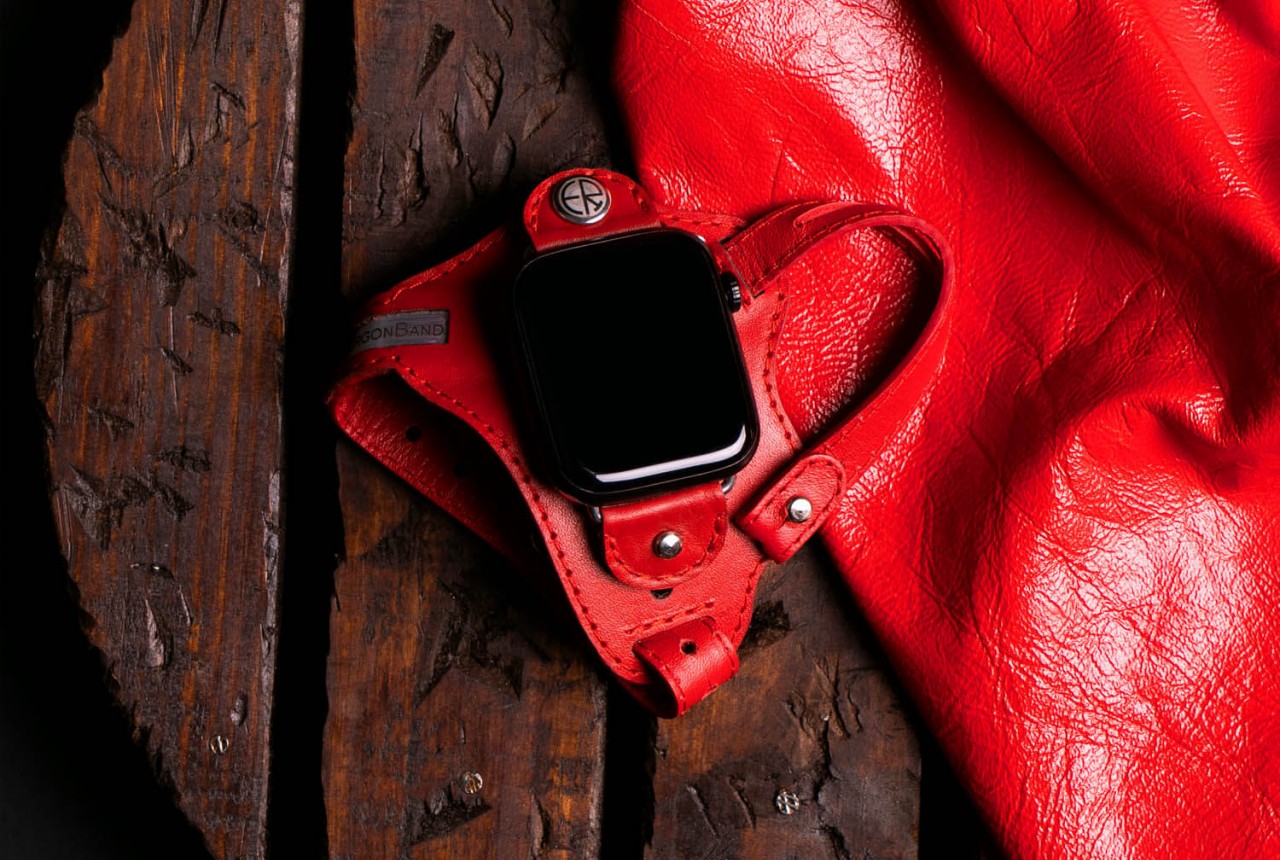
We wear watches on our wrists because that’s been the standard design of wristwatches, hence the name, for decades or even centuries. It’s a more convenient design compared to the classy yet antiquated pocket watches, but that doesn’t exactly mean they’re the best design available. For some people, that design can actually cause some pain in the wrist whenever you have to lift your hand and turn it so that you can see that time. That action is perhaps even worse with smartwatches, considering how often you have to do that to see not just the time but other information and notifications as well. That’s the kind of design flaw that this odd-looking Apple Watch “band” tries to address by simply moving the smartwatch from the back of your wrist to the back of your hand.

Designer: ErgonBand
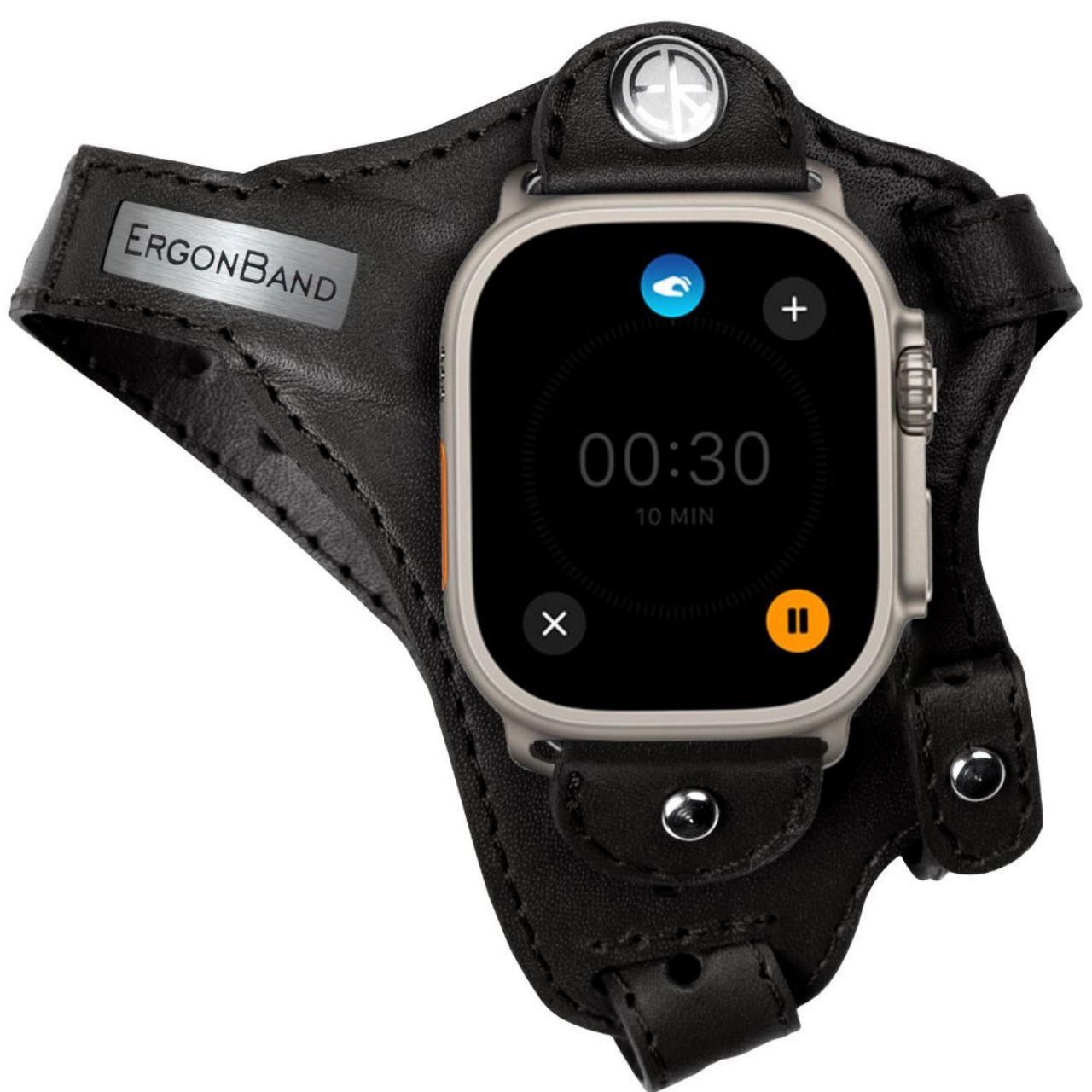
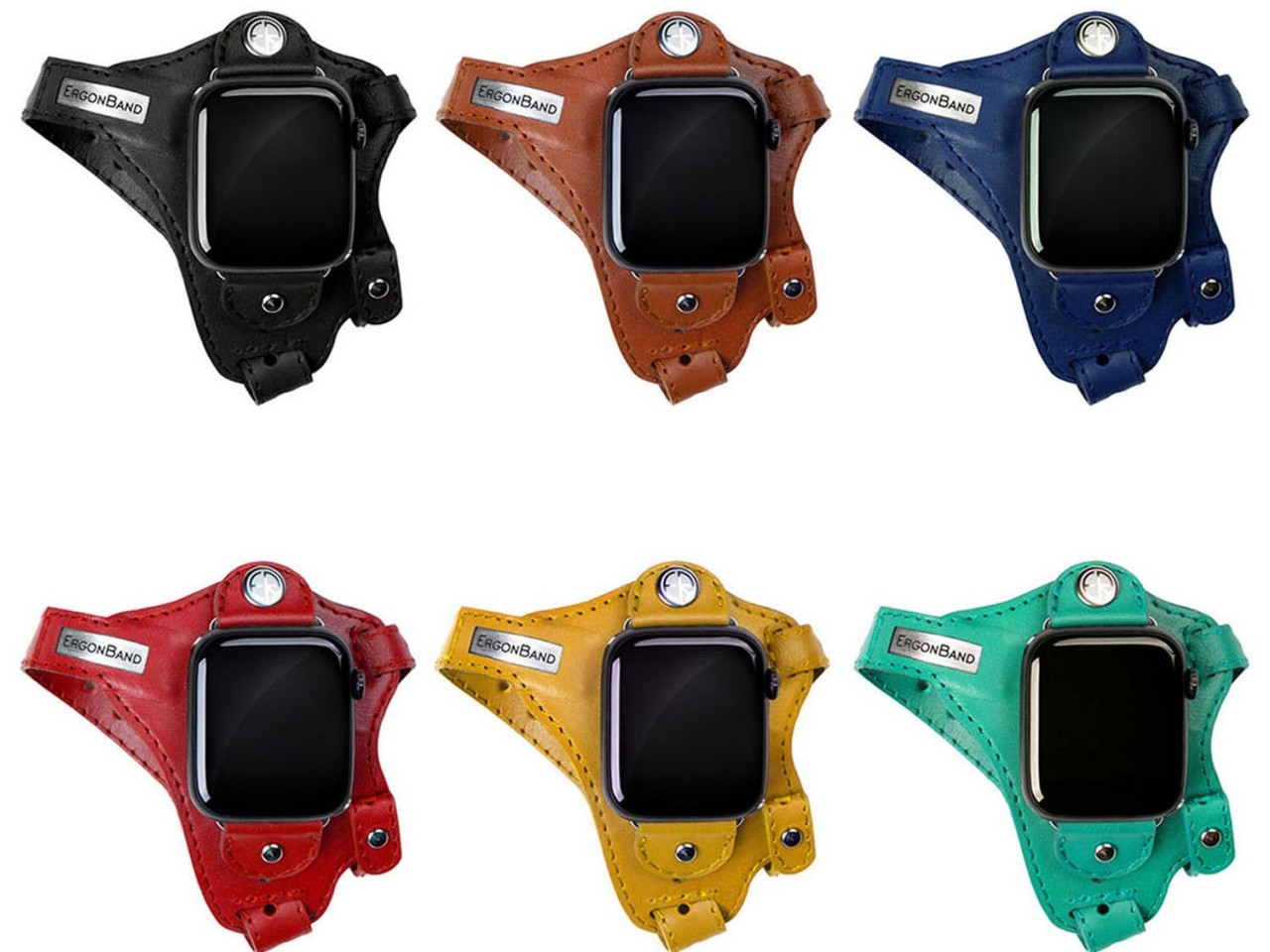
The appearance of this Apple Watch accessory looks a little ridiculous, at least until you hear the reasonable explanation behind its design. The band, which is actually more like a strap, looks like one of those thumb or hand braces that athletes use for protection. The Apple Watch, sans the straps, is locked in place using clips that utilize the standard lugs and is placed below the joint of your thumb.
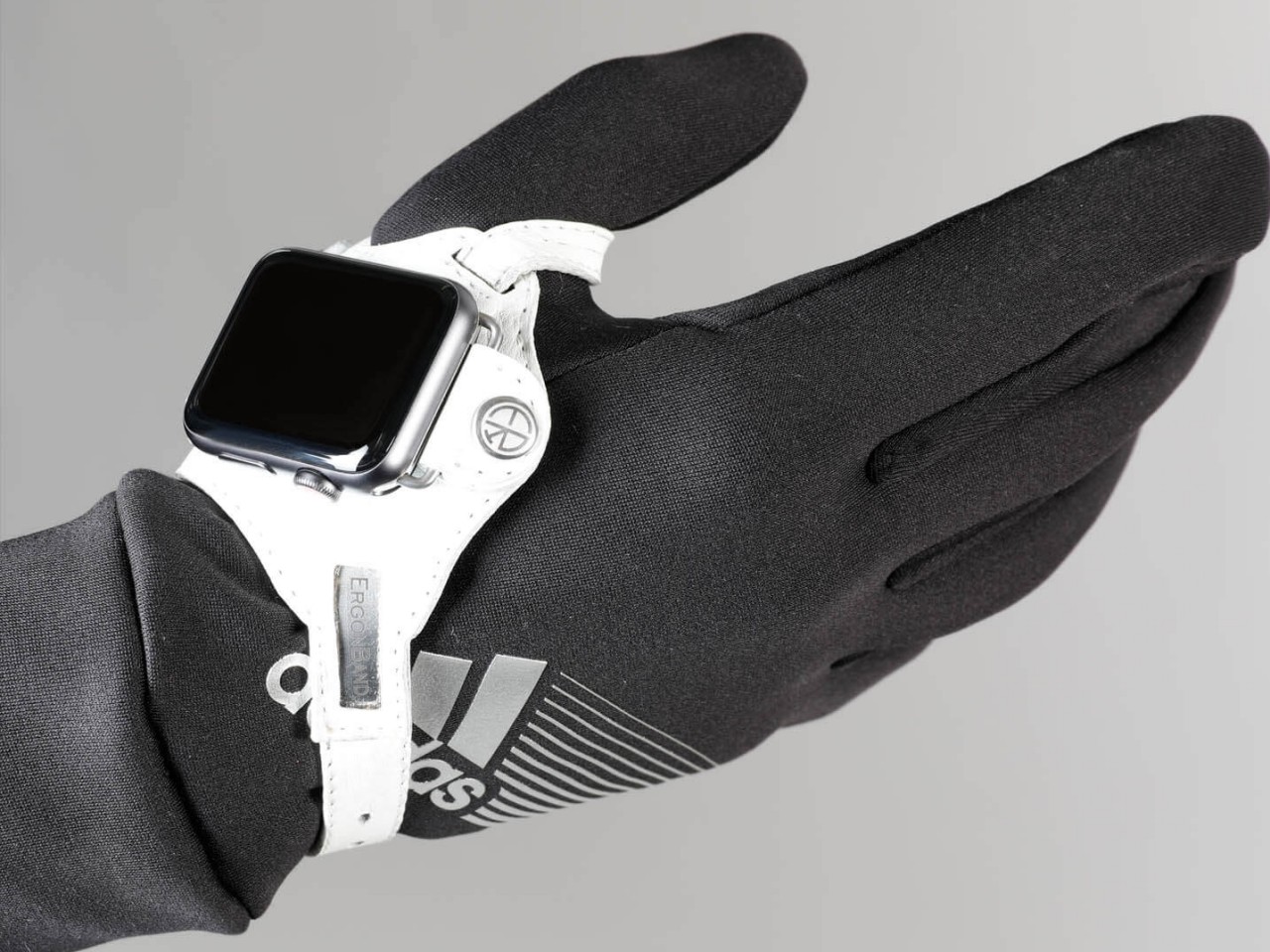
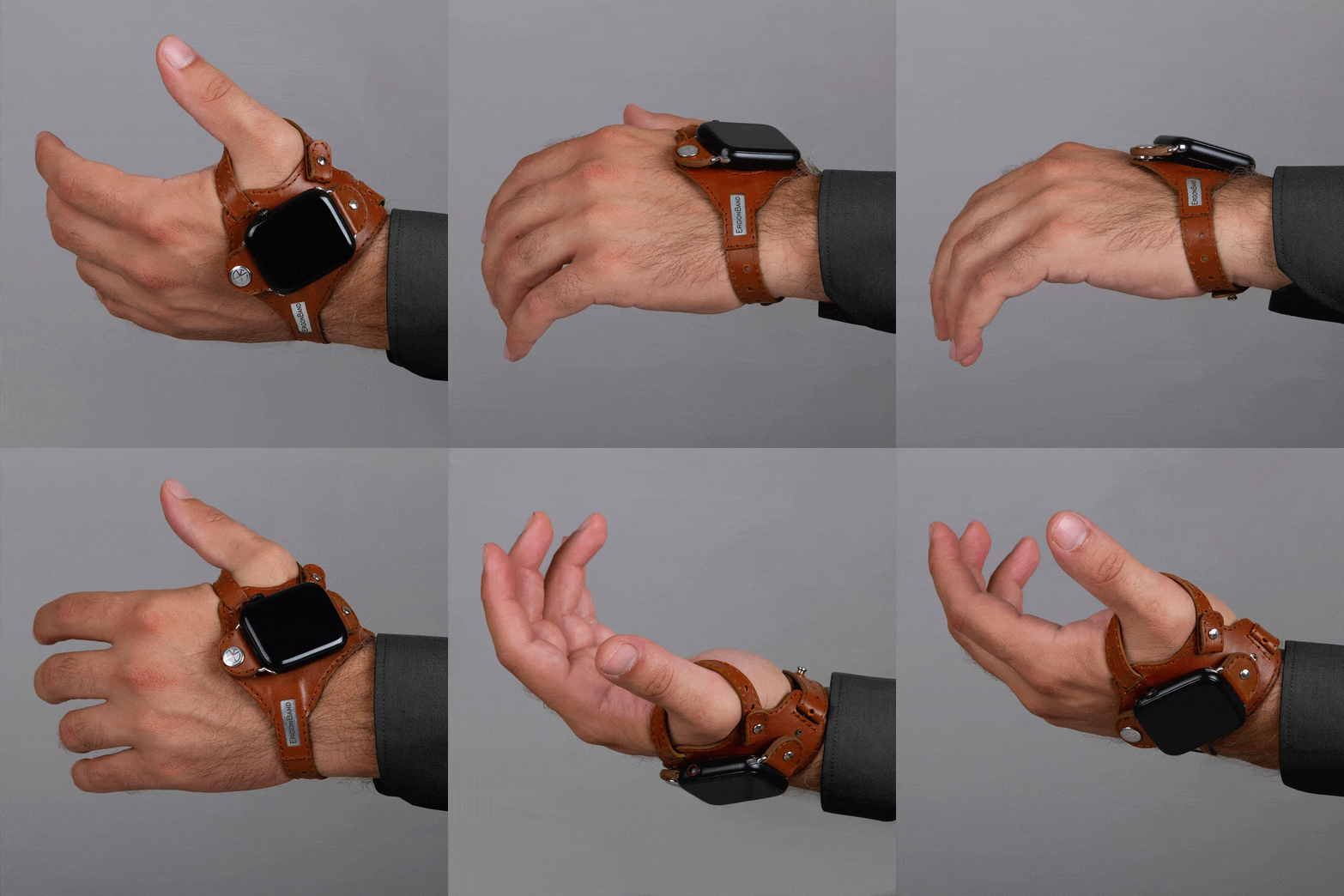
This location isn’t based on a whim but on how it makes the screen almost always visible without having to twist your wrist. At least that will be the case for people who need to see the watch face while holding something or with their hands swinging in front of them, like athletes doing training or people exercising. In fact, this kind of ergonomic design was made exactly for sports uses, though that doesn’t stop it from being used by anyone interested in a different way to wear a smartwatch.
1

While the theory might does sound plausible, there might be a few practical hurdles to such an ergonomic design. For one, waking up the Apple Watch is often done using that twisting gesture, so you’ll have to resort to actually touching the screen or pressing a button to turn on the screen. That defeats the purpose of not requiring your other hand just to glance at information quickly, which ironically makes it a bit less ergonomic in the process.

The other issue is that this kind of band might get in the way of using your hand for other things, especially ones that could make the strap dirty. Most of us are probably unused to wearing such a strap, so there will be some awkwardness and discomfort at the start. The hand-stitched leather material does try to make it a little bit comfortable and stylish, but that might also raise concerns about using it for intense workouts and sports activities. The ErgonBand is admittedly a curious attempt at solving this ergonomic problem, but it might remain just a curiosity rather than a solution that Apple Watch owners can rely on.
The post Ergonomic Apple Watch band puts the smartwatch on the back of your hand first appeared on Yanko Design.
New Jailbreak bypasses AI filtering on ChatGPT-4, Claude, Gemini and LLaMA

how to jailbreak ChatGPT AI

As always when any new operating system or device has been released the tech community is always interested in finding ways to circumvent any security or restrictions put in place by companies looking to restrict access. Recently a novel jailbreaking technique has been developed that challenges the content filtering systems of advanced AI language models, […]

The post New Jailbreak bypasses AI filtering on ChatGPT-4, Claude, Gemini and LLaMA appeared first on Geeky Gadgets.

M3 MacBook Air vs M2 MacBook Air (Video)

M3 MacBook Air vs M2 MacBook Air

When it comes to upgrading your tech arsenal, the MacBook Air series by Apple stands out as a premier choice for professionals and casual users alike. If you’re on the fence about choosing between the M2 and M3 MacBook Air models, you’ll be pleased to know that the latest iteration offers significant improvements that cater […]

The post M3 MacBook Air vs M2 MacBook Air (Video) appeared first on Geeky Gadgets.