Adobe is bringing its generative AI (GAI) tech to mobile for the first time. Firefly GAI features are included in the beta of the new Express app on Android and iOS starting today. They should afford users more expansive creation and editing options while they’re on the go.
Using text prompts, you’ll be able to generate images and insert, remove or replace people, objects and other elements such as backgrounds. Quick Actions enable you to apply edits, remove backgrounds and resize images with a single tap. Video editing tools, a social content scheduler and collaboration options are available too. Creative Cloud subscribers can use the Express mobile app to import and edit designs from Illustrator and Photoshop.
Adobe says Firefly GAI is designed for commercial use. Assets generated using Firefly tools include a label to indicate they were forged in the fires of GAI.
During the beta, Express premium features are available to everyone for free, but they'll eventually be locked behind a $10 per month subscription. The number of users who can access the beta on iOS are limited. Those who are interested can sign up through Adobe. The Android beta of the new Express app is available in most countries on the Google Play Store.
This article originally appeared on Engadget at https://www.engadget.com/adobe-brings-firefly-generative-ai-to-mobile-for-the-first-time-in-express-153323032.html?src=rss
Adobe is bringing its generative AI (GAI) tech to mobile for the first time. Firefly GAI features are included in the beta of the new Express app on Android and iOS starting today. They should afford users more expansive creation and editing options while they’re on the go.
Using text prompts, you’ll be able to generate images and insert, remove or replace people, objects and other elements such as backgrounds. Quick Actions enable you to apply edits, remove backgrounds and resize images with a single tap. Video editing tools, a social content scheduler and collaboration options are available too. Creative Cloud subscribers can use the Express mobile app to import and edit designs from Illustrator and Photoshop.
Adobe says Firefly GAI is designed for commercial use. Assets generated using Firefly tools include a label to indicate they were forged in the fires of GAI.
During the beta, Express premium features are available to everyone for free, but they'll eventually be locked behind a $10 per month subscription. The number of users who can access the beta on iOS are limited. Those who are interested can sign up through Adobe. The Android beta of the new Express app is available in most countries on the Google Play Store.
This article originally appeared on Engadget at https://www.engadget.com/adobe-brings-firefly-generative-ai-to-mobile-for-the-first-time-in-express-153323032.html?src=rss
Do you really like the aesthetic of bowling but have no interest in the game itself? In January, Xbox released the special edition Dream Vapor controller with swirls that look like they've been pulled right from a bowling ball. Now, the Dream Vapor controller — which is a great accessory for the Xbox Series X|S, Xbox One or Windows — is on sale for $58, down from $70. The 17 percent discount puts the model at the lowest price we've seen yet.
Xbox's Dream Vapor controller is — dare we say — beautiful. It has pink and purple accents that swirl together to create a calm, aesthetically pleasing look. Even the buttons are in a light pink with purple accents. The wireless controller works like its counterparts, offering 40 hours of battery life, custom button mapping and a share button.
The Dream Vapor model isn't the only Xbox controller available for a record-low price. If you're looking for a basic new controller, the Robot White Xbox controller is down to $45 from $60 — a 25 percent discount. It's a sleek but fun option with ABXY buttons in a range of bright colors.
This article originally appeared on Engadget at https://www.engadget.com/the-dream-vapor-xbox-wireless-controller-drops-to-a-record-low-of-58-151551431.html?src=rss
Do you really like the aesthetic of bowling but have no interest in the game itself? In January, Xbox released the special edition Dream Vapor controller with swirls that look like they've been pulled right from a bowling ball. Now, the Dream Vapor controller — which is a great accessory for the Xbox Series X|S, Xbox One or Windows — is on sale for $58, down from $70. The 17 percent discount puts the model at the lowest price we've seen yet.
Xbox's Dream Vapor controller is — dare we say — beautiful. It has pink and purple accents that swirl together to create a calm, aesthetically pleasing look. Even the buttons are in a light pink with purple accents. The wireless controller works like its counterparts, offering 40 hours of battery life, custom button mapping and a share button.
The Dream Vapor model isn't the only Xbox controller available for a record-low price. If you're looking for a basic new controller, the Robot White Xbox controller is down to $45 from $60 — a 25 percent discount. It's a sleek but fun option with ABXY buttons in a range of bright colors.
This article originally appeared on Engadget at https://www.engadget.com/the-dream-vapor-xbox-wireless-controller-drops-to-a-record-low-of-58-151551431.html?src=rss
In this article we look at a range of iPhone camera settings that you can change to improve the videos you create. Are you eager to elevate your iPhone videography to the next level? You’ll be pleased to know that mastering a few key camera settings can significantly enhance the quality of your videos, making […]
Xbox Game Pass is rolling out an array of games this March that will keep you on the edge of your seat. Microsoft’s subscription service is expanding its collection, and it’s packed with titles that cater to every kind of player. You can access these games on the cloud, your console, or PC, giving you […]
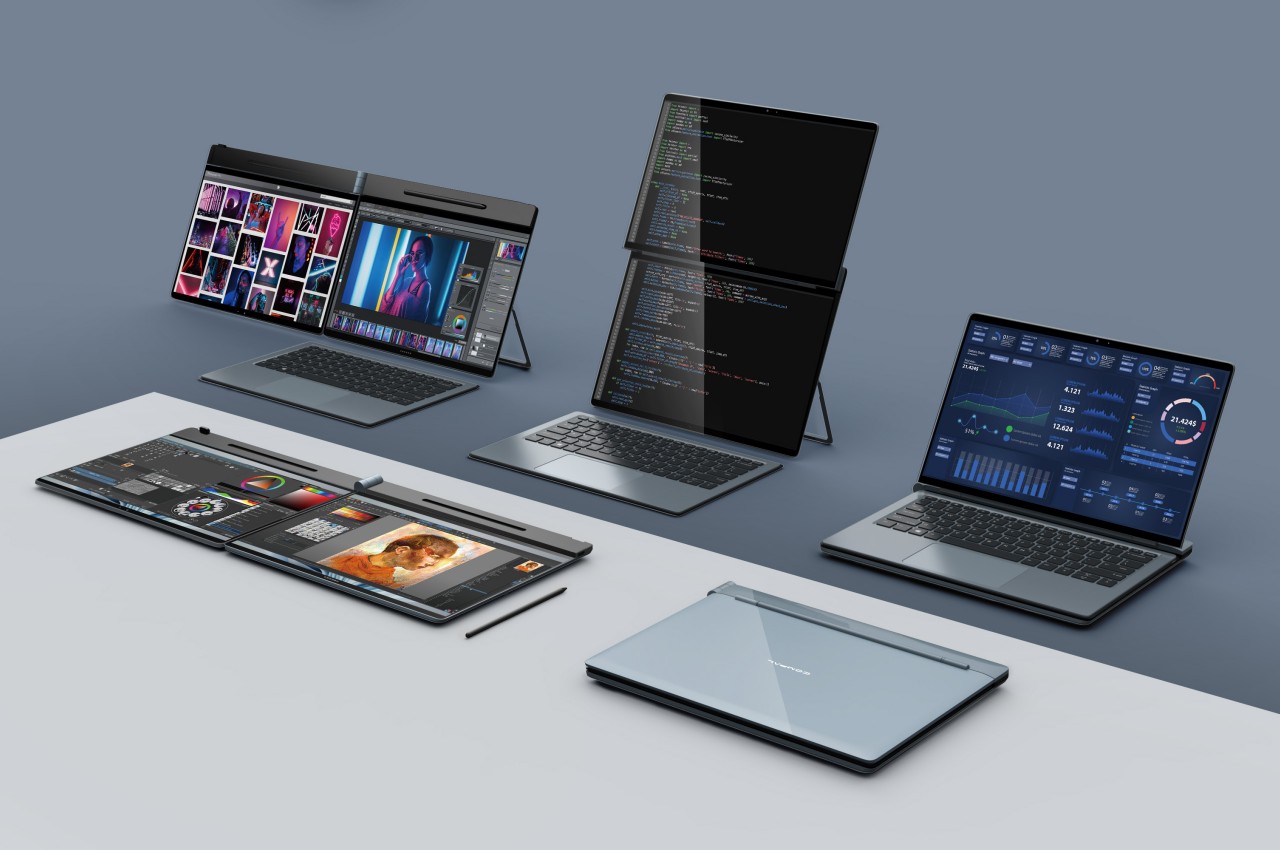
It’s still a very niche design, but it seems that dual-screen laptops are being adopted by major PC makers. Unlike a foldable laptop that mimics a foldable phone, a dual-screen laptop simply offers two separate displays joined by a hinge, sort of like offering a second monitor that’s permanently attached to the laptop. Given this design, however, the only available design was a book-type foldable like the aborted Microsoft Surface Duo, the ASUS ZenBook Pro Duo, and the Lenovo Yoga Book 9i. That, however, only covers about half of the use cases you might have for a dual-screen configuration and lacks the flexibility you’d enjoy with a detached second screen. That’s the kind of design problem that Compal’s concept is trying to solve and it does so in a very intriguing way.
The way dual-screen laptops are designed today is pretty much a product of familiarity rather than innovation. It’s the closest that resembles a regular laptop and is the easiest to implement. Ironically, it’s actually not the way people with two monitors arrange their screens in normal circumstances. Most have two horizontal monitors side by side or one stacked on top of the other. While current dual-screen laptops do support the latter use case, putting the monitors side by side requires having them standing vertically, opened like a book.
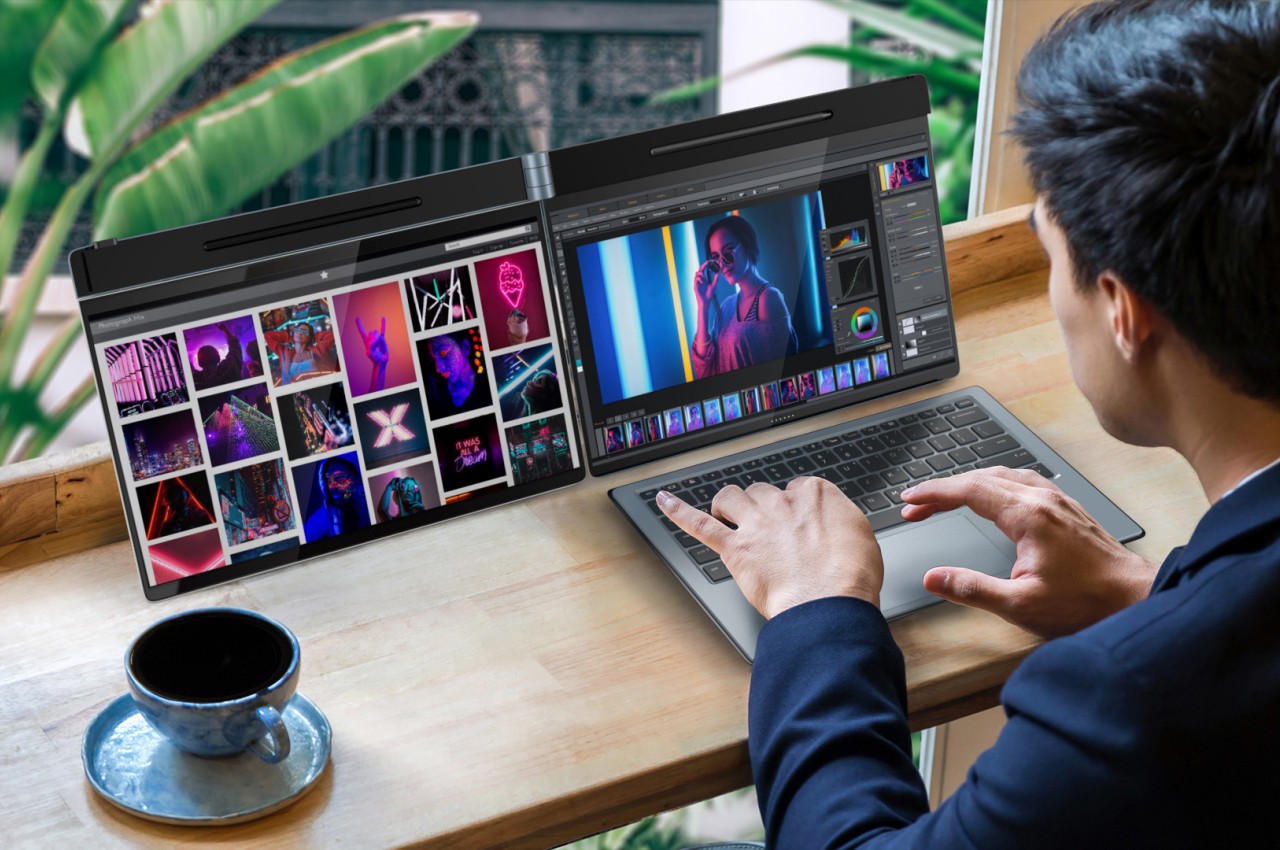
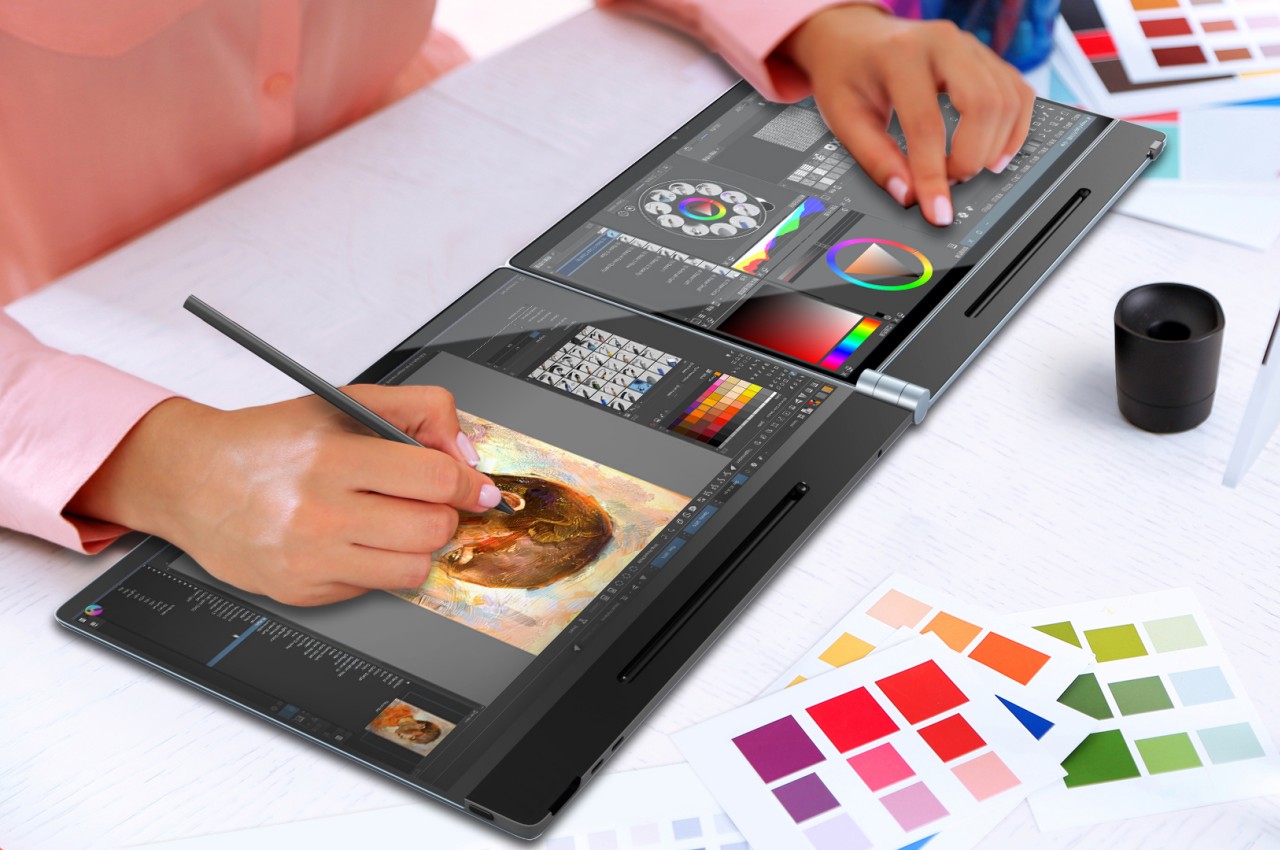
The Compal DualFlip concept flips that design on its head, pardon the pun, by giving the user the freedom to choose the configuration they need or want. They can have it stacked or side-by-side or even in the conventional book style. Or they can have only one screen active with the wireless keyboard sitting on top of the other, turning it into a regular laptop. The key point is that they dictate how they want to use the product rather than the other way around.
This opens the device to even more applications and users who have different needs and working conditions. Those monitoring data will probably appreciate having the monitor on top while those coding and writing might put the screen to the side. The latter is also the configuration that most will use for making digital art. Interestingly, having the screens stacked on top of each other also solves one of the biggest problems with dual-screen laptops and manages to “hide” the hinge and the gap that it creates between the two displays.
The key to this flexible design is the hinge that can fold or flip the screen as needed, hence the name. Of course, it’s still a concept and it’s uncertain if Compal already has working prototypes for this, but it definitely looks doable. If Compal manages to pull it off, it will definitely raise the brand’s profile and put it back on the map. That is unless its bigger rivals figure out another design that also solves that problem and actually puts it into production first.
Makers, designers and hobbyists searching for an automatic hot press may be interested in the QwikPress Enclosed Heat Press Studio. A device designed for safe and precise heat pressing operations, offering a range of features that cater to the needs of users looking to work with various materials and create custom imprints. You need a […]
Lotus has revealed the pricing for its new hyper-GT, the Lotus Emeya in the UKL and Europe. In the UK this new high-performance electric vehicle will cost £94,950 and in Europe, the car will cost €106,400. The car will be available for deliveries in the UK and Europe in Quarter three of 2024 and it […]
It's hard to expect much from Apple's new M3-equipped MacBook Airs. The 13-inch M2 model, released in 2022, was the first major redesign for Apple's most popular notebook in over a decade. Last year, Apple finally gave its fanatics a big-screen ultraportable notebook with the 15-inch MacBook Air. This week, we've got the same two computers with slightly faster chips. They didn't even get a real launch event from Apple, just a sleepy Monday morning press release. They look the same and are a bit faster than before — what else is there to say?
Now, I'm not saying these aren't great computers. It's just that we've been a bit spoiled by Apple's laptops over the last few years. The M3 MacBook Air marks the inevitable innovation plateau for the company, following the monumental rise of its mobile chips and a complete refresh of its laptops and desktops. It's like hitting cruising altitude after the excitement of takeoff — things are stable and comfortable for Apple and consumers alike.
M3 MacBook Air vs the M2 MacBook Air
Even though they look exactly the same as before, the M3 MacBook Air models have a few new features under the hood. For one, they support dual external displays, but only when their lids are closed. That was something even the M3-equipped 14-inch MacBook Pro lacked at launch, but Apple says the feature is coming to that device via a future software update. Having dual screen support is particularly useful for office workers who may need to drop their computers onto temporary desks, but it could also be helpful for creatives with multiple monitors at home. (If you absolutely need to have your laptop display on alongside two or more external monitors, you'll have to opt for a MacBook Pro with an M3 Pro or Max chip instead.)
Both new MacBook Air models also support Wi-Fi 6E, an upgrade over the previous Wi-Fi 6 standard with faster speeds and dramatically lower latency. You'll need a Wi-Fi 6E router to actually see those benefits, though. According to Intel, Wi-Fi 6E's ability to tap into seven 160MHz channels helps it avoid congested Wi-Fi 6 spectrum. Basically, you may actually be able to see gigabit speeds more often. (With my AT&T gigabit fiber connection and Wi-Fi 6 gateway, I saw download speeds of around 350 Mbps and uploads ran between 220 Mbps and 320 Mbps on both systems from my basement office. Both upload and download speeds leapt to 700 Mbps when I was on the same floor as the gateway.)
Photo by Devindra Hardawar/Engadget
Design and weight
Two years after the 13-inch M2 MacBook Air debuted, the M3 follow-up is just as sleek and attractive. It seems impossibly thin for a notebook, measuring 0.44 inches thick, and is fairly light at 2.7 pounds. We've seen ultraportables like LG's Gram and the ZenBook S13 OLED that are both lighter and thinner than Apple's hardware, but the MacBook Air still manages to feel like a more premium package. Its unibody aluminum case feels as smooth a river stone yet as sturdy as a boulder. It's a computer I simply love to touch.
Photo by Devindra Hardawar/Engadget
The 15-inch M3 MacBook Air is similarly thin, but clocks in half a pound heavier at 3.2 pounds. It's still relatively light for its size, but the additional bulk makes it feel more unwieldy than the 13-inch model. I can easily slip either MacBook Air model into a tote bag when running out to grab my kids from school, but the larger model’s length makes it more annoying to carry.
For some users, though, that extra heft will be worth it. The bigger MacBook Air sports a 15.3-inch Liquid Retina screen with a sharp 2,880 by 1,864 (224 pixels per inch) resolution, making it better suited for multitasking with multiple windows or working in media editing apps. It's also a better fit for older or visually impaired users, who may have to scale up their displays to make them more readable. (This is something I've noticed while shopping for computers for my parents and other older relatives. 13-inch laptops inevitably become hard to work on, unless you're always wearing bifocals.)
While I'm impressed that Apple finally has a large, consumer-focused laptop in its lineup, I still prefer the 13-inch MacBook Air. I spend most of my day writing, Slacking with colleagues, editing photos and talking with companies over video conferencing apps, all of which are easy to do on a smaller screen. If I was directly editing more episodes of the Engadget Podcast, or chopping up video on my own, though, I'd bump up to the 14-inch MacBook Pro with an M3 Pro chip. Even then, I wouldn't have much need for a significantly larger screen.
A lonely headphone jack that could use a USB-C companion.
Photo by Devindra Hardawar/Engadget
It's understandable why Apple wouldn't want to tweak the Air's design too much, given that it was just redone a few years ago. Still, I'd love to see a USB-C port on the right side of the machine, just to make charging easier in every location. But I suppose I should just be happy Apple hasn't removed the headphone jack, something that's happening all too frequently in new 13-inch notebooks, like the XPS 13.
Hardware
For our testing, Apple sent the "midnight" 13-inch MacBook Air (which is almost jet black and features a fingerprint-resistant coating that actually works), as well as the silver 15-inch model. Both computers were powered by an M3 chip with a 10-core GPU, 16GB of RAM and a 512GB SSD. While these MacBooks start at $1,099 and $1,299, respectively, the configurations we tested cost $400 more. Keep that in mind if you're paying attention to our benchmarks, as you'll definitely see lower figures on the base models. (The cheapest 13-inch offering only has 8GB of RAM, a 256GB SSD and an 8-core GPU, while the entry-level 15-inch unit has the same RAM and storage, along with a 10-core GPU.)
Geekbench 6 CPU
Geekbench 6 GPU
Cinebench R23
3DMark Wildlife Extreme
Apple MacBook Air 13-inch (M3, 2024)
3,190/12,102
30,561
1,894/9,037
8,310
Apple MacBook Air 15-inch (M3, 2024)
3,187/12,033
30,556
1,901/9,733
8,253
Apple MacBook Air 13-inch (M2, 2022)
2,570/9,650
25,295
1,576/7,372
6,761
Apple MacBook Pro 14-inch (M3, 2023)
3,142/11,902
30,462
1,932/10,159
8,139
M3 chip performance
I didn't expect to see a huge performance boost on either MacBook Air, but our benchmarks ended up surprising me. Both laptops scored around 300 points higher in the Cinebench R23 single-core test, compared to the M2 MacBook Air. And when it came to the more strenuous multi-core CPU test, the 13-inch M3 Air was around 1,700 points faster, while the 15-inch model was around 2,400 points faster. (Since both machines are fan-less, there's a good chance the larger case of the 15-inch Air allows for slightly better performance under load.)
There was a more noticeable difference in Geekbench 6, where the M3 models were around 40 percent faster than before. Apple is touting more middling improvements over the M2 chips — 17 percent faster single-core performance, 21 percent speedier multi-core workloads and 15 percent better GPU workloads — but it's nice to see areas where performance is even better. Really, though, these aren't machines meant to replace M2 systems — the better comparisons are how they measure up to nearly four-year-old M1 Macs or even creakier Intel models. Apple claims the M3 chip is up to 60 percent faster than the M1, but in my testing I saw just a 35 percent speed bump in Cinebench's R23 multi-core test.
When it comes to real-world performance, I didn't notice a huge difference between either M3-equipped MacBook Air, compared to the M2 model I've been using for the past few years. Apps load just as quickly, multitasking isn't noticeably faster (thank goodness they have 16GB of RAM), and even photo editing isn't significantly speedier. This is a good time to point out that the M2 MacBook Air is still a fine machine, and it's an even better deal now thanks to a lower $999 starting price. As we've said, the best thing about the existence of the M3 Airs is that they've made the M2 models cheaper. You'll surely find some good deals from stores clearing out older stock and refurbished units, as well as existing owners selling off their M2 machines.
Gaming and productivity work
I'll give the M3 MacBook Airs this: they're noticeably faster for gaming. I was able to run Lies of P in 1080p+ (1,920 by 1,200) with high graphics settings and see a smooth 60fps most of the time. It occasionally dipped into the low-50fps range, but that didn't affect the game's playability much. The director's cut of Death Stranding was also smooth and easy to play at that resolution, so long as I didn't crank up the graphics settings too much. It's nice to have the option for some serious games on Macs for once. And if you want more variety, you can also stream high-end games over Xbox's cloud streaming or NVIDIA's GeForce Now.
In addition to being a bit faster than before, the 13-inch and 15-inch MacBook Airs are simply nice computers to use. Their 500-nit screens support HDR and are bright to use outdoors in sunlight. While they're not as impressive as the ProMotion MiniLED displays on the MacBook Pros, they'll get the job done for most users. Apple's quad and six-speaker arrays are also best-in-class, and the 1080p webcams on both computers are perfect for video conferencing (especially when paired with Apple's camera tweaks for brightness and background blurring). And I can’t say enough good things about the MacBook Air’s responsive keyboard and smooth trackpad – I wish every laptop used them.
Photo by Devindra Hardawar/Engadget
Battery
Unfortunately, the short turn-around time for this review prevented me from running a complete battery test for these computers. At the moment, though, I can say that both machines only used up 40 percent of battery life while playing a 4K fullscreen video at full brightness for over 10 hours. Apple claims they'll play an Apple TV video for up to 18 hours, as well as browse the web wirelessly for up to 15 hours. My testing shows they'll definitely last far more than a typical workday. (I would often go three days without needing to charge the 13-inch M2 MacBook Air. Based on what I've seen so far, I expect similar performance from the M3 models.)
Photo by Devindra Hardawar/Engadget
Wrap-up
There aren’t any major surprises with the 13-inch and 15-inch M3 MacBook Air, but after years of continual upgrades, that’s to be expected. They’re great computers with excellent performance, gorgeous screens and incredible battery life. And best of all, their introduction also pushes down the prices of the still-great M2 models, making them an even better deal.
This article originally appeared on Engadget at https://www.engadget.com/macbook-air-m3-review-2024-13-15-inch-140053162.html?src=rss