Prime members can save up to 50 percent on Blink Outdoor 4 security cameras

Prime members can access a bunch of perks for their monthly subscription fee, from the likes of Prime Video and ad-free Amazon Music to delivery and games at no extra cost. They’re also eligible for discounts on certain products, such as Blink security cameras. A five-pack of Blink Outdoor 4 cameras has dropped by half to $200. That’s the lowest price we’ve seen for this particular bundle.

If you’re in the market for a single security camera, it’s worth noting that you can buy one Blink Outdoor 4 unit for $65 if you’re a Prime member. That’s 46 percent off and also a record low.

The Blink Outdoor 4 is our pick for the best wireless outdoor security camera. Compared with previous models, it has a wider field of view (at 143 degrees on the diagonal), enhanced motion detection and, according to Amazon, better image quality and low light functionality. There's also person detection available to those who take out the Blink Subscription Plan, which includes features such as cloud storage for video clips. Otherwise, you can save video locally by buying a Sync Module 2 separately and connecting a USB storage drive.

Despite the product's name, the Blink Outdoor 4 is suitable for indoor use too. It runs on a pair of AA batteries and the cells will last for up to two years before you need to replace them. The cameras are also weather resistant and support night vision, motion detection and two-way audio. It's worth bearing in mind that the only voice assistant Blink supports is Alexa, which makes sense since Amazon owns the brand.

Follow @EngadgetDeals on Twitter and subscribe to the Engadget Deals newsletter for the latest tech deals and buying advice.

This article originally appeared on Engadget at https://www.engadget.com/prime-members-can-save-up-to-50-percent-on-blink-outdoor-4-security-cameras-151735553.html?src=rss


Prime members can save up to 50 percent on Blink Outdoor 4 security cameras

Prime members can access a bunch of perks for their monthly subscription fee, from the likes of Prime Video and ad-free Amazon Music to delivery and games at no extra cost. They’re also eligible for discounts on certain products, such as Blink security cameras. A five-pack of Blink Outdoor 4 cameras has dropped by half to $200. That’s the lowest price we’ve seen for this particular bundle.

If you’re in the market for a single security camera, it’s worth noting that you can buy one Blink Outdoor 4 unit for $65 if you’re a Prime member. That’s 46 percent off and also a record low.

The Blink Outdoor 4 is our pick for the best wireless outdoor security camera. Compared with previous models, it has a wider field of view (at 143 degrees on the diagonal), enhanced motion detection and, according to Amazon, better image quality and low light functionality. There's also person detection available to those who take out the Blink Subscription Plan, which includes features such as cloud storage for video clips. Otherwise, you can save video locally by buying a Sync Module 2 separately and connecting a USB storage drive.

Despite the product's name, the Blink Outdoor 4 is suitable for indoor use too. It runs on a pair of AA batteries and the cells will last for up to two years before you need to replace them. The cameras are also weather resistant and support night vision, motion detection and two-way audio. It's worth bearing in mind that the only voice assistant Blink supports is Alexa, which makes sense since Amazon owns the brand.

Follow @EngadgetDeals on Twitter and subscribe to the Engadget Deals newsletter for the latest tech deals and buying advice.

This article originally appeared on Engadget at https://www.engadget.com/prime-members-can-save-up-to-50-percent-on-blink-outdoor-4-security-cameras-151735553.html?src=rss
Awesome Apple Watch Apps You Should Try Out

Apple Watch Apps

In the ever-evolving world of technology, the Apple Watch has emerged as a quintessential gadget for many, offering not just a sleek design but also a suite of features that enhance daily life. If you’re looking to maximize the utility of your Apple Watch, you’ll be pleased to know that there’s a plethora of apps […]

The post Awesome Apple Watch Apps You Should Try Out appeared first on Geeky Gadgets.

Zyxel WiFi 7 Triple-Radio NebulaFlex Access Point

The NWA130BE by Zyxel is a cutting-edge WiFi 7 access point crafted to cater to the specific needs and financial considerations of small to medium-sized businesses like yours. This device isn’t just an upgrade; it’s a leap forward in how your company connects and operates. The NWA130BE boasts a tri-band architecture that delivers speeds up […]

The post Zyxel WiFi 7 Triple-Radio NebulaFlex Access Point appeared first on Geeky Gadgets.

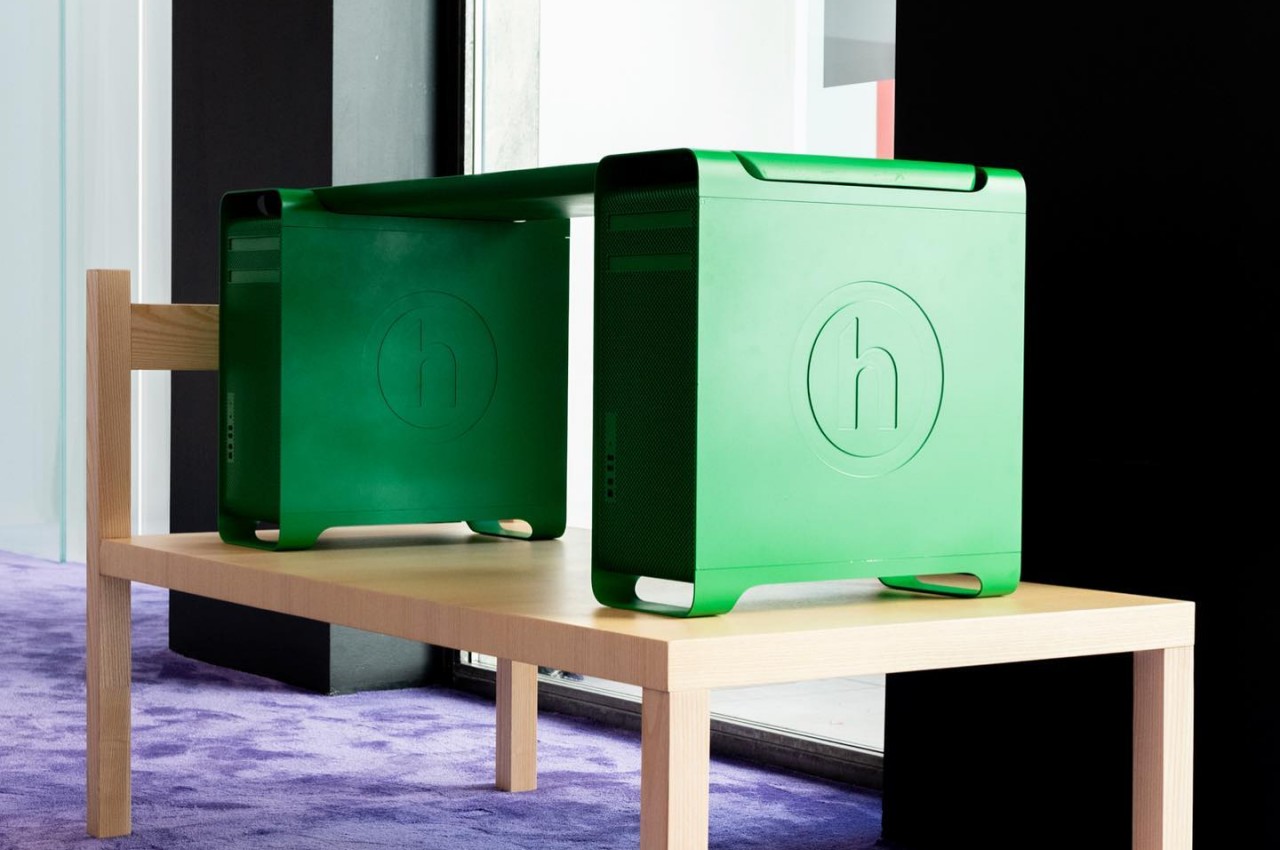
This aluminum bench stands on the shoulders of discarded Mac Pro cases

Apple is not a big fan of reusing its products for something else, at least something that is still close to the original function of the design. It probably won’t object to completely unrelated applications of those designs, especially when it’s for a creative and artistic purpose. The non-functional parts of an iPhone, for example, could be disassembled and framed to be displayed as a piece of tech history. Or one might simply take the empty shells of old Mac Pro and turn them into a piece of structural art, which is exactly what this rather striking metal bench tries to accomplish in a way that will probably make you wonder how strong those old Apple desktops might have been.

Designers: Quinner Baird, Alec Alborg, Ferb Liebana, Berit Levy, Jaime Uriarte (Caliper)

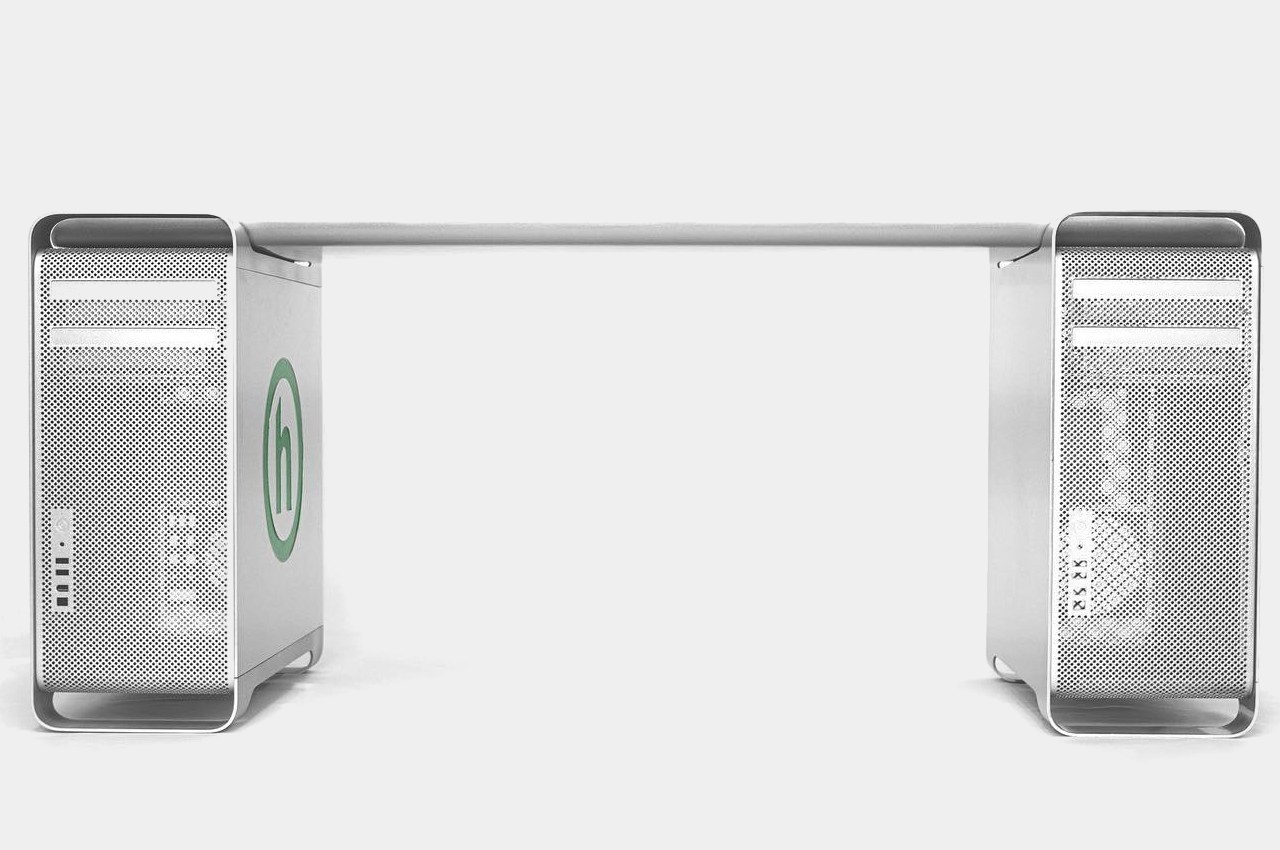
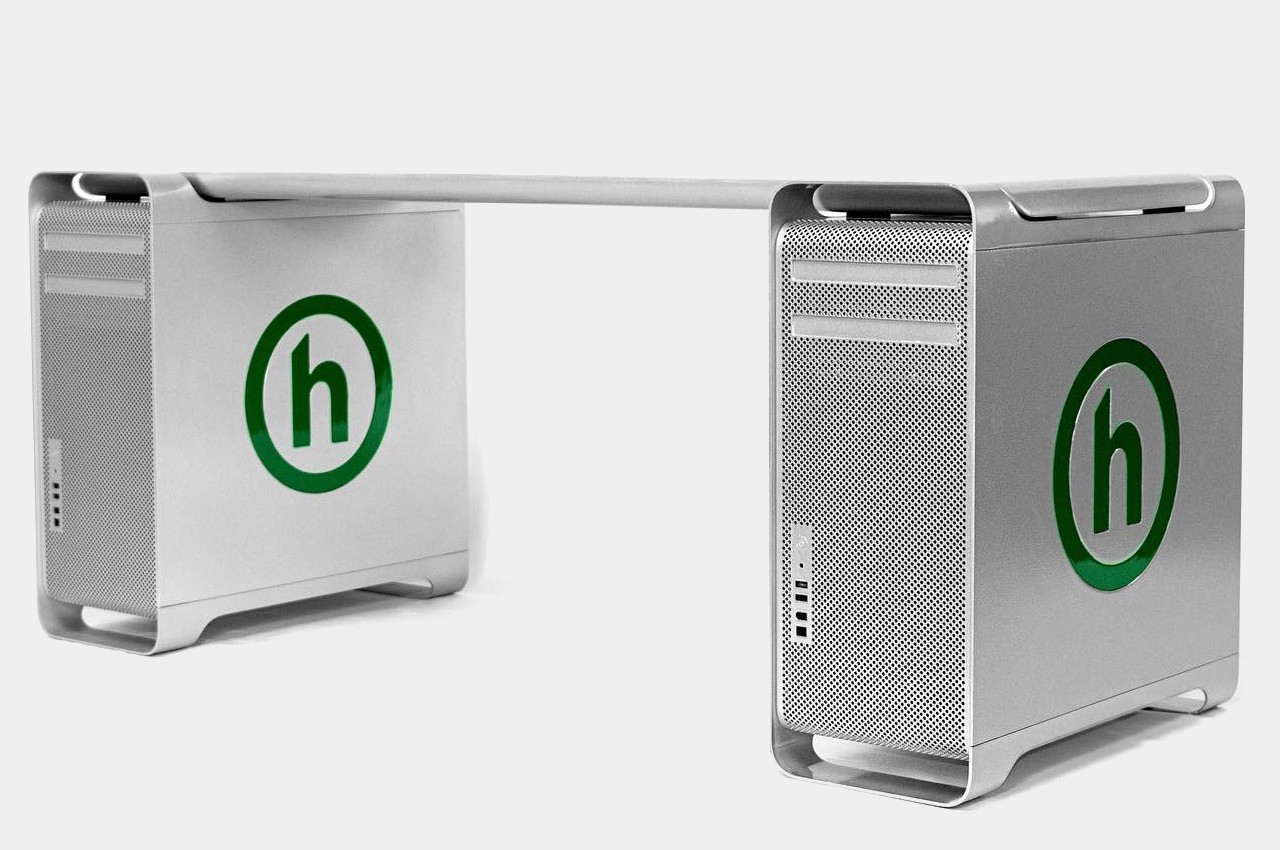
The designs for more recent Mac Pros have been rather controversial, to say the least. The cylindrical 2013 was derided for looking like a trash can, while the boxy 2019 design, though a bit more traditional, is jokingly called a cheese grater. Neither are good foundations for a stable piece of furniture, but the first-ever Mac Pro fortunately fits the bill perfectly. It was a minimalist brushed aluminum box with tapered legs on the front and back to raise it up and equally tapered handles on those same sides for easier lifting.

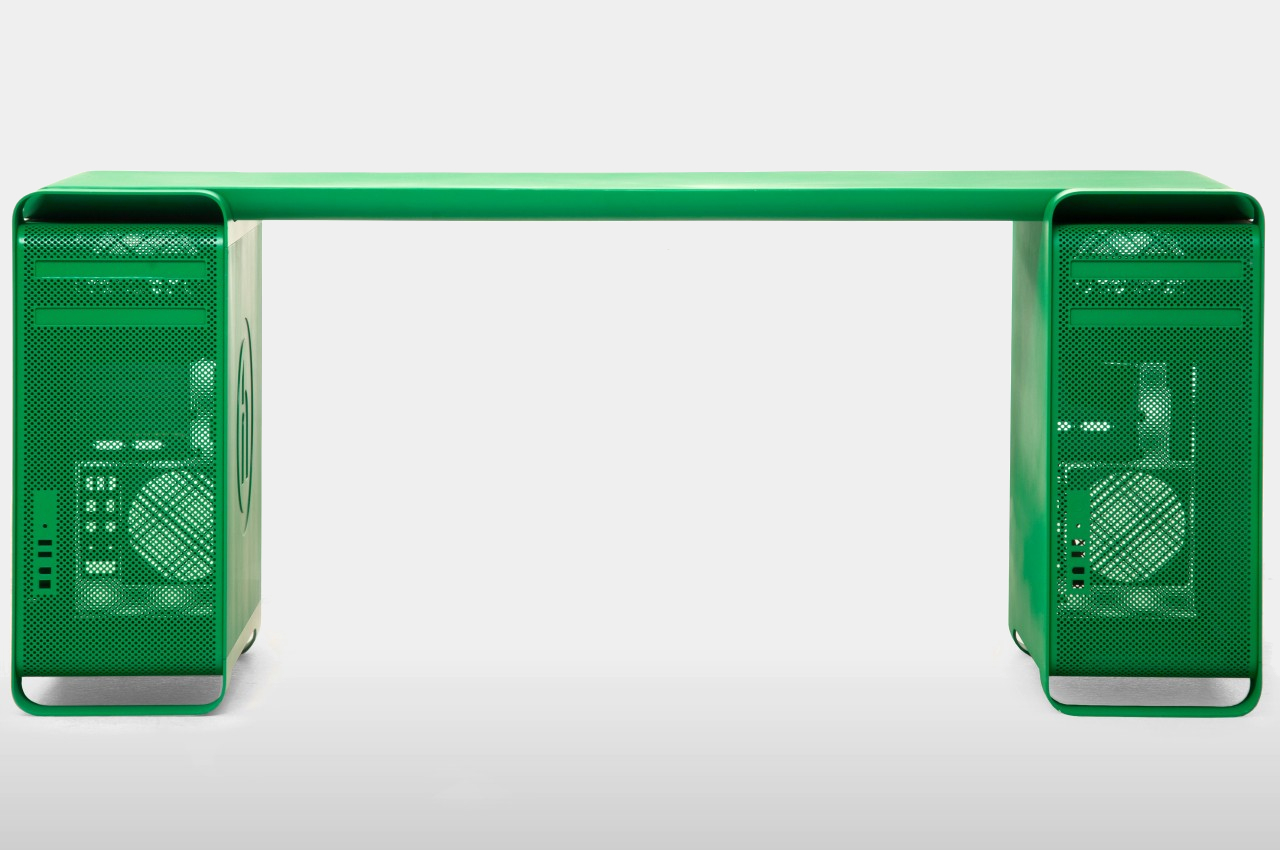
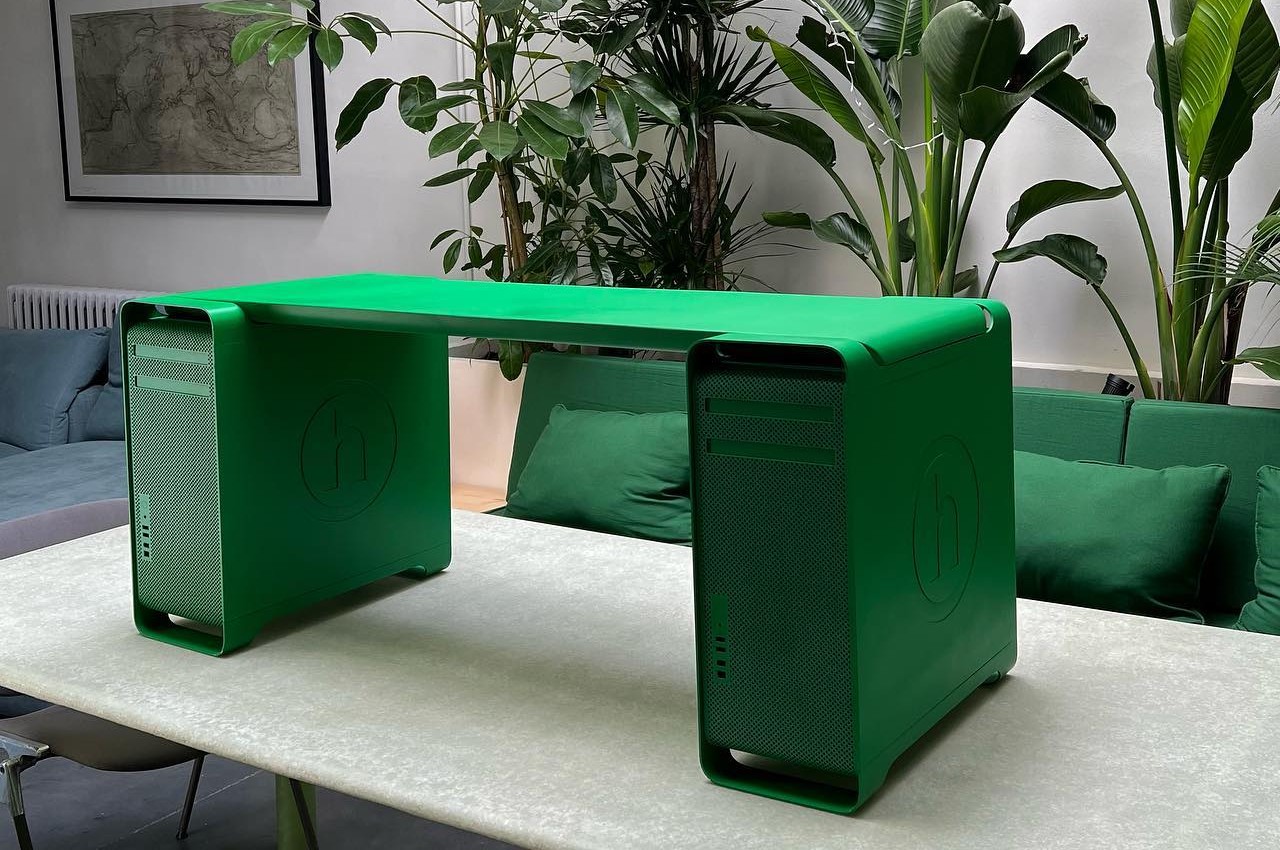
Made for Manhattan clothing brand Hidden as part of store display, the Mac Pro Bench is exactly what it sounds like. It takes two first-gen Mac Pros, totally gutted of any and all electronic components, and has a folded aluminum plank attached on top. The plan has a tapered shape that fits perfectly between the front and back handles, making it feel as if the desktops were made for this very purpose. Two versions of the bench exist, one preserving the brushed aluminum aesthetic of the Mac Pro, and another thoroughly coated in Hidden’s green motif.

It’s not being sold en masse, which will probably keep Apple’s lawyers happy, though there are also ways to make your own. That said, it’s probably not a good idea outside of making it a decorative piece. It’s actually not tested how much weight the Mac Pros will be able to handle, especially with a bench meant to sit more than one person. The hollow legs of the desktop don’t look reassuring either, and it might have been more practical to have sawed those off, even if it meant ruining the original Mac Pro shape.

That said, it’s possible to reinforce the foundations of the Mac Pro Bench to make it a more usable piece of furniture. More importantly, however, the piece of art could also spark the imagination and creativity of others to make similar designs that reuse discarded desktop PCs in a less conventional and more interesting manner.

The post This aluminum bench stands on the shoulders of discarded Mac Pro cases first appeared on Yanko Design.

Vera Ring wearable health and fitness monitor from $249

Vera Ring health monitor worn on your finger

Vera is a ring that does more than just sparkle. Picture a sleek, stylish accessory that doubles as a personal health advisor, quietly working around the clock to keep you informed about your body’s well-being. This is the Vera Ring, a cutting-edge health monitoring device designed to fit seamlessly into your life, offering valuable insights […]

The post Vera Ring wearable health and fitness monitor from $249 appeared first on Geeky Gadgets.

New top model Porsche Taycan coming 11th of March

Porsche Taycan

The 2024 Porsche Taycan was made official last month and now Porsche is getting ready to add a new model to the range, this will be the top model in the Taycan range and it will be unveiled at a press event on the 11th of March. Porsche will be holding a press event on […]

The post New top model Porsche Taycan coming 11th of March appeared first on Geeky Gadgets.

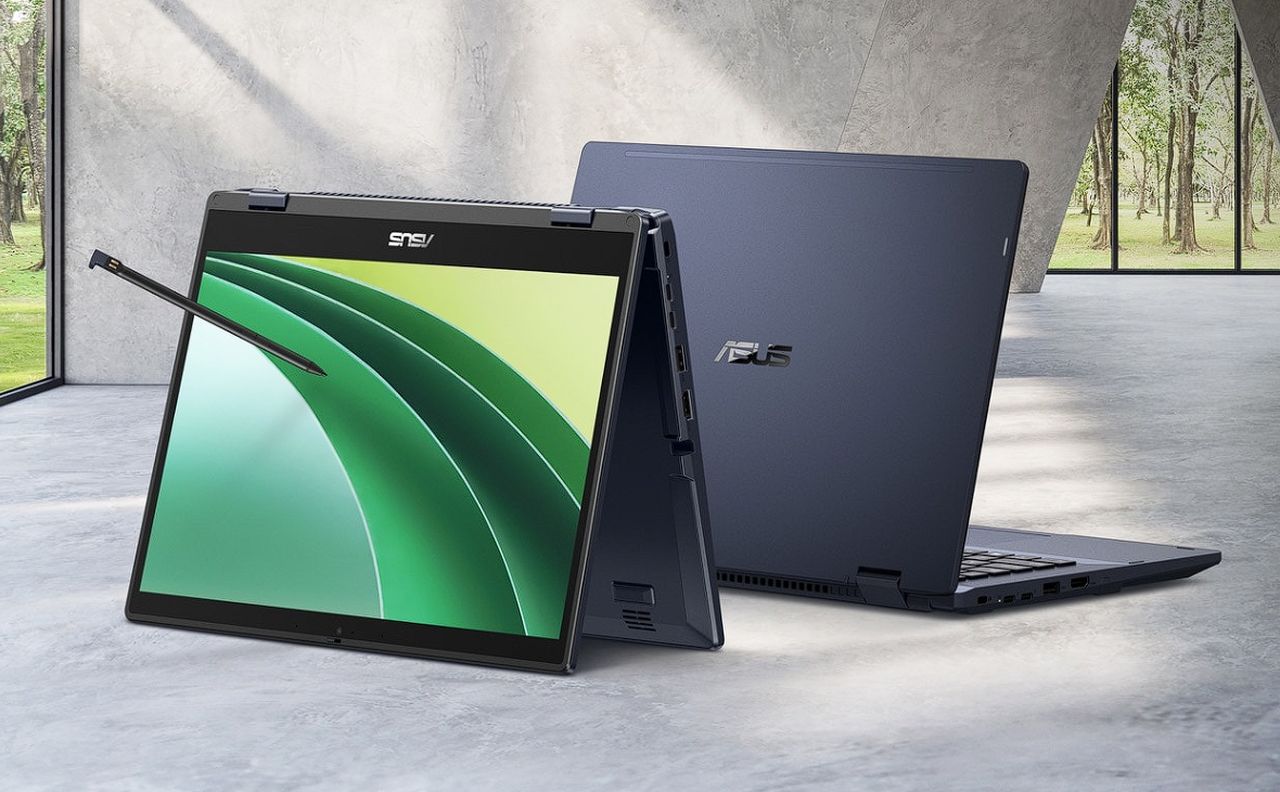
New ASUS ExpertBook B3 Flip convertible laptop launches

ASUS has launched a new convertible laptop, the ExpertBook B3 Flip, designed to meet the diverse needs of today’s professionals and students. This innovative device features a 360-degree hinge that allows it to function as a laptop, tablet, or tent, providing users with the flexibility to adapt to various work and learning environments. At the […]

The post New ASUS ExpertBook B3 Flip convertible laptop launches appeared first on Geeky Gadgets.

How to order the Apple MacBook Air with M3

After a few weeks of rumors, Apple announced the newest entries to its MacBook lineup today: 13-inch and 15-inch MacBook Air models, both powered by the M3 chipset. As anticipated, the M3 addition is the biggest change for these notebooks, bringing them in line with the latest MacBook Pros and 24-inch iMac, which were all updated at the end of 2023 to run on Apple's latest silicon. You can order both new MacBook Air laptops today from Apple's website and other retailers starting at $1,099, and they will be available in stores on March 8. With these new machines, Apple has removed the M1-powered Air from its online store and the MacBook Air M2's starting price has dropped to $999.

Apple states that the M3 MacBook Airs will be up to 60 percent faster than the M1-powered laptop and up to 13x faster than old-school Airs running on Intel chips. Speed and efficiency are the big takeaways here, because otherwise the MacBook Air specs haven't changed much. The new 13-inch and 15-inch notebooks have octa-core CPUs and support up to a 10-core GPU, along with up to 24GB of RAM and up to 2TB of internal storage. Notably, the base 13-inch MacBook Air M3 has the same starting specs of the M2 model that came before it: 8GB of RAM and 256GB of storage. Display specs remain the same across the board as well: both new models include a Liquid Retina panel with a 2,560 x 1,664 resolution and up to 500 nits of brightness.

The only other noteworthy additions on the M3-powered MacBook Airs are the added support for Wi-Fi 6E (the M2 Air supports just standard Wi-Fi 6) and up to two external displays (with the lid closed). The latter should be particularly useful for multitaskers and anyone using the new Air as a daily driver and wants to use more than one external display in their desk setup.

Color options have carried over from the M2 version as well: the 13-inch and 15-inch MacBook Air with M3 are available in midnight, space gray, starlight and silver. Although it appears Apple's now billing the M2 Air as its "budget" option in the lineup, the M1 machine remains on sale (at the moment) at other retailers like Amazon when you can pick it up for as low as $750.

This article originally appeared on Engadget at https://www.engadget.com/how-to-order-the-apple-macbook-air-with-m3-135057630.html?src=rss

How to order the Apple MacBook Air with M3

After a few weeks of rumors, Apple announced the newest entries to its MacBook lineup today: 13-inch and 15-inch MacBook Air models, both powered by the M3 chipset. As anticipated, the M3 addition is the biggest change for these notebooks, bringing them in line with the latest MacBook Pros and 24-inch iMac, which were all updated at the end of 2023 to run on Apple's latest silicon. You can order both new MacBook Air laptops today from Apple's website and other retailers starting at $1,099, and they will be available in stores on March 8. With these new machines, Apple has removed the M1-powered Air from its online store and the MacBook Air M2's starting price has dropped to $999.

Apple states that the M3 MacBook Airs will be up to 60 percent faster than the M1-powered laptop and up to 13x faster than old-school Airs running on Intel chips. Speed and efficiency are the big takeaways here, because otherwise the MacBook Air specs haven't changed much. The new 13-inch and 15-inch notebooks have octa-core CPUs and support up to a 10-core GPU, along with up to 24GB of RAM and up to 2TB of internal storage. Notably, the base 13-inch MacBook Air M3 has the same starting specs of the M2 model that came before it: 8GB of RAM and 256GB of storage. Display specs remain the same across the board as well: both new models include a Liquid Retina panel with a 2,560 x 1,664 resolution and up to 500 nits of brightness.

The only other noteworthy additions on the M3-powered MacBook Airs are the added support for Wi-Fi 6E (the M2 Air supports just standard Wi-Fi 6) and up to two external displays (with the lid closed). The latter should be particularly useful for multitaskers and anyone using the new Air as a daily driver and wants to use more than one external display in their desk setup.

Color options have carried over from the M2 version as well: the 13-inch and 15-inch MacBook Air with M3 are available in midnight, space gray, starlight and silver. Although it appears Apple's now billing the M2 Air as its "budget" option in the lineup, the M1 machine remains on sale (at the moment) at other retailers like Amazon when you can pick it up for as low as $750.

This article originally appeared on Engadget at https://www.engadget.com/how-to-order-the-apple-macbook-air-with-m3-135057630.html?src=rss