New Bentley Flying Spur Has 782 PS, 0 to 60 in 3.3 Seconds

Bentley Flying Spur

The automotive world is abuzz with the arrival of the fourth-generation Bentley Flying Spur, a luxury sedan that pushes the boundaries of performance and refinement. This latest iteration of the Flying Spur features an all-new 782 PS, 1000 Nm ‘Ultra Performance Hybrid’ powertrain, which seamlessly combines a high-performance V8 engine with an efficient electric motor. […]

The post New Bentley Flying Spur Has 782 PS, 0 to 60 in 3.3 Seconds appeared first on Geeky Gadgets.

Apple needs to remember what the iPhone 16 is for

There’s a meme that comes around when people are urged to see a movie on the biggest screen as the filmmaker intended. People then mock up images of them watching it on the worst, least-immersive devices possible, from iPods to Game Boys. It came to mind during the iPhones 16 launch event, Apple said its new models have CPUs that can challenge “even high-end desktop PCs” and “desktop-class GPU architecture.” And it made me wonder if anyone is actually playing AAA games on a 6-inch smartphone for any real length of time?

Look, we all know this is just Apple flexing the power of its homegrown silicon, given even its A-Series SOCs run almost as fast as a flagship Intel CPU. We also all know that if you tried to run your iPhone with the same load as you could put on a desktop, you’d quickly burn it out. (Case in point, Resident Evil Village caused GamesHub’s iPhone 15 Pro to run “uncomfortably hot” and burned through 30 percent of its battery life in an hour.) All of that power is great for the sort of tasks an iPhone needs to do which are only demanding in short bursts. Processing audio and video, or the odd blast of generative AI (when it arrives) that Apple is understandably proud of being able to do on-device.

But this emphasis on raw power suggests the company has lost sight of what the iPhone is for, and what its limitations are. Yes, I’m sure some people love playing Death Stranding on the bus into school, or work. I’m sure there are some people who will try and use the Notes app to write their term papers, and one or two filmmakers who will use the iPhone instead of a Red, but those can’t be massive constituencies of the overall user base.

It’s hard to see people using their iPhone to get the sort of Serious Work done that you’d need a better user interface to achieve. iPhones are great for photography, social media, communication, casual gaming, but they can’t be a comprehensive replacement for a laptop or games console. Well, you can use them for those purposes, but I’m not sure anyone should.

Another telling example was the demo showing a person using Voice Notes to record a new vocal over a backing track they’d previously recorded. It’s a great way to show the iPhones 16’s ability to isolate audio even when the sources are so close together. Apple added the feature to Voice Notes because it has seen user feedback that it’s become a valuable tool in a musician’s arsenal. But it’s also something of an own-goal given Apple’s own multi-track recording platform, Garageband, has been left (deservedly) ignored and unloved for the last decade.

I suspect all of this points to the fact that Apple, with its key strengths of merging hardware and software, has run out of worlds to conquer in the former. After all, as glorious as the new iPhone is, the upgrades have been incremental for a long while now. As fancy and high-tech as the new camera shutter button is, it’s not as if adding a dedicated button for capture is groundbreaking — I had one of those on my Sony Ericsson K750i. I’m also curious how many iPhone users actually harness those extra camera features (like adjusting the focal length, or shooting in RAW) when they’re snapping clips for TikTok. And if you, like me, don’t really value Apple Intelligence, or just think those features aren’t really compelling, then there’s little reason to rush out and upgrade.

It doesn’t help that I was also reminded of what Steve Jobs said in 2010, describing personal computers as “trucks” whose prominence would fall as people switched to the “cars” of phones and tablets. Trucks were go-anywhere, do-anything tools that were vital a century or more ago but were phased out when people started using more specific tools suited to their needs. The iPhone 16 launch event, however, felt like Apple showing everyone that it’d managed to cram a Big Rig engine into a Porsche.

Catch up on all the news from Apple’s iPhone 16 event!

This article originally appeared on Engadget at https://www.engadget.com/mobile/smartphones/apple-needs-to-remember-what-the-iphone-16-is-for-134535338.html?src=rss


Yamaha conceptualizes toys for your feline friends

There used to be a time when most pet-oriented brands would design products mostly for puppies and dogs. But now that there are a lot of feline fur parents out there too, we’re seeing more brands get into the game of creating products that will appeal to this market. Even brands that usually don’t have anything to do with pets are also conceptualizing toys for cats.

Designers: Kazuya Washio (Yamaha Design Lab)

Yamaha is known more for their musical instruments and vehicles but now they’re exploring design studies for cat-related products while still keeping the design values of the company. What they came up with are three design concepts for things that felines might enjoy if they ever get made into actual products although there are no plans to commercialize it for now.

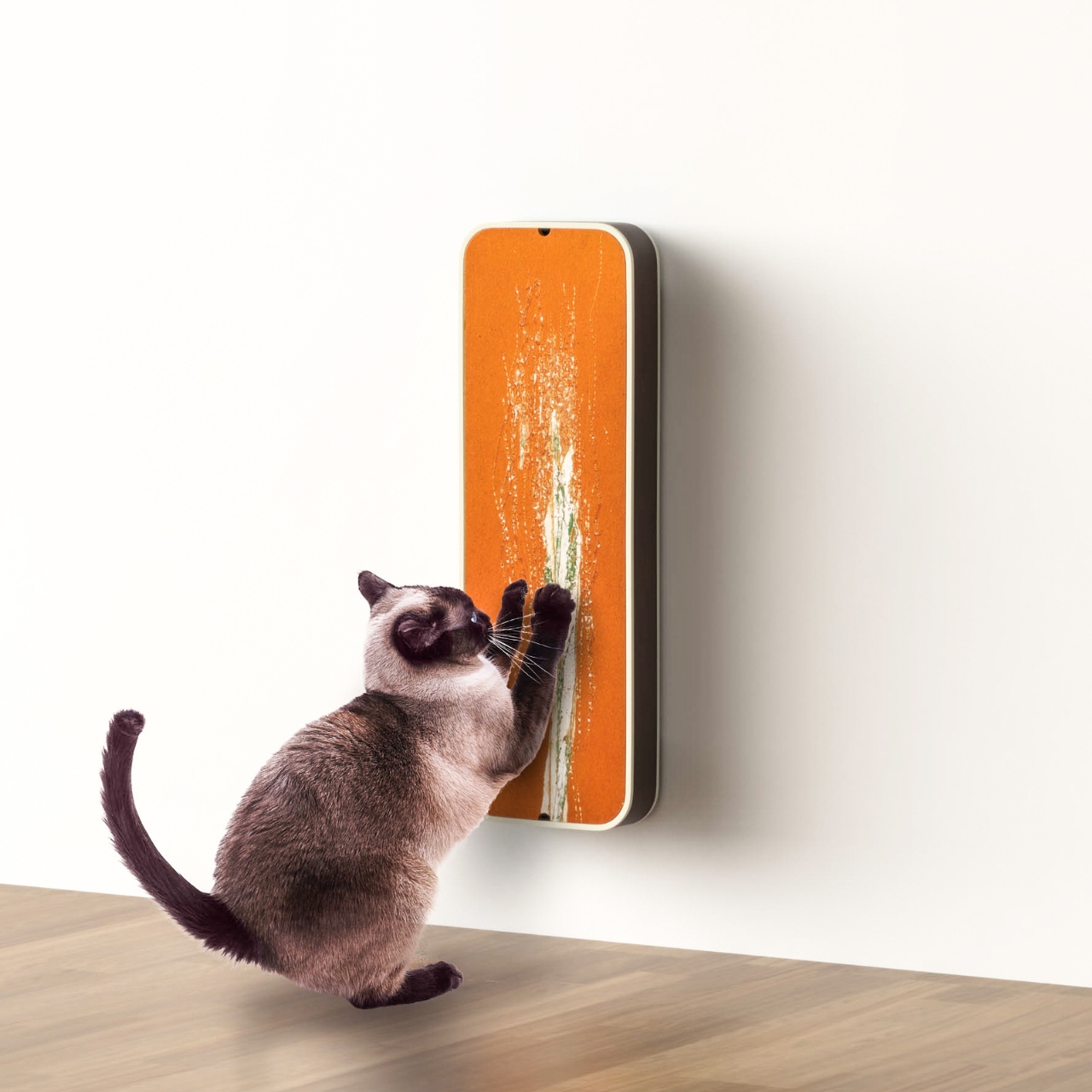
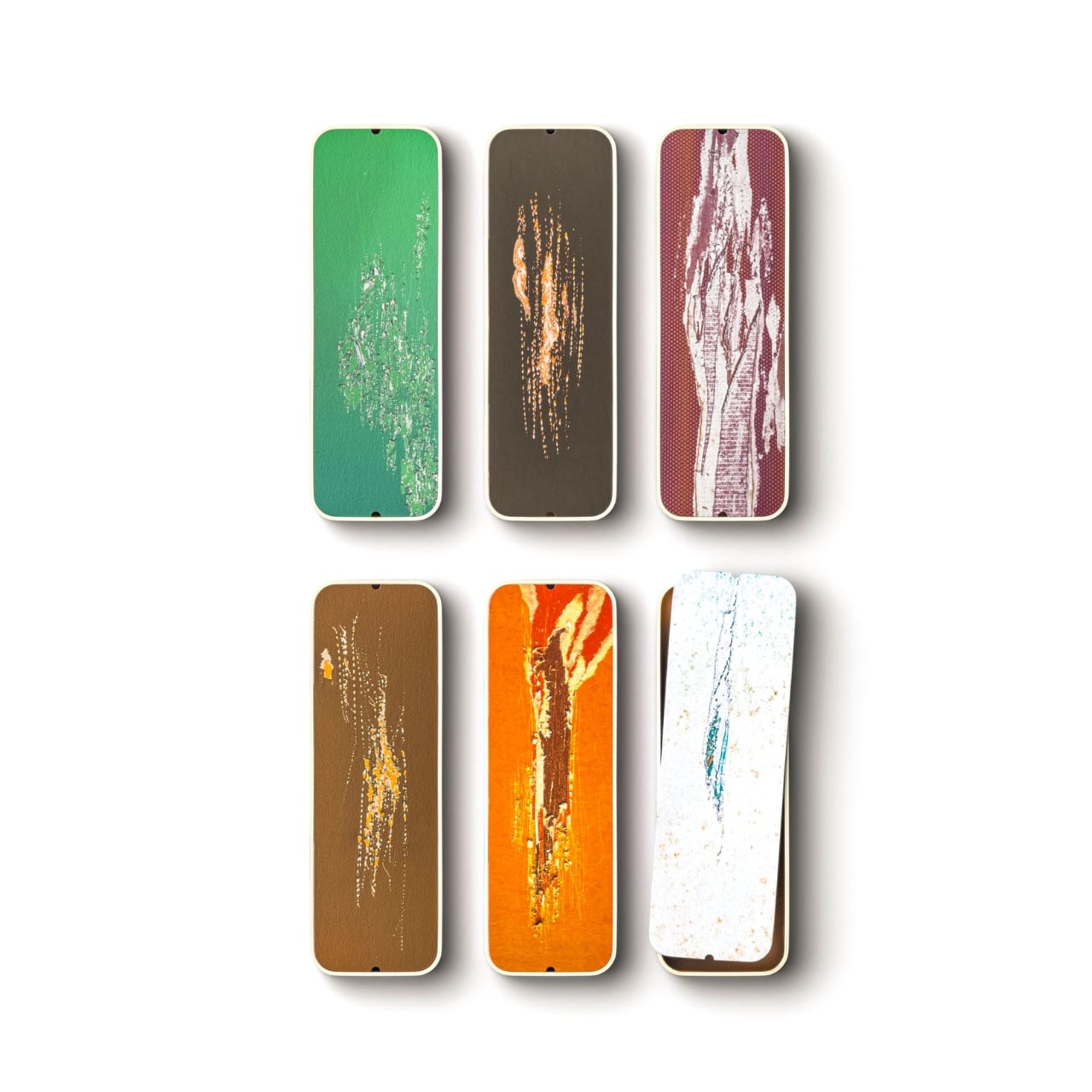
Neko-Yama is a cat playground but built in the “Yamaha style”. It lets the felines have a platform where they can explore all the tight spaces, crevices, and holes that they usually want to play around in. You will also be able to enjoy looking at them challenge themselves by playing around in the various places they can stick themselves in since it has a transparent design. The Strumming Box meanwhile is a scratching post where different colors will appear in the underside as they create their own patterns. Eventually it will look like a worn-out guitar but with the cat’s claws and scratches creating the unique surface.

Lastly, the Cat Music Box lets your feline friends create their own music by walking around in a wheel. Think of it as a hamster wheel but for cats and it is able to create notes through the rotation of the double wheels as it walks or runs around on the inner ring. The tempo also depends on how fast or slow they move. They can also walk backwards which might create a different kind of music.

The post Yamaha conceptualizes toys for your feline friends first appeared on Yanko Design.

More Details On iOS 18 Release Candidate

iOS 18 Release Candidate

Apple has recently released the highly anticipated iOS 18 Release Candidate (RC) for beta testers, marking a significant milestone in the development of their latest mobile operating system. Along with iOS 18, the company has also rolled out RC builds for iPadOS 18, watchOS 11, macOS Sequoia, tvOS 18, and visionOS 2. The official launch […]

The post More Details On iOS 18 Release Candidate appeared first on Geeky Gadgets.

Glorious Gaming’s GMMK 3 is a flagship keyboard with tons of premium features

Glorious Gaming just released its latest flagship keyboard, the GMMK 3. The company didn’t skimp on the bells and whistles with this one. As a matter of fact, it’s calling the GMMK 3 the “world’s most customizable keyboard.”

To that end, the keyboard offers nine points of modularity, from the keycaps to the switch plates, cables, accent pieces and, well, “every aesthetic part of the keyboard, from top and bottom.” Glorious Gaming says there are so many ways to customize this model, that it’s actually “over one billion keyboards in one.”

Gaming keyboards, however, are about way more than aesthetics. Fortunately, the GMMK 3 checks all of the boxes for premium keyboard features. There are Hall Effect sensors, support for a rapid trigger feature and up to an 8,000 Hz polling rate. There’s also customizable actuation and 4:1 dynamic keystroke mapping. There’s even a modular gasket system to adjust the precise sound and feel of keystrokes.

Some of the customization comes into play during the ordering process. The online configurator lets you select the color scheme and make other adjustments. There are also a bunch of accessories available, including key capsules, badges, rotary knobs and more. Additionally, each keyboard is available in three sizes.

A keyboard.
Glorious Gaming

Beyond sizing, the keyboards are split into three different versions. There’s the standard GMMK 3, which includes everything mentioned above, but the max polling rate shoots down to 1,000 Hz. The GMMK 3 Pro ships with a durable full aluminum body, but keeps that max polling rate of 1,000 Hz. The baddest of the bunch, the GMMK 3 Pro HE, includes the advertised 8,000 Hz polling rate, along with a revamped RGB lighting system and other goodies.

Finally, there are “barebones” versions of each keyboard that don’t include switches or keycaps, so you can hit the ground running when it comes to customization. All of the keyboards come with tools to help remove switches and keycaps, but it’s nice to have that part of the job finished already.

The GMMK 3 is available now in all of its many configurations. Prices range from $120 to $260.

This article originally appeared on Engadget at https://www.engadget.com/gaming/pc/glorious-gamings-gmmk-3-is-a-flagship-keyboard-with-tons-of-premium-features-130100429.html?src=rss

How to install Flux ControlNet with necessary workflows and models

install Flux ControlNet with necessary workflows and models

If you are interested in learning how to easily install the Flux ControlNet complete with necessary workflows and models. You will be pleased to know that Olivio Sarikas has created an  easy to follow step-by-step guide to installing and setting up Flux ControlNet, ensuring optimal performance and usability. By following these instructions, you’ll be able […]

The post How to install Flux ControlNet with necessary workflows and models appeared first on Geeky Gadgets.

Posted in Uncategorized | Tagged ,

50 Sci-fi Midjourney SREF styles

Midjourney SREF Sci-fi styles

AI artist and Midjourney specialist Thaeyne has created a fantastic video providing 50 Sci-fi Midjourney SREF styles you can use to expand your creativity when using the AI image generator. MidJourney’s SREF feature offers a captivating array of AI-generated styles, opening up a world of possibilities for designers, artists, and in this case science fiction […]

The post 50 Sci-fi Midjourney SREF styles appeared first on Geeky Gadgets.

Posted in Uncategorized | Tagged ,

Apple Intelligence for iPhone, iPad and Mac arrives in October

Apple Intelligence is coming next month. The company has revealed that its artificial intelligence platform is arriving on iPhones, iPads and MacBooks with the iOS 18.1, iPadOS 18.1 and macOS Sequoia 15.1 updates rolling out in October. It will only work on Apple's newer and more powerful devices, though, including the iPhone 15 Pro and the upcoming iPhone 16 models, as well as MacBooks and iPads running on M-series chips. In addition, the first batch of Apple Intelligence features will only be available in US English. Support for English in Australia, Canada, New Zealand, South Africa and the UK will be available in December, while for other languages, including Chinese, French, Japanese and Spanish is coming next year. 

One of the first Apple Intelligence features you'll be able to use is Writing Tools, which can rewrite, proofread and summarize text for you in Mail, Notes, Pages and even in third-party apps. The Memories feature will give you a way to easily create movies in Photos when you type a description for the kind of images you're looking for. You'll even be able to search for specific photos and videos by using natural language. And if you want to quickly remove background objects in images without damaging the rest of the photo, you can use the Clean Up tool. 

There's also a feature you can use to record, transcribe and summarize audio in Notes and Phone. If you initiate a recording while on a call, for instance, Apple Intelligence will generate a summary after it ends. A new Focus feature called "Reduce Interruptions" will surface only notifications that need immediate attention, while Priority Messages in Mail will put time-sensitive messages at the top based on the contents of those emails. You'll also see summaries of an email's most important information across your inbox and then use Smart Reply, which identifies questions and suggests quick responses, to fire off a quick message. 

Apple says its AI technology will make Siri more natural and more integrated into its platforms, as well. The voice assistant will apparently be able to understand your inquiries, even if you stutter or stumble over your words, and it can follow your train of thought even if you switch between text and voice. Apple says it's releasing more AI features over the next few months, including one that can generate an image using context when you circle an empty space and another that can create original emoji (or "Genmoji") based on a description you type.

Catch up on all the news from Apple’s iPhone 16 event!

This article originally appeared on Engadget at https://www.engadget.com/ai/apple-intelligence-for-iphone-ipad-and-mac-arrives-in-october-120502268.html?src=rss

The Best Calculator Apps For Android Phones

Calculator Android Apps

With the abundance of calculator apps available for Android phones, it can be overwhelming to choose the right one that caters to your specific needs. Whether you require a simple calculator for basic arithmetic or a more advanced app with scientific functions, there are several popular options to consider. The video below from Simple Alpaca […]

The post The Best Calculator Apps For Android Phones appeared first on Geeky Gadgets.

How to convert a PDF file to Excel without software

convert a PDF file to Excel without software

Converting data from a PDF file into an Excel spreadsheet can be a daunting task, especially when dealing with large datasets. However, Microsoft Excel’s built-in features provide a seamless solution to this challenge, making the process manageable and efficient. This comprehensive guide will walk you through the step-by-step process of converting a PDF file to […]

The post How to convert a PDF file to Excel without software appeared first on Geeky Gadgets.

Posted in Uncategorized | Tagged