Amazon Alexa+ is now available in Canada

Amazon has launched Alexa+, its next-generation digital assistant, in Canada. The company unveiled the new assistant in February, and it has been making its way to more and more people since. Canada is the first region outside the US to get access Amazon’s upgraded Alexa. Like the version that rolled out in the US, users can communicate with Alexa+ in natural language. They can say “I’m cold,” for instance, and the assistant will turn up the heat in their home. If they say “It’s dark,” Alexa+ can switch on the lights for them.

In Amazon’s announcement, Allison Siperco, the Alexa manager for Canada, said the assistant understands Canadian culture and regional expressions. It can understand distinctly Canadian topics, such as the country’s hockey teams and musicians. In addition, the assistant links with services Canadians use. It can make restaurant reservations for them through OpenTable, connects them to CBC news and help them look for and buy items from their e-commerce platforms. Siperco said the assistant will also support Yelp, Uber Eats, Suno and TripAdvisor in the country “soon.”

Alexa+ is capable of adapting its tone to everyone in the household, suggesting different routines based on the user. It can suggest meditation, for example, to someone who’s had a long day at the office. And it can remember if someone has dietary restrictions when recommending restaurants. Alexa+ can also help users shop by finding items with the best pricing, by creating grocery lists for them while taking dietary restrictions into account, as well as by comparing features across products and summarizing reviews on Amazon Canada.

Amazon’s upgraded assistant is free during its Early Access phase, though those who are interested to try it out right now will have to purchase the new Echo Show 8, Echo Show 11, Echo Dot Max or Echo Studio. After Early Access, it will remain free for Prime subscribers, while everyone else will have to pay $28 CAD a month for it.

This article originally appeared on Engadget at https://www.engadget.com/ai/amazon-alexa-is-now-available-in-canada-050827689.html?src=rss

Microsoft brings the Xbox Ally X’s full screen experience to other handhelds

A major selling point of the Xbox Ally and Ally X is that they ship with a full screen version of Windows that plays nice with handheld PCs. As part of the company's recent Xbox Partner Showcase, Microsoft has announced that the Windows "full screen experience" or FSE is finally rolling out to all other Windows 11 handhelds starting November 21.

For the most part, FSE lets you live inside a touch and controller-friendly version of the Xbox PC app, rather than the normal Windows desktop. The launcher collects games from a multitude of game marketplaces like Steam and the Epic Games Store, and gives you easy access to Game Pass, if you subscribe. As part of Microsoft's customizations, FSE also uses less resources, and offers simpler ways to switch between apps and setup Windows for the first time. 

All of these tweaks are supposed to make using Windows easier without a mouse and keyboard, and closer to what you'd get from a console. In comparison to SteamOS, which has gone through countless updates since Valve launched it alongside the Steam Deck in 2022, FSE still has a long way to go, but pushing the software to more devices could force Microsoft to iterate quickly.

While PC handheld owners will reap the benefits of these improvements first, Microsoft's announcement also mentions the company plans to bring the experience "to more Windows 11 PC form factors through the Xbox and Windows Insider programs soon." That could lend further credence to reports that the company plans to make the next Xbox an expensive PC rather than a traditional game console.

This article originally appeared on Engadget at https://www.engadget.com/gaming/pc/microsoft-brings-the-xbox-ally-xs-full-screen-experience-to-other-handhelds-211500288.html?src=rss

Google’s Nano Banana Pro image generator leverages Gemini 3 for improved visuals and text rendering

Google just unveiled its Nano Banana Pro image generation platform, which is also going by the name Gemini 3 Pro Image. The company promises this is an improvement over previous versions of the software in nearly every way. Google says it will "turn your visions into studio-quality designs with unprecedented control, flawless text rendering and enhanced world knowledge."

The text rendering portion seems to have gotten a big upgrade here, as Nano Banana Pro can create context-rich infographics and diagrams. The software can render legible text on top of a pre-existing image, making it a good option for generating posters and stuff like that. Google says that this feature is available in multiple languages.

The tool in action with a recipe.
Google

Google also says it can blend multiple elements into a single composition, with the ability to use up to 14 images at once. There are plenty of new editing controls. Users can select and edit any part of a created image. This can be used to adjust camera angles, change focus, adjust the color grade and even swap out the lighting from day to night.

Images created with Nano Banana Pro will have C2PA metadata embedded. This should, in time, make it easier to spot generative AI or deepfakes out there in the world. We'll have to see how that plays out. TikTok recently announced it would be using this metadata to better label AI-generated content, of which it currently does a very bad job at.

Nano Banana Pro is actually free to use. Free users are limited to a daily quota of images, with the number expanding for Google AI, Plus, Pro and Ultra subscribers. Just open up the Gemini app and create an image, but be sure to use the "Thinking" model. It's also available in Search and NotebookLM for some subscribers. This is all part of the recently-launched Gemini 3 model.

This article originally appeared on Engadget at https://www.engadget.com/ai/googles-nano-banana-pro-image-generator-leverages-gemini-3-for-improved-visuals-and-text-rendering-185505073.html?src=rss

Perplexity’s Comet AI browser is now on Android

Perplexity is continuing the rollout of its AI browser to more users. Comet is now available to download for Android mobile devices from the Google Play Store. Comet initially debuted this summer only to Perplexity's high-rolling subscribers on the $200-a-month Pro plan, but it expanded access to all users last month. It's free on Android as it now is on other platforms, and has many of the same features as the desktop version. The mobile option has access to Perplexity's AI assistant, and it can summarize searches or be interacted with by voice. 

Perplexity has been forthright about its goals of launching a browser as a way to collect customer data so it can more effectively target ads, and it's not the only artificial intelligence company or tech company trying to integrate AI into the browsing experience. These efforts have already drawn complaints from Amazon, particularly around AI in shopping, but they could yield big paydays for scammers.

This article originally appeared on Engadget at https://www.engadget.com/ai/perplexitys-comet-ai-browser-is-now-on-android-184500885.html?src=rss

WhatsApp is bringing back its very first feature

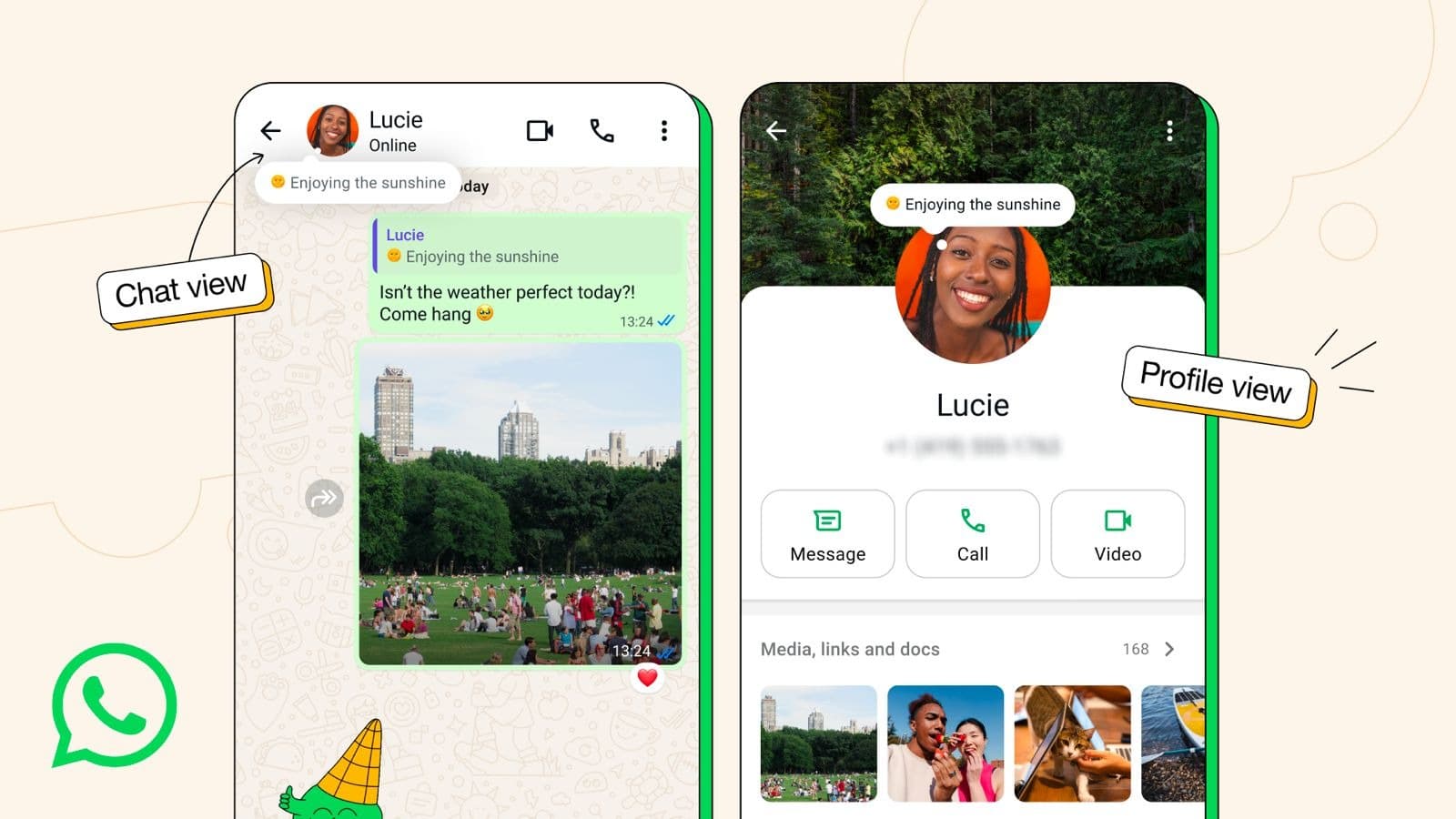
WhatsApp is going back to the past for its latest feature. In fact, it’s going all the way back, because it’s reviving the very first WhatsApp feature. You can think of About (the creators were really not very good at naming things, huh?) as a status update or WhatsApp’s version of an AIM away message. It’s designed to let your contacts know at a glance what you’ve got going on, such as something that’s keeping you busy and might make you slow to respond to messages.

The About message appears on both your profile and at the top of one-on-one chats. By default, the About message will vanish after 24 hours, but you can set it to vanish earlier or stick around for longer. You can do this by going to the “set about” option in the WhatsApp settings. You also have control over who is able to see your About message — you can restrict it to your contacts or allow anyone to view it from your profile.

This is a handy little update that apes the notes feature in sibling apps Instagram and Facebook. WhatsApp is starting to roll About (back) out to all users on mobile devices this week.

Illustration of the About feature in WhatsApp
Meta

This article originally appeared on Engadget at https://www.engadget.com/apps/whatsapp-is-bringing-back-its-very-first-feature-170100513.html?src=rss

Bluesky revamps its moderation and reporting tools with transparency in mind

Bluesky is looking to make its moderation and reporting systems more transparent as part of its efforts to forge a healthier social media ecosystem than some of the alternatives out there. The platform's userbase has doubled in size to 40 million over the past year, and with more users come more instances of toxicity and other types of harmful content. Bluesky is also subject to more regulatory requirements in certain jurisdictions. The team has been working to address those factors, and changes to the moderation system should help.

The platform is revamping how it enforces and tracks violations of its policies. In the latest version of the Bluesky app, the system for reporting posts now includes more granular options with specific options to flag content related to things like false information about elections, human trafficking and bullying. "This granularity helps our moderation systems and teams act faster and with greater precision," the Bluesky team wrote in a blog post. "It also allows for more accurate tracking of trends and harms across the network."

Rather than tracking community guidelines violations across individual policies as it did in the past, Bluesky will automatically track everything in a single system. As part of that, the platform will provide users clearer information about enforcement actions. Starting in the coming weeks, users whose accounts are actioned will learn which policy they violated, the severity level of their violation and how many times they’ve broken the rules. They'll also be notified as to the length and end date of any suspension, as well as how close they are to more severe penalties being applied to their account for repeated violations. There are appeals processes for both post takedowns and account suspensions.

Looking ahead, Bluesky plans to add a moderation inbox to the app rather than dealing with moderation decisions by email. The team says this will improve transparency and enable it to send a higher volume of notifications to users.

"These updates are part of our broader work on community health," the team wrote. "Our goal is to ensure consistent, fair enforcement that holds repeat violators accountable while serving our growing community as we continue to scale."

There are some other changes in the latest version of the app. The team says that a redesign makes the "who can reply" settings easier to use, including the option to save your selection as the default for future posts. There's also a dark mode app icon available. 

This article originally appeared on Engadget at https://www.engadget.com/social-media/bluesky-revamps-its-moderation-and-reporting-tools-with-transparency-in-mind-193629692.html?src=rss

Google Maps will use AI to predict if EV chargers will be available on arrival

Google is rolling out an update to Maps that brings some new tools to the table, including the ability to check on EV charger availability. The app already showed the location of EV chargers, but not if they were available or not. In other words, it was entirely possible to roll up to a charging station only to find a line of EVs waiting for juice.

The tool in action.
Google

The updated tool will soon show "how many chargers will likely be available upon your arrival." This uses a combination of AI wizardry and real-time charger availability to predict how many chargers are likely to be open and ready for use at a particular point in time. Google says this will help users "avoid lines and save time." The charger tracker drops next week, but only via Android Auto and cars with Google built-in.

The Explore tab has gotten a revamp, making it easier to find curated lists from local influencers and companies like OpenTable. All you have to do is swipe up to see "trending and popular restaurants, activities and sights near you." The updated Explore tab rolls out this month globally on both Android and iOS.

The company is also stuffing more Gemini into Maps because it's 2025 and that's the way things are done now. The AI chatbot will be able to whip up "know before you go" tips before visiting restaurants, hotels, concert venues and other locations of interest. Google says Gemini will be like "having a knowledgeable guide show you the way." We'll have to see how that works out in real life. This AI-powered tips feature is already available for many users in the US on Android and iOS.

Finally, reviewers can now change their display names when providing feedback to local businesses. Google says this can be used to review nearby shops with names like "Eager Elf" or "Julia Loves Sweets." Despite the user name change, it'll still be your Google account making the remark, so keep things polite.

This is just the latest update for Google Maps. The app is adding live lane guidance for Polestar 4 owners and is also coming to Garmin smartwatches.

This article originally appeared on Engadget at https://www.engadget.com/apps/google-maps-will-use-ai-to-predict-if-ev-chargers-will-be-available-on-arrival-191808879.html?src=rss

Read AI is building a note-taking app that works nearly anywhere

You probably haven't heard of Read AI. The company has quietly been making a name for itself in the crowded AI space, signing up 50,000 customers daily in recent months. At first glance, Read AI resembles apps like Otter.ai. You can use the software to transcribe and summarize meetings, but it's also more ambitious than that. 

"It's AI on standby," Read AI CEO David Shim explains, adding that the company's vision is to give people a tool that can record, transcribe and analyze nearly every professional conversation they have, no matter where those discussions take place and whether they occur online or in-person. Today, Read AI is taking a major step toward realizing that vision with the release of its new Operator agent (I'll admit, the company could have picked a more original name), and new apps for Windows, macOS and Android. 

Between its own software, including an existing iOS app, and third-party integrations, Read AI users can now connect their accounts to more than 22 other platforms. Some of the more notable inclusions there are Gmail, Outlook, Slack, HubSpot and Notion. More importantly, with Read AI's mobile apps, you can record impromptu in-person meetings; the company has data showing that more than half of professional conversations occur outside of online spaces.   

In any case, no matter where you talk to your colleagues, Operator is there to generate notes and insights. "We don't just look at meetings," Shim says. "We look at topics that are interesting to you.” To that end, Read AI has built a series of in-house multimodal models that look for context beyond what's said during any interaction you record. For example, the company's systems are designed to catch when you enthusiastically answer a question or look away in disinterest, and use that data to decide how the software goes about summarizing your meetings. 

"That context is what enables us to identify what is valuable to you, and make that discoverable," says Shim. One way Read AI will surface those insights is through a feature the company calls Monday Brief. At the start of every week, you'll get a summary of all the calls and conversations you had over the last seven days, with suggestions for follow-up actions you can take.

Now, you might be wondering, like I was, how Read AI hopes to compete in a market where a company like Microsoft is aggressively pushing Copilot on its users. If Shim is worried about the big players, he doesn't show it. "There's a need for an independent third party," he says. "There's always something new coming out. And that ability to be the independent third-party that plugs into different solutions is actually what consumers want and need." To his point, since the launch of Copilot two years ago, Read AI has seen a 20x increase in the daily number of people using its software alongside Microsoft Teams. "We've seen the same thing along those lines for Zoom and Google Meet."   

He believes the company's approach to data privacy is another differentiator. By default, users are opted out of their data being used for training Read AI's future models. Shim also notes the company takes recording disclosure seriously. "You need to notify people that you're [recording] a call, and we put that front and center every single time." 

If you want to try Read AI, the company offers a free plan that includes five meeting transcripts per month. Pricing for its paid subscriptions start at $19.75 per month.    

This article originally appeared on Engadget at https://www.engadget.com/ai/read-ai-is-building-a-note-taking-app-that-works-nearly-anywhere-130000235.html?src=rss

TikTok now has an in-app ‘affirmation journal’ and sound machine

TikTok is replacing its screen time management page with a Time and Well-being space, which also comes with new wellness features. You can now find an affirmation journal, where you can set your intentions for the day using the 120-plus cards the app provides. You can, say, choose the “grace” card that reminds you to be free of the expectation of others. The card is downloadable on your device, and you can share it with others.

You’ll also find an in-app soothing sound generator that you can use to listen to relaxing audio, such as those featuring the sound of rain, waves and white noise. The sounds stop after a few minutes when the timer ends, so you can play them to induce sleep when you go to bed. TikTok says its users are 14 percent more likely to listen to music to help them relax or go to sleep than non-users. You’ll also find different types of breathing exercises you can do in the new space.

In addition, TikTok is rolling out new well-being missions, expanding the original set it launched in July. These missions, which are particularly designed for teens, will reward you with badges for completing challenges related to balanced digital habits. The new Sleep Hours Mission will award you with a badge if you stay off TikTok at night, while the daily screen time mission will earn you another if you set a screen time limit and manage to stick to it. There’s also a new weekly screen time mission that will prompt you to check your screen time report every week, as well as a well-being ambassador mission that will earn you badges if you invite others to do the missions.

This article originally appeared on Engadget at https://www.engadget.com/social-media/tiktok-now-has-an-in-app-affirmation-journal-and-sound-machine-050100713.html?src=rss

TikTok will let users tone down the amount of AI content in their feed

TikTok is the latest social platform to hand users more control over the amount of AI-generated content they see. The app is experimenting with a new setting that will allow users to request to "see less" AI in their "For You" feed.

The new toggle will be available in “the coming weeks” in the app's "manage topics" section that lets people personalize the types of videos more likely to appear in their feed. In a blog post, TikTok says the control is meant to help users "dial things down" if they want to see less AI content in their recommendations. The update follows a similar move from Pinterest, which has faced complaints about AI slop drowning out authentic images on the platform.

TikTok, like most other platforms, has seen an influx of AI-generated content in recent years. The company, which requires users to label such creations, says that there are more than 1.3 billion videos with these labels. At the same time, the company notes that its existing methods for detecting AI content aren't perfect, Currently, TikTok relies on a widely-used watermarking system called Content Credentials that adds metadata to AI-generated content. But these signals can get harder to detect when images or videos are edited in other apps or copied and reshared to other sites, as often happens with viral content. 

To address this, TikTok says that it will also experiment with an additional "invisible watermarking" system that could help it identify and label AI content more reliably. "'Invisible watermarks' add another layer of safeguards with a robust technological 'watermark' that only we can read, making it harder for others to remove," the company explained.

This article originally appeared on Engadget at https://www.engadget.com/social-media/tiktok-will-let-users-tone-down-the-amount-of-ai-content-in-their-feed-050100596.html?src=rss