10 Iconic Frank Gehry Buildings That Celebrate The Late “Starchitect’s” Legacy

Frank Gehry’s death will feel like a seismic event, even to people who never learned his name but knew “that crazy silver building” in their city. Born in Toronto in 1929 and raised in Los Angeles, he moved through the twentieth century like a restless experiment in motion, turning cardboard models into titanium-clad landmarks and treating cities as full-scale sketchbooks. His passing closes a chapter in which architecture stopped pretending to be purely rational infrastructure and allowed itself to be emotional, unstable, and sometimes gloriously impractical.

What lingers most is not only the spectacle of his work but the shift in attitude it made possible. Gehry treated architecture as a narrative medium, not a neutral backdrop; every warped surface and improbable curve suggested a story about risk, uncertainty, and delight. He pushed software, fabrication, and engineering to their limits long before “parametric design” became a buzzword, yet he remained suspicious of fashion and theory, insisting that buildings should be humane, tactile, and a bit mischievous. The structures he leaves behind do more than house art, music, or offices; they continue to provoke arguments, civic pride, and sometimes outrage, which may be the clearest sign that they are very much alive.

Gehry’s legacy is also institutional and generational. He helped reframe what a “starchitect” could be: not just a brand attached to luxury clients, but a public figure whose work could catalyze urban reinvention, as Bilbao discovered, or reshape how a city thinks about its cultural core, as Los Angeles learned. Dozens of younger architects cite him less for his specific forms than for his license to be disobedient, to treat the brief as a starting point rather than a boundary. In that sense, his death does not simply mark an ending; it underlines how thoroughly his once-radical sensibility has seeped into the mainstream of contemporary design.

As we return to his most iconic works, what becomes clear is how consistent his obsessions were across wildly different contexts. Light, movement, and the choreography of how a body moves through space preoccupied him as much as façades ever did. In his absence, the buildings remain as articulate as any obituary, each one a frozen fragment of his ongoing argument with gravity, convention, and taste. They stand not as monuments in the solemn sense, but as restless objects that still seem to be in the process of becoming something else.

Guggenheim Museum, Bilbao, Spain

A veritable masterpiece, the Guggenheim Museum in Bilbao redefined the very essence of museum architecture. Clad in shimmering titanium, limestone, and glass, its fluid form and undulating surfaces transformed the post-industrial city of Bilbao into a global cultural hub. Beyond its exterior, the museum offers a labyrinth of interconnected spaces, providing a dynamic environment for art display and contemplation, where visitors are constantly reoriented by shifting scales, vistas, and shafts of light.

The so-called “Bilbao Effect” grew out of this building, turning a risky cultural investment into a template for urban reinvention that countless cities tried to emulate, with varying success. The Guggenheim’s success lies not just in its photogenic skin, but in the way it engages the river, the bridges, and the city’s once-neglected waterfront, stitching art into the daily life of Bilbao. Inside, Gehry’s vast gallery volumes proved unexpectedly flexible, accommodating everything from monumental sculpture to delicate installations, and showing that radical form could coexist with curatorial practicality.

Walt Disney Concert Hall, Los Angeles, USA

Situated in Los Angeles’ cultural corridor, the Walt Disney Concert Hall is an architectural symphony in stainless steel. Its sculptural, sail-like exterior rises from the street as if peeled up from the city grid, catching the famously sharp Southern California light and scattering it in soft, shifting reflections. The building’s complex geometry masks a remarkably clear organization, guiding audiences from the plaza and terraces into the heart of the hall through a sequence of compressed entries and soaring atriums.

Inside, the vineyard-style auditorium, wrapped in warm Douglas fir and oak, embodies Gehry’s close collaboration with acoustician Yasuhisa Toyota and the Los Angeles Philharmonic. The space is both intimate and monumental; the orchestra feels almost surrounded by the audience, and the sound is prized for its clarity and warmth. The organ, with its forest of asymmetrical wooden pipes, doubles as sculpture, echoing the exterior’s exuberance. Disney Hall did more than give Los Angeles a world-class concert venue; it anchored the city’s identity as a serious cultural capital and remains one of the rare buildings where musicians, critics, and everyday concertgoers are equally enthusiastic.

Dancing House, Prague, Czech Republic

In the heart of Prague, a city steeped in historic architectural grandeur, the Dancing House emerges as a contemporary icon. Its deconstructed silhouette, often likened to a dancing couple, stands in deliberate contrast to the neighboring Baroque and Gothic facades, signaling Prague’s evolving architectural narrative. The building’s glass “Fred” leans into the stone “Ginger,” creating a sense of motion that feels almost cinematic against the calm rhythm of the riverfront.

Beyond the playful metaphor, the Dancing House operates as a careful negotiation between old and new. Gehry and co-architect Vlado Milunić threaded the building into its tight urban site, respecting existing cornice lines while fracturing the expected symmetry and order. Offices occupy much of the interior, but the rooftop restaurant and terrace open the building to the public, offering panoramic views that reframe the city’s historic skyline. In a place where modern interventions are often contentious, the Dancing House has gradually shifted from scandal to beloved oddity, proving that contemporary architecture can coexist with, and even refresh, a deeply layered urban fabric.

Fondation Louis Vuitton, Paris, France

Gehry’s Fondation Louis Vuitton is a testament to the confluence of art, architecture, and landscape. Resembling a futuristic ship moored in the Bois de Boulogne, its glass “sails” seem to billow in the wind, catching reflections of trees, sky, and water. Set within the historic Jardin d’Acclimatation, the building plays a game of concealment and revelation; from some angles it appears almost transparent, from others it asserts itself as a crystalline object hovering above the park.

Inside, a series of white, box-like galleries are wrapped by the glass sails and linked through terraces, stairways, and bridges, creating a rich sequence of indoor-outdoor experiences. The museum’s program of contemporary art and performance takes advantage of these varied spaces, from intimate rooms to large, flexible volumes. At night, the Fondation becomes a lantern in the forest, a glowing presence that underscores Gehry’s fascination with light as a building material. It also represents a late-career synthesis for him: digital design and fabrication techniques are pushed to the extreme, yet the result feels surprisingly light, almost improvised, rather than technologically overdetermined.

Binoculars Building, Venice, Los Angeles, USA

Characterized by its monumental binocular facade, this office building exemplifies Gehry’s mischievous side. The structure is a hybrid of architecture and sculpture, with the colossal binoculars, originally a work by Claes Oldenburg and Coosje van Bruggen, serving as the principal entrance. Cars and pedestrians pass through the lenses, turning a familiar object into an inhabitable threshold and gently mocking the solemnity usually associated with corporate architecture.

The rest of the building, composed of irregular volumes clad in rough stucco and brick, plays foil to the central object, creating a streetscape that feels more like an assemblage of found pieces than a single, unified block. Over the years, the building has housed creative offices, including tech tenants, and has become a kind of mascot for the neighborhood’s informal, experimental energy. It demonstrates Gehry’s comfort with pop culture and humor, and his willingness to let another artist’s work literally occupy center stage, reinforcing his belief that architecture can be a generous collaborator rather than a jealous frame.

Lou Ruvo Center for Brain Health, Las Vegas, USA

In a city known for its flamboyant spectacles, the Lou Ruvo Center for Brain Health stands out with its cascading stainless steel forms that seem to melt and twist in the desert sun. The building is split into two distinct parts: a relatively rectilinear clinical wing that houses examination and treatment rooms, and a wildly contorted event hall whose warped grid and skewed windows evoke the tangled pathways of the brain. This juxtaposition turns the complex into a physical metaphor for cognitive disorder and the search for clarity within it.

Beyond its sculptural bravado, the center represents an attempt to bring architectural attention and philanthropic energy to the often invisible struggles of neurological disease and dementia. The event space helps fund the medical and research programs, hosting gatherings that place patients’ stories at the center of civic life. For Gehry, who has spoken publicly about friends and family affected by these conditions, the project had a personal resonance, and it shows in the building’s emotional charge. It is one of the clearest examples of his belief that dramatic form can serve not just commerce or culture, but also care and advocacy.

Neuer Zollhof, Düsseldorf, Germany

Overlooking Düsseldorf’s MedienHafen, the Neuer Zollhof complex showcases Gehry’s skill at composing buildings as a kind of urban sculpture. The trio of towers, each with its own material identity in white plaster, red brick, and shimmering stainless steel, appears to lean and sway, as if the harbor winds had pushed them out of alignment. Their undulating facades break up reflections of sky and water, adding a kinetic quality to what might otherwise be a static office district.

At the ground level, the buildings carve out irregular courtyards and passages that encourage wandering rather than straight-line commuting. This porousness allows the waterfront to feel more public, less like a sealed-off corporate enclave. Over time, Neuer Zollhof has become a visual shorthand for Düsseldorf’s transformation from industrial port to media and design hub, appearing in tourism imagery and local branding. The ensemble illustrates how Gehry could work at the scale of a neighborhood, not just a single object, using repetition and variation to give a district a distinct identity without lapsing into monotony.

Weisman Art Museum, Minneapolis, USA

The Weisman Art Museum at the University of Minnesota is a compact manifesto of Gehry’s interest in reflective surfaces and fractured forms. From the campus side, the building presents a relatively calm brick facade that aligns with neighboring structures, but facing the Mississippi River it explodes into a cascade of stainless steel planes. These facets catch the Midwestern light in constantly changing patterns, so the museum’s appearance shifts dramatically between bright winter mornings and long summer evenings.

Inside, the galleries are more restrained than the exterior might suggest, with white walls and straightforward geometries that accommodate a diverse collection, including American modernism and Native American art. The contrast between the calm interior and the exuberant shell underscores Gehry’s understanding that museums must serve art first, even when they are iconic objects in their own right. For the university and the city, the Weisman has become a landmark visible from bridges and river paths, a reminder that serious academic institutions can also embrace a bit of visual risk.

Vitra Design Museum, Weil am Rhein, Germany

Situated on the Vitra Campus, the Vitra Design Museum is one of Gehry’s earliest European works and a key piece in his evolution toward the more fluid forms of later years. The small building is composed of intersecting white plastered volumes, pitched roofs, and cylindrical elements, all twisted and stacked in a way that feels both familiar and disorienting. It reads like a collage of fragments from traditional architecture, reassembled into a dynamic, almost cubist object.

The museum’s interiors are intimate and idiosyncratic, with sloping ceilings and unexpected vistas that suit exhibitions on furniture, industrial design, and everyday objects. As part of a campus that later attracted buildings by Zaha Hadid, Tadao Ando, and others, Gehry’s museum helped establish Vitra’s reputation as a patron of experimental architecture. The project also marked one of the first major uses of his now-signature white sculptural volumes in Europe, setting the stage for the more complex geometries of Bilbao and beyond while reminding us that his work has always been as much about composition and light as about metallic skins.

8 Spruce Street (Beekman Tower), New York, USA

Rising above Lower Manhattan’s skyline, 8 Spruce Street, often branded as New York by Gehry, demonstrates his ability to bring a sense of movement to the rigid logic of the skyscraper. Its rippling stainless steel facade wraps a conventional concrete frame, creating the illusion of draped fabric caught in a vertical breeze. As daylight moves across the tower, the folds deepen and flatten, giving the building a constantly shifting presence against the more static grid of neighboring high-rises.

Inside, the residential tower combines rental apartments with amenities that were, at the time of its completion, notably generous for downtown living, including schools and community facilities at the base. The project signaled a shift in Lower Manhattan from a primarily financial district to a more mixed, residential neighborhood, and it showed that expressive architecture did not have to be reserved for cultural institutions or luxury condos. By applying his vocabulary to everyday housing, Gehry suggested that the pleasures of complex form and careful detailing could, at least occasionally, reach beyond elite enclaves and into the fabric of ordinary urban life.

The post 10 Iconic Frank Gehry Buildings That Celebrate The Late “Starchitect’s” Legacy first appeared on Yanko Design.

Pantone’s 2026 Color of the Year Finally Admits We’re All Exhausted

Pantone has officially called it: the prevailing mood for 2026 is exhaustion. This marks a sharp departure from recent years, when the annual announcement felt like a conversation happening in a different room. The world was navigating a pandemic hangover and digital burnout, while Pantone was prescribing electric purples for creativity and defiant magentas for bravery. Each choice, while commercially friendly, felt like a wellness influencer telling a tired person to simply manifest more energy.

This year, however, their choice of Cloud Dancer, a soft, billowy white, functions less like a statement and more like a surrender. It is the color of a blank page, an empty inbox, a quiet sky, a white flag, if you will. By choosing a hue defined by its peaceful lack of saturation, Pantone is finally acknowledging the dominant cultural mood – burnout. They are admitting that the most aspirational feeling right now is not vigor or joy, but rest.

Designer: Pantone

To understand why this feels so significant, you have to look at the recent track record. The disconnect between Pantone’s narrative and the world’s reality has been the core of the critique, which I made back in 2022, calling Pantone’s Very Peri an exercise in blind futility. The argument was that Pantone was no longer reading culture but trying to write it, pushing a top-down color prophecy that served its own marketing ecosystem more than it reflected any genuine grassroots sentiment. This critique felt especially potent with the last two selections, Peach Fuzz and Mocha Mousse.

Peach Fuzz, the choice for 2024, was sold with a story of tenderness, community, and tactile comfort. It was a lovely, gentle shade, but it landed in a year defined by rising inflation, geopolitical instability, and a pervasive anxiety about the acceleration of artificial intelligence. The narrative felt like a beautifully packaged lie of omission. Then came Mocha Mousse for 2025, a comforting brown meant to evoke groundedness and stability. It was a safe, aesthetically pleasing choice that aligned perfectly with coffee-shop interior trends, but it felt more like an algorithmic pick from a Pinterest board labeled “cozy” than a meaningful cultural statement. It was a color for a lifestyle, not for a life.

Which brings us to Cloud Dancer. On the surface, choosing white seems like the ultimate cop-out. It is the absence, the default, the non-choice. But Pantone’s justification is, for the first time in a long while, deeply resonant. Leatrice Eiseman, the executive director of the Pantone Color Institute, describes it as a “conscious statement of simplification” meant to provide “release from the distraction of external influences.” Laurie Pressman, the vice president, is even more direct, stating, “We’re looking for respite, looking for relief… we just want to step back.”

This is not the language of aspirational marketing; it is the language of burnout. Pantone is explicitly naming the problem: overstimulation, digital noise, and the overwhelming “cacophony that surrounds us.” Cloud Dancer is positioned as the visual antidote, a quiet space in a world that refuses to shut up. It is a breath of fresh air, a lofty vantage point above the chaos. By framing the color as a tool for focus and a symbol of a much-needed pause, Pantone has shifted from prescribing an emotion to validating one. It feels less like they are telling us how to feel and more like they are saying, “We hear you. You’re tired.”

Of course, we should not mistake this newfound self-awareness for a complete abandonment of the marketing machine. The Color of the Year is, and always will be, a commercial enterprise. But the choice of Cloud Dancer is a savvier, more sophisticated move. Choosing white cleverly sidesteps the pressure to project forced optimism. It aligns perfectly with existing design trends like soft minimalism and quiet luxury, making it an easy sell to brands. Most importantly, it allows Pantone to craft a story about retreat and renewal, a narrative that feels both authentic and highly marketable in a wellness-obsessed culture.

So, is the ‘marketing fluff’ gone? Not entirely. But it has been supplemented with something much more compelling. Instead of a tone-deaf declaration, we have a confession that feels a little more aware of a global sentiment. Cloud Dancer works because it is an admission of defeat. It is a white flag, a symbol of surrender to the relentless pace of modern life. In a world saturated with color, demanding our attention at every turn, the most radical and desired hue might just be the one that asks for nothing. Pantone did not just pick a color for 2026; it picked a feeling, and for the first time in a long time, it feels like our own.

The post Pantone’s 2026 Color of the Year Finally Admits We’re All Exhausted first appeared on Yanko Design.

Nothing Phone 3a Lite or CMF Phone 2 Pro? The Choice Is Just Glyph vs. Zoom

Glyph Light, more like Glyph Gaslight… Nothing just dropped its fifth phone this year, the 3a Lite, and the instant I looked at it, I was first shocked… then confused. Shocked because the phone looks exactly like Nothing’s CMF Phone 2 Pro. No seriously, the camera placement is EXACTLY the same, the chipset is the same, the battery, screen, most of its internals are the same. It took me a full minute for my shock to subside before it was replaced by confusion. Why? Why would Nothing introduce a ‘new’ phone into its lineup when it’s selling the exact same phone (for the exact same price) under its sub-brand?

I have no definite answers (we’re waiting for Carl Pei to reveal his underlying strategy), which is why it honestly feels so confusing. Two phones, practically twins (with probably just 2 small differences), and arguably running the same software on the same hardware for the same price. It goes against Nothing’s entire vision of disrupting the tech space by producing game-changing tech that injects fun into itself. Tech that builds a design-centric audience. Tech that prides itself on transparency. The fact that the Nothing Phone 3a Lite is just a ‘rebadged’ (and I use that term in the most calculated capacity) version of the CMF Phone 2 Pro feels like the opposite of transparent.

Designer: Nothing

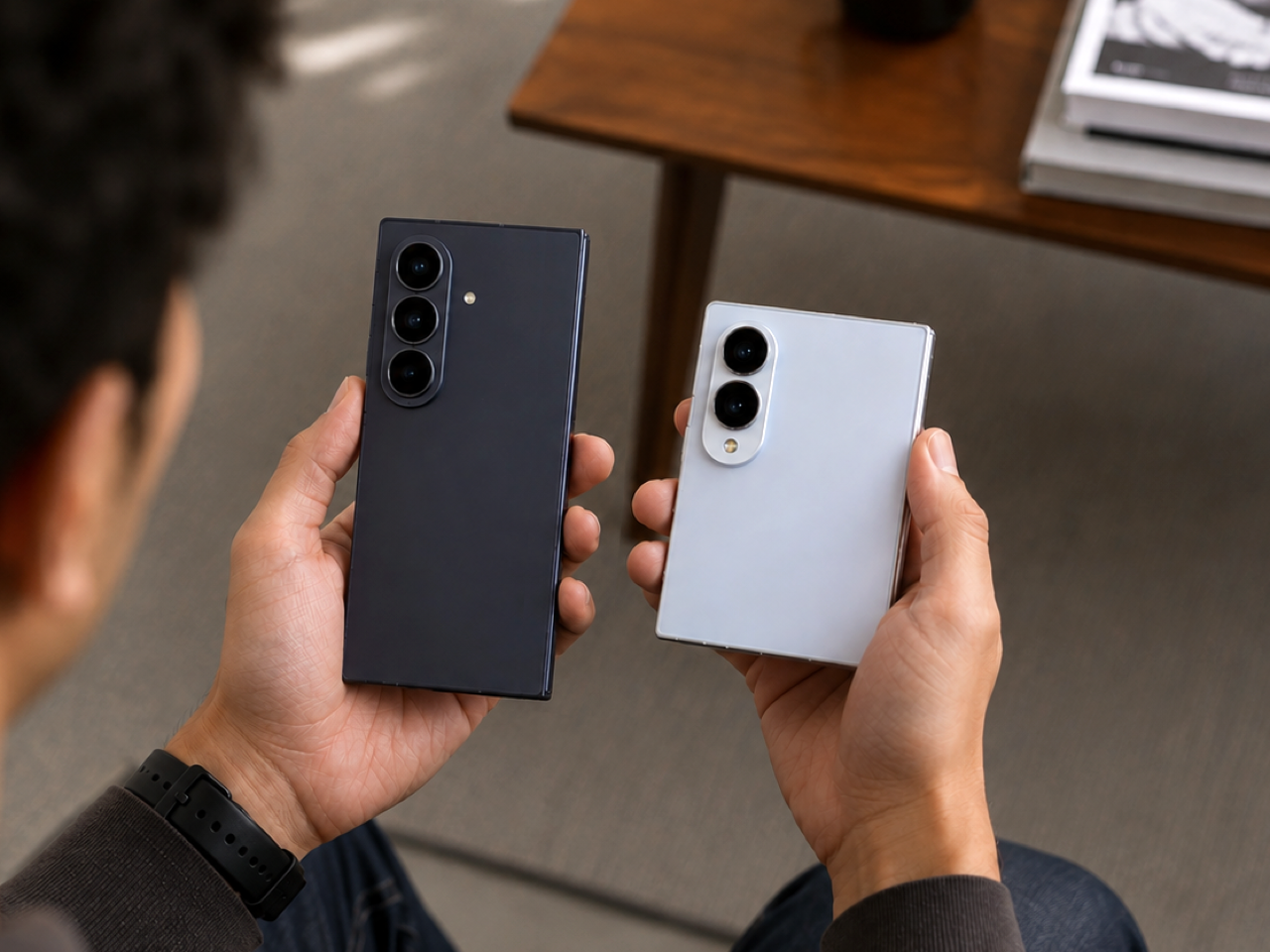
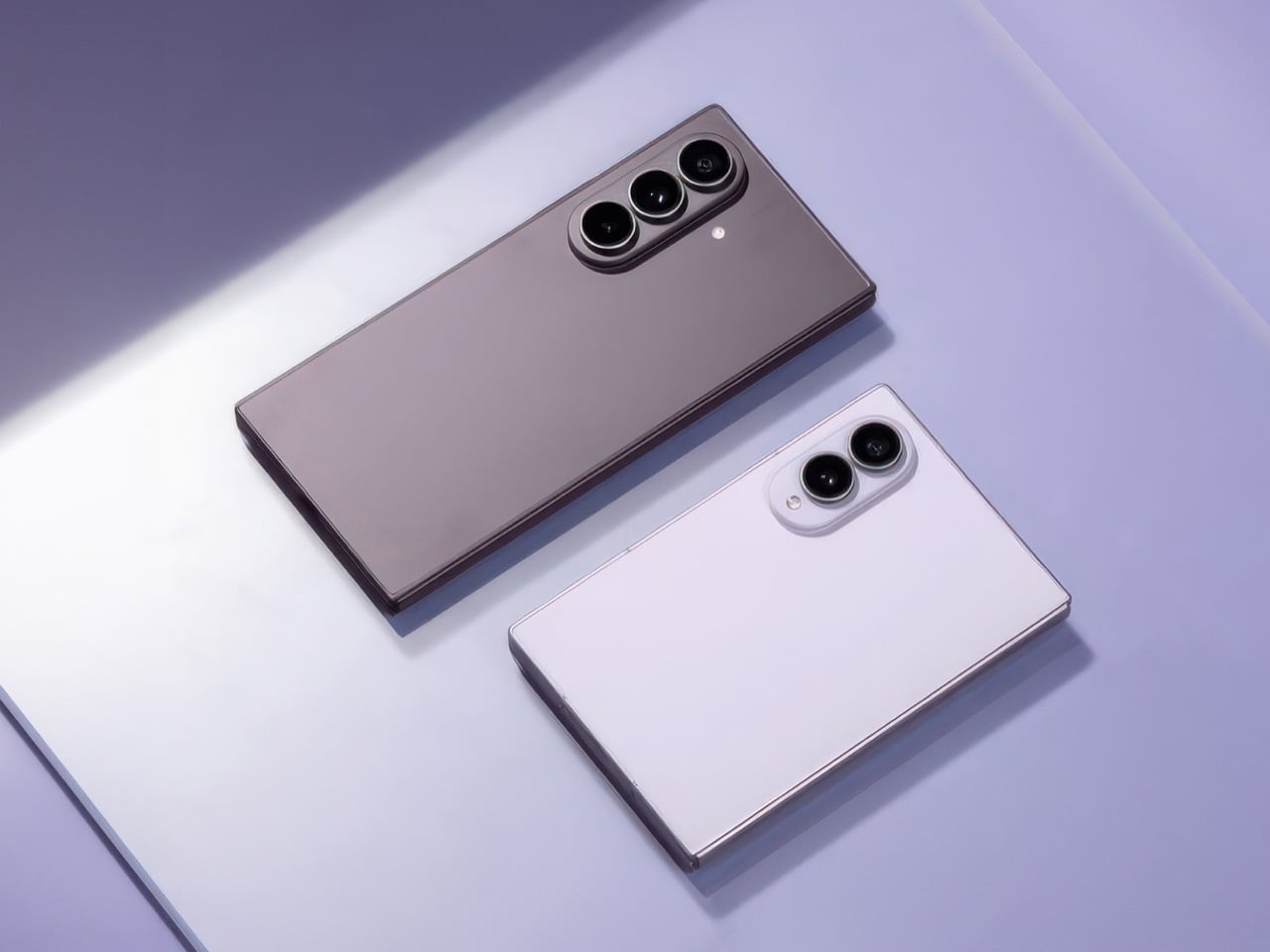
Nothing Phone 3a Lite (Left) vs CMF Phone 2 Pro (Right)

Here’s where the phones are identical. They both have the same screen – a FHD+ 6.77″ AMOLED running 120Hz at 300 nits max brightness. They both have the same chip too, a MediaTek Dimensity 7300 Pro with 8 cores. Both phones run 8GB of RAM and max out at 256GB of storage. The OS is the same too, Nothing OS 3.5 (with a 6-year software update promise)… and even the battery is exactly the same, a 5,000mAh cell with 33W fast charging and 5W reverse wired charging. No wireless charging on either of the models. As far as the cameras go, the placement (if you look below) is the same too. Two of the three lenses in the camera array are the same, a 50MP main and 8MP ultrawide. The front has a 16MP shooter on both. And both phones pack that Essential button on the side that Nothing began rolling out this year. On paper, it’s as if you were looking at a Xiaomi vs Redmi phone, or a Huawei vs Honor phone. The same build, barring a few minor cosmetic changes.

Nothing Phone 3a Lite (Left) vs CMF Phone 2 Pro (Right)

The changes aren’t drastic, but they’re worth noting. For starters, the third camera on both the CMF Phone 2 Pro and the Nothing Phone 3a Lite are different. While the CMF gizmo packs a nifty 50MP telephoto lens, the 3a Lite swaps that out for a 2MP macro lens. That’s while keeping the price exactly the same, so make of that what you will. Meanwhile, look above and you’ll notice that the flashlight gets moved just a couple of notches downwards on the 3a Lite, so I’d assume most cases for the Phone 2 Pro will work seamlessly on the 3a Lite if they have a running cutout for the camera and the flashlight. Barring these two features, the design (obviously) is the most noticeable difference. The CMF phone sports a plastic back, with the customizable modular design, while the Nothing phone resorts to its thematic transparent rear, with a glass back. The 3a Lite also has the Glyph, although instead of an interface it’s just a tiny little dot on the bottom right corner. The final difference lies in the offerings – the CMF Phone 2 Pro comes in 4 colors and one single spec variant – a 256GB model. The Nothing 3a Lite comes in just Black or White options, although you can choose between a 256GB model, or a lower 128GB model that’s just €30 cheaper.

So why exactly did Nothing go down this road? All I can do is speculate, but the more I do, the more I’m inclined to believe that this is a diversity play rather than an innovation play. The company wants to corner the market with as many phones across a price range. Currently, the 3a and 3a Pro represent a budget range, but not the sub $300 category. People who are fans of the transparent phone design wouldn’t want to splurge on a CMF phone, even though it’s objectively better out of the two we’re comparing here today. If you told me I had to choose between a glass back and a small blinking LED, versus a plastic-back phone that packs a 50MP telephoto camera, the choice wouldn’t be a tough one at all.

The post Nothing Phone 3a Lite or CMF Phone 2 Pro? The Choice Is Just Glyph vs. Zoom first appeared on Yanko Design.

Jaguar’s Rebranding feels ‘Confusingly Generic’ as the Luxury Carmaker Announces New Visual Identity

The new logotype, which looks indistinguishable from the Motorola font, makes the Jaguar feel ‘toothless’.

I didn’t have a Jaguar rebrand in my 2024 bingo cards, but honestly, this year has been curveball after curveball, hasn’t it? The British luxury automobile brand just unveiled its rebranding, characterized by 4 new elements that make up Jaguar’s fresh look to usher in its EV-only push. The new branding orbits around four meticulously designed elements.

First is the “Device Mark,” a logo stripped of excess yet bold in its restraint. Its symmetry hints at balance—a nod, perhaps, to the duality of tradition and innovation Jaguar aims to master. Then there’s the “Strikethrough,” a graphic motif that almost slices through the air with modernity, destined to carve a permanent space in Jaguar’s visual lexicon. The “Exuberant Colors” go even further, injecting vibrancy and connecting the brand to the artistic world. Finally, the “Makers Marks”—a duo of the traditional leaper emblem and a sleek monogram—grounds the brand in its storied history while letting its typography flirt with the contemporary.

Jaguar’s Chief Creative Officer, Professor Gerry McGovern, frames this shift as a reclamation of identity. This is a reimagining that recaptures the essence of Jaguar, returning it to the values that once made it so loved, but making it relevant for a contemporary audience,” he says. The implication (given the assets shared by Jaguar) hints at the company viewing themselves as less of a car brand and more of a luxury brand. The exuberant colors of the campaign imagery look like something out of a fashion magazine, which fails to address the most important part of Jaguar’s brand – its automotive part. In fact, none of the images even have a car in them, or hint at anything car-related.

The new logotype opts for a curved, sans-serif font that ditches Jaguar’s original aesthetic entirely. It’s somewhat ironic that Jaguar brings up a quote by its founder, Sir William Lyons who said “A Jaguar should be a copy of nothing,” when the logo instantly appears generic or ‘seen before’. The Device Mark tries to create a difference by boldly eschewing the branding styles of automotive companies; but in doing so, falls into the trap of feeling familiar, and not the good kind. The font somewhat resembles the logotype of Motorola, with the Jaguar’s G looking vaguely like Google’s G.

Obviously, my opinions are broadly my own, but show the logotype to someone completely new to the automotive world and they’re least likely to guess it belongs to a company that made something as ferociously fast as the F-Type. The Strikethrough gets a subtle yet significant change, however, with the jaguar being flipped to face towards the right instead of the left. A little easier to grasp as an outsider, this change does two things – it differentiates Jaguar from Puma, which both had left-facing feline logos, and secondly, it makes the jungle cat look like it’s lunging forward instead of backward. The lines of the strikethrough don’t provide much of an explanation for their presence, although they could at least bend around the Jaguar to make it look like a wind tunnel test.

Overall, the branding feels drastic, confusing, and outright rejects everything the British marque built over the past 102 years. It isn’t like Audi’s rebrand from last week, which meaningfully announced a new collaborative EV line exclusive to its China marketplace while still retaining the four-logo identity for the global brand. This rebrand on Jaguar’s part doesn’t explain much, especially when there’s no actual context in the picture.

The car company hasn’t announced any new cars that go with the branding, making the logo and visual identity feel confusing. The Device Mark presents a strange mashup of Motorola and Google, the Strikethrough creates ‘grills’ that famously don’t feature on EVs, the Makers Mark looks appealing but lacks any context, and the Exuberant Colors (the posters shown below) have absolutely zero reference to cars at all.

Jaguar’s campaign imagery mentions nothing about automobiles. There isn’t a car to be seen in any of the posters.

I don’t want to discount Jaguar’s efforts with its rebrand – let’s just say they probably know something I don’t. My opinions aside (even though they’re rather strong), Jaguar’s new identity comes just days before the company unveils the Jaguar Design Vision Concept – a conceptual automobile that serves as a guiding point for the carmaker’s future endeavors. With a commitment to launch a completely new slew of all-electric vehicles by the end of the decade, Jaguar is hoping the rebrand performs a ‘complete reset’ according to Managing Director Rawdon Glover.

History, at least, is on Jaguar’s side. The brand has repeatedly proven its ability to adapt and evolve, from the sleek lines of the E-Type to the modern flair of the I-PACE. This latest transformation is timed perfectly, albeit with the stakes turned up to eleven. Yet, reinvention always comes with risks. Will this new identity alienate loyalists who cherish Jaguar’s old-world charm? Can the brand authentically straddle the line between exclusivity and accessibility, artistry and practicality? These are the big questions Jaguar faces, and they’ll only be answered as its plans unfold in the years to come.

The post Jaguar’s Rebranding feels ‘Confusingly Generic’ as the Luxury Carmaker Announces New Visual Identity first appeared on Yanko Design.

Best Design Apps for the Creative Industry

Did you know that over 70% of designers report using multiple tools in their workflow? The world of design is not just about creativity; it’s also about efficiency and innovation. From industrial design and 3D modeling to interface design, graphic design, and even AI-powered designing, an array of applications exists to cater to every niche within the creative industry.

Here’s a look at some of the best design tools available today—each one a powerful ally in your quest for creative excellence—while providing insights into how they can elevate your projects from ordinary to extraordinary. Whether you’re a seasoned professional or an aspiring creator, this list should have something in it for everybody across the creative gamut.

Figma – Best for Interface Design

Figma has made a name for itself as one of the top tools for UI and UX designers, thanks to its real-time collaboration capabilities. The company that was notably ‘almost’ acquired by Adobe managed to carve out a spectacular niche within the digital creative industry in very little time. With cloud-based operation, Figma allows teams to work simultaneously on projects, offering features like component libraries, responsive design tools, and easy prototyping. Its web-based approach eliminates the need for downloads, which makes it ideal for team-based workflows.

Figma is commonly used in UI/UX design, with its free tier making it accessible to freelancers and small teams. Professional paid plans start at $15 per seat per month, unlocking additional features like team libraries and enhanced sharing capabilities. With its user-friendly design and robust functionality, Figma has become the go-to platform for designers focused on creating intuitive user interfaces and user experiences.

Why We Picked It?

Figma’s ease of use, and integration of incredibly powerful tools right into a web browser make it absolutely perfect for most individuals as well as large teams. The app feels extremely familiar once you open it, if you’re used to a general Adobe-style workflow. It takes next to no time mastering the inner workings, and the internet is FILLED with tutorials to help you unleash your creative vision.

What We Like

  • Real-time collaboration, ideal for team workflows
  • Web-based, no download required

What We Dislike

  • Limited offline functionality
  • Some advanced features are locked behind the paid plan

Canva – Best Web-App-based 2D Software

If Figma was for interfaces and workflows, Canva is for everything else 2D. A popular name in the creative industry, Canva has become one of the most widely used design tools for social media, presentations, and marketing materials. With a vast library of templates, fonts, and elements, Canva simplifies graphic design for those without formal training. Its drag-and-drop functionality is especially appealing for marketers and small business owners who need professional visuals quickly.

While Canva offers a free version, the Pro plan at $15 per month unlocks additional features like premium assets and brand kits, as well as Canva’s AI features. Canva’s ease of use and accessibility make it a go-to for digital marketing and content creation across industries.

Why We Picked It?

Canva’s device-agnostic approach to design makes it an incredibly easy and powerful tool for anyone. You can start working on a project on your phone, and then fine-tune the same project on your laptop or desktop. The app gives you access to hundreds of thousands of assets (some of them behind a paywall), and even supports working and exporting in popular sizes and formats.

What We Like

  • Huge library of templates and assets, great for non-designers
  • Drag-and-drop interface that’s easy to learn

What We Dislike

  • Limited flexibility for advanced graphic design projects
  • Pro version needed to unlock many premium assets and features

Spline – Best Web-App-based 3D Software

The 3D counterpart to Canva’s popularity, Spline is a relatively new entry in the 3D design space, offering designers the flexibility to create interactive 3D designs directly in their browsers. With a straightforward user interface and features like parametric modeling, lighting, animation, and even GenAI tools, Spline is user-friendly and accessible even for beginners.

Spline’s web-based nature makes it ideal for quick prototyping and presentations, especially for web designers aiming to add interactive 3D elements to entire websites (their Instagram is a hotspot for creativity). Spline offers a free version with limited features, while the Starter plan, at $12 per month, provides enhanced capabilities. Spline’s accessibility and ease of use are game-changers for those looking to experiment with 3D designs, games, and websites without complex software or even a line of code.

Why We Picked It?

3D modeling on a web browser was unheard of a couple of years ago. The most you could do was preview a model – but build, edit, AND render on a browser?? I’d like to say Spline was one of the first to really pioneer the idea. Their browser-based app won’t replace your traditional 3D modeling setup… but Spline is slowly getting there. Besides, it makes things so much easier for interactive web designers and game designers that it feels like magic!

What We Like

  • Web-based, making it accessible from anywhere
  • Easy-to-use interface for quick 3D modeling and interactivity
  • Powerful GenAI features

What We Dislike

  • Limited features compared to more advanced 3D modeling software
  • Still developing in terms of advanced capabilities and tools

Vizcom – Best AI-powered Visualization Tool

Vizcom leverages AI to turn sketches into highly realistic renderings within seconds, making it invaluable for concept artists and product designers. By using machine learning, Vizcom enhances quick sketches with photorealistic details, significantly speeding up the concept-to-presentation process.

Perfect for early-stage design visualizations, Vizcom allows artists to experiment with various styles and materials without the need for extensive manual rendering. Vizcom offers a free basic plan, while premium plans start at $49 per month, making it a great AI-assisted tool for rapid visualization and ideation.

Why We Picked It?

Sure, there are a lot of GenAI tools out there – but none as good as Vizcom when it comes to applying GenAI directly on your sketches. Visit Vizcom’s Instagram page to get a sense of how good it is and you’ll struggle to find a tool that even matches half its capability. It will render your sketches, turn them into basic 3D, and give you the ability to ideate alongside the AI, showing the true future of industrial design.

What We Like

  • AI-powered visualization generates high-quality renderings quickly
  • Affordable for individuals and small teams

What We Dislike

  • Primarily focused on concept and visualization, limited for detailed modeling
  • Requires an internet connection, which can be a drawback in remote or low-bandwidth settings.
  • Quality of output may vary depending on the complexity of the sketch

Gravity Sketch – Best Metaverse 3D Software

Gravity Sketch brings 3D modeling to VR (with an iPad app too), offering an immersive experience that’s particularly suited for designing within the metaverse and virtual environments. Users can draw in 3D space, walking around their creations and manipulating shapes in real time. This VR-first approach offers a unique level of creativity and interactivity that conventional 3D software can’t match.

Gravity Sketch is used by automotive and industrial designers who benefit from seeing their designs at scale. The software is notably free for individual users (something that Gravity Sketch announced in 2021) making it accessible for students and casual users experimenting with VR design, with a dynamic paid structure for teams and enterprises.

Why We Picked It?

Gravity Sketch was the first ever mainstream 3D modeling software for the metaverse, and to this day remains the gold standard when it comes to building in 3D, while immersed in 3D. You can create designs by waving your hands in mid-air, making curves, adjusting surfaces, and moving objects/layers around. This truly feels like what the future of industrial and automotive design should be!

What We Like

  • Immersive VR-based 3D modeling experience
  • Ideal for creating designs within the metaverse and virtual spaces
  • Used to be paid for individuals, but is now free

What We Dislike

  • Requires VR hardware, limiting accessibility
  • iPad app isn’t as immersive as the metaverse experience

Procreate – Best Sketching App for iPad

Procreate has made waves in the digital art community for its intuitive sketching tools on iPad. It offers a wide range of brushes, layering options, and even animation capabilities, making it versatile for illustrators, digital artists, and animators. With the Apple Pencil, Procreate brings a natural drawing experience to the digital canvas, letting you even sketch directly on 3D models!

Priced at a one-time fee of $12.99, Procreate is affordable and extremely powerful for creatives looking to sketch, paint, or animate on the go. It’s widely used for illustration, concept art, and character design, making it indispensable for artists who prefer tablet-based workflows.

Why We Picked It?

Hands down the best sketching app for the iPad. Procreate’s brilliantly simple interface, its abundance of tools and features, and its ability to handle everything from sketching and animation make it a must-have if you own an iPad. You could sketch with your finger or a capacitive stylus, but we recommend the Apple Pencil for its pressure and tilt sensitivity features. The one-time fee has great value because Procreate keeps adding new capabilities and features every few years without charging extra.

What We Like

  • Natural drawing experience on iPad with Apple Pencil
  • One-time payment, no ongoing subscription required

What We Dislike

  • Available only on iPad, limiting cross-platform use
  • Lacks some advanced features of desktop design software

Blender – Best Free 3D Software

Blender is a widely popular, open-source 3D software with extensive capabilities for modeling, sculpting, and animation. Known for being free yet feature-rich, Blender is a favorite among independent artists, animators, and hobbyists. It offers tools for everything from basic 3D object creation to complex animation, making it incredibly versatile.

One of Blender’s standout features is its robust community support, which keeps the software updated and provides a wealth of tutorials. This makes Blender ideal for creatives looking to learn 3D modeling without an upfront financial commitment. As a completely free tool, Blender is used not only in personal projects but also in professional production pipelines, especially in indie game development and VFX for films.

Why We Picked It?

There’s nothing Blender can’t do. The open-source software lets you model and render anything, whether you’re an industrial designer, 3D artist, animator, special-effects artist, or even an engineer working on simulations. Blender’s advanced settings let you customize the UI based on the kind of workflow you have, and you can even download plugins that make it even more fine-tuned to your needs. The software was and always will be free, so if there’s one 3D software I recommend you keep in your back pocket – it’s this one.

What We Like

  • Completely free and open-source with extensive community support
  • Powerful toolset for modeling, sculpting, animation, VFX, compositing, and even video editing—all in one program
  • Strong community provides extensive tutorials, plugins, and support, making it easier for beginners to get started and for advanced users to expand capabilities

What We Dislike

  • User interface can be overwhelming for new users
  • Lacks built-in collaboration tools

SketchUp – Best 3D Software for Architecture + Interiors

SketchUp has long been popular among architects and interior designers, offering intuitive 3D modeling that balances functionality with ease of use. Known for its push-pull tool and simple interface, SketchUp is ideal for creating detailed architectural models and visualizations quickly. The software was created by @Last Software and was acquired by Google in 2006. SketchUp finally got sold to Trimble Inc. in 2012.

While SketchUp offers a free web-only version for non-commercial use, the Pro plan at $49.99 per month gives you a dedicated app for Desktop, iPad, as well as web-based 3D modelers. Its user-friendly approach and accessible pricing make SketchUp an industry favorite for architecture and interior design projects.

Why We Picked It?

SketchUp was the first ever 3D design software I truly worked with. This was in the year 2008-09, just before I went to design college, and when SketchUp was owned by Google. The app was ridiculously intuitive to use, and I even designed houses and 3D scenes with zero prior knowledge. Although SketchUp has changed owners, it still remains a favorite in the architecture and interior design industry (you should check out Thilina Liyanage‘s work – all made on SketchUp).

What We Like

  • Intuitive and user-friendly, ideal for architecture and interior design
  • Free version available with essential modeling tools

What We Dislike

  • Lacks advanced rendering and parametric modeling tools
  • Pro version can be expensive for those needing full functionality
  • The 3D Warehouse has been disabled for non-web use, cutting off an entire repository of assets for users

Autodesk Fusion + Revit – Best Overall Suite for 3D Design

Autodesk is known for its powerful lineup of 3D design software, most notably Fusion and Revit. Fusion (previously known as Fusion 360) is a standout for CAD, CAM, and CAE, providing a full set of tools for product design and manufacturing. Its cloud-based nature enables real-time collaboration, making it ideal for engineering and industrial design teams that need seamless workflows and advanced simulation tools.

Revit, on the other hand, is a favorite among architects and construction professionals for its Building Information Modeling (BIM) capabilities. Revit allows for the creation of highly detailed building models with built-in structural and MEP (Mechanical, Electrical, and Plumbing) systems, facilitating a streamlined design process from conception through construction. It’s the go-to choice for architecture firms that need precise, collaborative tools for large-scale building projects.

Autodesk’s software is available through individual licenses or comprehensive subscription plans. Fusion costs $85 per month or $680 oer year, while Revit’s subscription starts at $365 per month or $2,910 per year, with discounts for bundled purchases. For educational purposes, all of Autodesk’s software remain free to use – both for students as well as teachers. The variety in Autodesk’s offerings makes it a powerful choice for industries spanning product design, architecture, and manufacturing, cementing its reputation as an industry standard for 3D modeling and BIM.

Why We Picked It?

Autodesk is the most commonly uttered name in the design and engineering circuit. With all its apps and software, be it Fusion, Revit, AutoCAD, 3DS Max, Maya, Arnold, Inventor, and a whole host of others, Autodesk has a strong grip on its industry and user base.

Fusion 360 is recommended for its all-in-one CAD, CAM, and CAE tools, ideal for iterative product design and remote collaboration via cloud-based features. Revit excels in architecture and construction with advanced BIM capabilities, supporting detailed, data-rich models that improve project precision and multi-disciplinary collaboration, making both tools invaluable for comprehensive, professional-grade design workflows.

What We Like

  • Comprehensive toolset for CAD, CAM, CAE, and BIM (Fusion 360 and Revit)
  • Cloud-based collaboration and data sharing
  • Free for Students and Educators

What We Dislike

  • Expensive subscription plans, especially for Revit

Adobe Creative Cloud – Best Overall Suite for Graphic Design

Adobe’s suite is a mainstay in the design world, with Photoshop, Illustrator, and InDesign leading the way for image editing, vector art, and layout design, respectively. Each of these apps provides a deep feature set, making Adobe essential for graphic designers, photographers, and digital artists. Photoshop’s advanced image editing, Illustrator’s vector manipulation, and InDesign’s layout capabilities make it versatile across creative industries. The company has also stayed ahead of the AI curve, launching multiple AI features within its popular software as well as on its Adobe Firefly web app.

Adobe’s Creative Cloud subscription costs $59.99 per month for access to the full suite, though individual apps are also available starting at $9.99 per month. Adobe Spark and Adobe XD add unique tools for social graphics and UI/UX design, cementing Adobe’s role as a comprehensive toolkit for digital and print projects alike.

Adobe has also moved into 3D design with Adobe Substance, expanding its offerings for those working in material texturing and 3D asset creation. This suite provides designers with everything from basic editing to advanced 3D tools, truly making Adobe a one-stop shop for creatives.

Why We Picked It?

There’s really no escaping Adobe. As hard as you try, Adobe always remains the industry standard for graphic and creative work, although they’re steadily expanding into most domains. Adobe Audition is a VERY capable digital audio workstation, Premiere Pro is the gold standard for video and VFX, Illustrator is the best for illustrators, InDesign for publication designers, and Photoshop – oh, where would we be without it! As an editor, I use Photoshop probably more than any other design app/software, and its intuitive layout (that hasn’t changed in decades) plus GenAI features make it the best photo-editing software out there. For a price, though.

What We Like

  • Industry-standard suite covering a wide range of design needs
  • Comprehensive toolset for everything from graphic design to 3D rendering
  • Incredible AI features integrated right into the software

What We Dislike

  • High monthly subscription costs, especially for full Creative Cloud access
  • Canceling your subscription can be a monumental task with extra fees

KeyShot – Best for 3D Rendering and Visualization

KeyShot, developed by Luxion, remains a top choice for 3D rendering and visualization, recently enhancing its platform with a comprehensive “Product Design-to-Market” suite. Known for its fast, photorealistic rendering and simple drag-and-drop interface, KeyShot enables designers to create high-quality visuals and animations from 3D models with ease. Its real-time rendering engine provides instant feedback, making it invaluable for quick design iterations and client presentations.

With the recent bifurcation into KeyShot Studio, KeyShot Hub, and KeyShot Dock, the software now extends beyond rendering to support a complete, collaborative workflow. KeyShot Studio delivers the powerful rendering capabilities users rely on, while KeyShot Hub enables streamlined asset management and sharing across teams. KeyShot Dock bridges the gap between design and marketing, making it easier for teams to transition finalized assets into promotional materials.

KeyShot is widely used in product design, automotive, and marketing, where lifelike visuals are crucial. Pricing for KeyShot Studio starts at $99 a month, with add-on plugins providing advanced features like Network Rendering and VR support. These new additions solidify KeyShot Studio as an essential tool for turning 3D models into stunning, market-ready visuals while enabling efficient, team-oriented workflows across the design-to-market process. KeyShot Hub and KeyShot Dock have pricing-on-request models.

Why We Picked It?

88% of Industrial Designers prefer KeyShot over any other rendering software. It’s intuitive, fast, and provides stellar results with minimal effort, unlike other software that requires a lot of technical know-how or pre-rendering setup. Although KeyShot isn’t a ‘design’ software, its Product Design-to-Market Suite is slowly and surely making it an integral part of the industrial design and visualization process. KeyShot Studio, or the rendering app, remains an industry favorite by a strong margin, being used by leading brands like Volvo, Nikon, Motorola, and Under Armour. The KeyShot Hub supplements the rendering program, allowing you to access assets to use alongside your designs.

What We Like

  • Real-time rendering with high-quality visuals and animations
  • New Design-to-Market suite enhances workflow with Studio, Hub, and Dock

What We Dislike

  • Pricey, especially for the Pro and enterprise-level versions
  • Primarily focused on rendering, not modeling or asset creation


The post Best Design Apps for the Creative Industry first appeared on Yanko Design.

In an Era of Touchscreens, Why Clicks’ iPhone Keyboard Case is a Touch of Genius

I’m going to say what we’ve all thought at some point: typing on touchscreen keyboards is a pain. Sure, it’s the norm now, but after years of mashing glass, I still long for the satisfying click of real buttons. The typos, the autocorrect mishaps, the constant toggling between letters, numbers, and emojis—it’s enough to make even the most seasoned smartphone user want to throw their phone across the room. And I’m not alone. Despite the dominance of touchscreens, there’s a growing group of people who just miss the feel of tactile keys beneath their thumbs. Enter Clicks, a physical keyboard for iPhones, and perhaps the best attempt yet at bringing back the tactile typing experience many of us crave.

But make no mistake, Clicks isn’t some relic from the past—it’s a modern accessory that embraces the best of what physical keyboards have to offer while blending seamlessly with today’s tech. And that makes it a fascinating piece of tech in a world that’s overwhelmingly gone touch-only.

The Market Demand for Tactile Keyboards

If you’ve ever lamented the loss of physical keys on phones, you’re far from alone. Many users, from former BlackBerry enthusiasts to those who simply struggle with touchscreens, have voiced their frustrations for years. Kevin Michaluk, affectionately known as CrackBerry Kevin from his early days as a BlackBerry champion, shared how he frequently heard from people who missed the days when they could type without staring at their screens. “I knew the demand was there because I’m the guy who gets emailed and tweeted constantly about, ‘Kevin, when is there going to be a new phone with buttons?’” he said. It’s a request that never stopped, even as BlackBerry transitioned to focusing on software.

What’s surprising, though, is that Clicks’ appeal isn’t just about nostalgia. Sure, former BlackBerry fans are part of the mix, but there’s also a new audience—those who never experienced physical keyboards on phones before. For many, Clicks offers a different kind of productivity. “It’s not about trying to bring back the past, but rather finding a balance between modern tech and tactility,” Kevin noted. In other words, it’s not just about what we lost with the shift to touchscreens, but what we could gain by bringing physical keys back.

Designing for the Modern Smartphone User

The team behind Clicks understood that making a physical keyboard for the iPhone had to be about more than just hitting the nostalgia button. They needed to design a product that felt like a natural extension of today’s smartphones. That meant looking beyond just adding keys and instead focusing on how users actually interact with their devices.


Image Credits: Clicks

Image Credits: Clicks

For Clicks, this meant a painstaking design process that involved multiple iterations and constant refinements. From the start, the team knew they wanted to build something that was as much about form as it was about function. “We thought, what would Apple do if they built a keyboard for the iPhone?” Kevin recalled. That meant focusing on clean lines, premium materials, and a seamless integration with the iPhone’s software.

Image Credits: Clicks

The result is a device that attaches to the bottom of an iPhone, offering a full QWERTY layout while leaving most of the screen visible—a big plus for those of us tired of losing half the display to a virtual keyboard. But achieving this wasn’t easy. One of the biggest challenges, according to Jeff, was balancing the tactile feel of the buttons with the need for backlighting. “Backlighting makes a product like this much more complicated than if you didn’t have it. We had to redesign the pushers and domes several times to get the perfect click while also avoiding light bleed,” he explained. It’s the kind of obsessive attention to detail that sets Clicks apart from gimmicky keyboard cases.

Image Credits: Clicks

A New Generation of Button Enthusiasts

While Clicks may look like a throwback at first glance, its user base tells a different story. Nearly half of Clicks users have never used a phone with physical keys before, according to Kevin, and that’s a surprising twist. For many of these new users, the attraction isn’t just about typing—it’s also about the added functionality that physical keys can bring to their smartphone experience.

Sure, there’s a bit of a learning curve. Typing on physical keys isn’t exactly the same as tapping on glass. It takes a bit of practice to build up the muscle memory needed to reach those higher typing speeds. But the payoff? A typing experience that feels far more intuitive and natural. Jeff pointed out that, “If you put in the time to develop the skill of typing on buttons again, you get to that moment where you can type without looking, and it’s amazing—it’s like magic again.” It’s an experience that resonates with people who use their phones as serious productivity tools, whether they’re composing long emails or just firing off quick texts without constantly peering down at the screen.

And then there’s the added bonus of reclaiming screen real estate. For users who are tired of virtual keyboards consuming half of their display, Clicks offers a breath of fresh air. It’s a little like trading in a cramped studio apartment for a place with a view—you suddenly have room to stretch out and breathe.

Accessibility Benefits and Inclusivity

One of the most unexpected success stories for Clicks has been its popularity among visually impaired users. For people who can’t rely on visual feedback, the tactile feel of physical keys makes all the difference. Kevin mentioned that the team has received heartfelt feedback from users who found that Clicks transformed their experience with smartphones. “What’s been most emotional for us is hearing from the accessibility market. People are saying, ‘You’ve changed my life,’” he shared.

But what really stands out is that Clicks didn’t set out to be an accessibility device. Instead, it was designed as a premium, stylish product that anyone would want to use. This has resonated with users who don’t want their device to scream “medical aid.” As Kevin put it, “We wanted to make something that felt trendy, culturally relevant—something that anyone would be proud to use.”

It’s a reminder that good design isn’t just about how a product looks or feels, but also how it makes people feel. In this case, Clicks has managed to strike a balance, creating a device that offers practical benefits without sacrificing style.

Challenges of Designing for a Modern Smartphone Market

Creating a physical keyboard for today’s smartphones isn’t without its hurdles. The Clicks team faced challenges like achieving MFI compliance (Apple’s strict certification for accessories) and adapting to the iPhone’s transition from Lightning to USB-C. Kevin explained that this shift forced the team to make tough decisions about functionality. “With USB-C, we had to choose between charging and data transfer. We prioritized charging because that’s what most users needed day-to-day, but we’re always working on ways to improve,” he noted.

Another design dilemma was how to maintain a high-quality typing experience without making the device too bulky. Early prototypes experimented with different button layouts, from larger space bars to various key sizes. Jeff described how they refined the design through constant user feedback: “We tested several versions with different button materials and layouts, and made over 100 refinements before we got to the final version that shipped.”

The focus was always on making Clicks feel like a natural extension of the iPhone, rather than a clunky add-on. That’s why the final product opts for solid buttons with a satisfying tactile click, rather than cheaper, translucent keys that could have compromised the overall feel.

The Future of Physical Keyboards in a Touchscreen World

While Clicks is currently focused on iPhones, the team hasn’t ruled out expanding to other devices. “You can’t not think about it,” Kevin teased when asked about potential Android versions. The demand is there, and as long as there are users who prefer tactile input, there’s room for innovation. But for now, Clicks is focused on refining its product for iPhone users and building a community of dedicated users who love what the product offers.

What’s clear is that Clicks taps into a larger trend—a realization that perhaps the touchscreen revolution went too far in eliminating physical controls. We’re seeing it in other areas too, like the backlash against touch-only controls in cars. People want that tactile feedback, and Clicks is betting that the same is true for smartphone users.

What’s Next for Clicks?

So, where does Clicks go from here? The team is already working on future iterations, refining everything from button feel to software integration. Kevin emphasized that they’re committed to making each version better than the last: “We always aim to build the best product we can, and we’ll keep pushing the boundaries of what’s possible.”

But even as they look forward, Clicks has already made a mark. It’s proven that there’s a market for people who don’t want to compromise on their typing experience—those who believe that sometimes, the future needs a bit of the past. And as I type this out on my own touchscreen keyboard, struggling yet again with autocorrect, I can’t help but think they might just be on to something.

The post In an Era of Touchscreens, Why Clicks’ iPhone Keyboard Case is a Touch of Genius first appeared on Yanko Design.

Top 10 Highest Paying Product Design Jobs and Fields

Here’s a professional hot take you’ll only hear from an actual professional – you want to future-proof your career? You want to work in a field that’ll stay relevant for years? Follow the salary structure. I remember when I graduated almost 11 years ago, the UI/UX field had pretty much sucked all the air out of the room for industrial designers and graphic designers. My friends making interfaces were getting much better jobs and earning much more money than my friends (and myself) doing a traditional industrial design job. Cut to just a few years later, UI/UX design became the dominant design discipline, outpacing traditional design fields that had stuck around for decades. As weirdly capitalist as that sounds, follow the money and you’ll know where that capital is being used to build the future. A well-paying job is indicative of the fact that the market deems it important/necessary for the future, and for designers looking to ensure they’re a part of this future – here’s a list of the top 10 highest-paying product design jobs as of now.

These jobs were curated using a combination of job market entries along with salary entries on sites like LinkedIn, Glassdoor, Payscale, etc. It isn’t perfect, but it’s fairly indicative of what jobs are currently experiencing high demand. The salaries are aggregated too, and will differ from country to country, and economy to economy – if you want to know which countries have the highest average salaries for industrial designers, I recommend taking a look at this article from last month. Feel free to use this article as a basis for planning your career trajectory (you can bookmark it too), but ultimately, do your own research to figure out which is the right path for you, your interests, your skill set, and your diverse background.

Images created by AI for representation purposes only

1. Metaverse Designer

Salary Range: $85,000 – $170,000 annually

With the metaverse (ahem, spatial computing industry) promising immersive and interactive virtual environments, Metaverse Designers are pioneering new experiences. These designers focus on both productivity as well as entertainment, creating expansive interfaces and collaborative tools in the metaverse, as well as 3D worlds, characters, and scenarios that come to life in VR and AR platforms. Key skills include UI and UX design but for AR/VR spaces, 3D modeling, animation, and a deep understanding of immersive storytelling, allowing them to design compelling digital spaces for entertainment, education, and even work environments. With the metaverse once again becoming a buzzword following the announcement of headsets from both Meta and Snap, demand for skilled designers in this area is expected to keep growing.

2. AI Experience Designer

Salary Range: $80,000 – $150,000 annually

AI Experience Designers create human-centered interactions for applications that incorporate artificial intelligence, such as virtual assistants, smart home systems, and predictive applications. They need to blend user-centered design with an understanding of AI capabilities, optimizing each experience to feel natural and intuitive. Skills in machine learning concepts, interaction design, and usability testing are essential, as they work closely with data scientists to tailor AI behaviors. As AI integration grows exponentially across sectors, these designers are increasingly sought after to help make technology more accessible and engaging.

3. Human-Computer Interaction (HCI) Specialist

Salary Range: $80,000 – $140,000 annually

HCI Specialists design interfaces where human interactions with systems need to be efficient, intuitive, and often AI-enhanced. Their work often centers on creating seamless interactions between users and systems that might involve natural language processing, touch, and even gesture-based controls. Proficiency in UX/UI principles, cognitive psychology, and advanced programming is crucial, as HCI specialists aim to minimize friction in the user experience. This role has become essential with the rise of smart devices and virtual environments, ensuring that technology remains user-friendly in an increasingly complex digital world.

4. Automotive Designer

Salary Range: $75,000 – $140,000 annually

Automotive Designers work on the aesthetic and ergonomic design of vehicles, focusing on both form and function. From exterior styling to interior layout, these designers aim to enhance user experience while keeping in mind aerodynamics, safety, and sustainability. Knowledge in materials engineering, 3D CAD modeling, and a keen sense of current design trends are important, especially as the industry moves toward electric and autonomous vehicles. With the rise of electric vehicles (EVs) and increasing attention to sustainable design, automotive design remains a robust and lucrative field.

5. Medical Device Designer

Salary Range: $70,000 – $140,000 annually

Medical Device Designers focus on the unique demands of healthcare, creating tools and devices used by medical professionals or patients. They must be skilled in human factors engineering, materials science, and regulatory compliance, as devices need to be both functional and safe. The work is highly impactful, often directly contributing to patient well-being. As healthcare technology advances and the need for remote healthcare grows, these designers are in high demand, helping to innovate lifesaving equipment and devices.

6. Systems Designer

Salary Range: $75,000 – $130,000 annually

Systems Designers manage the complexity of multi-component structures, whether they’re designing transportation systems, organizational frameworks, or digital platforms. Their goal is to ensure each component functions in harmony to achieve the desired outcomes, requiring skills in systems engineering, user journey mapping, and design thinking. As the world becomes more interconnected, systems designers are indispensable in fields that rely on a blend of digital and physical systems, like smart cities and automated industries.

7. User Interface (UI) / User Experience (UX) Designer

Salary Range: $70,000 – $130,000 annually

UI/UX Designers focus on creating smooth, aesthetically pleasing user interfaces that optimize the ease of use and functionality of digital products. They combine visual design principles with usability research to ensure that users have a satisfying experience. Expertise in wireframing, prototyping, and interaction design is essential, along with an understanding of user psychology and behavior. With digital products now central to business, social, and personal activities, UI/UX designers are more critical than ever to product success, driving customer satisfaction and loyalty.

8. Consumer Electronics Designer

Salary Range: $70,000 – $130,000 annually

Consumer Electronics Designers specialize in creating products that people use daily, from smartphones and smart home devices to audio equipment and more. Their work combines industrial design with technical specifications, focusing on aesthetics, ergonomics, and functionality. Proficiency in CAD software, knowledge of materials, and attention to manufacturing constraints are essential for creating durable and attractive consumer products. As consumer tech evolves rapidly, this role remains lucrative and vital to the electronics industry’s ongoing innovation.

9. Data Visualization Designer

Salary Range: $70,000 – $130,000 annually

Data Visualization Designers are responsible for transforming complex data into understandable, visually engaging formats that help stakeholders make informed decisions. They work with software like Tableau, D3.js, and Adobe Illustrator, balancing visual appeal with clarity and insight. Skills in data analysis, graphic design, and familiarity with AI-enhanced analytics are key, as AI now plays a role in generating predictive and interactive data visuals. As businesses rely more on data-driven insights, demand for skilled data visualization designers is steadily rising.

10. Wearable Technology Designer

Salary Range: $70,000 – $120,000 annually

Wearable Technology Designers work on integrating tech with fashion, creating devices that are as functional as they are fashionable. This includes items like fitness trackers, smartwatches, and other health-focused wearables. They combine industrial design with an understanding of electronics and software, emphasizing ergonomics and usability. As the trend toward personalized health monitoring and smart accessories grows, these designers are in high demand, innovating the future of personal technology and fashion.

These high-paying roles reflect not just the demand for specialized skills but also the rapid transformation of technology across industries. From immersive virtual worlds to cutting-edge healthcare solutions, these fields represent the future of product design in 2024 and beyond. It’s safe to say the design world has never been so diverse—or so lucrative.

The post Top 10 Highest Paying Product Design Jobs and Fields first appeared on Yanko Design.

Ditch the Socks: Discover How to Master the Sockless Shoe Trend Without the Blisters!

Happy Sunday, and welcome to Sneakers Sunday! Are you ready to discover the secrets to mastering the sockless look? Ditching socks can completely transform your style, but there are some crucial tips you need to know to avoid discomfort and keep your feet looking fresh. Let’s dive in and find out how to make this trend work for you.

Certain shoes are designed specifically for the sockless look, while others might not be as forgiving. We’ll explore specific models that fit this look and discuss when going without socks is the right move.

Fashionable Sockless Footwear Choices

When it comes to going sockless, the right shoes are essential. You want footwear that looks great, is comfortable, and won’t leave your feet blistered or sweaty. Here are some go-to models for a sockless style:

1. Loafers: Tod’s Gommino Driving Shoes

Loafers are a staple for those who want a sleek, effortless look. One of the best options for going sockless is the Tod’s Gommino Driving Shoe or Salvatore Ferragamo Parigi Driving Shoe. Known for their soft leather and signature rubber pebble outsole, they mold to your foot for a comfortable fit. The Gommino loafers offer a refined Italian style that works well for casual and more formal settings. Pair them with tailored chinos or slim jeans for a look that feels polished without being too stuffy.

2. Boat Shoes: Sperry Top-Sider Authentic Original

When you think of boat shoes, Sperry’s Top-Sider Authentic Original is the gold standard. Designed to handle the moisture of a day at sea, these shoes are made from leather and feature a non-marking rubber outsole with superior grip. Their breathable construction makes them ideal for sockless wear during warmer months. They’re perfect for a day on the water or casual weekend outings like a BBQ or beach day.

3. Low-Profile Sneakers: Onitsuka Tiger Mexico 66

For a contemporary, minimalist take, Onitsuka Tiger Mexico 66 is a fantastic sneaker for going sockless. These sneakers are made in Japan with high-quality materials such as leather and a sleek, low-profile design. Their understated look pairs well with shorts or rolled-up pants and keeps your outfit effortlessly clean. These sneakers are breathable enough to wear comfortably without socks, making them great for casual occasions or walking around the city.

4. Casual Slip-Ons: Vans Classic Slip-On Sneakers

For a laid-back summer vibe, espadrilles are hard to beat. The Vans Classic Slip-On Sneakers offer lightweight canvas construction with a classic rope sole. They’re perfect for beach days, outdoor events, or any warm-weather situation where you want your feet to stay cool and comfortable. Since they’re made to be worn without socks, they fit naturally into a sockless wardrobe.

How to Stay Comfortable and Avoid Blisters

Skipping socks can lead to discomfort if you’re not prepared, especially when dealing with new shoes. Blisters, sweaty feet, and general discomfort are people’s main issues when going sockless. However, there are steps you can take to prevent these problems.

Break in Your Shoes: Before wearing them without socks, break in your shoes with socks for a few days. This softens the material and reduces friction that could otherwise cause blisters when you go sockless.

Use No-Show Socks: For a sockless appearance but added protection, no-show socks are a must. Brands like Bombas and Stance offer high-quality, moisture-wicking, no-show socks that give your feet a layer of protection while staying hidden. Look for options with silicone grips at the heel to keep them from slipping down inside your shoe.

Apply Foot Powder or Antiperspirant: To manage sweat and reduce friction, apply foot powder or antiperspirant to your feet before slipping into your shoes. Products like Gold Bond or Certain Dri can help absorb moisture and keep your feet dry throughout the day, preventing discomfort and blisters.

Proper Shoe Care When Going Sockless

Without socks to absorb moisture, your shoes will need extra care to stay fresh and odor-free. Here’s how to maintain your sockless footwear:

Clean Your Shoes Regularly: After each wear, wipe down the interior and exterior of leather shoes like the Tod’s Gommino loafers with a damp cloth and a mild cleaner. This removes sweat and oils that can build up and cause odor or damage. For canvas shoes like the Vans Classic Slip-On Sneakers, you can machine wash them on a gentle cycle but always let them air dry fully before wearing them again.

Rotate Your Shoes: To avoid wearing the same pair of shoes every day, rotate your footwear to give each pair a chance to air out and recover. Shoes that don’t have time to dry out can develop bacteria and odor problems, so giving them a break is key.

Use Shoe Trees: Inserting cedar shoe trees into leather shoes like the Onitsuka Tiger Mexico 66 helps maintain their shape and absorb excess moisture. Cedar also has natural antibacterial properties that help reduce odor.

Deodorize Your Shoes: Use foot sprays or insert deodorizing pouches to help keep your shoes smelling fresh. Products like Sof Sole Sneaker Balls can be placed inside your shoes overnight to neutralize odors and absorb moisture.

Occasions for Going Sockless

Knowing which shoes to wear is half the battle, but understanding when to go sockless is just as important. The occasion will often determine whether leaving the socks behind is a smart move.

Casual Settings: Going sockless works best in informal environments like beach outings, backyard gatherings, or casual day trips. In these laid-back situations, shoes like the Sperry Top-Siders or Vans Classic Slip-Ons fit the bill perfectly. These shoes, designed for warmer weather, help keep your feet cool and stylish without needing socks.

Semi-Formal Occasions: You can push the sockless look into more formal settings if done thoughtfully. For example, pairing Tod’s Gommino Loafers or Salvatore Ferragamo Parigi Loafers with tailored pants or a smart blazer can create a polished look that still feels relaxed. This can work in creative offices or for dinner outings where a more refined but comfortable style is called for.

Strictly Casual: Sneakers like the Onitsuka Tiger Mexico 66 are perfect for casual outings where comfort meets style. Think weekends in the city, brunch with friends, or walking through parks. These shoes offer the flexibility to keep things simple and sockless while maintaining a sharp aesthetic.

However, going sockless may be inappropriate in very formal environments or workplaces with a traditional dress code. Before ditching the socks, it’s essential to assess the occasion and setting.

Your Next Steps

Going sockless goes beyond a style choice – it focuses on comfort, versatility, and knowing how to make it work for different occasions. By choosing the right shoes, like the Tod’s Gommino Loafers, Sperry Top-Sider Boat Shoes, Onitsuka Tiger Mexico 66, or Vans Classic Slip-On Sneakers, you can achieve a clean, effortless look that works in a variety of settings. Keep your feet comfortable with no-show socks, foot powder, and regular shoe care, and you’ll be able to rock the sockless trend with confidence.

The post Ditch the Socks: Discover How to Master the Sockless Shoe Trend Without the Blisters! first appeared on Yanko Design.

Important Tips For Designing Your Tiny Home Based on Climate and Environment

The appeal of tiny homes continues to rise as more people are drawn to the simplicity, affordability, and sustainability they offer. However, creating a cozy, functional, and lasting tiny home necessitates taking your local climate and environment into account. In this editorial, we’ll explore how to tailor your tiny home to thrive in various climates, offering practical design considerations for temperate, tropical, arid (desert), cold, and coastal environments. From personal anecdotes to professional insights, this article will guide you through what to prioritize to ensure your tiny home is both comfortable and efficient.

The environment where you plan to build isn’t just a backdrop; it’s a critical element that influences construction materials, design aesthetics, and long-term livability. A well-designed tiny home reflects thoughtful consideration of the climate, turning potential challenges into advantages. Whether you’re dealing with extreme temperatures, high humidity, frequent storms, or snowfall, your tiny home can be an oasis of comfort and functionality if built with the right principles in mind. Let’s dive into how to design your tiny sanctuary to harmonize with the environment you live in.

Tiny Home Tips for a Temperate (Mild) Climate

1. Effective Insulation: Keep it Cozy Year-Round

One of the best decisions you can make for a tiny home in a temperate climate is to invest in effective insulation. Think materials such as thermal insulation that can maintain comfortable indoor temperatures regardless of the season. Double-glazed windows are a game-changer. They help keep the heat out during summer and retain warmth in winter, making your tiny home’s energy consumption significantly lower.

2. Natural Light: Brighten Your Space Naturally

Maximizing natural light is another key consideration. Large windows and skylights can transform a small space into a bright, airy sanctuary. Light-colored interior finishes, such as white walls or pale wood flooring, help reflect sunlight, enhancing the overall sense of space. This is not just about aesthetics; natural light positively impacts mental health and reduces the need for artificial lighting, saving energy.

3. Seasonal Adaptability: Adjust Your Spaces with Ease

A temperate climate sees changes in temperature and humidity throughout the year. Designing flexible spaces or modular elements within your home can allow you to adjust your living conditions easily. Heating and cooling systems should be tailored for moderate variations, ensuring that your home remains comfortable through the seasons without significant energy expenditure.

4. Ventilation: Fresh Air Circulation

Proper ventilation is crucial for maintaining air quality in your tiny home. Design your windows and vents to promote cross-ventilation, ensuring fresh air circulates freely. Ceiling fans or mechanical ventilation systems can supplement natural airflow, especially on those days when opening windows isn’t an option.

5. Sustainable Materials: Eco-Friendly Living

Choosing locally sourced, sustainable building materials not only reduces your carbon footprint but also supports local businesses. Consider green roofs or walls, which can offer additional insulation and improve air quality, making your tiny home more eco-friendly and enjoyable to live in.

Tiny Home Tips for a Tropical (Humid) Climate

1. Moisture-Resistant Materials: Combat the Dampness

In tropical climates, dealing with high humidity and frequent rainfall is essential. Bamboo wood is a superb choice, as it is naturally resistant to moisture. Metals that don’t rust and mold-resistant paints and finishes will also extend the life of your home, reducing maintenance costs and efforts.

2. Ventilation: Natural Breezes to prevent that Musty Feeling

Strategic window placement and the use of louvers can help maximize airflow, keeping your home cool and dry. Elevated flooring is another effective strategy, allowing air to circulate underneath the house and preventing moisture build-up and that dank, musty feeling that you can often get from homes with the windows shut for too long.

3. Shading: Beat the Heat and Rain

To combat the relentless sun, incorporate overhangs and pergolas into your design. These elements protect against direct sunlight and rain, while light-colored and reflective roofing materials can reduce heat absorption, keeping the indoor spaces cooler.

4. Cooling Strategies: Passive Solutions to Stay Comfortable

Incorporate natural cooling techniques such as wide eaves and verandas, which shield your home from the sun while allowing breezes to flow through. Passive cooling systems, like roof ventilation or even small water features, can also play a significant role in keeping your tiny home comfortably cool.

5. Outdoor Living Spaces: Expand Your Living Area

Designing for outdoor living spaces in tropical climates not only expands your living area but also helps mitigate indoor heat. Equip these areas with weather-resistant furniture and fixtures, creating a comfortable and inviting addition to your tiny home.

Tiny Home Tips for an Arid (Desert) Climate

1. Thermal Mass: Regulate Temperature Naturally

In desert climates, the drastic temperature changes between day and night call for materials with high thermal mass, such as adobe or concrete. These materials absorb heat during the day and release it at night, helping to regulate your home’s temperature naturally.

2. Shade and Cooling: Keeping Cool in the Desert Heat

Incorporate shading devices like awnings and pergolas to reduce heat gain. Evaporative cooling systems, which use water to cool the air, can be incredibly effective in these dry climates, providing an energy-efficient means of temperature control.

3. Water Conservation: Make Every Drop Count

Water is a precious resource in arid environments. Implement rainwater harvesting systems to collect and store what little rainfall you get. Low-flow fixtures and greywater recycling systems can help minimize water use, making your home more sustainable.

4. Solar Energy: Harness the Sun’s Power

Solar panels are a must in sun-drenched regions. With strategic placement, these panels can provide a significant portion of your home’s energy needs, reducing reliance on non-renewable sources and lowering bills.

5. Landscape Design: Drought-resistant and Beautiful

Opt for xeriscaping—a landscaping method that uses drought-resistant plants. This reduces the amount of water needed for gardening while still offering aesthetic benefits. Efficient irrigation solutions can further minimize outdoor water use, aligning your tiny home with sustainable living practices.

Tiny Home Tips for a Cold (Snowfall) Climate

1. Insulation and Heating: Stay Warm All Winter Long

For areas experiencing significant snowfall, proper insulation is paramount. Materials like spray foam or rigid foam board provide excellent thermal resistance. Efficient heating systems such as radiant floor heating or wood stoves can ensure your home remains warm and cozy.

2. Snow Load Consideration: Keep Your Roof Safe

Your roof should be designed to handle heavy snow loads. This typically means a steep pitch and possibly a metal roofing material to facilitate snow shedding, preventing structural damage.

3. Energy Efficiency: Keep the Cold Out and the Warmth In

Triple-glazed windows are an excellent investment in colder climates. They provide superior insulation, keeping the heat inside and cold air out. Pair these with energy-efficient appliances and fixtures to further reduce your energy consumption.

4. Weatherproofing: Shield Against the Elements

Sealing and weatherproofing are vital to prevent drafts and heat loss. Use durable, weather-resistant exterior cladding to protect your home from the elements, ensuring longevity and reduced maintenance.

5. Access and Safety: Ease Your Winter Woes

For those snowy winters, incorporating heated walkways or driveways can prevent ice build-up, making daily access safer. Design considerations should also include adequate storage for winter gear and provisions, ensuring that your tiny home remains functional during the cold months.

Tiny Home Tips for a Coastal Climate

1. Salt-Resistant Materials: Protect Against Corrosion

Living near the sea presents unique challenges, primarily due to salt. Choose materials like composites or treated wood that can withstand salt corrosion. Non-corrosive metals, such as stainless steel or aluminum, are also excellent options for fixtures and structural elements.

2. Elevated Design: Guard Against Flooding

An elevated structure helps prevent flooding and water damage, which are common issues in coastal areas. Sturdy foundations are necessary to withstand coastal storms and wave impact, ensuring the safety and durability of your tiny home.

3. Wind Resistance: Build to Withstand Strong Winds

To combat high winds, incorporate aerodynamic designs that reduce resistance. Reinforced structural elements, such as hurricane ties or braced frames, are critical in providing additional stability and safety.

4. Humidity Control: Maintain a Healthy Environment

Dehumidifiers or humidity control systems are essential in coastal climates. Proper ventilation is key to preventing mold and mildew growth, ensuring that your living space remains healthy and comfortable.

5. Views and Natural Light: Embrace the Scenic Beauty

One of the joys of coastal living is the view. Large windows and open layouts can maximize these ocean vistas, making your tiny home a serene retreat. Outdoor living spaces that blend seamlessly with the natural environment not only enhance the aesthetic appeal but also expand your living area.


Designing a tiny home that harmonizes with its environment is an exercise in both creativity and practicality. The benefits are manifold: from increased comfort and efficiency to sustainability and aesthetic appeal. It requires a nuanced understanding of local climate challenges and opportunities. By using the right materials and design principles, you can create a tiny home that not only stands the test of time but also provides a sanctuary in harmony with nature.

Remember, your tiny home is more than just a place to live— it’s a reflection of your lifestyle and values. Whether you’re basking in the sun’s tropical warmth, savoring the tranquility of the coast, or enjoying the crisp air of a snowy landscape, your tiny home can be your personal oasis, thoughtfully designed for comfort and sustainability. So, as you embark on this journey, consider these tailored recommendations to make every square foot of your tiny home a testament to smart, climate-conscious design.

The post Important Tips For Designing Your Tiny Home Based on Climate and Environment first appeared on Yanko Design.
Meta’s futuristic Orion AR Glasses have Holographic Displays and Neural Control. Apple should take notes

At the Meta Connect 2024 keynote, not only did Mark Zuckerberg debut actual Augmented Reality with holographic displays and neural control, it did so in a device that’s smaller, lighter, and one could argue, more socially acceptable (aka stylish) than Apple’s Vision Pro. Dubbed the Orion, it’s simply a developer prototype for now, but Meta hopes to refine the design, improve the displays, and actually sell it at an affordable price to consumers.

Designer: Meta

Orion is not a bulky headset—it’s a sleek, spectacle-like device that weighs under 100 grams, making it comfortable for extended use. This is an impressive feat considering the amount of technology packed into such a small form factor. While Meta Quest Pro and Apple’s Vision Pro are capable of mixed reality, Orion’s fully transparent, holographic display takes things to a different level. Instead of the passthrough experiences that blend digital elements on top of a live camera feed, Orion projects 3D objects directly into the real world using innovative waveguide technology. The frames are made from magnesium, a super-light metal known for its strength and ability to dissipate heat (something even NASA’s relied on for its space hardware).

The core of this magic is a set of tiny projectors embedded within the arms of the glasses. These projectors beam light into lenses that have nanoscale 3D structures, creating stunningly sharp holographic displays. Zuckerberg emphasized that you could go about your day—whether you’re working in a coffee shop or flying on a plane—while interacting with immersive AR elements like a cinema-sized virtual screen or multiple work monitors.

But it’s not just about visuals. The glasses also facilitate natural social interaction: you can maintain eye contact with others through the transparent lenses, and digital elements seamlessly overlay onto the real world. Need to send a message? Instead of fumbling for your phone, a hologram will appear before your eyes, letting you reply with a quick, subtle gesture. This fluid integration of the digital and physical worlds could set Orion apart from its competitors.

When it comes to control, the Orion glasses offer several interaction modes—voice, hand, and eye tracking—but the star of the show is the neural wristband. In contrast to the Vision Pro, which relies on hand gestures, eye-tracking, and voice commands, Orion takes the next step by reading neural signals from your wrist to control the device. This neural interface allows for discreet control. Imagine being in a meeting or walking down the street—gesturing in mid-air or speaking aloud commands isn’t always convenient. The wristband can pick up subtle electrical signals from your brain and translate them into actions, like tapping your fingers to summon a holographic card game or message a friend. This introduces a new level of human-computer interaction, far more intimate and nuanced than what’s currently available on the market.

While Apple’s Vision Pro and Meta’s previous Quest Pro have been praised for their intuitive interaction systems, Orion’s neural control represents a massive leap forward. It reduces the friction of interacting with digital elements by cutting down on the physical and vocal gestures required, creating a more seamless experience.

One of the key differentiators for Orion is its display technology. Unlike the Vision Pro or Meta Quest Pro, which rely on cameras to pass a live feed of the outside world onto a screen, Orion offers true augmented reality. The glasses project digital holograms directly into your field of view, blending with your surroundings. This isn’t just a camera feed of your environment with digital elements superimposed—it’s real-world AR with transparent lenses that you can see through as you would normal glasses. The holograms are bright enough to stand out even in varied lighting conditions and sharp enough to allow users to perceive fine details in their digital overlays.

Zuckerberg illustrated this with examples: receiving a message as a floating hologram or “teleporting” a distant friend’s avatar into your living room. The display architecture is entirely new, made possible by custom silicon chips and sensors integrated into the glasses, offering a level of immersion that’s more subtle yet more profound than the pass-through systems we’ve seen so far. In a private demo, he even played a metaverse version of Pong with key industry experts like Nvidia CEO Jensen Huang, and investors like Gary Vaynerchuck and Daymond John of Shark Tank.

For all its innovation, Orion is still in the development phase. Zuckerberg was candid that Orion is not yet ready for consumers. Instead, it will serve as a development kit for Meta’s internal teams and a select group of external partners. This will help refine both the hardware and software, as well as grow the ecosystem of apps and experiences that will make Orion valuable when it eventually hits the consumer market. There’s also the matter of affordability—Zuckerberg mentioned the team is working to improve manufacturing processes to bring the cost down. As it stands, this isn’t a device you’ll see in stores next week, but it’s a crucial step in realizing Meta’s vision for the future of AR.


The potential for Orion is vast. Zuckerberg envisions it as the next major computing platform, capable of reshaping how we work, play, and interact with others. By leveraging the power of true augmented reality with a groundbreaking neural interface, Orion positions itself as more than just a wearable gadget—it’s an entirely new way of interfacing with the digital and physical worlds. For now, it’s an exciting glimpse into what the future might hold. The Orion glasses may not be in your hands today, but their arrival could redefine the entire AR landscape in the years to come.

The post Meta’s futuristic Orion AR Glasses have Holographic Displays and Neural Control. Apple should take notes first appeared on Yanko Design.