With Black Friday around the corner, OpenAI is upgrading ChatGPT's shopping capabilities just in time to make spending your money even easier. Starting today, the company has begun rolling out shopping research, a new feature inside of ChatGPT designed to simplify the process of comparing different products.
The tool is available to all ChatGPT users, including those with free accounts, with the company offering nearly unlimited usage through the holidays. As long as you're logged into your OpenAI account, you can try out the new experience by selecting "Shopping research" from the + menu. ChatGPT will also automatically route prompts it determines would be best served by the new model OpenAI has trained to answer commerce-related questions. For instance, if you type, "find the quietest cordless stick vacuum for a small apartment," ChatGPT will know what to do.
As it works to find products that fit your criteria, ChatGPT will ask clarifying questions.
OpenAI
In addition to comparative shopping, the new experience can help users track down deals, shop for gifts and even find lookalike products. For example, you can snap a photo of a dress and ask ChatGPT to find you something similar that costs less than $250. As you use the tool, ChatGPT will ask clarifying questions to help it narrow down its recommendations. For ChatGPT Pulse users, the tool will even be proactive, generating cards that offer personalized buying guides based on past conversations.
The feature is powered by a variant of GPT-5 mini designed to excel specifically at shopping-related tasks. "We trained it to read trusted sites, cite reliable sources and synthesize information across many sources to produce high-quality product research," said OpenAI. In practice, the shopping assistant should be better at accurately citing product details relative to the company's other systems, including more powerful general-purpose models like GPT-5 Thinking. Still, OpenAI warns the tool isn't perfect.
"Shopping research might make mistakes about product details like price and availability, and we encourage you to visit the merchant site for the most accurate details," the company said. Additionally, OpenAI notes the tool tends to do best in categories like electronics, beauty and home appliances where there are many details and specs the model can compare to generate comprehensive answers.
It's no surprise to see OpenAI expand ChatGPT's shopping capabilities. The company already offers the option to buy items from Etsy from its chatbot, and competitors like Google have been aggressively adding AI shopping features in recent months.
This article originally appeared on Engadget at https://www.engadget.com/ai/chatgpt-now-offers-a-dedicated-shopping-assistant-180000034.html?src=rss
There are millions upon millions of podcast episodes out there and it can be tough to figure out what to listen to and when. The popular podcast service Pocket Casts is rolling out a playlists feature to help users make sense of it all.
This is being advertised as a "new way for listeners to organize, sequence and customize episodes across all their favorite shows." The idea of a playlist isn't new by any stretch, but it's not typically an option on podcast apps. As a matter of fact, Pocket Casts says this was one of its most-requested features.
The platform says this tool is great for "building a morning news lineup, curating interviews to study a topic or creating a queue for a long flight." There's a manual option but also an automatic Smart Playlists feature that gathers episodes together based on pre-determined rules.
Pocket Casts
For instance, episodes can be collected and sorted by release date, duration and other factors. This replaces the pre-existing filters tool. I can absolutely see this being useful on a road trip when you don't really wanna fiddle with a phone and would rather just let the podcast episodes flow into one another to create a Conan O'Brien-induced driving zen state.
The playlists tool is available right now. This is just the latest move by Pocket Casts. The service recently added a free tier for accessing its web player and desktop app. We love it when things get cheaper, don't we folks?
This article originally appeared on Engadget at https://www.engadget.com/entertainment/pocket-casts-rolls-out-playlists-so-users-can-sequence-episodes-of-their-favorite-shows-170046666.html?src=rss
Apple updated its flagship earbuds this year with the new AirPods Pro 3, but the AirPods Pro 2 were our top picks for the best wireless earbuds for Apple users for many years before that. They're a bit hard to find at this point, but Walmart Black Friday deals have come for them (in addition to a bunch of other Apple products). Walmart has the AirPods Pro 2 for $139, which is the lowest price we've ever seen them and more than $100 off their standard $249 price tag. During Black Friday last year, they dropped to around $155.
At this price, the AirPods Pro 2 are a good option for anyone who wants most of the conveniences and features of the Pro 3s without spending nearly $100 more. They have excellent active noise cancellation and great sound quality, and thanks to a firmware update, they do support Apple's new Live Translation feature. Using the buds in tandem with the Translate app on iPhones running iOS 26 or later, you can translate foreign languages in conversation in real time, hearing other languages being spoken to you in your preferred language.
Sound quality remains great on the Pro 2 and battery life hits at around six hours of use on a single charge with ANC enabled. The wireless charging case that comes with the Pro 2 actually offers more total hours of listening time than the Pro 3 — 30 hours in total, in comparison to the Pro 3's 24 hours. You also get most of Apple's health tracking capabilities along with all the conveniences of the H2 chipset, which includes quick pairing and switching, plus hands-free Siri. What you won't get here is built-in heart rate tracking and improved sound quality and ANC, all of which are stand-out features of the new Pro 3.
In addition to the AirPods Pro 2, other AirPods are on sale for Black Friday. AirPods 4, both with and without ANC, are down to record-low or near-record low prices. Plus, the new AirPods Pro 3 are on sale for their best price since their launch in September. We'll update this post as more Walmart Black Friday tech deals come in.
This article originally appeared on Engadget at https://www.engadget.com/deals/walmart-black-friday-deals-the-airpods-pro-2-are-down-to-their-lowest-price-yet-170032199.html?src=rss
HBO Max has rolled out a limited-time, one-year subscription deal, offering a chance to stream HBO originals and Warner Bros. blockbusters at a lower cost. The platform has reduced pricing to $3 per month for one year, bringing the final cost down to $36 for the year. With many streaming services increasing their rates, this Black Friday streaming deal lets you catch up on hit shows and new releases without committing to a full year. You can sign up via HBO Max's website or, if you're a Prime Video subscriber already, via that service as an add-on.
HBO Max has one of the best libraries of content in the streaming market, combining HBO’s acclaimed originals with Warner Bros. theatrical releases, Discovery content and live sports. The service now runs across three main plans. The Basic With Ads plan, the one included in this deal, allows streaming on two devices in full HD and costs $11 a month at full price. The Standard plan adds offline downloads, more live sports coverage and better device flexibility for $18.49 per month. The Premium plan increases quality to 4K with Dolby Atmos sound (where available), four simultaneous streams and up to 100 downloadable titles for $23 monthly.
While the feature differences matter, the real appeal of HBO Max is its library. Subscribers get access to the full catalog of HBO originals, including House of the Dragon, The White Lotus, The Last of Us and Euphoria, alongside recent Warner Bros. theatrical hits like Dune: Part Two and Barbie. The addition of Discovery content brings in reality favorites such as Fixer Upper: The Hotel and 90 Day Fiancé, while sports coverage through TNT and TBS channels includes NHL, NASCAR, college football and more.
It’s worth noting that live sports are still limited to certain tiers and regions and 4K availability varies by title. But compared with other premium services that have recently raised prices or limited simultaneous streams, HBO Max’s current setup offers strong flexibility across its plans.
If you’re considering which streaming platform gives the best range of new shows, live events and cinema releases, our guide to the best streaming services compares HBO Max with other major options. For now, this one-year subscription offer provides a straightforward way to explore HBO’s latest hits and a wide catalog of content at a lower upfront cost.
Disney+ Hulu bundle — $60 for one year: The Disney+ and Hulu (with ads) bundle is on sale for $5 per month for one year (for a total of $60) through December 1. New and eligible returning subscribers can take advantage of this deal, and considering the bundle typically costs $13 per month, this deal represents more than a 50 percent discount on the standard monthly price.
Apple TV+ — 6 months for $36: Apple TV+ is offering six months of access for only $36 for Black Friday, which comes out to a discounted price of $6 per month for the six-month period. The deal is live now for new and eligible returning subscribers and runs through December 1, giving you a chance to stream shows like Silo, The Morning Show and For All Mankind for less. The biggest caveat to the deal is that you must subscribe directly through Apple and not through a third-party service.
Paramount+ — two months of Essential or Premium for $6: This Black Friday deal brings the monthly price of either Paramount+ tier down to just $6 for two months, or $3 per month. The obvious better deal is on the Premium plan, which typically costs $13 per month.
Sling TV Orange — day pass for only $1: Sling TV launched Day Passes earlier this year, giving users one-day access to a variety of its packages. This deal cuts $4 off the normal price of a day pass for Sling Orange. With that, you get unlimited access for 24 hours to Orange's more than 30 channels that includes ESPN, CNN, TBS and others.
This article originally appeared on Engadget at https://www.engadget.com/deals/hbo-max-black-friday-deal-get-one-year-of-access-for-only-3-per-month-163017450.html?src=rss
OnePlus just revealed a trio of products, including the long-anticipated 15R smartphone. This is a redesign of the OnePlus 15, which is a device we rather enjoyed. The 15R will presumably be a budget-friendly version of the flagship 15, based on past releases, but we don't have a price just yet. It is, however, being referred to as "the ultimate value high quality flagship device."
The company hasn't dropped any real specs just yet, but we do know that this handset prioritizes durability. As a matter of fact, OnePlus says the 15R has "the industry's most complete durability ratings of IP66, IP68, IP69 and IP69K." This phone should take a licking and keep on ticking.
OnePlus
It'll be available in two colors. There's a black one and a mint green design. The phone launches on December 17, which doesn't leave OnePlus a lot of time to provide specs and pricing information. Only customers in Europe, India and North America will be able to buy the handset at first.
OnePlus
OnePlus also just revealed the Pad Go 2, which looks like a decent enough mid-range tablet. It boasts an anti-glare finish and is available in both black and purple. This will be the first tablet from the company to offer 5G connectivity. It comes with an integrated stylus, which has been "designed to enhance productivity and precision for note-taking and creative work." It also drops on December 17 in Europe, India and North America.
OnePlus
The OnePlus Watch Lite is a budget-friendly version of its flagship smartwatch, offering top-tier "health and fitness features to an even more accessible price point." We don't have that price point just yet. This will only be available in a silver finish and also drops on December 17, but just in Europe.
This article originally appeared on Engadget at https://www.engadget.com/mobile/smartphones/the-oneplus-15r-smartphone-is-budget-friendly-durable-and-coming-next-month-163000244.html?src=rss
It’s almost time to return to Hawkins for one last ride, and ahead of Netflix releasing the first four episodes of Stranger Things season five this week, the company dropped one more trailer. The clip sets the stage for a final showdown with Vecna, as Demogorgons aplenty break through from the Upside Down to wreak havoc on a militarized zone and Hawkins at large.
The gang seems to have a plan to take down the series’ big bad, with Dustin saying that “I wanna see Vecna’s heart on a platter.” (Dustin is also shown with a bloody face in a few shots and I will never forgive the person or thing that harmed him or ripped his Hellfire Club shirt.) As with previous trailers, there’s lots of action and explosions here. This preview ends with Steve getting a Back to the Future moment as he — with Dustin, Nancy and Jonathan in the passenger seats — guns his car into an Upside Down portal.
Anyone who’s been watching the show over the last (gosh) nine years will be hoping that Netflix and the Duffer brothers — the Stranger Things creators and showrunners — can bring the show home with a satisfying conclusion. We’ll get a better sense of how well they’ll pull that off very soon. The first four episodes of the final season debut on Netflix at 8PM ET on Wednesday, November 26, just in time for a Thanksgiving weekend watch with loved ones. Three more episodes will land on December 25 and the finale will hit Netflix (and some theaters) on December 31.
This article originally appeared on Engadget at https://www.engadget.com/entertainment/tv-movies/netflix-drops-one-more-stranger-things-trailer-before-season-five-begins-152951886.html?src=rss
Meta allegedly suspended internal research into the mental health effects of its products after it showed that people who stopped using Facebook experienced less depression, anxiety and loneliness. This comes from unredacted court filings in a lawsuit filed by multiple US school districts against major social media companies, as reported by Reuters. The suit alleges that these companies had knowledge of the health risks posed by these platforms but intentionally hid this from users.
Meta started the research project, dubbed "Project Mercury," in 2020. The company's scientists worked with survey firm Nielsen to investigate what effect, if any, "deactivating" Facebook had on its users. The suit alleges that when this research showed mental health benefits to quitting Facebook, Meta shut down the project, chose not to publish the results and decreed the findings tainted by “existing media narrative” surrounding the company.
According to Reuters, the filings also showed internal research staffers clearly expressing that the findings had merit, writing “the Nielsen study does show causal impact on social comparison.” Another compared the findings to the tobacco industry “doing research and knowing cigs were bad and then keeping that info to themselves.” The allegations call to mind the now well-known decisions by Shell and Exxon to bury internal research connecting fossil fuels with catastrophic climate change as far back as the 1980s.
In a statement obtained by Reuters, a Meta spokesperson said, “the full record will show that for over a decade, we have listened to parents, researched issues that matter most, and made real changes to protect teens." The statement touted the company's Instagram Teen Accounts and said, "We strongly disagree with these allegations, which rely on cherry-picked quotes and misinformed opinions.”
Meta is arguing to strike the documents underlying these allegations, which are not yet public, claiming the nature of what plaintiffs want to unseal is overly broad. These lawsuits, filed by hundreds of school districts, are being consolidated and handled in the Northern District of California, with a hearing regarding this particular filing set for January 26.
This isn't even the first time the company has been accused of burying research that yielded inconvenient results. In 2023 Meta also faced a massive lawsuit from 41 states as well as the District of Columbia over allegations that its platforms harm and addict young users. A judge in that case ruled that Meta's lawyers tried blocking internal research showing its social media platforms were harmful to teen mental health.
There is growing concern surrounding the effects of social media on mental health, particularly for children. Today Malaysia joined a growing list of countries including Denmark and Australia in a plan to ban social media for underage users.
This article originally appeared on Engadget at https://www.engadget.com/social-media/meta-allegedly-buried-research-showing-its-products-are-harming-users-152236073.html?src=rss
Malaysia is the latest country with plans to limit social media use by age. On Sunday, the country's cabinet approved a ban on social media accounts for anyone under the age of 16, The Associated Press reports. It comes as concerns around social media's negative impact on children has grown globally.
The ban will reportedly go into affect in 2026. "I believe that if the government, regulatory bodies, and parents all play their roles, we can ensure that the Internet in Malaysia is not only fast, widespread and affordable but most importantly, safe, especially for children and families," Malaysian communications minister Fahmi Fadzil said in a statement reported by The Associated Press. The country already requires social media and messaging platforms with more than eight million local users to have a license. These companies must take steps like age verification and safety measures.
The Malaysian government is looking at countries like Australia to see the success of electronic ID verification checks. On December 10, Australia will enact the world's first blanket social media ban for anyone under 16-years-old. Social media companies will have to ensure compliance or face a fine of up to $49.5 million AUD ($32 million USD). Platforms impacted by the ban include X, Facebook, TikTok, Snapchat, Reddit, YouTube and Twitch.
Earlier this month, Denmark announced that it was taking steps toward a social media ban for anyone under the age of 15. "Children and young people have their sleep disrupted, lose their peace and concentration, and experience increasing pressure from digital relationships where adults are not always present," Denmark's Digitalization Ministry stated.
In the US, some states have tried to enact their own restrictions. In Utah, teens now require parental consent to make a social media account. In Texas, a bill that would have banned social media for anyone under 18-year-old failed to pass, while a Florida law to require consent for under 16s and banning under 14s passed but is held up in court.
This article originally appeared on Engadget at https://www.engadget.com/social-media/malaysia-takes-steps-to-ban-social-media-for-children-under-16-142643494.html?src=rss
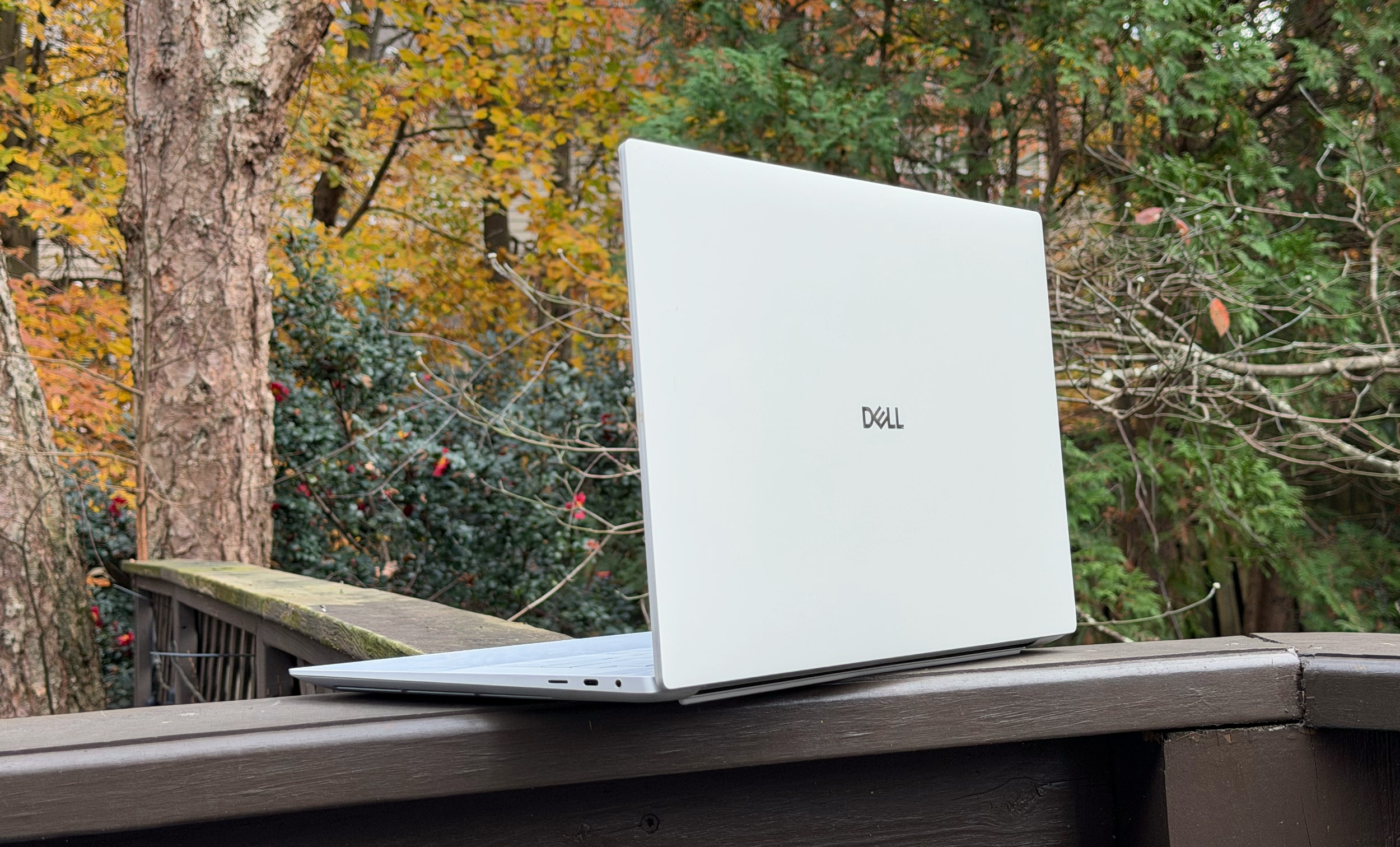
We've had less than a year to mourn the loss of Dell's iconic XPS laptop brand, and frankly, I'm still not over it. But time moves on. Engadget has already reviewed the Dell 14 Premium, formerly the XPS 14, and now I've finally had a chance to put the larger Dell 16 Premium through its paces. My conclusion? It's still as beautiful as the last XPS 16, but I also think Dell seriously needs to rethink its ultramodern design strategy.
With its minimalist design (look Ma, no visible trackpad!), smooth metal case and clean lines, the Dell 16 Premium looks like a work of art. It's the sort of thing I'd imagine someone creating as a prop for a sci-fi movie in the '90s, when we could barely imagine real notebooks moving beyond chunky grey bricks. But those good looks come at a cost — both in terms of price (it starts at $2,000) and basic functionality.
If you've read my reviews of the XPS 16 and XPS 13 Plus, Dell's first models to use this aesthetic, you might think I'm just beating a dead horse. But it's worth pointing out again, more than three years after I first chastised Dell for chasing style over function, that the company seemingly hasn't learned anything. Sure, it's a bit faster than before, thanks to Intel's Core Ultra chips and NVIDIA's RTX 50-series GPUs, but that's not saying much.
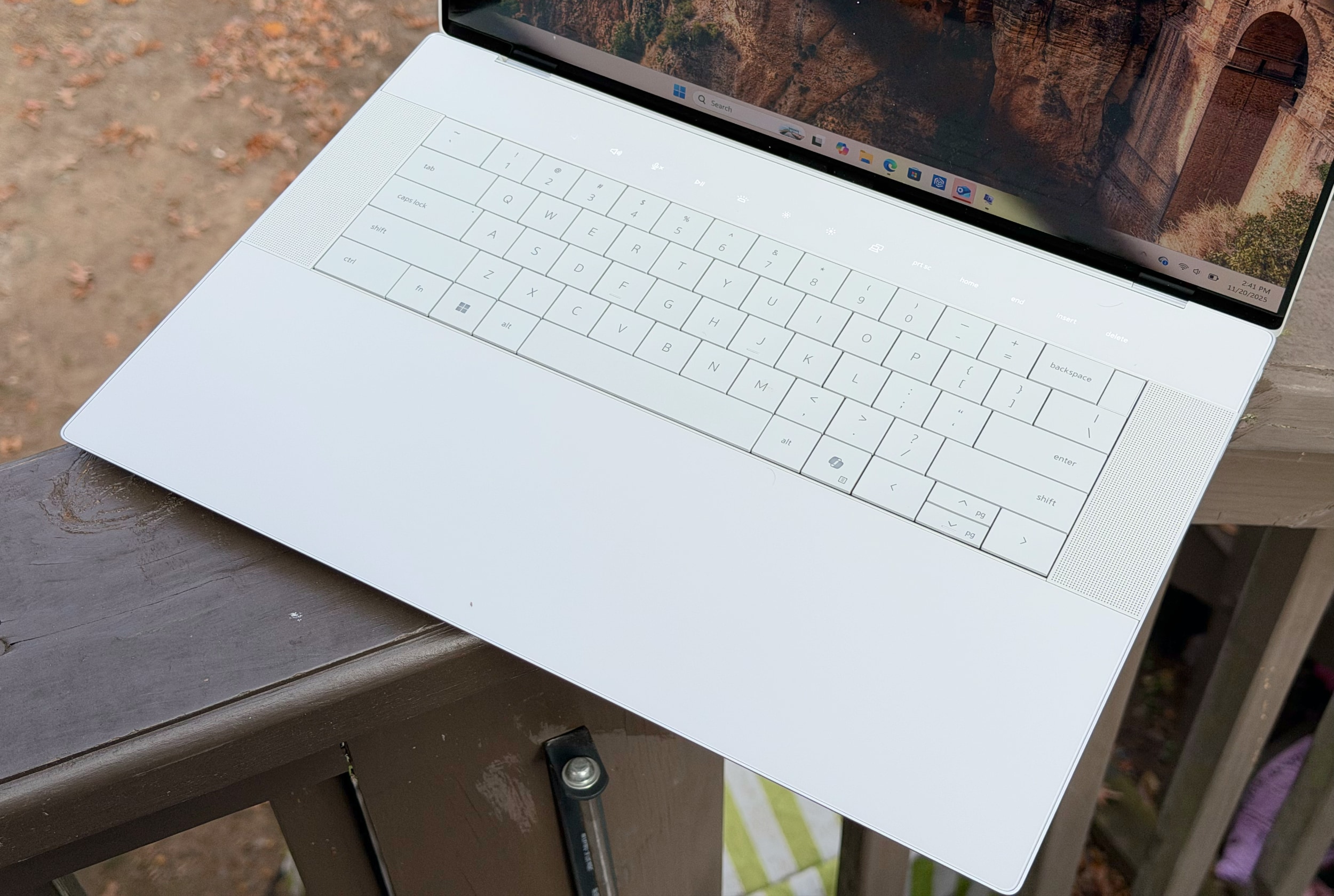
I still have trouble using the 16 Premium's borderless trackpad because it's tough to tell where the clickable zones are. I still hate the capacitive function row, both because it becomes miraculously invisible in bright light and it's tough to build muscle memory for specific keys (like changing the brightness or volume). And honestly, I still don't know how Dell can justify offering only USB-C ports and a microSD card slot on a laptop meant for serious work. Even Apple realized that it had to include a wider variety of ports for professionals, and that's also something other PC makers like ASUS and Acer offer. Did Dell miss the memo?
Worst of all, the 16 Premium's 4K OLED screen seriously hampers its battery life. It only lasted six hours and five minutes during a basic video rundown, whereas the previous XPS 16 lasted eight and a half hours in the much more demanding PCMark 10 battery test. (For some reason, that benchmark didn't run properly on my review 16 Premium review unit.) Larger laptops often stuff in bigger batteries than smaller models, but the 16 Premium can't even manage that.
At least it's faster than before. The Dell 16 Premium I reviewed was equipped with Intel's Core Ultra 7 255H chip and a low-wattage version of NVIDIA's RTX 5070 GPU. It scored around 10 percent higher than last year's XPS 16 in PCMark 10, and it was notably faster in the Geekbench AI benchmark thanks to Intel's revamped NPU. I was even able to play Cyberpunk 2077 in 4K at 84 fps thanks to the 5070, though I had to enable DLSS 4 frame generation to do so. For some reason though, the system would slow to an absolute crawl whenever I enabled ray tracing features. At best, I only saw around 60 fps in 1080p while using the low ray tracing settings.
The Dell 16 Premium from the rear.
Devindra Hardawar for Engadget
Sure, it's not a gaming laptop, so I can't directly compare it to something like the Razer Blade 16. But it's strange to see one of NVIDIA's latest GPUs handle ray tracing so poorly. As you'd expect, the Dell 16 Premium also got pretty loud whenever its fans spun up. At least they managed to keep the system relatively cool though: Its CPU and GPU sat at 68C and 70C, respectively, under load.
The more I looked at the Dell 16 Premium's beautiful facade, the more I wanted something... more. It needs more usable ports, like HDMI and a full-sized SD card reader. It needs more useful function keys that are visible in bright light — and also stay in one place — so I can touch type more easily. And for the love of god, just give up on the invisible trackpad. It's a parlor trick that just makes it harder to tell left and right mouse clicks apart, despite the impressively large trackpad area.
The 16 Premium's "invisible" trackpad blends seamlessly into its wrist rest, while the keyboard lays perfectly flat and a row of capacitive function keys sits above.
Devindra Hardawar for Engadget
Given its premium positioning, I also expected more from the laptop's speakers. They sound fine compared to most Windows laptops, but they can't hold a candle to the audio sorcery Apple accomplishes with the 16-inch MacBook Pro. When playing music, the 16 Premium doesn't have much dynamic range or low-end tone, whereas Apple's speakers often surprise me with their depth and enveloping sound. During late night writing sessions, I often find myself playing music straight through the 16-inch MacBook Pro, rather than casting it off to my Sonos speakers like the 16 Premium forces me to do.
To avoid being entirely negative, I'll reiterate that I genuinely enjoy looking at the Dell 16 Premium. I love the way its keyboard and large key caps lay perfectly flat along the notebook's lower half. And I'll admit, the 16-inch OLED screen looks lusciously colorful when it needs to. I'm just asking for Dell's designers to consider a better balance of style and functionality for their next stab at a premium 16-inch laptop.
This article originally appeared on Engadget at https://www.engadget.com/computing/laptops/dell-16-premium-review-stylish-to-a-fault-130000463.html?src=rss
Uber is apparently feeling generous this holiday season. The company is launching family sharing for Uber One members, allowing individuals to add another adult to their account for free. They can also include an unlimited number of teens.
Anyone added to the membership can access all of the same benefits, including free delivery. They will also earn unique credits for rides. You can attach someone to your membership by clicking Account and then Uber One. From there, you can tap manage membership and then family sharing.
Uber
Uber is also giving members additional perks, like prioritized complimentary upgrades. The company claims that it will upgrade over one million rides for members between December 2 and 25. Plus, members traveling between today and Thursday for Thanksgiving should get 10 percent off if booking an Uber Black to or from an airport.
Tech lovers with an Uber One subscription will be happy to hear that you can get early access to $25 off if you spend $75 or more at Best Buy — through Uber Eats, of course.
This article originally appeared on Engadget at https://www.engadget.com/apps/uber-one-subscribers-can-now-share-free-deliveries-and-other-perks-with-their-family-120004629.html?src=rss