In 2024, Microsoft caused a lot of head-scratching and general bemusement with the launch of its "This is an Xbox" marketing campaign. Now, though, it appears the quandary over what is and isn't an Xbox has been resolved. Game Developer noticed that the original blog post on Xbox Wire that kicked off the whole affair has been removed. It seems Xbox will be going a new direction with its future promotions.
Maybe since the new Project Helix hardware it has in the works is more definite attempt to blur console and PC gaming, "This is an Xbox" might have been truly confusing as a tagline. Maybe with the recent changing of the guard at the company, the top brass decided that it was the right time to start fresh with a less meme-able marketing plan. Whatever the reason, we have enjoyed this opportunity to learn about the existential philosophy behind being an Xbox. And fortunately, although the blog post may be gone, the video trailer still exists whenever we need to remind ourselves of the many things that can be Xbox-ified.
This article originally appeared on Engadget at https://www.engadget.com/gaming/xbox/i-guess-this-wasnt-an-xbox-after-all-230154314.html?src=rss
TikTok will soon let you stream full songs in its app via a new integration with Apple Music. The company's new Play Full Song feature makes it possible to link your Apple Music account toTikTok, and play any song that strikes your fancy directly in the app while you're scrolling.
Starting a song is as simple as tapping a button in the Sound Details page or your For You page. Assuming you pay for Apple Music, TikTok will then open up a streamlined version of Apple's music player, which you can use to listen to the song, save it for later or add it to a playlist.
TikTok says that Play Full Song is built using Apple's MusicKit APIs, which let developers surface elements of the Apple Music streaming service in their apps. TikTok has previously offered integration with multiple music streaming services through a feature it calls Add to Music App, which made it possible to save songs you heard on TikTok to your streaming library. What's particularly interesting about this new integration is that because it's using Apple's APIs, songs streamed with Play Full Song count as normal streams for the artists in Apple Music, so they don't lose out on any money.
Alongside the new feature, TikTok and Apple are also introducing a way for fans to listen to music live with their favorite artists. TikTok's Listening Party feature creates a live "shared environment" where people can listen to music and interact with artists directly, in what effectively sounds like an audio-only livestream. TikTok livestreams are a whole ecosystem in their own right, and Listening Party seems like a way to leverage some of the same technology for a more controlled, music promotion-focused end.
TikTok is already a popular tool for music discovery and launching the career of new artists, and the platform also briefly dabbled in offering a streaming service of its own in 2023. The company abandoned those plans in 2024, but under new owners, TikTok's ambitions could ultimately be bigger than just offering nice integrations with existing streaming services.
TikTok says Play Full Song and Listening Party are rolling out worldwide “in the weeks ahead,” so if you don’t see either feature now, you may soon.
This article originally appeared on Engadget at https://www.engadget.com/apps/tiktok-will-let-you-stream-full-songs-in-its-app-if-youre-an-apple-music-subscriber-183333143.html?src=rss
Xbox Mode will only be available in select markets at first, and Microsoft describes it as bringing "a controller-optimized experience to your Windows 11 device, letting players browse their library, launch games, use Game Bar and switch between apps." You know, just like Steam Big Picture mode. Microsoft didn't have much else to share about optimizations in Xbox Mode, but when it debuted the feature for Windows 11 Insiders last fall, the company noted that its task switcher will let people quickly move between games, as well as their apps.
Microsoft also has some geekier developer-focused news for the Games Developer Conference. Advanced Shader Delivery (ASD), which first appeared on the Xbox ROG Ally, will be made available to all developers on the Xbox store. ASD allows delivers to pre-compile shaders, so you're not stuck waiting for them to get processed on your system. That should also help to avoid the shader stuttering so common when playing a new title, since shader processing often occurs in the background too.
DirectStorage, Microsoft's technology for speeding up game loading on NVMe SSDs, is also getting support for Zstandard compression, as well as a tool called the "Game Asset Conditional Library." According to Microsoft, that tool enables "improving compression efficiency while simplifying asset conditioning across production pipelines." Microsoft also plans to give developers a glimpse at how next-generation Machine Learning will be implemented in its DirectX gaming API.
This article originally appeared on Engadget at https://www.engadget.com/gaming/xbox/microsofts-full-screen-xbox-mode-will-roll-out-to-windows-11-pcs-in-april-181000289.html?src=rss
Microsoft plans to begin shipping early units of its next generation console, codenamed Project Helix, to game studios starting sometime next year. “We're sending alpha versions of Project Helix to developers starting in 2027,“ said Jason Ronald, vice-president of next generation for Xbox, according to IGN, which was present at the company’s GDC 2026 presentation where it shared early details about the new device. Ronald did not clarify what he meant by “alpha version,” but given the keynote’s developer focus, presumably he meant devkits, which studios could use to start creating games for the new console.
Additionally, Ronald reiterated that the new system would be capable of playing both Xbox console games and PC games, and said it would incorporate a custom AMD-made system-on-a-chip capable of rendering graphics with path tracing. Judging from a slide the company shared, Microsoft and AMD are working on many of the same technologies and capabilities AMD is co-designing with Sony for next PlayStation console. For instance, Ronald said Helix would be capable of ray regeneration, a technique designed to produce better-looking ray-traced effects. The new console will also offer multi-frame frame generation and machine learning-based upscaling.
“It delivers an order of magnitude leap in ray tracing performance and capability, integrates intelligence directly into the graphics and compute pipeline, and drives meaningful gains in efficiency, scale, and visual ambition. The result is more realistic, immersive, and dynamic worlds for players,” Ronald wrote in a blog post published after his presentation.
Ronald didn’t speak to any specific compute numbers, likely due to the fact Microsoft has yet to finalize the Helix hardware. We’ll likely learn more of those details the closer we get to 2027.
This article originally appeared on Engadget at https://www.engadget.com/gaming/xbox/microsoft-will-start-providing-game-studios-with-project-helix-consoles-in-2027-180352458.html?src=rss
When you think of an AI-forward PC, you might think of something like NVIDIA's $3,999 DGX Spark — a computer with enough computing power to run complex large language models locally. That's not what Rabbit is trying to build with Project Cyberdeck. Instead, the company's goal is to produce a device tailored for vibe coding, and Engadget was given an exclusive first look at the upcoming PC.
Rabbit began working on Project Cyberdeck after the company's CEO, Jesse Lyu, saw how much his software engineers were using Claude Code. Lyu thought a small form factor PC, like the netbooks that were popular in the late aughts, with a command line interface would be ideal for on-the-go vibe coding, but when he went online to look for something that fit the bill, he was disappointed.
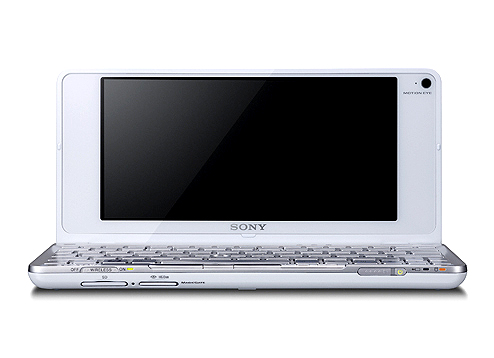
"They all come with shitty rubber dome keyboards," Lyu says of low-cost PCs like the latest Chromebooks, which use flexible silicone sheets under their keys to save on space and cost. "They're not something you would enjoy typing on for an extended period of time." So Rabbit decided to build its own device. For inspiration, Lyu and company looked to an unlikely source: the Sony Vaio P.
The Cyberdeck takes inspiration from the Sony Vaio P.
Sony
Sony's netbook was only briefly available from the start of 2009 to about the end of 2010. At the time, the 8-inch Vaio P was the world's lightest netbook, weighing just 1.4 pounds, but it had a host of issues. It was also expensive, costing considerably more than other Intel Atom notebooks of the time. In 2009, the most affordable Vaio P would set you back $900 (about $1,365 adjusted for inflation). With Project Cyberdeck, Rabbit is aiming for a device that costs about $500, and hopefully avoids a similar fate.
I saw a few early renders of Project Cyberdeck, which Rabbit isn't ready to share publicly yet. Imagine a cross between the Rabbit R1, Vaio P and the original Nintendo DS. It looks cute. All the renders had four USB-C ports to allow users to connect the device to external monitors and peripherals, though the actual IO specs are as-yet undecided.
The company is in the process of sourcing components and working towards a final design, so details can — and will — change. I saw some of the parts Lyu has been testing in his office, but no final prototype as such.
For one, Rabbit still needs to decide on a chipset. The company is aiming for a performance benchmark relative to the Raspberry Pi 5, which has a Broadcom BCM2712 quad-core Arm Cortex A76 processor clocked at 2.4GHz. With 16GB of RAM, the Raspberry Pi 5 can run two external monitors, a capability Rabbit hopes to match with the Cyberdeck. The idea here is to make a device that's powerful enough it won't feel slow when it's communicating with Anthropic and OpenAI's servers, but affordable enough to make it a no-brainer purchase for developers.
The company confirmed Project Cyberdeck will run Linux. Rabbit will allow users to modify the operating system and install any third-party tools they want. Additionally, all the software features the company has developed for RabbitOS will be available through command-line prompts.
Two parts of the device Lyu hopes are major differentiating factors are the keyboard and screen. Lyu appears set on shipping a computer with a 40 percent keyboard that has low-profile mechanical switches and a fully hot swappable PCB, so users can tweak the typing feel to their liking. Lyu also had a sample 7-inch OLED screen on his desk when I spoke to him. That specific panel offers touch input, a 165Hz refresh rate and 815 nits of brightness. While it might not be the one Rabbit settles on, OLED is the goal, because of what it would mean for battery life.
For the uninitiated, OLED panels produce black values by turning off individual diodes, and since each diode is self-emitting, there's no need for a power-hungry backlight. Like every smartphone manufacturer, Rabbit is taking advantage of this by planning to offer a dark mode interface from day one.
One aspect of the Cyberdeck's design Lyu can't definitively speak to is how much RAM it will feature. The entire industry is dealing with datacenter demand for high-bandwidth memory that has sent the price of computers, smartphones and other electronics soaring. Lyu believes Rabbit won't be forced to delay the Cyberdeck out of 2026, but he also didn't rule out the possibility either. If things change for the better, he's confident Rabbit would be able to take advantage, since it took the company about 93 days to ship the first R1 device after it began working on the design.
Separately, I wonder if people will want to carry around a second device solely for their coding needs? You don't need a dedicated machine to access Claude Code or OpenAI Cursor. Even companies like Apple have begun integrating vibe coding services into their development environments. Rabbit could be on track for a repeat of the R1, but with so many details of the Cyberdeck left undecided, for now, it's too early to know for sure. The company will get to make its case when it shares more details in the coming weeks and months.
This article originally appeared on Engadget at https://www.engadget.com/ai/rabbits-cyberdeck-is-a-modern-take-on-a-netbook-151907273.html?src=rss
Looking Glass has been doggedly committed to making holographic displays the next big thing since 2019, and with its new Musubi digital photo frame, it might finally be offering its tech at a price that's hard to deny. Musubi is scheduled to start shipping in June, and unlike the company's previous, more developer-focused kits, the company's new display only costs $149.
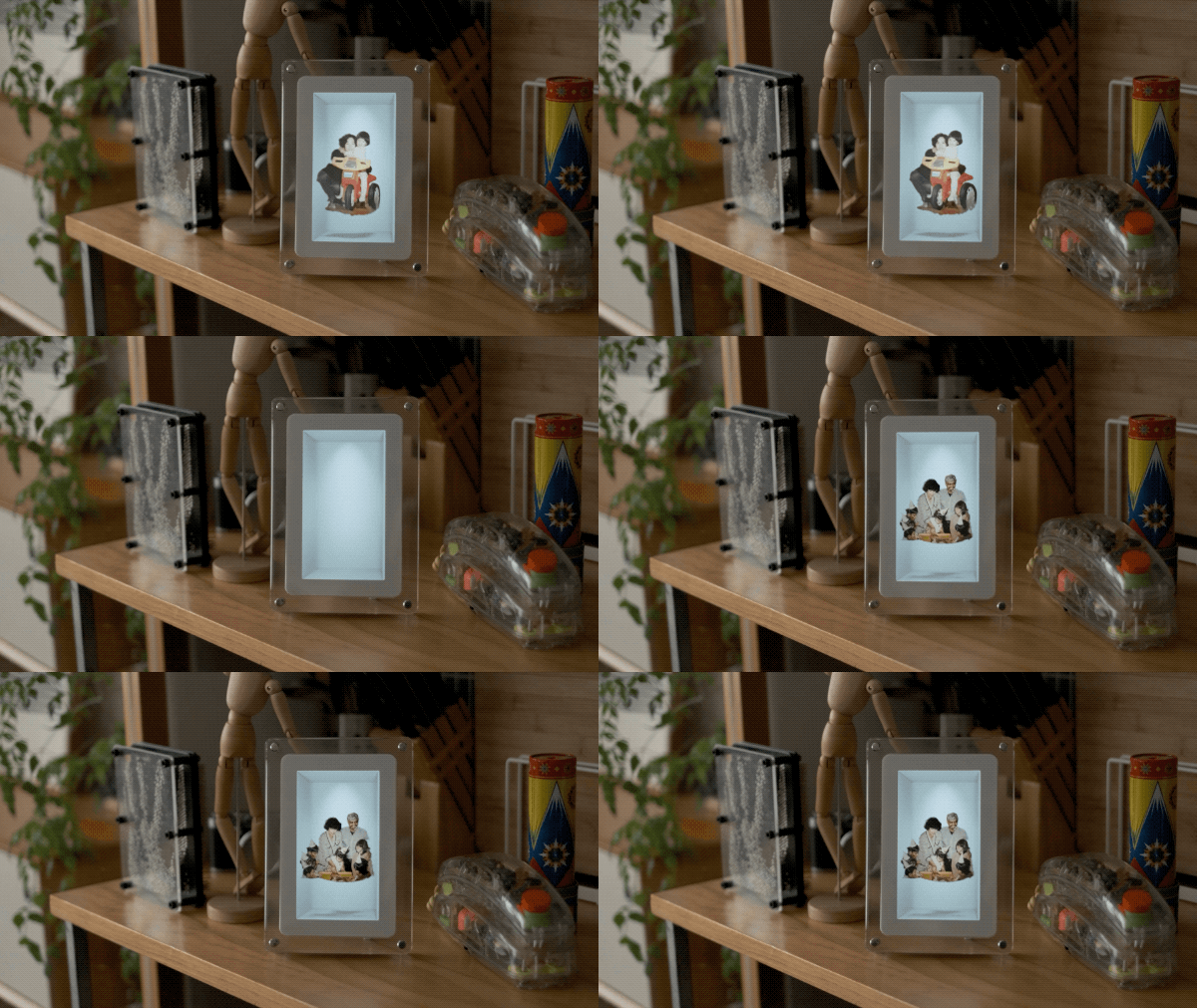
Musubi is a 7-inch frame with a glass border and white matte that acts as the home for whatever content you convert and upload to it. Looking Glass says the Musubi can store up to 1,000 images or 30-second video clips, and is able to display your content for three hours on a single charge, or indefinitely if you plug it in with an included wall adapter. You'll have to convert your photos and videos into holographic files using Looking Glass' free desktop app in order to display them, but once they're converted, all you need to do is transfer them over USB-C to start showing them off on Musubi.
Musubi can also cycle through multiple holographic images.
Looking Glass
Looking Glass has offered multiple versions of this concept before — including the compact, $300 Looking Glass Go from 2023 — but Musubi is supposed to be the best representation of the company's current display stack. The frame uses the Hololuminescent Display (HLD) technology Looking Glass announced in 2025, which "combines 2D display layers with a 3D holographic volume" to show off holograms that are viewable by multiple people at the same time, without the need for eye-tracking or glasses. It's hard to get a sense for the whole Musubi experience from the company's YouTube video alone, but the results seem novel, if a bit limited.
You can pre-order Musubi starting today through Looking Glass' Kickstarter campaign. For the first 24 hours of the company's Kickstarter, the frame will be available for $99. Afterwards, Musubi will sell for $149. Anything on Kickstarter should be treated with a certain amount of caution, but Looking Glass' past campaigns and the company's commitment to start shipping Musubi in June does suggest it’s confident the frame will be released without issues.
This article originally appeared on Engadget at https://www.engadget.com/ar-vr/looking-glass-musubi-showcases-its-holographic-display-in-a-consumer-friendly-package-130000304.html?src=rss
NVIDIA is reportedly working on its own open-source AI agent platform, according to Wired. The chipmaker has been pitching the product to enterprise software companies. Reporting indicates it's going to be called NemoClaw, suggesting that the entire industry is going to embrace this whole "claw" naming convention moving forward.
Just like OpenClaw, this will be a platform in which users dispatch AI agents to perform a variety of tasks. However, NVIDIA's effort looks to have an enterprise focus for now. To that end, reporting indicates that companies will be able to access this platform even if their products don't run on NVIDIA chips.
NVIDIA is currently preparing for its annual developer conference next week and Wired has suggested that the company has already reached out to entities like Salesforce, Cisco and Google to strike partnerships for its platform. It's not clear if these discussions have led to anything official, as none of these companies have provided statements.
This could be a steep climb for NVIDIA, as usage of these multi-purpose agents in the enterprise space is relatively controversial. Some tech companies have asked employees to refrain from using OpenClaw and related tools on their work computers, as the agents can be unpredictable and cause all manner of mayhem. A Meta employee recently shared a story about an AI agent going rogue and mass deleting emails.
This poses a serious security risk to enterprise customers. It's one thing if the claw is trapped on a personal computer, but another thing if it has access to an entire enterprise network. NVIDIA is reportedly beefing up NemoClaw with additional layers of security for AI agents, which is likely an effort to attract those business customers.
Why is this a big deal? Unlike traditional chatbots that typically require hand-holding from the user every step of the way, claws are designed to run autonomously on computers and perform complex, multi-pronged tasks without too much human supervision.
Peter Steinberger is joining OpenAI to drive the next generation of personal agents. He is a genius with a lot of amazing ideas about the future of very smart agents interacting with each other to do very useful things for people. We expect this will quickly become core to our…
This all started with software originally called Clawdbot, which is now called OpenClaw. The creator of OpenClaw, Peter Steinberger, recently joined OpenAI to help "drive the next generation of personal agents."
This article originally appeared on Engadget at https://www.engadget.com/ai/nvidia-is-reportedly-working-on-its-own-open-source-ai-agent-platform-153203397.html?src=rss
NVIDIA's GeForce Now game streaming platform has added a few minor but useful updates, especially for GOG and VR headset users, the company announced at Game Developer's Conference (GDC). The biggest technical improvement is for virtual reality headsets that support GeForce Now like the Apple Vision Pro and Meta Quest. Starting next week (March 19), those devices will be able to stream at 90 fps for Ultimate members (up from 60 fps) for improved smoothness, responsiveness and realism.
Another helpful update is in-app labels coming "soon" to GeForce Now. Once you connect an Xbox or Ubisoft_ account, you'll see clear labels directly on game art inside the GeForce Now app showing exactly what's available to play from your subscription services. NVIDIA is also expanding account linking, adding GOG to the roster of services on top of Gaijin single-sign announced at CES.
GeForce Now is also expanding its Install-to-Play library with select Xbox titles including Brutal Legend from Double Fine Productions and Compulsion Games' Contrast. The service will also see several anticipated games directly on the cloud service at launch, namely Remedy's Control Resonant and Samson: A Tyndalston Story from Liquid Swords.
As a reminder, NVIDIA's GeForce Now is one of the better cloud gaming services out there, particularly since it added GeForce RTX 5080-powered servers that Engadget's Devindra Hardawar called "indistinguishable from a powerful rig." The service recently came to Fire TV sticks and is available on Windows and Mac PCs, NVIDIA's Shield, Android TV, smartphones and many other devices.
This article originally appeared on Engadget at https://www.engadget.com/gaming/geforce-now-adds-gog-syncing-and-90fps-game-streaming-in-vr-headsets-130656731.html?src=rss
Google is rolling out a batch of Gemini updates across its Workspace apps that give the AI assistant the ability to generate first drafts in Docs, build entire spreadsheets in Sheets, design presentations in Slides and answer questions about files stored in Drive. The features started rolling out on March 10 in beta for Google AI Ultra and Pro subscribers and Gemini Alpha business customers, in English only.
In Docs, a new "Help me create" tool produces a formatted first draft by pulling context from Drive, Gmail, Chat and the web based on a user's prompt. Gemini can also match the writing style or formatting of a reference document. Google says more than a third of new Docs are created from copies of existing files, so the formatting tool is meant to cut down on that manual work. In Sheets, Gemini can now construct an entire spreadsheet from a natural language prompt, drawing data from a user's files and emails, as well as Google Chat and the web.
A "Fill with Gemini" feature auto-populates table cells, which Google says is nine times faster than manual entry based on a 95-person study (this sounds profoundly unscientific, so take these claims with a grain of salt). Sheets also gained optimization tools powered by Google DeepMind and Google Research that can solve problems like employee scheduling through written prompts. In Slides, Gemini can generate individual slides that match an existing deck's theme, with full presentation generation from a single prompt coming later.
Google Drive is getting AI Overviews in search results, similar to a feature the company recently added to Gmail, along with a new "Ask Gemini" tool that lets users query their files, emails and calendar. The Drive features will be released first only for customers in the US, unlike the rest of these updates.
This article originally appeared on Engadget at https://www.engadget.com/ai/google-brings-gemini-powered-content-creation-tools-to-docs-sheets-slides-and-drive-144705622.html?src=rss
Sonos has just announced its first new products since 2024, when the company’s plans went sideways after a disastrous update to its app. First up is the Sonos Play, the company’s latest portable speaker. Long-time Sonos watchers will recognize the name from the old Play:1, Play:3 and Play:5 speakers, but this new model has little to do with those products of the past. The $299 Play is a Wi-Fi and Bluetooth speaker that sits between the $179 Roam 2 and $499 Move 2 and could be the “goldilocks” speaker in the company’s portable lineup, at least based on what I know so far.
The closest comparison for the Play is the excellent Era 100, which Sonos released back in 2023. At 7.6” tall, 4.4” wide and 3” deep, it’s much thinner than the Era 100 which is over 5 inches deep. And compared to the Move 2 (9.5” x 6.3 x 5”) it’s much more portable. That goes for weight, too — the Play is less than 3 pounds, compared to over 6.5 pounds for the Move 2. It’s not the kind of speaker you’ll throw in your bag and forget about, like the tiny Roam 2, but it’s far more portable than the Move 2. Finally, the Play is IP67 rated, just like the Roam 2. That means it can be submerged in up to a meter of water for up to 30 minutes; it’s also dustproof.
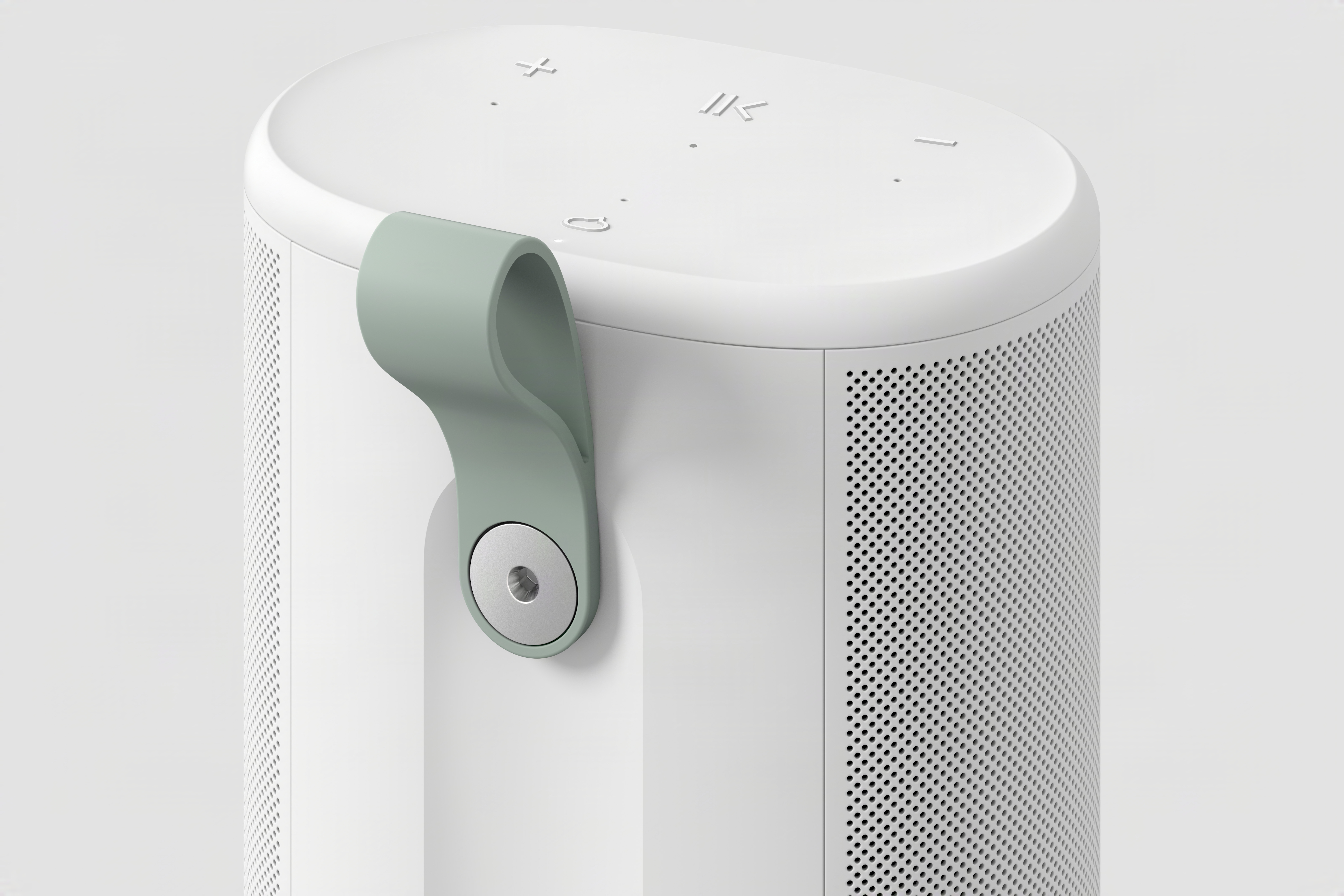
The grab handle on the back of the Sonos Play.
Sonos
From a speaker component perspective, it’s again quite similar to the Era 100. It has two tweeters positioned at a 90-degree angle for stereo separation paired with one midwoofer; it also has two additional passive radiators to increase the bass response in its relatively small case. The Era 100 lacks those passive radiators but is otherwise identical. Obviously, we’ll have to listen to the Play before saying how closely it compares to the Era 100, but this speaker should significantly outperform the Roam 2 simply due to the increased size of its components. The Move 2, on the other hand, is extremely loud and will likely still be the best choice for people who want a speaker to cover a large outdoor space.
You’ll find familiar controls on the Sonos Play, which comes in black or white. (Fingers crossed for future color options like the lovely trio that Sonos offers on the Roam.) On the top surface are buttons for play/pause, volume up and down and a microphone toggle. On the back is a power button, a Bluetooth button and a physical switch that disconnects the microphone for increased security. Finally, there’s a new feature here: a removable plastic grab loop.
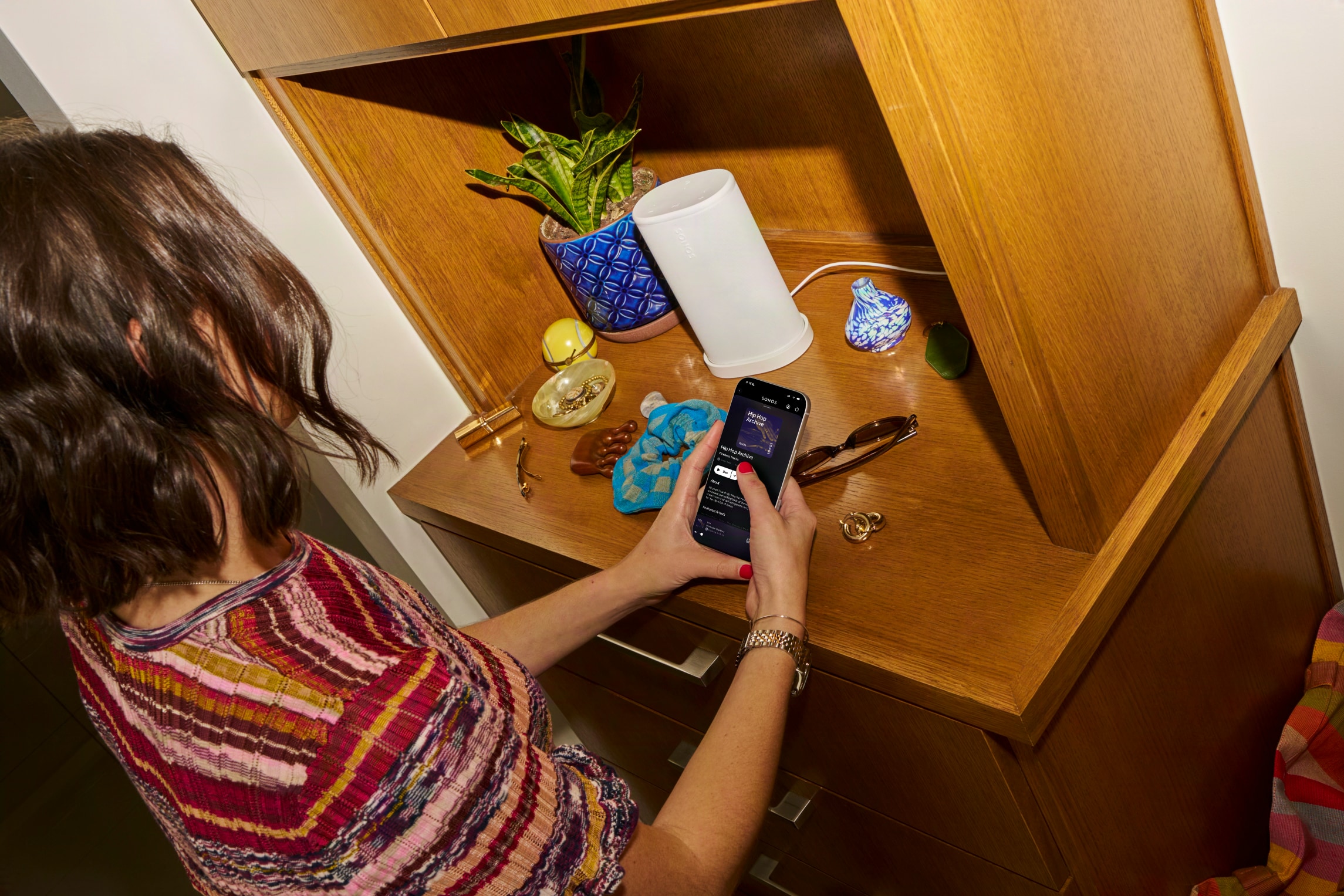
Sonos was keen to note that the Play is a full-featured member of the Sonos ecosystem. Like all of its other speakers, that means you’ll see all Sonos speakers in the app and can group them as you see fit, or have different music playing on different speakers throughout the house. You can also pair two of these in stereo. If you remove one from your network (say you’re outside and away from Wi-Fi), you’ll need to re-pair them though. In addition to controlling playback via the Sonos app (which, in my testing, is functioning fine and recovered from the 2024 debacle), you can stream music via AirPlay 2 or Spotify Connect. The Sonos Voice Assistant as well as Amazon Alexa are also on board here for anyone who likes to shout at their speakers.
The Sonos Play on its wireless charging base.
Sonos
There’s a new trick here for both the Play and Move 2, as well. For the first time, you can group Sonos speakers together through Bluetooth. After pairing a Play to your phone via Bluetooth, you can press and hold the play/pause button on three more Play or Move 2 speakers to add them to the group. If you want to cover a larger outdoor space with multiple speakers, this sounds like a pretty handy way to do so.
The Play also has line-in via its USB-C port, and you can use it for Ethernet as well; both features require a separate adapter. You can even use the USB-C port to top up your phone if you’re so inclined. And while you can also charge via the USB-C port, the Play comes with a wireless charging dock which makes for a nice home base for the speaker’s primary location. Annoyingly, Sonos did not include a charger, so you’ll need to provide your own USB-C brick.
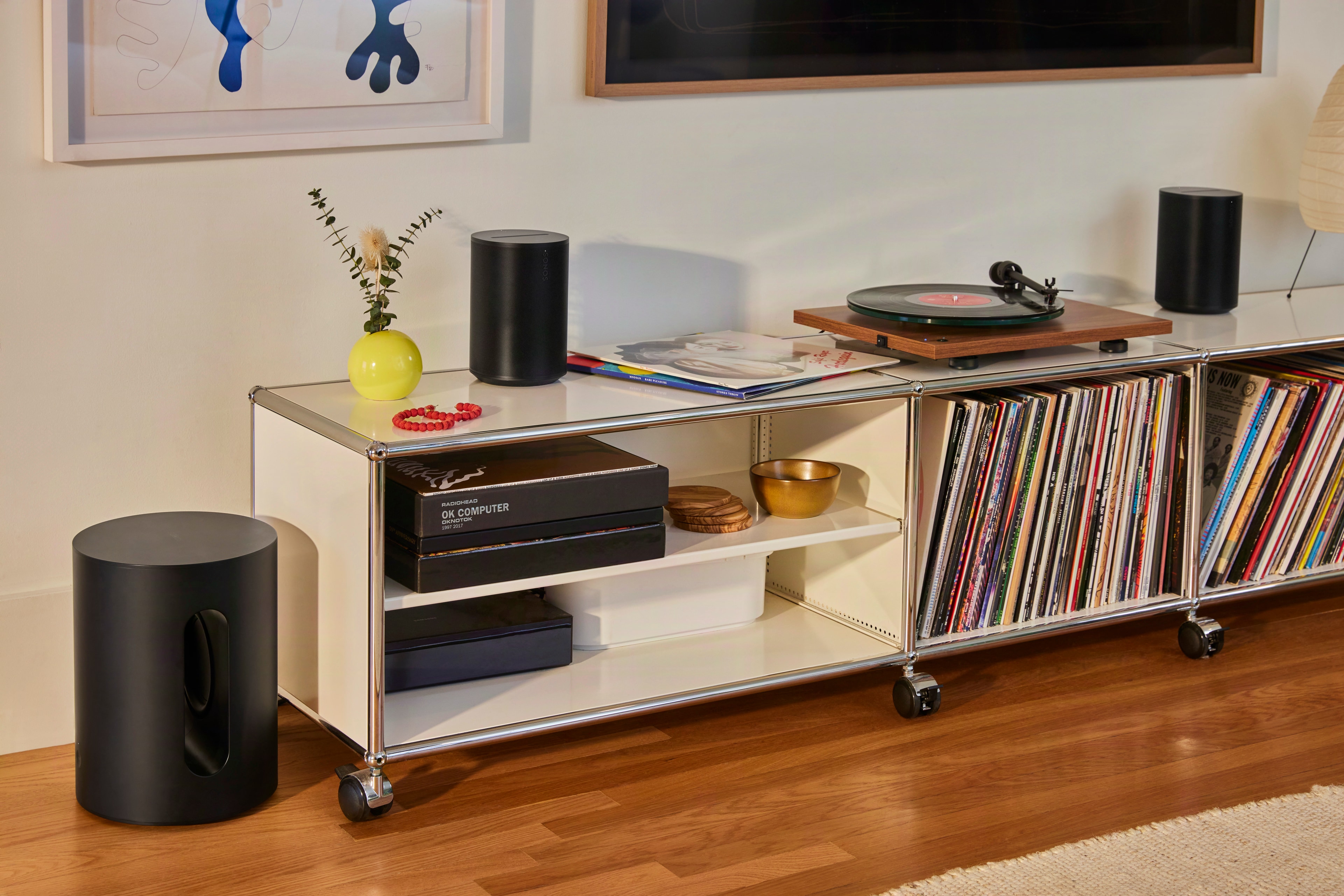
A pair of Sonos Era 100 SL speakers with a turntable.
Sonos
Sonos is also adding a second, much simpler speaker to its lineup today: the Era 100 SL. Like the One SL before it, the Era 100 SL is identical to the Era 100 with one key difference. There are no microphones on it at all. As such, the Era 100 SL is also a bit cheaper, coming in at $189 compared to $219 for the standard model.
Otherwise, there are no differences in acoustic architecture or feature set here. As its most affordable speaker besides the portable Roam 2, Sonos is positioning the Era 100 SL as the ideal entry point into its products. I can’t really argue with that, as the Era 100 still sounds outstanding and is also quite flexible with features like line-in and Bluetooth as well as all the standard streaming options. Both versions of the Era 100 are compatible with each other, too — so if you get an SL and then decide you want a stereo pair, a standard Era 100 with a mic will work there and bring voice control to your system as well.
Both the $299 Play and $189 Era 100 SL are up for pre-order now, and Sonos says they’ll be shipping on March 31.
This article originally appeared on Engadget at https://www.engadget.com/audio/speakers/the-sonos-play-puts-the-best-parts-of-the-era-100-in-a-portable-speaker-133000129.html?src=rss