Google is reportedly rebranding Bard to Gemini and plans to launch a dedicated app

According to a document leaked on X, Google is planning to introduce some major changes to its Bard AI tool as soon as this coming week. The plans, which have not been publicly confirmed, reportedly include changing the Bard name to Gemini. It would make sense for Google to do so, if only for simplicity’s sake — the company introduced its new multimodal AI model, Gemini, at the end of 2023 and has begun integrating it into some of its products, including Bard.

The changelog shared by Android app developer Dylan Roussel is dated February 7, and also notes that the paid Gemini Advanced tier will become available at this time. It mentions a Gemini app for Android is “coming soon,” as well.

Per the document, Gemini Advanced will give users access to the Ultra 1.0 model of Gemini, which is “far more capable at highly complex tasks like coding, logical reasoning, following nuanced instructions, and creative collaboration.” It’ll be available in over 150 countries and optimized for the English language at the start. The changelog also says Gemini will expand to Canada with this release.

This article originally appeared on Engadget at https://www.engadget.com/google-is-reportedly-rebranding-bard-to-gemini-and-plans-to-launch-a-dedicated-app-204442265.html?src=rss

Pool noodle furniture brings a spirit of play to both indoor and outdoor spaces

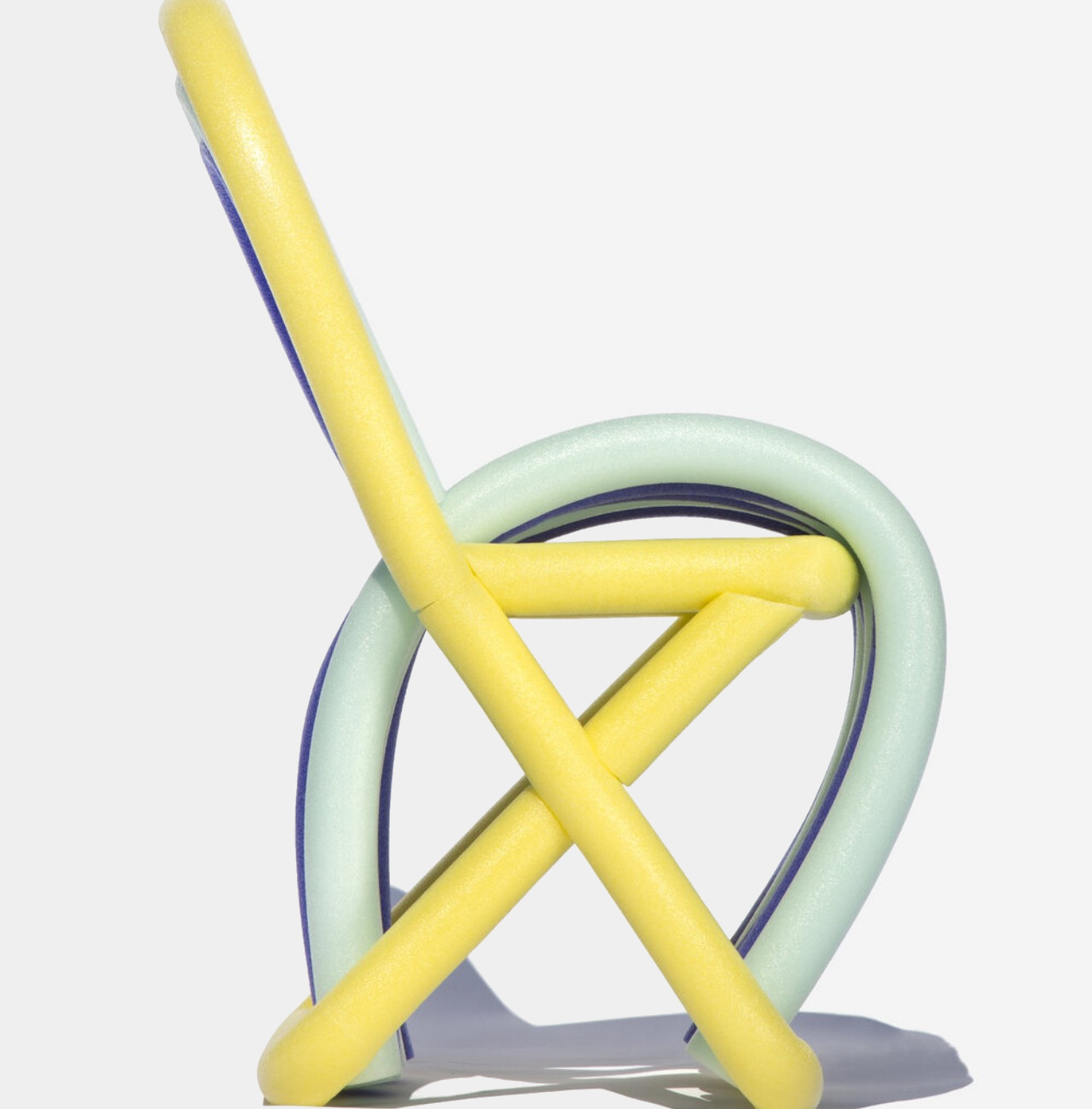
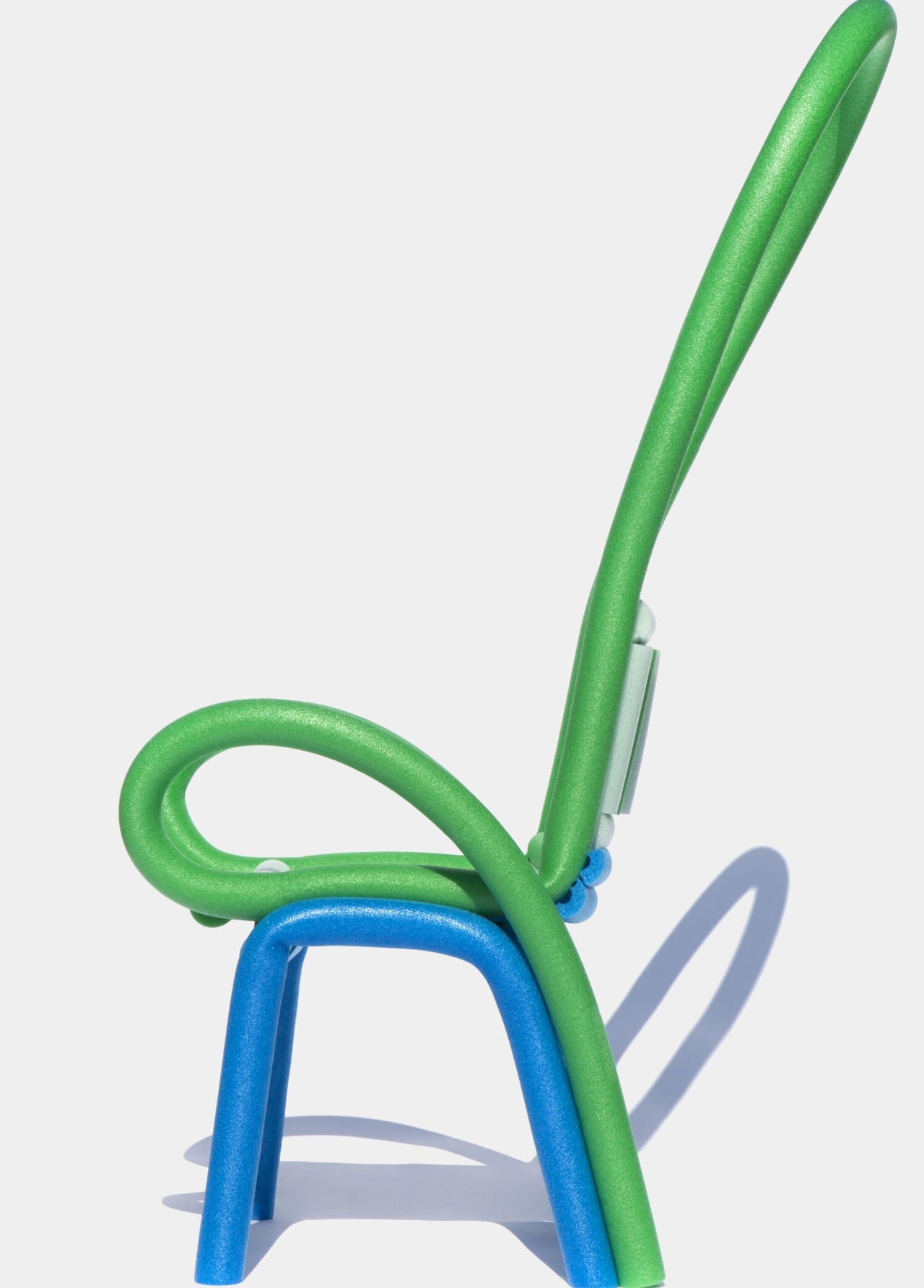
Bright, colorful, flexible, buoyant, and life-saving. These are the words that are often used to describe pool noodles, sometimes called waterlogs or even water woggles. These floating foam tubes allow kids and adults alike to engage in playful banter in the pool while still remaining safe, though they’re also finding use outside of the water. Their flexible bodies and soft material make the perfect objects for safe play, but they’ve amusingly also become the foundations of designs completely unrelated to their original use. Take this experimental set of furniture that employs these vibrant tubes to deliver that same whimsical atmosphere to chairs, tables, and everything in between.

Designer: Lieyah Dagan

They may come by any other name, but pool noodles are a popular component in many fanciful designs, from playground obstacle courses to car covers. Their ubiquity, affordability, and flexibility make it easy to shape them into different objects, combining them to form a more complex composition of rods, circles, and arcs. What pool noodles aren’t known for is stability and rigidity, properties that are almost antithetical to the very essence of these foamy objects. And yet that’s exactly what this furniture is presenting, mixing contrasting elements to give the designs a distinct, lively character.

The first step in producing the Looped line of indoor and outdoor furniture was to actually break chairs, tables, and other furniture down to their frames, revealing the structure that ultimately gives them form. The pool noodles are then used to “flesh out” the actual shape of the furniture, giving them mass that would be needed to support their newfound purpose as utilitarian objects. Once the final designs have been selected, dowels and medium-density fiberboard (MDF) are added to provide the needed support to make the furniture become more stable and reliable.

Of course, it wouldn’t be fun if the pool noodles simply followed the same shape as the original furniture. Looped embodies not just the characteristics but also the spirit of these playful waterlogs, employing plenty of curves, loops, and over-the-top proportions that make the furniture almost feel like toys. That, for better or worse, is both the strength and the flaw of the design.

Loop has an undeniable pull that makes people want to play with it, whether it’s because of the bright colors, the soft material, or familiarity with pool noodles. That’s fine with soft toys like actual pool noodles, but playing with a chair or a table brings risks of accidents and injuries. In the end, it creates a perception of playful engagement when they’re also supposed to be designed for serious use, creating a conflict in the mind of the viewer that is both enthralling but also a bit confusing.

The post Pool noodle furniture brings a spirit of play to both indoor and outdoor spaces first appeared on Yanko Design.

You won’t be able to use a Bluetooth mouse with Apple Vision Pro

Apple released a new support document for the Vision Pro on Friday night, and it clarifies which accessories will — and won’t — work with the headset. While Apple says it is compatible with “most” Bluetooth keyboards, including its own and other manufacturers’, the Vision Pro doesn’t support Bluetooth mice. Vision Pro owners will be to use Apple’s Magic Trackpad, though.

Apple Vision Pro officially hit shelves yesterday, and there are hundreds of apps for productivity and entertainment available at launch. With eye and hand tracking for precision navigation and controls, there isn’t necessarily a need for a mouse, but some people probably would have liked to use one for certain tasks. However, it is compatible with plenty of other accessories that are critical for certain experiences, like gaming controllers. According to Apple, “All controllers with MFi (Made for iPhone) designation work with Apple Vision Pro. This includes controllers by Xbox, PlayStation, and any controller that works with iPadOS.”

And, while it supports Bluetooth keyboards, you may need to upgrade if you use an older Apple keyboard. According to Apple, its older models that use removable batteries will not work with the Vision Pro.

This article originally appeared on Engadget at https://www.engadget.com/you-wont-be-able-to-use-a-bluetooth-mouse-with-apple-vision-pro-183137646.html?src=rss

The Apple Watch Series 9 is on sale for $299 today only

Apple’s latest smartwatch, the Series 9, is back down to its record-low price in a one-day-only sale at Best Buy. The 41mm Apple Watch Series 9, which normally goes for $399, is just $299 today for the GPS model. The larger version, 45mm, is on sale for $100 off as well, bringing it down to $329. For both sizes, the deal applies to multiple colors, so you can get the watch in Silver, Light Pink, Starlight, Midnight or (Product)Red with either the sport band or the nylon sport loop.

The Apple Watch Series 9 added some new features for more convenient interactions with your smartwatch. That includes Double Tap, a control option that doesn’t require you to touch the screen at all — you just need to squeeze your thumb and index finger together two times using the hand on the same arm as your watch, and it’ll carry out a designated action. You could use it, for example, to pause or unpause your music.

The Series 9 scored a 92 in our review, excelling as usual at health and fitness tracking, among other tasks. It also tops our list of the best smartwatches you can get this year. Apple also introduced on-device Siri for the Apple Watch with the Series 9, which means the assistant can function when you’re offline or don’t have your phone with you. Apple also said it improved the “Raise to Speak” feature with the Series 9 to wake Siri more efficiently without voice commands. All of this is made possible by its new S9 system-in-package (SiP).

You won’t get blood oxygen monitoring with the Series 9, though, despite the feature initially being among its offerings. Apple removed the feature last month following a patent dispute. But even without that, the Series 9 is a solid device that offers pretty much everything you’d need or want in a smartwatch.

Follow @EngadgetDeals on Twitter and subscribe to the Engadget Deals newsletter for the latest tech deals and buying advice.

This article originally appeared on Engadget at https://www.engadget.com/the-apple-watch-series-9-is-on-sale-for-299-today-only-155051471.html?src=rss

Apple Vison Pro In Action (Video)

Apple Vision Pro

Apple’s foray into spatial computing arrives in the form of the Apple Vision Pro which went on sale yesterday, a device that’s been eagerly anticipated by tech enthusiasts and professionals alike. If you’ve been curious about Apple’s latest innovation, a detailed video review by Brandon Butch offers a deep dive into its unboxing, setup, and […]

The post Apple Vison Pro In Action (Video) appeared first on Geeky Gadgets.

Posted in Uncategorized | Tagged

The Morning After: TikTok loses Taylor Swift’s songs and the verdict on the Galaxy S24 Ultra

Following failed negotiations with TikTok, Universal music has come good on its threat to pull music from the social media platform. That means no more TayTay, no more Drake and no more... all the other artists that fall under its corporate umbrella. Elsewhere, the CEOs of the world's most influential social media platforms got an (at times) genuine grilling from the US Senate. While a few senators managed to come across as, once again, out of touch and out of their depth. X boss Linda Yaccarino might have said the most bizarre thing, stating that the once-Twitter social network was a "brand new company," and that it was looking into parental controls. Twitter was founded in 2006, Linda. 

This week:

🧠💻 Neuralink’s brain chip has been implanted in a human, Elon Musk says

🤑🎸 Universal Music threatens to pull songs from TikTok over payment terms

📱📲 Galaxy S24 Ultra review: Samsung’s AI reinforcements have arrived

Read this:

As mentioned, the CEOs of Meta, Snap, Discord, X and TikTok testified at a high-stakes Senate Judiciary Committee hearing on child exploitation online. Mark Zuckerberg, Evan Spiegel, Jason Citron, Linda Yaccarino, and Shou Chew spent nearly four hours being grilled by lawmakers, but we've managed to condense the main points and the social media executives' responses to them. 

The hearing was the first time Spiegel, Citron and Yaccarino testified to Congress. Notably, according to lawmakers, all three were subpoenaed by the committee after refusing to appear voluntarily. Judiciary Committee Chair Senator Dick Durbin noted that Citron “only accepted services of his subpoena after US Marshals were sent to Discord’s headquarters at taxpayers’ expense.”

Like email more than video? Subscribe right here for daily reports, direct to your inbox.

This article originally appeared on Engadget at https://www.engadget.com/the-morning-after-tiktok-loses-taylor-swifts-songs-and-the-verdict-on-the-galaxy-s24-ultra-140001783.html?src=rss

New Midjourney Niji 6 anime AI art generator

Midjourney Niji 6 anime AI art creator

Following on from the wealth of new features being rolled out by the development team at Midjourney, such as the new Midjourney web-based AI art generation system which will soon be available in its beta release. The world of anime AI image creation has taken an exciting turn with the introduction of the Midjourney new […]

The post New Midjourney Niji 6 anime AI art generator appeared first on Geeky Gadgets.

How to delete your Instagram account

Sometimes you just need a break from Instagram. If you’re ready to delete your Instagram account, you can deactivate or delete it from either a computer or mobile device. In this guide, we’ll walk through the steps involved and also break down the difference between deactivation and deletion.

Deactivating/Deleting Instagram
Malak Saleh

Deactivating vs. deleting Instagram

Deletion is for people who want to permanently remove their account from Instagram. Deletion will not only make your account vanish from the platform, but it means all your likes, photos and videos will be permanently stripped. So if you had a photo where you tagged other accounts , that photo will no longer show up under your friends’ tagged tabs, for example. It’s important to note that deleting your account is irreversible.

In contrast, when you deactivate your account your likes, photos and videos will temporarily be hidden until you reactivate your account. While reactivating your account is as simple as logging back into the app, if you delete your account and decide to return to the app, you will have to create a new account entirely. You can only deactivate your account once a week, meaning if you deactivate your account then decide to relog in within that window, you won't be able to hide your profile again.

How to permanently delete Instagram

In Instagram’s iOS and Android apps, deleting your account is all done through the Settings page. To start, go to your account’s page and tap the icon with three horizontal lines at the top right corner of the screen. Tap the Settings and privacy icon in the dropdown menu at the top of the list. Once you select that icon, you will navigate to a new page with a full list of tools. At the very top of the new Settings page, tap Accounts Center, then select Personal details under Accounts settings. A new page will appear showing your contact information and birthday. Tap “Account ownership and control”’ and then a new tab that reads “Deactivation or Deletion” will appear.

Settings and privacy screen grab
Malak Saleh

If you have more than one Meta account registered to your Instagram, you will have to choose which account you want to deactivate or delete. After you select the profile you want to manage, a new page will open showing you your options. Instagram lets you choose between deactivating or deleting at this point. The page you’re looking at here includes an explanation of the difference between permanently deleting or deactivating your account.

To wit, Instagram will remind you that deleting your account is permanent and that your profile, photos, videos, comments, likes and followers will be permanently removed from the app. Once you tap “Delete account,” a drop-down will appear asking you why you are removing your account. You can select which reason applies to you, such as “Too many ads” or “Too busy/too distracting.” If you do select certain options, such as “Privacy concerns,” Instagram will share articles available through its Help Center designed to address your concerns and persuade you to keep your account active.

Screengrab
Malak Saleh

How to delete or deactivate your Instagram account from a web browser

If you prefer using Instagram on your computer (who does that?!), deleting or deactivating your account from a web browser might be easier for you.

To delete your Instagram account from a computer, the instructions are pretty much the same as when you take action on your mobile device, but some of the drop-downs are in different places. If you're on the Feeds page, select that same icon with three horizontal lines in the bottom left corner of your page. You can also take the same initial step from your profile page and tap the Settings icon in the top right corner of your profile. Either way, you will automatically end up on the Settings page or you can tap to select it from a drop-down after selecting the More button.

screengrab of deleting
Malak Saleh

Tap Account Center and a menu will appear showing you the singular or multiple profiles you manage and all the tools on one page. Instead of selecting “Personal details” as you would on a mobile device, tap “Your information and permissions,” which will open up three drop-down menus, one of which reads “Deactivation or deletion.” Tap and then select the profile you want to deactivate or delete, then select which action you want to proceed with.

Either way, you will be prompted to write your password for that profile if you select to deactivate or delete the account. Finally, you will need to select a reason for deleting or deactivating the account, and then you’re done. Once you select the reason, for a second time, Instagram will ask you to confirm deletion and give you a date that your account details will be permanently deleted off of the platform.

Again, after your request goes through, it can take Meta up to 30 days to delete the account and affiliated information permanently. Meta does warn that during the 30 days pass, your content will remain subject to Instagram’s privacy policy, but your information and profile will not be accessible to other people using Instagram. It also is worth noting that it can take up to 90 days for the deletion process to finish after it gets initiated. So if you're really trying to disappear, it could take a while.

Screengrab
Malak Saleh

This article originally appeared on Engadget at https://www.engadget.com/how-to-delete-your-instagram-account-130017501.html?src=rss

Top 10 Unique Desks For Creative Thinkers & Workers To Support Their Out-Of-The-Box Working Styles

If you’re a creative person, then you’re bound to spend a substantial amount of your time at the desk. You either type away to glory or even have your meals on there. Hence, it’s important to have a unique and innovative desk design that perfectly meets your creative thinking needs and working styles. The perfect desk can put you in the right mindset, helping your creative juices flow seamlessly, while also pushing you to achieve your daily productivity goals and complete your tasks. And, we’ve put together a collection of innovative, well-designed, and highly functional desk designs that will make a great fit for your office. Have a look!

1. The Time Table

This desk is truly unique and one-of-a-kind as it makes the passing of time visible and tangible, allowing you to maintain and build a personal relationship with the time you invest in activities, projects, and other work.

Why is it noteworthy?

It features a sub-table, which moves up and down, changing its elevation as time passes before returning to its base state at the lowest point. Think of it as a time, like a reverse hourglass, that slowly demonstrates the movement of time visually.

What we like

  • It enables you to log and measure time and be aware of how much time you’re spending there, allowing creative people to take a much-needed break from their work

What we dislike

  • The desk could also become a bit distracting for those who have issues with focusing

2. DEN Desk
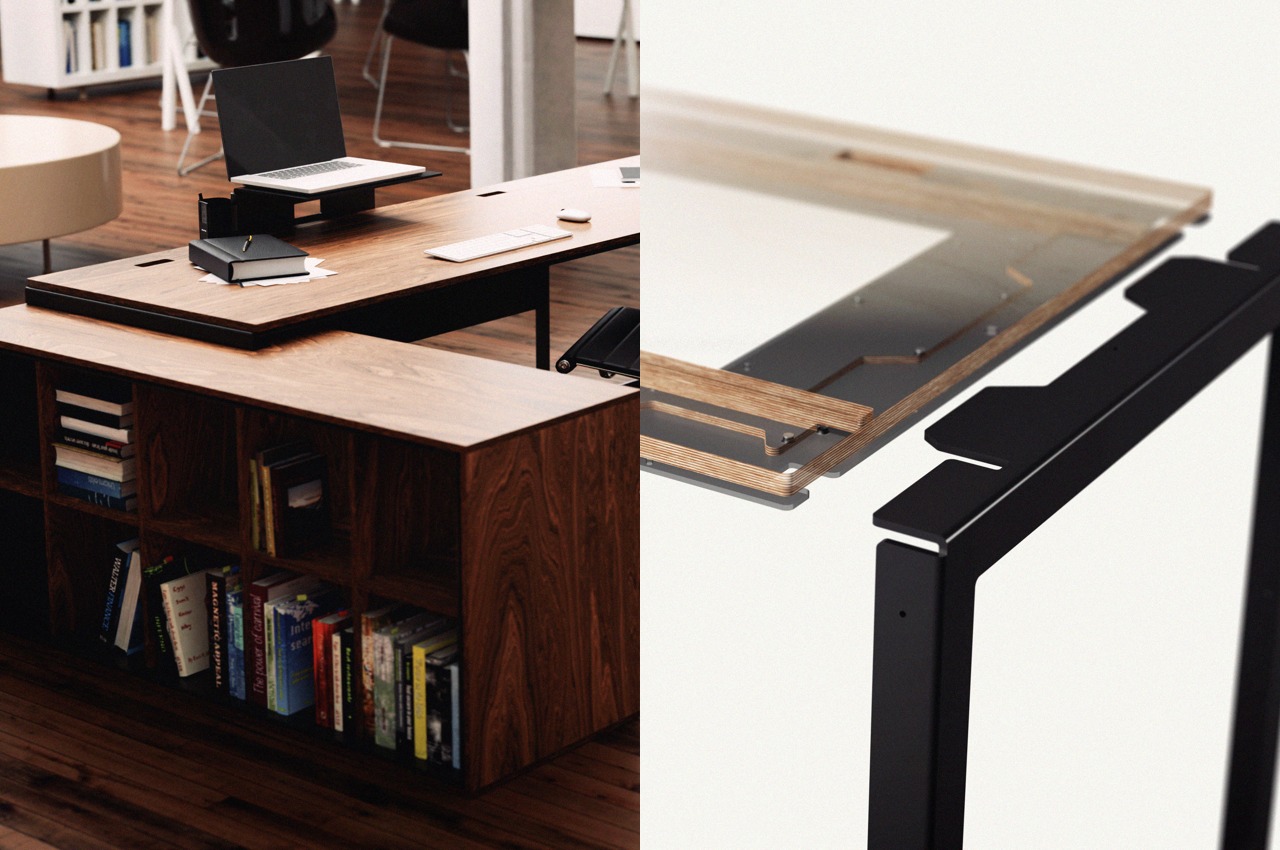
Called the DEN Desk, this unique and innovative desk is a perfect fit for creative thinkers, as it lets them build their desk just the way they like it! With the Den Desk, it feels like you’re playing with LEGO!

Why is it noteworthy?

You can start with the most basic setup and then grow your desk by adding other parts or accessories, from monitor mounts to even a cabinet on the side. You can slot in a desktop at an angle, and build a corner desk if you like!

What we like

  • You can assemble and disassemble the various pieces with relative ease, allowing you to build a desk that caters to your needs and requirements

What we dislike

  • Bulky, space-consuming design that is not an ideal fit for homes with space constraints

3. Buddyhub Desk

Creative thinkers and workers often need their own space to think and come up with fresh ideas, they need the chance to detach from the rest of the world. Dubbed the Buddyhub Desk, this cozy-looking, round-edged desk is great for giving you some private space. It features a sound-absorbing fabric panel that is wrapped around the outer edge.

Why is it noteworthy?

The Buddyhub Desk works as a private cocoon, allowing you to work without being disturbed by other employees. The innovative sound-absorbing fabric panel is available in a range of soft and pastel colors, creating a colorful and cute desk.

What we like

  • Can be customized with a wide range of optional accessories

What we dislike

  • There are similar designs in the market, nothing to make it really stand out

4. Linea Desk

The Italian furniture brand Porro created the Linea collection that was designed by late postmodernist architect and designer Medini a couple of years ago. The collection includes a quirky and colorful writing desk that is ideal for those who need to indulge in some creative writing.

Why is it noteworthy?

Mendini created the designs by defining them with stunning cellulose acetate surfaces that feature inlays in primary colors. The writing desk is an excellent space to write and get your creative juices flowing.

What we like

  • Characterized by bold and bright colors, with playful contrasts between light and dark colors

What we dislike

  • The aesthetics may be considered too quirky by some people, and not preferred by everyone, as it may not suit all interior styles

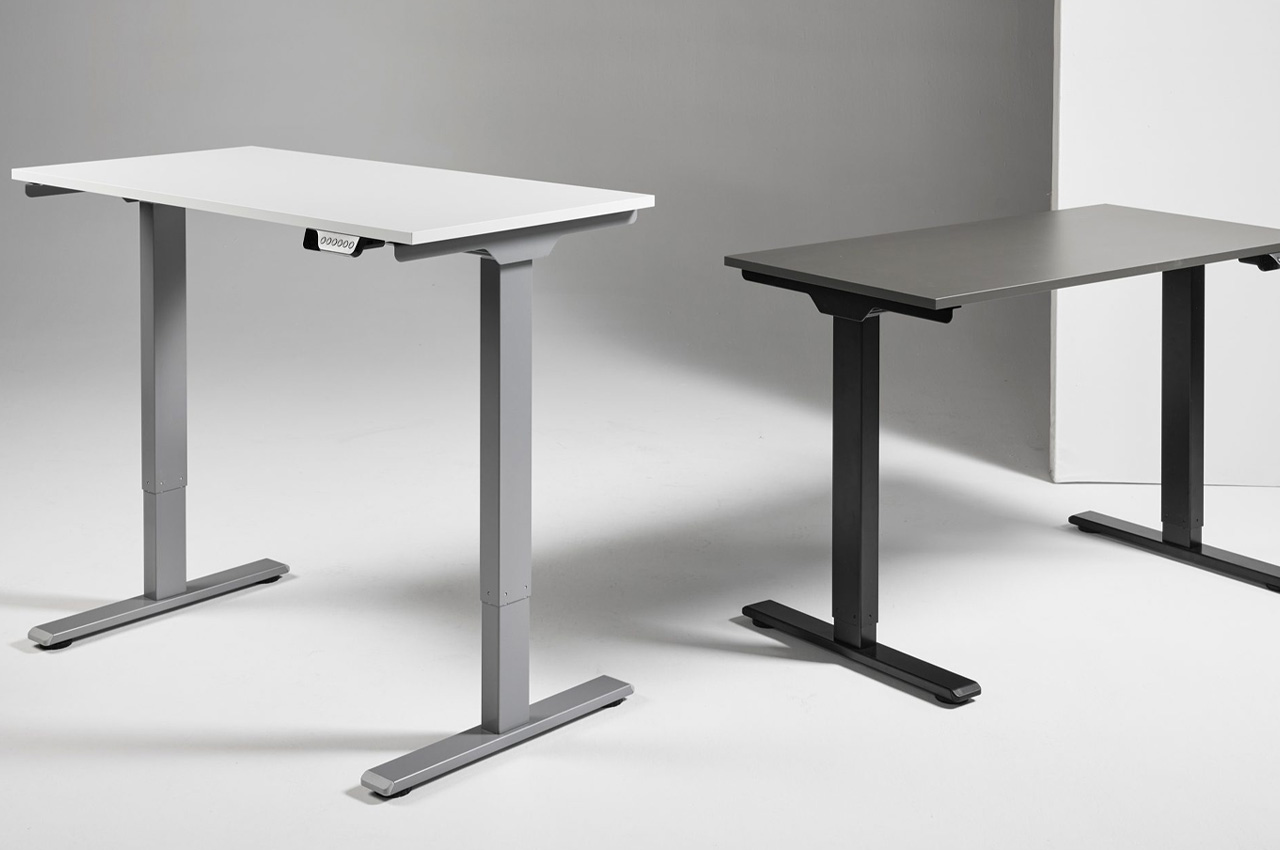
5. The eFloat Go 2.0
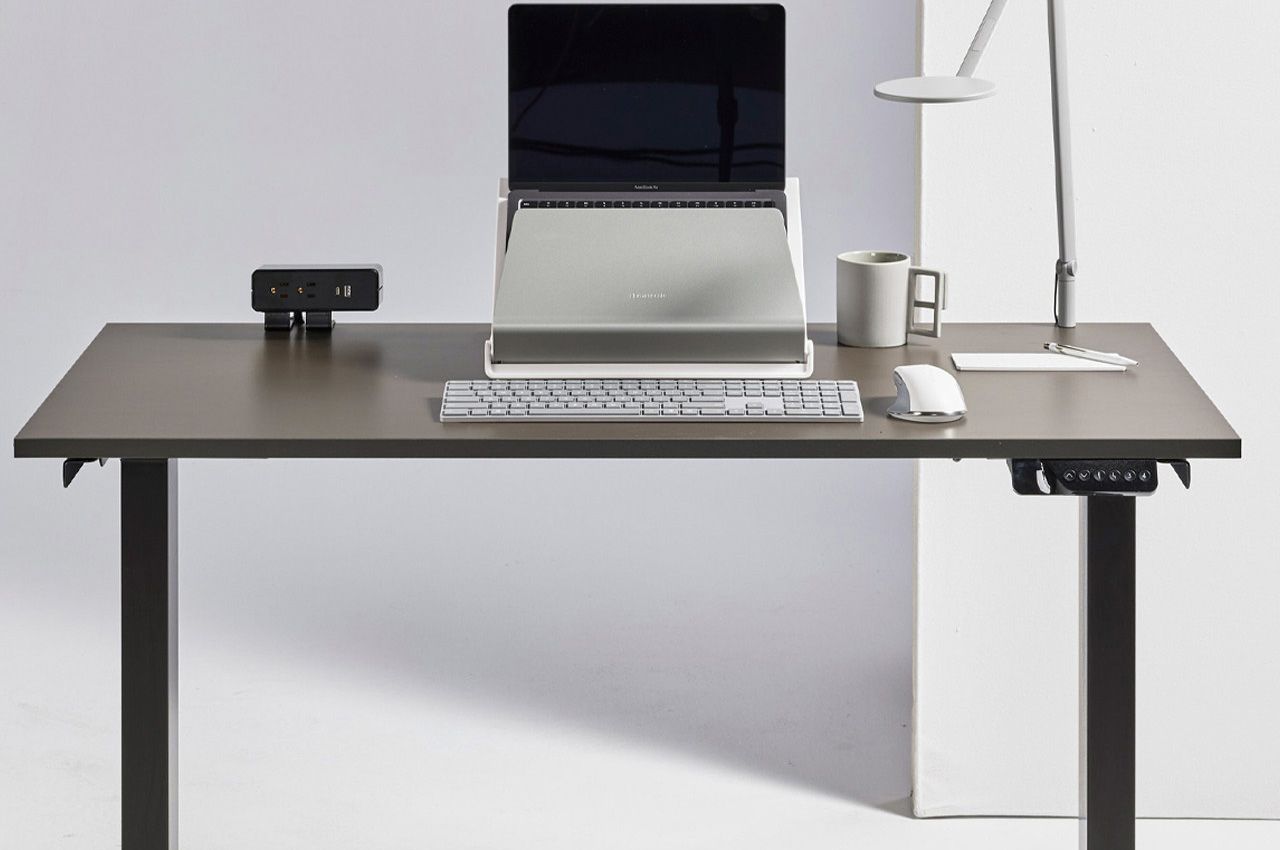
Called the eFloat Go 2.0 is the perfect adjustable standup desk built for those creative thinkers and workers who spend hours on their desks without really moving. The desk is simple and precise, and equipped with advanced anti-collision sensors.

Why is it noteworthy?

The eFloat Go 2.0 consists of a height-adjustable table base equipped with updated sit/stand technology. Anti-collision sensors and quiet motors were added to the desk to ensure smooth and hassle-free transitions between both modes.

What we like

  • The desk is easy and efficient to install while also having a wide range of work surfaces and depths

What we dislike

  • The desk has metallic and sharp edges, so not advisable to be placed around children

6. Pill Writing Desk
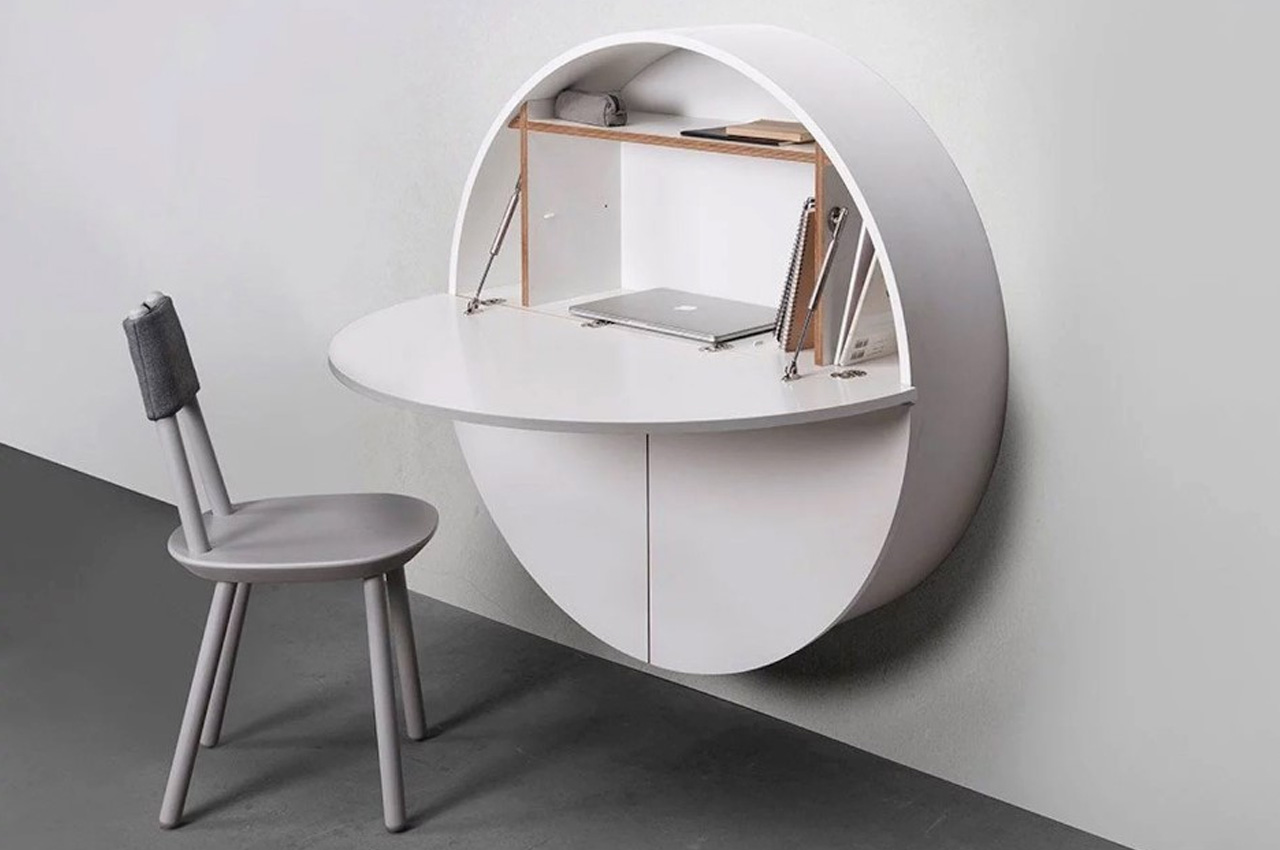
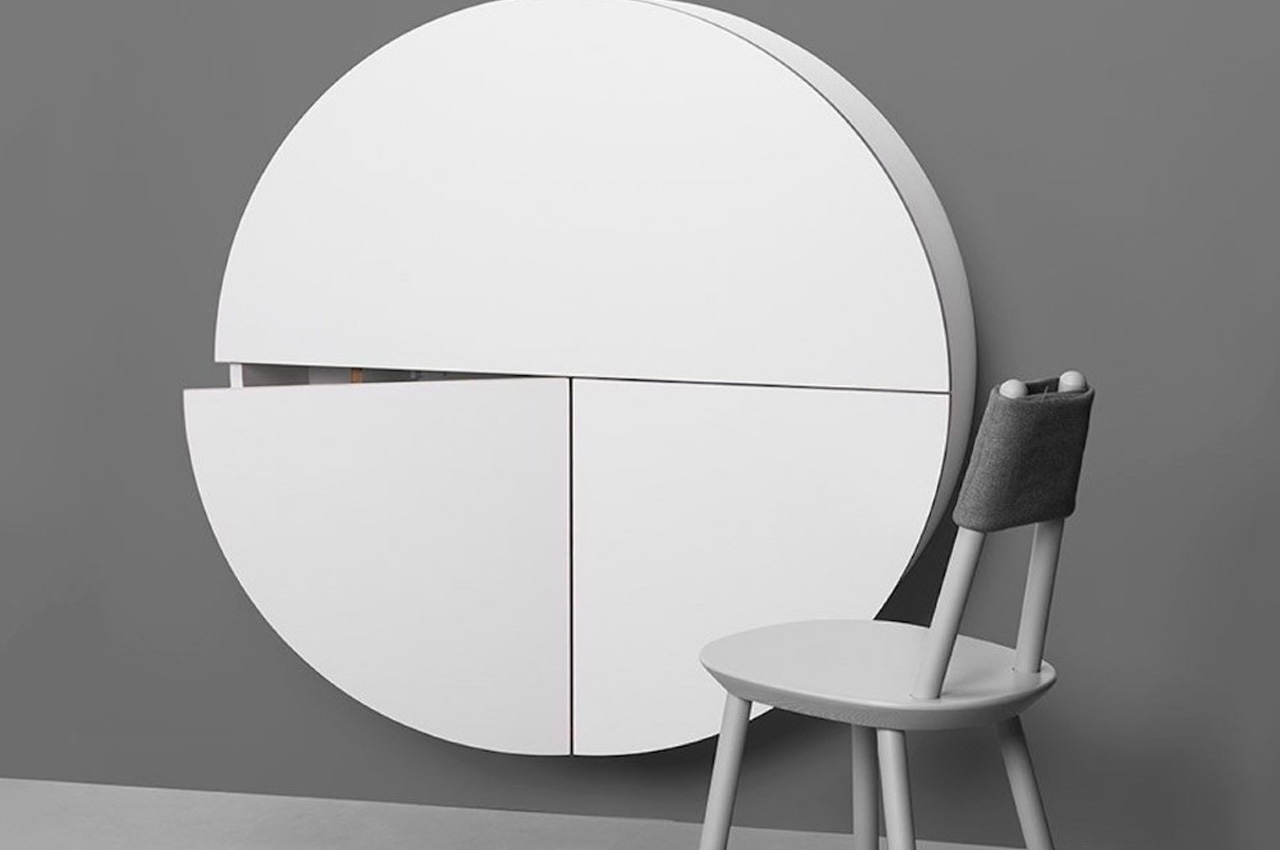
The Pill Writing Desk is a unique and innovative desk design with an unusual shape that’s quite eye-catching when closed, and super functional when open. It works as a furniture design, while also looking like minimalist art.

Why is it noteworthy?

It has a unique circular form that comes firmly wall-mounted, which makes it quite comparable to a wall-hung painting rather than a 4-legged floor-resting desk.

What we like

  • Features an upper semicircle that functions as a writing space with enough storage for your belongings

What we dislike

  • Because of its unique shape, the desk looks difficult to clean and maintain

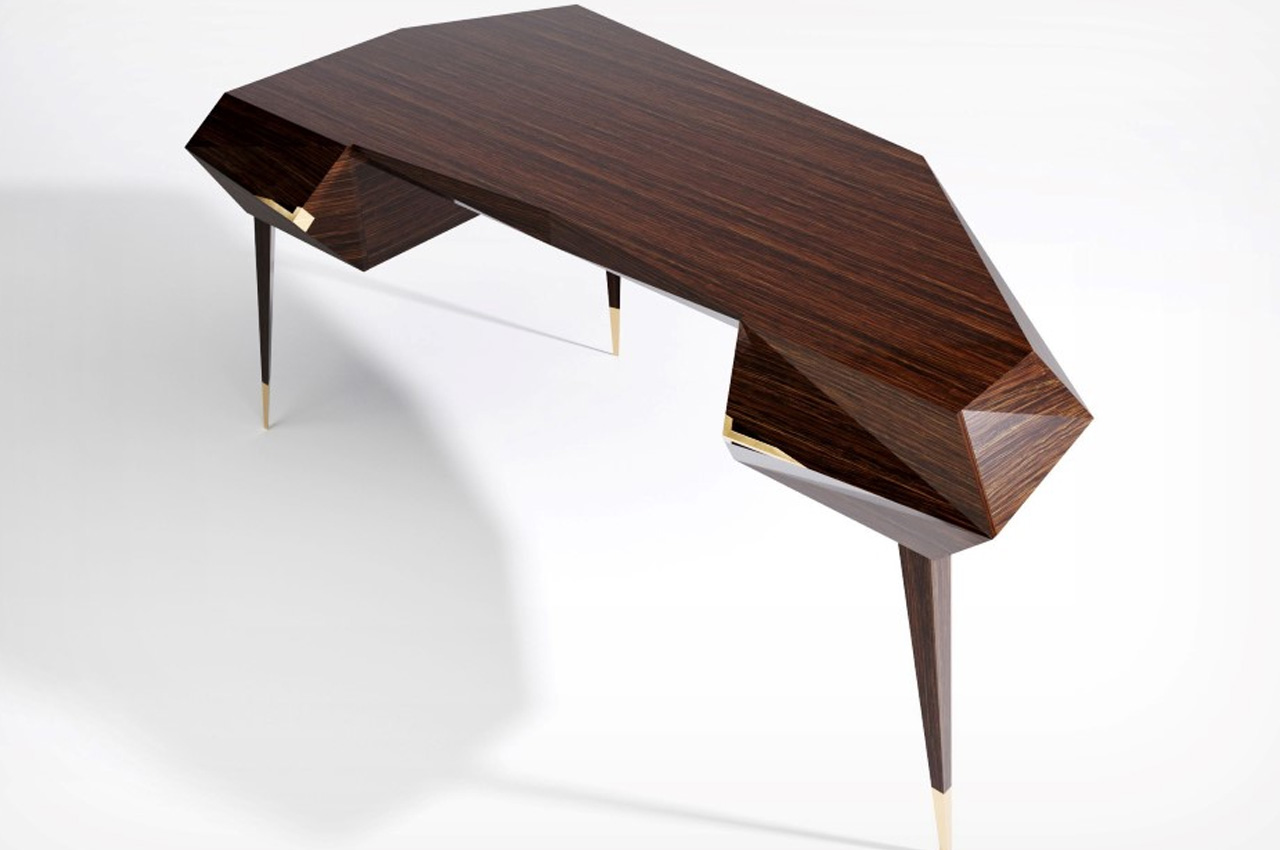
7. Intermodality Desk
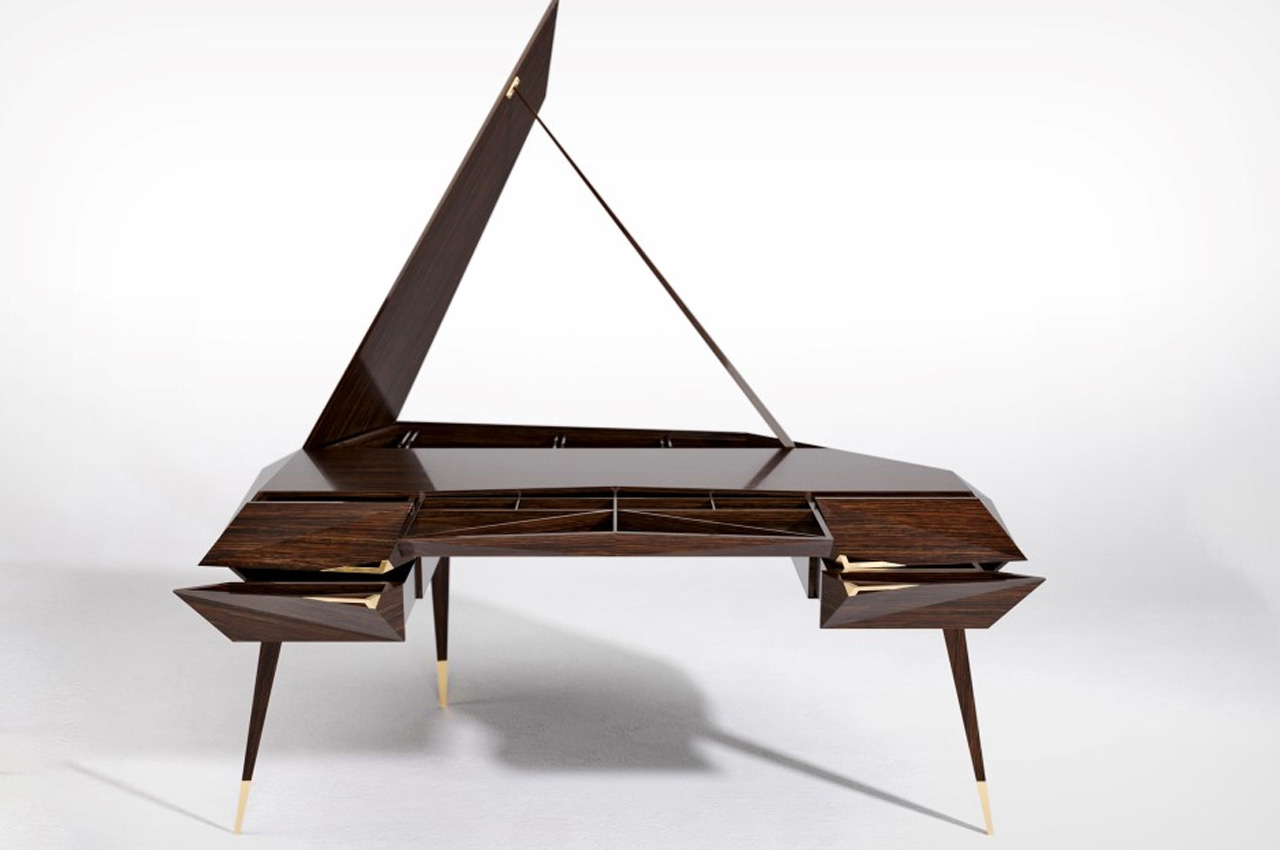
The Intermodality desk is inspired by the prominent and impressive role and place of grand pianos in homes. It features a design that follows the cues of the large instrument, the shape and size is much like that of a piano.

Why is it noteworthy?

Crafted from antiqued plywood, the desk has a creative and unique design, making it an excellent fit for creative employees, who need a dose of inspiration whenever they enter their office.

What we like

  • Features copper trimmings that add a touch of finesse to the desk

What we dislike

  • The desk is quite big and bulky and isn’t well-suited for smaller homes

8. Axis
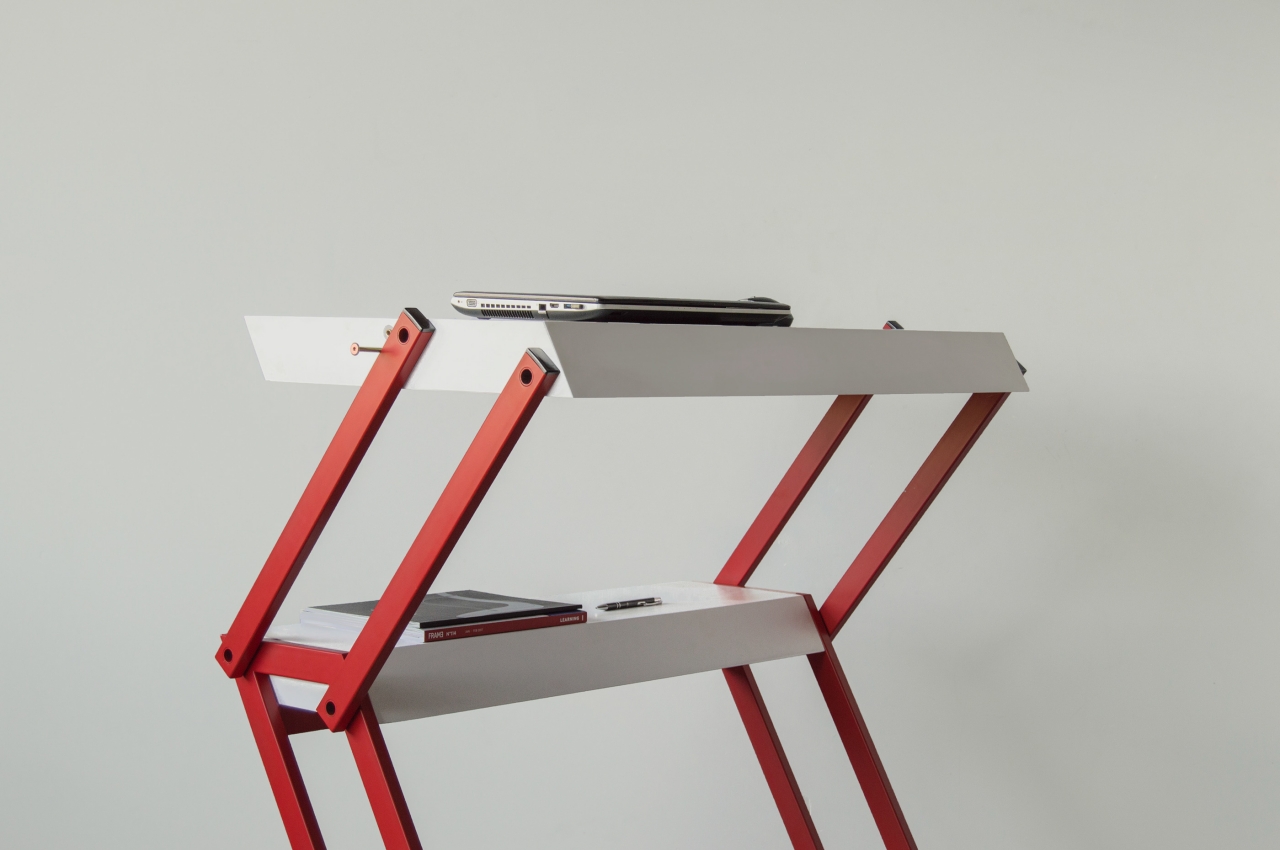
This desk is another excellent option for the creative workers out there! Dubbed Axis, this mechanical standing desk concept enables you to enjoy the perks of a healthy working lifestyle without breaking the bank. It doubles up as a temporary bookshelf for those who love reading to support a creative line of thinking.

Why is it noteworthy?

It makes use of a simple axis mechanism, which allows the larger desk surface to move up or down as needed. A part of the desk also remains in position and is a great place to store supplies, books, and organizers.

What we like

  • Doubles up as a temporary bookshelf
  • Replacement parts are easy and cheap to purchase

What we dislike

  • There is the risk of objects falling/rolling off the desk when we transform the desk

9. Nice Chair

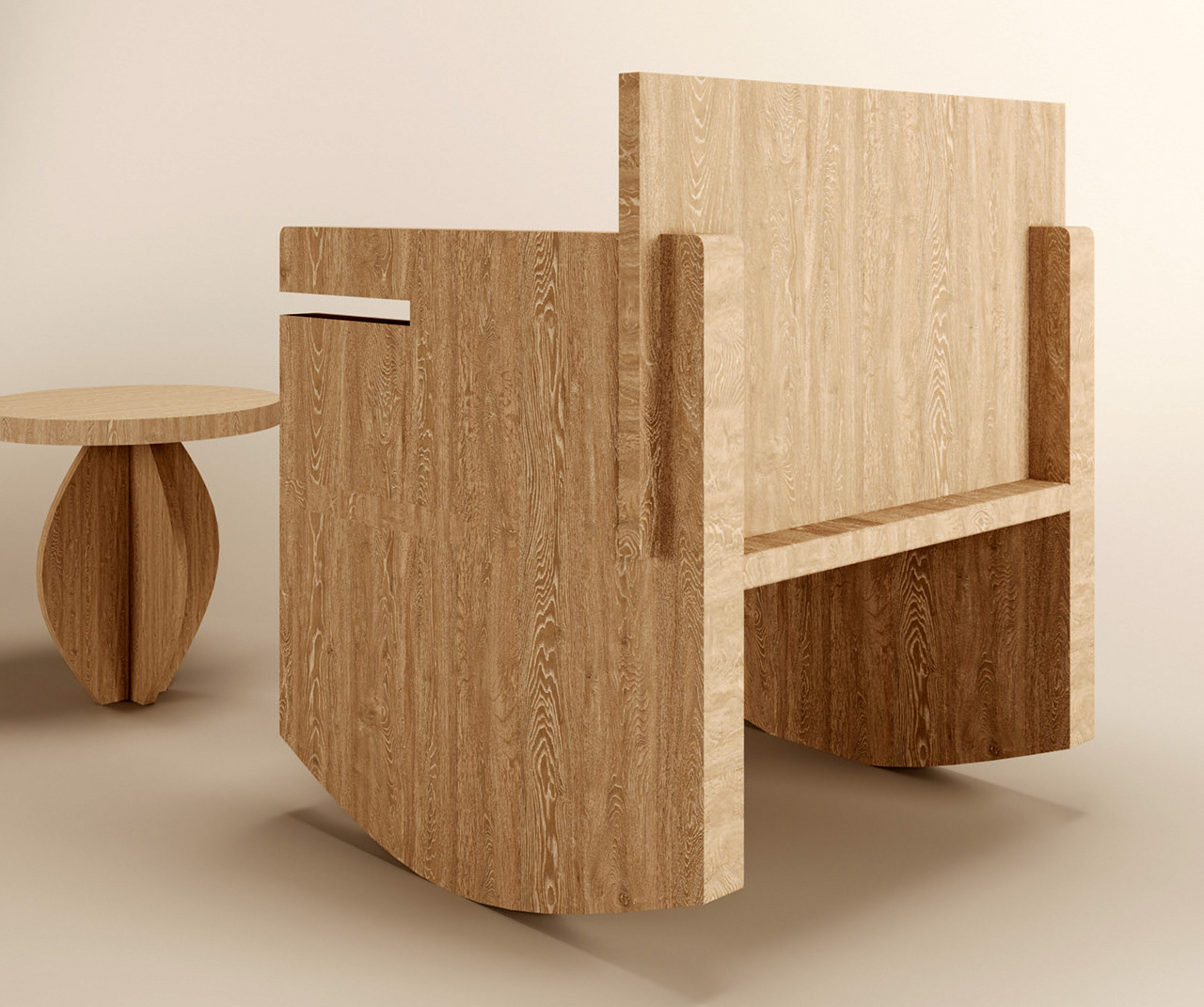
This unique-looking chair is intended to be a disassembled chair and it is called the Nice Chair! The Nice Chair is designed to occupy minimum space and can be easily assembled and disassembled, and it features a desk surface, allowing it to function as a workspace as well.

Why is it noteworthy?

What makes the Nice Chair unique and innovative is that it can function as a rocker, or as an ordinary chair to sit on, or as a workspace. You can also slide a tabletop between the ridges on the arms of the chair, to convert it into a workspace, that can hold and store your work accessories.

What we like

  • Multifunctional furniture design that can switch between two different modes

What we dislike

  • There is no way to stop the chair from rocking while working it seems, which can be annoying and distracting

10. Sui Desk Chair
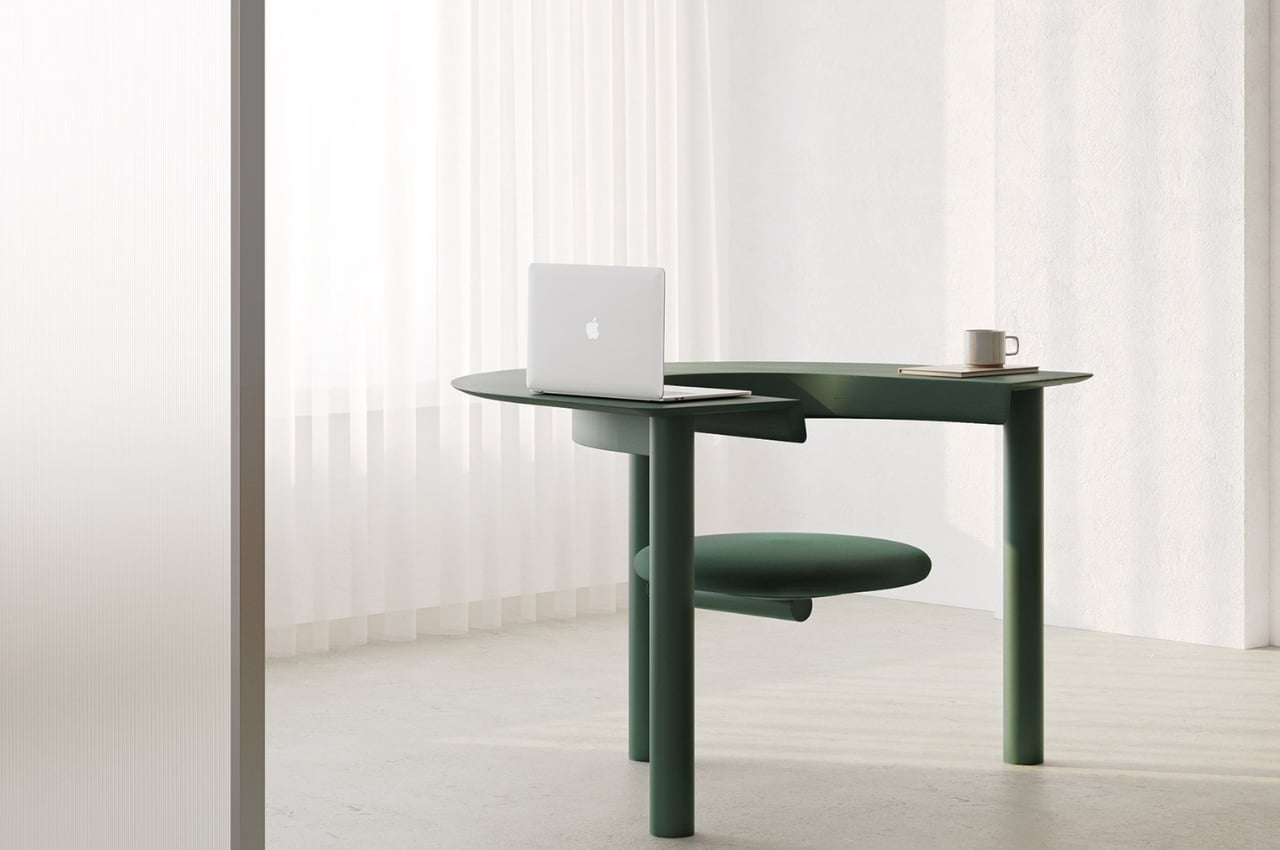
If you’re a creative person, you probably prefer creative and out-of-the-box designs, and the Sui Desk Chair is one such design. It can transform into a working desk from a casual chair, allowing you to either work on it or sip some coffee and read your favorite book.

Why is it noteworthy?

It has a hybrid and multi-purpose structure, and it allows you to have freedom of movement, even though it is a desk design. It provides you with private and semi-public spaces, depending on how you want it to swivel.

What we like

  • Made using wood that is “grown with respect for the land” and metal parts that are built from 99% recyclable steel, making it an eco-friendly furniture option

What we dislike

  • Could make your sedentary lifestyle more sedentary if you already have one, making it tough to move around

The post Top 10 Unique Desks For Creative Thinkers & Workers To Support Their Out-Of-The-Box Working Styles first appeared on Yanko Design.