
Floating lamp illusion brings an air of mystery to your living space

Lamps come in all shapes and sizes, but the one thing they have in common is that most of them come in a single piece and are anchored to the ceiling, wall, or even the floor. While there’s definitely nothing wrong with that, there’s also room for improvement when it comes to simplifying not only the design but also their installation and maintenance. Many lamps involve complicated wiring or installing fixtures in places that can clutter the space, physically and visually. This intriguing lamp design solves that in a peculiar way that ends up making the lamp look like it’s floating in midair, creating an atmosphere of magic and mystery in any space it’s in.

Designer: Paul Cocksedge
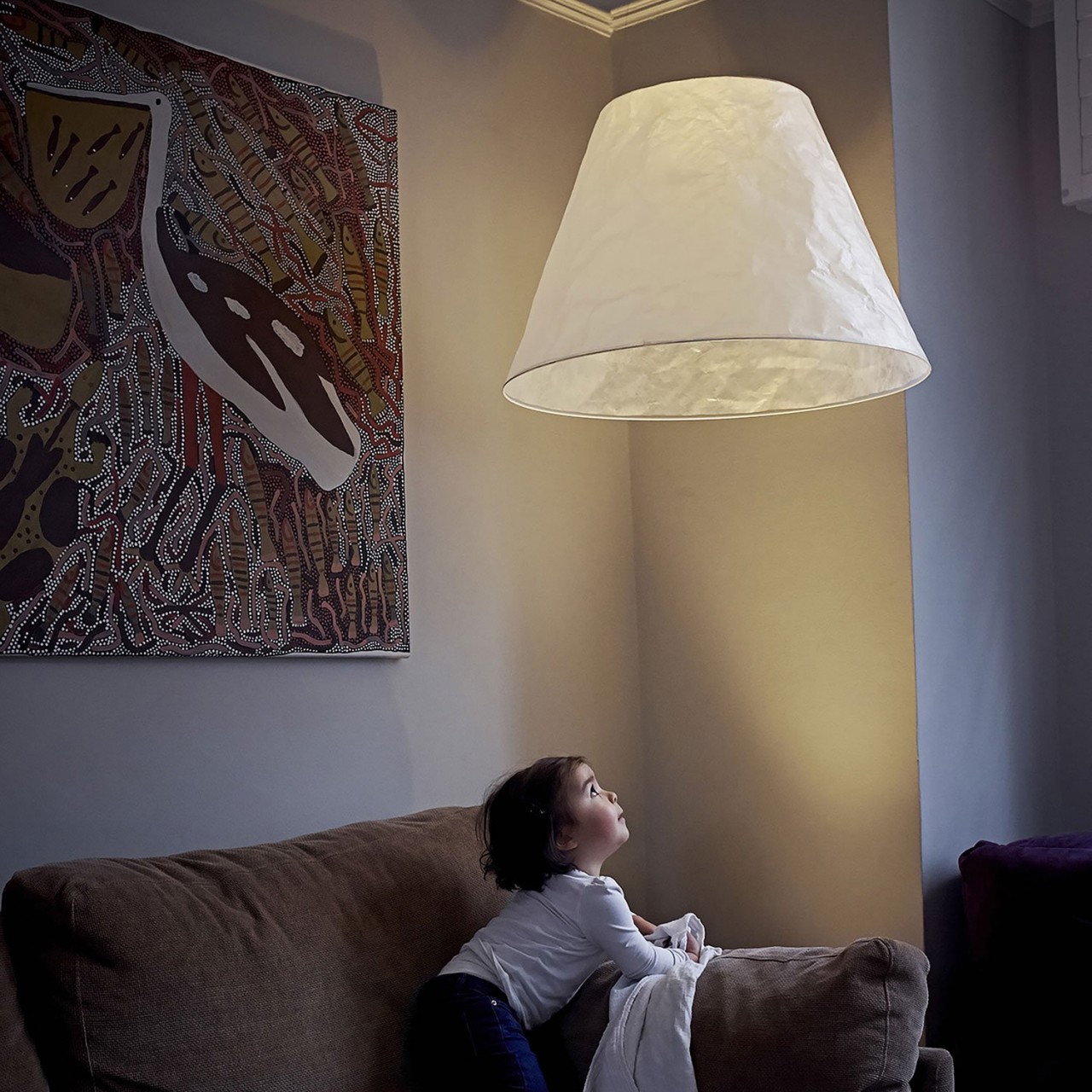
The most critical part of a lamp is, of course, the light source, but many lamps also need a way to direct or diffuse the light to make it less blinding. While most designs have these pieces in a single form, there’s no rule they have to be on a single body. Shade, whose name might not reflect its mesmerizing appearance, deconstructs and separates the design of a lamp into its two most basic parts, creating what is probably the most minimalist lamp design of all.

When lit up, Shade looks like a white conical lampshade eerily floating in the air, almost like a stereotypical ghost. Of course, it’s not literally floating but suspended by “capillary-thin” wires that are practically invisible unless you see them up close. But that’s only half the magic because the lampshade itself doesn’t have a light source. Instead, that comes from a small, can-shaped directional spotlight shining upward into the lampshade, creating the illusion of a floating lamp.
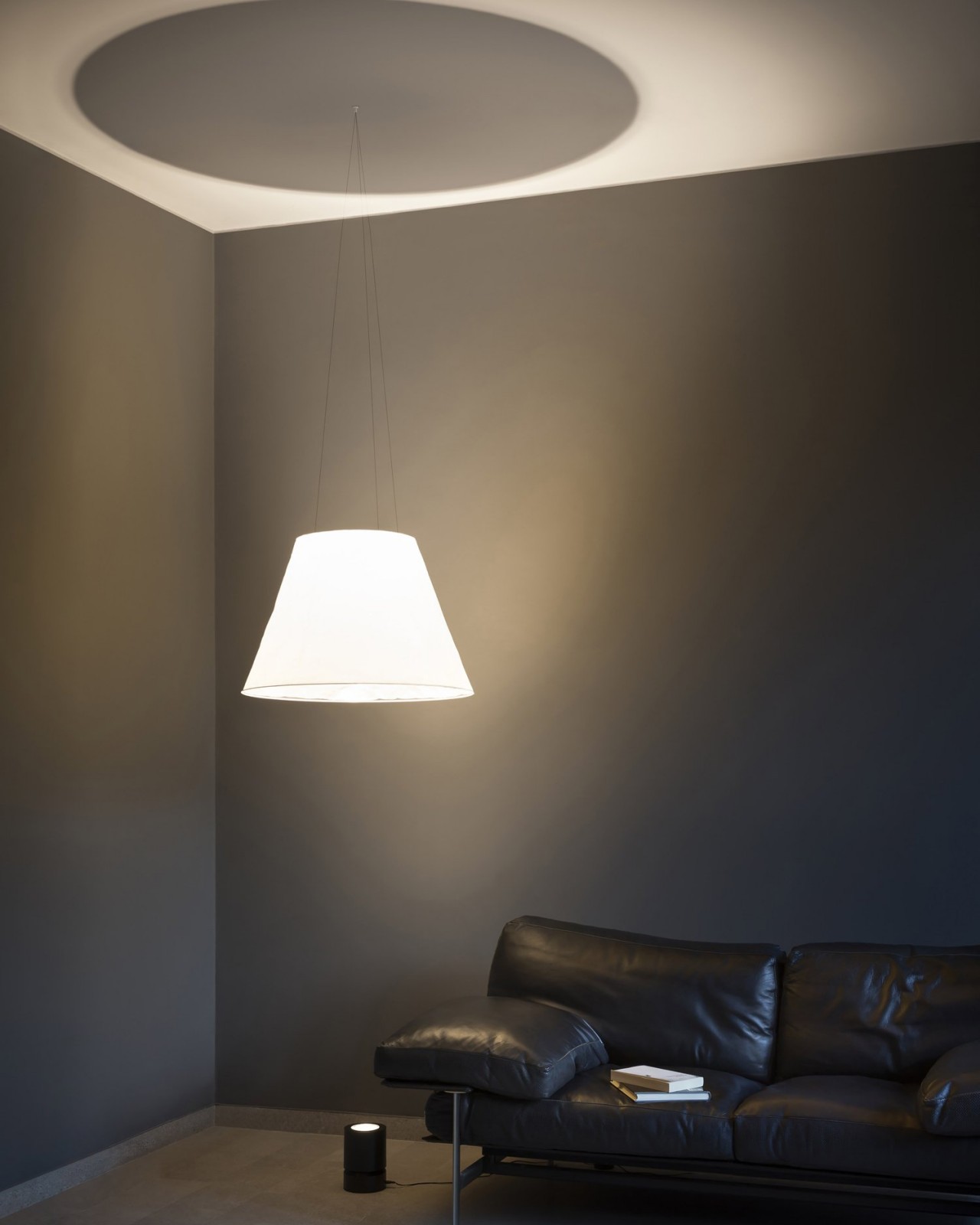
In essence, Shade separates the lamp into the shade and the actual light source, and neither is physically connected to the other. More than just creating this bewildering sight, this design also simplifies the installation of the lamp. No need for complicated wiring since the lamp can be set anywhere on the floor where the shade can be hung. You can also place the lamp anywhere as well, though you might want to put it somewhere safe and hidden, just to heighten the sense of mystery.

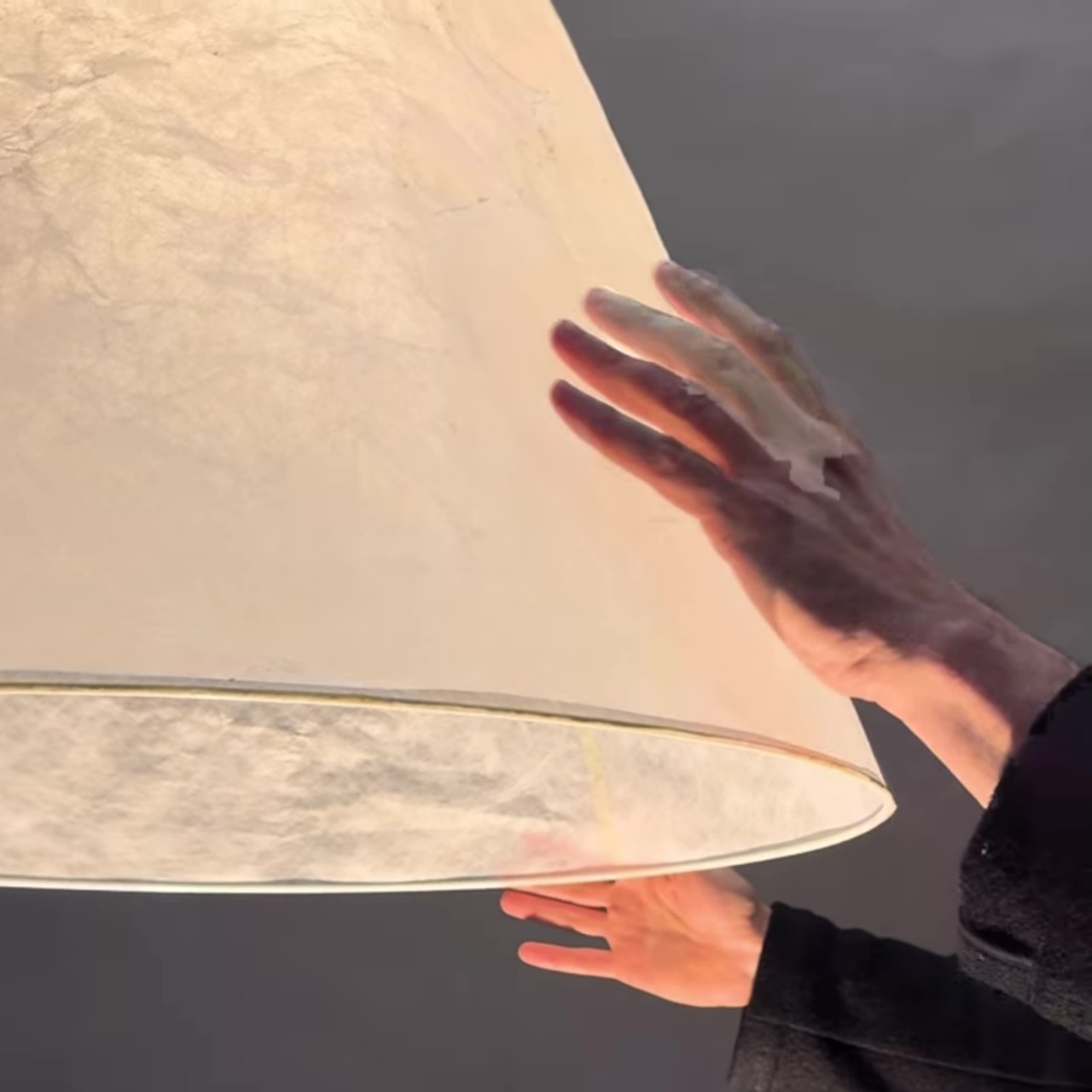
The construction of Shade itself is pretty simple, with the lampshade made of soft yet durably Japanese paper. This material not only gives the shade an almost pure white surface but also gently diffuses the light to a soft glow. The crumpled paper also gives it a unique visual texture that creates a subtle play of light and shadows, enhancing the lamp’s distinctive appeal even when the lights are off.

The post Floating lamp illusion brings an air of mystery to your living space first appeared on Yanko Design.

Our favorite mesh Wi-Fi router system is on sale for a record-low price

The TP-Link Deco AXE5400 WI-Fi mesh router system is on sale for $310 via Amazon. This pack gets you three units that cover up to 7,200 square feet. Unless you’re Scrooge McDuck, that’ll likely be enough to bring sweet, sweet internet anywhere in the home.

This is our very favorite mesh Wi-Fi system currently available. It just works, with minimal frustration. The setup is easy, the app is useful and, of course, the wireless signal is strong. After testing this system, we said that it “expertly balances raw power and user-friendliness.” It’s also a good value for the money, made even more so by today’s sale.

This is a tri-band system, which is always nice, and it can handle up to 200 devices at once. It supports Wi-Fi 6. There’s a newer model that supports Wi-Fi 7, but a three-pack costs around $800. If you’re dead set on a Wi-Fi 7 router, consider a two-pack instead of a three-pack to save some money. We have found during testing that two mesh routers is more than enough for many average-sized homes. 

We don’t have any significant gripes about the TP-Link Deco AXE5400, aside from some nitpicks. The power cord is on the shorter side, which may require an extension. The app, while useful, could use a bit more polish. Other than that, this is a near-perfect mesh router system.

Follow @EngadgetDeals on Twitter and subscribe to the Engadget Deals newsletter for the latest tech deals and buying advice.

This article originally appeared on Engadget at https://www.engadget.com/our-favorite-mesh-wi-fi-router-system-is-on-sale-for-a-record-low-price-160505515.html?src=rss

Sony’s PS VR2 adaptor for PC will arrive on August 7 with a $60 price tag

Sony revealed earlier this year that it was working on a way to make the PlayStation VR2 headset compatible with PCs. That's becoming a reality on August 7 when the company releases a PC adapter, which is expected to cost $60.

A recently spotted filing indicated that Sony was building an adapter to make the PS VR2 work with PCs. At the time, there were no details about how connectivity would work (the PS VR2 natively uses a single USB-C cable) but Sony has cleared that up. The adapter will connect to a DisplayPort 1.4-compatible port though you'll need to supply your own DisplayPort cable. The adapter also has a USB connection and HDMI output in case you want to capture your gameplay or share what you're seeing with others in the room.

You'll need a PC that's up to scratch too. The system will need to have at least 8GB of memory and an Intel Core i5-7600 or AMD Ryzen 3 3100 processor with Zen 2 or later architecture. As for your CPU, Sony recommends at least an NVIDIA GeForce RTX 3060 or AMD Radeon RX 6600XT, though you should get away with an NVIDIA GeForce GTX 1650 or AMD Radeon RX 5500XT at minimum. Your PC will also need to support at least Bluetooth 4.0 or later.

If your system checks all those boxes, then you'll be able to play the likes of Half-Life: Alyx on a PS VR2. The adapter will give users access to thousands of Steam VR games through the headset, orders of magnitude more than are available for the PS VR2 through a PlayStation 5.

Sony notes that some PS VR2 features aren't available when playing on PC, such as headset feedback, eye tracking, adaptive triggers and haptic feedback (except for a more generic rumble). Disappointingly, there won't be HDR support. However, you will be able to enjoy 4K visuals, a 110-degree field of view, finger touch detection, and see-through view are all supported, along with foveated rendering (sans eye tracking) and 3D audio if a game supports it.

We do think the PS VR2 is a great headset for VR gaming and gave it a score of 84 in our review, though we had some reservations, largely due to its price. The headset typically costs $550, but it's $100 off until June 12 as part of Sony's Days of Play sale. A bundle with Horizon Call of the Mountain will run you an extra $50.

This article originally appeared on Engadget at https://www.engadget.com/sonys-ps-vr2-adaptor-for-pc-will-arrive-on-august-7-with-a-60-price-tag-155751937.html?src=rss

Pick up two Tile Pro Bluetooth trackers for only $48

You can pick up two Tile Pro trackers on Amazon for just $48. This is 20 percent off and the lowest price we’ve seen all year for these handy little Bluetooth trackers. This deal gets you one black Tile and one white Tile, though there are also discounts on single trackers.

The Tile Pro is a stellar tracking device. It made our list of the best Bluetooth trackers for some very good reasons. The key-fob shaped device is sturdy and easy to use. We enjoyed the lengthy connectivity range and the higher-than-average ring volume, at 78 decibels. You’ll hear this thing, even if the device it's attached to is buried underneath a couch cushion somewhere.

We found the tracker to be highly accurate during our finder network tests. This is also the only Tile device with a replaceable battery, so you won’t have to trash the tracker when it fails. The battery that ships with the device lasts around a year. It uses a standard CR2032, which is easy to find and budget-friendly.

Though the tracker works with both Android and Apple devices, we had less luck with the iOS ecosystem. The iPhone experience was plagued by connectivity issues and a lack of alerts. This is the tracker to get for those tied to Android. There’s one final caveat. Tile requires a subscription to enable separation alerts, which goes for $3 per month or $30 per year. This isn’t needed for regular household use, but comes in handy if you lose something out in the world. For the price of a subscription, the company also throws in a free battery each year and will reimburse up to $100 on lost items.

Follow @EngadgetDeals on Twitter and subscribe to the Engadget Deals newsletter for the latest tech deals and buying advice.

This article originally appeared on Engadget at https://www.engadget.com/pick-up-two-tile-pro-bluetooth-trackers-for-only-48-151204124.html?src=rss

Pick up two Tile Pro Bluetooth trackers for only $48

You can pick up two Tile Pro trackers on Amazon for just $48. This is 20 percent off and the lowest price we’ve seen all year for these handy little Bluetooth trackers. This deal gets you one black Tile and one white Tile, though there are also discounts on single trackers.

The Tile Pro is a stellar tracking device. It made our list of the best Bluetooth trackers for some very good reasons. The key-fob shaped device is sturdy and easy to use. We enjoyed the lengthy connectivity range and the higher-than-average ring volume, at 78 decibels. You’ll hear this thing, even if the device it's attached to is buried underneath a couch cushion somewhere.

We found the tracker to be highly accurate during our finder network tests. This is also the only Tile device with a replaceable battery, so you won’t have to trash the tracker when it fails. The battery that ships with the device lasts around a year. It uses a standard CR2032, which is easy to find and budget-friendly.

Though the tracker works with both Android and Apple devices, we had less luck with the iOS ecosystem. The iPhone experience was plagued by connectivity issues and a lack of alerts. This is the tracker to get for those tied to Android. There’s one final caveat. Tile requires a subscription to enable separation alerts, which goes for $3 per month or $30 per year. This isn’t needed for regular household use, but comes in handy if you lose something out in the world. For the price of a subscription, the company also throws in a free battery each year and will reimburse up to $100 on lost items.

Follow @EngadgetDeals on Twitter and subscribe to the Engadget Deals newsletter for the latest tech deals and buying advice.

This article originally appeared on Engadget at https://www.engadget.com/pick-up-two-tile-pro-bluetooth-trackers-for-only-48-151204124.html?src=rss

New VW Golf GTI Clubsport Unveiled

VW Golf GTI Clubsport

Volkswagen has unveiled its latest masterpiece, the new VW Golf GTI Clubsport. This highly anticipated addition to the iconic Golf GTI series is set to redefine the standards of performance and style in the hot hatchback segment. With its striking redesign and innovative features, the Clubsport is poised to capture the hearts of motorsport enthusiasts […]

The post New VW Golf GTI Clubsport Unveiled appeared first on Geeky Gadgets.

The 13-inch MacBook Air M2 drops back down to a record low of $829

Less than a month after dropping to its all-time low price, our favorite budget MacBook is back on sale for $829. That's right — Apple's 2022 MacBook Air has a 17 percent discount, cutting its price from $999. This deal is available for the 256GB model in every color but doesn't include AppleCare+. 

Apple's 2022 MacBook Air might not be the flashiest option on the market, but it's really good. In fact, we dubbed it a "near-perfect Mac" in our review — in which we also gave it a score of 96. There are so many things to like about the 13.6-inch MacBook, including its Liquid Retina screen that offers 500 nits of brightness and a 60Hz refresh rate. The screen is slightly bigger and the device is slightly thinner than its predecessor, providing an extra bit of sleekness to the model. 

The biggest change for the 2022 MacBook Air was its M2 chip. The M2 features eight CPU cores and up to 10 GPU cores, making it a great, fast-performing option — even as Apple launches an M4 chip. The MacBook also has a quad-speaker system, compatible with Spatial Audio and Dolby Atmos. Plus, there's a three-mic array for excellent video chat quality. 

Follow @EngadgetDeals on Twitter and subscribe to the Engadget Deals newsletter for the latest tech deals and buying advice.

This article originally appeared on Engadget at https://www.engadget.com/the-13-inch-macbook-air-m2-drops-back-down-to-a-record-low-of-829-140002280.html?src=rss

Acer TravelMate Business AI Laptops

Acer TravelMate AI Laptops

Acer has unveiled a new range of AI-enhanced TravelMate business laptops, designed to transform the way professionals and executives work in today’s fast-paced, mobile-driven business environment. These innovative laptops are powered by the latest generation of processors with built-in Neural Processing Units (NPUs), offering advanced AI capabilities that streamline device management and enhance user experiences. […]

The post Acer TravelMate Business AI Laptops appeared first on Geeky Gadgets.

NVIDIA’s latest AI feature is in-game help

If you've ever wanted an AI assistant to do make sure your PC is optimized for whatever game you're playing, NVIDIA may have the answer. The company is showing off a new demo called G-Assist, a GeForce-powered AI chatbot that might one day help reduce the more tedious aspects of gaming. 

G-Assist performs a couple of key functions around both setup and directly in games. In a demo running inside ARK: Survival Ascended, NVIDIA shows it answering queries like "what's the next early game weapon and where do I find the crafting materials for it." In response, it points out that the best one is a spear and describes how to gather wood, flint and fiber to make one.

Some purists might see that as cheating, but another G-Assist tool looks to be less ethically fraught. If you ask it to optimize settings for a game like Cyberpunk 2077, it can do things like directly apply the highest quality graphics settings. It can also analyze your system as a whole and recommend changes like boosting your 4K monitor refresh rate from 60Hz to 144Hz. 

NVIDIA has used the G-Assist name before for a 2017 April Fool's joke, saying the AI would play games for you in "Ghostplay" mode while you went to pay for a pizza at the door. The new G-Assist can't do that, but it could still be helpful by eliminating the busywork needed for system optimization. It's just a demonstration for now, but NVIDIA is actively signing up developers interested in learning more about the project. 

This article originally appeared on Engadget at https://www.engadget.com/nvidias-latest-ai-feature-is-in-game-help-131826701.html?src=rss

Running Arduino and MicroPython side-by-side on multi-core microcontrollers

Running Arduino and MicroPython side-by-side

The world of microcontrollers is set to experience a significant shift with the upcoming release of MicroPython v1.23, which will introduce support for Asymmetric Multiprocessing (AMP) on multi-core microcontrollers. This groundbreaking advancement, built upon the industry-standard OpenAMP framework, empowers developers and hobbyists to run an Arduino sketch and a MicroPython program concurrently on multi-core modules. […]

The post Running Arduino and MicroPython side-by-side on multi-core microcontrollers appeared first on Geeky Gadgets.