It can be tough to know when a phone is on its deathbed or when an app is just being an overt battery hog. Google is going to help users get to the bottom of things, according to a recent Android Developers Blog.
The company just announced the launch of a new metric for app developers that keeps an eye on battery usage. If a developer consistently runs afoul of Google's battery usage guidelines, a warning will pop up in the Play Store to alert end users.
Google
This metric will keep a particular eye on so-called wake locks, which is when smartphones are prevented from entering sleep mode by battery-hungry apps that want to run background processes when the screen is off. Google says wake locks are a "heavy contributor to battery drain" and has developed a threshold for what is deemed acceptable for apps running in the background.
This threshold "considers a user session excessive if it holds more than two cumulative hours of non-exempt wake locks in a 24 hour period." There are exemptions if the background process offers "clear user benefits" with examples given of audio playback and user-initiated data transfers.
If a developer doesn't fix the underlying wake lock issue, they get slapped with a visible warning. The Play Store label says that "this app may use more battery than expected due to high background activity." That will likely turn off potential downloaders. I certainly wouldn't pop one of those apps on my phone.
Google will go a step further in some cases, making the offending apps ineligible for certain discovery sections within the Play Store. These rules go into effect on March 1, so we only have a few more months to experience just how quickly an Android phone can go from a full battery to completely dead.
This article originally appeared on Engadget at https://www.engadget.com/apps/google-is-clamping-down-on-android-apps-that-cause-excessive-battery-drain-194008031.html?src=rss
Google's November 2025 Pixel Drop is available today, and it includes some new features that should benefit more than just the Pixel phones and tablets Google typically targets. A new messaging feature called Remix in Google Messages expands access to Gemini-powered photo editing, and Google's improving its Scam Detection and Pixel VIP features, too.
Remix in Google Messages is essentially Google's Nano Banana photo editing tool, but available directly in Google Messages. The feature uses the same image model as Gemini and Google Photos, and lets Messages users tweak photos directly in a chat. Importantly, the edited photos are viewable by anyone in the chat, even if they're not on Android. The feature is available in English in the US, UK, Australia, Canada, India, Ireland and New Zealand with RCS enabled. Google says remixed images can also be sent over MMS.
In the Google Photos app, those photo editing skills will now also be even more personalized. Google says eligible Android users with Ask Photos and Face Groups enabled, can refer to people in their photos by name while they edit. The Photos app can use past photos of your labelled friends to make tweaks like adding a smile or opening someone's eyes without having to be provided a previous reference.
Power Saving Mode in action.
Google
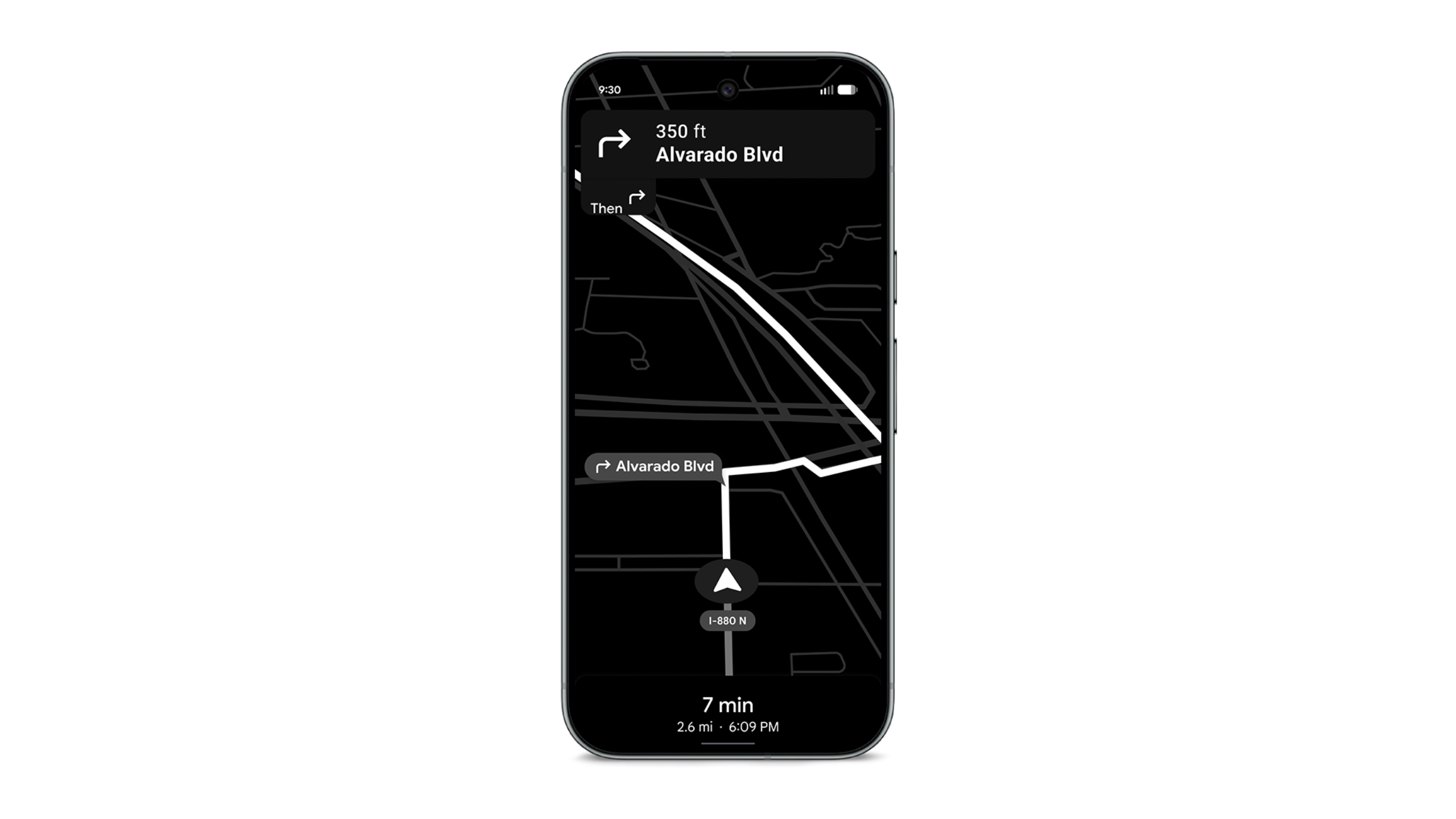
For anyone who owns one of the latest Pixel 10 phones, the Pixel Drop includes a new Power Saving Mode in Google Maps that blacks out the screen and only shows essential information and directions. Google claims the feature and extend battery life for up to four hours. The company hasn’t announced any plans, but the feature seems like it could be an equally good fit on Android Auto.
Scam Detection is Android's built-in feature for identifying scam calls and warning you with a notification. As part of the Pixel Drop, Scam Detection will now also work with messages, warning you in your notifications on Pixel 6 devices and up if you could be dealing with fraud. As part of the update, Scam Detection is also now available in the UK, Ireland, India, Australia and Canada. The update also includes support for Notification Summaries on the Pixel 9 and up, which summarize frequent group chat notifications as a recap in your notification shade. If you've marked anyone as a Pixel VIP (a feature added back in June), Android will now also prioritize their messages so you don't miss them.
Alongside those more practical features, Google is also introducing a new seasonal Wicked: For Good theme pack on Pixel 6 and newer devices. The theme pack is accessible via a new Theme Packs app that was released earlier in November. While it uses existing options like your wallpaper and icon settings to set "Glinda" and "Elphaba" themes, the convenience of Theme Packs is the ability to change all those settings at once. It's unfortunate Google's introducing the tool with an ad, but it could prove useful down the line.
This article originally appeared on Engadget at https://www.engadget.com/mobile/smartphones/remix-in-google-messages-brings-ai-photo-editing-to-even-more-phones-190000445.html?src=rss
Google Photos introduced a fresh batch of a half-dozen AI-powered features today. First is personalized photo editing. Using "Help me edit," you can now make adjustments to portraits and group shots, such as removing sunglasses or fixing closed eyes. Google says that the AI uses other images stored in a user's face groups to make accurate changes to the people in your photo library. The "Help me edit" voice- or text-controlled photo editing tool is also starting to roll out to iOS users in the US.
Next, the company is integrating its Nano Banana image editor into Google Photos. Users can make open-ended restyling requests in the "Help me edit" tool, such as making a picture look like a Renaissance painting or a mosaic. Nano Banana will also power a new Create with AI section, which will provide templates based on popular requests to jumpstart the AI editing process. This feature will roll out to the Create tab for Android users in the US and India beginning next week. Later on, Google will begin personalizing these templates to the particular hobbies and experiences captured in a person's photo library.
Following a "pause" and restart in June, the Ask Photos tool is also expanding. The feature for AI-powered searches of the Google photo library will be available in more than 100 new markets and will support 17 new languages starting this week.
Finally, Google Photos is getting a new Ask button aimed at delivering more details about a specific image. After tapping the button, a user can type questions about the content of the photo, find similar pictures in their library or begin describing desired edits. This feature is rolling out just in the US for now, but on both Android and iOS platforms.
This article originally appeared on Engadget at https://www.engadget.com/ai/google-photos-now-has-six-more-ai-powered-features-170000125.html?src=rss
The holiday season is just about here and it's officially the time of year to ask: What presents am I going to get everyone? Thankfully, there are a ton of early Black Friday deals for the tech lover in your life.
Take the 43 percent discount currently available on the 8Bitdo Ultimate Bluetooth Controller and Charging Dock. It's a great option for the gamer in your life, and a steal down from $70 to $40 — a new all-time low price. The controller comes with perks such as the charging dock, 22 hours of battery per charge and compatibility with everything from Steam Deck to Switch. The deal is only for the white model.
Earlier this year, 8Bitdo released a new version of this $70 controller, aptly called the Ultimate 2 Bluetooth. We rated it as one of the best controllers for the Nintendo Switch 2. While the upgraded model brings you features like more precise and sensitive joysticks, this sale brings the original Ultimate Controller back into view — and our shopping carts. Plus, it also works well with the Nintendo Switch 2.
This article originally appeared on Engadget at https://www.engadget.com/deals/the-8bitdo-ultimate-controller-drops-to-40-for-black-friday-133023380.html?src=rss
Samsung has rolled out an update for its SmartThings app on the iPhone, and it will give you the ability to activate routines with Siri voice commands. Specifically, the update adds compatibility between SmartThings and Siri Shortcuts, which is an iOS feature you can use to automate multi-step tasks. You can simply drag and drop multiple actions from the apps that support the feature within the Shortcuts app to create an automation. But this update means you’ll be able to access even routines created in the SmartThings application.
As 9to5Mac reports, Samsung described the update as something that could bridge “the gap between Galaxy and Apple devices to make it easier for everyone in the home to stay connected.” With the update, you can, for instance, have a shared “Good Morning” automation between SmartThings and Shortcuts. On iOS, just activate Siri and say the routine name to switch on the lights and the coffee maker, as well as to raise the blinds at the same time. A “Good night” automation could dim the lights and switch off everything at once.
In addition, the update will give you the ability to see your SmartThings devices and device groups on your Apple Watch. You’ll be able to control them and run automations from the wearable. Samsung will now show your five most recently used devices on iOS Live Activities, as well, so you can quickly check your ACs, air purifiers, washing machines and other Samsung products.
This article originally appeared on Engadget at https://www.engadget.com/apps/samsung-makes-smartthings-routines-compatible-with-siri-voice-commands-130000236.html?src=rss
Apple’s entry-level smartwatch has improved so much it delivers an experience comparable to pricier Apple Watches. The most important upgrades in the SE 3 are the always-on display, faster charging speeds and on-device Siri. This brings a lot of parity to other Apple Watch devices in the most crucial areas.
It doesn’t have everything: The SE 3’s optical sensor is older and lacks the capabilities of Series 10 and 11 smartwatches, which feature electrical heart rate sensors. You’ll still get notifications for irregular rhythms and low cardio fitness as well as high and low heart rate notifications. All of this for $259? (Or $200 if you’re quick.) It’s the most tempting first step into Apple’s wearable yet. It might be time for me to upgrade from my Series 8.
The Nintendo Switch 2 is the console launch of 2025, and it will undoubtedly be at the top of many wish lists for both kids and adults. If you were hoping to save a bit on the console during Black Friday, you may be disappointed. However, the marquee Nintendo deals for the holidays come as console bundles. When the Switch 2 launched earlier this year, it was available as just the console only for $449 or bundled with Mario Kart World for $499. Both options are still available, but there’s a new bundle to consider as well, the console with the new Pokémon Legends: Z-A game, which also costs $499.
The Nintendo eShop will have cyber deals on games November 20 through December 3. The shop will feature “holiday offers on select games,” but we don’t know which games they will be. Meanwhile, other retailers will have discounts on some physical Switch games, including Princess Peach: Showtime!, The Legend of Zelda: Echoes of Wisdom, Luigi’s Mansion 3 and Kirby’s Return to Dream Land Deluxe. Those will each be $40, while other games like Super Mario Odyssey, Nintendo Switch Sports, Paper Mario: The Thousand-Year Door and Splatoon 3 will be $30.
Kojima Productions has a new collaboration for anyone who wishes to enhance their lower-body strength and stability — or simply prepare for cosplay in 2026. The studio has teamed up with exoskeleton maker Dnsys for a limited run of a model based on Death Stranding 2: On The Beach. It’s said to mimic the game’s load-balancing system by offloading up to 200 percent of the wearer’s body weight from their knees to help protect the joints. Dnsys said it adds 50 percent more power to steps and “intelligent gait control” to improve balance on stairs and uneven terrain.
According to a report from Android Headlines, Samsung may stick with its Plus models of Galaxy phone — and ditch the just-got-here Edge line. A leaker has given us a glimpse at the forthcoming S26+, and it looks similar to the company’s other smartphones. The small, raised camera island has been tweaked a bit, and the report suggests the S26+ will be 7.35mm thick, which is in line with the S25+. It also seems to be decidedly chunkier than the S25 Edge, so this is likely not a swap: The next Plus device won’t be the Edge.
Apple has announced a new accessory that feels a bit out of left field, to say the least. Say hello to the limited edition iPhone Pocket, a 3D-knitted "ribbed open structure" designed in collaboration with Issey Miyake. Available with a short or long strap design, it can be worn on your arm, attached to a bag or across your body.
"The design of iPhone Pocket speaks to the bond between iPhone and its user, while keeping in mind that an Apple product is designed to be universal in aesthetic and versatile in use," Miyake Design Studio design director, Yoshiyuki Miyamae, said in a statement. "iPhone Pocket explores the concept of ‘the joy of wearing iPhone in your own way.'"
Yes, this "additional pocket" is a real item that you can purchase and decide for yourself if it's bizarre or — dare we say — kind of chic? The iPhone Pocket's short strap model is available in lemon, mandarin, purple, pink, peacock, sapphire, cinnamon and black. The long strap design comes in sapphire, cinnamon and black. Apple’s vice president of industrial design, Molly Anderson, added that the different options were "intentionally designed to mix and match with all our iPhone models and colors."
Apple
The iPhone Pocket is available this Friday, November 14, on Apple's website. However, the release is not only limited in quantity, but in location. You can pick one up online from the US, France, Greater China, Italy, Japan, Singapore, South Korea or the UK. With phone theft so high in the latter, it isn't the worst option we've seen to keep your phone secure while out and about.
If you live in very specific cities then you might also be able to see one in person. In the US, it will only be available at New York City's SoHo Apple Store. Whether you buy it in person or online, the iPhone Pocket will put you back a pretty penny. The short strap is going for $150, while the long strap retails for $230.
This article originally appeared on Engadget at https://www.engadget.com/mobile/smartphones/apple-and-issey-miyakes-iphone-pocket-is-a-knitted-sleeve-to-hold-your-phone-103504776.html?src=rss
Broadcom and a company called CAMB.AI are teaming up to bring on-device audio translation to a chipset. This would allow devices that use the SoC to complete translation, dubbing and audio description tasks without having to dip into the cloud. In other words, it could massively improve accessibility for consumers.
The companies promise ultra-low latency and enhanced privacy, being that all processing is kept local to the user's device. The wireless bandwidth should also be drastically reduced.
As for the audio description piece, there's a demo video of the tool being used on a clip from the film Ratatouille. The AI can be heard describing the scene in various languages, in addition to a written translation appearing on-screen. This looks incredibly useful, particularly for those with vision issues.
Of course, we have no idea how this tech will work in a real world scenario. Also, we don't know how accurate the information will be. It does feature a voice model that's already being used by organizations like NASCAR, Comcast and Eurovision.
The companies boast that this will enable "on-device translation in over 150 languages." We don't know when these chips will begin showing up in TVs and other gadgets. Broadcom also recently teamed up with OpenAI to help the latter company to manufacture its own chips.
Update, November 11 2025, 12:18PM ET: This story has been updated to clarify the use of the tool in the above clip.
This article originally appeared on Engadget at https://www.engadget.com/ai/broadcom-just-announced-an-ai-chipset-that-translates-audio-in-real-time-directly-on-the-device-050036717.html?src=rss
The Rodecaster series of podcast mixers have become a mainstay among audio creatives. Last year, the company expanded the line with its first multimedia model — the Rodecaster Video. It was a more niche proposition, aimed at streamers, video podcasters and live producers, and, at $1,200, people with deeper pockets. Today, Rode returns with the Rodecaster Video S (RCV-S), a streamlined version that offers much of the same functionality for less than half the cost of the original ($499).
If you currently use Ecamm Live, OBS, a Stream Deck, a Rodecaster Pro/Duo, a video capture card or Blackmagic Atem type switcher, then there’s a good chance the RCV-S does something, or many things, useful to you. Maybe it can replace all those products, some of them or enhance your workflow. It’s a little complicated, but within that complication is a lot of versatility.
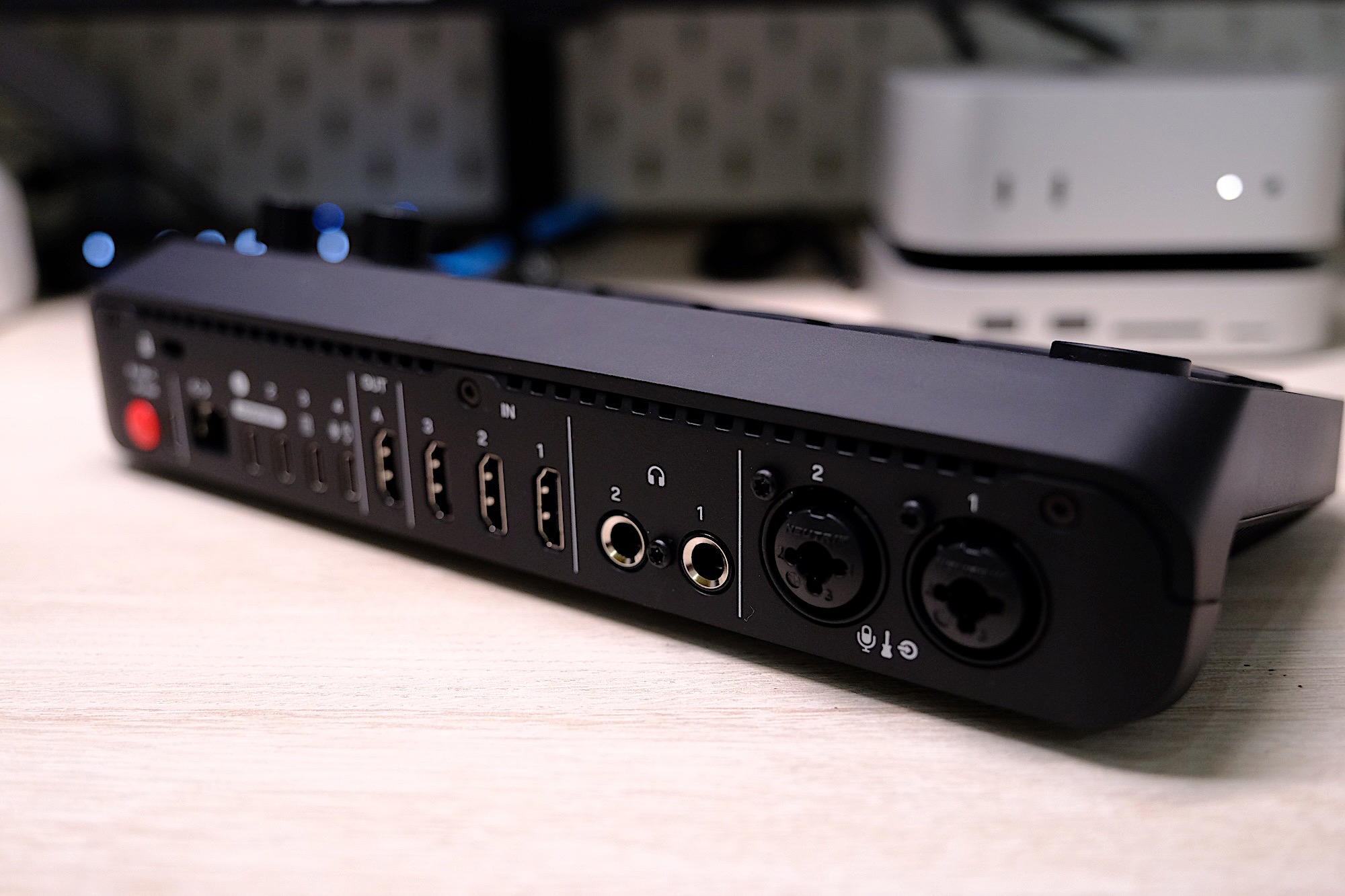
With three HDMI inputs, one USB webcam/mic input and up to four NDI/wireless camera inputs, video is clearly the focus here. But there are also two XLR/Combo ports for studio microphones and instruments and the option to connect up to two of Rode’s wireless lav mics (such as the Wireless Go) directly without the need for a receiver. The RCV-S, like Blackmagic’s popular Atem Mini, outputs over HDMI at 1080p/60 (no 4K) or can be used over USB as a virtual camera just like you’d find in Zoom or Teams.
Unlike the Rodecaster Pro or Duo, there are no faders; instead, there are two rows of pads for switching between video sources and scenes. There’s 20GB of onboard storage for media — such as overlays, graphics and audio/video clips — and you can record shows directly onto USB hard-drives or stream natively to Twitch, YouTube and other platforms via RTMP/S. There’s a lot going on, and how you want to use it all is largely up to you. While the RCV-S leans more toward “live” productions such as streaming or podcasts, you can use it for conventional YouTube-style video production, depending on your workflow or video preferences.
Rodecaster Video versus Rodecaster Video S
The huge price difference between the original Rodecaster Video and the new S model might lead you to expect some serious feature trimming this time around, but Rode’s garden shears have been fairly kind. Most notably, the number of sources you can connect has been reduced from six to four. Meanwhile, the number of “scenes” you can create is now five, down from seven. As mentioned above, there are three HDMI inputs, not four, and only one USB webcam/mic input, down from two on the original. There are still nine channels of audio with two headphone outputs, but the line outputs on the original are no longer here. The SD card slot for media has also been removed in favor of internal storage. In short, there’s a little bit less connectivity, but not enough for it to feel hobbled, especially for the more casual users this is clearly aimed at.
In-use
At its most basic, the RCV-S is an all-in-one video switcher. You don’t need to connect it to a PC, just plug in your video and audio sources and you can jump between them in real time with a choice of transitions. For a more polished production you can create “scenes” via the menu with a selection of layouts for multiple cameras, picture-in-picture and so on. That could be two talking heads for a podcast, overlaying your web camera on top of your gameplay or a top-down camera mixed with a different perspective for cooking tutorials or presentations.
You can create scenes directly on the device in advance or live via templates, but things get a lot easier and more creative when you use Rode’s companion Rodecaster app. Here, you’ll find a “scene creator” tool that’s both visual and intuitive, plus it has the option to make custom layouts where you can freely resize and place all your different media wherever you want, add borders or rounded corners and so on.
While the main pads are primarily for switching between sources and scenes, they can also trigger media — pre-made video clips, overlays and graphics, for example. You can assign media to them without reducing the number of sources/scenes that are available to switch between, just tap the Media/Overlay button to temporarily change the functionality of the pads. You can also set up chromakey/green screening directly on the device or via the Rodecaster App, too.
Once you have everything set up, you can directly record output onto a USB SSD, again, without the need for a PC. There’s even the option to record only the main output (“program”) or a multi-track version which will export a recording of every input as a separate file that you can edit as you see fit. This is helpful if you’re using apps like Adobe Premier or Davinci Resolve. If you shoot multi-camera dance tutorials, for example, you can jump between your main and wide camera and then to a close up without having to hunt-down the right part from each file you recorded on different memory cards.
Rode recently updated the Rodecaster Video firmware to add support for up to four “NDI” wireless cameras as additional sources. Typically these are remote or security-style cameras, but Rode’s Capture mobile app also supports NDI streaming, meaning you can use your phone wirelessly as another camera that you can switch to, which is particularly useful. Though do note, the Rodecaster Video will need to be hard-wired to your router on the same network as your phone for this to work.
Audio
The Rodecaster Video S handles audio and video with ease.
James Trew for Engadget
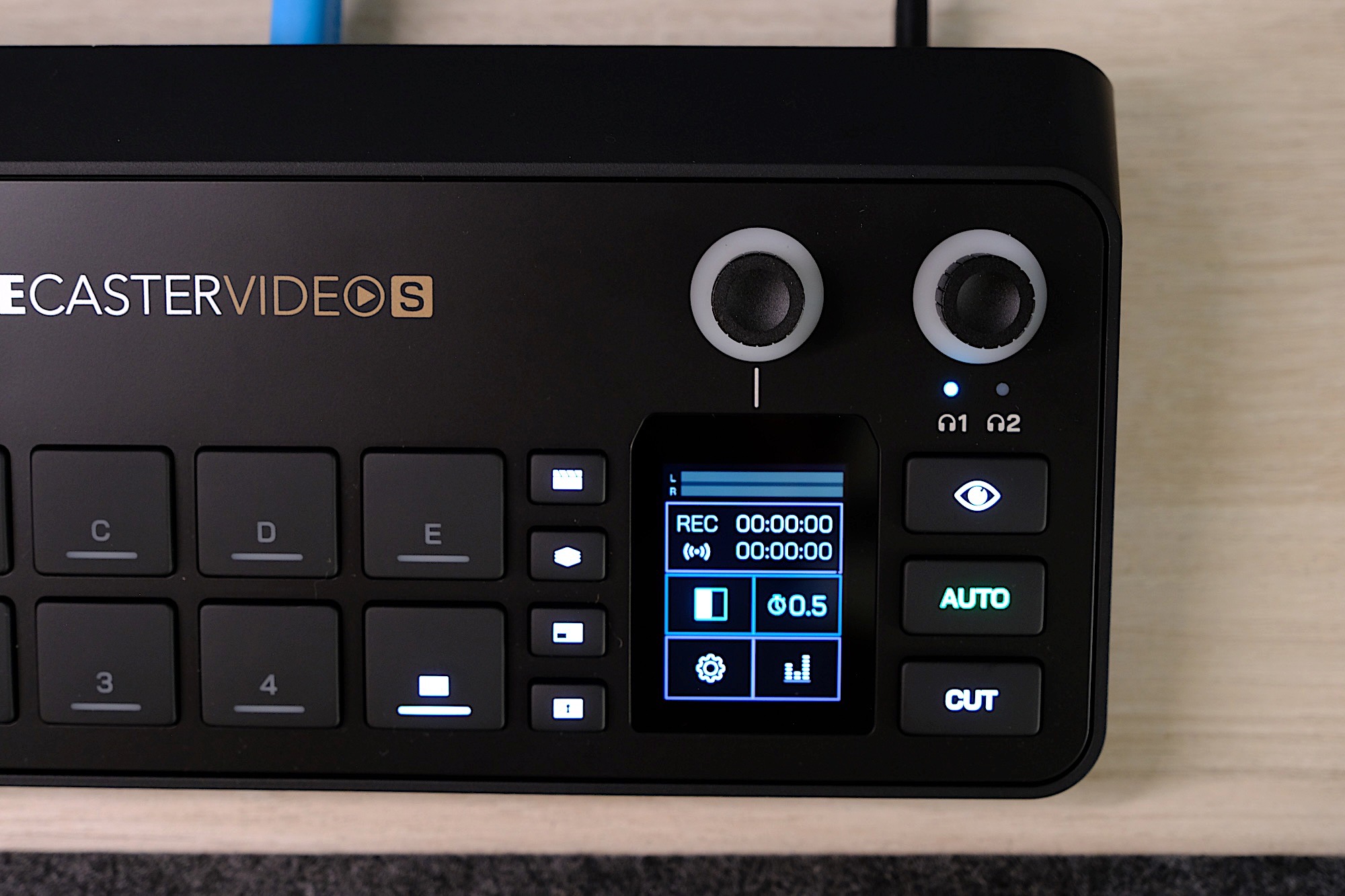
While the RCV-S offers nine audio tracks, it’s fair to say it isn’t really designed for live audio mixing in the pure sense since there are no faders. Instead, you have to access different channels via the menu on a small display and a dial — It’s a lot of hunting and pecking. If you’re connected to a PC, the Rodecaster app does offer a software mixer with faders though, which makes adjusting levels on the fly much easier.
The good news is that some voice enhancement tools, such as Depth, Sparkle and Punch have been carried over from the Rodecaster Pro/Duo, giving you a little more fine-grained control over how you or your guests sound.
There’s a slight drawback when using the RCV-S as a standalone unit, in that you need to physically push the buttons to change the scene, which might not be ideal if you’re trying to make a polished recording or can’t always be near the console. Thankfully, Rode has a solution in “auto switching.” I’m mentioning it here, in the audio section, as the RCV-S can switch cameras based on which one has the strongest audio or based on user-defined priority. Typically, that would be whoever is talking in a podcast, but it could also be in-game sound or when you switch to playing a musical instrument.
Auto switching works well, but it’s not quite dependable enough to rely on for full autonomy in a professional environment — say while recording a panel at a conference — but it solves a problem if you’re on your own, and it could at least save some time in a casual podcast situation.
Things to consider
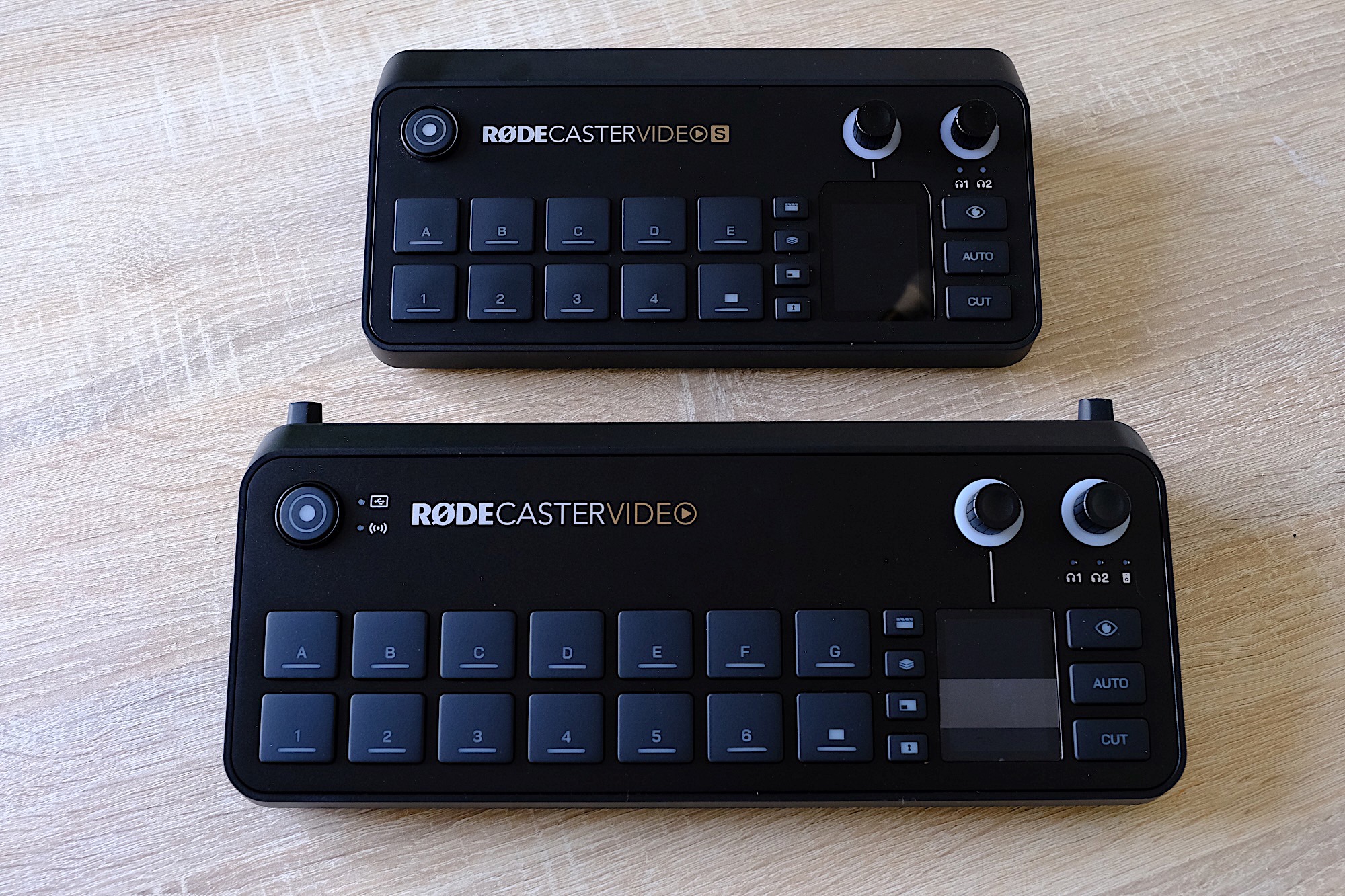
The Rodecaster Video S (top) vs. The Rodecaster Video (bottom)
James Trew for Engadget
It’s clear that the RCV-S, despite having fewer inputs than the original Rodecaster Video, is still quite a complex, open-ended tool. If you already have a streaming setup you like and the software and interfaces you need, then the appeal of the RCV-S will be down to whether it can do what you need more efficiently. For live video production, it’s an easier sell, as there aren’t many all-in-one devices to compete with it that can be used standalone.
For example, Blackmagic’s Atem series is incredibly popular, and until now, had the advantage on price with the Mini Pro costing just $330. Even the Mini Pro ISO ($550) that exports multi-track video was half the price of the original Rodecaster Video. The RCV-S now offers comparable connectivity, onboard recording, more expansive audio features and multi-track export for $50 less.
For general content creators it’s a little trickier. As someone that makes YouTube videos, the appeal to me is the chance to consolidate a few devices into one and remove some friction in my recordings. Right now, I have a Rodecaster Duo handling my audio, a capture card for my main camera and I swap out that camera for a smaller one if I am shooting top-down footage or need a second angle. That means I have several different devices on my desk, and I’m constantly doing a dance of unplugging things and juggling media or different recordings before I get everything ready to edit.
The Rodecaster Video S has a tiny display for menus and settings.
James Trew for Engadget
With the RCV-S I can ditch my standalone capture card and permanently leave multiple cameras connected to the Rodecaster so that they are ready to go at any time. I can even remove the Rodecaster Duo and bring it back out again on the occasions I need more immediate control over multiple sources of audio (which is sometimes, but not often). The appeal in my case is fewer devices on my desk, and the ability to record multi-camera video without having to set up every shot, every single time, which saves significant time that I can then use to actually get more work done.
There are, of course, some limitations. Not least of all is the lack of 4K. I’m still inclined to record on camera for my primary shot to ensure I still have a 4K copy for YouTube and then use the Rodecaster Video S for everything else, but as a small creator, convenience and flexibility is very appealing. For streamers and live video production, the Rodecaster Video S is a very capable tool that offers a wide range of functionality for an accessible price that will no doubt become the central hub for many creators.
The real kicker here is the price. Let’s be clear, $500 is still significant money. But at less than half the price of the original Rodecaster with decent connectivity and basically the same functionality, it's an easy recommendation to those who were holding off based on price alone. Likewise, if you’re just starting out with content creation and need something with solid video credentials and audio chops, Rode makes a good case for itself with the Rodecaster Video S.
This article originally appeared on Engadget at https://www.engadget.com/general/rodecaster-video-s-review-compact-and-comprehensive-video-production-230000221.html?src=rss
Rode is today launching the Rodecaster Video S, a smaller and cheaper version of its existing all-in-one production console. The Rodecaster Video is targeted at professionals and environments regularly producing multi-camera content. The S, meanwhile, is aimed at bedroom streamers, video podcasters and other indie creators with more modest production needs. Consequently, the focus here is on trimming down unnecessary features to get the price to a more reasonable $500.
Rode
It’s easy to spot the differences by sight alone, since the hardware is smaller than its bigger sibling. It’s got fewer input and scene buttons, and is clad in plastic, rater than metal, since it probably won’t need to be moved around a lot. The number of HDMI inputs/outputs drops from 4/2 on the original to 3/1 here, and there’s only one multi-function USB-C port. Similarly, there’s only two headphone outputs here, and you’ll only get 24GB internal storage rather than the microSD-card slot found on the original.
The Rodecaster Video S is available to pre-order today, with units expected to ship across December, depending on your territory.
This article originally appeared on Engadget at https://www.engadget.com/entertainment/streaming/rodes-rodecaster-video-s-is-a-smaller-cheaper-production-console-for-creators-230052793.html?src=rss