Fender Mix review: Well-designed headphones that just fall short of greatness

I know what you’re thinking: “Isn’t Fender a guitar company?” It sure is, and has been one of the most iconic names in guitars and amplifiers since 1946. So what is the company doing making headphones and speakers? Well, it isn’t, exactly. Like Zound Industries used to do with Marshall (before buying the amp business), another company is licensing the Fender name for its consumer audio products. Fender Audio, the brand that’s on the headphones I’m reviewing, is owned by the Fender Corporation, but Riffsound oversees the design and production of portable audio gear. 

The first products from Fender Audio are the Mix headphones and the Elie speaker (in two sizes). The company revealed these in January before properly showing them off  at CES. I’ll get to those speakers in a few weeks, but the Mix headphones are first up on the review docket. 

With the Mix, Fender Audio seeks to offer a set of premium over-ear, noise-canceling headphones at a lower price than the likes of Sony, Bose and Sennheiser. There’s also marathon battery life, several smart design touches, a lossless Bluetooth transmitter and swappable parts that combine for a unique formula to take on those big names. I’m honestly impressed that Fender Audio could cram all of that in a more affordable package, but the final verdict on the Mix isn’t so straightforward.

Fender Audio made numerous smart design decisions on the Mix headphones, and they resulted in my favorite things about using them. To start, you can swap out the ear pads, ear cups and headband as you see fit. The ear cups attach to the headband via USB-C ports, so they’re easy to snap on and off. Obviously, this allows you to change the look of the Mix over time, within the bounds of Fender’s available colors. 

Underneath the ear pads, Fender put a storage slot for the lossless dongle on the left side and gives you access to the removable battery on the right. I’m thrilled that I can enjoy higher quality Bluetooth connectivity without having to remember to bring along such a small accessory. Plus, it’s nice to know that users will be able to install a fresh battery, provided the company sells those at some point. 

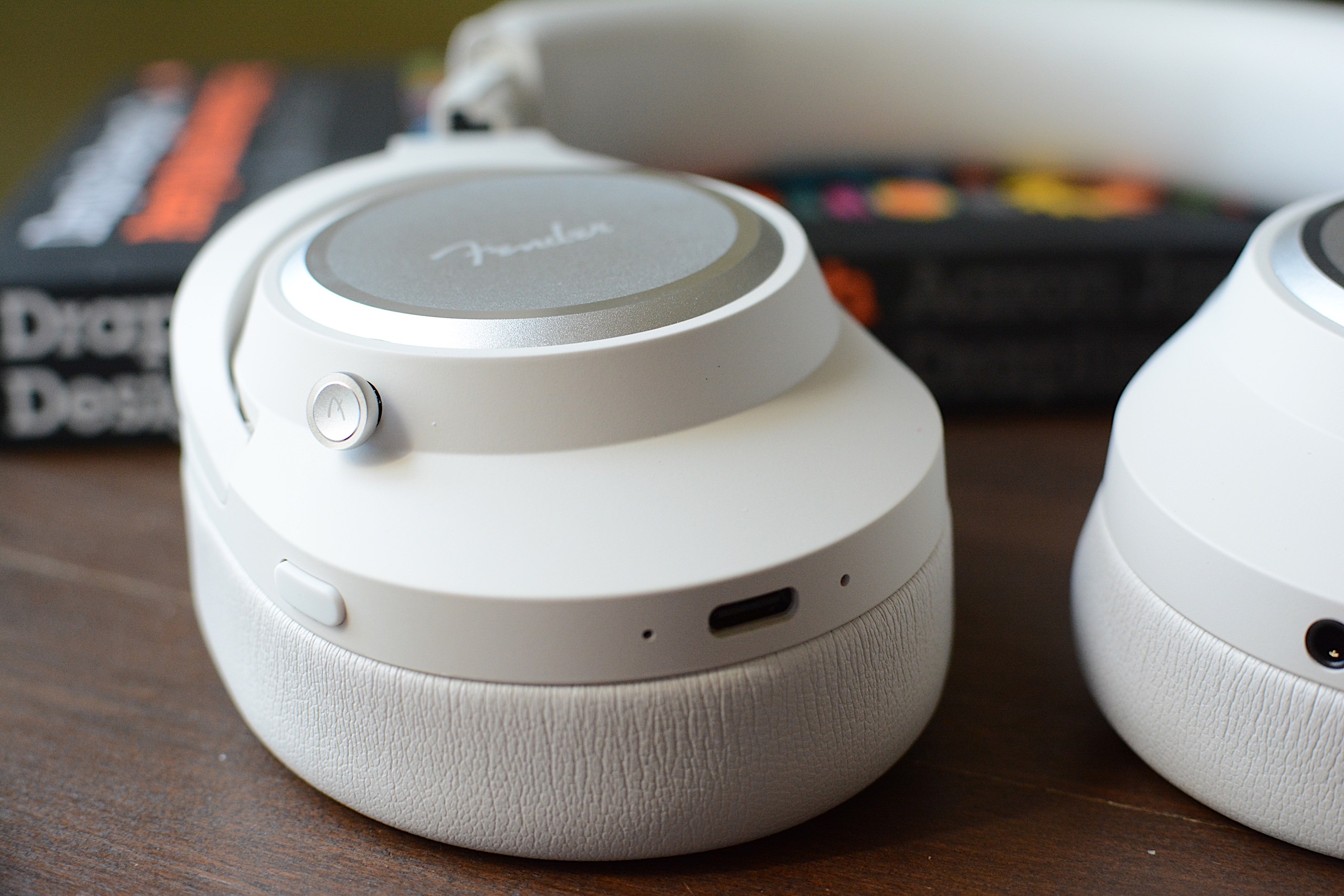
I also enjoy how Fender Audio designed the onboard controls. First, they’re physical buttons, which are always my preference over touch- or gesture-based options. Second, the main one is a five-way joystick, so they’re very simple. Press it to play/pause, press and hold for pairing mode or press longer to power on or off. If you push the joystick up or down, you can adjust the volume, while moving it left and right skips the track forward or backward. You can also push down twice to enable Auracast pairing right on the headphones. A second button, which is just the regular kind, is used to cycle through noise canceling modes: ANC, transparency and both off. 
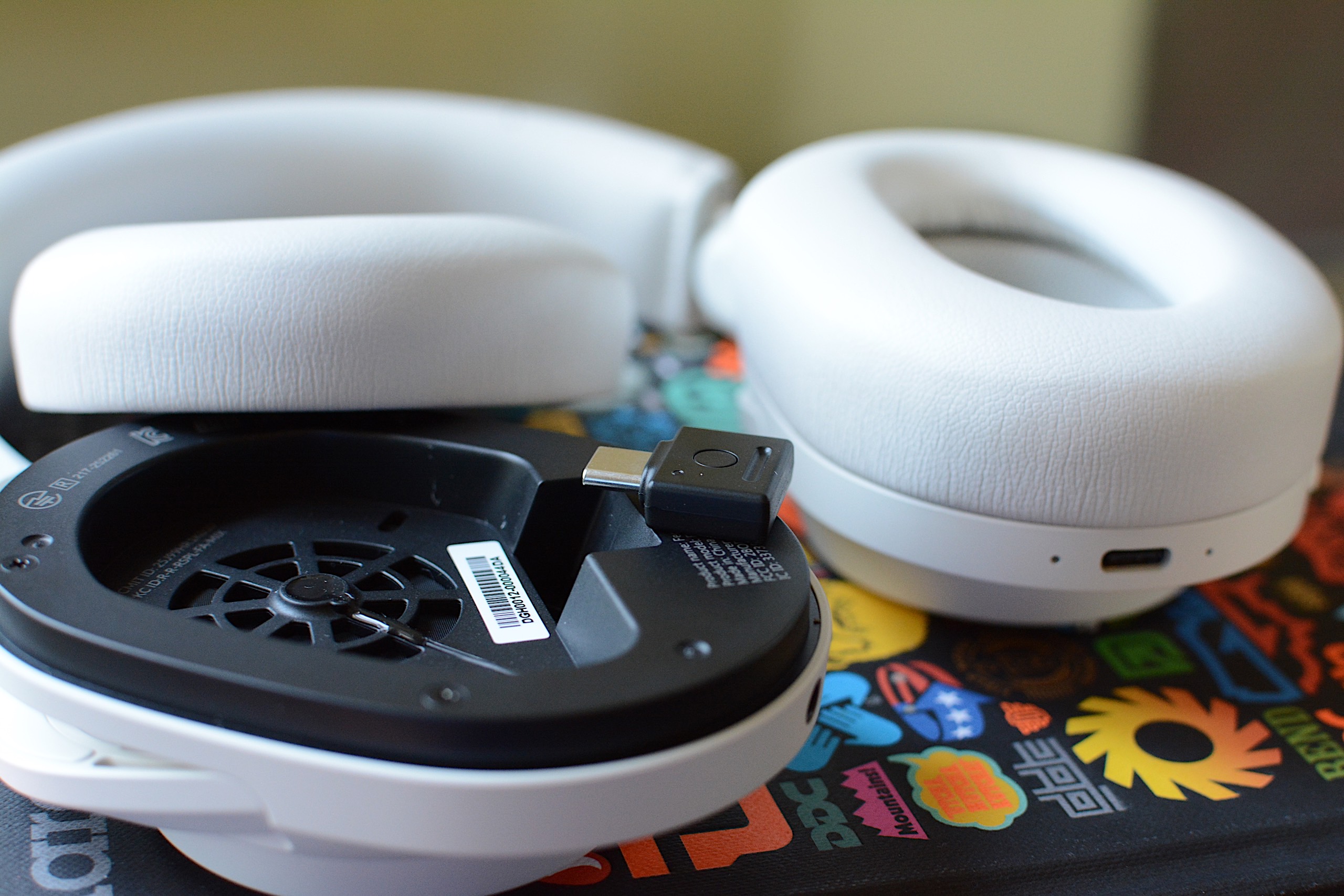
The lossless Bluetooth dongle inside the left ear cup
Billy Steele for Engadget

Sonically, the Mix headphones are at the height of their powers in lossless mode, which is enabled by the Bluetooth dongle hidden inside the ear cup. Bass tuning that’s otherwise overpowering in most cases is restrained, and you can pick up finer details in the more balanced mix. When listening to Watchhouse’s Rituals, I got the sense that I was surrounded by the band, with strings, drums and vocals enveloping my ears with sound — rather than it simply being projected from the left and right channels. There’s more nuance with the lossless mode, and it kept calling me back to the Mix headphones at the times when I’d probably opt for the conveniences of earbuds or a speaker. 

ANC performance is respectable, although it’s not on the level of Bose. It’s good enough to block out mild-to-moderate distractions, but it struggles with louder human voices and sudden jolts of noise. It will certainly do the job in the office or coffee shop, but you may notice some sounds invade your ears during a commute. For calls, transparency mode provides natural sound and it picks up enough of my voice that I never felt the need to shout. Call quality, though, is a different matter (more on that in a bit). 

Another big perk of the Mix is its long battery life. Fender Audio says you’ll get up to 52 hours with ANC on or a whopping 100 hours with it off. The company is forthcoming with the fact that the latter number is achieved at 50 percent volume, which will be too low for most “regular” use. Still, with noise canceling enabled and the volume around 70 percent, I had 52 percent battery left after nearly 30 hours of use. I spent most of that time with either ANC or transparency mode on. 

The five-way joystick and ANC button on the Fender Mix
Billy Steele for Engadget

Out of the box, Fender Mix’s tuning is too bass heavy. I realize a lot of people prefer a thundering low-end tone out of their headphones, but I found it to be too overpowering here. The stock sound profile is my biggest issue with this model, although it’s somewhat alleviated by using the lossless Bluetooth dongle. In that mode, the bass is slightly subdued, but it’s still quite prominent at times when it shouldn’t be. 

On that Watchhouse album, the kick drum starts to drive the sound, rather than the guitars, mandolin and other instruments. When I listen to the same songs on other headphones, I’ve noticed a better blend of drums and strings. With more intense genres, like the hardcore riffs and breakdowns of Incendiary’s Product of New York, the booming bass isn’t as much of an issue. The distorted guitars still cut through, and there’s plenty of texture in their tone. And when each song hits its climax, the cranked up lows offer extra oomph. It works for metal, but it isn’t always nice for bluegrass, jazz and synth-laiden electronic tunes where the extra bass can muddy the mix. 

The Fender Mix also lacks many of the smart features that are present in premium headphones today, which is probably how the company is able to sell them for $299. Things like automatic EQ tweaks and adaptive ANC are missing, as is automatic pausing when you speak or things like head gestures. These headphones don’t have wear detection either, so they don’t pause the audio when you take them off. There’s also no app available to dial in the EQ or adjust other settings (it’s coming soon).

These headphones only have two microphones for calls, and you can tell almost instantly that those are insufficient. Despite claims of “crystal clear calls,” your voice will just sound okay to the person on the other end. Honestly, I would’ve sounded better just using my iPhone with no headphones. The Mix works to get your voice across, but don’t dream of dialing into a podcast recording with them. What’s more, the Mix isn’t good at blocking background noise, so you’ll need to use them in a quiet location to have a chance at sounding decent. Which, again, is about the best these headphones can muster.

While the modular design allows for a decent degree of customization, the extra parts you’ll need aren’t on sale yet. What’s more, only two colors — white, which is really more of a light gray, and black — are currently available. So, for now, one of the perks of the Mix remains untapped. 

The Fender Mix headphones
Billy Steele for Engadget

There’s a lot to like about the Fender Mix, from the clever design choices to the crisp, detailed sound. The lack of finesse with the bass tuning and the omission of advanced features, particularly the absence of an app for settings changes, keeps these headphones firmly planted in the midrange category. 

Clearly that’s not what the company is aiming for with tools like the lossless Bluetooth dongle, but that’s where it lands for me at the end of the day. So, at $299, the Mix is a tough call when a $250 price tag would make these an easier sell. Sure, there’s enough here to make these a capable daily audio accessory, but not everything I’d need to call them a must buy.

This article originally appeared on Engadget at https://www.engadget.com/audio/headphones/fender-mix-review-well-designed-headphones-that-just-fall-short-of-greatness-120000974.html?src=rss

Fender Mix review: Well-designed headphones that just fall short of greatness

I know what you’re thinking: “Isn’t Fender a guitar company?” It sure is, and has been one of the most iconic names in guitars and amplifiers since 1946. So what is the company doing making headphones and speakers? Well, it isn’t, exactly. Like Zound Industries used to do with Marshall (before buying the amp business), another company is licensing the Fender name for its consumer audio products. Fender Audio, the brand that’s on the headphones I’m reviewing, is owned by the Fender Corporation, but Riffsound oversees the design and production of portable audio gear. 

The first products from Fender Audio are the Mix headphones and the Elie speaker (in two sizes). The company revealed these in January before properly showing them off  at CES. I’ll get to those speakers in a few weeks, but the Mix headphones are first up on the review docket. 

With the Mix, Fender Audio seeks to offer a set of premium over-ear, noise-canceling headphones at a lower price than the likes of Sony, Bose and Sennheiser. There’s also marathon battery life, several smart design touches, a lossless Bluetooth transmitter and swappable parts that combine for a unique formula to take on those big names. I’m honestly impressed that Fender Audio could cram all of that in a more affordable package, but the final verdict on the Mix isn’t so straightforward.

Fender Audio made numerous smart design decisions on the Mix headphones, and they resulted in my favorite things about using them. To start, you can swap out the ear pads, ear cups and headband as you see fit. The ear cups attach to the headband via USB-C ports, so they’re easy to snap on and off. Obviously, this allows you to change the look of the Mix over time, within the bounds of Fender’s available colors. 

Underneath the ear pads, Fender put a storage slot for the lossless dongle on the left side and gives you access to the removable battery on the right. I’m thrilled that I can enjoy higher quality Bluetooth connectivity without having to remember to bring along such a small accessory. Plus, it’s nice to know that users will be able to install a fresh battery, provided the company sells those at some point. 

I also enjoy how Fender Audio designed the onboard controls. First, they’re physical buttons, which are always my preference over touch- or gesture-based options. Second, the main one is a five-way joystick, so they’re very simple. Press it to play/pause, press and hold for pairing mode or press longer to power on or off. If you push the joystick up or down, you can adjust the volume, while moving it left and right skips the track forward or backward. You can also push down twice to enable Auracast pairing right on the headphones. A second button, which is just the regular kind, is used to cycle through noise canceling modes: ANC, transparency and both off. 

The lossless Bluetooth dongle inside the left ear cup
Billy Steele for Engadget

Sonically, the Mix headphones are at the height of their powers in lossless mode, which is enabled by the Bluetooth dongle hidden inside the ear cup. Bass tuning that’s otherwise overpowering in most cases is restrained, and you can pick up finer details in the more balanced mix. When listening to Watchhouse’s Rituals, I got the sense that I was surrounded by the band, with strings, drums and vocals enveloping my ears with sound — rather than it simply being projected from the left and right channels. There’s more nuance with the lossless mode, and it kept calling me back to the Mix headphones at the times when I’d probably opt for the conveniences of earbuds or a speaker. 

ANC performance is respectable, although it’s not on the level of Bose. It’s good enough to block out mild-to-moderate distractions, but it struggles with louder human voices and sudden jolts of noise. It will certainly do the job in the office or coffee shop, but you may notice some sounds invade your ears during a commute. For calls, transparency mode provides natural sound and it picks up enough of my voice that I never felt the need to shout. Call quality, though, is a different matter (more on that in a bit). 

Another big perk of the Mix is its long battery life. Fender Audio says you’ll get up to 52 hours with ANC on or a whopping 100 hours with it off. The company is forthcoming with the fact that the latter number is achieved at 50 percent volume, which will be too low for most “regular” use. Still, with noise canceling enabled and the volume around 70 percent, I had 52 percent battery left after nearly 30 hours of use. I spent most of that time with either ANC or transparency mode on. 

The five-way joystick and ANC button on the Fender Mix
Billy Steele for Engadget

Out of the box, Fender Mix’s tuning is too bass heavy. I realize a lot of people prefer a thundering low-end tone out of their headphones, but I found it to be too overpowering here. The stock sound profile is my biggest issue with this model, although it’s somewhat alleviated by using the lossless Bluetooth dongle. In that mode, the bass is slightly subdued, but it’s still quite prominent at times when it shouldn’t be. 

On that Watchhouse album, the kick drum starts to drive the sound, rather than the guitars, mandolin and other instruments. When I listen to the same songs on other headphones, I’ve noticed a better blend of drums and strings. With more intense genres, like the hardcore riffs and breakdowns of Incendiary’s Product of New York, the booming bass isn’t as much of an issue. The distorted guitars still cut through, and there’s plenty of texture in their tone. And when each song hits its climax, the cranked up lows offer extra oomph. It works for metal, but it isn’t always nice for bluegrass, jazz and synth-laiden electronic tunes where the extra bass can muddy the mix. 

The Fender Mix also lacks many of the smart features that are present in premium headphones today, which is probably how the company is able to sell them for $299. Things like automatic EQ tweaks and adaptive ANC are missing, as is automatic pausing when you speak or things like head gestures. These headphones don’t have wear detection either, so they don’t pause the audio when you take them off. There’s also no app available to dial in the EQ or adjust other settings (it’s coming soon).

These headphones only have two microphones for calls, and you can tell almost instantly that those are insufficient. Despite claims of “crystal clear calls,” your voice will just sound okay to the person on the other end. Honestly, I would’ve sounded better just using my iPhone with no headphones. The Mix works to get your voice across, but don’t dream of dialing into a podcast recording with them. What’s more, the Mix isn’t good at blocking background noise, so you’ll need to use them in a quiet location to have a chance at sounding decent. Which, again, is about the best these headphones can muster.

While the modular design allows for a decent degree of customization, the extra parts you’ll need aren’t on sale yet. What’s more, only two colors — white, which is really more of a light gray, and black — are currently available. So, for now, one of the perks of the Mix remains untapped. 

The Fender Mix headphones
Billy Steele for Engadget

There’s a lot to like about the Fender Mix, from the clever design choices to the crisp, detailed sound. The lack of finesse with the bass tuning and the omission of advanced features, particularly the absence of an app for settings changes, keeps these headphones firmly planted in the midrange category. 

Clearly that’s not what the company is aiming for with tools like the lossless Bluetooth dongle, but that’s where it lands for me at the end of the day. So, at $299, the Mix is a tough call when a $250 price tag would make these an easier sell. Sure, there’s enough here to make these a capable daily audio accessory, but not everything I’d need to call them a must buy.

This article originally appeared on Engadget at https://www.engadget.com/audio/headphones/fender-mix-review-well-designed-headphones-that-just-fall-short-of-greatness-120000974.html?src=rss

Apple discontinues the Mac Pro

Apple has confirmed to Engadget that the Mac Pro, the desktop tower-shaped computer that was last updated in 2023, has been discontinued. As 9to5Mac notes, the computer no longer appears in the lineup of Macs on Apple's website or in its storefront. That means at least for now, the Mac Studio is the Apple's top-of-the-line professional computer.

The current version of the Mac Pro was introduced in 2019, with a distinct cheese-grater design, Intel chips and a bevy of easily-accessible expansion slots. Apple released the computer as a make-good for several years of inadequately meeting the performance needs of professional Mac users, but its uncontested time at the top of the company's lineup was short-lived. A year later in 2020, Apple began transitioning to its custom M-series Arm chips, proving Macs could be more powerful and power-efficient by abandoning Intel entirely.

Apple eventually updated the Mac Pro to the M2 Ultra without updating the computer's design, but by then the writing was on the wall. The far smaller Mac Studio, introduced in 2022, also supported the new chip, and it's been updated since then while the Mac Pro has languished. Bloomberg reported Apple was planning to retire the Mac Pro in November 2025, so it's not all that surprising the company quietly pulled the plug only a few months later.

Apple’s effort to cater to professionals, creatives and anyone with a chunk of change to drop on a fast computer lives on through the Mac Studio, and the recently announced Studio Display XDR, itself a replacement for the Pro Display XDR Apple announced for the 2019 Mac Pro. Now all the company needs to do is update the Mac Studio with an M5 Max chip to make it the most “pro” computer Apple offers.

Update, March 26, 6:25PM ET: Added confirmation from Apple that the Mac Pro has been discontinued.

This article originally appeared on Engadget at https://www.engadget.com/computing/apple-discontinues-the-mac-pro-221502339.html?src=rss

Google begins rolling out Search Live globally

Following a false start last week, Google has begun rolling out Search Live globally. The tool allows you to point your phone's camera at an object or scene and ask questions about what you see in front of you. With today's expansion, Google is making Search Live available in every location and language where it offers its AI Mode chatbot. With that, people in more than 200 countries and territories can use Search Live to get answers to their questions. 

Behind the expansion is Google's Gemini 3.1 Flash Live model. According to the company, the new AI system was designed to be natively multilingual, and capable of more natural conversations. It should also be more reliable and faster.

Separately from Search Live, Google is bringing Live Translate to iOS. Live Translate, if you need a reminder, allows you to put on a pair of headphones and get a real-time translation of what another person is saying. With today's announcement, Google is also bringing the feature to more countries, including Germany, Italy, Spain, Japan and the UK, across both Android and iOS. All told, Live Translate can now understand more than 70 languages and work with any set of headphones. Neat.


This article originally appeared on Engadget at https://www.engadget.com/ai/google-begins-rolling-out-search-live-globally-180938407.html?src=rss

Wikipedia has banned AI-generated articles

English Wikipedia has banned the use of generative AI when writing or rewriting articles. The platform says it came to this decision because using AI to whip up copy "often violates several of Wikipedia's core content policies."

There are a couple of minor exceptions. Editors can use large language models (LLMs) to refine their own writing, but only if the copy is checked for accuracy. The policy states that this is because LLMs "can go beyond what you ask of them and change the meaning of the text such that it is not supported by the sources cited."

Editors can also use LLMs to assist with language translation. However, they must be fluent enough in both languages to catch errors. Once again, the information must be checked for inaccuracies.

"My genuine hope is that this can spark a broader change. Empower communities on other platforms, and see this become a grassroots movement of users deciding whether AI should be welcome in their communities, and to what extent," Wikipedia administrator Chaotic Enby wrote. The administrator also called the policy a "pushback against enshittification and the forceful push of AI by so many companies in these last few years."

There is one thing worth noting. Wikipedia is not a monolith. Each Wikipedia site has its own independent rules and editing teams. Some may decide to embrace LLMs. However, others may go even further. Spanish Wikipedia, for instance, has fully banned the use of LLMs, with no exceptions for refinement or translation.

Also, identifying text written by LLMs is not an exact science so Wikipedia's human moderators could miss some spots of slop every now and again. This is more likely on pages with less frequent moderation.

This article originally appeared on Engadget at https://www.engadget.com/ai/wikipedia-has-banned-ai-generated-articles-173641377.html?src=rss

AMD’s Ryzen 9950X3D2 chip features an incredible 208MB of on-chip cache

AMD just revealed the Ryzen 9950X3D2 Dual Edition desktop processor, which is a beastly follow-up to last year's 9950X3D. This is the company's first desktop processor where both chiplets have been equipped with AMD's proprietary 3D V-Cache technology, which seems like a boon for gamers. Each chiplet includes 104MB of cache, offering an incredible 208MB total on-chip cache.

"208MB of cache means more game data, more assets and more working data sitting right next to the CPU cores," AMD Senior VP Jack Huynh explained in an announcement video.

Just like last year's release, the 9950X3D2 features a 16-core processor based on the Zen 5 architecture. This new release has increased to a 200W TDP, compared to the 170TDP of the original. This could indicate an increase in speed and performance, but with more heat output. 

A comparison chart.
AMD

AMD says the chip will be great for both gaming and for creative workloads, like compiling game engines, running AI models and rendering 3D objects. The company says it can deliver a five to 10 percent performance boost when using applications like Unreal Engine, Chromium, Blender and DaVinci Resolve.

Last year's 9950X3D chip was already an absolute powerhouse, so we are looking forward to putting this one through its paces. The Ryzen 9950X3D2 chip will be available on April 22, though we don't have a price just yet. The standard 9950X3D currently costs around $675.

This article originally appeared on Engadget at https://www.engadget.com/computing/amds-ryzen-9950x3d2-chip-features-an-incredible-208mb-of-on-chip-cache-154137156.html?src=rss

How to use Apple’s Playlist Playground to make AI-generated mixes

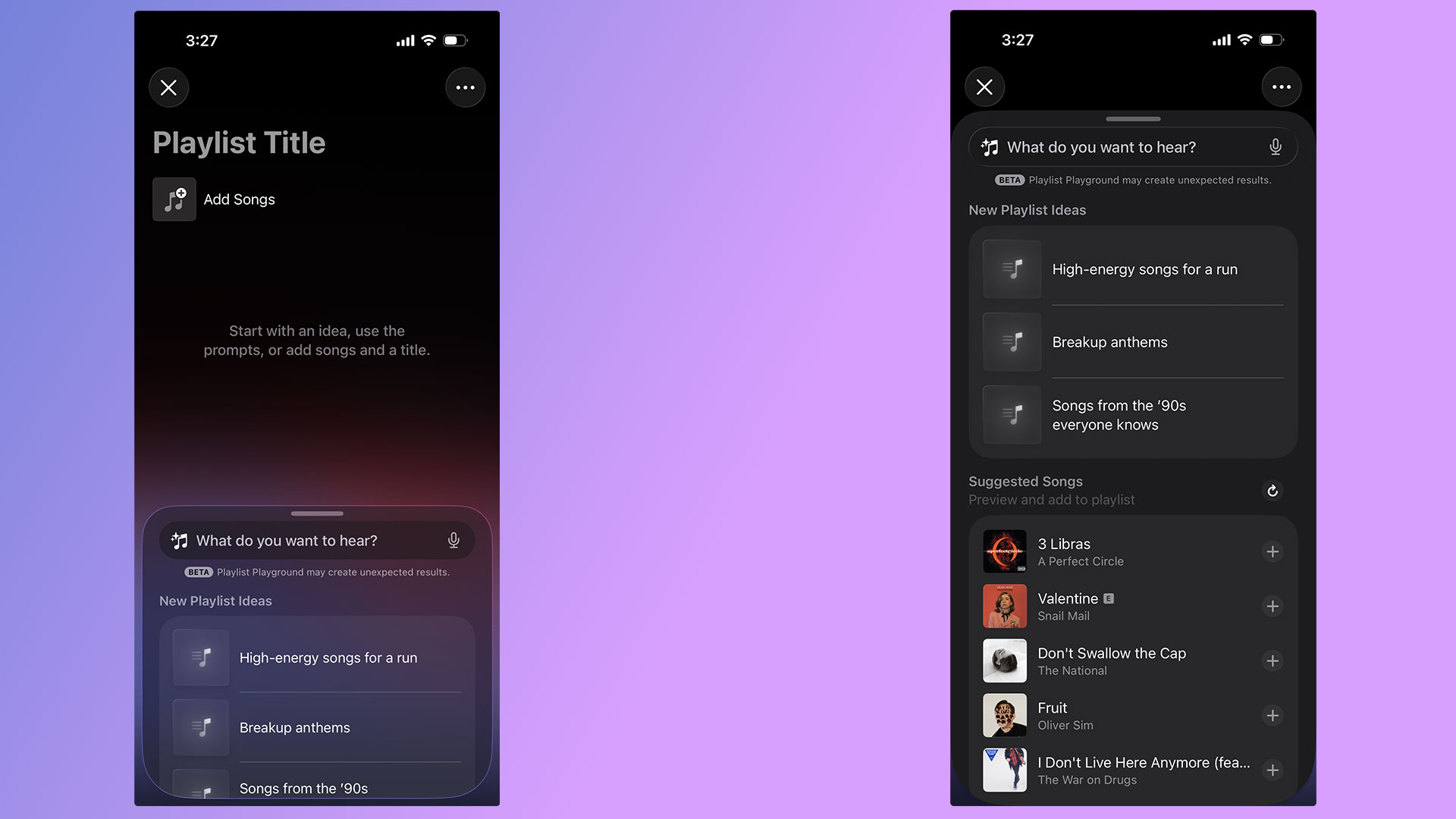
With the release of iOS 26.4, Apple Music's Playlist Playground can now generate playlists with the help of AI. Best of all, you don't need an Apple Intelligence-capable iPhone to take advantage of the new feature. As long as you're a US Apple Music subscriber with your language set to English, you can start using Playlist Playground right now. Here's how to get started. 

A pair of screenshots showing off Apple Music's new Playlist Playground feature.
Igor Bonifacic for Engadget

For the time being, there are two ways to access Playlist Playground. For the time being, the company is highlighting the feature within the "Top Picks for You" section of Apple Music's Home tab. If you don't see a shortcut there, Apple integrated the feature into the app's existing playlist creation tool. Just tap the new icon found in the Library tab. If you're new to Apple Music, the flow looks like this: 

  1. Open Apple Music. 

  2. Navigate to the "Library" tab.

  3. Tap the playlist creation button.

  4. Write a prompt describing the mood or style of music you want to hear. 

To help people get started, Apple provides a selection of sample prompts. One pro tip: it's possible to use metadata in conjunction with Playlist Playground. For example, after Apple Music generates a playlist, you can tell Apple's model to edit it by removing any songs released before 2016. Of course, you're also free to add and remove songs manually as you please. 

Once you're happy with your new playlist, Apple Music treats all Playlist Playground mixes like it does any other playlist, meaning you can save it to your Library, download for offline playback, play it from your Apple Watch and share it with friends and invite them to add songs.   

As of the writing of this article, Playlist Playground is a beta release only available to Apple Music subscribers in the US with their preferred language set to English. An iPhone or iPad running iOS 26.4, or an Apple Vision headset running visionOS 26.4 is also required.     

As Apple releases the feature in more countries and languages, we'll update this article. 

Yes, if you use Apple Music on Android, Playlist Playground is available there too.  

When generating mixes, Playlist Playground pulls from both trending data and your personal listening history. Along with other AI-powered Apple Music features like AutoMix and Lyrics Translation, Playlist Playground runs as part of the Apple Music service. That’s one of the reasons Apple can offer it outside of Apple Intelligence-capable devices. 


This article originally appeared on Engadget at https://www.engadget.com/entertainment/music/how-to-use-apples-playlist-playground-to-make-ai-generated-mixes-134500610.html?src=rss

WhatsApp rolls out updates including multiple accounts for iOS

WhatsApp shared multiple quality of life updates coming to its messaging platform starting today. The first is a long awaited option to have two accounts on a single iOS device. The option has been available for years on Android, and iPhone users can now be logged into two separate accounts at once. The profile photo for the account will be visible in the bottom tab to double-check which persona you're messaging as. 

The other new features allow for easier movement of chat histories, both between platforms and devices in the same ecosystem. This chat transfer should make it easier to retain messages when upgrading to a new phone, especially if you're switching between iOS and Android. There's also a new option to delete large files directly from a WhatsApp chat to avoid storage clutter. It's available under the Manage Storage option when you tap a chat's name. It includes an option to delete just media files from a conversation. 

And of course it wouldn't be a tech news announcement without at least some AI features present. WhatsApp now supports using Meta AI for light photo editing, including removing backgrounds, changing aesthetic styles and deleting elements from the composition. There's also a Writing Help prompt that uses AI to help draft a message, although Meta's blog post states that using this still keeps chats private. The above features should be arriving to all WhatsApp users “soon,” according to the company.

This article originally appeared on Engadget at https://www.engadget.com/social-media/whatsapp-rolls-out-updates-including-multiple-accounts-for-ios-130000252.html?src=rss

DJI Avata 360 drone review: 360 video hits new highs

After achieving action camera success, Insta360 invaded DJI’s turf with the first mass-market panoramic drone, the Antigravity A1. It had instant appeal for drone pilots, offering 8K 360 video and features like subject tracking, obstacle detection and FPV flying.

Though beaten to the punch, DJI has responded quickly with the Avata 360, aided by its drone experience and camera tech from the new Osmo 360 action cam. It has a lot in common with its rival, but it’s safer to fly around people and offers single camera 4K footage on top of 8K 360 video.

To find out how the Avata 360 stacks up against the A1, I tested it both indoors and out, around people and even “stunt” horses. The Avata 360 isn’t perfect, but it is far more polished than its rival. As with other DJI drones of late, though, US availability remains unclear.

The 360 camera makes the Avata 360 different from any other DJI drone. It features two ultrawide cameras with f/1.9 lenses and 1.1-inch 64-megapixel sensors, with one pointing up and the other down for unobstructed 200-degree views. Those are then stitched together by software to create 360 degree video at up to 8K 60 fps.

This setup fundamentally changes the way you pilot a drone and capture video. Since the 360 camera records everything around it, you can focus on flying and reframe shots later in DJI’s Studio app. That 360 view is also handy when piloting in FPV mode. With the head tracking on DJI’s Goggles N3, you can look all around you simply by turning your head.

Unlike the Antigravity A1 that only shoots 360 video, the Avata 360 supports regular single-camera shooting as well. When you switch to that mode, the camera rotates forward and shoots 4K video at up to 60 fps with a 28mm field of view. DJI’s drone also works with a regular controller, which isn’t an option on the A1. You have to use the Insta360’s goggles at all times.

Because of the chunky 360 camera, the Avata 360 is slightly bigger than the Avata 2. It’s also quite a bit heavier at 455 grams (one pound) and so, unlike the 249-gram Antigravity A1, you’ll need a permit to fly one in most regions.

The Avata 360’s propellers are shielded to protect the drone and keep it safe indoors or around people, unlike the open-prop A1. For additional protection it has two omni obstacle sensors on the side, a Lidar sensor up front, landing sensors on the bottom and, of course, a camera that points in all directions. To keep the lenses off of bare ground, it comes with a foldable 18x18-inch landing mat.

DJI’s Goggles N3 (available with the RC Motion 3 controller as an option) are comfortable and allow you to wear eyeglasses. Unlike the Goggles 3, though, there’s no external camera to see outside. If you’d rather pilot conventionally, you can get the Avata 360 bundled with DJI’s RC 2 screen controller in another kit.

As an FPV drone, the Avata 360 is fast and agile. It can hit speeds up to 40 MPH in sport mode (without obstacle avoidance) or 35 MPH in normal mode. When used with the optional FPV Remote Controller 3, you can do flips, rolls and other “cinewhoop” style maneuvers. Once you get used to flying it that way, it’s incredibly fun.

The 38.7Wh batteries have 26 percent more capacity than the Avata 2’s cells, but rated endurance is about the same at 24 minutes. I never got more than about 18 minutes in real-world flying though, so it’s a good idea to buy the Fly More kit with three batteries and a fast charger that can replenish them all in about 100 minutes.

The Avata 360 can be controlled using DJI's Goggles N3 and RC Motion 3 controller in FPV mode.
Samuel Dejours for Engadget

Part of my testing of the Avata 360 was capturing “trick riding” horses, so it was important that the drone noise didn’t spook them. At 81db the Avata 360 is louder than the Mini 4 Pro (67 db) and less banshee-like than the Neo 2 due to the larger propellers, so the horses weren’t alarmed.

Video is transmitted to the Goggles N3 and RC Motion 3 controller (or the RC screen controller) at 1080p 60 fps via DJI’s OcuSync 4.0+ system. The maximum flying range is 20 km (12.4 miles), double that of the Avata 2. This is an impressive distance for an FPV drone.

The 45GB of internal storage (42GB usable) can fill up quickly when you’re shooting 8K video, but the drone also has a microSD slot. To get your footage onto a PC or smartphone, you can transfer it via the USB-C port or over Wi-Fi using DJI’s Fly app.

The Avata 360 has DJI’s usual tracking and obstacle detection features, but they’re available only with the RC 2 controller and not the Goggles N3. To follow a subject, simply draw a box around them on the controller to enable Focus Track and its three modes: Spotlight, Point of Interest and ActiveTrack. The latter tracks a subject automatically and lets you control the drone’s position via an on-screen “steering wheel.”

DJI's Avata 360 offers excellent subject tracking but with a 360 twist
Steve Dent for Engadget

To test that, I biked in a narrow forested lane and walked around a bamboo-covered obstacle course. When using Focus Track, the drone dodged most obstacles and was only confused by small leaves and branches. If it did contact one of those, it sailed right through without crashing thanks to the propeller guards.

Subject tracking works in both 360 and single camera modes, but when using the latter, The Avata 360 can’t see and avoid obstacles behind it. It contacted branches several times during my testing, but fortunately the prop guards prevented crashes. Other automatic features include Dronie, Rocket and Quickshot modes that let you capture clips for social media.

The Avata 360 prioritizes FPV freedom and flexibility over pure video quality. Though the specs promise 8K, that only applies to the full 360 degree video — your final, flat video will actually be 4K or less after processing. And the 360 camera zooms digitally (not optically), which further reduces resolution. On top of that, you can often see a “seam” in the video where stitching occurs, and dewarping (used to output flat video) can create softness at the edges. With all that, video is less sharp than DJI’s regular Mini, Air and Mavic drones.

Because the camera is fixed when shooting 360 video, the Avata 360’s gimbal can’t smooth out jolts or correct for roll. Instead, it uses action cam-style electronic stabilization. What’s more, that type of smoothing causes motion blur and artifacts in low light due to the lower shutter speeds — something I also noticed with the Osmo 360.

DJI Avata 360 drone review: 360 video hits new highs
Steve Dent for Engadget

With that said, video quality was as sharp and color-accurate as the Osmo 360, and a touch better than the Antigravity A1 when filming in daylight. For tricky, contrasty conditions like a shaded path on a sunny day, the D-LogM option boosted dynamic range, helping me bring out shadow detail and tone down overly-bright highlights. However, the cityscape I shot at night was soft and occasionally blurry due to the aforementioned stabilization issues.

In exchange for this lower video quality, the 360 camera provides incredible flexibility. For a vlog style tracking shot, for instance, I usually need to film twice to show the forward and backward directions. With the Avata 360, though, I was able to get both POVs from the same shot and output an overhead view too for good measure.

DJI Studio is where you go to select your desired framing and output the flat video. It’s not quite as versatile as Insta360’s app, but it allows you to reframe shots and create smooth transitions between camera angles. And to save time, you can use the Intelligent Tracking feature to center your subject. The app also offers color correction and other features, but I found it easier to export the final shots to DaVinci Resolve for any additional work.

Flat video a mixed bag. Sharpness is mildly better than the 360 video, but the lack of a gimbal roll axis means that the camera can’t level itself when the drone banks into the wind. As a result, most of my footage was tilted and often unusable.

DJI's Avata 360 offers incredible flexibility but lacks video quality compared to its other drones.
Steve Dent for Engadget

With the Avata 360, DJI has a surprisingly sophisticated drone that offers better video quality and more features than its only rival, Insta360’s Antigravity A1. It can do everything you’d expect from a DJI FPV drone like tracking, obstacle avoidance and acrobatics, while operating safely around people (or horses).

DJI also managed to undercut Insta360 on price, with the Avata 360 starting at 459 euros (approx. $530), or 939 euros ($1,089) in a kit with a screen controller, three batteries and a charger. It’s also available with the extra batteries and charger, DJI’s FPV Goggles N3 and the RC Motion 3 controller for 939 euros ($1,089). As mentioned, there’s no word yet on US pricing, but the Avata 360 has been approved by the FCC so it could appear in the US soon.

Like 360 action cams though, this is a niche product. If you’re a vlogger, extreme action shooter, FPV pilot or solo filmmaker who wants speed and flexibility, the Avata 360 is a great choice. If it’s pixel perfect image quality you want, however, you’re better off with DJI’s Mini 5 Pro, Air 3S or Avata 4 Pro drone.

This article originally appeared on Engadget at https://www.engadget.com/cameras/dji-avata-360-drone-review-360-video-hits-new-highs-120014666.html?src=rss

Razer’s new Blade 16 has Intel’s latest chips and ultra-fast RAM

After leaning into some questionable AI antics at CES 2026, Razer is making some altogether more practical updates to its 16-inch laptop by giving it newer chips and faster RAM. The new Razer Blade 16 features Intel's new Core Ultra chips and speedy LPDDR5X-9600 MHz RAM, and is available to order today for $3,500.

The Razer Blade 16 is designed to split the difference between the portable Razer Blade 14 and the monstrous Razer Blade 18, mostly by being thin but offering improved performance. Razer says the 2026 Blade 16 is 0.59 inches (14.9mm) at its thinnest point, which matches the thinness of the 2025 Blade 16. The laptop also has a similar 16-inch QHD+, 240Hz OLED screen to last year's model, though the company says it's 100 nits brighter than before. Port selection also remains respectable: the laptop includes three USB 3.2 Gen 2 Type-A ports, a Thunderbolt 4 port, a Thunderbolt 5 port, a full-sized HDMI 2.1 port and a UHS-II SD card reader.

A Razer Blade 16 laptop viewed from the front next to a monitor.
Razer

The real notable upgrade is Razer's switch from AMD Ryzen chips to new Intel Core Ultra 9 386H chips on the 2026 Razer Blade 16. The new Core Ultra chips are some of Intel's first processors made with its new 18A process and pitched as the company's comeback. Razer says the new chip es 16 cores and an integrated NPU that "provides up to 50 TOPS" for things like image generation and live translation, which the Razer Blade 16 supports natively as a Copilot+PC. The efficiency of the new chip also contributes to the laptop’s up to 15 hours of battery life. Of course, if you want power, the Razer Blade 16 has it: the laptop includes NVIDIA's GeForce RTX 50 Series Laptop GPUs and up to 64Gb of LPDDR5X-9600MHz RAM, which should give the Razer Blade 16 plenty of pep for games.

Hardware upgrades don't come cheap, and the higher $3,500 starting price of the Razer Blade 16 — which includes 32GB of RAM, 1TB of storage and a GeForce RTX 5080 GPU at a minimum — is likely reflective of the growing cost of memory and storage that's already negatively impacting the PC industry.

The Razer Blade 16 is available to purchase now through Razer’s website.

This article originally appeared on Engadget at https://www.engadget.com/computing/laptops/razers-new-blade-16-has-intels-latest-chips-and-ultra-fast-ram-185858799.html?src=rss