In a surprise release, OpenAI has made ChatGPT's Voice mode available through Apple CarPlay. If you're running the latest version of both iOS and the ChatGPT app, and own a CarPlay-compatible vehicle, you can check out the experience. To get started, download all the necessary software, connect your iPhone to CarPlay and select "New voice chat" from ChatGPT. When the in-app text indicates ChatGPT is "listening," you can start a conversation.
There are some notable limitations to using ChatGPT Voice with CarPlay. For one, OpenAI's chatbot can't control car functions. If you want to adjust the cabin temperature or skip tracks, you'll still need Siri for those tasks. Due to Apple's restrictions, you also can't start using ChatGPT through a wake word like you can Siri. For example, to resume a previous conversation, you need to open the ChatGPT app from CarPlay and tap a recent or pinned chat.
With those limitations in mind, OpenAI suggests you can use Voice mode to get how-to advice, brainstorm ideas and practice languages. Personally, I like to listen to podcasts and music when I'm driving, but if talking with ChatGPT is your thing, you do you.
This article originally appeared on Engadget at https://www.engadget.com/ai/openai-brings-chatgpts-voice-mode-to-carplay-191422297.html?src=rss
Over the last 50 years, Apple reimagined personal computers, catalyzed the era of the smartphone, enlarged an iPhone and called it the iPad and garnered a strong position in wearable tech through its Watch series and its AirPods. It also popularized software and services like its App Store, FaceTime, iCloud, iMessages and many more. For a lot of us, the first time we pinched-to-zoom on a photo was likely on an iPhone.
However, Apple gives and it takes away. Things have had to change, be removed and consumers have to move on to whatever's new. For better or worse, the weight of Apple's influence has led to entire product categories following suit. Or, more typically, there's resistance, complaining and then… following suit. With the benefit of hindsight, most of these cases are examples of Apple seeing where technology was going and getting ahead of a transition that would have been inevitable. Often, these transitions have caused short-term pain for some, but time has proven Apple (mostly) correct about dropping older tech.
As Sir Arthur Quiller-Couch once said: murder your darlings. Here are some of the darlings we’ve lost over the years.
The death of the disk drive (1998)
This is a two-parter. The iMac G3 marked Steve Jobs' return. The colorful all-in-one Mac was a new start in many ways. In 1998, Apple ditched the standard ports and myriad cable types of personal computers, going all in on USB and a little-known thing called the internet. (In fact, that’s what the ‘i’ in iMac stands for.)
In doing so, it also ditched the 3.5-inch floppy disk drive — although it did have a read-only optical disk drive. Even with sluggish internet and USB transfer speeds at the time, the convenience was plain to see and it led to a decade of thumb drives of ever-increasing storage limits. High-capacity alternatives to the floppy disk, like the Zip disk and even Minidisc, attempted to bridge the gap, but never gained the widespread traction and adoption of the original disk drive. But flash drives and, later, internet-based file storage quickly made them obsolete anyway. Apple was just a little early with its dismissal.
Portable music players (2007)
Despite Apple’s iPod being the de facto music player at the time, it was supplanted by the company’s own biggest hit: the iPhone. At its peak, the iPod made Apple the zeitgeisty tech company it is today. It dominated the MP3 player market, and by 2006, iPods were responsible for 40 percent of the company’s revenue. And that was before the era of Apple including a free U2 album with every iTunes account.
When the iPhone launched in June 2007, it was swiftly followed by the iPod Touch in September. This was the iPhone without the phone part — indicating how the company saw the future of music listening. You didn’t need an iPod if you already had an iPhone in your pocket. It’s the best example of Apple cannibalizing a product that defined a decade with something far more impressive and, eventually, more successful.
It was a slow death. Ignoring the countless MP3-playing rivals, (RIP Zune), Apple dropped the classic iPod in 2014. It soon did the same to the tiny iPod nano and iPod shuffle in 2017. Finally, the company discontinued the iPod Touch in May 2022.
The physical smartphone keyboard (2007 plus change)
Unsplash / Thai Nguyen
When the iPhone’s capacitive screen and touch keyboard landed, there was a learning curve. Moving from physical keys (whether it was a 9-key alphanumeric version or the BlackBerry’s QWERTY experience) to a touch screen, especially on the tiny 3.5-inch panel of the first iPhone, wasn’t easy.
But it was the future. Physical keyboards took up physical space on devices — especially as those screens grew and grew. The adoption of touch keyboards sped up, thanks to third-party keyboard apps on Android, like Swype, SwiftKey and many others, introducing different input methods, smarter predictive text, typing algorithms and even touch heatmaps. Software keyboards were intrinsically more versatile, supporting multiple languages, infinite key arrangements and eventually emoji galleries. A colon-ellipsis smiley soon didn’t hit the same.
The death of the disk drive, part 2 (2008)
The MacBook Air, introduced by Steve Jobs in 2008, was famously pulled from a manila envelope to demonstrate its ultraportable design. To achieve that slimness, it had to ditch the internal optical drive entirely, making it the first MacBook without one. That move kickstarted an era of ultraportable laptops.
It was a major break from what laptop users were used to, and Apple tried to offer people some options. Apple introduced "Remote Disc," a feature which allowed the Air to wirelessly use the optical drive of a nearby Mac or PC, and offered an external USB SuperDrive as an optional accessory. (I've used mine exactly once since I bought it in 2013.)
While it was considered underpowered compared to Windows competitors, the original MacBook Air set a new design standard for the industry. It positioned Apple’s Macs for a future of App Store software installations, faster internet connectivity, and the rise of streaming media, cloud storage, and the rest. Apple’s MacBook Pro and MacBooks eventually followed suit, ditching optical drives in 2012.
Adobe Flash (2010)
Apple
In the early days of the iPhone, Apple famously refused to support Adobe Flash. This was in the early 2000s, too, when much of the web was built with Flash for animations and video support. The iPhone and iPad notably lacked support, creating a fractured browsing experience for years.
In April 2010, just as the first iPad arrived, Steve Jobs published his "Thoughts on Flash" open letter, criticizing its poor security and a lack of touch-friendliness. Many Flash games and interfaces interacted with the mouse cursor's precise position, something that was invisible on the touchscreen iPhone.
It was also a calculated move. By denying Adobe access to the rapidly growing iOS user base, Apple forced developers to choose between sticking with the aging Flash or embracing open standards like HTML5. Also, by making Flash-based games and tools incompatible, it nudged those developers (and iPhone users) toward the App Store for those very games and tools (and more). There, Apple could curate and monetize those creations.
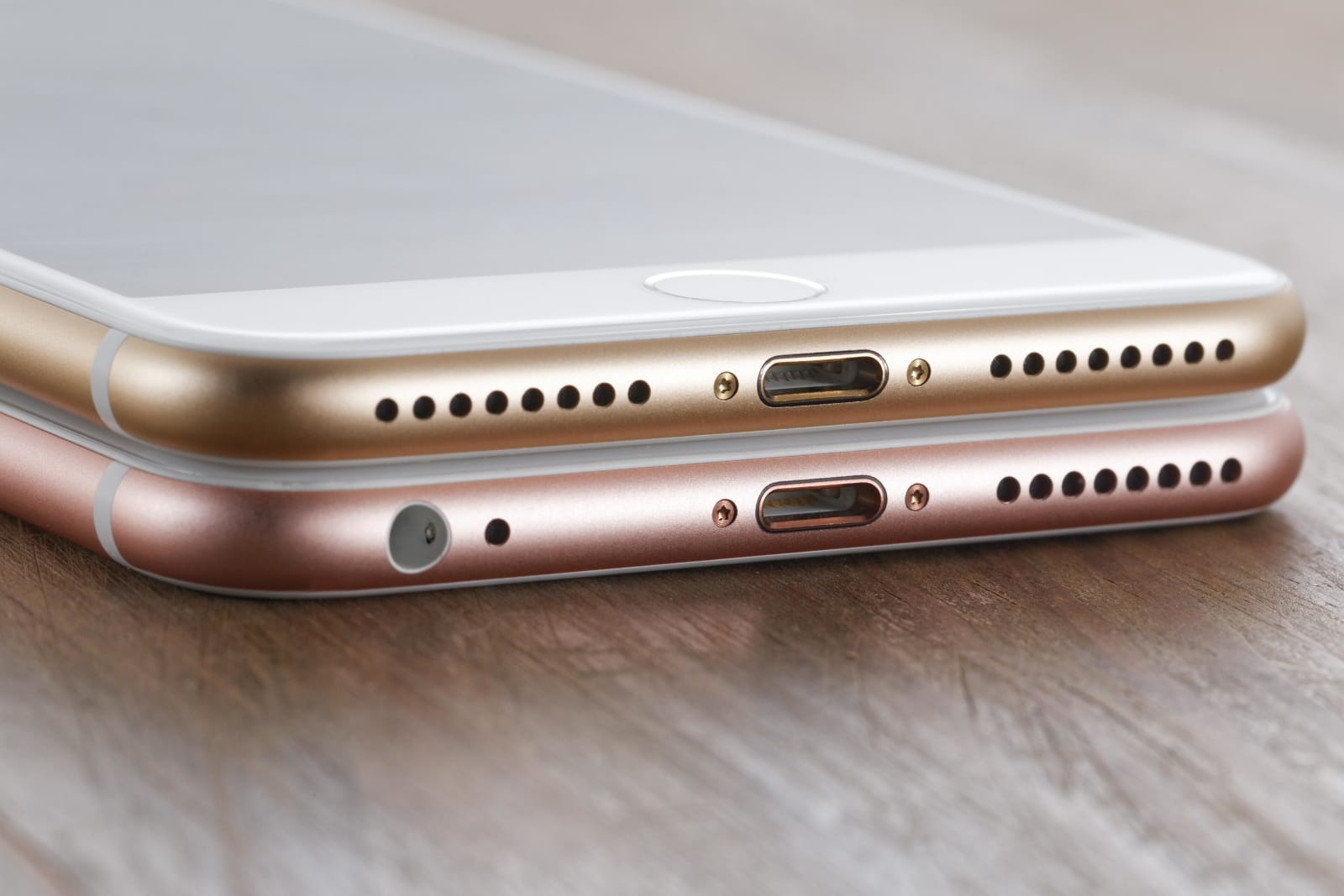
In a move described by Apple marketing executive Phil Schiller as "courage,” nixing the headphone socket ended up becoming the biggest headline to come from the iPhone 7 launch in 2016. Every flagship iPhone since has lacked the jack, with the most recent iPhone to include it being the original iPhone SE.
To make the change more palatable, Apple bundled a Lightning-to-3.5mm adapter (expect more dongle chat later) with the iPhone 7, 8 and X. In-box headphones also swapped from the typical jack to Lightning. Naturally, this meant you couldn’t charge the phone while you listened to music, unless you already had a pair of wireless headphones.
Of course, this move was ultimately instrumental in making true wireless earbuds ubiquitous. While Apple wasn’t remotely the first company to introduce wireless earbuds (and then headphones), the removal of the headphone jack undoubtedly sped up adoption. Pour one out for the Bragi Dash, the Jabras, the Jaybirds of this world.
Conveniently, alongside the aforementioned iPhone 7, Apple announced the AirPods. Features like one-tap setup and automatic pairing brought the convenience people expected of Apple and put it into a tiny white case.
Despite early resistance and "bragging" from rivals who clung onto the headphone jack, at this point, the socket is mostly confined to cheaper smartphones or phones aimed at audiophiles (hi, Sony) or mobile gamers (ASUS ROG).
Eventually, the iPad Pro also lost its headphone jack, and the rest of the company's tablets followed. The only non-Mac device to keep the jack? The iPod Touch, which had one until its discontinuation in 2022.
Bespoke ports (2016)
Engadget
2016 was the year of donglegate. Apple’s MacBook Pro redesign that year was another drastic shift in the laptop's history. Chasing ever-thinner profiles and less port fuss, Apple stripped away nearly every legacy connector that professionals relied on. This was particularly jarring after the previous-generation MacBook Pro (2015) was often cited as the peak of utility, with a MagSafe charging port, two Thunderbolt 2 ports, two USB-A ports, not to mention a full-size HDMI port and an SD card slot.
Those were replaced with four (or on the cheapest 13-inch MBP only two!) Thunderbolt 3 USB-C ports and a headphone jack. For power users (like some Engadget editors), it demanded dongles (possibly multiple ones) in order to connect your USB-A thumb drive, wired internet, SD cards, external screens and well, at that point, pretty much everything. Many were particularly furious with the loss of the MagSafe charging connector. Of course, this also meant that one of those USB-C ports would be used primarily to charge the MBP. This sped up the availability of USB-C peripherals and accessories — perhaps because everyone was sick of carrying around so many dongles and hubs — but we still have USB-A devices. HDMI is everywhere. I still have SD Cards.
Eventually, Apple course-corrected itself. The 2021 MacBook Pro redesign reintroduced the SD card reader and HDMI port, and even MagSafe returned, freeing up a USB-C port.
This article originally appeared on Engadget at https://www.engadget.com/big-tech/50-years-of-apple-pushing-tech-forward-for-better-or-worse-170025862.html?src=rss
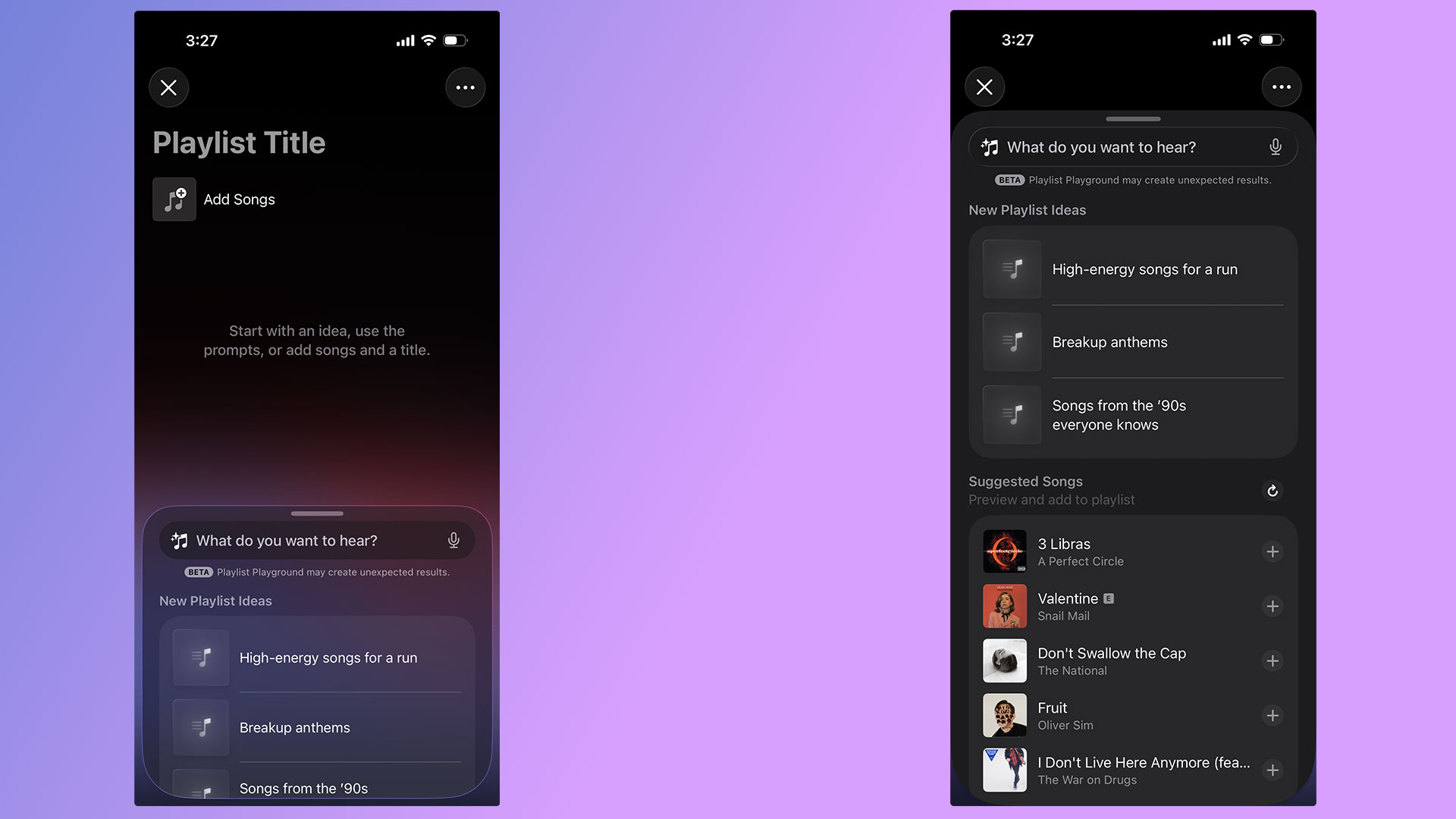
With the release of iOS 26.4, Apple Music's Playlist Playground can now generate playlists with the help of AI. Best of all, you don't need an Apple Intelligence-capable iPhone to take advantage of the new feature. As long as you're a US Apple Music subscriber with your language set to English, you can start using Playlist Playground right now. Here's how to get started.
How to create playlists using Playlist Playground
A pair of screenshots showing off Apple Music's new Playlist Playground feature.
Igor Bonifacic for Engadget
For the time being, there are two ways to access Playlist Playground. For the time being, the company is highlighting the feature within the "Top Picks for You" section of Apple Music's Home tab. If you don't see a shortcut there, Apple integrated the feature into the app's existing playlist creation tool. Just tap the new icon found in the Library tab. If you're new to Apple Music, the flow looks like this:
Open Apple Music.
Navigate to the "Library" tab.
Tap the playlist creation button.
Write a prompt describing the mood or style of music you want to hear.
To help people get started, Apple provides a selection of sample prompts. One pro tip: it's possible to use metadata in conjunction with Playlist Playground. For example, after Apple Music generates a playlist, you can tell Apple's model to edit it by removing any songs released before 2016. Of course, you're also free to add and remove songs manually as you please.
Once you're happy with your new playlist, Apple Music treats all Playlist Playground mixes like it does any other playlist, meaning you can save it to your Library, download for offline playback, play it from your Apple Watch and share it with friends and invite them to add songs.
FAQ
What Apple devices is Playlist Playground available on?
As of the writing of this article, Playlist Playground is a beta release only available to Apple Music subscribers in the US with their preferred language set to English. An iPhone or iPad running iOS 26.4, or an Apple Vision headset running visionOS 26.4 is also required.
As Apple releases the feature in more countries and languages, we'll update this article.
Is Playlist Playground available on Android?
Yes, if you use Apple Music on Android, Playlist Playground is available there too.
How does Playlist Playground work?
When generating mixes, Playlist Playground pulls from both trending data and your personal listening history. Along with other AI-powered Apple Music features like AutoMix and Lyrics Translation, Playlist Playground runs as part of the Apple Music service. That’s one of the reasons Apple can offer it outside of Apple Intelligence-capable devices.
This article originally appeared on Engadget at https://www.engadget.com/entertainment/music/how-to-use-apples-playlist-playground-to-make-ai-generated-mixes-134500610.html?src=rss
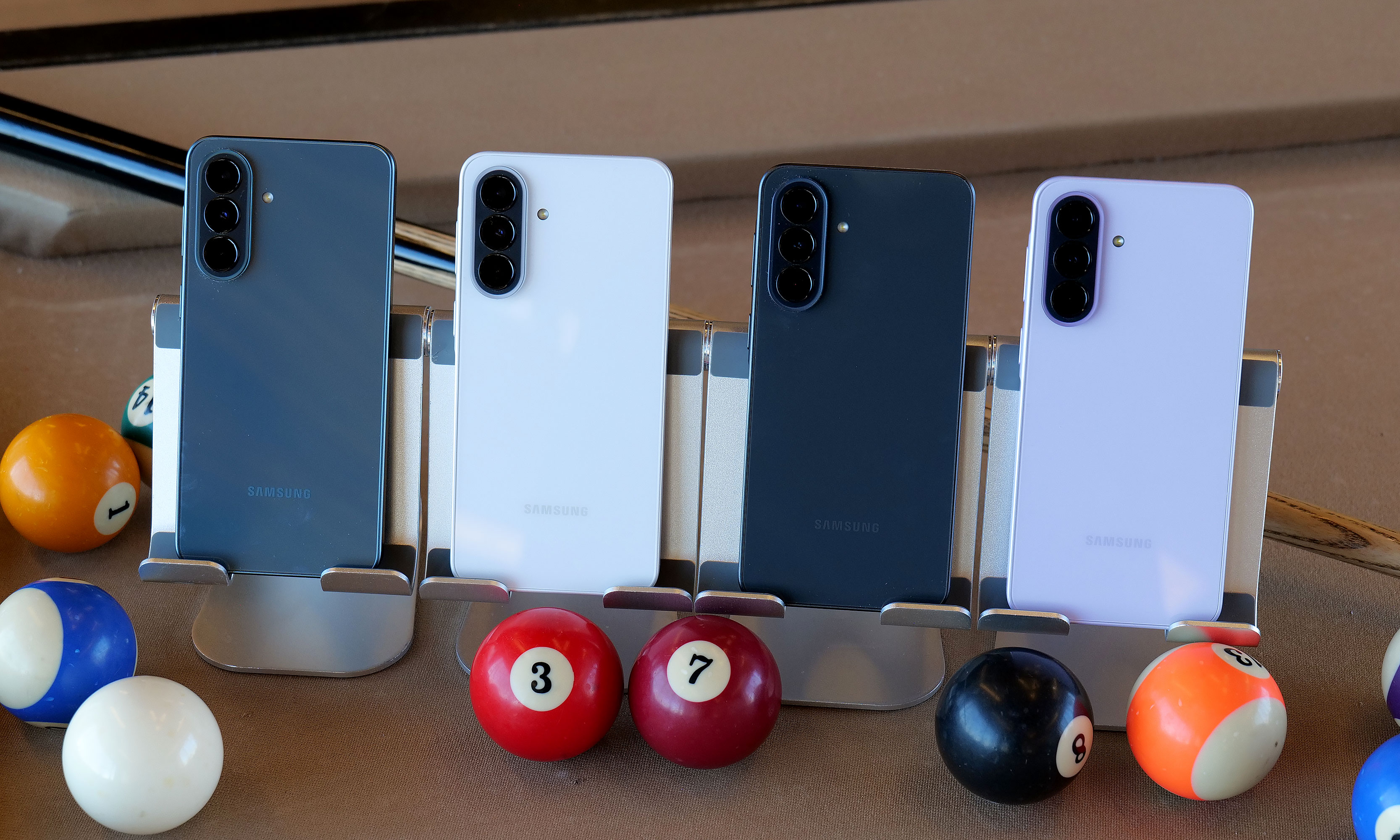
Late last year, Samsung launched its newest generation of affordable A-series phones, starting with the entry-level A17. Following the arrival of the flagship Galaxy S26 line, the company has returned to flesh out the rest of its midrange portfolio. The more affordable Galaxy A37 and Galaxy A57 sport some interesting upgrades, even when compared to some of their pricier siblings.
Core specs and features
Before we dive into my hands-on impressions, I want to do a quick rundown of each phone's specs as that should help set up (or temper) expectations. As you'd expect based on their numbering, the A37 is the more affordable of the two with a base price of $450 for 6GB of RAM and 128GB of storage. You can also choose 8GB RAM and 256GB of storage for $540. Notably, when compared to the A17, the A37 features a much more recent and more powerful Exynos 1480 chip that brings a big jump in NPU performance and helps unlock much of the phone's newfound AI capabilities. It also comes with a large 6.7-inch AMOLED display, a 5,000mAh battery and three rear cameras. However, two of those will likely get more use than the other as the A37 packs a 50-megapixel main camera and an 8MP ultra-wide, along with a 5MP macro shooter.
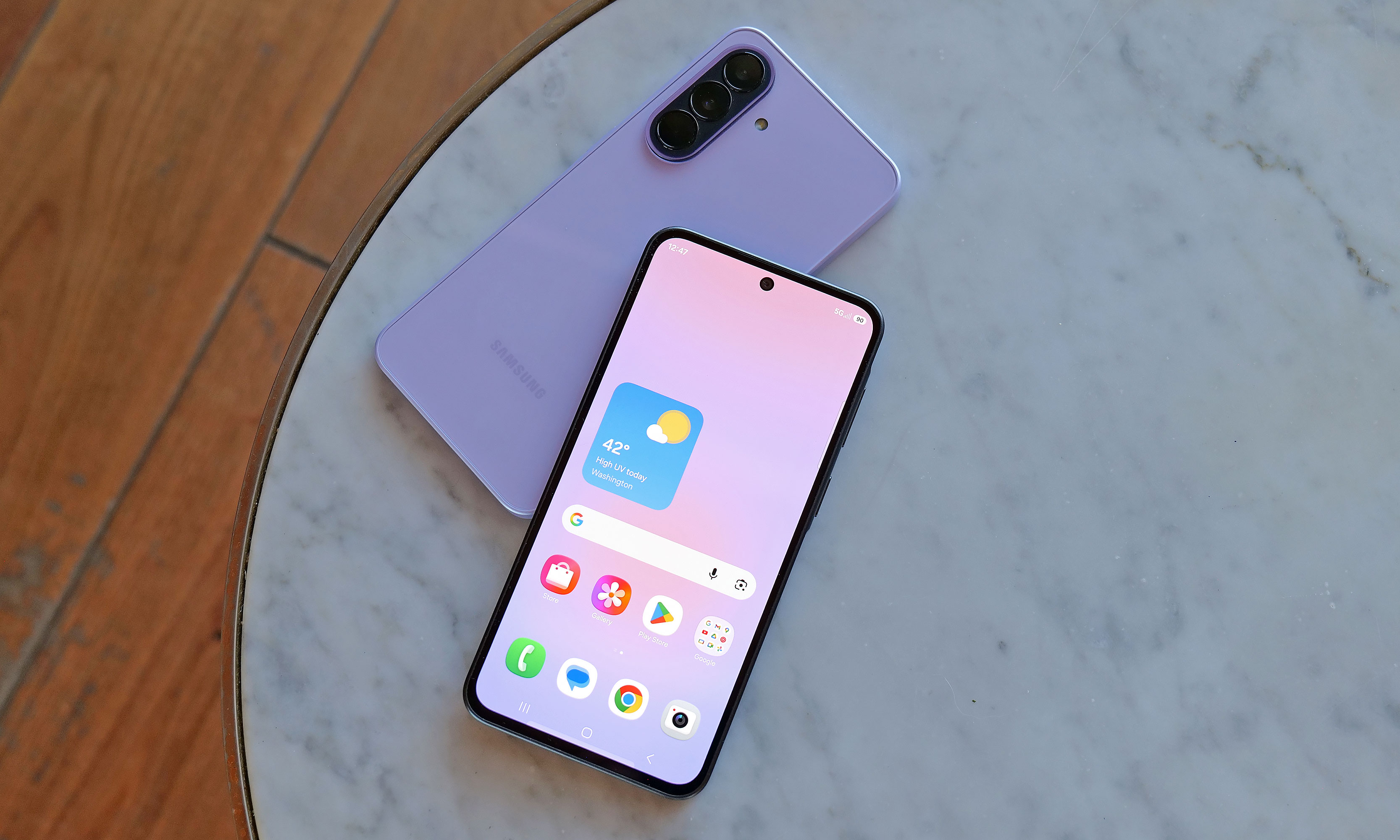
The Galaxy A37 will be available in four colors: charcoal, white, lavender and graygreen. However, the middle two are Samsung.com exclusives and the last one is only available from Best Buy.
Sam Rutherford for Engadget
Meanwhile, the Galaxy A57 is a bit more expensive, starting at $550 for 8GB of RAM and 128GB of storage, or $610 for the 8GB/256GB version. It also features a slightly more powerful Exynos 1680 processor and a higher-res 12MP sensor for its ultra-wide lens, but aside from that, it has the same general camera setup as A37 and the same size battery. One small difference is that the A57 has Bluetooth 6 connectivity and Wi-Fi 6E, but the A37 is still stuck with BT 5.3 and basic Wi-Fi 6.
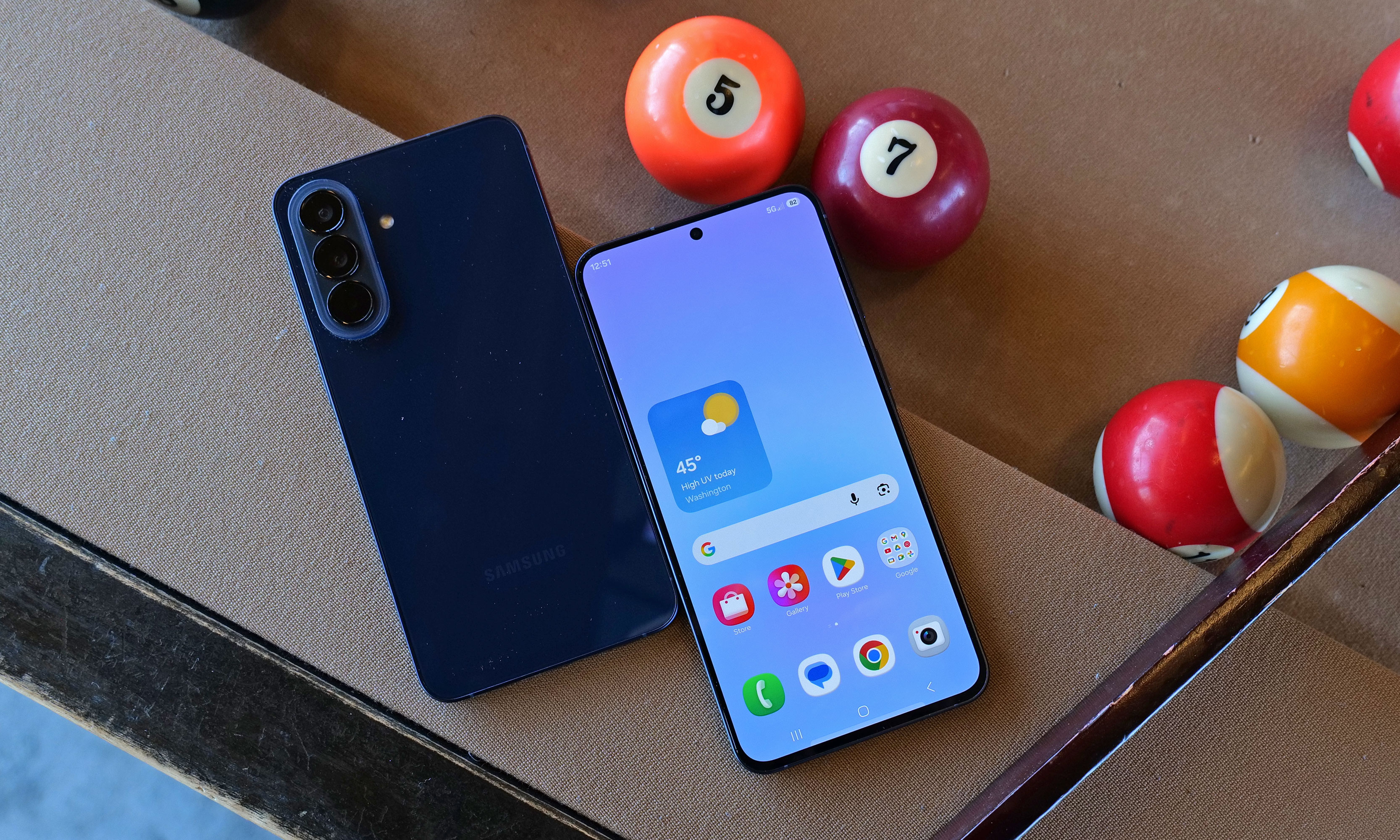
For some reason, the A57 is only available in one color: navy.
Sam Rutherford for Engadget
Both phones come with IP68 ratings for dust and water resistance (which is an upgrade from IP67 on the A36) and 120Hz refresh rates. However, the most important shared trait is that while neither supports wireless charging, they can both take wired power at up to 45 watts, which is actually faster than a base Galaxy S26's limit of just 25 watts. Finally, in addition to six years of OS and security updates, the A37 and A57 are getting some trickle-down AI features from its flagship siblings. Those include improved support for Google's Circle to Search, Object Eraser and better transcription and translation capabilities in the Samsung Voice Recorder app.
Galaxy A37 impressions
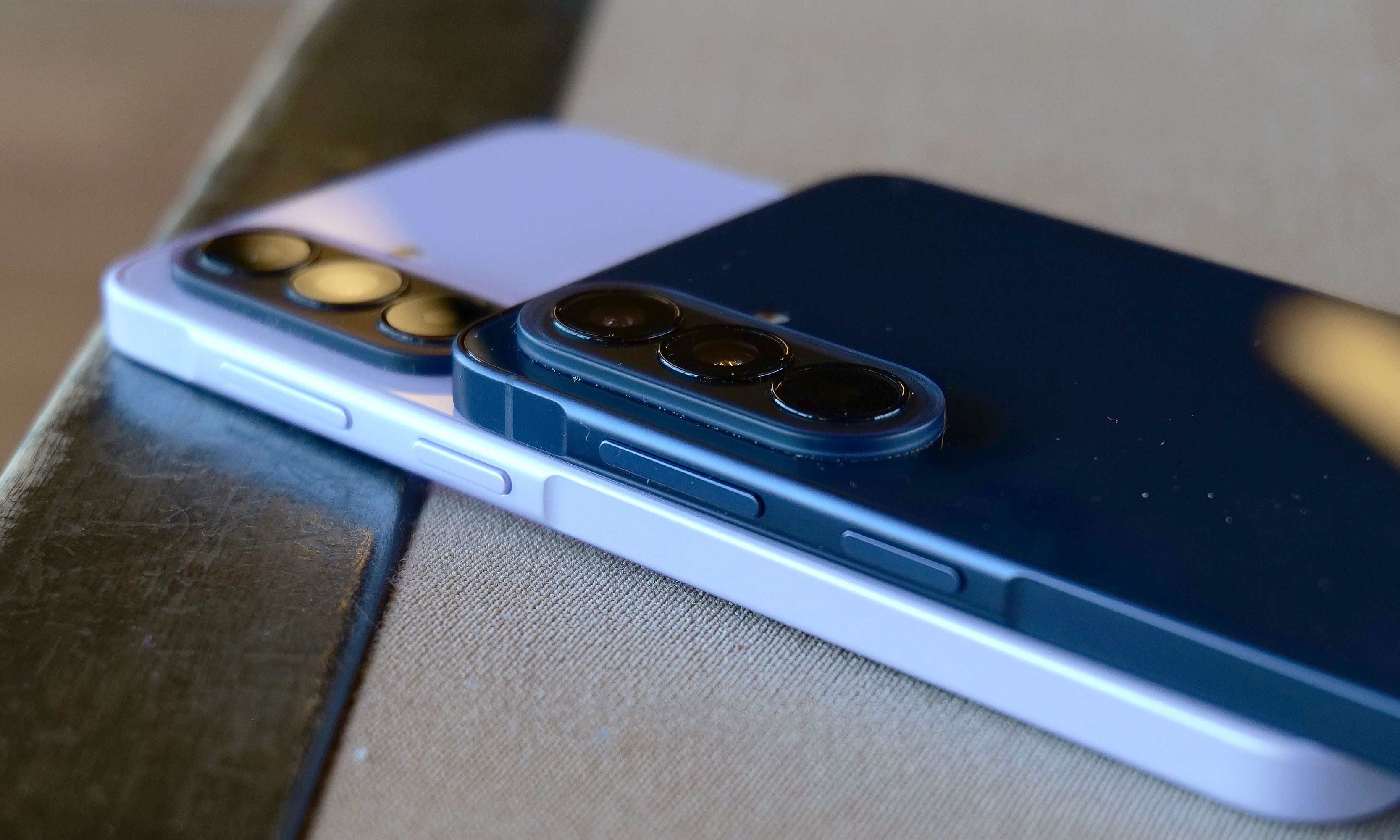
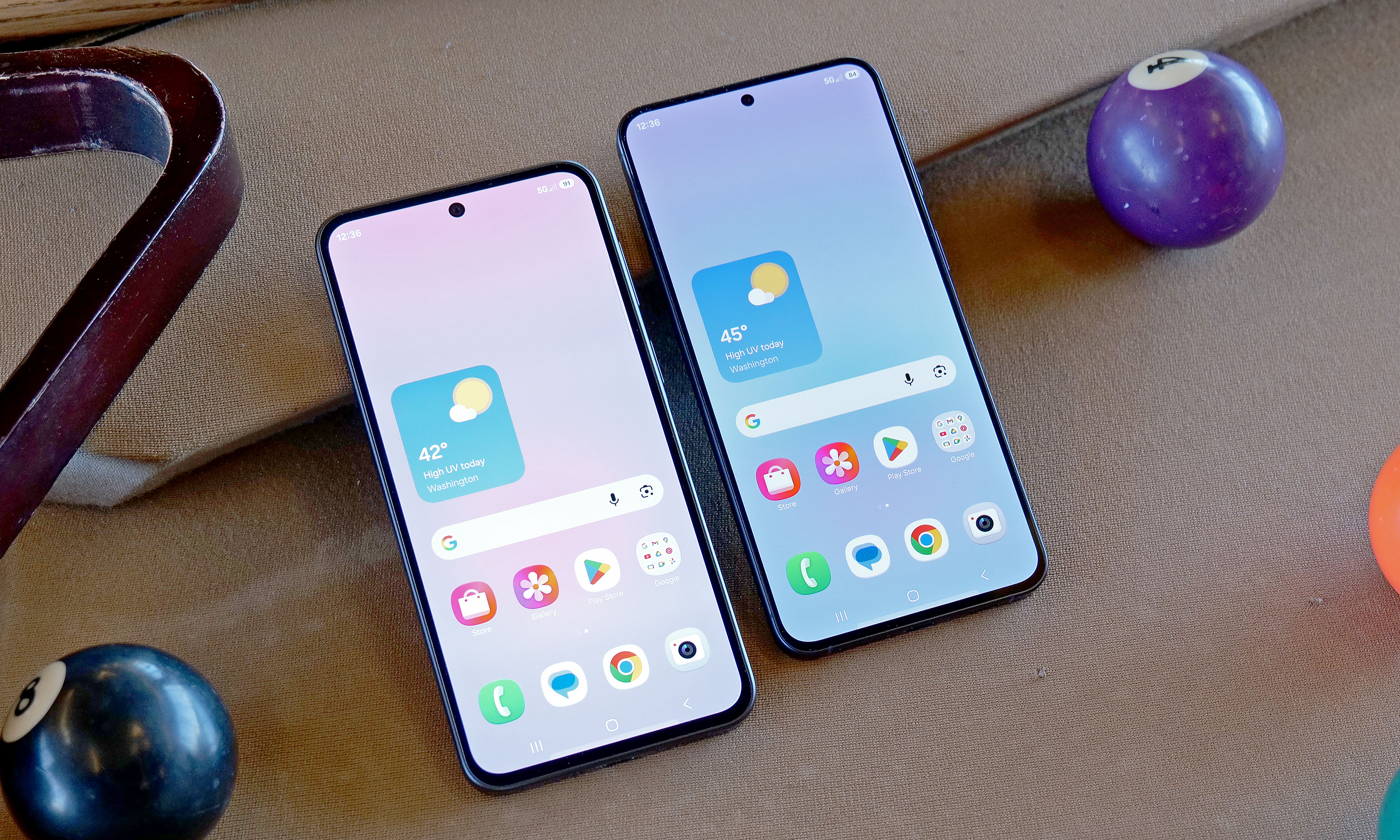
Both phones have nearly identical designs, right down to the same screen size and number of cameras. That said, one area where Samsung cut corners on A37 is that it features a plastic frame instead of the A57’s aluminum. But even when you hold them side by side, it's rather difficult to discern between the two. There's no obvious difference in appearance or button layout, so the main way to tell the two apart is by feeling for the cooler touch you typically get from a metal chassis. Alternatively, if you look closely, you'll notice that the A37 has slightly thicker bezels around the outside of its screen.
Here's a closer look at the A37's color options.
Sam Rutherford for Engadget
Compared to the Galaxy A17, the A37's Exynos 1480 felt significantly snappier and much better equipped for multitasking or AI-based tasks like removing unwanted objects from photos. Regardless, as the less expensive of Samsung's new midrange phone options, the company did a really good job disguising the major differences between the two new models.
Galaxy A57 impressions
To be honest, the A57 wasn't quite as appealing as the A37 due to its higher price and no additional features. The main tool it has that isn't available on its more affordable sibling is Samsung's Best Face camera tool, which allows the phone to analyze people's expressions so you can select your favorite reaction and put it in the photo you want. On paper, its Exynos 1680 chip should be a bit faster, but in normal use, it's really hard to tell. And unlike the A37, which comes in four colors (white, charcoal, lavender and gray/green, depending on the retailer), the A57 is only available in navy.
Early thoughts
While they look the same, the A57 features an aluminum chassis instead of plastic like on the A37, which should be better for long term durability.
Sam Rutherford for Engadget
As a more powerful and more premium alternative to the $200 A17, the A37 feels like a worthy upgrade for the money. It offers noticeably smoother performance along with a more elegant hole-punch selfie cam (instead of a waterdrop) and stereo speakers (instead of mono). Starting at $450, the A37 can also undercut the Pixel 10a while offering a larger 6.7-inch AMOLED display (versus 6.3 inches for the Pixel) and a smattering of equivalent AI features. And in some ways, the wider selection of colors just reinforces that Samsung is probably placing bigger bets on the A37's market prospects. If I were looking for an affordable Android phone with a big screen, I'd give more consideration to this new middle child in Samsung's A-series lineup.
Aside from bezels that are a tiny bit bigger, the Galaxy A37 (left) looks almost exactly the same as the more expensive Galaxy A57 (right).
Sam Rutherford for Engadget
As for the A57, it's certainly not a bad phone, but starting at $550, it suffers from being in a much more competitive price bracket. For those who prefer smaller devices, the $500 Pixel 10a is cheaper while offering even better AI tools, a cleaner UI, wireless charging, a slightly larger battery and unmatched photo quality. However, the A57's biggest rival is arguably another Samsung phone: the Galaxy S25 FE. Aside from slower wired charging, it has an even nicer design, an extra year of software and security updates (seven total) and a proper telephoto camera instead of a macro lens. And while its MSRP is a bit higher at $650, it's regularly on sale for under $600 (or less), which effectively sidesteps the A57's biggest advantage.
That said, no matter which one you prefer, more options for affordable gadgets are always welcome — especially with the price of smartphones and PCs increasing due to the global RAM shortage.
The Galaxy A37 and A57 will officially go on sale April 9.
This article originally appeared on Engadget at https://www.engadget.com/mobile/smartphones/samsung-galaxy-a37-and-a57-hands-on-the-cheaper-phone-might-be-a-winner-120000965.html?src=rss
Apple Maps will soon have ads, Apple confirmed in a blog post announcing the company's new Apple Business platform. Reports that Apple planned to expand its ad business outside of the App Store and Apple News broke as recently as yesterday, but the company has been rumored to be exploring putting ads in its navigation app as far back as 2022.
Ads in Maps, as the new advertising program is called, will allow businesses to create ads that can appear "when users search in Maps," at the top of search results and "at the top of a new Suggested Places experience in Maps, which will display recommendations based on what’s trending nearby, the user’s recent searches, and more," Apple says. The program will be open to Apple Business customers in the US and Canada starting this summer. Any advertisers using the existing Apple Ads experience will also be able to book space in Apple Maps.
Like the other ads Apple offers to businesses in the App Store and Apple News, ads in maps will be clearly marked and are designed to maintain users' privacy. What ads users interact with and their current location is not associated with their Apple Account, and personal data stays on user's devices and isn't shared with third-parties or collected by Apple.
Apple's slow expansion into advertising most directly benefits its over $100 billion "Services" business, which covers obvious things like Apple TV and Apple Music, but also includes the fees it takes from in-app purchases made through the App Store and the money it makes selling advertising. At least so far, Apple's ads are easy to ignore, and based on the samples provided as part of its announcement, that'll stay true in Apple Maps.
Ads in Maps are bundled in Apple's larger Apple Business program, an enterprise offering that's designed to appeal to multiple different sizes of business. Apple Business includes things like mobile device management (for distributing apps and managing user accounts), the ability to set up a business email, calendar and web domain through Apple and the aforementioned Ads in Maps.
This article originally appeared on Engadget at https://www.engadget.com/apps/apple-confirms-ads-are-coming-to-apple-maps-175613751.html?src=rss
It’s coming. Apple’s Worldwide Developers Conference (WWDC) will take place from June 8-12. Going on past timings, CEO Tim Cook will take the stage for the keynote on June 8, most likely at 1 PM ET.
WWDC is a software-focused affair, so expect to see the upcoming "27" operating systems, now that the new naming convention has settled. Apple will likely cover iOS 27, iPadOS 27, macOS 27, visionOS 27, watchOS 27 and macOS 27. However, Bloomberg's Mark Gurman is suggesting that WWDC will be "a fairly muted affair," – but in all fairness, WWDC has never been that explosive.
Still, there are things I want to hear about: Rumors suggest that iOS 27 will deliver big upgrades to Apple Intelligence and — possibly — that overdue Siri overhaul. Reports also suggest the presence of split-pane multitasking, if you’re aching to juggle spreadsheets, web browsing and more on your mobile device.
Senior reporter Karissa Bell marks two decades on Twitter. Twitter/X as changed a lot, especially in the last five years, as AI slop, clickbait, and ragebait keep the algorithm ticking over. More recently, X’s AI assistant was able to ‘undress’ anyone you ask it to. Great.
The social network has moved far away from its exciting heyday of live tweeting, memes and more — or even a place to make new friends and contacts. In fact, I got my job here at Engadget through Twitter DMs to former Engadget editor Richard Lai. As Karissa puts it, "Twitter stopped being that place a long time ago.”
The Phone 4a Pro punches well above its $499 price tag. Nothing has successfully refined its hardware into a more premium, all-metal unibody, losing the jarring camera bump of its predecessor in favor of a sleek design that houses a genuinely impressive camera. There are still a few signs that it’s not quite a flagship (mediocre video recording performance and a lack of wireless charging), but at this price, these seem like minor complaints. Nothing’s next flagship phone needs to offer something, right?
Android AirDrop sharing is expanding to more devices. Samsung announced earlier this week that its Galaxy S26 Series is getting AirDrop support via the Quick Share feature.
Google first introduced the Quick Share feature on its Pixel 10 phones last year. The setting allows Android users to send and receive photos and files from an Apple device. Y’know, like AirDrop.
As Google promised, Apple AirDrop sharing is expanding to more Android devices. Samsung announced today that its Galaxy S26 Series is getting AirDrop support through the Quick Share feature.
Google first introduced the Quick Share feature on its Pixel 10 phones last year and, in February, shared plans to increase the number of devices included. The setting allows Android users to send and receive photos and files from an Apple device, much like two Apple users do with AirDrop. To get media from an iPhone, Android users need to turn visibility settings onto "everyone for 10 minutes."
Starting tomorrow, March 23, Samsung will begin rolling out this AirDrop support in Korea. It should then expand to areas such as North America, Europe, Hong Kong, Japan, and Latin America. Once again, Samsung states that additional devices should be able to get AirDrop compatibility soon.
This article originally appeared on Engadget at https://www.engadget.com/mobile/smartphones/samsungs-galaxy-s26-will-get-apple-airdrop-support-starting-today-110452832.html?src=rss
Apple already announced a lot of new devices in 2026 and we’ve been busy reviewing them all. In this installment of our bi-weekly roundup, we revisit the MacBook Neo, iPhone 17e and more, in addition to the “regular” Galaxy S26 and Dell XPS 16. There’s even more than those gadget to catch up on, so sit back, relax and cozy up to some fresh reviews.
Apple MacBook Neo
The main attraction for Apple’s early device deluge was the $599 MacBook Neo. The company is finally giving us something we’ve been begging for: a low-cost Mac laptop that’s good enough for most people. “It's a $599 computer that can handle basic workloads just fine, all the while looking like one of the company's more expensive notebooks,” senior reporter Devindra Hardawar said. “Most importantly, it delivers more speed, a brighter screen and an overall better user experience than any competing $600 Windows PC.”
Apple iPhone 17e
The MacBook Neo wasn’t the only affordable device Apple announced recently. The company also debuted the iPhone 17e, which is also $599 and offers an economical choice for iOS devotees. “The name “iPhone” carries its own premium, and the iPhone 17e is a solid entry-level handset for those who need a basic, no-frills path into the Apple ecosystem,” managing editor Cherlynn Low said.
The rest of the new Apple gear
The remainder of the new Apple devices were primarily chip upgrades. The company added the M4 to the iPad Air, which deputy editor Nathan Ingraham still argues is the best Apple tablet overall. Apple also put the M5 chip inside the MacBook Air and the M5 Pro and M5 Max silicon in the MacBook Pro,. Our staff maintains that those two laptops are among the best choices in their respective categories.
We also tested Apple’s claims on the Studio Display XDR, where we discovered the high price could be worth it for pros who need supreme color accuracy and high brightness.
Samsung Galaxy S26
The Galaxy S26 Ultra may get the bulk of the attention in Samsung’s 2026 lineup thus far, but the “regular” S26 is capable in its own right. However, it’s time for bigger updates on this model. “There's nothing wrong with this safe, solid Android phone, but you could pick up last year's S25 and get an experience that's 99 percent the same for $99 less,” UK bureau chief Mat Smith said.
Dell XPS 16 (2026)
Dell pulled a 180 after nixing its XPS brand last year. Enter the XPS 16. Thankfully, the first devices after the fiasco show an expected return to form, albeit with one issue. “My one complaint is that I wish Dell would bring back the chiclet-style keyboards we got on models from the early 2020s,” senior reporter Sam Rutherford said. “Though as long as the company can release updated software to fix the ghosting issues I've encountered, what's on there now is more than good enough.”
But wait, there’s more
If portable projectors are more your speed, contributing reporter Steve Dent put the Soundcore Nebula P1i through its paces. Mat also spent some time with the Nothing Phone 4a Pro, which is undoubtedly the most uniquely designed handset we’ve tested this year. Lastly, Sam used an upgraded version of Belkin’s Switch 2 charging case to keep his gaming handheld safe and topped up in transit.
This article originally appeared on Engadget at https://www.engadget.com/engadget-review-recap-lots-of-apple-devices-galaxy-s26-dell-xps-16-and-more-120000820.html?src=rss
Amazon is reportedly planning to re-enter the smartphone market more than 10 years after its last attempt. According to a Reutersreport, the mysterious phone is internally codenamed "Transformer" and is being developed by the company’s devices and services unit.
There isn’t a whole lot to go on right now, but it probably won’t surprise many to learn that the phone will likely lean heavily on AI. According to Reuters’ sources, Alexa functionality would be a core part of the experience, but Amazon wouldn’t necessarily build a custom OS around its voice assistant. The phone would make buying products on Amazon and using services like Prime Music and Prime Video "easier than ever," and may bypass traditional app stores.
Reuters reports that the Transformer project is being led by the recently established ZeroOne, an Amazon devices unit headed up by ex-Microsoft executive and Xbox co-founder J Allard, who was also one of the creators of Zune. Allard joined Amazon last year to lead a "a special projects team dedicated to inventing breakthrough consumer product categories."
The development team has reportedly considered launching both a traditional smartphone and a so-called "dumbphone," which would presumably strip away anything that needlessly distracted you from the Amazon empire. Reuters’ anonymous sources suggest the latter could help combat screen addiction by offering fewer features.
ZeroOne is apparently inspired by the ultra-minimalist Light Phone, suggesting that Amazon might be reluctant to take on the flagship devices of Apple and Samsung. The report adds that the Transformer phone could even be positioned as a secondary handset.
This, of course, would not be Amazon’s first crack at the smartphone business. The company launched the Fire Phone in 2014, an ambitious and interesting device that ultimately failed to tempt people away from the more established smartphone ecosystems. It’s widely remembered as perhaps the company’s biggest hardware misstep.
With analysts forecasting an unprecedented decline in the smartphone market in 2026, now seems like a risky time for Amazon to try again, and Reuters was unable to determine exactly how much the company has committed to the Transformer project. Sources also wouldn’t rule out it being scrapped altogether if the company’s priorities suddenly shifted.
This article originally appeared on Engadget at https://www.engadget.com/mobile/amazon-is-reportedly-working-on-a-new-phone-built-around-alexa-142244500.html?src=rss
Nothing takes a different tack with its phone series. For the second time in a row, its midrange entry-level A-series smartphones debuted ahead of its next flagship device. The company has even warned that we won’t be getting the Nothing Phone 4 until next year. Until then, the Phone 4a Pro is here to make an impact, with a more restrained design, a less obtrusive camera bump and specs that beat out last year’s Nothing Phone 3 — all for $499. In 2026, Nothing is truly aiming to dethrone the Pixel 10a.
Hardware
Mat Smith for Engadget
It’s a new look. That’s often the case with Nothing’s smartphones as the company typically reimagines or rejigs what you can see through the clear back panel. This year, however, Nothing is making bigger changes: this is its first metal (aluminum) unibody phone.
With a new periscope telephoto camera design, the jarringly thick camera bump of last year’s Phone 3a Pro is thankfully gone, resulting in a slice of smartphone that feels — and to some, looks — more premium and more refined than Nothing’s “flagship” Phone 3.
However, compared to the Nothing phones that came before, it also feels muted, and a little safe. The playfulness of Nothing has been hemmed in a little. You might prefer it, but I’m not sure I do.
Those identifiable Nothing design flourishes — red details, visible screens, lots and lots of circles — are now squeezed into a camera panel. This oblong area with curved corners houses a trio of cameras, a “Now Recording” red light and a tweaked Glyph Matrix, which we last saw on the Nothing Phone 3.
This new Glyph Matrix is bigger and brighter, but at a lower “resolution,” that’s made of 137 mini-LEDs. That’s fewer than the Nothing Phone 3’s 489-strong dot-matrix, but the LEDs here are 100 percent brighter. So bright, in fact, that I had to turn them down to their lowest brightness when I was using them.The 4a Pro, however, lacks the rear button on the Phone 3 that lets you cycle through Glyph functions. Does this mean the company has made it easy to switch between Glyph toys and notifications in the phone’s UI? Sadly not.
You can dip into the Glyph options through the main settings menu, but to change what the Glyph displays is hidden in a sub-tab. I also noticed that the offering of “toys” was limited, with fewer items than even the Nothing Phone 3 had at launch. Hopefully, this will expand once the phone officially launches.
The 4a Pro packs a bigger screen than the company’s flagship, with a 6.83-inch AMOLED screen running at 1.5K resolution. It also has a higher refresh rate than the 6.67-inch Phone 3. And on top of that, the Phone 4a Pro’s display has a peak brightness of 5,000 nits, making it Nothing’s brightest smartphone yet.
I’ve handled so many phones over the last four weeks that it’s often hard to discern the difference between brighter displays. Fortunately, I have the Nothing Phone 3 (and 3a Pro) to compare against the Phone 4a Pro. It’s noticeably brighter, and as we slowly get into sunnier weather, a smartphone that’s easier to read outdoors is always very welcome.
The Phone 4a Pro also has improved IP65 water and dust resistance, while Nothing says it's 42 percent more bend-resistant than the Phone 3a Pro as well. It’s also almost 0.5mm thinner, if you ignore the camera bump for those measurements. Factor that in and the Phone 4a Pro is almost 1.5mm thinner than its predecessor. This design change also makes Nothing’s newest phone feel far less top-heavy than the 3a Pro. Regardless of the aesthetic changes, this is unmistakably refined hardware.
Cameras
Mat Smith for Engadget
Besides the streamlined camera unit, with a new tetraprism periscopic lens that takes up less space, the Phone 4a Pro has improved imaging capabilities (almost) across the board. The new 50-megapixel periscope telephoto lens (which Nothing says also uses less power) has a 3.5x optical zoom, plus computational photography magic that can now crank it up to a (mostly unusable) 140x hybrid zoom.
The main 50MP sensor also features a bigger sensor for improved low-light performance. With an f/1.88 lens though, it doesn’t quite match the Phone 3’s main camera (f/1.68), both on paper and in practice. The array is rounded out with an 8MP ultrawide camera, which sounds like the weakest link, but I rarely use the ultrawide cameras on any phone aside from review testing. Oddly, the selfie camera is a technical downgrade in resolution, with a 32MP sensor on the 4a Pro, down from 50MP on the 3a Pro.
Mat Smith for Engadget
One new addition was co-developed by Google. Ultra XDR blends Android’s native HDR processing with Nothing’s own approach, capturing 13 RAW frames at different exposures and combining them to deliver greater dynamic range and detail. However, as proof of how new they are, your Ultra XDR images can’t be shared as easily. They do work with Google Photos and Instagram, at least. If it’s any consolation, Ultra XDR so far doesn’t seem hugely far away from typical HDR capture. I’ll keep testing the cameras and if I figure out where it really shines, I’ll update this review.
Mat Smith for Engadget
If one thing disappoints on the 4a Pro, it’s recording video. Switching between zoom levels will often completely derail exposure settings. Even if you record on a single camera at the same focal length, exposure levels seem extremely sensitive and struggle to stay locked. Footage is often muddy and low-light performance isn’t great, even if using the Ultra XDR video mode. You aren’t forced to endure this with the Pixel 10a, but then again, there’s no zoom on Google’s mid-range phone — just a lossless crop. In more forgiving lighting, video is adequate, but quality drops off beyond the 3.5x optical zoom. Still, the versatility and quality of the still images from both the main camera and the telephoto lens put it above every other smartphone at this price.
Performance and software
The Phone 4a Pro is now powered by a more capable processor: Qualcomm’s Snapdragon 7 Gen 4. Nothing claims that, in addition to its own on-device optimizations, it improved CPU performance by 27 percent, GPU performance by 30 percent and AI performance by 65 percent compared to the Phone 3a series.
There’s certainly a big difference in performance while gaming. While the 3a series struggled with more complex games, the 4a Pro kept up with Red Dead Redemption and Diablo Immortal. It’s not the most polished interpretation of Decard Cain and the lands of Sanctuary, but it's responsive and playable, even at 60 fps, with only a few frame drops.
The Phone 4a has a 5,080mAh battery, roughly equivalent to its predecessor. It supports up to 50W fast charging, a tad faster than the Pixel 10a, though it lacks wireless charging support, unlike Google’s midranger. It’s one of the few signs that this isn’t Nothing’s “true” flagship, even if it looks the part.
I was pleasantly surprised by the battery life, too. Typically, phones are getting increasingly bigger batteries, but as I mentioned, that’s not the case here.. However, the 4a Pro lasted 24 hours in our battery rundown test, five hours more than last year’s model.
The Phone 4a Pro has all the software features either present or teased in older Nothing Phones. Essential Search is a system-wide search that can find terms in messages, files and the rest of your phone. There’s also a new Breathing Break widget; we definitely need that in 2026.
Essential Memory is Nothing’s name for its background algorithms and analysis, scrutinizing your phone’s contents as well as whatever’s saved in Essential Space. Nothing has added cloud storage for Space, aimed at devoted upgraders, meaning everything you saved on older compatible Nothing phones can be transferred over. Sure, it’s a little niche, but it was an early frustration while testing the Phone 3 after the 3a series. If, for some reason, you have to reset your device, keeping everything in Space backed up elsewhere is a boon.
Mat Smith for Engadget
Also, while it’s technically a hardware tweak, Nothing has also moved the Essential Key to the left edge of the phone, making it far less likely to be triggered when you’re adjusting the volume and more in line with other phones and my own smartphone muscle memory.
One caveat from previous Nothing devices remains. The company says it will deliver three years of Android updates and an additional three years of security patches. Compare that to Samsung’s seven years of Android updates for this year’s S26 series (and Google’s Pixel 10a), and you can see how it falls short.
Wrap-up
The Phone 4a Pro punches well above its $499 price tag. Nothing has successfully refined its hardware into a more premium, all-metal unibody, losing the jarring camera bump of its predecessor in favor of a sleek design that houses a genuinely impressive camera. The improved camera versatility, coupled with its class-leading 24-hour battery life and a more capable processor, makes this a serious threat to the Pixel 10a.
However, some of Nothing's signature playfulness has been dialed back. The Glyph Matrix, while brighter, is lower-resolution and its “toys” are disappointingly limited at launch. The lack of wireless charging is another nod to its midrange status.
Nothing’s Phone 4a Pro is a device with a clear identity, delivering on the essentials for half the price of many rivals.
This article originally appeared on Engadget at https://www.engadget.com/mobile/smartphones/nothing-phone-4a-pro-review-glyph-matrix-130042005.html?src=rss